

404 errors silently drain your SEO performance, waste crawl budget, and send potential customers straight to competitors. Every broken link represents lost traffic, diminished trust, and revenue slipping through digital cracks.
These HTTP status codes signal that requested pages no longer exist. For businesses relying on organic search, unresolved 404s compound into serious ranking problems and conversion losses over time.
This guide covers everything from identifying and fixing 404 errors to building prevention systems that protect your site’s authority and user experience long-term.
What Is a 404 Error?
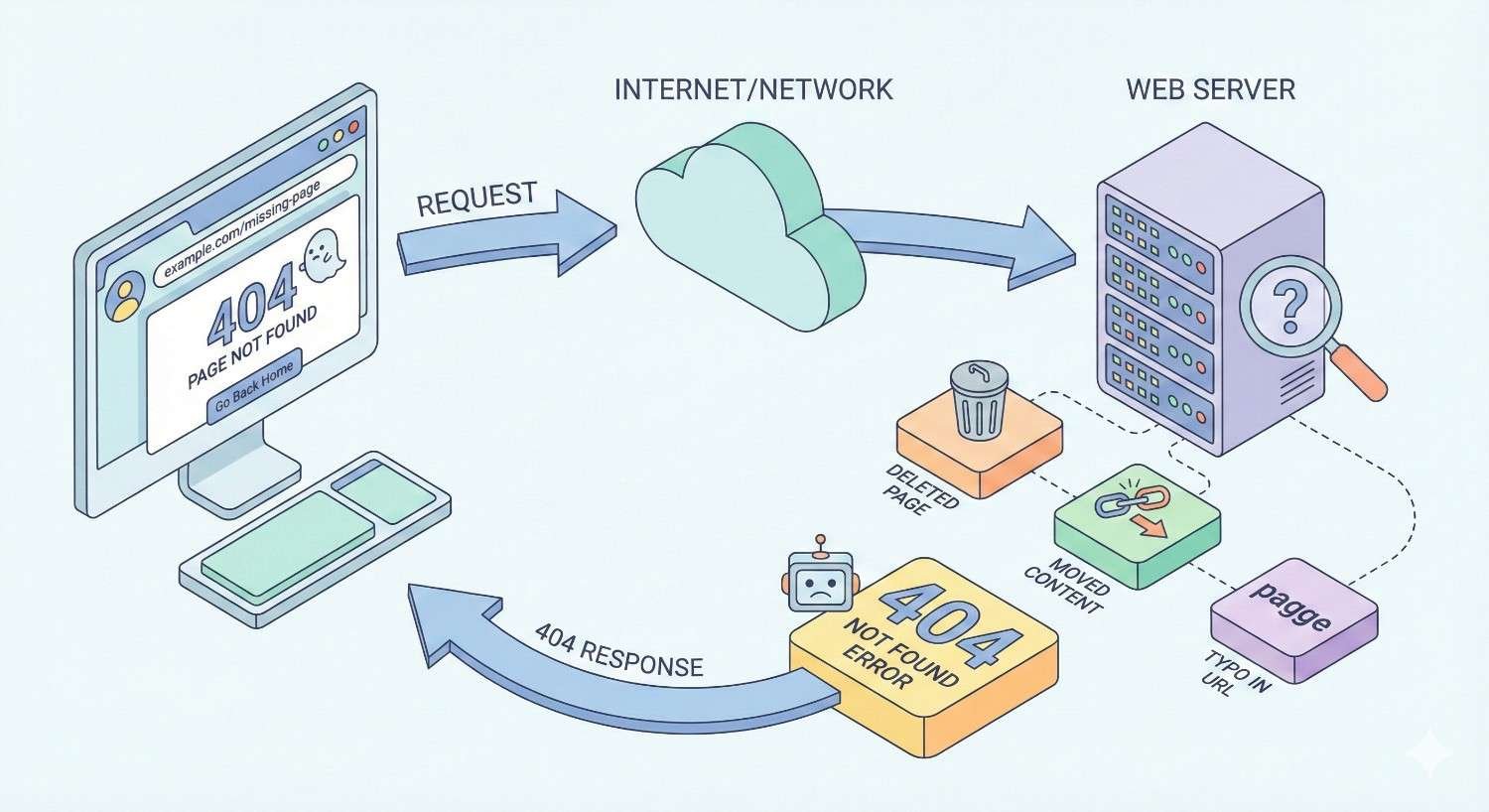
A 404 error is an HTTP status code indicating that a server cannot find the requested webpage. The server is functioning correctly, but the specific URL the user or search engine crawler requested does not exist at that location.
When browsers or search engine bots encounter a 404, they receive a clear signal: this page is gone. Unlike server errors that indicate technical problems, 404s specifically communicate that the content at that URL is unavailable.
Understanding how these errors occur, their common causes, and how they differ from similar status codes gives you the foundation to diagnose and resolve them effectively.
How 404 Errors Occur
404 errors trigger when a request reaches your server for a URL that has no corresponding content. The server searches its file system or database, finds nothing matching that path, and returns the 404 status code.
This happens through several pathways. A user might click an outdated bookmark. A search engine might crawl an old sitemap entry. Another website might link to a page you deleted months ago. Internal navigation might point to URLs that changed during a site update.
The technical process is straightforward: request comes in, server looks for content, content is missing, 404 returns. The business impact, however, compounds with every occurrence.
Common Causes of 404 Errors
Deleted content without redirects ranks as the most frequent cause. When teams remove products, blog posts, or landing pages without implementing proper redirects, every existing link to that content becomes broken.
URL structure changes during redesigns or CMS migrations create mass 404 situations. Changing from /blog/post-title to /articles/post-title breaks every link pointing to the old structure.
Typos in internal links happen more often than most teams realize. A developer manually typing /sevices instead of /services creates a persistent broken link that affects every visitor navigating that path.
External links to non-existent pages occur when other websites link to URLs that never existed or misspell your actual URLs. You cannot control what others link to, but you can monitor and address these issues.
Expired or removed products in e-commerce create ongoing 404 problems. Seasonal items, discontinued products, and out-of-stock inventory often get removed without redirect strategies.
The Difference Between 404, Soft 404, and Other HTTP Status Codes
Standard 404 returns a proper HTTP 404 status code, clearly telling search engines the page does not exist. This is the correct response for genuinely missing content.
Soft 404 occurs when a page returns a 200 (success) status code but displays “page not found” content. Google identifies these through content analysis and treats them as errors because the status code misleads crawlers.
410 (Gone) explicitly tells search engines the content was intentionally removed and will not return. This accelerates deindexing compared to 404, which search engines may recheck periodically.
301 (Permanent Redirect) sends users and crawlers to a new URL while passing link equity. This is your primary tool for handling moved or consolidated content.
302 (Temporary Redirect) indicates content moved temporarily. Search engines may continue indexing the original URL, making this inappropriate for permanent changes.
Understanding these distinctions helps you choose the right response for each situation rather than applying blanket solutions.
How 404 Errors Impact SEO Performance
404 errors affect multiple SEO factors simultaneously. While Google has stated that 404s are a normal part of the web, the cumulative effect of unmanaged broken pages creates measurable ranking and visibility problems.
The impact scales with your site’s size, the importance of affected pages, and how long errors persist without resolution.
Crawl Budget Waste and Indexing Issues
Search engines allocate limited crawling resources to each website. When Googlebot repeatedly encounters 404 errors, it spends crawl budget on pages that return nothing useful.
For large sites with thousands of pages, this matters significantly. If crawlers waste time on hundreds of broken URLs, they have less capacity to discover and index your actual content. New pages may take longer to appear in search results.
Google’s documentation confirms that crawl budget becomes a factor for sites with many URLs. Persistent 404s in your crawl reports indicate wasted resources that could serve your indexable content.
User Experience and Engagement Metrics
When users land on 404 pages, most leave immediately. This behavior sends negative engagement signals that search engines can observe and factor into quality assessments.
High bounce rates from organic search suggest content does not satisfy user intent. While Google does not use bounce rate directly as a ranking factor, patterns of users quickly returning to search results after visiting your site indicate potential quality issues.
Session duration drops when users hit dead ends. Pages per session decreases when navigation breaks. These metrics reflect real user frustration that correlates with ranking performance over time.
Link Equity Loss and Backlink Degradation
Every backlink pointing to a 404 page represents lost link equity. External sites linked to your content because it provided value. When that content disappears without a redirect, the ranking power those links provided vanishes.
This loss compounds over time. A page that earned 50 backlinks over several years loses all that accumulated authority when deleted without proper handling. Competitors with similar content and intact link profiles gain relative advantage.
Ahrefs research shows that broken backlinks represent significant lost opportunities. Identifying and redirecting these pages recovers equity that took years to build.
Impact on Site Authority and Rankings
Widespread 404 errors signal poor site maintenance to search engines. While individual 404s rarely cause ranking drops, patterns of broken pages suggest neglected content and technical debt.
Sites demonstrating consistent quality maintenance tend to perform better than those with obvious structural problems. Search engines aim to send users to reliable destinations. Broken pages undermine that reliability signal.
Domain authority calculations factor in the health of your link profile. When significant portions of your backlinks point to non-existent pages, your overall authority metrics suffer accordingly.
How 404 Errors Affect User Experience and Conversions
Beyond SEO, 404 errors directly impact business outcomes. Every broken page represents a potential customer who encountered friction instead of finding what they needed.
The conversion impact often exceeds the SEO impact in immediate revenue terms.
Bounce Rate and Session Duration
Users hitting 404 pages face a choice: try to find what they wanted or leave. Most leave. Research from Nielsen Norman Group consistently shows that error experiences create lasting negative impressions.
A visitor clicking a product link from social media who lands on a 404 page rarely searches your site for alternatives. They return to the platform and find a competitor. That conversion opportunity is gone.
Session duration metrics reflect this pattern. Users who encounter errors spend less time on your site overall, even if they attempt to continue browsing. The frustration carries forward.
Trust and Brand Perception
Broken links signal carelessness. Users encountering 404 errors question whether the business maintains its digital presence properly. If the website has obvious problems, what about the products or services?
This perception damage extends beyond the individual user. Visitors who encounter errors are less likely to recommend your site to others. They may share negative experiences on social media or in reviews.
Professional brands maintain professional websites. Persistent 404 errors contradict that expectation and erode trust that takes significant effort to rebuild.
Revenue and Lead Generation Impact
Every 404 page in a conversion path represents lost revenue. Product pages returning 404 mean lost sales. Landing pages returning 404 mean lost leads. Contact pages returning 404 mean lost opportunities.
E-commerce sites feel this most acutely. A customer ready to purchase who encounters a 404 on the product page will find that product elsewhere. The sale goes to a competitor with a functioning website.
Lead generation suffers similarly. Visitors clicking calls-to-action that lead to broken pages do not convert. They do not fill out forms, sign up for newsletters, or request consultations. The marketing spend that drove them to your site produces nothing.
How to Find 404 Errors on Your Website
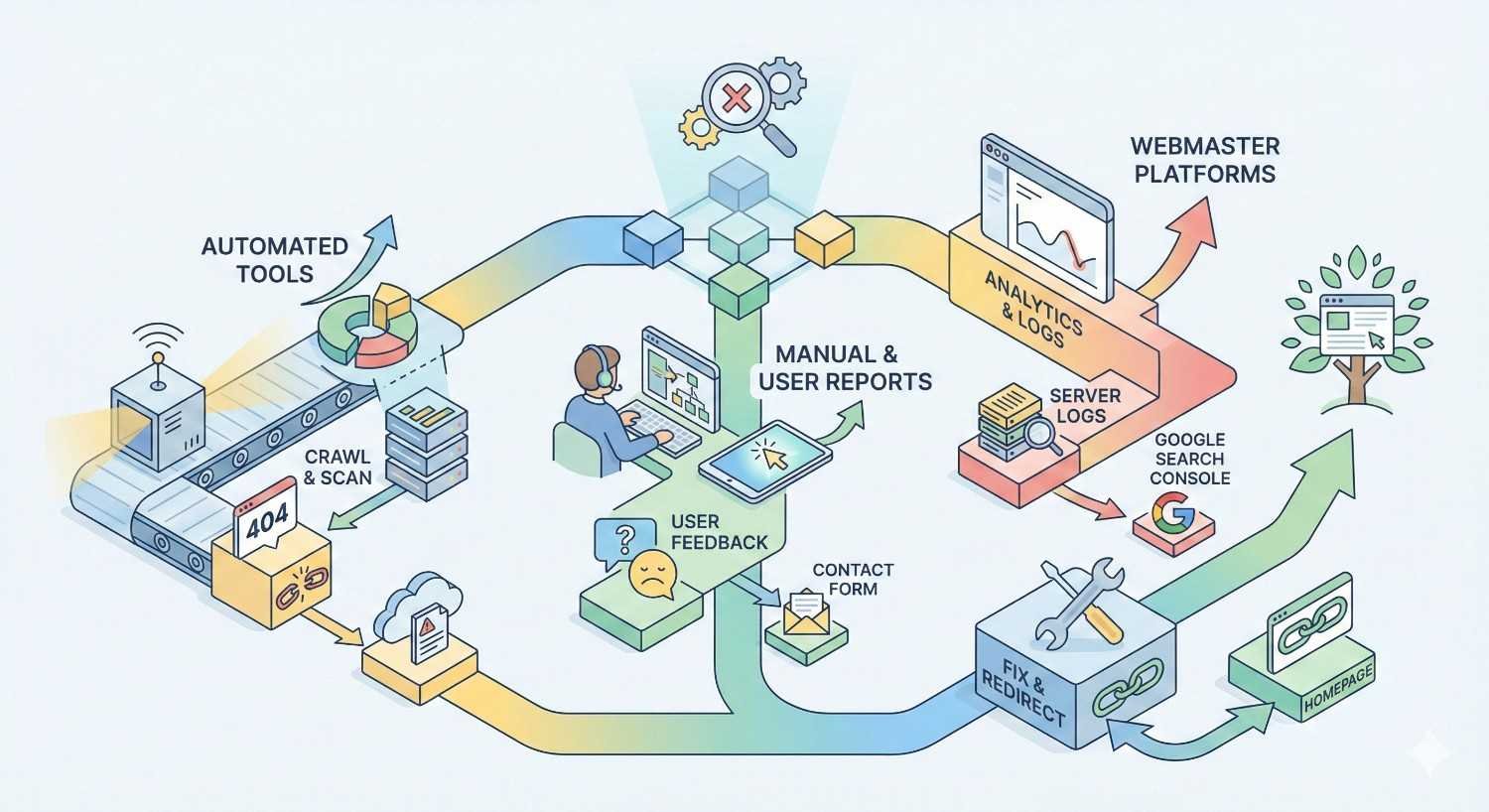
Identifying 404 errors requires systematic monitoring across multiple data sources. No single tool catches everything. Comprehensive detection combines search console data, crawling tools, server logs, and external link monitoring.
Using Google Search Console
Google Search Console provides the most authoritative view of 404 errors affecting your search presence. The Coverage report shows pages Google attempted to crawl but could not index due to 404 status.
Navigate to Indexing > Pages and filter for “Not found (404)” errors. This report shows URLs Google encountered that returned 404 status codes. The list includes both internal discovery and external links Google followed to your site.
Review this report weekly at minimum. New 404 errors appearing indicate recent content changes, broken links, or external sites linking to non-existent pages. Prioritize fixing errors on pages that previously received traffic or have backlinks.
Crawling Your Site with SEO Tools
Dedicated crawling tools like Screaming Frog, Sitebulb, or Ahrefs Site Audit scan your entire site structure and identify broken internal links.
These tools follow every link on your site, recording the status code each URL returns. The resulting reports show exactly which pages link to 404 URLs, making fixes straightforward.
Run comprehensive crawls monthly for most sites, weekly for large or frequently updated sites. Compare crawl reports over time to identify new problems before they compound.
Screaming Frog’s free version crawls up to 500 URLs, sufficient for smaller sites. Larger sites require paid tools or enterprise solutions capable of handling thousands of pages efficiently.
Analyzing Server Logs
Server logs record every request your server receives, including those returning 404 status codes. This data reveals 404 errors that crawling tools and Search Console might miss.
Log analysis shows requests from all sources: search engines, users, bots, and scrapers. You can identify patterns like specific referrers sending traffic to broken URLs or bots repeatedly requesting non-existent paths.
Tools like Screaming Frog Log Analyzer, Splunk, or custom scripts parse log files and extract actionable insights. Focus on 404s with significant request volume or those coming from valuable referral sources.
Monitoring Broken Links from External Sources
External sites linking to your broken pages require different detection methods. These links do not appear in internal crawls because they originate outside your site.
Ahrefs, Moz, and Semrush track your backlink profile and identify links pointing to 404 pages. Regular backlink audits reveal opportunities to recover link equity through redirects.
Set up alerts for new backlinks to non-existent pages. When another site links to a URL that does not exist, you can create the content or implement a redirect before losing that link’s value.
Google Alerts and brand monitoring tools sometimes catch mentions that include broken links. Comprehensive monitoring combines multiple data sources for complete coverage.
How to Fix 404 Errors: Step-by-Step Resolution
Fixing 404 errors requires matching the right solution to each situation. Not every 404 needs a redirect. Not every deleted page should be restored. Strategic resolution maximizes SEO benefit while maintaining site quality.
Implementing 301 Redirects to Relevant Pages
301 redirects are your primary tool for handling 404 errors on pages that have moved or been consolidated. A 301 tells search engines the content permanently moved to a new location and passes most link equity to the destination.
Implementation steps:
- Identify the 404 URL and its purpose
- Find the most relevant existing page on your site
- Implement the redirect at the server level (.htaccess, nginx config, or CMS plugin)
- Test the redirect using a status code checker
- Monitor Search Console for resolution confirmation
Redirect to genuinely relevant content. Redirecting a deleted product page to your homepage provides poor user experience and may be treated as a soft 404 by Google. Redirect to the category page or a similar product instead.
Avoid redirect chains where URL A redirects to URL B which redirects to URL C. Each hop loses some equity and slows page loading. Redirect directly to the final destination.
Restoring Deleted or Moved Content
Sometimes the best fix is bringing the content back. If a page had significant traffic, backlinks, or conversion value, restoration may outperform redirection.
Check the Wayback Machine at archive.org for cached versions of deleted content. Your CMS may retain deleted pages in trash or revision history. Database backups can restore content removed months ago.
Evaluate whether the content still serves user needs. Outdated information should be updated rather than restored as-is. Irrelevant content should redirect rather than return.
For moved content, ensure the original URL redirects to the new location. Do not simply recreate content at the old URL if it now lives elsewhere. This creates duplicate content issues.
Updating Internal Links
Internal links pointing to 404 pages need updating to point to valid destinations. This prevents users and crawlers from encountering errors through your own navigation.
Crawling tools identify which pages contain links to 404 URLs. Work through this list systematically, updating each link to point to the correct destination.
For CMS-based sites, search-and-replace tools can update links across multiple pages simultaneously. WordPress plugins like Better Search Replace handle this efficiently.
After updating links, recrawl your site to verify fixes. Missed links continue sending users to error pages and wasting crawl budget.
Fixing Broken External Links
You cannot directly fix links on other websites, but you can address the 404 errors they cause. Implement redirects for URLs that external sites link to, sending that traffic to relevant content.
For high-value backlinks, consider reaching out to the linking site and requesting they update the link. Many webmasters will correct links when notified, especially if you provide the correct URL.
Prioritize external link fixes by link quality. A broken link from a high-authority site deserves immediate attention. Broken links from low-quality or irrelevant sites may not warrant redirect implementation.
When to Use 410 (Gone) Instead of 404
The 410 status code explicitly tells search engines that content was intentionally removed and will not return. This accelerates deindexing compared to 404, which search engines may recheck.
Use 410 for:
- Content you deliberately removed and will not restore
- Pages that should not be indexed under any circumstances
- Spam or low-quality pages you want removed from search results quickly
Use 404 for:
- Accidentally deleted content you might restore
- URLs that never existed (typos, probing attempts)
- Situations where you are unsure about permanent removal
Google treats 404 and 410 similarly in most cases, but 410 provides a clearer signal of intentional removal. For content you definitely want deindexed, 410 is the appropriate choice.
Creating an Effective Custom 404 Page
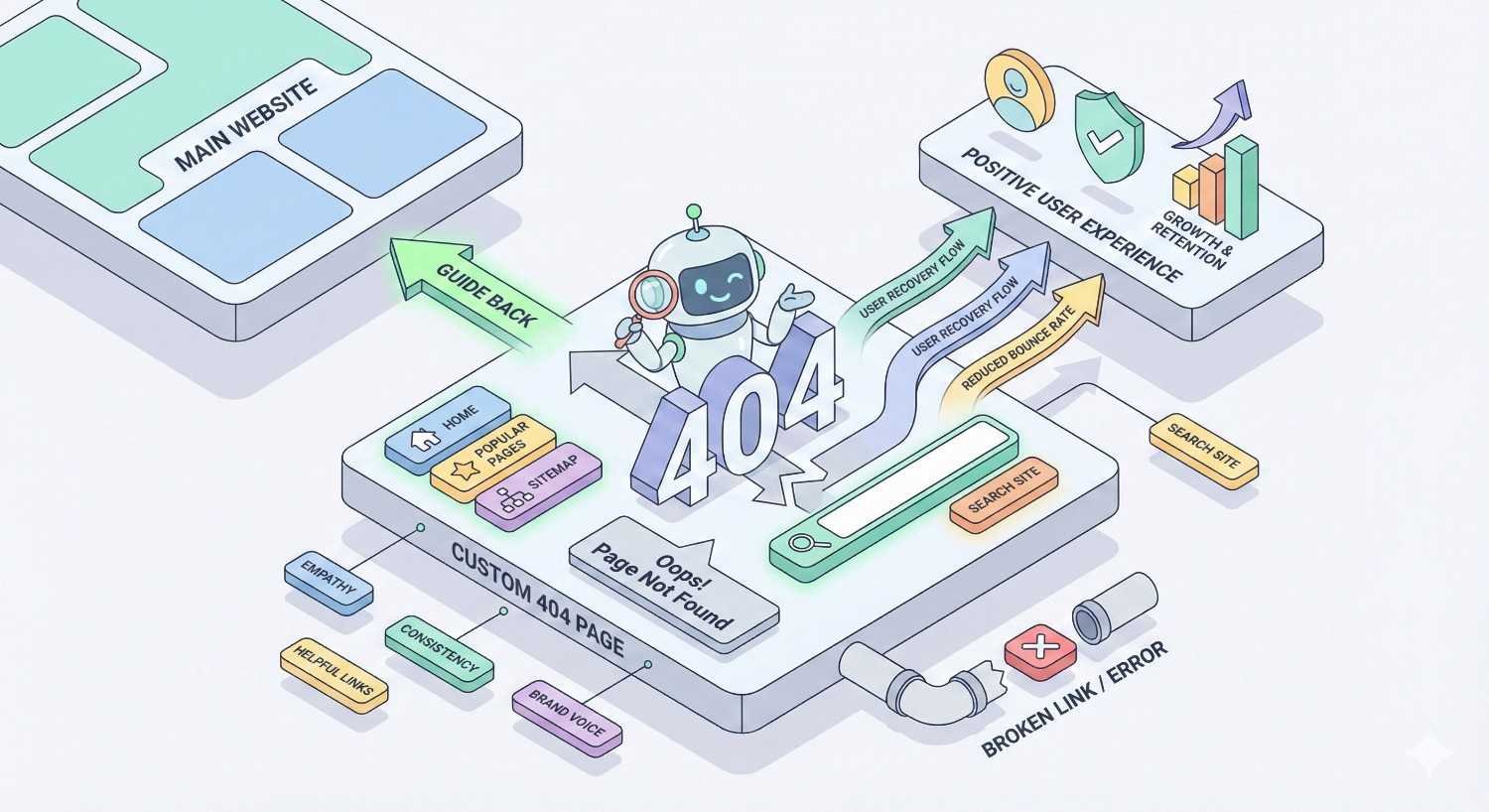
A well-designed custom 404 page transforms error experiences into recovery opportunities. Instead of losing visitors entirely, you guide them toward relevant content and maintain engagement.
Essential Elements of a User-Friendly 404 Page
Clear error acknowledgment tells users what happened without technical jargon. “We couldn’t find that page” communicates better than “Error 404: Resource not found.”
Helpful suggestions give users paths forward. Display popular pages, recent content, or category links that might match what they sought.
Search functionality lets users find content themselves. A prominent search box on your 404 page captures visitors who know what they want but reached the wrong URL.
Contact information provides a fallback for users who cannot find what they need. Some visitors will reach out rather than leave if given an easy option.
Brand consistency maintains professional appearance even during errors. Your 404 page should match your site’s design, reinforcing brand identity rather than looking like a generic error.
Navigation and Search Functionality
Include your main navigation on 404 pages. Users who hit dead ends can still access your primary content areas without returning to the homepage first.
Site search on 404 pages should be prominent and functional. Pre-populate the search box with keywords from the broken URL when possible. If someone tried to reach /blue-widgets, showing search results for “blue widgets” immediately helps.
Suggest related content based on the URL structure. A 404 on /blog/seo-tips should suggest other SEO-related blog posts. A 404 on /products/shoes should link to your footwear category.
Design Best Practices
Keep 404 pages simple and fast-loading. Users already frustrated by an error should not wait for heavy graphics or animations.
Use friendly, helpful language rather than apologetic or humorous tones that may not land well. “Let’s help you find what you’re looking for” works better than “Oops! Something went wrong!”
Make clickable elements obvious. Large buttons for popular destinations, clear links to categories, and visible search functionality guide users effectively.
Test your 404 page on mobile devices. Many users encountering errors are on phones, where cluttered designs become unusable.
SEO Considerations for Custom 404 Pages
Custom 404 pages must return proper 404 status codes. A common mistake is creating a custom page that returns 200 status, creating soft 404 issues.
Do not include 404 pages in your sitemap or internal linking structure. They should only be reached through broken links, not intentional navigation.
Avoid placing important content exclusively on 404 pages. Search engines do not index 404 pages, so any unique content there remains invisible to search.
Monitor 404 page analytics to understand error patterns. High traffic to your 404 page indicates widespread broken link issues requiring systematic resolution.
How to Prevent 404 Errors from Occurring
Prevention costs less than remediation. Establishing processes that minimize 404 creation protects your SEO investment and user experience proactively.
Content Management Best Practices
Never delete without redirecting. Before removing any page, identify where its traffic and links should go. Implement the redirect before deletion, not after.
Document URL changes. Maintain a log of all URL modifications, including old URLs, new URLs, and redirect implementation dates. This documentation proves invaluable during audits and troubleshooting.
Use consistent URL structures. Establish URL conventions and enforce them across all content creation. Inconsistent structures lead to errors and confusion.
Archive rather than delete. When content becomes outdated, consider updating or archiving rather than removing. Archived content can be restored if needed.
URL Structure and Migration Planning
Plan URL structures before building sites or launching redesigns. Changing URLs after content is live creates redirect requirements and potential errors.
During migrations, create comprehensive URL mapping documents. Every old URL should have a defined destination, whether that is a direct equivalent, a category page, or intentional removal with 410 status.
Test migrations in staging environments before going live. Crawl the staging site to identify broken links and missing redirects before they affect your production site.
Maintain old URL structures when possible. If your current URLs work and have accumulated authority, changing them creates unnecessary risk and work.
Link Maintenance Workflows
Schedule regular internal link audits. Monthly crawls catch broken links before they accumulate into significant problems.
Implement link checking in content workflows. Before publishing new content, verify all internal and external links function correctly.
Use relative URLs for internal links when your CMS supports them. Relative URLs survive domain changes and protocol updates without breaking.
Monitor external links periodically. Sites you link to may remove content, creating broken outbound links that affect user experience.
Quality Assurance Testing
Include 404 checking in deployment processes. After any site update, crawl affected sections to verify no new broken links appeared.
Test redirects after implementation. Verify they return proper 301 status codes and reach intended destinations.
Monitor error rates in analytics. Spikes in 404 page views indicate new problems requiring investigation.
Establish ownership for 404 monitoring. Someone should review Search Console and crawl reports regularly, with authority to prioritize fixes.
Tools and Resources for 404 Error Management
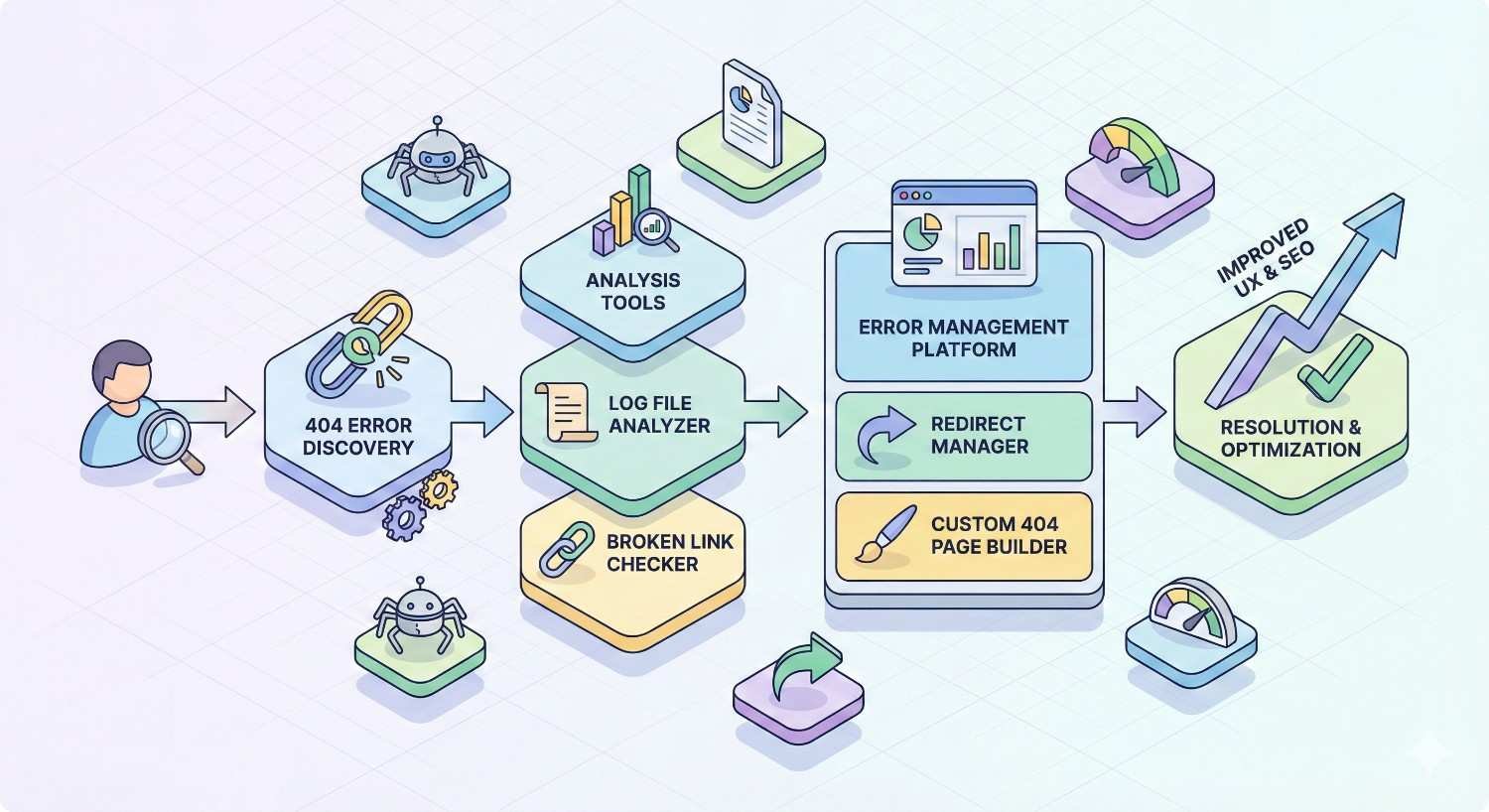
Effective 404 management requires the right tools configured for ongoing monitoring. One-time audits catch existing problems; continuous monitoring prevents new ones.
Google Search Console Setup and Monitoring
Verify your site in Google Search Console if you have not already. This free tool provides authoritative data on how Google sees your site.
Configure email alerts for coverage issues. Search Console can notify you when new 404 errors appear, enabling quick response.
Review the Coverage report weekly. Filter for 404 errors and prioritize fixes based on page importance and error volume.
Use the URL Inspection tool to check specific URLs. After implementing fixes, request indexing to accelerate Google’s recognition of changes.
Recommended SEO Crawling Tools
Screaming Frog SEO Spider remains the industry standard for site crawling. The free version handles small sites; the paid version offers advanced features for larger properties.
Sitebulb provides visual crawl analysis that makes identifying issues intuitive. Its prioritization features help focus on high-impact problems first.
Ahrefs Site Audit combines crawling with backlink data, showing both internal 404s and external links pointing to broken pages.
Semrush Site Audit offers similar functionality with integration into broader SEO workflows.
Choose tools based on your site size, technical comfort level, and existing tool stack. Most SEO professionals use multiple tools for comprehensive coverage.
Redirect Management Plugins and Solutions
WordPress users benefit from plugins like Redirection, Yoast SEO Premium, or Rank Math Pro. These tools simplify redirect creation and provide monitoring dashboards.
Server-level redirects through .htaccess (Apache) or nginx configuration offer better performance than plugin-based solutions for high-traffic sites.
CDN-level redirects through Cloudflare or similar services handle redirects before requests reach your server, improving speed and reducing server load.
Enterprise redirect management platforms like Conductor or BrightEdge include redirect functionality within broader SEO toolsets.
Document all redirects regardless of implementation method. Redirect management becomes complex over time; documentation prevents conflicts and enables auditing.
Automated Monitoring and Alert Systems
Uptime monitoring tools like Pingdom, UptimeRobot, or StatusCake can monitor specific URLs and alert you to 404 status codes.
Custom monitoring scripts using tools like Python with requests library can check critical URLs on schedules you define.
Log monitoring solutions like Datadog or Splunk can alert on 404 error rate spikes, indicating new problems requiring attention.
Integration with project management tools ensures 404 alerts reach the right people and get tracked to resolution.
404 Errors During Website Migrations and Redesigns
Website migrations represent the highest-risk period for 404 errors. URL structure changes, platform switches, and content reorganization create numerous opportunities for broken links.
Proper planning prevents most migration-related 404 problems.
Pre-Migration Planning and URL Mapping
Crawl your existing site completely before any migration work begins. Document every URL, its traffic, backlinks, and content purpose.
Create comprehensive URL mapping showing where each old URL should redirect. This document becomes your migration blueprint.
Identify high-value pages that require special attention. Pages with significant traffic, backlinks, or conversion value need verified redirects.
Plan for URLs that should not migrate. Some content may be intentionally removed. Document these decisions and plan appropriate 410 responses.
Test mapping completeness by comparing your URL list against analytics and Search Console data. Missing URLs in your mapping will become 404 errors.
Redirect Strategy Implementation
Implement redirects before switching to the new site when possible. Having redirects ready prevents any gap where old URLs return 404s.
Use server-level redirects for performance and reliability. Plugin-based redirects may not function during platform transitions.
Test redirects thoroughly in staging environments. Verify each redirect returns 301 status and reaches the correct destination.
Handle redirect chains proactively. If old redirects exist, update them to point directly to new destinations rather than creating chains.
Document everything including redirect rules, implementation dates, and responsible parties. This documentation proves essential for troubleshooting.
Post-Migration Monitoring and Cleanup
Crawl immediately after launch to identify any broken links or failed redirects. Fix critical issues within hours, not days.
Monitor Search Console daily for the first two weeks post-migration. New 404 errors appearing indicate mapping gaps requiring immediate attention.
Track organic traffic closely during the migration period. Significant drops may indicate redirect problems affecting important pages.
Check backlink tools for links pointing to 404 pages. External sites may link to URLs you missed in mapping.
Plan for ongoing monitoring beyond the immediate post-migration period. Some issues only surface weeks later as search engines recrawl your site.
When to Seek Professional SEO Help for 404 Issues
Some 404 situations exceed what internal teams can handle effectively. Recognizing when professional help is needed prevents prolonged damage to your search visibility.
Signs Your 404 Problem Requires Expert Intervention
Massive error volumes from migrations or technical failures require systematic approaches that generalist teams may lack experience implementing.
Persistent ranking drops following 404 issues suggest deeper problems than simple redirect implementation can solve.
Complex redirect requirements involving pattern matching, conditional logic, or integration with multiple systems benefit from specialized expertise.
Limited internal resources mean 404 fixes compete with other priorities. Professional help provides dedicated focus on resolution.
Recurring problems despite previous fix attempts indicate underlying issues requiring diagnostic expertise to identify and resolve.
What Professional SEO Audits Uncover
Comprehensive technical audits examine 404 errors within broader site health context. Isolated fixes may miss related issues affecting performance.
Professional audits identify redirect chain problems, orphaned pages, crawl budget waste, and indexation issues that compound 404 impacts.
Competitive analysis reveals how 404 problems affect your position relative to competitors. Understanding the gap helps prioritize fixes.
Historical analysis traces when problems began and what changes caused them. This insight prevents recurrence and guides systematic resolution.
Long-Term SEO Strategy Beyond Error Resolution
Fixing 404 errors addresses symptoms. Sustainable SEO requires processes preventing future problems while building authority systematically.
Professional SEO partnerships establish monitoring systems, content workflows, and technical standards that minimize error creation.
Strategic content development fills gaps exposed by 404 analysis. Pages that attracted links before deletion may warrant recreation with updated content.
Authority building through link acquisition replaces equity lost to historical 404 problems. Proactive outreach recovers ranking potential.
Conclusion
404 errors impact every aspect of your digital presence, from search rankings and crawl efficiency to user trust and conversion rates. Systematic identification, strategic resolution, and proactive prevention protect the SEO investment your business has built.
The tools and processes outlined here give you a framework for managing 404 errors effectively. Whether handling routine maintenance or recovering from migration problems, the principles remain consistent: find errors quickly, fix them appropriately, and prevent recurrence.
We at White Label SEO Service help businesses build sustainable organic growth through technical SEO foundations, including comprehensive 404 management. Contact our team to discuss how we can support your site’s health and search visibility.
Frequently Asked Questions About 404 Errors
Do 404 errors directly hurt my rankings?
Individual 404 errors rarely cause ranking drops. However, widespread 404 problems waste crawl budget, lose link equity, and signal poor site maintenance. The cumulative effect of unmanaged 404s can impact rankings over time.
How many 404 errors are too many?
There is no specific threshold. Focus on fixing 404s that affect important pages, have backlinks, or appear in user navigation paths. A site with 100 404s on irrelevant old pages differs from one with 10 404s on high-traffic product pages.
Should I redirect all 404 pages?
No. Only redirect pages that have relevant destinations. Redirecting everything to your homepage creates poor user experience and may be treated as soft 404s. Pages without logical redirect destinations should remain 404 or return 410 if intentionally removed.
How long does it take for Google to recrawl fixed 404s?
Recrawl timing varies from days to weeks depending on your site’s crawl frequency. Use Search Console’s URL Inspection tool to request indexing after fixes. High-authority sites typically see faster recrawling than smaller properties.
Can 404 errors cause my site to be deindexed?
404 errors alone will not cause site-wide deindexing. However, if most of your site returns 404 status, search engines will remove those pages from their index. Healthy sites with some 404 errors face no deindexing risk from those errors specifically.
What is the difference between a 404 and a soft 404?
A standard 404 returns proper HTTP 404 status code. A soft 404 returns 200 status but displays “page not found” content. Google identifies soft 404s and treats them as errors because the status code misleads crawlers about page existence.
Should I use 404 or 410 for deleted content?
Use 410 when content is intentionally and permanently removed. Use 404 for content that might return or URLs that never existed. Google treats both similarly, but 410 provides clearer signal of intentional removal and may accelerate deindexing.


