

Crawlability is the ability of search engine bots like Googlebot to access, read, and navigate the pages on your website without encountering blocks, broken links, or technical barriers. Without crawlability, none of your SEO investment — content, backlinks, on-page optimization — can deliver results, because search engines never see the work in the first place.
For business owners and marketers, mastering crawlability now matters because Google’s resources are finite, sites grow faster than they’re maintained, and small misconfigurations silently cost traffic.
This guide covers what crawlability is, why it matters, how crawlers work, how it differs from indexability, the factors affecting it, common issues, diagnostic methods, improvements, tools, and when expert help pays off.
What is Crawlability in SEO?
Crawlability is a website’s technical readiness to be discovered and read by search engine crawlers. When Googlebot, Bingbot, or any automated spider visits your site, crawlability determines whether it can follow links from page to page, retrieve the HTML and rendered content, and pass that information back to the search engine’s processing pipeline.
A crawlable page is one that returns a successful server response, contains discoverable internal or external links pointing to it, is not blocked by directives like robots.txt or noindex headers, and renders its meaningful content in a way bots can parse. A non-crawlable page is invisible to search engines, regardless of how valuable it is to users.
Crawlability is the very first stage of the SEO pipeline. Before a page can be indexed, ranked, or appear in search results, it must first be crawled. Every SEO effort downstream — keyword targeting, content depth, authority building — depends on this foundation working correctly.

Why Crawlability Matters for Your SEO Performance
Crawlability matters because it is the gate between your content and search visibility. If Google cannot reach your pages, those pages effectively do not exist in organic search. According to Google’s official documentation, the crawling stage is the first of three distinct phases — crawling, indexing, serving — and failure at this stage halts everything that follows.
For growing businesses, the stakes are practical. A site with poor crawlability typically experiences slow discovery of new pages, stale rankings on updated content, sections that never appear in search at all, and wasted spend on content that delivers no organic return. The larger your site grows, the more these compounding issues quietly erode performance.
Crawlability also directly affects how efficiently Google distributes its attention across your site. Sites with clean architecture and clear signals get more pages crawled more frequently. Sites with crawl traps, redirect chains, or duplicate URLs burn through their crawl allowance before Google reaches the pages that actually matter.
Crawlability sits at the base of every technical SEO program, and our technical SEO foundations guide walks through every infrastructure layer — from server response codes to structured data — that determines whether search engines can access and understand your content.
How Search Engine Crawlers Work
Search engine crawlers, also called spiders or bots, are automated programs that systematically browse the web by following links. Googlebot, the most common crawler affecting SEO, starts from a list of known URLs — typically previously crawled pages, submitted sitemaps, and links discovered on other sites — and works outward, page by page.
When a crawler requests a page, your server returns an HTTP status code, the page’s HTML, and any resources required to render it. The crawler then parses the HTML, extracts every link it finds, and adds new or updated URLs to its crawl queue. This process repeats continuously, with priority given to high-authority, frequently updated, and well-linked pages.
Modern crawlers also render JavaScript. Googlebot uses a recent version of Chromium to execute scripts and see the final rendered DOM, which means JavaScript-heavy sites are crawlable in principle — but rendering happens in a second pass and uses significantly more resources, making technical efficiency even more important.
Three things determine how often and how deeply a crawler visits your site: the perceived authority and freshness of your domain, the technical efficiency of your server, and the clarity of your internal linking. Sites that score well on all three get crawled faster, deeper, and more frequently.
Understanding crawling becomes far clearer when you see how it fits into the broader pipeline, and our complete breakdown of how search engines work explains every stage from discovery to ranking with practical examples.
Crawlability vs. Indexability — Key Differences
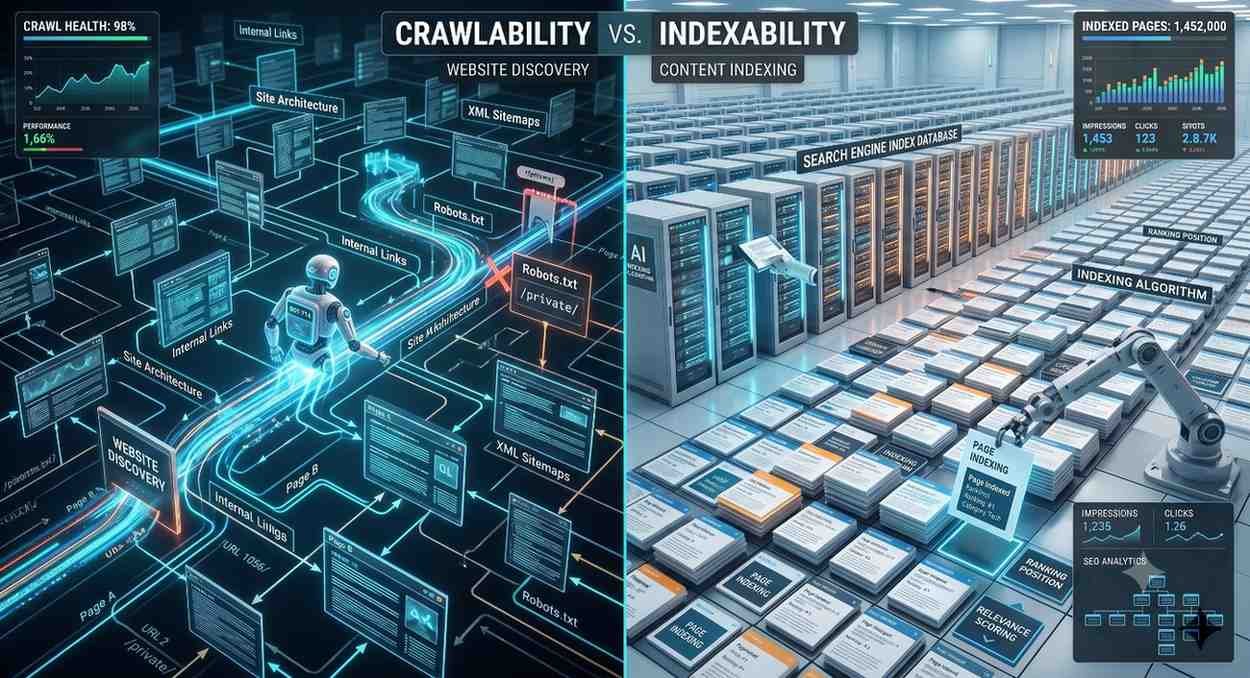
Crawlability and indexability are often used interchangeably, but they describe two separate stages. Crawlability is whether a search engine can access a page. Indexability is whether, after accessing it, the search engine decides to store that page in its index and make it eligible to rank.
A page can be crawlable but not indexable — for example, a page that returns a successful response and is fully accessible to Googlebot, but carries a noindex meta tag instructing search engines not to store it. Conversely, a page cannot be indexable if it is not crawlable in the first place, because the search engine never has the chance to read its content.
The practical implication is that solving one does not automatically solve the other. Sites often have pages Google can reach but deliberately excludes from the index, and pages it would gladly index if it could just discover them. Both conditions must be satisfied for a page to appear in search results.
Crawlability gets your pages discovered while indexability decides if they enter Google’s database, and our dedicated guide to indexability in SEO covers every signal — from meta robots tags to canonical directives — that controls which crawled pages actually qualify to rank.
Key Factors That Affect Crawlability
Several technical signals work together to determine how crawlers experience your site. Some open the door to crawling, others restrict it, and most require active management as your site evolves. The five factors below have the largest practical impact for most websites.
Robots.txt
The robots.txt file lives at your site’s root and gives crawlers their first set of instructions. It tells specific user-agents which directories or URL patterns they are allowed to crawl and which they are not. A single misplaced Disallow directive can block entire sections of a site from search engines — one of the most common and damaging crawl errors in real-world audits.
Robots.txt is a powerful tool, but it is also frequently misused. Common mistakes include blocking CSS or JavaScript files Google needs to render pages, accidentally disallowing entire site sections during a redesign, and confusing robots.txt with noindex (which it does not do).
A robots.txt file gives crawlers their first set of instructions for your site, and our complete robots.txt configuration <!–NEW PAGE NEEDED–> guide walks through every directive, syntax pitfall, and testing method needed to avoid accidentally blocking critical pages.
XML Sitemaps
An XML sitemap is a structured list of URLs you want search engines to know about. While sitemaps do not guarantee crawling or indexing, they significantly accelerate the discovery of new and updated pages — particularly for large sites, recently launched sections, and pages with few internal links.
Sitemaps should include only canonical, indexable, and live URLs. Including pages that are blocked, redirected, or set to noindex sends mixed signals and reduces the trust Google places in your sitemap as a discovery source.
XML sitemaps act as a guided tour of your most important URLs, and our XML sitemap best practices <!–NEW PAGE NEEDED–> guide breaks down every priority tag, frequency setting, and submission method that helps crawlers find new and updated content faster.
Internal Linking
Internal links are the primary mechanism through which crawlers discover new pages. Every page on your site should be reachable from at least one other page through a clickable link in your site’s main navigation, body content, or footer. Pages without internal links — known as orphan pages — are extremely difficult for crawlers to find.
Beyond discovery, internal linking also distributes authority. Pages that receive many internal links from important pages are crawled more frequently and ranked more easily than pages buried deep in a site’s structure.
Internal links are the highways crawlers follow to discover new URLs, and our strategic internal linking guide explains the anchor-text, depth, and hub-and-spoke principles that turn navigation into a crawl-equity distribution system.
Site Architecture
Site architecture describes how URLs are organized and how pages connect to one another. A flat architecture — where every important page sits within a few clicks of the homepage — makes crawling efficient. A deep architecture, where pages are buried five or more clicks from the homepage, makes them less likely to be crawled regularly.
Logical URL structures, consistent category groupings, and a clear hub-and-spoke organization signal topical relationships to search engines while also keeping crawlers from getting lost in the structure.
A flat, logical site structure dramatically improves crawl efficiency, and our SEO site architecture <!–NEW PAGE NEEDED–> resource explains how to plan URL hierarchies, category depth, and silo design before crawl problems ever appear.
Crawl Budget
Crawl budget is the number of pages a search engine will crawl on your site within a given period. For small sites, crawl budget is rarely a limiting factor. For large sites with tens of thousands of URLs, faceted navigation, or frequently changing inventories, crawl budget becomes a major constraint that directly impacts how quickly new and updated content enters the index.
Crawl budget is influenced by your server’s response speed, the perceived value of your site, and how efficiently your site avoids wasting crawler attention on low-value URLs like parameter variations, duplicates, and infinite scroll traps.
Large sites face an additional constraint where crawlers only retrieve a finite number of pages per visit, and our crawl budget optimization <!–NEW PAGE NEEDED–> guide details the log-file analysis, parameter handling, and prioritization tactics that maximize discovery on enterprise sites.

Common Crawlability Issues That Hurt Rankings
Most crawlability problems share a few recurring patterns. Identifying them early prevents months of stalled SEO performance and saves significant remediation cost downstream.
Blocked resources are the most common issue. Robots.txt rules accidentally restrict CSS, JavaScript, or entire site sections, leaving Google unable to render pages correctly or unable to reach them at all. Even partial blocks can cause Google to misjudge a page’s content and demote it in rankings.
Broken links and redirect chains waste crawl budget. Every 404 error a crawler encounters is an opportunity lost, and long redirect chains — three or more hops to reach the final URL — burn crawl resources without delivering value. Both problems compound as a site grows.
Slow server response times also reduce crawl frequency. When Google notices that pages take a long time to load or return frequent 5xx errors, it reduces how often it visits to avoid overloading your server. The effect is fewer pages crawled per day and slower indexing of new content.
Duplicate content and infinite URL parameters create crawl traps. Faceted navigation, session IDs, sorting parameters, and tracking codes can generate millions of low-value URL variations that consume crawl budget without contributing anything new to search engines.
When multiple crawlability symptoms appear together, the fastest path to resolution is a structured diagnostic, and our full technical SEO audit <!–NEW PAGE NEEDED–> framework walks through every checkpoint from server logs to rendering tests that uncovers the root cause.
How to Check and Diagnose Crawlability
Diagnosing crawlability starts with three core data sources: Google Search Console, server log files, and a third-party crawler that simulates how Googlebot sees your site. Used together, they reveal exactly where crawling breaks down.
Google Search Console’s Coverage report and Crawl Stats report show which pages Google has discovered, which it has been unable to crawl, and how its crawl behavior is trending. Spikes in errors, sudden drops in crawl frequency, and pages stuck in “Discovered, currently not indexed” status are all early warning signs.
Server log file analysis offers the deepest view because it shows every actual Googlebot request to your server — which URLs were crawled, when, how often, and what response code they returned. Logs reveal what tools cannot: crawl budget allocation, ignored pages, and how Google actually behaves on your specific site.
Third-party crawlers like Screaming Frog and Sitebulb crawl your site the way Googlebot would, surfacing broken links, redirect chains, blocked resources, noindex pages, and architecture issues in a single scan. They are essential for both routine audits and post-migration verification.
Google Search Console gives you a direct view of how Google crawls your site, and our complete guide to Google Search Console for SEO <!–NEW PAGE NEEDED–> covers every report — from Coverage to Crawl Stats — that surfaces issues before they damage rankings.
How to Improve Your Site’s Crawlability
Improving crawlability is a continuous discipline rather than a one-time project. The highest-impact improvements fall into a predictable order, and addressing them in sequence produces the fastest visible results in Search Console and rankings.
Start with the basics: validate your robots.txt file, confirm that critical pages return HTTP 200 responses, and ensure your XML sitemap is current, accurate, and submitted in Search Console. These steps eliminate the most common catastrophic errors and create a clean baseline.
Next, address site architecture and internal linking. Reduce the click depth of important pages, eliminate orphan pages, fix broken internal links, and shorten redirect chains. These changes redistribute crawl attention toward pages that drive business outcomes.
Then optimize server performance and crawl efficiency. Improve response times, eliminate duplicate URL variations through canonicals or parameter handling, and remove low-value URLs from sitemaps and internal links. On large sites, these efficiency gains often translate into substantial increases in pages crawled per day.
Finally, monitor continuously. Crawlability degrades silently as sites grow, plugins update, and content teams ship new pages. Monthly Search Console reviews and quarterly full audits catch regressions before they become rankings problems.
Improving crawlability is rarely a single fix, and our complete technical SEO checklist <!–NEW PAGE NEEDED–> walks through every audit point — from crawl-budget management to structured-data implementation — in the exact priority order that delivers fastest ranking gains.

Tools for Monitoring Crawlability
Most teams rely on a small stack of crawlability tools rather than a single platform. Google Search Console is foundational and free — every site must use it. Beyond that, Screaming Frog SEO Spider is the industry standard for desktop-based crawls, with strong support for JavaScript rendering and customizable extractions.
Sitebulb offers a more visual diagnostic layer with prioritized recommendations, particularly useful for less technical teams. Ahrefs Site Audit and Semrush Site Audit provide cloud-based crawling with built-in tracking over time and integration with rank and backlink data, making them strong fits for ongoing monitoring rather than one-off audits.
For enterprise sites, log file analyzers like Splunk, Screaming Frog Log File Analyser, or Botify provide direct visibility into actual crawler behavior — the most accurate signal of how search engines truly experience your site.
Choosing the right diagnostic platform makes ongoing monitoring far easier, and our breakdown of the best SEO crawling tools <!–NEW PAGE NEEDED–> compares Screaming Frog, Sitebulb, Ahrefs, and Semrush across crawl depth, JavaScript rendering, and reporting strength.
When to Get Professional Help
Most crawlability fundamentals are achievable in-house with the right knowledge and tools. Professional help becomes valuable when sites scale beyond simple architectures, when multiple technical issues compound, or when business goals depend on accelerated organic results.
A specialist SEO partner typically delivers fastest ROI in three situations: post-migration audits where ranking drops have appeared, large sites where crawl budget is constraining performance, and businesses where in-house technical capacity is limited but organic growth is critical. In each case, the cost of professional intervention is dwarfed by the cost of ongoing traffic loss.
For businesses where in-house bandwidth is limited, working with an experienced team delivering professional SEO services compresses months of crawlability remediation into a structured engagement that ties technical fixes directly to traffic outcomes.
Conclusion
Crawlability is the foundation of every SEO outcome — discovery, indexing, ranking, and organic traffic all depend on it working correctly across your site.
This guide has mapped the full domain, from how crawlers operate to which factors affect them, and connects to deeper spoke resources covering each subtopic in full technical detail.
We at White Label SEO Service help businesses turn crawlability diagnostics into measurable organic growth — let’s build a foundation your search results can grow on.
Frequently Asked Questions
What is crawlability in simple terms?
Crawlability is how easily search engine bots can find, access, and read your website’s pages. If a page is not crawlable, it cannot be indexed or appear in search results.
How is crawlability different from indexability?
Crawlability is whether Google can reach a page. Indexability is whether Google decides to store it in its index. A page must be crawlable first before it can be indexed.
How do I check if my site is crawlable?
Use Google Search Console’s Coverage and Crawl Stats reports, run a Screaming Frog or Sitebulb audit, and review server log files. Together they reveal every crawl barrier on your site.
What causes poor crawlability?
Common causes include misconfigured robots.txt files, broken internal links, slow server response times, deep site architecture, redirect chains, and infinite URL parameter traps from faceted navigation.
Does crawlability affect SEO rankings?
Yes, indirectly but powerfully. Pages that are not crawled cannot be indexed, and pages that are not indexed cannot rank. Crawlability is the prerequisite for every other ranking factor.
How often does Google crawl my website?
Crawl frequency depends on your site’s authority, freshness, server speed, and internal linking strength. Established, well-maintained sites are crawled more frequently than small or new ones.
Can I improve crawlability without a developer?
Many improvements — submitting sitemaps, cleaning broken links, updating robots.txt — are achievable without coding. Deeper changes like architecture redesigns or server optimization typically require developer support.


