If you run a website and you want it to actually grow, keyword ranking is the number you need to watch first. It tells you, in one glance, whether your content is working, whether it needs more effort, or whether it’s completely out of step with what Google wants to show searchers.
I’ve found that most business owners overcomplicate this. You don’t need to be a search engine expert to understand your rankings; you just need to know where to look and how to read what you find. Checking your rankings isn’t a one-time task either. It’s an ongoing habit that reveals patterns over time and shows you exactly where the opportunities sit.
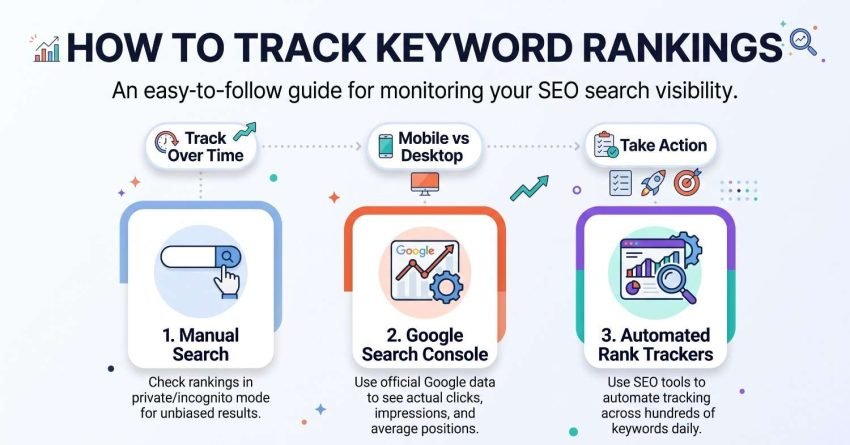
In this guide, I walk through why ranking position actually matters to your traffic, what a genuinely “good” position looks like depending on what you’re searching for, the three practical ways to check where you stand manually, through Google Search Console, and with automated rank trackers, along with how often to check, the mobile-versus-desktop gap most people miss, the mistakes that quietly corrupt your data, what multi-location businesses need to do differently, and what to actually do once you have your numbers in hand.
Why is Keyword Ranking Vital to Your Website’s Performance?
Every person online has done this same thing thousands of times. They need something, so they open a browser, type a phrase, and trust Google to hand them the best answer within a few seconds.
Most searchers never scroll past the first three or four results. That’s the part business owners underestimate. It’s not that your competition is one or two other sites; in almost every industry there are hundreds, sometimes thousands, of pages chasing the same search term.
Your ranking position is effectively a gate on how much of that competition even sees your site. A page sitting in position 15 might have better content than the page sitting in position 3, and it will still get a fraction of the clicks, because most people never look that far down the page.
None of this is fixed permanently, though. Rankings shift constantly based on relevance, content quality, technical health, and how well a page matches what searchers are actually trying to accomplish. Checking your ranking is the starting point for figuring out where you stand and what’s actually holding a page back, whether that’s thin content, a technical issue, or simply stronger competition outranking you on relevance.
What Counts as a “Good” Keyword Ranking Position
A “good” ranking depends entirely on what a searcher is trying to do when they type that phrase. Position 1 for a broad, informational term still might not convert the way position 3 does for a term with clear buying intent.
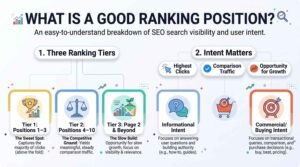
I generally think about it in three tiers. Positions 1 through 3 capture the overwhelming majority of clicks on any given search, because they sit above the fold alongside any featured snippets or ads. Positions 4 through 10 still get meaningful traffic, especially on searches where people compare a few options before deciding. Anything on page 2 or beyond functions more like a slow build; it signals the page is relevant, but it rarely produces real volume until it climbs higher.
There’s also a difference between commercial and informational rankings. Ranking #1 for an informational query with a featured snippet above it might send fewer clicks to your page than ranking #3 for a commercial query with no snippet competing for attention. When you evaluate whether a position is “good,” weigh it against what that specific search term is actually for, not just the number itself.
Best Ways to Check Your Keyword Rankings
There are three practical routes to checking where your keywords stand, ranging from completely free and manual to fully automated. Each one suits a different stage of managing a website.
1. Checking Keywords Manually
If you want a quick answer without setting up any tools, you can check rankings the same way you’d search anything else on Google. The catch is that your results won’t be accurate the way you’d expect.
Search results are localized. Google shows you results based on where it thinks you’re searching from, which means a website targeting the United States will show completely different rankings to someone searching from South Africa than it will to someone searching from Chicago. Your own browser, logged into your own accounts, is the least reliable way to see what your actual target audience sees.
The Process
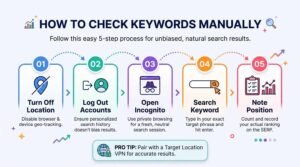
To get a cleaner read, follow this sequence:
- Turn off location sharing in your browser and disable location permissions for the browser itself
- Log out of every Google account currently signed into that browser
- Open an incognito or private browsing window
- Type your target keyword into Google Search exactly as a customer would search it
- Scroll through the results and note where your page appears
Even after all of that, you may still see results skewed toward your general region rather than your true target market. For a business genuinely targeting a specific country or city, pairing this process with a VPN set to that target location gives a far more reliable read than incognito mode alone.
This method costs nothing and takes a few minutes, which makes it useful for a fast spot-check. It’s not something I’d rely on for tracking trends over months, since there’s no historical record and no way to check dozens of keywords at once without it becoming a full afternoon.
2. Using Google Search Console
If you don’t mind using a tool, Google Search Console is the most direct option available, since it comes straight from Google itself and reflects the exact data Google has about your site’s performance.
The Process
Open Google Search Console and log into the account connected to your website property. Navigate to the Performance tab, then select Search Results.
From there, make sure the boxes for Total Clicks, Total Impressions, Average CTR, and Average Position are all checked. Together, these four metrics tell a complete story: how many people saw your page, how many clicked, how well your listing converts attention into visits, and roughly where you’re sitting in the results.
Set your date range wide enough to smooth out daily fluctuation; three months gives a far more honest read than seven days. From there, you can filter by individual query to see exactly where a specific keyword stands, then cross-reference that with impressions and clicks to judge whether a low average position is actually costing you traffic or barely matters.
Beyond simple ranking checks, this same report reveals opportunities the ranking number alone won’t show you. Sorting by impressions with a low CTR often flags pages where the title tag or meta description isn’t earning clicks despite decent visibility. Queries showing meaningful impressions but no dedicated page at all point to content gaps worth filling.
3. Using Automated SEO Rank Trackers
Agencies and in-house marketing teams managing dozens or hundreds of keywords generally move to automated rank tracking tools, because manual checks and Search Console pulls don’t scale well past a handful of terms.
These platforms check your keyword list on a set schedule, build a visual history over time, and often flag significant position changes automatically instead of requiring you to notice them yourself. Many also let you track a competitor’s rankings for the same terms side by side with your own, which turns rank tracking into competitive intelligence rather than just a status check.
Here’s how the three approaches actually compare for someone deciding where to start:
| Method | Cost | Accuracy | Effort | Best For |
| Manual checking | Free | Low-moderate (location bias) | Low, but not scalable | Quick spot-checks, single keywords |
| Google Search Console | Free | High for owned-site data | Low-moderate | Ongoing tracking, opportunity finding |
| Automated rank trackers | Paid (subscription) | High, with historical trend data | Very low once set up | Agencies, large keyword lists, competitor tracking |
The right choice usually comes down to volume. A handful of keywords rarely justifies a paid subscription. A hundred or more, tracked across multiple clients or locations, makes automation close to essential simply on a time-saved basis.
How Often You Should Check Your Keyword Rankings
Checking rankings daily on a small site rarely tells you anything new; rankings fluctuate naturally within a normal range, and daily noise can make a stable page look unstable when nothing has actually changed.
For most small to mid-sized sites, a weekly check strikes the right balance. It’s frequent enough to catch a real drop early, but spaced out enough that you’re looking at a genuine trend rather than daily noise. Sites with high page counts, frequent algorithm exposure, or aggressive content publishing schedules benefit from more frequent tracking, since a broader footprint means more can shift at once.
The exception is right after a major change: a new piece of content goes live, you’ve done a significant technical fix, or Google has rolled out a confirmed algorithm update. In those windows, checking every few days for two to three weeks gives you a much clearer picture of impact than waiting for your normal weekly cycle.
Mobile vs Desktop Ranking Differences You Need to Track
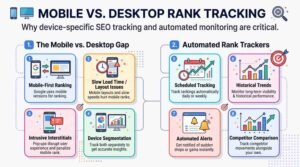
Google indexes and ranks the mobile version of your site first, which means the mobile ranking is frequently the one that actually matters, even if you’re checking from a desktop browser out of habit.
The gap between the two isn’t hypothetical. A page can rank comfortably on desktop while sitting several positions lower on mobile because of a slower load time, a layout issue, or an intrusive interstitial that only shows on smaller screens. Since most search traffic now happens on mobile devices, a desktop-only check can leave you confident about a ranking that doesn’t reflect what most of your actual audience sees.
Both Google Search Console and most automated rank trackers let you segment by device. I’d treat that segmentation as mandatory rather than optional; checking only desktop position and assuming mobile matches it is one of the more common blind spots I see on client audits, and it’s an easy one to close once you know to look for it.
Common Mistakes That Skew Your Ranking Data
A few habits quietly distort ranking data even when someone follows the right process. The most common is checking from a logged-in, non-incognito browser and assuming the result is neutral. Personalization and search history both influence what you see, even in ways that aren’t obvious.
SERP features cause a second, subtler problem. When a featured snippet, a local pack, a video carousel, or a “People Also Ask” block sits above the traditional listings, “position 1” in a rank tracker’s count doesn’t always mean the first visible link on the page. A page can technically hold position 1 in organic listings while sitting visually below three or four other elements, which changes how much traffic that position actually earns.
SERP Feature Reality Check: If your tracked keyword triggers a featured snippet, a local pack, or a shopping carousel, treat your organic position number as a starting point, not the full picture. Check the actual visual layout of the results page occasionally to see how much space organic listings realistically occupy.
Caching is the third quiet culprit. Rank tracking tools and even browsers can serve a cached version of results that’s a few hours or a day old, which makes a genuine ranking change look delayed or makes a temporary fluctuation look permanent. Cross-checking a suspicious result with a fresh incognito search resolves most of these false alarms.
Rank Tracking for Local and Multi-Location Businesses
A business operating across several cities or regions can’t rely on a single ranking number the way a purely online, single-location brand can. The same keyword can rank very differently in Denver than it does in Atlanta, even under the same domain, because local search results factor in proximity, local relevance signals, and localized competition.
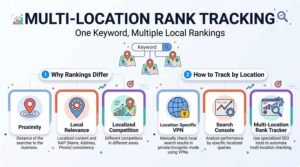
For multi-location businesses in the United States, tracking needs to happen at the city or metro level, not just nationally. That usually means running the same keyword check across each target market separately, whether that’s through location-specific VPN checks, Search Console filtered by query and page, or a rank tracker configured with multiple tracked locations per keyword.
This is where a structured SEO partner earns its keep. As a full-service provider working across technical SEO, content strategy, and performance tracking, White Label SEO Service builds rank tracking around the actual footprint of a business rather than a single generic check because a business with five locations genuinely needs five sets of rankings, not one average that hides which markets are underperforming.
What to Do After You Check Your Rankings
Checking a ranking number is only useful if it changes what you do next. A page sitting on page two of results usually needs one of three things: stronger on-page content that actually satisfies the search intent, better internal linking to signal its importance, or backlinks from relevant sites to build authority Google can trust.
A page already on page one but stuck below position 5 often responds well to smaller, faster fixes: a tightened title tag, a more compelling meta description to lift click-through rate, or added depth on subtopics competitors are covering that your page currently skips.
Tracking rankings without a follow-up strategy just produces a spreadsheet of numbers. Turning that data into action prioritizing which pages to fix first, matching the fix to the actual gap, and re-checking on a set cadence is the part that actually moves traffic and leads. This is exactly the ongoing, strategic layer a dedicated SEO partner is built to manage, since it requires tying technical fixes, content updates, and authority building together rather than treating them as separate tasks.
Conclusion
Keyword ranking is the clearest signal you have of whether your SEO efforts are actually working, and checking it consistently through the right method for your scale turns guesswork into a real strategy. The businesses that grow steadily are the ones that treat rank checking as an ongoing habit tied to action, not a one-off task.
Whether you’re checking manually, pulling reports from Search Console, or managing rankings across dozens of keywords and locations, the goal stays the same: understand where you stand, then close the gap with the right fix.
If you’d rather have a dedicated partner handle the tracking, the analysis, and the follow-through, we at White Label SEO Service build that strategy around your actual business, from technical SEO and content to authority building and ongoing performance tracking, so your rankings turn into real traffic and leads.
Frequently Asked Questions
How long does it take to see keyword ranking improvements?
Most sites see meaningful movement within three to six months, depending on competition, site authority, and how consistently content and technical fixes are applied.
Can I check keyword rankings for free?
Yes. Manual incognito searches and Google Search Console are both completely free and cover most small business tracking needs effectively.
Why do my rankings differ between my phone and my computer?
Google indexes the mobile version of your site first, and layout or speed issues on mobile can cause a lower ranking there than on desktop.
Do keyword rankings update in real time?
No. Rankings can shift daily due to normal algorithm fluctuations, and most tracking tools refresh once every 24 hours rather than instantly.
Is checking rankings on Google.com accurate?
Only if you remove personalization first: log out, use incognito mode, and ideally match your location to your target market for an accurate read.
How many keywords should a small business track?
Most small businesses get solid insight tracking 10 to 30 core keywords tied directly to their main services or products, rather than hundreds of loosely related terms.