

Your Website’s Secret Weapon: The Ultimate Guide to Technical SEO & Site Audits That Actually Work
Look, I’ll be honest with you if your website isn’t ranking like you thought it would, there’s probably something going on behind the scenes that you just can’t see. And that’s where technical SEO comes in.
Think of technical SEO like the foundation of your house. You could have the most beautiful furniture and paint colors (that’s your content), but if the foundation’s cracked? Everything else doesn’t matter much. A proper technical SEO audit finds those cracks before they become sinkholes.
Ready to uncover what’s holding your site back? Our white label technical SEO audit services dig deep into your website’s foundation and fix issues that are literally costing you rankings every single day. Get Your Free Site Audit Analysis →
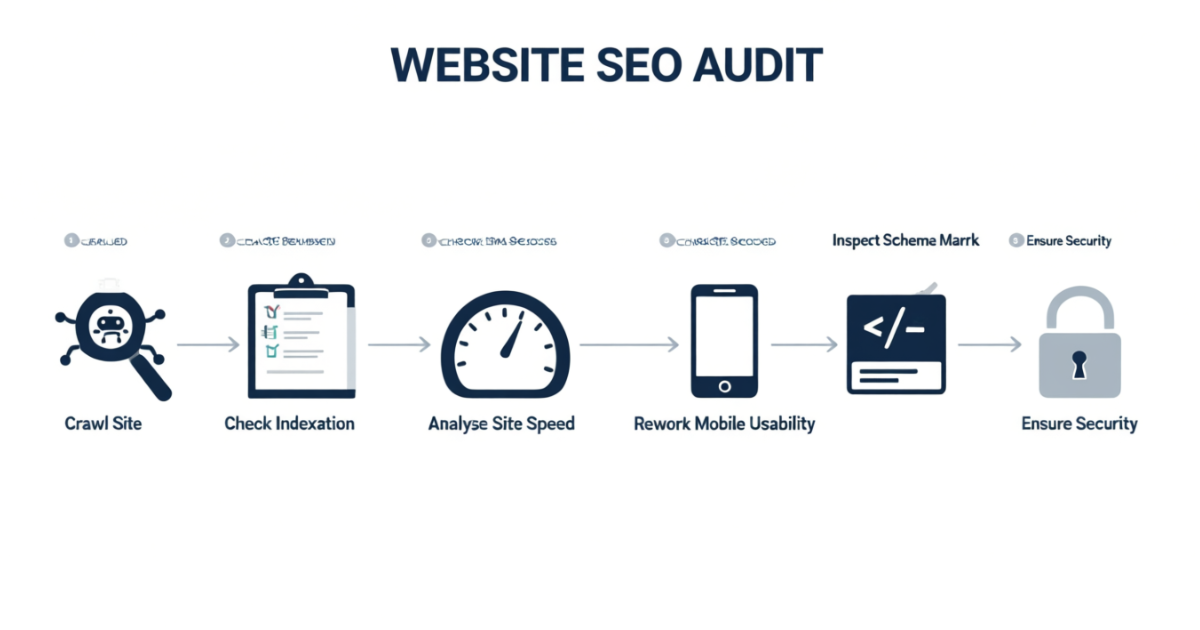
What is Technical SEO Anyway? (And Why Should You Care)
Here’s the thing, technical SEO is basically making sure search engines like Google can actually find, understand, and rank your website properly. It’s the stuff happening under the hood that most people never see but makes all the difference.
When search engines crawl your site, they’re looking at things like page speed, mobile-friendliness, site structure, and whether they can even access your content in the first place. Miss any of these elements and you’re basically invisible online, no matter how good your content is.
Did you know? Sites that fix their technical SEO issues see an average traffic increase of 30% within 3-6 months. That’s not a small number, that’s real business growth.
The Core Components Every Technical SEO Audit Must Cover
Crawlability & Indexation (Making Sure Google Can Find You)
This is step one, and honestly? It’s where most sites mess up without even knowing it.
Crawlability means search engine bots can access and navigate your website. Indexation means those pages actually get stored in Google’s database so they can show up in search results.
What we check in this section:
- Robots.txt file configuration (are you accidentally blocking important pages?)
- XML sitemap accuracy and submission status
- Crawl errors and broken internal links
- Orphan pages that exist but aren’t linked anywhere
- Canonical tag implementation to avoid duplicate content penalties
- Noindex tags that might be hiding valuable content
Pro tip: Use Google Search Console’s URL Inspection Tool to check if specific pages are indexed. Just type in the URL and Google tells you exactly what it sees.
Site Architecture & Internal Linking (Your Website’s GPS System)
Your site structure should make sense to both humans AND search engines. If visitors get lost trying to find information, Google’s bots will too.
A well-organized site follows a logical hierarchy, think of it like a pyramid with your homepage at the top, category pages in the middle, and individual content pages at the bottom.
Best practices for site architecture:
- Keep important pages within 3 clicks from your homepage
- Use descriptive URLs that include relevant keywords (like /services/technical-seo-audit instead of /page123)
- Create clear navigation menus that guide visitors naturally
- Build internal links using descriptive anchor text (not just “click here”)
- Implement breadcrumb navigation so users always know where they are
Common mistake: Sites that add pages randomly without thinking about how they connect to existing content. This creates orphan pages that Google might never find.

Page Speed & Core Web Vitals (The Need for Speed)
Okay, this one’s huge in 2026 because Google’s literally using speed as a ranking factor now through something called Core Web Vitals.
Core Web Vitals measure three things:
- LCP (Largest Contentful Paint) – How fast your main content loads (aim for under 2.5 seconds)
- INP (Interaction to Next Paint) – How quickly your site responds to user interactions like clicks (under 200 milliseconds is good)
- CLS (Cumulative Layout Shift) – Whether your page jumps around while loading (keep it under 0.1)
Quick wins for faster page speed:
- Compress images (seriously, a 5MB image is killing your load time)
- Enable browser caching so repeat visitors load faster
- Minify CSS, JavaScript, and HTML code
- Use a Content Delivery Network (CDN) to serve content from locations closer to your users
- Implement lazy loading for images below the fold
- Remove unused JavaScript and CSS files
Use Google’s PageSpeed Insights tool, it’s free and tells you exactly what to fix.
Mobile Optimization (Because Most People Browse on Their Phones)
Here’s a stat that’ll wake you up: over 60% of searches happen on mobile devices. If your site looks terrible on phones, you’re losing more than half your potential traffic.
Google switched to mobile-first indexing, which means they look at your mobile site FIRST when deciding how to rank you. Not your desktop version. Your mobile version.
Mobile optimization checklist:
- Responsive design that adapts to different screen sizes automatically
- Touch-friendly buttons and links (no tiny clickable areas)
- Text that’s readable without zooming in
- No horizontal scrolling required
- Forms that are easy to fill out on small screens
- Pop-ups that don’t cover the entire mobile screen
Test it yourself: Open your site on your phone right now. Can you easily navigate it? If you’re struggling, so are your potential customers.
Structured Data & Schema Markup (Speaking Google’s Language)
Schema markup is like adding labels to your content so search engines understand exactly what they’re looking at. It’s code that tells Google “this is a product price” or “this is a customer review.”
When implemented correctly, schema can get you rich snippets, those fancy search results with star ratings, prices, and extra information that make people way more likely to click.
Types of schema that work really well:
- Local Business Schema (address, hours, phone number)
- Product Schema (price, availability, reviews)
- FAQ Schema (gets you in the FAQ section of search results)
- Article Schema (publish date, author, headline)
- Breadcrumb Schema (shows your site structure in search results)
You can implement schema using Google’s Structured Data Markup Helper – it’s easier than it sounds.

HTTPS & Website Security (Trust Signals Matter)
If your site still uses HTTP instead of HTTPS, you’re basically telling visitors “hey, this site might not be safe.” That’s not a good look.
HTTPS encrypts data between your website and visitors, protecting sensitive information. Google confirmed years ago that HTTPS is a ranking signal, and browsers literally warn people when they visit HTTP sites now.
Security essentials:
- Valid SSL certificate installed and properly configured
- All internal links pointing to HTTPS versions
- 301 redirects from HTTP to HTTPS versions
- Mixed content issues resolved (no HTTP resources on HTTPS pages)
- Regular security updates for your CMS and plugins
Most hosting providers offer free SSL certificates through Let’s Encrypt. Tthere’s really no excuse not to have one.
How AI Is Changing Technical SEO in 2026
This is the new stuff that’s shaking everything up. With Google’s AI Overviews and tools like ChatGPT giving answers directly in search results, technical SEO has evolved.
AI search engines prioritize content that’s clearly structured, factually accurate, and easy to extract information from. This means your technical foundation matters more than ever.
New technical considerations for AI search:
- Clean heading structure (H1, H2, H3 tags used logically)
- FAQ sections formatted for easy extraction
- Concise, direct answers to common questions (40-60 words)
- Author bios showing expertise and credentials
- External links to authoritative sources
- Structured data implementation for better content understanding
Reality check: Zero-click searches are rising (64% of searches in 2026 don’t result in a click), but being featured in AI answers still builds brand awareness and authority.
Want to stay ahead of AI search changes? Our team monitors algorithm updates daily and adjusts strategies in real-time so you don’t have to. Schedule Your Strategy Call →
The Complete Technical SEO Audit Checklist
Alright, let’s get practical. Here’s the exact checklist we use when auditing client websites:
Phase 1: Initial Website Crawl
- Run site crawl using Screaming Frog or Semrush Site Audit
- Identify all URLs, response codes, and crawl errors
- Export data for analysis
Phase 2: Indexation Analysis
- Check Google Search Console for index coverage issues
- Review XML sitemap for accuracy
- Identify pages that should be indexed but aren’t
- Find pages that are indexed but shouldn’t be
Phase 3: On-Page Technical Elements
- Audit title tags (unique, under 60 characters, include keywords)
- Review meta descriptions (compelling, under 160 characters)
- Check heading tag hierarchy (proper H1-H6 structure)
- Verify canonical tags are correctly implemented
- Scan for duplicate content issues
Phase 4: Site Performance
- Test page speed with PageSpeed Insights
- Measure Core Web Vitals scores
- Identify render-blocking resources
- Check image optimization and compression
- Review server response times
Phase 5: Mobile Experience
- Run Google’s Mobile-Friendly Test
- Check viewport configuration
- Test touch elements and tap targets
- Verify no blocked CSS or JavaScript
- Review mobile usability in Search Console
Phase 6: Site Architecture
- Map out site structure and depth
- Identify orphan pages
- Review internal linking patterns
- Check URL structure and naming conventions
- Analyze navigation and user flow
Phase 7: Security & HTTPS
- Verify SSL certificate validity
- Check for mixed content warnings
- Ensure all redirects point to HTTPS
- Review security headers
Phase 8: Advanced Elements
- Audit structured data implementation
- Check robots.txt configuration
- Review international targeting (hreflang tags if applicable)
- Verify pagination handling
- Check for redirect chains and loops

Common Technical SEO Issues (How to Fix Them Fast)
Broken Links & 404 Errors
The Problem: Dead links send users and search bots to pages that don’t exist.
The Fix: Use Screaming Frog to find all 404s, then either create 301 redirects to relevant pages or restore the missing content. For external broken links, replace them with working alternatives.
Redirect Chains
The Problem: Multiple redirects in a row waste crawl budget and slow down page loading (like URL A → URL B → URL C).
The Fix: Create direct 301 redirects from the original URL to the final destination.
Duplicate Content
The Problem: Multiple URLs showing the same content confuses search engines about which version to rank.
The Fix: Implement canonical tags pointing to your preferred version, or use 301 redirects to consolidate duplicate pages.
Slow Page Speed
The Problem: Sites taking more than 3 seconds to load lose visitors and rankings.
The Fix: Compress images, enable caching, minify code, upgrade hosting if needed, and implement a CDN.
Missing or Poor Mobile Experience
The Problem: Site doesn’t work well on mobile devices, leading to high bounce rates.
The Fix: Implement responsive design, increase font sizes, make buttons touch-friendly, and test thoroughly on actual mobile devices.
Essential Tools for Technical SEO Audits
You don’t need to spend thousands on tools, but you definitely need the right ones. Here’s what actually works:
Free Tools (Start Here):
- Google Search Console – Essential for index coverage and performance data
- Google PageSpeed Insights – Core Web Vitals and performance recommendations
- Google Mobile-Friendly Test – Check mobile compatibility
- Google’s Rich Results Test – Validate structured data
- Bing Webmaster Tools – Don’t sleep on Bing, it drives real traffic
Paid Tools (Worth the Investment):
- Screaming Frog SEO Spider – Best website crawler (free up to 500 URLs)
- Semrush Site Audit – Comprehensive technical analysis with prioritized fixes
- Ahrefs Site Audit – Great for combining technical SEO with backlink analysis
- Sitebulb – Visual site audits that are easier to understand
- GTmetrix – Detailed page speed analysis with specific recommendations
Our Recommendation: Start with free tools to identify issues, then use paid tools for deeper analysis and ongoing monitoring.
Who Needs Technical SEO Services?
Honestly? Pretty much everyone with a website, but especially:
E-commerce Sites: Thousands of product pages mean more potential technical issues. Site speed directly impacts conversion rates.
Multi-Location Businesses: Need proper schema markup, location pages, and mobile optimization for local search.
B2B Companies: Longer sales cycles mean you can’t afford to lose prospects to slow load times or poor user experience.
Agencies & Marketing Firms: Our white label technical SEO services let you offer comprehensive SEO without hiring specialized technical staff.
Enterprise Websites: Complex site structures, multiple subdomains, and international versions require expert technical management.
Content Publishers & Blogs: Heavy content sites need excellent crawl budget management and page speed optimization.
Any Site That’s Been Ignored: If you haven’t done a technical audit in the last 6 months, you’re probably sitting on issues that are costing you traffic.
White Label Technical SEO Services We Offer
As a white label provider, we work behind the scenes so you can keep your client relationships strong while delivering expert technical SEO services under your brand.
Comprehensive Technical Audits: Full website analysis identifying all technical issues with prioritized action plans.
Core Web Vitals Optimization: Speed improvements, INP optimization, and layout shift fixes to pass Google’s performance benchmarks.
Mobile-First Optimization: Responsive design implementation, mobile usability fixes, and mobile page speed enhancements.
Site Architecture Restructuring: Internal linking improvements, URL structure optimization, and navigation enhancements.
Schema Markup Implementation: Structured data setup for rich snippets, local business schema, product markup, and FAQ schema.
Security & HTTPS Migration: SSL certificate installation, mixed content fixes, and complete HTTP to HTTPS migrations.
International SEO Setup: Hreflang tag implementation, multi-language site optimization, and geo-targeting configuration.
Crawl Budget Optimization: For large sites, we optimize how search engines spend their time crawling your pages.
Ongoing Technical Monitoring: Monthly technical health checks, Core Web Vitals tracking, and proactive issue identification.
White Label Reporting: Client-ready reports with your branding, clear explanations, and actionable next steps.

Key Trends & Takeaways for 2026
The technical SEO landscape keeps evolving, but here’s what you need to know right now:
AI Search Is Here to Stay: Google’s AI Overviews, ChatGPT, and Perplexity are changing how people find information. Your technical setup needs to support clear content extraction.
Zero-Click Searches Growing: More queries get answered directly in search results. Focus on visibility and brand mentions, not just clicks.
Core Web Vitals Matter More: Google continues weighting page experience heavily. Sites with poor vitals won’t rank well, period.
Mobile-First Isn’t Optional: With 60%+ of searches on mobile, your mobile experience is your primary experience.
E-E-A-T Signals Critical: Expertise, Experience, Authoritativeness, and Trustworthiness are becoming more important as AI tries to filter quality content.
Structured Data Advantage: Schema markup helps both traditional search and AI systems understand your content better.
Security Is Table Stakes: HTTPS, regular updates, and security measures are expected, not impressive.
Technical SEO Never Sleeps: This isn’t a one-time project. Ongoing monitoring and optimization are required to maintain rankings.
Lessons Learned From Hundreds of Technical Audits
After running technical audits for sites ranging from small local businesses to enterprise corporations, here’s what we’ve learned:
- The simple stuff often makes the biggest impact. You’d be surprised how many sites see traffic increases just from fixing broken links and optimizing images.
- Most businesses don’t know they have technical issues. They think they need more content or backlinks when really, search engines can’t properly access what they already have.
- Page speed improvements translate directly to better user experience and higher conversion rates. Not just better rankings but actual business results.
- Mobile optimization gaps are extremely common. Sites that look great on desktop often have serious mobile usability problems nobody noticed.
- Technical SEO compounds over time. Small issues left unaddressed become bigger problems. Sites that invest in technical foundations consistently outperform those that don’t.
- Tools are helpful but human analysis is irreplaceable. Automated tools flag issues, but understanding context and prioritization requires experience.

Pro Tips & Hacks From the Trenches
The 80/20 Rule: Focus on fixing critical issues first – broken pages, severe speed problems, mobile-breaking bugs. These give you the biggest return on effort.
Use Log File Analysis: For large sites, analyzing server logs shows exactly what search engines are crawling and where they’re spending time.
Pagination Best Practices: Use rel=”next” and rel=”prev” for paginated content, or implement “View All” pages with canonical tags.
Crawl Budget Management: If you have thousands of pages, use robots.txt to prevent bots from wasting time on unimportant sections like filtered search results.
JavaScript SEO: If your site uses React, Vue, or Angular, test how it renders for search engines using Google’s URL Inspection Tool.
Leverage Browser Caching: Set longer expiration times for static resources so browsers don’t have to download everything on repeat visits.
Image Optimization Shortcut: Use tools like TinyPNG or ImageOptim to batch compress images without visible quality loss.
Quick Core Web Vitals Win: Preload critical resources (fonts, hero images) so they load immediately.
Schema Testing Trick: After implementing schema, use Google’s Rich Results Test to verify it’s working before going live.
Ready to dominate search results with bulletproof technical SEO? Stop letting hidden technical issues sabotage your rankings. Our white label team becomes your behind-the-scenes technical SEO department. Explore Partnership Options →
Frequently Asked Questions
How often should I run a technical SEO audit?
Run a comprehensive audit quarterly (every 3 months) at minimum. For larger sites or sites with frequent changes, monthly mini-audits are better. After major updates, redesigns, or migrations, run an immediate audit to catch any issues early.
Can I do a technical SEO audit myself or do I need an expert?
You can definitely start with free tools like Google Search Console and PageSpeed Insights to identify basic issues. However, complex sites, e-commerce platforms, or businesses relying heavily on organic traffic benefit significantly from expert audits. Technical SEO requires understanding not just what issues exist, but how to prioritize and fix them properly.
How long does it take to see results from fixing technical SEO issues?
Quick wins like fixing broken links or improving page speed can show improvements within days to a couple weeks. More comprehensive technical fixes typically show measurable traffic increases within 3-6 months as search engines re-crawl and re-evaluate your site. Remember that technical SEO is a foundation you still need quality content and backlinks to maximize results.
What’s the difference between on-page SEO and technical SEO?
On-page SEO focuses on content elements like keywords, title tags, headings, and internal links within your content. Technical SEO focuses on website infrastructure like site speed, crawlability, mobile-friendliness, structured data, and security. Both are essential and work together. You need technical SEO to make sure search engines can access your content, and on-page SEO to make sure that content is optimized for the right keywords and topics.
Take Action: Get Your Technical SEO Audit Today
Here’s the bottom line, every day your site has technical issues is another day you’re losing rankings, traffic, and revenue to competitors who have their technical foundations dialed in.
The good news? Most technical issues are fixable once you know what they are. And that’s exactly where we come in.
What You Get With White Label SEO Service:
✅ Comprehensive 50+ Point Technical Audit – We check everything from crawlability to Core Web Vitals to mobile optimization
✅ Prioritized Action Plan – Not just a list of problems, but a clear roadmap of what to fix first for maximum impact
✅ Expert Implementation – Our team can handle the fixes for you, or provide detailed instructions for your development team
✅ White Label Reporting – Client-ready reports with your branding that clearly explain issues and solutions
✅ Ongoing Monitoring – Monthly technical health checks to catch issues before they become problems
✅ Direct Support – Real humans who answer questions and provide strategic guidance
Special Offer: First-time clients get a complimentary technical SEO audit snapshot highlighting the top 10 critical issues holding your site back. No strings attached, just actionable insights.
Don’t let technical issues keep your content from ranking. Whether you’re an agency looking for white label technical SEO support or a business wanting to fix your site’s foundation, we’ve got you covered.
Schedule your consultation today and let’s uncover what’s really holding your website back.
Contact White Label SEO Service | Request Your Free Audit | View Our Services
About White Label SEO Service: We’re a specialized technical SEO agency providing white label services to digital marketing agencies, web developers, and businesses worldwide. Our team of technical SEO experts has conducted over 1,000+ comprehensive audits and helped clients achieve an average 30% increase in organic traffic through technical optimizations. We work behind the scenes so you can deliver exceptional results under your brand.


