

The right SEO automation tools can save your team 15-30 hours per week on repetitive tasks like rank tracking, technical audits, and content optimization scoring. That’s not marketing hype. It’s the measurable difference between manually pulling reports and letting software handle the heavy lifting.
For business owners and marketing teams managing organic growth, time is the scarcest resource. Every hour spent on manual keyword tracking or crawling spreadsheets is an hour not spent on strategy, content creation, or relationship building. The SEO automation landscape in 2026 has matured significantly, with AI-powered features that go far beyond basic scheduling.
This guide breaks down the 15 best SEO automation tools available today, with honest assessments of what each actually automates, how much time you’ll realistically save, and which tool fits your specific situation. Whether you’re a startup watching every dollar or an enterprise team managing thousands of pages, you’ll find actionable recommendations backed by real-world testing.
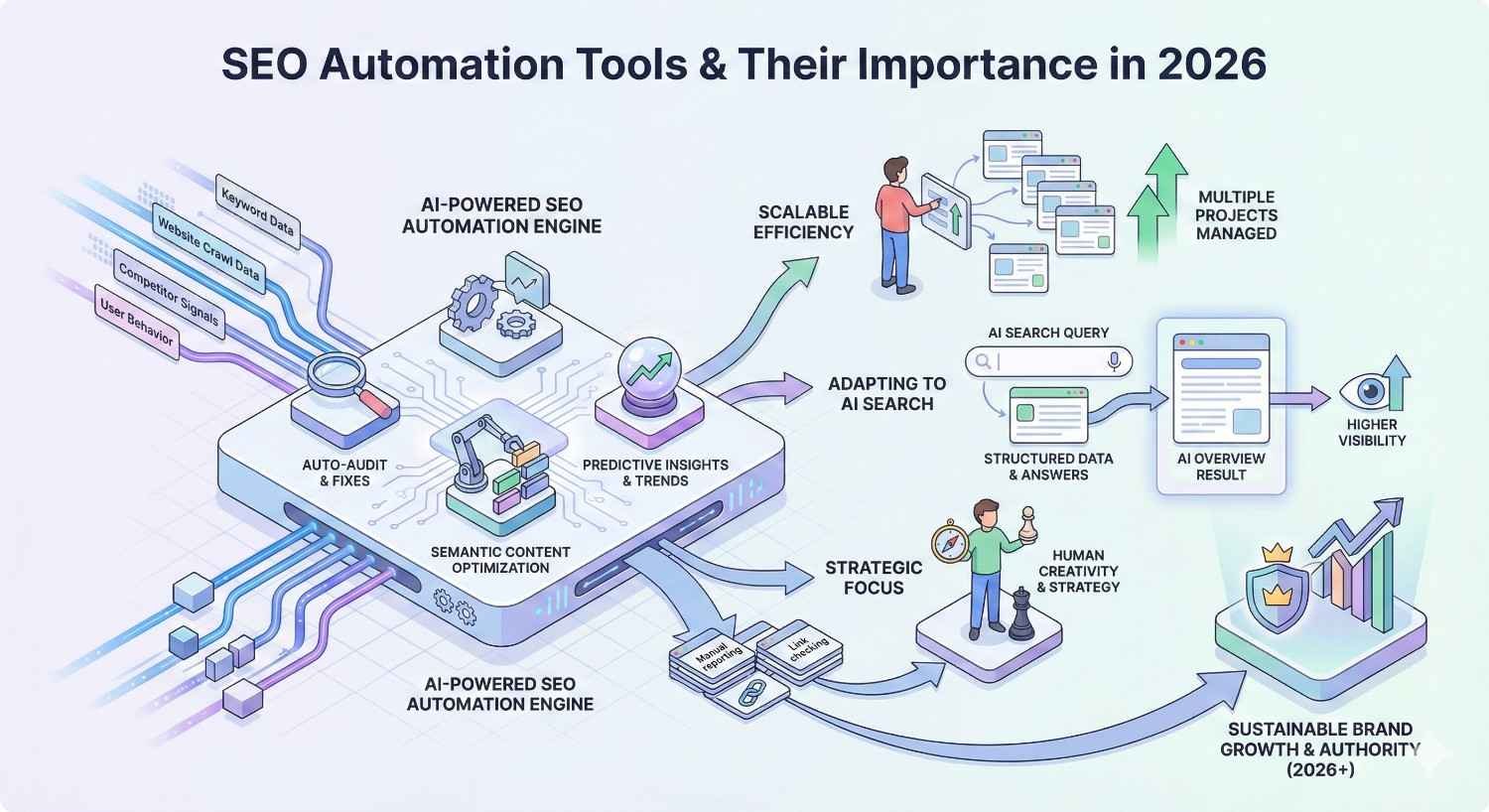
What Are SEO Automation Tools and Why Do They Matter in 2026?
SEO automation tools are software platforms that handle repetitive search optimization tasks without constant manual intervention. They monitor rankings, crawl websites for technical issues, analyze content against competitors, track backlinks, and generate reports automatically. The goal is simple: free up human expertise for strategic work that machines can’t replicate.
In 2026, these tools matter more than ever because SEO complexity has increased dramatically. Google’s algorithm updates happen continuously. Competitors publish content faster. Technical requirements grow more demanding. Manual processes that worked five years ago now create bottlenecks that slow organic growth.
The best automation tools don’t replace SEO professionals. They amplify what skilled practitioners can accomplish. A single SEO manager with the right automation stack can now handle workloads that previously required entire teams.
How SEO Automation Has Evolved Beyond Basic Scheduling
Early SEO tools offered simple scheduling. Set a time, run a crawl, get a report. That was revolutionary in 2015. Today’s automation operates on an entirely different level.
Modern platforms use machine learning to identify patterns humans would miss. They predict ranking fluctuations before they happen. They automatically prioritize technical fixes based on traffic impact. They generate content briefs by analyzing hundreds of competing pages in seconds.
The shift from reactive to proactive automation represents the biggest change. Instead of telling you what happened last week, today’s tools alert you to problems as they occur and recommend specific fixes. ContentKing monitors your site continuously and sends alerts the moment a critical page loses its meta description. Semrush’s Position Tracking identifies ranking drops within 24 hours and correlates them with algorithm updates.
Integration capabilities have also transformed. Tools now connect directly with Google Search Console, Google Analytics 4, content management systems, and project management platforms. Data flows automatically between systems, eliminating manual export-import cycles that consumed hours weekly.
The Real Cost of Manual SEO Tasks (Time & Resource Analysis)
Manual SEO work carries hidden costs that compound over time. Consider what happens without automation:
Rank tracking for 500 keywords across 3 competitors requires approximately 4-6 hours weekly when done manually through Search Console and spreadsheets. An automated tool handles this in the background and delivers organized reports in minutes.
Technical audits of a 10,000-page website take 2-3 full days when crawling manually and documenting issues in spreadsheets. Automated crawlers complete the same audit overnight and categorize issues by priority.
Content optimization research for a single article involves analyzing 10-20 competing pages, extracting common topics, identifying keyword gaps, and structuring recommendations. Manually, this takes 3-4 hours per piece. Automated tools like Surfer SEO or Clearscope deliver comparable analysis in under 5 minutes.
Backlink monitoring across a portfolio of 50 referring domains requires weekly manual checks to identify lost links, new toxic links, or competitor gains. Automated monitoring handles this continuously and alerts you only when action is needed.
The cumulative impact is significant. A mid-sized company running manual SEO processes easily loses 40-60 hours monthly to tasks that automation handles better and faster. At average SEO specialist rates, that represents $3,000-$6,000 monthly in labor costs that could be redirected toward strategic initiatives.
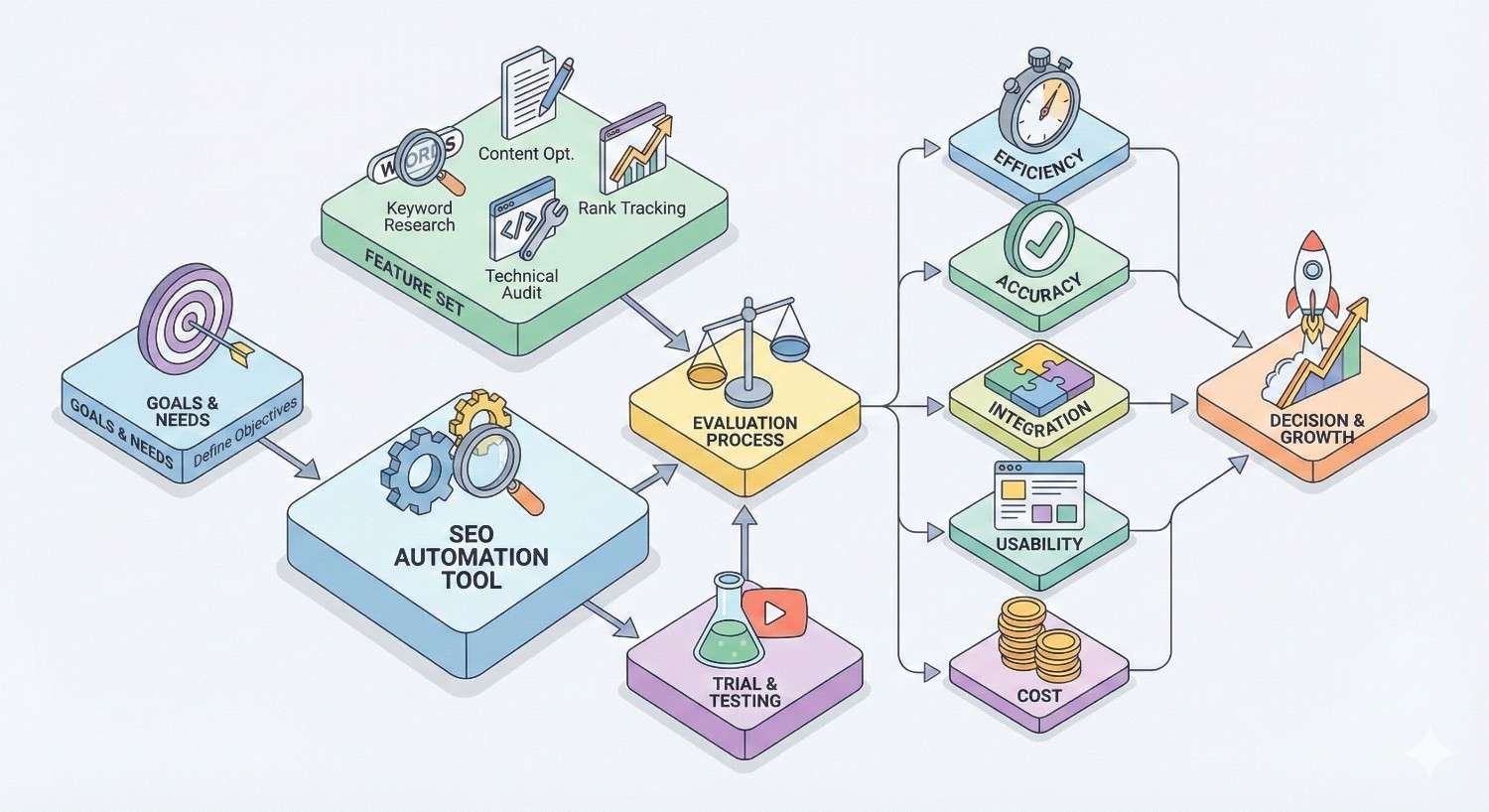
How We Evaluated These SEO Automation Tools
Selecting the best SEO automation tools required systematic evaluation across multiple dimensions. Marketing claims rarely match real-world performance, so we focused on measurable outcomes rather than feature lists.
Our evaluation prioritized tools that deliver genuine time savings on tasks SEO professionals actually perform daily. A platform might offer 50 features, but if the core automation functions are unreliable or require constant manual oversight, it fails the fundamental test.
Time-Saving Metrics and Measurement Criteria
We measured time savings by comparing manual task completion against automated alternatives for identical workflows. This included:
Setup time: How long does initial configuration take? Some tools require days of setup that offset months of time savings.
Ongoing maintenance: Does the automation truly run independently, or does it require frequent manual intervention to stay accurate?
Output usability: Are automated reports actionable immediately, or do they require significant interpretation and reformatting?
Alert accuracy: Do notifications identify real issues, or do they generate noise that wastes time investigating false positives?
Tools earned higher rankings when they reduced total time investment, including setup and maintenance, not just task execution time.
Integration Capabilities and Workflow Efficiency
Standalone tools create data silos. The best automation platforms connect seamlessly with existing workflows.
We evaluated native integrations with Google Search Console, Google Analytics 4, Looker Studio, popular CMS platforms like WordPress, and project management tools like Asana and Monday.com. API availability and documentation quality also factored into assessments.
Workflow efficiency extends beyond technical integration. We considered how easily teams can collaborate within each platform, whether automated reports can be white-labeled for client delivery, and how smoothly data exports for further analysis.
Accuracy, Reliability, and Data Quality Standards
Automation that produces inaccurate data creates more problems than it solves. We tested each tool’s data quality against verified sources.
Rank tracking accuracy was validated against manual Search Console position checks. Backlink data was compared against multiple sources to identify coverage gaps. Technical audit findings were verified through manual inspection of flagged issues.
Reliability encompasses uptime, consistent data refresh schedules, and responsive customer support when issues arise. Enterprise teams cannot build workflows around tools that experience frequent outages or unexplained data discrepancies.
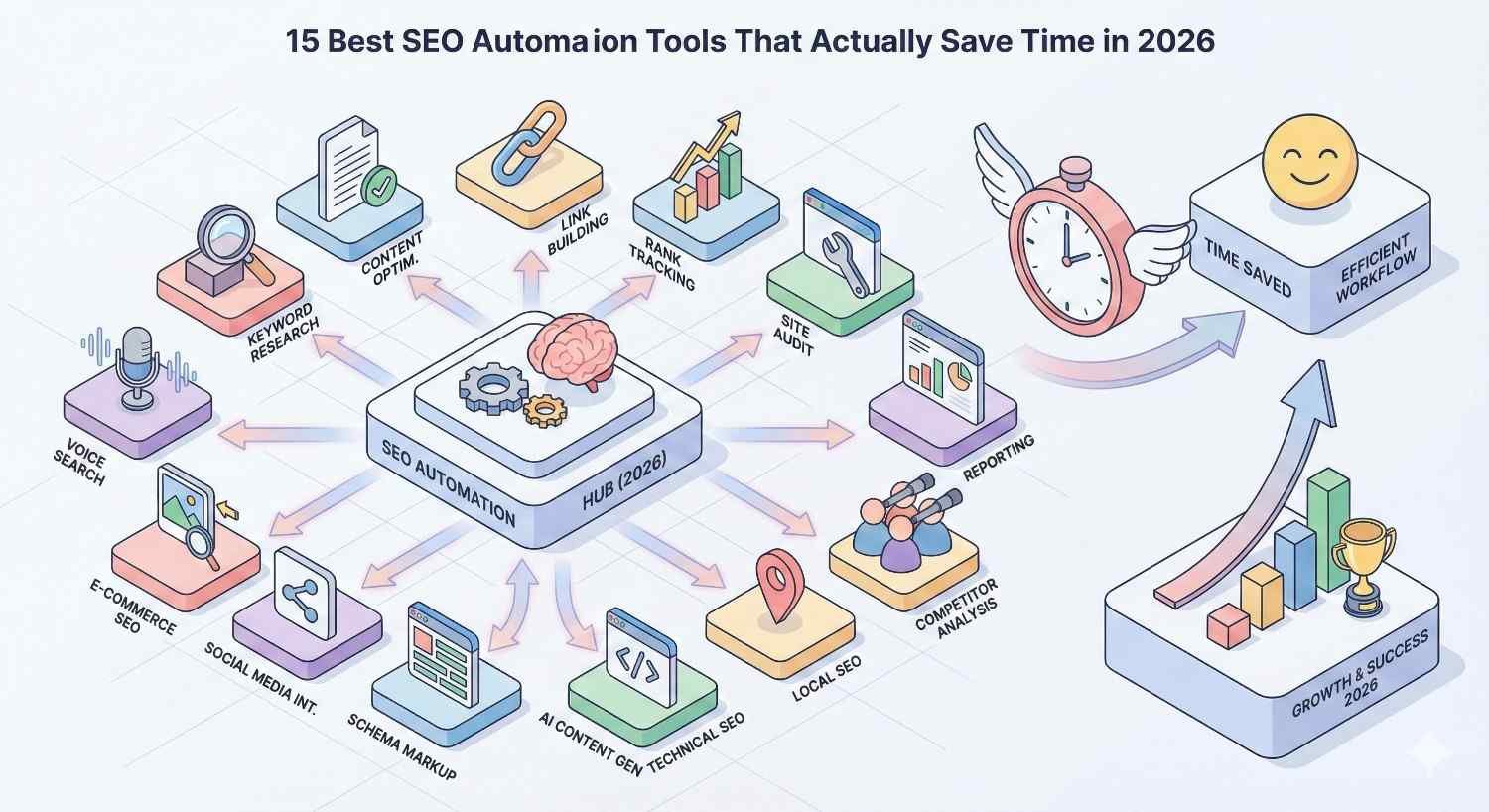
15 Best SEO Automation Tools That Actually Save Time in 2026
The following tools represent the strongest options across different use cases and budgets. Each recommendation includes specific automation capabilities, realistic time savings, current pricing, and ideal user profiles.
1. Semrush – Best All-in-One SEO Automation Platform
Semrush has evolved into the most comprehensive SEO automation platform available. It combines rank tracking, site auditing, backlink analysis, content optimization, and competitive research in a single interface with robust automation throughout.
The platform’s strength lies in workflow integration. Position Tracking monitors rankings daily and automatically flags significant changes. Site Audit runs on customizable schedules and prioritizes issues by impact. The Backlink Audit tool identifies toxic links and generates disavow files automatically.
Semrush’s newer AI features accelerate content workflows. The SEO Writing Assistant scores content in real-time against top-ranking competitors. ContentShake AI generates draft content and optimization recommendations, though human editing remains essential for quality.
Key Automation Features | Time Saved | Pricing | Best For
Key Automation Features:
- Automated daily rank tracking with change alerts
- Scheduled site audits with prioritized issue lists
- Backlink monitoring with automatic toxic link detection
- Content optimization scoring in real-time
- Automated competitor tracking and gap analysis
- Custom report scheduling and delivery
Time Saved: 12-18 hours weekly for teams managing multiple projects. The consolidated platform eliminates time switching between specialized tools.
Pricing: Plans start at $139.95/month (Pro) with Business plans at $499.95/month for agencies and larger teams. Annual billing reduces costs by approximately 17%.
Best For: Marketing agencies, in-house teams managing comprehensive SEO programs, and businesses wanting a single platform for most SEO automation needs.
2. Ahrefs – Best for Automated Backlink Monitoring & Analysis
Ahrefs maintains the largest backlink index in the industry, making it the definitive choice for link-focused automation. The platform crawls the web continuously, updating its index faster than competitors.
Backlink monitoring automation stands out. Set up alerts for new and lost backlinks to your domain or competitors. Track referring domain growth over time. Identify link building opportunities through automated gap analysis that shows where competitors have links you don’t.
The Site Audit feature runs scheduled crawls and tracks technical health over time. While not as comprehensive as dedicated technical SEO tools, it handles most common issues effectively.
Ahrefs’ Content Explorer automates content research by surfacing high-performing pages in any niche based on backlinks, traffic estimates, and social shares.
Key Automation Features | Time Saved | Pricing | Best For
Key Automation Features:
- Real-time backlink alerts for new and lost links
- Automated competitor backlink monitoring
- Scheduled site audits with historical tracking
- Rank tracking with SERP feature monitoring
- Content performance alerts based on traffic changes
- Automated broken link identification for outreach
Time Saved: 8-12 hours weekly for link building teams. Automated monitoring eliminates manual backlink checking and competitor research.
Pricing: Starts at $129/month (Lite) with Standard at $249/month and Advanced at $449/month. The Lite plan has significant limitations on tracked keywords and projects.
Best For: Link building specialists, agencies focused on authority building, and teams prioritizing backlink analysis over content optimization.
3. Surfer SEO – Best for Automated Content Optimization
Surfer SEO transformed content optimization from subjective guesswork into data-driven automation. The platform analyzes top-ranking pages for any keyword and generates specific recommendations for matching their optimization patterns.
The Content Editor provides real-time scoring as writers work. It identifies missing topics, suggests optimal word counts, recommends heading structures, and flags over-optimization. Writers see exactly what changes will improve their content score.
Surfer’s Audit feature analyzes existing content against current SERP leaders and generates prioritized improvement recommendations. This automation identifies quick-win optimization opportunities across entire content libraries.
The newer AI writing features generate draft content and outlines, though quality varies and human oversight remains necessary.
Key Automation Features | Time Saved | Pricing | Best For
Key Automation Features:
- Automated SERP analysis for content briefs
- Real-time content scoring during writing
- Existing content audit with improvement priorities
- NLP-based topic and term recommendations
- Automated internal linking suggestions
- Content structure optimization guidance
Time Saved: 3-5 hours per content piece. Research and optimization that previously took half a day now happens in under an hour.
Pricing: Essential plan at $89/month, Scale at $129/month with more articles and features. Enterprise pricing available for high-volume needs.
Best For: Content teams, freelance writers, and agencies producing SEO-focused content at scale.
4. Screaming Frog – Best for Automated Technical SEO Audits
Screaming Frog remains the industry standard for technical SEO crawling. The desktop application crawls websites with unmatched depth and configurability, identifying issues that cloud-based tools often miss.
Automation comes through scheduled crawls and change detection. Set crawls to run daily, weekly, or monthly. The tool compares results against previous crawls and highlights what changed. This catches technical regressions before they impact rankings.
Integration with Google Analytics, Search Console, and PageSpeed Insights enriches crawl data with performance metrics. Custom extraction pulls specific data elements from pages for analysis.
The learning curve is steeper than cloud-based alternatives, but the depth of analysis justifies the investment for technical SEO specialists.
Key Automation Features | Time Saved | Pricing | Best For
Key Automation Features:
- Scheduled crawls with automatic execution
- Change detection between crawl comparisons
- Custom extraction for specific data elements
- Integration with GA4, Search Console, PageSpeed
- Automated sitemap generation and validation
- Bulk export for further analysis
Time Saved: 6-10 hours weekly for technical SEO specialists managing multiple sites. Scheduled crawls eliminate manual audit initiation.
Pricing: Free version crawls up to 500 URLs. Paid license at $259/year removes limits and enables scheduling, making it exceptional value.
Best For: Technical SEO specialists, agencies managing site migrations, and teams requiring deep crawl analysis.
5. SE Ranking – Best Budget-Friendly Automation Suite
SE Ranking delivers comprehensive SEO automation at price points significantly below enterprise competitors. The platform covers rank tracking, site auditing, backlink monitoring, and content tools in a unified interface.
Automation capabilities match more expensive alternatives for core functions. Rank tracking updates daily with customizable alert thresholds. Site audits run on schedule and track issue resolution over time. The backlink checker monitors link profiles and identifies changes.
White-label reporting makes SE Ranking particularly attractive for agencies. Automated reports can be branded and scheduled for client delivery without manual intervention.
The platform’s competitive research tools have improved substantially, offering automated competitor tracking and gap analysis.
Key Automation Features | Time Saved | Pricing | Best For
Key Automation Features:
- Daily rank tracking with custom alerts
- Scheduled site audits with progress tracking
- Automated backlink monitoring and alerts
- White-label report scheduling
- Competitor tracking automation
- Social media monitoring integration
Time Saved: 10-15 hours weekly for small teams. Consolidated platform reduces tool-switching overhead.
Pricing: Starts at $65/month (Essential) with Pro at $119/month and Business at $259/month. Significantly more affordable than Semrush or Ahrefs.
Best For: Small businesses, startups, freelancers, and agencies seeking comprehensive automation without enterprise pricing.
6. Clearscope – Best for Automated Content Briefs & Scoring
Clearscope focuses exclusively on content optimization, delivering the most refined automated brief generation in the market. The platform analyzes search results and produces detailed content guidelines that writers can follow without SEO expertise.
Content briefs include recommended word counts, heading structures, topics to cover, and terms to include. The automation removes guesswork from content planning and ensures consistency across writing teams.
The grading system provides immediate feedback during writing. Content receives letter grades based on optimization completeness, making it easy for editors to identify pieces needing improvement.
Clearscope integrates directly with Google Docs and WordPress, embedding optimization guidance into existing writing workflows.
Key Automation Features | Time Saved | Pricing | Best For
Key Automation Features:
- Automated content brief generation
- Real-time content grading during writing
- Google Docs and WordPress integration
- Competitor content analysis automation
- Topic and term recommendations
- Content inventory scoring for existing pages
Time Saved: 2-4 hours per content piece on research and optimization. Brief generation that took hours now happens in minutes.
Pricing: Starts at $189/month (Essentials) with Professional at $399/month. Higher pricing reflects specialized focus and accuracy.
Best For: Content marketing teams, publications, and organizations prioritizing content quality over broad SEO toolsets.
7. BrightEdge – Best Enterprise SEO Automation Platform
BrightEdge serves enterprise organizations requiring SEO automation at massive scale. The platform handles millions of keywords, thousands of pages, and complex multi-site architectures that overwhelm smaller tools.
DataCube technology provides automated insights across enormous datasets. The platform identifies opportunities and issues that would be impossible to find manually at enterprise scale.
Automation extends to recommendations. BrightEdge doesn’t just report problems; it prioritizes fixes based on projected traffic impact and generates implementation guidance for development teams.
The ContentIQ feature monitors content performance continuously and alerts teams to optimization opportunities and declining pages.
Key Automation Features | Time Saved | Pricing | Best For
Key Automation Features:
- Enterprise-scale rank tracking automation
- Automated opportunity identification and prioritization
- ContentIQ continuous monitoring
- Integration with enterprise marketing stacks
- Automated competitive intelligence
- Custom dashboard and reporting automation
Time Saved: 20-40 hours weekly for enterprise teams. Scale efficiencies compound as site complexity increases.
Pricing: Custom enterprise pricing, typically $3,000-$10,000+ monthly depending on scale and features. Requires annual commitment.
Best For: Enterprise organizations, Fortune 500 companies, and large publishers managing complex SEO programs.
8. Conductor – Best for Automated SEO Insights & Recommendations
Conductor positions itself as an organic marketing platform, emphasizing actionable insights over raw data. The platform automates the analysis layer that typically requires senior SEO expertise.
Insight automation identifies what’s working, what’s declining, and what opportunities exist. Rather than presenting dashboards requiring interpretation, Conductor surfaces specific recommendations with projected impact.
The platform excels at connecting SEO data to business outcomes. Automated reporting ties organic performance to revenue metrics, making it easier to demonstrate SEO value to stakeholders.
Workflow automation routes tasks to appropriate team members and tracks completion, turning insights into action.
Key Automation Features | Time Saved | Pricing | Best For
Key Automation Features:
- Automated insight generation and prioritization
- Workflow automation for task routing
- Revenue attribution automation
- Competitive monitoring and alerts
- Content performance tracking
- Integration with enterprise systems
Time Saved: 15-25 hours weekly for enterprise teams. Insight automation reduces analysis time significantly.
Pricing: Enterprise pricing model, typically $2,000-$6,000+ monthly. Pricing varies based on features and scale.
Best For: Enterprise marketing teams, organizations requiring business outcome attribution, and teams needing workflow automation.
9. MarketMuse – Best for AI-Powered Content Planning Automation
MarketMuse pioneered AI-driven content strategy, automating the research and planning phases that traditionally required extensive manual analysis. The platform builds topic models that identify content gaps and prioritization.
Content inventory automation analyzes existing content against topic authority requirements. The platform identifies where you’re strong, where you’re weak, and what content would most efficiently build topical authority.
Brief generation goes beyond keyword recommendations. MarketMuse produces comprehensive content plans including structure, topics, questions to answer, and competitive positioning.
The personalized difficulty scores predict how hard it will be for your specific site to rank for topics, based on your existing authority.
Key Automation Features | Time Saved | Pricing | Best For
Key Automation Features:
- Automated topic modeling and gap analysis
- Content inventory analysis and scoring
- Personalized difficulty predictions
- Comprehensive brief generation
- Competitive content analysis
- Content optimization scoring
Time Saved: 5-8 hours weekly on content strategy and planning. Topic research that took days now happens in hours.
Pricing: Free plan with limited queries. Standard at $149/month, Team at $399/month. Enterprise pricing available.
Best For: Content strategists, publishers building topical authority, and teams prioritizing strategic content planning.
10. Sitebulb – Best for Automated Technical SEO Visualization
Sitebulb combines deep technical crawling with visualization that makes complex issues understandable. The platform automates not just data collection but interpretation, presenting findings in formats that non-technical stakeholders can grasp.
Hints and prioritization automation identifies issues and explains why they matter. Each finding includes context about SEO impact and implementation guidance.
The visualization capabilities set Sitebulb apart. Automated crawl maps, internal linking diagrams, and issue distribution charts communicate technical SEO status more effectively than spreadsheets.
Scheduled crawls and change tracking enable continuous monitoring without manual intervention.
Key Automation Features | Time Saved | Pricing | Best For
Key Automation Features:
- Scheduled crawls with change detection
- Automated issue prioritization and explanation
- Visual crawl mapping and diagrams
- Internal linking visualization
- PDF report generation
- Cloud and desktop deployment options
Time Saved: 4-8 hours weekly on technical auditing and reporting. Visualization reduces stakeholder communication time.
Pricing: Desktop license at $35/month or $280/year. Cloud version at $60/month or $480/year.
Best For: Technical SEO consultants, agencies presenting to clients, and teams needing visual technical reporting.
11. ContentKing – Best for Real-Time Automated SEO Monitoring
ContentKing monitors websites continuously, detecting changes as they happen rather than waiting for scheduled crawls. This real-time automation catches issues before they impact rankings.
The platform tracks every page change, from meta descriptions to content modifications to technical elements. Alerts notify teams immediately when critical changes occur, whether intentional or accidental.
Change tracking automation maintains complete audit trails. When rankings drop, teams can correlate timing with specific site changes to identify causes quickly.
Integration with development workflows enables monitoring of staging environments before changes go live.
Key Automation Features | Time Saved | Pricing | Best For
Key Automation Features:
- Real-time continuous monitoring
- Instant change detection and alerts
- Complete change history tracking
- Critical issue prioritization
- Integration with development workflows
- Multi-site monitoring from single dashboard
Time Saved: 5-10 hours weekly on monitoring and issue detection. Real-time alerts prevent extended ranking losses.
Pricing: Starts at $89/month for small sites. Pricing scales with pages monitored, reaching $500+ monthly for large sites.
Best For: E-commerce sites, publishers, and any organization where SEO issues have immediate revenue impact.
12. Frase – Best for Automated Research & Content Creation
Frase automates the research phase of content creation, pulling information from top-ranking pages and organizing it into usable formats. The platform bridges the gap between SEO tools and actual writing.
Research automation extracts key points, statistics, and topics from competing content. Writers receive organized research without spending hours reading competitor articles.
The AI writing features generate draft content, outlines, and answers to specific questions. While human editing remains essential, the automation accelerates first-draft creation significantly.
Content optimization scoring provides real-time feedback similar to Surfer SEO and Clearscope.
Key Automation Features | Time Saved | Pricing | Best For
Key Automation Features:
- Automated SERP research and extraction
- AI content generation and outlining
- Real-time content optimization scoring
- Question research automation
- Content brief generation
- Answer engine optimization features
Time Saved: 3-6 hours per content piece on research and drafting. Research automation provides the largest time savings.
Pricing: Solo plan at $15/month with limited features. Basic at $45/month, Team at $115/month.
Best For: Content creators, freelance writers, and small teams needing research automation at accessible pricing.
13. Botify – Best for Large-Scale Automated Crawl Analysis
Botify handles technical SEO at scales that break other tools. The platform crawls millions of pages and processes log file data to understand how search engines actually interact with large sites.
Log file analysis automation reveals crawl budget allocation, identifying pages that receive crawler attention and those being ignored. This data is impossible to obtain through standard crawling.
The platform connects crawl data with analytics and search console information, automating the correlation analysis that identifies why specific pages underperform.
Automated recommendations prioritize fixes based on projected traffic impact, focusing enterprise teams on highest-value improvements.
Key Automation Features | Time Saved | Pricing | Best For
Key Automation Features:
- Large-scale crawl automation (millions of pages)
- Log file analysis and crawl budget insights
- Automated data correlation across sources
- Impact-based recommendation prioritization
- JavaScript rendering analysis
- Custom segmentation and filtering
Time Saved: 30-50 hours weekly for enterprise technical teams. Scale efficiencies are dramatic for large sites.
Pricing: Enterprise pricing starting around $1,000+ monthly. Pricing varies significantly based on site size and features.
Best For: Large e-commerce sites, enterprise publishers, and organizations with millions of indexed pages.
14. seoClarity – Best for Automated Rank Tracking at Scale
seoClarity provides rank tracking automation designed for enterprise keyword volumes. The platform tracks millions of keywords across markets, devices, and locations without the limitations of smaller tools.
Daily rank tracking automation captures position changes across massive keyword sets. The platform identifies patterns and anomalies that would be invisible in smaller samples.
Automated competitive tracking monitors competitor rankings at the same scale, enabling comprehensive market analysis.
The Content Fusion feature automates content optimization similar to Surfer SEO and Clearscope, integrated within the broader enterprise platform.
Key Automation Features | Time Saved | Pricing | Best For
Key Automation Features:
- Enterprise-scale daily rank tracking
- Automated competitive rank monitoring
- Content optimization automation
- Custom reporting and dashboards
- API access for data integration
- Multi-market and multi-language tracking
Time Saved: 15-30 hours weekly for enterprise teams managing large keyword portfolios.
Pricing: Enterprise pricing model, typically $3,000-$8,000+ monthly depending on keyword volume and features.
Best For: Enterprise organizations tracking thousands of keywords, multi-national companies, and large agencies.
15. Keyword Insights – Best for Automated Keyword Clustering
Keyword Insights automates keyword clustering and search intent classification, transforming raw keyword lists into organized content strategies. The platform uses SERP analysis to group keywords that should target the same page.
Clustering automation analyzes search results to identify which keywords share ranking pages. This reveals content consolidation opportunities and prevents keyword cannibalization.
Intent classification automation categorizes keywords by search intent, enabling content planning that matches user expectations.
The platform generates content briefs based on clustered keywords, ensuring comprehensive topic coverage.
Key Automation Features | Time Saved | Pricing | Best For
Key Automation Features:
- Automated keyword clustering via SERP analysis
- Search intent classification
- Content brief generation from clusters
- Cannibalization identification
- Bulk keyword processing
- Export for content planning
Time Saved: 8-15 hours on keyword research projects. Clustering that took days now completes in hours.
Pricing: Starts at $58/month (Basic) with Pro at $145/month and Expert at $299/month.
Best For: Content strategists, SEO agencies handling keyword research, and teams building comprehensive content plans.
SEO Automation Tools Comparison Table (2026)
| Tool | Primary Strength | Starting Price | Time Saved/Week | Best For |
| Semrush | All-in-one platform | $139.95/mo | 12-18 hours | Agencies, comprehensive SEO |
| Ahrefs | Backlink analysis | $129/mo | 8-12 hours | Link building teams |
| Surfer SEO | Content optimization | $89/mo | 3-5 hrs/piece | Content teams |
| Screaming Frog | Technical audits | $259/year | 6-10 hours | Technical specialists |
| SE Ranking | Budget automation | $65/mo | 10-15 hours | Small businesses, startups |
| Clearscope | Content briefs | $189/mo | 2-4 hrs/piece | Content marketing teams |
| BrightEdge | Enterprise scale | $3,000+/mo | 20-40 hours | Enterprise organizations |
| Conductor | Automated insights | $2,000+/mo | 15-25 hours | Enterprise marketing |
| MarketMuse | Content planning | $149/mo | 5-8 hours | Content strategists |
| Sitebulb | Technical visualization | $35/mo | 4-8 hours | Consultants, agencies |
| ContentKing | Real-time monitoring | $89/mo | 5-10 hours | E-commerce, publishers |
| Frase | Research automation | $45/mo | 3-6 hrs/piece | Writers, small teams |
| Botify | Large-scale crawling | $1,000+/mo | 30-50 hours | Enterprise technical SEO |
| seoClarity | Enterprise rank tracking | $3,000+/mo | 15-30 hours | Large keyword portfolios |
| Keyword Insights | Keyword clustering | $58/mo | 8-15 hours | Content planning |
How to Choose the Right SEO Automation Tool for Your Business
Selecting the right automation tools depends on your specific situation, budget, and priorities. The best tool for an enterprise publisher differs dramatically from the best choice for a startup.
For Startups and Small Businesses
Budget constraints require prioritization. Focus on tools that automate your biggest time drains first.
Recommended approach: Start with SE Ranking for comprehensive coverage at accessible pricing. Add Surfer SEO or Frase if content production is a priority. Use Screaming Frog’s free version for technical audits until you outgrow the 500-URL limit.
Total monthly investment: $65-$150 covers most automation needs for small teams.
Key consideration: Avoid enterprise tools that offer features you won’t use. The complexity overhead isn’t worth it at smaller scales.
For Marketing Agencies Managing Multiple Clients
Agencies need white-label capabilities, multi-project management, and efficient client reporting.
Recommended approach: Semrush or SE Ranking provide the best agency-focused features with white-label reporting. Add Surfer SEO or Clearscope for content clients. Use Screaming Frog for technical audits across client sites.
Total monthly investment: $300-$600 covers most agency automation needs.
Key consideration: Prioritize tools with strong API access and integration capabilities. Agency workflows require data to flow between systems.
For Enterprise Teams and Large Websites
Enterprise scale requires tools built for complexity. Consumer-grade tools break down at enterprise volumes.
Recommended approach: BrightEdge, Conductor, or seoClarity for core platform needs. Add Botify for technical SEO on large sites. ContentKing for real-time monitoring of critical pages.
Total monthly investment: $5,000-$15,000+ depending on scale and feature requirements.
Key consideration: Total cost of ownership matters more than subscription price. Enterprise tools that reduce headcount requirements or prevent revenue-impacting issues justify premium pricing.
For In-House SEO Teams with Limited Resources
Small in-house teams need maximum automation with minimal complexity.
Recommended approach: Semrush provides the broadest automation in a single platform, reducing tool management overhead. Add Screaming Frog for deeper technical analysis. Consider Surfer SEO if content optimization is a frequent task.
Total monthly investment: $200-$400 covers comprehensive automation for lean teams.
Key consideration: Consolidation reduces context-switching costs. One comprehensive tool often outperforms multiple specialized tools for small teams.
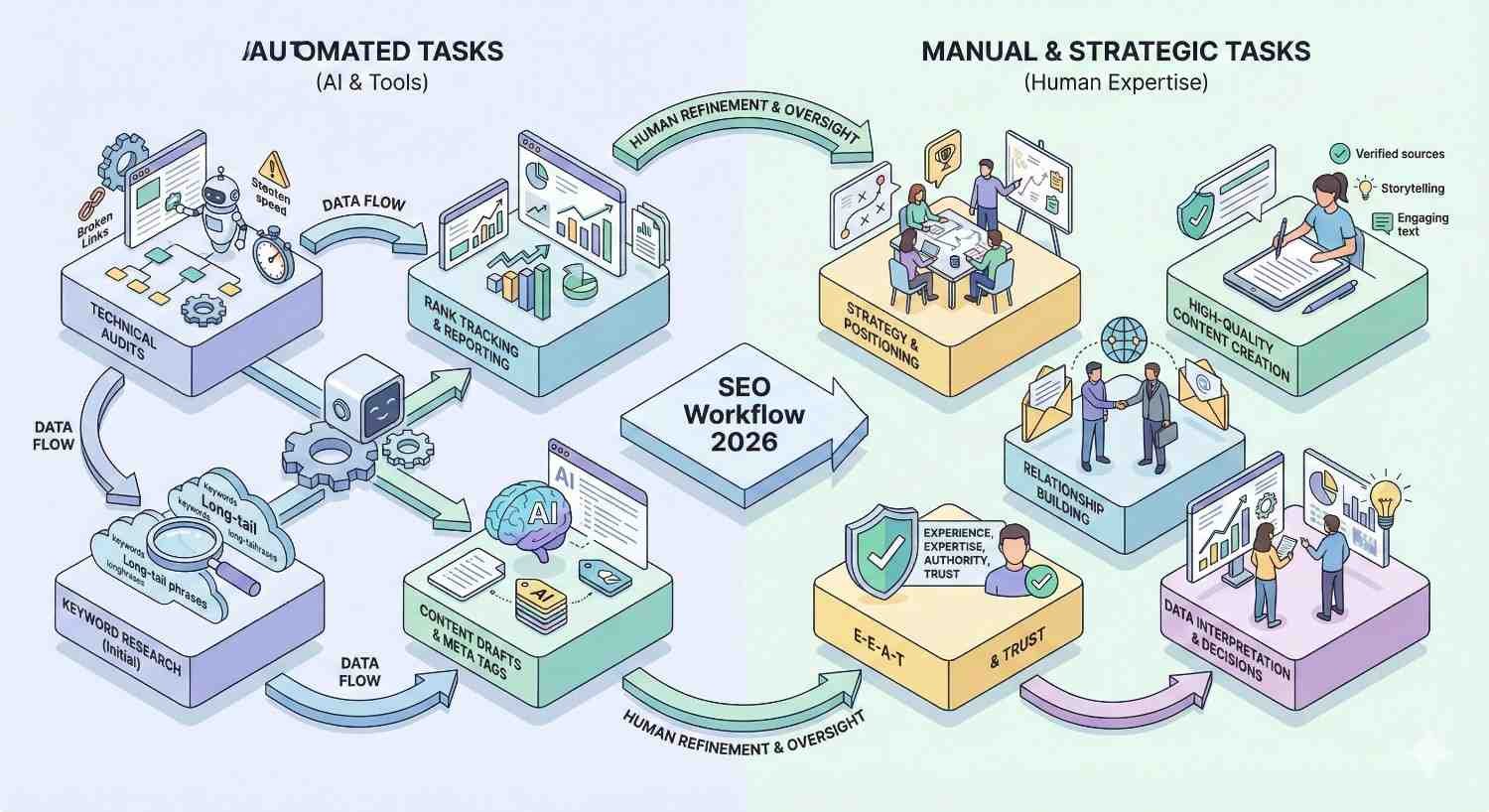
What SEO Tasks Can (and Can’t) Be Automated in 2026?
Understanding automation boundaries prevents both underutilization and over-reliance. Some tasks automate beautifully. Others require human judgment that no tool can replicate.
High-Value Automation Opportunities
Rank Tracking & Reporting
Rank tracking is perhaps the most valuable automation opportunity. Manual position checking is tedious, error-prone, and scales poorly. Automated tracking provides daily updates across thousands of keywords with change alerts and historical trending.
Reporting automation transforms raw data into stakeholder-ready formats. Scheduled reports deliver consistent updates without manual compilation.
Technical Audits & Error Detection
Crawling websites for technical issues is perfectly suited to automation. Tools identify broken links, missing meta tags, duplicate content, crawl errors, and hundreds of other issues faster and more comprehensively than manual review.
Continuous monitoring catches issues as they occur rather than waiting for periodic audits.
Content Optimization Scoring
Analyzing competing content and generating optimization recommendations automates effectively. Tools can identify topic gaps, suggest terms to include, and score content against SERP leaders.
The research phase of content creation, traditionally requiring hours of competitor analysis, now happens in minutes.
Backlink Monitoring & Alerts
Tracking backlink profiles, identifying new and lost links, and monitoring competitor link building all automate well. Manual backlink checking is impractical at any meaningful scale.
Automated alerts notify teams of significant changes requiring attention.
Tasks That Still Require Human Expertise
Strategy Development
No tool can determine your SEO strategy. Automation provides data and insights, but deciding which opportunities to pursue, how to allocate resources, and what trade-offs to accept requires human judgment.
Strategic decisions depend on business context that tools cannot understand: competitive positioning, brand considerations, resource constraints, and organizational priorities.
Content Creation & Quality Control
AI writing tools have improved dramatically, but they cannot replace human content creation for quality-focused SEO. Generated content requires substantial editing to meet quality standards.
More importantly, truly valuable content requires expertise, original insights, and perspectives that AI cannot provide. Automation accelerates research and optimization, but humans create content worth ranking.
Relationship-Based Link Building
Outreach, relationship development, and earning links from authoritative sources remain fundamentally human activities. Tools can identify opportunities and track progress, but building relationships requires genuine human connection.
Automated outreach at scale typically produces poor results and can damage brand reputation.
Competitive Analysis Interpretation
Tools provide competitive data, but interpreting what it means for your strategy requires human analysis. Understanding why competitors rank, what they’re doing well, and how to differentiate requires strategic thinking beyond data processing.
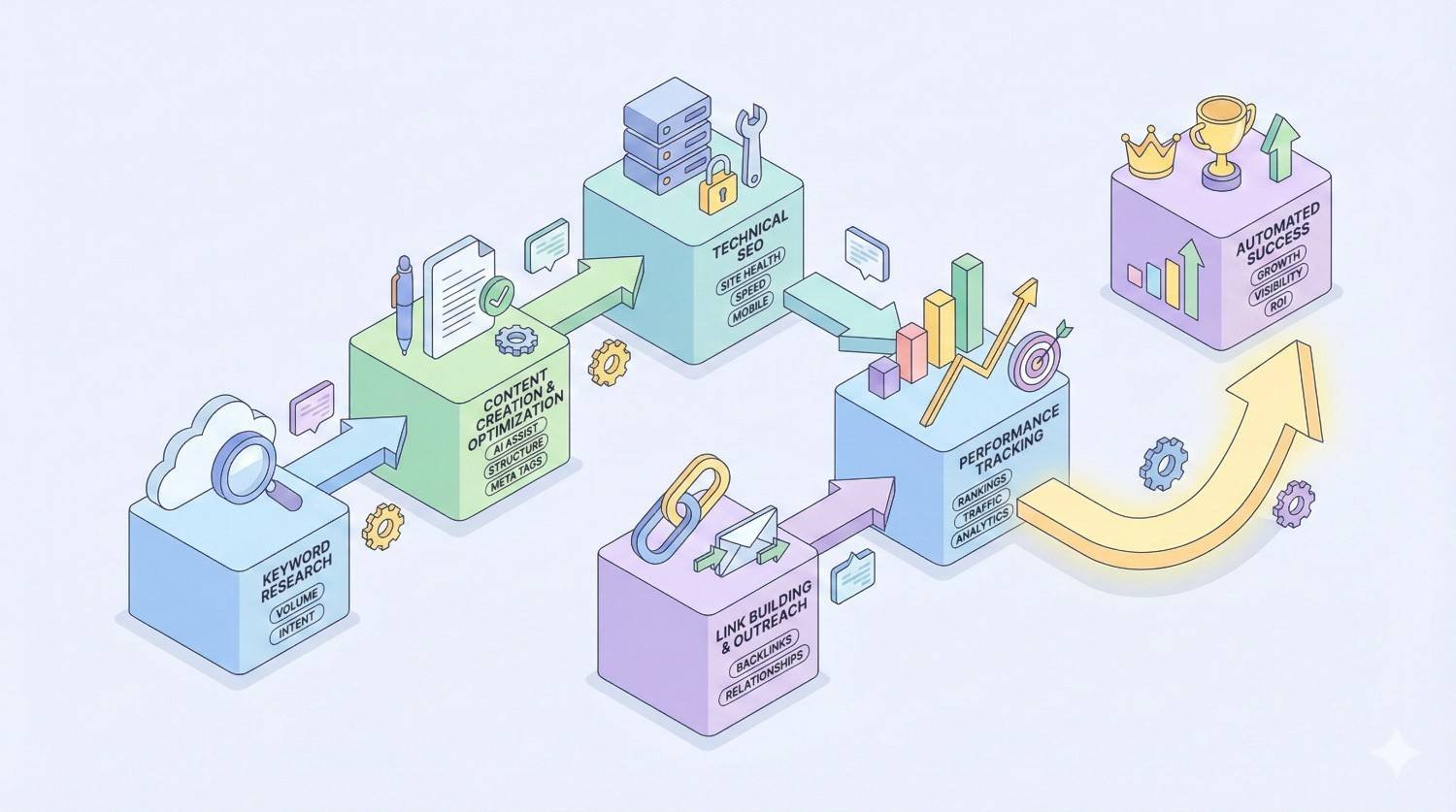
How to Build an Automated SEO Workflow (Step-by-Step)
Implementing SEO automation effectively requires systematic planning. Random tool adoption creates complexity without proportional benefit.
Step 1 – Audit Your Current Manual Processes
Before selecting tools, document your current SEO workflows in detail. Track time spent on each task category over 2-4 weeks.
Identify which tasks consume the most time, which are most repetitive, and which create bottlenecks. This audit reveals where automation will deliver the greatest impact.
Common time sinks include rank checking, report compilation, technical issue identification, content research, and backlink monitoring.
Step 2 – Identify Time-Intensive Repetitive Tasks
From your audit, prioritize tasks that are both time-intensive and highly repetitive. These offer the best automation ROI.
Tasks requiring judgment, creativity, or relationship building are poor automation candidates regardless of time investment. Focus on data collection, monitoring, and reporting tasks.
Create a prioritized list ranking automation opportunities by time savings potential and implementation complexity.
Step 3 – Select Tools Based on Integration Needs
Choose tools that integrate with your existing systems. Standalone tools that require manual data transfer create new bottlenecks.
Map your current technology stack: CMS, analytics, project management, reporting tools. Prioritize SEO tools with native integrations or robust APIs for custom connections.
Consider total workflow impact, not just individual tool capabilities. A slightly less powerful tool that integrates seamlessly often outperforms a superior tool that creates data silos.
Step 4 – Set Up Automated Reporting Dashboards
Configure automated reports that deliver insights without manual compilation. Most SEO tools offer scheduled report delivery via email or dashboard updates.
Design reports for specific audiences. Executive summaries differ from technical team reports. Automate each report type separately with appropriate metrics and detail levels.
Establish consistent reporting cadences: weekly operational reports, monthly performance summaries, quarterly strategic reviews.
Step 5 – Create Alert Systems for Critical Issues
Configure alerts for issues requiring immediate attention. Not everything needs an alert; focus on critical items.
Priority alert categories include significant ranking drops, technical errors on high-value pages, lost backlinks from important domains, and security issues.
Set appropriate thresholds to avoid alert fatigue. An alert for every minor ranking fluctuation becomes noise that gets ignored.
Common SEO Automation Mistakes to Avoid
Automation implementation frequently goes wrong in predictable ways. Avoiding these mistakes maximizes automation value.
Over-Relying on Automation Without Human Oversight
Automation handles execution, not judgment. Teams that set up automation and stop paying attention eventually face problems.
Automated recommendations aren’t always correct. Content optimization tools sometimes suggest changes that hurt readability. Technical audit tools flag issues that aren’t actually problems. Rank tracking can miss context that explains fluctuations.
Maintain regular human review of automated outputs. Trust but verify.
Using Too Many Disconnected Tools
Tool proliferation creates complexity that offsets automation benefits. Each additional tool requires learning, maintenance, and data reconciliation.
Data discrepancies between tools create confusion. Which rank tracking data is correct when two tools show different positions? Time spent reconciling conflicting data erases time saved by automation.
Consolidate where possible. A comprehensive platform that handles 80% of needs often outperforms five specialized tools that each handle 20%.
Ignoring Data Accuracy and Quality Checks
Automated data isn’t automatically accurate. Tools have bugs, data sources have gaps, and algorithms make mistakes.
Periodically validate automated data against primary sources. Check rank tracking against Search Console. Verify backlink data through manual spot checks. Confirm technical audit findings through direct inspection.
Build validation into your workflows rather than assuming automation is always correct.
SEO Automation ROI: Calculating Time and Cost Savings
Justifying automation investment requires quantifying returns. Time savings translate directly to cost savings and capacity expansion.
Average Hours Saved Per Month by Task Type
Based on typical implementations, expect the following monthly time savings:
Rank tracking and reporting: 15-25 hours saved versus manual processes
Technical auditing: 10-20 hours saved versus manual crawling and documentation
Content optimization research: 2-4 hours saved per content piece
Backlink monitoring: 8-15 hours saved versus manual checking
Competitive analysis: 10-20 hours saved versus manual research
Total monthly savings for comprehensive automation typically range from 40-80 hours for mid-sized operations.
How to Measure Automation ROI for Your Team
Calculate ROI using this framework:
Time savings value: Hours saved monthly × hourly labor cost = monthly labor savings
Tool costs: Total monthly subscription costs for automation tools
Net savings: Monthly labor savings – tool costs = net monthly savings
ROI percentage: (Net savings / tool costs) × 100
Example calculation:
- 50 hours saved monthly × $50/hour = $2,500 labor savings
- Tool costs: $500/month
- Net savings: $2,000/month
- ROI: 400%
Beyond direct savings, consider capacity expansion. Those 50 hours can be redirected to strategic work that drives additional organic growth.
Frequently Asked Questions About SEO Automation Tools
What is the best free SEO automation tool in 2026?
Google Search Console remains the best free SEO tool, providing rank tracking, technical issue identification, and performance data directly from Google. Screaming Frog’s free version handles technical audits for sites under 500 pages. For content optimization, Frase offers a limited free tier. However, free tools have significant limitations; budget-friendly paid options like SE Ranking provide substantially more automation value.
Can SEO automation replace an SEO specialist?
No. Automation handles repetitive tasks and data processing, but SEO strategy, content creation, relationship building, and result interpretation require human expertise. The best outcomes come from skilled SEO professionals using automation to amplify their capabilities, not from automation operating independently.
How much do SEO automation tools cost?
Costs range from free to $10,000+ monthly depending on scale and features. Small businesses can implement comprehensive automation for $100-$300 monthly. Mid-sized operations typically spend $300-$1,000 monthly. Enterprise implementations range from $3,000-$15,000+ monthly. Annual billing usually reduces costs by 15-20%.
Which SEO automation tool is best for beginners?
SE Ranking offers the best combination of comprehensive features and accessibility for beginners. The interface is intuitive, pricing is affordable, and the platform covers most automation needs without overwhelming complexity. Semrush is also beginner-friendly but costs more.
Are AI-powered SEO tools worth the investment?
AI features add genuine value for content optimization, topic research, and insight generation. However, AI-generated content still requires significant human editing to meet quality standards. Evaluate AI tools based on specific use cases rather than general AI capabilities. The research and analysis applications typically deliver better ROI than content generation.
How do I integrate SEO automation tools with my existing stack?
Most modern SEO tools offer native integrations with Google Search Console, Google Analytics 4, and popular CMS platforms. For custom integrations, look for tools with robust API access. Zapier and similar automation platforms can connect tools that lack native integrations. Prioritize tools that fit your existing workflow rather than forcing workflow changes to accommodate tools.
How long does it take to see ROI from SEO automation tools?
Most teams see positive ROI within 30-60 days of proper implementation. Initial setup requires time investment, but ongoing time savings begin immediately once automation is configured. The key is focusing automation on your highest-time-consumption tasks first rather than trying to automate everything simultaneously.
Final Verdict: Which SEO Automation Tool Should You Choose?
After comprehensive evaluation, clear recommendations emerge for different priorities and situations.
Best Overall Tool for Time Savings
Semrush delivers the greatest total time savings for most organizations. The consolidated platform eliminates tool-switching overhead while providing automation across rank tracking, technical auditing, backlink monitoring, content optimization, and competitive analysis. Teams using Semrush as their primary platform consistently report 12-18 hours weekly in time savings.
Best Value for Money
SE Ranking provides exceptional value, delivering 80-90% of enterprise tool capabilities at a fraction of the cost. For organizations where budget matters, SE Ranking’s $65-$119 monthly pricing delivers comprehensive automation that would cost $300-$500 with premium alternatives.
Our Recommendation Based on Business Size
Startups and small businesses: Start with SE Ranking plus Screaming Frog’s free version. Add Surfer SEO or Frase when content production scales.
Growing businesses and agencies: Semrush provides the best foundation. Add specialized tools like Clearscope or Sitebulb for specific needs.
Enterprise organizations: BrightEdge or Conductor for core platform needs, supplemented by Botify for technical SEO and ContentKing for real-time monitoring.
The right automation stack depends on your specific situation, but every organization benefits from strategic automation implementation. The tools exist to save significant time. The question is which combination best fits your workflows, budget, and growth objectives.
Conclusion
SEO automation tools have matured into essential infrastructure for sustainable organic growth. The 15 platforms covered in this guide represent the strongest options available in 2026, each excelling in specific use cases from comprehensive all-in-one solutions to specialized technical analysis.
The key insight isn’t which tool is objectively best. It’s which combination matches your team’s specific needs, budget constraints, and workflow requirements. A startup’s optimal stack looks nothing like an enterprise configuration, and that’s exactly how it should be.
We help businesses implement SEO automation as part of comprehensive organic growth strategies. If you’re ready to stop spending hours on manual tasks and start focusing on strategic work that drives results, White Label SEO Service can guide your automation implementation and overall SEO program. Reach out to discuss which tools and approaches fit your specific situation.


