

The right SEO content optimization tool can cut your content production time by half while dramatically improving your search rankings. These platforms analyze top-performing pages, identify semantic gaps, and guide writers toward content that satisfies both users and algorithms.
Content optimization has become essential as Google’s algorithms grow more sophisticated. Without proper tooling, you’re essentially guessing what search engines want to see.
This guide reviews 15 leading content optimization tools for 2026, covering features, pricing, and ideal use cases to help you choose wisely.

What Are SEO Content Optimization Tools?
SEO content optimization tools are specialized software platforms designed to help content creators produce search-friendly content. Unlike general SEO platforms that focus on technical audits or backlink analysis, these tools concentrate specifically on improving the quality and relevance of your written content.
These platforms analyze search engine results pages, extract patterns from top-ranking content, and provide actionable recommendations for writers. They bridge the gap between what you write and what search engines reward with visibility.
Core Functions of Content Optimization Software
Content optimization software performs several critical functions that manual analysis cannot match at scale.
Semantic analysis examines how top-ranking pages cover topics. The tool identifies terms, phrases, and concepts that appear consistently across successful content. This goes beyond simple keyword matching to understand topical relationships.
Content scoring provides real-time feedback as you write. Most tools assign numerical scores based on factors like keyword coverage, readability, content length, and semantic completeness. Writers can see immediately whether their content meets competitive benchmarks.
SERP analysis pulls data from current search results to understand what Google rewards for specific queries. This includes analyzing content structure, word counts, heading usage, and topic coverage patterns.
Content brief generation automates the research phase. Tools create detailed outlines with recommended headings, questions to answer, and terms to include based on competitive analysis.
NLP and entity optimization helps content align with how search engines understand language. Modern tools identify entities, relationships, and semantic contexts that strengthen topical relevance.
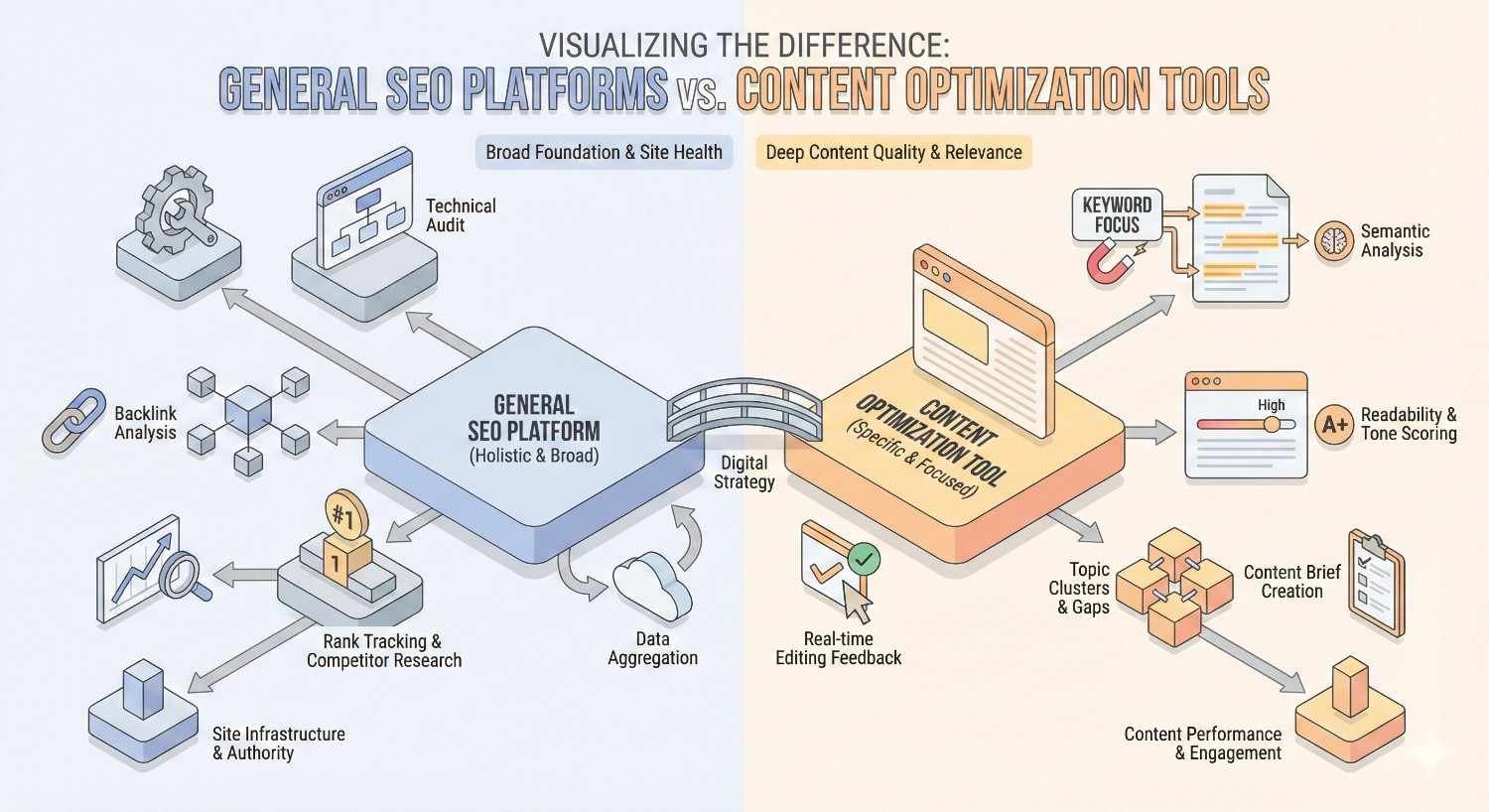
How Content Optimization Tools Differ from General SEO Platforms
General SEO platforms like Ahrefs or Semrush excel at technical audits, backlink analysis, and keyword research. They tell you what keywords to target and how your site performs technically.
Content optimization tools pick up where those platforms stop. They focus specifically on making individual pieces of content more competitive for target keywords.
The distinction matters for workflow efficiency. A general SEO platform might show you that a keyword has 10,000 monthly searches and medium difficulty. A content optimization tool shows you exactly how to write content that can rank for that keyword.
Most teams use both tool types together. General SEO platforms inform strategy and identify opportunities. Content optimization tools execute that strategy at the page level.
How We Evaluated These SEO Content Optimization Tools
Our evaluation process involved hands-on testing of each platform across multiple content projects. We assessed real-world performance rather than relying solely on feature lists or marketing claims.
Evaluation Criteria and Testing Methodology
We tested each tool using identical content briefs across three industries: B2B SaaS, e-commerce, and professional services. This approach revealed how tools perform across different content types and competitive landscapes.
Testing parameters included:
- Time required to generate usable content briefs
- Accuracy of competitor analysis compared to manual SERP review
- Usefulness of optimization recommendations during writing
- Learning curve for new users
- Integration capabilities with common content workflows
We also tracked content performance over 90 days for pieces optimized using each tool. While many factors influence rankings, this data provided directional insights about tool effectiveness.
Semantic Analysis Capabilities
Semantic analysis quality varies significantly between platforms. We evaluated each tool’s ability to identify relevant terms beyond exact-match keywords.
Strong semantic analysis should surface:
- Related concepts and subtopics
- Questions users ask about the topic
- Entities and their relationships
- Contextual terms that signal topical depth
Tools with advanced NLP capabilities consistently produced more comprehensive content recommendations. Basic tools often missed important semantic connections that manual analysis would catch.
Content Scoring and Recommendations
Content scoring systems differ in methodology and usefulness. Some tools use simple keyword density calculations. Others employ sophisticated algorithms that consider semantic relationships, content structure, and competitive benchmarks.
We evaluated scoring systems based on:
- Correlation between high scores and actual ranking performance
- Actionability of specific recommendations
- Balance between optimization guidance and creative flexibility
- Handling of different content types and industries
The best scoring systems provide clear direction without encouraging over-optimization. They help writers understand what’s missing without demanding robotic keyword insertion.
Integration and Workflow Efficiency
Content optimization tools must fit into existing workflows to deliver value. We assessed integration capabilities with:
- Google Docs and Microsoft Word
- WordPress and other CMS platforms
- Project management tools
- Team collaboration features
Tools that require constant context-switching between platforms reduce productivity gains. The most effective tools embed directly into writing environments where content creation happens.
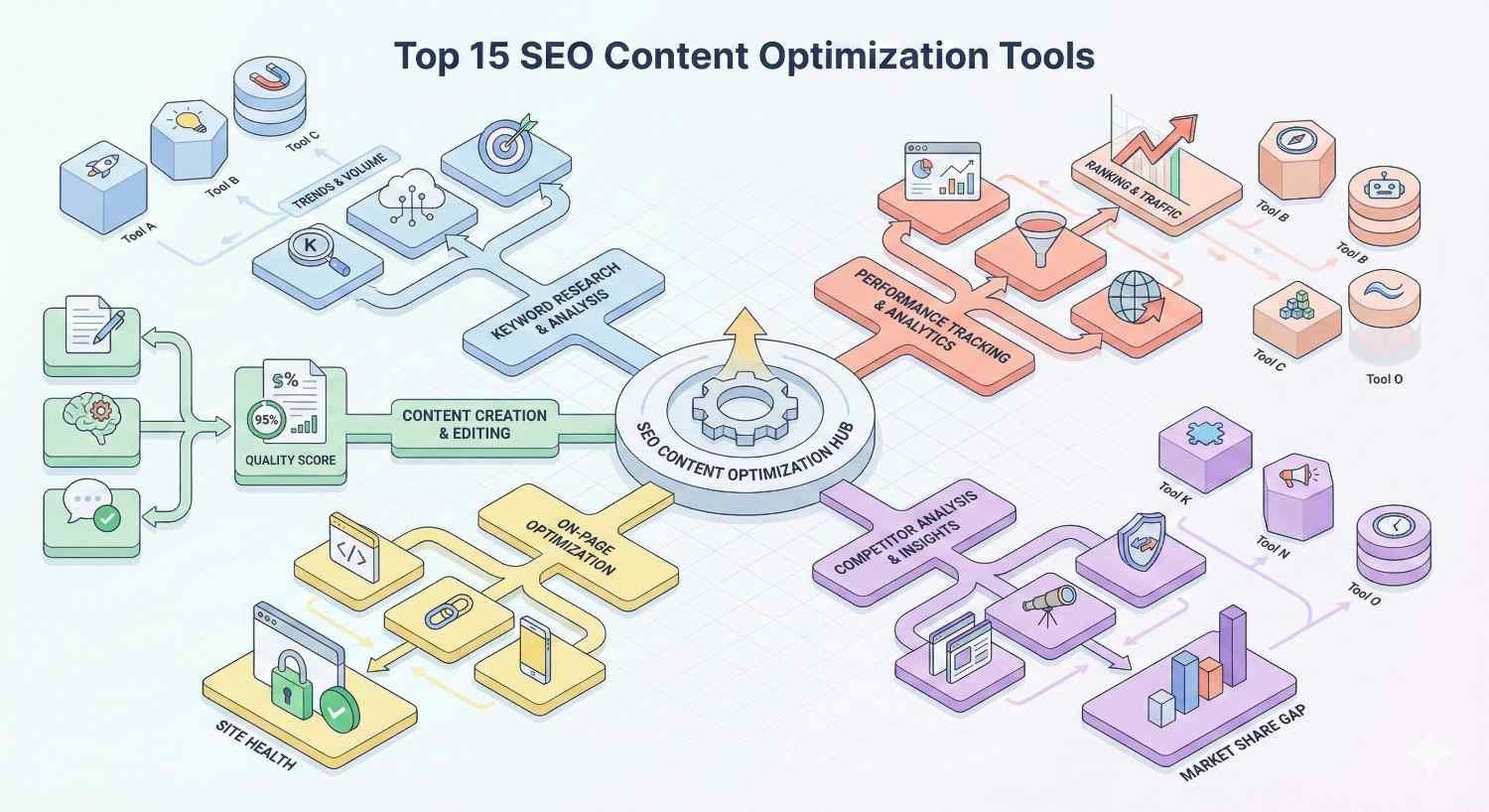
Top 15 SEO Content Optimization Tools Compared (2026)
Quick Comparison Table: Features, Pricing, and Best Use Cases
| Tool | Starting Price | Best For | Key Strength |
| Clearscope | $189/month | Enterprise content operations | Comprehensive semantic analysis |
| MarketMuse | $149/month | Semantic SEO and topic modeling | Content inventory analysis |
| Surfer SEO | $89/month | Real-time content scoring | SERP-based optimization |
| Frase | $15/month | AI-powered content briefs | Research automation |
| Semrush Writing Assistant | $139.95/month | SERP analysis and competitor research | All-in-one integration |
| Content Harmony | $99/month | Content teams and collaboration | Workflow management |
| NeuronWriter | $23/month | Budget-friendly SME option | Value pricing |
| InLinks | $39/month | NLP and entity optimization | Internal linking automation |
| Dashword | $99/month | Content performance tracking | Analytics integration |
| Rank Math Content AI | $6.99/month | WordPress users | Native WP integration |
| Salsify | Custom pricing | E-commerce content | Product content optimization |
| BrightLocal | $39/month | Local SEO content | Location-based optimization |
| Ahrefs Content Explorer | $129/month | Content gap analysis | Competitive intelligence |
| Screaming Frog + Plugins | $259/year | Technical SEO integration | Crawl-based insights |
| SE Ranking | $65/month | All-in-one SEO suite | Comprehensive feature set |
1. Clearscope – Best for Enterprise Content Operations
Clearscope has established itself as the premium choice for organizations producing content at scale. The platform combines sophisticated semantic analysis with enterprise-grade workflow features.
Key Features and Content Optimization Capabilities
Clearscope’s content grading system analyzes top-ranking pages and generates comprehensive term recommendations. The platform identifies not just keywords but semantic concepts that signal topical authority.
Core capabilities include:
- Real-time content grading with letter scores (A++ to F)
- Comprehensive term recommendations with usage guidance
- Google Docs and WordPress integrations
- Team collaboration and content inventory management
- Historical content performance tracking
The platform excels at identifying semantic gaps in existing content. Its content inventory feature analyzes your entire site and prioritizes optimization opportunities based on potential impact.
Clearscope’s recommendations tend toward comprehensiveness. The tool encourages thorough topic coverage rather than keyword stuffing, aligning well with modern search algorithms.
Pricing and Plans
Clearscope operates on a credit-based pricing model starting at $189/month for the Essentials plan, which includes 100 content reports monthly.
The Business plan at $399/month adds team features, API access, and increased report limits. Enterprise pricing is custom and includes dedicated support, advanced integrations, and unlimited users.
Annual billing provides approximately 20% savings across all tiers.
Pros and Cons
Pros:
- Industry-leading semantic analysis accuracy
- Clean, intuitive interface that writers actually enjoy using
- Strong Google Docs integration for seamless workflows
- Excellent customer support and onboarding
- Regular algorithm updates reflecting search changes
Cons:
- Premium pricing excludes smaller teams and individuals
- Credit-based model can feel restrictive for high-volume operations
- Limited keyword research capabilities compared to all-in-one platforms
- No built-in AI writing assistance
Best For
Clearscope fits best for content teams at mid-market and enterprise companies producing 20+ pieces monthly. Marketing agencies managing multiple client accounts also benefit from the platform’s scalability and white-label reporting options.
2. MarketMuse – Best for Semantic SEO and Topic Modeling
MarketMuse pioneered AI-driven content optimization and continues leading in semantic analysis sophistication. The platform thinks in topics and clusters rather than individual keywords.
Key Features and Content Optimization Capabilities
MarketMuse’s topic modeling capabilities set it apart from competitors. The platform maps entire topic areas, identifying content gaps and opportunities across your domain.
Standout features include:
- Content inventory analysis with optimization prioritization
- Topic authority scoring at the domain level
- Competitive content gap identification
- AI-generated first drafts based on optimization targets
- Personalized difficulty scores based on your existing authority
The platform’s personalized metrics deserve special attention. Rather than showing generic keyword difficulty, MarketMuse calculates how difficult a topic would be for your specific site based on existing content authority.
Content briefs from MarketMuse include detailed topic models showing how concepts relate to each other. This helps writers understand not just what to cover but how topics connect.
Pricing and Plans
MarketMuse offers a limited free tier for individual users exploring the platform.
The Standard plan starts at $149/month with limited queries and basic features. The Team plan at $399/month adds collaboration features and increased limits.
Premium and Enterprise tiers provide custom pricing with dedicated support, API access, and advanced features.
Pros and Cons
Pros:
- Most sophisticated topic modeling in the market
- Personalized difficulty scores based on your site’s authority
- Content inventory analysis identifies high-impact optimization opportunities
- Strong AI writing assistance for first drafts
- Excellent for building topical authority systematically
Cons:
- Steeper learning curve than simpler tools
- Interface can feel overwhelming for new users
- Higher price point for full feature access
- Some features require significant existing content to be useful
Best For
MarketMuse excels for organizations building comprehensive topical authority. Publishers, content-heavy brands, and companies pursuing aggressive content strategies benefit most from the platform’s strategic capabilities.
3. Surfer SEO – Best for Real-Time Content Scoring
Surfer SEO has grown from a simple content editor to a comprehensive optimization platform. Its real-time scoring system provides immediate feedback during the writing process.
Key Features and Content Optimization Capabilities
Surfer’s Content Editor remains its flagship feature. Writers receive live scores and recommendations as they type, with clear guidance on term usage, content length, and structure.
Key capabilities include:
- Real-time content scoring with specific term recommendations
- SERP Analyzer for detailed competitor breakdowns
- Grow Flow for automated optimization suggestions
- AI writing integration with Jasper and other tools
- Audit feature for existing content optimization
The platform’s SERP Analyzer provides granular data about ranking pages, including word counts, heading structures, keyword densities, and more. This data-driven approach appeals to analytically-minded content teams.
Surfer’s Grow Flow feature monitors your content and suggests optimization opportunities automatically. This proactive approach helps teams maintain content freshness without manual auditing.
Pricing and Plans
Surfer offers four pricing tiers starting at $89/month for the Essential plan with 30 Content Editor articles monthly.
The Scale plan at $129/month increases limits and adds AI writing credits. The Scale AI plan at $219/month provides substantial AI writing capabilities.
Enterprise pricing is custom and includes API access, white-label options, and dedicated support.
Pros and Cons
Pros:
- Intuitive real-time scoring that writers understand immediately
- Strong SERP analysis with actionable data
- Good value at lower price points
- Active development with frequent feature additions
- Chrome extension for quick analysis
Cons:
- Recommendations can sometimes encourage over-optimization
- AI writing quality varies by topic
- Limited content inventory features compared to MarketMuse
- Some advanced features locked behind higher tiers
Best For
Surfer SEO works well for content teams wanting immediate optimization feedback without extensive training. Agencies appreciate the scalable pricing and client-friendly reports. Individual content creators find the interface approachable.
4. Frase – Best for AI-Powered Content Briefs
Frase focuses on the research and planning phase of content creation. The platform automates content brief generation, reducing hours of manual research to minutes.
Key Features and Content Optimization Capabilities
Frase’s content brief generator pulls data from top-ranking pages and structures it into actionable outlines. Writers receive comprehensive starting points rather than blank pages.
Core features include:
- Automated content brief generation from SERP analysis
- AI writing assistance integrated into the editor
- Question research from People Also Ask and forums
- Topic clustering for content strategy planning
- Analytics integration for performance tracking
The platform’s question research capabilities stand out. Frase aggregates questions from multiple sources, helping writers address user intent comprehensively.
Frase’s AI writing features have improved significantly. The tool can generate full sections based on brief parameters, though human editing remains essential for quality.
Pricing and Plans
Frase offers aggressive pricing starting at just $15/month for the Solo plan with 10 documents monthly.
The Basic plan at $45/month provides 30 documents. The Team plan at $115/month adds collaboration features and unlimited documents.
All plans include AI writing capabilities, though with varying limits.
Pros and Cons
Pros:
- Excellent content brief automation saves significant research time
- Competitive pricing makes it accessible for individuals and small teams
- Strong question research for comprehensive content planning
- Intuitive interface with minimal learning curve
- Good AI writing assistance for first drafts
Cons:
- Semantic analysis less sophisticated than premium competitors
- Limited content inventory and site-wide analysis features
- Fewer integration options than larger platforms
- AI writing requires substantial editing for quality
Best For
Frase fits content creators and small teams prioritizing efficiency in the research phase. Freelance writers, small agencies, and startups benefit from the low price point and strong brief generation capabilities.
5. Semrush Writing Assistant – Best for SERP Analysis and Competitor Research
Semrush Writing Assistant integrates content optimization into the broader Semrush ecosystem. Users benefit from comprehensive SEO data alongside content recommendations.
Key Features and Content Optimization Capabilities
The Writing Assistant analyzes content against top-ranking competitors and provides optimization recommendations in real-time.
Key features include:
- Real-time content scoring within Google Docs, WordPress, and Semrush
- Readability analysis with specific improvement suggestions
- Tone of voice consistency checking
- Plagiarism detection
- SEO recommendations based on target keywords
The integration with Semrush’s keyword database adds significant value. Writers can access search volume, difficulty scores, and related keywords without leaving the content editor.
Semrush’s competitive analysis capabilities inform content recommendations. The tool understands not just what competitors write but how their content performs.
Pricing and Plans
Semrush Writing Assistant is included with Semrush subscriptions starting at $139.95/month for the Pro plan.
The Guru plan at $249.95/month adds content marketing features including the full Content Marketing Toolkit. The Business plan at $499.95/month provides agency-level features.
The Writing Assistant alone doesn’t justify Semrush pricing, but teams already using Semrush for SEO gain substantial value.
Pros and Cons
Pros:
- Seamless integration with comprehensive SEO data
- Multiple platform integrations (Google Docs, WordPress, MS Word)
- Plagiarism detection included
- Tone of voice analysis for brand consistency
- Strong competitive intelligence backing recommendations
Cons:
- Requires full Semrush subscription for access
- Content optimization features less sophisticated than dedicated tools
- Can feel like an add-on rather than a core product
- Limited AI writing capabilities compared to competitors
Best For
Semrush Writing Assistant makes sense for teams already invested in the Semrush ecosystem. The integration value outweighs standalone content optimization tools for these users. Teams needing combined SEO research and content optimization benefit from the unified platform.
6. Content Harmony – Best for Content Teams and Collaboration
Content Harmony focuses on the workflow challenges content teams face. The platform combines optimization capabilities with project management features.
Key Features and Content Optimization Capabilities
Content Harmony structures the entire content production process from keyword research through publication.
Core capabilities include:
- Comprehensive content briefs with search intent analysis
- Grading system for content quality assessment
- Workflow management with assignment and approval features
- Brand voice and style guide integration
- Team collaboration with commenting and feedback
The platform’s search intent analysis deserves attention. Content Harmony categorizes intent types and recommends content formats based on what ranks for target keywords.
Brief templates can be customized to match your content standards. This ensures consistency across writers and projects.
Pricing and Plans
Content Harmony pricing starts at $99/month for the Standard plan with 12 content workflows monthly.
The Professional plan at $299/month increases limits and adds advanced features. Enterprise pricing is custom and includes dedicated support and custom integrations.
Pros and Cons
Pros:
- Strong workflow management for content teams
- Excellent brief templates with customization options
- Search intent analysis guides content format decisions
- Good collaboration features for distributed teams
- Clean interface that non-technical users appreciate
Cons:
- Smaller user community than major competitors
- Fewer integrations than established platforms
- Limited AI writing capabilities
- Higher per-workflow cost than some alternatives
Best For
Content Harmony fits content teams needing structured workflows alongside optimization. Agencies managing multiple writers benefit from the assignment and approval features. In-house teams with established content processes find the workflow management valuable.
7. NeuronWriter – Best Budget-Friendly Option for SMEs
NeuronWriter delivers solid content optimization at price points accessible to small businesses and individual creators.
Key Features and Content Optimization Capabilities
NeuronWriter provides core optimization features without the premium pricing of market leaders.
Key features include:
- Content editor with real-time optimization scoring
- NLP-based term recommendations
- Competitor content analysis
- AI writing assistance
- Content planning and project management
The platform’s NLP analysis identifies semantic terms and entities relevant to target keywords. Recommendations help writers achieve topical depth without extensive manual research.
NeuronWriter’s AI writing features generate content sections based on optimization targets. Quality varies but provides useful starting points for editing.
Pricing and Plans
NeuronWriter offers exceptional value starting at $23/month for the Bronze plan with 25 analyses monthly.
The Silver plan at $45/month provides 50 analyses. The Gold plan at $69/month includes 75 analyses and additional features.
All plans include AI writing credits, making NeuronWriter one of the most affordable comprehensive options.
Pros and Cons
Pros:
- Excellent value at all price points
- Solid NLP analysis for the price
- AI writing included in all plans
- Intuitive interface with minimal learning curve
- Regular updates and feature additions
Cons:
- Less sophisticated analysis than premium tools
- Smaller feature set than established competitors
- Limited integrations
- Smaller user community and fewer resources
Best For
NeuronWriter serves small businesses, freelancers, and startups needing content optimization on limited budgets. Teams testing content optimization before committing to premium tools find NeuronWriter a low-risk starting point.
8. InLinks – Best for NLP and Entity Optimization
InLinks approaches content optimization through entity-based SEO. The platform focuses on how search engines understand topics through entities and relationships.
Key Features and Content Optimization Capabilities
InLinks builds knowledge graphs for your content, identifying entities and their relationships.
Standout features include:
- Entity-based content optimization recommendations
- Automated internal linking based on entity relationships
- Schema markup generation for entities
- Topic clustering through entity analysis
- Content gap identification based on entity coverage
The platform’s automated internal linking sets it apart. InLinks identifies linking opportunities based on entity relationships and can implement links automatically.
Schema markup generation helps content appear in rich results. The platform creates structured data for entities mentioned in your content.
Pricing and Plans
InLinks pricing starts at $39/month for up to 20 pages analyzed monthly.
Pricing scales based on pages analyzed, with custom enterprise options for large sites. The model works well for focused optimization efforts but costs increase with site size.
Pros and Cons
Pros:
- Unique entity-based approach aligns with search engine understanding
- Automated internal linking saves significant time
- Schema markup generation improves rich result eligibility
- Strong for building topical authority through entity coverage
- Innovative approach to content optimization
Cons:
- Learning curve for entity-based thinking
- Less intuitive than traditional keyword-focused tools
- Limited real-time writing assistance
- Pricing can escalate for large sites
Best For
InLinks fits SEO professionals and teams focused on entity-based optimization strategies. Sites with substantial existing content benefit from the internal linking automation. Technical SEO teams appreciate the schema markup capabilities.
9. Dashword – Best for Content Performance Tracking
Dashword combines content optimization with performance analytics, helping teams understand how optimized content performs over time.
Key Features and Content Optimization Capabilities
Dashword connects optimization efforts to measurable outcomes through integrated analytics.
Key features include:
- Content editor with real-time optimization scoring
- Performance tracking with Google Search Console integration
- Content decay monitoring and alerts
- Team collaboration and workflow features
- Competitor content monitoring
The platform’s performance tracking connects optimization scores to actual search performance. Teams can see whether high-scoring content actually ranks well.
Content decay monitoring alerts teams when previously successful content loses rankings. This proactive approach helps maintain content freshness.
Pricing and Plans
Dashword pricing starts at $99/month for the Startup plan with limited reports.
The Business plan at $349/month adds team features and increased limits. Enterprise pricing is custom.
Pros and Cons
Pros:
- Strong connection between optimization and performance data
- Content decay monitoring prevents ranking losses
- Good team collaboration features
- Clean, modern interface
- Helpful competitor monitoring
Cons:
- Higher starting price than some alternatives
- Smaller feature set than comprehensive platforms
- Limited AI writing capabilities
- Fewer integrations than established tools
Best For
Dashword serves teams wanting to connect optimization efforts to measurable results. Data-driven content teams appreciate the analytics integration. Organizations focused on content ROI benefit from performance tracking capabilities.
10. Rank Math Content AI – Best for WordPress Users
Rank Math Content AI brings content optimization directly into WordPress, eliminating context-switching between platforms.
Key Features and Content Optimization Capabilities
Rank Math Content AI integrates with the popular Rank Math SEO plugin, providing optimization within the WordPress editor.
Core features include:
- Real-time content scoring within WordPress
- AI-powered content suggestions
- Keyword recommendations based on target terms
- Readability analysis
- Focus keyword tracking
The native WordPress integration means writers never leave their familiar environment. Optimization happens alongside content creation without additional tools.
Rank Math’s broader SEO features complement the content AI. Users get technical SEO, schema markup, and content optimization in one plugin.
Pricing and Plans
Rank Math Content AI credits start at $6.99/month for 15 credits (approximately 15 content analyses).
The Pro plan at $12.99/month provides 100 credits. The Business plan at $49.99/month includes 500 credits. The Agency plan at $99.99/month provides 1,500 credits.
Credits can also be purchased separately without subscription.
Pros and Cons
Pros:
- Native WordPress integration eliminates workflow friction
- Extremely affordable entry point
- Combines with comprehensive Rank Math SEO features
- Familiar interface for WordPress users
- Regular updates and active development
Cons:
- WordPress-only limits flexibility
- Less sophisticated analysis than dedicated platforms
- Limited team collaboration features
- Dependent on Rank Math plugin ecosystem
Best For
Rank Math Content AI fits WordPress-based content operations wanting optimization without additional tools. Bloggers, small publishers, and WordPress-focused agencies benefit from the native integration and affordable pricing.
11. Salsify – Best for E-commerce Content Optimization
Salsify specializes in product content optimization, addressing the unique challenges of e-commerce content at scale.
Key Features and Content Optimization Capabilities
Salsify focuses on product descriptions, category pages, and e-commerce content types.
Key capabilities include:
- Product content optimization for multiple channels
- Syndication to retail partners and marketplaces
- Digital asset management for product images
- Content quality scoring for product listings
- Bulk editing and optimization tools
The platform handles the scale challenges e-commerce faces. Optimizing thousands of product descriptions requires different tools than blog content optimization.
Salsify’s syndication capabilities ensure optimized content reaches all sales channels consistently. This multi-channel approach maximizes content investment returns.
Pricing and Plans
Salsify operates on custom enterprise pricing based on SKU counts and feature requirements.
The platform targets mid-market and enterprise e-commerce operations. Pricing typically starts in the thousands monthly, reflecting enterprise positioning.
Pros and Cons
Pros:
- Purpose-built for e-commerce content challenges
- Handles scale that general tools cannot
- Multi-channel syndication maximizes content reach
- Strong digital asset management
- Enterprise-grade reliability and support
Cons:
- Enterprise pricing excludes smaller operations
- Overkill for non-e-commerce content
- Complex implementation process
- Requires significant onboarding investment
Best For
Salsify serves e-commerce operations with substantial product catalogs needing optimization at scale. Brands selling through multiple retail channels benefit from syndication capabilities. Enterprise e-commerce teams find the specialized features essential.
12. BrightLocal – Best for Local SEO Content
BrightLocal focuses on local search optimization, including content recommendations for location-based visibility.
Key Features and Content Optimization Capabilities
BrightLocal addresses the specific content needs of local businesses and multi-location brands.
Core features include:
- Local keyword research and tracking
- Citation building and management
- Review monitoring and generation
- Local content recommendations
- Competitor analysis for local markets
The platform’s local focus means recommendations consider geographic relevance. Content suggestions include location-specific terms and topics that general tools miss.
BrightLocal’s citation management ensures NAP consistency across directories. This technical foundation supports local content efforts.
Pricing and Plans
BrightLocal pricing starts at $39/month for the Track plan focused on rank tracking.
The Manage plan at $49/month adds citation management. The Grow plan at $59/month includes review management and additional features.
Pros and Cons
Pros:
- Specialized local SEO focus addresses unique needs
- Strong citation and review management
- Local keyword research with geographic context
- Good value for local businesses
- Comprehensive local search toolkit
Cons:
- Limited general content optimization features
- Not suitable for non-local content strategies
- Smaller feature set than comprehensive platforms
- Less sophisticated content analysis than dedicated tools
Best For
BrightLocal serves local businesses and agencies managing local SEO campaigns. Multi-location brands benefit from scalable local management. Service businesses targeting geographic areas find the local focus valuable.
13. Ahrefs Content Explorer – Best for Content Gap Analysis
Ahrefs Content Explorer excels at identifying content opportunities through competitive analysis and gap identification.
Key Features and Content Optimization Capabilities
Content Explorer searches billions of pages to identify content opportunities and competitive gaps.
Key capabilities include:
- Content discovery across any topic or domain
- Traffic estimation for competing content
- Content gap analysis between domains
- Trending topic identification
- Backlink analysis for content pieces
The platform’s content gap analysis compares your coverage against competitors. This reveals topics competitors rank for that you haven’t addressed.
Traffic estimation helps prioritize opportunities. Writers can focus on topics with proven traffic potential rather than guessing.
Pricing and Plans
Ahrefs Content Explorer is included with Ahrefs subscriptions starting at $129/month for the Lite plan.
The Standard plan at $249/month provides increased limits. The Advanced plan at $449/month and Enterprise at $14,990/year serve larger operations.
Pros and Cons
Pros:
- Unmatched content discovery capabilities
- Accurate traffic estimation for prioritization
- Strong competitive gap analysis
- Integration with comprehensive Ahrefs SEO data
- Massive index of content for research
Cons:
- Requires full Ahrefs subscription
- Limited real-time content optimization features
- Not a content editor or writing assistant
- Better for research than execution
Best For
Ahrefs Content Explorer fits teams needing comprehensive content research and gap analysis. SEO strategists planning content calendars benefit from discovery capabilities. Teams already using Ahrefs gain substantial value from Content Explorer.
14. Screaming Frog + Plugins – Best for Technical SEO Integration
Screaming Frog combined with content-focused plugins provides technical SEO integration that cloud-based tools cannot match.
Key Features and Content Optimization Capabilities
Screaming Frog’s crawling capabilities combined with custom extraction and plugins enable unique content analysis.
Key capabilities include:
- Site-wide content auditing through crawling
- Custom extraction for content analysis
- Integration with Google Analytics and Search Console
- Duplicate content identification
- Content quality metrics at scale
The platform’s crawl-based approach analyzes your entire site systematically. This reveals content issues that page-by-page tools miss.
Custom extraction allows pulling specific content elements for analysis. Teams can audit heading structures, word counts, and content patterns across thousands of pages.
Pricing and Plans
Screaming Frog offers a free version limited to 500 URLs.
The paid license costs $259/year for unlimited crawling and full features. This one-time annual cost provides exceptional value for technical teams.
Pros and Cons
Pros:
- Unmatched site-wide content auditing capabilities
- Highly customizable for specific analysis needs
- One-time annual cost rather than monthly subscription
- Integration with major analytics platforms
- Desktop application provides speed and reliability
Cons:
- Steep learning curve for non-technical users
- No real-time writing assistance
- Requires technical knowledge to maximize value
- Desktop-only limits collaboration
Best For
Screaming Frog serves technical SEO teams needing site-wide content analysis. Agencies conducting content audits benefit from crawling capabilities. Teams with technical resources find the customization valuable.
15. SE Ranking – Best All-in-One SEO Suite with Content Optimization
SE Ranking provides comprehensive SEO capabilities including content optimization, offering good value for teams wanting unified tooling.
Key Features and Content Optimization Capabilities
SE Ranking combines content optimization with broader SEO features in one platform.
Core capabilities include:
- Content Editor with optimization scoring
- Keyword research and tracking
- Site audit and technical SEO
- Backlink analysis and monitoring
- Competitor research and tracking
The Content Editor provides real-time optimization recommendations based on SERP analysis. Writers receive guidance on terms, structure, and content length.
The platform’s all-in-one approach means teams can manage entire SEO workflows without multiple subscriptions. This consolidation provides cost and efficiency benefits.
Pricing and Plans
SE Ranking pricing starts at $65/month for the Essential plan with limited features.
The Pro plan at $119/month adds content marketing features. The Business plan at $259/month provides full capabilities for larger teams.
Pros and Cons
Pros:
- Comprehensive SEO suite at competitive pricing
- Good content optimization features for the price
- Strong keyword research and tracking
- Solid technical SEO capabilities
- Regular feature updates and improvements
Cons:
- Content optimization less sophisticated than dedicated tools
- Jack-of-all-trades approach means no category leadership
- Interface can feel cluttered with features
- Some advanced features require higher tiers
Best For
SE Ranking fits teams wanting unified SEO tooling without premium pricing. Small to mid-sized businesses benefit from the comprehensive feature set. Teams prioritizing cost efficiency over best-in-class features find good value.
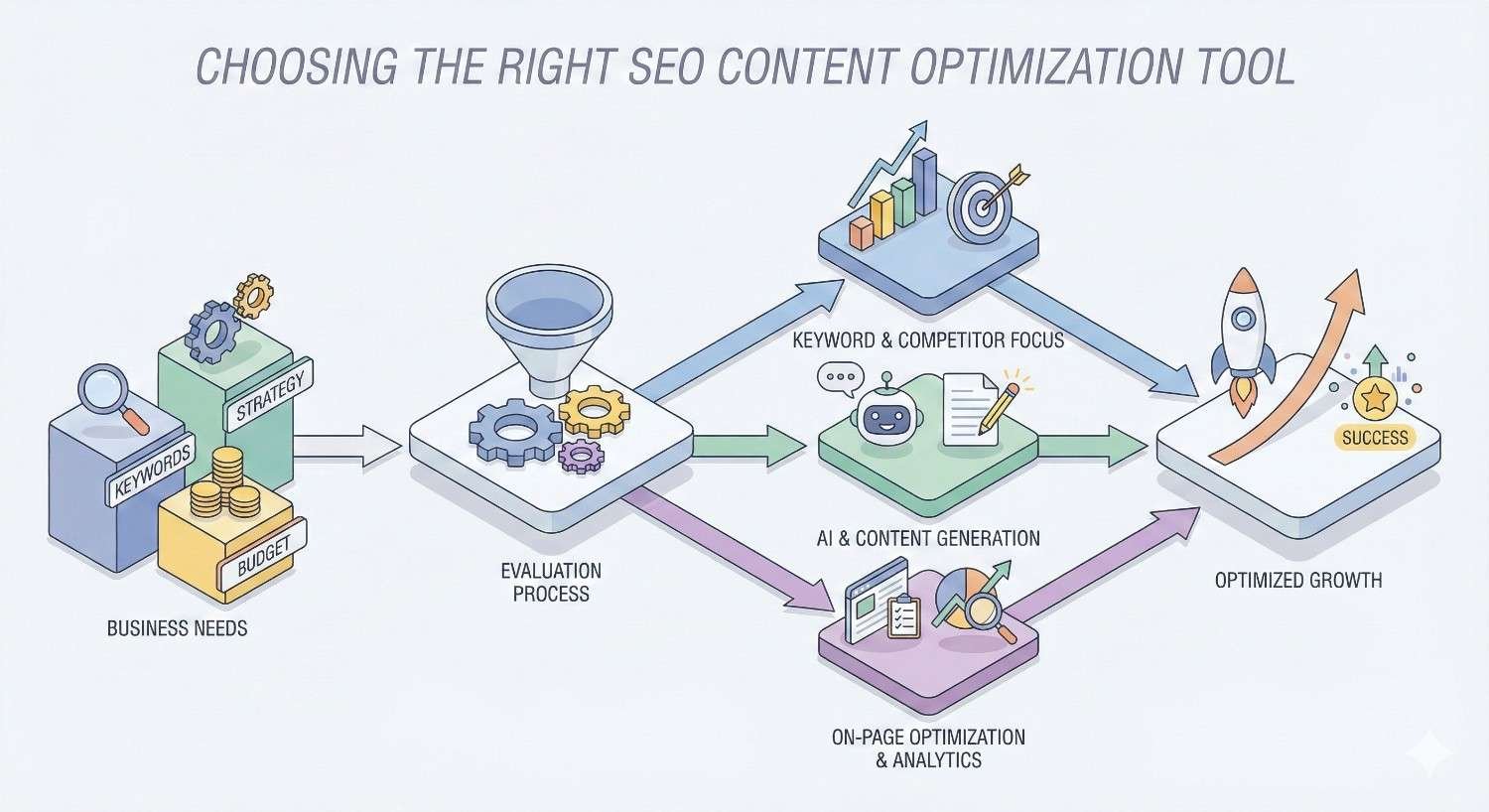
How to Choose the Right SEO Content Optimization Tool for Your Business
Selecting the right tool requires honest assessment of your needs, resources, and goals. The best tool for an enterprise content team differs dramatically from what serves a solo content creator.
Assess Your Content Production Volume and Team Size
Content volume directly impacts tool requirements. Teams producing 50+ pieces monthly need different capabilities than those publishing weekly.
High-volume operations benefit from:
- Bulk analysis and optimization features
- Team collaboration and workflow management
- Content inventory and prioritization tools
- API access for custom integrations
Lower-volume operations can prioritize:
- Per-piece quality over bulk efficiency
- Simpler interfaces with faster learning curves
- Lower price points without volume commitments
- Flexibility over enterprise features
Team size also matters. Solo creators need different tools than distributed teams requiring collaboration features, approval workflows, and consistent brand voice enforcement.
Evaluate Your Technical SEO Maturity
Your team’s SEO sophistication influences which tools provide value. Advanced teams can leverage complex features that would overwhelm beginners.
Less experienced teams should prioritize:
- Clear, actionable recommendations
- Educational resources and support
- Intuitive interfaces without jargon
- Guided workflows rather than open-ended tools
Experienced teams can leverage:
- Advanced semantic analysis
- Custom configuration options
- API access for integration
- Raw data exports for custom analysis
Matching tool complexity to team capability ensures adoption. The most sophisticated tool provides no value if your team cannot use it effectively.
Consider Integration with Existing Marketing Stack
Content optimization tools must fit into existing workflows. Evaluate integration capabilities with your current tools.
Common integration requirements:
- Google Docs or Microsoft Word for writing
- WordPress or other CMS for publishing
- Project management tools for workflow
- Analytics platforms for performance tracking
- Other SEO tools for research
Tools requiring significant workflow changes face adoption challenges. Native integrations with your existing stack reduce friction and increase usage.
Budget Considerations and ROI Expectations
Content optimization tools range from free to thousands monthly. Budget decisions should consider total cost of ownership and expected returns.
Calculate true costs including:
- Subscription fees at your usage level
- Training and onboarding time
- Integration and setup costs
- Ongoing management overhead
Estimate returns based on:
- Time savings in content research and optimization
- Expected ranking improvements and traffic gains
- Content quality improvements affecting conversion
- Reduced revision cycles from better first drafts
Most teams see positive ROI from content optimization tools within 3-6 months. The key is selecting tools matched to your actual needs rather than paying for unused capabilities.
Trial Period Testing Recommendations
Most tools offer free trials. Use this time strategically to evaluate fit.
During trials, test:
- Your actual content types and topics
- Real workflows rather than demo scenarios
- Team adoption and usability
- Integration with your existing tools
- Support responsiveness and quality
Evaluation criteria should include:
- Time to produce optimized content
- Quality of recommendations for your niche
- Team feedback on usability
- Technical integration success
- Support experience during setup
Document findings systematically. Comparing tools becomes difficult without structured evaluation notes.
What Features Should You Prioritize in a Content Optimization Tool?
Feature prioritization depends on your specific needs, but certain capabilities provide foundational value across use cases.
Semantic Analysis and Entity Recognition
Modern search engines understand topics through semantic relationships and entities. Tools with strong semantic analysis help content align with this understanding.
Look for capabilities including:
- Related term identification beyond exact keywords
- Entity recognition and relationship mapping
- Topic modeling and clustering
- Semantic gap identification
Tools using basic keyword density calculations miss the sophistication modern SEO requires. Semantic analysis capabilities separate effective tools from outdated approaches.
Real-Time Content Scoring
Immediate feedback during writing improves efficiency and outcomes. Writers can adjust content before completion rather than revising after the fact.
Effective scoring systems provide:
- Clear numerical or letter grades
- Specific term recommendations with usage guidance
- Structure and formatting suggestions
- Competitive benchmarking context
Scoring should guide without dictating. The best systems help writers understand what’s missing without demanding robotic keyword insertion.
SERP Competitor Analysis
Understanding what currently ranks informs effective optimization. Tools should analyze actual search results for target keywords.
Valuable SERP analysis includes:
- Content length and structure patterns
- Common topics and subtopics covered
- Heading usage and organization
- Content type and format patterns
This competitive intelligence ensures content meets or exceeds current ranking standards. Without SERP analysis, optimization becomes guesswork.
Keyword Research and Topic Clustering
Content optimization connects to broader keyword strategy. Tools with research capabilities help identify opportunities and organize content efforts.
Useful research features include:
- Search volume and difficulty data
- Related keyword suggestions
- Topic clustering and content mapping
- Opportunity identification and prioritization
Integration between research and optimization streamlines workflows. Teams can move from opportunity identification to content creation without switching tools.
Content Brief Generation
Automated brief generation reduces research time and ensures consistent starting points for writers.
Effective briefs include:
- Recommended headings and structure
- Key terms and topics to cover
- Questions to answer
- Competitive context and benchmarks
Brief quality directly impacts content quality. Tools producing comprehensive, actionable briefs accelerate content production significantly.
Performance Tracking and Reporting
Connecting optimization efforts to results enables continuous improvement. Tools should track how optimized content performs.
Valuable tracking includes:
- Ranking position monitoring
- Traffic and engagement metrics
- Content decay alerts
- ROI calculation capabilities
Performance data validates tool effectiveness and guides future optimization priorities.
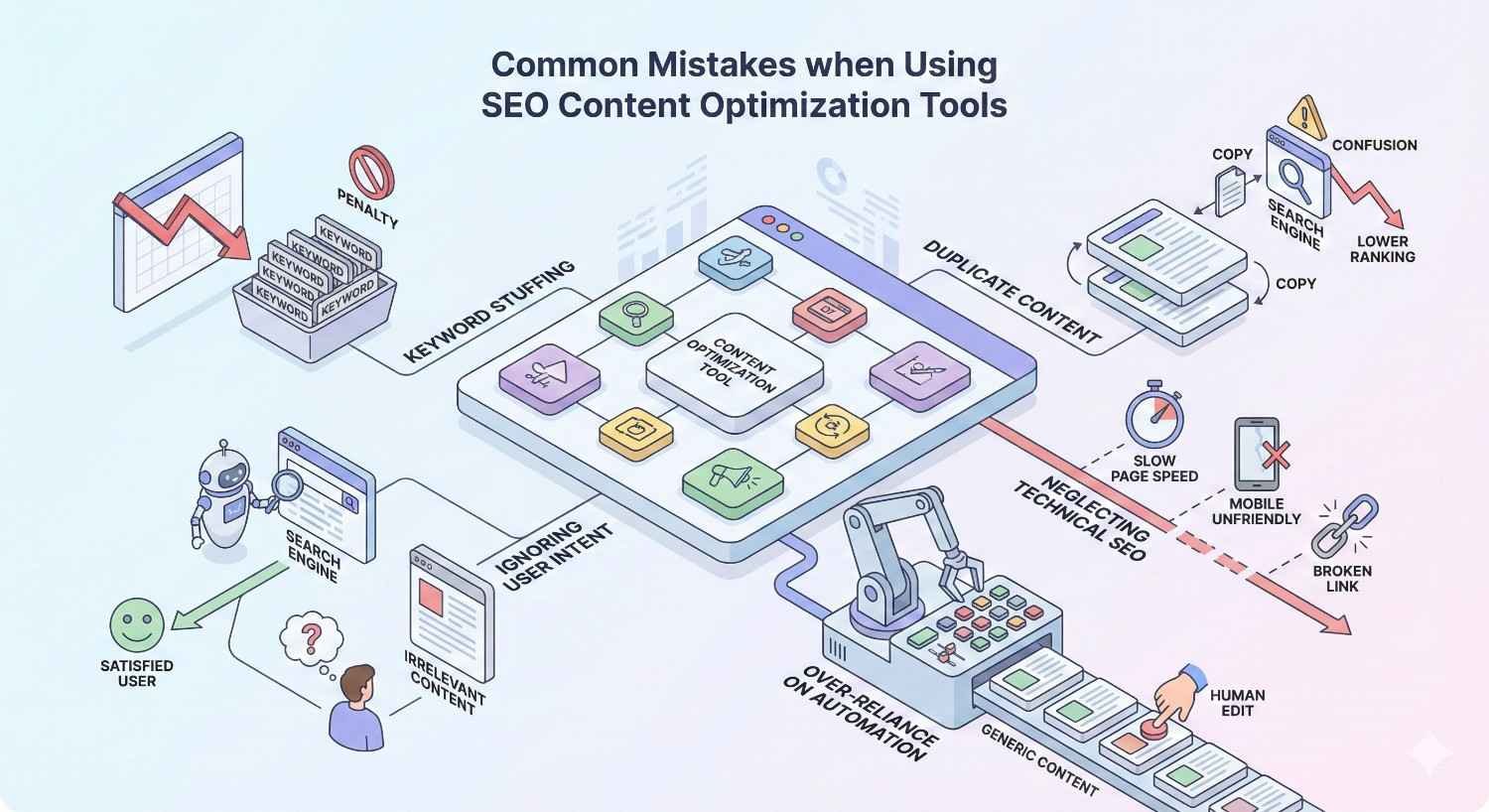
Common Mistakes When Using SEO Content Optimization Tools
Tools provide leverage but cannot replace strategic thinking. Avoiding common mistakes ensures tools enhance rather than undermine content quality.
Over-Optimizing for Tool Scores Instead of User Intent
Chasing perfect scores can produce content that satisfies algorithms but fails users. Tools measure optimization signals, not content quality.
Signs of over-optimization:
- Awkward keyword insertion disrupting readability
- Covering topics superficially to check boxes
- Prioritizing term count over explanation quality
- Ignoring user questions to hit score targets
The goal is content that serves users while signaling relevance to search engines. When scores conflict with user experience, prioritize users.
Ignoring Content Quality for Keyword Density
Keyword density metrics can encourage stuffing that harms both readability and rankings. Modern algorithms penalize obvious optimization.
Quality indicators matter more than density:
- Clear explanations of complex topics
- Unique insights and perspectives
- Practical, actionable information
- Engaging writing that holds attention
Tools should inform content direction, not dictate word-by-word construction. Writers must maintain quality standards regardless of optimization scores.
Not Customizing Tool Recommendations for Your Niche
Generic recommendations may not fit specialized industries. Tools analyze general patterns that may not apply to your specific audience.
Customization considerations:
- Industry-specific terminology and concepts
- Audience sophistication and expectations
- Competitive landscape differences
- Content format preferences in your space
Treat tool recommendations as starting points for customization rather than rigid requirements. Your industry knowledge should override generic suggestions when appropriate.
Failing to Combine Tools with Strategic SEO Thinking
Tools execute tactics but cannot replace strategy. Content optimization fits within broader SEO and business objectives.
Strategic context tools cannot provide:
- Business goal alignment
- Brand voice and positioning
- Content calendar and publishing strategy
- Link building and promotion planning
Use tools to execute strategy efficiently, not to define strategy. The most optimized content fails if it targets wrong keywords or ignores business objectives.
How Content Optimization Tools Fit into Your Overall SEO Strategy
Content optimization represents one component of comprehensive SEO. Understanding how tools fit the broader picture maximizes their value.
The Role of Content Optimization in Technical SEO
Technical SEO creates the foundation content optimization builds upon. Without proper technical setup, optimized content cannot perform.
Technical prerequisites for content success:
- Crawlable site architecture
- Fast page load speeds
- Mobile-friendly design
- Proper indexation and canonicalization
Content optimization tools assume technical foundations exist. Teams should address technical issues before investing heavily in content optimization.
Connecting Content Optimization to Link Building
Optimized content attracts links more effectively than unoptimized content. The connection between content quality and link acquisition is direct.
Content optimization supports link building through:
- Comprehensive coverage that becomes reference material
- Unique data and insights worth citing
- Clear structure that facilitates linking
- Quality that builds author and site authority
Link building strategies should consider content optimization. The best outreach targets content optimized for both users and search engines.
Measuring Content Performance Beyond Tool Scores
Tool scores predict potential but don’t guarantee results. Actual performance measurement validates optimization effectiveness.
Key performance metrics:
- Organic traffic to optimized content
- Ranking positions for target keywords
- Engagement metrics (time on page, bounce rate)
- Conversion and business outcome metrics
Track performance systematically. Correlating optimization scores with actual results reveals which recommendations matter most for your site.
When to Use Tools vs. Manual Optimization
Tools provide efficiency but cannot replace expertise in all situations. Knowing when manual optimization adds value improves outcomes.
Tools work best for:
- Identifying optimization opportunities at scale
- Ensuring consistent baseline optimization
- Training writers on optimization principles
- Tracking competitive benchmarks
Manual optimization adds value for:
- Highly specialized or technical topics
- Brand voice and positioning decisions
- Strategic content differentiation
- Complex user intent interpretation
Combine tool efficiency with human judgment. The best results come from tools informing rather than replacing expert decision-making.
SEO Content Optimization Tool Trends for 2026
The content optimization landscape continues evolving. Understanding current trends helps teams prepare for future capabilities.
AI and Machine Learning Integration
AI capabilities have expanded dramatically across content optimization tools. Machine learning improves recommendation accuracy and enables new features.
Current AI applications include:
- Content generation and drafting assistance
- Predictive ranking potential scoring
- Automated content brief creation
- Natural language understanding for better analysis
AI integration will deepen. Expect tools to provide increasingly sophisticated writing assistance while maintaining human oversight requirements.
Enhanced NLP and Semantic Understanding
Natural language processing capabilities continue advancing. Tools understand content meaning more accurately, improving recommendation relevance.
NLP improvements enable:
- Better entity recognition and relationship mapping
- More accurate semantic gap identification
- Improved understanding of user intent
- Context-aware optimization recommendations
As search engines advance their language understanding, optimization tools must keep pace. NLP sophistication increasingly separates effective tools from outdated approaches.
Predictive Content Performance Analytics
Tools are moving beyond descriptive analytics to predictive capabilities. Machine learning models estimate content performance before publication.
Predictive features emerging:
- Traffic potential estimation for content topics
- Ranking probability scoring
- Content decay prediction
- ROI forecasting for content investments
Predictive analytics help teams prioritize efforts. Understanding likely outcomes before investing resources improves content strategy efficiency.
Multi-Channel Content Optimization
Content appears across multiple channels beyond organic search. Tools are expanding to optimize for diverse distribution.
Multi-channel considerations include:
- Social media content optimization
- Email content effectiveness
- Video content optimization
- Voice search and AI assistant optimization
As content distribution fragments, optimization tools must address multiple channels. Single-channel focus limits content investment returns.
Frequently Asked Questions About SEO Content Optimization Tools
Do SEO content optimization tools guarantee higher rankings?
No tool guarantees rankings. Content optimization tools improve your content’s competitive position but cannot control all ranking factors. Technical SEO, backlinks, domain authority, and user behavior all influence rankings independently of content optimization. Tools increase your probability of ranking well but cannot guarantee specific outcomes.
How much do content optimization tools cost?
Pricing ranges from free to thousands monthly. Budget options like NeuronWriter start around $23/month. Mid-tier tools like Surfer SEO and Frase range from $45-150/month. Premium platforms like Clearscope and MarketMuse start at $149-189/month with enterprise tiers reaching $500+/month.
Can I use multiple content optimization tools together?
Yes, many teams use complementary tools. Common combinations include using one tool for research and briefs with another for real-time writing optimization. However, overlapping tools waste budget. Evaluate whether multiple tools provide distinct value before subscribing to several platforms.
How long does it take to see results from content optimization?
Optimized content typically shows ranking improvements within 2-8 weeks, though timelines vary significantly. New content on new domains takes longer than updates to existing content on established sites. Competitive keywords require more time than low-competition terms. Consistent optimization across multiple pieces compounds results over time.
Are free SEO content optimization tools effective?
Free tools provide basic value but lack sophistication of paid options. Free tiers from platforms like MarketMuse or Frase offer limited functionality. Free tools work for learning and occasional use but cannot support serious content operations. Most teams outgrow free tools quickly.
What’s the difference between content optimization and keyword research tools?
Keyword research tools identify what keywords to target based on volume, difficulty, and relevance. Content optimization tools help you create content that ranks for those keywords. Research tools inform strategy; optimization tools execute it. Most teams need both capabilities, either from separate tools or all-in-one platforms.
Do I need technical SEO knowledge to use these tools?
Basic tools require minimal technical knowledge. Platforms like Surfer SEO and Frase provide clear recommendations anyone can follow. Advanced tools like InLinks or Screaming Frog require more technical understanding to maximize value. Match tool complexity to your team’s capabilities for best results.
Get Professional Help with Your SEO Content Strategy
When to Partner with an SEO Agency
Content optimization tools provide leverage but cannot replace strategic expertise. Consider agency partnership when internal resources limit execution capacity or when specialized knowledge would accelerate results.
Agency partnership makes sense when:
- Content production exceeds internal capacity
- Technical SEO issues require specialized expertise
- Competitive landscapes demand advanced strategies
- ROI expectations require professional execution
How We Use Content Optimization Tools in Our Process
Our team combines multiple optimization tools with strategic expertise to deliver results. We use enterprise-grade platforms for semantic analysis, competitive research, and content scoring throughout our content production process.
Tools inform our recommendations but don’t dictate them. Human expertise interprets tool outputs within your specific business context, competitive landscape, and strategic objectives.
Combining Tools with Strategic SEO Expertise
The most effective content strategies combine tool efficiency with human judgment. Tools handle data analysis and pattern recognition at scale. Strategists apply business context, creative thinking, and experience that tools cannot replicate.
This combination produces content that satisfies both algorithmic requirements and user needs, driving sustainable organic growth.
Conclusion
SEO content optimization tools have become essential for competitive content strategies in 2026. The right tool dramatically improves content quality while reducing production time and guesswork.
Selecting the best tool requires matching capabilities to your specific needs, budget, and team sophistication. Premium tools like Clearscope and MarketMuse serve enterprise operations, while options like NeuronWriter and Frase provide excellent value for smaller teams.
We help businesses build sustainable organic growth through strategic content optimization. Contact White Label SEO Service to discuss how professional content strategy can accelerate your search visibility and drive measurable business results.
Frequently Asked Questions
What is the best SEO content optimization tool for beginners?
Surfer SEO and Frase offer the most approachable interfaces for beginners. Both provide clear, actionable recommendations without requiring deep SEO knowledge. Their real-time scoring systems help new users understand optimization principles through immediate feedback.
How do content optimization tools analyze competitor content?
These tools crawl top-ranking pages for target keywords and extract patterns. They analyze word counts, heading structures, term usage, and topic coverage. This data creates benchmarks showing what successful content includes, guiding your optimization efforts.
Can content optimization tools help with existing content?
Yes, most tools excel at identifying optimization opportunities in existing content. Platforms like MarketMuse and Clearscope analyze your content inventory and prioritize updates based on potential impact. Refreshing existing content often produces faster results than creating new pieces.
Do content optimization tools work for all industries?
Tools work across industries but effectiveness varies. Highly specialized or technical fields may require customization of generic recommendations. Tools trained on broad datasets may miss industry-specific terminology or user expectations. Supplement tool recommendations with industry expertise.
How often should I use content optimization tools?
Use tools for every piece of content targeting competitive keywords. For lower-competition terms or brand content, lighter optimization may suffice. Revisit existing content quarterly to identify decay and optimization opportunities. Consistent tool usage compounds results over time.
What’s the learning curve for content optimization tools?
Basic tools like Surfer SEO require minimal learning, often under an hour. Advanced platforms like MarketMuse may require several weeks to master fully. Most tools offer onboarding resources and support. Plan for learning investment when evaluating new tools.
Should I trust content optimization tool scores completely?
Treat scores as guidance rather than absolute requirements. High scores indicate competitive optimization but don’t guarantee rankings or quality. User experience, unique value, and strategic fit matter beyond scores. Use scores to identify gaps while maintaining quality standards.


