

Technical SEO determines whether search engines can find, understand, and rank your content. Without a solid technical foundation, even exceptional content and strong backlinks fail to deliver results. The difference between websites that dominate search results and those that struggle often comes down to technical infrastructure.
This matters because Google’s algorithms increasingly reward sites that load fast, render correctly, and provide seamless user experiences across devices. Technical issues silently drain your organic potential every day they remain unfixed.
This guide covers everything from crawlability and indexing to Core Web Vitals, structured data, and international SEO. You’ll learn systematic approaches to audit, prioritize, and fix technical issues that directly impact your rankings and revenue.
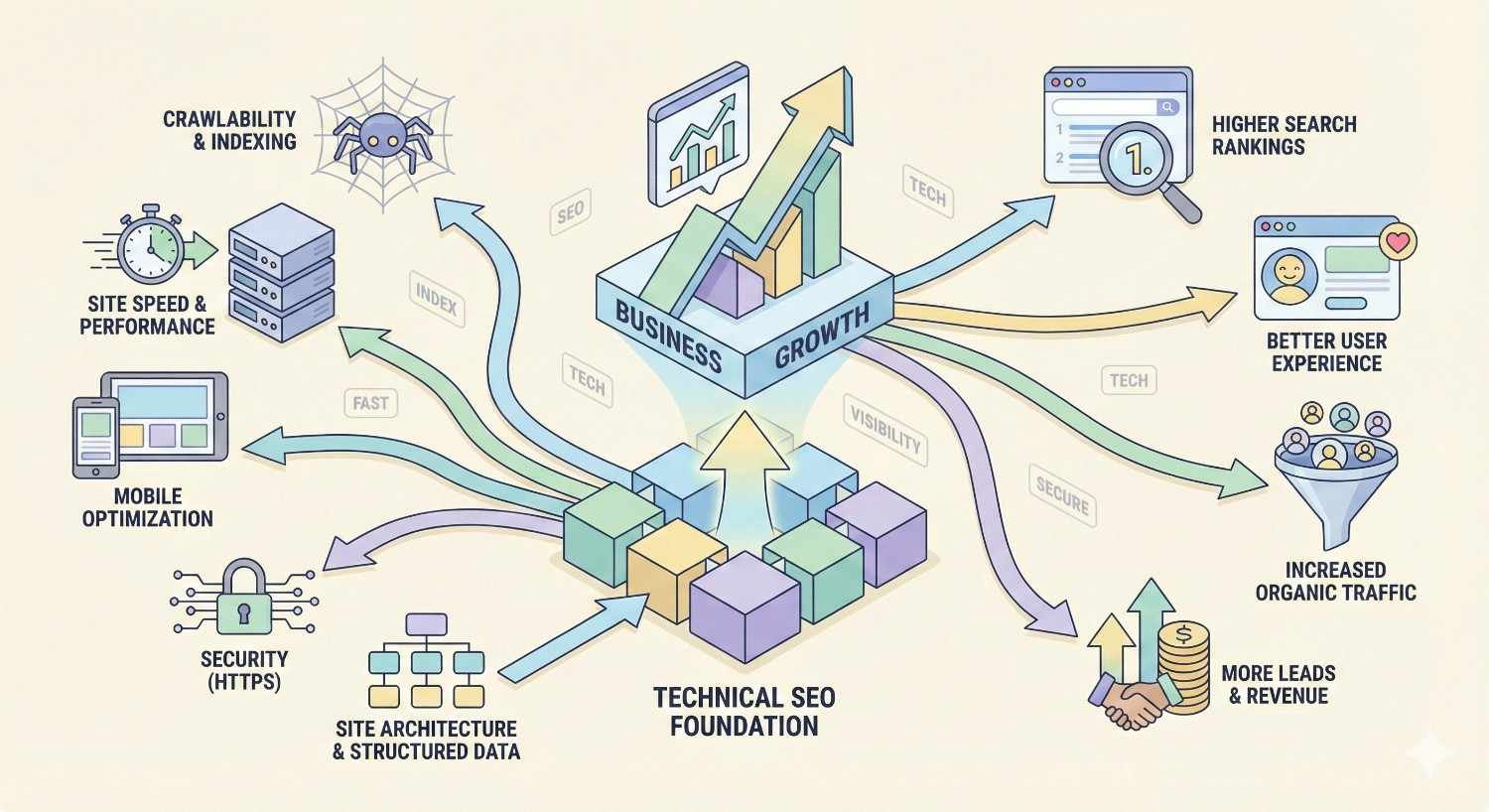
What Is Technical SEO and Why It Matters for Business Growth
Technical SEO encompasses the backend optimizations that help search engines crawl, index, and render your website effectively. It’s the infrastructure layer that supports all other SEO efforts.
Technical SEO Defined: The Foundation of Search Visibility
Technical SEO refers to optimizations made to your website’s infrastructure and server configuration that help search engine bots access, crawl, interpret, and index your pages. Unlike content optimization, technical SEO focuses on how your site functions rather than what it says.
Core technical SEO elements include site speed, mobile responsiveness, secure connections, XML sitemaps, robots.txt configuration, and structured data implementation. These factors determine whether search engines can efficiently discover and understand your content.
Think of technical SEO as the foundation of a building. Content and links are the visible structure, but without a solid foundation, everything above it becomes unstable. A technically sound website ensures that your content marketing and link building investments actually translate into rankings.
How Technical SEO Differs from On-Page and Off-Page SEO
On-page SEO focuses on content elements visible to users: title tags, meta descriptions, header structure, keyword usage, and content quality. It’s about making individual pages relevant and valuable for specific search queries.
Off-page SEO involves external signals, primarily backlinks from other websites. Link building, brand mentions, and social signals fall into this category. These factors establish your site’s authority and trustworthiness in Google’s eyes.
Technical SEO operates beneath both layers. It ensures search engines can access your on-page content and properly attribute your off-page signals. A site with excellent content and strong backlinks but poor technical health will underperform compared to competitors with solid technical foundations.
The three pillars work together. Technical SEO enables discovery and indexing. On-page SEO ensures relevance and quality. Off-page SEO builds authority and trust. Neglecting any pillar limits your overall organic performance.
The Business Case: Technical SEO’s Impact on Revenue and ROI
Technical SEO directly impacts business outcomes through multiple channels. Faster page speeds reduce bounce rates and increase conversions. Mobile optimization captures the majority of search traffic. Proper indexing ensures your products and services appear in relevant searches.
Consider the compound effect: a site with crawl errors might have 30% of its pages missing from Google’s index. That’s 30% of potential organic traffic lost before content quality even becomes a factor. Fix those errors, and you’ve potentially increased your addressable organic market by nearly half.
Technical improvements often deliver faster results than content or link building campaigns. While new content takes months to rank and links require ongoing outreach, fixing a critical crawl issue can restore traffic within days of Google’s next crawl.
The ROI calculation favors technical SEO for sites with existing technical debt. Resolving indexing issues, improving Core Web Vitals, and implementing structured data typically require one-time investments that deliver ongoing returns. Compare this to content creation, which requires continuous investment to maintain momentum.
Core Technical SEO Components Every Website Needs
Every website requires three fundamental technical capabilities: crawlability, indexability, and renderability. Master these, and you’ve built a foundation that supports all other SEO efforts.
Crawlability: Ensuring Search Engines Can Access Your Content
Crawlability determines whether search engine bots can discover and access your pages. If Googlebot can’t reach a page, that page cannot rank. Period.
Search engines use automated programs called crawlers or spiders to discover web content. These bots follow links, read sitemaps, and attempt to access every URL they encounter. Your job is to make this process as efficient as possible while directing crawlers toward your most valuable content.
Crawl efficiency matters especially for large websites. Google allocates a crawl budget to each site based on its perceived importance and server capacity. Wasting crawl budget on low-value pages means important pages get crawled less frequently, delaying indexing of new content and updates.
Robots.txt Configuration and Best Practices
The robots.txt file sits at your domain’s root directory and provides instructions to search engine crawlers. It tells bots which areas of your site they can and cannot access.
Proper robots.txt configuration blocks crawlers from accessing duplicate content, admin areas, staging environments, and resource-heavy pages that provide no SEO value. This preserves crawl budget for pages that matter.
Common robots.txt mistakes include accidentally blocking important pages, using overly broad disallow rules, and forgetting to update the file after site migrations. Always test your robots.txt using Google Search Console’s robots.txt tester before deploying changes.
A well-structured robots.txt file includes specific disallow rules for admin directories, search result pages, and parameter-based duplicates. It also references your XML sitemap location, helping crawlers discover your site structure immediately.
XML Sitemap Optimization and Submission
XML sitemaps provide search engines with a roadmap of your site’s important pages. They list URLs along with metadata about when each page was last modified and how frequently it changes.
Effective sitemaps include only indexable, canonical URLs. Exclude pages blocked by robots.txt, pages with noindex tags, redirected URLs, and duplicate content. Including non-indexable URLs wastes crawl budget and sends mixed signals to search engines.
Large sites benefit from sitemap segmentation. Create separate sitemaps for different content types: products, blog posts, category pages, and location pages. This organization helps you monitor indexing rates by content type and quickly identify problems.
Submit sitemaps through Google Search Console and Bing Webmaster Tools. Monitor the index coverage report to track how many submitted URLs actually get indexed. A large gap between submitted and indexed URLs indicates potential quality or technical issues.
Managing Crawl Budget for Large Websites
Crawl budget becomes a critical concern for sites with thousands or millions of pages. Google determines crawl budget based on crawl rate limit (how fast your server can handle requests) and crawl demand (how valuable Google considers your content).
Maximize crawl budget efficiency by eliminating soft 404 errors, reducing redirect chains, fixing broken internal links, and removing or consolidating thin content pages. Every URL that returns an error or redirect wastes crawl resources.
Prioritize crawling of high-value pages through internal linking structure. Pages with more internal links get crawled more frequently. Ensure your most important commercial pages receive strong internal link support from across your site.
Monitor crawl statistics in Google Search Console to understand how Googlebot interacts with your site. Track crawl requests over time, response codes, and average response time. Sudden drops in crawl activity often indicate server issues or newly introduced technical problems.
Indexability: Getting Your Pages Into Search Results
Indexability determines whether crawled pages actually enter Google’s search index. A page can be perfectly crawlable but still fail to get indexed due to quality signals, duplicate content issues, or explicit indexing directives.
Google’s index is selective. The search engine evaluates each crawled page for quality, uniqueness, and value before deciding whether to include it in search results. Understanding and optimizing for these factors ensures your important pages make the cut.
Index Coverage Analysis and Error Resolution
Google Search Console’s index coverage report reveals exactly how Google views your site’s pages. It categorizes URLs into four buckets: valid (indexed), valid with warnings, excluded, and error.
Focus first on error states: server errors, redirect errors, and submitted URLs marked as noindex. These represent pages you want indexed but Google cannot process correctly. Resolve these issues to recover lost indexing potential.
Excluded pages require careful analysis. Some exclusions are intentional (duplicate content, noindex pages), while others indicate problems (crawled but not indexed, discovered but not crawled). Investigate “crawled but not indexed” URLs specifically, as these suggest Google found the content but deemed it insufficient quality.
Regular index coverage monitoring catches problems early. Set up weekly reviews of your coverage report, paying attention to sudden increases in excluded or error URLs. These spikes often correlate with recent site changes or technical deployments.
Canonical Tags and Duplicate Content Management
Canonical tags tell search engines which version of a page should be indexed when multiple URLs contain similar or identical content. Proper canonical implementation consolidates ranking signals and prevents duplicate content penalties.
Self-referencing canonicals on every page establish clear indexing preferences. Even pages without duplicates benefit from explicit canonical declarations, as they prevent future issues if duplicate URLs are accidentally created.
Common canonical mistakes include pointing canonicals to non-indexable pages, creating canonical chains, and using relative instead of absolute URLs. Always use absolute URLs in canonical tags and ensure the canonical target is the definitive, indexable version.
Handle parameter-based duplicates through canonical tags combined with Google Search Console’s URL parameter tool. Faceted navigation, sorting options, and tracking parameters frequently create thousands of duplicate URLs that dilute crawl budget and confuse indexing signals.
Noindex, Nofollow, and Meta Robots Directives
Meta robots directives provide page-level control over indexing and link following behavior. The noindex directive prevents a page from appearing in search results, while nofollow instructs crawlers not to follow links on that page.
Use noindex strategically for pages that serve users but shouldn’t rank: thank you pages, internal search results, paginated archives beyond page one, and user account pages. These pages consume crawl budget without providing search value.
The nofollow attribute on links tells search engines not to pass PageRank through those links. Apply nofollow to user-generated content, paid links, and links to untrusted external sites. However, avoid using nofollow on internal links, as this wastes PageRank that could strengthen your own pages.
X-Robots-Tag HTTP headers provide the same functionality as meta robots tags but work for non-HTML resources like PDFs and images. Use HTTP headers when you need to control indexing of files that don’t support meta tags.
Renderability: JavaScript SEO and Dynamic Content
Modern websites increasingly rely on JavaScript to render content. Search engines must execute JavaScript to see the same content users see, creating potential indexing challenges for JavaScript-heavy sites.
Google can render JavaScript, but the process is resource-intensive and introduces delays. Content rendered via JavaScript may take days or weeks longer to index compared to server-rendered HTML. For time-sensitive content, this delay can significantly impact organic performance.
Client-Side vs. Server-Side Rendering for SEO
Client-side rendering (CSR) delivers a minimal HTML shell to browsers, then uses JavaScript to fetch and display content. This approach creates fast initial page loads but requires search engines to execute JavaScript to see your content.
Server-side rendering (SSR) generates complete HTML on the server before sending it to browsers. Search engines receive fully-rendered content immediately, eliminating JavaScript rendering dependencies. SSR is generally preferred for SEO-critical pages.
Hybrid approaches like static site generation (SSG) and incremental static regeneration (ISR) offer the best of both worlds. These methods pre-render pages at build time or on first request, serving static HTML to both users and search engines while maintaining dynamic functionality.
Choose your rendering strategy based on content type and update frequency. Product pages, blog posts, and landing pages benefit from server-side or static rendering. Highly personalized or real-time content may require client-side rendering with appropriate SEO accommodations.
Solving JavaScript Rendering Issues
Diagnose JavaScript rendering problems using Google Search Console’s URL inspection tool. Compare the rendered HTML to your source code to identify content that requires JavaScript execution. The “View Rendered Page” feature shows exactly what Googlebot sees.
Common JavaScript SEO issues include content loaded via user interaction (clicks, scrolls), content behind authentication, infinite scroll without proper pagination, and JavaScript-dependent internal links. Each of these can prevent content from being crawled or indexed.
Implement solutions based on the specific issue. Lazy-loaded content should use intersection observer with proper fallbacks. Infinite scroll pages need paginated alternatives with crawlable links. Critical content should never depend on user interaction to appear.
Test rendering regularly using tools like Google’s Mobile-Friendly Test and Rich Results Test. These tools render pages using Googlebot’s rendering engine, revealing exactly what search engines see. Discrepancies between user-visible and bot-visible content indicate rendering problems requiring attention.
Site Architecture and URL Structure Optimization
Site architecture determines how users and search engines navigate your content. A logical, well-organized structure improves crawl efficiency, distributes link equity effectively, and helps users find what they need.
Building a Logical Site Hierarchy for Users and Search Engines
Effective site architecture follows a pyramid structure. The homepage sits at the top, linking to main category pages, which link to subcategories, which link to individual content pages. This hierarchy creates clear topical relationships and efficient crawl paths.
Limit hierarchy depth to three or four levels from homepage to deepest content. Pages buried five or more clicks deep receive less crawl attention and accumulate less PageRank. Flatten deep hierarchies by adding direct links from higher-level pages.
Organize content into topical silos that group related pages together. A site selling outdoor gear might have silos for camping, hiking, climbing, and fishing. Each silo contains all related content, from category pages to product pages to informational articles.
Siloed architecture strengthens topical relevance signals. When all pages about camping link to each other and share a common parent category, search engines understand the topical relationship and may boost rankings for camping-related queries across the entire silo.
URL Structure Best Practices for Maximum Crawl Efficiency
URLs should be readable, descriptive, and consistent. A well-structured URL tells users and search engines what to expect before clicking. Compare /p/12847 to /hiking-boots/waterproof-mens-boots—the second URL communicates clear topical relevance.
Keep URLs concise while maintaining descriptiveness. Eliminate unnecessary words like “the,” “and,” and “of.” Use hyphens to separate words, not underscores or spaces. Lowercase all characters to prevent duplicate content from case variations.
Include relevant keywords in URLs, but avoid keyword stuffing. One or two descriptive terms per URL segment is sufficient. /blog/seo-tips-tricks-strategies-techniques-methods looks spammy and provides no additional ranking benefit over /blog/seo-strategies.
Maintain consistent URL patterns across your site. If product URLs follow /category/product-name, don’t suddenly switch to /products/product-name for some items. Consistency helps users predict URL structures and makes technical management easier.
Internal Linking Strategies That Distribute Authority
Internal links pass PageRank between pages and establish topical relationships. Strategic internal linking ensures your most important pages receive the authority they need to rank competitively.
Link from high-authority pages to pages you want to rank. Your homepage typically has the most backlinks and authority. Ensure it links directly to your most important category and product pages, not just to a generic navigation menu.
Use descriptive anchor text that includes relevant keywords. Instead of “click here” or “learn more,” use anchors like “waterproof hiking boots” or “technical SEO audit checklist.” Descriptive anchors help search engines understand the linked page’s topic.
Create contextual links within body content, not just navigation menus. A blog post about hiking gear should link to relevant product categories. A product page should link to related products and informational content. These contextual links carry more weight than templated navigation links.
Audit internal links regularly to identify orphan pages (pages with no internal links) and pages with excessive links. Orphan pages struggle to get crawled and indexed. Pages with hundreds of outbound links dilute the PageRank passed through each link.
Breadcrumb Navigation and Site Depth Optimization
Breadcrumbs display the user’s location within site hierarchy: Home > Category > Subcategory > Current Page. They improve user navigation and provide additional internal linking opportunities.
Implement breadcrumbs with structured data markup to enable rich results in search. Google may display breadcrumb paths directly in search results, improving click-through rates by showing users exactly where they’ll land within your site.
Breadcrumbs reinforce site architecture signals. Each breadcrumb link passes PageRank upward through the hierarchy while establishing clear parent-child relationships between pages. This strengthens topical associations and helps search engines understand your site structure.
Ensure breadcrumb paths reflect actual site hierarchy, not arbitrary categorizations. If a product appears in multiple categories, choose the most relevant primary category for breadcrumb display. Inconsistent breadcrumbs confuse both users and search engines.
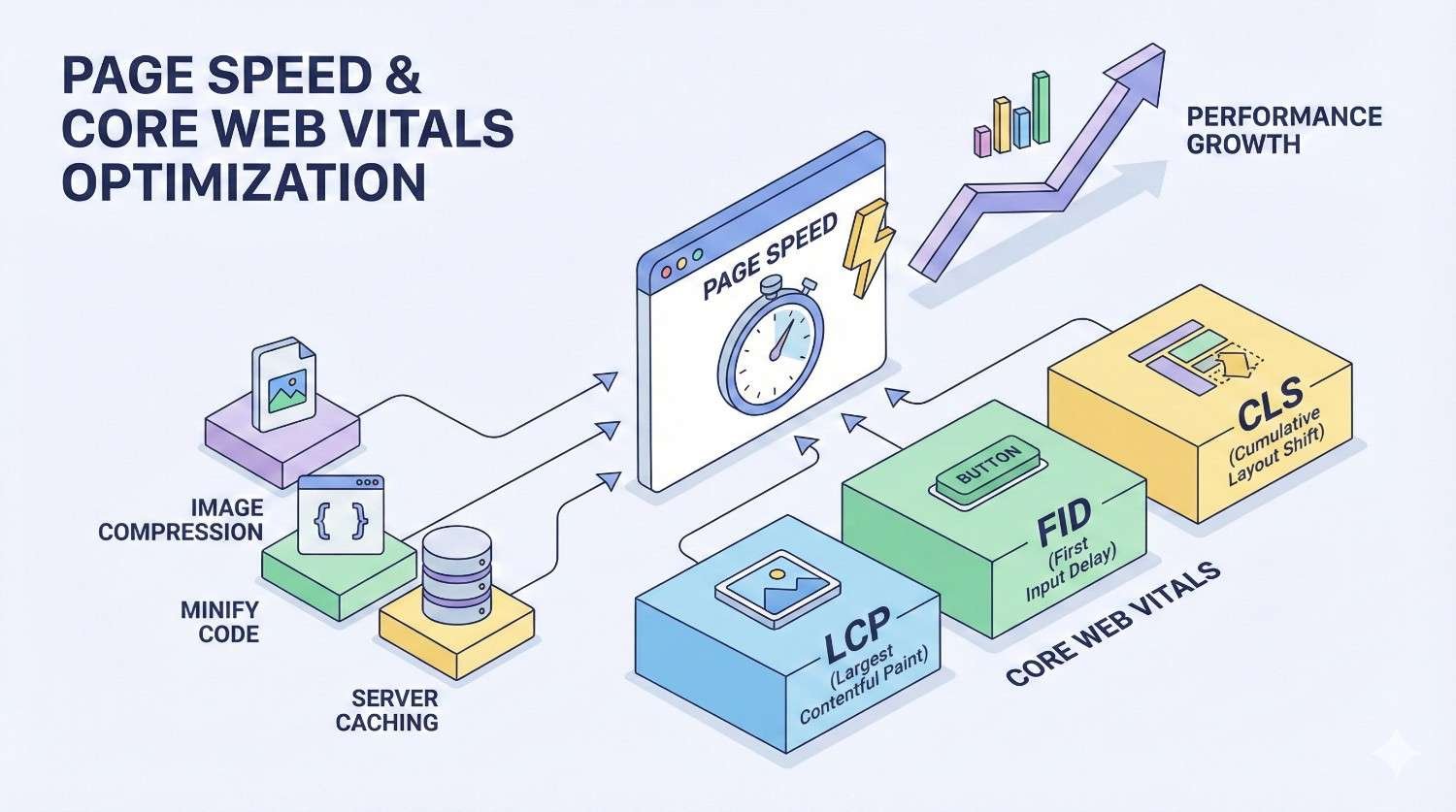
Page Speed and Core Web Vitals Optimization
Page speed directly impacts rankings, user experience, and conversion rates. Google’s Core Web Vitals metrics quantify user experience and serve as ranking factors for both desktop and mobile search.
Understanding Core Web Vitals: LCP, INP, and CLS
Largest Contentful Paint (LCP) measures loading performance. It tracks how long it takes for the largest visible content element to render. Google considers LCP good when it occurs within 2.5 seconds of page load start.
Interaction to Next Paint (INP) replaced First Input Delay in 2024 as the responsiveness metric. INP measures the latency of all user interactions throughout the page lifecycle, not just the first interaction. Good INP scores are 200 milliseconds or less.
Cumulative Layout Shift (CLS) measures visual stability. It quantifies how much page content shifts unexpectedly during loading. A CLS score below 0.1 is considered good. Layout shifts frustrate users and can cause accidental clicks on wrong elements.
All three metrics matter for rankings, but their relative importance varies by page type. E-commerce pages may prioritize LCP (fast product image loading), while interactive applications focus on INP (responsive interfaces).
Diagnosing Performance Issues with PageSpeed Insights and Lighthouse
Google PageSpeed Insights provides field data from real users (Core Web Vitals) and lab data from simulated tests. Field data reflects actual user experience, while lab data helps diagnose specific issues in controlled conditions.
Lighthouse, available in Chrome DevTools, offers detailed performance audits with specific recommendations. It identifies render-blocking resources, unused JavaScript, unoptimized images, and other issues affecting load times.
Focus on opportunities with the largest potential impact. Lighthouse estimates time savings for each recommendation. Prioritize fixes that save seconds, not milliseconds. A single large improvement often outweighs dozens of minor optimizations.
Test pages under realistic conditions. Use throttled network speeds and mid-range device emulation to simulate typical user experiences. Testing on fast connections with powerful hardware masks performance problems that affect real users.
Image Optimization: Formats, Compression, and Lazy Loading
Images typically account for the largest portion of page weight. Optimizing images delivers significant performance improvements with relatively straightforward implementation.
Use modern image formats like WebP and AVIF, which provide superior compression compared to JPEG and PNG. WebP offers 25-35% smaller file sizes at equivalent quality. Implement format fallbacks for browsers that don’t support newer formats.
Compress images appropriately for their display size. A 3000-pixel-wide image displayed at 300 pixels wastes bandwidth loading unnecessary detail. Serve responsive images using srcset attributes that deliver appropriately sized versions based on viewport and device pixel ratio.
Implement lazy loading for images below the fold. Native lazy loading (loading=”lazy”) defers loading until images approach the viewport. This reduces initial page weight and improves LCP by prioritizing above-the-fold content.
Specify image dimensions in HTML to prevent layout shifts. When browsers know image dimensions before loading, they reserve appropriate space, eliminating CLS caused by images pushing content around as they load.
Code Optimization: Minification, Compression, and Critical CSS
Minification removes unnecessary characters from code without changing functionality. Minified JavaScript and CSS files load faster due to reduced file sizes. Most build tools and CDNs offer automatic minification.
Enable Gzip or Brotli compression at the server level. These algorithms compress text-based resources (HTML, CSS, JavaScript) during transfer, reducing bandwidth usage by 70-90%. Brotli offers better compression ratios than Gzip for most content.
Identify and eliminate render-blocking resources. CSS and JavaScript in the document head block rendering until they download and execute. Defer non-critical JavaScript and inline critical CSS to allow faster initial rendering.
Critical CSS includes only the styles needed to render above-the-fold content. Inline these styles directly in the HTML head, then load the full stylesheet asynchronously. This technique dramatically improves perceived load time and LCP scores.
Remove unused CSS and JavaScript. Modern websites often load entire frameworks when only small portions are actually used. Tools like PurgeCSS identify and remove unused styles, while tree-shaking eliminates dead JavaScript code.
Server-Level Optimizations: Caching, CDNs, and Hosting
Browser caching stores static resources locally, eliminating redundant downloads on repeat visits. Configure cache headers to specify how long browsers should retain different resource types. Static assets like images and fonts can cache for months or years.
Content Delivery Networks (CDNs) distribute your content across global server networks. Users receive content from geographically nearby servers, reducing latency. CDNs also provide DDoS protection, automatic compression, and edge caching.
Choose hosting appropriate for your traffic and performance requirements. Shared hosting works for small sites but struggles under load. Virtual private servers (VPS) offer more resources and control. Dedicated servers and cloud hosting provide maximum performance and scalability.
Server response time (Time to First Byte) affects all subsequent performance metrics. Optimize database queries, implement server-side caching, and ensure adequate server resources. TTFB under 200ms is ideal; anything over 600ms indicates server-side problems.
Mobile-First Indexing and Responsive Design
Google predominantly uses mobile versions of websites for indexing and ranking. Mobile optimization isn’t optional—it’s the primary factor determining how Google evaluates your site.
What Mobile-First Indexing Means for Your Website
Mobile-first indexing means Google primarily crawls and indexes the mobile version of your site. If content exists only on your desktop version, Google may not see it. If your mobile site has less content than desktop, that reduced content determines your rankings.
Ensure content parity between mobile and desktop versions. All text, images, videos, and links present on desktop should also appear on mobile. Hidden content (accordions, tabs) is acceptable as long as it’s accessible without user interaction.
Structured data must be present on mobile pages. If you’ve implemented schema markup only on desktop templates, Google won’t see it. Verify structured data presence on mobile using the Mobile-Friendly Test or URL Inspection tool.
Check that your mobile site allows Googlebot access. Some sites accidentally block mobile crawling through robots.txt rules or serve different content to mobile user agents. Use Search Console’s URL Inspection to verify Google sees your mobile content correctly.
Responsive Design vs. Dynamic Serving vs. Separate URLs
Responsive design uses CSS media queries to adapt a single HTML document to different screen sizes. This approach is Google’s recommended configuration because it uses one URL per page, simplifying crawling and eliminating duplicate content concerns.
Dynamic serving delivers different HTML to different devices from the same URL. The server detects user agent and serves appropriate content. This approach requires Vary HTTP headers to signal content variation and careful implementation to avoid cloaking concerns.
Separate mobile URLs (m.example.com) maintain distinct mobile and desktop sites. This legacy approach requires proper bidirectional annotation using rel=”alternate” and rel=”canonical” tags. It’s the most complex to maintain and most prone to implementation errors.
For new sites, responsive design is almost always the best choice. It’s easier to maintain, eliminates duplicate content issues, and consolidates all ranking signals to single URLs. Migrate legacy separate mobile sites to responsive design when feasible.
Mobile Usability Audits and Common Issues to Fix
Google Search Console’s Mobile Usability report identifies pages with mobile-specific problems. Common issues include text too small to read, clickable elements too close together, and content wider than screen.
Test mobile usability manually on actual devices, not just emulators. Touch targets should be at least 48×48 pixels with adequate spacing. Text should be readable without zooming (minimum 16px for body text). Horizontal scrolling should never be required.
Eliminate intrusive interstitials that block content on mobile. Pop-ups covering the main content immediately after arriving from search results can trigger ranking penalties. Acceptable interstitials include age verification, cookie consent, and small banners that don’t obstruct content.
Verify forms work correctly on mobile. Input fields should use appropriate types (email, tel, number) to trigger correct mobile keyboards. Form validation should provide clear, visible error messages. Autofill should work correctly for common fields.
Structured Data and Schema Markup Implementation
Structured data helps search engines understand your content’s meaning, not just its text. Proper schema markup can earn rich results that dramatically improve click-through rates and visibility.
How Schema Markup Enhances Search Visibility
Schema markup provides explicit context about your content using a standardized vocabulary. Instead of inferring that a page contains a recipe, schema markup explicitly declares ingredients, cooking time, nutrition facts, and ratings.
Rich results display enhanced search listings with additional information: star ratings, prices, availability, images, and more. These enhanced listings stand out in search results and typically achieve higher click-through rates than standard blue links.
Schema markup also feeds Google’s Knowledge Graph, potentially earning knowledge panel appearances and featured snippets. The more Google understands your content, the more opportunities exist for prominent SERP features.
Not all schema markup generates visible rich results. Some markup helps Google understand content relationships without producing visual enhancements. Implement schema for semantic benefits even when rich results aren’t guaranteed.
Essential Schema Types for Business Websites
Different schema types serve different content and business goals. Prioritize schema implementation based on your content types and the rich results most valuable to your business.
Organization and LocalBusiness Schema
Organization schema establishes your brand identity in Google’s Knowledge Graph. Include your official name, logo, social profiles, and contact information. This markup helps Google connect your various web properties and may influence knowledge panel content.
LocalBusiness schema is essential for businesses with physical locations. Include address, phone number, business hours, and geographic coordinates. This markup enables local pack appearances and Google Maps integration.
Use the most specific LocalBusiness subtype available. Instead of generic LocalBusiness, use Restaurant, Dentist, or AutoRepair. Specific types enable additional properties and more relevant rich results.
Product, Review, and FAQ Schema
Product schema enables rich results showing price, availability, and ratings directly in search results. For e-commerce sites, product markup is essential for competitive visibility. Include offers, reviews, and brand information.
Review schema displays star ratings in search results. Aggregate ratings (average of multiple reviews) work for product and local business pages. Individual reviews work for critic reviews and editorial content.
FAQ schema can display expandable question-and-answer pairs directly in search results. This markup works well for informational pages addressing common questions. Each FAQ result occupies significant SERP real estate, improving visibility.
Article, HowTo, and Breadcrumb Schema
Article schema helps Google understand news articles, blog posts, and other editorial content. Include headline, author, publication date, and featured image. News sites benefit from NewsArticle schema for Google News eligibility.
HowTo schema enables step-by-step rich results for instructional content. Include individual steps, required tools, time estimates, and images. These rich results are particularly prominent on mobile devices.
Breadcrumb schema displays your site hierarchy in search results, replacing the default URL display. Breadcrumb-enhanced results show clear navigation paths, helping users understand page context before clicking.
Implementing and Validating Structured Data
Implement structured data using JSON-LD format, Google’s preferred method. JSON-LD scripts sit in the page head or body without affecting visible content. This separation makes implementation and maintenance easier than inline microdata.
Validate markup using Google’s Rich Results Test before deployment. This tool shows exactly which rich results your markup enables and identifies any errors or warnings. Fix all errors before publishing; warnings indicate optional improvements.
Test structured data on live pages using Search Console’s URL Inspection tool. This confirms Google can access and parse your markup in production. Discrepancies between Rich Results Test and URL Inspection indicate rendering or access issues.
Avoid common schema mistakes: marking up content not visible on the page, using incorrect schema types, including misleading information, and implementing schema that violates Google’s guidelines. Violations can result in manual actions removing rich result eligibility.
Measuring Rich Result Performance in Search Console
Search Console’s Performance report includes a Search Appearance filter showing clicks and impressions by rich result type. Monitor this data to understand which schema implementations drive actual traffic.
Track rich result eligibility in the Enhancements reports. Separate reports exist for different schema types (FAQ, Product, etc.). These reports show valid items, items with warnings, and items with errors across your site.
Compare click-through rates for pages with and without rich results. Rich results typically improve CTR significantly, but the impact varies by result type and competition. Use this data to prioritize schema implementation across your site.
Monitor for rich result losses. Algorithm updates and guideline changes can affect eligibility. Sudden drops in rich result impressions indicate potential issues requiring investigation.
HTTPS, Security, and Technical Trust Signals
Security is a confirmed ranking factor and a fundamental user trust signal. HTTPS implementation, security headers, and protection against common vulnerabilities demonstrate technical trustworthiness.
SSL/TLS Implementation and Mixed Content Resolution
HTTPS encrypts data transmitted between browsers and servers, protecting user information from interception. Google confirmed HTTPS as a ranking signal in 2014 and has progressively increased its importance.
Obtain SSL certificates from trusted certificate authorities. Free options like Let’s Encrypt provide valid certificates suitable for most sites. E-commerce and enterprise sites may prefer extended validation (EV) certificates for additional trust indicators.
Mixed content occurs when HTTPS pages load resources (images, scripts, stylesheets) over insecure HTTP connections. Browsers may block mixed content or display security warnings. Audit all resource URLs and update them to HTTPS.
Implement HTTP Strict Transport Security (HSTS) to force HTTPS connections. HSTS headers tell browsers to always use HTTPS for your domain, preventing downgrade attacks and accidental HTTP access. Consider HSTS preloading for maximum security.
Security Headers and Website Protection
Security headers provide additional protection against common web vulnerabilities. While not direct ranking factors, they demonstrate security consciousness and protect users from attacks.
Content Security Policy (CSP) headers restrict which resources can load on your pages, preventing cross-site scripting (XSS) attacks. Start with report-only mode to identify violations before enforcing restrictions.
X-Frame-Options prevents your pages from being embedded in frames on other sites, protecting against clickjacking attacks. Set to DENY or SAMEORIGIN depending on whether you need to frame your own content.
X-Content-Type-Options prevents browsers from MIME-sniffing responses, reducing exposure to drive-by download attacks. Always set this header to “nosniff.”
Referrer-Policy controls how much referrer information is sent with requests. Balance privacy concerns with analytics needs. “strict-origin-when-cross-origin” provides reasonable privacy while maintaining referrer data for same-origin requests.
Handling HTTP to HTTPS Migrations Without Traffic Loss
HTTPS migrations require careful planning to preserve rankings and traffic. Rushed migrations frequently cause temporary or permanent organic traffic losses.
Implement 301 redirects from all HTTP URLs to their HTTPS equivalents. Redirect at the page level, not just the homepage. Ensure redirects work for all URL variations including www/non-www and trailing slashes.
Update internal links to use HTTPS URLs directly. While redirects work, direct HTTPS links are more efficient and eliminate redirect latency. Update hardcoded URLs in templates, content, and databases.
Update external references where possible. Reach out to sites linking to you and request URL updates. Update your profiles on social media, directories, and business listings to use HTTPS URLs.
Monitor Search Console closely during and after migration. Add and verify the HTTPS property. Watch for crawl errors, indexing issues, and traffic changes. Google typically processes HTTPS migrations within a few weeks, but larger sites may take longer.
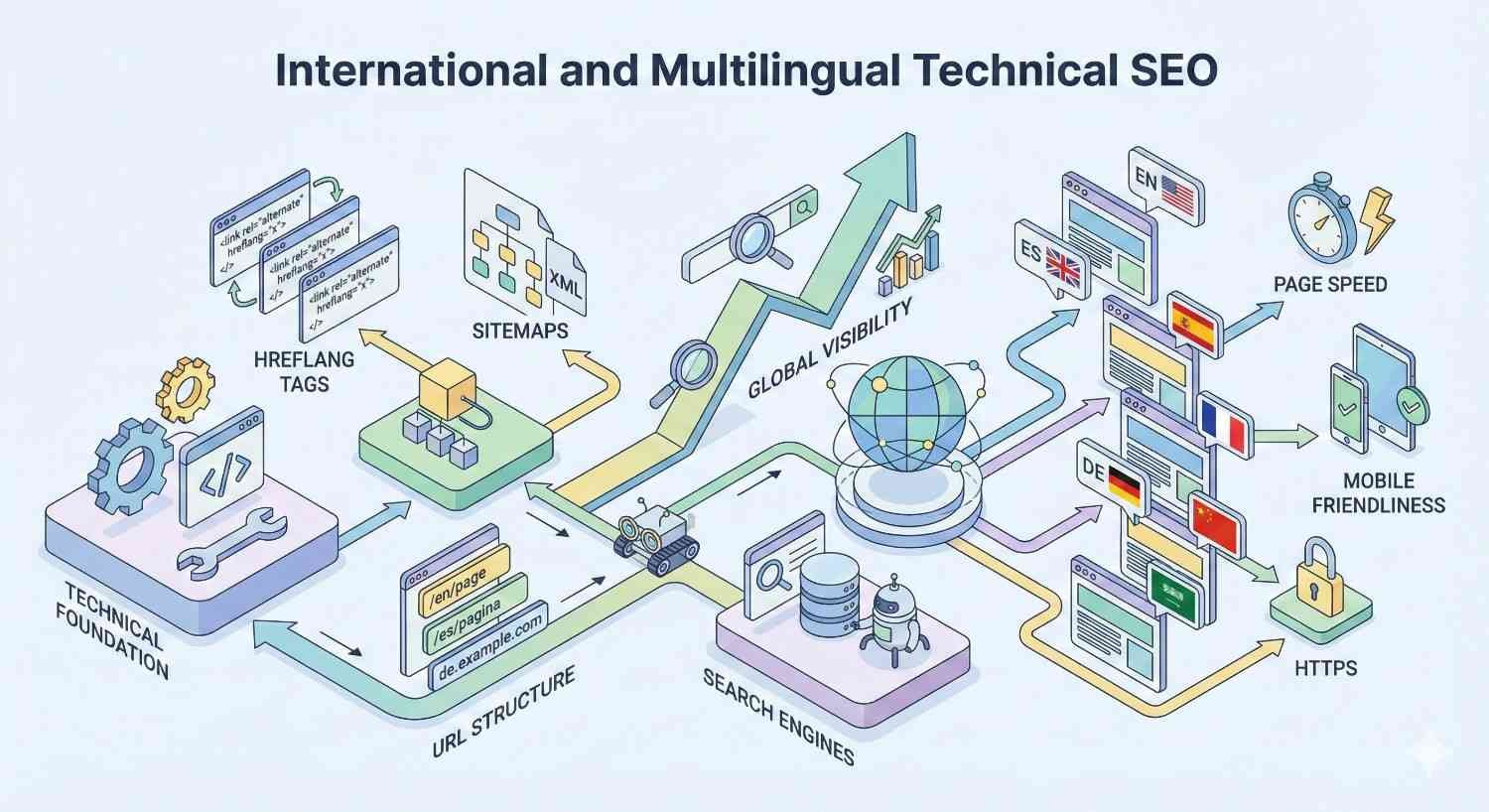
International and Multilingual Technical SEO
Websites targeting multiple countries or languages require additional technical considerations. Proper international SEO implementation ensures the right content reaches the right audience in each market.
Hreflang Implementation for Multi-Language Sites
Hreflang tags tell search engines which language and regional versions of a page exist. This prevents duplicate content issues across language versions and helps Google serve the appropriate version to each user.
Implement hreflang using link elements in the HTML head, HTTP headers, or XML sitemaps. All methods are valid; choose based on your technical constraints. Large sites often prefer sitemap implementation for easier management.
Every page in a language cluster must reference all other versions, including itself. If English, Spanish, and French versions exist, each page needs three hreflang tags pointing to all three versions. Missing or inconsistent tags cause implementation failures.
Include an x-default hreflang for users who don’t match any specified language/region. This fallback typically points to your primary language version or a language selector page.
Validate hreflang implementation using specialized tools. Common errors include missing return tags, incorrect language codes, and pointing to non-canonical URLs. Even small errors can invalidate entire hreflang implementations.
Country-Specific Targeting with ccTLDs, Subdomains, and Subdirectories
Country-code top-level domains (ccTLDs) like .de, .fr, and .co.uk provide the strongest geographic signals. Each ccTLD is treated as a separate site, requiring independent SEO efforts but offering clear country targeting.
Subdirectories (example.com/de/, example.com/fr/) consolidate domain authority while enabling country targeting through Search Console’s international targeting settings. This approach balances SEO efficiency with geographic flexibility.
Subdomains (de.example.com, fr.example.com) offer a middle ground. They’re treated as separate sites for some purposes but share the root domain. Subdomains require more technical setup than subdirectories but less than ccTLDs.
Choose your structure based on business needs and resources. ccTLDs work best for established brands with dedicated local teams. Subdirectories suit businesses wanting to leverage existing domain authority. Subdomains fit specific technical requirements or organizational structures.
Common International SEO Mistakes and How to Avoid Them
Automatic redirects based on IP or browser language frustrate users and confuse search engines. Users traveling abroad get wrong-language content. Googlebot crawling from US IP addresses may never see non-English versions. Use language selectors instead of forced redirects.
Machine translation without human review creates poor user experiences and potential ranking issues. Google’s algorithms can detect low-quality translated content. Invest in professional translation or high-quality machine translation with native speaker review.
Duplicate content across language versions occurs when pages aren’t properly differentiated. Ensure each language version has unique, localized content—not just translated text but culturally appropriate examples, currencies, and references.
Inconsistent URL structures across language versions complicate technical management and user experience. Maintain parallel URL structures where possible: /en/products/shoes should correspond to /de/produkte/schuhe with consistent hierarchy.
Log File Analysis and Advanced Crawl Diagnostics
Server logs reveal exactly how search engines interact with your site. Log file analysis provides insights unavailable from any other source, enabling data-driven technical SEO decisions.
What Server Logs Reveal About Search Engine Behavior
Server logs record every request made to your server, including requests from search engine crawlers. Each log entry shows the requesting IP, user agent, requested URL, response code, and timestamp.
Log analysis reveals which pages Googlebot actually crawls, how frequently, and what responses it receives. This ground-truth data often differs significantly from assumptions based on site structure or Search Console data.
Identify crawl waste by finding pages that receive crawl attention but provide no SEO value. Internal search results, filtered category pages, and parameter variations often consume significant crawl budget without contributing to organic performance.
Discover pages Googlebot ignores despite their importance. If your highest-value pages receive infrequent crawls while low-value pages get crawled daily, your internal linking and site architecture need adjustment.
Tools and Methods for Log File Analysis
Enterprise SEO platforms like Botify, Oncrawl, and JetOctopus specialize in log file analysis at scale. These tools parse massive log files, identify bot traffic, and visualize crawl patterns over time.
For smaller sites or one-time analysis, tools like Screaming Frog Log File Analyser provide capable analysis without enterprise pricing. Import log files and filter for search engine bot traffic to understand crawl behavior.
Raw log analysis using command-line tools (grep, awk) or spreadsheet software works for basic investigations. Filter logs by user agent to isolate Googlebot requests, then analyze URL patterns, response codes, and request frequency.
Combine log data with crawl data and analytics for complete pictures. A page might be crawled frequently (logs), indexed correctly (Search Console), but receive no traffic (analytics)—indicating content quality or relevance issues rather than technical problems.
Using Crawl Data to Prioritize Technical Fixes
Prioritize fixes based on crawl frequency and page importance. A technical issue affecting pages crawled thousands of times daily has more impact than the same issue on rarely-crawled pages.
Identify crawl traps—URL patterns that generate infinite or near-infinite crawlable URLs. Calendar widgets, faceted navigation, and session IDs commonly create crawl traps. Block these patterns via robots.txt or fix the underlying URL generation.
Monitor crawl budget allocation over time. Healthy sites show consistent crawl patterns with appropriate attention to important pages. Sudden changes in crawl behavior often indicate new technical issues or algorithm updates affecting your site.
Use log data to validate technical fixes. After implementing changes, monitor logs to confirm Googlebot responds as expected. Reduced crawl waste, improved response codes, and increased crawling of priority pages confirm successful implementations.
Technical SEO Auditing: A Systematic Approach
Regular technical audits identify issues before they impact rankings. A systematic approach ensures comprehensive coverage and enables prioritized remediation.
Essential Technical SEO Audit Checklist
Start with crawlability fundamentals: robots.txt accessibility, XML sitemap validity, and basic site accessibility. Verify search engines can reach your content before investigating more complex issues.
Check indexability signals: canonical tags, meta robots directives, and index coverage in Search Console. Identify pages that should be indexed but aren’t, and pages that are indexed but shouldn’t be.
Evaluate site architecture: internal linking depth, orphan pages, and redirect chains. Map how authority flows through your site and identify structural improvements.
Assess page experience factors: Core Web Vitals, mobile usability, and HTTPS implementation. These factors directly impact rankings and user experience.
Review structured data implementation: schema validity, rich result eligibility, and enhancement report status. Ensure markup accurately represents page content.
Analyze international targeting if applicable: hreflang implementation, geographic targeting settings, and content localization quality.
Tools for Comprehensive Technical Audits
Different tools excel at different aspects of technical SEO. Comprehensive audits typically require multiple tools working together.
Google Search Console Deep Dive
Search Console provides authoritative data directly from Google. The Index Coverage report shows exactly which pages Google has indexed and why others were excluded. The Core Web Vitals report shows field data from real users.
Use URL Inspection for page-level diagnostics. See how Google renders pages, check index status, and request indexing for updated content. The live test feature shows current page state versus last crawled version.
Monitor the Security & Manual Actions section for critical issues. Manual actions indicate Google has identified policy violations requiring correction. Security issues indicate malware or hacking that needs immediate attention.
Screaming Frog and Sitebulb for Crawl Analysis
Screaming Frog SEO Spider crawls websites like search engines do, identifying technical issues at scale. It finds broken links, redirect chains, duplicate content, missing meta data, and hundreds of other issues.
Configure Screaming Frog to render JavaScript for accurate analysis of modern websites. Enable the “JavaScript” rendering option and allow sufficient time for page rendering. Compare rendered versus raw HTML to identify JavaScript-dependent content.
Sitebulb provides similar crawl analysis with more visual reporting and prioritized recommendations. Its hint system explains issues in plain language and estimates impact, helping prioritize fixes for non-technical stakeholders.
Both tools integrate with Google Analytics and Search Console, enriching crawl data with traffic and indexing information. Pages with technical issues AND significant traffic deserve priority attention.
Ahrefs, SEMrush, and Other Enterprise Tools
Ahrefs Site Audit crawls your site and identifies technical issues while also providing backlink context. See which pages have technical problems AND strong backlink profiles—these pages deserve immediate attention to preserve link equity.
SEMrush Site Audit offers comprehensive technical analysis with project-based tracking over time. Monitor how your technical health score changes as you implement fixes and as new issues emerge.
Enterprise platforms like Conductor, BrightEdge, and seoClarity provide technical auditing alongside broader SEO capabilities. These tools suit large organizations needing integrated workflows, team collaboration, and executive reporting.
Prioritizing Technical Issues by Impact and Effort
Not all technical issues deserve equal attention. Prioritize based on potential impact and implementation effort to maximize ROI from technical SEO work.
High impact, low effort issues deserve immediate attention. Fixing a robots.txt error blocking your entire site takes minutes but has massive impact. Adding missing canonical tags to template pages affects thousands of URLs with a single change.
High impact, high effort issues require planning and resources. Site-wide page speed improvements, JavaScript rendering fixes, and architecture restructuring deliver significant results but need development resources and careful implementation.
Low impact issues can wait or be addressed opportunistically. A single broken internal link or one page with a missing meta description won’t meaningfully affect site performance. Fix these during regular maintenance rather than dedicated projects.
Create a prioritized backlog with estimated impact and effort for each issue. This enables informed resource allocation and helps communicate technical SEO value to stakeholders who control development resources.
Technical SEO Timelines: What to Expect and When
Technical SEO improvements don’t deliver instant results. Understanding realistic timelines helps set appropriate expectations and measure success accurately.
Realistic Timeframes for Technical SEO Improvements
Critical fixes like resolving robots.txt blocks or server errors can show results within days of Google’s next crawl. Once Google can access previously blocked content, indexing and ranking can begin immediately.
Indexing improvements typically manifest within two to four weeks. After fixing canonical issues, removing noindex tags, or improving internal linking, allow time for Google to recrawl affected pages and update its index.
Core Web Vitals improvements may take one to three months to fully impact rankings. Google uses field data collected over 28 days, so improvements need time to accumulate sufficient real-user data before affecting rankings.
Site architecture changes often require three to six months for full effect. Restructuring internal linking, consolidating content, or changing URL patterns requires Google to recrawl, reprocess, and reevaluate your entire site.
Factors That Accelerate or Delay Technical SEO Results
Site size significantly affects timeline. Small sites with hundreds of pages get recrawled quickly. Enterprise sites with millions of pages may take months for changes to propagate fully.
Crawl frequency matters. Sites that Google crawls frequently see changes reflected faster. New or low-authority sites with infrequent crawls experience longer delays between implementation and results.
Issue severity influences speed. Fixing critical errors that completely blocked indexing shows faster results than optimizing already-functional elements. The worse the starting point, the more dramatic the improvement.
Competition affects perceived results. Technical improvements that would significantly boost rankings in low-competition niches may produce modest gains in highly competitive markets where competitors also have strong technical foundations.
Setting Expectations with Stakeholders and Clients
Communicate timelines proactively before starting technical SEO work. Stakeholders expecting immediate results will be disappointed even when implementations succeed. Set realistic expectations upfront.
Define measurable milestones beyond rankings. Track crawl stats, indexing rates, Core Web Vitals scores, and error counts. These metrics show progress even before ranking improvements materialize.
Document baseline metrics before implementing changes. Without clear before-and-after data, demonstrating impact becomes difficult. Screenshot Search Console reports, export crawl data, and record performance metrics.
Report on leading indicators during the waiting period. Increased crawl frequency, improved index coverage, and better Core Web Vitals scores indicate that ranking improvements will follow.
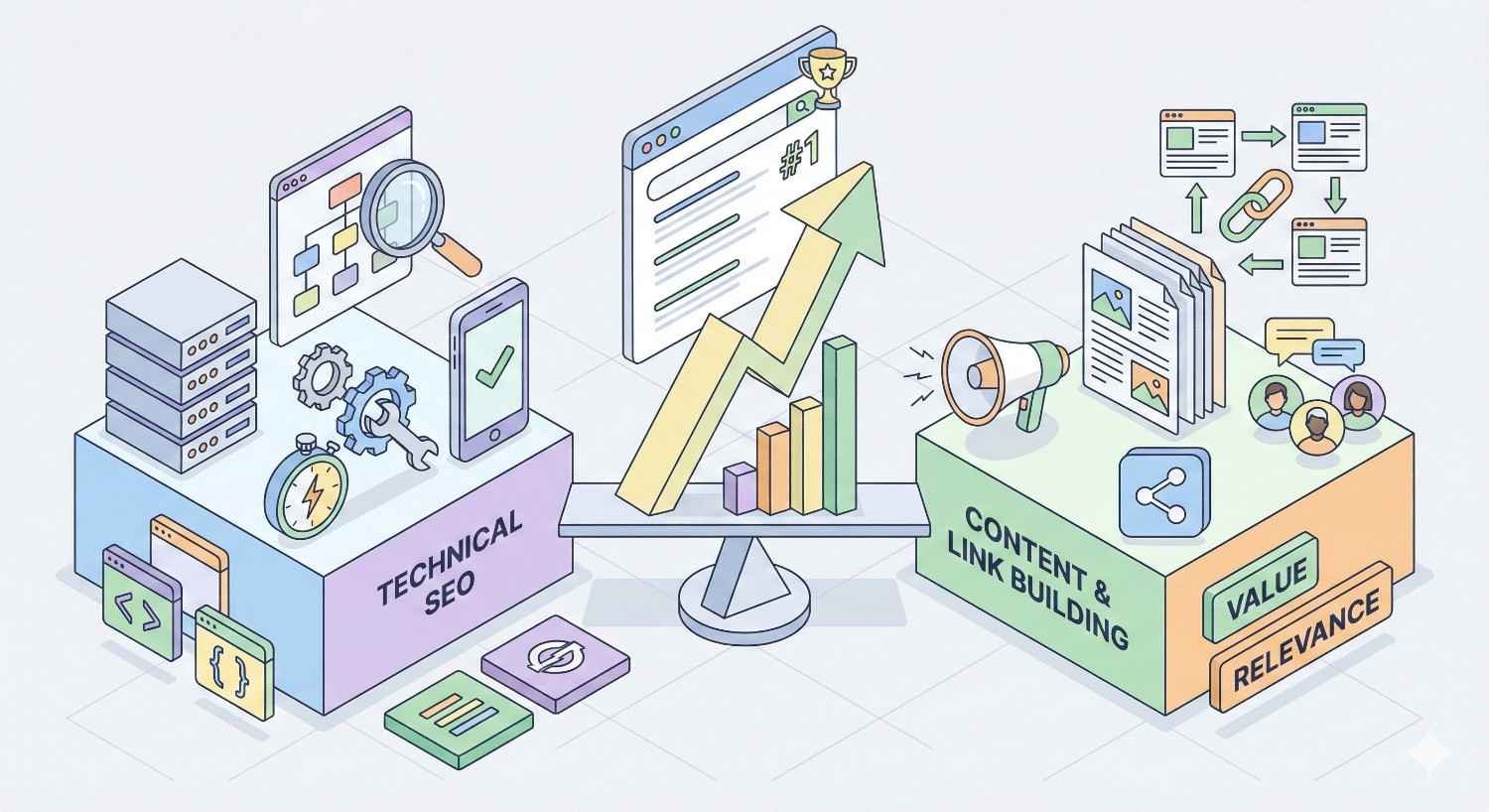
Technical SEO vs. Content and Link Building: Finding the Right Balance
Technical SEO, content, and links work together. Understanding when to prioritize each element maximizes overall organic performance.
When Technical SEO Should Be Your Priority
Prioritize technical SEO when fundamental issues prevent indexing. If Google can’t crawl or index your pages, content quality and backlinks are irrelevant. Fix access issues before investing in other areas.
Technical SEO takes priority when you have existing content that underperforms. If quality content isn’t ranking, technical barriers may be the cause. Audit technical factors before creating more content that may face the same obstacles.
Sites with significant technical debt should address foundational issues first. Launching content campaigns on technically broken sites wastes resources. Establish a solid technical foundation, then scale content and link building.
New sites benefit from getting technical SEO right from the start. Building on a proper foundation prevents future remediation costs. Invest in technical setup before aggressive content production.
Integrating Technical SEO with Content Strategy
Technical SEO should inform content architecture. Understanding how search engines crawl and index content helps structure content hubs, topic clusters, and internal linking for maximum impact.
Content templates should incorporate technical SEO requirements. Ensure templates include proper heading structure, schema markup, canonical tags, and performance optimization. This prevents technical debt from accumulating with each new piece of content.
Coordinate content launches with technical readiness. New content sections may require sitemap updates, internal linking adjustments, and navigation changes. Plan technical work alongside content calendars.
Use technical insights to guide content decisions. Log file analysis reveals which content types get crawled most frequently. Index coverage data shows which content Google values. Let this data inform content investment priorities.
How Technical Foundation Amplifies Link Building ROI
Links to technically broken pages waste link equity. If linked pages have indexing issues, redirect chains, or poor performance, backlink value diminishes. Fix technical issues on pages receiving external links.
Site architecture determines how link equity flows. Strong internal linking from linked pages to priority pages distributes authority effectively. Poor architecture traps link equity in low-value pages.
Page speed affects link acquisition indirectly. Slow, frustrating pages discourage linking. Fast, well-functioning pages encourage sharing and natural link building. Technical excellence supports link building success.
Technical SEO enables link building at scale. Programmatic pages (location pages, product pages, data-driven content) can attract links when technically sound. Technical issues prevent these pages from ranking and attracting natural links.
Measuring Technical SEO Success: KPIs and Reporting
Effective measurement demonstrates technical SEO value and guides ongoing optimization. Track metrics that connect technical improvements to business outcomes.
Key Metrics That Indicate Technical SEO Health
Crawl statistics from Search Console show how Google interacts with your site. Track total crawl requests, average response time, and crawl request trends over time. Healthy sites show consistent or increasing crawl activity.
Index coverage metrics reveal indexing effectiveness. Monitor the ratio of indexed to submitted pages, track excluded page reasons, and watch for sudden changes in indexed page counts.
Core Web Vitals scores from field data indicate real user experience. Track the percentage of page views meeting “good” thresholds for LCP, INP, and CLS. Aim for 75% or more of experiences in the good range.
Error rates across the site indicate technical health. Track 4xx and 5xx error rates, broken link counts, and redirect chain occurrences. Decreasing error rates signal improving technical health.
Building Technical SEO Dashboards and Reports
Create dashboards that track key metrics over time. Visualize trends rather than snapshots. A single data point means little; trends reveal whether technical health is improving or declining.
Segment data meaningfully. Track metrics by page type, site section, or template. Aggregate site-wide metrics can mask section-specific problems. A healthy blog section might hide a broken e-commerce section in overall averages.
Include both leading and lagging indicators. Leading indicators (crawl stats, error rates, Core Web Vitals) predict future performance. Lagging indicators (organic traffic, rankings) confirm whether predictions materialized.
Automate reporting where possible. Manual data collection is time-consuming and error-prone. Use API connections, scheduled exports, and reporting tools to maintain consistent, accurate tracking.
Connecting Technical Improvements to Business Outcomes
Correlate technical changes with traffic and revenue changes. When a technical fix coincides with traffic increases, document the connection. Build a record of technical SEO impact over time.
Calculate ROI for significant technical projects. Estimate traffic value before and after improvements. Compare the cost of technical work to the value of recovered or gained traffic.
Attribute conversions to technical improvements where possible. If fixing mobile usability issues increases mobile conversion rates, quantify the revenue impact. Technical SEO drives business results, not just technical metrics.
Communicate in business terms, not technical jargon. Stakeholders care about revenue, leads, and growth—not crawl budget or render-blocking resources. Translate technical improvements into business language.
Common Technical SEO Mistakes That Hurt Rankings
Avoiding common mistakes prevents unnecessary ranking losses. Learn from others’ errors to protect your organic performance.
Critical Errors That Block Indexing and Crawling
Accidental noindex tags on important pages prevent indexing entirely. This often happens during development when noindex is added to staging sites and accidentally deployed to production. Audit meta robots tags regularly.
Robots.txt blocking critical resources prevents proper rendering. Blocking CSS or JavaScript files means Google can’t render pages correctly, potentially missing content or misunderstanding page layout. Test rendering in Search Console.
Incorrect canonical tags pointing to wrong pages consolidate signals incorrectly. Self-referencing canonicals pointing to different URLs, canonicals to non-existent pages, or canonicals to non-canonical URLs all cause problems.
Server errors and timeouts during crawling prevent indexing. If Googlebot consistently encounters 5xx errors or timeouts, it reduces crawl frequency and may drop pages from the index. Monitor server health continuously.
Performance Pitfalls That Damage User Experience
Unoptimized images remain the most common performance issue. Large, uncompressed images in outdated formats dramatically slow page loads. Implement image optimization as a standard part of content workflows.
Render-blocking third-party scripts delay page rendering. Analytics, advertising, chat widgets, and social media embeds often block rendering while loading. Defer non-critical scripts and evaluate whether each third-party resource is truly necessary.
Excessive DOM size slows rendering and interaction. Pages with thousands of DOM elements strain browser resources. Simplify page structure, remove unnecessary elements, and consider pagination for long content.
Missing resource hints (preconnect, preload, prefetch) force browsers to discover resources sequentially. Hint critical resources to enable parallel loading and faster rendering.
Migration and Redesign Disasters to Avoid
Failing to implement redirects during URL changes causes immediate traffic loss. Every old URL needs a 301 redirect to its new equivalent. Missing redirects mean lost rankings, lost backlinks, and lost traffic.
Changing URL structure without business justification creates unnecessary risk. URL changes reset ranking signals and require redirect maintenance indefinitely. Only change URLs when there’s compelling reason.
Launching redesigns without technical SEO review introduces new issues. New templates may lack schema markup, have poor heading structure, or create new duplicate content. Audit redesigns before launch.
Removing content without redirects or consolidation wastes accumulated authority. Deleted pages with backlinks lose that link equity. Redirect deleted pages to relevant alternatives or consolidate content before removal.
When to Hire a Technical SEO Expert or Agency
Some technical SEO work requires specialized expertise. Knowing when to seek help prevents costly mistakes and accelerates results.
Signs Your Website Needs Professional Technical SEO Help
Persistent indexing problems despite attempted fixes indicate deeper issues. If pages remain unindexed after addressing obvious problems, expert diagnosis may reveal hidden causes.
Significant traffic drops without clear cause require investigation. Sudden organic traffic losses often have technical roots. Experienced technical SEOs can diagnose issues that generalists miss.
Complex technical environments need specialized knowledge. JavaScript frameworks, headless CMS platforms, enterprise e-commerce systems, and international multi-site setups present challenges beyond basic technical SEO.
Major projects like migrations, redesigns, and platform changes benefit from expert guidance. The cost of expert help is far less than the cost of a botched migration that loses years of organic growth.
What to Look for in a Technical SEO Partner
Verify technical depth through case studies and references. Ask about specific technical challenges they’ve solved. Generic SEO experience doesn’t guarantee technical expertise.
Assess their diagnostic process. Good technical SEOs have systematic approaches to identifying issues. Ask how they would approach auditing your site and what tools they use.
Evaluate communication skills. Technical SEOs must translate complex issues into actionable recommendations for developers and business stakeholders. Poor communication leads to misunderstanding and incomplete implementations.
Check their development relationships. Technical SEO recommendations require developer implementation. Partners who understand development workflows and constraints produce more actionable recommendations.
Questions to Ask Before Engaging an SEO Agency
What specific technical SEO experience do you have with sites like mine? Industry, platform, and scale experience matter. An agency experienced with small WordPress sites may struggle with enterprise e-commerce platforms.
How do you prioritize technical recommendations? Good agencies have frameworks for assessing impact and effort. Agencies that deliver hundred-item checklists without prioritization create more confusion than clarity.
What does your reporting include and how often? Understand what metrics they track and how they demonstrate progress. Ensure reporting aligns with your business goals, not just technical metrics.
How do you work with development teams? Technical SEO requires implementation. Understand how the agency collaborates with your developers, whether they provide implementation support, and how they handle technical questions.
Future-Proofing Your Technical SEO Strategy
Technical SEO continues evolving with search engine capabilities and web technologies. Building adaptable processes ensures long-term success.
Emerging Technical SEO Trends and Algorithm Updates
Core Web Vitals metrics continue evolving. INP replaced FID in 2024, and future metric changes are likely. Build performance monitoring that can adapt to new metrics rather than optimizing narrowly for current ones.
AI-generated content detection is improving. Search engines are getting better at identifying and potentially devaluing low-quality AI content. Focus on unique value and expertise that AI cannot easily replicate.
Entity-based search is becoming more prominent. Search engines increasingly understand entities and relationships rather than just keywords. Structured data and clear entity definitions become more important.
Mobile experience requirements continue tightening. What’s acceptable mobile performance today may be insufficient tomorrow. Maintain headroom above minimum thresholds rather than barely meeting current standards.
Preparing for AI Search and New SERP Features
AI-powered search experiences like Google’s AI Overviews change how users interact with search results. Content that AI can easily extract and summarize may receive prominent placement—or may lose clicks to AI-generated answers.
Structure content for AI extraction. Clear headings, concise answers, and well-organized information help AI systems understand and cite your content. FAQ sections, definition paragraphs, and structured data all support AI comprehension.
Focus on content AI cannot easily generate. Original research, unique data, expert opinions, and first-hand experience provide value that AI summaries cannot replicate. This content earns citations and clicks even in AI-enhanced search.
Monitor new SERP features and adapt quickly. Search result formats change frequently. Sites that quickly implement support for new features (new schema types, new content formats) gain early-mover advantages.
Building Sustainable Technical SEO Processes
Integrate technical SEO into development workflows. Technical requirements should be part of project specifications, not afterthoughts. Train developers on SEO implications of technical decisions.
Establish regular audit cadences. Monthly quick checks catch emerging issues early. Quarterly deep audits ensure comprehensive coverage. Annual strategic reviews assess whether technical approach aligns with business goals.
Document technical SEO standards and decisions. When team members change, documentation preserves institutional knowledge. Standards documents prevent regression to old bad practices.
Build monitoring and alerting systems. Automated monitoring catches issues faster than periodic manual checks. Alert on significant changes in crawl patterns, indexing, Core Web Vitals, and error rates.
Conclusion
Technical SEO forms the foundation that determines whether your content and link building investments deliver results. From crawlability and indexing to Core Web Vitals and structured data, each technical element contributes to your site’s ability to rank and convert organic traffic.
The strategies covered in this guide connect directly to business outcomes: more pages indexed means more ranking opportunities, faster pages mean better conversions, and proper international targeting means reaching global audiences effectively. Technical excellence isn’t just about satisfying search engine requirements—it’s about building websites that perform for users and businesses alike.
We help businesses build sustainable organic growth through comprehensive technical SEO, content strategy, and authority building. Contact White Label SEO Service to discuss how advanced technical SEO strategies can strengthen your search visibility and drive measurable business results.
Frequently Asked Questions
How long does technical SEO take to show results?
Technical SEO timelines vary by issue type and site size. Critical fixes like resolving crawl blocks can show results within days. Core Web Vitals improvements typically take one to three months as Google collects new field data. Major architecture changes may require three to six months for full impact.
Should I fix technical SEO before creating content?
Yes, address fundamental technical issues before scaling content production. If crawling or indexing problems exist, new content faces the same barriers as existing content. Establish a solid technical foundation first, then invest in content that can actually rank.
How much does technical SEO cost?
Technical SEO costs range from a few hundred dollars for basic audits to tens of thousands for enterprise implementations. Factors include site size, technical complexity, and whether you need ongoing management or one-time fixes. ROI typically exceeds costs when technical issues are genuinely limiting organic performance.
Can I do technical SEO myself or do I need an expert?
Many technical SEO tasks are manageable for website owners with basic technical skills. Tools like Screaming Frog and Google Search Console make auditing accessible. However, complex issues involving JavaScript rendering, large-scale migrations, or enterprise platforms often require specialized expertise.
What’s the most important technical SEO factor?
Indexability is foundational—if pages aren’t indexed, nothing else matters. Beyond that, Core Web Vitals and mobile usability directly impact rankings and user experience. The most important factor for your site depends on your current technical health and specific issues.
How often should I conduct technical SEO audits?
Perform quick technical checks monthly to catch emerging issues. Conduct comprehensive audits quarterly to ensure nothing is missed. After major site changes (redesigns, migrations, platform updates), audit immediately regardless of schedule.
Does technical SEO affect local search rankings?
Yes, technical SEO significantly impacts local search. Mobile usability is especially important since most local searches happen on mobile devices. Page speed affects local pack rankings. Proper LocalBusiness schema markup enables rich local results and supports Google Business Profile integration.