

A technical SEO audit identifies the hidden infrastructure issues preventing your website from ranking. This systematic review examines crawlability, indexability, site speed, and security factors that directly impact organic visibility.
Without regular technical audits, even the best content struggles to reach its ranking potential. Most sites have 15-30 technical issues actively suppressing their search performance.
This guide provides a complete technical SEO audit template covering every critical checkpoint. You’ll learn exactly what to examine, which tools to use, and how to prioritize fixes for maximum impact.
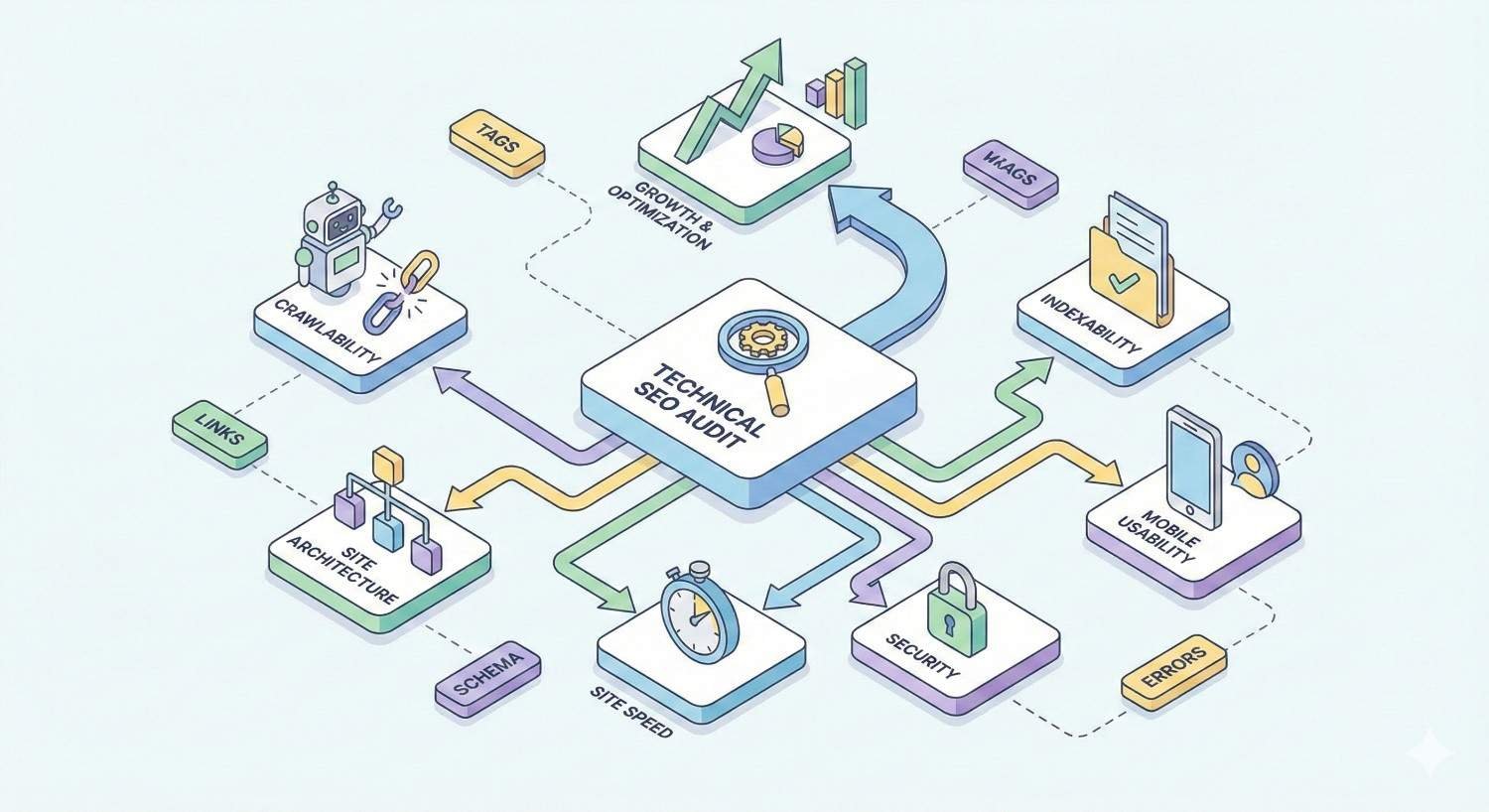
What Is a Technical SEO Audit?
A technical SEO audit is a comprehensive evaluation of your website’s infrastructure and backend elements that affect search engine crawling, indexing, and ranking. Unlike content audits that focus on what users read, technical audits examine how search engines access and understand your site.
The audit process systematically reviews server configurations, site architecture, page speed metrics, mobile optimization, security protocols, and structured data implementation. Each element either helps or hinders your organic visibility.
Technical audits reveal problems invisible to casual observation. A page might look perfect to visitors while being completely inaccessible to Googlebot due to JavaScript rendering issues or robots.txt misconfigurations.
Core Components of Technical SEO
Technical SEO encompasses several interconnected systems that determine search engine accessibility.
Crawlability refers to search engine bots’ ability to discover and access your pages. This includes robots.txt directives, XML sitemaps, internal linking structures, and server response codes.
Indexability determines whether discovered pages can be added to search engine databases. Meta robots tags, canonical URLs, and duplicate content issues all affect indexation.
Site architecture covers URL structure, navigation hierarchy, and internal link distribution. Poor architecture creates orphaned pages and dilutes link equity across your domain.
Page experience signals include Core Web Vitals, mobile-friendliness, HTTPS security, and intrusive interstitial avoidance. Google explicitly uses these as ranking factors.
Rendering involves how search engines process JavaScript and display dynamic content. Modern websites often rely on client-side rendering that search engines may struggle to execute.
Why Technical Audits Matter for Organic Growth
Technical issues create invisible ceilings on your organic performance. You can produce exceptional content and build quality backlinks, but fundamental infrastructure problems prevent those efforts from translating into rankings.
Consider crawl budget. Google allocates limited resources to crawl each domain. If your site wastes crawl budget on redirect chains, parameter URLs, or low-value pages, important content may not get crawled frequently enough to rank competitively.
Index bloat presents another common problem. Sites with thousands of thin, duplicate, or near-duplicate pages dilute their topical authority. Search engines struggle to identify which pages deserve ranking for specific queries.
Page speed directly impacts both rankings and user behavior. Google’s research confirms that pages failing Core Web Vitals thresholds see measurably lower engagement and conversion rates.
Mobile-first indexing means Google primarily uses your mobile site version for ranking decisions. Desktop-only optimization strategies no longer work.
Technical audits identify these issues before they compound. A single misconfigured canonical tag can suppress an entire section of your site. Regular audits catch problems early when fixes remain straightforward.
Pre-Audit Preparation: Tools and Access Requirements
Effective technical audits require proper tooling and access credentials. Attempting an audit without adequate preparation wastes time and produces incomplete findings.
Essential Technical SEO Tools
Your technical SEO toolkit should include crawling software, performance testing tools, and search console access.
Crawling tools simulate how search engines discover your site. Screaming Frog SEO Spider remains the industry standard for sites under 500 pages on its free tier. Sitebulb offers more visual reporting. For enterprise sites, Lumar (formerly DeepCrawl) or Botify provide cloud-based crawling at scale.
Google Search Console provides authoritative data on how Google actually crawls and indexes your site. The Index Coverage report, Core Web Vitals report, and URL Inspection tool are irreplaceable for technical audits.
PageSpeed Insights and Lighthouse measure Core Web Vitals and provide specific optimization recommendations. Chrome DevTools offers deeper performance profiling for developers.
Log file analyzers like Screaming Frog Log File Analyzer or Splunk reveal actual bot behavior on your server. This data shows what search engines actually crawl versus what you want them to crawl.
Mobile testing tools include Google’s Mobile-Friendly Test and BrowserStack for cross-device testing. Chrome DevTools device emulation works for quick checks.
Structured data validators like Google’s Rich Results Test and Schema.org’s validator confirm your markup implementation.
Required Access and Credentials
Before starting your audit, secure access to these systems:
Google Search Console with full permissions for the property. Verify you can access all reports including Index Coverage, Core Web Vitals, and Manual Actions.
Google Analytics or your analytics platform to correlate technical issues with traffic patterns. Historical data helps identify when problems began.
Server access for log files, robots.txt editing, and .htaccess modifications. Know who can implement server-level changes.
CMS admin access for on-page elements, redirects, and plugin management. Document which changes require developer involvement.
CDN dashboard if using Cloudflare, Fastly, or similar services. CDN configurations affect caching, security headers, and performance.
Hosting control panel for server response time monitoring and SSL certificate management.
Setting Up Your Audit Workspace
Organize your audit environment before beginning analysis.
Create a dedicated spreadsheet or project management board to track findings. Categorize issues by type (crawlability, indexability, performance, etc.) and severity (critical, high, medium, low).
Document your baseline metrics. Record current indexed page counts, crawl stats, Core Web Vitals scores, and organic traffic levels. These benchmarks measure improvement after implementing fixes.
Set up your crawling tool with appropriate configurations. Match your crawl settings to Googlebot’s behavior: respect robots.txt, follow redirects, render JavaScript if your site requires it.
Establish a staging environment for testing fixes before production deployment. Technical changes can have unintended consequences that staging catches first.
Site Crawlability and Indexability Audit
Crawlability and indexability form the foundation of technical SEO. If search engines cannot access and index your pages, nothing else matters.
Robots.txt Configuration and Testing
Your robots.txt file provides instructions to search engine crawlers. Misconfigurations here can block entire sections of your site from indexing.
Location verification: Confirm robots.txt exists at yourdomain.com/robots.txt. The file must be at the root domain level.
Syntax validation: Use Google Search Console’s robots.txt Tester to check for syntax errors. Even small typos can cause unintended blocking.
Directive review: Examine each Disallow directive. Verify you’re intentionally blocking those paths. Common mistakes include blocking CSS/JS files needed for rendering, blocking entire subdirectories accidentally, or using overly broad wildcards.
Crawl-delay considerations: While Googlebot ignores crawl-delay directives, other search engines respect them. Excessive delays slow indexation.
Sitemap reference: Include your XML sitemap URL in robots.txt. This helps search engines discover your sitemap even without Search Console submission.
Test specific URLs using the robots.txt Tester to confirm important pages remain accessible. Pay special attention to pages that should be indexed but aren’t appearing in search results.
XML Sitemap Validation
XML sitemaps guide search engines to your important pages. Effective sitemaps accelerate discovery and communicate page priorities.
Sitemap accessibility: Verify your sitemap loads without errors at its declared URL. Check both the index sitemap and individual sitemaps if you use a sitemap index.
URL accuracy: Every URL in your sitemap should return a 200 status code. Sitemaps containing redirects, 404s, or 5xx errors waste crawl budget and signal poor site maintenance.
Canonical consistency: Sitemap URLs should match canonical URLs exactly. Including non-canonical URLs creates conflicting signals.
Completeness: Compare sitemap URLs against your crawl data. Important pages missing from the sitemap may receive less frequent crawling.
Size limits: Individual sitemaps cannot exceed 50,000 URLs or 50MB uncompressed. Use sitemap index files for larger sites.
Lastmod accuracy: If using lastmod dates, ensure they reflect actual content changes. Artificially inflated dates can reduce Google’s trust in your sitemap signals.
Submit your sitemap through Google Search Console and monitor the Index Coverage report for sitemap-specific issues.
Meta Robots and X-Robots-Tag Analysis
Meta robots tags and X-Robots-Tag HTTP headers control indexing at the page level. These directives override robots.txt for indexing decisions.
Noindex audit: Crawl your site and filter for pages with noindex directives. Verify each noindex is intentional. Accidental noindex tags on important pages completely prevent ranking.
Nofollow review: Pages with nofollow meta tags don’t pass link equity. This is rarely appropriate for internal pages.
X-Robots-Tag headers: Check HTTP headers for X-Robots-Tag directives, especially on non-HTML resources like PDFs. These headers can block indexing without visible page-level tags.
Directive conflicts: Identify pages where robots.txt blocks crawling but meta robots allows indexing, or vice versa. Conflicting signals confuse search engines.
JavaScript-rendered directives: If your site uses client-side rendering, verify that meta robots tags are present in the initial HTML response, not just the rendered DOM.
Crawl Budget Optimization
Crawl budget represents the resources Google allocates to crawling your domain. Large sites and sites with crawl efficiency problems need active crawl budget management.
Crawl waste identification: Review server logs to identify URLs receiving crawl attention that shouldn’t. Common culprits include faceted navigation parameters, session IDs, internal search results, and calendar widgets generating infinite URLs.
Redirect chain elimination: Each redirect in a chain consumes crawl budget. Flatten chains to single redirects.
Duplicate content consolidation: Multiple URLs serving identical content waste crawl resources. Implement proper canonicalization or consolidate to single URLs.
Low-value page management: Consider noindexing or removing thin content pages, outdated blog posts with no traffic, and auto-generated pages providing no unique value.
Crawl rate monitoring: Google Search Console’s Crawl Stats report shows crawl frequency and response times. Sudden drops may indicate server issues or Google detecting quality problems.
Index Coverage and Status Monitoring
Google Search Console’s Index Coverage report reveals exactly how Google processes your pages.
Error review: Address all errors first. Common errors include server errors (5xx), redirect errors, and submitted URL blocked by robots.txt.
Excluded page analysis: Review excluded pages to understand why Google chose not to index them. Categories include:
- Duplicate without user-selected canonical
- Duplicate, Google chose different canonical than user
- Crawled, currently not indexed
- Discovered, currently not indexed
- Excluded by noindex tag
Valid page verification: Confirm your important pages appear in the Valid category. Cross-reference against your sitemap and priority page list.
Trend monitoring: Watch for sudden changes in indexed page counts. Drops may indicate technical problems; unexpected increases may signal index bloat.
Use the URL Inspection tool to check specific pages. This shows Google’s cached version, mobile usability status, and any detected issues.
Site Architecture and URL Structure Analysis
Site architecture determines how link equity flows through your domain and how easily users and search engines navigate your content.
URL Structure Best Practices
Clean, descriptive URLs improve both user experience and search engine understanding.
Readability: URLs should be human-readable and indicate page content. Avoid parameter strings, session IDs, and meaningless numbers.
Keyword inclusion: Include relevant keywords naturally in URLs without stuffing. Keep URLs concise while remaining descriptive.
Consistency: Maintain consistent URL patterns across your site. Decide on conventions for categories, dates, and hierarchy representation.
Lowercase enforcement: URLs are case-sensitive. Enforce lowercase to prevent duplicate content from case variations.
Word separation: Use hyphens to separate words. Underscores are not recognized as word separators by search engines.
Static over dynamic: Prefer static URLs over parameter-based dynamic URLs when possible. If parameters are necessary, configure URL parameter handling in Search Console.
HTTPS consistency: All URLs should use HTTPS. HTTP versions should redirect to HTTPS equivalents.
Internal Linking Architecture
Internal links distribute link equity and establish topical relationships between pages.
Link equity distribution: Analyze how PageRank flows through your site. Important pages should receive more internal links from other authoritative pages on your domain.
Anchor text optimization: Internal link anchor text should be descriptive and varied. Avoid generic anchors like “click here” or “read more.”
Navigation links: Primary navigation should link to your most important category and service pages. Footer links can support secondary pages but carry less weight.
Contextual links: In-content links from relevant pages pass more topical relevance than navigation links. Build contextual links between related content pieces.
Link depth analysis: Count how many clicks separate important pages from your homepage. Critical pages should be reachable within 3 clicks.
Broken link detection: Crawl your site to identify internal links pointing to 404 pages, redirects, or error pages. Fix or remove broken links.
Site Depth and Click Distance
Click distance measures how many clicks separate a page from the homepage. Shallow architecture improves crawlability and user experience.
Depth analysis: Generate a report showing page distribution by click depth. Most important pages should be at depth 1-2.
Deep page identification: Pages at depth 4+ may receive insufficient crawl attention and link equity. Consider restructuring navigation or adding internal links to reduce depth.
Flat vs. hierarchical: Balance between flat architecture (everything accessible quickly) and logical hierarchy (clear categorical organization). Most sites benefit from a hybrid approach.
Breadcrumb implementation: Breadcrumbs provide secondary navigation and help search engines understand site hierarchy. Implement breadcrumb structured data for enhanced SERP display.
Pagination and Faceted Navigation
Pagination and faceted navigation create crawlability challenges that require careful management.
Pagination handling: For paginated content series, ensure each page is crawlable and indexable. Use self-referencing canonicals on each page. Implement rel=”next” and rel=”prev” if appropriate for your CMS.
View-all pages: If offering view-all options, consider canonicalizing paginated pages to the view-all version if it loads efficiently.
Faceted navigation audit: E-commerce sites with filters (size, color, price) can generate thousands of parameter combinations. Most combinations should be blocked from indexing to prevent crawl waste and duplicate content.
Parameter handling: Configure URL parameters in Google Search Console to indicate which parameters change page content versus which are tracking or sorting parameters.
Crawl trap prevention: Ensure faceted navigation doesn’t create infinite crawl paths. Calendar widgets, sorting options, and filter combinations can generate unlimited URLs.
Orphaned Pages Detection
Orphaned pages have no internal links pointing to them, making them difficult for search engines to discover.
Orphan identification: Compare your sitemap URLs and crawled URLs against pages receiving internal links. Pages in your sitemap but not linked internally are orphaned.
Intentional vs. accidental: Some orphaned pages are intentional (landing pages for paid campaigns). Verify each orphan’s status.
Resolution strategies: For valuable orphaned pages, add internal links from relevant content. For outdated or low-value orphans, consider removal or noindexing.
Sitemap dependency: Orphaned pages rely entirely on sitemap discovery. This is less reliable than internal link discovery for maintaining index freshness.
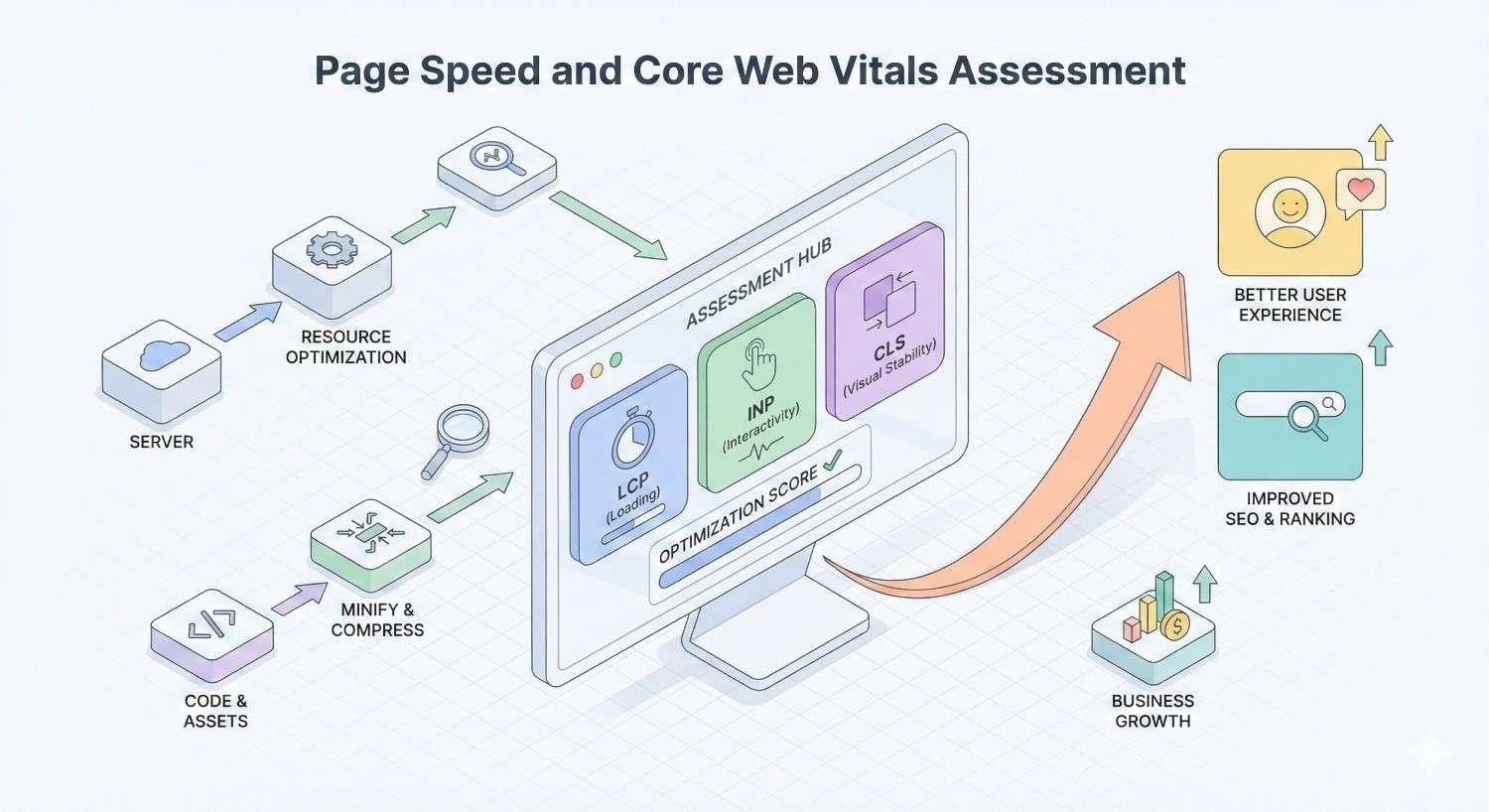
Page speed directly impacts rankings, user experience, and conversion rates. Core Web Vitals are confirmed Google ranking factors.
Core Web Vitals Metrics (LCP, FID, CLS)
Core Web Vitals measure real-world user experience through three specific metrics.
Largest Contentful Paint (LCP) measures loading performance. LCP should occur within 2.5 seconds of page load start. LCP typically measures the largest image or text block in the viewport.
Common LCP issues include slow server response times, render-blocking resources, slow resource load times, and client-side rendering delays.
First Input Delay (FID) measures interactivity. FID should be less than 100 milliseconds. This metric captures the delay between a user’s first interaction and the browser’s response.
FID problems usually stem from heavy JavaScript execution blocking the main thread. Long tasks, large JavaScript bundles, and third-party scripts commonly cause FID failures.
Note: FID is being replaced by Interaction to Next Paint (INP) as of March 2024. INP measures responsiveness throughout the entire page lifecycle, not just first interaction.
Cumulative Layout Shift (CLS) measures visual stability. CLS should be less than 0.1. This metric quantifies how much page content shifts unexpectedly during loading.
CLS issues arise from images without dimensions, ads or embeds without reserved space, dynamically injected content, and web fonts causing text reflow.
Mobile vs Desktop Performance
Google uses mobile-first indexing, making mobile performance the priority. However, both experiences matter for users.
Separate testing: Test mobile and desktop performance independently. Issues often differ between device types.
Mobile-specific problems: Mobile devices have less processing power, slower network connections, and smaller screens. JavaScript execution takes longer, and large images impact mobile more severely.
Desktop-specific issues: Desktop pages may load different resources or have different layouts. Don’t assume desktop performance matches mobile.
Field data vs. lab data: Chrome User Experience Report (CrUX) provides field data from real users. PageSpeed Insights lab data simulates performance. Both matter, but field data determines ranking impact.
Segment analysis: In Search Console, review Core Web Vitals by page type. Template-level issues affect all pages using that template.
Server Response Time (TTFB)
Time to First Byte measures how quickly your server responds to requests. TTFB under 200ms is good; under 500ms is acceptable.
Server optimization: Slow TTFB indicates server-side problems. Investigate database query efficiency, server resources, and application code performance.
Hosting evaluation: Shared hosting often produces inconsistent TTFB. Consider upgrading to VPS, dedicated, or managed hosting for performance-critical sites.
CDN implementation: Content Delivery Networks cache content at edge locations closer to users, reducing TTFB for static resources.
Caching configuration: Implement server-side caching for dynamic content. Database query caching, object caching, and full-page caching all reduce TTFB.
Geographic considerations: Test TTFB from multiple locations. Users far from your server experience higher latency.
Render-Blocking Resources
Render-blocking resources prevent the browser from displaying content until they load and execute.
CSS optimization: Critical CSS should be inlined in the HTML head. Non-critical CSS should be loaded asynchronously or deferred.
JavaScript deferral: Add defer or async attributes to script tags. Defer maintains execution order; async does not.
Third-party scripts: Audit third-party scripts for necessity and performance impact. Analytics, chat widgets, and advertising scripts often block rendering.
Font loading: Web fonts can block text rendering. Use font-display: swap to show fallback fonts while custom fonts load.
Resource prioritization: Use preload hints for critical resources and preconnect for third-party domains you’ll need early.
Image Optimization Opportunities
Images typically constitute the largest portion of page weight. Optimization provides significant performance gains.
Format selection: Use WebP or AVIF for photographs and complex images. Use SVG for icons and simple graphics. PNG for images requiring transparency. JPEG for photographs where WebP isn’t supported.
Compression: Compress images to reduce file size without visible quality loss. Tools like Squoosh, ImageOptim, or automated build processes handle compression.
Responsive images: Serve appropriately sized images for each device. Use srcset and sizes attributes to let browsers choose optimal image sizes.
Lazy loading: Implement native lazy loading (loading=”lazy”) for images below the fold. This defers loading until images approach the viewport.
Dimension attributes: Always specify width and height attributes on images. This reserves space and prevents CLS.
Next-gen formats: Implement WebP with JPEG/PNG fallbacks for browsers lacking support. Consider AVIF for even better compression where supported.
Mobile Optimization and Responsive Design Audit
Mobile-first indexing means Google predominantly uses your mobile site version for ranking. Mobile optimization is not optional.
Mobile-First Indexing Compliance
Verify your site meets mobile-first indexing requirements.
Content parity: Mobile and desktop versions should have equivalent content. Hidden content, accordion elements, and tabs are fine if the content is in the HTML.
Structured data parity: Structured data must be present on mobile pages, not just desktop.
Meta data parity: Title tags, meta descriptions, and meta robots directives should match between versions.
Image optimization: Mobile images should have alt text and be crawlable. Don’t block images on mobile.
Hreflang consistency: International sites must have hreflang annotations on mobile pages.
Verification: Use URL Inspection in Search Console to confirm Google is crawling your mobile version. The tool shows which version Google selected.
Responsive Design Testing
Responsive design adapts layouts to different screen sizes using CSS media queries.
Breakpoint testing: Test your site at common breakpoints: 320px, 375px, 414px, 768px, 1024px, 1440px. Content should remain accessible and readable at each size.
Content reflow: Verify content reflows appropriately without horizontal scrolling. Text should remain readable without zooming.
Navigation functionality: Mobile navigation (hamburger menus, dropdowns) should function correctly. Test touch interactions.
Form usability: Forms should be usable on mobile with appropriately sized input fields and touch-friendly buttons.
Media queries audit: Review CSS media queries for conflicts or gaps that cause layout issues at specific widths.
Mobile Usability Issues
Google Search Console reports specific mobile usability problems.
Text too small: Font sizes below 16px require zooming on mobile. Ensure body text is readable without magnification.
Clickable elements too close: Touch targets should be at least 48×48 pixels with adequate spacing. Closely spaced links frustrate mobile users.
Content wider than screen: Horizontal scrolling indicates layout problems. Usually caused by fixed-width elements or images without max-width constraints.
Viewport not set: The viewport meta tag must be present and correctly configured.
Intrusive interstitials: Pop-ups covering main content on mobile can trigger ranking penalties. Acceptable interstitials include age verification, cookie consent, and small banners.
Touch Elements and Viewport Configuration
Proper viewport and touch configuration ensures mobile usability.
Viewport meta tag: Include <meta name=”viewport” content=”width=device-width, initial-scale=1″> in your HTML head. This enables responsive behavior.
Touch target sizing: Buttons, links, and form elements need minimum 48×48 pixel touch targets. Add padding if necessary to meet this requirement.
Touch target spacing: Maintain at least 8 pixels between touch targets to prevent accidental taps.
Zoom capability: Don’t disable user zooming with maximum-scale=1 or user-scalable=no. Users with visual impairments need zoom functionality.
Input types: Use appropriate input types (email, tel, number) to trigger correct mobile keyboards.
On-Page Technical Elements Audit
On-page technical elements communicate page content and purpose to search engines.
Title Tag Optimization
Title tags remain one of the strongest on-page ranking signals.
Uniqueness: Every indexable page needs a unique title tag. Duplicate titles confuse search engines about which page to rank.
Length: Keep titles under 60 characters to prevent truncation in SERPs. Front-load important keywords.
Keyword placement: Include primary keywords near the beginning of the title. Avoid keyword stuffing.
Brand inclusion: Include brand name, typically at the end, separated by a pipe or dash.
Click-through optimization: Titles should be compelling and accurately represent page content. Misleading titles increase bounce rates.
Template issues: CMS templates often generate poor titles. Audit auto-generated titles for quality and uniqueness.
Meta Description Analysis
Meta descriptions don’t directly impact rankings but significantly affect click-through rates.
Uniqueness: Each page should have a unique meta description. Duplicate descriptions provide no value.
Length: Aim for 150-160 characters. Google may truncate longer descriptions or pull different text from the page.
Keyword inclusion: Include relevant keywords naturally. Google bolds matching search terms in descriptions.
Call to action: Include compelling CTAs that encourage clicks. Describe what users will find on the page.
Missing descriptions: Pages without meta descriptions rely on Google to generate snippets. This often produces suboptimal results.
Accuracy: Descriptions must accurately represent page content. Misleading descriptions harm user experience and engagement metrics.
Header Tag Hierarchy (H1-H6)
Header tags establish content hierarchy and help search engines understand page structure.
Single H1: Each page should have exactly one H1 tag containing the primary topic. Multiple H1s dilute topical focus.
Logical hierarchy: Headers should follow logical order: H1 → H2 → H3. Don’t skip levels (H1 → H3).
Keyword integration: Include relevant keywords in headers naturally. Headers carry more weight than body text.
Descriptive content: Headers should describe the following section’s content. Avoid vague headers like “More Information.”
Length considerations: Keep headers concise while remaining descriptive. Long headers lose impact.
Styling separation: Don’t use header tags for styling purposes. Use CSS for visual formatting; reserve headers for semantic structure.
Schema Markup Implementation
Structured data helps search engines understand page content and enables rich results.
Relevant schema types: Implement schema types appropriate for your content: Article, Product, LocalBusiness, FAQ, HowTo, Review, Event, Organization, etc.
Required properties: Each schema type has required and recommended properties. Include all required properties and as many recommended properties as applicable.
Accuracy: Schema data must accurately reflect visible page content. Misleading structured data violates Google’s guidelines.
Validation: Test all structured data using Google’s Rich Results Test. Fix any errors or warnings.
Page-level implementation: Implement schema on individual pages, not just site-wide. Product pages need Product schema; articles need Article schema.
Canonical Tag Configuration
Canonical tags tell search engines which URL version to index when duplicate or similar content exists.
Self-referencing canonicals: Every indexable page should have a self-referencing canonical tag pointing to its own URL.
Consistency: Canonical URLs should match exactly: same protocol (HTTPS), same domain version (www or non-www), same trailing slash convention.
Cross-domain canonicals: Use cross-domain canonicals carefully. They transfer ranking signals to the canonical URL.
Canonical chains: Avoid canonicals pointing to pages that canonical elsewhere. This creates chains that may not be followed.
Conflicting signals: Canonicals should align with internal links, sitemaps, and redirects. Conflicting signals confuse search engines.
JavaScript rendering: Ensure canonical tags are present in the initial HTML response, not just the rendered DOM.
Hreflang Implementation (International Sites)
Hreflang tags help search engines serve the correct language or regional version to users.
Correct syntax: Hreflang uses ISO 639-1 language codes and optionally ISO 3166-1 Alpha 2 country codes. Example: en-US, en-GB, de-DE.
Return links: Hreflang annotations must be reciprocal. If page A references page B, page B must reference page A.
Self-reference: Each page should include a self-referencing hreflang annotation.
X-default: Include an x-default hreflang for users whose language/region doesn’t match any specific version.
Implementation methods: Hreflang can be implemented via HTML link tags, HTTP headers, or XML sitemaps. Choose one method and apply consistently.
Validation: Use hreflang testing tools to verify correct implementation. Errors are common and can cause wrong versions to rank.
Content Duplication and Canonicalization Issues
Duplicate content dilutes ranking signals and wastes crawl budget. Proper canonicalization consolidates signals to preferred URLs.
Duplicate Content Detection
Identify duplicate and near-duplicate content across your site.
Exact duplicates: Multiple URLs serving identical content. Common causes include parameter variations, trailing slash inconsistencies, and protocol/subdomain variations.
Near duplicates: Pages with substantially similar content. Product variations, location pages with templated content, and paginated archives often create near-duplicates.
Crawl-based detection: Use crawling tools to identify pages with matching or highly similar content. Screaming Frog’s “Near Duplicates” feature helps identify these.
Cross-domain duplication: Content syndicated to other sites or scraped by competitors creates external duplication. Canonical tags help, but original publication and internal linking matter more.
Boilerplate content: Excessive boilerplate (headers, footers, sidebars) relative to unique content can trigger duplicate content issues. Ensure each page has substantial unique content.
Canonical Tag Audit
Review canonical tag implementation across your site.
Missing canonicals: Identify pages without canonical tags. Every indexable page needs one.
Incorrect canonicals: Find pages with canonicals pointing to wrong URLs. This can suppress important pages from indexing.
Canonical to non-indexable: Canonicals should never point to noindexed pages, redirecting pages, or 404 pages.
HTTP/HTTPS mismatches: Canonical URLs should use HTTPS if your site uses HTTPS.
Relative vs. absolute: Use absolute URLs in canonical tags to prevent protocol or domain ambiguity.
Pagination canonicals: Paginated pages should have self-referencing canonicals, not canonicals to page 1 (unless consolidating to a view-all page).
Parameter Handling
URL parameters create duplicate content when they don’t change page content meaningfully.
Parameter identification: Catalog all URL parameters used on your site. Categorize by function: tracking, sorting, filtering, pagination, session.
Search Console configuration: Configure URL parameters in Google Search Console. Indicate which parameters Google should ignore.
Canonical implementation: Pages with parameters should canonical to the parameter-free version when parameters don’t change content.
Robots.txt blocking: Consider blocking parameter URLs in robots.txt if they provide no unique value. Be careful not to block important filtered views.
Clean URL enforcement: Where possible, use clean URLs instead of parameters. Rewrite rules can transform parameter URLs to cleaner formats.
WWW vs Non-WWW and HTTP vs HTTPS
Domain and protocol variations create duplicate content if not properly consolidated.
Single version enforcement: Choose one canonical version (www or non-www, always HTTPS) and redirect all variations to it.
301 redirect implementation: All non-canonical versions should 301 redirect to the canonical version. Test all four combinations:
Search Console verification: Verify all domain versions in Search Console, then set your preferred version.
Internal link consistency: All internal links should use the canonical version. Don’t link to versions that redirect.
Sitemap consistency: Sitemap URLs should match your canonical domain version exactly.
HTTPS and Security Audit
HTTPS is a confirmed ranking signal. Security issues can trigger browser warnings that devastate traffic.
SSL Certificate Validation
Verify your SSL certificate is properly configured and valid.
Certificate validity: Check expiration date. Expired certificates trigger browser security warnings.
Certificate chain: The complete certificate chain must be installed. Missing intermediate certificates cause validation failures on some devices.
Domain coverage: Certificate must cover all domains and subdomains you use. Wildcard certificates cover subdomains; multi-domain certificates cover specific domains.
Certificate authority: Use certificates from trusted certificate authorities. Self-signed certificates trigger browser warnings.
Key strength: Use 2048-bit RSA keys or 256-bit ECDSA keys minimum. Weaker keys are considered insecure.
Protocol support: Support TLS 1.2 and TLS 1.3. Disable older protocols (SSL 3.0, TLS 1.0, TLS 1.1) which have known vulnerabilities.
Mixed Content Issues
Mixed content occurs when HTTPS pages load resources over HTTP.
Active mixed content: HTTP JavaScript or CSS on HTTPS pages. Browsers block this content, breaking functionality.
Passive mixed content: HTTP images, videos, or audio on HTTPS pages. Browsers may display warnings but typically load the content.
Detection methods: Browser developer tools console shows mixed content warnings. Crawling tools can identify mixed content across your site.
Resolution: Update all resource URLs to HTTPS. Use protocol-relative URLs (//example.com/resource) or absolute HTTPS URLs.
Third-party resources: Ensure third-party scripts, fonts, and embeds support HTTPS. Replace any that don’t.
HTTPS Migration Checklist
If migrating from HTTP to HTTPS, follow this checklist:
Pre-migration:
- Obtain and install SSL certificate
- Update internal links to HTTPS
- Update canonical tags to HTTPS
- Update sitemap URLs to HTTPS
- Update robots.txt sitemap reference
Migration:
- Implement 301 redirects from HTTP to HTTPS
- Test redirects for all page types
- Verify no redirect chains or loops
Post-migration:
- Add HTTPS property to Search Console
- Submit HTTPS sitemap
- Update external links where possible
- Monitor Index Coverage for issues
- Update Google Analytics and other tools
Security Headers Implementation
Security headers protect users and demonstrate site security.
HSTS (HTTP Strict Transport Security): Forces browsers to use HTTPS. Prevents protocol downgrade attacks.
Content-Security-Policy: Controls which resources browsers can load. Prevents XSS attacks.
X-Content-Type-Options: Prevents MIME type sniffing. Set to “nosniff.”
X-Frame-Options: Prevents clickjacking by controlling iframe embedding. Set to “SAMEORIGIN” or “DENY.”
Referrer-Policy: Controls referrer information sent with requests. Balance privacy with analytics needs.
Permissions-Policy: Controls browser feature access (camera, microphone, geolocation).
Test security headers using tools like SecurityHeaders.com. Implement headers appropriate for your site’s functionality.
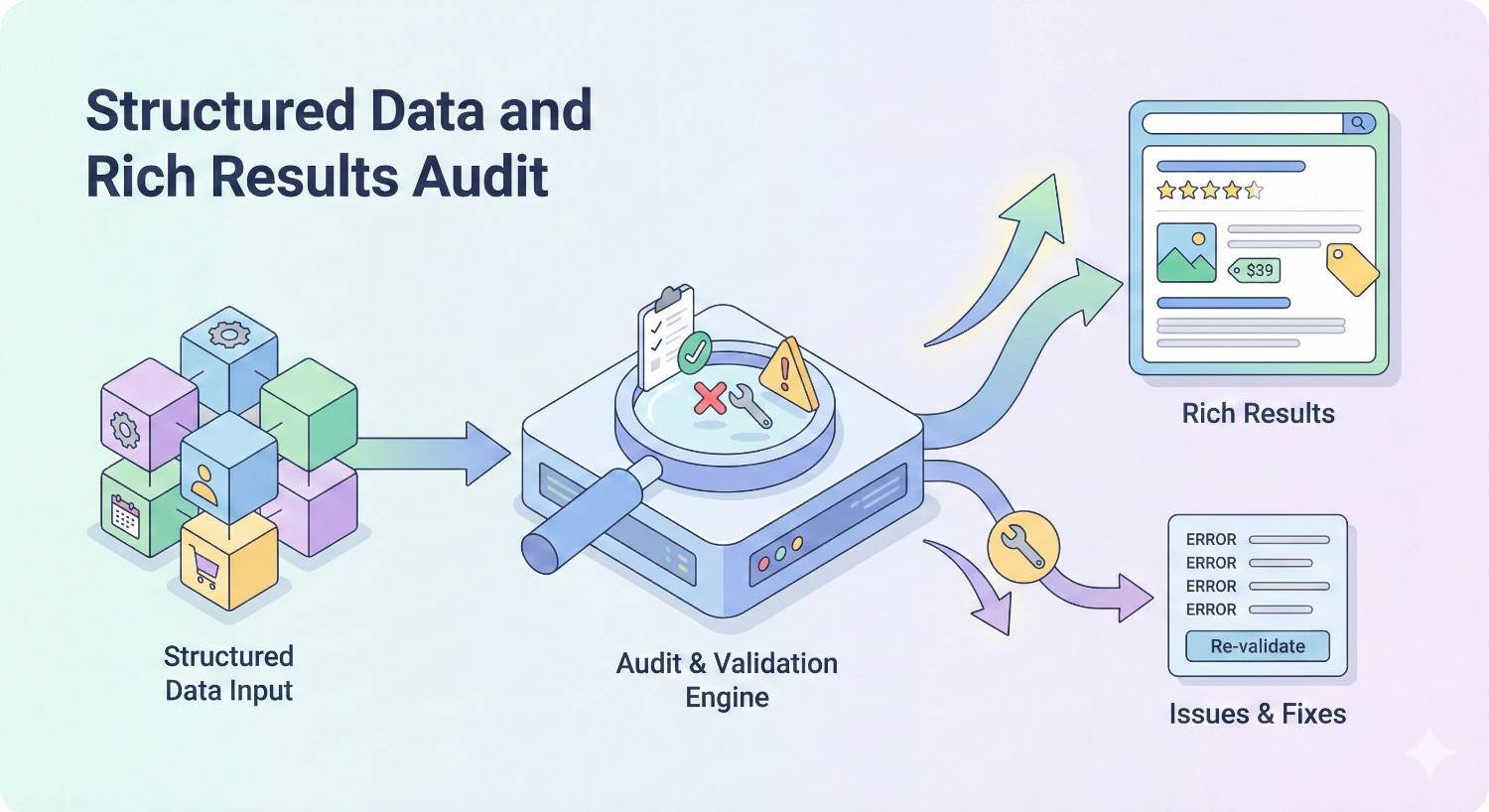
Structured Data and Rich Results Audit
Structured data enables rich results that increase SERP visibility and click-through rates.
Schema Markup Types and Implementation
Choose and implement schema types relevant to your content.
Common schema types:
- Article/NewsArticle/BlogPosting: For editorial content
- Product: For e-commerce product pages
- LocalBusiness: For businesses with physical locations
- Organization: For company information
- FAQ: For frequently asked questions
- HowTo: For instructional content
- Review/AggregateRating: For review content
- Event: For events with dates and locations
- Recipe: For cooking content
- Video: For video content
Implementation methods:
- JSON-LD: Recommended by Google. Script block in HTML head or body.
- Microdata: HTML attributes within content markup.
- RDFa: HTML attributes, less commonly used.
Nesting: Complex pages may need nested schema. A Product can contain AggregateRating, Offer, and Brand entities.
Structured Data Validation
Test all structured data implementation for errors.
Google Rich Results Test: Tests specific URLs for rich result eligibility. Shows errors, warnings, and detected items.
Schema.org Validator: Validates against schema.org specifications. More comprehensive than Google’s test.
Search Console Enhancement Reports: Shows structured data detected across your site and any errors.
Common errors:
- Missing required properties
- Invalid property values
- Incorrect data types
- Markup not matching visible content
Warnings vs. errors: Errors prevent rich results. Warnings indicate missing recommended properties that could enhance results.
Rich Results Eligibility
Not all structured data generates rich results. Understand eligibility requirements.
Content requirements: Rich results require high-quality, relevant content. Structured data alone doesn’t guarantee rich results.
Page quality: Pages must meet Google’s quality guidelines. Low-quality pages won’t receive rich results regardless of markup.
Specific requirements: Each rich result type has specific requirements. FAQ rich results require actual FAQ content. Review rich results require genuine reviews.
Testing eligibility: Rich Results Test shows which rich results your page may be eligible for.
Monitoring: Track rich result impressions in Search Console’s Performance report. Filter by search appearance to see rich result performance.
JSON-LD vs Microdata vs RDFa
Understanding implementation format differences helps choose the right approach.
JSON-LD advantages:
- Recommended by Google
- Separated from HTML content
- Easier to maintain and update
- Can be dynamically generated
- Doesn’t affect page rendering
Microdata considerations:
- Embedded in HTML markup
- Tightly coupled with content
- Harder to maintain at scale
- Can complicate HTML structure
RDFa considerations:
- Similar to Microdata
- More verbose syntax
- Less commonly used
- Supported but not preferred
Recommendation: Use JSON-LD for new implementations. Migrate existing Microdata to JSON-LD when practical.
JavaScript and Rendering Audit
Modern websites rely heavily on JavaScript. Understanding how search engines render JavaScript is critical for technical SEO.
JavaScript SEO Fundamentals
Search engines process JavaScript differently than browsers.
Two-wave indexing: Google crawls HTML first, then renders JavaScript in a second wave. This delay can affect indexing speed.
Rendering resources: JavaScript rendering requires significant computational resources. Google may not render all pages or may render them less frequently.
Critical content: Ensure critical content (text, links, metadata) is in the initial HTML response when possible. Don’t rely solely on JavaScript for SEO-critical elements.
JavaScript errors: JavaScript errors can prevent content from rendering. Test for errors in browser console.
Googlebot capabilities: Googlebot uses a relatively recent version of Chrome for rendering. However, it may not execute all JavaScript perfectly.
Client-Side vs Server-Side Rendering
Rendering architecture significantly impacts SEO.
Client-Side Rendering (CSR):
- JavaScript renders content in the browser
- Initial HTML is minimal
- Requires JavaScript execution for content
- SEO challenges: delayed indexing, rendering failures
Server-Side Rendering (SSR):
- Server generates complete HTML
- Content visible without JavaScript
- Better for SEO
- Higher server resource requirements
Static Site Generation (SSG):
- Pages pre-rendered at build time
- Fastest performance
- Best for SEO
- Limited dynamic functionality
Hybrid approaches:
- Initial server render with client-side hydration
- Balances SEO and interactivity
- More complex implementation
Dynamic Content Rendering Test
Verify search engines can access your JavaScript-rendered content.
URL Inspection tool: Use Search Console’s URL Inspection to see Google’s rendered version of your pages. Compare to what users see.
Mobile-Friendly Test: Shows rendered HTML. Compare to source HTML to identify JavaScript-dependent content.
Cache comparison: Compare Google’s cached version to your live page. Missing content indicates rendering issues.
Fetch and render: Crawling tools like Screaming Frog can render JavaScript. Compare rendered content to source HTML.
Critical element verification: Specifically check that these elements are present in rendered HTML:
- Main content text
- Internal links
- Title tags and meta descriptions
- Canonical tags
- Structured data
JavaScript Framework Considerations
Different JavaScript frameworks present different SEO challenges.
React: Requires SSR (Next.js) or pre-rendering for optimal SEO. Client-side only React has significant SEO limitations.
Angular: Angular Universal provides SSR. Without it, Angular apps face indexing challenges.
Vue: Nuxt.js provides SSR for Vue. Similar considerations to React.
Single Page Applications (SPAs): SPAs often struggle with SEO due to client-side routing and rendering. Implement SSR or pre-rendering.
Pre-rendering services: Services like Prerender.io can serve pre-rendered HTML to search engines. Useful for sites that can’t implement SSR.
Dynamic rendering: Serve different content to users (JavaScript) and bots (pre-rendered HTML). Google accepts this but prefers SSR.
Log File Analysis
Server logs reveal actual search engine behavior on your site, providing insights unavailable from other tools.
Server Log Collection and Setup
Configure log collection before analysis.
Log location: Server logs are typically stored in /var/log/ on Linux servers or accessible through hosting control panels.
Log format: Common formats include Combined Log Format and W3C Extended Log Format. Ensure your format captures: IP address, timestamp, request URL, status code, user agent, referrer.
Log retention: Retain logs for at least 30 days, preferably 90+ days for trend analysis.
Log size management: High-traffic sites generate large log files. Implement log rotation and compression.
Privacy considerations: Logs contain IP addresses. Ensure compliance with privacy regulations regarding log storage and analysis.
Crawl Frequency and Patterns
Analyze how often search engines crawl your site.
Crawl volume: Count total Googlebot requests per day/week. Compare against your page count and update frequency.
Crawl distribution: Which pages receive the most crawl attention? Are important pages being crawled frequently?
Crawl timing: When does Googlebot crawl most actively? Patterns may reveal server performance issues during peak times.
Crawl depth: How deep into your site does Googlebot crawl? Shallow crawling may indicate architecture or link issues.
New page discovery: How quickly does Googlebot find new pages? Slow discovery suggests sitemap or internal linking problems.
Bot Traffic Analysis
Identify and analyze different bot traffic.
Googlebot variants:
- Googlebot (desktop)
- Googlebot Smartphone (mobile)
- Googlebot-Image
- Googlebot-Video
- AdsBot-Google
Other search engines: Bingbot, Yandex, Baidu, DuckDuckBot. Verify legitimate bots by reverse DNS lookup.
SEO tool bots: Screaming Frog, Ahrefs, SEMrush, Moz crawlers. These don’t affect rankings but consume server resources.
Malicious bots: Scrapers, spam bots, vulnerability scanners. Consider blocking if they impact performance.
Bot verification: Legitimate Googlebot IPs resolve to googlebot.com via reverse DNS. Fake Googlebots are common.
Error Code Identification
Log analysis reveals errors that may not appear in other tools.
5xx errors: Server errors indicate infrastructure problems. Identify which pages trigger errors and when.
4xx errors: Client errors, especially 404s, reveal broken links and missing pages. Track 404 sources to fix linking issues.
Soft 404s: Pages returning 200 status but displaying error content. Logs show the 200 status; you need additional analysis to identify soft 404s.
Timeout errors: Requests that time out before completing. Indicates server performance issues.
Error patterns: Do errors occur at specific times? For specific bot types? On specific page types? Patterns help diagnose root causes.
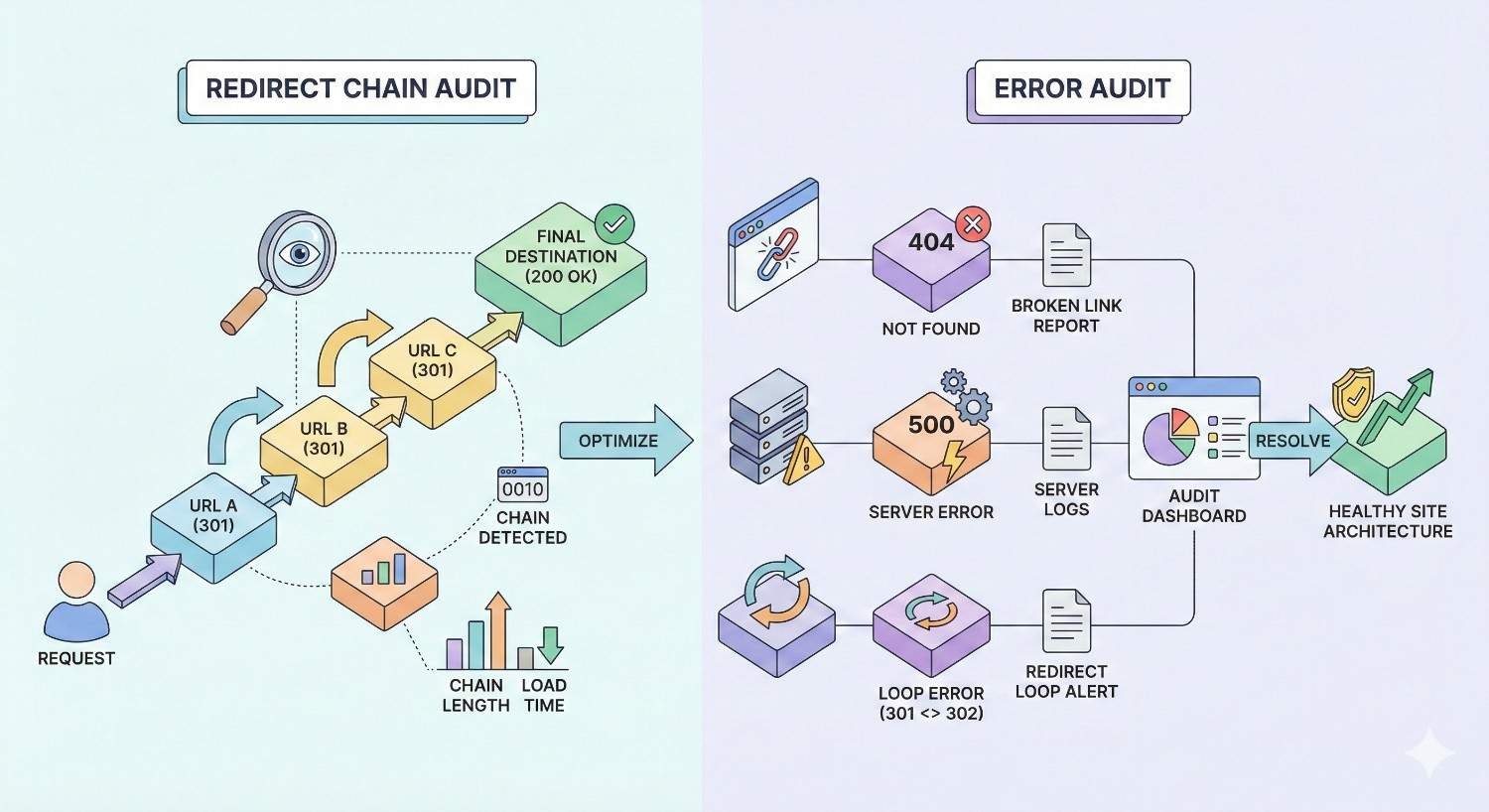
Redirect Chain and Error Audit
Redirects and errors affect user experience, crawl efficiency, and link equity transfer.
301 vs 302 Redirects
Understanding redirect types ensures proper implementation.
301 (Permanent): Indicates the page has permanently moved. Passes most link equity to the destination. Use for permanent URL changes, domain migrations, and HTTPS migrations.
302 (Temporary): Indicates a temporary move. May not pass full link equity. Use only for genuinely temporary situations.
307 and 308: HTTP/1.1 equivalents of 302 and 301 respectively. Preserve request method (GET/POST).
Meta refresh: Not recommended for SEO. Slower and may not pass link equity properly.
JavaScript redirects: Search engines may not follow JavaScript redirects reliably. Avoid for SEO-critical redirects.
Audit focus: Identify 302 redirects that should be 301s. Temporary redirects left in place for extended periods should be converted to permanent.
Redirect Chain Detection
Redirect chains waste crawl budget and dilute link equity.
Chain identification: Crawl your site following redirects. Flag any redirect sequences longer than one hop.
Chain examples:
- Page A → Page B → Page C (2-hop chain)
- HTTP → HTTPS → www version (2-hop chain)
- Old URL → intermediate URL → final URL (2-hop chain)
Resolution: Update redirects to point directly to final destinations. Update internal links to point to final URLs.
Maximum hops: Google follows up to 10 redirects but recommends no more than 3. Aim for single-hop redirects.
Redirect loops: Identify and fix redirect loops (A → B → A). These prevent pages from loading entirely.
404 Error Pages
404 errors indicate missing content that users and search engines are trying to access.
404 sources: Identify where 404 requests originate. Internal links, external backlinks, and direct traffic all matter differently.
Internal 404s: Fix immediately. Update or remove internal links pointing to non-existent pages.
External 404s: If valuable backlinks point to 404 pages, implement 301 redirects to relevant existing content.
Custom 404 page: Create a helpful 404 page that guides users to relevant content. Include search functionality and popular page links.
Soft 404 distinction: True 404s return 404 status codes. Soft 404s return 200 status but display error content. Both need attention.
Soft 404 Issues
Soft 404s confuse search engines and waste crawl budget.
Definition: Pages returning 200 OK status but displaying “not found” or minimal content that should be 404s.
Common causes:
- Empty search results pages
- Out-of-stock product pages with no content
- Parameter URLs generating empty pages
- CMS handling missing content poorly
Detection: Search Console reports soft 404s in Index Coverage. Crawling tools can identify pages with minimal content.
Resolution: Configure your server/CMS to return proper 404 status codes for missing content. Alternatively, add substantial content to thin pages.
Server Error (5xx) Monitoring
Server errors indicate infrastructure problems requiring immediate attention.
500 Internal Server Error: Generic server error. Check server logs for specific causes.
502 Bad Gateway: Server received invalid response from upstream server. Often indicates proxy or load balancer issues.
503 Service Unavailable: Server temporarily unable to handle requests. May indicate overload or maintenance.
504 Gateway Timeout: Upstream server didn’t respond in time. Database or application performance issues.
Monitoring setup: Implement uptime monitoring that alerts you to 5xx errors immediately. Services like Pingdom, UptimeRobot, or StatusCake provide this.
Impact assessment: Frequent 5xx errors during Googlebot crawls can negatively impact crawl rate and potentially rankings.
Creating Your Technical SEO Audit Report
Documenting findings and prioritizing fixes transforms audit data into actionable improvements.
Issue Prioritization Framework
Not all technical issues deserve equal attention. Prioritize based on impact and effort.
Impact assessment:
- Critical: Issues preventing indexing or causing major ranking loss
- High: Issues significantly affecting crawlability, user experience, or rankings
- Medium: Issues with moderate SEO impact
- Low: Minor issues or best practice improvements
Effort assessment:
- Quick wins: Low effort, high impact. Do these first.
- Major projects: High effort, high impact. Plan and resource appropriately.
- Fill-ins: Low effort, low impact. Address when convenient.
- Thankless tasks: High effort, low impact. Deprioritize or skip.
Prioritization matrix: Plot issues on impact vs. effort grid. Address high-impact, low-effort issues first.
Business context: Consider business priorities. Issues affecting revenue-generating pages take precedence.
Audit Report Structure
Organize your report for clarity and actionability.
Executive summary: High-level findings, critical issues, and recommended priorities. Non-technical stakeholders read this section.
Methodology: Tools used, pages crawled, date range analyzed. Establishes credibility and reproducibility.
Findings by category: Organize issues by audit section (crawlability, performance, mobile, etc.). Include:
- Issue description
- Affected URLs/pages
- Impact assessment
- Recommended fix
- Implementation notes
Priority action items: Consolidated list of recommended actions in priority order.
Appendices: Detailed data exports, full URL lists, technical specifications.
Communicating Technical Issues to Stakeholders
Translate technical findings into business language.
Business impact framing: Don’t say “orphaned pages.” Say “These 50 pages aren’t being found by Google, potentially losing X monthly visits.”
Visual aids: Screenshots, charts, and graphs communicate issues more effectively than technical descriptions.
Competitive context: Show how competitors handle similar issues. “Competitor X loads in 2 seconds; we load in 5 seconds.”
ROI projections: Where possible, estimate traffic or revenue impact of fixes. “Improving page speed could increase conversions by X%.”
Avoid jargon: Define technical terms or use plain language alternatives. Your report should be understandable by non-technical stakeholders.
Creating Actionable Recommendations
Recommendations should be specific and implementable.
Specific instructions: Don’t say “fix redirects.” Say “Update these 15 redirect chains to point directly to final URLs. See attached spreadsheet.”
Responsible parties: Identify who should implement each fix. Developer tasks differ from content team tasks.
Resource estimates: Provide time/effort estimates for planning purposes.
Success metrics: Define how you’ll measure whether the fix worked. “After implementation, verify in Search Console that indexed page count increases.”
Dependencies: Note if fixes depend on other changes or have prerequisites.
Verification steps: Include how to verify correct implementation.
Technical SEO Audit Frequency and Maintenance
Technical SEO requires ongoing attention, not one-time fixes.
How Often to Conduct Technical Audits
Audit frequency depends on site size, change velocity, and resources.
Comprehensive audits: Conduct full technical audits quarterly for most sites. Large sites or those with frequent changes may need monthly comprehensive audits.
Triggered audits: Conduct audits after:
- Site migrations or redesigns
- CMS or platform changes
- Major content additions
- Significant traffic changes
- Algorithm updates
Continuous monitoring: Supplement periodic audits with ongoing monitoring of critical metrics.
Ongoing Monitoring vs Full Audits
Balance comprehensive audits with continuous monitoring.
Continuous monitoring targets:
- Core Web Vitals scores
- Index coverage changes
- Crawl errors
- Security issues
- Uptime and server errors
Full audit scope: Comprehensive audits examine everything. Monitoring catches changes between audits.
Monitoring tools: Google Search Console, Google Analytics, uptime monitors, and rank tracking tools provide ongoing visibility.
Alert thresholds: Set alerts for significant changes. Sudden drops in indexed pages or spikes in errors warrant immediate investigation.
Setting Up Automated Alerts
Proactive alerting catches issues before they cause significant damage.
Search Console alerts: Enable email notifications for critical issues, security problems, and manual actions.
Uptime monitoring: Configure alerts for downtime and slow response times. Services like Pingdom or UptimeRobot provide this.
Rank monitoring: Track rankings for important keywords. Significant drops may indicate technical problems.
Core Web Vitals monitoring: Tools like Calibre or SpeedCurve track performance over time and alert on regressions.
Custom alerts: Set up custom monitoring for site-specific concerns. Log analysis tools can alert on unusual bot behavior or error spikes.
Common Technical SEO Audit Mistakes to Avoid
Learn from common audit errors to improve your process.
Overlooking Mobile-First Issues
Mobile-first indexing makes mobile the priority, yet many audits focus on desktop.
Desktop-centric testing: Testing only desktop versions misses mobile-specific issues.
Content parity assumptions: Assuming mobile and desktop content match without verification.
Mobile performance neglect: Focusing on desktop speed while mobile performance suffers.
Touch usability: Ignoring mobile-specific usability issues like touch target sizing.
Solution: Always test mobile first. Use mobile as your primary audit perspective.
Ignoring JavaScript Rendering
JavaScript-heavy sites require rendering-aware auditing.
Source-only analysis: Analyzing only HTML source misses JavaScript-rendered content.
Assuming Google renders everything: Google may not render all JavaScript or may render it with delays.
Missing JavaScript errors: JavaScript errors preventing content rendering go undetected without proper testing.
Solution: Use rendering-capable crawlers. Verify rendered content matches expectations using URL Inspection tool.
Focusing Only on Homepage Performance
Homepage optimization is necessary but insufficient.
Template blindness: Issues affecting templates impact hundreds or thousands of pages.
Category/product page neglect: These pages often drive more traffic than homepages.
Blog post oversight: Older blog posts may have different templates with different issues.
Solution: Audit representative pages from each template type. Prioritize by traffic and business value.
Technical SEO Audit Template Download
A structured template ensures consistent, comprehensive audits.
Using the Template Effectively
Maximize template value with proper usage.
Customization first: Adapt the template to your site’s specific needs before starting.
Systematic completion: Work through sections methodically. Don’t skip sections even if you expect no issues.
Evidence documentation: Record specific URLs, screenshots, and data supporting each finding.
Status tracking: Mark items as checked, issues found, or not applicable.
Version control: Date your audits and maintain historical records for trend analysis.
Customizing for Your Website Type
Different site types have different audit priorities.
E-commerce sites: Emphasize product page optimization, faceted navigation handling, and structured data for products.
Content/blog sites: Focus on content organization, pagination, and article structured data.
Local businesses: Prioritize LocalBusiness schema, NAP consistency, and Google Business Profile alignment.
SaaS/web applications: Address JavaScript rendering, application state URLs, and authenticated content handling.
Enterprise sites: Scale audit processes, prioritize by traffic/revenue impact, and coordinate across teams.
When to Hire a Technical SEO Professional
Some situations warrant professional expertise.
DIY vs Professional Technical Audits
Assess your capabilities honestly.
DIY appropriate when:
- Small sites with simple architecture
- Basic technical issues
- Available time and learning willingness
- Limited budget
Professional needed when:
- Large or complex sites
- Significant technical debt
- Migration or redesign projects
- Competitive industries requiring optimization edge
- Limited internal technical resources
Hybrid approach: Conduct basic audits internally; engage professionals for complex issues or periodic deep audits.
Complex Technical Issues Requiring Expertise
Some issues require specialized knowledge.
JavaScript framework SEO: Implementing SSR or debugging rendering issues requires development expertise.
Large-scale migrations: Domain migrations, platform changes, and major restructuring carry significant risk.
International SEO: Hreflang implementation at scale is notoriously error-prone.
Enterprise architecture: Sites with millions of pages need specialized crawl management strategies.
Recovery from penalties: Manual actions or significant algorithm impacts require experienced diagnosis.
ROI of Professional Technical SEO Services
Professional audits often pay for themselves.
Opportunity cost: Time spent learning and executing audits has value. Professionals work faster and more accurately.
Risk mitigation: Incorrect implementations can cause ranking losses. Professionals reduce implementation risk.
Comprehensive coverage: Professionals catch issues that DIY audits miss.
Strategic guidance: Beyond finding issues, professionals provide prioritization and strategic recommendations.
Typical investment: Professional technical audits range from $1,000-$10,000+ depending on site size and complexity. ROI comes from traffic gains and avoided losses.
Conclusion
Technical SEO audits reveal the infrastructure issues silently limiting your organic growth. From crawlability and indexability to Core Web Vitals and JavaScript rendering, each element either supports or undermines your ranking potential.
Regular audits using a systematic template ensure nothing gets missed. Prioritize findings by impact and effort, communicate clearly to stakeholders, and implement fixes methodically.
We help businesses worldwide build sustainable organic growth through comprehensive technical SEO services. Contact White Label SEO Service to discuss how our technical audit expertise can identify and resolve the issues holding back your search visibility.
Frequently Asked Questions About Technical SEO Audits
How long does a technical SEO audit take?
A comprehensive technical SEO audit typically takes 1-4 weeks depending on site size and complexity. Small sites under 500 pages can be audited in a few days. Enterprise sites with millions of pages require several weeks for thorough analysis.
What’s the difference between technical SEO and on-page SEO?
Technical SEO focuses on infrastructure: crawlability, site speed, mobile optimization, and security. On-page SEO addresses content elements: title tags, headers, keyword usage, and content quality. Both are essential for ranking success.
Can I do a technical SEO audit without coding knowledge?
Yes, many technical audit tasks require no coding. Tools like Screaming Frog, Google Search Console, and PageSpeed Insights provide actionable insights without code. However, implementing fixes often requires developer assistance.
What tools are essential for technical SEO audits?
Essential tools include Google Search Console for indexing data, a crawling tool like Screaming Frog for site analysis, PageSpeed Insights for performance testing, and a mobile testing tool. Additional tools depend on specific site needs.
How much does a professional technical SEO audit cost?
Professional technical SEO audits typically cost $1,000-$10,000 depending on site size, complexity, and audit depth. Enterprise sites with complex architectures command higher fees. The investment often returns multiples in recovered or gained organic traffic.
What are the most critical technical SEO issues to fix first?
Prioritize issues blocking indexing: robots.txt misconfigurations, noindex tags on important pages, and severe crawl errors. Next, address Core Web Vitals failures and mobile usability issues. Finally, tackle optimization opportunities like redirect chains and duplicate content.
How often should I conduct a technical SEO audit?
Conduct comprehensive audits quarterly for most sites. Perform additional audits after major site changes, platform migrations, or significant traffic fluctuations. Supplement with continuous monitoring of critical metrics between full audits.


