

A technical SEO audit report sample gives you the exact framework to identify crawl errors, indexation problems, and site performance issues blocking your organic growth. Without a structured audit template, critical technical problems go unnoticed while your competitors capture the traffic you’re missing.
This guide delivers a complete technical SEO audit report template you can customize immediately. You’ll find section-by-section breakdowns, industry-specific examples, interpretation guidelines, and actionable checklists that transform raw technical data into clear business priorities.
What Is a Technical SEO Audit Report?
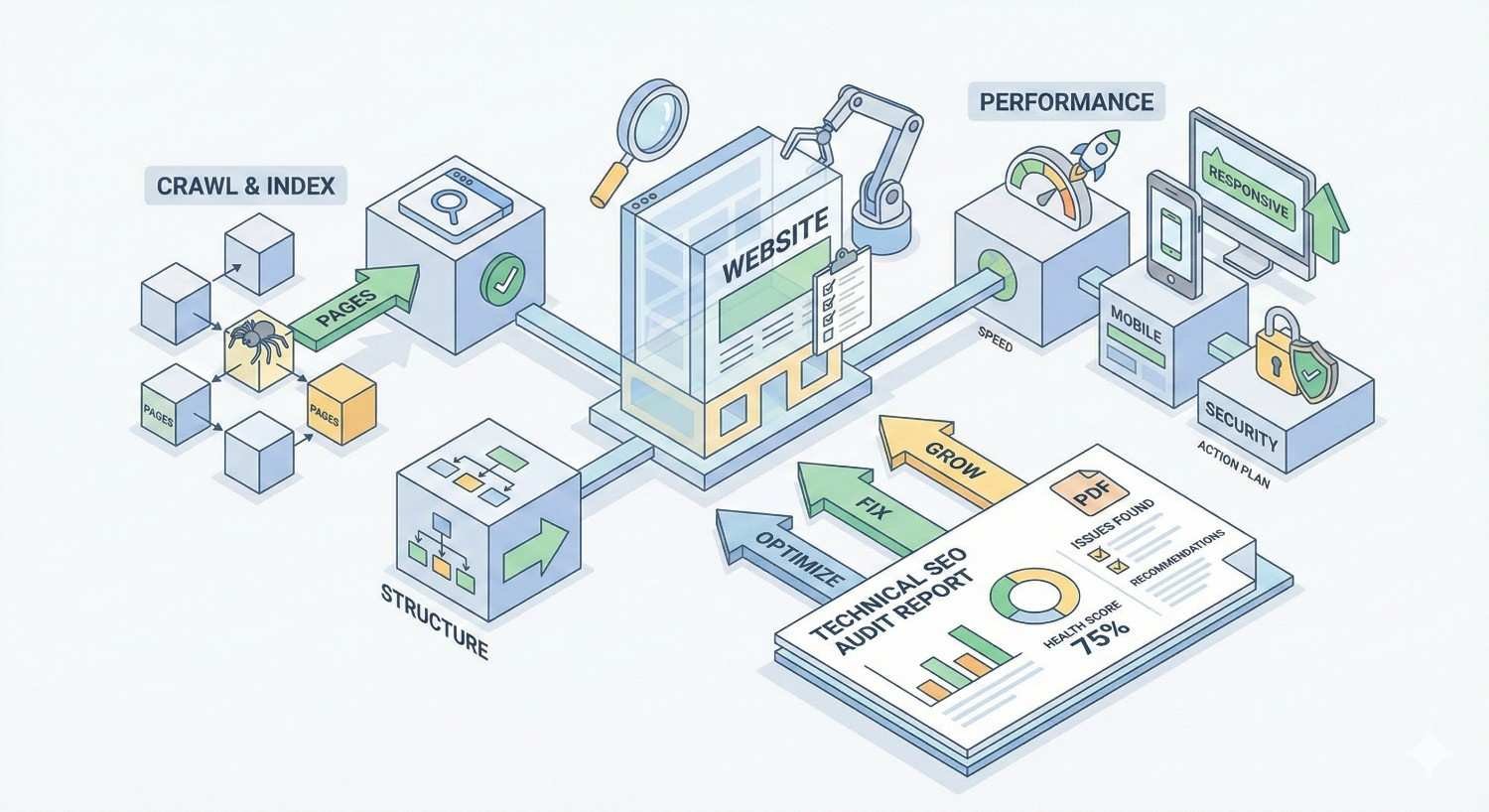
A technical SEO audit report is a comprehensive document that evaluates your website’s infrastructure, crawlability, and technical health from a search engine perspective. It identifies barriers preventing search engines from properly accessing, understanding, and ranking your content.
Unlike content audits or backlink analyses, technical SEO audits focus exclusively on the foundational elements that determine whether your pages can even compete in search results.
Definition and Purpose
A technical SEO audit report systematically examines how search engine crawlers interact with your website. It documents issues affecting indexation, page speed, mobile usability, security protocols, and structured data implementation.
The primary purpose is diagnostic. The report identifies what’s broken, what’s suboptimal, and what’s missing entirely. Secondary purposes include prioritization and planning. A well-structured report ranks issues by severity and provides clear remediation steps.
For business owners and marketing managers, the report translates technical jargon into actionable insights. It answers the fundamental question: what’s stopping our website from ranking better?
Key Components of a Technical SEO Audit
Every comprehensive technical SEO audit covers these core areas:
Crawlability and Indexation examines whether search engines can discover and access your pages. This includes robots.txt configuration, XML sitemaps, crawl budget allocation, and indexation status across your site.
Site Architecture evaluates URL structure, internal linking patterns, navigation hierarchy, and how link equity flows through your website.
Page Performance measures Core Web Vitals, server response times, render-blocking resources, and overall loading speed across devices.
Mobile Optimization assesses responsive design implementation, mobile usability errors, and mobile-first indexing readiness.
On-Page Technical Elements reviews meta tags, heading structures, canonical tags, hreflang implementation, and structured data markup.
Security verifies HTTPS implementation, mixed content issues, and security certificate status.
Who Needs a Technical SEO Audit Report?
Any website competing for organic search traffic needs periodic technical audits. However, certain situations make audits especially critical.
E-commerce sites with thousands of product pages face unique crawl budget challenges. Faceted navigation, out-of-stock products, and duplicate content from product variants create technical debt that compounds over time.
SaaS companies often struggle with JavaScript rendering issues, dynamic content indexation, and complex URL parameters from application features.
Local businesses with multiple locations need audits to verify proper NAP consistency, location page optimization, and local schema implementation.
Startups and growing companies benefit from establishing technical baselines before scaling content production. Fixing foundational issues early prevents expensive remediation later.
Websites experiencing traffic drops need immediate audits to identify whether technical problems caused the decline. Algorithm updates often expose pre-existing technical weaknesses.
Technical SEO Audit Report Sample Template
The following template provides a section-by-section framework you can adapt for any website. Each component includes the specific data points to capture and how to present findings clearly.
Executive Summary Section
The executive summary condenses your entire audit into a single page that stakeholders can review in under five minutes. It should answer three questions immediately: How healthy is the site technically? What are the biggest problems? What should we fix first?
Overall Technical Health Score: Assign a numerical score (typically 0-100) based on weighted criteria across all audit categories. Tools like Screaming Frog, Sitebulb, and Semrush generate these automatically, but you should validate and adjust based on business context.
Critical Issues Count: List the total number of issues by severity level. Example: 3 critical, 12 high priority, 27 medium priority, 45 low priority.
Top 5 Priority Recommendations: Summarize the most impactful fixes in plain language. Each recommendation should include the issue, the business impact, and the estimated effort to resolve.
Estimated Impact: Project the potential traffic or ranking improvement from addressing identified issues. Be conservative and specific. “Fixing crawl errors affecting 2,400 pages could restore indexation for approximately 15% of your product catalog.”
Crawlability and Indexation Analysis
This section determines whether search engines can actually find and index your content. Even the best content delivers zero organic traffic if it’s not indexed.
Crawl Stats from Google Search Console: Document total pages crawled, crawl frequency, average response time, and any crawl anomalies over the past 90 days.
Index Coverage Report: Record the total indexed pages versus total pages submitted. Note any pages with “Excluded” status and categorize the exclusion reasons.
Robots.txt Analysis: Verify that critical pages aren’t accidentally blocked. Document any disallow rules and confirm they’re intentional.
Crawl Budget Assessment: For larger sites (10,000+ pages), evaluate whether crawl budget is being wasted on low-value pages like filtered URLs, pagination, or parameter variations.
Sample Finding Format:
- Issue: 847 product pages returning “Crawled – currently not indexed” status
- Cause: Thin content and duplicate meta descriptions across product variants
- Impact: Estimated 12% of product catalog not appearing in search results
- Recommendation: Consolidate variant pages using canonical tags; expand unique product descriptions to minimum 150 words
Site Architecture and URL Structure Review
Site architecture determines how link equity distributes across your pages and how easily users and crawlers navigate your content.
URL Structure Analysis: Document URL patterns across the site. Flag issues like excessive parameters, non-descriptive slugs, uppercase characters, or inconsistent formatting.
Click Depth Mapping: Identify pages requiring more than three clicks from the homepage. Deep pages receive less crawl priority and link equity.
Orphan Page Detection: List pages with no internal links pointing to them. These pages are effectively invisible to crawlers navigating your site structure.
Navigation Audit: Evaluate main navigation, footer links, breadcrumbs, and contextual internal links. Confirm that priority pages are accessible from multiple pathways.
Sample Finding Format:
- Issue: 234 blog posts are orphaned with zero internal links
- Cause: Content published without contextual linking strategy
- Impact: These pages receive minimal crawl attention and no link equity transfer
- Recommendation: Implement topic cluster model; add contextual links from related posts; include in relevant category pages
Page Speed and Core Web Vitals Assessment
Page speed directly impacts rankings, user experience, and conversion rates. Google’s research confirms that Core Web Vitals are ranking signals, making this section critical for any audit.
Core Web Vitals Scores: Document Largest Contentful Paint (LCP), First Input Delay (FID) or Interaction to Next Paint (INP), and Cumulative Layout Shift (CLS) for both mobile and desktop.
Page Speed Insights Data: Record performance scores for key page templates: homepage, category pages, product pages, blog posts, and landing pages.
Field Data vs. Lab Data: Distinguish between real-user metrics from Chrome User Experience Report and synthetic testing data. Field data reflects actual user experience.
Resource Analysis: Identify render-blocking JavaScript, unoptimized images, excessive third-party scripts, and server response time issues.
Sample Finding Format:
- Issue: Mobile LCP of 4.2 seconds (poor) on product pages
- Cause: Hero images served at 2400px width without responsive sizing; no lazy loading implemented
- Impact: Product pages fail Core Web Vitals thresholds; potential ranking suppression in mobile search
- Recommendation: Implement responsive images with srcset; add lazy loading for below-fold images; target LCP under 2.5 seconds
Mobile-Friendliness Evaluation
With mobile-first indexing, Google predominantly uses the mobile version of your content for ranking. Mobile optimization isn’t optional.
Mobile Usability Report: Pull data from Google Search Console’s Mobile Usability report. Document any pages with errors.
Responsive Design Testing: Verify that all page templates render correctly across device sizes. Check for horizontal scrolling, touch target sizing, and viewport configuration.
Mobile Page Speed: Mobile performance often differs significantly from desktop. Document mobile-specific speed issues.
Content Parity: Confirm that mobile pages contain the same content as desktop versions. Hidden content, collapsed accordions, or removed sections can impact rankings.
Sample Finding Format:
- Issue: 156 pages flagged for “Clickable elements too close together”
- Cause: Navigation menu buttons have insufficient spacing on mobile viewport
- Impact: Poor mobile usability signals; potential user experience issues affecting engagement metrics
- Recommendation: Increase touch target size to minimum 48×48 pixels; add spacing between interactive elements
On-Page Technical Elements Audit
On-page technical elements help search engines understand your content’s topic, structure, and relationships to other pages.
Meta Tags Analysis
Title Tags: Document pages with missing titles, duplicate titles, titles exceeding 60 characters, or titles that don’t include target keywords.
Meta Descriptions: Identify missing descriptions, duplicates, descriptions exceeding 160 characters, or descriptions lacking compelling calls-to-action.
Meta Robots Tags: Verify that important pages don’t have noindex or nofollow directives unintentionally applied.
Sample Finding Format:
- Issue: 412 pages share identical meta descriptions
- Cause: Template-based description generation without customization
- Impact: Reduced click-through rates; missed opportunity for keyword targeting
- Recommendation: Create unique meta descriptions for top 100 traffic pages; implement dynamic description templates for remaining pages
Heading Structure Review
H1 Tag Audit: Every page should have exactly one H1 tag containing the primary topic. Document pages with missing H1s, multiple H1s, or H1s that don’t reflect page content.
Heading Hierarchy: Verify logical heading structure (H1 → H2 → H3). Flag pages that skip heading levels or use headings purely for styling.
Keyword Alignment: Confirm that heading tags include relevant keywords naturally without over-optimization.
Schema Markup Implementation
Current Schema Coverage: Document which schema types are implemented and on which page templates.
Validation Status: Run all structured data through Google’s Rich Results Test. Note any errors or warnings.
Missing Opportunities: Identify schema types that should be implemented based on content type. E-commerce sites need Product, Review, and BreadcrumbList schema. Local businesses need LocalBusiness schema.
Sample Finding Format:
- Issue: Product pages lack Product schema markup
- Cause: Schema implementation not included in product page template
- Impact: Missing rich snippets in search results (price, availability, reviews); competitive disadvantage against competitors with rich results
- Recommendation: Implement Product schema with price, availability, review aggregate, and brand properties
Canonical Tags and Duplicate Content
Canonical Tag Audit: Verify that all pages have self-referencing canonical tags. Identify pages with missing canonicals or canonicals pointing to incorrect URLs.
Duplicate Content Detection: Use crawl tools to identify pages with identical or near-identical content. Document the duplication source and recommended resolution.
Parameter Handling: Review how URL parameters are handled. Confirm that filtered, sorted, or paginated URLs either canonical to the primary version or are properly managed in Google Search Console.
Internal Linking Structure Analysis
Internal links distribute PageRank, establish topical relationships, and guide crawlers through your site. Poor internal linking wastes your site’s authority.
Link Distribution Analysis: Identify pages with excessive internal links (over 100) and pages with too few (under 5). Both extremes indicate structural problems.
Anchor Text Review: Document internal link anchor text patterns. Flag over-optimized anchors or generic anchors like “click here” that waste contextual signals.
Link Equity Flow: Map how authority flows from high-value pages (homepage, top-linked pages) to deeper content. Identify bottlenecks where link equity doesn’t reach important pages.
Broken Internal Links: List all internal links returning 404 errors. These waste crawl budget and create poor user experience.
Sample Finding Format:
- Issue: Homepage links to 247 pages directly; product category pages average only 3 internal links each
- Cause: Flat site architecture without strategic link hierarchy
- Impact: Link equity concentrated on homepage; category pages lack authority signals
- Recommendation: Restructure navigation to prioritize category pages; add contextual links from blog content to category pages
Security and HTTPS Status
Security is a confirmed ranking factor. HTTPS implementation must be complete and correct across your entire site.
SSL Certificate Status: Verify certificate validity, expiration date, and proper configuration.
Mixed Content Issues: Identify any HTTP resources (images, scripts, stylesheets) loaded on HTTPS pages. Mixed content triggers browser warnings and security flags.
HTTPS Redirect Chain: Confirm that HTTP URLs redirect to HTTPS with single 301 redirects, not chains.
Security Headers: Review implementation of security headers like HSTS, X-Content-Type-Options, and X-Frame-Options.
Sample Finding Format:
- Issue: 89 pages contain mixed content warnings
- Cause: Legacy image URLs hardcoded with HTTP protocol
- Impact: Browser security warnings; potential trust signals to search engines
- Recommendation: Update all internal resource URLs to HTTPS; implement Content Security Policy header
XML Sitemap and Robots.txt Review
Sitemaps and robots.txt directly control how search engines discover and access your content.
XML Sitemap Audit:
- Verify sitemap is submitted in Google Search Console
- Confirm sitemap URL count matches actual indexable pages
- Check for 404 URLs, redirects, or noindexed pages in sitemap
- Validate sitemap format and size limits (50,000 URLs, 50MB uncompressed)
Robots.txt Analysis:
- Review all disallow rules for unintended blocking
- Verify sitemap location is declared
- Check for crawl-delay directives that may slow indexation
- Confirm robots.txt is accessible and returns 200 status
Sample Finding Format:
- Issue: XML sitemap contains 3,400 URLs returning 404 status
- Cause: Sitemap not updated after product discontinuation
- Impact: Wasted crawl budget; signals of poor site maintenance to search engines
- Recommendation: Implement dynamic sitemap generation; exclude non-200 URLs automatically
Priority Issues and Recommendations Matrix
The priority matrix transforms raw findings into an actionable roadmap. It should be the most referenced section of your report.
Matrix Structure:
| Priority | Issue | Pages Affected | Business Impact | Effort | Recommended Timeline |
| Critical | Robots.txt blocking /products/ directory | 2,400 | Complete loss of product page indexation | Low | Immediate |
| High | Missing Product schema | 2,400 | No rich snippets; lower CTR | Medium | Week 1-2 |
| High | Mobile LCP over 4 seconds | Site-wide | Core Web Vitals failure | High | Week 2-4 |
| Medium | Duplicate meta descriptions | 412 | Reduced CTR | Medium | Week 3-4 |
| Low | Missing alt text on images | 1,847 | Accessibility; image search | Low | Ongoing |
Priority Definitions:
- Critical: Issues causing immediate ranking or indexation loss. Fix within 24-48 hours.
- High: Significant impact on rankings or user experience. Fix within 1-2 weeks.
- Medium: Moderate impact; optimization opportunities. Fix within 1 month.
- Low: Minor issues or best practice improvements. Address as resources allow.
How to Read and Interpret a Technical SEO Audit Report
Understanding what an audit report tells you is just as important as having one. This section helps you extract actionable insights from technical findings.
Understanding Severity Levels and Priority Scoring
Not all technical issues deserve equal attention. Severity scoring helps you allocate limited resources effectively.
Critical issues prevent search engines from accessing or indexing your content entirely. A misconfigured robots.txt blocking your entire site is critical. A single broken internal link is not.
High-priority issues significantly impact rankings or user experience across large portions of your site. Site-wide Core Web Vitals failures fall here.
Medium-priority issues affect rankings or experience but have limited scope or moderate impact. Duplicate meta descriptions on a subset of pages fit this category.
Low-priority issues represent best practice improvements or minor optimizations. They matter for competitive advantage but won’t cause ranking drops if ignored temporarily.
When reviewing severity scores, consider your specific context. A “medium” issue affecting your highest-revenue pages may warrant higher priority than a “high” issue affecting low-traffic blog posts.
Identifying Quick Wins vs. Long-Term Fixes
Quick wins deliver measurable improvement with minimal effort. They build momentum and demonstrate ROI from the audit investment.
Common quick wins include:
- Fixing robots.txt blocking errors
- Adding missing canonical tags
- Submitting updated XML sitemaps
- Resolving broken internal links
- Adding missing meta descriptions to high-traffic pages
Long-term fixes require development resources, structural changes, or ongoing processes. They deliver larger impact but need proper planning.
Common long-term fixes include:
- Site architecture restructuring
- Core Web Vitals optimization
- Schema markup implementation across templates
- Internal linking strategy overhaul
- Mobile experience redesign
Prioritize quick wins for immediate implementation while planning long-term fixes into your development roadmap.
Translating Technical Findings into Business Impact
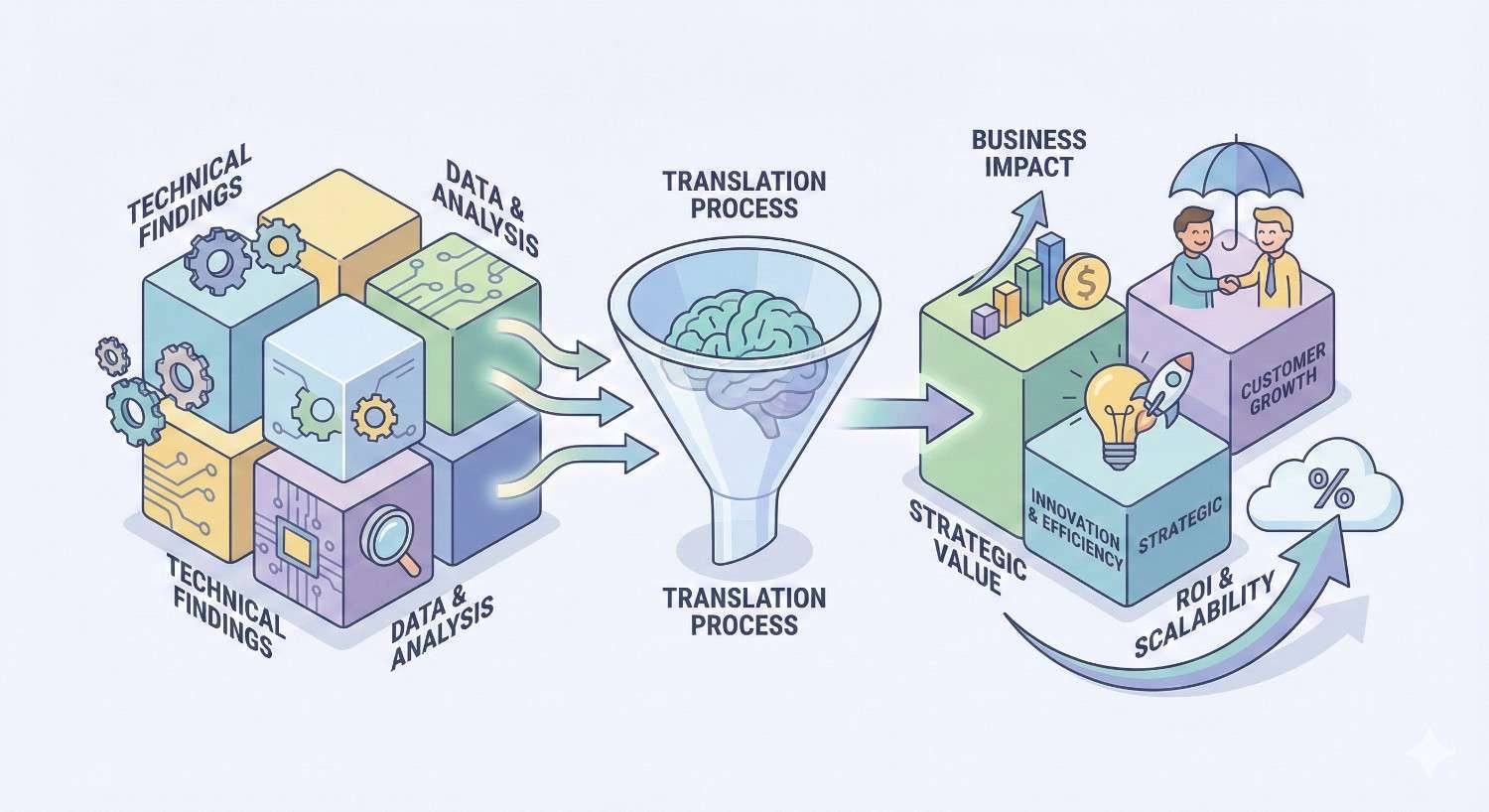
Technical metrics only matter when connected to business outcomes. Your audit report should bridge this gap explicitly.
Traffic Impact: Estimate how many pages are affected and their current or potential traffic contribution. “Fixing indexation issues on 2,400 product pages could restore visibility for products generating an estimated $45,000 monthly revenue.”
Conversion Impact: Connect user experience issues to conversion metrics. “Mobile page speed improvements could reduce bounce rate by 15-20%, potentially increasing mobile conversions by 8-12%.”
Competitive Impact: Frame findings against competitor performance. “Competitors have Product schema on 100% of product pages. Our 0% implementation means we’re missing rich snippets on every product SERP.”
Risk Assessment: Quantify the risk of inaction. “Without HTTPS migration, Chrome will display ‘Not Secure’ warnings to 100% of visitors, potentially reducing trust and conversions.”
How to Use This Technical SEO Audit Report Sample
This template becomes valuable only when customized for your specific website and implemented systematically.
Customizing the Template for Your Website
Start by identifying which sections apply to your site type and scale.
For small sites (under 500 pages): Focus on crawlability, on-page elements, and Core Web Vitals. Site architecture issues are less complex at this scale.
For large sites (10,000+ pages): Emphasize crawl budget management, indexation efficiency, and scalable solutions. Manual fixes don’t work at scale.
For e-commerce sites: Add sections for product page optimization, faceted navigation handling, and inventory-related technical issues.
For JavaScript-heavy sites: Include JavaScript rendering analysis, dynamic content indexation, and client-side vs. server-side rendering assessment.
Customize the priority matrix weights based on your business model. An e-commerce site should weight product page issues higher than blog issues. A content publisher should prioritize article template optimization.
Tools Required to Conduct a Technical SEO Audit
A comprehensive audit requires multiple tools working together. No single tool covers everything.
Essential Tools:
Google Search Console provides authoritative data on how Google sees your site. Index coverage, Core Web Vitals field data, and crawl stats come directly from Google.
Screaming Frog SEO Spider crawls your site like a search engine, identifying technical issues at scale. The free version handles up to 500 URLs.
PageSpeed Insights measures Core Web Vitals and provides specific optimization recommendations.
Google Mobile-Friendly Test validates mobile rendering and usability.
Recommended Additional Tools:
Semrush Site Audit provides automated scoring, historical tracking, and prioritized recommendations.
Ahrefs Site Audit offers similar functionality with strong internal linking analysis.
Sitebulb excels at visualization and makes complex site architecture issues understandable.
Chrome DevTools enables manual inspection of rendering, network requests, and performance bottlenecks.
Step-by-Step Audit Process Guide
Follow this sequence to conduct a thorough technical SEO audit:
Step 1: Gather Baseline Data (Day 1)
- Export Google Search Console data for past 90 days
- Run full site crawl with Screaming Frog or similar tool
- Document current organic traffic and ranking positions
Step 2: Crawlability and Indexation Analysis (Day 2)
- Review Index Coverage report
- Analyze robots.txt and XML sitemaps
- Identify crawl errors and blocked resources
Step 3: Site Architecture Review (Day 3)
- Map URL structure and click depth
- Identify orphan pages and internal linking gaps
- Evaluate navigation and information architecture
Step 4: Performance Assessment (Day 4)
- Test Core Web Vitals across page templates
- Identify speed bottlenecks
- Document mobile usability issues
Step 5: On-Page Technical Elements (Day 5)
- Audit meta tags across all pages
- Review heading structure and schema markup
- Check canonical tags and duplicate content
Step 6: Security and Configuration (Day 6)
- Verify HTTPS implementation
- Check for mixed content
- Review security headers
Step 7: Compile Report and Prioritize (Day 7)
- Organize findings by category
- Assign severity scores
- Create priority matrix and recommendations
Technical SEO Audit Checklist
Use these checklists to ensure comprehensive coverage during your audit process.
Pre-Audit Preparation Checklist
Before starting your audit, gather these resources:
- Google Search Console access (owner or full user permissions)
- Google Analytics access
- Website staging or development environment access
- Current XML sitemap URL
- Robots.txt file location
- List of priority pages (top traffic, top revenue, strategic importance)
- Previous audit reports (if available)
- Known technical issues or recent site changes
- Development team contact for technical questions
- Competitor websites for benchmarking
Complete Technical SEO Audit Checklist (Downloadable)
Crawlability and Indexation
- Robots.txt allows crawling of important pages
- XML sitemap exists and is submitted to Search Console
- Sitemap contains only indexable, 200-status URLs
- No critical pages blocked by robots.txt
- Index Coverage report shows no unexpected exclusions
- Crawl stats show consistent crawl activity
- No crawl errors in Search Console
Site Architecture
- All important pages within 3 clicks of homepage
- No orphan pages (pages with zero internal links)
- URL structure is logical and descriptive
- No excessive URL parameters
- Breadcrumb navigation implemented
- Internal links use descriptive anchor text
- No broken internal links (404 errors)
Page Speed and Core Web Vitals
- LCP under 2.5 seconds on mobile
- INP under 200 milliseconds
- CLS under 0.1
- No render-blocking resources
- Images optimized and lazy-loaded
- Server response time under 200ms
- Browser caching implemented
Mobile Optimization
- Site passes Mobile-Friendly Test
- No mobile usability errors in Search Console
- Viewport meta tag configured correctly
- Touch targets adequately sized (48x48px minimum)
- No horizontal scrolling required
- Content parity between mobile and desktop
On-Page Technical Elements
- Every page has unique title tag
- Title tags under 60 characters
- Every page has unique meta description
- Meta descriptions under 160 characters
- One H1 tag per page
- Logical heading hierarchy (H1→H2→H3)
- Self-referencing canonical tags on all pages
- No duplicate content issues
- Appropriate schema markup implemented
- Schema validates without errors
Security
- Valid SSL certificate installed
- All pages served over HTTPS
- No mixed content warnings
- HTTP redirects to HTTPS properly
- Security headers implemented
Post-Audit Action Plan Template
After completing your audit, structure your action plan:
Immediate Actions (Week 1)
- List critical issues requiring immediate attention
- Assign owners and deadlines
- Document expected outcomes
Short-Term Fixes (Weeks 2-4)
- List high-priority issues
- Estimate development resources needed
- Schedule implementation sprints
Medium-Term Projects (Months 2-3)
- List medium-priority structural improvements
- Create project briefs for larger initiatives
- Allocate budget and resources
Ongoing Monitoring
- Define KPIs to track improvement
- Set up automated monitoring alerts
- Schedule follow-up audit date
Common Technical SEO Issues Found in Audits
Understanding frequent problems helps you anticipate what your audit might uncover and prepare appropriate solutions.
Crawl Errors and Blocked Resources
Crawl errors prevent search engines from accessing your content. Common causes include:
Accidental robots.txt blocking happens when developers add disallow rules during staging and forget to remove them. Always review robots.txt after any site migration or major update.
Server errors (5xx) indicate hosting or application problems. Intermittent 500 errors during peak traffic can cause Googlebot to reduce crawl rate.
Soft 404s occur when pages return 200 status but display “page not found” content. Search engines may eventually stop crawling these URLs.
Blocked resources happen when CSS, JavaScript, or images are blocked by robots.txt. Google needs these resources to render pages correctly.
Slow Page Load Times
Page speed issues typically stem from a few common sources:
Unoptimized images are the most frequent culprit. Large image files, missing compression, and lack of responsive sizing dramatically slow page loads.
Excessive JavaScript blocks rendering and delays interactivity. Third-party scripts for analytics, chat widgets, and advertising often compound this problem.
Poor server performance creates slow Time to First Byte (TTFB). Shared hosting, unoptimized databases, and missing caching contribute to server delays.
No content delivery network (CDN) means users far from your server experience slower loads. CDNs distribute content globally for faster delivery.
Mobile Usability Problems
Mobile issues often reflect desktop-first design thinking:
Small touch targets make navigation frustrating on mobile devices. Buttons and links need adequate size and spacing.
Viewport not configured causes pages to render at desktop width, requiring zooming and horizontal scrolling.
Content wider than screen typically results from fixed-width elements or images without max-width constraints.
Intrusive interstitials that cover content on mobile can trigger Google penalties and frustrate users.
Duplicate Content and Canonicalization Issues
Duplicate content dilutes ranking signals and wastes crawl budget:
WWW vs. non-WWW versions both accessible without redirects creates duplicate content. Choose one version and redirect the other.
HTTP and HTTPS versions both indexed means duplicate content. Ensure HTTP redirects to HTTPS.
Trailing slash inconsistency (example.com/page vs. example.com/page/) can create duplicates if both versions are accessible.
Parameter-based duplicates from sorting, filtering, or tracking parameters create multiple URLs with identical content.
Pagination without proper handling can cause duplicate content when page 1 content appears across paginated URLs.
Broken Links and Redirect Chains
Link issues waste authority and create poor user experience:
Internal 404 links send users and crawlers to dead ends. Regular crawling identifies these for cleanup.
Redirect chains (A→B→C→D) dilute PageRank with each hop and slow page loads. Consolidate to single redirects.
Redirect loops (A→B→A) prevent pages from loading entirely. These require immediate fixes.
External broken links to defunct websites reflect poorly on content quality and user experience.
Missing or Incorrect Structured Data
Schema markup issues prevent rich results and reduce SERP visibility:
No schema implemented means missing opportunities for rich snippets, knowledge panel inclusion, and enhanced SERP features.
Validation errors in existing schema prevent Google from using the markup. Common errors include missing required properties and incorrect data types.
Mismatched schema that doesn’t reflect actual page content violates Google’s guidelines and may result in manual actions.
Incomplete schema with only basic properties misses opportunities for more detailed rich results.
Technical SEO Audit Report Examples by Industry
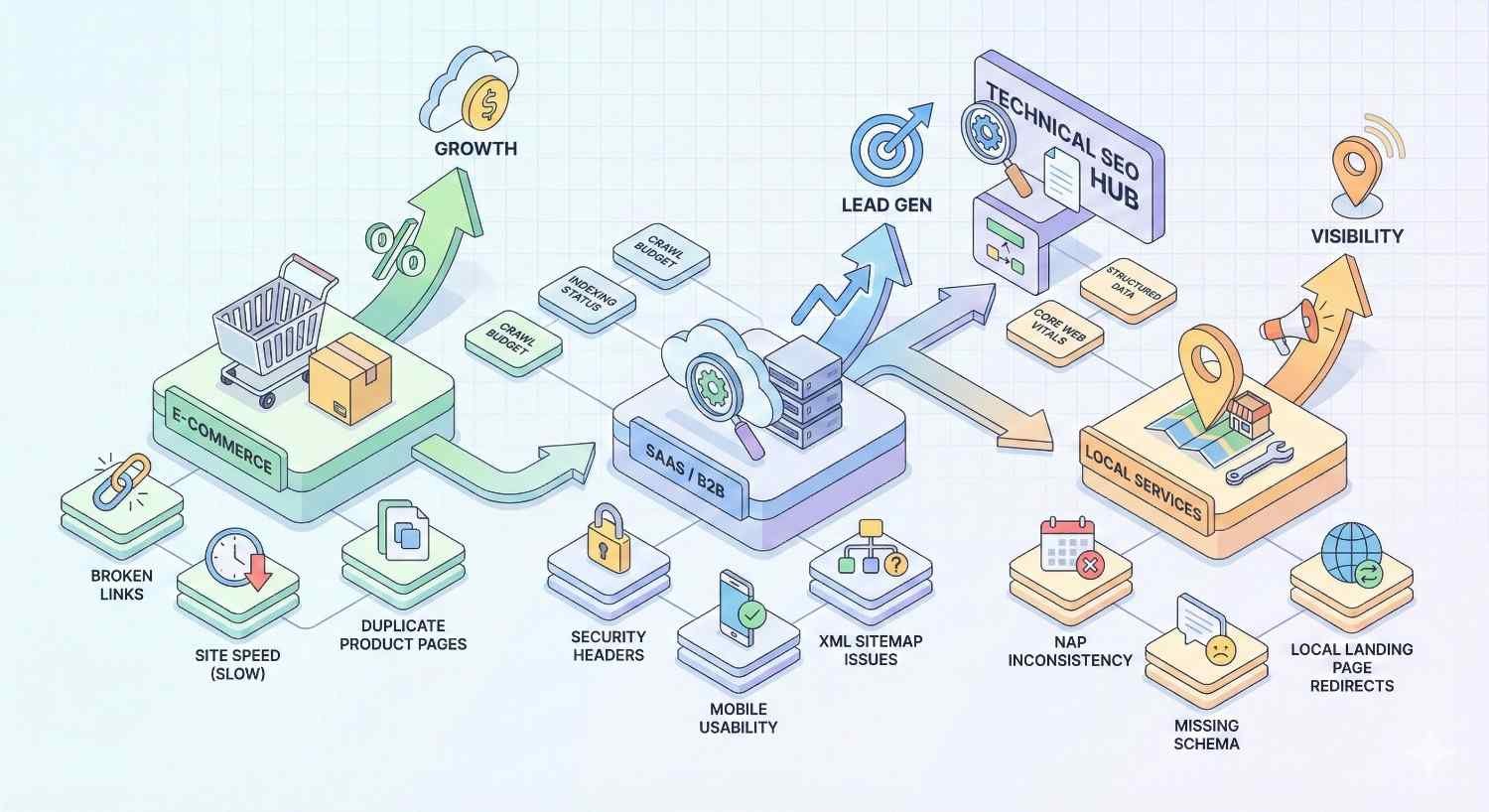
Different industries face unique technical SEO challenges. These examples highlight industry-specific focus areas.
E-commerce Technical SEO Audit Sample
E-commerce sites typically have thousands of product pages, complex navigation, and frequent inventory changes.
Priority Focus Areas:
Faceted Navigation Management: Filter combinations create exponential URL variations. A site with 10 filter options can generate millions of URL combinations. Audit should verify proper canonicalization, robots.txt handling, or parameter management in Search Console.
Product Page Indexation: Out-of-stock products, discontinued items, and seasonal inventory create indexation challenges. Document how these pages are handled and whether valuable pages are being deindexed unnecessarily.
Product Schema Implementation: Verify Product schema includes price, availability, reviews, and brand. Check that aggregate review schema accurately reflects actual review data.
Category Page Optimization: Category pages often drive more traffic than individual products. Audit pagination handling, content depth, and internal linking to products.
Site Search Indexation: Internal search result pages should be blocked from indexing to prevent thin content issues.
Sample E-commerce Finding:
- Issue: 12,400 faceted navigation URLs indexed
- Cause: No robots.txt blocking or canonical strategy for filter combinations
- Impact: Severe crawl budget waste; duplicate content signals; diluted ranking authority
- Recommendation: Implement canonical tags pointing to base category URLs; add robots.txt disallow for filter parameters; use Search Console parameter handling
SaaS Website Technical SEO Audit Sample
SaaS websites often rely heavily on JavaScript frameworks and have complex application URLs mixed with marketing pages.
Priority Focus Areas:
JavaScript Rendering: Many SaaS sites use React, Angular, or Vue. Audit should verify that Googlebot can render content correctly. Use URL Inspection tool to compare rendered HTML with source HTML.
Application vs. Marketing Page Separation: Login pages, dashboard URLs, and application features should be blocked from indexing. Marketing pages need full optimization.
Documentation Indexation: Help docs and knowledge bases often contain valuable long-tail content. Verify proper indexation and internal linking.
Dynamic Content Handling: Pricing pages, feature comparisons, and integration listings often use dynamic content. Confirm this content is indexable.
Trial and Demo Page Optimization: High-intent pages need technical optimization for conversion tracking and page speed.
Sample SaaS Finding:
- Issue: Blog content not rendering for Googlebot
- Cause: React-based blog loads content client-side; Googlebot sees empty containers
- Impact: Zero indexation of 340 blog posts; complete loss of content marketing SEO value
- Recommendation: Implement server-side rendering or pre-rendering for blog section; verify rendering with URL Inspection tool
Local Business Technical SEO Audit Sample
Local businesses need technical optimization that supports local search visibility and multi-location management.
Priority Focus Areas:
Google Business Profile Integration: Verify website URL matches GBP listing. Check that NAP (Name, Address, Phone) is consistent and crawlable.
LocalBusiness Schema: Audit should verify LocalBusiness schema implementation with complete address, hours, and geo-coordinates.
Location Page Optimization: Multi-location businesses need unique, substantial content for each location page. Audit for thin content and duplicate location pages.
Mobile Performance: Local searches are predominantly mobile. Mobile speed and usability are especially critical.
Review Schema: If displaying reviews on-site, verify Review schema implementation and accuracy.
Sample Local Business Finding:
- Issue: Location pages contain only embedded Google Maps and contact form
- Cause: Template-based location pages without unique content
- Impact: Thin content signals; poor local ranking potential; missed opportunity for location-specific keywords
- Recommendation: Add unique content to each location page including local service descriptions, team information, and location-specific testimonials; implement LocalBusiness schema with complete properties
How Often Should You Conduct a Technical SEO Audit?
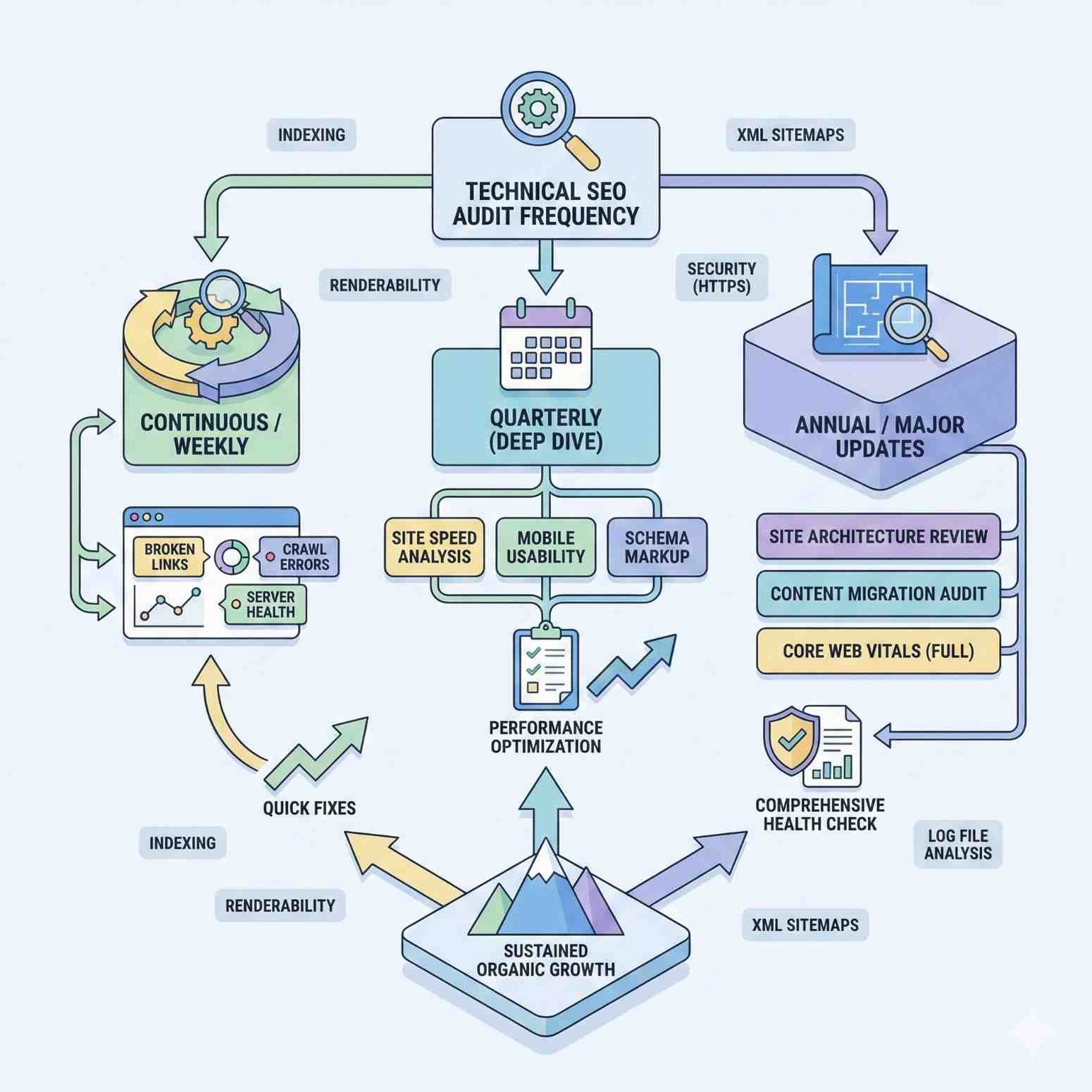
Audit frequency depends on your site’s size, complexity, and rate of change. Establishing the right cadence prevents issues from compounding.
Audit Frequency Recommendations
Small sites (under 500 pages): Conduct comprehensive audits quarterly. Monthly spot-checks on Core Web Vitals and index coverage are sufficient between full audits.
Medium sites (500-10,000 pages): Monthly partial audits focusing on new content and changed pages. Full comprehensive audits every 6 months.
Large sites (10,000+ pages): Continuous automated monitoring with weekly reviews. Full manual audits annually or after major changes.
High-change sites (daily content publishing, frequent product updates) need more frequent monitoring regardless of size. Automated alerts for critical issues are essential.
Triggers for Immediate Technical Audits
Certain events should trigger immediate audits regardless of your regular schedule:
Traffic drops exceeding 10% without obvious cause (seasonality, algorithm updates) warrant immediate technical investigation.
Site migrations or redesigns require pre-migration audits, post-migration verification, and follow-up audits at 30 and 90 days.
Platform or CMS changes can introduce unexpected technical issues. Audit immediately after launch.
Google algorithm updates that affect your traffic indicate potential technical vulnerabilities exposed by the update.
New development features that affect URLs, navigation, or page templates need technical review before and after deployment.
Security incidents require audits to verify no SEO-damaging changes occurred (injected content, redirects, cloaking).
Ongoing Technical SEO Monitoring
Between formal audits, continuous monitoring catches issues before they compound:
Google Search Console alerts: Enable email notifications for critical issues. Review Index Coverage and Core Web Vitals reports weekly.
Automated crawling: Schedule weekly crawls with Screaming Frog, Sitebulb, or cloud-based tools. Set up alerts for new 404s, redirect changes, or indexation issues.
Uptime monitoring: Use tools like Pingdom or UptimeRobot to alert on server downtime that affects crawling.
Core Web Vitals tracking: Monitor field data trends in Search Console. Set up alerts for threshold failures.
Log file analysis: For large sites, periodic log analysis reveals crawl patterns and potential issues not visible in other tools.
DIY vs. Professional Technical SEO Audit
Deciding between conducting your own audit or hiring professionals depends on your resources, expertise, and site complexity.
When to Conduct Your Own Audit
DIY audits make sense when:
Your site is relatively small (under 1,000 pages) with straightforward architecture. The technical complexity is manageable with standard tools.
You have technical SEO knowledge or team members who understand crawling, indexation, and site performance concepts.
Budget constraints prevent hiring external help. A DIY audit using free tools is better than no audit.
You need quick diagnostics for a specific issue rather than comprehensive analysis.
You’re building internal capabilities and want to develop technical SEO expertise within your team.
For DIY audits, invest time in learning the tools properly. Screaming Frog, Google Search Console, and PageSpeed Insights have extensive documentation and tutorials.
When to Hire an SEO Agency
Professional audits are worth the investment when:
Your site is large or complex with thousands of pages, multiple subdomains, or international versions. Scale introduces issues that require experienced interpretation.
You’ve experienced significant traffic loss and need expert diagnosis. Professionals recognize patterns and causes that may not be obvious.
You’re planning a major migration or redesign. Professional pre-migration audits prevent costly mistakes.
Your site uses complex technology like JavaScript frameworks, headless CMS, or custom platforms. These require specialized expertise.
You need actionable recommendations with clear prioritization. Professionals translate findings into business-focused roadmaps.
Internal resources are limited and your team can’t dedicate the time required for thorough analysis.
What to Expect from a Professional Technical SEO Audit
Professional audits should deliver more than a list of issues. Expect:
Comprehensive documentation covering all technical areas with clear explanations of findings.
Prioritized recommendations ranked by impact and effort, not just severity scores from automated tools.
Business context connecting technical issues to traffic, revenue, and competitive positioning.
Implementation guidance with specific instructions for developers, not just “fix this issue.”
Competitive benchmarking showing how your technical health compares to competitors.
Follow-up support to answer questions during implementation and verify fixes.
Timeline: Professional audits typically take 2-4 weeks depending on site size. Expect an initial findings call, draft report review, and final deliverable.
Cost range: Professional technical SEO audits typically range from $1,500 to $10,000+ depending on site complexity, agency expertise, and scope of analysis.
Frequently Asked Questions About Technical SEO Audit Reports
What should a technical SEO audit include?
A comprehensive technical SEO audit should cover crawlability and indexation, site architecture, page speed and Core Web Vitals, mobile optimization, on-page technical elements, security, and structured data. The audit should also include a prioritized recommendations matrix that ranks issues by severity and business impact.
How long does a technical SEO audit take?
A thorough technical SEO audit typically takes 1-2 weeks for small to medium sites and 2-4 weeks for large or complex sites. The timeline includes data gathering, analysis, report compilation, and recommendations development. Automated tools can generate basic reports in hours, but meaningful analysis requires human interpretation.
What tools are used for technical SEO audits?
Essential tools include Google Search Console for authoritative indexation data, Screaming Frog or Sitebulb for site crawling, PageSpeed Insights for performance testing, and Chrome DevTools for manual inspection. Professional auditors often use additional tools like Semrush, Ahrefs, or Lumar for advanced analysis and historical tracking.
How much does a technical SEO audit cost?
Technical SEO audit costs vary widely based on site size and complexity. DIY audits using free tools cost only time investment. Professional audits from agencies typically range from $1,500 for small sites to $10,000+ for enterprise-level analysis. The investment often pays for itself through improved rankings and traffic recovery.
What is the difference between a technical SEO audit and a full SEO audit?
A technical SEO audit focuses exclusively on infrastructure, crawlability, and technical performance. A full SEO audit also includes content analysis, backlink profile review, keyword opportunity assessment, and competitive analysis. Technical audits are a subset of comprehensive SEO audits but can be conducted independently when technical issues are the primary concern.
Next Steps: Implementing Your Technical SEO Audit Findings
An audit only delivers value when findings are implemented. This section helps you move from report to results.
Creating an Implementation Roadmap
Transform your priority matrix into a structured implementation plan:
Phase 1: Critical Fixes (Week 1) Address issues causing immediate ranking or indexation loss. These typically require minimal development effort but have outsized impact.
Phase 2: Quick Wins (Weeks 2-3) Implement high-impact, low-effort improvements. Meta tag optimization, canonical tag fixes, and internal linking improvements often fall here.
Phase 3: Development Projects (Weeks 4-8) Schedule larger technical projects requiring development resources. Core Web Vitals optimization, schema implementation, and site architecture changes need proper planning.
Phase 4: Ongoing Optimization (Continuous) Establish processes for continuous technical health maintenance. Regular monitoring, automated alerts, and periodic re-audits prevent regression.
Assign clear ownership for each item. Technical SEO implementation often requires coordination between marketing, development, and IT teams.
Measuring Technical SEO Improvements
Track these metrics to quantify audit impact:
Indexation metrics: Monitor indexed page count, crawl stats, and Index Coverage report improvements in Google Search Console.
Core Web Vitals: Track LCP, INP, and CLS improvements in both lab and field data. Aim for “Good” thresholds across all metrics.
Organic traffic: Measure traffic changes to affected page groups. Isolate technical improvements from content or seasonal factors.
Crawl efficiency: Monitor pages crawled per day and crawl errors over time.
Ranking improvements: Track position changes for keywords on pages affected by technical fixes.
Page speed scores: Document PageSpeed Insights score improvements for key templates.
Allow 4-8 weeks after implementation for changes to reflect in rankings and traffic. Technical improvements often show gradual rather than immediate impact.
Partnering with SEO Experts for Ongoing Optimization
Technical SEO isn’t a one-time project. Search engines continuously evolve, and websites constantly change. Ongoing partnership with SEO experts ensures sustained technical health.
Retainer relationships provide continuous monitoring, regular audits, and immediate response to emerging issues. This model works well for sites with frequent changes or competitive markets.
Project-based engagements suit specific initiatives like migrations, redesigns, or recovery from traffic drops. Define clear scope and deliverables.
Training and enablement builds internal capabilities while maintaining expert oversight. Your team handles routine monitoring while experts address complex issues.
Conclusion
A technical SEO audit report sample provides the framework to systematically identify and prioritize the infrastructure issues limiting your organic search performance. From crawlability and indexation to Core Web Vitals and structured data, each component of your technical foundation either supports or undermines your ranking potential.
The templates, checklists, and examples in this guide give you everything needed to conduct thorough audits and translate findings into measurable improvements. Whether you’re diagnosing a traffic drop, preparing for a migration, or establishing technical baselines, structured auditing delivers clarity and direction.
We help businesses worldwide build sustainable organic growth through comprehensive technical SEO audits and ongoing optimization. Contact White Label SEO Service to discuss how our technical SEO expertise can identify the opportunities hiding in your website’s infrastructure.
Frequently Asked Questions
How do I know if my website needs a technical SEO audit?
Your website needs a technical SEO audit if you’ve experienced unexplained traffic drops, recently launched or migrated your site, haven’t audited in over 12 months, or notice indexation issues in Google Search Console. Any site competing for organic traffic benefits from periodic technical review.
Can I use free tools to conduct a technical SEO audit?
Yes, you can conduct a basic technical SEO audit using free tools. Google Search Console, the free version of Screaming Frog (500 URL limit), PageSpeed Insights, and Google’s Mobile-Friendly Test cover essential audit areas. Paid tools add efficiency and advanced features but aren’t strictly required.
What’s the most common technical SEO issue you find in audits?
The most common issues are duplicate content from poor canonicalization, slow page speed from unoptimized images, and crawl waste from parameter-based URL variations. These three issues appear in the majority of technical audits across industries and site sizes.
How quickly will I see results after fixing technical SEO issues?
Results timeline varies by issue type. Critical fixes like unblocking robots.txt can show impact within days. Core Web Vitals improvements typically take 4-8 weeks to reflect in rankings. Structural changes like site architecture may take 2-3 months for full impact as Google recrawls and reprocesses your site.
Should I fix all issues found in a technical SEO audit?
Not necessarily. Focus on issues with meaningful business impact. Critical and high-priority issues warrant immediate attention. Low-priority issues may not justify the resource investment, especially if they affect low-traffic pages. Use the priority matrix to allocate resources strategically.
What happens if I ignore technical SEO issues?
Ignored technical issues compound over time. Crawl errors multiply as new content inherits structural problems. Page speed degrades as sites add features without optimization. Competitors who maintain technical health gain ranking advantages. Eventually, accumulated technical debt requires significantly more resources to resolve.
How is a technical SEO audit different from a website audit?
A technical SEO audit focuses specifically on search engine crawling, indexation, and ranking factors. A general website audit may include broader elements like design, user experience, conversion optimization, content quality, and business functionality. Technical SEO audits are more specialized and search-focused.


