

Technical SEO audits often reveal hundreds of issues, but fixing them randomly wastes resources and delays results. The difference between struggling websites and high-performing ones comes down to strategic prioritization.
Without a clear framework, teams chase minor problems while critical indexability blockers destroy organic visibility. Your competitors gain ground while you optimize pagination nobody sees.
This guide delivers a complete prioritization system covering severity classification, business alignment, and actionable roadmaps for every website type.
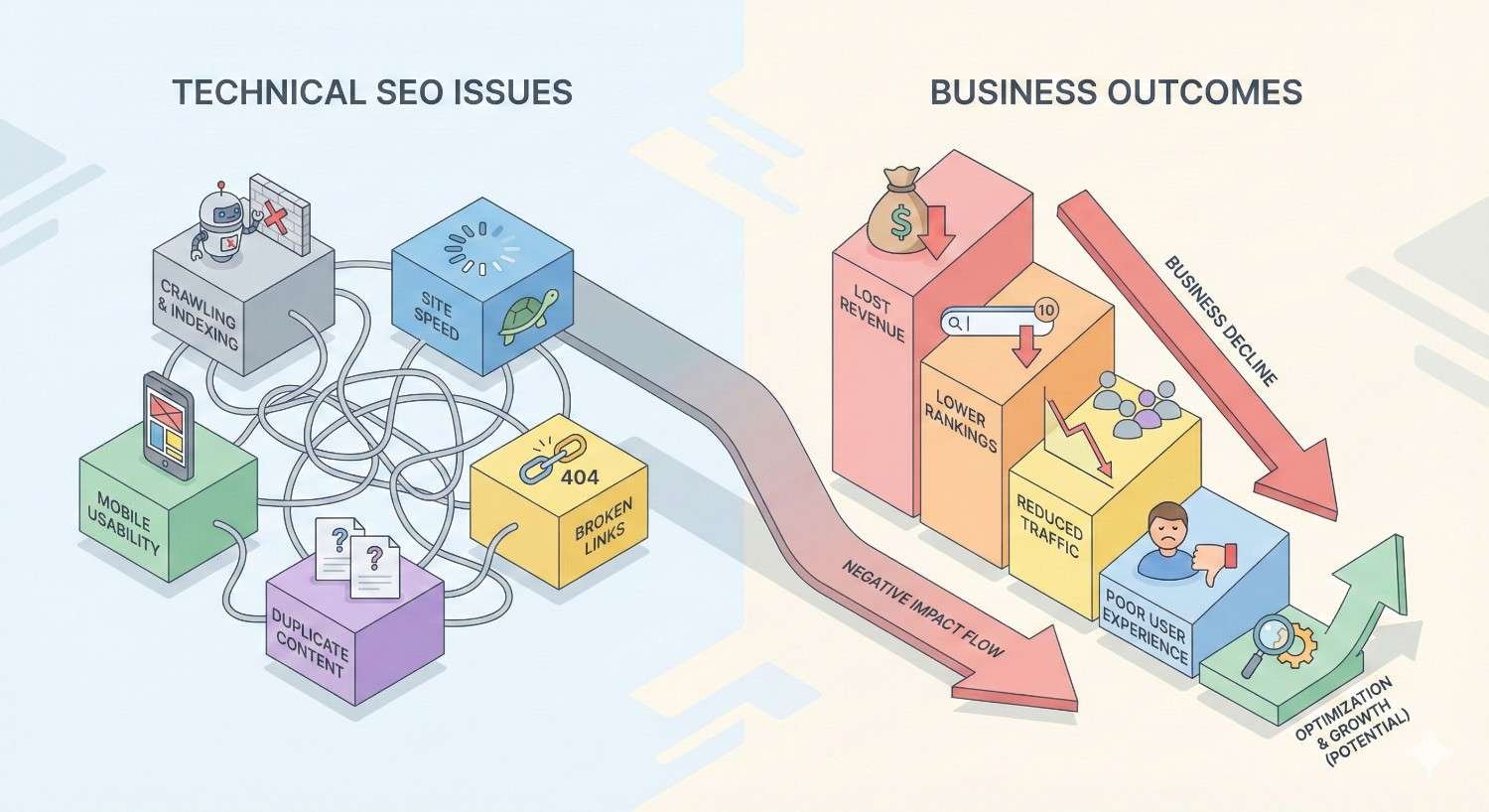
Understanding Technical SEO Issues and Their Business Impact
Technical SEO forms the foundation of search visibility. Before prioritizing fixes, you need clarity on what constitutes a technical issue and how these problems translate into lost revenue.
What Qualifies as a Technical SEO Issue
Technical SEO issues are problems affecting how search engines crawl, index, render, and rank your website. These differ from content or off-page factors because they involve your site’s infrastructure, code, and server configuration.
Common categories include crawlability barriers preventing search engine access, indexability problems blocking pages from search results, rendering issues affecting how content appears to Googlebot, and performance problems degrading user experience signals.
A technical issue becomes significant when it prevents search engines from properly understanding or serving your content. Minor HTML validation warnings differ vastly from robots.txt misconfigurations blocking your entire product catalog.
How Technical Issues Affect Organic Visibility
Technical problems create a cascade effect through your entire SEO strategy. When Googlebot cannot access pages, no amount of content optimization or link building produces results.
Crawlability issues mean search engines never discover your content. Indexability problems prevent discovered pages from appearing in search results. Rendering failures cause Google to see incomplete or different content than users see. Performance issues trigger ranking demotions through Core Web Vitals signals.
According to Google’s Search Central documentation, pages must be crawlable, indexable, and renderable before any ranking factors apply. Technical barriers at any stage break this chain completely.
The Cost of Ignoring Technical SEO Problems
Unresolved technical issues compound over time. A single misconfigured canonical tag might affect one page initially. Left unchecked, similar errors spread across templates, eventually impacting thousands of URLs.
Revenue impact varies by issue severity. Indexability blockers on product pages directly eliminate sales opportunities. Slow page speeds increase bounce rates and reduce conversion rates. Research from Portent shows conversion rates drop 4.42% for each additional second of load time.
Beyond direct revenue loss, technical debt accumulates. Fixing problems becomes exponentially harder as sites grow. What takes hours to resolve on a 500-page site requires weeks on a 50,000-page enterprise platform.
The Technical SEO Prioritization Framework
Effective prioritization requires a systematic approach balancing impact, effort, and business objectives. Random fixes waste resources. Strategic sequencing maximizes returns.
Impact vs. Effort Matrix for Technical SEO
The impact-effort matrix categorizes issues into four quadrants guiding resource allocation.
High Impact, Low Effort (Quick Wins): Fix immediately. These include robots.txt corrections, noindex tag removals, and canonical tag fixes. Resolution often takes minutes but unlocks significant visibility gains.
High Impact, High Effort (Major Projects): Schedule strategically. Site migrations, CMS changes, and complete URL restructuring fall here. Plan thoroughly, allocate resources, and execute during low-traffic periods.
Low Impact, Low Effort (Fill-Ins): Address during downtime. Minor metadata improvements and HTML validation errors fit this category. Handle when primary projects stall or resources free up.
Low Impact, High Effort (Avoid): Deprioritize or eliminate. Complex fixes producing minimal ranking improvements waste resources better spent elsewhere.
Severity Classification System
Beyond impact-effort analysis, classify issues by severity level determining urgency.
Critical (Priority 1): Issues actively preventing indexation or causing significant ranking loss. Fix within 24-48 hours. Examples include site-wide noindex tags, complete robots.txt blocks, and server errors on primary pages.
High (Priority 2): Issues degrading performance or limiting visibility without complete blockage. Address within 30 days. Structured data errors, internal linking problems, and redirect chains qualify here.
Medium (Priority 3): Issues affecting optimization efficiency without immediate ranking impact. Schedule within 90 days. Image optimization, JavaScript rendering improvements, and crawl budget inefficiencies fit this tier.
Low (Priority 4): Issues representing optimization opportunities rather than problems. Handle during ongoing maintenance. Minor metadata refinements and HTML validation warnings belong here.
Business Goals Alignment in Prioritization
Technical priorities must align with business objectives. An e-commerce site launching a holiday campaign prioritizes product page indexability over blog optimization. A SaaS company preparing for funding focuses on pages demonstrating market traction.
Map each technical issue to specific business outcomes. Ask which pages drive revenue, which support conversion paths, and which attract high-value traffic. Prioritize fixes affecting these pages regardless of site-wide issue counts.
Stakeholder communication improves when technical priorities connect to business metrics. Explaining that fixing canonical errors on product pages could recover 15% of lost organic traffic resonates more than discussing duplicate content theory.
Critical Technical SEO Issues (Priority 1: Fix Immediately)
Priority 1 issues require immediate attention. These problems actively block search visibility or cause ongoing ranking damage. Every day without resolution costs traffic and revenue.
Indexability and Crawlability Blockers
Crawlability and indexability issues represent the most severe technical problems. If search engines cannot access or index your content, nothing else matters.
Robots.txt Blocking Critical Pages
Robots.txt misconfigurations can accidentally block entire site sections. Common mistakes include blocking JavaScript or CSS files needed for rendering, disallowing parameter-based URLs that include important pages, and using overly broad disallow rules.
Check your robots.txt file in Google Search Console under the Indexing section. Use the robots.txt tester to verify critical URLs remain accessible. Remember that robots.txt blocks crawling, not indexing. Pages blocked by robots.txt but linked externally may still appear in search results with limited information.
Noindex Tags on Important Content
Noindex directives tell search engines to exclude pages from results. These tags sometimes appear accidentally through CMS settings, staging environment configurations carried to production, or developer oversights.
Audit your site using crawling tools to identify pages with noindex tags. Cross-reference against your priority page list. Pay special attention to pages generating traffic historically that suddenly dropped. Accidental noindex implementation often explains mysterious traffic losses.
Server Errors and 5xx Status Codes
Server errors prevent both users and search engines from accessing content. Persistent 5xx errors signal reliability problems that can trigger ranking demotions.
Monitor server status through Google Search Console’s Coverage report and server logs. Investigate patterns in error timing. Errors during peak traffic suggest capacity issues. Random errors across pages indicate application bugs or database problems.
Resolve server errors by working with your hosting provider or development team. Upgrade server resources if capacity causes problems. Fix application code generating errors. Implement proper error handling preventing cascading failures.
Site-Wide Performance Issues
Performance problems affect every page simultaneously. Google’s page experience signals make performance a direct ranking factor, particularly for mobile searches.
Core Web Vitals Failures
Core Web Vitals measure loading performance (LCP), interactivity (INP), and visual stability (CLS). Failing these metrics across your site creates a competitive disadvantage against faster competitors.
Google’s PageSpeed Insights provides field data from real users alongside lab diagnostics. Focus on field data showing actual user experience. Lab data helps diagnose issues but doesn’t reflect real-world performance.
Common LCP improvements include optimizing server response times, implementing efficient caching, preloading critical resources, and optimizing images. INP improvements focus on reducing JavaScript execution time and breaking up long tasks. CLS fixes involve specifying image dimensions and avoiding dynamic content insertion above the fold.
Mobile Usability Errors
Google’s mobile-first indexing means mobile versions determine rankings for all searches. Mobile usability errors directly impact visibility.
Check Google Search Console’s Mobile Usability report for specific issues. Common problems include text too small to read, clickable elements too close together, content wider than screen, and viewport not configured.
Test critical pages using Google’s Mobile-Friendly Test. Implement responsive design principles ensuring content adapts to all screen sizes. Avoid separate mobile URLs when possible, as they create maintenance complexity and potential indexing issues.
HTTPS and Security Issues
HTTPS is a confirmed ranking signal. Mixed content warnings, certificate errors, and security vulnerabilities damage both rankings and user trust.
Ensure your entire site loads over HTTPS without mixed content warnings. Implement proper redirects from HTTP to HTTPS versions. Keep SSL certificates current and properly configured. Use security headers protecting against common vulnerabilities.
Check for security issues in Google Search Console’s Security & Manual Actions section. Address any flagged problems immediately, as security warnings can trigger search result warnings deterring clicks.
Critical Duplicate Content Problems
Duplicate content confuses search engines about which version to rank. Severe cases split ranking signals across multiple URLs, weakening all versions.
Canonical Tag Errors
Canonical tags tell search engines which URL version to index. Errors include pointing to non-existent pages, creating canonical chains, self-referencing incorrectly, and conflicting with other signals.
Audit canonical implementation across your site. Every indexable page should have a self-referencing canonical or point to the preferred version. Canonical tags should use absolute URLs and match the protocol and domain of the target page.
Avoid canonical chains where page A canonicals to page B, which canonicals to page C. Search engines may not follow the chain completely, leaving intermediate pages indexed.
Parameter Handling Issues
URL parameters create duplicate content when the same content appears under multiple URLs. Session IDs, tracking parameters, and filter options commonly cause problems.
Configure parameter handling in Google Search Console when possible. Implement canonical tags pointing parameter URLs to clean versions. Consider using POST requests for filters that don’t need indexing rather than GET parameters creating new URLs.
For e-commerce sites with faceted navigation, carefully balance crawlability against duplicate content. Allow crawling of valuable filter combinations while blocking or canonicalizing low-value variations.
Multiple Versions of Homepage
Homepages often exist at multiple URLs: with and without www, with and without trailing slashes, at index.html or index.php, and at both HTTP and HTTPS. Each version splits authority.
Implement 301 redirects consolidating all versions to a single canonical URL. Choose one format and redirect all others. Ensure internal links use the canonical version consistently. Update external links where possible.
High-Impact Technical SEO Issues (Priority 2: Address Within 30 Days)
Priority 2 issues significantly affect performance without causing complete visibility loss. Address these within 30 days to prevent compounding problems and capture optimization opportunities.
Structured Data and Schema Markup Gaps
Structured data helps search engines understand content context and enables rich results increasing click-through rates. Missing or incorrect schema limits SERP visibility.
Implement schema markup for content types relevant to your business. E-commerce sites need Product, Review, and Organization schema. Local businesses require LocalBusiness markup. Content publishers benefit from Article and FAQ schema.
Validate implementation using Google’s Rich Results Test. Fix errors preventing rich result eligibility. Monitor performance in Search Console’s Enhancements reports tracking impression and click data for each schema type.
Internal Linking Architecture Problems
Internal links distribute authority throughout your site and help search engines discover content. Architecture problems waste crawl budget and leave pages under-optimized.
Orphaned Pages
Orphaned pages have no internal links pointing to them. Search engines struggle to discover these pages, and they receive no internal authority signals.
Identify orphaned pages by comparing your sitemap URLs against pages found through crawling. Any page in your sitemap but not discovered through links is effectively orphaned. Add contextual internal links from relevant pages or remove orphaned pages from your sitemap if they shouldn’t be indexed.
Broken Internal Links
Broken internal links waste crawl budget and create poor user experiences. They also prevent authority flow to target pages.
Crawl your site regularly to identify broken links. Fix by updating links to correct URLs, implementing redirects for moved content, or removing links to deleted pages. Prioritize fixing broken links on high-authority pages where link equity loss matters most.
Poor Link Equity Distribution
Link equity should flow to your most important pages. Poor architecture concentrates authority on low-value pages while starving priority content.
Analyze internal link distribution using crawling tools. Identify pages receiving disproportionate internal links relative to their importance. Restructure navigation and contextual linking to direct more authority toward revenue-generating pages.
XML Sitemap Issues
XML sitemaps guide search engine crawling and communicate page importance. Problems include listing non-indexable URLs, missing important pages, outdated entries, and improper formatting.
Audit your sitemap against actual site content. Remove URLs returning non-200 status codes, blocked by robots.txt, or containing noindex tags. Add important pages missing from the sitemap. Update lastmod dates accurately reflecting content changes.
Keep sitemaps under 50,000 URLs and 50MB uncompressed. Use sitemap index files for larger sites. Submit sitemaps through Google Search Console and reference them in robots.txt.
Page Speed Optimization Opportunities
Beyond Core Web Vitals failures, page speed optimization opportunities improve user experience and competitive positioning. Faster sites convert better and rank higher.
Focus on reducing server response time through caching and CDN implementation. Optimize images using modern formats like WebP and appropriate compression. Minimize render-blocking resources by deferring non-critical JavaScript and CSS. Implement lazy loading for below-fold content.
Measure improvements using both lab tools and real user monitoring. Track Core Web Vitals field data over time to verify optimizations produce real-world improvements.
Redirect Chain and Loop Problems
Redirect chains occur when redirects point to other redirects rather than final destinations. Each hop adds latency and risks losing link equity. Redirect loops create infinite cycles preventing page access.
Identify chains and loops through site crawls. Update redirects to point directly to final destinations. Fix loops by correcting the redirect target. Aim for single-hop redirects whenever possible.
Pay special attention to redirects from high-authority pages. Long chains from pages with significant backlinks waste valuable link equity that should flow to target pages.
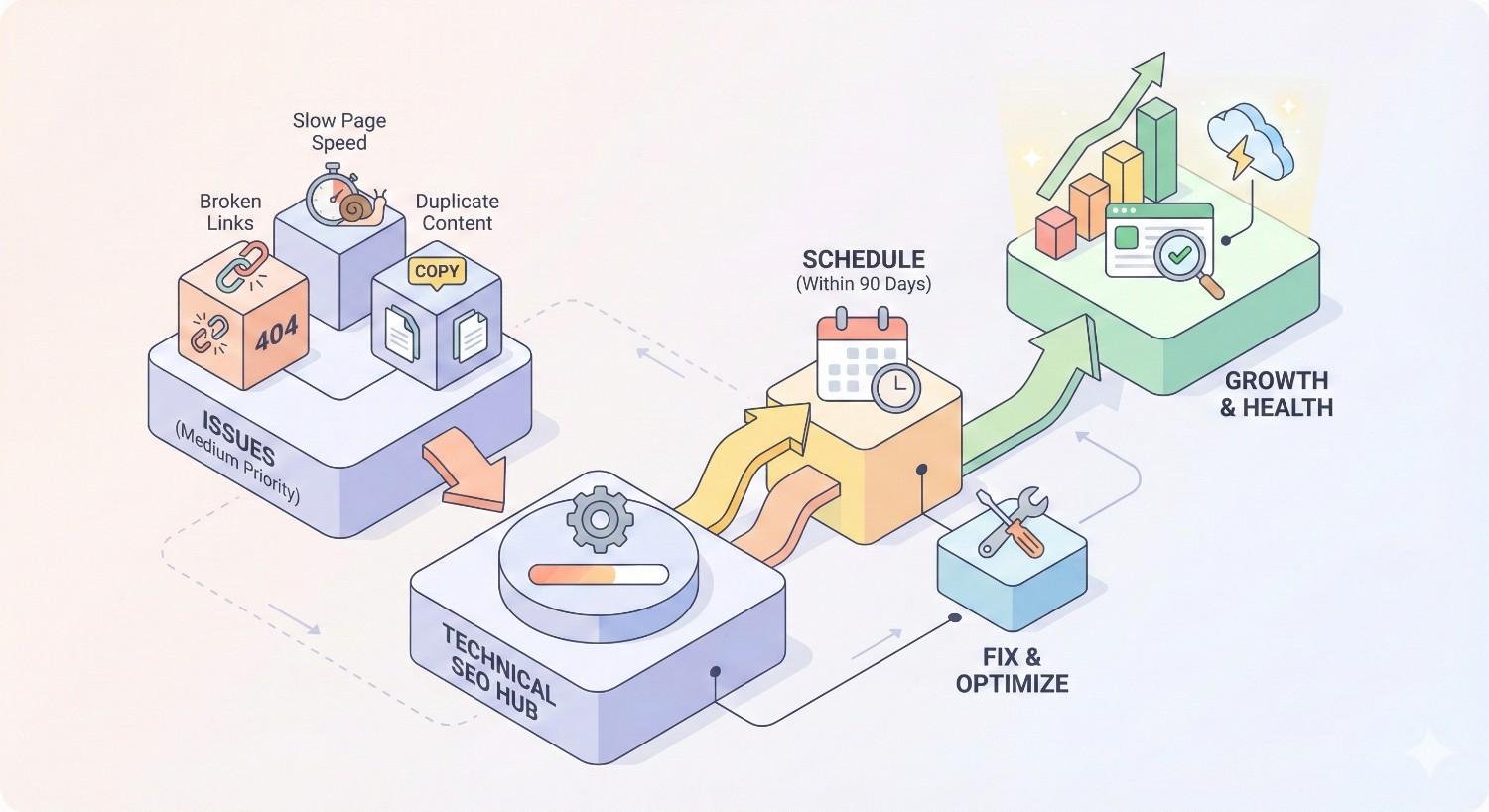
Medium-Priority Technical SEO Issues (Priority 3: Schedule Within 90 Days)
Priority 3 issues affect optimization efficiency without immediate ranking impact. Schedule these within 90 days as part of ongoing improvement efforts.
Image Optimization Issues
Unoptimized images slow page loading and waste bandwidth. Common issues include oversized files, missing alt text, incorrect formats, and missing dimensions.
Compress images appropriately for web delivery. Use modern formats like WebP with fallbacks for older browsers. Specify width and height attributes preventing layout shifts. Write descriptive alt text supporting accessibility and image search visibility.
Implement responsive images serving appropriate sizes for different devices. Use srcset attributes allowing browsers to select optimal image versions. Consider lazy loading for images below the initial viewport.
JavaScript Rendering Problems
JavaScript-heavy sites risk content not being indexed if rendering fails. Googlebot renders JavaScript but may miss content due to timing issues, errors, or resource blocking.
Test JavaScript rendering using Google Search Console’s URL Inspection tool. Compare rendered HTML against source HTML to identify content differences. Use the Mobile-Friendly Test to see how Googlebot renders specific pages.
Implement server-side rendering or dynamic rendering for critical content. Ensure important text and links exist in initial HTML rather than requiring JavaScript execution. Avoid placing critical content behind user interactions Googlebot cannot trigger.
Hreflang and International SEO Errors
Hreflang tags tell search engines which language and regional versions to show different users. Errors cause wrong versions appearing in search results or duplicate content issues across regions.
Validate hreflang implementation using specialized tools checking for common errors. Ensure reciprocal tags exist between all language versions. Use correct language and region codes following ISO standards. Include self-referencing hreflang tags on each page.
Consider implementation method based on site size. Small sites can use HTML link elements. Larger sites benefit from HTTP headers or sitemap-based implementation reducing page code complexity.
Log File and Crawl Budget Inefficiencies
Log file analysis reveals how search engines actually crawl your site versus how you expect them to crawl. Inefficiencies waste crawl budget on low-value pages while important content receives insufficient attention.
Analyze server logs to identify crawl patterns. Look for Googlebot spending excessive time on parameter URLs, old content, or low-value sections. Compare crawl frequency against page importance and update frequency.
Improve crawl efficiency by blocking low-value URLs through robots.txt, improving internal linking to priority pages, and ensuring XML sitemaps accurately reflect content priorities. Monitor changes in crawl patterns after implementing fixes.
URL Structure and Architecture Improvements
URL structure affects both user experience and search engine understanding. Poor structures create unnecessarily deep pages, confusing hierarchies, and keyword-stuffed URLs.
Implement logical URL hierarchies reflecting site structure. Keep URLs concise and descriptive. Use hyphens between words. Avoid unnecessary parameters, session IDs, and excessive folder depth.
Plan URL changes carefully. Implement proper redirects maintaining link equity. Update internal links to new URLs. Monitor traffic after changes to catch any redirect failures.
Low-Priority Technical SEO Issues (Priority 4: Ongoing Optimization)
Priority 4 issues represent optimization opportunities rather than problems requiring urgent attention. Address these during ongoing maintenance when higher priorities are resolved.
Minor Metadata Improvements
Metadata optimization beyond critical pages offers incremental improvements. Title tags and meta descriptions on lower-traffic pages can be refined over time.
Focus on pages with impression data but low click-through rates. Test different title and description approaches. Ensure metadata accurately reflects page content and includes relevant keywords naturally.
Avoid over-optimizing metadata at the expense of user appeal. Compelling, accurate descriptions outperform keyword-stuffed alternatives that fail to attract clicks.
HTML Validation Errors
HTML validation errors rarely affect rankings directly but can indicate code quality issues. Severe errors might affect rendering or accessibility.
Run periodic validation checks using the W3C validator. Prioritize errors affecting functionality or accessibility over minor warnings. Fix systematic errors appearing across templates rather than individual page issues.
Balance validation perfection against development resources. Some validation warnings have no practical impact and don’t warrant fixing.
Pagination Optimization
Pagination helps users and search engines navigate large content sets. Optimization opportunities include implementing proper rel=”next” and rel=”prev” signals, ensuring paginated pages have unique content value, and providing view-all options where appropriate.
Avoid creating thin paginated pages with minimal unique content. Consider whether pagination serves users or simply exists due to CMS defaults. Consolidate where possible without harming user experience.
Breadcrumb Navigation Enhancement
Breadcrumbs improve user navigation and can appear in search results through structured data. Enhancement opportunities include implementing BreadcrumbList schema, ensuring breadcrumb trails accurately reflect site hierarchy, and making breadcrumbs clickable and useful.
Prioritize breadcrumb implementation on deep pages where navigation context helps users. Ensure schema markup validates correctly and matches visible breadcrumb content.
How to Conduct a Technical SEO Audit for Prioritization
Effective prioritization requires comprehensive auditing. Systematic processes ensure no critical issues escape detection while avoiding analysis paralysis from minor problems.
Essential Technical SEO Audit Tools
Different tools serve different audit purposes. Combining multiple tools provides complete visibility into technical health.
Google Search Console Analysis
Google Search Console provides authoritative data directly from Google about how they see your site. Key reports include Coverage showing indexing status, Core Web Vitals displaying performance data, Mobile Usability identifying mobile issues, and Enhancements tracking structured data.
Review Search Console weekly for new issues. Set up email alerts for critical problems. Use the URL Inspection tool to diagnose specific page issues and request indexing after fixes.
Crawling Tools (Screaming Frog, Sitebulb)
Desktop crawlers like Screaming Frog and Sitebulb simulate search engine crawling, identifying issues across your entire site. These tools find broken links, redirect chains, duplicate content, missing metadata, and numerous other problems.
Configure crawlers to match Googlebot behavior. Enable JavaScript rendering for accurate results on dynamic sites. Export findings for analysis and tracking. Schedule regular crawls to catch new issues quickly.
Performance Testing Tools
Performance tools measure page speed and Core Web Vitals. Google PageSpeed Insights provides both lab and field data. WebPageTest offers detailed waterfall analysis. Chrome DevTools enables real-time debugging.
Test representative pages from each template type. Focus on mobile performance given mobile-first indexing. Track metrics over time to measure improvement impact.
Step-by-Step Technical Audit Process
Follow a systematic process ensuring comprehensive coverage without overwhelming detail.
Step 1: Crawl Configuration Set up your crawler matching search engine behavior. Configure user agent, rendering settings, and crawl scope. Include subdomains if relevant.
Step 2: Initial Crawl Analysis Run a complete site crawl. Review summary statistics identifying major issue categories. Note total pages, response codes, and indexability status.
Step 3: Indexability Assessment Identify pages blocked from indexing through robots.txt, noindex tags, or canonical tags. Cross-reference against pages that should be indexed.
Step 4: Crawlability Review Analyze crawl depth, internal linking, and orphaned pages. Identify crawl traps and inefficient structures wasting crawl budget.
Step 5: Performance Evaluation Test Core Web Vitals across page templates. Identify systematic performance issues versus individual page problems.
Step 6: Content Duplication Check Find duplicate titles, descriptions, and content. Identify canonical tag issues and parameter handling problems.
Step 7: Structured Data Validation Test schema markup implementation. Verify rich result eligibility and fix validation errors.
Step 8: Mobile Assessment Review mobile usability issues. Test critical pages for mobile rendering problems.
Documenting and Categorizing Issues
Proper documentation enables prioritization and tracking. Create a structured issue log capturing essential details.
For each issue, document the problem description, affected URLs or URL patterns, severity classification, estimated impact, required effort to fix, responsible team or person, and target resolution date.
Group issues by category and priority level. This organization helps stakeholders understand the scope and supports sprint planning. Update documentation as issues are resolved, maintaining a record of improvements.
Creating Your Technical SEO Prioritization Roadmap
Audit findings require translation into actionable plans. Roadmaps align technical work with business timelines and resource availability.
Mapping Issues to Business Objectives
Connect each technical issue to specific business outcomes. This mapping justifies prioritization decisions and helps secure resources.
Identify which pages drive revenue, leads, or other key metrics. Prioritize technical fixes affecting these pages regardless of site-wide issue counts. A single critical error on your top-converting page matters more than hundreds of minor issues on low-traffic content.
Frame technical work in business terms when communicating with stakeholders. Instead of discussing canonical tag errors, explain how fixing duplicate content issues could recover lost organic traffic to product pages.
Resource Allocation and Timeline Planning
Realistic timelines account for available resources, dependencies, and competing priorities. Overly aggressive schedules lead to incomplete fixes or quality compromises.
Assess available development resources. Determine who can implement fixes and their capacity. Identify dependencies between issues where one fix enables another.
Build timelines working backward from business deadlines. If a product launch requires technical readiness, schedule fixes accordingly. Allow buffer time for unexpected complications.
Quick Wins vs. Long-Term Projects
Balance immediate improvements against strategic investments. Quick wins build momentum and demonstrate value. Long-term projects address fundamental issues requiring sustained effort.
Quick wins typically include robots.txt corrections, noindex removals, canonical fixes, and redirect updates. These often take hours to implement but produce measurable results within weeks.
Long-term projects include site migrations, CMS changes, complete URL restructuring, and major performance overhauls. These require careful planning, staged implementation, and extended monitoring.
Maintain a mix of both in your roadmap. Quick wins keep stakeholders engaged while long-term projects progress. Avoid focusing exclusively on either category.
Building Your Technical SEO Sprint Plan
Organize work into manageable sprints enabling progress tracking and adjustment. Two-week sprints work well for most teams, providing enough time for meaningful work while maintaining accountability.
Sprint Planning: Select issues from your prioritized backlog fitting available capacity. Include a mix of quick wins and progress on larger projects. Define clear acceptance criteria for each item.
Sprint Execution: Implement fixes according to plan. Document changes made and any complications encountered. Test implementations before considering items complete.
Sprint Review: Assess completed work against goals. Measure impact where possible. Identify lessons learned for future sprints. Adjust upcoming sprint plans based on findings.
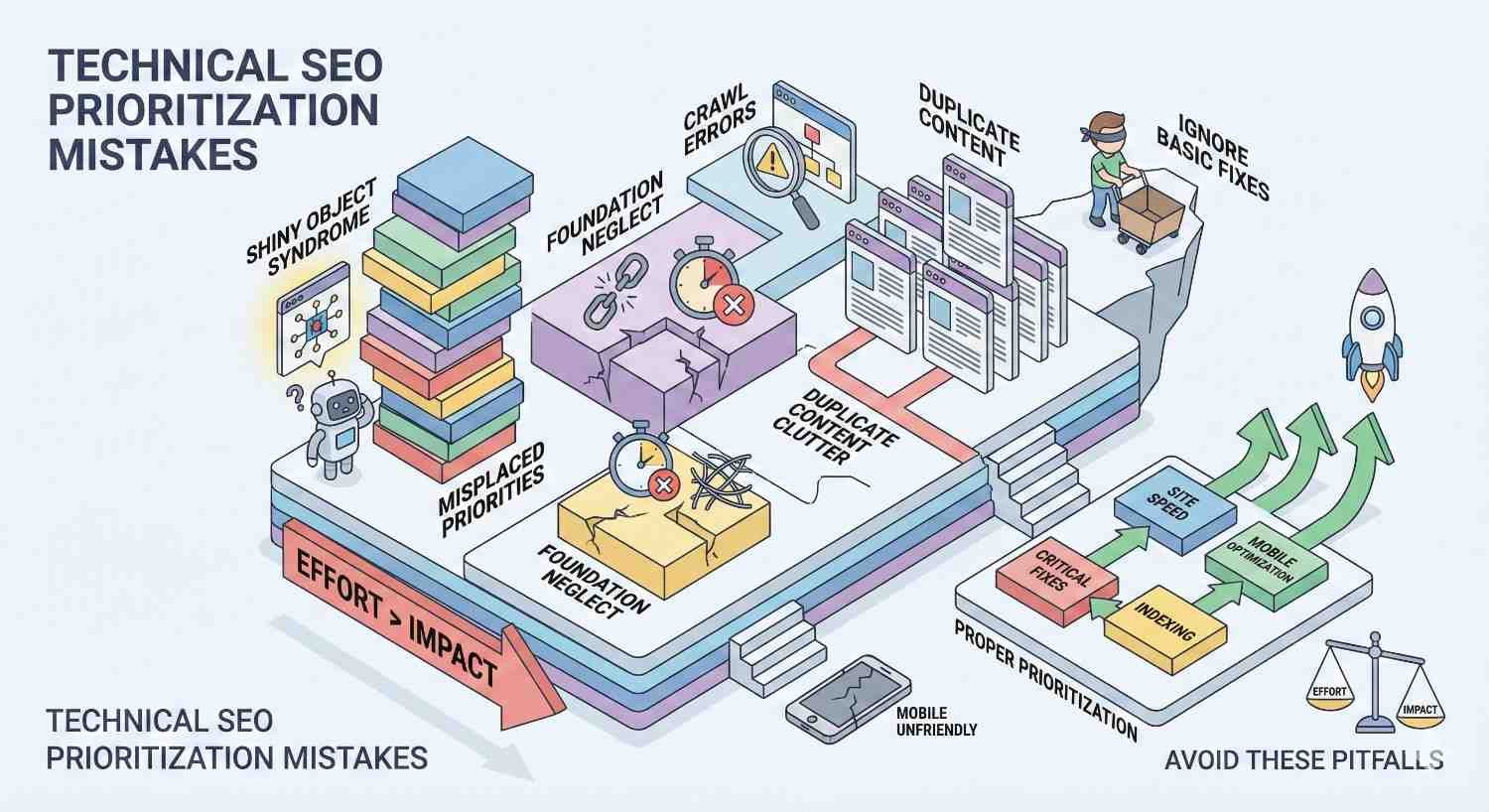
Common Technical SEO Prioritization Mistakes to Avoid
Even experienced teams make prioritization errors. Recognizing common mistakes helps avoid wasted effort and missed opportunities.
Chasing Low-Impact Issues First
Tool-generated issue counts create false urgency. Seeing 5,000 HTML validation warnings triggers action even when these warnings have zero ranking impact.
Resist the temptation to clear easy issues first. A clean audit report means nothing if critical problems remain unresolved. Always prioritize by impact, not by issue count or ease of resolution.
Evaluate each issue category’s actual ranking impact before allocating resources. Some issues flagged by tools have no practical SEO consequence and can be safely ignored.
Ignoring Mobile-First Indexing Requirements
Desktop-focused optimization ignores how Google actually indexes sites. Mobile-first indexing means Google primarily uses mobile versions for ranking decisions.
Ensure mobile versions contain all content and functionality present on desktop. Test mobile rendering and performance as primary concerns. Address mobile usability issues before desktop-only optimizations.
Check that structured data, metadata, and internal links exist on mobile versions. Content hidden behind tabs or accordions on mobile may receive less weight than visible content.
Over-Optimizing at the Expense of User Experience
Technical optimization should improve user experience, not degrade it. Aggressive optimization sometimes harms usability.
Avoid removing functionality to improve page speed if users need that functionality. Don’t implement aggressive lazy loading that frustrates users waiting for content. Balance technical perfection against practical usability.
Test changes with real users when possible. Monitor engagement metrics after technical changes. Revert optimizations that improve technical scores but harm user behavior.
Failing to Measure Impact After Fixes
Implementing fixes without measuring results wastes learning opportunities. You cannot improve prioritization accuracy without understanding which fixes produced results.
Establish baseline metrics before implementing changes. Track relevant KPIs after fixes go live. Allow sufficient time for changes to affect rankings before drawing conclusions.
Document which fixes produced measurable improvements. Use this data to refine future prioritization decisions. Share learnings with your team to improve collective judgment.
Measuring the Impact of Technical SEO Fixes
Demonstrating ROI from technical SEO work requires systematic measurement. Proper attribution connects fixes to business outcomes.
Key Performance Indicators to Track
Select KPIs aligned with fix objectives. Different issues affect different metrics.
Indexability fixes: Track indexed page counts, crawl stats, and impressions for affected pages.
Performance fixes: Monitor Core Web Vitals scores, page speed metrics, and bounce rates.
Duplicate content fixes: Watch for ranking improvements on consolidated pages and traffic recovery.
Structured data fixes: Measure rich result impressions, click-through rates, and SERP feature appearances.
Avoid vanity metrics disconnected from business outcomes. Ultimately, technical fixes should improve traffic, conversions, or revenue.
Before and After Comparison Methodology
Establish clear baselines before implementing fixes. Document current performance for affected pages and metrics.
Allow sufficient time after fixes for search engines to recrawl and reprocess pages. Most technical changes require 2-4 weeks minimum before ranking impacts appear. Major changes may take longer.
Compare post-fix performance against baselines. Account for seasonality and external factors affecting traffic. Use year-over-year comparisons when possible to control for seasonal variation.
Attribution and Reporting Best Practices
Isolate technical fix impacts from other changes when possible. Implementing multiple changes simultaneously makes attribution difficult.
Document all changes with timestamps. When analyzing results, check for confounding factors like algorithm updates, competitor changes, or marketing campaigns affecting traffic.
Report results in business terms stakeholders understand. Connect technical improvements to traffic gains, conversion improvements, or revenue impact. Avoid jargon-heavy reports that obscure actual value delivered.
Expected Timelines for Technical SEO Results
Technical SEO results vary by issue type and site characteristics. Set realistic expectations to avoid premature conclusions.
Indexability fixes: Results often appear within 1-2 weeks as Google recrawls and indexes previously blocked pages.
Performance improvements: Core Web Vitals changes may take 28 days or longer to reflect in field data. Ranking impacts follow field data improvements.
Duplicate content resolution: Consolidation benefits typically appear within 4-8 weeks as Google reprocesses affected pages.
Structural changes: Major architecture modifications may require 3-6 months for full impact as Google recrawls and reevaluates the entire site.
When to Bring in Technical SEO Expertise
Not every team has the skills or capacity for complex technical SEO work. Recognizing when to seek help prevents prolonged problems and wasted internal effort.
Signs You Need Professional Technical SEO Help
Several indicators suggest external expertise would benefit your situation.
Persistent issues: Problems that recur despite multiple fix attempts indicate deeper issues requiring specialized diagnosis.
Complex platforms: Enterprise CMS platforms, custom applications, and headless architectures often require specialized knowledge.
Major projects: Site migrations, platform changes, and international expansions benefit from experienced guidance.
Resource constraints: When internal teams lack capacity for thorough technical work, external support fills gaps.
Declining performance: Unexplained traffic losses or ranking drops warrant expert investigation.
In-House vs. Agency vs. Consultant
Different engagement models suit different situations.
In-house teams provide ongoing attention and deep platform knowledge. They work best for organizations with sufficient scale to justify dedicated technical SEO roles.
Agencies offer diverse expertise and scalable resources. They suit organizations needing comprehensive SEO services beyond technical work alone.
Consultants provide specialized expertise for specific projects or audits. They work well for organizations with capable implementation teams needing strategic guidance.
Consider your ongoing needs, budget, and internal capabilities when choosing. Many organizations combine models, using consultants for strategy and audits while agencies or in-house teams handle implementation.
What to Look for in a Technical SEO Provider
Evaluate potential providers based on relevant experience and demonstrated results.
Technical depth: Providers should demonstrate understanding of crawling, rendering, indexing, and ranking systems. Ask about specific technical challenges they’ve solved.
Platform experience: Experience with your specific CMS, e-commerce platform, or technology stack accelerates results.
Communication skills: Technical experts must translate complex issues into business terms stakeholders understand.
Process transparency: Quality providers explain their methodology and keep you informed throughout engagements.
References and results: Request case studies and references from similar projects. Verify claimed results where possible.
Technical SEO Investment and ROI Expectations
Technical SEO investments should produce measurable returns. Set realistic expectations based on your situation.
Initial audits and roadmap development typically require $2,000-$15,000 depending on site complexity. Implementation costs vary widely based on issue severity and platform constraints.
ROI timelines depend on issue severity and traffic potential. Sites with critical indexability problems may see rapid returns as blocked pages gain visibility. Sites with minor optimization opportunities see gradual improvements over months.
Calculate potential ROI by estimating traffic recovery or growth from fixes. Apply your average traffic value to project revenue impact. Compare against investment costs to evaluate opportunities.
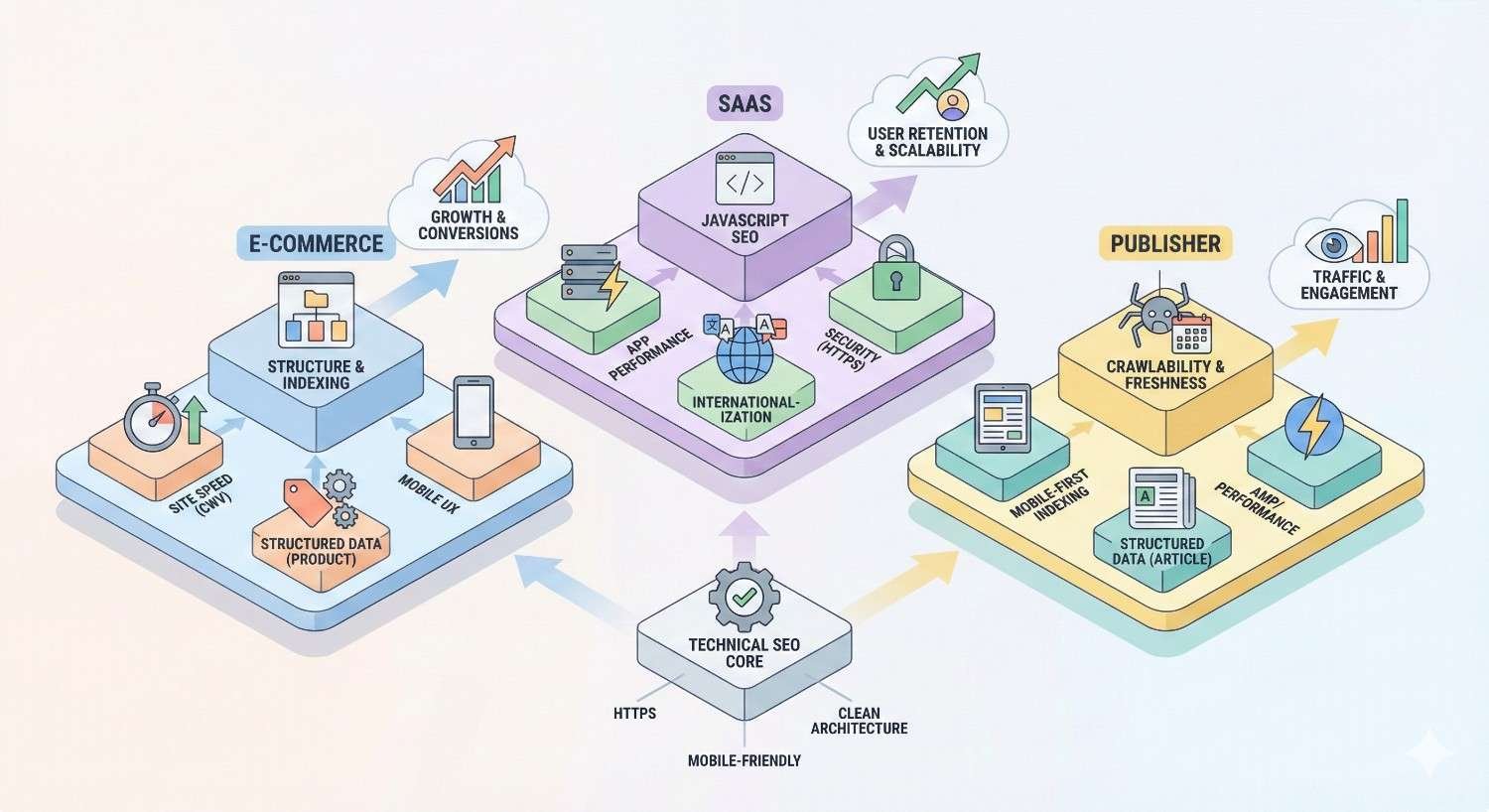
Technical SEO Prioritization by Website Type
Different website types face different technical challenges. Prioritization should reflect your specific situation.
E-commerce Technical SEO Priorities
E-commerce sites face unique challenges from large product catalogs, faceted navigation, and frequent inventory changes.
Top priorities:
- Product page indexability ensuring all products appear in search
- Faceted navigation handling preventing duplicate content
- Site speed optimization reducing cart abandonment
- Structured data enabling product rich results
- Out-of-stock page handling maintaining SEO value
Focus on pages directly driving revenue. Product and category pages typically matter more than informational content. Ensure checkout processes don’t create indexability issues.
SaaS and Software Company Priorities
SaaS sites often rely heavily on content marketing while maintaining application functionality.
Top priorities:
- JavaScript rendering ensuring content visibility
- Blog and resource indexability supporting content strategy
- Core Web Vitals for conversion-focused pages
- International targeting for global markets
- Documentation site optimization
Balance marketing site optimization against application performance. Ensure marketing pages load quickly even if applications require heavier resources.
Local Business Technical SEO Focus
Local businesses need technical foundations supporting local search visibility.
Top priorities:
- Mobile usability for on-the-go searchers
- LocalBusiness schema markup
- NAP consistency across pages
- Page speed for mobile users
- Google Business Profile integration
Local sites typically have fewer pages, making comprehensive optimization more achievable. Focus on ensuring every page performs well rather than prioritizing among thousands.
Enterprise and Large-Scale Site Priorities
Enterprise sites face scale challenges multiplying technical debt impact.
Top priorities:
- Crawl budget optimization across millions of pages
- Template-level fixes affecting thousands of URLs
- Log file analysis understanding actual crawl behavior
- Staging and production environment consistency
- Change management preventing regression
Prioritize fixes affecting the largest page counts. Template corrections often provide better ROI than individual page fixes. Implement monitoring preventing new issues from spreading.
Maintaining Technical SEO Health Long-Term
Technical SEO requires ongoing attention. Sites constantly change, creating new issues. Proactive maintenance prevents problems from accumulating.
Ongoing Monitoring and Maintenance Schedule
Establish regular monitoring cadences catching issues early.
Daily: Check Google Search Console for critical alerts and security issues.
Weekly: Review coverage reports, Core Web Vitals data, and crawl stats.
Monthly: Run site crawls comparing against previous months. Analyze log files for crawl pattern changes.
Quarterly: Conduct comprehensive audits reviewing all technical aspects. Update prioritization roadmaps based on findings.
Automate monitoring where possible. Set up alerts for critical metrics triggering immediate investigation.
Preventing Technical SEO Regression
New development work often introduces technical issues. Prevent regression through process improvements.
Implement technical SEO requirements in development workflows. Include SEO checks in code review processes. Test staging environments before production deployment.
Create technical SEO checklists for common development tasks. Ensure developers understand SEO implications of their work. Provide training on common issues and prevention.
Technical SEO Checklist for Website Updates
Before launching website changes, verify technical SEO requirements.
Pre-launch checks:
- Robots.txt allows crawling of new content
- No accidental noindex tags on new pages
- Canonical tags properly configured
- Internal links updated to new URLs
- Redirects implemented for changed URLs
- Structured data validates correctly
- Mobile rendering works properly
- Page speed meets standards
Post-launch monitoring:
- Verify indexing of new pages
- Check for crawl errors in Search Console
- Monitor traffic to changed sections
- Validate redirects working correctly
Building Technical SEO into Development Workflows
Sustainable technical SEO requires integration into standard processes rather than periodic audits.
Include SEO requirements in project specifications. Define technical SEO acceptance criteria for new features. Make SEO review a standard deployment gate.
Provide developers with SEO testing tools and training. Create documentation explaining common issues and solutions. Foster collaboration between SEO and development teams.
Celebrate SEO wins to reinforce positive behaviors. Share success stories showing business impact of technical improvements. Build organizational appreciation for technical SEO value.
Conclusion: Building a Sustainable Technical SEO Strategy
Technical SEO prioritization transforms overwhelming audit findings into strategic action plans. By classifying issues by severity, aligning fixes with business objectives, and measuring results systematically, you maximize returns from technical investments.
The framework presented here applies across website types and scales. Whether managing a small business site or enterprise platform, the principles remain consistent: fix critical blockers immediately, address high-impact issues promptly, and maintain ongoing optimization discipline.
We help businesses worldwide build sustainable organic growth through strategic technical SEO. Contact White Label SEO Service to discuss how our prioritization framework can accelerate your search visibility and drive measurable business results.
Frequently Asked Questions
How long does it take to fix technical SEO issues?
Fix timelines vary by issue complexity. Simple fixes like removing noindex tags take minutes. Complex problems like site migrations require weeks or months of planning and implementation. Most sites can resolve critical issues within 2-4 weeks with dedicated resources.
Should I hire an agency or fix technical SEO in-house?
The decision depends on your team’s technical capabilities and available capacity. In-house works well when you have skilled developers and ongoing needs. Agencies suit organizations needing comprehensive support or lacking internal expertise. Many businesses combine both approaches.
What tools do I need for technical SEO?
Essential tools include Google Search Console for authoritative Google data, a crawling tool like Screaming Frog or Sitebulb for comprehensive site analysis, and PageSpeed Insights for performance testing. Additional tools for log file analysis and monitoring add value for larger sites.
How do I know which technical SEO issues are most important?
Prioritize issues blocking indexability first, as these prevent any ranking potential. Next address performance problems affecting user experience signals. Then tackle issues limiting optimization efficiency. Always consider business impact when ranking similar-severity issues.
Can technical SEO issues cause sudden traffic drops?
Yes, critical technical issues can cause immediate traffic losses. Accidental noindex tags, robots.txt blocks, or server errors can eliminate visibility within days. If you experience sudden drops, check Google Search Console for indexing issues and recent site changes.
How often should I conduct technical SEO audits?
Comprehensive audits should occur quarterly for most sites. Monthly crawls catch emerging issues between full audits. Sites with frequent changes or large scale benefit from more frequent monitoring. Always audit before and after major site changes.
What is the ROI of fixing technical SEO issues?
ROI varies based on issue severity and traffic potential. Sites with critical indexability problems often see rapid traffic recovery worth many times the fix cost. Performance improvements typically show 10-30% conversion rate improvements. Calculate potential ROI by estimating traffic gains and applying your average visitor value.


