

Index bloat silently drains your SEO performance by forcing search engines to crawl and index pages that deliver zero value. When Google wastes resources on duplicate URLs, thin content, and parameter variations, your important pages lose visibility. Sites with severe bloat often see crawl budget exhaustion, diluted authority, and unexplained ranking drops.
This technical SEO problem affects businesses of all sizes, from small WordPress blogs to enterprise e-commerce platforms with millions of URLs. The good news: index bloat is fixable with the right diagnostic approach and systematic remediation.
This guide walks you through exactly how to identify bloated indexes, understand root causes, implement proven fixes, and establish ongoing prevention protocols that protect your organic growth.
What Is Index Bloat?
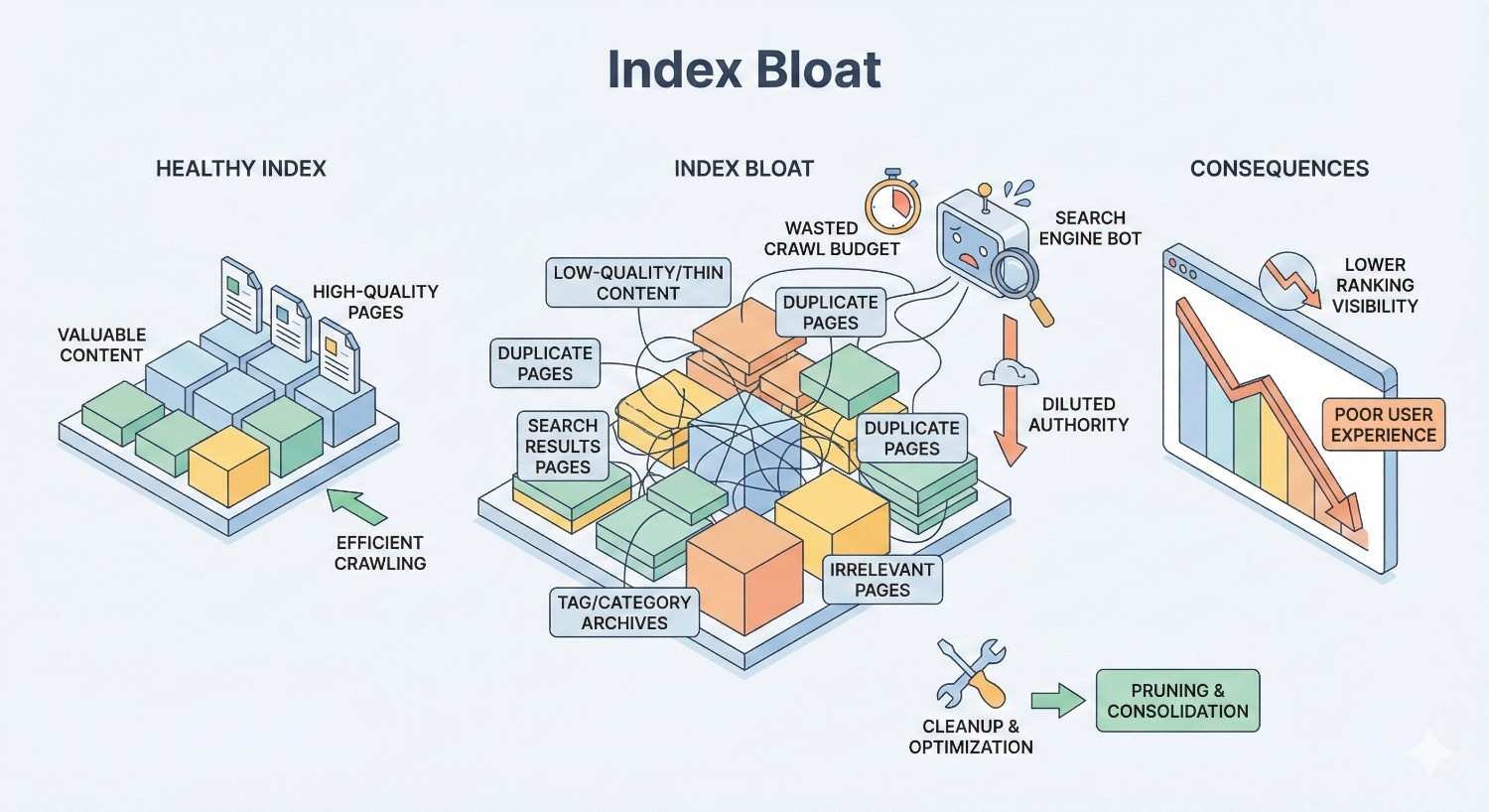
Index bloat occurs when search engines index significantly more pages from your website than actually provide unique value to users. These excess indexed pages consume crawl budget, confuse ranking signals, and ultimately weaken your site’s overall search performance.
Think of your website’s index like a library catalog. A healthy catalog lists only books worth reading. Index bloat is like cataloging every draft, duplicate copy, and blank page alongside your actual content. Searchers struggle to find what matters, and librarians waste time organizing worthless entries.
How Search Engine Indexing Works
Search engines discover and store web pages through a systematic process. Googlebot and other crawlers visit your site, follow links, and request pages. When a page meets quality thresholds and contains no blocking directives, it enters the search index.
The index serves as Google’s massive database of web content. When users search, Google queries this index to return relevant results. Pages must be indexed to appear in organic search results.
Crawling and indexing consume finite resources. Google allocates a crawl budget to each site based on factors like server capacity, site authority, and content freshness signals. Larger sites with strong authority receive more generous budgets, but no site has unlimited crawling resources.
Every URL you allow into the index competes for attention. When low-value pages consume crawl budget, high-value pages may be crawled less frequently or discovered more slowly.
Index Bloat vs. Healthy Index: Key Differences
A healthy index contains pages that serve distinct user intents, provide unique content, and contribute to your site’s topical authority. Each indexed URL earns its place by delivering value that no other page on your site provides.
Bloated indexes contain redundant, thin, or automatically generated pages that fragment your site’s authority. Common bloat indicators include:
Healthy Index Characteristics:
- Indexed page count closely matches intentionally published content
- Each URL targets a distinct keyword or user need
- Pages receive organic traffic proportional to their importance
- Crawl logs show efficient bot behavior focused on priority content
Bloated Index Characteristics:
- Indexed pages far exceed intentionally created content
- Multiple URLs target identical or overlapping keywords
- Most indexed pages receive zero organic traffic
- Crawl logs reveal bots stuck on parameter variations and duplicate paths
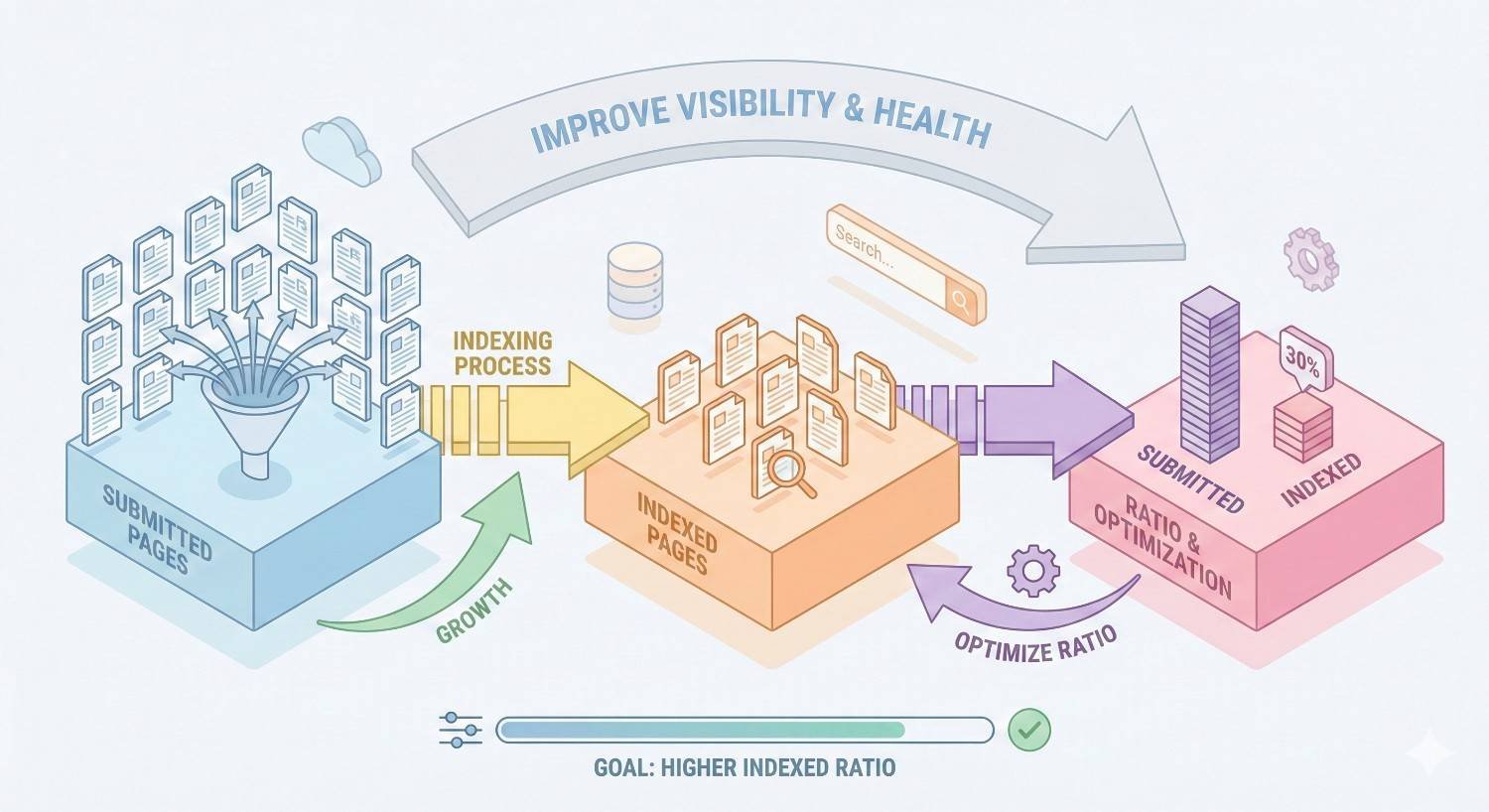
The ratio between submitted sitemap URLs and actual indexed pages provides a quick diagnostic signal. Significant discrepancies warrant investigation.
Why Index Bloat Hurts Your SEO Performance
Index bloat creates cascading problems that compound over time. Understanding these impacts helps prioritize remediation efforts and justify technical SEO investments to stakeholders.
Crawl Budget Waste & Its Impact on Rankings
Every website receives a finite crawl budget from Google. This budget determines how many pages Googlebot will request during each crawl session. When bloated pages consume this budget, important content suffers.
For smaller sites with a few hundred pages, crawl budget rarely becomes a limiting factor. But sites with thousands or millions of URLs face real constraints. E-commerce catalogs, news publishers, and large content platforms frequently encounter crawl budget exhaustion.
The consequences extend beyond simple discovery delays. When Google repeatedly crawls low-value pages, it may reduce overall crawl frequency for your domain. Fresh content takes longer to index. Updated pages retain stale information in search results. Competitive keywords slip as rivals publish and index faster.
Google’s documentation confirms that crawl budget optimization matters most for large sites, but the principles apply whenever bloat reaches significant levels.
Diluted Page Authority & Link Equity
Internal links distribute authority throughout your site. When bloated pages exist, link equity flows to worthless destinations instead of concentrating on pages that drive business results.
Consider a site with 1,000 legitimate product pages and 50,000 parameter-generated duplicates. Internal navigation links to category pages, which link to products. But those same category pages also link to filtered variations, sorted versions, and paginated results. Authority spreads thin across 51,000 URLs instead of consolidating on 1,000 valuable pages.
External backlinks face similar dilution. If other sites link to parameter-laden URLs instead of canonical versions, that link equity may not transfer properly to your preferred pages.
The cumulative effect weakens your entire domain’s competitive position. Pages that should rank strongly underperform because authority leaks to bloated URLs that will never rank for anything.
Poor User Experience & Conversion Loss
Index bloat doesn’t just affect search engines. Users who land on thin, duplicate, or irrelevant pages bounce quickly. These negative engagement signals feed back into ranking algorithms.
Imagine searching for a specific product and landing on an out-of-stock page, a filtered category with zero results, or a paginated archive showing outdated content. You leave immediately. Google notices.
High bounce rates, low time-on-site, and poor conversion rates from organic traffic often trace back to bloated pages ranking for queries they shouldn’t target. Cleaning up index bloat frequently improves both rankings and conversion metrics simultaneously.
Common Causes of Index Bloat
Index bloat rarely happens intentionally. It accumulates through technical oversights, CMS defaults, and scaling challenges. Identifying root causes enables targeted fixes rather than endless whack-a-mole remediation.
Duplicate Content & URL Parameters
URL parameters create the most common and severe bloat problems. A single product page might generate dozens of indexed variations:
Copy
/product/blue-widget
/product/blue-widget?color=blue
/product/blue-widget?ref=homepage
/product/blue-widget?utm_source=email&utm_medium=newsletter
/product/blue-widget?sort=price&color=blue&ref=sidebar
Each parameter combination creates a technically distinct URL that search engines may index separately. Session IDs, tracking parameters, sorting options, and filter selections multiply URLs exponentially.
Duplicate content also emerges from:
- HTTP and HTTPS versions both accessible
- WWW and non-WWW variations not redirected
- Trailing slash inconsistencies
- Case sensitivity issues
- Print-friendly page versions
- Mobile subdomains duplicating desktop content
Thin & Low-Value Pages
Thin pages contain minimal unique content that fails to satisfy user intent. Common examples include:
- Tag pages with only one or two posts
- Author archives for single-contribution writers
- Date-based archives duplicating content accessible elsewhere
- Location pages with only address swaps and no unique information
- Product pages with manufacturer descriptions copied across competitors
These pages individually seem harmless. At scale, they create thousands of indexed URLs competing against each other and diluting your site’s topical focus.
Faceted Navigation & Filter Pages
E-commerce sites and directories rely on faceted navigation to help users narrow results. Size, color, price range, brand, rating, and dozens of other filters create useful browsing experiences.
Each filter combination generates a unique URL. A clothing store with 10 sizes, 20 colors, 5 price ranges, and 50 brands creates millions of potential filter combinations. Most contain duplicate or near-duplicate product listings.
Without proper controls, search engines index these filter pages. Your site suddenly has millions of indexed URLs, most showing the same products in slightly different arrangements.
Pagination Issues
Paginated content creates multiple URLs for what users perceive as single resources. Blog archives, product categories, and search results commonly use pagination.
Page 2, page 3, and page 47 of your blog archive all get indexed separately. Each contains a subset of posts available elsewhere on your site. None provides unique value that justifies independent indexing.
Infinite scroll implementations sometimes create even worse problems by generating URLs for every scroll position or AJAX request.
Tag, Category & Archive Page Proliferation
Content management systems automatically generate taxonomy pages. Every tag, category, author, and date creates an archive page. These features help users navigate, but they also create indexing challenges.
A blog with 500 posts might have:
- 200 tag pages
- 30 category pages
- 15 author pages
- 60 monthly archives
- 5 yearly archives
That’s 310 archive pages for 500 posts. Many archive pages contain overlapping content. Some tags might have only one associated post, creating thin pages that add no value.
Staging, Test & Development URLs
Development environments accidentally exposed to search engines cause embarrassing and damaging bloat. Staging sites, test servers, and development branches should never be indexed.
Common exposure paths include:
- Staging subdomains without password protection or noindex directives
- Development servers with public IP addresses
- Test content published to production accidentally
- Preview URLs shared externally and discovered by crawlers
These pages often contain incomplete content, placeholder text, or duplicate production content. Once indexed, they compete with legitimate pages and confuse search engines about your site’s canonical structure.
How to Identify Index Bloat on Your Website
Diagnosing index bloat requires multiple data sources. No single tool provides complete visibility. Combine these methods for comprehensive assessment.
Google Search Console Index Coverage Report
Google Search Console’s Index Coverage report shows exactly how Google views your site’s indexing status. Navigate to Pages (formerly Coverage) in the left sidebar.
Key metrics to examine:
Indexed pages count: Compare this number to your intentionally published content. If you have 500 blog posts and 200 product pages but Google shows 15,000 indexed pages, you have significant bloat.
“Indexed, not submitted in sitemap”: These pages were indexed despite not appearing in your XML sitemap. Large numbers here indicate crawlers finding URLs you didn’t intend to expose.
“Discovered – currently not indexed”: Google found these URLs but chose not to index them. High numbers suggest Google already recognizes quality issues with many of your pages.
“Crawled – currently not indexed”: Google crawled these pages but deemed them unworthy of indexing. This wastes crawl budget even though pages don’t appear in results.
Review the specific URLs in each category. Patterns emerge quickly. You might discover thousands of parameter variations, pagination pages, or taxonomy archives consuming resources.
Site: Search Operator Analysis
The site: search operator reveals what Google has actually indexed. Search site:yourdomain.com to see total indexed pages.
Refine searches to investigate specific bloat sources:
Copy
site:yourdomain.com inurl:?
site:yourdomain.com inurl:page=
site:yourdomain.com inurl:/tag/
site:yourdomain.com inurl:/category/
site:yourdomain.com inurl:sort=
site:yourdomain.com inurl:filter=
Compare results against expectations. Finding 50,000 URLs with question marks when you expected none reveals parameter bloat. Discovering indexed staging content confirms environment exposure.
This method provides quick directional insights but lacks precision. Google doesn’t guarantee complete results, and counts fluctuate. Use site: searches for initial diagnosis, then verify with other tools.
Log File Analysis for Crawl Patterns
Server log files reveal exactly which URLs search engine bots request. This data shows crawl budget allocation in practice, not just what’s theoretically indexed.
Export access logs and filter for Googlebot user agents. Analyze:
Crawl frequency distribution: Which URLs receive the most crawl attention? If parameter pages dominate, bots waste resources on bloat.
Response codes: High volumes of 404s, 301s, or 500s indicate structural problems. Bots shouldn’t repeatedly request non-existent or redirected pages.
Crawl depth patterns: How many clicks from homepage do bots travel? Deep crawls into pagination or filter paths suggest navigation issues.
Tools like Screaming Frog Log File Analyzer, Botify, or custom scripts process log data efficiently. Enterprise sites generate massive logs requiring specialized infrastructure.
SEO Crawling Tools (Screaming Frog, Sitebulb, Ahrefs)
Desktop and cloud crawlers simulate search engine behavior to audit your site comprehensively.
Screaming Frog SEO Spider crawls sites and exports detailed URL data. Configure crawls to follow parameters, respect or ignore robots.txt, and identify duplicates. The tool flags:
- Duplicate titles and descriptions
- Duplicate content (via near-duplicate detection)
- Parameter URLs
- Pagination sequences
- Canonical tag issues
- Indexability status
Sitebulb provides visual crawl maps and automated issue detection. Its hints system prioritizes problems by impact, helping focus remediation efforts.
Ahrefs Site Audit combines crawling with backlink data to show which bloated pages receive external links. This helps prioritize redirects and consolidation.
Run comprehensive crawls monthly or after significant site changes. Compare crawl data against Google Search Console to identify discrepancies between what you publish and what Google indexes.
Indexed Pages vs. Submitted Pages Ratio
Calculate your index efficiency ratio:
Index Ratio = Indexed Pages / Sitemap URLs
A ratio near 1.0 indicates healthy alignment. Ratios significantly above 1.0 reveal bloat (Google indexes more than you submit). Ratios below 1.0 suggest indexing problems (Google ignores submitted content).
Example interpretations:
- Ratio 1.1: Minor bloat, likely acceptable
- Ratio 2.0: Moderate bloat, investigation warranted
- Ratio 5.0+: Severe bloat, urgent remediation needed
- Ratio 0.5: Indexing problems, different issue than bloat
Track this ratio over time. Sudden increases indicate new bloat sources. Gradual increases suggest accumulating technical debt.
How to Fix Index Bloat: Step-by-Step Solutions
Fixing index bloat requires systematic execution. Rushed implementations create new problems. Follow this sequence for safe, effective remediation.
Audit & Prioritize Pages for Removal
Before implementing technical fixes, decide which pages should remain indexed. Not every page needs removal. Some thin pages serve legitimate purposes. Some duplicates should consolidate rather than disappear.
Create a spreadsheet categorizing every indexed URL:
Keep indexed: Unique, valuable content targeting distinct keywords Noindex: Pages with site utility but no search value (login pages, thank you pages, internal search results) Redirect: Duplicate or outdated pages with backlinks or traffic Delete: Worthless pages with no links, traffic, or utility Consolidate: Similar pages that should merge into comprehensive resources
Prioritize by impact. Pages wasting the most crawl budget or diluting the most authority deserve immediate attention. Low-traffic parameter variations can wait while you address high-volume duplicates.
Implement Noindex Tags Correctly
The noindex meta robots tag tells search engines to remove or exclude pages from their index while still allowing crawling. This preserves internal link equity flow while preventing indexation.
Add to the HTML head section:
html
Copy
<meta name=”robots“ content=”noindex, follow“>
The “follow” directive allows crawlers to discover links on the page, passing equity to linked pages. Use “noindex, nofollow” only when you want to block both indexing and link following.
Common noindex candidates:
- Internal search results pages
- Login and account pages
- Shopping cart and checkout pages
- Thank you and confirmation pages
- Paginated archives beyond page 1
- Tag and category pages with minimal content
- Parameter-filtered pages
Verify implementation using browser developer tools or SEO extensions. Check that noindex tags appear in rendered HTML, not just source code. JavaScript-rendered pages may require additional verification.
Use Robots.txt Strategically
Robots.txt blocks crawling but doesn’t remove already-indexed pages. Use it to prevent future crawling of specific URL patterns, not to deindex existing content.
Effective robots.txt patterns for bloat prevention:
Copy
# Block parameter URLs
Disallow: /*?*
# Block specific parameters
Disallow: /*?sort=
Disallow: /*?filter=
Disallow: /*?ref=
# Block internal search
Disallow: /search/
# Block pagination beyond page 1
Disallow: /*?page=
# Block staging environments
Disallow: /staging/
Critical warning: Blocking URLs via robots.txt that are already indexed can cause problems. Google may keep pages indexed indefinitely without crawling them to discover noindex tags. For already-indexed bloat, use noindex tags first, allow crawling until deindexation occurs, then optionally add robots.txt blocks.
Canonical Tags for Duplicate Content
Canonical tags tell search engines which URL represents the preferred version of duplicate or similar content. The canonical URL receives ranking signals while duplicates are treated as copies.
Implement self-referencing canonicals on all pages:
html
Copy
<link rel=”canonical“ href=”https://www.example.com/preferred-url/“ />
For parameter variations, point canonicals to clean URLs:
html
Copy
<!– On /product?color=blue&sort=price –>
<link rel=”canonical“ href=”https://www.example.com/product/“ />
Canonical tag best practices:
- Use absolute URLs, not relative paths
- Include protocol (https) and subdomain (www or non-www)
- Ensure canonical targets return 200 status codes
- Don’t canonical to redirected URLs
- Maintain consistency between canonical tags and internal links
Canonical tags are hints, not directives. Google may ignore canonicals if signals conflict. Combine canonicals with consistent internal linking and sitemap inclusion for strongest effect.
URL Parameter Handling in GSC
Google Search Console previously offered URL parameter configuration tools. While Google deprecated the legacy parameter tool, understanding parameter handling remains important.
Current best practices for parameter management:
Use canonical tags to specify preferred versions of parameterized URLs.
Implement consistent parameter ordering so the same filters always generate identical URLs regardless of selection sequence.
Consider parameter removal at the server level for tracking parameters that don’t change content. Strip UTM parameters before rendering pages.
Use JavaScript-based filtering that doesn’t modify URLs for purely cosmetic changes like sorting. This prevents parameter URL generation entirely.
For sites with severe parameter bloat, server-side solutions often prove more effective than relying on search engine interpretation of hints.
301 Redirects & Content Consolidation
When multiple pages target the same keyword or serve the same intent, consolidate them into a single authoritative resource. Redirect old URLs to the consolidated page using 301 (permanent) redirects.
Consolidation candidates:
- Multiple blog posts covering the same topic from different angles
- Product pages for discontinued items that should point to replacements
- Location pages with identical content except city names
- Seasonal content that should merge into evergreen resources
Redirect implementation:
apache
Copy
# Apache .htaccess
Redirect 301 /old-page/ https://www.example.com/new-page/
# Nginx
rewrite ^/old-page/$ https://www.example.com/new-page/ permanent;
After redirecting, update internal links to point directly to new URLs. This reduces redirect chains and ensures efficient crawling.
Monitor redirected URLs in Google Search Console. Deindexation typically occurs within days to weeks, though some URLs persist longer.
Removing URLs via Google Search Console
For urgent removal needs, Google Search Console’s Removals tool temporarily hides URLs from search results. This provides immediate relief while permanent solutions take effect.
Navigate to Removals in Search Console and submit URLs or URL prefixes for temporary removal. Removals last approximately six months, giving time to implement permanent fixes.
Use the Removals tool for:
- Sensitive content accidentally indexed
- Staging environments exposed to search
- Outdated content causing reputation issues
- Emergency bloat situations requiring immediate action
Remember that removals are temporary. Without permanent fixes (noindex, deletion, or robots.txt blocks), pages will reappear after the removal period expires.
XML Sitemap Optimization
Your XML sitemap should include only pages you want indexed. Bloated sitemaps waste crawl budget and send confusing signals about your site’s priorities.
Sitemap optimization steps:
Remove non-indexable URLs: Exclude noindexed pages, redirected URLs, and canonicalized duplicates from sitemaps.
Prioritize important content: While search engines don’t strictly follow priority values, organizing sitemaps by importance helps communicate site structure.
Segment large sitemaps: Create separate sitemaps for different content types (products, blog posts, categories). This enables granular monitoring in Search Console.
Update regularly: Ensure sitemaps reflect current site state. Remove deleted pages promptly. Add new content quickly.
Validate formatting: Use Search Console’s sitemap report to identify parsing errors. Invalid sitemaps may be partially or completely ignored.
Submit sitemaps through Search Console and reference them in robots.txt:
Copy
Sitemap: https://www.example.com/sitemap.xml
Preventing Index Bloat: Ongoing Best Practices
Fixing existing bloat solves immediate problems. Prevention ensures bloat doesn’t return. Establish systems and processes that maintain index health automatically.
Content Governance & Publishing Protocols
Create publishing guidelines that prevent bloat at the source:
Require unique value assessment: Before publishing any page, confirm it provides value no other page on your site delivers. If content overlaps significantly with existing pages, consolidate instead of creating duplicates.
Establish taxonomy limits: Set maximum tag and category counts. Require minimum post thresholds before creating new taxonomy terms. Archive or merge underutilized taxonomies regularly.
Document URL structures: Maintain canonical URL patterns for all content types. Ensure developers and content creators understand which parameters are acceptable and which create bloat.
Review before launch: Include SEO review in content approval workflows. Catch potential bloat before pages go live rather than cleaning up afterward.
Technical SEO Audits Schedule
Regular audits catch bloat early before it compounds into major problems.
Weekly monitoring:
- Check Search Console index coverage for sudden changes
- Review crawl stats for unusual patterns
- Monitor sitemap submission status
Monthly audits:
- Run full site crawls with Screaming Frog or similar tools
- Compare indexed page counts against expectations
- Analyze log files for crawl budget allocation
Quarterly deep dives:
- Comprehensive duplicate content analysis
- Parameter URL inventory and assessment
- Taxonomy page review and cleanup
- Staging environment security verification
Document findings and track trends over time. Gradual increases in indexed pages without corresponding content growth signal emerging bloat.
Monitoring Index Health Over Time
Establish baseline metrics and track deviations:
Key metrics to monitor:
- Total indexed pages (Search Console)
- Index ratio (indexed vs. submitted)
- Crawl budget utilization (log files)
- Duplicate content percentage (crawl tools)
- Pages with zero organic traffic (Analytics + Search Console)
Create dashboards or reports that surface these metrics regularly. Set alerts for significant changes that warrant investigation.
Healthy sites maintain stable index ratios over time. New content increases indexed pages proportionally. Bloat manifests as indexed page growth outpacing content production.
How long does it take to fix index bloat?
Timeline depends on bloat severity and implementation speed. Minor bloat with a few hundred excess pages typically resolves within 2-4 weeks after implementing fixes. Google recrawls and deindexes pages gradually.
Severe bloat affecting thousands or millions of URLs requires longer remediation. Expect 1-3 months for significant improvement, with full resolution potentially taking 6+ months for enterprise-scale problems.
Factors affecting timeline include your site’s crawl frequency, the technical solutions implemented, and how quickly Google processes changes. Sites with higher authority and more frequent crawling see faster results.
Can index bloat recovery improve rankings?
Yes, addressing index bloat frequently produces measurable ranking improvements. When crawl budget focuses on valuable pages, those pages get indexed faster and more completely. When authority consolidates instead of diluting across duplicates, target pages rank higher.
Recovery results vary based on bloat severity and competitive landscape. Sites with severe bloat often see dramatic improvements. Sites with minor bloat may notice subtle gains. In all cases, fixing bloat removes a handicap that was limiting potential performance.
Index Bloat & E-Commerce Websites
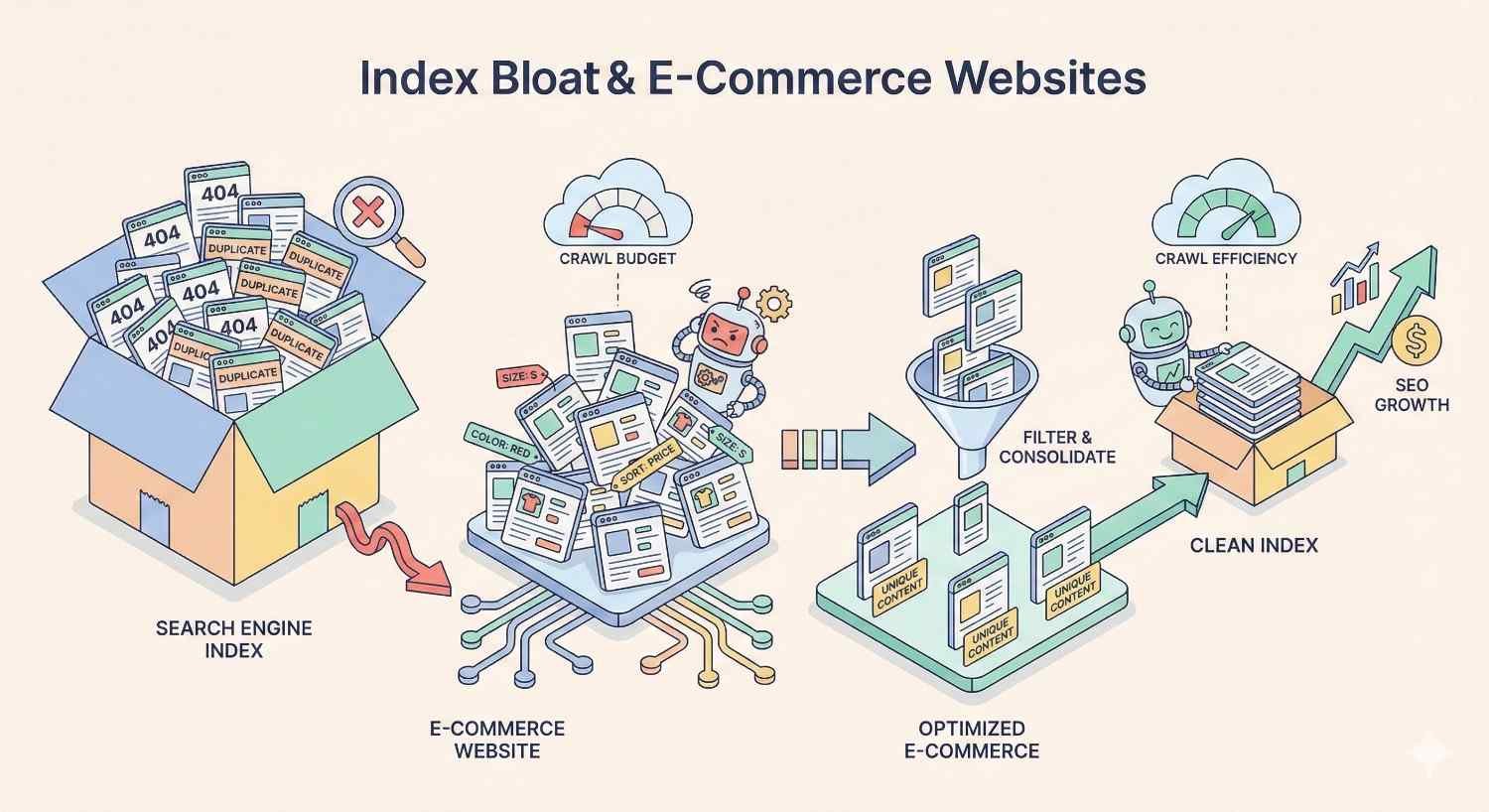
E-commerce sites face unique bloat challenges due to large product catalogs, complex filtering systems, and dynamic inventory. The scale of potential bloat often exceeds other site types by orders of magnitude.
Product Variant & Filter Page Management
A single product with size, color, and material options might generate dozens of variant URLs. Multiply across thousands of products, and variant pages alone create massive bloat.
Effective variant management strategies:
Use canonical tags pointing to parent products when variants don’t warrant independent indexing. A blue medium t-shirt probably shouldn’t rank separately from the main t-shirt page.
Index only high-demand variants that users actually search for. If data shows significant search volume for “red running shoes size 10,” that variant might deserve indexing. Most variants don’t.
Implement proper structured data on parent pages to communicate variant availability without requiring separate indexed URLs.
For filter pages, the math becomes even more challenging. Prevent filter URL indexing by default, then selectively enable indexing for high-value filter combinations with genuine search demand.
Out-of-Stock & Discontinued Product Handling
Products go out of stock temporarily or permanently. Each scenario requires different handling to prevent bloat while preserving SEO value.
Temporarily out of stock:
- Keep pages indexed with clear availability messaging
- Maintain structured data showing out-of-stock status
- Don’t noindex or redirect; the product will return
Permanently discontinued:
- Redirect to replacement products when direct substitutes exist
- Redirect to parent category when no replacement exists
- Consider noindex with eventual deletion for products with no logical redirect target
- Preserve pages with significant backlinks through redirects
Seasonal products:
- Keep pages live year-round if products return seasonally
- Update content to reflect availability timing
- Don’t create new URLs each season; reuse existing pages
Audit discontinued product handling quarterly. Accumulated dead product pages create significant bloat over time.
Index Bloat in WordPress & CMS Platforms
Content management systems generate pages automatically based on configuration settings. Default configurations often create bloat that site owners never intended.
Plugin-Generated Pages
WordPress plugins frequently create indexable pages without explicit user action:
SEO plugins may generate XML sitemaps that include unwanted URLs by default.
E-commerce plugins create cart, checkout, and account pages that shouldn’t be indexed.
Form plugins sometimes create thank-you pages for each form submission.
Membership plugins generate user profile pages, login pages, and restricted content notices.
Translation plugins may create URL variations for each language, multiplying page counts.
Review installed plugins and their URL generation behavior. Configure each plugin to prevent unwanted indexable page creation. Use plugin settings or add noindex tags to plugin-generated pages that serve functional rather than search purposes.
Theme & Archive Settings
WordPress themes control archive page generation. Default settings often create more archives than necessary:
Date archives: Monthly and yearly archives duplicate content available through categories and tags. Consider disabling or noindexing date-based archives.
Author archives: Single-author sites don’t need author archives. Multi-author sites should evaluate whether author pages provide unique value.
Attachment pages: WordPress creates separate pages for each uploaded media file. These thin pages add no value. Redirect attachment URLs to parent posts or the media files themselves.
Search results pages: Internal search results should never be indexed. They create infinite URL possibilities and provide no unique content.
Popular SEO plugins like Yoast and Rank Math provide settings to control archive indexing. Configure these settings during initial site setup and review them when changing themes or adding functionality.
How Long Does Index Bloat Recovery Take?
Setting realistic expectations helps maintain stakeholder confidence during remediation. Index bloat recovery isn’t instant, but improvements typically appear within predictable timeframes.
Realistic Timelines & Ranking Impact
Week 1-2: Implement technical fixes (noindex tags, canonicals, redirects). Changes begin propagating as Google recrawls affected pages.
Week 2-4: Initial deindexation occurs. Search Console shows decreasing indexed page counts. Crawl patterns begin shifting toward priority content.
Month 1-2: Significant bloat reduction visible in Search Console. Crawl budget reallocation measurable in log files. Early ranking improvements may appear for previously suppressed pages.
Month 2-4: Majority of bloat resolved for moderately affected sites. Authority consolidation effects become measurable. Traffic patterns stabilize at new levels.
Month 4-6: Full recovery for severely bloated sites. Long-tail ranking improvements continue as topical authority strengthens. Baseline metrics establish for ongoing monitoring.
Factors accelerating recovery:
- Higher domain authority (more frequent crawling)
- Smaller total bloat volume
- Clean technical implementation
- Consistent internal linking to priority pages
Factors slowing recovery:
- Massive bloat scale (millions of URLs)
- Conflicting signals (canonicals pointing to noindexed pages)
- Continued bloat generation from unfixed sources
- Low crawl frequency due to site authority or server issues
Index Bloat Checklist: Quick Reference Guide
Use this checklist for systematic bloat identification and remediation:
Identification Phase
☐ Check Google Search Console indexed page count ☐ Compare indexed pages to intentionally published content ☐ Calculate index ratio (indexed ÷ submitted) ☐ Run site: search operator analysis ☐ Identify parameter URL patterns in index ☐ Review taxonomy page indexation ☐ Audit pagination handling ☐ Verify staging environments are blocked ☐ Analyze crawl logs for budget waste ☐ Run comprehensive site crawl with SEO tools
Remediation Phase
☐ Categorize all indexed URLs (keep, noindex, redirect, delete) ☐ Implement noindex tags on low-value pages ☐ Add canonical tags to duplicate content ☐ Configure robots.txt for future crawl prevention ☐ Set up 301 redirects for consolidation targets ☐ Remove bloated URLs from XML sitemaps ☐ Submit removal requests for urgent cases ☐ Update internal links to canonical URLs ☐ Fix parameter handling at server level ☐ Address CMS and plugin settings
Prevention Phase
☐ Document URL structure standards ☐ Create content publishing guidelines ☐ Establish taxonomy governance rules ☐ Schedule regular technical audits ☐ Set up monitoring dashboards ☐ Configure alerts for index count changes ☐ Train team on bloat prevention ☐ Review new features for bloat potential

When to Hire an SEO Professional for Index Bloat
Some bloat situations exceed in-house capabilities. Recognizing when to seek expert help prevents prolonged damage and wasted effort.
Signs You Need Expert Technical SEO Help
Scale overwhelms internal resources: Sites with millions of URLs require enterprise-grade tools and methodologies. Manual remediation becomes impractical.
Multiple failed fix attempts: If implemented solutions haven’t produced results after 2-3 months, underlying issues may require deeper diagnosis.
Complex technical architecture: Headless CMS setups, JavaScript-heavy sites, and multi-domain configurations create bloat patterns that require specialized expertise.
Significant revenue impact: When organic traffic drives substantial revenue, the cost of prolonged bloat exceeds professional remediation investment.
Lack of technical implementation access: Marketing teams without developer support struggle to implement server-level fixes, redirect rules, and CMS configurations.
Merger or migration situations: Combining sites or migrating platforms creates bloat risks that benefit from proactive expert guidance.
Professional technical SEO audits typically identify bloat sources faster, recommend more effective solutions, and provide implementation support that accelerates recovery timelines.
Conclusion
Index bloat undermines SEO performance through crawl budget waste, authority dilution, and poor user experiences. The problem affects sites of all sizes but becomes critical for large e-commerce catalogs, content-heavy publishers, and enterprise platforms.
Systematic identification using Search Console data, site: searches, log analysis, and crawl tools reveals bloat sources. Remediation through noindex tags, canonical implementation, strategic redirects, and sitemap optimization restores index health. Prevention through content governance, regular audits, and monitoring maintains long-term performance.
We help businesses diagnose and resolve technical SEO challenges like index bloat through comprehensive audits and hands-on remediation support. Contact White Label SEO Service to discuss how our technical SEO expertise can restore your site’s organic visibility and protect your search investment.
Frequently Asked Questions About Index Bloat
What is index bloat in SEO?
Index bloat occurs when search engines index significantly more pages from your website than provide unique value. These excess pages include duplicates, parameter variations, thin content, and automatically generated archives that waste crawl budget and dilute your site’s authority.
How do I know if my site has index bloat?
Compare your Google Search Console indexed page count against intentionally published content. If Google shows 10,000 indexed pages but you’ve only created 500, you likely have bloat. Site: searches, crawl audits, and index ratio calculations provide additional diagnostic data.
Does index bloat affect crawl budget?
Yes, index bloat directly consumes crawl budget. When Googlebot spends resources crawling duplicate and low-value pages, less budget remains for your important content. This delays indexing of new pages and reduces crawl frequency for existing priority content.
What’s the difference between noindex and robots.txt?
Noindex tags tell search engines not to include pages in their index while still allowing crawling. Robots.txt blocks crawling entirely but doesn’t remove already-indexed pages. Use noindex for pages you want deindexed; use robots.txt to prevent future crawling of URL patterns.
Can index bloat cause ranking drops?
Index bloat can cause ranking drops through multiple mechanisms. Diluted authority weakens page competitiveness. Crawl budget waste delays content updates. Duplicate content confuses ranking signals. Addressing bloat frequently produces ranking improvements as these negative factors resolve.
How often should I audit my indexed pages?
Monitor Search Console index counts weekly for sudden changes. Conduct monthly crawl audits to catch emerging bloat patterns. Perform quarterly deep-dive analyses covering duplicate content, parameter URLs, and taxonomy pages. Increase frequency after site changes or migrations.
What causes index bloat on e-commerce sites?
E-commerce bloat typically stems from faceted navigation creating filter URL combinations, product variant pages, parameter-based sorting and pagination, out-of-stock product accumulation, and session or tracking parameters appended to URLs. The multiplicative nature of these factors creates severe bloat at scale.


