

Understanding Crawling and Indexing Control
Choosing between noindex and disallow determines whether search engines can see your pages or show them in results. These two directives serve fundamentally different purposes, and using the wrong one can tank your rankings or waste crawl budget.
The distinction matters because blocking crawlers is not the same as removing pages from search results. Many site owners confuse these functions and create technical SEO problems that take months to fix.
This guide covers exactly when to use each directive, implementation methods, common mistakes to avoid, and a decision framework for every scenario you will encounter.
What Is Robots.txt Disallow?
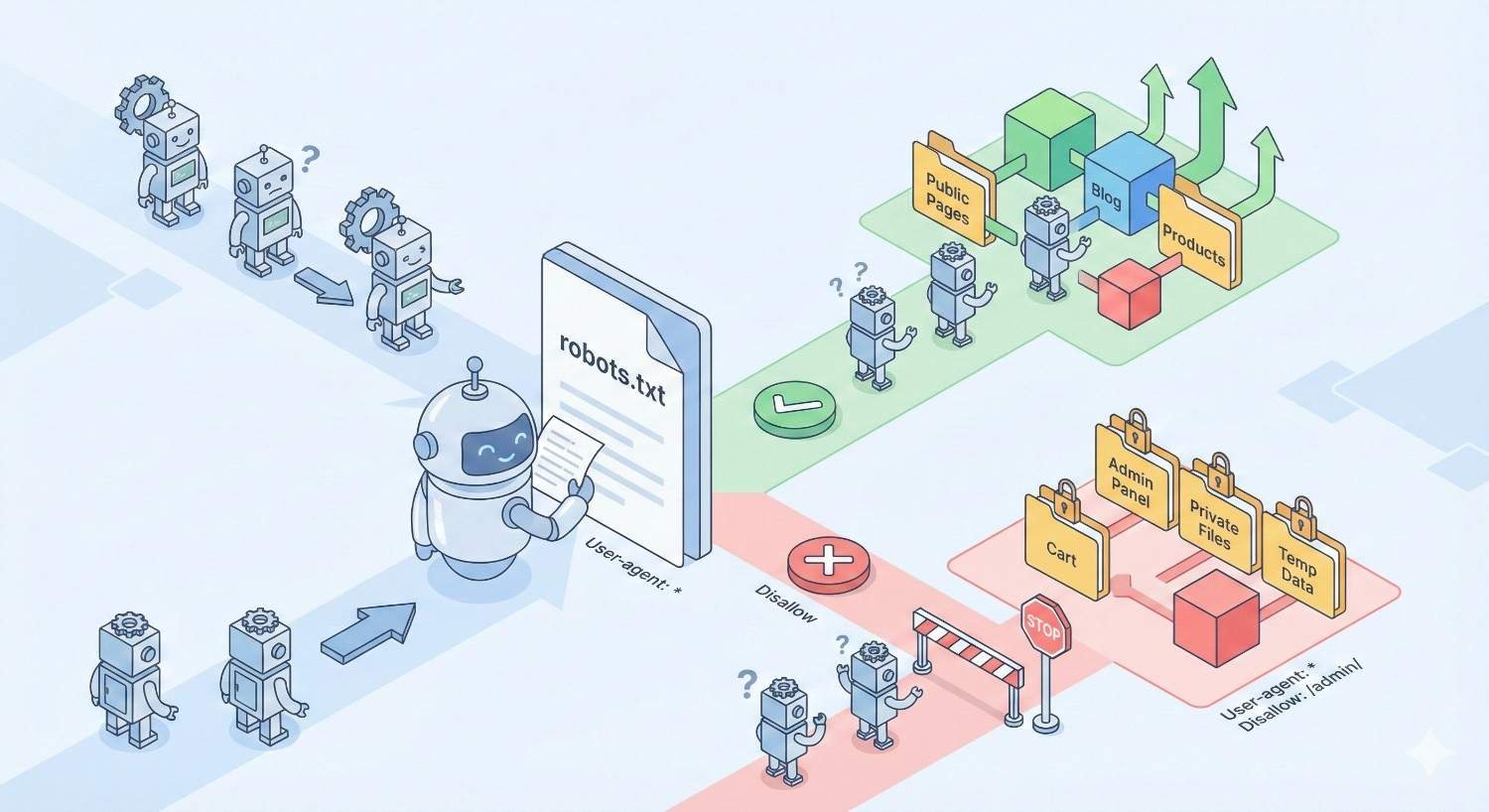
The robots.txt disallow directive tells search engine crawlers not to access specific URLs or directories on your website. It functions as a request to crawlers, asking them to skip certain paths during their crawl sessions.
This file sits at your domain root (example.com/robots.txt) and provides instructions before crawlers attempt to access any page. Major search engines like Google, Bing, and others check this file first when visiting your site.
How Disallow Works (Crawl Blocking Mechanism)
When Googlebot or another crawler visits your site, it first requests your robots.txt file. The crawler reads the directives and determines which URLs it can and cannot access based on the rules you have defined.
The disallow directive prevents crawlers from fetching page content. If you block a URL with disallow, the crawler will not download the HTML, process the content, or follow links on that page. The crawler simply skips the blocked paths and moves on.
This blocking happens at the crawl stage, before any indexing decisions occur. The crawler never sees what is on the page because it respects your request not to access it.
Syntax and Implementation
The robots.txt file uses a simple syntax structure. Each rule set begins with a user-agent declaration followed by one or more directives.
Basic disallow syntax:
Copy
User-agent: Googlebot
Disallow: /admin/
Disallow: /private/
This tells Googlebot to avoid crawling any URLs starting with /admin/ or /private/. The asterisk wildcard applies rules to all crawlers:
Copy
User-agent: *
Disallow: /staging/
You can block specific file types, URL parameters, or entire directory structures. The syntax supports wildcards and pattern matching for more complex blocking rules.
What Disallow Does NOT Do
Disallow does not remove pages from Google’s index. This is the most critical misunderstanding in technical SEO. If a page is already indexed and you add a disallow rule, Google may keep that page in search results indefinitely.
Google can still index blocked URLs if other pages link to them. The search engine will show the URL in results with a message like “No information is available for this page” because it cannot access the content.
Disallow does not prevent link equity from flowing to blocked pages. Other sites can still link to disallowed URLs, and that authority accumulates even though Google cannot crawl the page.
What Is the Noindex Meta Tag?
The noindex directive tells search engines not to include a specific page in their search results index. Unlike disallow, noindex allows crawlers to access and process the page content before making the indexing decision.
This directive communicates directly with the indexing system rather than the crawling system. The page gets crawled, analyzed, and then excluded from search results based on your instruction.
How Noindex Works (Index Blocking Mechanism)
Search engines must crawl a page to find and process the noindex directive. Googlebot visits the URL, downloads the HTML, and reads the meta robots tag or HTTP header containing the noindex instruction.
Upon finding noindex, Google processes the page content but excludes it from the search index. The page will not appear in search results for any query. If the page was previously indexed, Google will remove it during the next crawl.
The crawler can still follow links on noindexed pages unless you also add a nofollow directive. This means internal linking structures remain functional even when pages are excluded from search results.
Implementation Methods (Meta Tag vs X-Robots-Tag)
You can implement noindex through two primary methods: the meta robots tag in HTML or the X-Robots-Tag HTTP header.
Meta robots tag implementation:
html
Copy
<head>
<meta name=”robots“ content=”noindex“>
</head>
This tag goes in the head section of your HTML document. You can combine directives:
html
Copy
<meta name=”robots“ content=”noindex, nofollow“>
X-Robots-Tag HTTP header implementation:
Copy
X-Robots-Tag: noindex
The HTTP header method works for non-HTML files like PDFs, images, or other resources that cannot contain meta tags. Configure this through your server settings or .htaccess file.
What Noindex Does NOT Do
Noindex does not prevent crawling. Search engines will still visit and process noindexed pages, consuming crawl budget. If you have thousands of noindexed pages, crawlers will still spend resources accessing them.
Noindex does not block other search engines automatically. The meta robots tag with name=”robots” applies to all compliant crawlers, but some bots may ignore it. For specific search engines, use targeted tags like name=”googlebot”.
Noindex does not immediately remove pages from search results. Google must recrawl the page to discover the directive, and removal can take days to weeks depending on crawl frequency.
Noindex vs Disallow: Key Differences
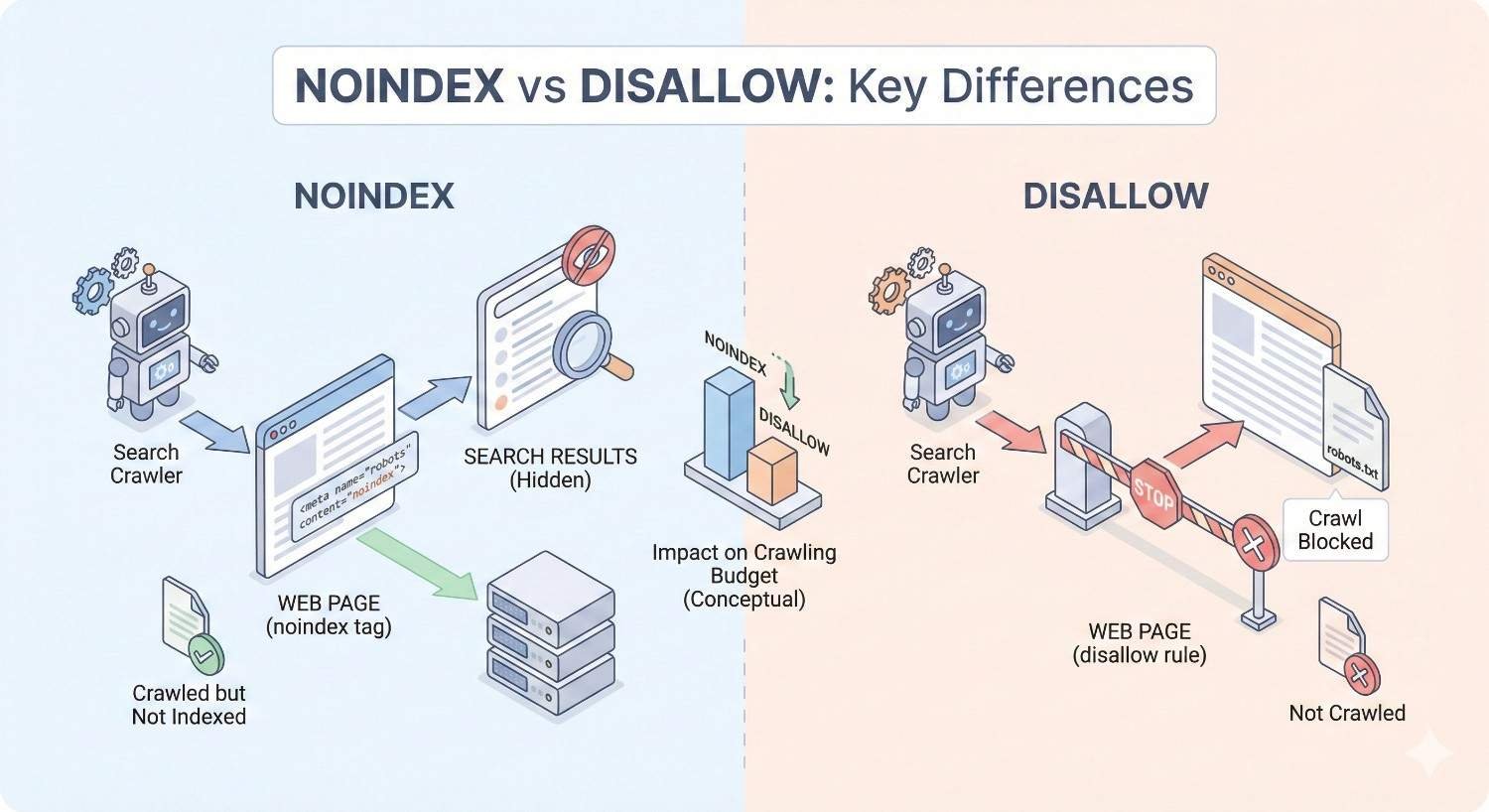
Understanding the fundamental differences between these directives prevents costly technical SEO mistakes. Each serves a distinct purpose in your crawl and index management strategy.
Crawling vs Indexing: Understanding the Distinction
Crawling and indexing are separate processes in how search engines work. Crawling is the discovery and fetching of page content. Indexing is the storage and organization of that content for search results.
Disallow controls crawling. It tells bots not to fetch specific URLs. The content remains invisible to the crawler.
Noindex controls indexing. It allows crawling but prevents the page from appearing in search results. The content is visible to crawlers but excluded from the index.
Think of crawling as reading a book and indexing as adding that book to a library catalog. Disallow prevents reading. Noindex allows reading but prevents cataloging.
Impact on Search Visibility
Disallow can paradoxically increase search visibility for blocked pages. If external sites link to a disallowed URL, Google may index that URL based on anchor text and link context alone. The page appears in search results without any content snippet.
Noindex guarantees removal from search results once processed. The page will not rank for any keywords because it is explicitly excluded from the index. This provides definitive control over search visibility.
For pages you want completely hidden from search results, noindex is the only reliable method. Disallow creates uncertainty about whether pages will appear in search.
PageRank and Link Equity Flow
Link equity flows differently depending on which directive you use. This affects your site’s overall authority distribution and ranking potential.
Disallowed pages can still accumulate PageRank from external links. However, that authority gets trapped because Google cannot crawl the page to discover outbound links. The equity does not flow further into your site.
Noindexed pages allow normal link equity flow. Google crawls the page, follows internal links, and passes authority to linked pages. Your internal linking structure remains functional even though the noindexed page itself will not rank.
For pages with valuable internal links, noindex preserves link equity flow while disallow blocks it.
Comparison Table: Noindex vs Disallow
| Feature | Noindex | Disallow |
| Prevents crawling | No | Yes |
| Prevents indexing | Yes | No |
| Removes from search results | Yes | No |
| Allows link equity flow | Yes | No |
| Requires page access | Yes | No |
| Implementation location | Page level | Site level |
| Effect on crawl budget | Still consumes | Conserves |
| Works for non-HTML files | Via HTTP header | Yes |
| Immediate effect | No (requires recrawl) | Yes |
When to Use Disallow (Robots.txt)
Disallow serves specific technical purposes related to crawl management rather than search visibility. Use it when you need to control how crawlers interact with your server and site structure.
Conserving Crawl Budget
Large websites with millions of pages need to prioritize which URLs get crawled. Crawl budget refers to the number of pages Googlebot will crawl on your site within a given timeframe.
Use disallow to block low-value URL patterns that waste crawl resources. This includes infinite calendar pages, search result pages with endless parameter combinations, or auto-generated URLs that provide no unique content.
By blocking these paths, you direct crawl budget toward pages that matter for rankings. Your important content gets crawled more frequently, leading to faster indexing of updates and new pages.
Blocking Resource Files and Parameters
Some files and URL parameters should never be crawled because they serve no search purpose. These include internal search results, session IDs, tracking parameters, and administrative interfaces.
Block URL parameters that create duplicate content without adding value:
Copy
User-agent: *
Disallow: /*?sessionid=
Disallow: /*?sort=
Disallow: /*?ref=
This prevents crawlers from wasting resources on parameter variations while allowing the base URLs to be crawled normally.
Preventing Server Load Issues
Aggressive crawling can strain server resources, especially during traffic spikes or on shared hosting. Disallow provides a mechanism to reduce crawler requests to resource-intensive sections.
If your server struggles with certain dynamic pages or database-heavy operations, blocking those paths reduces load. Combine disallow with crawl-delay directives for additional control:
Copy
User-agent: *
Crawl-delay: 10
Disallow: /heavy-query/
This protects server performance while maintaining crawl access to critical pages.
Common Disallow Use Cases
Admin and backend directories: Block /wp-admin/, /admin/, /backend/ to prevent crawling of administrative interfaces.
Development and staging paths: Block /dev/, /staging/, /test/ to keep work-in-progress content away from crawlers.
Internal search results: Block /search?q= to prevent indexing of internal search pages.
Print and PDF versions: Block /print/, /?print=1 to avoid duplicate content from print-friendly versions.
Shopping cart and checkout: Block /cart/, /checkout/ to prevent crawling of transactional pages with no search value.
When to Use Noindex
Noindex is your tool for controlling what appears in search results. Use it when pages should remain accessible to users and crawlers but excluded from search rankings.
Removing Pages from Search Results
When you need to guarantee a page will not appear in Google search results, noindex is the only reliable method. This applies to pages that are already indexed and need removal.
Add the noindex tag, then request removal through Google Search Console for faster processing. The page will drop from search results once Google recrawls and processes the directive.
This method works for sensitive content, outdated pages you want to keep accessible, or any URL that should not rank for any search query.
Duplicate Content Management
Duplicate content dilutes ranking signals across multiple URLs. When you have legitimate reasons for duplicate pages but only want one version to rank, noindex the duplicates.
Common scenarios include:
Print versions of articles that duplicate the main content. Noindex the print version while keeping it accessible for users who want to print.
Parameter-based sorting or filtering that creates duplicate URLs. Noindex the filtered versions while keeping the canonical version indexable.
Syndicated content that appears on your site and others. Noindex your version if the original should rank instead.
Thin or Low-Value Pages
Pages with minimal unique content can harm your site’s overall quality signals. Google’s algorithms evaluate content quality across your entire site, and thin pages drag down perceived quality.
Noindex pages that exist for user experience but lack substantial content:
Tag archive pages with just a list of post titles. Author pages with minimal biographical information. Category pages that only display post excerpts.
These pages serve navigation purposes but should not compete in search results or dilute your site’s quality signals.
Staging and Development Environments
Development and staging sites should never appear in search results. While disallow can prevent crawling, noindex provides additional protection if crawlers somehow access these environments.
Implement both directives for staging sites:
Copy
# robots.txt
User-agent: *
Disallow: /
html
Copy
<!– Every page –>
<meta name=”robots“ content=”noindex, nofollow“>
This belt-and-suspenders approach ensures staging content never reaches search results even if configuration errors occur.
Common Noindex Use Cases
Thank you and confirmation pages: Users reach these after form submissions, but they have no search value.
Login and account pages: These serve authenticated users only and should not appear in search results.
Paginated archives beyond page one: Keep page one indexed but noindex subsequent pagination pages.
Internal documentation: Help pages and FAQs meant for existing customers rather than search traffic.
Temporary landing pages: Campaign pages with short lifespans that should not accumulate search presence.
When NOT to Use Disallow
Misusing disallow creates technical SEO problems that can persist for months. Understanding when to avoid this directive prevents common mistakes.
Pages You Want Deindexed
If your goal is removing a page from search results, disallow will not accomplish this. Blocking crawlers prevents Google from seeing your noindex directive, so the page may remain indexed indefinitely.
This creates a frustrating situation where the page appears in search results but Google cannot access it to process removal instructions. Users clicking from search results may see the content while Google shows “No information available.”
For deindexing, always use noindex and ensure the page remains crawlable so Google can process the directive.
Pages with Important Internal Links
Disallowing pages that contain valuable internal links breaks your site’s link equity flow. Google cannot follow links on pages it cannot crawl, so authority stops at the blocked page.
If a disallowed page links to important content, those destination pages lose the link equity they would otherwise receive. This can significantly impact rankings for pages deeper in your site structure.
Audit your internal linking before adding disallow rules. Ensure blocked pages do not serve as important link hubs in your site architecture.
Common Disallow Mistakes
Blocking CSS and JavaScript files: Google needs these resources to render pages properly. Blocking them causes rendering issues and potential ranking problems.
Blocking entire directories containing important pages: A broad disallow rule like /products/ blocks all product pages, not just the ones you intended.
Forgetting trailing slashes: Disallow: /blog blocks only the exact URL /blog while Disallow: /blog/ blocks the directory and all contents.
Using disallow for privacy: Robots.txt is publicly accessible. Anyone can read your blocked paths, potentially revealing sensitive URL structures.
Not testing changes: Implement disallow rules in Google Search Console’s robots.txt tester before deploying to catch syntax errors.
When NOT to Use Noindex
Noindex removes pages from search results permanently until you remove the directive. Using it incorrectly eliminates ranking potential for valuable content.
Pages You Want Ranked
Never add noindex to pages targeting keywords you want to rank for. This seems obvious, but accidental noindex tags are a common cause of traffic drops.
Check for noindex directives when:
Traffic suddenly drops for specific pages. New content fails to appear in search results. Plugin or theme updates change default settings.
CMS plugins sometimes add noindex to certain page types by default. Review your SEO plugin settings to ensure important pages remain indexable.
Canonicalization Scenarios
When dealing with duplicate content, canonical tags are often better than noindex. Canonical tags consolidate ranking signals to a preferred URL while keeping all versions crawlable.
Use canonical instead of noindex when:
Multiple URLs show the same content and you want one to rank. Parameter variations create duplicates of the same page. HTTP and HTTPS or www and non-www versions coexist.
Noindex removes pages from search entirely. Canonical consolidates signals while maintaining the duplicate as a valid URL that redirects ranking power.
Common Noindex Mistakes
Noindexing paginated content incorrectly: Page 2, 3, etc. of archives should use rel=”next/prev” or canonical tags rather than noindex, which can orphan deep content.
Leaving noindex on after site launch: Staging sites use noindex, but forgetting to remove it after launch prevents the entire site from ranking.
Noindexing pages with external backlinks: If other sites link to a noindexed page, you lose that link equity entirely. Consider redirects instead.
Using noindex for temporary removal: If you plan to reindex the page later, noindex creates delays. Use the URL removal tool for temporary hiding.
Combining noindex with canonical: This sends conflicting signals. The canonical says “index this other URL” while noindex says “do not index.” Pick one approach.
Can You Use Noindex and Disallow Together?
Combining noindex and disallow on the same URLs creates a technical conflict that prevents your intended outcome. Understanding this interaction is critical for proper implementation.
Why This Combination Is Problematic
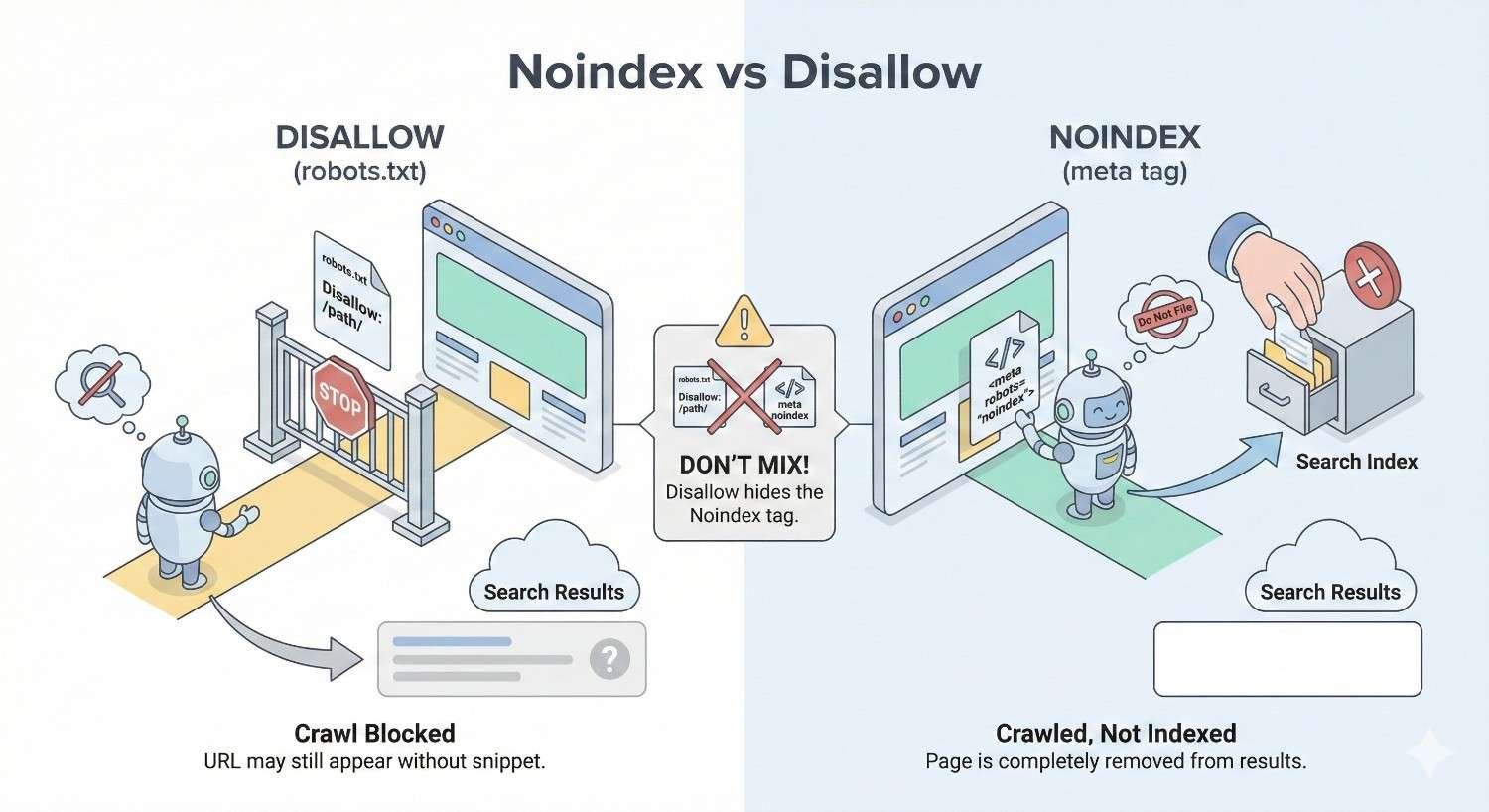
If you disallow a URL in robots.txt and add a noindex tag to the page, Google cannot see the noindex directive. The disallow prevents crawling, so Google never accesses the page to read the meta tag.
The result: Google may keep the page indexed based on external signals while being unable to process your removal instruction. You have blocked the very mechanism that would remove the page from search results.
This combination is counterproductive for deindexing. You must choose one approach based on your actual goal.
The Crawl-Index Paradox
The paradox works like this:
You want a page removed from search results. You add noindex to the page. You also add disallow to robots.txt for extra protection. Google cannot crawl the page due to disallow. Google never sees the noindex tag. The page remains indexed indefinitely.
Your attempt to be thorough actually prevented the desired outcome. The disallow rule blocked Google from processing your noindex instruction.
Correct Sequencing for Deindexing
To properly remove a page from search results:
Step 1: Add the noindex tag to the page. Keep the page crawlable (no disallow).
Step 2: Wait for Google to recrawl and process the noindex directive. Monitor in Google Search Console.
Step 3: Once the page is confirmed deindexed, you can optionally add disallow to prevent future crawling.
Step 4: For faster removal, use the URL Removal tool in Google Search Console after adding noindex.
The key is allowing Google to crawl the page at least once after adding noindex. Only then does blocking crawlers make sense.
How to Implement Noindex Correctly
Proper noindex implementation ensures search engines process your directive and remove pages from results. Incorrect implementation leaves pages indexed despite your intentions.
Meta Robots Tag Implementation
Add the meta robots tag within the head section of your HTML document. The tag must appear before the closing head tag for proper processing.
Basic noindex implementation:
html
Copy
<!DOCTYPE html>
<html>
<head>
<meta name=”robots“ content=”noindex“>
<title>Page Title</title>
</head>
Noindex with follow (allows link crawling):
html
Copy
<meta name=”robots“ content=”noindex, follow“>
Noindex with nofollow (blocks link crawling):
html
Copy
<meta name=”robots“ content=”noindex, nofollow“>
For CMS platforms like WordPress, use SEO plugins to add noindex without editing code. Yoast SEO, Rank Math, and similar plugins provide checkbox options for individual pages.
HTTP Header X-Robots-Tag Implementation
Use HTTP headers when you cannot modify HTML content or need to noindex non-HTML files like PDFs or images.
Apache .htaccess implementation:
apache
Copy
<Files “document.pdf”>
Header set X-Robots-Tag “noindex”
</Files>
Nginx configuration:
nginx
Copy
location /private/ {
add_header X-Robots-Tag “noindex”;
}
PHP header implementation:
php
Copy
<?php
header(“X-Robots-Tag: noindex”, true);
?>
The HTTP header method works for any file type and takes precedence if both meta tag and header are present.
Verification and Testing
After implementing noindex, verify that search engines can access and process the directive.
Google Search Console URL Inspection:
Enter the URL in the inspection tool. Check the “Indexing” section for “Indexing allowed?” status. The tool shows whether Google detected the noindex directive.
Live test vs. cached version:
The URL Inspection tool shows both the last crawled version and a live test. Use the live test to confirm your current implementation before waiting for a recrawl.
Fetch and render:
Request indexing after adding noindex to prompt a recrawl. Monitor the Coverage report for status changes from “Indexed” to “Excluded by noindex tag.”
How to Implement Disallow Correctly
Robots.txt implementation requires precise syntax. Errors can accidentally block important pages or fail to block intended URLs.
Robots.txt Syntax and Rules
The robots.txt file must be named exactly “robots.txt” and placed at your domain root. Access it at example.com/robots.txt.
Basic structure:
Copy
User-agent: [crawler name or *]
Disallow: [path]
Allow: [path]
Rules processing:
Crawlers read rules from top to bottom. More specific rules override general rules. The first matching rule applies.
Example with multiple user agents:
Copy
User-agent: Googlebot
Disallow: /private/
Allow: /private/public-page.html
User-agent: Bingbot
Disallow: /bing-blocked/
User-agent: *
Disallow: /admin/
Wildcard Patterns and Advanced Directives
Wildcards enable pattern matching for complex URL structures.
Asterisk wildcard (*):
Matches any sequence of characters.
Copy
Disallow: /category/*/page/
This blocks /category/shoes/page/, /category/shirts/page/, etc.
Dollar sign ($):
Matches the end of a URL.
Copy
Disallow: /*.pdf$
This blocks all URLs ending in .pdf but allows /pdf-guide/ (directory).
Combining patterns:
Copy
Disallow: /*?*sort=
This blocks any URL containing a sort parameter regardless of position.
Testing with Google Search Console
Before deploying robots.txt changes, test them in Google Search Console.
Robots.txt Tester:
Navigate to the legacy Search Console robots.txt tester. Enter your robots.txt content. Test specific URLs to see if they would be blocked.
URL Inspection tool:
After deployment, use URL Inspection to verify crawl status. Check “Crawl allowed?” to confirm your rules work as intended.
Common testing scenarios:
Test the exact URLs you want blocked. Test similar URLs you want to remain crawlable. Test edge cases with parameters and variations.
How to Audit Your Site for Noindex and Disallow Issues
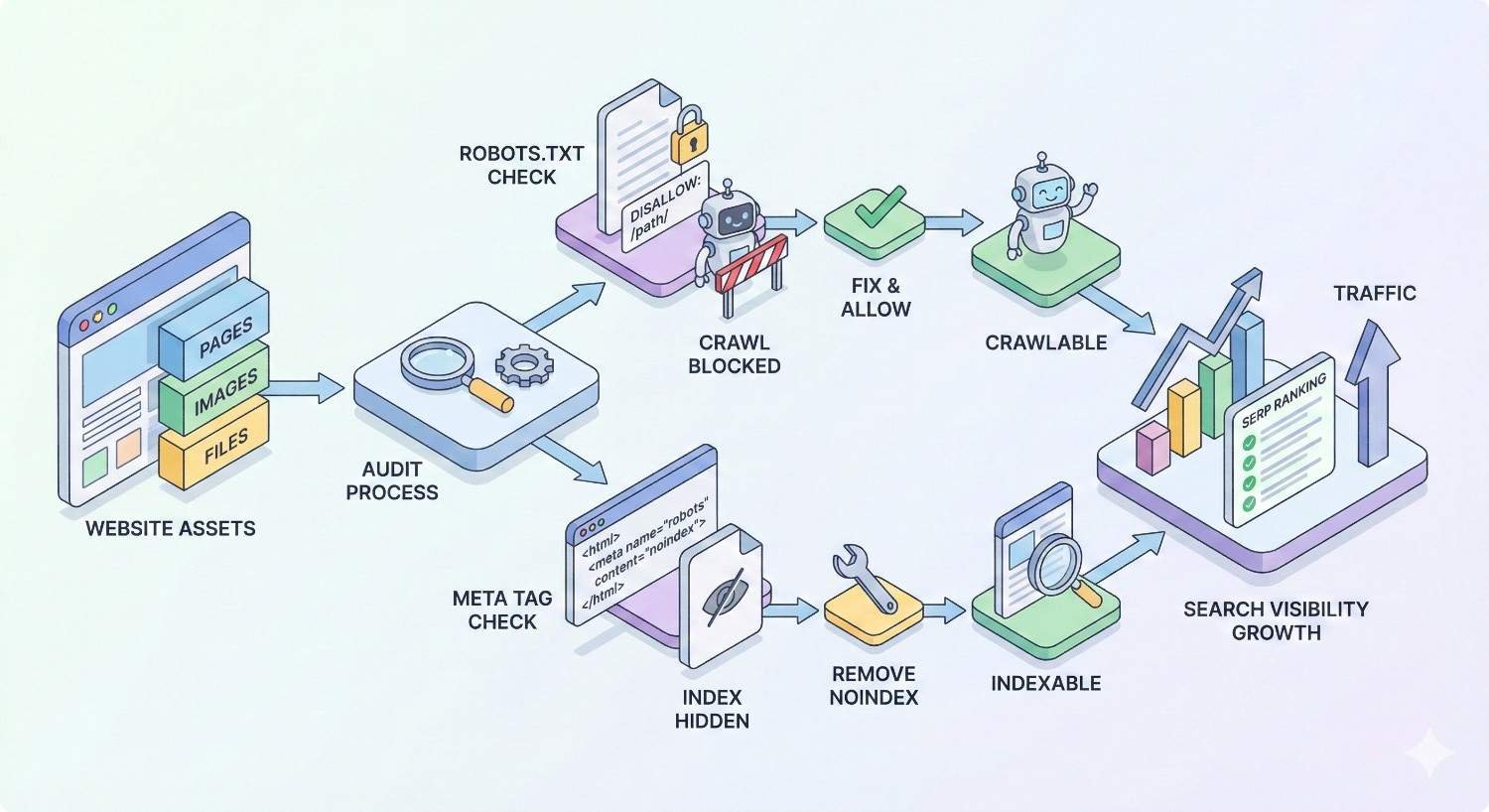
Regular audits catch directive problems before they impact rankings. Establish a systematic approach to monitoring crawl and index status.
Using Google Search Console
Google Search Console provides direct insight into how Google processes your directives.
Coverage report:
Review the “Excluded” section for pages blocked by robots.txt or noindex. Check for unexpected exclusions that might indicate configuration errors.
Index status categories:
“Blocked by robots.txt” shows disallowed pages. “Excluded by noindex tag” shows noindexed pages. “Crawled, currently not indexed” may indicate quality issues separate from directives.
URL Inspection for specific pages:
Enter any URL to see its current crawl and index status. The tool shows which directives Google detected and how they affect indexing.
Crawling Tools (Screaming Frog, Sitebulb)
Desktop crawlers provide comprehensive site-wide audits of directive implementation.
Screaming Frog SEO Spider:
Crawl your site to identify all pages with noindex tags. Filter by “Indexability” to find noindexed pages. Check the “Directives” tab for meta robots and X-Robots-Tag values.
Sitebulb:
Generates visual reports of indexability issues. Highlights conflicts between directives. Shows pages blocked by robots.txt that have inbound links.
Audit checklist:
Identify all noindexed pages and verify each is intentional. Find pages blocked by robots.txt and confirm they should not be crawled. Check for conflicts between robots.txt and meta robots. Verify important pages are crawlable and indexable.
Common Audit Findings and Fixes
Finding: Important pages accidentally noindexed
Fix: Remove the noindex tag and request reindexing in Search Console.
Finding: Disallow blocking CSS/JS files
Fix: Remove disallow rules for resource files. Add specific allows if needed.
Finding: Noindex on paginated pages causing orphaned content
Fix: Replace noindex with proper canonical tags or rel=”next/prev” implementation.
Finding: Conflicting directives (noindex + canonical to different URL)
Fix: Choose one approach. Either noindex the page or canonical to the preferred version.
Finding: Robots.txt blocking pages with external backlinks
Fix: Remove disallow and use noindex if you want to prevent indexing while preserving link equity.
Creating a Crawl and Index Directive Inventory
Document all intentional directives across your site for reference and change management.
Inventory components:
List all robots.txt rules with explanations for each. Document pages with noindex tags and the reason for each. Record X-Robots-Tag implementations and affected file types. Note any directive changes with dates and rationale.
Maintenance schedule:
Review the inventory quarterly. Audit actual implementation against documented intentions. Update documentation when making changes.
Noindex vs Disallow: Decision Framework
A systematic decision process prevents mistakes and ensures you choose the right directive for each situation.
Questions to Ask Before Choosing
Question 1: What is your goal?
If you want to remove a page from search results → Use noindex. If you want to save crawl budget → Use disallow. If you want to prevent server load → Use disallow.
Question 2: Is the page currently indexed?
If yes and you want it removed → Use noindex (keep crawlable). If no and you want to prevent indexing → Either can work, but noindex is more reliable.
Question 3: Does the page have valuable internal links?
If yes → Use noindex to preserve link equity flow. If no → Either directive works.
Question 4: Do external sites link to this page?
If yes → Use noindex to maintain link equity. Disallow would trap the authority. If no → Either directive works based on other factors.
Question 5: Is this a temporary or permanent change?
If temporary → Use noindex with URL Removal tool for faster effect. If permanent → Either directive based on other factors.
Decision Tree: Which Directive to Use
Copy
START: What do you want to achieve?
│
├─► Remove from search results
│ └─► Use NOINDEX (keep page crawlable)
│
├─► Save crawl budget
│ ├─► Page has important links?
│ │ ├─► Yes → Use NOINDEX
│ │ └─► No → Use DISALLOW
│ │
│ └─► Page has external backlinks?
│ ├─► Yes → Use NOINDEX
│ └─► No → Use DISALLOW
│
├─► Prevent server load
│ └─► Use DISALLOW
│
└─► Block sensitive content
└─► Use authentication (not robots.txt)
Documentation and Change Management
Track all directive changes to prevent configuration drift and enable troubleshooting.
Change log requirements:
Date of change. URLs or patterns affected. Directive added or removed. Reason for change. Person responsible. Expected outcome.
Review process:
Require approval for robots.txt changes. Test in staging before production deployment. Monitor Search Console for unexpected impacts after changes.
Impact on SEO Performance and Organic Growth
Directive choices directly affect your site’s search performance. Understanding these impacts helps you make informed decisions.
How Incorrect Usage Affects Rankings
Accidental noindex on important pages:
Traffic drops immediately once Google processes the directive. Recovery requires removing the tag and waiting for reindexing, which can take weeks.
Disallowing pages with backlinks:
External link equity gets trapped on blocked pages. Your site loses authority that should flow to important content.
Blocking JavaScript and CSS:
Google cannot render pages properly. Content may be indexed incorrectly or not at all. Mobile-first indexing suffers when rendering fails.
Conflicting directives:
Mixed signals confuse search engines. Pages may be indexed inconsistently or excluded unexpectedly.
Crawl Budget Optimization for Growth
Efficient crawl budget usage accelerates indexing of new and updated content.
Signs of crawl budget problems:
New pages take weeks to get indexed. Updated content does not reflect in search results. Google Search Console shows low crawl rate.
Optimization strategies:
Disallow low-value URL patterns that waste crawl resources. Fix crawl errors that consume budget without indexing. Improve site speed to allow more pages per crawl session. Submit sitemaps to prioritize important pages.
Index Bloat and Quality Signals
Too many low-quality pages in Google’s index can harm your site’s overall quality perception.
Index bloat indicators:
Site: search shows thousands more pages than expected. Many indexed pages have zero traffic. Thin content pages appear in search results.
Quality signal impacts:
Google evaluates content quality across your entire indexed site. Low-quality indexed pages dilute your site’s perceived expertise. Noindexing thin pages can improve rankings for quality content.
Monitoring Performance After Implementation
Track key metrics after making directive changes to measure impact.
Metrics to monitor:
Indexed page count in Search Console. Crawl stats (pages crawled per day). Organic traffic to affected sections. Rankings for target keywords.
Timeline expectations:
Robots.txt changes take effect immediately for new crawls. Noindex removal from search results takes days to weeks. Full impact assessment requires 4-8 weeks of data.
Common Scenarios: Noindex vs Disallow in Practice
Real-world applications demonstrate how to apply these directives across different site types and situations.
E-commerce Sites (Filters, Facets, Out-of-Stock)
E-commerce sites generate massive URL variations through filtering and sorting options.
Faceted navigation:
Product listing pages with filters create thousands of URL combinations. Most provide no unique content value.
Recommended approach:
Use canonical tags to point filtered pages to the main category. Noindex filter combinations that create thin or duplicate content. Disallow extreme filter combinations that waste crawl budget.
Out-of-stock products:
Keep pages indexed if products will return to stock. Noindex permanently discontinued products. Redirect to replacement products when available.
Blog and Content Sites (Tags, Archives, Pagination)
Content sites accumulate archive pages that can dilute quality signals.
Tag and category archives:
Noindex tag pages with few posts. Keep category pages indexed if they provide navigation value. Use canonical tags for overlapping taxonomies.
Pagination:
Keep page one indexed with proper canonical. Noindex pages 2+ or use rel=”next/prev” for proper handling. Ensure deep content remains accessible through internal links.
Date-based archives:
Noindex monthly and yearly archives. These duplicate content available through categories and tags.
Membership and Gated Content
Protected content requires careful handling to avoid indexing private information.
Member-only pages:
Use authentication rather than robots.txt for true privacy. Noindex account pages, dashboards, and personalized content. Keep public preview pages indexed to attract new members.
Gated content strategy:
Index landing pages that describe gated content. Noindex the actual gated content behind forms. Use structured data to indicate access requirements.
Multi-language and Multi-regional Sites
International sites need coordinated directive strategies across language versions.
Hreflang implementation:
All language versions should be indexable for hreflang to work. Do not noindex alternate language pages.
Regional duplicates:
Use hreflang rather than noindex for regional variations. Canonical tags can indicate preferred versions for identical content.
Country-specific robots.txt:
Subdomain and subdirectory structures may need separate robots.txt files. Coordinate directives across all regional versions.
Getting Expert Help with Technical SEO
Technical SEO complexity increases with site size and architecture. Knowing when to seek expertise prevents costly mistakes.
When to Bring in an SEO Partner
Indicators you need help:
Traffic dropped significantly after site changes. Google Search Console shows persistent crawl or index errors. You are planning a site migration or major restructure. Your team lacks technical SEO experience.
Complexity thresholds:
Sites with 10,000+ pages need systematic crawl management. E-commerce sites with faceted navigation require expert configuration. International sites need coordinated multi-regional strategies.
What a Full-Service SEO Provider Can Do
Technical audit and remediation:
Comprehensive crawl analysis identifying all directive issues. Prioritized fix recommendations based on impact. Implementation support and verification.
Ongoing monitoring:
Regular audits catching problems before they impact rankings. Proactive optimization as site structure evolves. Performance tracking and reporting.
Strategic guidance:
Crawl budget optimization for large sites. Index management strategies aligned with business goals. Integration with content and link building efforts.
Building a Sustainable Technical SEO Foundation
Long-term organic growth requires systematic technical SEO management.
Foundation elements:
Documented directive policies and procedures. Regular audit schedules and checklists. Change management processes for robots.txt and meta robots. Monitoring dashboards tracking crawl and index health.
Scalable processes:
Templates for common directive scenarios. Training for content teams on indexability requirements. Integration with development workflows.
Conclusion
Noindex and disallow serve fundamentally different purposes in your technical SEO toolkit. Noindex removes pages from search results while allowing crawling. Disallow prevents crawling but does not guarantee removal from the index. Choosing correctly depends on your specific goal for each URL.
The decision framework is straightforward once you understand the distinction. Use noindex when you want pages excluded from search results. Use disallow when you need to conserve crawl budget or reduce server load on pages that do not need indexing anyway.
We help businesses implement technical SEO foundations that support sustainable organic growth. White Label SEO Service provides comprehensive audits, strategic guidance, and ongoing optimization to ensure your crawl and index directives work together for maximum search visibility.
Frequently Asked Questions
What happens if I use both noindex and disallow on the same page?
Google cannot see the noindex directive if the page is blocked by disallow. The page may remain indexed indefinitely because Google cannot access it to process the removal instruction. Choose one directive based on your goal.
How long does it take for noindex to remove a page from Google?
Removal typically takes a few days to several weeks depending on how frequently Google crawls your site. Use the URL Removal tool in Google Search Console for faster temporary removal while waiting for the noindex to be processed.
Will disallow in robots.txt remove my page from Google search results?
No. Disallow only prevents crawling. If the page is already indexed or has external links pointing to it, Google may keep it in search results. Use noindex to guarantee removal from search results.
Can Google still index a page that is blocked by robots.txt?
Yes. Google can index URLs blocked by robots.txt if other pages link to them. The indexed result will show limited information since Google cannot access the page content, but the URL can still appear in search results.
Should I noindex or disallow my staging site?
Use both for maximum protection. Add a site-wide disallow in robots.txt and noindex tags on every page. This prevents crawling and ensures pages are excluded from search results even if crawlers somehow access the staging environment.
Does noindex affect my crawl budget?
Yes. Google still crawls noindexed pages to process the directive. If you have thousands of noindexed pages, they consume crawl budget. For pages that never need crawling, disallow is more efficient for crawl budget conservation.
How do I check if my noindex or disallow is working correctly?
Use Google Search Console’s URL Inspection tool to check individual pages. For site-wide audits, use crawling tools like Screaming Frog to identify all pages with noindex tags or blocked by robots.txt. Compare findings against your intended configuration.


