

Your Largest Contentful Paint score directly impacts whether visitors stay or bounce—and whether Google ranks your pages. Sites achieving LCP under 2.5 seconds see measurably higher engagement, better conversion rates, and stronger organic visibility. This metric has become non-negotiable for competitive search performance.
LCP optimization matters because it measures what users actually experience: how quickly your main content becomes visible. Slow LCP frustrates visitors before they even engage with your message, costing you traffic and revenue.
This guide covers everything from diagnosing LCP issues to implementing server-side fixes, image optimization, code improvements, and platform-specific strategies. You’ll walk away with a prioritized action plan for measurable performance gains.
What Is LCP (Largest Contentful Paint)?
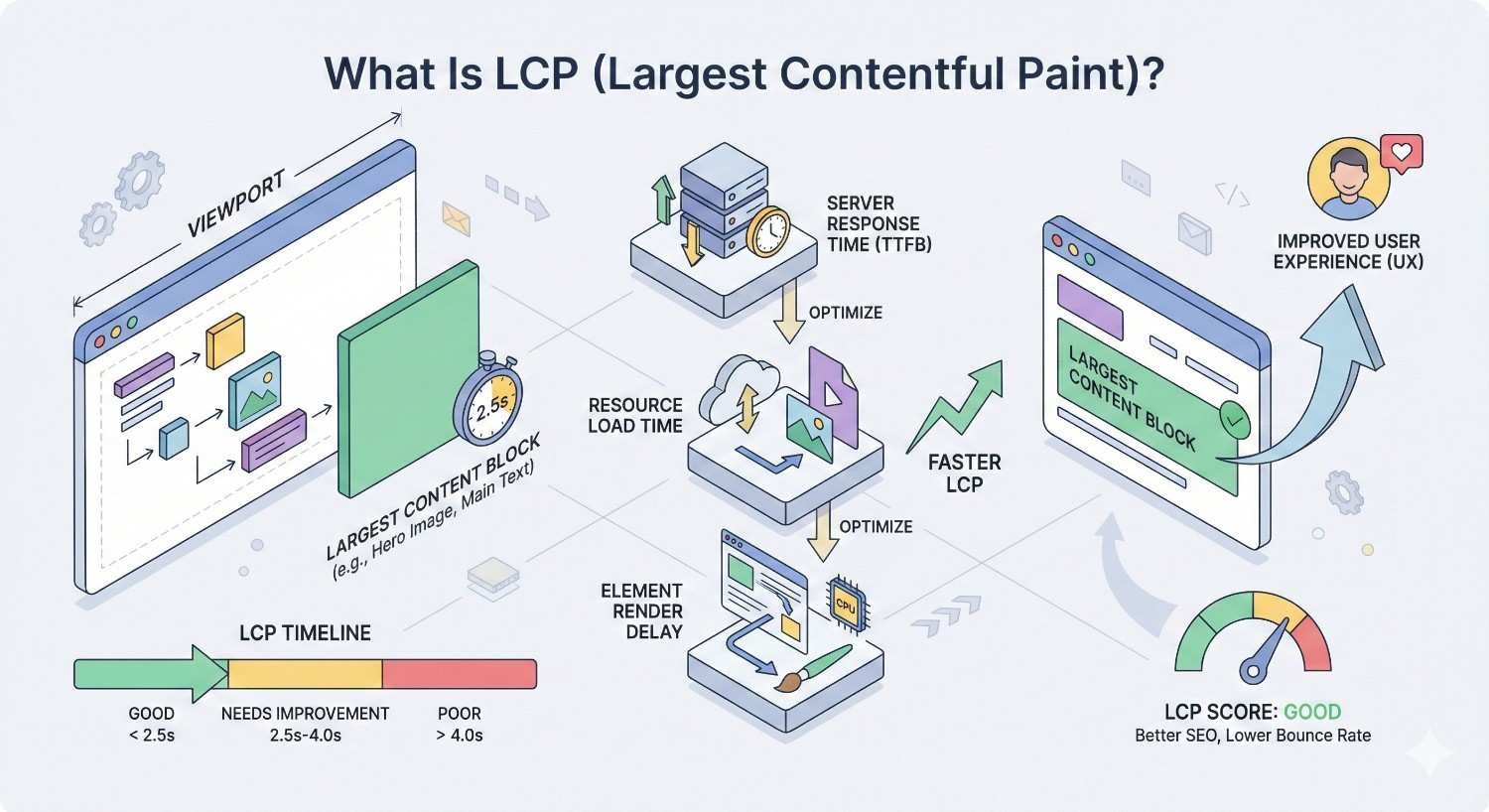
Largest Contentful Paint measures the render time of the largest visible content element in the viewport. This typically means your hero image, main heading, or primary content block. LCP captures the moment users perceive your page as “loaded” and ready to consume.
Unlike older metrics that tracked technical events, LCP focuses on user perception. It answers a simple question: when does the most important content appear? This user-centric approach makes LCP one of the most meaningful performance indicators available.
Understanding LCP requires knowing what triggers it, how browsers calculate it, and what thresholds separate good performance from poor. Let’s break down each component.
How LCP Is Measured
Browsers track LCP through the Performance Observer API, monitoring the viewport for content changes during page load. The measurement starts when navigation begins and continues until user interaction occurs or the page fully loads.
The browser identifies the largest content element rendered at each moment, updating the LCP candidate as larger elements appear. The final LCP value reflects the render time of the largest element before user input. This means early-loading small elements don’t count—only the largest visible content matters.
LCP measurement stops when users interact with the page through clicks, taps, or key presses. This design acknowledges that once users engage, their perception of load time is already formed.
What Counts as the Largest Contentful Paint Element
Not every page element qualifies as an LCP candidate. The specification includes specific element types: <img> elements, <image> elements inside SVGs, <video> elements with poster images, elements with background images loaded via CSS, and block-level elements containing text nodes.
Hero images dominate LCP on most pages. A full-width banner image above the fold almost always becomes the LCP element. On text-heavy pages without large images, the main heading or first paragraph typically triggers LCP.
Identifying your LCP element is the first diagnostic step. You cannot optimize what you haven’t identified. Chrome DevTools and PageSpeed Insights both highlight the specific element responsible for your LCP score.
LCP Thresholds: Good, Needs Improvement, and Poor Scores
Google defines three LCP performance tiers. Scores of 2.5 seconds or faster qualify as “good.” Scores between 2.5 and 4.0 seconds fall into “needs improvement.” Anything slower than 4.0 seconds rates as “poor.”
These thresholds apply to the 75th percentile of page loads, meaning 75% of your visitors must experience LCP within the threshold for your page to pass. A few fast loads don’t compensate for many slow ones.
The 2.5-second target isn’t arbitrary. Research from Google indicates this threshold correlates with positive user experience signals. Pages meeting this benchmark show lower abandonment rates and higher engagement metrics.
Why LCP Matters for SEO and User Experience
LCP sits at the intersection of technical performance and business outcomes. It affects how Google evaluates your pages and how users experience your content. Ignoring LCP means accepting preventable losses in both rankings and conversions.
The connection between page speed and user behavior is well-documented. What’s changed is Google’s explicit incorporation of LCP into ranking algorithms. Performance optimization is no longer just about user experience—it’s about search visibility.
LCP as a Core Web Vital Ranking Factor
Google confirmed Core Web Vitals as ranking signals in 2021, with LCP as one of three primary metrics. While content relevance and backlinks remain dominant factors, LCP serves as a tiebreaker among otherwise equal pages.
In competitive niches where multiple pages offer similar content quality, Core Web Vitals can determine which page ranks higher. This makes LCP optimization particularly valuable for head terms with strong competition.
The ranking impact extends beyond individual pages. Sites with consistently poor Core Web Vitals may face broader visibility challenges as Google interprets performance issues as quality signals.
The Connection Between LCP and Bounce Rate
Slow-loading pages lose visitors before content appears. Users don’t wait for sluggish pages when alternatives exist one click away. Every second of delay increases the probability of abandonment.
Studies from Google show that as page load time increases from 1 to 3 seconds, bounce probability increases by 32%. From 1 to 5 seconds, that probability jumps to 90%. LCP directly influences these outcomes because it determines when users see meaningful content.
High bounce rates create a negative feedback loop. Users leave, engagement metrics drop, and search engines interpret this as a quality signal. Improving LCP breaks this cycle by keeping visitors engaged long enough to consume your content.
How LCP Impacts Conversion Rates and Revenue
Performance affects the bottom line. Faster pages convert better because users complete more actions when friction decreases. Every optimization that reduces LCP contributes to revenue growth.
E-commerce sites see particularly strong correlations between speed and sales. Deloitte research found that a 0.1-second improvement in mobile site speed increased conversion rates by 8.4% for retail sites. For travel sites, the same improvement drove 10.1% higher conversions.
Lead generation sites benefit similarly. Faster forms get completed more often. Faster landing pages produce more signups. LCP optimization isn’t a technical exercise—it’s a revenue lever.
Common Causes of Poor LCP Scores
Diagnosing LCP problems requires understanding what typically causes them. Most sites struggle with a combination of server delays, resource blocking, and unoptimized assets. Identifying your specific bottlenecks enables targeted fixes.
LCP issues rarely have single causes. A slow hero image might mask underlying server problems. Render-blocking scripts might delay otherwise optimized images. Effective diagnosis examines the entire loading sequence.
Slow Server Response Times (TTFB)
Time to First Byte measures how long the server takes to respond with the first byte of content. High TTFB delays everything that follows, including LCP. If your server responds slowly, no amount of front-end optimization compensates.
Common TTFB culprits include overloaded shared hosting, unoptimized database queries, missing server-side caching, and geographic distance between servers and users. Each adds milliseconds that accumulate into noticeable delays.
TTFB above 600 milliseconds typically indicates server-side problems requiring attention. Ideal TTFB falls under 200 milliseconds for most applications.
Render-Blocking JavaScript and CSS
Browsers must download, parse, and execute certain resources before rendering content. JavaScript and CSS files in the document head block rendering until they complete. Large or numerous blocking resources delay LCP significantly.
The problem compounds with third-party scripts. Analytics, chat widgets, advertising tags, and social media embeds each add blocking potential. Sites accumulating many third-party resources often suffer severe LCP degradation.
Identifying render-blocking resources requires examining the network waterfall in DevTools. Resources that load before your LCP element and block rendering are optimization targets.
Unoptimized Images and Media Files
Images cause more LCP problems than any other factor. Oversized images, wrong formats, missing compression, and absent responsive sizing all contribute to slow LCP scores.
A common pattern: designers export high-resolution images for print quality, developers upload them directly, and users download megabytes of unnecessary data. A hero image optimized for desktop might be 10x larger than necessary for mobile viewports.
Video elements with poster images face similar challenges. Large poster images delay LCP just like regular images. Video files themselves don’t affect LCP, but their poster attributes do.
Client-Side Rendering Delays
Single-page applications using React, Vue, or Angular often render content client-side. The browser downloads JavaScript, executes it, fetches data, then renders content. This sequence delays LCP compared to server-rendered HTML.
Client-side rendering adds multiple round trips before content appears. The initial HTML contains minimal content, JavaScript must download and parse, API calls must complete, and only then does meaningful content render.
Sites using client-side rendering frequently show LCP scores 2-3 seconds slower than server-rendered equivalents. The architectural choice has direct performance implications.
Third-Party Script Interference
Third-party scripts compete for bandwidth, CPU, and main thread time. Each script added to your page potentially delays LCP by consuming resources needed for critical content.
Tag managers compound the problem by loading additional scripts dynamically. A single tag manager might trigger dozens of subsequent requests, each competing with your LCP element for resources.
Auditing third-party scripts often reveals abandoned tools, duplicate tracking, and unnecessary widgets. Removing unused scripts provides immediate LCP improvements without functionality loss.
How to Measure and Diagnose LCP Issues
Effective optimization requires accurate measurement. Multiple tools provide LCP data, each with different strengths. Combining lab testing with field data gives the complete picture needed for informed decisions.
Lab data shows what’s possible under controlled conditions. Field data shows what users actually experience. Both matter, but field data ultimately determines your Core Web Vitals status in Google’s eyes.
Using Google PageSpeed Insights
PageSpeed Insights combines lab testing with field data from the Chrome User Experience Report. Enter any URL to see both simulated performance and real-user metrics when available.
The tool identifies your LCP element and provides specific recommendations for improvement. Opportunities and diagnostics sections highlight exactly what’s slowing your page.
PageSpeed Insights shows mobile and desktop results separately. Mobile typically shows worse scores due to slower connections and less powerful devices. Prioritize mobile optimization since Google uses mobile-first indexing.
Analyzing LCP in Google Search Console
Search Console’s Core Web Vitals report shows field data across your entire site. Pages are grouped by status: good, needs improvement, or poor. This aggregate view reveals site-wide patterns individual page tests miss.
The report identifies URL groups sharing similar issues. Fixing one representative URL often fixes the entire group, making optimization more efficient than addressing pages individually.
Search Console data reflects actual user experiences over the previous 28 days. Changes take time to appear as new data replaces old. Expect 2-4 weeks before optimizations show in Search Console reports.
Chrome DevTools Performance Panel
DevTools provides the most detailed LCP analysis available. The Performance panel records page loads and visualizes every event affecting rendering.
Record a page load, then examine the timings section to find the LCP marker. The panel shows exactly when LCP occurred and what preceded it. Network requests, script execution, and rendering events all appear on the timeline.
The “Largest Contentful Paint” entry in the timings track links directly to the element responsible. Click it to highlight the element in the DOM, confirming what you’re optimizing.
Lighthouse Audits for LCP
Lighthouse runs comprehensive performance audits directly in Chrome or through PageSpeed Insights. The performance score incorporates LCP along with other metrics, weighted by user impact.
Lighthouse provides actionable recommendations specific to your page. Each suggestion includes estimated savings, helping prioritize high-impact fixes over minor improvements.
Run Lighthouse in incognito mode to avoid extension interference. Extensions can significantly affect performance measurements, producing misleading results.
Real User Monitoring (RUM) vs Lab Data
Lab data comes from controlled tests using simulated conditions. RUM data comes from actual user sessions with real devices, networks, and conditions. Both serve different purposes.
Lab data helps during development and debugging. You control variables and can test changes immediately. However, lab conditions rarely match real-world diversity.
RUM captures the full range of user experiences. Slow connections, old devices, and geographic distance all appear in RUM data. Google uses RUM data (via CrUX) for ranking purposes, making it the authoritative source for Core Web Vitals status.
Server-Side LCP Optimization Strategies
Server performance sets the foundation for everything else. No front-end optimization overcomes a slow server. Addressing server-side issues first ensures subsequent optimizations have maximum impact.
Server optimization often requires infrastructure changes or developer involvement. The investment pays dividends across all pages, not just individual URLs. Prioritize server improvements when TTFB exceeds acceptable thresholds.
Reducing Time to First Byte (TTFB)
TTFB reduction starts with identifying the bottleneck. Is the server overloaded? Is the application code slow? Are database queries inefficient? Each cause requires different solutions.
Application-level caching stores computed results for reuse. Instead of regenerating pages on every request, serve cached versions. This alone can reduce TTFB from seconds to milliseconds.
Code profiling reveals slow functions consuming server time. Optimizing or rewriting inefficient code directly improves response times. Focus on code paths executed on every request.
Implementing Server-Side Caching
Caching layers prevent redundant computation. Page caching stores complete HTML responses. Object caching stores database query results. Opcode caching stores compiled PHP code. Each layer reduces server work.
Full-page caching provides the largest TTFB improvements. Tools like Varnish, Redis, or built-in CMS caching can serve pages in under 50 milliseconds that would otherwise take seconds to generate.
Cache invalidation requires careful configuration. Stale content frustrates users and damages trust. Implement cache clearing triggers for content updates to maintain freshness.
Using a Content Delivery Network (CDN)
CDNs distribute content across global edge servers, reducing the physical distance between users and content. A user in Tokyo receives content from a nearby edge server rather than your origin server in New York.
CDN benefits extend beyond static assets. Modern CDNs cache dynamic content, optimize images automatically, and provide edge computing capabilities. Services like Cloudflare, Fastly, and AWS CloudFront offer comprehensive performance features.
CDN implementation typically requires DNS changes and origin configuration. Most providers offer straightforward setup processes with immediate performance benefits.
Optimizing Database Queries
Database queries often cause server delays. Unindexed queries, missing joins, and excessive queries per page load all contribute to slow TTFB.
Query analysis tools identify slow queries consuming server resources. Adding appropriate indexes can reduce query times from seconds to milliseconds. Review query logs regularly to catch performance regressions.
Query reduction matters as much as query speed. Pages making hundreds of database calls suffer cumulative delays. Implement query batching and caching to minimize database round trips.
Upgrading Hosting Infrastructure
Sometimes hardware limitations cause performance problems. Shared hosting with limited CPU and memory cannot serve high-traffic sites quickly. Upgrading infrastructure provides immediate improvements.
Consider dedicated servers, cloud hosting with auto-scaling, or managed hosting optimized for your platform. The cost increase often pays for itself through improved conversion rates and reduced bounce rates.
Geographic server placement affects users in specific regions. If your audience concentrates in particular areas, locate servers nearby or use CDN edge caching to reduce latency.
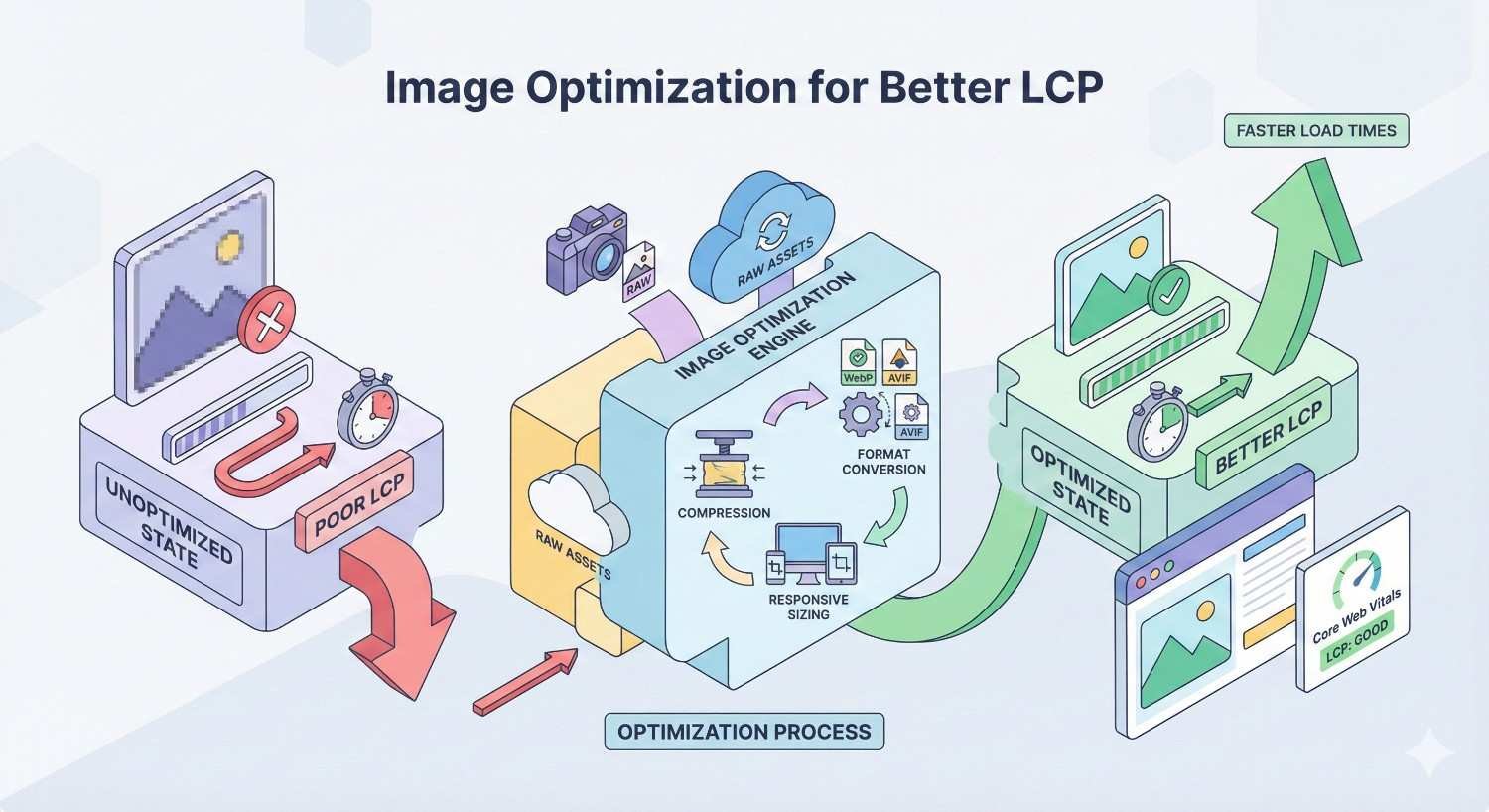
Image Optimization for Better LCP
Images dominate LCP on most websites. Hero images, product photos, and featured graphics typically trigger LCP measurements. Optimizing these images produces the largest LCP improvements for most sites.
Image optimization involves format selection, sizing, compression, and delivery strategy. Each factor contributes to total image weight and loading speed. Comprehensive optimization addresses all factors.
Choosing the Right Image Format (WebP, AVIF, JPEG)
Modern formats like WebP and AVIF provide superior compression compared to JPEG and PNG. The same visual quality requires significantly fewer bytes, directly improving load times.
WebP offers 25-35% smaller files than equivalent JPEGs with broad browser support. AVIF provides even better compression but with more limited browser support. Use format fallbacks to serve optimal formats to capable browsers.
Implement format selection through <picture> elements or server-side content negotiation. Serve AVIF to supporting browsers, WebP as fallback, and JPEG for legacy browsers.
Implementing Responsive Images with srcset
Responsive images serve appropriately sized versions based on viewport and device capabilities. A mobile user receives a smaller image than a desktop user, reducing unnecessary data transfer.
The srcset attribute lists available image sizes with their widths. The sizes attribute tells browsers how large the image will display. Browsers select the optimal source automatically.
html
Copy
<img src=”hero-800.jpg“
srcset=”hero-400.jpg 400w, hero-800.jpg 800w, hero-1200.jpg 1200w“
sizes=”(max-width: 600px) 100vw, 50vw“
alt=”Hero image“>
Generate multiple image sizes during build or upload processes. Automation ensures consistent responsive image availability without manual effort.
Lazy Loading vs Eager Loading for LCP Elements
Lazy loading defers image loading until images approach the viewport. This conserves bandwidth for below-fold content but creates problems for LCP elements.
Never lazy load your LCP element. The LCP image must load immediately, not when users scroll. Apply loading=”eager” or omit the loading attribute entirely for above-fold images.
Reserve lazy loading for below-fold images that don’t affect initial viewport rendering. This combination optimizes both LCP and total page weight.
Image Compression Best Practices
Compression reduces file size while maintaining acceptable visual quality. Lossy compression discards some data for smaller files. Lossless compression preserves all data with modest size reduction.
For photographs and complex images, lossy compression at 80-85% quality typically provides good balance. Higher compression introduces visible artifacts. Lower compression wastes bandwidth.
Tools like ImageOptim, Squoosh, and ShortPixel automate compression with intelligent quality settings. Integrate compression into build processes to ensure all images receive optimization.
Preloading Critical Hero Images
Preloading tells browsers to fetch resources before they’re discovered in HTML parsing. For LCP images, preloading can significantly reduce load times by starting downloads earlier.
Add preload hints in the document head:
html
Copy
<link rel=”preload“ as=”image“ href=”hero.webp“ type=”image/webp“>
Preload only critical resources. Excessive preloading wastes bandwidth and can delay more important resources. Limit preloads to your LCP image and perhaps one or two other critical assets.
CSS and JavaScript Optimization Techniques
Render-blocking resources delay content visibility. CSS and JavaScript in the critical path must complete before browsers render content. Optimizing these resources directly improves LCP.
The goal is minimizing what blocks rendering while ensuring pages function correctly. This requires distinguishing critical resources from those that can load later.
Eliminating Render-Blocking Resources
Identify render-blocking resources through Lighthouse or DevTools. Resources loading before LCP that block rendering are optimization candidates.
Move non-critical CSS and JavaScript below the fold or load them asynchronously. Only resources required for initial viewport rendering should block.
Third-party scripts frequently block rendering unnecessarily. Evaluate each script’s necessity and loading behavior. Remove or defer scripts that don’t contribute to initial content display.
Inlining Critical CSS
Critical CSS includes only styles needed for above-fold content. Inlining these styles in the HTML head eliminates a blocking request, allowing faster rendering.
Tools like Critical, Penthouse, and CriticalCSS extract above-fold styles automatically. The extracted CSS goes directly in <style> tags, while full stylesheets load asynchronously.
Critical CSS extraction requires testing across viewport sizes. Mobile and desktop have different above-fold content requiring different critical styles.
Deferring Non-Critical JavaScript
The defer attribute loads scripts without blocking parsing, executing them after HTML parsing completes. The async attribute loads scripts without blocking but executes immediately upon download.
Use defer for scripts that depend on DOM elements or other scripts. Use async for independent scripts like analytics that don’t affect page rendering.
html
Copy
<script src=”analytics.js“ async></script>
<script src=”app.js“ defer></script>
Move scripts to the document end when possible. Scripts at the bottom naturally avoid blocking initial rendering.
Code Splitting and Tree Shaking
Code splitting divides JavaScript into smaller chunks loaded on demand. Users download only code needed for the current page, reducing initial bundle size.
Tree shaking removes unused code from bundles. Build tools analyze imports and exclude functions never called. This reduces bundle size without manual code removal.
Modern bundlers like Webpack, Rollup, and esbuild support both techniques. Configure build processes to maximize splitting and shaking benefits.
Minification and Compression
Minification removes unnecessary characters from code: whitespace, comments, and long variable names become shorter equivalents. Minified files are smaller without functional changes.
Compression (gzip or Brotli) further reduces transfer size. Servers compress responses, browsers decompress them. Brotli typically achieves 15-20% better compression than gzip.
Enable both minification and compression. They work together—minification reduces source size, compression reduces transfer size. Most hosting platforms support both with simple configuration.
Font Optimization for LCP
Web fonts can delay text rendering, affecting LCP when text elements trigger the measurement. Font optimization ensures text appears quickly while maintaining design consistency.
Font loading behavior varies by browser. Without explicit control, browsers may hide text until fonts load (FOIT) or show fallback fonts then swap (FOUT). Neither is ideal without optimization.
Using font-display: swap
The font-display CSS property controls font loading behavior. The swap value shows fallback text immediately, swapping to the web font when loaded.
css
Copy
@font-face {
font-family: ‘CustomFont’;
src: url(‘custom.woff2’) format(‘woff2’);
font-display: swap;
}
swap prevents invisible text that delays LCP. Users see content immediately with system fonts, then see the design font once loaded. The brief flash is preferable to delayed content.
Preloading Web Fonts
Font preloading starts downloads before CSS parsing discovers font references. This reduces the time between page load and font availability.
html
Copy
<link rel=”preload“ as=”font“ href=”custom.woff2“ type=”font/woff2“ crossorigin>
The crossorigin attribute is required for font preloads, even for same-origin fonts. Omitting it causes duplicate downloads.
Preload only fonts used above the fold. Preloading all fonts wastes bandwidth and can delay critical resources.
Subsetting Fonts for Faster Loading
Font subsetting removes unused characters from font files. A font supporting all Unicode characters might be 500KB. Subsetting to Latin characters might reduce it to 20KB.
Tools like Glyphhanger and FontSquirrel’s generator create subsets containing only needed characters. Analyze your content to determine required character sets.
Variable fonts offer another optimization path. A single variable font file replaces multiple weight and style files, reducing total font downloads.
System Font Stacks as Fallbacks
System font stacks use fonts already installed on user devices. No download required means instant text rendering.
css
Copy
font-family: -apple-system, BlinkMacSystemFont, ‘Segoe UI’, Roboto, Oxygen, Ubuntu, sans-serif;
Consider whether custom fonts justify their performance cost. System fonts have improved significantly. Many sites achieve excellent design using system stacks exclusively.
When custom fonts are necessary, ensure system fallbacks provide acceptable appearance during loading. Match x-height and character width to minimize layout shift when fonts swap.
Advanced LCP Optimization Techniques
Beyond basic optimizations, advanced techniques provide additional performance gains. These require more technical implementation but offer significant benefits for sites pursuing optimal performance.
Advanced optimizations often involve infrastructure changes or build process modifications. Evaluate implementation complexity against expected benefits for your specific situation.
Resource Hints: Preconnect, Prefetch, and Preload
Resource hints tell browsers about resources needed soon, enabling proactive fetching. Each hint type serves different purposes.
preconnect establishes early connections to third-party origins:
html
Copy
<link rel=”preconnect“ href=”https://fonts.googleapis.com“>
prefetch downloads resources likely needed for future navigation:
html
Copy
<link rel=”prefetch“ href=”/next-page.html“>
preload fetches resources needed for the current page:
html
Copy
<link rel=”preload“ as=”image“ href=”hero.webp“>
Use hints strategically. Excessive hints waste bandwidth and can delay critical resources. Focus on resources that demonstrably affect LCP.
Priority Hints for Critical Resources
Priority hints (fetchpriority attribute) tell browsers which resources matter most. High-priority resources receive bandwidth and processing preference.
html
Copy
<img src=”hero.webp“ fetchpriority=”high“ alt=”Hero“>
<img src=”thumbnail.webp“ fetchpriority=”low“ alt=”Thumbnail“>
Apply high priority to LCP images and critical scripts. Apply low priority to below-fold images and non-essential resources. Browsers make better decisions with explicit guidance.
Optimizing the Critical Rendering Path
The critical rendering path includes all steps between receiving HTML and rendering pixels. Optimizing this path means reducing steps and accelerating each one.
Key optimizations include: minimizing critical resource count, reducing critical bytes, and shortening critical path length. Each reduction accelerates initial rendering.
Analyze your critical path using DevTools’ Performance panel. Identify resources blocking rendering and evaluate whether they’re truly critical. Remove or defer anything non-essential.
Edge Computing and Edge-Side Includes
Edge computing runs code at CDN edge locations, closer to users. Dynamic content generation at the edge reduces latency compared to origin server processing.
Edge-side includes (ESI) assemble pages from cached fragments at the edge. Static portions serve from cache while dynamic portions generate on demand. This hybrid approach provides caching benefits for partially dynamic pages.
Platforms like Cloudflare Workers, Fastly Compute, and AWS Lambda@Edge enable edge computing. Implementation requires architectural changes but offers significant performance benefits for dynamic sites.
HTTP/2 and HTTP/3 Protocol Optimization
HTTP/2 enables multiplexing—multiple requests over single connections. This eliminates head-of-line blocking that slowed HTTP/1.1 performance.
HTTP/3 uses QUIC protocol, further reducing connection latency. Initial connections establish faster, and packet loss affects individual streams rather than entire connections.
Most modern hosting supports HTTP/2 by default. HTTP/3 adoption is growing. Verify your server supports modern protocols and configure them if not enabled.
LCP Optimization by Platform
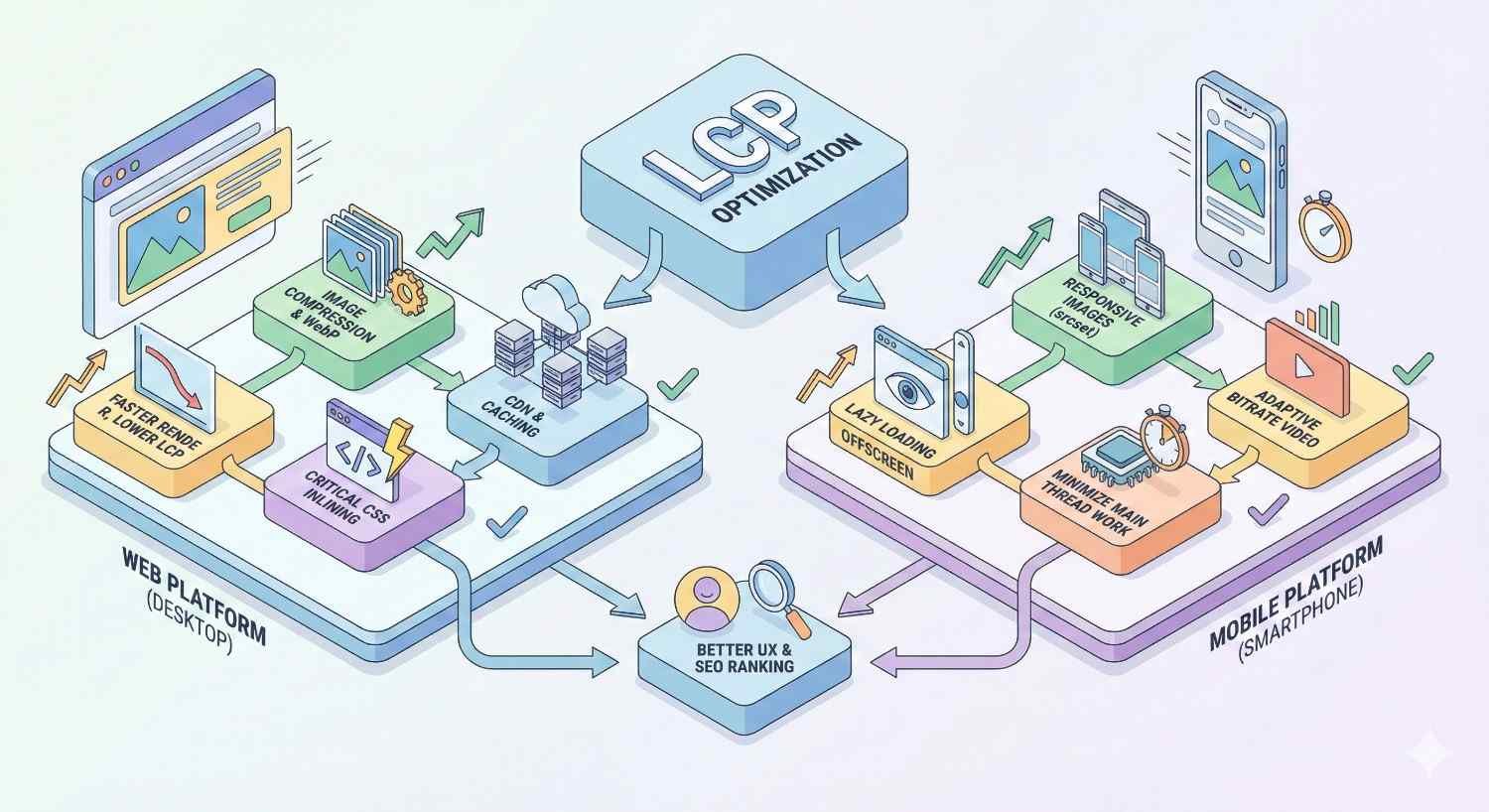
Different platforms require different optimization approaches. CMS limitations, framework architectures, and available tools vary significantly. Platform-specific strategies maximize results within each environment.
Understanding your platform’s constraints and capabilities enables realistic optimization planning. Some improvements require plugin installation; others require custom development.
WordPress LCP Optimization
WordPress powers a significant portion of the web, making WordPress-specific LCP optimization widely relevant. The platform’s flexibility creates both opportunities and challenges.
Caching plugins like WP Rocket, W3 Total Cache, and LiteSpeed Cache provide page caching, browser caching, and optimization features. These plugins address multiple LCP factors through single installations.
Image optimization plugins handle format conversion, compression, and lazy loading. Imagify, ShortPixel, and Smush automate image optimization for existing and new uploads.
Theme selection significantly affects baseline performance. Lightweight themes like GeneratePress, Astra, and Kadence provide faster foundations than bloated alternatives. Theme switching can improve LCP without other changes.
Shopify LCP Optimization
Shopify’s hosted platform limits server-side optimization options. Focus shifts to front-end optimizations within platform constraints.
Theme optimization matters significantly. Shopify’s Dawn theme and other Online Store 2.0 themes offer better performance than legacy themes. Theme migration can provide substantial improvements.
App audit reveals performance impacts. Each Shopify app potentially adds scripts affecting LCP. Remove unused apps and evaluate alternatives for necessary functionality.
Shopify’s built-in CDN and image optimization help, but manual image optimization before upload ensures best results. Upload appropriately sized images rather than relying entirely on automatic resizing.
React and Next.js LCP Strategies
React applications face client-side rendering challenges. Next.js addresses many through server-side rendering (SSR) and static site generation (SSG).
Use SSR or SSG for content pages where LCP matters. Client-side rendering delays content visibility. Server-rendered HTML provides immediate content that hydrates into interactive applications.
Next.js Image component handles responsive images, lazy loading, and format optimization automatically. Use it for all images to ensure consistent optimization.
Code splitting happens automatically in Next.js. Ensure dynamic imports for heavy components that aren’t needed immediately. This reduces initial JavaScript bundle size.
Custom CMS and Static Site Generators
Custom platforms offer maximum optimization flexibility. Without platform constraints, you control every performance aspect.
Static site generators like Hugo, Eleventy, and Gatsby produce pre-built HTML requiring no server-side processing. TTFB approaches zero when serving static files from CDN edge locations.
Custom CMS implementations should prioritize caching, efficient queries, and optimized asset delivery. Build performance considerations into architecture rather than retrofitting optimizations.
LCP Optimization Checklist and Prioritization
Systematic optimization requires prioritization. Not all improvements offer equal returns. Focus efforts on high-impact changes before addressing minor optimizations.
This checklist organizes optimizations by implementation timeline and expected impact. Start with quick wins, progress to medium-term projects, and plan long-term investments.
Quick Wins for Immediate LCP Improvement
These optimizations typically take hours to implement and provide immediate benefits:
Image optimization:
- Compress existing images
- Convert to WebP format
- Add width and height attributes
- Preload LCP image
Resource hints:
- Add preconnect for third-party origins
- Preload critical fonts
- Set fetchpriority on LCP image
Quick code changes:
- Add font-display: swap
- Defer non-critical JavaScript
- Remove unused CSS and JavaScript
Medium-Term Optimization Projects
These projects require days to weeks and often involve development resources:
Caching implementation:
- Configure server-side caching
- Implement CDN
- Set up browser caching headers
Code optimization:
- Extract and inline critical CSS
- Implement code splitting
- Configure tree shaking
Infrastructure improvements:
- Upgrade hosting plan
- Optimize database queries
- Configure HTTP/2 or HTTP/3
Long-Term Infrastructure Investments
These investments require significant planning and resources but provide lasting benefits:
Architecture changes:
- Migrate to server-side rendering
- Implement edge computing
- Redesign for performance
Platform migrations:
- Move to faster hosting
- Switch to performance-optimized CMS
- Rebuild on modern framework
Process improvements:
- Integrate performance testing in CI/CD
- Establish performance budgets
- Train team on performance best practices
Measuring LCP Optimization Success
Optimization without measurement is guesswork. Establish baselines, track changes, and correlate performance with business outcomes. Data-driven optimization ensures efforts produce results.
Measurement should be ongoing, not one-time. Performance regresses without attention. Continuous monitoring catches problems before they affect users significantly.
Setting LCP Performance Benchmarks
Establish current performance before optimizing. Measure LCP across device types, connection speeds, and geographic locations. This baseline enables meaningful comparison after changes.
Set target benchmarks based on Google’s thresholds and competitive analysis. Achieving “good” status (under 2.5 seconds) should be the minimum goal. Competitive advantage may require faster targets.
Document benchmarks and targets clearly. Share with stakeholders to align expectations and demonstrate progress.
Tracking LCP Improvements Over Time
Implement continuous monitoring through RUM tools or regular testing schedules. Track both lab and field data to understand controlled performance and real-user experience.
Create dashboards showing LCP trends over time. Visualizations help identify regressions quickly and demonstrate optimization impact to stakeholders.
Correlate changes with specific optimizations. When LCP improves, understand which change caused it. When LCP regresses, identify the responsible deployment.
Correlating LCP with SEO and Business Metrics
Connect performance data with business outcomes. Track whether LCP improvements correlate with ranking changes, traffic increases, or conversion improvements.
Use Google Search Console to monitor Core Web Vitals status and search performance together. Look for patterns between passing Core Web Vitals and ranking improvements.
Calculate ROI from performance investments. If LCP optimization cost $5,000 and conversion rate increased 10%, quantify the revenue impact. This justifies continued performance investment.
Common LCP Optimization Mistakes to Avoid
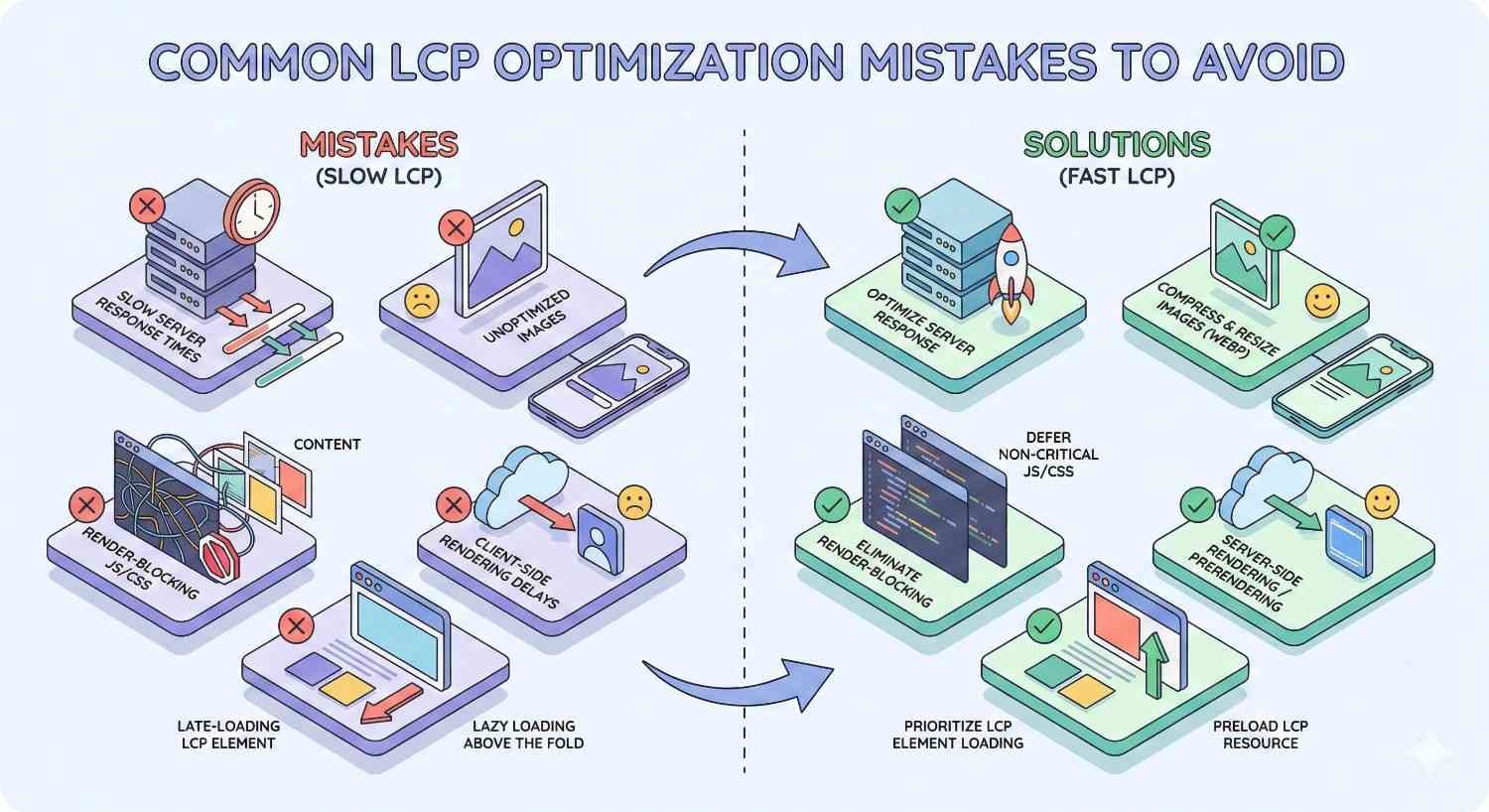
Optimization efforts sometimes backfire or miss the mark. Understanding common mistakes helps avoid wasted effort and unintended consequences.
These mistakes appear frequently across sites of all sizes. Learning from others’ errors accelerates your optimization success.
Over-Optimizing at the Expense of Functionality
Aggressive optimization can break functionality. Deferring critical scripts might cause errors. Removing “unnecessary” CSS might break layouts. Compression might corrupt files.
Test thoroughly after each optimization. Verify functionality across browsers and devices. Automated testing catches regressions before users encounter them.
Balance performance with user experience. A slightly slower page that works correctly beats a fast page with broken features.
Ignoring Mobile LCP Performance
Mobile performance typically lags desktop due to slower connections and less powerful devices. Google uses mobile-first indexing, making mobile LCP the primary ranking factor.
Test mobile performance specifically, not just desktop. Simulate slow connections and low-powered devices. Real mobile testing on actual devices reveals issues emulators miss.
Prioritize mobile optimizations when resources are limited. Desktop improvements matter, but mobile determines search visibility.
Focusing on Lab Data Over Field Data
Lab data shows potential performance under ideal conditions. Field data shows actual user experience. Google uses field data for ranking purposes.
A page scoring well in Lighthouse might fail Core Web Vitals due to real-world conditions. Slow connections, old devices, and geographic distance affect field data but not lab tests.
Monitor field data through Search Console and RUM tools. Optimize for real users, not synthetic tests.
When to Hire an SEO or Performance Expert
LCP optimization ranges from simple plugin installations to complex infrastructure projects. Knowing when to seek professional help saves time and ensures quality results.
Consider your team’s capabilities, available time, and optimization complexity when deciding between DIY and professional approaches.
DIY vs Professional LCP Optimization
DIY optimization works well for straightforward improvements: image compression, caching plugins, basic code changes. These require minimal technical expertise and carry low risk.
Professional help becomes valuable for complex optimizations: server configuration, code architecture, custom development. Mistakes in these areas can cause significant problems.
Evaluate honestly: do you have the skills and time for the required optimizations? Professional investment often costs less than extended DIY struggles or fixing self-inflicted problems.
What to Look for in a Technical SEO Partner
Seek partners with demonstrated Core Web Vitals expertise. Ask for case studies showing LCP improvements and their business impact.
Technical competence matters, but so does communication. Partners should explain recommendations clearly and set realistic expectations. Avoid those promising instant results or guaranteed rankings.
Verify they understand your platform. WordPress optimization differs from Shopify optimization differs from custom development. Platform-specific expertise ensures relevant recommendations.
Expected ROI from Professional Optimization
Professional optimization costs vary widely based on scope and complexity. Simple audits might cost hundreds of dollars. Comprehensive optimization projects might cost thousands.
Calculate potential ROI before engaging professionals. If your site generates $100,000 monthly and optimization could improve conversions 10%, the potential value is $10,000 monthly. Professional fees become easy to justify.
Request projected outcomes and timelines. Reputable professionals provide realistic estimates based on your specific situation, not generic promises.
Conclusion
LCP optimization combines server performance, asset optimization, and code efficiency into faster, more engaging user experiences. The strategies covered here—from basic image compression to advanced edge computing—provide a complete toolkit for achieving excellent Core Web Vitals scores.
Faster pages rank better, convert more visitors, and build stronger brand perception. Every millisecond reduced from your LCP score contributes to measurable business outcomes. The investment in performance optimization pays dividends across traffic, engagement, and revenue.
We help businesses implement comprehensive LCP optimization strategies that deliver measurable results. White Label SEO Service provides the technical expertise and systematic approach needed to transform your site’s performance. Contact us to discuss how we can accelerate your pages and your growth.
Frequently Asked Questions About LCP Optimization
What is a good LCP score?
A good LCP score is 2.5 seconds or faster, measured at the 75th percentile of page loads. This means 75% of your visitors must experience LCP within 2.5 seconds for Google to consider your page as having good LCP performance.
How does LCP affect Google rankings?
LCP is one of three Core Web Vitals that Google uses as ranking signals. While content relevance and backlinks remain primary factors, LCP serves as a tiebreaker among otherwise similar pages. Sites with consistently poor LCP may face broader visibility challenges.
Can LCP be improved without developer help?
Many LCP improvements require no coding: image compression, caching plugins, CDN setup, and removing unused plugins. However, complex optimizations like code splitting, critical CSS extraction, and server configuration typically require developer expertise.
How often should I monitor LCP?
Monitor LCP continuously through RUM tools or at least weekly through manual testing. Check Search Console’s Core Web Vitals report monthly. Increased monitoring frequency helps catch regressions quickly before they affect rankings or user experience significantly.
What’s the difference between LCP, FID, and CLS?
LCP measures loading performance (when main content appears). FID (First Input Delay) measures interactivity (response time to first user interaction). CLS (Cumulative Layout Shift) measures visual stability (unexpected layout movements). Together, these three metrics form Core Web Vitals.
How long does it take to improve LCP scores?
Quick wins like image optimization can improve LCP immediately. Field data in Search Console updates over 28 days, so ranking impacts may take 4-8 weeks to materialize. Complex optimizations requiring infrastructure changes may take months to fully implement and measure.
Does LCP optimization help with AI search visibility?
Yes. AI platforms like Google AI Overviews, ChatGPT, and Perplexity favor authoritative, well-structured content from fast-loading sources. Sites meeting Core Web Vitals thresholds demonstrate technical quality that AI systems recognize when selecting sources for answers.


