

A content delivery network can reduce page load times by 50% or more, delivering your website’s files from servers located closest to each visitor. For businesses competing in organic search, this speed advantage directly impacts Core Web Vitals scores, user engagement, and conversion rates.
Website speed has become a non-negotiable ranking factor. Google’s algorithm updates continue to prioritize fast-loading pages, and users expect sites to load in under three seconds. A CDN addresses this by eliminating the distance barrier between your server and global audiences.
This guide covers how CDNs work, which features matter most for performance, implementation steps, and how to measure real improvements. You’ll learn to integrate CDN technology into a broader technical SEO strategy that drives sustainable organic growth.
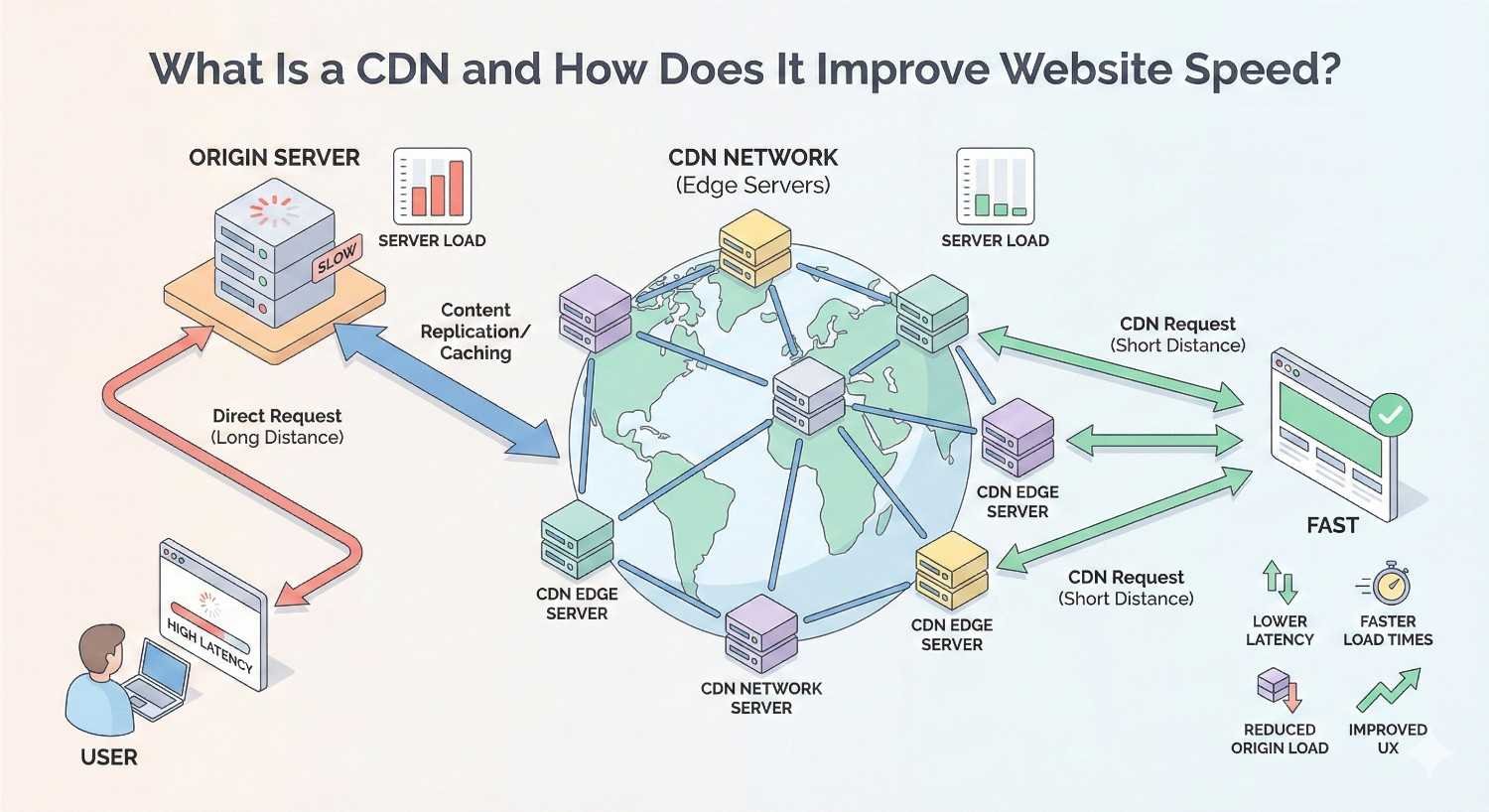
What Is a CDN and How Does It Improve Website Speed?
A content delivery network is a geographically distributed group of servers that work together to deliver web content quickly. Instead of every visitor requesting files from a single origin server, a CDN serves cached copies from the nearest edge location. This fundamental shift in content delivery architecture eliminates latency caused by physical distance.
The performance improvement is measurable and significant. Websites serving global audiences often see load time reductions of 40-60% after CDN implementation. For businesses targeting multiple regions, this translates directly into better user experience metrics and improved search visibility.
How Content Delivery Networks Work
When a user visits your website, their browser sends a request for files. Without a CDN, that request travels to your origin server, regardless of where the user is located. A visitor in Tokyo requesting content from a server in New York experiences latency from the round-trip distance.
CDNs solve this through edge caching. Your website’s static assets—images, CSS files, JavaScript, videos—are copied to servers worldwide. When that Tokyo visitor makes a request, the CDN’s edge server in Asia responds instead. The physical proximity dramatically reduces time to first byte (TTFB) and overall page load time.
The process works through these steps:
- You configure your domain to route through the CDN
- The CDN pulls content from your origin server
- Edge servers cache this content at strategic locations
- User requests are routed to the nearest edge server
- Cached content is delivered with minimal latency
Modern CDNs also handle dynamic content through intelligent routing and connection optimization. Even requests that must reach your origin server benefit from the CDN’s optimized network paths and persistent connections.
The Connection Between CDN and Page Load Time
Page load time consists of multiple components, and CDNs impact several of them directly. The most significant improvement comes from reduced latency. Light travels at a fixed speed, and data packets must traverse physical infrastructure. Shorter distances mean faster delivery.
Beyond distance reduction, CDNs improve load times through:
Connection optimization. CDNs maintain persistent connections between edge servers and your origin. This eliminates the overhead of establishing new connections for each request.
Protocol efficiency. Leading CDN providers support HTTP/2 and HTTP/3, enabling multiplexed connections and header compression that traditional hosting often lacks.
Bandwidth capacity. CDN networks handle massive traffic volumes. Your origin server never becomes a bottleneck during traffic spikes.
Smart routing. CDNs continuously monitor network conditions and route requests through the fastest available paths.
The cumulative effect is substantial. A page that loads in 4 seconds from a single server might load in 1.5 seconds through a well-configured CDN. For SEO purposes, this difference can determine whether you pass or fail Core Web Vitals thresholds.
Why Website Speed Matters for SEO and Business Growth
Speed is no longer a nice-to-have feature. It’s a competitive requirement that affects rankings, user behavior, and revenue. Search engines have made their position clear: fast websites provide better user experiences and deserve ranking preference.
The business case extends beyond SEO. Every second of delay costs conversions. Users have been conditioned by fast-loading apps and websites to expect instant responses. When your site fails to meet those expectations, visitors leave.
Core Web Vitals and Google Ranking Factors
Google’s Core Web Vitals measure real-world user experience through three specific metrics. Largest Contentful Paint (LCP) measures loading performance—how quickly the main content becomes visible. First Input Delay (FID), now being replaced by Interaction to Next Paint (INP), measures interactivity. Cumulative Layout Shift (CLS) measures visual stability.
CDNs directly improve LCP by delivering content faster. The target threshold is 2.5 seconds or less for a good score. Sites exceeding 4 seconds receive a poor rating that can negatively impact rankings.
Google’s page experience documentation confirms these metrics as ranking signals. While content relevance remains primary, Core Web Vitals serve as a tiebreaker between pages of similar quality. In competitive niches, this tiebreaker determines visibility.
The ranking impact compounds over time. Faster sites earn better engagement metrics. Better engagement signals reinforce ranking positions. This creates a virtuous cycle where speed improvements generate ongoing SEO benefits.
User Experience and Bounce Rate Impact
Bounce rate measures the percentage of visitors who leave after viewing only one page. Slow load times are a primary driver of high bounce rates. Users don’t wait for slow pages when alternatives are one click away.
Research consistently shows the relationship between speed and engagement:
- Pages loading in 1-2 seconds have significantly lower bounce rates than those loading in 3+ seconds
- Mobile users are particularly sensitive to delays
- Each additional second of load time increases bounce probability
Beyond bounce rate, speed affects pages per session, time on site, and return visit likelihood. These engagement signals influence how search engines evaluate your content’s value to users.
The psychological impact matters too. Fast sites feel professional and trustworthy. Slow sites create friction and frustration. These perceptions influence whether visitors convert, subscribe, or recommend your business.
Conversion Rate and Revenue Correlation
The connection between speed and revenue is direct and measurable. Portent’s research found that conversion rates drop significantly with each second of load time. A site loading in 1 second converts at nearly 3x the rate of a site loading in 5 seconds.
For e-commerce businesses, these percentages translate to substantial revenue differences. A site generating $100,000 monthly that improves load time from 4 seconds to 2 seconds could see conversion improvements worth thousands in additional revenue.
The impact extends to lead generation, content engagement, and any action you want visitors to take. Faster pages mean more completed forms, more newsletter signups, and more content consumption. CDN implementation often delivers measurable ROI within weeks.
Key CDN Features That Accelerate Website Performance
Not all CDN features contribute equally to speed improvements. Understanding which capabilities matter most helps you evaluate providers and configure your CDN for maximum performance. The features below represent the core functionality that drives measurable speed gains.
Global Edge Server Distribution
The number and location of edge servers determine how effectively a CDN reduces latency. Major providers operate hundreds of points of presence (PoPs) across six continents. This density ensures most users connect to a server within a few hundred miles.
When evaluating CDN providers, consider:
Geographic coverage. Does the network have strong presence in your target markets? A CDN with extensive European coverage but limited Asian presence won’t help if your audience is in Southeast Asia.
Network capacity. Total bandwidth capacity affects performance during traffic spikes. Leading CDNs handle terabits per second of traffic.
Peering relationships. CDNs with direct connections to major ISPs deliver content faster than those routing through multiple intermediaries.
Cloudflare operates over 300 cities worldwide. Fastly focuses on fewer but strategically placed locations with high capacity. AWS CloudFront leverages Amazon’s infrastructure across 400+ edge locations. Each approach has tradeoffs between coverage breadth and individual location performance.
Caching and Content Optimization
Caching is the foundation of CDN performance. When edge servers store copies of your content, they eliminate the need to fetch files from your origin server repeatedly. Effective caching requires proper configuration of cache headers and TTL (time to live) settings.
Static assets like images, CSS, and JavaScript files should have long cache durations—often weeks or months. These files change infrequently, and aggressive caching maximizes performance benefits.
Dynamic content requires more nuanced handling. Some CDNs offer edge computing capabilities that can cache personalized content or generate dynamic responses at the edge. This extends CDN benefits beyond purely static assets.
Cache hit ratio measures caching effectiveness. A ratio above 90% indicates most requests are served from cache rather than your origin. Lower ratios suggest configuration issues or content that changes too frequently for effective caching.
Image and File Compression
Images typically account for the largest portion of page weight. CDNs can compress and optimize images automatically, reducing file sizes without visible quality loss. This feature alone can cut page weight by 30-50% for image-heavy sites.
Modern CDNs offer:
Format conversion. Automatically serving WebP or AVIF formats to browsers that support them, with fallbacks for older browsers.
Responsive images. Generating multiple image sizes and serving the appropriate version based on device and viewport.
Lazy loading. Deferring off-screen image loading to prioritize above-the-fold content.
Lossless compression. Reducing file sizes without any quality degradation.
Beyond images, CDNs compress text-based files using Gzip or Brotli compression. Brotli typically achieves 15-20% better compression than Gzip for text content, further reducing transfer sizes.
Minification of CSS, JavaScript, and HTML
Minification removes unnecessary characters from code files—whitespace, comments, and formatting that browsers don’t need. The result is smaller files that transfer faster and parse more quickly.
CDNs can minify files automatically as they pass through the network. This eliminates the need to maintain separate minified versions in your development workflow. The original, readable code stays in your repository while users receive optimized versions.
The performance impact varies by file size and complexity. Large JavaScript bundles might see 20-30% size reductions from minification alone. Combined with compression, total transfer sizes can drop by 70% or more compared to unoptimized files.
Some CDNs also offer JavaScript and CSS bundling, combining multiple files into single requests. This reduces HTTP overhead, though HTTP/2 multiplexing has made bundling less critical than in earlier protocol versions.
HTTP/2 and HTTP/3 Protocol Support
HTTP/2 introduced multiplexing, allowing multiple requests over a single connection. This eliminated the head-of-line blocking that plagued HTTP/1.1 and made techniques like domain sharding obsolete. Most CDNs have supported HTTP/2 for years.
HTTP/3, built on the QUIC protocol, represents the next evolution. It uses UDP instead of TCP, enabling faster connection establishment and better performance on unreliable networks. Mobile users particularly benefit from HTTP/3’s improved handling of network transitions.
Cloudflare’s data shows HTTP/3 reducing connection times by up to 30% compared to HTTP/2 in real-world conditions. The improvement is most pronounced for users on mobile networks or in regions with less reliable infrastructure.
CDN support for these protocols matters because many origin servers and hosting providers lag in adoption. By terminating connections at the edge with modern protocols, CDNs provide performance benefits regardless of your origin server’s capabilities.
Types of CDN Solutions for Different Business Needs
The CDN market offers options ranging from free tiers to enterprise solutions costing thousands monthly. Understanding the differences helps you select the right solution for your traffic volume, technical requirements, and budget.
Traditional CDN vs. Modern Edge Networks
Traditional CDNs focused primarily on caching and content delivery. You configured cache rules, pointed your DNS at the CDN, and static content was served from edge locations. This model still works well for straightforward use cases.
Modern edge networks expand this functionality significantly. They offer:
Edge computing. Running code at edge locations to handle logic that previously required origin server requests. Cloudflare Workers, Fastly Compute@Edge, and AWS Lambda@Edge enable sophisticated applications at the edge.
Security integration. WAF (Web Application Firewall), DDoS protection, and bot management built into the CDN layer.
API acceleration. Optimizing API responses through caching, compression, and intelligent routing.
Real-time analytics. Detailed performance data and traffic insights beyond basic CDN metrics.
For most business websites, traditional CDN functionality provides the core speed benefits. Edge computing becomes valuable when you need to personalize content, handle complex routing logic, or process data closer to users.
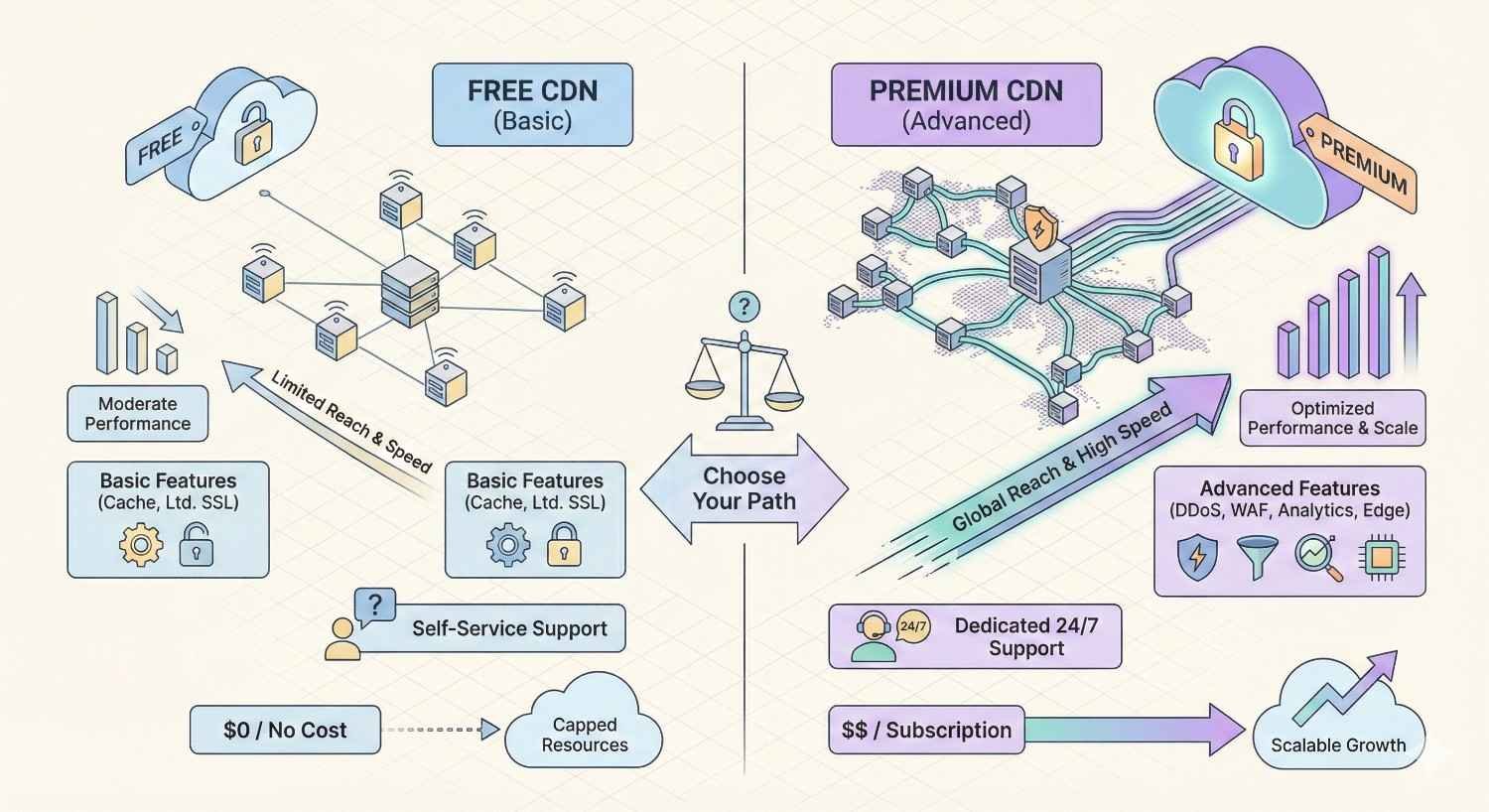
Free CDN Options vs. Premium CDN Services
Free CDN tiers exist and can provide meaningful performance improvements. Cloudflare’s free plan includes global CDN, basic DDoS protection, and SSL. For small sites with moderate traffic, this may be sufficient.
Free tier limitations typically include:
- Reduced feature sets (no advanced caching rules, limited analytics)
- Lower priority during traffic spikes
- Basic support only
- Usage caps on certain features
Premium CDN services offer:
- Guaranteed performance SLAs
- Advanced configuration options
- Priority support with faster response times
- Higher bandwidth allocations
- Enterprise security features
- Custom SSL certificates
- Detailed analytics and reporting
The decision depends on your traffic volume and business requirements. A startup blog might thrive on Cloudflare’s free tier. An e-commerce site processing significant revenue needs the reliability guarantees and support of a paid plan.
Pricing models vary. Some CDNs charge by bandwidth consumed. Others offer flat-rate plans. Enterprise agreements often include custom pricing based on specific requirements. Monthly costs range from $20 for basic paid plans to $500+ for enterprise features.
CDN for WordPress, Shopify, and Other Platforms
Platform-specific considerations affect CDN implementation. WordPress sites have particular caching challenges due to dynamic content generation. Shopify includes CDN functionality by default. Other platforms have varying levels of CDN compatibility.
WordPress CDN integration:
WordPress generates pages dynamically by default, which can conflict with aggressive caching. Solutions include:
- Page caching plugins (WP Rocket, W3 Total Cache) that create static HTML versions
- CDN plugins that handle asset URL rewriting
- Full-page caching at the CDN level with cache purging on content updates
Popular WordPress CDN options include Cloudflare (with plugin), BunnyCDN, and KeyCDN. Each offers WordPress-specific documentation and integration tools.
Shopify CDN considerations:
Shopify hosts all stores on its infrastructure with built-in CDN. You cannot replace this CDN, but you can supplement it. Third-party CDNs can accelerate custom assets, improve performance in specific regions, or add security features Shopify doesn’t provide.
Other platforms:
Most modern CMS platforms and e-commerce solutions support CDN integration. Implementation complexity varies. Headless CMS architectures often work seamlessly with CDNs since they serve static content by design. Legacy systems may require more configuration.
How to Implement a CDN for Your Website
CDN implementation follows a predictable process regardless of provider. The steps below apply broadly, though specific interfaces and terminology vary. Plan for a few hours of initial setup and a testing period before full deployment.
Choosing the Right CDN Provider
Provider selection should match your specific requirements. Consider these factors:
Geographic coverage. Where are your users? Ensure the CDN has strong presence in those regions.
Feature requirements. Do you need basic caching or advanced features like edge computing, video delivery, or API acceleration?
Integration complexity. How easily does the CDN integrate with your existing stack? Some providers offer one-click integrations with popular platforms.
Budget. What can you afford monthly? Factor in potential traffic growth.
Support quality. How critical is uptime for your business? Enterprise support may be worth the premium.
Leading providers for general website acceleration:
- Cloudflare: Excellent free tier, strong security features, easy setup
- Fastly: Developer-friendly, real-time purging, powerful edge computing
- AWS CloudFront: Deep AWS integration, pay-as-you-go pricing, massive scale
- Akamai: Enterprise-focused, largest network, premium pricing
- BunnyCDN: Cost-effective, simple pricing, good performance
Request trials or use free tiers to test performance before committing. Real-world testing with your specific content provides better data than benchmark comparisons.
CDN Setup and Configuration Steps
Basic CDN setup follows this general process:
Step 1: Create an account and add your domain. Sign up with your chosen provider and register your website’s domain. You’ll typically verify ownership through DNS records or file upload.
Step 2: Configure origin settings. Tell the CDN where to fetch content. This is usually your existing hosting server’s IP address or hostname.
Step 3: Set up SSL/TLS. Configure HTTPS for secure connections. Most CDNs offer free SSL certificates or let you upload custom certificates.
Step 4: Define caching rules. Specify which content to cache and for how long. Start with conservative settings and optimize based on performance data.
Step 5: Update DNS. Point your domain to the CDN’s servers. This is where traffic starts flowing through the CDN.
Step 6: Test thoroughly. Verify the site works correctly through the CDN before considering the migration complete.
Configuration details matter significantly. Incorrect cache headers can serve stale content. Missing SSL settings can break secure pages. Take time to understand each setting’s impact.
DNS Configuration and Propagation
DNS changes are required to route traffic through your CDN. The specific changes depend on your CDN and setup approach.
CNAME setup: Point your domain’s CNAME record to the CDN-provided hostname. This works for subdomains and www versions but not bare domains (example.com without www).
Nameserver change: Some CDNs (notably Cloudflare) require changing your domain’s nameservers entirely. This gives the CDN full DNS control and enables additional features.
A record setup: Point A records to CDN-provided IP addresses. This works for bare domains but requires updating if IPs change.
DNS propagation takes time. Changes can take anywhere from minutes to 48 hours to reach all DNS servers globally. During propagation, some users see the old configuration while others see the new one.
To minimize disruption:
- Lower TTL values on existing DNS records before making changes
- Make changes during low-traffic periods
- Monitor for issues during the propagation window
- Have a rollback plan ready
Testing CDN Performance After Implementation
Verification testing ensures the CDN is working correctly and delivering expected improvements. Test immediately after DNS propagation completes.
Functional testing:
- Browse the site thoroughly, checking all page types
- Test forms, checkout processes, and interactive features
- Verify images and assets load correctly
- Check that HTTPS works on all pages
- Test from multiple geographic locations using VPN or testing tools
Performance testing:
- Run speed tests from multiple locations (GTmetrix, WebPageTest, Pingdom)
- Compare results to pre-CDN benchmarks
- Check response headers to confirm CDN is serving content
- Verify cache hit ratios in CDN analytics
Cache verification:
Look for CDN-specific headers in browser developer tools:
- CF-Cache-Status (Cloudflare)
- X-Cache (various CDNs)
- Age header showing how long content has been cached
A “HIT” status confirms content is being served from cache. “MISS” indicates the request went to your origin server.
Measuring CDN Impact on Website Speed
Measurement validates your CDN investment and identifies optimization opportunities. Without data, you’re guessing at performance. With proper tracking, you can quantify improvements and make informed decisions about further optimization.
Key Performance Metrics to Track
Focus on metrics that reflect real user experience:
Time to First Byte (TTFB): How quickly the server responds to a request. CDNs dramatically improve TTFB by serving content from nearby edge servers. Target: under 200ms.
Largest Contentful Paint (LCP): When the main content becomes visible. This Core Web Vital directly impacts SEO. Target: under 2.5 seconds.
First Contentful Paint (FCP): When any content first appears. Indicates initial responsiveness. Target: under 1.8 seconds.
Total page load time: When the page is fully interactive. While less critical than above metrics, it affects user perception. Target: under 3 seconds.
Cache hit ratio: Percentage of requests served from CDN cache. Higher is better. Target: above 90% for static content.
Bandwidth savings: How much data transfer the CDN handles versus your origin. Indicates both performance benefit and origin server load reduction.
Track these metrics over time, not just immediately after implementation. Performance can vary with traffic patterns, content changes, and CDN configuration adjustments.
Tools for Testing CDN Speed Improvements
Multiple tools provide different perspectives on performance:
Google PageSpeed Insights: Free tool providing Core Web Vitals data from real users (CrUX data) and lab tests. Essential for SEO-focused optimization.
GTmetrix: Detailed waterfall charts showing how each resource loads. Useful for identifying specific bottlenecks. Free tier available.
WebPageTest: Advanced testing from multiple locations with various connection speeds. Provides filmstrip views and detailed technical data. Free.
Pingdom: Simple speed testing with historical tracking. Good for ongoing monitoring. Free and paid tiers.
Chrome DevTools: Built into Chrome browser. Network tab shows individual resource timing. Performance tab provides detailed loading analysis.
CDN analytics dashboards: Your CDN provider’s analytics show cache performance, bandwidth, and geographic distribution. Essential for CDN-specific optimization.
Use multiple tools for comprehensive understanding. Each has strengths and limitations. Lab tests show potential performance; real user data shows actual experience.
Before and After Benchmarking
Meaningful comparison requires baseline measurements taken before CDN implementation. If you didn’t capture baselines, you can still measure current performance and track improvements from optimization changes.
Establishing baselines:
- Test from multiple geographic locations
- Test at different times of day
- Run multiple tests and average results
- Document specific page URLs tested
- Record all relevant metrics, not just load time
Post-implementation comparison:
- Use identical test conditions (same locations, times, pages)
- Allow time for CDN caches to warm up
- Run multiple tests to account for variability
- Calculate percentage improvements for each metric
Documenting results:
Create a simple comparison table:
| Metric | Before CDN | After CDN | Improvement |
| TTFB | 450ms | 85ms | 81% |
| LCP | 3.8s | 1.9s | 50% |
| Page Load | 5.2s | 2.4s | 54% |
This documentation proves ROI and guides future optimization priorities.
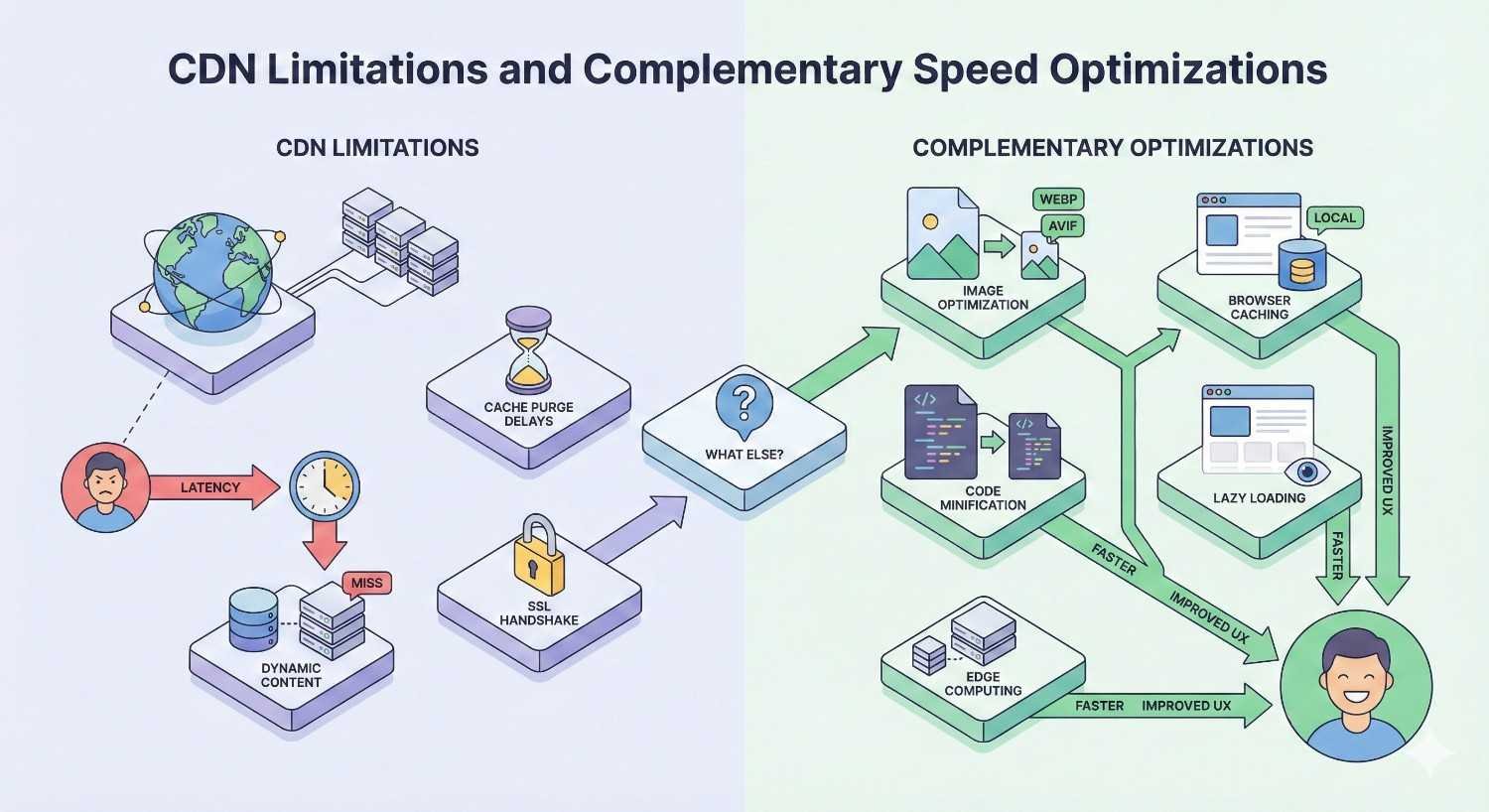
CDN Limitations and Complementary Speed Optimizations
CDNs solve specific performance problems but don’t address every speed issue. Understanding these limitations helps set realistic expectations and identify additional optimization opportunities. A comprehensive speed strategy combines CDN benefits with other technical improvements.
When a CDN Alone Isn’t Enough
CDNs excel at delivering static content quickly. They’re less effective for:
Dynamic content generation. If your pages are built on each request (common in WordPress, e-commerce platforms), the CDN can’t cache the HTML. The origin server still processes every page view.
Database-heavy operations. Queries to your database happen on your origin server. A CDN doesn’t speed up slow database queries or poorly optimized data retrieval.
Third-party scripts. Resources loaded from external domains (analytics, ads, widgets) aren’t served through your CDN. Slow third-party scripts still impact performance.
Server-side processing. Complex calculations, API calls to external services, and business logic execution happen on your origin regardless of CDN presence.
Initial cache population. The first request for any resource must reach your origin. Until caches warm up, some users experience origin server speeds.
Recognizing these limitations prevents disappointment and guides complementary optimization efforts.
Server-Side Optimization Requirements
Your origin server’s performance still matters, even with a CDN. Requests that reach the origin—cache misses, dynamic content, admin functions—depend on server capabilities.
Hosting quality: Shared hosting with limited resources creates bottlenecks. VPS or dedicated servers provide more consistent performance. Managed WordPress hosting often includes server-level optimizations.
PHP/application optimization: For WordPress and similar platforms, PHP version, opcode caching, and application-level caching significantly impact dynamic page generation speed.
Server configuration: Proper web server configuration (Apache, Nginx) affects how efficiently requests are handled. Nginx generally outperforms Apache for static content and high-concurrency scenarios.
Geographic server location: Place your origin server close to your primary audience or your CDN’s primary pull location. This reduces latency for cache misses and dynamic content.
Resource allocation: Ensure adequate CPU, memory, and I/O capacity for your traffic levels. Undersized servers create bottlenecks that CDNs can’t overcome.
Database and Backend Performance Factors
Database performance often determines dynamic page speed. E-commerce product pages, search results, and personalized content all require database queries.
Query optimization: Slow queries compound with traffic. A query taking 500ms instead of 50ms adds half a second to every page load. Database indexing, query restructuring, and caching reduce query times.
Database caching: Tools like Redis or Memcached store query results in memory. Subsequent requests retrieve cached data instead of querying the database again.
Connection pooling: Reusing database connections instead of establishing new ones for each request reduces overhead.
Database server resources: Like application servers, databases need adequate CPU, memory, and fast storage. SSD storage dramatically improves database performance compared to traditional hard drives.
Object caching: WordPress object caching stores database query results, reducing redundant queries. Plugins like Redis Object Cache implement this functionality.
A holistic approach addresses all performance layers: CDN for content delivery, server optimization for processing, and database tuning for data retrieval.
CDN and Technical SEO: A Strategic Approach
CDN implementation is one component of technical SEO. Maximum benefit comes from integrating CDN strategy with broader SEO efforts. Speed improvements support rankings, but only when combined with quality content, proper site structure, and ongoing optimization.
How CDN Fits Into a Comprehensive SEO Strategy
Technical SEO creates the foundation for organic visibility. CDNs contribute to this foundation by improving Core Web Vitals and user experience metrics. But they work alongside other technical elements:
Crawlability: Search engines must access your content efficiently. CDNs can help by ensuring fast, reliable responses to crawler requests. Some CDNs offer crawler-specific optimizations.
Indexability: Proper canonical tags, robots directives, and sitemap configuration ensure the right pages get indexed. CDN configuration shouldn’t interfere with these signals.
Site architecture: Logical URL structure, internal linking, and content organization help search engines understand your site. CDNs deliver this structure faster but don’t create it.
Mobile optimization: Responsive design and mobile-specific optimizations complement CDN speed improvements. Fast delivery of a poorly designed mobile experience still frustrates users.
Content quality: No amount of speed optimization compensates for thin or irrelevant content. CDNs accelerate delivery of whatever content you create.
Position CDN implementation as part of a technical SEO audit and improvement plan. Address speed alongside crawl issues, indexation problems, and structural improvements.
Avoiding Common CDN SEO Mistakes
Incorrect CDN configuration can create SEO problems. Awareness of common mistakes helps you avoid them:
Duplicate content from CDN subdomains. If your CDN serves content from both your domain and a CDN subdomain (cdn.example.com), search engines may see duplicate content. Ensure canonical tags point to your primary domain.
Caching dynamic SEO elements. Pages with personalized content, A/B tests, or dynamic meta tags need careful cache configuration. Caching the wrong version can serve incorrect content to users and search engines.
Blocking search engine crawlers. Some security features may inadvertently block legitimate crawlers. Verify that Googlebot and other search engine bots can access your site through the CDN.
SSL/HTTPS issues. Mixed content warnings, redirect loops, or certificate errors after CDN implementation harm both user experience and SEO. Test thoroughly.
Cache invalidation delays. When you update content, old versions may persist in CDN caches. Implement proper cache purging for content updates, especially for time-sensitive changes.
Geographic restrictions. If your CDN blocks certain regions, you may inadvertently prevent search engine crawlers in those regions from accessing your content.
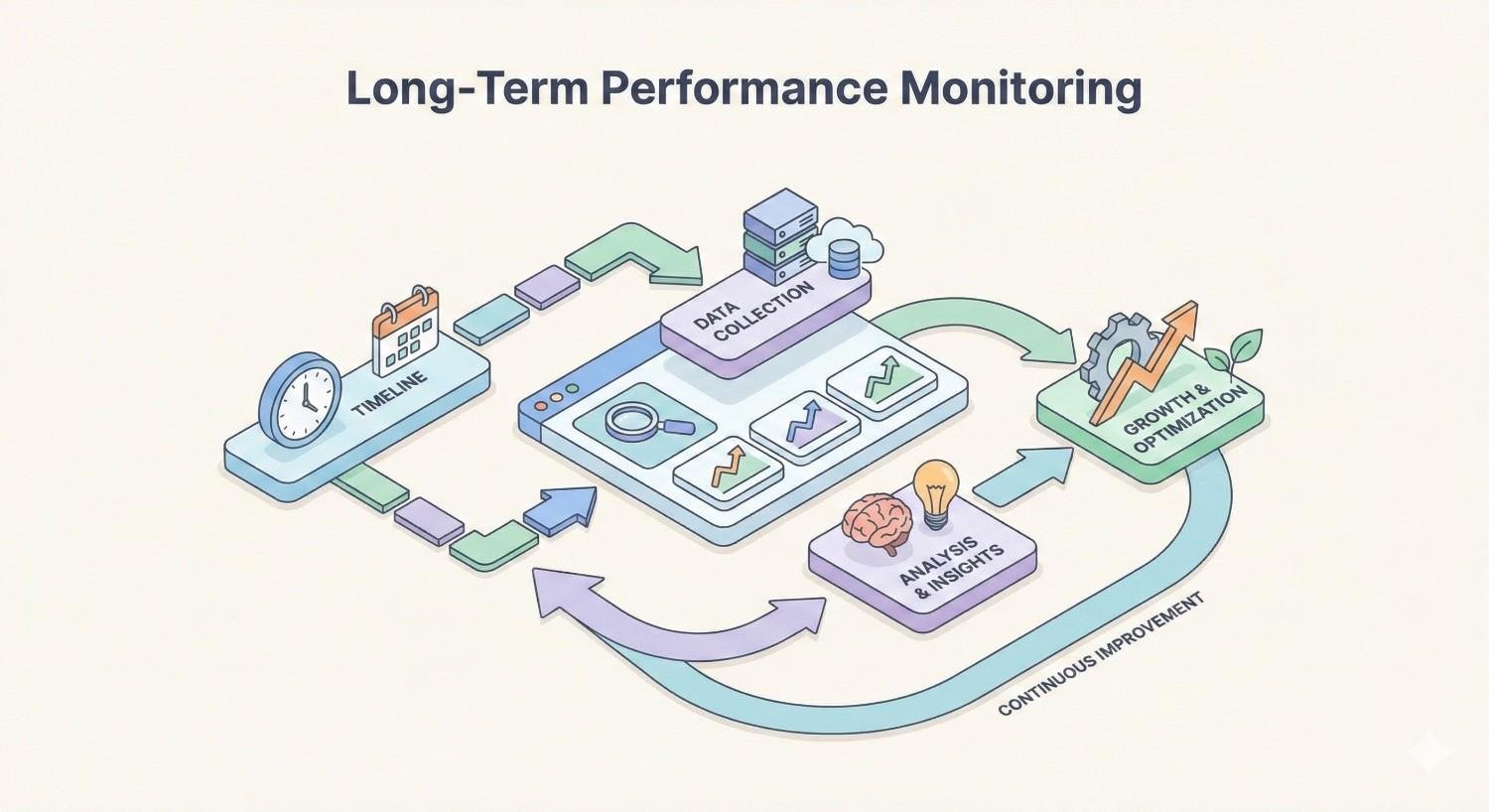
Long-Term Performance Monitoring
Performance optimization isn’t a one-time project. Ongoing monitoring identifies degradation, validates changes, and reveals new optimization opportunities.
Set up automated monitoring:
- Google Search Console tracks Core Web Vitals from real users
- Uptime monitoring services alert you to outages
- CDN dashboards show cache performance trends
- Synthetic monitoring tools run regular speed tests
Establish review cadence:
- Weekly: Check for anomalies in CDN analytics
- Monthly: Review Core Web Vitals trends in Search Console
- Quarterly: Comprehensive performance audit with benchmarking
Track correlation with business metrics:
- Monitor organic traffic alongside speed improvements
- Track conversion rates as performance changes
- Document ranking changes for key pages
Stay current with CDN features:
CDN providers regularly release new features and optimizations. Review release notes and consider enabling new capabilities that could improve performance.
Conclusion
CDN implementation delivers measurable improvements to website speed, directly supporting Core Web Vitals performance and user experience metrics that influence search rankings. The technology eliminates latency through edge caching, optimizes content delivery through compression and modern protocols, and provides the foundation for fast page loads regardless of visitor location.
Speed optimization extends beyond CDN configuration into server performance, database efficiency, and overall technical SEO health. A comprehensive approach addresses all layers of the performance stack while maintaining proper search engine accessibility and avoiding common configuration mistakes.
At White Label SEO Service, we integrate CDN strategy into complete technical SEO programs that drive sustainable organic growth. Our team handles implementation, monitoring, and ongoing optimization so you can focus on your business while your site performs at its best. Contact us to discuss how faster load times can accelerate your search visibility and conversion rates.
Frequently Asked Questions About CDN for Website Speed
Does a CDN help with mobile website speed?
Yes, CDNs significantly improve mobile website speed. Mobile users often connect through cellular networks with higher latency than wired connections. By serving content from nearby edge servers, CDNs reduce the distance data travels, which is especially impactful on slower mobile networks. Additionally, CDN features like image optimization and compression reduce data transfer, helping pages load faster on bandwidth-limited mobile connections.
How much does a CDN cost?
CDN costs range from free to thousands of dollars monthly depending on features and traffic volume. Cloudflare offers a robust free tier suitable for small to medium sites. Paid plans typically start around $20-25 per month for basic features. Enterprise solutions with advanced security, dedicated support, and custom configurations can cost $500 to $5,000+ monthly. Most providers offer pay-as-you-go pricing based on bandwidth consumption.
Can a CDN improve website security?
CDNs provide substantial security benefits beyond speed improvements. Most include DDoS protection that absorbs attack traffic across their distributed network. Web Application Firewalls (WAF) filter malicious requests before they reach your server. SSL/TLS encryption protects data in transit. Some CDNs also offer bot management, rate limiting, and protection against common vulnerabilities like SQL injection and cross-site scripting.
How long does it take to see CDN speed improvements?
Speed improvements are typically visible immediately after DNS propagation completes and CDN caches warm up. DNS propagation can take anywhere from a few minutes to 48 hours. Initial requests populate the cache, so performance improves as more content gets cached at edge locations. Most sites see significant improvements within 24-48 hours of proper CDN configuration. Core Web Vitals improvements in Google Search Console may take 28 days to reflect in the data.
Do I need a CDN if my audience is local?
A CDN still provides benefits for locally-focused websites, though the latency reduction is less dramatic. Local audiences benefit from CDN features like image optimization, compression, and modern protocol support. CDNs also provide redundancy—if your origin server experiences issues, cached content remains available. For businesses with purely local audiences and simple websites, a CDN is less critical but still offers performance and reliability improvements worth considering.
Will a CDN help my Google rankings directly?
CDNs indirectly support rankings by improving Core Web Vitals scores, which are confirmed Google ranking factors. Faster load times reduce bounce rates and improve user engagement metrics that may influence rankings. However, CDNs don’t directly boost rankings—they improve the technical foundation that supports ranking potential. Content quality, relevance, and authority remain the primary ranking factors. Think of CDN implementation as removing a potential ranking barrier rather than adding ranking power.
Can I use a CDN with any web hosting provider?
Most CDNs work with any hosting provider since they sit between your visitors and your origin server. You configure DNS to route traffic through the CDN, which then fetches content from your existing host. Some managed hosting providers include CDN functionality or have preferred CDN partnerships. A few hosts may have configurations that complicate CDN setup, but these situations are rare. Check your CDN provider’s documentation for any hosting-specific considerations.


