

Your site architecture directly determines how search engines discover, crawl, and rank your pages. Flat structures keep content within 2-3 clicks of the homepage, maximizing crawl efficiency. Deep structures organize content through multiple category layers, creating topical clarity for large sites.
The right choice depends on your site size, content volume, and business model. A 50-page service site needs different architecture than a 10,000-product e-commerce store.
This guide breaks down both approaches, compares their SEO impact, and shows you exactly how to implement the structure that drives better organic performance for your specific situation.
What Is Site Architecture in SEO?
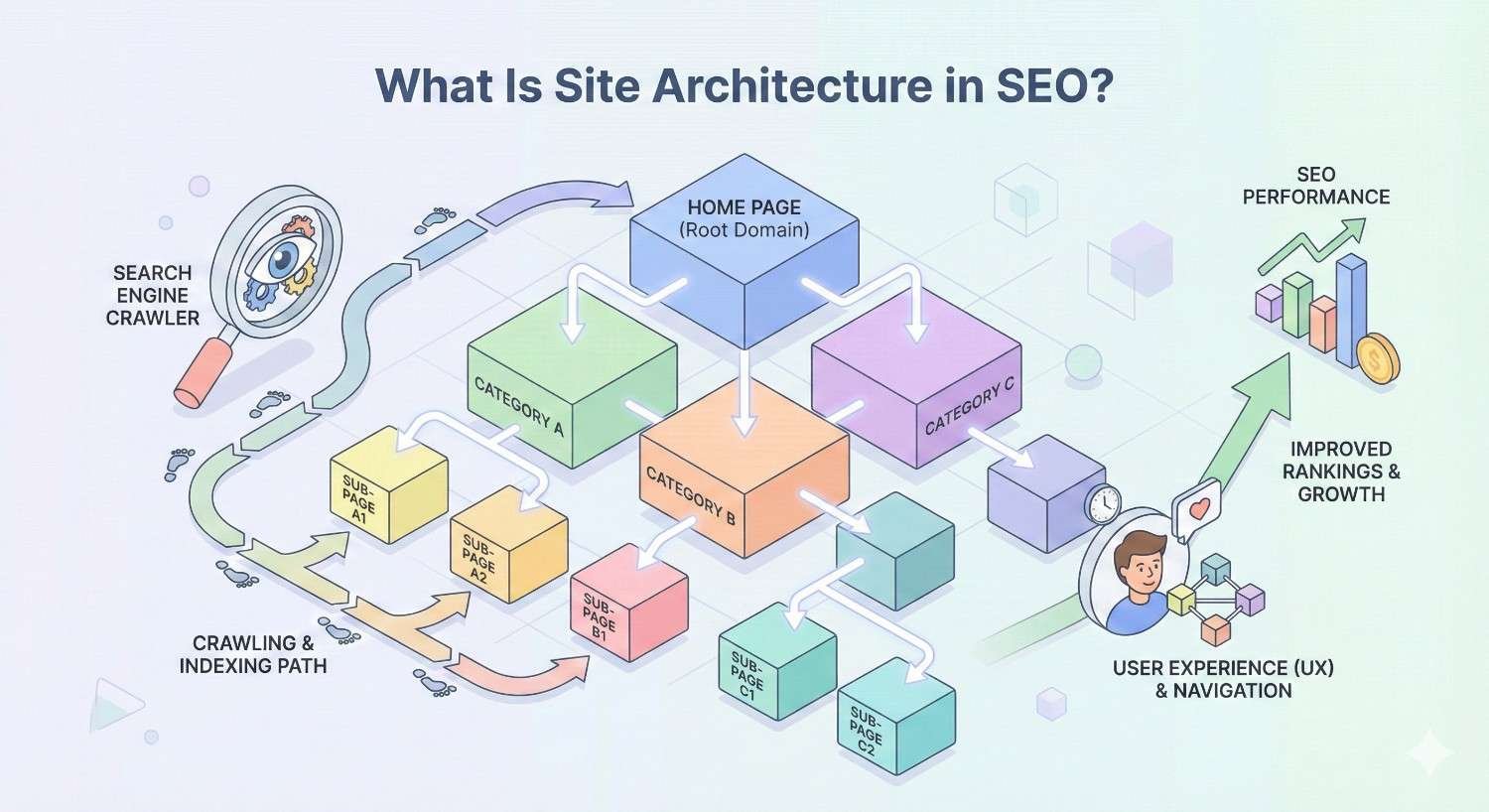
Site architecture refers to how you organize and connect pages on your website. It determines the pathways users and search engines follow to discover your content. Strong architecture creates logical relationships between pages, distributes link equity effectively, and signals topical relevance to crawlers.
Think of it as your website’s blueprint. Every page needs a clear position in the hierarchy, accessible through intentional navigation paths and internal links.
Defining Site Structure and Hierarchy
Site structure is the organizational framework that groups related content together. Hierarchy establishes parent-child relationships between pages, moving from broad topics to specific subtopics.
A typical hierarchy flows from homepage to category pages to subcategory pages to individual content pages. Each level represents increasing specificity. Your homepage covers your entire business. Category pages address major topic areas. Individual pages target specific queries.
The depth of this hierarchy varies significantly between flat and deep architectures. Flat sites compress the hierarchy into fewer levels. Deep sites expand it across many levels.
URL structure often reflects this hierarchy. A flat structure might use example.com/product-name while a deep structure uses example.com/category/subcategory/product-name. Both approaches have distinct advantages depending on your content strategy.
How Search Engines Crawl and Index Site Architecture
Googlebot and other crawlers navigate your site by following links. They start from known pages, typically your homepage or sitemap, and discover new content through internal links.
Crawl budget matters for larger sites. Search engines allocate limited resources to each domain. Pages buried deep in your architecture may receive fewer crawl visits, potentially delaying indexation or causing pages to drop from the index entirely.
Click depth directly impacts crawl priority. Pages closer to the homepage typically receive more frequent crawls. Google’s own documentation confirms that internal linking patterns influence how Googlebot discovers and prioritizes content.
Architecture also affects how search engines understand topical relationships. Clear hierarchies help crawlers identify which pages belong together and how they relate to broader topics. This contextual understanding influences how Google evaluates your topical authority.
What Is Flat Site Architecture?
Flat site architecture minimizes the number of clicks required to reach any page from the homepage. Most content sits within 1-3 clicks of the homepage, creating a wide, shallow structure rather than a narrow, deep one.
This approach prioritizes accessibility and crawl efficiency over detailed categorization. Every page maintains close proximity to your site’s authority center.
Core Characteristics of Flat Architecture
Flat architecture features minimal hierarchy levels. The homepage links directly to most important pages. Category pages, if they exist, contain comprehensive internal links to all relevant content.
Navigation menus in flat structures tend to be expansive. Mega menus, footer links, and sidebar navigation expose many pages simultaneously. This creates multiple pathways to each piece of content.
URL structures in flat architectures are typically short. Pages often sit directly off the root domain without nested folder structures. This simplicity makes URLs easier to remember and share.
Internal linking density is high in flat structures. Pages connect to many other pages, creating a web-like pattern rather than a tree-like hierarchy. This distributes PageRank more evenly across the site.
Click Depth and Crawl Efficiency in Flat Structures
Click depth measures how many clicks separate a page from the homepage. Flat architectures keep most pages within 2-3 clicks, ensuring crawlers can reach all content quickly.
Lower click depth correlates with faster indexation. When Googlebot can reach a page in fewer steps, it typically discovers and indexes that content sooner. For time-sensitive content or new product launches, this speed advantage matters.
Crawl efficiency improves because crawlers don’t need to navigate through multiple intermediate pages. Each crawl session can cover more unique URLs when paths are shorter.
However, extremely flat structures can create navigation challenges. When every page links to dozens of other pages, the signal of which pages matter most becomes diluted. Strategic internal linking becomes essential to maintain clear priority signals.
When Flat Architecture Works Best
Flat architecture excels for smaller websites with fewer than 500 pages. Service businesses, local companies, and focused content sites benefit from keeping all content easily accessible.
Sites with limited content categories also suit flat structures. If your business covers 3-5 main topics, you don’t need deep hierarchical organization. A flat approach keeps navigation simple and crawl paths short.
Websites prioritizing crawl speed and indexation benefit from flat architecture. News sites, blogs with frequent publishing, and sites competing on content freshness gain advantages from rapid crawler access.
Flat structures also work well when most pages have similar importance. If you don’t have clear tier distinctions between content types, a flat approach distributes authority more evenly.
What Is Deep Site Architecture?
Deep site architecture organizes content through multiple hierarchical levels. Pages may sit 4, 5, or more clicks from the homepage, nested within categories, subcategories, and sub-subcategories.
This approach prioritizes logical organization and topical clarity over crawl proximity. It creates clear content silos that signal expertise in specific subject areas.
Core Characteristics of Deep Architecture
Deep architecture features extensive hierarchy. Content flows from broad categories through increasingly specific subcategories before reaching individual pages. Each level narrows the topical focus.
Navigation in deep structures relies heavily on breadcrumbs and contextual links. Users and crawlers follow logical paths through the hierarchy rather than jumping directly to deep content.
URL structures reflect the hierarchy depth. Paths like /category/subcategory/sub-subcategory/page-name clearly communicate the content’s position within the site’s organizational framework.
Internal linking follows hierarchical patterns. Parent pages link to child pages. Sibling pages link to each other within categories. This creates clear topical clusters that search engines can identify.
Hierarchical Organization and Category Depth
Deep hierarchies create distinct content silos. Each major category becomes a self-contained topic cluster with its own subcategories and supporting content.
This organization signals topical authority to search engines. When Google sees comprehensive coverage of a topic organized logically, it better understands your expertise in that area.
Category depth allows for precise content targeting. You can create pages for highly specific long-tail queries and position them appropriately within your topical hierarchy.
However, excessive depth creates problems. Pages buried 6+ clicks deep may struggle to accumulate authority or receive regular crawls. Most SEO professionals recommend keeping maximum click depth to 4 levels for important content.
When Deep Architecture Works Best
Deep architecture suits large websites with thousands of pages. E-commerce sites with extensive product catalogs need hierarchical organization to maintain usability and crawl efficiency.
Sites covering broad topic areas benefit from deep structures. If your content spans dozens of distinct categories, hierarchical organization helps users and search engines navigate the complexity.
Businesses with complex product or service taxonomies need deep architecture. When offerings have multiple attributes, variations, and relationships, flat structures become unwieldy.
Deep structures also support sophisticated SEO strategies. Topic clusters, pillar content models, and siloed authority building all rely on hierarchical organization to function effectively.
Flat vs Deep Site Architecture: Direct Comparison
Both architectures have distinct strengths and weaknesses. The right choice depends on your specific situation, content volume, and SEO goals.
Crawl Efficiency and Indexation
Flat architecture wins on raw crawl efficiency. Shorter paths mean faster discovery and more pages crawled per session. For sites with crawl budget constraints, this advantage is significant.
Deep architecture requires more intentional crawl optimization. XML sitemaps become essential for ensuring deep pages get discovered. Internal linking must be strategic to guide crawlers through the hierarchy.
However, deep architecture can improve crawl prioritization. Clear hierarchies help search engines understand which pages matter most. Category pages signal importance, directing crawl resources appropriately.
For most small to medium sites, flat architecture provides sufficient crawl efficiency. Large sites with tens of thousands of pages may need deep architecture’s organizational benefits despite the crawl complexity.
Link Equity Distribution (PageRank Flow)
Flat architecture distributes link equity more evenly. When most pages sit close to the homepage, they all benefit from its authority. External links to any page flow quickly throughout the site.
Deep architecture concentrates authority at higher hierarchy levels. Category pages accumulate link equity from their child pages. This can create powerful category-level rankings but may leave deep pages with limited authority.
Strategic internal linking can modify these patterns in either architecture. Flat sites can create priority pages through link volume. Deep sites can boost important deep pages through contextual links from authoritative pages.
The best approach depends on your ranking goals. If you need strong category-level rankings, deep architecture’s natural authority concentration helps. If you need many individual pages to rank, flat architecture’s even distribution may work better.
User Experience and Navigation
Flat architecture simplifies navigation for small sites. Users can reach any content quickly without learning complex category structures. This works well when your audience has diverse needs.
Deep architecture improves navigation for large, complex sites. Clear categories help users find relevant content without overwhelming them with options. Breadcrumbs provide orientation and easy backtracking.
Mobile navigation favors flatter structures. Limited screen space makes deep hierarchical menus difficult to use. Flat sites adapt more easily to mobile-first design requirements.
User intent should guide your choice. If visitors typically know what they want, flat navigation gets them there faster. If visitors need to browse and discover, deep hierarchical navigation supports exploration.
Scalability and Content Growth
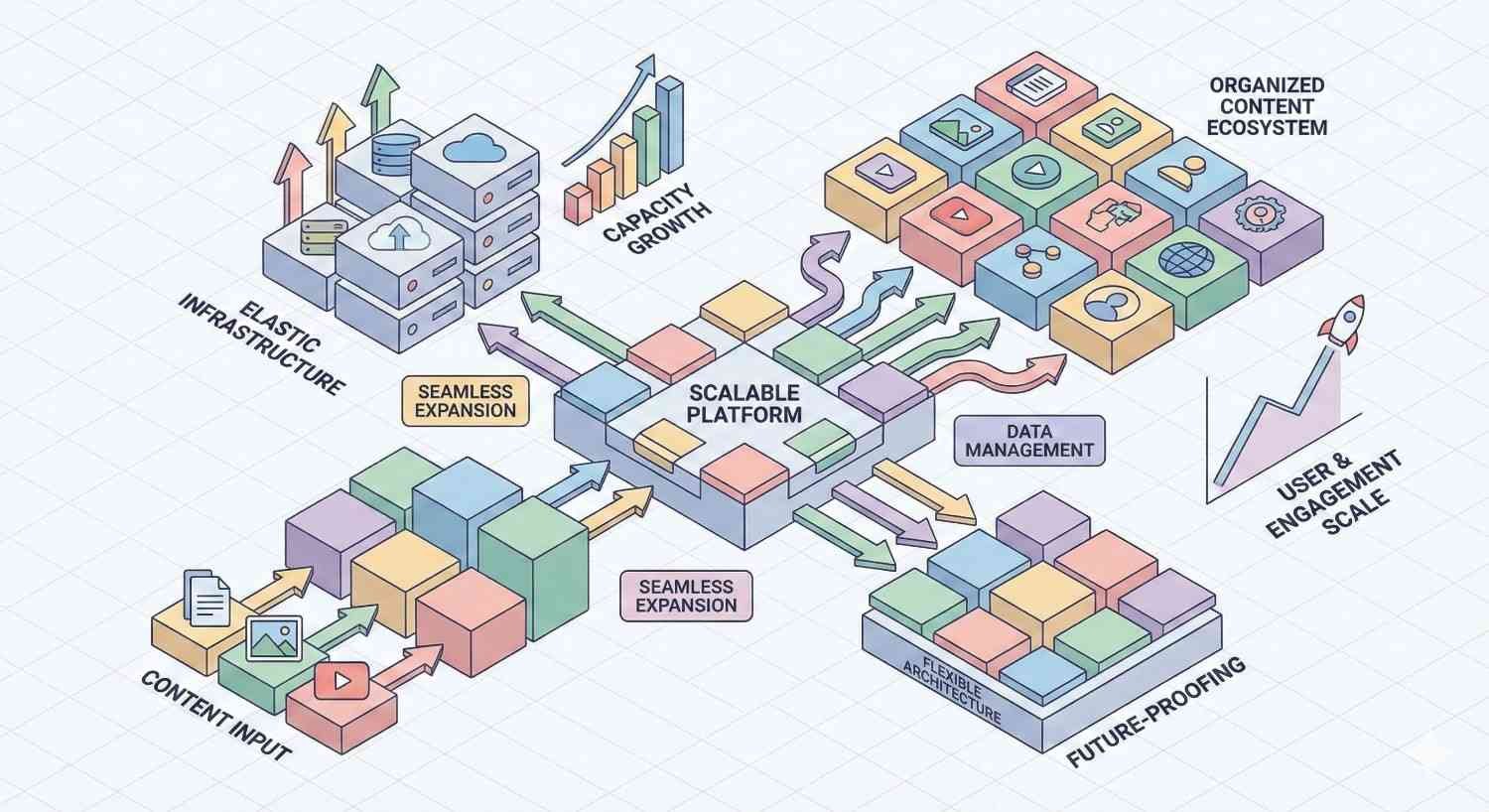
Deep architecture scales better for content growth. Adding new subcategories and pages fits naturally within the existing hierarchy. The structure accommodates expansion without fundamental reorganization.
Flat architecture becomes unwieldy as sites grow. Navigation menus overflow. Internal linking becomes chaotic. At some point, flat sites must restructure into deeper hierarchies to remain manageable.
Plan for your 3-5 year content roadmap when choosing architecture. If you expect significant growth, starting with a moderately deep structure prevents painful migrations later.
Hybrid approaches offer flexibility. Start relatively flat, then add hierarchy as content volume justifies it. This balances current simplicity with future scalability.
Technical Implementation Complexity
Flat architecture is simpler to implement and maintain. Fewer hierarchy levels mean simpler URL structures, navigation systems, and internal linking patterns.
Deep architecture requires more sophisticated technical infrastructure. Breadcrumb systems, faceted navigation, and dynamic internal linking become necessary. CMS configuration grows more complex.
Development resources should factor into your decision. If you lack technical SEO expertise or development support, flat architecture reduces implementation risk.
However, deep architecture’s complexity often reflects genuine content complexity. Forcing a flat structure onto inherently hierarchical content creates worse problems than managing a deep hierarchy properly.
How Site Architecture Affects SEO Performance
Architecture decisions ripple through every aspect of SEO performance. Understanding these connections helps you make informed structural choices.
Impact on Crawl Budget and Indexation Speed
Crawl budget represents the resources Google allocates to crawling your site. Architecture directly affects how efficiently those resources translate into indexed pages.
Flat sites maximize crawl efficiency. More pages get discovered and indexed per crawl session. New content enters the index faster. Updates propagate more quickly.
Deep sites require crawl budget optimization. Strategic internal linking, XML sitemaps, and crawl prioritization through robots.txt become essential. Without these optimizations, deep pages may languish unindexed.
Google Search Console’s crawl stats report reveals how architecture affects your specific site. Monitor crawl frequency across different site sections to identify architecture-related issues.
Internal Linking and Authority Distribution
Internal links are the primary mechanism for distributing authority throughout your site. Architecture determines the natural flow patterns of this authority.
Flat architecture creates dense internal link networks. Authority flows freely between pages. This benefits sites where many pages need to rank independently.
Deep architecture creates hierarchical authority flow. Link equity concentrates at category levels, then trickles down to child pages. This benefits sites targeting competitive category-level keywords.
Intentional internal linking can override architectural defaults. Add contextual links from high-authority pages to important deep content. Create hub pages that consolidate authority around key topics.
URL Structure and Keyword Targeting
URL structure often reflects architecture choices. These URLs affect both user perception and search engine understanding.
Flat URLs are short and keyword-focused. example.com/blue-running-shoes puts the target keyword prominently in a clean, memorable URL.
Deep URLs provide context through hierarchy. example.com/shoes/running/blue-running-shoes signals the content’s relationship to broader categories. This can help with topical relevance signals.
Neither approach is inherently better for rankings. Google has stated that URL structure is a minor ranking factor. Focus on creating logical, readable URLs that accurately represent your content’s position in your site.
Site Speed and Technical Performance
Architecture affects page load performance through navigation complexity and internal linking patterns.
Flat sites with mega menus may load more slowly. Rendering extensive navigation elements adds to page weight. JavaScript-heavy navigation systems can delay interactivity.
Deep sites with simpler navigation often load faster initially. However, users may need more page loads to reach their destination, increasing total session load time.
Optimize navigation rendering regardless of architecture. Lazy-load menu elements. Minimize JavaScript dependencies. Prioritize above-the-fold content loading.
Choosing the Right Architecture for Your Website
The optimal architecture depends on multiple factors specific to your situation. Consider these dimensions when making your decision.
Site Size and Content Volume Considerations
Page count is the primary driver of architecture decisions. Small sites benefit from flat structures. Large sites require hierarchical organization.
Under 100 pages: Flat architecture works well. Keep everything within 2 clicks of the homepage.
100-500 pages: Moderately flat with light categorization. Use 2-3 hierarchy levels maximum.
500-5,000 pages: Balanced hierarchy. Implement clear categories and subcategories while maintaining reasonable click depth.
5,000+ pages: Deep architecture becomes necessary. Focus on crawl optimization and strategic internal linking to support the hierarchy.
These thresholds are guidelines, not rules. Content complexity matters as much as volume. A 200-page site covering 20 distinct topics may need more hierarchy than a 500-page site focused on one topic.
Business Model and User Journey Mapping
Your business model shapes how users interact with your site. Architecture should support natural user journeys.
E-commerce: Users browse categories, filter options, and compare products. Deep hierarchical architecture supports this discovery process.
Lead generation: Users research topics, evaluate solutions, and convert. Flat architecture with clear conversion paths often works best.
Content publishing: Users discover content through search, browse related articles, and subscribe. Moderate hierarchy with strong internal linking supports engagement.
SaaS/Software: Users evaluate features, compare plans, and sign up. Flat architecture with clear product and pricing pages typically performs well.
Map your typical user journeys before finalizing architecture. Ensure your structure supports rather than hinders the paths users naturally want to follow.
Industry-Specific Architecture Patterns
Certain industries have established architecture patterns that users expect. Deviating from these patterns can create friction.
E-commerce: Category > Subcategory > Product structure is standard. Users expect faceted navigation and filtering. Deep architecture is the norm.
Professional services: Service pages, industry pages, and resource sections are common. Moderate hierarchy with clear service categorization works well.
Media/Publishing: Topic categories, author pages, and chronological archives are expected. Flat to moderate hierarchy with strong tagging systems.
B2B Technology: Product pages, solution pages, resource libraries, and documentation. Moderate hierarchy with multiple navigation paths to key content.
Study competitors and industry leaders to understand user expectations. Your architecture should feel familiar while improving on existing patterns.
Hybrid Architecture Approaches
Most successful sites use hybrid approaches rather than pure flat or deep structures. Strategic combination captures benefits of both.
Flat core with deep extensions: Keep main navigation flat while allowing specific sections to develop deeper hierarchies. An e-commerce site might have flat service pages but deep product catalogs.
Deep structure with flat shortcuts: Maintain hierarchical organization while providing direct links to popular deep content. Featured products, trending articles, and quick links bypass the hierarchy for high-demand pages.
Tiered depth by content type: Apply different depth levels to different content types. Blog posts might sit in a flat structure while product pages follow deep categorization.
The key is intentional design. Choose your hybrid approach based on content needs and user behavior, not arbitrary decisions or technical convenience.
How to Implement Flat Site Architecture
Implementing flat architecture requires deliberate planning to maintain organization while minimizing hierarchy depth.
Reducing Click Depth Across Your Site
Audit your current click depth using crawling tools. Identify pages more than 3 clicks from the homepage. These are candidates for restructuring.
Add direct links from the homepage to important deep pages. Feature key content in homepage sections, sidebars, or footer navigation.
Consolidate thin category levels. If a category contains only 2-3 subcategories, consider merging them into a single level.
Create hub pages that aggregate related content. A single hub page linking to 20 related articles is flatter than 4 category pages each linking to 5 articles.
Review your URL structure. Remove unnecessary folder levels. example.com/blog/2024/january/post-title can become example.com/blog/post-title without losing meaning.
Internal Linking Strategies for Flat Structures
Flat sites need robust internal linking to maintain topical signals without hierarchical structure.
Implement contextual links within content. Every page should link to 3-5 related pages through natural in-content references.
Create related content sections. Display related posts, products, or services at the bottom of each page. This creates lateral connections across your flat structure.
Use tag and topic pages strategically. Even without deep hierarchy, topic aggregation pages help users and crawlers find related content.
Build pillar content that links comprehensively to supporting pages. These pillar pages become authority hubs within your flat structure.
Audit internal link distribution regularly. Ensure important pages receive adequate internal links even without hierarchical positioning to boost them.
Navigation and Menu Design Best Practices
Flat site navigation must expose content without overwhelming users.
Prioritize your main navigation carefully. Include only the most important 5-7 sections. Use dropdowns sparingly to maintain simplicity.
Implement comprehensive footer navigation. Footer links can expose secondary pages without cluttering main navigation.
Consider mega menus for content-rich flat sites. Well-designed mega menus can display many options in an organized, scannable format.
Add search functionality prominently. When navigation can’t expose everything, search becomes essential for content discovery.
Use breadcrumbs even in flat structures. They provide orientation and easy navigation even when hierarchy is minimal.
How to Implement Deep Site Architecture
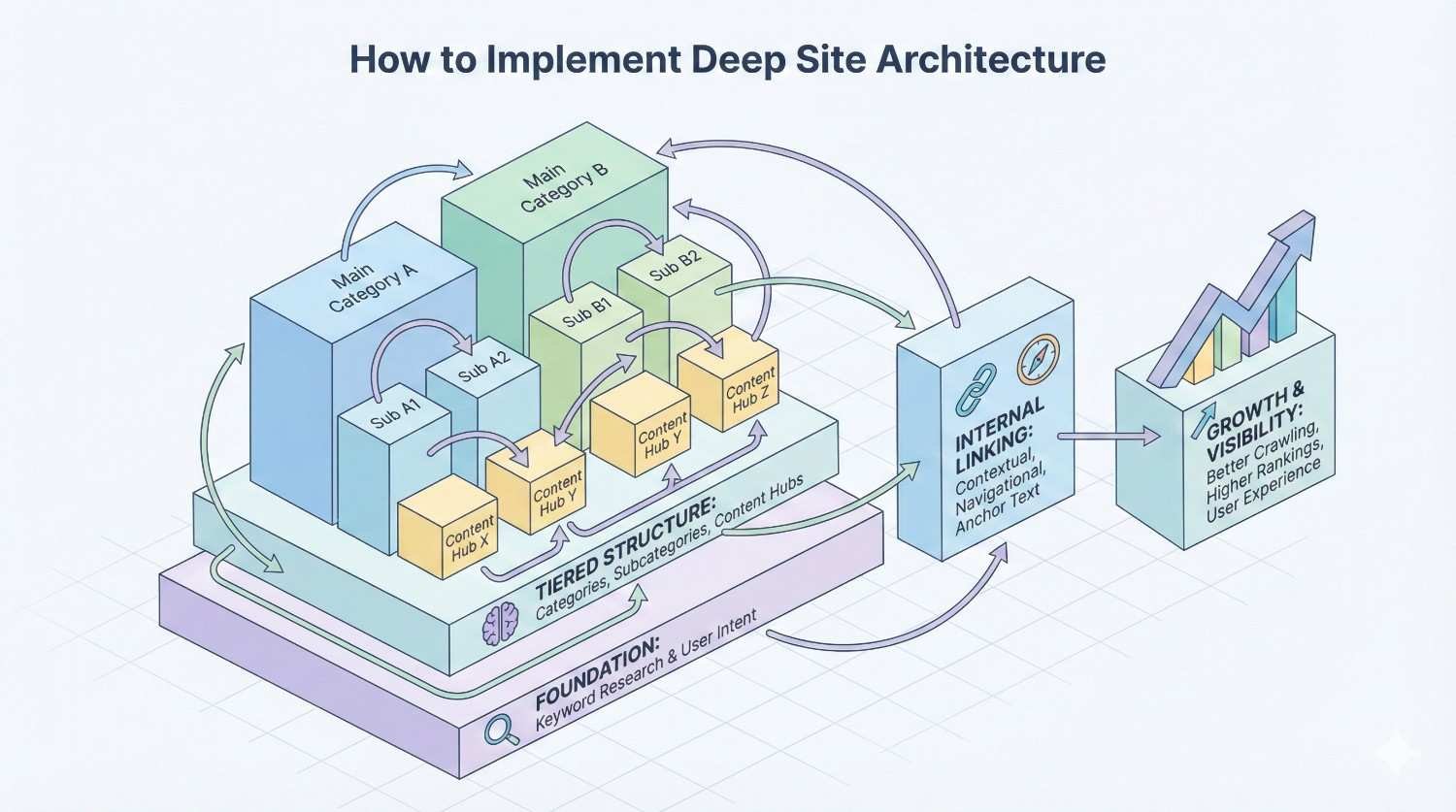
Deep architecture requires careful planning to maintain crawl efficiency and user experience across multiple hierarchy levels.
Creating Logical Category Hierarchies
Start with your content inventory. Group pages by topic, then identify natural subcategories within each group.
Limit hierarchy depth to 4 levels maximum for important content. Deeper pages struggle to accumulate authority and may face indexation challenges.
Ensure each category level has sufficient content. Categories with only 1-2 child pages add unnecessary depth. Consolidate sparse categories.
Name categories clearly and consistently. Users and search engines should understand what content belongs in each category from the name alone.
Plan for growth within your hierarchy. Leave room for new subcategories without restructuring existing content.
Breadcrumb Navigation and URL Structures
Breadcrumbs are essential for deep architecture usability. They show users their location and provide easy navigation to parent categories.
Implement breadcrumb structured data using Schema.org BreadcrumbList markup. This helps search engines understand your hierarchy and can generate breadcrumb displays in search results.
Match URL structure to your hierarchy. URLs should reflect the breadcrumb path: example.com/category/subcategory/page-name.
Keep URL segments short and descriptive. Use hyphens between words. Avoid unnecessary words like “the” or “and” in URL paths.
Ensure breadcrumbs and URLs remain synchronized. Mismatches confuse users and send mixed signals to search engines.
Managing Orphan Pages and Dead Ends
Deep architectures risk creating orphan pages that lack internal links. Regular audits prevent this problem.
Use crawling tools to identify orphan pages. Any page not linked from other pages on your site is effectively invisible to crawlers following links.
Add orphan pages to appropriate category pages. Every page should have at least one contextual internal link from a related page.
Eliminate dead-end pages that don’t link to other content. Every page should offer users clear next steps through internal links.
Create category-level navigation that exposes all child pages. Users browsing a category should be able to discover all content within it.
Monitor Google Search Console for indexation issues. Pages that drop from the index may have become orphaned through site changes.
Common Site Architecture Mistakes to Avoid
Architecture mistakes can undermine your SEO efforts regardless of whether you choose flat or deep structures.
Excessive Click Depth (Beyond 3-4 Clicks)
Pages buried too deep in your hierarchy face multiple problems. Crawlers may not reach them frequently. They accumulate less authority. Users may never find them.
Audit click depth regularly. Any page more than 4 clicks from the homepage deserves scrutiny. Is that depth necessary? Can you create shorter paths?
Add direct links to important deep content. Feature deep pages in navigation, sidebars, or related content sections to reduce effective click depth.
Consider flattening sections with excessive depth. If users and crawlers struggle to reach content, the organizational benefits of depth aren’t worth the accessibility costs.
Poor Internal Linking and Siloed Content
Siloed content lacks connections to the rest of your site. This isolates pages from authority flow and makes them harder to discover.
Every page needs contextual internal links. Link to related content naturally within your text. Don’t rely solely on navigation and automated related content.
Connect silos through strategic cross-links. Even if you maintain topical silos, occasional links between related topics strengthen your overall site authority.
Audit internal link distribution. Pages with few incoming internal links need attention. Add links from relevant, authoritative pages.
Avoid over-relying on automated internal linking. Plugins that add random related links often create irrelevant connections. Manual, contextual linking performs better.
Inconsistent URL Structures
Inconsistent URLs confuse users and search engines. They make your site harder to understand and can create duplicate content issues.
Establish URL conventions and follow them consistently. Decide on trailing slashes, capitalization, and folder structures, then apply them site-wide.
Redirect inconsistent URLs to canonical versions. If both example.com/page and example.com/page/ exist, redirect one to the other.
Avoid changing URL structures without redirects. Every URL change without a 301 redirect loses accumulated authority and creates broken links.
Document your URL structure rules. Ensure everyone creating content understands and follows the conventions.
Ignoring Mobile Navigation Patterns
Mobile users interact with navigation differently than desktop users. Architecture that works on desktop may fail on mobile.
Test your navigation on actual mobile devices. Hamburger menus, deep dropdowns, and complex mega menus often frustrate mobile users.
Simplify mobile navigation paths. Mobile users have less patience for browsing. Provide clear, direct paths to popular content.
Ensure touch targets are adequately sized. Links and buttons need sufficient spacing for accurate tapping.
Consider mobile-specific navigation patterns. Bottom navigation bars, sticky headers, and simplified category structures often work better on mobile.
Tools and Methods for Analyzing Site Architecture
Regular architecture analysis identifies problems before they impact performance. These tools and methods support ongoing optimization.
Crawling Tools (Screaming Frog, Sitebulb, DeepCrawl)
Desktop crawlers simulate how search engines navigate your site. They reveal architecture issues that manual review misses.
Screaming Frog SEO Spider is the industry standard for site crawling. It maps your site structure, identifies click depth, and flags orphan pages.
Sitebulb provides visual architecture analysis with intuitive diagrams. Its hints system highlights specific architecture problems and suggests fixes.
Lumar (formerly DeepCrawl) handles enterprise-scale sites that overwhelm desktop tools. Cloud-based crawling supports sites with millions of pages.
Run crawls monthly at minimum. More frequent crawls catch issues faster, especially on sites with regular content changes.
Visualizing Site Structure and Click Depth
Visual representations make architecture problems obvious. Diagrams reveal issues that spreadsheets hide.
Most crawling tools include visualization features. Screaming Frog’s directory tree and Sitebulb’s crawl maps show your structure graphically.
Look for visual patterns indicating problems. Isolated clusters suggest siloed content. Long chains indicate excessive depth. Missing connections reveal internal linking gaps.
Share visualizations with stakeholders. Non-technical team members understand visual architecture representations more easily than technical reports.
Create before-and-after visualizations when restructuring. These demonstrate the impact of architecture changes clearly.
Google Search Console Insights
Google Search Console provides direct data on how Google crawls and indexes your site.
The Coverage report shows indexation status across your site. Pages excluded from indexing may have architecture-related issues.
The Crawl Stats report reveals crawling patterns. Declining crawl rates or uneven crawling across site sections suggest architecture problems.
URL Inspection shows how Google sees individual pages. Check important pages to ensure they’re indexed and rendering correctly.
The Links report shows internal link distribution. Pages with few internal links may need better integration into your architecture.
Log File Analysis for Crawl Patterns
Server logs reveal actual Googlebot behavior on your site. This data shows what crawlers actually do, not what tools predict they’ll do.
Log file analysis shows which pages Googlebot visits and how often. Pages rarely crawled may have architecture issues limiting their discovery.
Compare crawl frequency across site sections. Sections with lower crawl rates may need better internal linking or shorter paths from the homepage.
Identify crawl waste on low-value pages. If Googlebot spends resources on pagination, filters, or other low-value URLs, architecture changes can redirect that budget to important content.
Tools like Screaming Frog Log File Analyser and JetOctopus simplify log analysis for SEO purposes.
Migrating Between Site Architecture Types
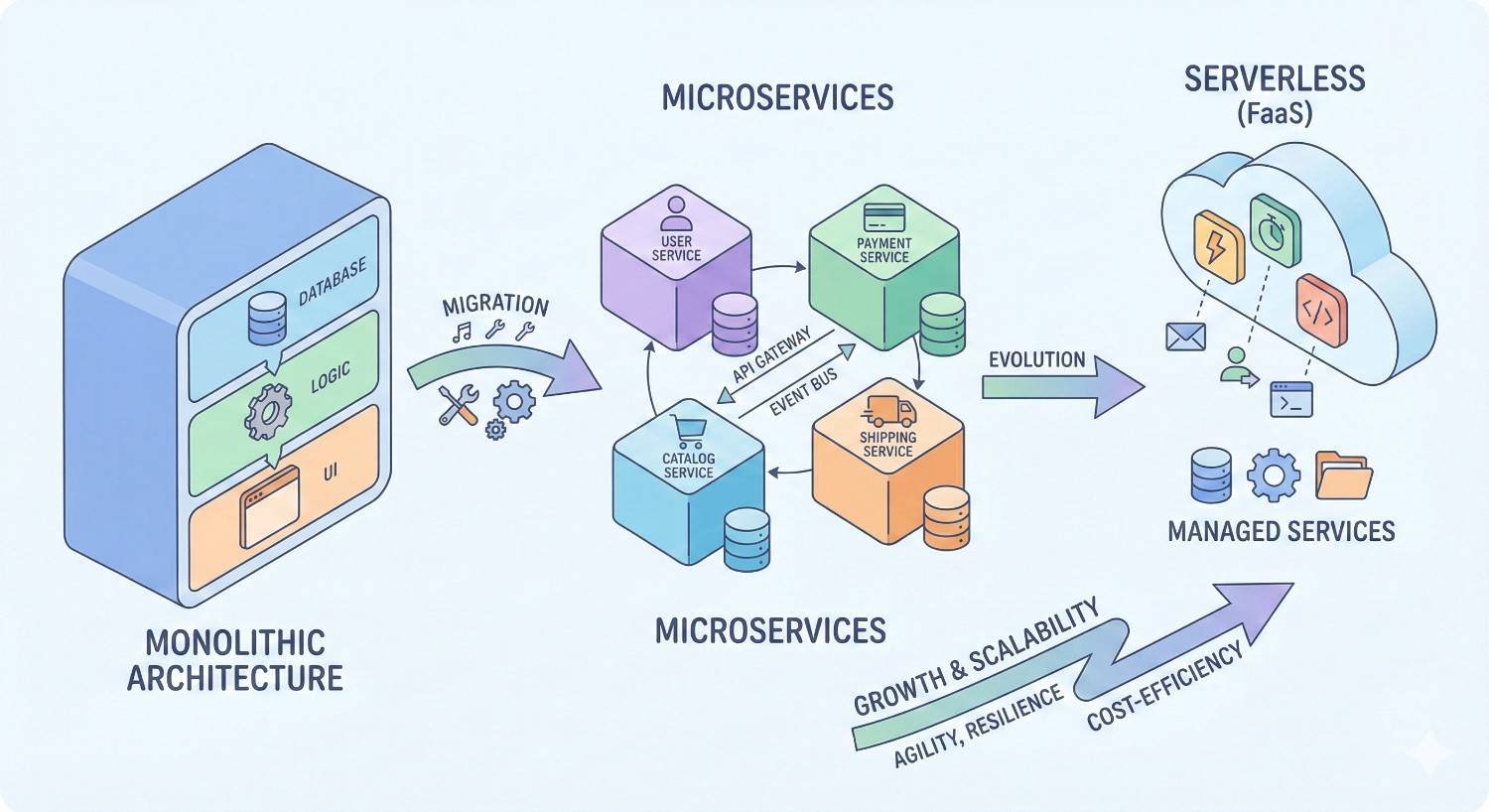
Architecture migrations are complex projects with significant SEO risk. Careful planning minimizes disruption.
Planning Your Architecture Migration
Document your current architecture thoroughly before making changes. Map all URLs, their current positions, and their performance metrics.
Define clear goals for the migration. What problems are you solving? What improvements do you expect? How will you measure success?
Create your new architecture map before touching the live site. Plan every URL’s new location and the redirects required.
Identify high-value pages requiring extra attention. Pages with strong rankings, significant traffic, or important backlinks need careful handling.
Set realistic timelines. Architecture migrations typically cause temporary ranking fluctuations. Plan for a 2-4 month stabilization period.
301 Redirects and URL Mapping
Every URL change requires a 301 redirect from the old URL to the new URL. Missing redirects cause 404 errors and lost authority.
Create comprehensive redirect maps before migration. Spreadsheets mapping old URLs to new URLs prevent missed redirects.
Implement redirects before removing old URLs. The redirect should be in place before the old URL stops working.
Avoid redirect chains. If page A redirected to page B, and now page B moves to page C, update the redirect so A goes directly to C.
Test redirects thoroughly after implementation. Crawl your old URL list and verify each redirect resolves correctly.
Preserving Link Equity During Restructuring
External backlinks represent accumulated authority. Redirects preserve most of this value, but some loss is inevitable.
Identify pages with significant backlink profiles. These pages need direct redirects to relevant new URLs, not generic category pages.
Redirect to the most relevant new URL. A product page should redirect to the same product’s new URL, not a category page.
Update internal links to point directly to new URLs. While redirects work, direct links are more efficient and pass authority more cleanly.
Consider reaching out to high-value link sources. If important sites link to you, notifying them of URL changes may prompt them to update their links.
Monitoring Performance Post-Migration
Close monitoring catches problems early when they’re easier to fix.
Track crawl rates in Google Search Console. Declining crawls after migration may indicate redirect problems or architecture issues.
Monitor indexation of new URLs. New URLs should enter the index within days to weeks. Delayed indexation suggests discovery problems.
Watch rankings for key pages closely. Some fluctuation is normal, but sustained drops indicate problems requiring investigation.
Check for 404 errors in Search Console and analytics. Spikes in 404s reveal missed redirects or broken internal links.
Compare traffic patterns before and after migration. Account for seasonality and other factors, but significant unexplained drops warrant investigation.
Site Architecture for Different Website Types
Different business models require different architectural approaches. These patterns provide starting points for common website types.
E-commerce Sites (Product Categories and Filters)
E-commerce sites typically need deep architecture to organize large product catalogs logically.
Standard e-commerce hierarchy: Homepage > Department > Category > Subcategory > Product. This creates clear browsing paths for users exploring your catalog.
Faceted navigation adds complexity. Filters for size, color, price, and other attributes create potentially infinite URL combinations. Manage this through canonical tags, robots.txt, or parameter handling in Search Console.
Product pages should be accessible through multiple category paths when relevant. A blue running shoe might appear in both “Running Shoes” and “Blue Shoes” categories.
Implement breadcrumbs showing the primary category path. Even with multiple access paths, one canonical hierarchy should be clear.
Balance category depth with usability. Users shouldn’t need more than 3-4 clicks to reach products from the homepage.
Content Sites and Blogs
Content sites benefit from moderate hierarchy with strong internal linking.
Organize content by topic rather than date. Chronological archives bury older content that may still be valuable and relevant.
Create topic hub pages that aggregate related content. These hubs become authority centers for their topics and provide clear entry points for users.
Implement robust tagging systems. Tags create lateral connections between content that might not share categories.
Keep individual articles within 2-3 clicks of the homepage. Feature recent and popular content prominently to maintain accessibility.
Consider pillar content strategies. Comprehensive pillar pages link to supporting articles, creating clear topical clusters.
Service-Based Business Websites
Service businesses typically need flatter architecture focused on conversion paths.
Organize by service type rather than deep categorization. Most service businesses have 5-15 distinct services that can sit at the same hierarchy level.
Create location pages for local SEO if serving multiple areas. These can add one hierarchy level: Service > Location-specific service page.
Develop resource sections for content marketing. Blog posts and guides can follow moderate hierarchy while service pages remain flat.
Ensure clear paths from informational content to service pages. Users researching topics should easily find relevant services.
Keep conversion pages (contact, quote request) accessible from every page through persistent navigation.
Enterprise and Large-Scale Sites
Enterprise sites with tens of thousands of pages require sophisticated architecture strategies.
Implement multiple navigation systems. Global navigation, section navigation, contextual links, and search all play roles in content discovery.
Use XML sitemaps strategically. Break sitemaps into logical sections. Prioritize important content through sitemap organization.
Monitor crawl budget carefully. Large sites often face crawl budget constraints. Architecture optimization directly impacts how much content gets crawled.
Consider subdomain or subfolder strategies for distinct content types. Documentation, blogs, and product catalogs might benefit from separate architectural treatment.
Invest in technical SEO infrastructure. Large sites need automated internal linking, dynamic sitemap generation, and sophisticated redirect management.
Measuring Site Architecture Performance
Ongoing measurement ensures your architecture continues supporting SEO goals as your site evolves.
Key Metrics to Track (Crawl Stats, Index Coverage, Rankings)
Crawl stats: Monitor total pages crawled, crawl frequency, and response times in Google Search Console. Declining metrics may indicate architecture problems.
Index coverage: Track the ratio of submitted pages to indexed pages. Large gaps suggest crawl or architecture issues preventing indexation.
Click depth distribution: Use crawling tools to monitor how click depth changes over time. Increasing average depth indicates architecture drift toward problematic patterns.
Internal link distribution: Track how internal links are distributed across your site. Concentration on few pages while others lack links indicates imbalance.
Rankings by site section: Monitor how different sections perform. Underperforming sections may have architecture issues limiting their authority.
Identifying Architecture-Related Issues
Certain patterns indicate architecture problems rather than content or authority issues.
New content not indexing: If quality content isn’t entering the index, architecture may be preventing discovery.
Deep pages underperforming: Pages with strong content but weak rankings may lack sufficient internal links or sit too deep in the hierarchy.
Uneven crawl distribution: If some sections get crawled frequently while others are neglected, architecture may be directing crawlers inefficiently.
High bounce rates on category pages: Users leaving category pages quickly may indicate navigation problems or poor category organization.
Orphan pages appearing in audits: Regular discovery of orphan pages suggests systematic internal linking failures.
A/B Testing Structural Changes
Architecture changes can be tested before full implementation.
Test navigation changes on a subset of users. Measure engagement, conversion, and user satisfaction before rolling out site-wide.
Implement architecture changes on a site section first. Monitor that section’s performance before applying changes broadly.
Use staged rollouts for major restructuring. Migrate sections incrementally rather than changing everything simultaneously.
Document baseline metrics before any changes. Without clear baselines, you can’t measure the impact of architecture modifications.
Long-Term Architecture Optimization Strategy
Architecture optimization is ongoing, not a one-time project.
Schedule quarterly architecture audits. Review click depth, internal linking, and crawl patterns regularly.
Integrate architecture considerations into content planning. New content should fit logically within existing structure or prompt intentional structure expansion.
Train content creators on architecture principles. Everyone adding content should understand how their work fits into the broader structure.
Plan for scale. Your architecture should accommodate projected growth without requiring fundamental restructuring.
Review architecture after major site changes. Redesigns, platform migrations, and significant content additions all warrant architecture review.
Conclusion
Site architecture fundamentally shapes how search engines discover, understand, and rank your content. Flat structures maximize crawl efficiency and work well for smaller sites. Deep structures provide organizational clarity for large, complex sites. Most successful websites use hybrid approaches tailored to their specific needs.
The right architecture aligns with your content volume, business model, and growth trajectory. Regular audits, intentional internal linking, and ongoing optimization keep your structure supporting rather than hindering your SEO performance.
We help businesses build site architectures that drive sustainable organic growth. Whether you need a complete restructuring or optimization of your existing structure, White Label SEO Service provides the technical expertise and strategic guidance to get your architecture right.
Frequently Asked Questions
How many clicks from the homepage is too deep for SEO?
Most SEO professionals recommend keeping important content within 3-4 clicks of the homepage. Pages deeper than 4 clicks may receive fewer crawls and accumulate less authority. However, the specific threshold depends on your site’s overall authority and crawl budget.
Can I have both flat and deep architecture on the same site?
Yes, hybrid approaches are common and often optimal. You might keep service pages flat while organizing blog content in topic hierarchies, or maintain a flat main navigation while allowing product catalogs to develop deeper category structures.
How do I know if my site architecture is hurting my SEO?
Signs include new content not getting indexed, deep pages underperforming despite quality content, uneven crawl distribution across site sections, and orphan pages appearing in audits. Google Search Console’s coverage and crawl stats reports reveal many architecture-related issues.
Should I restructure my site if it’s currently ranking well?
Generally, avoid major restructuring if current performance is strong. Architecture changes carry inherent risk. Focus on incremental improvements rather than wholesale restructuring unless you have clear evidence that architecture is limiting your potential.
How long does it take for Google to adjust to architecture changes?
Expect 2-4 months for rankings to stabilize after significant architecture changes. Google needs time to recrawl your site, process redirects, and reassess page relationships. Monitor closely during this period but avoid making additional changes that complicate analysis.
Do URL structures matter for site architecture SEO?
URL structure is a minor direct ranking factor, but it affects user experience and click-through rates. More importantly, URL structure should reflect your logical hierarchy, helping both users and search engines understand content relationships.
What’s the best site architecture for a new website?
Start with a moderately flat structure that can accommodate growth. Plan your category structure based on projected content, but don’t create empty categories. Add hierarchy depth as content volume justifies it rather than building deep structures you’ll need years to fill.


