

Your navigation menu directly controls how search engines discover, crawl, and rank your most important pages. A poorly structured menu can bury critical content three or more clicks deep, waste crawl budget on low-value pages, and dilute the link equity your site has earned. The difference between a strategically optimized navigation and a neglected one often translates to significant ranking gaps for competitive keywords.
Navigation menu SEO sits at the intersection of technical SEO, user experience, and site architecture. When you get it right, you create clear pathways for both Googlebot and human visitors to find your highest-value content. When you get it wrong, even exceptional content struggles to rank.
This guide covers everything from foundational concepts to advanced optimization tactics. You will learn how to audit your current navigation, implement best practices for different website types, and measure the impact of navigation changes on your organic visibility.
What Is Navigation Menu SEO?
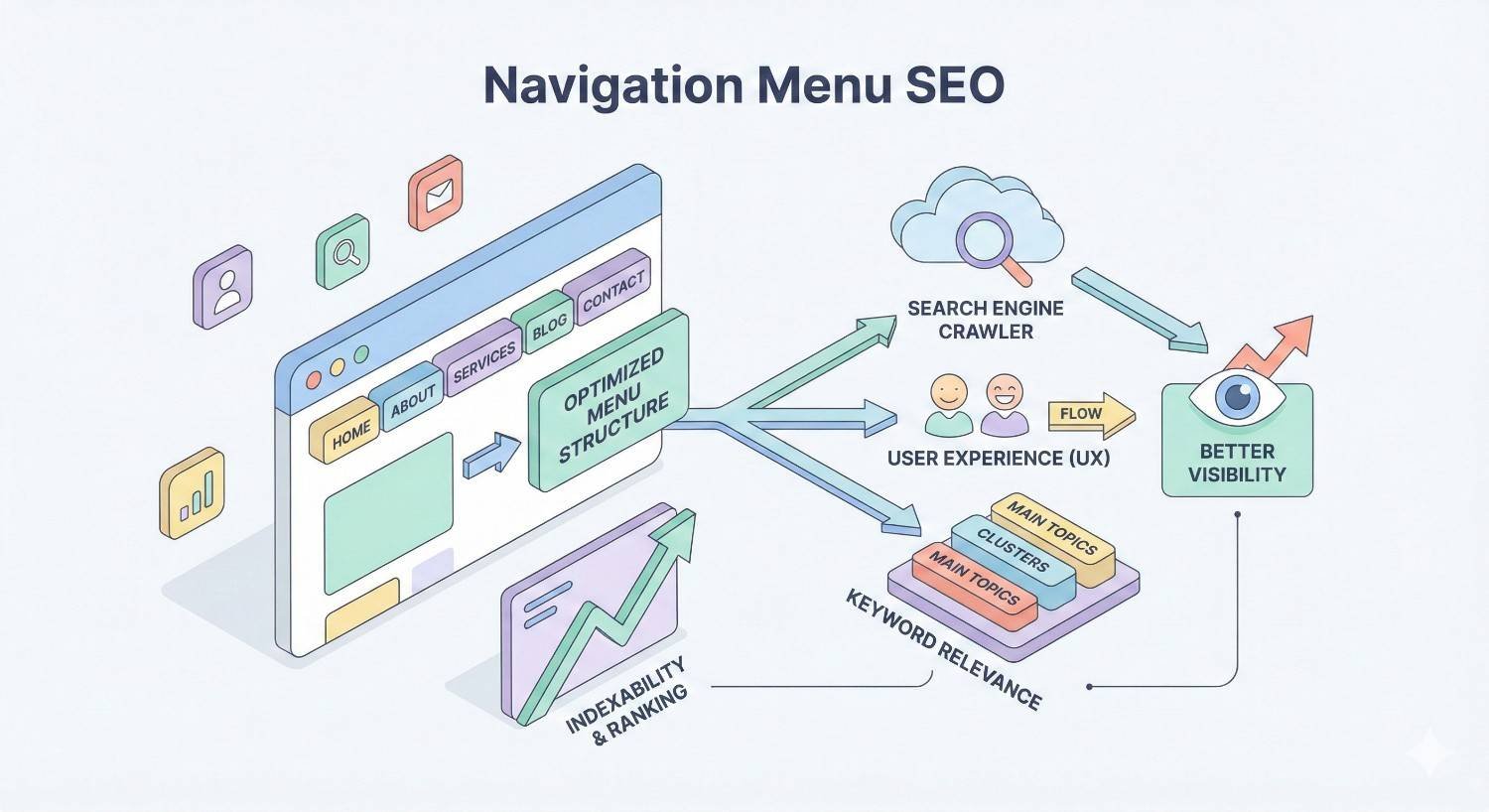
Navigation menu SEO refers to the strategic optimization of your website’s navigation elements to improve search engine crawling, indexing, and ranking performance. It encompasses the structure, placement, anchor text, and technical implementation of all navigation components across your site.
This discipline bridges technical SEO fundamentals with information architecture principles. Your navigation menu serves as both a roadmap for search engine crawlers and a wayfinding system for users. Optimizing it requires understanding how these two audiences interact with your site differently.
Definition and Core Concepts
Navigation menu SEO involves optimizing the links, structure, and code of your site’s navigation to maximize search visibility. The core goal is ensuring search engines can efficiently discover and understand the relationship between your pages while users can quickly find what they need.
Key concepts include link equity distribution, crawl efficiency, click depth, and semantic hierarchy. Link equity flows through your navigation links to connected pages. Pages linked from your main navigation receive more internal link value than those buried deeper in your site structure.
Your navigation establishes topical relationships between pages. When you group related pages under logical categories, you signal to search engines how your content connects. This helps algorithms understand your site’s topical focus and authority areas.
How Search Engines Crawl and Interpret Navigation Menus
Search engine crawlers like Googlebot follow links to discover new pages and understand site structure. Your navigation menu provides the primary pathway for this discovery process. Crawlers parse the HTML of your navigation to extract links, anchor text, and hierarchical relationships.
Google’s crawlers render JavaScript, but HTML-based navigation remains more reliable for discovery. When crawlers encounter your navigation, they extract the destination URLs and the anchor text describing each link. This anchor text provides contextual signals about the linked page’s content.
The position of links within your navigation also matters. Links appearing higher in the HTML source code and more prominently in the visual hierarchy typically receive more weight. Header navigation links generally pass more value than footer links due to their prominence and placement.
The Relationship Between Navigation Structure and Crawl Budget
Crawl budget represents the number of pages search engines will crawl on your site within a given timeframe. Your navigation structure directly impacts how efficiently crawlers use this budget. A flat, well-organized navigation helps crawlers reach important pages quickly.
Deep navigation structures force crawlers to follow multiple link chains to reach content. Each additional click level reduces the likelihood of thorough crawling. Pages requiring four or more clicks from the homepage often receive less frequent crawling attention.
Excessive navigation links can also waste crawl budget. If your navigation includes hundreds of links to low-priority pages, crawlers may spend resources on these instead of your most valuable content. Strategic navigation design prioritizes important pages while maintaining reasonable link counts.
Why Navigation Menu SEO Matters for Organic Visibility
Navigation optimization directly influences three critical ranking factors: site architecture quality, user experience signals, and technical performance metrics. Neglecting navigation SEO creates compounding problems that limit your organic growth potential.
Sites with optimized navigation consistently outperform competitors with similar content quality but poor structure. The navigation serves as the backbone of your internal linking strategy, which remains one of the most controllable ranking factors available to site owners.
Impact on Site Architecture and Internal Link Equity
Your navigation menu is the primary mechanism for distributing internal link equity across your site. Every page linked from your main navigation receives a portion of your homepage’s authority. This authority then flows to pages linked from those category pages.
Internal link equity follows a diminishing pattern as it moves through your site structure. Pages one click from the homepage receive the most value. Pages two clicks away receive less, and so on. Strategic navigation design ensures your highest-priority pages sit closest to the homepage.
Site architecture also establishes topical silos that help search engines understand your content organization. When your navigation groups related content logically, you reinforce topical relevance signals. This clustering helps individual pages rank for related keywords within their topic area.
User Experience Signals and Search Rankings
Google’s algorithms incorporate user behavior signals when evaluating page quality. Navigation directly impacts metrics like bounce rate, time on site, and pages per session. Users who can easily find what they need engage more deeply with your content.
Poor navigation creates friction that drives users away. When visitors cannot locate relevant content, they return to search results and try a competitor. This pogo-sticking behavior signals to Google that your site did not satisfy the user’s intent.
Clear navigation also supports conversion paths. Users who can easily navigate from informational content to product or service pages convert at higher rates. This commercial performance, while not a direct ranking factor, supports the business outcomes that justify SEO investment.
Mobile Navigation and Core Web Vitals Considerations
Mobile navigation presents unique optimization challenges. Over 60% of searches now occur on mobile devices, making mobile navigation performance critical for organic visibility. Google’s mobile-first indexing means your mobile navigation structure determines how your site is evaluated.
Core Web Vitals metrics can be significantly impacted by navigation implementation. Heavy JavaScript navigation menus often cause Largest Contentful Paint delays. Complex dropdown animations can trigger Cumulative Layout Shift issues. These performance problems directly affect ranking potential.
Mobile navigation must balance usability with performance. Hamburger menus conserve screen space but can hide important links from crawlers if implemented incorrectly. The technical implementation of your mobile navigation determines whether search engines can access all your content.
Types of Navigation Menus and Their SEO Implications
Different navigation types serve distinct purposes and carry varying SEO weight. Understanding the role and optimization approach for each type helps you build a comprehensive navigation strategy. Most sites benefit from combining multiple navigation types strategically.
Each navigation element contributes to your overall internal linking profile. The key is ensuring consistency across navigation types while using each for its intended purpose. Redundancy between navigation elements can reinforce important pages without creating confusion.
Header Navigation (Primary Navigation)
Header navigation carries the most SEO weight of any navigation element. Links in your primary navigation appear on every page, creating site-wide internal links to featured destinations. This prominence signals to search engines that these pages are your most important content.
Limit primary navigation to your highest-priority pages and categories. Most successful sites include between five and seven main navigation items. Each additional item dilutes the link equity distributed to other navigation links.
Primary navigation anchor text should be descriptive but concise. Use terms that accurately describe the destination page while incorporating relevant keywords naturally. Avoid generic labels like “Products” when more specific terms like “SEO Services” better describe the content.
Footer Navigation
Footer navigation provides secondary linking opportunities for pages that do not warrant header placement. Common footer links include legal pages, contact information, secondary service categories, and resource sections. These links appear site-wide but carry less weight than header links.
Footer navigation can support SEO by linking to important pages that do not fit the primary navigation structure. Many sites use footers to link to location pages, detailed service descriptions, or content hubs. This ensures these pages receive internal links without cluttering the main navigation.
Avoid stuffing footers with excessive keyword-rich links. This outdated tactic can trigger spam filters and provides poor user experience. Keep footer navigation organized and purposeful, focusing on genuinely useful secondary links.
Sidebar Navigation
Sidebar navigation works well for content-heavy sites with deep topic hierarchies. Blogs, documentation sites, and resource libraries often use sidebars to display category structures or related content links. Sidebar links typically appear on specific sections rather than site-wide.
The SEO value of sidebar navigation depends on implementation. Contextual sidebar links that change based on the current page section can reinforce topical relationships. Static sidebars that repeat the same links across all pages provide less targeted value.
Sidebar navigation should complement rather than duplicate header navigation. Use sidebars to expose deeper content within specific sections. This approach helps users and crawlers navigate within topic areas without overwhelming the primary navigation.
Breadcrumb Navigation
Breadcrumb navigation displays the hierarchical path from the homepage to the current page. This navigation type serves both users and search engines by clarifying site structure. Breadcrumbs are particularly valuable for e-commerce sites and content publishers with deep hierarchies.
Google often displays breadcrumb paths in search results when properly implemented with structured data. This enhanced display can improve click-through rates by showing users exactly where the page sits within your site. Implementing BreadcrumbList schema markup enables this feature.
Breadcrumbs reinforce your site’s topical hierarchy to search engines. Each breadcrumb link passes contextual signals about the relationship between pages. This helps algorithms understand how your content is organized and which pages serve as category hubs.
Hamburger Menus and Mobile Navigation
Hamburger menus hide navigation behind a toggle icon, typically three horizontal lines. This pattern conserves mobile screen space but can create SEO challenges if implemented incorrectly. The key concern is ensuring hidden navigation links remain crawlable.
Google can crawl content behind hamburger menus when the underlying HTML is present in the initial page load. Problems arise when navigation content loads only after user interaction via JavaScript. Always ensure your navigation HTML exists in the page source regardless of visibility state.
Mobile navigation should mirror desktop navigation structure as closely as possible. Significant differences between mobile and desktop navigation can create indexing inconsistencies under mobile-first indexing. Users and crawlers should find the same content accessible through both versions.
Mega Menus and Dropdown Navigation
Mega menus display expanded navigation panels with multiple columns of links. E-commerce sites and large publishers commonly use mega menus to expose category depth without requiring additional clicks. When implemented correctly, mega menus can significantly improve crawl efficiency.
The SEO benefit of mega menus comes from reducing click depth to important pages. A product three levels deep in your hierarchy can be directly accessible from the homepage via a mega menu. This flattens your effective site structure for both users and crawlers.
Mega menu implementation requires careful attention to HTML structure and load behavior. Links should be present in the HTML source, not dynamically loaded via JavaScript on hover. Excessive mega menu links can dilute link equity, so prioritize your most important category and product pages.
Navigation Menu SEO Best Practices
Implementing navigation SEO best practices requires balancing technical requirements with user experience considerations. The following guidelines represent proven approaches that improve both crawlability and usability. Apply these principles systematically across all navigation elements.
Successful navigation optimization is iterative. Start with foundational improvements, measure results, and refine based on data. The best navigation structures evolve alongside your content strategy and business priorities.
Optimal Menu Structure and Hierarchy
Structure your navigation to reflect your site’s topical hierarchy logically. Group related pages under descriptive parent categories. This organization helps users predict where to find content and helps search engines understand topical relationships.
Aim for a flat structure where important pages sit within two to three clicks of the homepage. Deep hierarchies bury content from both users and crawlers. If pages require more than three clicks to reach, consider restructuring or adding direct navigation links.
Prioritize navigation items by business importance and search demand. Your highest-value pages and most searched topics should occupy prominent navigation positions. Use analytics data and keyword research to inform these prioritization decisions.
Anchor Text Optimization for Navigation Links
Navigation anchor text provides contextual signals about linked page content. Use descriptive, keyword-relevant anchor text that accurately represents the destination page. This helps search engines understand what each page covers.
Avoid generic anchor text like “Click Here” or “Learn More” in navigation. These phrases waste an opportunity to provide topical context. Instead, use specific terms that describe the page content, such as “Technical SEO Services” or “Keyword Research Guide.”
Balance keyword optimization with natural language. Over-optimized anchor text that stuffs keywords unnaturally can trigger spam signals. Write anchor text for users first, incorporating relevant terms where they fit naturally.
Limiting Navigation Depth (Click Depth Optimization)
Click depth measures how many clicks separate a page from the homepage. Pages with lower click depth typically receive more crawl attention and internal link equity. Optimize your navigation to minimize click depth for priority pages.
Audit your current click depth using crawling tools like Screaming Frog or Sitebulb. Identify important pages that require more than three clicks to reach. Look for opportunities to add direct navigation links or restructure categories to reduce depth.
Mega menus and footer links can reduce effective click depth without restructuring your entire site. Adding direct links to deep pages from site-wide navigation elements brings them closer to the homepage in terms of link distance.
HTML vs JavaScript Navigation: Crawlability Considerations
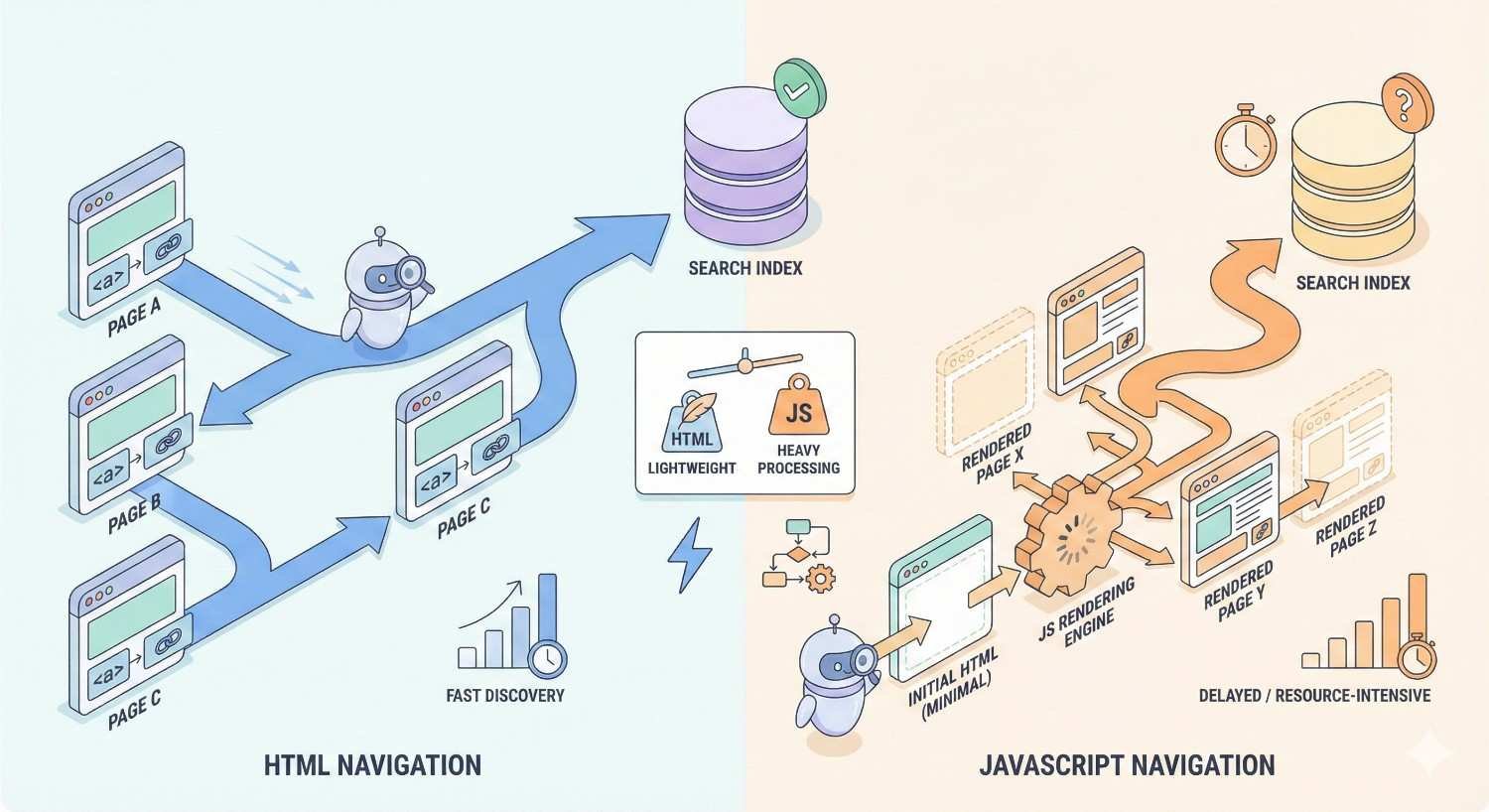
HTML-based navigation remains the most reliable approach for search engine crawlability. Links rendered in static HTML are immediately discoverable by crawlers without requiring JavaScript execution. This ensures consistent indexing regardless of crawler capabilities.
JavaScript navigation can work for SEO when implemented correctly. Google’s crawlers render JavaScript, but rendering adds processing time and can delay discovery. If using JavaScript navigation, ensure links are present in the rendered DOM and test crawlability regularly.
Server-side rendering or static generation provides the best of both worlds. These approaches deliver HTML navigation to crawlers while enabling dynamic functionality for users. If your navigation relies heavily on JavaScript, consider implementing server-side rendering.
Strategic Use of Nofollow in Navigation
The nofollow attribute tells search engines not to pass link equity through a specific link. Strategic use of nofollow in navigation can theoretically concentrate link equity on priority pages. However, this approach has become less effective and more risky over time.
Google’s handling of nofollow has evolved. The attribute is now treated as a hint rather than a directive. Link equity may not flow to nofollowed pages, but it does not necessarily redistribute to other links. This makes nofollow sculpting unreliable.
Most sites should avoid nofollow in main navigation entirely. Focus instead on limiting navigation links to pages that deserve link equity. If a page does not warrant a navigation link, remove it rather than nofollowing it.
Balancing SEO and User Experience in Menu Design
The best navigation serves both search engines and users effectively. Prioritize user experience in navigation design decisions. Navigation that frustrates users will ultimately harm SEO through poor engagement signals.
Test navigation changes with real users before full implementation. User testing reveals friction points that analytics alone cannot identify. Watch how users attempt to find specific content and note where they struggle.
Avoid SEO tactics that degrade user experience. Keyword-stuffed navigation labels, excessive link counts, and confusing structures may seem SEO-friendly but ultimately harm performance. User-centered navigation design naturally aligns with search engine preferences.
How to Audit Your Navigation Menu for SEO
Regular navigation audits identify optimization opportunities and technical issues before they impact rankings. A comprehensive audit examines link distribution, crawlability, mobile performance, and alignment with business priorities. Schedule navigation audits quarterly or after significant site changes.
Effective audits combine automated crawl data with manual review. Tools provide quantitative insights, but human judgment determines strategic priorities. Use the following framework to structure your navigation audit process.
Crawl Analysis and Link Equity Distribution
Run a complete site crawl using tools like Screaming Frog, Sitebulb, or Ahrefs Site Audit. Analyze the internal link distribution to identify which pages receive the most internal links. Compare this distribution against your priority pages to spot misalignments.
Examine click depth data from your crawl. Identify important pages that sit more than three clicks from the homepage. These pages likely receive insufficient internal link equity and crawl attention. Flag them for navigation restructuring.
Review the anchor text profile of your internal links. Look for opportunities to improve descriptive anchor text in navigation elements. Identify any instances of generic or over-optimized anchor text that should be revised.
Identifying Orphan Pages Through Navigation Gaps
Orphan pages have no internal links pointing to them, making them invisible to crawlers following your site structure. These pages can only be discovered through sitemaps or external links. Identify orphan pages by comparing your crawl data against your sitemap or CMS page list.
Navigation gaps often create orphan pages unintentionally. When pages are removed from navigation during redesigns, they may lose all internal links. Regular audits catch these gaps before they impact indexing.
Resolve orphan pages by adding appropriate navigation or contextual links. If a page deserves traffic, it deserves internal links. If it does not warrant linking, consider whether it should exist at all.
Mobile Navigation Audit Checklist
Test your mobile navigation on actual devices, not just browser emulators. Verify that all navigation links are accessible and functional on various screen sizes. Check that touch targets are appropriately sized for finger navigation.
Compare mobile and desktop navigation content. Ensure the same pages are accessible through both versions. Note any links present on desktop but missing from mobile navigation, as these may receive reduced crawl priority.
Measure mobile navigation performance using Core Web Vitals tools. Test Largest Contentful Paint, First Input Delay, and Cumulative Layout Shift with navigation interactions. Address any performance issues that could impact mobile rankings.
Tools for Navigation SEO Analysis
Screaming Frog SEO Spider provides comprehensive crawl data including internal link counts, click depth, and anchor text analysis. Use it to map your complete internal link structure and identify navigation optimization opportunities.
Google Search Console shows which pages Google has indexed and any crawl errors encountered. The Links report reveals internal link distribution from Google’s perspective. Compare this data against your intended navigation structure.
Ahrefs and Semrush offer site audit features that identify navigation-related issues. These tools flag orphan pages, excessive click depth, and internal linking problems. Their competitive analysis features also reveal how competitor navigation structures compare.
PageSpeed Insights and Lighthouse measure the performance impact of your navigation implementation. Use these tools to identify JavaScript or CSS issues affecting navigation load times. Address any Core Web Vitals problems related to navigation elements.
Common Navigation Menu SEO Mistakes to Avoid
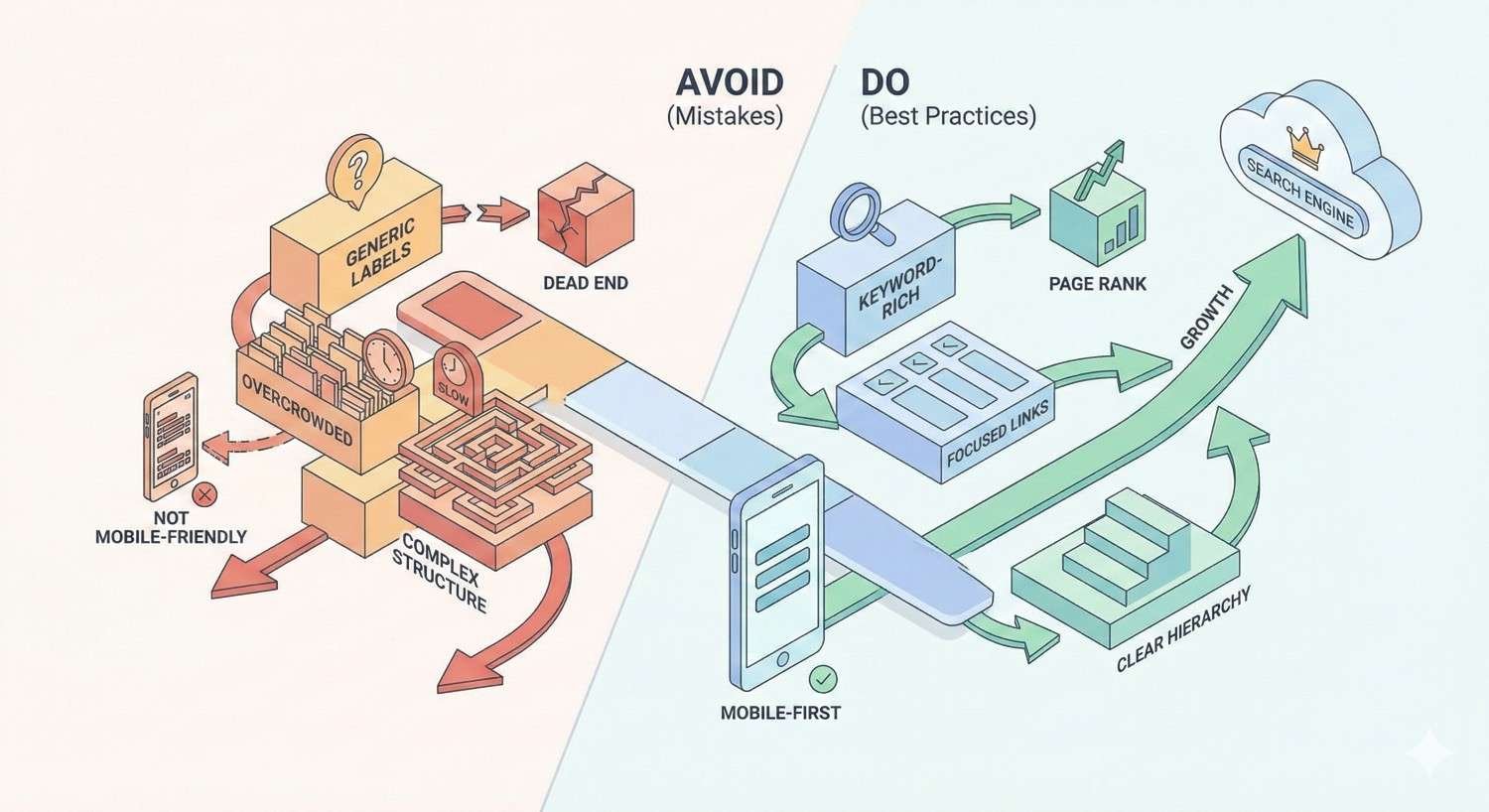
Navigation mistakes can undermine otherwise strong SEO strategies. The following errors appear frequently across sites of all sizes. Avoiding these pitfalls protects your organic visibility and ensures navigation supports rather than hinders your SEO efforts.
Many navigation mistakes stem from prioritizing short-term convenience over long-term strategy. Taking time to implement navigation correctly from the start prevents costly corrections later.
Over-Optimized Anchor Text in Navigation
Stuffing exact-match keywords into navigation anchor text can trigger spam filters. Navigation labels like “Best Cheap SEO Services New York” appear manipulative to both users and algorithms. This approach often backfires, harming rather than helping rankings.
Natural anchor text describes the destination page accurately without forcing keywords. “SEO Services” works better than “Best SEO Services for Small Business.” Users understand what they will find, and search engines receive appropriate contextual signals.
Audit your navigation for keyword stuffing patterns. Replace over-optimized labels with natural, descriptive alternatives. Focus on clarity and accuracy rather than keyword density.
JavaScript-Only Navigation Without HTML Fallback
Navigation that requires JavaScript execution to render links creates crawlability risks. While Google renders JavaScript, the process is resource-intensive and can delay discovery. Pages linked only through JavaScript navigation may experience indexing delays.
Always ensure navigation links exist in the initial HTML response. Server-side rendering, static site generation, or progressive enhancement approaches all solve this problem. Test your navigation with JavaScript disabled to verify HTML fallback functionality.
Monitor Google Search Console for indexing issues that may indicate JavaScript navigation problems. If important pages show indexing delays or errors, investigate whether navigation implementation is the cause.
Excessive Menu Items Diluting Link Equity
Navigation menus with dozens of links dilute the equity passed to each destination. When your header navigation includes 50 links, each receives a small fraction of available link equity. Prioritization becomes impossible when everything is equally prominent.
Limit primary navigation to your most important pages and categories. Most effective header navigations include five to ten items. Use secondary navigation elements like footers and sidebars for additional links.
Audit your current navigation link count. If your header navigation exceeds 15 items, identify candidates for removal or relocation. Focus primary navigation on pages that drive business value and search traffic.
Inconsistent Navigation Across Desktop and Mobile
Significant differences between desktop and mobile navigation create indexing inconsistencies. Under mobile-first indexing, Google primarily uses your mobile site for ranking decisions. Pages accessible only through desktop navigation may receive reduced visibility.
Ensure navigation parity between desktop and mobile versions. The same pages should be reachable through both navigation systems. Visual presentation can differ, but link destinations should match.
Test both navigation versions regularly. Site updates sometimes affect one version without the other. Automated testing can catch inconsistencies before they impact indexing.
Ignoring Footer Navigation Opportunities
Footers provide valuable secondary navigation real estate that many sites underutilize. While footer links carry less weight than header links, they still contribute to internal link equity distribution. Strategic footer navigation supports pages that do not fit the primary navigation.
Use footer navigation for important pages outside your main topic hierarchy. Legal pages, location pages, detailed service descriptions, and resource archives all benefit from footer placement. This ensures these pages receive site-wide internal links.
Avoid treating footers as dumping grounds for excessive links. Organize footer navigation logically and limit link counts to maintain usability. A cluttered footer helps neither users nor search engines.
Navigation Menu SEO for Different Website Types
Navigation optimization strategies vary based on site type and business model. E-commerce sites face different challenges than content publishers or service businesses. Apply the following type-specific guidance alongside general best practices.
Understanding your site type’s unique requirements helps prioritize navigation improvements. Focus on the strategies most relevant to your business model and content structure.
E-commerce Navigation Optimization
E-commerce navigation must balance extensive product catalogs with usability and SEO requirements. Category hierarchy is critical for both user wayfinding and search engine understanding. Structure categories to reflect how customers think about and search for products.
Implement faceted navigation carefully to avoid duplicate content and crawl waste. Faceted navigation creates filtered views of product listings, potentially generating thousands of URL variations. Use canonical tags, robots directives, or parameter handling to control which variations get indexed.
Mega menus work well for e-commerce sites with deep category structures. They expose subcategories and popular products directly from the main navigation, reducing click depth significantly. Ensure mega menu links are HTML-based and load with the initial page.
Breadcrumb navigation is essential for e-commerce SEO. Product pages often exist within multiple category paths. Breadcrumbs clarify the primary hierarchy and provide additional internal links to category pages.
SaaS and Service Business Navigation
SaaS and service business navigation typically focuses on a smaller number of high-value pages. Product features, pricing, use cases, and resources form the core navigation structure. Prioritize pages that drive conversions and address key buyer questions.
Feature and solution pages benefit from prominent navigation placement. These pages often target valuable commercial keywords and support the buyer journey. Ensure they sit within one to two clicks of the homepage.
Resource sections and blogs require thoughtful navigation integration. Content marketing drives significant traffic for many SaaS businesses. Include clear navigation paths to content hubs while keeping primary navigation focused on commercial pages.
Consider audience-based navigation for businesses serving multiple customer segments. Navigation organized by industry, company size, or use case helps visitors self-select into relevant content paths.
Content Publishers and Blog Navigation
Content publishers face unique navigation challenges due to high content volume and diverse topics. Category and tag structures must organize potentially thousands of articles into navigable hierarchies. Effective navigation helps users discover related content and helps search engines understand topical organization.
Topic hubs or pillar pages deserve prominent navigation placement. These comprehensive resources anchor your topical authority and attract links. Navigation links to hub pages distribute equity to your most important content assets.
Implement robust category navigation that exposes your content hierarchy. Users should be able to browse by topic area without relying solely on search. This browsing behavior also helps search engines understand your topical coverage.
Archive and pagination navigation affects crawl efficiency for large content sites. Ensure older content remains accessible within reasonable click depth. Consider implementing date-based or alphabetical archives for comprehensive content access.
Local Business Website Navigation
Local business navigation should prominently feature location information and service areas. Users searching for local services need quick access to contact details, service descriptions, and location-specific content. Navigation should facilitate these common user goals.
Service pages deserve primary navigation placement for local businesses. Each core service should be accessible within one click from the homepage. This structure supports both user needs and local SEO keyword targeting.
Location pages require navigation access for multi-location businesses. Create clear navigation paths to individual location pages while maintaining a logical hierarchy. This helps both users finding nearby locations and search engines understanding your geographic coverage.
Include clear calls-to-action in navigation for local businesses. Contact links, appointment scheduling, and quote requests should be immediately accessible. These conversion-focused elements support business goals while improving user experience.
How Navigation Menu Changes Impact SEO Timelines
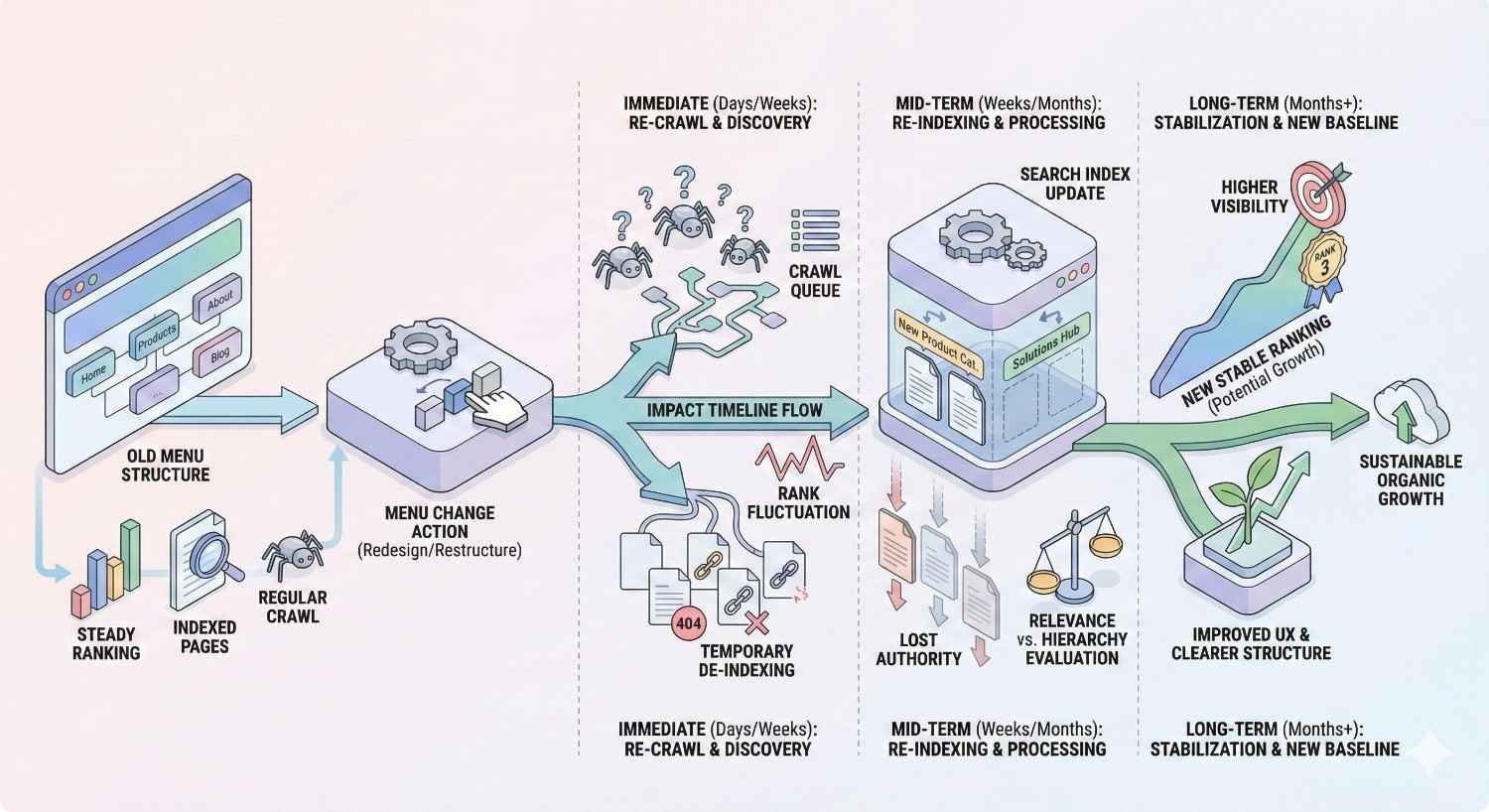
Navigation changes affect SEO performance over predictable timeframes. Understanding these timelines helps set realistic expectations and plan implementation strategies. Major navigation restructuring requires patience as search engines process and respond to changes.
The impact timeline depends on your site’s crawl frequency, the scope of changes, and competitive factors. Larger, more authoritative sites typically see faster response to changes than smaller sites with less frequent crawling.
Expected Timeframes for Crawling and Indexing Changes
Search engines must crawl your site to discover navigation changes. For most sites, significant navigation updates are detected within one to four weeks. Sites with higher authority and more frequent crawling may see faster detection.
Indexing updates follow crawling as search engines process the new structure. Internal link equity redistribution begins as crawlers follow new navigation paths. This redistribution process typically takes four to eight weeks to stabilize.
You can accelerate initial detection by submitting updated sitemaps and requesting indexing of key pages through Google Search Console. However, the full impact of navigation changes still requires time for complete processing.
Measuring Navigation SEO Impact on Rankings
Track ranking changes for pages affected by navigation updates. Pages that gained navigation prominence should show gradual ranking improvements. Pages removed from navigation may experience ranking declines as internal link equity decreases.
Monitor Google Search Console data for indexing and crawl changes. The Coverage report shows how Google is processing your pages. The Links report reveals changes in internal link distribution as Google recrawls your site.
Use position tracking tools to monitor keyword rankings over time. Establish baseline rankings before navigation changes and track movement over the following three to six months. This data reveals the true impact of your navigation optimization.
When to Expect Traffic Changes After Navigation Updates
Traffic changes lag behind ranking changes as users respond to new search positions. Expect initial traffic movement four to eight weeks after navigation changes. Full traffic impact typically materializes over three to six months.
Positive navigation changes often show gradual, sustained improvement rather than sudden jumps. As internal link equity redistributes and rankings improve, traffic grows incrementally. This pattern differs from content-driven traffic spikes.
Negative impacts from navigation mistakes may appear faster than positive gains. Removing important pages from navigation can cause relatively quick ranking and traffic declines. Monitor closely after any navigation changes and be prepared to revert problematic updates.
Integrating Navigation SEO Into Your Overall SEO Strategy
Navigation optimization works best as part of a comprehensive SEO strategy. Isolated navigation improvements deliver limited results without supporting technical foundations, content strategy, and authority building. Integrate navigation SEO into your broader organic growth plan.
View navigation as the connective tissue of your SEO strategy. It links technical infrastructure to content assets and distributes the authority you build through link acquisition. Optimizing navigation amplifies the impact of all other SEO investments.
Navigation Menu SEO and Technical SEO Foundations
Navigation optimization builds on technical SEO fundamentals. Crawlability, indexation, and site speed form the foundation that navigation optimization enhances. Address core technical issues before focusing on navigation refinements.
Ensure your robots.txt and meta robots directives do not block navigation elements. Verify that your sitemap accurately reflects your navigation structure. Confirm that canonical tags properly handle any duplicate content created by navigation systems.
Site speed optimization supports navigation performance. Fast-loading navigation improves user experience and Core Web Vitals scores. Address any performance issues related to navigation JavaScript, CSS, or image assets.
Aligning Navigation with Content Strategy
Navigation structure should reflect and support your content strategy. As you develop new content areas, update navigation to incorporate them appropriately. Navigation and content strategy should evolve together.
Use keyword research to inform navigation decisions. High-volume, high-intent keywords often deserve dedicated navigation links. Align navigation labels with the terms your audience uses to search for your content.
Content hubs and pillar pages should receive prominent navigation placement. These cornerstone content assets anchor your topical authority. Navigation links ensure they receive appropriate internal link equity and user attention.
Navigation’s Role in Link Building and Authority
External links to your site pass authority that navigation distributes internally. Strategic navigation ensures this acquired authority flows to your priority pages. Pages receiving external links should connect to other important pages through navigation.
Link building campaigns should consider navigation structure. When acquiring links to specific pages, ensure those pages connect to related content through navigation. This maximizes the authority distribution from each acquired link.
Navigation can support link acquisition by making linkable assets easily discoverable. Resources, tools, and research that attract links should be accessible through clear navigation paths. This helps potential linkers find and reference your content.
Ongoing Navigation Optimization and Performance Tracking
Navigation optimization is not a one-time project. Regular monitoring and refinement ensure navigation continues supporting your SEO goals. Establish ongoing processes for navigation performance tracking.
Review navigation analytics monthly. Track click patterns, exit rates, and conversion paths through navigation elements. Identify underperforming navigation links and opportunities for improvement.
Conduct quarterly navigation audits using the framework outlined earlier. Check for technical issues, orphan pages, and alignment with current business priorities. Update navigation to reflect new content, changed priorities, and competitive insights.
Navigation Menu SEO Checklist
Use this checklist to audit and optimize your navigation systematically. Address items in order of priority, focusing on foundational elements before refinements.
Structure and Hierarchy
- Primary navigation limited to 5-10 high-priority items
- Important pages accessible within 2-3 clicks from homepage
- Logical category groupings reflecting user mental models
- Consistent hierarchy across all navigation elements
Technical Implementation
- Navigation links present in HTML source (not JavaScript-only)
- Mobile navigation mirrors desktop link structure
- No crawl blocks affecting navigation elements
- Fast load times for navigation components
Anchor Text and Labels
- Descriptive, keyword-relevant anchor text
- Natural language without keyword stuffing
- Consistent labeling across navigation types
- Clear, user-friendly terminology
Link Equity Distribution
- Priority pages receive prominent navigation placement
- No orphan pages missing navigation links
- Footer navigation supports secondary pages
- Breadcrumbs implemented with structured data
Mobile Optimization
- Touch targets appropriately sized
- Navigation accessible without horizontal scrolling
- Hamburger menu content crawlable
- Core Web Vitals passing on mobile
Ongoing Maintenance
- Regular crawl audits scheduled
- Analytics tracking navigation performance
- Process for updating navigation with new content
- Documentation of navigation structure and rationale
Conclusion: Building Navigation That Drives Sustainable Organic Growth
Navigation menu SEO directly impacts how search engines discover, understand, and rank your content. Strategic navigation optimization improves crawl efficiency, distributes link equity to priority pages, and creates clear topical signals that support ranking performance. The technical and structural decisions you make about navigation compound over time, either accelerating or limiting your organic growth potential.
At White Label SEO Service, we help businesses build navigation structures that support long-term organic visibility. Our technical SEO audits identify navigation issues limiting your performance, and our strategic recommendations align navigation with your broader content and authority-building goals. Navigation optimization is one component of comprehensive SEO strategy that drives sustainable traffic growth.
Ready to optimize your navigation for better search performance? We offer professional SEO navigation audits that identify specific opportunities for your site. Contact White Label SEO Service to discuss how navigation optimization fits into your organic growth strategy.
Frequently Asked Questions About Navigation Menu SEO
How many items should be in a navigation menu for SEO?
Most effective primary navigation menus contain five to ten items. This range balances comprehensive coverage with focused link equity distribution. Exceeding 15 items typically dilutes the SEO value passed to each linked page while creating usability challenges for visitors.
Does dropdown menu affect SEO?
Dropdown menus can positively impact SEO by reducing click depth to important pages. The key requirement is proper HTML implementation that makes dropdown links crawlable without JavaScript execution. Test your dropdown navigation with JavaScript disabled to verify search engines can access all links.
Should navigation links be nofollow?
Navigation links should generally not use nofollow attributes. Google treats nofollow as a hint rather than a directive, making link equity sculpting unreliable. Instead of nofollowing navigation links, remove links to pages that do not deserve navigation placement.
How do I make my navigation menu mobile-friendly for SEO?
Ensure mobile navigation provides access to the same pages as desktop navigation. Implement navigation HTML in the initial page load rather than loading it dynamically via JavaScript. Test touch target sizes, load performance, and Core Web Vitals metrics specifically for mobile navigation interactions.
Can changing navigation hurt my rankings?
Yes, navigation changes can negatively impact rankings if implemented poorly. Removing pages from navigation reduces their internal link equity. Changing URL structures without proper redirects creates broken links. Always plan navigation changes carefully and monitor rankings closely after implementation.
What is the best navigation structure for SEO?
The best navigation structure places your highest-priority pages within two to three clicks of the homepage, uses descriptive anchor text, and organizes content into logical topical categories. Effective navigation balances SEO requirements with user experience, making important content easily discoverable for both search engines and visitors.
How long does it take to see SEO results from navigation changes?
Navigation changes typically begin affecting rankings within four to eight weeks as search engines recrawl and reprocess your site structure. Full impact usually materializes over three to six months as link equity redistribution stabilizes. Larger sites with more frequent crawling may see faster results than smaller sites.


