

Progressive Web Apps require specialized SEO strategies that differ fundamentally from traditional website optimization. PWAs rely heavily on JavaScript rendering, service workers, and client-side routing, creating unique challenges for search engine crawlers that most businesses underestimate until rankings suffer.
The gap between PWA technology adoption and SEO implementation knowledge costs companies significant organic traffic. Without proper technical foundations, your PWA becomes invisible to search engines despite delivering exceptional user experiences.
This guide covers everything from JavaScript rendering solutions and service worker configuration to Core Web Vitals optimization and migration strategies. You’ll learn exactly how to make your PWA rank competitively while maintaining the performance benefits that made you choose this architecture.
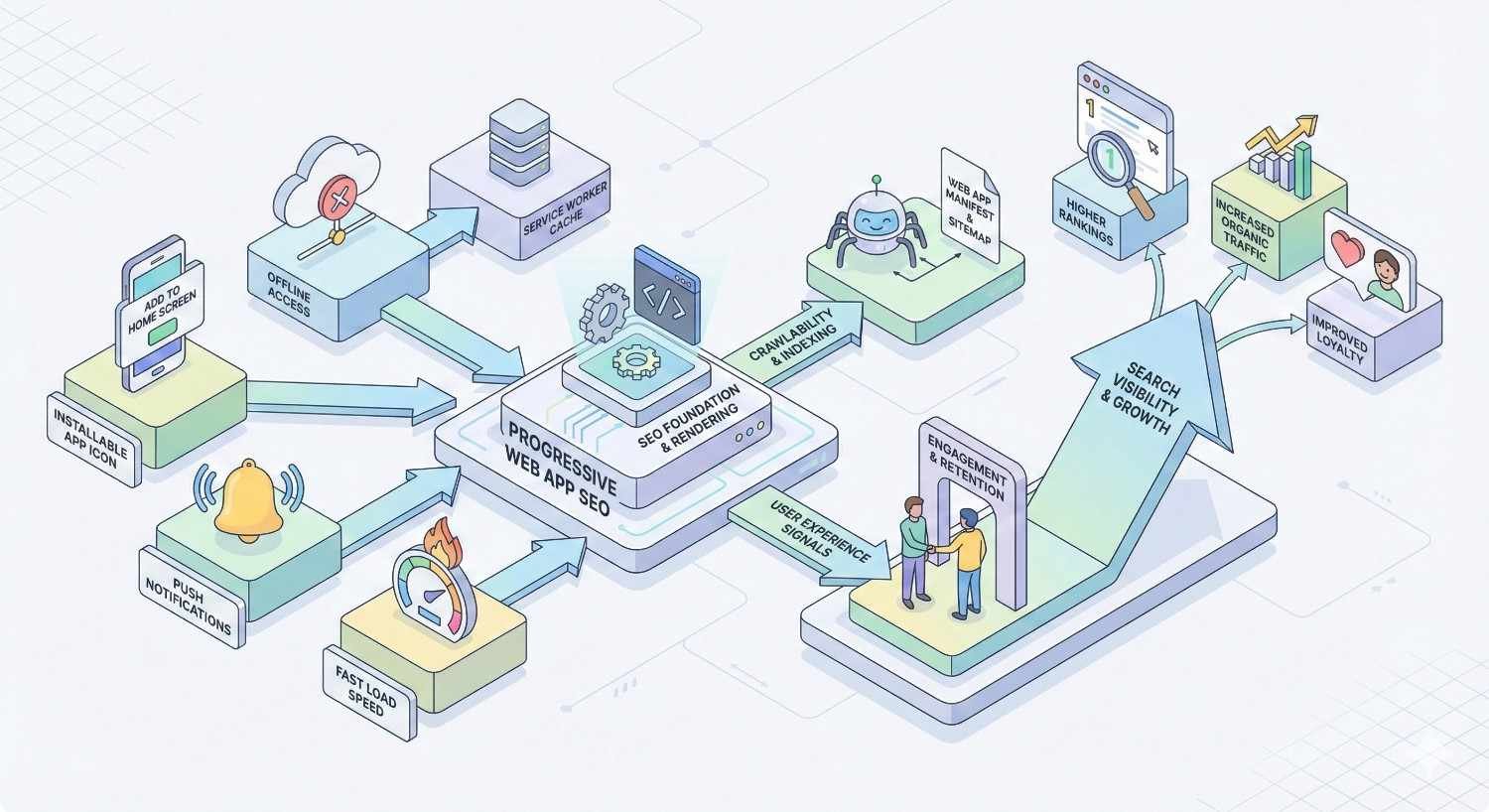
What is Progressive Web App SEO?
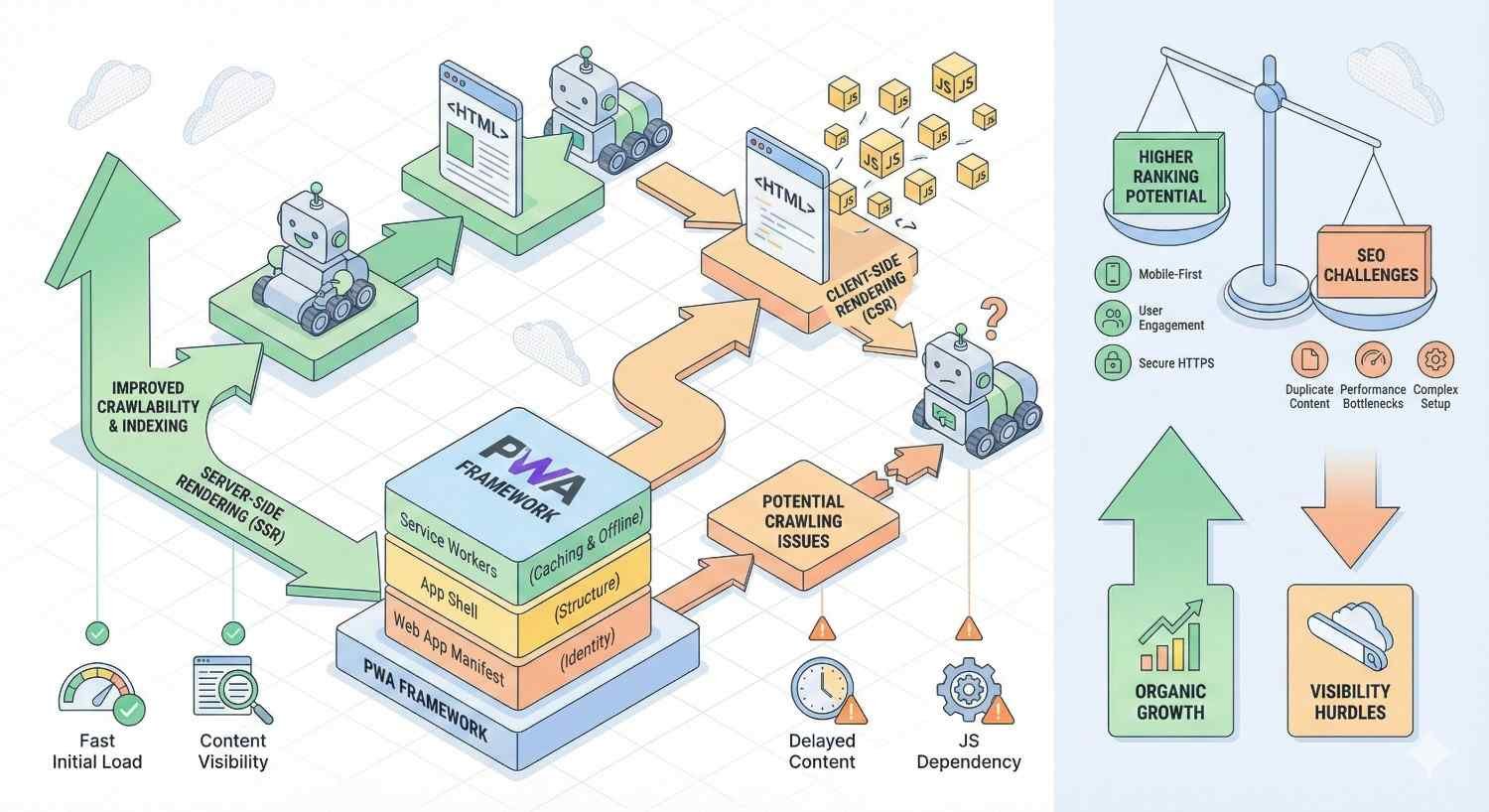
Progressive Web App SEO encompasses the specialized optimization techniques required to make JavaScript-heavy, service worker-powered web applications visible and rankable in search engines. Unlike traditional websites that serve static HTML, PWAs generate content dynamically through JavaScript execution, requiring search engines to render pages before indexing content.
The core challenge lies in bridging the gap between modern web application architecture and search engine crawler capabilities. While Googlebot has improved its JavaScript rendering significantly, the process introduces delays, resource constraints, and potential indexation failures that don’t exist with server-rendered HTML.
PWA SEO demands expertise across multiple technical domains: JavaScript rendering strategies, service worker configuration, URL management, structured data implementation, and Core Web Vitals optimization. Success requires understanding both how search engines process JavaScript applications and how PWA-specific features like offline functionality and app shell models affect crawlability.
How PWAs Differ from Traditional Websites in Search
Traditional websites deliver complete HTML documents to browsers and search engine crawlers alike. The content exists in the initial server response, making indexation straightforward. Crawlers receive exactly what users see without additional processing steps.
PWAs fundamentally change this dynamic. The initial HTML response often contains minimal content, with the actual page content generated through JavaScript execution after the page loads. Search engines must execute JavaScript, wait for API calls to complete, and render the final DOM before understanding page content.
This rendering requirement creates several SEO implications. Crawl budget consumption increases because rendering JavaScript requires more resources than parsing HTML. Indexation delays occur because Google’s two-wave indexing process handles JavaScript content in a secondary queue. Content visibility depends entirely on proper JavaScript execution, meaning errors that wouldn’t affect traditional sites can completely block indexation.
PWAs also introduce unique URL challenges. Client-side routing creates URLs that don’t correspond to server-side resources, potentially causing crawlability issues if not implemented correctly. The app shell model, while excellent for performance, can result in search engines seeing only the shell without dynamic content.
Why PWA Architecture Impacts Organic Visibility
PWA architecture decisions made during development directly determine SEO outcomes. The choice between client-side rendering, server-side rendering, or hybrid approaches establishes the foundation for all subsequent optimization efforts.
Client-side rendered PWAs face the steepest SEO challenges. Content depends entirely on JavaScript execution, creating single points of failure for indexation. If JavaScript errors occur, API calls fail, or rendering times exceed crawler timeouts, pages appear empty to search engines regardless of their actual content quality.
Service workers add another layer of complexity. While they enable offline functionality and performance improvements, misconfigured service workers can intercept crawler requests, serve cached content instead of fresh pages, or block access to critical resources. The same features that enhance user experience can inadvertently harm search visibility.
The manifest file, while not directly affecting rankings, influences how PWAs appear in search results and browser interfaces. Proper configuration ensures consistent branding across installation prompts, home screen icons, and potentially rich search result displays.
How Search Engines Crawl and Index Progressive Web Apps
Understanding how search engines process PWAs reveals why specific technical implementations succeed or fail. Google’s approach to JavaScript rendering has evolved significantly, but fundamental constraints remain that every PWA developer and SEO professional must account for.
Search engines crawl PWAs through a multi-stage process. Initial crawling retrieves the HTML document and identifies resources for rendering. The rendering phase executes JavaScript and generates the final DOM. Indexing then processes the rendered content for search results. Each stage introduces potential failure points unique to JavaScript applications.
JavaScript Rendering and Googlebot
Googlebot uses a headless Chromium browser to render JavaScript content, maintaining relative parity with modern Chrome versions. This capability allows Google to process most JavaScript frameworks and libraries, but the rendering process differs significantly from how users experience pages.
The two-wave indexing system processes HTML content immediately during the first wave, while JavaScript-dependent content enters a rendering queue for the second wave. According to Google’s documentation on JavaScript SEO, this queue introduces delays ranging from seconds to days depending on crawl demand and resource availability.
Rendering resources are finite and shared across billions of pages. Complex JavaScript applications consume more rendering budget, potentially limiting how many pages Google can process from your site. Heavy frameworks, excessive API calls, and inefficient code all increase rendering costs.
Googlebot doesn’t interact with pages like users do. It doesn’t click buttons, scroll infinitely, or wait for user-triggered content loads. Content that requires interaction to appear remains invisible to search engines unless specifically addressed through technical solutions.
Error handling differs between user browsers and Googlebot. Users might see error messages or retry mechanisms, while Googlebot typically moves on after encountering JavaScript errors. Silent failures that users never notice can completely block indexation.
Service Worker Impact on Crawlability
Service workers operate as proxy servers between web applications and networks, intercepting requests and controlling responses. This powerful capability enables offline functionality, background sync, and performance optimization, but creates potential crawlability issues when not configured for search engine compatibility.
Googlebot does not execute service workers during crawling. This design decision prevents service workers from interfering with crawl operations but means any content exclusively served through service worker logic remains invisible to search engines. Content must be accessible through standard network requests, not just service worker caches.
Caching strategies require careful consideration. Aggressive caching that serves stale content to users might also serve outdated content if service workers somehow affect the crawlable version. While Googlebot bypasses service workers, testing and debugging tools might not, creating discrepancies between what you test and what Google sees.
Service worker registration timing affects initial page load. If service worker installation blocks or delays critical content rendering, the impact extends to both user experience and potential crawl timeout issues. Registration should occur after initial content loads, not before.
App Shell Model and Indexation Challenges
The app shell architecture separates static UI components from dynamic content, enabling instant loading of the application framework while content populates asynchronously. This pattern delivers excellent perceived performance but creates specific indexation challenges.
Search engines crawling app shell implementations initially see only the shell, the navigation, headers, footers, and layout elements without actual page content. The dynamic content that makes pages valuable for search must load and render within crawler timeout windows to be indexed.
App shells often contain minimal text content, potentially triggering thin content signals if dynamic content fails to render. The shell itself might be identical across all pages, creating duplicate content patterns if the unique content doesn’t load properly.
Proper implementation requires ensuring dynamic content renders server-side or loads quickly enough for crawler processing. The shell provides the performance benefits while server-side rendering or pre-rendering handles SEO requirements. Hybrid approaches that serve rendered content to crawlers while maintaining app shell benefits for users represent the optimal solution.
Technical SEO Requirements for Progressive Web Apps
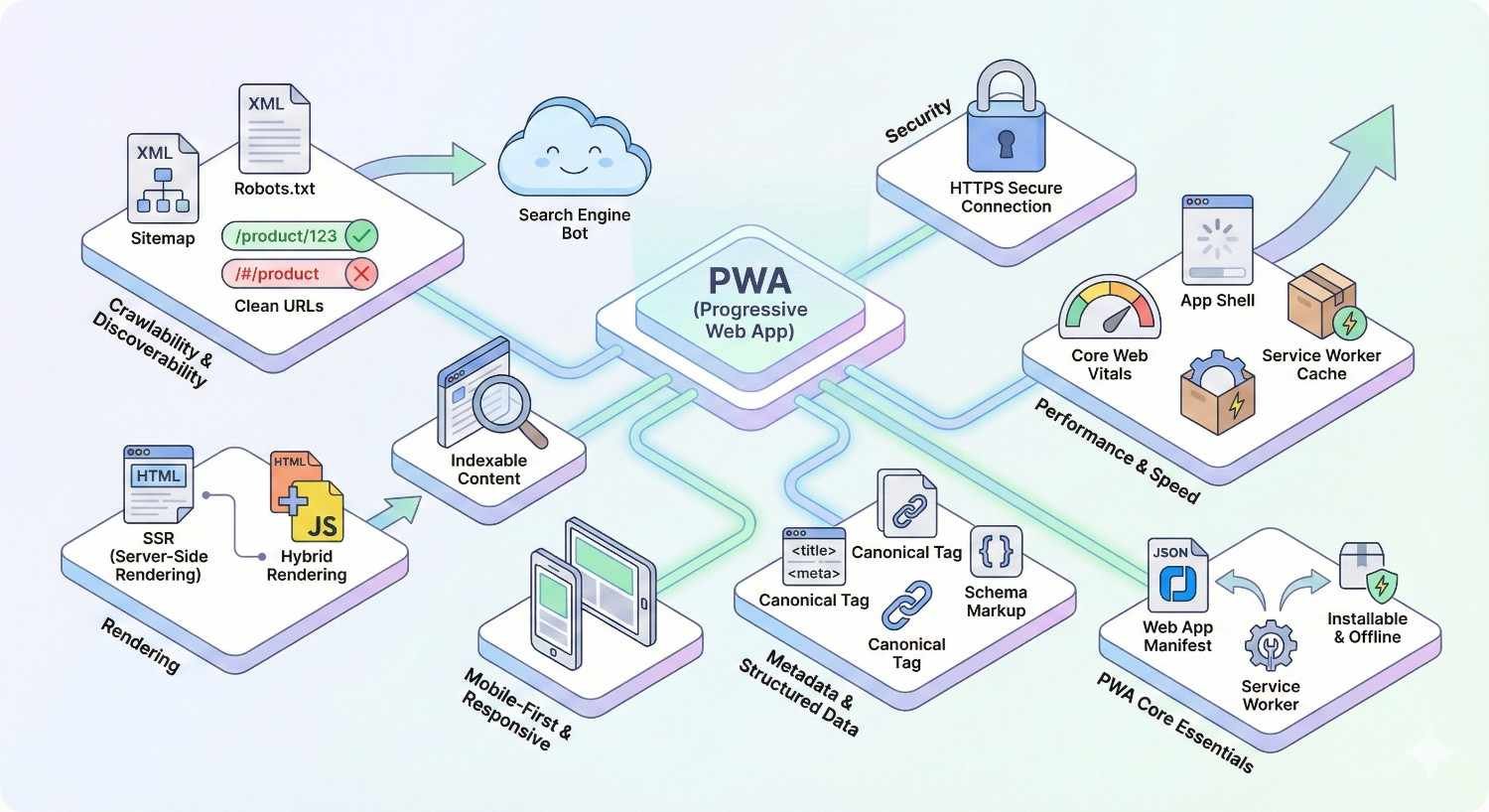
Technical SEO for PWAs extends beyond traditional optimization into JavaScript rendering strategies, server configuration, and build process modifications. The technical foundation determines whether subsequent SEO efforts can succeed.
Server-Side Rendering (SSR) vs Client-Side Rendering
Server-side rendering generates complete HTML on the server before sending responses to browsers or crawlers. The initial HTML contains all content, eliminating JavaScript rendering dependencies for indexation. SSR represents the most SEO-reliable approach for PWAs.
Client-side rendering shifts HTML generation to browsers through JavaScript execution. The server sends minimal HTML with JavaScript bundles that construct the page after loading. While modern search engines can process CSR content, the approach introduces indexation risks and delays.
SSR advantages for SEO include immediate content availability, faster indexation, reduced crawl budget consumption, and elimination of JavaScript rendering failures. Search engines receive exactly what users see without additional processing steps.
SSR implementation requires server infrastructure capable of rendering JavaScript applications. Node.js servers running framework-specific rendering solutions handle incoming requests, execute JavaScript, and return complete HTML. This adds server complexity and computational costs compared to static file serving.
Hybrid approaches combine SSR for initial page loads with client-side rendering for subsequent navigation. Users get fast initial loads with SEO-friendly content, then experience smooth client-side transitions. This pattern, often called universal or isomorphic rendering, provides optimal balance between SEO requirements and user experience.
Dynamic Rendering Implementation for PWAs
Dynamic rendering serves different content versions to users and search engine crawlers. Users receive standard client-side rendered pages while crawlers receive pre-rendered static HTML. This approach addresses SEO requirements without modifying the primary application architecture.
Implementation involves detecting crawler user agents and routing requests to a rendering service. Tools like Puppeteer, Rendertron, or commercial services render JavaScript pages and cache the results for crawler requests. The rendered HTML contains all content search engines need for indexation.
Google officially supports dynamic rendering as a workaround for JavaScript SEO challenges, though they recommend SSR as the preferred long-term solution. Dynamic rendering adds infrastructure complexity and potential points of failure but avoids modifying application code.
User agent detection must accurately identify search engine crawlers without blocking legitimate users or triggering cloaking concerns. Major search engines publish their user agent strings, but maintaining accurate detection requires ongoing updates as crawlers evolve.
Caching rendered pages improves performance and reduces rendering service load. Cache invalidation strategies must ensure crawlers receive updated content when pages change. Stale cached content can result in outdated information appearing in search results.
Pre-rendering Strategies for JavaScript Content
Pre-rendering generates static HTML versions of pages during build time rather than on each request. The build process renders all pages and outputs HTML files that servers deliver directly without runtime JavaScript execution.
Static site generation frameworks like Gatsby, Next.js static export, and Nuxt generate modes create pre-rendered PWAs. Pages exist as HTML files with JavaScript hydration adding interactivity after initial load. Search engines index the static HTML while users experience full PWA functionality.
Pre-rendering works best for content that doesn’t change frequently. Blog posts, documentation, product pages with stable information, and marketing content suit pre-rendering well. Highly dynamic content requiring real-time data presents challenges for build-time rendering.
Incremental static regeneration addresses dynamic content limitations by regenerating specific pages on demand or schedules. Next.js ISR and similar approaches combine static generation benefits with the ability to update content without full rebuilds.
Build times increase with page count for pre-rendered sites. Sites with thousands of pages may require significant build infrastructure and optimization. Incremental builds that only regenerate changed pages help manage build time growth.
Critical Rendering Path Optimization
The critical rendering path encompasses all steps browsers take to convert HTML, CSS, and JavaScript into rendered pixels. Optimizing this path improves both user experience metrics and search engine rendering success.
Render-blocking resources delay page rendering until they load and execute. CSS files block rendering by default, while JavaScript can block both parsing and rendering. Minimizing render-blocking resources accelerates content visibility for users and crawlers.
Critical CSS extraction identifies styles needed for above-the-fold content and inlines them in HTML. Remaining CSS loads asynchronously without blocking rendering. This technique ensures immediate content display while full styles load in the background.
JavaScript loading strategies affect rendering timing. Async and defer attributes control script execution timing relative to HTML parsing. Defer maintains execution order while allowing HTML parsing to continue. Async loads scripts independently but may execute out of order.
Code splitting divides JavaScript bundles into smaller chunks loaded on demand. Initial bundles contain only code needed for first render, with additional functionality loading as users navigate. Smaller initial bundles reduce time to interactive and improve Core Web Vitals.
Progressive Enhancement for Search Visibility
Progressive enhancement builds functionality in layers, starting with basic HTML content and adding JavaScript enhancements for capable browsers. This approach ensures content accessibility regardless of JavaScript execution success.
Core content should exist in initial HTML responses, not depend entirely on JavaScript generation. Even if JavaScript fails or times out, search engines and users with disabled JavaScript see meaningful content. JavaScript then enhances the experience with interactivity and dynamic features.
Feature detection determines browser capabilities before applying enhancements. Rather than assuming JavaScript support, code checks for specific features and gracefully degrades when unavailable. This resilience benefits both accessibility and SEO.
Server-side rendering naturally supports progressive enhancement by providing complete HTML that JavaScript hydrates. The page functions without JavaScript, then gains enhanced capabilities when scripts execute. This pattern aligns SEO requirements with accessibility best practices.
PWA Manifest File and SEO Implications
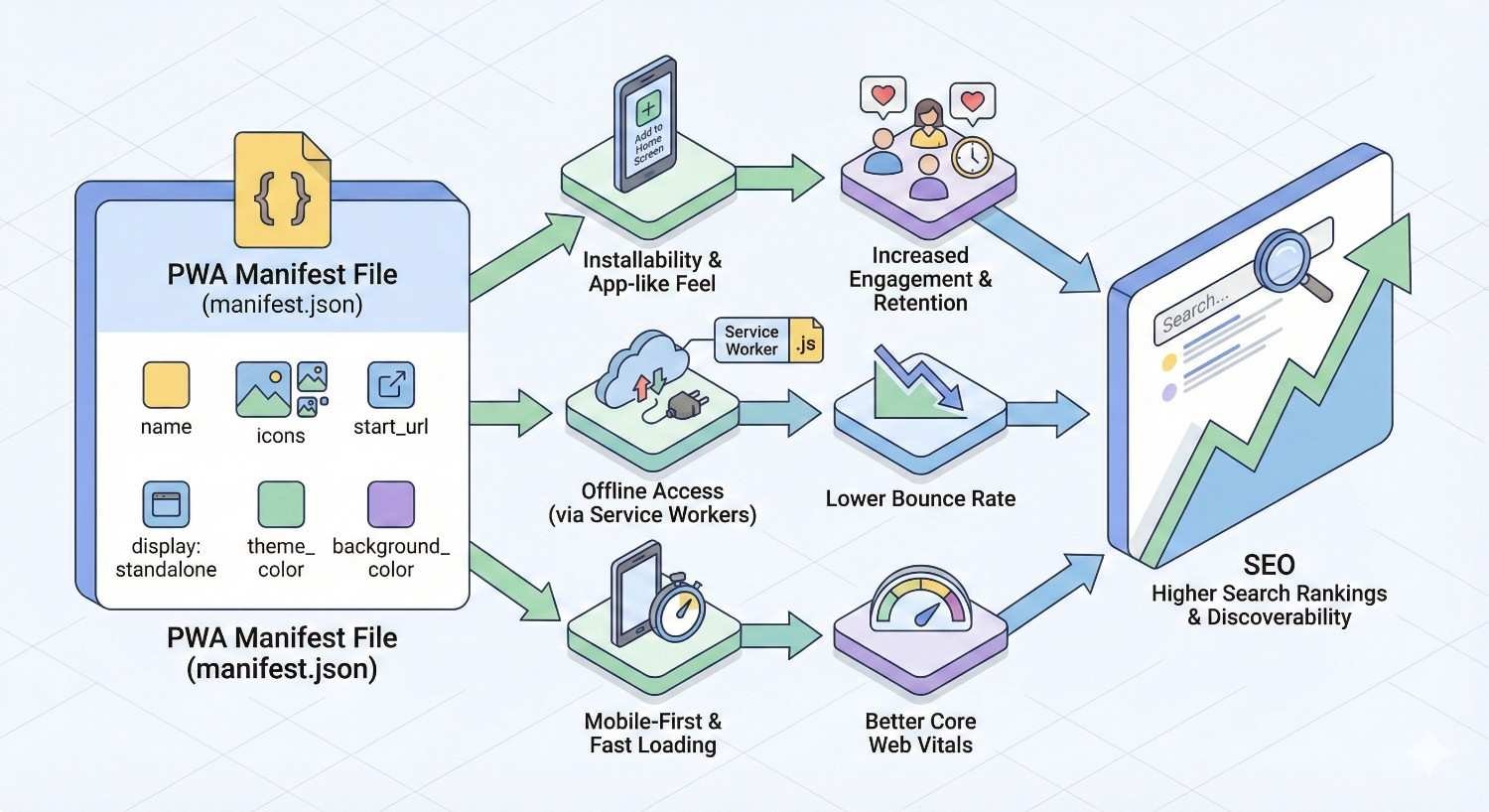
The web app manifest file defines how PWAs appear when installed on devices and influences browser behavior. While not a direct ranking factor, proper manifest configuration affects user experience signals and brand consistency across platforms.
Manifest.json Configuration for Search Engines
The manifest.json file contains metadata about the PWA including name, icons, colors, and display preferences. Browsers use this information for installation prompts, home screen icons, and standalone app windows.
Required manifest properties include name or short_name, icons array, start_url, and display mode. The name appears in installation prompts and app listings. Icons display on home screens and in app switchers. Start_url defines the page that opens when launching the installed app.
Display modes control how the PWA appears when launched. Standalone mode hides browser UI for an app-like experience. Fullscreen removes all UI including status bars. Minimal-ui shows minimal browser controls. Browser mode opens in a standard browser tab.
The scope property defines which URLs belong to the PWA. Navigation outside the scope opens in a browser rather than the app window. Proper scope configuration ensures consistent behavior and prevents unexpected browser switches during navigation.
App Name, Description, and Metadata Optimization
The name property should match your brand and be recognizable to users. Keep it concise for display in limited spaces like home screens and app switchers. The short_name provides an abbreviated version for constrained display contexts.
Description metadata, while not displayed in all contexts, provides information about the PWA for app stores and directories that index web apps. Write descriptions that clearly communicate the app’s purpose and value proposition.
Categories help classify the PWA for discovery in app directories. Use relevant categories that accurately describe your application’s primary function. Multiple categories can be specified when the app serves multiple purposes.
Related_applications can link to native app versions if they exist. This property helps users discover native alternatives and can influence browser behavior regarding installation prompts. Prefer_related_applications indicates whether browsers should promote native apps over the PWA.
Icon and Theme Color Impact on Search Appearance
Icons require multiple sizes for different display contexts. Provide at least 192×192 and 512×512 pixel versions for reliable display across devices. Additional sizes improve appearance in specific contexts like splash screens and app stores.
Maskable icons adapt to different platform icon shapes. Android devices may display icons in circles, squares, or rounded rectangles depending on manufacturer. Maskable icons include safe zones that remain visible regardless of masking shape.
Theme_color sets the browser toolbar color when viewing the PWA. This color appears in the address bar on mobile browsers and in the title bar of standalone windows. Choose colors that match your brand and provide sufficient contrast.
Background_color defines the splash screen color displayed while the PWA loads. This color should complement your theme_color and provide a smooth visual transition to your app’s interface. Consistent colors across manifest properties create professional, polished experiences.
Service Workers: SEO Risks and Best Practices
Service workers enable PWA capabilities like offline functionality, push notifications, and background sync. Their power to intercept network requests creates both opportunities and risks for search engine optimization.
Service Worker Registration and Crawl Budget
Service worker registration should occur after initial page content loads. Registering service workers too early can delay critical content rendering, affecting both user experience and potential crawler timeout issues.
Registration code typically checks for service worker support before attempting registration. This feature detection prevents errors in browsers that don’t support service workers while enabling functionality where available.
javascript
Copy
if (‘serviceWorker’ in navigator) {
window.addEventListener(‘load’, () => {
navigator.serviceWorker.register(‘/sw.js’);
});
}
The service worker file location determines its scope. A service worker at /sw.js controls the entire origin, while /app/sw.js only controls /app/ and subdirectories. Place service workers appropriately for your URL structure.
Update strategies affect how quickly changes propagate to users. The default behavior requires all tabs to close before activating new service workers. skipWaiting() and clients.claim() can force immediate activation but may cause inconsistencies if not handled carefully.
Caching Strategies That Don’t Block Indexation
Cache-first strategies serve cached content before checking networks, providing instant responses for cached resources. This approach works well for static assets like images, fonts, and CSS that rarely change.
Network-first strategies check networks before falling back to caches. This approach ensures fresh content for dynamic pages while providing offline fallbacks. Use network-first for HTML pages and API responses that change frequently.
Stale-while-revalidate serves cached content immediately while fetching updates in the background. Users see fast responses while caches stay fresh. This strategy balances performance with content freshness effectively.
Cache-only and network-only strategies serve specific use cases. Cache-only works for truly static resources that never change. Network-only ensures fresh data for real-time features where stale content would cause problems.
Runtime caching adds resources to caches as users navigate. This approach builds caches organically based on actual usage patterns. Combine with cache size limits to prevent unbounded cache growth.
Offline Functionality Without Hurting Rankings
Offline pages should provide meaningful content and navigation options, not just error messages. Custom offline pages maintain brand experience and help users understand their connectivity status.
Cached content enables offline access to previously visited pages. Users can continue reading articles, browsing products, or accessing information without network connectivity. This capability enhances user experience without affecting SEO.
Background sync queues actions taken offline for execution when connectivity returns. Form submissions, favorites, and other user actions persist across connectivity changes. This feature improves conversion rates for users with intermittent connections.
Offline analytics capture user behavior data during offline sessions for later transmission. This ensures complete analytics data regardless of connectivity status. Google Analytics and other platforms support offline data collection through service workers.
Service Worker Debugging for SEO Issues
Chrome DevTools provides comprehensive service worker debugging capabilities. The Application panel shows registered service workers, their status, and cached resources. Use these tools to verify service worker behavior matches expectations.
The Network panel reveals which requests service workers intercept and how they respond. Filter by service worker to see only intercepted requests. Compare responses between service worker and network to identify caching issues.
Lighthouse audits include PWA-specific checks for service worker implementation. Run Lighthouse in Chrome DevTools or through PageSpeed Insights to identify service worker issues affecting performance or functionality.
Testing service worker updates requires understanding the update lifecycle. Use “Update on reload” in DevTools during development to force service worker updates on each page load. This prevents stale service worker code from affecting testing.
Simulating offline conditions tests fallback behavior. DevTools Network panel includes offline simulation. Test that offline pages display correctly and that cached content remains accessible without network connectivity.
URL Structure and Navigation in Progressive Web Apps
URL architecture in PWAs requires careful planning to ensure crawlability while maintaining smooth client-side navigation. The disconnect between client-side routing and server-side URL handling creates unique challenges.
Client-Side Routing vs SEO-Friendly URLs
Client-side routing handles navigation within the browser without server requests. JavaScript intercepts link clicks, updates the URL, and renders new content. This creates fast, app-like navigation but requires proper configuration for SEO.
Hash-based routing uses URL fragments (#/page) for navigation. Search engines historically ignored content after hash symbols, making hash routing problematic for SEO. While some improvements exist, hash routing remains suboptimal for search visibility.
History API routing uses standard URL paths (/page) with JavaScript handling navigation. This approach creates SEO-friendly URLs that search engines can crawl and index. The History API’s pushState and replaceState methods update URLs without page reloads.
Server configuration must handle History API URLs correctly. Requests for any route should return the main application HTML, allowing client-side routing to render appropriate content. Without proper server configuration, direct URL access returns 404 errors.
History API Implementation for Crawlable Routes
The History API enables URL manipulation without page reloads. pushState adds entries to browser history, while replaceState modifies the current entry. Both methods update the displayed URL and enable back/forward navigation.
javascript
Copy
// Navigate to new page
history.pushState({page: ‘about’}, ‘About’, ‘/about’);
// Replace current history entry
history.replaceState({page: ‘home’}, ‘Home’, ‘/’);
Popstate events fire when users navigate through history. Applications must listen for these events and render appropriate content. Without popstate handling, back/forward buttons don’t update page content.
Server-side fallback configuration ensures direct URL access works. Apache, Nginx, and other servers need rules that serve the main HTML file for all application routes. This allows the client-side router to handle any URL.
nginx
Copy
# Nginx configuration for History API routing
location / {
try_files $uri $uri/ /index.html;
}
Deep Linking Architecture in PWAs
Deep links point directly to specific content within applications. Users should be able to bookmark, share, and access any page through its URL. Proper deep linking requires both client-side routing and server-side support.
Each distinct piece of content needs a unique, permanent URL. Product pages, articles, user profiles, and other content should have dedicated URLs that remain stable over time. URL changes require redirects to maintain link equity and user bookmarks.
Query parameters handle filtering, sorting, and pagination without creating separate URLs for each combination. Use parameters for temporary state that shouldn’t be indexed separately. Canonical tags prevent duplicate content issues from parameter variations.
State management must support deep linking. When users access deep links directly, applications must initialize with correct state. This often requires fetching data based on URL parameters during initial load.
Canonical URL Management for Single-Page Applications
Canonical tags tell search engines which URL version to index when multiple URLs show similar content. SPAs often create duplicate content scenarios through client-side routing, query parameters, and trailing slash variations.
Dynamic canonical tag updates ensure each page specifies its preferred URL. JavaScript must update the canonical tag when navigation occurs. Static canonical tags pointing to the homepage create indexation problems for all other pages.
javascript
Copy
// Update canonical tag on navigation
function updateCanonical(url) {
let canonical = document.querySelector(‘link[rel=”canonical”]’);
if (canonical) {
canonical.href = url;
}
}
Self-referencing canonicals point to the current page’s URL. Each page should have a canonical tag pointing to itself, confirming that URL as the preferred version. This prevents search engines from choosing unexpected canonical URLs.
Parameter handling through canonical tags consolidates variations. Pages with sorting or filtering parameters can canonical to the base URL if the filtered content shouldn’t be indexed separately. This approach manages crawl budget and prevents thin content issues.
Core Web Vitals Optimization for Progressive Web Apps
Core Web Vitals measure user experience through loading performance, interactivity, and visual stability. PWAs face unique challenges meeting these metrics due to JavaScript dependencies and dynamic content loading.
Largest Contentful Paint (LCP) in PWA Architecture
LCP measures when the largest content element becomes visible, targeting under 2.5 seconds for good scores. PWAs often struggle with LCP because main content depends on JavaScript execution and API responses.
Server-side rendering dramatically improves LCP by including content in initial HTML. The largest element renders immediately rather than waiting for JavaScript. SSR represents the most effective LCP optimization for content-heavy PWAs.
Critical resource prioritization ensures LCP elements load first. Use preload hints for hero images, critical fonts, and above-the-fold content. Defer non-critical resources until after LCP elements render.
html
Copy
<link rel=”preload“ href=”/hero-image.webp“ as=”image“>
<link rel=”preload“ href=”/critical-font.woff2“ as=”font“ crossorigin>
Image optimization significantly impacts LCP when images are the largest elements. Use modern formats like WebP or AVIF, appropriate sizing, and responsive images. Lazy load below-fold images while prioritizing above-fold content.
First Input Delay (FID) and JavaScript Execution
FID measures responsiveness to first user interaction, targeting under 100 milliseconds. Heavy JavaScript execution blocks the main thread, delaying response to user input. PWAs with large JavaScript bundles often struggle with FID.
Code splitting reduces initial JavaScript payload. Load only code needed for the current page, deferring additional functionality until needed. Dynamic imports enable on-demand loading of features and routes.
javascript
Copy
// Dynamic import for code splitting
const module = await import(‘./heavy-feature.js’);
Long task breaking prevents extended main thread blocking. Tasks over 50 milliseconds should be broken into smaller chunks using requestIdleCallback, setTimeout, or web workers. This allows the browser to respond to user input between task chunks.
Third-party script management affects FID significantly. Analytics, advertising, and social widgets often execute heavy JavaScript. Load third-party scripts after critical content and consider lazy loading non-essential scripts.
Cumulative Layout Shift (CLS) Prevention in Dynamic Content
CLS measures visual stability, targeting scores under 0.1. PWAs with dynamic content loading frequently cause layout shifts as content appears and pushes other elements around.
Dimension reservation prevents shifts from loading content. Specify width and height attributes on images and videos. Use CSS aspect-ratio or padding-based techniques for responsive media containers.
css
Copy
.image-container {
aspect-ratio: 16 / 9;
width: 100%;
}
Font loading strategies prevent text shifts. Use font-display: swap with fallback fonts that match web font metrics. Consider font-display: optional for non-critical text to eliminate shifts entirely.
Dynamic content insertion should occur in reserved spaces. Ads, related content, and lazy-loaded elements need placeholder space. Avoid inserting content above existing content, which pushes everything down.
Skeleton screens provide visual placeholders during loading. Users see the page structure immediately while content loads into designated areas. This approach improves perceived performance while preventing layout shifts.
Interaction to Next Paint (INP) for PWA Performance
INP replaced FID as a Core Web Vital in March 2024, measuring responsiveness throughout the page lifecycle rather than just first interaction. PWAs must maintain responsiveness during all user interactions, not just initial ones.
Event handler optimization ensures quick response to user actions. Keep event handlers lightweight, deferring heavy processing. Use requestAnimationFrame for visual updates and web workers for computation.
Rendering optimization prevents slow visual updates after interactions. Minimize DOM manipulation, batch updates, and use CSS transforms for animations. Virtual DOM libraries help but add their own overhead.
Input debouncing and throttling prevent excessive processing from rapid user input. Search fields, scroll handlers, and resize listeners benefit from controlled execution frequency.
App Shell Performance Impact on Core Web Vitals
The app shell model can improve or harm Core Web Vitals depending on implementation. Properly optimized shells provide instant visual feedback while content loads. Poorly implemented shells delay meaningful content.
Shell caching enables instant display on repeat visits. Service workers serve cached shell HTML and assets immediately. This dramatically improves LCP for returning users while fresh content loads.
Shell content should be minimal but meaningful. Include navigation, branding, and loading indicators. Avoid large images or complex layouts in the shell that slow initial rendering.
Content loading indicators within the shell prevent perceived slowness. Skeleton screens, spinners, or progress bars communicate loading status. Users tolerate waiting when they understand something is happening.
Hydration timing affects interactivity. The shell may appear interactive before JavaScript hydration completes. Consider disabling interactive elements until hydration finishes to prevent user frustration.
Mobile-First Indexing and PWA Advantages
Google’s mobile-first indexing uses mobile page versions for ranking and indexing. PWAs, designed primarily for mobile experiences, align naturally with mobile-first requirements when properly implemented.
How PWAs Align with Mobile-First Requirements
PWAs prioritize mobile experience by design. The technology emerged to bring app-like experiences to mobile web users. This mobile-first philosophy matches Google’s indexing approach.
Responsive design is fundamental to PWAs. Applications adapt to any screen size, providing optimal experiences across devices. This responsiveness satisfies mobile-first indexing requirements for content parity between mobile and desktop.
Touch-optimized interfaces improve mobile usability signals. PWAs typically feature large tap targets, swipe gestures, and mobile-friendly navigation. These design patterns align with mobile usability best practices.
Performance optimization for mobile networks benefits both users and SEO. PWAs minimize data transfer, cache aggressively, and work offline. These capabilities address mobile-specific challenges like slow connections and data limits.
Responsive Design vs Adaptive Loading in PWAs
Responsive design serves the same content with CSS adapting layout to screen size. All devices receive identical HTML and assets, with styling determining presentation. This approach ensures content parity for mobile-first indexing.
Adaptive loading serves different content or assets based on device capabilities. Mobile devices might receive smaller images, simplified features, or reduced functionality. This approach optimizes performance but risks content parity issues.
Network-aware loading adjusts based on connection speed. Slow connections receive lower-quality images or deferred non-critical content. The Network Information API enables connection-aware decisions.
javascript
Copy
if (navigator.connection) {
if (navigator.connection.saveData ||
navigator.connection.effectiveType === ‘2g’) {
// Load lightweight version
}
}
Device capability detection enables progressive enhancement. Feature detection determines available APIs and adjusts functionality accordingly. This approach provides optimal experiences across device capabilities.
Mobile Usability Signals for Progressive Web Apps
Tap target sizing affects mobile usability scores. Interactive elements need sufficient size and spacing for accurate touch input. Google recommends minimum 48×48 pixel tap targets with adequate spacing.
Viewport configuration ensures proper mobile rendering. The viewport meta tag must allow user scaling and set appropriate initial scale. Blocking zoom creates accessibility issues and may affect mobile usability signals.
html
Copy
<meta name=”viewport“ content=”width=device-width, initial-scale=1“>
Content sizing within viewport prevents horizontal scrolling. All content should fit within the viewport width without requiring horizontal scroll. Responsive images and flexible layouts prevent overflow issues.
Font sizing for readability affects mobile usability. Base font sizes should be at least 16 pixels to prevent mobile browsers from zooming. Adequate line height and contrast improve readability on small screens.
Structured Data Implementation in Progressive Web Apps
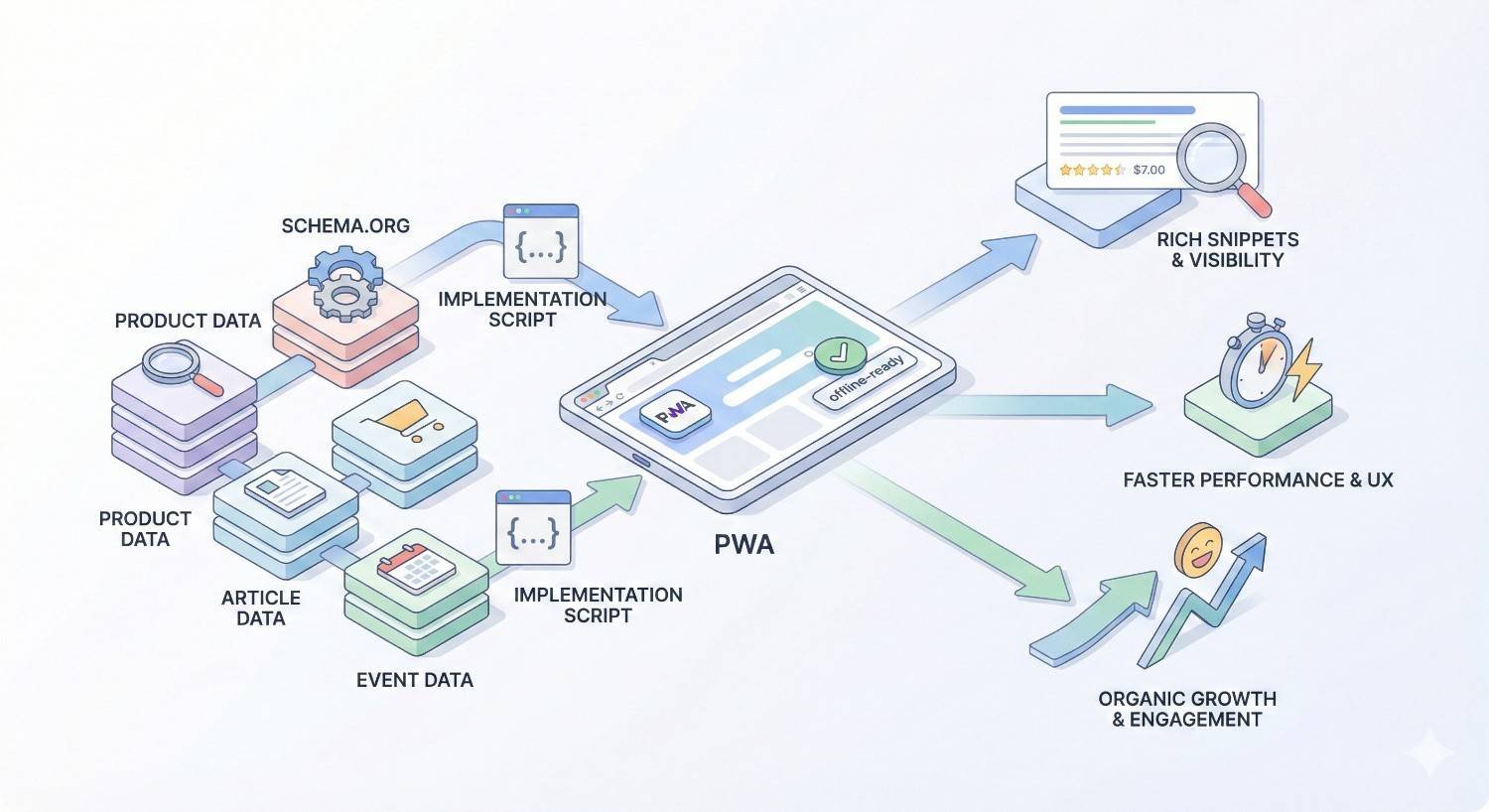
Structured data helps search engines understand page content and enables rich results in search. PWAs require special consideration for structured data implementation due to JavaScript rendering dependencies.
JSON-LD Injection in JavaScript-Rendered Content
JSON-LD is Google’s preferred structured data format, embedded in script tags within HTML. For PWAs, JSON-LD can be included in initial HTML or injected dynamically through JavaScript.
Server-side JSON-LD inclusion ensures search engines see structured data regardless of JavaScript execution. Include JSON-LD in the initial HTML response for critical structured data like organization, website, and page-specific schemas.
html
Copy
<script type=”application/ld+json“>
{
“@context”: “https://schema.org”,
“@type”: “Article”,
“headline”: “Article Title”,
“author”: {“@type”: “Person”, “name”: “Author Name”}
}
</script>
Dynamic JSON-LD injection works for content loaded after initial render. JavaScript can create and append script elements containing JSON-LD. Google’s renderer processes dynamically injected structured data.
javascript
Copy
const script = document.createElement(‘script’);
script.type = ‘application/ld+json’;
script.text = JSON.stringify(structuredData);
document.head.appendChild(script);
Schema Markup for PWA Products and Services
Product schema enables rich results for e-commerce PWAs. Include name, description, image, price, availability, and review data. Aggregate ratings from multiple reviews enhance product rich results.
Service schema describes service offerings with provider information, service area, and pricing. Local businesses benefit from LocalBusiness schema with address, hours, and contact information.
Organization schema establishes entity identity for knowledge panels. Include logo, social profiles, contact information, and founding details. This schema helps search engines understand your brand entity.
FAQ schema marks up question and answer content for FAQ rich results. Each question-answer pair appears expandable in search results, increasing SERP real estate and click-through rates.
Breadcrumb and Navigation Schema in Single-Page Apps
BreadcrumbList schema helps search engines understand site hierarchy. Breadcrumbs appear in search results, showing users the page’s location within your site structure.
Dynamic breadcrumb updates must include schema updates. When client-side navigation changes the page, update both visible breadcrumbs and underlying structured data. Mismatches between visible and schema breadcrumbs cause validation errors.
javascript
Copy
function updateBreadcrumbSchema(breadcrumbs) {
const schema = {
“@context”: “https://schema.org”,
“@type”: “BreadcrumbList”,
“itemListElement”: breadcrumbs.map((crumb, index) => ({
“@type”: “ListItem”,
“position”: index + 1,
“name”: crumb.name,
“item”: crumb.url
}))
};
// Update or inject schema
}
SiteNavigationElement schema describes main navigation structure. While less commonly used than breadcrumbs, it helps search engines understand site organization and important pages.
Dynamic Structured Data for Client-Side Content
Content-dependent structured data must update with content changes. Product pages, articles, and other dynamic content need corresponding schema updates when content loads or changes.
State management integration ensures schema stays synchronized with content. When application state changes, trigger schema updates alongside UI updates. This prevents stale structured data from misrepresenting current content.
Validation during development catches schema errors before deployment. Use Google’s Rich Results Test and Schema Markup Validator during development. Automated testing can include schema validation in CI/CD pipelines.
Error handling for schema generation prevents malformed structured data. Missing required fields or invalid values cause validation failures. Implement fallbacks and validation before injecting schemas.
Content Delivery and SEO in Progressive Web Apps
Content delivery strategies in PWAs affect both user experience and search engine crawlability. Lazy loading, infinite scroll, and media optimization require careful implementation to maintain SEO effectiveness.
Lazy Loading Implementation Without Blocking Crawlers
Native lazy loading uses the loading=”lazy” attribute for images and iframes. Browsers defer loading until elements approach the viewport. This native approach works with search engine crawlers.
html
Copy
<img src=”image.jpg“ loading=”lazy“ alt=”Description“>
Intersection Observer enables custom lazy loading for any content. Elements load when they enter or approach the viewport. This JavaScript-based approach requires consideration for crawler compatibility.
javascript
Copy
const observer = new IntersectionObserver((entries) => {
entries.forEach(entry => {
if (entry.isIntersecting) {
loadContent(entry.target);
observer.unobserve(entry.target);
}
});
});
Critical content should not be lazy loaded. Above-fold content, main article text, and primary images should load immediately. Lazy loading applies to below-fold and supplementary content.
Fallback content for lazy-loaded elements ensures crawlers see something meaningful. Placeholder text or low-resolution images provide context even if full content doesn’t load during crawling.
Infinite Scroll and Pagination SEO Strategies
Infinite scroll loads additional content as users scroll, creating seamless browsing experiences. However, search engines cannot scroll, making infinitely scrolled content potentially invisible to crawlers.
Paginated URLs provide crawler access to infinite scroll content. Each “page” of content should have a distinct URL that crawlers can access directly. Users experience infinite scroll while crawlers follow pagination links.
Load more buttons offer a middle ground between pagination and infinite scroll. Users click to load additional content, with each state having a distinct URL. This approach maintains crawlability while improving user experience over traditional pagination.
rel=”next” and rel=”prev” link elements help search engines understand pagination relationships. While Google no longer uses these for indexing signals, they remain useful for other search engines and accessibility.
html
Copy
<link rel=”prev“ href=”/page/1“>
<link rel=”next“ href=”/page/3“>
Image Optimization in PWA Architecture
Modern image formats reduce file sizes significantly. WebP offers 25-35% smaller files than JPEG at equivalent quality. AVIF provides even better compression for supporting browsers.
Responsive images serve appropriate sizes for different viewports. The srcset attribute specifies multiple image versions, while sizes indicates display dimensions. Browsers select optimal images automatically.
html
Copy
<img srcset=”small.jpg 400w, medium.jpg 800w, large.jpg 1200w“
sizes=”(max-width: 600px) 400px, (max-width: 1200px) 800px, 1200px“
src=”medium.jpg“ alt=”Description“>
Image CDNs automate optimization and format selection. Services like Cloudinary, imgix, and Cloudflare Images transform images on-demand, serving optimal formats and sizes based on request parameters.
Alt text remains essential for image SEO. Descriptive alt attributes help search engines understand image content and improve accessibility. Every meaningful image needs appropriate alt text.
Font Loading Strategies for Performance and Visibility
Font loading affects both performance metrics and content visibility. Web fonts can block text rendering, causing invisible text until fonts load. This impacts LCP and user experience.
font-display: swap shows fallback fonts immediately, swapping to web fonts when loaded. This prevents invisible text but may cause layout shifts if fallback and web font metrics differ significantly.
css
Copy
@font-face {
font-family: ‘Custom Font’;
src: url(‘font.woff2’) format(‘woff2’);
font-display: swap;
}
Font preloading prioritizes critical font loading. Preload fonts used for above-fold text to minimize swap timing. Limit preloading to essential fonts to avoid resource contention.
html
Copy
<link rel=”preload“ href=”font.woff2“ as=”font“ type=”font/woff2“ crossorigin>
System font stacks eliminate web font loading entirely. Using system fonts like -apple-system, BlinkMacSystemFont, and Segoe UI provides consistent, fast typography without external resources.
Font subsetting reduces file sizes by including only needed characters. If your content uses limited character sets, subset fonts to exclude unused glyphs. This significantly reduces font file sizes.
Internal Linking Architecture for PWAs
Internal linking distributes page authority and helps search engines discover content. PWAs require specific implementation approaches to ensure links function for both users and crawlers.
Crawlable Link Structure in JavaScript Applications
Standard anchor tags with href attributes create crawlable links. Search engines follow href values to discover linked pages. JavaScript-only navigation without href attributes prevents crawler discovery.
html
Copy
<!– Crawlable –>
<a href=”/about“>About Us</a>
<!– Not crawlable –>
<span onclick=”navigate(‘/about’)“>About Us</span>
Client-side routing frameworks must render proper anchor tags. React Router, Vue Router, and Angular Router all support crawlable link components. Use framework-provided link components rather than custom click handlers.
jsx
Copy
// React Router – crawlable
<Link to=”/about“>About Us</Link>
// Custom handler – not crawlable
<span onClick={() => history.push(‘/about’)}>About Us</span>
Navigation menus need crawlable links to all important pages. Main navigation, footer links, and sidebar menus should use proper anchor tags. These links help crawlers discover and understand site structure.
Anchor Tag Implementation vs JavaScript Navigation
Anchor tags should handle all navigation that search engines need to follow. Internal links, pagination, category navigation, and content links require proper href attributes.
JavaScript enhancement adds functionality without replacing anchor behavior. Event listeners can intercept clicks for smooth transitions while maintaining href for crawlers and users with JavaScript disabled.
javascript
Copy
document.querySelectorAll(‘a’).forEach(link => {
link.addEventListener(‘click’, (e) => {
if (shouldHandleClientSide(link)) {
e.preventDefault();
navigateClientSide(link.href);
}
// Otherwise, normal navigation occurs
});
});
Progressive enhancement ensures links work without JavaScript. The href provides fallback navigation if JavaScript fails. This approach benefits both SEO and accessibility.
External links should open normally or in new tabs as appropriate. Don’t intercept external link clicks for client-side handling. Use target=”_blank” with rel=”noopener” for new tab behavior.
Link Equity Distribution in Single-Page Applications
Internal linking distributes ranking signals throughout your site. Pages with more internal links receive more authority. Strategic linking emphasizes important pages.
Flat site architecture keeps important pages within a few clicks of the homepage. Deep nesting dilutes link equity and makes content harder for crawlers to discover. Aim for important content within three clicks.
Contextual links within content carry more weight than navigation links. Link to related content naturally within articles and product descriptions. These editorial links signal topical relationships.
Orphan pages lack internal links and may not be discovered by crawlers. Audit your site for pages without incoming internal links. Add appropriate links or consider whether orphan pages should exist.
Link anchor text provides context about linked pages. Use descriptive anchor text that indicates the linked page’s topic. Avoid generic text like “click here” or “read more.”
Meta Tags and On-Page SEO for Progressive Web Apps
Meta tags communicate page information to search engines and social platforms. PWAs must manage meta tags dynamically as users navigate between pages without full page reloads.
Dynamic Title Tag and Meta Description Management
Title tags must update with each navigation. Static titles that don’t change create duplicate title issues across all pages. JavaScript must update document.title on every route change.
javascript
Copy
// Update title on navigation
document.title = ‘Page Title | Site Name’;
Meta descriptions require similar dynamic updates. Select the meta description element and update its content attribute. Missing or duplicate descriptions reduce click-through rates from search results.
javascript
Copy
document.querySelector(‘meta[name=”description”]’)
.setAttribute(‘content’, ‘New page description’);
Server-side rendering simplifies meta tag management. Each page renders with correct meta tags in initial HTML. Client-side updates maintain consistency during navigation.
Framework-specific solutions handle meta tags elegantly. React Helmet, Vue Meta, and Angular’s Meta service provide declarative meta tag management. These tools handle updates automatically based on component state.
Open Graph and Twitter Card Implementation in PWAs
Open Graph tags control how pages appear when shared on Facebook and other platforms. Dynamic updates ensure shared links display correct titles, descriptions, and images.
html
Copy
<meta property=”og:title“ content=”Page Title“>
<meta property=”og:description“ content=”Page description“>
<meta property=”og:image“ content=”https://example.com/image.jpg“>
<meta property=”og:url“ content=”https://example.com/page“>
Twitter Cards provide similar functionality for Twitter sharing. Use twitter:card, twitter:title, twitter:description, and twitter:image tags. Summary and summary_large_image card types suit most content.
Server-side rendering is essential for social sharing. Social platform crawlers don’t execute JavaScript, so Open Graph and Twitter Card tags must exist in initial HTML. Dynamic updates only affect users, not social crawlers.
Pre-rendering or SSR ensures social crawlers see correct metadata. Each shareable page needs server-rendered meta tags matching its content. This requirement often drives SSR adoption for PWAs.
Robots Meta Tags for JavaScript-Rendered Pages
Robots meta tags control indexing and link following behavior. The default allows indexing and following, but specific pages may need restrictions.
html
Copy
<meta name=”robots“ content=”index, follow“>
<meta name=”robots“ content=”noindex, nofollow“>
Dynamic robots tags must be present in rendered HTML when crawlers process pages. If robots tags are added after initial render, crawlers may not see them. Server-side rendering ensures robots directives are respected.
Googlebot-specific directives allow Google-only instructions. Use googlebot instead of robots for directives that should only affect Google. Other search engines ignore googlebot-specific tags.
X-Robots-Tag HTTP headers provide an alternative to meta tags. Headers work for non-HTML resources and can be set at the server level. This approach ensures directives apply regardless of rendering.
Hreflang Implementation for Multilingual PWAs
Hreflang tags indicate language and regional targeting for international content. Each language version links to all other versions, including itself.
html
Copy
<link rel=”alternate“ hreflang=”en“ href=”https://example.com/page“>
<link rel=”alternate“ hreflang=”es“ href=”https://example.com/es/page“>
<link rel=”alternate“ hreflang=”x-default“ href=”https://example.com/page“>
Dynamic hreflang updates must occur with navigation. Each page needs correct hreflang tags pointing to its language variants. Missing or incorrect hreflang causes international targeting issues.
Server-side rendering ensures crawlers see hreflang tags. Like other meta tags, hreflang must exist in initial HTML for crawler processing. Client-side-only hreflang implementation fails for SEO purposes.
Hreflang consistency across all language versions prevents errors. Every page in the hreflang set must link to all others. Inconsistent implementation causes search engines to ignore hreflang signals.
Common PWA SEO Issues and Solutions
PWAs encounter specific SEO problems that don’t affect traditional websites. Understanding these issues and their solutions prevents ranking losses and indexation failures.
Blank Page Rendering in Search Results
Blank pages occur when JavaScript fails to execute or times out during crawling. Search engines see empty content, resulting in thin content signals or complete indexation failure.
Causes include JavaScript errors, slow API responses, render-blocking resources, and crawler timeout. Any failure in the rendering chain can result in blank pages.
Diagnosis uses Google Search Console’s URL Inspection tool. The rendered HTML view shows what Google sees. Compare rendered content to expected content to identify rendering failures.
Solutions involve server-side rendering, pre-rendering, or fixing JavaScript errors. SSR eliminates JavaScript rendering dependencies. Error handling and performance optimization address specific failure causes.
Duplicate Content from Client-Side Routing
Client-side routing can create multiple URLs for identical content. Trailing slashes, query parameters, and hash variations all potentially create duplicates.
Canonical tags consolidate duplicate URLs to preferred versions. Every page should have a self-referencing canonical or point to the preferred URL version.
URL normalization ensures consistent URL formats. Redirect non-canonical URLs to canonical versions. Enforce trailing slash or no-trailing-slash consistently.
Parameter handling through Google Search Console indicates which parameters affect content. Configure parameters that don’t change content as non-indexable to prevent duplicate indexation.
Missing or Incorrect Canonical Tags
Static canonical tags pointing to the homepage affect all pages. This common mistake tells search engines every page is a duplicate of the homepage.
Dynamic canonical updates must occur with navigation. Each page needs its own canonical URL. Verify canonical tags update correctly using browser developer tools.
Canonical URL format must match indexed URL format. Protocol (http vs https), www vs non-www, and trailing slashes must be consistent. Mismatched formats cause canonicalization failures.
Cross-domain canonicals require careful implementation. Pointing canonical tags to different domains transfers ranking signals. Only use cross-domain canonicals intentionally for syndicated content.
Service Worker Blocking Critical Resources
Misconfigured service workers can intercept and fail to serve critical resources. CSS, JavaScript, and images blocked by service workers prevent proper rendering.
Network request interception must handle all request types appropriately. Ensure fetch event handlers return appropriate responses for all resource types. Missing handlers cause request failures.
Cache invalidation prevents stale resources from being served. Implement cache versioning or time-based expiration. Users and potentially crawlers receiving outdated resources causes various issues.
Service worker scope limitations prevent unintended interception. Scope service workers appropriately for your URL structure. Overly broad scopes may intercept requests they shouldn’t handle.
JavaScript Errors Preventing Indexation
JavaScript errors halt execution, preventing content rendering. Errors that don’t affect user experience may still prevent crawler rendering.
Error monitoring identifies issues affecting crawlers. Tools like Sentry, LogRocket, and browser error tracking capture JavaScript errors. Monitor for errors occurring during initial render.
Graceful degradation ensures partial functionality despite errors. Try-catch blocks prevent single errors from crashing entire applications. Display meaningful content even when some features fail.
Testing in headless browsers simulates crawler behavior. Puppeteer and Playwright can render pages like Googlebot. Automated testing catches rendering issues before deployment.
Testing and Validating PWA SEO Implementation
Regular testing ensures PWA SEO implementations work correctly. Multiple tools and techniques verify different aspects of SEO functionality.
Google Search Console for PWA Monitoring
Google Search Console provides direct insight into how Google sees your PWA. The URL Inspection tool shows rendered HTML, detected resources, and indexation status.
Coverage reports identify indexation issues across your site. Errors, warnings, and excluded pages indicate problems requiring attention. Regular monitoring catches issues before they significantly impact traffic.
Performance reports show search visibility and click-through rates. Monitor impressions, clicks, and average position for important pages. Declining metrics may indicate SEO issues.
Core Web Vitals reports show field data from real users. Compare your PWA’s performance against Google’s thresholds. Poor Core Web Vitals may affect rankings.
Mobile-Friendly Test and Page Speed Insights
Google’s Mobile-Friendly Test verifies mobile usability. Enter URLs to check mobile rendering and identify usability issues. The test also shows rendered HTML for debugging.
PageSpeed Insights combines lab and field performance data. Lighthouse-based analysis provides specific optimization recommendations. Field data from Chrome User Experience Report shows real-world performance.
Core Web Vitals assessment within PageSpeed Insights shows pass/fail status. Green scores indicate good performance, while red scores require optimization. Yellow scores are acceptable but improvable.
Opportunities and diagnostics sections provide actionable recommendations. Prioritize high-impact optimizations identified by the tool. Address critical issues before minor optimizations.
Rich Results Test for Structured Data Validation
Google’s Rich Results Test validates structured data implementation. Enter URLs or code snippets to check for errors and warnings. The test shows which rich results your structured data enables.
Rendered HTML view shows structured data as Google sees it. Verify dynamically injected JSON-LD appears correctly. Missing structured data in rendered HTML indicates implementation issues.
Warnings indicate potential improvements without blocking rich results. Errors prevent rich result eligibility. Address errors first, then consider warning resolutions.
Multiple schema types can be tested simultaneously. Pages with multiple structured data types should validate all schemas. Test after any changes to structured data implementation.
Lighthouse SEO Audits for Progressive Web Apps
Lighthouse includes an SEO audit category checking common issues. Run Lighthouse in Chrome DevTools, through PageSpeed Insights, or via command line.
SEO audits check meta tags, crawlability, mobile-friendliness, and more. Each audit provides pass/fail status with explanations. Failed audits include remediation guidance.
PWA audits verify Progressive Web App requirements. Installability, service worker functionality, and HTTPS are checked. These audits ensure PWA features work correctly.
Performance audits affect SEO through Core Web Vitals. LCP, FID/INP, and CLS measurements indicate ranking factor performance. Optimize based on Lighthouse performance recommendations.
JavaScript SEO Testing Tools and Techniques
Puppeteer and Playwright enable programmatic browser testing. Scripts can render pages, extract content, and verify SEO elements. Automated testing catches regressions before deployment.
javascript
Copy
const puppeteer = require(‘puppeteer’);
async function testRendering(url) {
const browser = await puppeteer.launch();
const page = await browser.newPage();
await page.goto(url, {waitUntil: ‘networkidle0’});
const title = await page.title();
const content = await page.content();
// Verify expected content exists
console.log(‘Title:’, title);
console.log(‘Content length:’, content.length);
await browser.close();
}
Screaming Frog with JavaScript rendering crawls sites like search engines. Enable JavaScript rendering in configuration to see rendered content. Compare JavaScript-rendered crawls to standard crawls.
Chrome DevTools Network panel shows resource loading. Filter by document type to see HTML responses. Compare initial HTML to rendered DOM to understand JavaScript’s impact.
Mobile emulation in DevTools tests mobile rendering. Use device toolbar to simulate various devices. Verify content and functionality work correctly on mobile viewports.
PWA Frameworks and Their SEO Implications
Framework choice significantly impacts PWA SEO capabilities. Each framework offers different rendering options, performance characteristics, and SEO tooling.
Next.js for SEO-Optimized Progressive Web Apps
Next.js provides multiple rendering strategies within a single application. Static generation, server-side rendering, and client-side rendering can be mixed per page. This flexibility enables optimal SEO approaches for different content types.
Automatic static optimization generates static HTML for pages without data requirements. Pages with getStaticProps pre-render at build time. This approach provides excellent SEO with minimal configuration.
Server-side rendering through getServerSideProps handles dynamic content. Each request generates fresh HTML with current data. This approach suits frequently changing content requiring immediate indexation.
Incremental Static Regeneration updates static pages without full rebuilds. Pages regenerate on-demand or on schedules. This hybrid approach combines static generation benefits with dynamic content capabilities.
Built-in Image and Script components optimize performance automatically. Next/Image handles responsive images, lazy loading, and format optimization. Next/Script manages third-party script loading for better Core Web Vitals.
Gatsby and Static Site Generation for PWAs
Gatsby generates static HTML at build time for all pages. The resulting sites load instantly and work without JavaScript for basic functionality. This approach provides excellent SEO baseline.
GraphQL data layer unifies content from multiple sources. CMSs, APIs, databases, and files all feed into Gatsby’s build process. Content from any source becomes static HTML.
Plugin ecosystem extends functionality extensively. SEO plugins handle meta tags, sitemaps, and structured data. PWA plugins add service workers and manifest files.
Build times increase with site size. Large sites with thousands of pages require significant build infrastructure. Incremental builds help but don’t eliminate scaling challenges.
Hydration adds interactivity after initial static load. The static HTML provides SEO content while React hydration enables dynamic features. This progressive enhancement approach benefits both SEO and user experience.
Angular Universal for Server-Side Rendering
Angular Universal adds server-side rendering to Angular applications. The same Angular code runs on servers to generate HTML. This approach maintains single codebase while enabling SSR.
Transfer State prevents duplicate API calls. Data fetched during server rendering transfers to the client. The browser doesn’t re-fetch data already available from SSR.
Pre-rendering generates static HTML during build for known routes. Similar to static site generation, pre-rendering creates HTML files served directly. This approach works well for content that doesn’t change frequently.
Lazy loading modules reduce initial bundle size. Angular’s module system enables code splitting by route. Users download only code needed for current functionality.
SEO considerations require explicit handling in Angular. Meta tags, canonical URLs, and structured data need manual implementation. Libraries like @ngx-meta/core simplify meta tag management.
React and Preact SEO Considerations
React alone provides client-side rendering without SSR. Additional tools like Next.js, Gatsby, or custom Express setups add server rendering. Pure React SPAs face JavaScript rendering dependencies.
React Helmet manages document head elements. Title tags, meta descriptions, and other head elements update declaratively. This library simplifies dynamic meta tag management.
jsx
Copy
import { Helmet } from ‘react-helmet’;
function Page() {
return (
<>
<Helmet>
<title>Page Title</title>
<meta name=”description“ content=”Page description“ />
</Helmet>
<div>Page content</div>
</>
);
}
Preact offers React-compatible API with smaller bundle size. The 3KB library provides similar functionality to React’s 40KB+. Smaller bundles improve performance metrics.
React Server Components enable server rendering within React itself. This newer approach renders components on servers without client-side JavaScript. Adoption is growing but requires compatible frameworks.
Vue.js and Nuxt.js for Search-Friendly PWAs
Vue.js provides reactive UI framework with optional SSR through Nuxt.js. Vue alone creates client-side applications, while Nuxt adds server rendering and static generation.
Nuxt.js offers multiple rendering modes. Universal mode provides SSR, static mode generates static sites, and SPA mode creates client-only applications. Choose modes based on content requirements.
Auto-imports reduce boilerplate code. Components, composables, and utilities import automatically. This developer experience improvement doesn’t affect SEO but speeds development.
Vue Meta handles document head management. Similar to React Helmet, Vue Meta provides declarative meta tag control. Nuxt includes head management built-in.
vue
Copy
<script setup>
useHead({
title: ‘Page Title’,
meta: [
{ name: ‘description’, content: ‘Page description’ }
]
})
</script>
Nuxt Content module enables markdown-based content management. Content files become pages with automatic routing. This approach suits documentation and blog sites.
Migrating to PWA: SEO Transition Strategy
PWA migrations require careful planning to maintain search visibility. Rushed migrations often cause significant traffic losses that take months to recover.
Pre-Migration SEO Audit and Baseline Metrics
Document current SEO performance before any changes. Record organic traffic, rankings for important keywords, indexed page counts, and Core Web Vitals scores. These baselines enable post-migration comparison.
Crawl the existing site to map all URLs. Tools like Screaming Frog or Sitebulb identify all pages, their relationships, and current SEO elements. This inventory guides URL mapping for the new PWA.
Identify high-value pages requiring special attention. Pages driving significant traffic or conversions need careful migration handling. Prioritize these pages in testing and monitoring.
Audit current technical SEO elements. Document canonical tags, hreflang implementation, structured data, and internal linking. The PWA must replicate or improve these elements.
Phased Rollout vs Full Migration Approach
Phased rollouts migrate sections incrementally. Start with lower-traffic sections to identify issues before migrating critical pages. This approach reduces risk but extends migration timeline.
Full migrations switch everything simultaneously. This approach provides cleaner transitions but higher risk. Issues affect the entire site immediately rather than isolated sections.
Subdomain testing enables PWA validation before migration. Deploy the PWA on a staging subdomain for thorough testing. Verify all SEO elements work correctly before production deployment.
A/B testing between old and new versions measures impact. Route portions of traffic to the PWA while maintaining the original site. Compare performance metrics between versions.
301 Redirects and URL Mapping Strategy
Map every old URL to its new PWA equivalent. Create comprehensive redirect rules covering all indexed pages. Missing redirects cause 404 errors and lost link equity.
Implement redirects at the server level, not through JavaScript. Search engines may not execute JavaScript redirects. Server-side 301 redirects properly transfer ranking signals.
nginx
Copy
# Nginx redirect example
location /old-page {
return 301 /new-page;
}
Test redirects thoroughly before launch. Verify each redirect reaches the correct destination. Check for redirect chains or loops that waste crawl budget.
Monitor 404 errors after migration. Google Search Console reports crawl errors including 404s. Address missing redirects promptly to minimize traffic loss.
Monitoring Rankings During PWA Transition
Track rankings for important keywords throughout migration. Daily monitoring identifies issues quickly. Ranking tools like Semrush, Ahrefs, or Moz provide tracking capabilities.
Expect temporary fluctuations during migration. Search engines need time to process changes. Minor ranking movements in the first few weeks are normal.
Significant drops require immediate investigation. Large ranking losses indicate technical issues requiring urgent attention. Check indexation status, rendering, and redirect implementation.
Compare traffic patterns to pre-migration baselines. Google Analytics shows organic traffic trends. Segment by landing page to identify specific pages with issues.
Post-Migration SEO Recovery Timeline
Initial indexation of new URLs typically occurs within days to weeks. Google discovers and processes redirects, updating its index with new URLs. Monitor Search Console for indexation progress.
Ranking stabilization usually takes 4-8 weeks for most sites. Search engines need time to evaluate new pages and adjust rankings accordingly. Patience is essential during this period.
Full recovery may take 3-6 months for large sites or significant changes. Complex migrations with many URL changes require longer adjustment periods. Consistent monitoring identifies lingering issues.
Ongoing optimization continues after initial recovery. Use post-migration data to identify improvement opportunities. The PWA platform may enable optimizations not possible on the previous site.
PWA SEO vs Native App SEO vs Traditional Website SEO
Different platforms offer distinct SEO characteristics. Understanding these differences helps choose the right approach for your goals.
Indexation Differences Across Platforms
Traditional websites index most reliably. HTML content is immediately available to crawlers without rendering requirements. This simplicity makes traditional sites the SEO baseline.
PWAs require JavaScript rendering for indexation. While Google handles this well, rendering adds complexity and potential failure points. Proper implementation achieves comparable indexation to traditional sites.
Native apps don’t index in traditional web search. App Store Optimization (ASO) governs native app discovery. App Indexing and App Links can surface app content in search, but implementation differs significantly from web SEO.
Web content within apps can be indexed through App Indexing. Deep links connect search results to specific app content. This hybrid approach requires both web and app optimization.
Ranking Factor Comparison
Content quality and relevance remain primary factors across all platforms. Regardless of technology, valuable content that satisfies user intent ranks well. Technical implementation enables but doesn’t replace content quality.
Page experience signals apply to web content including PWAs. Core Web Vitals, mobile-friendliness, and HTTPS affect rankings. PWAs can excel at these factors when properly optimized.
Backlinks matter for web content but not native apps. Link building strategies apply to PWAs and traditional sites equally. Native apps rely on app store reviews and ratings instead.
User engagement signals may influence rankings. Time on site, bounce rate, and return visits indicate content quality. PWAs often improve engagement through better performance and offline capabilities.
When to Choose PWA Over Other Options
Choose PWAs when web discoverability matters. If organic search drives significant traffic, PWAs maintain that channel while adding app-like features. Native apps sacrifice web SEO entirely.
Choose PWAs for cross-platform reach. Single codebases work across devices and operating systems. Native apps require separate iOS and Android development.
Choose PWAs when installation friction must be minimal. PWAs install from browsers without app store visits. This reduces barriers compared to native app installation.
Choose native apps when platform-specific features are essential. Hardware access, background processing, and platform integration favor native development. PWAs have limitations native apps don’t.
Hybrid Strategies for Maximum Visibility
Maintain web presence alongside native apps. Websites or PWAs capture search traffic while native apps serve engaged users. Both channels contribute to overall visibility.
Deep linking connects web and app experiences. Users finding content through search can open it in installed apps. This bridges web discoverability with app engagement.
Content parity ensures consistent information across platforms. Web and app versions should provide equivalent content. Discrepancies confuse users and complicate maintenance.
Analytics integration tracks user journeys across platforms. Understand how users move between web and app experiences. This data informs optimization priorities for each platform.
E-commerce PWA SEO Best Practices
E-commerce sites have specific SEO requirements that PWA architecture must address. Product discovery, category navigation, and transactional pages all need careful optimization.
Product Page Optimization in PWA Architecture
Product pages need complete content in rendered HTML. Product names, descriptions, prices, and images must be crawlable. Server-side rendering ensures product content indexes reliably.
Unique content differentiates product pages. Avoid duplicate manufacturer descriptions across products. Add unique value through detailed specifications, use cases, and original imagery.
Product schema markup enables rich results. Include name, description, image, price, availability, and reviews. Aggregate ratings from customer reviews enhance search appearance.
json
Copy
{
“@context”: “https://schema.org”,
“@type”: “Product”,
“name”: “Product Name”,
“description”: “Product description”,
“image”: “https://example.com/product.jpg”,
“offers”: {
“@type”: “Offer”,
“price”: “99.99”,
“priceCurrency”: “USD”,
“availability”: “https://schema.org/InStock”
}
}
Internal linking from category pages distributes authority. Products should be reachable through logical category hierarchies. Orphan products without category links may not be discovered.
Category Navigation and Faceted Search SEO
Category pages serve as landing pages for broad searches. Optimize category titles, descriptions, and content for category-level keywords. These pages often drive significant organic traffic.
Faceted navigation creates URL variations through filters. Color, size, price, and other filters generate potentially thousands of URL combinations. Without management, this causes crawl budget waste and duplicate content.
Canonical tags consolidate filtered variations. Point filtered URLs to the main category page unless filters create meaningfully different content. This prevents duplicate content issues.
Robots directives can block filter combinations from indexing. Use robots meta tags or robots.txt to prevent indexation of low-value filter combinations. Allow indexation only for valuable filtered views.
Crawlable category links ensure discovery. Main navigation should include category links as proper anchor tags. JavaScript-only navigation prevents category page discovery.
Shopping Cart and Checkout Page Indexation
Cart and checkout pages typically shouldn’t be indexed. These pages contain user-specific content and don’t provide search value. Use noindex directives to prevent indexation.
html
Copy
<meta name=”robots“ content=”noindex, nofollow“>
Session-based URLs create duplicate content issues. Cart URLs with session IDs generate unique URLs for identical content. Canonical tags or noindex prevent these duplicates from indexing.
Secure checkout pages require HTTPS. While all pages should use HTTPS, checkout security is especially critical. Search engines and browsers flag insecure checkout pages.
Thank you and confirmation pages don’t need indexation. These post-transaction pages provide no search value. Apply noindex to prevent wasted crawl budget.
Product Schema and Review Markup in PWAs
Product schema enables product rich results in search. Price, availability, and ratings display directly in search results. This enhanced appearance improves click-through rates.
Review schema aggregates customer feedback. AggregateRating shows overall ratings while individual Review markup shows specific reviews. Both enhance search result appearance.
json
Copy
{
“@type”: “Product”,
“aggregateRating”: {
“@type”: “AggregateRating”,
“ratingValue”: “4.5”,
“reviewCount”: “127”
},
“review”: [{
“@type”: “Review”,
“author”: {“@type”: “Person”, “name”: “Reviewer”},
“reviewRating”: {“@type”: “Rating”, “ratingValue”: “5”},
“reviewBody”: “Great product!”
}]
}
Dynamic schema updates reflect current data. Prices, availability, and reviews change over time. Schema must update with content to avoid misrepresentation.
Validation ensures schema eligibility for rich results. Test product pages with Google’s Rich Results Test. Fix errors and warnings to maximize rich result appearance.
Content Management and Publishing in PWA Environments
Content management in PWAs differs from traditional CMS-driven sites. Headless architectures and API-driven content require specific SEO considerations.
Headless CMS Integration for SEO
Headless CMSs separate content management from presentation. Content stored in the CMS delivers through APIs to PWA frontends. This architecture provides flexibility but requires SEO attention.
Content APIs must provide all SEO-relevant data. Titles, descriptions, structured data, and canonical URLs should be manageable in the CMS. Frontend applications consume this data for proper SEO implementation.
Preview functionality helps content creators see SEO elements. Headless setups often lack WYSIWYG previews. Build preview capabilities showing how content appears with SEO elements.
Popular headless CMS options include Contentful, Strapi, Sanity, and Prismic. Each offers different SEO capabilities and integration approaches. Evaluate SEO features when selecting a headless CMS.
Webhook-triggered rebuilds update static sites when content changes. CMS content updates trigger PWA rebuilds, deploying fresh content. This automation ensures content changes reach production promptly.
Content Update Frequency and Crawl Signals
Fresh content signals active, maintained sites. Regular updates encourage more frequent crawling. Stale sites may see reduced crawl frequency over time.
Sitemaps with lastmod dates indicate content freshness. Update lastmod when content changes meaningfully. Accurate dates help crawlers prioritize recently updated content.
xml
Copy
<url>
<loc>https://example.com/page</loc>
<lastmod>2025-01-15</lastmod>
</url>
Content calendars maintain publishing consistency. Regular new content and updates to existing content signal site vitality. Plan content updates as part of ongoing SEO strategy.
Evergreen content updates keep valuable pages current. Update statistics, examples, and references in high-performing content. This maintenance preserves and improves rankings over time.
Blog and Article Publishing in PWA Architecture
Blog content benefits from pre-rendering or SSR. Articles don’t change frequently, making static generation efficient. Fresh articles can use ISR for quick publication.
Article schema markup enhances search appearance. Include headline, author, datePublished, and image. News articles may qualify for Top Stories with proper markup.
json
Copy
{
“@context”: “https://schema.org”,
“@type”: “Article”,
“headline”: “Article Title”,
“author”: {“@type”: “Person”, “name”: “Author Name”},
“datePublished”: “2025-01-15”,
“image”: “https://example.com/article-image.jpg”
}
Category and tag pages organize blog content. These archive pages can rank for broader topics. Optimize archive pages with unique descriptions and proper pagination.
Internal linking from articles distributes authority. Link to related articles, product pages, and service pages. This contextual linking strengthens topical authority.
Editorial Workflow for SEO-Optimized PWA Content
SEO review should be part of content workflows. Before publication, verify titles, descriptions, headings, and structured data. Catch SEO issues before content goes live.
Content briefs include SEO requirements. Writers receive target keywords, required headings, and linking instructions. This upfront guidance produces SEO-optimized content from the start.
Staging environments enable pre-publication testing. Test content rendering, meta tags, and structured data before production deployment. Catch issues in staging rather than production.
Post-publication monitoring tracks content performance. Monitor new content in Search Console for indexation and initial rankings. Address any issues promptly after publication.
International SEO for Progressive Web Apps
International PWAs serve multiple languages and regions. Proper implementation ensures correct content reaches appropriate audiences in each market.
Multi-Language PWA Implementation
Separate URLs for each language enable proper targeting. Subdirectories (/en/, /es/), subdomains (en.example.com), or separate domains (example.es) all work. Subdirectories are often simplest to implement and maintain.
Language detection should not redirect automatically. Let users choose their language or use hreflang for search engine targeting. Automatic redirects based on IP can block crawlers and frustrate users.
Content translation requires human review. Machine translation alone produces poor quality content. Professional translation or thorough human review ensures content quality.
URL structure should be consistent across languages. If /products/ exists in English, /productos/ should exist in Spanish. Parallel structures simplify hreflang implementation and user navigation.
Hreflang in JavaScript-Rendered Applications
Hreflang tags must exist in rendered HTML. Server-side rendering ensures crawlers see hreflang regardless of JavaScript execution. Client-side-only hreflang fails for SEO purposes.
Every language version needs complete hreflang sets. Each page links to all language versions including itself. Missing or inconsistent hreflang causes targeting failures.
x-default indicates the fallback for unmatched languages. This version serves users whose language isn’t specifically targeted. Typically the primary language version serves as x-default.
html
Copy
<link rel=”alternate“ hreflang=”en“ href=”https://example.com/page“>
<link rel=”alternate“ hreflang=”es“ href=”https://example.com/es/page“>
<link rel=”alternate“ hreflang=”x-default“ href=”https://example.com/page“>
Hreflang validation tools check implementation correctness. Ahrefs, Screaming Frog, and dedicated hreflang tools identify errors. Regular validation catches issues from content updates.
Geo-Targeting and Regional Content Delivery
Google Search Console allows country targeting for generic TLDs. Set target countries for subdomains or subdirectories. Country-code TLDs (.uk, .de) automatically target their countries.
CDN configuration can serve region-appropriate content. Edge servers deliver content from nearby locations. This improves performance for international users.
Regional content variations address local needs. Prices in local currencies, region-specific products, and local contact information improve relevance. These variations require proper hreflang implementation.
IP-based content changes risk cloaking concerns. If crawlers see different content than users, this may be considered cloaking. Ensure crawlers can access all content versions.
Currency and Localization SEO Considerations
Currency display should match target markets. Show prices in local currencies for each region. Currency conversion or region-specific pricing improves user experience.
Product schema should reflect displayed currency. The priceCurrency property must match what users see. Mismatches between schema and displayed prices cause validation issues.
json
Copy
{
“@type”: “Offer”,
“price”: “89.99”,
“priceCurrency”: “EUR”
}
Date and number formats vary by region. Use locale-appropriate formatting for dates, numbers, and measurements. These details affect user experience and trust.
Local payment methods improve conversion. Region-specific payment options like iDEAL in Netherlands or Boleto in Brazil serve local preferences. Payment method availability affects user experience signals.
PWA SEO Performance Monitoring and KPIs
Ongoing monitoring ensures PWA SEO efforts produce results. Track key metrics to identify issues and opportunities.
Organic Traffic Metrics for Progressive Web Apps
Organic sessions measure search-driven visits. Google Analytics segments traffic by source, showing organic search specifically. Monitor trends over time to identify growth or decline.
Landing page performance shows which pages drive traffic. Identify top-performing pages and those underperforming expectations. This data guides optimization priorities.
Organic conversion rates measure traffic quality. High-traffic pages with low conversions may need content or UX improvements. Track conversions by landing page for actionable insights.
Mobile vs desktop organic traffic reveals device preferences. PWAs often improve mobile experience significantly. Monitor mobile traffic share and engagement metrics.
Indexation Coverage and Status Monitoring
Google Search Console Coverage report shows indexation status. Valid pages are indexed, while errors and exclusions indicate issues. Regular monitoring catches indexation problems early.
Index bloat from unnecessary pages wastes crawl budget. Identify indexed pages that shouldn’t be, like filtered URLs or utility pages. Apply noindex or remove from sitemaps.
Crawl stats show how Google accesses your site. Crawl frequency, response times, and crawl budget usage indicate site health. Sudden changes may indicate technical issues.
Sitemap indexation status confirms sitemap processing. Submitted sitemaps should show discovered and indexed URL counts. Large discrepancies indicate indexation issues.
Core Web Vitals Tracking Over Time
Search Console Core Web Vitals report shows field data trends. Track improvements from optimization efforts. Field data reflects real user experience.
PageSpeed Insights provides point-in-time assessments. Regular testing tracks lab metric improvements. Compare scores before and after optimizations.
Web Vitals JavaScript library enables custom tracking. Collect Core Web Vitals data in your analytics platform. This provides more granular data than Search Console.
javascript
Copy
import {getCLS, getFID, getLCP} from ‘web-vitals’;
getCLS(console.log);
getFID(console.log);
getLCP(console.log);
Performance budgets prevent regression. Set thresholds for key metrics and alert when exceeded. Automated monitoring catches performance degradation quickly.
Conversion Rate Impact from PWA Implementation
Compare conversion rates before and after PWA migration. Improved performance often increases conversions. Isolate PWA impact from other changes for accurate attribution.
Mobile conversion rates often improve most significantly. PWAs address mobile performance challenges effectively. Compare mobile conversion rate changes specifically.
Engagement metrics like time on site and pages per session indicate experience quality. PWAs typically improve these metrics through faster navigation. Track engagement alongside conversions.
Revenue per session combines traffic and conversion impacts. Even if conversion rates stay flat, increased traffic grows revenue. Track revenue metrics for complete business impact assessment.
ROI Measurement for PWA SEO Investment
Calculate total PWA investment including development, migration, and ongoing maintenance. Include opportunity costs from development time. This establishes the investment baseline.
Measure organic traffic value using average revenue per organic session. Multiply by traffic changes attributable to PWA implementation. This quantifies traffic value changes.
Performance improvement value comes from conversion rate changes. Calculate additional conversions from improved experience. Multiply by average conversion value for revenue impact.
Payback period divides investment by monthly value increase. Typical PWA implementations achieve payback within 6-18 months depending on site size and traffic levels.
Advanced PWA SEO Techniques
Advanced techniques push PWA SEO beyond basics. These approaches require more sophisticated implementation but deliver competitive advantages.
Edge SEO and CDN-Level Optimization
Edge computing executes logic at CDN edge servers. SEO modifications happen before responses reach users or crawlers. This approach enables optimizations without application changes.
Cloudflare Workers, AWS Lambda@Edge, and similar services enable edge SEO. Inject structured data, modify meta tags, or implement redirects at the edge. Changes deploy globally without application redeployment.
A/B testing at the edge tests SEO changes safely. Route portions of traffic to modified versions. Measure impact before full rollout.
Bot detection at the edge can serve optimized content to crawlers. Ensure this doesn’t constitute cloaking by serving equivalent content. Edge optimization should enhance, not replace, application-level SEO.
AI-Powered Content Personalization Without Cloaking
Personalization improves user experience but risks cloaking if crawlers see different content. Implement personalization that maintains content equivalence for SEO safety.
Personalize presentation, not core content. Layout, recommendations, and UI elements can personalize while main content stays consistent. Crawlers and users see the same primary content.
Client-side personalization after initial render avoids cloaking concerns. Server responses contain standard content, with JavaScript adding personalization. Crawlers see the base content.
Document personalization approaches for transparency. If questioned about content differences, clear documentation demonstrates non-deceptive intent. Maintain records of personalization logic.
Progressive Hydration for Faster Indexation
Progressive hydration prioritizes interactive elements. Critical components hydrate first while less important elements wait. This improves time to interactive without sacrificing functionality.
Islands architecture hydrates independent component islands. Static content remains static while interactive islands hydrate separately. This approach minimizes JavaScript execution for mostly-static pages.
Partial hydration skips hydration for purely presentational components. Components without interactivity don’t need JavaScript. This reduces hydration overhead significantly.
Lazy hydration defers component hydration until needed. Components hydrate when they enter the viewport or receive interaction. This approach prioritizes visible, interactive content.
Predictive Prefetching and SEO Implications
Predictive prefetching loads likely next pages before users click. Machine learning predicts navigation patterns and preloads resources. Users experience instant page transitions.
Prefetching doesn’t directly affect SEO but improves user experience metrics. Faster perceived navigation may improve engagement signals. Better experience correlates with better rankings.
Guess.js and similar libraries enable intelligent prefetching. Analytics data trains models predicting user navigation. Prefetching focuses on likely destinations rather than all links.
Resource hints enable manual prefetching control. Prefetch, preload, and preconnect hints prioritize specific resources. Use these for known high-priority navigation paths.
html
Copy
<link rel=”prefetch“ href=”/likely-next-page“>
<link rel=”preconnect“ href=”https://api.example.com“>
Case Studies: Successful PWA SEO Implementations
Real-world examples demonstrate PWA SEO success. These cases show achievable results from proper implementation.
E-commerce Brand PWA Migration Results
A major fashion retailer migrated from a traditional e-commerce platform to a PWA built with Next.js. The migration prioritized SEO through server-side rendering and comprehensive redirect mapping.
Pre-migration preparation included complete URL inventory, baseline metric documentation, and phased testing on staging environments. The team identified and addressed potential issues before production deployment.
Results after six months showed 23% increase in organic traffic and 15% improvement in mobile conversion rates. Core Web Vitals scores improved from failing to passing across all metrics. The combination of better performance and maintained SEO produced significant business impact.
Key success factors included thorough planning, SSR implementation, and aggressive post-migration monitoring. Issues identified in the first weeks were addressed quickly, preventing prolonged ranking losses.
Media Publisher PWA Performance Gains
A news publisher implemented PWA features on their existing site, adding service workers, app manifest, and performance optimizations without full platform migration.
The incremental approach allowed testing and refinement without migration risks. Service workers enabled offline reading and improved repeat visit performance. Performance optimizations addressed Core Web Vitals issues.
Results included 40% improvement in page load times and 18% increase in pages per session. Organic traffic grew 12% over the following year, attributed partly to improved user experience signals.
The publisher’s approach demonstrates that PWA benefits don’t require complete rebuilds. Incremental PWA adoption can improve SEO outcomes while managing implementation risk.
SaaS Platform PWA Organic Growth
A B2B SaaS company rebuilt their marketing site and documentation as a PWA using Gatsby. The static generation approach provided excellent performance while maintaining content management flexibility.
Documentation pages, previously difficult to maintain and poorly optimized, became a significant organic traffic source. Structured content in the headless CMS enabled consistent SEO implementation across hundreds of pages.
Organic traffic to documentation grew 156% year-over-year. The improved documentation experience also reduced support tickets, providing additional business value beyond SEO.
The case demonstrates PWA benefits for content-heavy sites. Static generation combined with headless CMS provides both performance and maintainability advantages.
Future of PWA SEO: Trends and Predictions
PWA SEO continues evolving with search engine capabilities and web standards. Understanding trends helps prepare for future requirements.
Google’s Evolving JavaScript Rendering Capabilities
Google’s rendering capabilities continue improving. Faster rendering, better JavaScript support, and reduced delays benefit PWAs. The gap between user and crawler experiences narrows over time.
However, rendering will likely always introduce some delay compared to static HTML. Server-side rendering remains the most reliable approach for critical content. Don’t assume future improvements eliminate current best practices.
Web Rendering Service updates occur regularly. Stay informed about Googlebot capabilities through official announcements. Test your PWA’s rendering compatibility with each significant update.
Other search engines lag behind Google in JavaScript rendering. Bing, DuckDuckGo, and others have varying JavaScript capabilities. SSR ensures compatibility across all search engines.
Web Components and SEO Implications
Web Components provide native component encapsulation. Custom elements, shadow DOM, and HTML templates enable reusable components without frameworks. Adoption is growing across the web development community.
Shadow DOM creates SEO considerations. Content within shadow DOM may not be accessible to all crawlers. Test shadow DOM content visibility in rendered HTML.
Declarative Shadow DOM enables server-rendered shadow DOM. This approach combines Web Components with SSR benefits. Adoption of this pattern may improve Web Component SEO compatibility.
Framework-agnostic components benefit long-term maintainability. Web Components work across frameworks, reducing migration complexity. Consider Web Components for shared component libraries.
AI-Driven Search and PWA Optimization
AI-powered search features like Google’s AI Overviews change result page dynamics. Featured snippets, knowledge panels, and AI summaries may reduce traditional click-through rates.
Content structure for AI consumption becomes increasingly important. Clear, well-organized content helps AI systems understand and cite your information. Structured data and semantic HTML support AI comprehension.
Conversational search queries grow with AI assistants. Long-tail, natural language queries increase. Content addressing specific questions in conversational language aligns with this trend.
E-E-A-T signals matter more as AI evaluates content quality. Demonstrable expertise, authoritative sources, and trustworthy information help content surface in AI-powered results.
Emerging Standards Affecting PWA Visibility
Web standards continue evolving with new APIs and capabilities. Stay informed about standards affecting PWA functionality and SEO.
Speculation Rules API enables more sophisticated prefetching. Declarative rules specify prefetch and prerender behavior. This standard may replace current prefetching approaches.
View Transitions API enables smooth page transitions. Native transition support improves user experience without JavaScript complexity. Adoption improves perceived performance.
Privacy-focused changes affect analytics and personalization. Third-party cookie deprecation and privacy regulations change tracking capabilities. Adapt measurement strategies to privacy-first approaches.
Getting Started with PWA SEO: Implementation Roadmap
A structured approach ensures successful PWA SEO implementation. Follow this roadmap for systematic progress.
Phase 1: Technical Foundation (Weeks 1-4)
Audit current SEO status and document baselines. Record organic traffic, rankings, indexed pages, and Core Web Vitals. These baselines enable progress measurement.
Choose rendering strategy based on content requirements. SSR for dynamic content, static generation for stable content, or hybrid approaches. This decision affects all subsequent implementation.
Implement chosen rendering approach. Configure server-side rendering, set up static generation, or implement dynamic rendering. Verify rendered HTML contains expected content.
Configure URL structure and routing. Implement History API routing with server-side fallbacks. Ensure all URLs resolve correctly for both users and crawlers.
Set up service workers with SEO-safe caching strategies. Implement network-first for HTML, cache-first for static assets. Test that crawlers receive fresh content.
Phase 2: Content and On-Page Optimization (Weeks 5-8)
Implement dynamic meta tag management. Title tags, descriptions, and canonical URLs must update with navigation. Verify updates using browser developer tools.
Add structured data for relevant content types. Product, Article, FAQ, and Organization schemas as appropriate. Validate with Rich Results Test.
Configure Open Graph and Twitter Card tags. Ensure social sharing displays correct information. Test with platform debugging tools.
Implement hreflang for international content. Complete, consistent hreflang across all language versions. Validate with hreflang testing tools.
Optimize internal linking structure. Ensure crawlable links throughout the site. Verify link equity distribution supports important pages.
Phase 3: Performance and Core Web Vitals (Weeks 9-12)
Optimize Largest Contentful Paint. Prioritize critical resources, optimize images, implement critical CSS. Target under 2.5 seconds.
Improve Interaction to Next Paint. Optimize JavaScript execution, break long tasks, defer non-critical scripts. Target under 200 milliseconds.
Minimize Cumulative Layout Shift. Reserve space for dynamic content, optimize font loading, avoid inserting content above existing content. Target under 0.1.
Implement performance monitoring. Set up Core Web Vitals tracking in analytics. Establish alerting for performance regressions.
Test across devices and connection speeds. Verify performance on mobile devices with slow connections. Address issues affecting real-world users.
Phase 4: Monitoring and Continuous Improvement (Ongoing)
Monitor Search Console for indexation issues. Address errors and warnings promptly. Track coverage trends over time.
Track organic traffic and rankings. Identify pages gaining or losing visibility. Investigate significant changes.
Conduct regular technical audits. Crawl the site monthly to identify new issues. Address technical debt before it accumulates.
Stay informed about search engine updates. Algorithm changes may require optimization adjustments. Adapt strategies based on industry developments.
Test new features and optimizations. A/B test changes when possible. Measure impact before full rollout.
Working with SEO Agencies for PWA Implementation
Specialized expertise accelerates PWA SEO success. Agencies with JavaScript SEO experience understand unique PWA challenges. Their knowledge prevents common mistakes and identifies opportunities.
Evaluate agency PWA experience specifically. General SEO knowledge doesn’t guarantee PWA competence. Ask about previous PWA projects and their outcomes.
Collaboration between development and SEO teams is essential. PWA SEO requires technical implementation, not just recommendations. Ensure agencies can work effectively with your development team.
Clear communication about rendering approaches prevents misunderstandings. Agencies should understand your technical architecture. This knowledge enables relevant, implementable recommendations.
Ongoing partnership provides continuous improvement. PWA SEO isn’t a one-time project. Regular audits, monitoring, and optimization maintain and improve results over time.
Conclusion
Progressive Web App SEO requires specialized knowledge spanning JavaScript rendering, service worker configuration, and performance optimization. Success depends on proper technical foundations that enable search engines to crawl, render, and index your content effectively.
The investment in PWA SEO pays dividends through improved organic visibility, better user experience metrics, and competitive advantages in mobile search. Organizations that master these techniques position themselves for sustainable organic growth as web technologies and search algorithms continue evolving.
At White Label SEO Service, we help businesses navigate PWA SEO complexity with proven strategies and hands-on implementation support. Contact our team to discuss how we can optimize your Progressive Web App for maximum search visibility and organic traffic growth.
Frequently Asked Questions
How long does it take to see SEO results after implementing a PWA?
Initial indexation typically occurs within days to weeks after launch. Ranking stabilization usually takes 4-8 weeks for most sites. Full SEO recovery and growth may require 3-6 months depending on site size and implementation quality.
Can PWAs rank as well as traditional websites in search results?
Yes, properly implemented PWAs can rank equally well as traditional websites. Server-side rendering or pre-rendering eliminates JavaScript rendering dependencies. Google’s improved JavaScript processing capabilities support PWA indexation when best practices are followed.
What’s the best framework for building an SEO-friendly PWA?
Next.js offers the most comprehensive SEO capabilities with flexible rendering options. Nuxt.js provides similar benefits for Vue developers. Gatsby excels for content-heavy sites benefiting from static generation. Choose based on your team’s expertise and content requirements.
Do service workers hurt SEO?
Service workers don’t directly hurt SEO when properly configured. Googlebot bypasses service workers during crawling. However, misconfigured service workers can affect testing and debugging. Implement SEO-safe caching strategies and test thoroughly.
How do I prevent duplicate content issues in single-page applications?
Implement dynamic canonical tags that update with each navigation. Ensure each page specifies its own canonical URL. Use consistent URL formats and redirect non-canonical variations. Configure parameter handling in Google Search Console for filter URLs.
Should I use client-side or server-side rendering for my PWA?
Server-side rendering provides the most reliable SEO outcomes. Content exists in initial HTML without JavaScript dependencies. If SSR isn’t feasible, dynamic rendering or pre-rendering offer alternatives. Pure client-side rendering introduces indexation risks that require careful management.
How do Core Web Vitals affect PWA rankings?
Core Web Vitals are confirmed ranking factors affecting page experience signals. PWAs can excel at these metrics through optimized architecture and caching. Poor Core Web Vitals may negatively impact rankings regardless of content quality. Prioritize LCP, INP, and CLS optimization.


