

HTTP Strict Transport Security (HSTS) eliminates unnecessary redirects, speeds up page loads, and strengthens your site’s security posture—all factors that directly influence how search engines crawl and rank your website. While HTTPS has been a confirmed Google ranking signal since 2014, HSTS takes your security implementation further by forcing browsers to connect via HTTPS automatically, removing the performance penalty of HTTP-to-HTTPS redirects entirely.
This matters because every millisecond counts for Core Web Vitals, and every redirect chain wastes crawl budget. For business owners and marketing teams focused on sustainable organic growth, HSTS represents a technical SEO quick win that compounds over time.
In this guide, we’ll break down exactly how HSTS works, why it matters for search visibility, and how to implement it correctly without breaking your site.
What Is HSTS? (HTTP Strict Transport Security Explained)
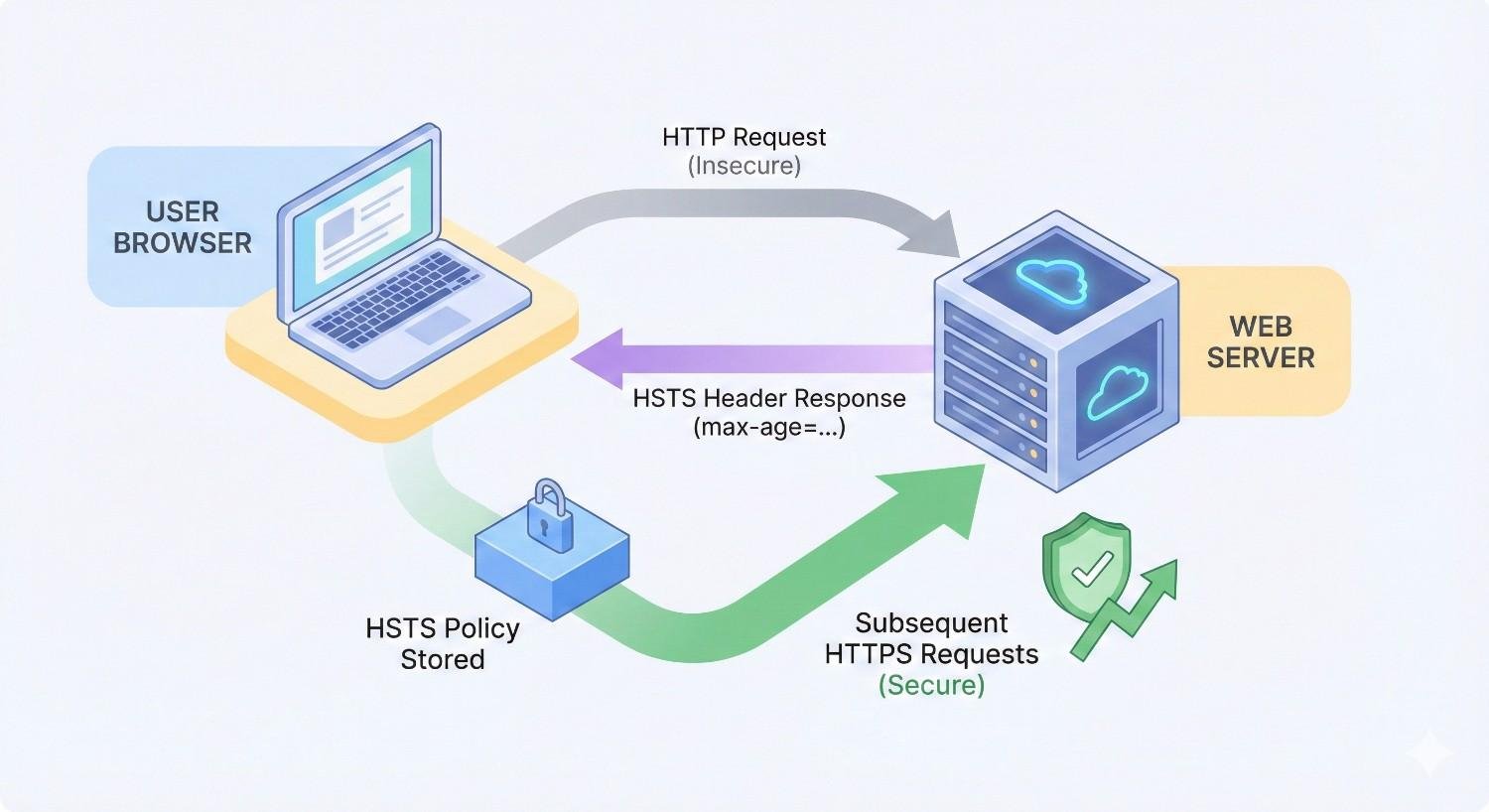
HSTS is a web security policy mechanism that tells browsers to only interact with your website using secure HTTPS connections. Once a browser receives an HSTS header from your server, it automatically converts any HTTP requests to HTTPS before sending them—no server-side redirect required.
This happens entirely in the browser. The user never sees an insecure connection attempt, and your server never has to process a redirect. The result is faster, more secure connections for every visitor.
HSTS was standardized in RFC 6797 and is now supported by all major browsers including Chrome, Firefox, Safari, and Edge. For websites serious about both security and performance, it’s become a baseline technical requirement.
How HSTS Works: The Technical Process
The HSTS process begins when a user first visits your website over HTTPS. Your server responds with a special HTTP header called Strict-Transport-Security. This header tells the browser to remember that your site should only be accessed via HTTPS for a specified period.
Here’s what happens step by step:
- User types example.com or clicks an HTTP link to your site
- Browser checks its internal HSTS cache for your domain
- If found, browser automatically upgrades the request to HTTPS before sending
- If not found, browser sends HTTP request, server redirects to HTTPS
- Server responds with HSTS header, browser caches the policy
- All future requests automatically use HTTPS
The critical difference from standard redirects is timing. With HSTS cached, the browser never makes an insecure request. The upgrade happens locally, instantly, with zero network latency.
This browser-side enforcement also protects against certain attacks. Man-in-the-middle attackers cannot intercept the initial HTTP request because it never happens after the first visit.
HSTS Header Syntax and Directives
The HSTS header uses a straightforward syntax with three main directives:
Copy
Strict-Transport-Security: max-age=31536000; includeSubDomains; preload
max-age specifies how long (in seconds) the browser should remember to use HTTPS. The value 31536000 equals one year. During this period, the browser will refuse to connect via HTTP regardless of what the user types or clicks.
includeSubDomains extends the HSTS policy to all subdomains. If your main site is example.com, this directive also covers blog.example.com, shop.example.com, and any other subdomain. This is essential for comprehensive security but requires that all subdomains support HTTPS.
preload signals that you want your domain included in browser preload lists. This directive alone doesn’t add you to the list—you must submit separately—but it’s required for eligibility.
A minimal implementation might use only max-age:
Copy
Strict-Transport-Security: max-age=86400
This 24-hour policy is useful for testing but provides limited SEO benefit. Production sites should use longer durations with includeSubDomains for full protection.
HSTS Preload List Explained
The HSTS preload list is a collection of domains hardcoded into browsers that should always use HTTPS. Unlike standard HSTS, preloaded domains are protected from the very first visit—no initial HTTP request ever occurs.
Major browsers including Chrome, Firefox, Safari, Edge, and Opera share a common preload list maintained by the Chromium project. When your domain is on this list, browsers know to use HTTPS before they ever contact your server.
This solves HSTS’s one weakness: the first visit. Standard HSTS requires at least one successful HTTPS connection to set the policy. Until then, the initial request could theoretically be intercepted. Preloading eliminates this window entirely.
To qualify for the preload list, your site must:
- Serve a valid HTTPS certificate
- Redirect all HTTP traffic to HTTPS
- Serve an HSTS header with max-age of at least one year
- Include the includeSubDomains directive
- Include the preload directive
- Have all subdomains support HTTPS
The preload list contains over 100,000 domains according to hstspreload.org, including major sites like Google, Facebook, and Twitter. Submission is free but should be considered carefully—removal is difficult and slow.
Why HSTS Matters for SEO
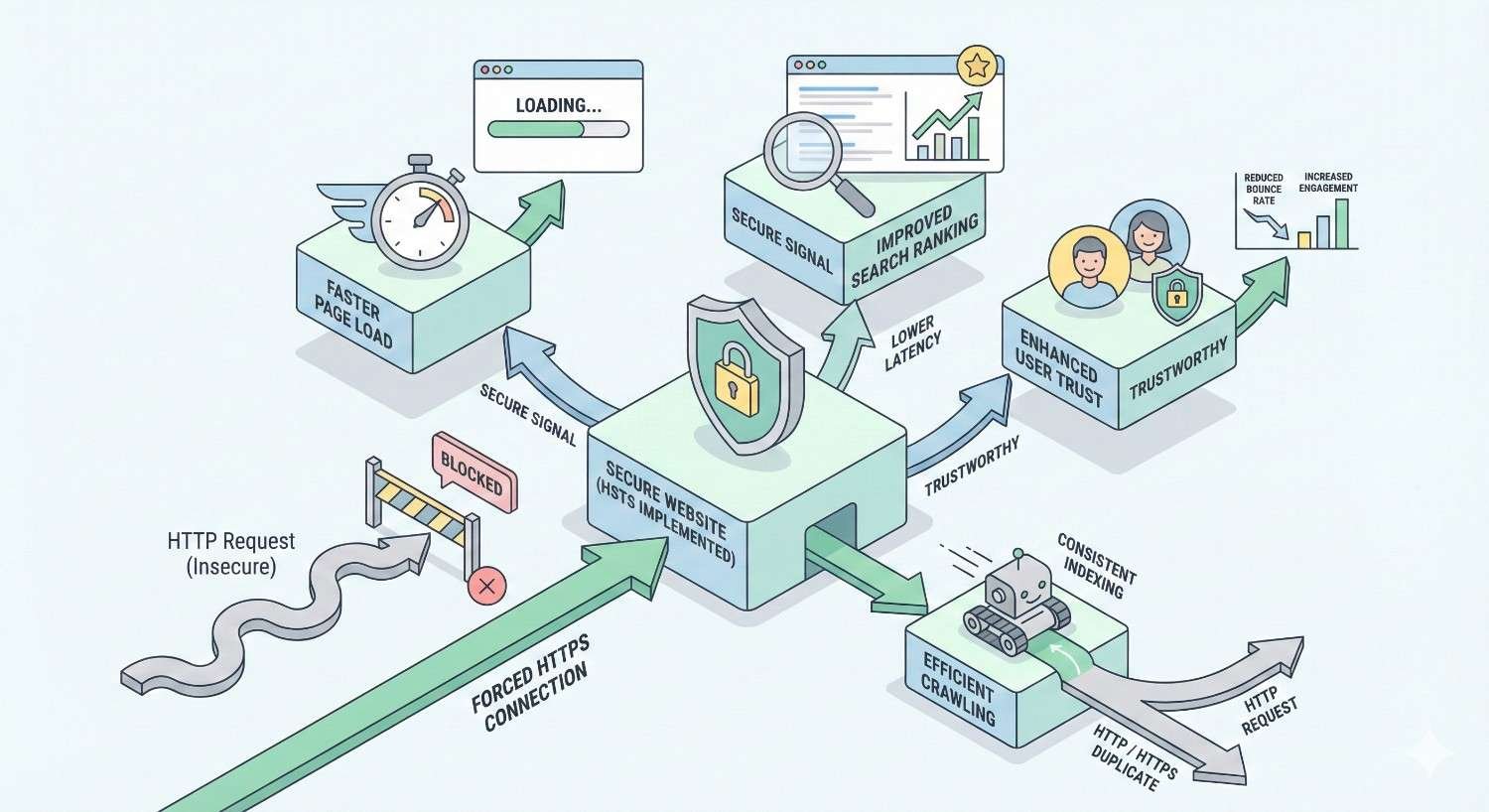
HSTS connects to SEO through multiple pathways: security signals, crawl efficiency, page speed, and user experience. While not a direct ranking factor itself, HSTS strengthens several factors that Google explicitly considers.
Understanding these connections helps you prioritize HSTS implementation within your broader technical SEO strategy. The benefits compound—faster pages improve engagement metrics, which influence rankings, which drive more traffic to experience those faster pages.
HTTPS as a Google Ranking Signal
Google confirmed HTTPS as a ranking signal in August 2014. Initially described as a “lightweight” signal affecting fewer than 1% of queries, its importance has grown substantially.
By 2024, HTTPS adoption reached over 95% of Chrome browsing time, making it effectively a baseline requirement rather than a competitive advantage. Sites without HTTPS face ranking penalties and browser security warnings that devastate click-through rates.
HSTS doesn’t add a separate ranking signal. Instead, it ensures your HTTPS implementation works correctly and consistently. A site with HSTS properly configured demonstrates technical competence and commitment to security—qualities that align with Google’s emphasis on trustworthy content.
Chrome also displays security indicators differently based on HTTPS status. Sites without HTTPS show “Not Secure” warnings that reduce user trust and engagement. HSTS ensures users always see the secure padlock icon.
How HSTS Eliminates HTTP-to-HTTPS Redirect Chains
Every redirect adds latency. When a user requests http://example.com, your server must respond with a 301 redirect to https://example.com. This round trip typically adds 100-300 milliseconds depending on server location and network conditions.
For sites with multiple redirect hops—HTTP to HTTPS, non-www to www, trailing slash normalization—these delays compound. A three-redirect chain could add nearly a full second before content loading even begins.
HSTS eliminates the HTTP-to-HTTPS redirect entirely for returning visitors. The browser upgrades the connection locally in microseconds rather than waiting for a server response. This single change can remove 100+ milliseconds from every page load.
The impact scales with traffic. A site with 100,000 monthly visitors eliminating one redirect saves roughly 2,800 hours of cumulative user wait time annually. That’s time users spend engaging with content instead of staring at loading indicators.
For Googlebot, faster responses mean more efficient crawling. The crawler can process more pages in the same time window, improving index freshness for large sites.
Crawl Budget Optimization Through HSTS
Crawl budget represents how many pages Googlebot will crawl on your site within a given timeframe. For large sites with thousands or millions of pages, crawl budget directly impacts how quickly new content gets indexed and how frequently existing content gets refreshed.
Redirects consume crawl budget. When Googlebot requests an HTTP URL and receives a redirect, that counts as a crawl. The subsequent HTTPS request counts as another crawl. Two crawls for one page.
HSTS doesn’t directly reduce Googlebot’s redirect following—the crawler doesn’t cache HSTS headers the same way browsers do. However, HSTS ensures your internal linking and sitemap consistently use HTTPS URLs, preventing unnecessary redirect chains in your site architecture.
More importantly, HSTS prevents the creation of duplicate URL variations. Without HSTS, both HTTP and HTTPS versions of pages might get indexed, splitting crawl budget between duplicates. With HSTS enforcing HTTPS-only access, you consolidate crawling on canonical URLs.
For sites with crawl budget constraints, every efficiency gain matters. HSTS is one piece of a broader strategy including clean URL structures, efficient internal linking, and proper canonical tags.
Security Trust Signals and User Experience
User experience metrics influence rankings indirectly through engagement signals. Sites that feel trustworthy keep users engaged longer, reduce bounce rates, and generate more return visits.
Security perception matters. Research from GlobalSign found that 84% of users would abandon a purchase if data was sent over an insecure connection. Browser security warnings trigger immediate exits for many visitors.
HSTS ensures users never see security warnings caused by accidental HTTP access. Whether they type your URL without https://, click an old HTTP link, or follow a misconfigured redirect, HSTS guarantees a secure connection.
This consistency builds trust. Users learn that your site always works correctly, always shows the security padlock, and never triggers browser warnings. That trust translates to longer sessions, more page views, and higher conversion rates.
From an SEO perspective, these engagement improvements send positive signals to search engines. Pages that satisfy users tend to rank better than pages users quickly abandon.
SEO Benefits of Implementing HSTS
Beyond the foundational security and redirect benefits, HSTS delivers specific SEO advantages that compound over time. These benefits affect Core Web Vitals scores, content indexing, link equity distribution, and duplicate content management.
Understanding each benefit helps you measure HSTS’s impact and communicate its value to stakeholders who may view security configurations as purely technical concerns.
Faster Page Load Times and Core Web Vitals
Core Web Vitals became a ranking factor in June 2021, making page speed directly relevant to search visibility. The three metrics—Largest Contentful Paint (LCP), First Input Delay (FID), and Cumulative Layout Shift (CLS)—all benefit from faster initial connections.
HSTS improves LCP by eliminating redirect latency. LCP measures when the largest content element becomes visible, and every millisecond of redirect delay pushes that moment later. For pages near the 2.5-second “good” threshold, removing a 200ms redirect could mean the difference between passing and failing.
The connection also affects Time to First Byte (TTFB), a supporting metric that influences LCP. HSTS-enabled browsers establish HTTPS connections immediately without waiting for redirect responses, reducing TTFB for returning visitors.
These improvements show up in field data from Chrome User Experience Report (CrUX), which Google uses for ranking purposes. Lab tests might not capture the full benefit since testing tools don’t cache HSTS headers between runs.
For sites struggling with Core Web Vitals, HSTS represents a low-effort optimization that improves real-user metrics without requiring code changes or content modifications.
Preventing Mixed Content Issues
Mixed content occurs when an HTTPS page loads resources (images, scripts, stylesheets) over HTTP. Browsers block or warn about mixed content, breaking page functionality and triggering security indicators.
Mixed content creates SEO problems beyond broken pages. Search engines may have difficulty rendering pages correctly, affecting how content gets indexed. Users encountering broken pages bounce quickly, sending negative engagement signals.
HSTS helps prevent mixed content by ensuring all requests upgrade to HTTPS. If a page accidentally references an HTTP resource on the same domain, HSTS-aware browsers automatically request the HTTPS version instead.
This protection isn’t complete—HSTS only applies to your domain and subdomains, not third-party resources. External HTTP resources still cause mixed content warnings. But for internal resources, HSTS provides a safety net against configuration mistakes.
The protection is especially valuable during migrations or when working with legacy content that might contain hardcoded HTTP URLs. HSTS ensures these old references don’t break pages for users.
Consolidating Link Equity (HTTP vs HTTPS)
Link equity (sometimes called “link juice”) flows through links to influence page authority and rankings. When external sites link to your content, that equity should consolidate on your canonical URLs.
Without proper HTTPS enforcement, links might point to HTTP versions of pages. While Google generally consolidates these signals, the process isn’t perfect. Some equity may be lost in redirect chains, and mixed signals can confuse canonicalization.
HSTS ensures that once visitors arrive via any URL variation, they end up on the HTTPS version. Combined with proper canonical tags and consistent internal linking, this consolidates all link equity on your preferred URLs.
The benefit is most significant for sites with long histories. Older backlinks often use HTTP URLs from before HTTPS became standard. HSTS ensures these legacy links still deliver full value to your current HTTPS pages.
For new sites, HSTS prevents equity fragmentation from the start. Every link, regardless of how it’s formatted, ultimately benefits your canonical HTTPS URLs.
Reducing Duplicate Content Problems
Duplicate content dilutes ranking signals and wastes crawl budget. When the same content exists at multiple URLs, search engines must choose which version to index and rank.
HTTP and HTTPS variations create automatic duplicates. Without enforcement, http://example.com/page and https://example.com/page could both get indexed, splitting signals between them.
HSTS reduces this risk by ensuring browsers always access HTTPS versions. Combined with 301 redirects for crawlers and canonical tags for clarity, HSTS creates a comprehensive duplicate prevention strategy.
The protection extends to user-generated links. When customers share your URLs in forums, social media, or emails, they might omit the protocol or use HTTP. HSTS ensures these shares resolve to your canonical HTTPS pages.
For e-commerce sites with thousands of product pages, duplicate prevention at scale is essential. HSTS provides automatic protection without requiring per-page configuration.
How to Implement HSTS for SEO (Step-by-Step)
Implementing HSTS requires careful preparation and testing. A misconfigured HSTS header can make your site inaccessible, so following a methodical process is essential.
This section provides specific instructions for common server configurations and CDN platforms. Adapt these examples to your specific environment, and always test in staging before deploying to production.
Prerequisites Before Enabling HSTS
Before enabling HSTS, verify your site meets these requirements:
Valid SSL/TLS Certificate: Your certificate must be properly installed, not expired, and trusted by major browsers. Use SSL Labs to verify your configuration scores A or higher.
Complete HTTPS Migration: Every page, resource, and subdomain must work over HTTPS. Test thoroughly—HSTS will break access to anything that doesn’t support secure connections.
Working Redirects: HTTP requests should already redirect to HTTPS via 301 redirects. HSTS supplements redirects; it doesn’t replace them for first-time visitors and crawlers.
Subdomain Audit: If you plan to use includeSubDomains, verify every subdomain supports HTTPS. This includes staging environments, legacy subdomains, and third-party services using your domain.
Certificate Renewal Process: Ensure your SSL certificate renewal is automated and monitored. An expired certificate with HSTS enabled makes your site completely inaccessible.
Rollback Plan: Document how to remove HSTS headers quickly if problems arise. Note that browsers will cache the policy for the specified max-age, so recovery isn’t instant.
Start with a short max-age (300 seconds / 5 minutes) for initial testing. This limits exposure if something goes wrong while you verify everything works correctly.
Configuring HSTS Headers on Apache
For Apache servers, add the HSTS header using the Header directive in your virtual host configuration or .htaccess file.
First, ensure mod_headers is enabled:
bash
Copy
sudo a2enmod headers
sudo systemctl restart apache2
Add the HSTS header to your HTTPS virtual host configuration:
apache
Copy
<VirtualHost *:443>
ServerName example.com
# Other SSL configuration…
# HSTS Header
Header always set Strict-Transport-Security “max-age=31536000; includeSubDomains; preload”
</VirtualHost>
For .htaccess implementation (if virtual host access is unavailable):
apache
Copy
<IfModule mod_headers.c>
Header always set Strict-Transport-Security “max-age=31536000; includeSubDomains; preload” env=HTTPS
</IfModule>
The env=HTTPS condition ensures the header only appears on HTTPS responses. Sending HSTS over HTTP is ignored by browsers and wastes bandwidth.
After adding the configuration, test with:
bash
Copy
curl -I https://example.com
Verify the Strict-Transport-Security header appears in the response.
Configuring HSTS Headers on Nginx
Nginx configuration uses the add_header directive within your server block:
nginx
Copy
server {
listen 443 ssl http2;
server_name example.com;
# SSL configuration…
# HSTS Header
add_header Strict-Transport-Security “max-age=31536000; includeSubDomains; preload” always;
# Other configuration…
}
The always parameter ensures the header is sent with all response codes, including errors. Without it, Nginx only adds headers to successful responses.
For sites using includes or snippets, create a reusable HSTS configuration:
nginx
Copy
# /etc/nginx/snippets/hsts.conf
add_header Strict-Transport-Security “max-age=31536000; includeSubDomains; preload” always;
Then include it in server blocks:
nginx
Copy
server {
listen 443 ssl http2;
server_name example.com;
include snippets/hsts.conf;
# Other configuration…
}
Test the configuration before reloading:
bash
Copy
sudo nginx -t
sudo systemctl reload nginx
Configuring HSTS on CDN Platforms (Cloudflare, AWS)
Cloudflare offers HSTS configuration through the dashboard without server changes:
- Navigate to SSL/TLS → Edge Certificates
- Scroll to HTTP Strict Transport Security (HSTS)
- Click “Enable HSTS”
- Configure max-age, includeSubDomains, and preload options
- Acknowledge the warning and save
Cloudflare applies HSTS at the edge, meaning the header is added before responses reach users. This works even if your origin server doesn’t support HSTS configuration.
AWS CloudFront requires a Lambda@Edge function or CloudFront Functions to add HSTS headers:
javascript
Copy
function handler(event) {
var response = event.response;
var headers = response.headers;
headers[‘strict-transport-security’] = {
value: ‘max-age=31536000; includeSubDomains; preload’
};
return response;
}
Attach this function to the viewer response event in your CloudFront distribution.
AWS Application Load Balancer can add HSTS headers through response header policies without Lambda functions, simplifying implementation for ALB-based architectures.
Setting the Right max-age Value
The max-age value determines how long browsers remember your HSTS policy. Choosing the right duration balances security benefits against flexibility for changes.
Recommended values:
- Testing: 300 seconds (5 minutes) – Verify everything works
- Initial deployment: 86400 seconds (1 day) – Limited exposure during monitoring
- Short-term: 604800 seconds (1 week) – Building confidence
- Standard: 31536000 seconds (1 year) – Production recommendation
- Preload requirement: 31536000 seconds minimum (1 year)
Start low and increase gradually. If you set max-age=31536000 immediately and discover a problem, users’ browsers will refuse HTTP connections for up to a year—even after you remove the header.
A staged rollout might look like:
- Week 1: max-age=300 – Test and verify
- Week 2: max-age=86400 – Monitor for issues
- Week 3: max-age=604800 – Broader testing
- Week 4+: max-age=31536000 – Full production deployment
Monitor your analytics and error logs at each stage. Look for increased bounce rates, broken page reports, or SSL-related errors that might indicate problems.
Submitting to the HSTS Preload List
After running HSTS successfully with full directives for several weeks, you can submit for preload inclusion:
- Verify your header includes all required directives:
- Copy
Strict-Transport-Security: max-age=31536000; includeSubDomains; preload - Visit hstspreload.org
- Enter your domain and check eligibility
- Review and acknowledge the warnings about permanence
- Submit your domain
The preload list updates ship with browser releases, so inclusion takes several months to reach all users. Chrome updates most frequently; other browsers may take longer.
Before submitting, understand that removal is difficult. The preload list is designed for permanent inclusion. If you need to revert to HTTP for any subdomain, you’ll face a lengthy removal process while users cannot access affected resources.
Only submit when you’re confident every subdomain will support HTTPS indefinitely.
Common HSTS Implementation Mistakes That Hurt SEO
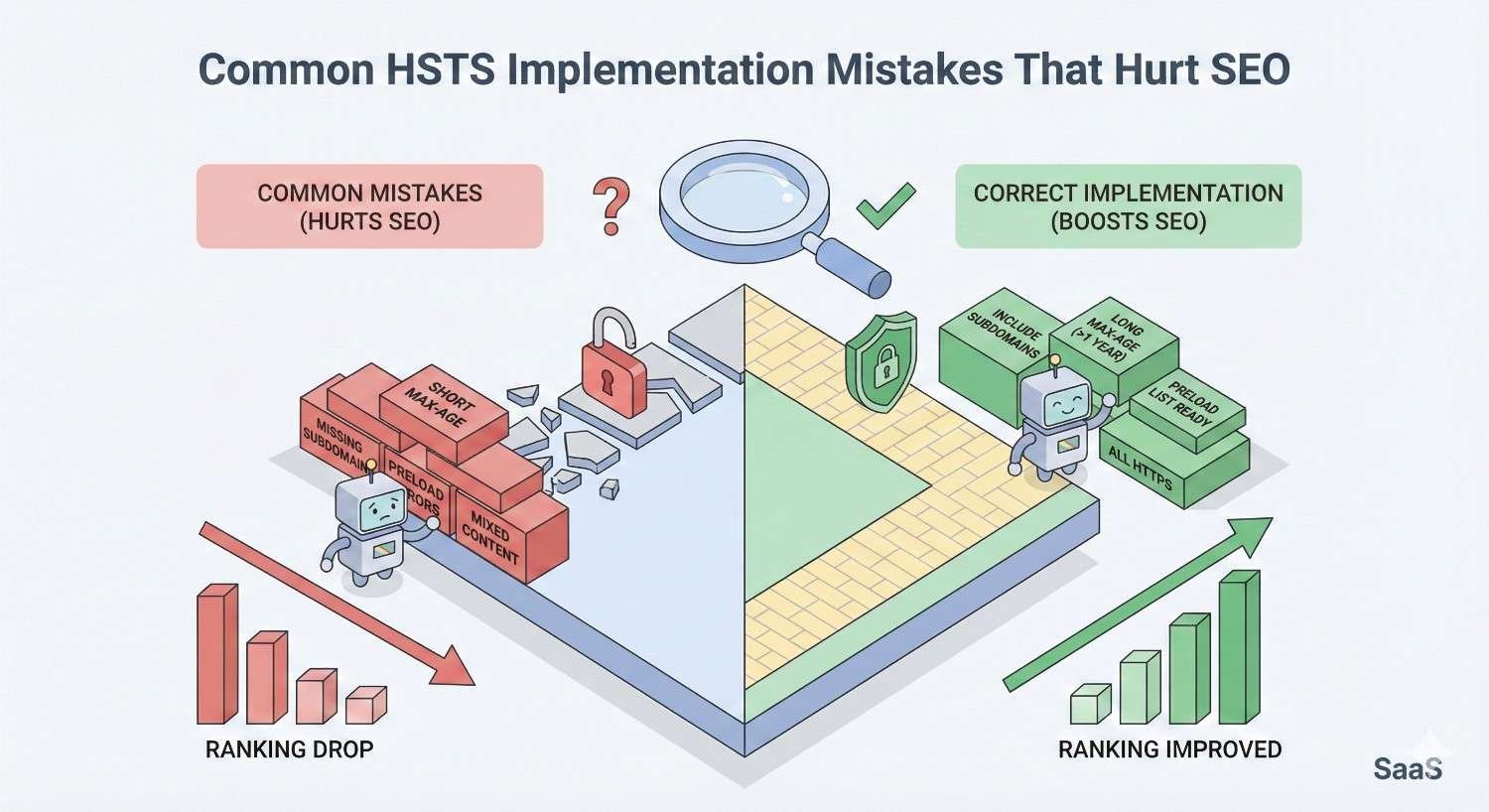
HSTS mistakes can severely impact your site’s accessibility and search visibility. Understanding common errors helps you avoid them and troubleshoot issues if they arise.
These mistakes range from timing errors to configuration oversights. Each can make portions of your site inaccessible to users, directly harming traffic and rankings.
Enabling HSTS Before Full HTTPS Migration
The most damaging mistake is enabling HSTS before ensuring complete HTTPS support. Once browsers cache your HSTS policy, they refuse HTTP connections entirely. Any page or resource that doesn’t work over HTTPS becomes inaccessible.
Common scenarios where this causes problems:
- Legacy pages still served over HTTP
- Development or staging subdomains without SSL
- Third-party tools or widgets using your subdomain
- Old marketing landing pages on separate infrastructure
- Email tracking pixels or redirects
Before enabling HSTS, audit every URL under your domain. Use crawling tools like Screaming Frog to identify all pages and resources. Test each one over HTTPS manually.
If you’ve already enabled HSTS prematurely, you cannot force browsers to forget the policy. Users must wait for max-age to expire, clear their browser data, or access your site from a different browser/device.
This is why starting with short max-age values is critical. A 5-minute policy causes 5 minutes of problems; a 1-year policy causes up to a year of problems.
Incorrect Subdomain Configuration
The includeSubDomains directive extends HSTS to all subdomains—including ones you might have forgotten about. This creates problems when:
- Subdomains use different hosting without SSL
- Third-party services operate on your subdomains
- Legacy applications don’t support HTTPS
- Development environments share the production domain
Before using includeSubDomains, inventory every subdomain:
bash
Copy
# Check DNS records for subdomains
dig example.com ANY
Use subdomain enumeration tools to find forgotten subdomains. Services like SecurityTrails or DNSDumpster can reveal subdomains you’ve forgotten.
If you cannot secure all subdomains, omit includeSubDomains from your HSTS header. You lose some security benefit but avoid breaking legitimate subdomain services.
For preload submission, includeSubDomains is mandatory. This means preloading requires complete subdomain HTTPS coverage with no exceptions.
Setting max-age Too Short or Too Long
Too short (under 1 week): Provides minimal security benefit. Browsers frequently “forget” the policy, allowing HTTP connections. Users don’t get consistent protection, and you don’t qualify for preload submission.
Too long (over 2 years): Creates extended recovery time if problems arise. While not technically harmful if everything works, it limits your flexibility unnecessarily.
The sweet spot for most sites is 1 year (31536000 seconds). This provides strong protection, meets preload requirements, and allows annual review of your HSTS configuration.
Some organizations use 2-year values for additional security, but the marginal benefit over 1 year is minimal. The main consideration is ensuring your SSL certificate renewal process is reliable—an expired certificate with 2-year HSTS creates 2 years of potential problems.
Missing includeSubDomains Directive
Omitting includeSubDomains leaves subdomains vulnerable and disqualifies you from preload submission. Attackers could potentially intercept subdomain traffic even while your main domain is protected.
From an SEO perspective, inconsistent HTTPS enforcement across subdomains can cause:
- Mixed content warnings when main pages load subdomain resources
- Duplicate content issues if subdomains are accessible via HTTP
- Crawl inefficiency as Googlebot follows redirects on subdomains
- Trust signal dilution from inconsistent security implementation
If you’re not ready for includeSubDomains, create a roadmap to get there. Identify blocking subdomains, plan their HTTPS migration, and set a target date for full implementation.
For sites using subdomains extensively (regional sites, product lines, user-generated content), subdomain HTTPS migration may require significant planning. Start early to avoid delaying your HSTS implementation indefinitely.
How to Test and Verify HSTS Configuration
Testing confirms your HSTS implementation works correctly before and after deployment. Regular verification catches configuration drift and certificate issues before they impact users.
Use multiple testing methods to ensure comprehensive coverage. Browser tools show real-user experience, online tools provide objective verification, and preload checkers confirm submission eligibility.
Browser Developer Tools Method
Chrome DevTools provides the most direct way to verify HSTS behavior:
- Open Chrome DevTools (F12 or Cmd+Option+I)
- Navigate to the Network tab
- Visit your site and select the main document request
- Check the Response Headers section for Strict-Transport-Security
To verify HSTS is actively enforced:
- Visit chrome://net-internals/#hsts
- Enter your domain in the “Query HSTS/PKP domain” section
- Click “Query” to see cached HSTS status
The results show:
- static_sts_domain: Whether you’re on the preload list
- dynamic_sts_domain: Whether HSTS was set via header
- dynamic_sts_expiry: When the cached policy expires
You can also test enforcement by attempting to visit http://yourdomain.com after HSTS is cached. The browser should automatically redirect to HTTPS without contacting your server—visible in DevTools as an internal redirect (307 Internal Redirect).
Firefox and Safari have similar developer tools, though the internal HSTS cache inspection varies by browser.
Online HSTS Testing Tools
Several online tools verify HSTS configuration without requiring browser setup:
SecurityHeaders.com scans your site and grades security headers including HSTS. It identifies missing directives and provides recommendations.
SSL Labs Server Test comprehensively analyzes your SSL/TLS configuration including HSTS. The detailed report shows exactly what header values are returned.
HSTSPreload.org checks preload eligibility specifically. It verifies all requirements and identifies any blocking issues.
Hardenize provides ongoing monitoring of security configurations including HSTS. Useful for detecting configuration changes over time.
For command-line testing:
bash
Copy
curl -s -D- https://example.com | grep -i strict-transport-security
This returns the raw HSTS header value for verification.
Run these tests after any server configuration changes, SSL certificate renewals, or CDN modifications. HSTS headers can be accidentally removed during updates.
Checking HSTS Preload Status
After submitting to the preload list, track your inclusion status:
- Visit hstspreload.org
- Enter your domain
- Check the status message
Possible statuses include:
- Not preloaded: Domain not in the list
- Pending: Submitted and awaiting inclusion
- Preloaded: Included in the source list
- Deployed: Shipped in browser releases
The journey from submission to full deployment takes 3-6 months typically. Chrome ships updates most frequently, while other browsers may take longer to include list updates.
You can also check the source list directly:
bash
Copy
curl https://chromium.googlesource.com/chromium/src/+/main/net/http/transport_security_state_static.json?format=TEXT | base64 -d | grep yourdomain
This shows whether your domain appears in the Chromium source, which feeds all major browsers’ preload lists.
Monitor your domain’s status periodically. Removal from the preload list (if ever needed) follows the same submission process but takes even longer to propagate.
HSTS vs 301 Redirects: Which Is Better for SEO?
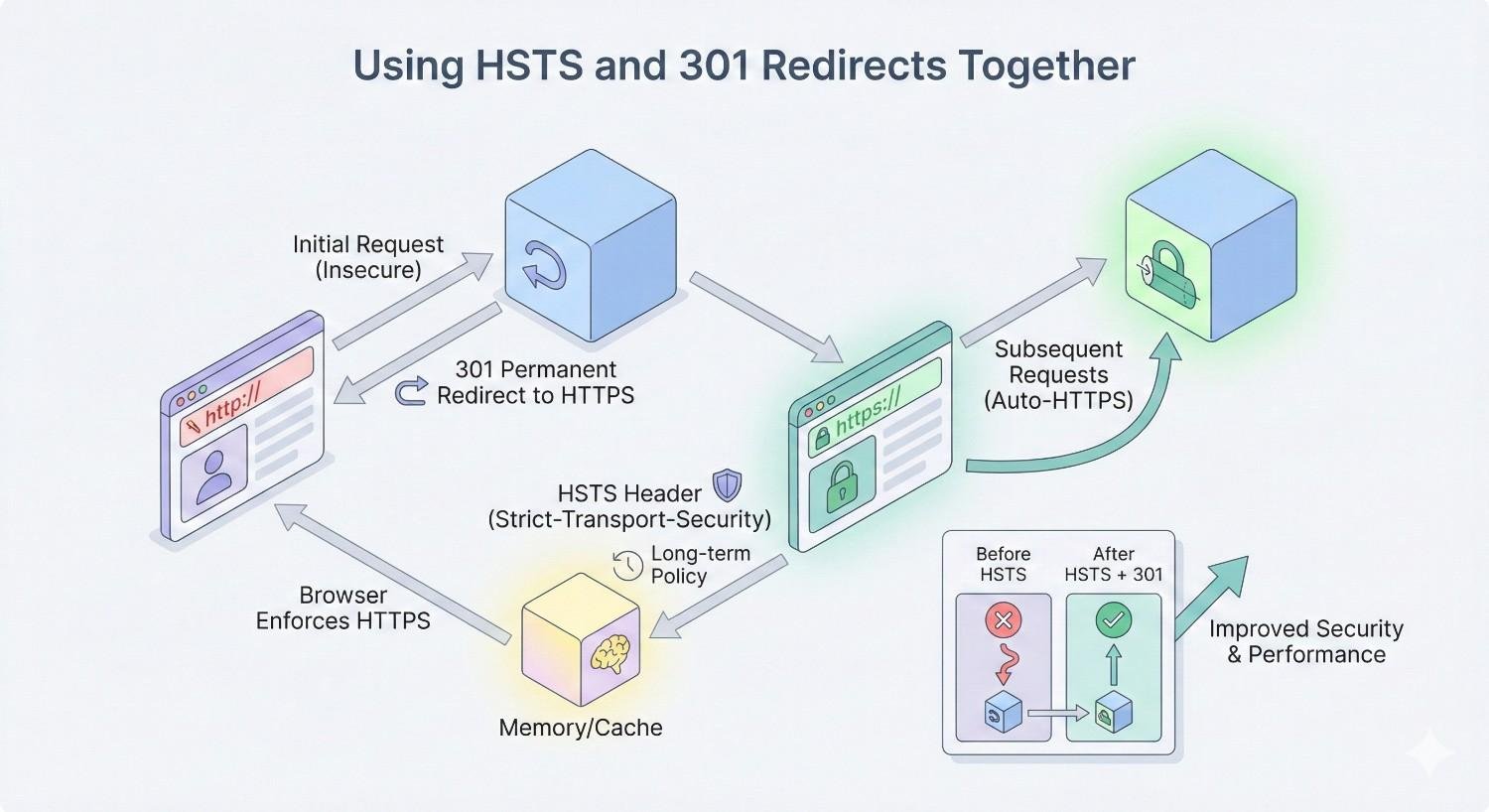
HSTS and 301 redirects serve different purposes but work together for comprehensive HTTPS enforcement. Understanding their distinct roles helps you implement both correctly.
Neither replaces the other. Optimal configuration uses both: 301 redirects for crawlers and first-time visitors, HSTS for returning visitors and security enforcement.
How 301 Redirects Work
A 301 redirect is a server response that tells browsers and crawlers a page has permanently moved. When someone requests http://example.com, the server responds with status code 301 and a Location header pointing to https://example.com.
The process requires a complete HTTP request-response cycle:
- Browser sends HTTP request to server
- Server processes request and generates 301 response
- Browser receives response and reads new location
- Browser sends new request to HTTPS URL
- Server responds with actual page content
This round trip adds latency—typically 100-300ms depending on server location and load. For users on slow connections or distant servers, the delay is noticeable.
From an SEO perspective, 301 redirects pass link equity to the destination URL. Google treats them as signals that the new URL should inherit the old URL’s ranking signals. However, some equity may be lost in the redirect, particularly in chains of multiple redirects.
301 redirects are essential because:
- Googlebot doesn’t cache HSTS headers like browsers do
- First-time visitors need server-side direction
- Old bookmarks and links need to resolve correctly
- Some older browsers don’t support HSTS
Why HSTS Outperforms Redirects for Security
HSTS provides security benefits that 301 redirects cannot match:
No insecure request window: With HSTS cached, the browser never sends an HTTP request. Attackers cannot intercept traffic during the redirect window because no redirect occurs.
Protection against downgrade attacks: Attackers cannot trick browsers into using HTTP by manipulating redirect responses. The browser enforces HTTPS regardless of what the network returns.
Certificate validation enforcement: HSTS-enabled browsers refuse to proceed past certificate warnings. Users cannot click through to sites with invalid certificates, preventing certain phishing attacks.
Faster connections: Browser-side enforcement happens in microseconds versus hundreds of milliseconds for server redirects. This speed improvement benefits both users and Core Web Vitals scores.
For SEO specifically, the speed benefit is most relevant. Faster page loads improve user experience metrics and Core Web Vitals scores, both of which influence rankings.
The security benefits matter for user trust. Sites that feel secure—fast loading, no warnings, consistent HTTPS—keep users engaged longer and convert better.
Using HSTS and 301 Redirects Together
The optimal configuration uses both mechanisms:
301 redirects handle:
- First-time visitors before HSTS is cached
- Search engine crawlers (Googlebot, Bingbot)
- Older browsers without HSTS support
- Automated tools and scripts
- RSS readers and feed aggregators
HSTS handles:
- Returning visitors with cached policies
- Browser-side security enforcement
- Performance optimization for repeat visits
- Protection against network-level attacks
Implementation order matters:
- First, ensure 301 redirects work correctly for all HTTP URLs
- Test HTTPS thoroughly across all pages and resources
- Add HSTS header with short max-age for testing
- Gradually increase max-age as confidence builds
- Optionally submit for preload after extended successful operation
Never remove 301 redirects after implementing HSTS. The redirects remain necessary for traffic that doesn’t benefit from HSTS caching.
Monitor both mechanisms in your analytics. Track redirect response times and HSTS cache hit rates to understand how traffic flows through your security configuration.
HSTS Preload: Is It Worth It for SEO?
Preloading offers the ultimate HSTS protection but comes with significant commitments. Evaluating whether preload makes sense for your site requires understanding both benefits and risks.
For most sites focused on SEO, standard HSTS provides sufficient benefit. Preloading adds marginal SEO value but substantial operational constraints.
Benefits of HSTS Preload for Search Visibility
Preloading eliminates the first-visit vulnerability. New visitors connect via HTTPS immediately, without any HTTP request or redirect. This provides:
Faster first impressions: New visitors experience your site at full speed from their first click. No redirect latency means better initial engagement metrics.
Complete redirect elimination: Even first-time visitors skip the HTTP-to-HTTPS redirect. Every visit benefits from HSTS speed improvements.
Stronger security signals: Preloaded domains demonstrate serious commitment to security. While not a direct ranking factor, this aligns with Google’s emphasis on trustworthy sites.
Protection for all traffic sources: Whether visitors come from old HTTP links, typed URLs, or misconfigured referrals, they always connect securely.
For high-traffic sites where first impressions matter significantly—e-commerce, lead generation, news publishers—preloading provides measurable user experience improvements.
The SEO benefit is primarily indirect. Faster first visits improve engagement metrics for new users, which can influence rankings over time. The direct ranking impact is minimal since Google already knows your site uses HTTPS.
Risks and Considerations Before Preloading
Preloading is effectively permanent. Removal from the preload list takes 6-12 months or longer and requires browser updates to propagate. During removal, users with older browser versions may still be unable to access HTTP resources.
Key risks include:
Subdomain lockdown: Every subdomain must support HTTPS forever. Future subdomains, acquired domains, or third-party integrations must all have valid certificates.
Certificate dependency: SSL certificate failures become site-wide outages. There’s no fallback to HTTP, so certificate expiration or misconfiguration makes your entire domain inaccessible.
Limited flexibility: You cannot temporarily disable HTTPS for testing, migration, or troubleshooting. The preload list doesn’t have exceptions.
Slow removal: If you need to remove preloading, the process takes months. Users cannot access your site via HTTP during this period, even in emergencies.
Before preloading, verify:
- Automated certificate renewal is reliable and monitored
- All current and planned subdomains support HTTPS
- Your organization commits to HTTPS-only operation indefinitely
- You have redundant SSL certificate sources (multiple CAs)
- Incident response plans account for certificate emergencies
For most small to medium businesses, standard HSTS with a 1-year max-age provides nearly all the benefits with far less risk. Preloading makes sense primarily for large organizations with mature security operations.
How to Remove Your Site from the Preload List
If you need to remove your domain from the preload list:
- Remove the preload directive from your HSTS header
- Keep serving HSTS with max-age=0 to clear cached policies
- Submit a removal request at hstspreload.org
- Wait for the removal to be processed and shipped in browser updates
The removal process follows browser release cycles:
- Chrome: Updates every 4-6 weeks
- Firefox: Similar update frequency
- Safari: Less frequent updates
- Edge: Follows Chromium releases
Full propagation to all browser versions takes 6-12 months minimum. Users with older browsers may be affected even longer.
During removal, you cannot serve HTTP content to users whose browsers still have your domain preloaded. Plan for this extended transition period.
To minimize removal impact:
- Maintain HTTPS operation throughout the removal process
- Monitor browser version distribution in your analytics
- Communicate with users about any access issues
- Consider keeping HTTPS as default even after removal completes
Removal should be a last resort. If you’re uncertain about long-term HTTPS commitment, don’t submit for preloading in the first place.
HSTS and Technical SEO Audits
HSTS belongs in every technical SEO audit as part of security and performance evaluation. Regular monitoring catches configuration issues before they impact rankings or user experience.
Integrating HSTS checks into your audit workflow ensures this important configuration doesn’t get overlooked during site reviews.
Including HSTS in Your Technical SEO Checklist
Add these HSTS verification steps to your technical audit process:
Initial Assessment:
- HSTS header present on HTTPS responses
- Appropriate max-age value (minimum 1 year for production)
- includeSubDomains directive present (if applicable)
- Header not served over HTTP (only HTTPS)
- All subdomains support HTTPS (if using includeSubDomains)
Configuration Quality:
- max-age meets preload requirements (if pursuing preload)
- No conflicting headers from multiple sources (server + CDN)
- Header values consistent across all pages
- Preload directive present only if actively pursuing preload
Integration Verification:
- 301 redirects still function for HTTP requests
- No mixed content warnings on any pages
- SSL certificate valid with adequate remaining time
- Certificate renewal automation verified
Performance Impact:
- Core Web Vitals scores stable or improved
- No increase in SSL-related errors in logs
- Redirect chain length reduced for returning visitors
Document HSTS status in your audit reports alongside other security headers like Content-Security-Policy and X-Frame-Options. Security configuration increasingly influences both rankings and user trust.
Tools for Monitoring HSTS Implementation
Continuous Monitoring Tools:
Hardenize monitors security headers including HSTS and alerts on changes. Useful for detecting accidental configuration removal during deployments.
Mozilla Observatory provides free security header scanning with detailed recommendations. Good for periodic manual checks.
Detectify includes HSTS verification in broader security scanning. Enterprise-focused with automated monitoring.
Crawling Tools:
Screaming Frog can extract HSTS headers during crawls using custom extraction. Configure it to capture the Strict-Transport-Security header for site-wide verification.
Sitebulb includes security header analysis in its audit reports, flagging missing or misconfigured HSTS.
Log Analysis:
Monitor your server logs for HTTP requests that should be HTTPS. High volumes of HTTP traffic might indicate HSTS isn’t working correctly or max-age is too short.
Track 307 Internal Redirect responses in analytics. These indicate HSTS is working—browsers are upgrading requests locally rather than hitting your server.
Alerting Setup:
Configure alerts for:
- HSTS header removal (via Hardenize or similar)
- SSL certificate expiration approaching
- Increased HTTP traffic volume
- Mixed content errors in browser console logs
Reporting HSTS Status to Stakeholders
When reporting HSTS status to non-technical stakeholders, focus on business impact:
Security Benefits: “HSTS ensures all visitor connections are encrypted, protecting customer data and building trust. This is now a baseline expectation for professional websites.”
Performance Benefits: “HSTS eliminates redirect delays for returning visitors, improving page load times by 100-300 milliseconds. This directly impacts our Core Web Vitals scores and user experience.”
SEO Benefits: “Proper HSTS configuration supports our HTTPS implementation, which is a confirmed Google ranking factor. It also improves crawl efficiency and prevents duplicate content issues.”
Risk Context: “HSTS requires ongoing SSL certificate maintenance. We have automated renewal in place with monitoring alerts to prevent any access issues.”
Include HSTS in regular technical SEO reports alongside:
- Core Web Vitals trends
- Crawl statistics
- Index coverage
- Security header status
For executive summaries, a simple status indicator works well:
- ✅ HSTS: Properly configured with 1-year max-age
- ⚠️ HSTS: Configured but max-age below recommended
- ❌ HSTS: Not implemented
Frequently Asked Questions About HSTS and SEO
Does HSTS Directly Improve Google Rankings?
HSTS is not a direct ranking factor. Google has confirmed HTTPS as a ranking signal, but HSTS specifically hasn’t been identified as an independent factor. However, HSTS supports your HTTPS implementation and improves page speed, both of which do influence rankings. The indirect benefits through faster load times and better user experience metrics make HSTS valuable for SEO even without direct ranking impact.
How Long Should My HSTS max-age Be?
For production websites, use 31536000 seconds (1 year). This duration provides strong security, meets preload requirements, and represents the industry standard. Start with shorter values (300-86400 seconds) during initial testing, then increase once you’ve verified everything works correctly. Values under one week provide minimal benefit; values over two years add risk without meaningful security improvement.
Can HSTS Break My Website?
Yes, if implemented incorrectly. HSTS forces HTTPS connections, so any page or resource that doesn’t support HTTPS becomes inaccessible. The most common issues are forgotten subdomains without SSL certificates and legacy pages not migrated to HTTPS. Always audit your entire domain before enabling HSTS, start with short max-age values, and test thoroughly in staging environments.
Is HSTS Required for All Websites?
HSTS isn’t technically required, but it’s strongly recommended for any site using HTTPS. Without HSTS, users can still accidentally access HTTP versions of your pages, creating security vulnerabilities and performance penalties. For sites handling sensitive data, processing payments, or requiring user authentication, HSTS should be considered essential. Even simple informational sites benefit from the performance improvements.
What Happens If My SSL Certificate Expires with HSTS Enabled?
Your site becomes completely inaccessible. Browsers will refuse to connect because HSTS requires valid HTTPS, but your expired certificate fails validation. Users cannot bypass this—there’s no “proceed anyway” option with HSTS. This is why automated certificate renewal and expiration monitoring are critical before enabling HSTS. Always verify your renewal process works reliably and set up alerts for certificates approaching expiration.
Next Steps: Implementing HSTS as Part of Your SEO Strategy
HSTS implementation fits within a broader technical SEO strategy focused on security, performance, and crawl efficiency. Approaching it systematically ensures you capture the benefits while avoiding common pitfalls.
Whether you handle implementation internally or work with specialists, having a clear plan accelerates deployment and reduces risk.
HSTS Implementation Checklist
Use this checklist to guide your HSTS deployment:
Week 1-2: Preparation
- Audit all subdomains for HTTPS support
- Verify SSL certificate validity and renewal automation
- Test all pages and resources over HTTPS
- Document current redirect configuration
- Identify any HTTP-only dependencies
Week 3: Initial Deployment
- Add HSTS header with max-age=300 (5 minutes)
- Verify header appears in browser DevTools
- Test with online scanning tools
- Monitor error logs for SSL issues
- Check Core Web Vitals for any changes
Week 4: Extended Testing
- Increase max-age to 86400 (1 day)
- Verify HSTS caching in chrome://net-internals/#hsts
- Test subdomain access if using includeSubDomains
- Review analytics for unusual patterns
- Document any issues and resolutions
Week 5-8: Production Rollout
- Increase max-age to 604800 (1 week)
- Monitor for one week with no issues
- Increase max-age to 31536000 (1 year)
- Add includeSubDomains if all subdomains verified
- Update technical documentation
Optional: Preload Submission
- Verify all preload requirements met
- Add preload directive to header
- Submit at hstspreload.org
- Monitor submission status
- Track browser inclusion over following months
When to Seek Professional Technical SEO Help
Consider working with technical SEO specialists when:
Complex Infrastructure: Sites with multiple subdomains, CDN configurations, or legacy systems benefit from experienced guidance. Mistakes in complex environments are harder to diagnose and fix.
High-Traffic Sites: When downtime costs are significant, professional implementation reduces risk. Experts can identify potential issues before they impact users.
Limited Internal Resources: If your team lacks server administration experience, outsourcing HSTS implementation ensures correct configuration without a steep learning curve.
Compliance Requirements: Industries with security regulations (healthcare, finance, e-commerce) may need documented implementation processes that specialists can provide.
Migration Projects: When HSTS implementation coincides with larger migrations (new CMS, hosting changes, domain consolidation), coordinated planning prevents conflicts.
Professional help is also valuable for ongoing monitoring and maintenance. HSTS configuration can drift during deployments, and regular audits catch issues before they impact performance or security.
Conclusion
HSTS strengthens your site’s security posture while delivering measurable SEO benefits through faster page loads, eliminated redirect chains, and consolidated link equity. For business owners and marketing teams focused on sustainable organic growth, it represents a technical foundation that compounds over time.
At White Label SEO Service, we help businesses implement technical SEO improvements like HSTS as part of comprehensive strategies covering security, performance, and search visibility. Proper implementation requires attention to detail, but the long-term benefits for rankings and user experience make it worthwhile.
Ready to optimize your site’s technical SEO foundation? We can audit your current HSTS configuration, identify implementation opportunities, and ensure your security setup supports your organic growth goals. Contact White Label SEO Service to discuss your technical SEO needs.
Frequently Asked Questions
What is the difference between HSTS and HTTPS redirects?
HSTS and HTTPS redirects work differently. Redirects require a server round-trip where your server tells browsers to use HTTPS. HSTS is cached in browsers, so they automatically use HTTPS without contacting your server first. HSTS is faster for returning visitors but requires redirects for first-time visitors and search crawlers.
Can HSTS hurt my website’s SEO performance?
HSTS itself won’t hurt SEO when implemented correctly. However, enabling HSTS before completing HTTPS migration can make pages inaccessible, which severely damages rankings. Always verify all pages and subdomains support HTTPS before enabling HSTS, and start with short max-age values during testing.
How does HSTS affect Google’s crawling of my website?
Googlebot doesn’t cache HSTS headers like browsers do, so it still follows your 301 redirects. However, HSTS ensures your internal links consistently use HTTPS URLs, reducing redirect chains in your site architecture. This improves crawl efficiency and helps consolidate ranking signals on canonical URLs.
Should small business websites implement HSTS?
Yes, small business websites benefit from HSTS. The implementation is straightforward on most hosting platforms, and the performance and security benefits apply regardless of site size. Start with basic HSTS configuration without preloading to minimize risk while capturing the core benefits.
How long does it take for HSTS to improve page speed?
HSTS improves page speed immediately for returning visitors once their browsers cache the policy. First-time visitors won’t see improvement until their second visit. The speed gain is typically 100-300 milliseconds per page load from eliminated redirect latency.
Does HSTS work with all web browsers?
All modern browsers support HSTS, including Chrome, Firefox, Safari, Edge, and Opera. Very old browser versions (Internet Explorer 10 and earlier) don’t support HSTS, but these represent a negligible percentage of current web traffic. Your 301 redirects handle these legacy browsers.
What’s the relationship between HSTS and Core Web Vitals?
HSTS improves Core Web Vitals by reducing Time to First Byte and Largest Contentful Paint. By eliminating redirect latency for returning visitors, pages begin loading faster. This improvement shows up in field data from real users, which Google uses for ranking purposes.


