

Security headers directly influence your search rankings by strengthening site trust, enabling HTTPS enforcement, and improving Core Web Vitals scores. These HTTP response headers tell browsers how to handle your content securely, and Google rewards sites that implement them correctly.
For business owners and marketing teams investing in organic growth, security headers represent a technical SEO opportunity that most competitors overlook. Proper implementation protects users while sending positive signals to search engines.
This guide covers every security header that matters for SEO, with exact implementation steps for Apache, Nginx, WordPress, and major CDNs, plus testing tools and common mistakes to avoid.

What Are Security Headers and Why They Matter for SEO
Security headers form the foundation of your website’s defense system while simultaneously influencing how search engines evaluate your site’s trustworthiness. Understanding their dual role helps you prioritize implementation correctly.
Understanding HTTP Security Headers
HTTP security headers are instructions your server sends to browsers before delivering page content. They define security policies that protect visitors from attacks like cross-site scripting, clickjacking, and data injection.
When a user requests your webpage, your server responds with both the content and a set of headers. Security headers within this response tell the browser what actions are permitted, what resources can load, and how to handle sensitive data.
Common security headers include Content Security Policy, HTTP Strict Transport Security, X-Content-Type-Options, X-Frame-Options, Referrer-Policy, and Permissions-Policy. Each serves a specific protective function while contributing to your overall security posture.
These headers require no visible changes to your website. Visitors never see them directly, but their browsers read and enforce the policies automatically. This invisible layer of protection operates continuously without affecting user experience when configured correctly.
The Connection Between Site Security and Search Rankings
Google has explicitly stated that site security influences rankings. The search engine wants to send users to safe destinations, making security a logical ranking consideration.
Google confirmed HTTPS as a ranking signal in 2014, and security headers strengthen your HTTPS implementation. A site with HTTPS but missing security headers leaves vulnerabilities that sophisticated attackers can exploit.
Search engines evaluate trust signals comprehensively. Security headers demonstrate technical competence and user protection commitment. Sites lacking these headers may appear less trustworthy to algorithms designed to assess site quality.
Beyond direct ranking impact, security headers prevent attacks that could devastate your SEO. A compromised site often gets flagged with malware warnings, loses rankings rapidly, and requires extensive recovery efforts. Prevention through proper headers costs far less than remediation.
How Security Headers Affect Core Web Vitals and Page Experience
Core Web Vitals measure user experience through loading performance, interactivity, and visual stability. Security headers influence these metrics in several ways.
Properly configured Content Security Policy headers can improve loading times by preventing unauthorized scripts from executing. When browsers know exactly which resources are permitted, they process pages more efficiently.
HSTS headers eliminate redirect latency by telling browsers to always use HTTPS. Without HSTS, browsers may first attempt HTTP connections, then redirect to HTTPS, adding unnecessary milliseconds to every page load.
Security headers also prevent malicious code injection that could cause layout shifts or block interactivity. By maintaining page integrity, these headers indirectly support better CLS and FID scores.
The page experience update made user safety a ranking component. Security headers directly address this by protecting visitors from common web attacks, contributing to the overall experience signals Google evaluates.
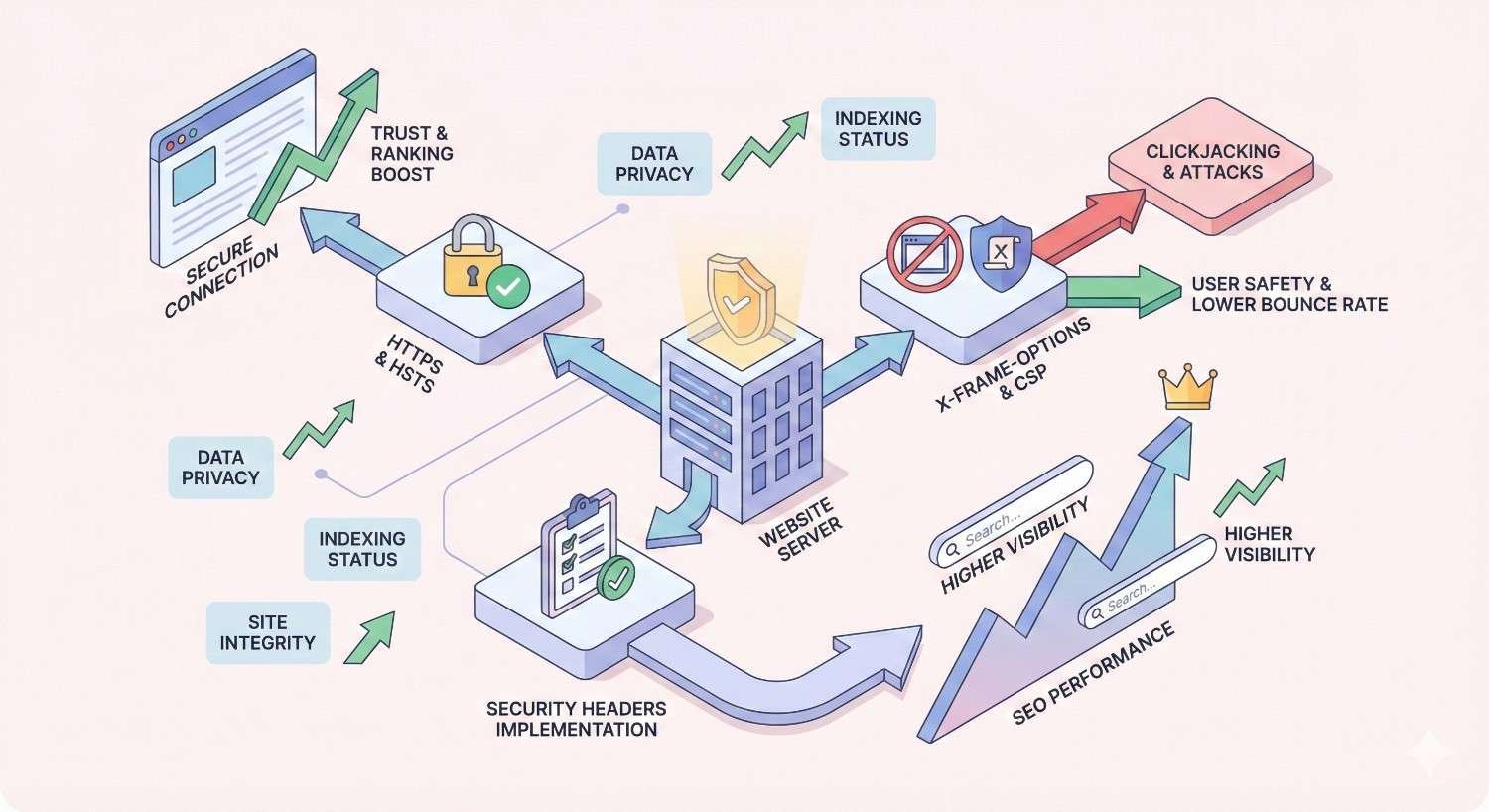
Essential Security Headers That Impact SEO Performance
Six security headers deserve priority attention for SEO purposes. Each provides specific protections while contributing to your site’s overall security rating.
Content Security Policy (CSP)
Content Security Policy is the most powerful and complex security header. It defines exactly which resources your page can load and from where, preventing unauthorized script execution.
CSP works by creating a whitelist of approved content sources. Any resource not matching your policy gets blocked, stopping attackers from injecting malicious scripts even if they find a vulnerability in your code.
How CSP Prevents XSS Attacks
Cross-site scripting attacks inject malicious JavaScript into your pages. Without CSP, browsers execute any script they encounter, trusting that your server sent legitimate code.
CSP breaks this attack vector by requiring explicit approval for every script source. Even if an attacker injects code, the browser refuses to execute it because the source isn’t whitelisted.
A basic CSP might specify that scripts can only load from your domain and specific trusted CDNs. Any script from other sources gets blocked automatically, regardless of how it appeared in your HTML.
This protection extends to inline scripts, eval functions, and other common attack vectors. Strict CSP configurations can eliminate entire categories of vulnerabilities that have plagued websites for decades.
CSP Implementation Without Breaking Functionality
CSP implementation requires careful planning because overly restrictive policies break legitimate functionality. Start with report-only mode to identify what your site actually needs.
The Content-Security-Policy-Report-Only header applies your policy without blocking violations. Instead, browsers report what would have been blocked, letting you refine your whitelist before enforcement.
Begin with a permissive policy and tighten gradually. List all legitimate script sources, style sources, image sources, and connection endpoints your site requires. Test thoroughly in staging before production deployment.
Common CSP mistakes include forgetting about inline styles, third-party analytics scripts, and embedded content. Document every external resource your site uses, then whitelist each one explicitly.
HTTP Strict Transport Security (HSTS)
HSTS tells browsers to only connect to your site using HTTPS. Once a browser receives this header, it automatically converts any HTTP requests to HTTPS before sending them.
This header prevents protocol downgrade attacks where attackers intercept HTTP connections before the HTTPS redirect occurs. HSTS closes this vulnerability window completely.
HSTS and HTTPS Migration
When migrating from HTTP to HTTPS, HSTS ensures the transition sticks. Without it, users with bookmarks or cached links to HTTP versions might still attempt insecure connections.
Start with a short max-age value during migration, perhaps one day or one week. This allows quick recovery if you discover HTTPS configuration problems. Gradually increase the duration as confidence grows.
Include the includeSubDomains directive if all your subdomains support HTTPS. This prevents attackers from exploiting insecure subdomains to compromise your main domain.
Monitor for mixed content warnings after enabling HSTS. Any HTTP resources on HTTPS pages will fail to load, potentially breaking functionality. Fix all mixed content before extending your HSTS duration.
HSTS Preload List Benefits
The HSTS preload list hardcodes your domain into browsers as HTTPS-only. Users connecting for the first time receive HSTS protection immediately, without needing to visit your site first.
Preload submission requires meeting specific criteria: valid HTTPS certificate, redirect all HTTP to HTTPS, serve HSTS header with minimum one-year max-age, include the preload directive.
Submit your domain at hstspreload.org after meeting all requirements. Browser inclusion takes several months, but the protection becomes permanent and automatic for all users.
Preload removal is difficult and slow, so only submit after confirming your entire domain will remain HTTPS-only indefinitely. Subdomains included in your policy must also support HTTPS permanently.
X-Content-Type-Options
This simple header prevents browsers from MIME-sniffing responses away from the declared content type. Set it to “nosniff” to enforce strict type checking.
MIME sniffing can turn harmless-looking files into executable scripts. An attacker might upload a file that appears to be an image but contains JavaScript. Without this header, browsers might execute the hidden code.
Implementation is straightforward with no configuration options. Add “X-Content-Type-Options: nosniff” to all responses. This header has no downside and should be enabled universally.
The protection particularly matters for sites accepting user uploads. Even with file type validation, MIME sniffing vulnerabilities can bypass your checks. This header provides defense in depth.
X-Frame-Options and Clickjacking Protection
X-Frame-Options controls whether your pages can be embedded in frames on other sites. Clickjacking attacks trick users into clicking hidden elements by overlaying your site within a malicious frame.
Set this header to DENY to prevent all framing, or SAMEORIGIN to allow framing only from your own domain. The ALLOW-FROM directive permits specific external domains but has limited browser support.
Most sites should use DENY unless they specifically need framing functionality. Legitimate embedding requirements are rare, and the clickjacking risk usually outweighs the convenience.
Note that Content Security Policy’s frame-ancestors directive provides more flexible framing control. Modern implementations often use both headers for maximum compatibility across browser versions.
Referrer-Policy Header
Referrer-Policy controls how much URL information browsers share when users navigate away from your site. This affects both privacy and potential information leakage.
The header offers multiple options ranging from no-referrer, which shares nothing, to unsafe-url, which shares the complete URL including query parameters. Most sites should use strict-origin-when-cross-origin.
This balanced setting shares your domain with external sites but keeps the full path private. Same-origin navigations receive complete referrer information for analytics purposes.
For SEO, referrer policy affects how your outbound links appear in other sites’ analytics. Overly restrictive policies might reduce your visibility as a traffic source, while permissive policies could leak sensitive URL parameters.
Permissions-Policy (formerly Feature-Policy)
Permissions-Policy controls which browser features your site can use. It restricts access to sensitive capabilities like camera, microphone, geolocation, and payment APIs.
This header prevents malicious scripts from accessing features your site doesn’t legitimately need. Even if attackers inject code, they cannot activate the camera or access location data if your policy prohibits it.
Define permissions based on actual requirements. A blog doesn’t need camera access, so disable it. An e-commerce site might need payment APIs but not microphone access. Restrict everything unnecessary.
The header also controls features that affect performance and user experience, including autoplay, fullscreen, and picture-in-picture. Thoughtful configuration improves both security and usability.
How Security Headers Directly Influence Search Rankings
Understanding the specific mechanisms connecting security headers to rankings helps prioritize implementation efforts and set realistic expectations.
Google’s Site Security as a Ranking Signal
Google’s ranking algorithms incorporate hundreds of signals, with site security confirmed as one factor. The exact weight remains undisclosed, but the direction is clear: secure sites receive preference.
Security headers strengthen the HTTPS ranking signal by ensuring proper implementation. HTTPS alone provides encryption, but headers add policy enforcement that prevents common attacks.
Google’s systems likely evaluate security holistically rather than checking individual headers. A site with comprehensive security measures demonstrates technical competence and user protection commitment.
The ranking impact of security headers alone is modest compared to content quality and backlinks. However, in competitive niches where top sites have similar content and authority, technical factors like security can determine final positions.
HTTPS Requirements and Security Headers
HTTPS became a ranking requirement rather than just a signal. Sites without HTTPS face significant ranking disadvantages and browser warnings that devastate click-through rates.
Security headers maximize HTTPS effectiveness. HSTS ensures consistent HTTPS usage, CSP prevents mixed content issues, and other headers close vulnerabilities that HTTPS alone doesn’t address.
Chrome and other browsers display security indicators based on your overall configuration. Proper headers contribute to the padlock icon and “Secure” label that users have learned to trust.
Missing security headers don’t trigger browser warnings like missing HTTPS does. However, security scanning tools that Google might use would identify the gaps, potentially affecting trust assessments.
Trust Signals and User Safety Indicators
Search engines aim to protect users from harmful sites. Security headers provide concrete evidence that a site takes user protection seriously.
Trust signals extend beyond technical security to include factors like contact information, privacy policies, and business verification. Security headers fit within this broader trust framework.
Sites handling sensitive data face higher security expectations. E-commerce sites, healthcare providers, and financial services should implement comprehensive security headers as baseline requirements.
User behavior signals might indirectly reflect security quality. Sites that get hacked often see traffic drops, increased bounce rates, and lost conversions. Prevention through proper headers maintains the positive signals that support rankings.
Security Headers Impact on Crawling and Indexing
Security headers generally don’t affect Googlebot’s ability to crawl and index your content. The headers target browser behavior, and search engine crawlers operate differently.
However, misconfigured headers can cause problems. Overly restrictive CSP policies might block resources that Googlebot needs to render your pages correctly. Always test crawlability after implementing new headers.
X-Robots-Tag is technically a header but serves a different purpose than security headers. Ensure your security header implementation doesn’t accidentally include directives that block indexing.
Server response times matter for crawl efficiency. Security headers add minimal overhead, but complex CSP policies with many directives could slightly increase response sizes. The impact is negligible for most sites.
Technical Implementation of Security Headers
Implementation methods vary by server type, hosting environment, and technical access level. Choose the approach that matches your infrastructure.
Implementing Security Headers in Apache
Apache servers use .htaccess files or main configuration files to set headers. The mod_headers module must be enabled for header manipulation.
.htaccess Configuration Examples
Add these directives to your .htaccess file in the web root:
apache
Copy
<IfModule mod_headers.c>
Header always set Strict-Transport-Security “max-age=31536000; includeSubDomains; preload”
Header always set X-Content-Type-Options “nosniff”
Header always set X-Frame-Options “DENY”
Header always set Referrer-Policy “strict-origin-when-cross-origin”
Header always set Permissions-Policy “camera=(), microphone=(), geolocation=()”
Header always set Content-Security-Policy “default-src ‘self’; script-src ‘self’ https://trusted-cdn.com; style-src ‘self’ ‘unsafe-inline'”
</IfModule>
Customize the Content-Security-Policy directive based on your site’s actual resource requirements. The example above is a starting template, not a universal solution.
Test each header individually before combining them. A syntax error in one directive can prevent all headers from being set correctly.
Implementing Security Headers in Nginx
Nginx configuration uses the add_header directive within server or location blocks. Headers set in parent blocks inherit to child blocks unless overridden.
nginx.conf Configuration Examples
Add these lines within your server block:
nginx
Copy
add_header Strict-Transport-Security “max-age=31536000; includeSubDomains; preload” always;
add_header X-Content-Type-Options “nosniff” always;
add_header X-Frame-Options “DENY” always;
add_header Referrer-Policy “strict-origin-when-cross-origin” always;
add_header Permissions-Policy “camera=(), microphone=(), geolocation=()” always;
add_header Content-Security-Policy “default-src ‘self’; script-src ‘self’ https://trusted-cdn.com; style-src ‘self’ ‘unsafe-inline'” always;
The “always” parameter ensures headers are sent even for error responses. Without it, 404 and 500 pages might lack security headers.
Reload Nginx configuration after changes with “nginx -s reload” or restart the service. Test configuration syntax first with “nginx -t” to catch errors before they affect live traffic.
Implementing Security Headers in IIS
Internet Information Services uses web.config files for header configuration. Add custom headers within the system.webServer section.
xml
Copy
<system.webServer>
<httpProtocol>
<customHeaders>
<add name=”Strict-Transport-Security“ value=”max-age=31536000; includeSubDomains; preload“ />
<add name=”X-Content-Type-Options“ value=”nosniff“ />
<add name=”X-Frame-Options“ value=”DENY“ />
<add name=”Referrer-Policy“ value=”strict-origin-when-cross-origin“ />
<add name=”Permissions-Policy“ value=”camera=(), microphone=(), geolocation=()“ />
<add name=”Content-Security-Policy“ value=”default-src ‘self‘” />
</customHeaders>
</httpProtocol>
</system.webServer>
IIS also supports header configuration through the GUI. Open IIS Manager, select your site, and use the HTTP Response Headers feature.
Remove any default headers that leak server information. The X-Powered-By header revealing ASP.NET version should be removed for security.
CDN-Level Security Header Configuration
Content delivery networks can add security headers at the edge, applying them globally without server configuration changes. This approach works well for sites using CDN caching.
Cloudflare Security Header Setup
Cloudflare offers multiple methods for adding security headers. Transform Rules provide the most flexibility for header manipulation.
Navigate to Rules > Transform Rules > Modify Response Header. Create rules that add each security header to all responses or specific URL patterns.
Cloudflare also offers one-click HSTS configuration under SSL/TLS > Edge Certificates. Enable HSTS and configure max-age, includeSubDomains, and preload options through the interface.
For CSP, use Transform Rules or Page Rules depending on your Cloudflare plan. Enterprise plans offer additional header management features.
AWS CloudFront Configuration
CloudFront uses response headers policies to add security headers. Create a policy in the CloudFront console under Policies > Response headers.
Configure each security header within the policy, then attach the policy to your CloudFront distribution behaviors. Headers apply to all responses matching those behaviors.
CloudFront provides preset security header configurations for common use cases. These presets offer reasonable defaults that you can customize for specific requirements.
Lambda@Edge functions offer maximum flexibility for complex header logic. Use them when standard policies can’t express your requirements.
Other CDN Providers
Fastly, Akamai, KeyCDN, and other providers offer similar header configuration capabilities. Consult provider documentation for specific implementation steps.
Most CDNs support header manipulation through configuration interfaces, API calls, or edge computing functions. Choose the method that matches your technical comfort level.
CDN-level headers override origin server headers by default. Coordinate configurations to avoid conflicts or unexpected behavior.
CMS-Specific Implementation
Content management systems often require plugins or theme modifications for security header implementation. Server-level configuration remains preferable when accessible.
WordPress Security Headers
WordPress sites can add headers through plugins, theme functions, or server configuration. Server-level implementation provides the most reliable results.
Popular security plugins like Wordfence, Sucuri, and Headers Security Advanced include header configuration features. These plugins simplify implementation but add overhead.
For theme-based implementation, add header functions to your theme’s functions.php file or a custom plugin:
php
Copy
function add_security_headers() {
header(‘X-Content-Type-Options: nosniff’);
header(‘X-Frame-Options: DENY’);
header(‘Referrer-Policy: strict-origin-when-cross-origin’);
}
add_action(‘send_headers’, ‘add_security_headers’);
This method works but executes on every page load. Server-level configuration is more efficient for high-traffic sites.
Shopify Security Headers
Shopify’s hosted platform limits direct header configuration. Shopify automatically includes some security headers, but customization options are restricted.
Contact Shopify support for enterprise-level header customization requirements. Standard plans have limited flexibility for security header modifications.
Shopify Plus merchants have additional options through checkout.liquid customization and script tags. Consult Shopify Plus documentation for advanced configurations.
Third-party apps claiming to add security headers on Shopify should be evaluated carefully. Many cannot actually modify HTTP headers on the hosted platform.
Custom Platform Solutions
Custom-built platforms offer maximum flexibility for security header implementation. Add headers at the application level, web server level, or both.
Framework-specific middleware often provides the cleanest implementation. Express.js has helmet, Django has django-csp, Rails has secure_headers gem.
Document your header configuration in your codebase. Include comments explaining why each header is configured as it is, making future maintenance easier.
Test headers across all application routes. Dynamic applications might have different header requirements for different endpoints.
Testing and Validating Your Security Headers
Implementation without verification is incomplete. Multiple tools help confirm your headers are configured correctly and identify areas for improvement.
Security Header Scanning Tools
Automated scanners quickly assess your security header implementation and provide actionable recommendations.
SecurityHeaders.com Analysis
SecurityHeaders.com provides instant security header analysis with letter grades. Enter your URL and receive a detailed report within seconds.
The tool checks for all major security headers and rates your implementation from A+ to F. Each missing or misconfigured header includes explanation and remediation guidance.
Use this tool before and after implementation to verify changes took effect. The simple interface makes it accessible for non-technical stakeholders who want to understand security status.
Reports can be shared via unique URLs, useful for documenting improvements or communicating with clients and team members.
Mozilla Observatory
Mozilla Observatory offers comprehensive security scanning beyond just headers. It evaluates cookies, CORS, redirects, and other security factors.
The tool provides detailed explanations for each test, helping you understand why specific configurations matter. Educational content accompanies technical recommendations.
Observatory integrates with third-party scanners for additional checks. A single scan can reveal issues across multiple security dimensions.
Scores range from 0 to 130+, with most sites scoring below 50. Achieving high scores requires attention to details that many sites overlook.
Chrome DevTools Network Tab
Browser developer tools let you inspect actual headers your site sends. This verification method catches issues that external scanners might miss.
Open DevTools with F12, navigate to the Network tab, and reload your page. Click any request to view response headers in the Headers panel.
Check headers on multiple page types: homepage, blog posts, product pages, and error pages. Configuration issues sometimes affect only specific routes.
DevTools also reveals header values, not just presence. Verify that CSP directives, HSTS max-age values, and other parameters match your intended configuration.
Common Security Header Errors and Fixes
Implementation mistakes can negate security benefits or break site functionality. Learn to recognize and resolve common issues.
Duplicate headers occur when multiple configuration sources add the same header. Check for conflicts between server config, CDN settings, and application code.
Syntax errors in CSP directives silently fail, providing no protection. Use CSP validators to check policy syntax before deployment.
Missing headers on specific routes often result from configuration scope issues. Ensure headers apply to all responses, not just certain file types or paths.
Incorrect header values provide false security. An HSTS max-age of 0 effectively disables the protection. Verify values match security requirements.
Achieving A+ Security Header Ratings
A+ ratings require comprehensive implementation of all recommended headers with optimal configurations.
Start with the easy headers: X-Content-Type-Options, X-Frame-Options, and Referrer-Policy. These have simple configurations with minimal risk of breaking functionality.
Add HSTS with a long max-age and includeSubDomains. Consider preload submission after confirming stable HTTPS across all subdomains.
Implement CSP last due to its complexity. Begin with report-only mode, refine your policy based on violation reports, then switch to enforcement.
Permissions-Policy rounds out your implementation. Disable all features you don’t use, which is most of them for typical websites.
Monitoring Security Headers Over Time
Security header configuration can change unexpectedly. Regular monitoring catches regressions before they become problems.
Schedule monthly scans using SecurityHeaders.com or similar tools. Document baseline scores and investigate any decreases.
Integrate header checks into deployment pipelines. Automated tests can verify headers remain correct after code changes.
Monitor CSP violation reports if you’ve configured reporting. Unexpected violations might indicate attacks or legitimate resources you forgot to whitelist.
Track browser security indicator changes. Chrome and other browsers update their security UI periodically, potentially affecting how users perceive your site.
Security Headers and Site Performance Optimization
Security and performance sometimes conflict. Understanding the tradeoffs helps you optimize both without sacrificing either.
Balancing Security with Page Load Speed
Security headers themselves add negligible overhead. The header data is tiny compared to page content, adding perhaps a few hundred bytes to responses.
However, security policies can affect how browsers load resources. Strict CSP policies might require additional DNS lookups or prevent certain optimization techniques.
Evaluate performance impact after implementing each header. Use WebPageTest or Lighthouse to measure before and after metrics.
If performance degrades, investigate which specific policy is responsible. Often, minor CSP adjustments restore performance without compromising security.
CSP and Resource Loading Optimization
Content Security Policy interacts with resource loading in ways that affect performance. Understanding these interactions helps you write efficient policies.
Nonce-based CSP requires generating unique tokens for each page load, adding server-side processing overhead. Hash-based approaches avoid this but require updating hashes when scripts change.
Strict CSP policies might prevent inline styles and scripts that would otherwise load faster than external files. Evaluate whether the security benefit justifies the performance cost.
Preconnect and prefetch hints work within CSP constraints. Whitelist domains you want to preconnect to, enabling browsers to establish connections early.
Security Headers Impact on Core Web Vitals
Each Core Web Vital can be affected by security header configuration, though the impacts are typically minor.
LCP (Largest Contentful Paint)
HSTS improves LCP by eliminating HTTP-to-HTTPS redirect latency. First-time visitors benefit most, as returning visitors already have HSTS cached.
CSP policies that block render-blocking resources could theoretically improve LCP, but this is rarely the intended effect. Focus on legitimate optimization techniques.
Overly complex CSP policies with many directives might slightly increase response size, marginally affecting time-to-first-byte. The impact is negligible for most sites.
FID (First Input Delay)
Security headers have minimal direct impact on FID. This metric primarily reflects JavaScript execution efficiency.
CSP can indirectly affect FID by blocking malicious scripts that would otherwise consume processing resources. This protective benefit is difficult to measure but real.
Permissions-Policy restrictions on unused features might marginally reduce browser overhead, though the FID impact would be immeasurable.
CLS (Cumulative Layout Shift)
Security headers don’t directly cause layout shifts. CLS issues stem from content loading behavior, not security policies.
However, CSP violations that block resources could cause layout shifts if the blocked content would have reserved space. Ensure your CSP whitelist includes all legitimate resources.
Proper security headers prevent attacks that might inject content causing layout shifts. This protective benefit maintains your CLS score against malicious interference.
Caching Considerations with Security Headers
Security headers interact with caching in ways that require attention. Incorrect configurations can undermine either security or performance.
HSTS headers should be cached by browsers, which is their intended behavior. The max-age directive controls cache duration.
CSP headers with nonces cannot be cached because each response needs a unique nonce. Consider hash-based CSP for cacheable pages.
CDN caching of responses with security headers works normally. Ensure your CDN preserves headers rather than stripping them during caching.
Vary headers might be needed if security headers differ based on request characteristics. Most sites can use consistent headers across all requests.
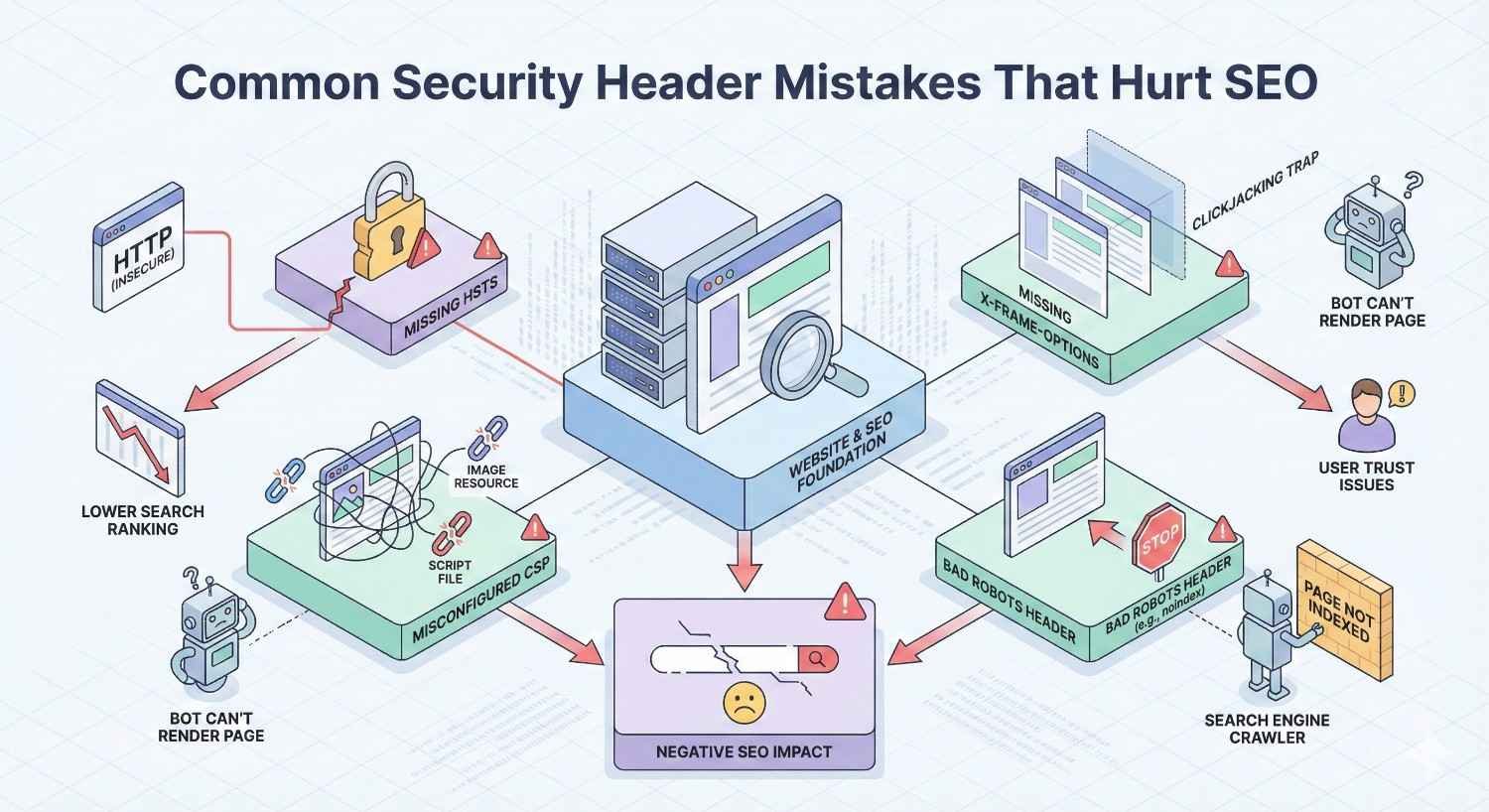
Common Security Header Mistakes That Hurt SEO
Misconfigured security headers can damage rankings and user experience. Avoid these common errors.
Overly Restrictive CSP Blocking Resources
The most common CSP mistake is blocking legitimate resources your site needs. This breaks functionality and frustrates users.
Symptoms include missing images, broken JavaScript features, and unstyled pages. Check browser console for CSP violation messages identifying blocked resources.
Start with report-only mode to identify all required resources before enforcement. Rushing to strict CSP without proper analysis causes problems.
Third-party integrations often require CSP exceptions. Analytics scripts, chat widgets, payment processors, and advertising code all need whitelisting.
Incorrect HSTS Configuration
HSTS mistakes can lock users out of your site or provide false security. Configuration errors are difficult to reverse.
Setting max-age too high before confirming stable HTTPS creates risk. If you need to revert to HTTP, users with cached HSTS cannot access your site.
Forgetting includeSubDomains when subdomains use HTTP breaks those subdomains for users who visited your main domain first.
Preload submission without meeting all requirements wastes time. Your domain won’t be accepted, and you might not understand why.
X-Robots-Tag Conflicts with Security Headers
X-Robots-Tag is a header but serves different purposes than security headers. Confusion between them causes indexing problems.
Never include noindex directives in your security header configuration. This mistake can deindex your entire site.
Keep X-Robots-Tag configuration separate from security headers. Different configuration files or sections prevent accidental mixing.
Test crawlability after any header changes. Use Google Search Console’s URL Inspection tool to verify Googlebot can access your pages.
Mixed Content Issues
Mixed content occurs when HTTPS pages load HTTP resources. This triggers browser warnings and can break functionality.
HSTS enforcement makes mixed content failures more severe. Without HSTS, browsers might load HTTP resources with warnings. With HSTS, they block entirely.
Audit all resource URLs before enabling strict HSTS. Images, scripts, stylesheets, fonts, and API calls must all use HTTPS.
Content management systems sometimes store absolute HTTP URLs in databases. Update these references before HSTS enforcement.
Security Headers Breaking JavaScript Functionality
JavaScript-heavy sites face particular challenges with security header implementation. Modern frameworks often require specific CSP accommodations.
Inline event handlers like onclick attributes violate strict CSP. Refactor to use addEventListener for CSP compliance.
eval() and similar dynamic code execution violates CSP by default. Some frameworks require unsafe-eval exceptions, though this weakens security.
Web workers, service workers, and other advanced JavaScript features have specific CSP requirements. Consult framework documentation for guidance.
Security Headers vs Other Technical SEO Factors
Security headers compete for implementation priority with other technical SEO improvements. Understanding relative importance helps allocate resources effectively.
Security Headers vs Schema Markup
Schema markup directly affects rich snippet eligibility and click-through rates. Security headers provide indirect ranking benefits through trust signals.
For most sites, schema markup delivers more visible SEO impact than security headers. Rich snippets increase SERP real estate and attract clicks.
However, security headers require less ongoing maintenance than schema. Once configured correctly, headers work automatically without content updates.
Implement both, but prioritize schema if you must choose. Security headers can follow once schema implementation is complete.
Security Headers vs Site Speed Optimization
Site speed directly affects rankings and user experience. Google has explicitly confirmed speed as a ranking factor with measurable impact.
Speed optimization typically delivers greater ranking improvements than security headers. Users notice speed differences immediately, affecting engagement metrics.
Security headers require minimal effort compared to comprehensive speed optimization. Implement headers quickly, then invest more time in speed improvements.
The good news: security headers don’t conflict with speed optimization. You can pursue both simultaneously without tradeoffs.
Priority Matrix for Technical SEO Implementation
Rank technical SEO factors by impact and effort to prioritize effectively.
High impact, low effort: HTTPS migration, basic security headers, XML sitemap, robots.txt optimization. Do these first.
High impact, high effort: Site speed optimization, mobile responsiveness, Core Web Vitals improvements. Invest significant resources here.
Medium impact, low effort: Schema markup for key pages, canonical tags, hreflang for international sites. Quick wins after fundamentals.
Lower impact, variable effort: Advanced security headers like strict CSP, comprehensive schema coverage, edge case technical fixes. Address after higher priorities.
Security Headers for Different Website Types
Different site types have different security requirements and implementation considerations.
E-commerce Sites and Payment Security
E-commerce sites handle sensitive payment data, making security headers essential rather than optional.
PCI DSS compliance doesn’t explicitly require security headers, but they support compliance goals. Auditors view comprehensive security measures favorably.
CSP is particularly important for e-commerce to prevent script injection that could steal payment information. Strict policies protect customers and your reputation.
Payment processor integrations require CSP exceptions. Stripe, PayPal, and other processors need whitelisting for their JavaScript libraries.
SaaS Platforms and Application Security
SaaS applications face sophisticated attack attempts due to their valuable data and user bases. Security headers provide essential protection layers.
Multi-tenant architectures require careful CSP configuration. Ensure tenant isolation extends to content security policies.
API endpoints need appropriate headers too. Don’t assume security headers only matter for HTML pages.
Regular security audits should include header verification. SaaS platforms evolve rapidly, and header configurations must keep pace.
Content Sites and Publisher Requirements
Content sites prioritize user experience and advertising revenue. Security headers must accommodate these business requirements.
Advertising networks require extensive CSP exceptions. Ad scripts load from numerous domains, complicating whitelist management.
Consider CSP report-only mode for ad-heavy sites. Full enforcement might break revenue-generating functionality.
Publisher sites benefit from clickjacking protection. Competitors or malicious actors might attempt to frame your content inappropriately.
Local Business Websites
Local business sites have simpler security requirements but still benefit from proper headers.
Basic security headers improve trust signals that matter for local search. Google evaluates local businesses partly on website quality.
Simple sites can implement strict security policies easily. Without complex JavaScript or third-party integrations, CSP configuration is straightforward.
Local businesses often use website builders with limited header control. Evaluate platform capabilities before committing.
Advanced Security Header Strategies
Beyond basic implementation, advanced techniques provide additional security and SEO benefits.
Subresource Integrity (SRI) Implementation
SRI ensures external scripts haven’t been tampered with. Browsers verify file hashes before execution, blocking modified resources.
Add integrity attributes to script and link tags loading external resources. Generate hashes using tools like srihash.org.
SRI protects against CDN compromises and man-in-the-middle attacks. Even if attackers modify files on external servers, browsers reject the tampered versions.
Combine SRI with CSP for defense in depth. CSP controls which sources are allowed; SRI verifies the content from those sources.
Cross-Origin Resource Sharing (CORS) Headers
CORS headers control which external sites can access your resources via JavaScript. Proper configuration prevents unauthorized data access.
Restrictive CORS policies protect APIs from cross-origin attacks. Only whitelist domains that legitimately need access.
Overly permissive CORS (Access-Control-Allow-Origin: *) creates security risks. Avoid wildcards for sensitive endpoints.
CORS interacts with CSP in complex ways. Test thoroughly when implementing both header types.
Security Headers for Single Page Applications (SPAs)
SPAs present unique security header challenges due to their JavaScript-heavy architecture.
CSP configuration for SPAs often requires unsafe-inline or nonces for framework functionality. Evaluate security tradeoffs carefully.
Client-side routing means security headers apply to the initial HTML load only. Subsequent navigation doesn’t trigger new header delivery.
Consider server-side rendering for critical pages to ensure security headers apply. Hybrid approaches balance SPA benefits with security requirements.
Progressive Web Apps (PWA) Security Considerations
PWAs require specific security configurations for service workers and offline functionality.
Service workers have their own CSP requirements. The worker script and resources it fetches need appropriate whitelisting.
HTTPS is mandatory for PWAs, making HSTS implementation natural. Service workers only function over secure connections.
Manifest files and icons need appropriate CORS and CSP configurations. Test PWA installation after implementing security headers.
Measuring SEO Impact of Security Headers
Quantifying security header benefits helps justify implementation effort and demonstrate value to stakeholders.
Key Metrics to Track
Monitor multiple metrics to capture security header impact comprehensively.
Organic traffic changes after implementation indicate ranking effects. Isolate other variables to attribute changes accurately.
Security scanner scores provide objective improvement measures. Track SecurityHeaders.com grades over time.
Core Web Vitals metrics might improve slightly from HSTS implementation. Monitor through Search Console and PageSpeed Insights.
User trust indicators like conversion rates and bounce rates might improve with visible security enhancements.
Before and After Analysis Framework
Structured analysis separates security header effects from other changes.
Document baseline metrics before implementation: rankings, traffic, Core Web Vitals, security scores.
Implement headers during a period without other major changes. Avoid simultaneous content updates or technical modifications.
Wait 4-8 weeks for search engines to recrawl and reevaluate your site. Ranking changes take time to manifest.
Compare post-implementation metrics to baseline. Note any confounding factors that might explain changes.
Attribution Modeling for Security Improvements
Security headers contribute to rankings alongside many other factors. Attribution requires careful analysis.
Correlation doesn’t prove causation. Traffic increases after header implementation might result from other factors.
Compare against control groups if possible. Sites without header changes provide comparison baselines.
Consider security headers as part of comprehensive technical SEO rather than isolated improvements. Combined effects matter more than individual contributions.
Reporting Security Header Performance to Stakeholders
Translate technical improvements into business language for non-technical stakeholders.
Lead with security scanner grade improvements. A to A+ progression is easily understood.
Connect security to trust and conversions. Protected users are more likely to complete transactions.
Quantify risk reduction. Security headers prevent attacks that could cost significant revenue and reputation damage.
Include competitive analysis. Show how your security compares to competitors in your industry.
Security Headers Roadmap and Maintenance
Sustainable security requires ongoing attention, not just initial implementation.
Phased Implementation Approach
Gradual rollout reduces risk and allows learning between phases.
Phase 1: Implement simple headers with no configuration options. X-Content-Type-Options and basic X-Frame-Options take minutes.
Phase 2: Add HSTS with conservative max-age. Monitor for mixed content issues before extending duration.
Phase 3: Implement Referrer-Policy and Permissions-Policy. These require some decision-making but rarely break functionality.
Phase 4: Deploy CSP in report-only mode. Collect violation data for weeks before enforcement.
Phase 5: Enforce CSP and optimize based on real-world data. Refine policies as your site evolves.
Quarterly Security Header Audits
Regular audits catch configuration drift and identify improvement opportunities.
Run security scans quarterly at minimum. More frequent scans for high-risk sites.
Review CSP violation reports for patterns. Recurring violations might indicate needed policy updates or attack attempts.
Check for new security header recommendations. Web security evolves, and new headers emerge periodically.
Verify headers remain consistent across all page types. Site updates sometimes inadvertently affect header configuration.
Staying Updated with Security Standards
Security best practices evolve continuously. Stay informed to maintain effective protection.
Follow OWASP guidelines for web security recommendations. Their resources reflect current threat landscapes.
Monitor browser vendor announcements. Chrome, Firefox, and Safari sometimes change header handling.
Subscribe to security newsletters and blogs. Expert commentary helps interpret changes and prioritize responses.
Participate in security communities. Peer discussions reveal practical implementation insights.
Long-term Security and SEO Strategy Integration
Security headers should integrate into broader technical SEO and security strategies.
Include header verification in site launch checklists. New sites and redesigns should have proper headers from day one.
Document header configurations in technical SEO audits. Headers deserve attention alongside other technical factors.
Train team members on security header importance. Developers, marketers, and content creators all affect security.
Budget for ongoing security maintenance. Headers require periodic attention even after initial implementation.
Getting Professional Help with Security Headers and SEO
Complex implementations or limited internal resources might warrant professional assistance.
When to Hire an SEO Agency for Technical Implementation
Consider professional help when internal capabilities are insufficient.
Complex server environments with multiple configuration layers benefit from expert guidance. Mistakes in production can be costly.
Sites with extensive third-party integrations need careful CSP planning. Agencies experienced with similar sites implement faster.
Time constraints might justify outsourcing. Agencies deliver results while your team focuses on core business activities.
Compliance requirements sometimes mandate professional security assessments. Agencies provide documentation for auditors.
Security Header Implementation as Part of Comprehensive SEO
Security headers fit within broader technical SEO services. Isolated implementation misses optimization opportunities.
Technical SEO audits should include security header assessment. Comprehensive audits reveal interconnected issues.
Implementation should coordinate with other technical improvements. Combining efforts reduces total project time.
Ongoing SEO retainers can include security monitoring. Regular attention prevents configuration drift.
Ongoing Technical SEO Support and Monitoring
Continuous support maintains security and SEO performance over time.
Monthly reporting should include security metrics. Stakeholders need visibility into protection status.
Proactive monitoring catches issues before they affect rankings. Automated alerts enable rapid response.
Regular strategy reviews ensure security aligns with business goals. Requirements change as sites evolve.
Expert guidance helps navigate emerging threats and opportunities. Security landscapes shift constantly.
Conclusion
Security headers represent a technical SEO opportunity that strengthens site protection while sending positive trust signals to search engines. Proper implementation of CSP, HSTS, and supporting headers creates defense layers that protect users and support ranking goals.
The connection between security and SEO continues strengthening as Google emphasizes user safety. Sites with comprehensive security header implementation demonstrate the technical competence and user protection commitment that search algorithms reward.
We help businesses implement security headers as part of comprehensive technical SEO strategies. Contact White Label SEO Service to discuss how proper security configuration can support your organic growth goals.
Frequently Asked Questions
Do security headers directly improve Google rankings?
Security headers contribute to rankings indirectly through trust signals and HTTPS strengthening. Google confirms site security as a ranking factor, and headers demonstrate security commitment. The impact is modest compared to content and links but meaningful in competitive situations.
How long does it take to see SEO benefits from security headers?
Expect 4-8 weeks for search engines to recrawl and reevaluate your site after implementation. Ranking changes emerge gradually as Google processes the updated trust signals. Immediate benefits include improved security scanner scores and browser trust indicators.
Can security headers break my website functionality?
Yes, misconfigured headers can break functionality. Content Security Policy poses the greatest risk by blocking legitimate resources. Start with report-only mode, test thoroughly in staging, and implement gradually to minimize disruption.
Which security header should I implement first?
Start with X-Content-Type-Options and X-Frame-Options because they require no configuration decisions and cannot break functionality. Add HSTS next with a conservative max-age. Save CSP for last due to its complexity.
Do I need security headers if I already have HTTPS?
Yes, HTTPS and security headers serve complementary purposes. HTTPS encrypts data in transit, while headers enforce security policies that prevent attacks HTTPS doesn’t address. Comprehensive security requires both.
How do security headers affect page load speed?
Security headers add negligible overhead, typically a few hundred bytes per response. HSTS can actually improve speed by eliminating HTTP-to-HTTPS redirect latency. Properly configured CSP might slightly improve loading by preventing unauthorized resource execution.
What security header grade should I aim for?
Aim for A or A+ on SecurityHeaders.com. This requires implementing all major headers with appropriate configurations. Most sites can achieve A+ with proper planning, though strict CSP implementation requires the most effort.


