

Soft 404 errors silently drain your crawl budget and block pages from ranking. Unlike standard 404s that clearly signal “page not found,” soft 404s confuse search engines by returning a 200 OK status while displaying error-like or empty content. This mismatch wastes Googlebot’s time and can suppress your entire site’s indexing efficiency.
For business owners and marketing teams focused on organic growth, soft 404s represent a hidden technical debt. They accumulate quietly, often going unnoticed until crawl reports reveal hundreds or thousands of affected URLs.
This guide covers everything you need to identify soft 404 errors, understand their root causes, implement permanent fixes, and prevent them from recurring. You’ll walk away with actionable steps to protect your crawl budget and indexing health.
What Is a Soft 404 Error?
A soft 404 error occurs when a page returns an HTTP 200 status code (indicating success) but displays content that looks like an error page or contains little to no useful information. Search engines expect pages returning 200 to deliver valuable, indexable content. When they encounter a “successful” response paired with empty or error-like content, they flag it as a soft 404.
Google’s systems are sophisticated enough to detect this mismatch. They analyze page content, not just status codes. If a page says “Product not found” or “No results” while technically loading successfully, Google treats it as if the page doesn’t exist.
This creates a fundamental problem. Your server says everything is fine. Google disagrees. The result is wasted crawl resources and potential indexing confusion across your site.
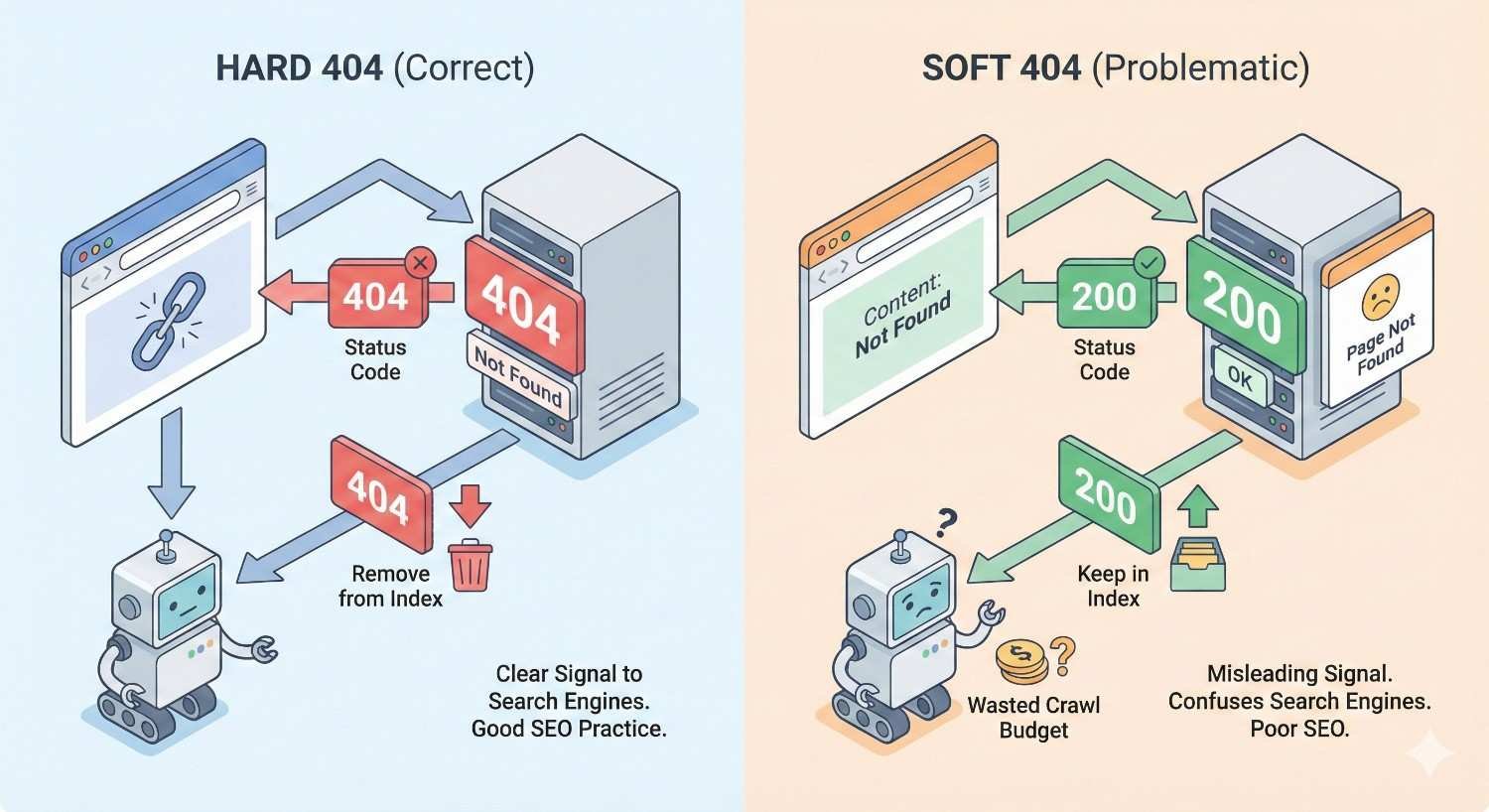
Soft 404 vs. Hard 404: Key Differences
A hard 404 is straightforward. The server returns a 404 status code, telling browsers and search engines the page doesn’t exist. Search engines understand this signal immediately and remove the URL from their index over time.
Soft 404s are ambiguous. The server claims the page exists and loaded correctly. But the content tells a different story. This ambiguity forces search engines to make judgment calls about your pages.
| Aspect | Hard 404 | Soft 404 |
| HTTP Status Code | 404 Not Found | 200 OK |
| Server Signal | Clear “doesn’t exist” | “Everything is fine” |
| Content | Error page | Empty, thin, or error-like |
| Search Engine Response | Removes from index | Flags as problematic |
| Crawl Impact | Minimal after detection | Ongoing waste |
Hard 404s are clean signals. Soft 404s create noise. From an SEO perspective, a proper hard 404 is always preferable to a soft 404 because it communicates clearly with search engines.
How Search Engines Interpret Soft 404s
Google uses machine learning and content analysis to identify soft 404s. According to Google’s Search Central documentation, their systems look for patterns indicating a page lacks substantive content despite returning a success status.
Common triggers include pages displaying:
- “Page not found” or similar error messages
- Empty product listings
- Search results with zero matches
- Placeholder text without real content
- Redirect chains landing on generic pages
When Google detects a soft 404, it excludes the URL from indexing and reports it in Search Console. The page won’t appear in search results regardless of how many times Googlebot crawls it.
Bing and other search engines use similar detection methods, though their specific algorithms differ. The core principle remains consistent: pages must deliver value matching their status code.
Why Soft 404 Errors Hurt Your SEO
Soft 404 errors create three distinct problems for your organic search performance. Each compounds over time, making early detection and resolution critical for sites pursuing sustainable growth.
Crawl Budget Waste
Every website has a crawl budget. This represents how many pages Googlebot will crawl within a given timeframe. For small sites with a few hundred pages, crawl budget rarely becomes a constraint. For larger sites with thousands or millions of URLs, it’s a genuine limiting factor.
Soft 404 pages consume crawl budget without providing any return. Googlebot visits these URLs, analyzes their content, determines they’re soft 404s, and moves on. That crawl could have been spent on pages that actually deserve indexing.
Google’s John Mueller has confirmed that crawl budget matters most for large sites. If you’re running an e-commerce store with 50,000+ product pages, having 5,000 soft 404s means roughly 10% of your potential crawl capacity goes to waste.
The math is simple but impactful. Fewer crawls on valuable pages means slower indexing of new content, delayed recognition of updates, and reduced overall search visibility.
Indexing Problems and Ranking Impact
Soft 404s don’t just waste crawl budget. They can signal broader quality issues to search engines.
When a significant percentage of your site returns soft 404s, it suggests poor site maintenance. Search engines may interpret this as a quality signal affecting your entire domain. While Google hasn’t confirmed direct ranking penalties for soft 404s, the indirect effects are measurable.
Pages stuck in soft 404 status never enter the index. Any backlinks pointing to these URLs pass no value. Internal links to soft 404 pages create dead ends in your site architecture. The cumulative effect weakens your site’s overall link equity distribution.
Additionally, if users land on soft 404 pages from search results (before Google detects them), they’ll bounce immediately. High bounce rates and poor engagement metrics can influence how search engines perceive your site’s quality.
User Experience Degradation
Beyond search engines, soft 404s frustrate real visitors. Someone clicks a link expecting content and finds an empty page or error message. The page loaded successfully from a technical standpoint, but it delivered nothing useful.
This damages trust. Users who encounter multiple dead ends on your site are unlikely to return. They’re certainly unlikely to convert, subscribe, or recommend your business.
For e-commerce sites, soft 404s on product pages represent lost revenue. A potential customer searching for a specific item lands on a page saying “Product unavailable” with no alternatives offered. That’s a conversion lost to poor technical hygiene.
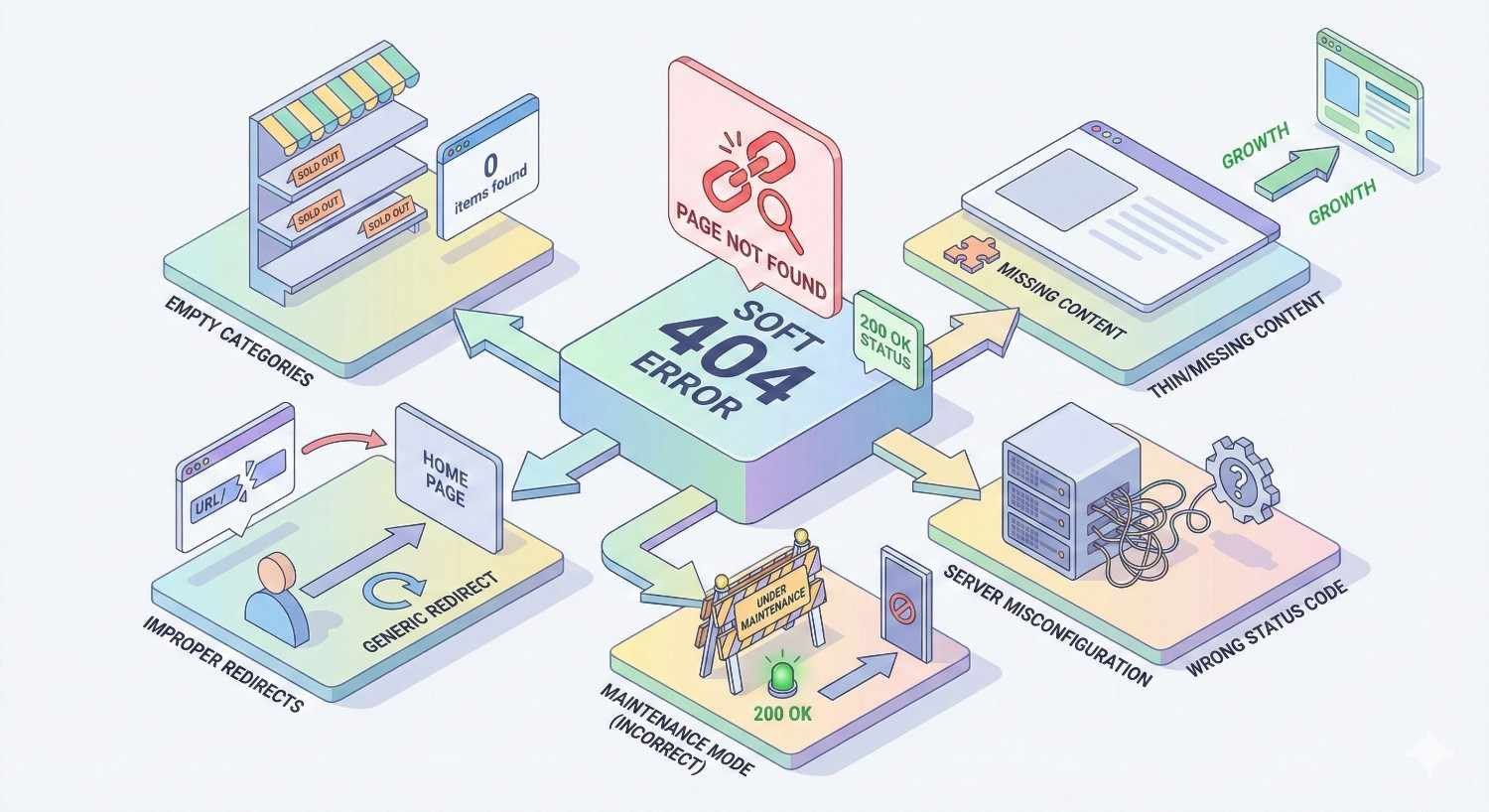
Common Causes of Soft 404 Errors
Understanding why soft 404s occur helps you prevent them. Most stem from a handful of common scenarios that affect sites across industries.
Empty or Thin Content Pages
Pages with minimal content often trigger soft 404 detection. If a page contains only a header, footer, and navigation with no substantive body content, Google may classify it as a soft 404.
This commonly affects:
- Blog category pages with no posts yet
- Author pages for contributors who haven’t published
- Tag pages with only one or two associated articles
- Landing pages still under development
The threshold isn’t precisely defined, but pages need enough unique, valuable content to justify their existence. A page with 50 words of boilerplate text surrounded by site-wide elements won’t pass muster.
Misconfigured Server Responses
Server configuration errors are a frequent culprit. Your CMS or server might be set to return 200 status codes for all requests, even when pages don’t exist.
Common misconfigurations include:
- Custom 404 pages that return 200 instead of 404
- Catch-all routes that serve generic content for any URL
- Load balancers or CDNs that mask actual server responses
- Misconfigured .htaccess or nginx rules
Testing is straightforward. Request a URL you know doesn’t exist and check the HTTP status code. If it returns 200, your server configuration needs adjustment.
Search Results Pages Returning 200 Status
Internal site search creates soft 404 problems when zero-result pages return 200 status codes. Someone searches for “xyz123nonsense” on your site, gets a page saying “No results found,” but the server reports success.
Google crawls these URLs when they appear in your sitemap, internal links, or external links. Each zero-result search page becomes a soft 404.
The solution involves either:
- Returning proper 404 status for zero-result searches
- Blocking search result URLs from indexing via robots.txt or noindex
- Preventing search URLs from being crawled entirely
Out-of-Stock Product Pages
E-commerce sites face this challenge constantly. Products sell out or get discontinued. The page remains accessible, but the content essentially says “This product isn’t available.”
Google may interpret these as soft 404s, especially if:
- The page shows only “Out of stock” with no product details
- All product information has been removed
- The page redirects to a generic “Product unavailable” template
Managing product lifecycle pages requires a deliberate strategy, which we’ll cover in the e-commerce section below.
Pagination and Filtered URL Issues
Pagination creates soft 404 risks when page numbers exceed actual content. If your blog has 10 pages of posts but someone requests page 500, what happens?
Many sites return a 200 status with an empty content area. That’s a soft 404.
Filtered URLs compound this problem. E-commerce sites with faceted navigation can generate millions of URL combinations. Most return valid products, but edge cases return empty results. Each empty filter combination becomes a potential soft 404.
Example problematic URLs:
- /products?color=purple&size=xxxl&material=titanium (no matching products)
- /blog/page/999 (pagination beyond actual content)
- /category/shoes?price=0-1 (unrealistic filter values)
How to Find Soft 404 Errors on Your Website
Detection is the first step toward resolution. Multiple tools and methods exist, each with distinct advantages.
Using Google Search Console Coverage Report
Google Search Console remains the primary source for soft 404 detection. Google tells you exactly which URLs they’ve classified as soft 404s.
To access this data:
- Log into Google Search Console
- Navigate to “Indexing” → “Pages”
- Look for “Soft 404” under the “Not indexed” section
- Click to see the full list of affected URLs
Search Console shows URLs Google has already crawled and classified. This means you’re seeing confirmed soft 404s, not predictions. The data is authoritative but not real-time. There’s typically a delay of several days between Google’s crawl and the report appearing.
Export the full list for analysis. Look for patterns in the URLs. Are they all from one section of your site? Do they share common parameters? Pattern recognition speeds up diagnosis.
Crawling Tools (Screaming Frog, Sitebulb, Ahrefs)
Third-party crawling tools provide proactive detection. They crawl your site like a search engine and flag potential soft 404s before Google reports them.
Screaming Frog offers soft 404 detection in its configuration options. Enable content analysis, and it will flag pages with thin content or error-like patterns. You can customize detection rules based on your site’s specific templates.
Sitebulb includes built-in soft 404 detection with visual reporting. It identifies pages returning 200 status codes while displaying error messages or minimal content.
Ahrefs Site Audit crawls your site and reports soft 404s alongside other technical issues. Its advantage is integration with backlink data, showing which soft 404 pages have external links pointing to them.
These tools catch issues before they reach Search Console. Regular crawls (weekly or monthly depending on site size) provide early warning.
Log File Analysis for Soft 404 Detection
Server log files reveal exactly what Googlebot crawls and how your server responds. This data is unfiltered and comprehensive.
Log file analysis helps identify:
- URLs Googlebot crawls repeatedly without indexing
- Status codes your server actually returns (vs. what you think it returns)
- Patterns in crawl behavior suggesting soft 404 detection
Tools like Screaming Frog Log File Analyzer, Splunk, or custom scripts can parse log data. Look for URLs with high crawl frequency but no corresponding indexed pages. These are likely soft 404 candidates.
Log analysis requires technical setup but provides insights unavailable elsewhere. It’s particularly valuable for large sites where Search Console sampling may miss issues.
Manual Spot-Checking Methods
Sometimes manual verification is necessary. Automated tools flag potential issues, but human judgment confirms them.
For manual checking:
- Visit the flagged URL in a browser
- Check the HTTP status code using browser developer tools (Network tab)
- Evaluate the page content objectively
- Ask: “Does this page provide value to a visitor?”
Use browser extensions like “HTTP Status” or “Redirect Path” to see status codes without opening developer tools. Check multiple flagged URLs to understand the scope and pattern.
Manual verification is essential before implementing fixes. You don’t want to accidentally 404 pages that actually have value.
How to Fix Soft 404 Errors
Fixing soft 404s requires matching the solution to the cause. Different scenarios demand different approaches.
Return Proper 404 or 410 Status Codes
If a page genuinely doesn’t exist or has no value, return an appropriate status code.
404 Not Found tells search engines the page doesn’t exist. Use this for:
- Deleted content that might return
- Temporary unavailability
- Standard “page not found” scenarios
410 Gone signals permanent removal. Use this for:
- Content that will never return
- Discontinued products with no replacement
- Deliberately removed pages
Implementing proper status codes requires server-side changes. In most CMS platforms:
WordPress: Ensure your theme’s 404.php template exists and your server returns actual 404 status. Test with a non-existent URL.
Custom applications: Configure your routing to return appropriate status codes when content doesn’t exist.
Server configuration: Update .htaccess (Apache) or nginx.conf to handle missing pages correctly.
Implement 301 Redirects to Relevant Pages
When deleted content has a logical replacement, redirect users and search engines to that alternative.
301 redirects are appropriate when:
- A product is discontinued but a similar product exists
- Content has been consolidated into a comprehensive guide
- URL structure has changed but content remains
- A category has been merged with another
Best practices for redirects:
- Redirect to the most relevant alternative, not just the homepage
- Maintain redirect chains under 3 hops
- Update internal links to point directly to new URLs
- Monitor redirected URLs for crawl errors
Avoid redirecting all soft 404s to your homepage. This creates a poor user experience and may be interpreted as a soft 404 itself if the homepage doesn’t match user intent.
Add Valuable Content to Thin Pages
Some soft 404s occur on pages that should exist but lack sufficient content. The fix is adding value, not removing the page.
For thin content pages:
- Add substantive, unique content relevant to the page’s purpose
- Include helpful information beyond navigation elements
- Ensure the page serves a distinct purpose in your site architecture
- Consider whether the page deserves to exist independently
Category pages with few items can include category descriptions, buying guides, or related content. Author pages can feature bios, expertise areas, and content summaries.
The goal is making every indexed page worth a user’s time.
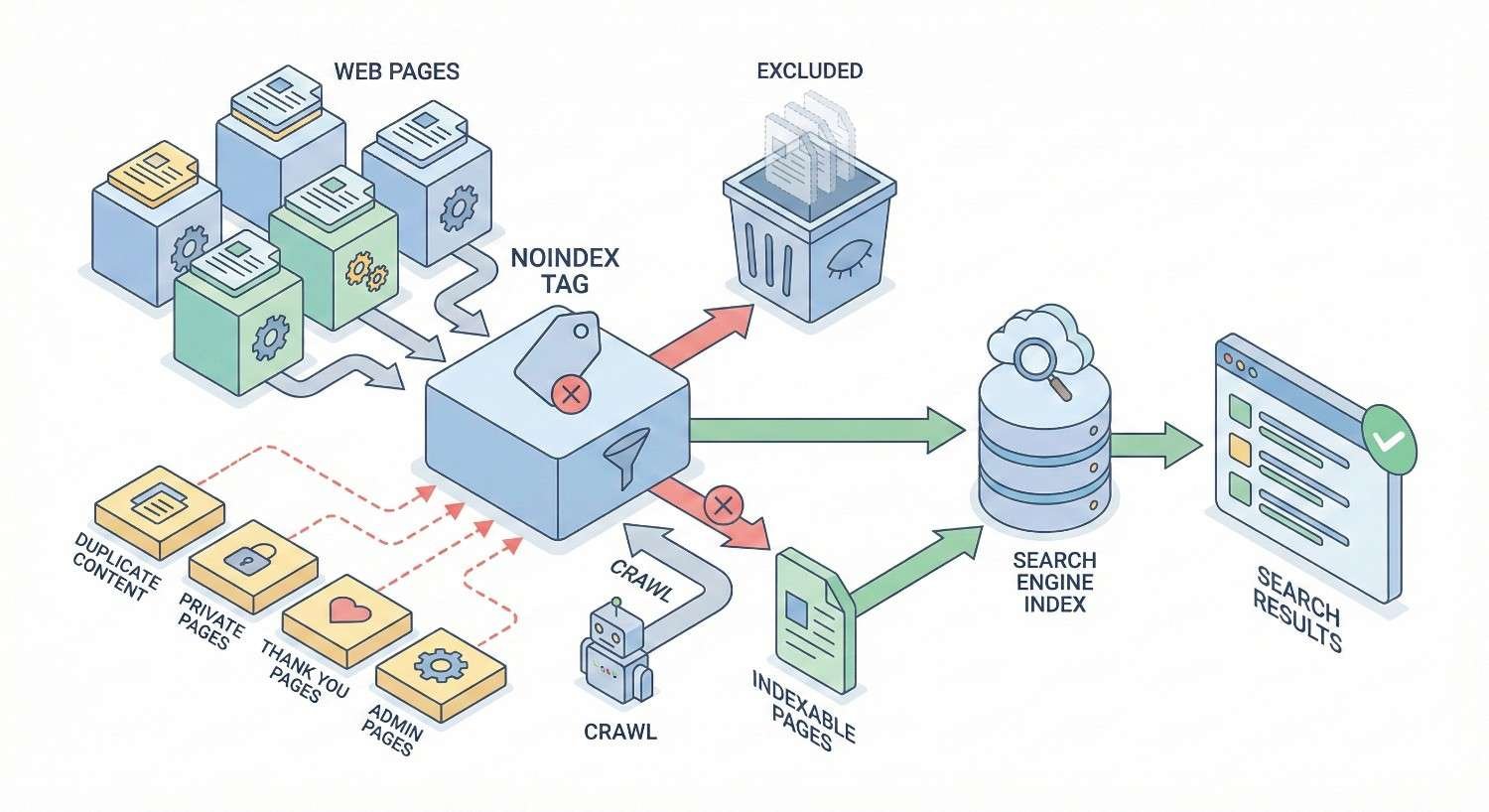
Configure Noindex Tags When Appropriate
Some pages should exist for users but don’t need search engine indexing. Noindex tags prevent indexing while allowing the page to function normally.
Use noindex for:
- Internal search result pages
- Filtered navigation pages with minimal unique content
- Thank you pages after form submissions
- User account pages
- Staging or test pages accessible publicly
Implementation:
html
Copy
<meta name=”robots“ content=”noindex, follow“>
The “follow” directive allows search engines to discover links on the page while not indexing the page itself. This preserves link equity flow through your site.
Noindex doesn’t fix the underlying soft 404 issue. It prevents the page from being flagged by removing it from indexing consideration entirely.
Handle Dynamic and Parameter-Based URLs
Dynamic URLs with query parameters require systematic handling. You can’t manually fix thousands of parameter combinations.
Strategies include:
URL parameter handling in Search Console: Tell Google how to treat specific parameters. Mark parameters that don’t change content as “No URLs” to prevent crawling.
Canonical tags: Point parameter variations to the canonical version without parameters.
Robots.txt blocking: Prevent crawling of problematic parameter patterns entirely.
Server-side validation: Return 404 status for invalid parameter combinations rather than empty results.
For pagination, implement proper rel=”prev” and rel=”next” markup (though Google has deprecated this, it still helps other search engines). More importantly, ensure pagination beyond actual content returns 404 status.
Preventing Soft 404 Errors Going Forward
Prevention costs less than remediation. Establishing proper systems stops soft 404s before they accumulate.
Server Configuration Best Practices
Your server should return accurate status codes by default. This requires intentional configuration.
Apache (.htaccess):
apache
Copy
ErrorDocument 404 /404.html
Ensure your 404.html page returns actual 404 status, not 200.
Nginx:
nginx
Copy
error_page 404 /404.html;
location = /404.html {
internal;
}
Test your configuration by requesting URLs that don’t exist. Verify the response code using curl:
bash
Copy
curl -I https://yoursite.com/nonexistent-page-xyz
The response should show HTTP/1.1 404 Not Found, not HTTP/1.1 200 OK.
CMS and E-commerce Platform Settings
Most platforms have settings affecting soft 404 behavior. Review and configure them properly.
WordPress:
- Verify your theme handles 404s correctly
- Check permalink settings after changes
- Review plugin behavior for custom post types
Shopify:
- Configure out-of-stock product behavior
- Set up proper redirects for deleted products
- Review collection page settings for empty collections
WooCommerce:
- Configure visibility settings for out-of-stock items
- Set up redirect rules for discontinued products
- Review category archive behavior
Magento:
- Configure “Display Out of Stock Products” settings
- Set up URL rewrites for removed products
- Review layered navigation settings
Document your platform’s default behavior and adjust settings to prevent soft 404 generation.
Ongoing Monitoring and Audit Schedules
Soft 404s accumulate over time. Regular monitoring catches them early.
Weekly: Check Google Search Console for new soft 404 reports. Address spikes immediately.
Monthly: Run a full site crawl with Screaming Frog or similar tools. Compare results to previous months.
Quarterly: Conduct comprehensive technical SEO audits including log file analysis. Review patterns and systemic issues.
After major changes: Audit immediately following site migrations, redesigns, platform updates, or large content changes.
Create alerts in Search Console for coverage issues. Set up monitoring dashboards tracking soft 404 counts over time. Treat increasing soft 404 numbers as a leading indicator of technical problems.
Soft 404 Errors in E-commerce: Special Considerations
E-commerce sites face unique soft 404 challenges due to product lifecycle management and complex navigation systems.
Managing Out-of-Stock and Discontinued Products
Product availability changes constantly. Your handling strategy affects both SEO and user experience.
For temporarily out-of-stock products:
- Keep the page live with full product information
- Clearly indicate out-of-stock status
- Offer alternatives or waitlist signup
- Maintain the 200 status code (this is legitimate content)
For permanently discontinued products:
- If a replacement exists, 301 redirect to the replacement
- If no replacement exists, 301 redirect to the parent category
- If the product had significant traffic/links, consider keeping a modified page explaining discontinuation with alternatives
- For products with no traffic or links, return 410 Gone
Avoid:
- Showing only “Product not found” with no context
- Redirecting all discontinued products to the homepage
- Leaving empty product pages with just navigation
The key distinction is whether the page provides value. A discontinued product page with alternatives and context provides value. An empty page saying “unavailable” does not.
Faceted Navigation and Filter Pages
Faceted navigation generates exponential URL combinations. Most provide value, but edge cases create soft 404s.
Prevention strategies:
Limit indexable combinations: Use canonical tags to point filter variations to primary category pages. Only allow indexing of high-value filter combinations.
Validate filter combinations: Before rendering a page, check if products match the filter criteria. If zero results, return 404 or redirect to the parent category.
Block problematic patterns: Use robots.txt to prevent crawling of filter combinations unlikely to have results.
Implement proper noindex: For filter pages you want users to access but not index, use noindex tags.
Google recommends consolidating duplicate URLs through canonicalization. For e-commerce, this means identifying your preferred URL for each product/category and pointing variations to it.
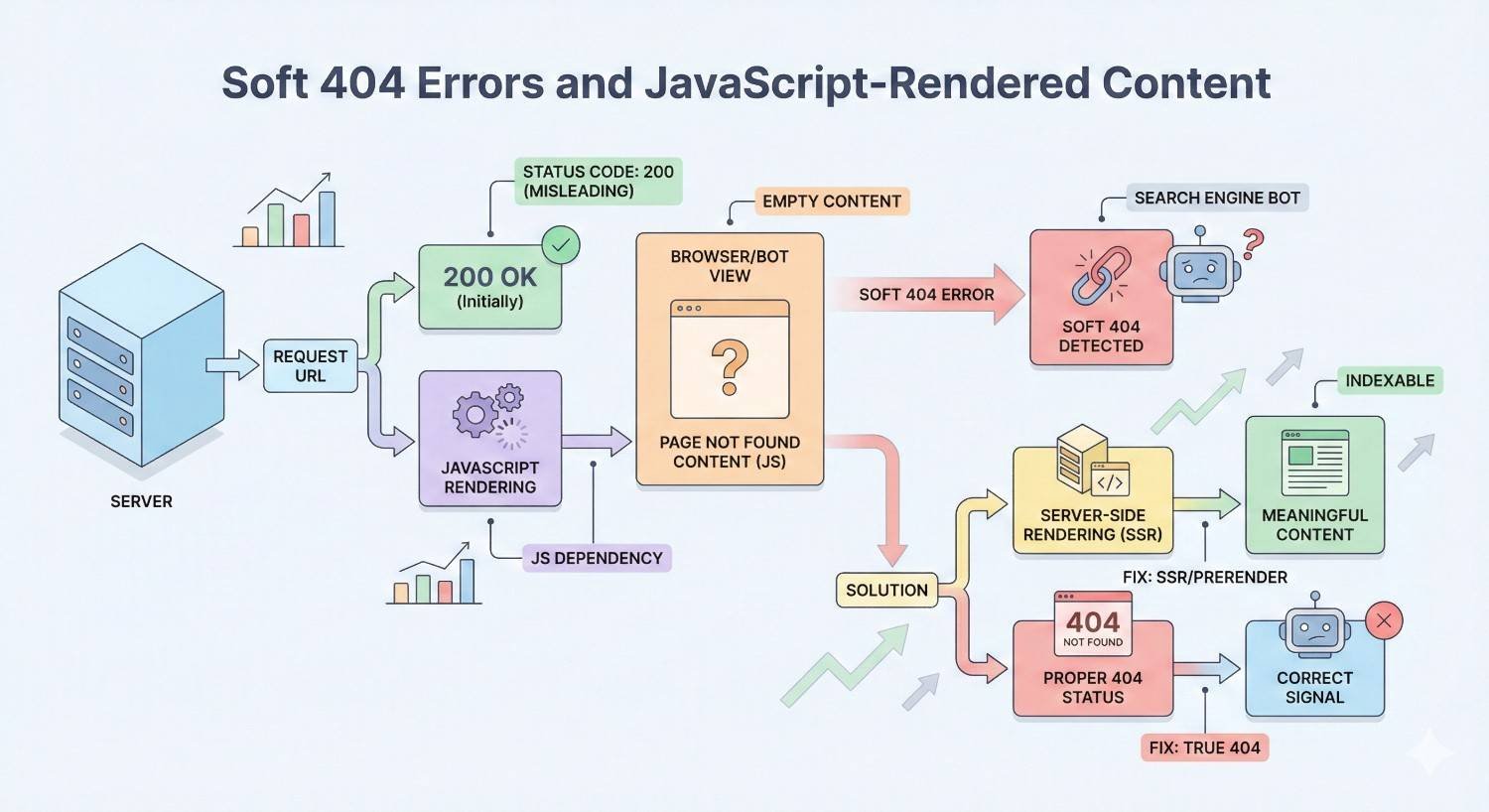
Soft 404 Errors and JavaScript-Rendered Content
Modern websites increasingly rely on JavaScript for content rendering. This creates specific soft 404 challenges.
Client-Side Rendering Challenges
When content loads via JavaScript after the initial page load, search engines may see an empty page before JavaScript executes. This can trigger soft 404 classification.
The problem:
- Server sends HTML shell with JavaScript
- Browser executes JavaScript and renders content
- Googlebot may or may not wait for JavaScript execution
- If Googlebot sees empty content, it flags soft 404
Solutions:
Server-side rendering (SSR): Render content on the server before sending to the browser. Googlebot sees complete content immediately.
Pre-rendering: Generate static HTML versions of pages for search engine crawlers.
Dynamic rendering: Serve different content to users (JavaScript) and crawlers (pre-rendered HTML).
Hybrid approaches: Use frameworks like Next.js or Nuxt.js that support SSR with client-side hydration.
Test your JavaScript-rendered pages using Google’s URL Inspection tool in Search Console. The “View Tested Page” option shows exactly what Googlebot sees after rendering. If critical content is missing, you have a rendering problem that may cause soft 404 classification.
How Long Does It Take to Resolve Soft 404 Issues?
After implementing fixes, patience is required. Search engines don’t update instantly.
Google Recrawl and Reindexing Timelines
Google’s recrawl timing depends on several factors:
- Your site’s overall crawl frequency
- The specific URL’s historical crawl rate
- Server response time and availability
- Sitemap updates signaling changes
Typical timelines:
High-authority sites with frequent crawling: Changes may be detected within days to 1-2 weeks.
Medium-authority sites: Expect 2-4 weeks for Google to recrawl and reprocess.
Lower-authority or less frequently crawled sites: May take 4-8 weeks or longer.
Accelerating the process:
Use the URL Inspection tool in Search Console to request indexing for specific fixed URLs. This doesn’t guarantee immediate crawling but signals priority.
Update your sitemap with fresh timestamps for fixed URLs. Submit the sitemap in Search Console.
Ensure fixed pages are internally linked from crawled pages. Googlebot discovers URLs through links.
Tracking Recovery in Search Console
Monitor progress through Search Console’s coverage reports.
What to watch:
- Decreasing soft 404 count over time
- Fixed URLs moving to “Valid” status
- No new soft 404s appearing (indicating prevention is working)
Expected pattern: After fixes, soft 404 counts should decrease gradually as Google recrawls. If counts remain stable or increase, your fixes aren’t working or new soft 404s are being created.
Create a tracking spreadsheet documenting:
- Date fixes implemented
- Number of soft 404s at fix date
- Weekly soft 404 counts thereafter
- Any new URLs appearing in reports
This data helps demonstrate ROI of technical SEO work and identifies whether systemic issues persist.
Soft 404 Errors vs. Other Crawl Errors
Understanding how soft 404s differ from other errors helps prioritize fixes and diagnose root causes.
Soft 404 vs. Server Errors (5xx)
Server errors (5xx) indicate your server failed to fulfill a request. The server acknowledges something went wrong.
Soft 404s indicate your server claims success while delivering failure-like content.
| Aspect | Soft 404 | Server Error (5xx) |
| Server’s claim | “Everything worked” | “Something broke” |
| Actual situation | Page has no value | Server couldn’t respond |
| Typical cause | Content/config issue | Server/infrastructure issue |
| Fix approach | Content or status code | Server maintenance |
| Urgency | Medium | High |
Server errors require immediate attention as they indicate infrastructure problems. Soft 404s are important but typically less urgent.
Soft 404 vs. Redirect Errors
Redirect errors occur when redirects fail, loop, or chain excessively.
Soft 404s occur when pages load successfully but lack content.
Sometimes these overlap. A redirect chain ending on a thin page may be classified as a soft 404. The redirect itself worked, but the destination triggered soft 404 detection.
Diagnosis approach:
- Check if the URL redirects (use redirect checker tools)
- If yes, follow the chain to the final destination
- Evaluate the final destination for soft 404 characteristics
- Fix either the redirect or the destination content
Redirect errors and soft 404s require different fixes. Accurate diagnosis prevents wasted effort.
When to Seek Professional Technical SEO Help
Not every soft 404 situation requires outside expertise. But some scenarios benefit from professional intervention.
Signs Your Soft 404 Problem Needs Expert Intervention
Consider professional help when:
Scale exceeds internal capacity: If you have 10,000+ soft 404s, manual fixes aren’t practical. You need systematic solutions requiring technical SEO expertise.
Root cause is unclear: You’ve fixed obvious issues but soft 404s keep appearing. Something systemic is generating them, and you can’t identify it.
Platform limitations: Your CMS or e-commerce platform doesn’t easily support proper status codes. Custom development or platform migration may be needed.
JavaScript rendering complexity: Your site relies heavily on client-side rendering, and you’re unsure how to implement SSR or pre-rendering.
Migration aftermath: A recent site migration created thousands of soft 404s, and you need rapid remediation to preserve rankings.
Competitive pressure: Your competitors are outranking you, and technical issues like soft 404s are contributing to the gap.
Internal resources are stretched: Your team handles marketing, not technical SEO. Attempting complex fixes without expertise risks making things worse.
Professional technical SEO services provide systematic audits, prioritized fix recommendations, implementation support, and ongoing monitoring. The investment often pays for itself through recovered traffic and prevented future issues.
Conclusion
Soft 404 errors represent a fixable technical SEO problem with measurable impact on crawl efficiency, indexing, and ultimately organic traffic. The path forward is clear: identify affected URLs through Search Console and crawling tools, diagnose root causes, implement appropriate fixes, and establish prevention systems.
At White Label SEO Service, we help businesses worldwide resolve technical SEO issues like soft 404 errors as part of comprehensive organic growth strategies. Our technical audits identify not just the symptoms but the systemic causes, ensuring fixes stick.
Ready to eliminate soft 404 errors and strengthen your site’s technical foundation? Contact White Label SEO Service for a technical SEO audit that identifies issues and provides actionable remediation plans.
Frequently Asked Questions About Soft 404 Errors
What triggers Google to report a soft 404?
Google reports soft 404s when a page returns a 200 status code but contains content suggesting the page doesn’t exist or lacks value. This includes error messages, empty content areas, or extremely thin content. Google’s algorithms analyze page content, not just status codes.
Can soft 404 errors cause a site to be penalized?
Soft 404s don’t trigger manual penalties. However, large numbers of soft 404s waste crawl budget, prevent proper indexing, and may signal quality issues to algorithms. The impact is indirect but real, affecting your site’s overall search performance rather than triggering explicit penalties.
Do soft 404s affect Core Web Vitals?
Soft 404s don’t directly impact Core Web Vitals metrics like LCP, FID, or CLS. However, if soft 404 pages load slowly or have layout shifts, those specific pages would show poor vitals. The primary concern with soft 404s is indexing and crawl efficiency, not page experience metrics.
How do I prioritize which soft 404s to fix first?
Prioritize soft 404s with external backlinks first, as these waste link equity. Next, address soft 404s on pages that previously received organic traffic. Then fix soft 404s in important site sections like product categories. Finally, address remaining soft 404s systematically by volume and pattern.
Are soft 404 errors the same across all search engines?
Different search engines use different detection methods, but the concept is universal. Google, Bing, and other search engines all identify pages returning success status codes while displaying error-like content. Google’s reporting in Search Console is most detailed, but fixing soft 404s benefits visibility across all search engines.
Can I ignore soft 404 errors if my site is small?
Small sites can tolerate some soft 404s without major impact, but ignoring them isn’t advisable. Even on small sites, soft 404s indicate configuration problems that may worsen as you grow. Fixing them now prevents larger issues later and ensures clean technical foundations for future growth.
Will fixing soft 404s immediately improve my rankings?
Fixing soft 404s removes a negative factor but doesn’t guarantee ranking improvements. You’ll see better crawl efficiency and proper indexing of fixed pages. Ranking improvements depend on many factors including content quality, backlinks, and competition. Consider soft 404 fixes as foundational work enabling other SEO efforts to succeed.


