

A single misplaced noindex tag can remove your most valuable pages from Google’s index overnight, costing you thousands in lost organic traffic. Meta robots tag issues rank among the most damaging yet overlooked technical SEO problems affecting websites today.
These small HTML directives control whether search engines can index and follow your pages. When they malfunction, the consequences range from invisible product pages to entire site sections disappearing from search results. The good news: most meta robots problems are straightforward to diagnose and fix once you know where to look.
This guide walks you through identifying meta robots tag errors, implementing proven fixes across major CMS platforms, and establishing monitoring systems that prevent future issues from derailing your search visibility.
What Is a Meta Robots Tag?
A meta robots tag is an HTML element placed in a webpage’s head section that instructs search engine crawlers how to handle that specific page. Unlike site-wide directives, meta robots tags provide page-level control over indexing and link-following behavior.
The basic syntax looks like this:
html
Copy
<meta name=”robots“ content=”index, follow“>
This tag communicates directly with search engine bots during the crawling process. The “name” attribute specifies which crawlers should follow the instruction, while the “content” attribute contains the actual directives.
Common directive values include:
- index/noindex: Controls whether the page appears in search results
- follow/nofollow: Determines if crawlers should follow links on the page
- noarchive: Prevents cached versions from appearing in search results
- nosnippet: Blocks text snippets in search listings
- max-snippet: Limits snippet character length
- max-image-preview: Controls image preview size in results
You can also target specific search engines using variations like <meta name=”googlebot” content=”noindex”> for Google-only instructions.
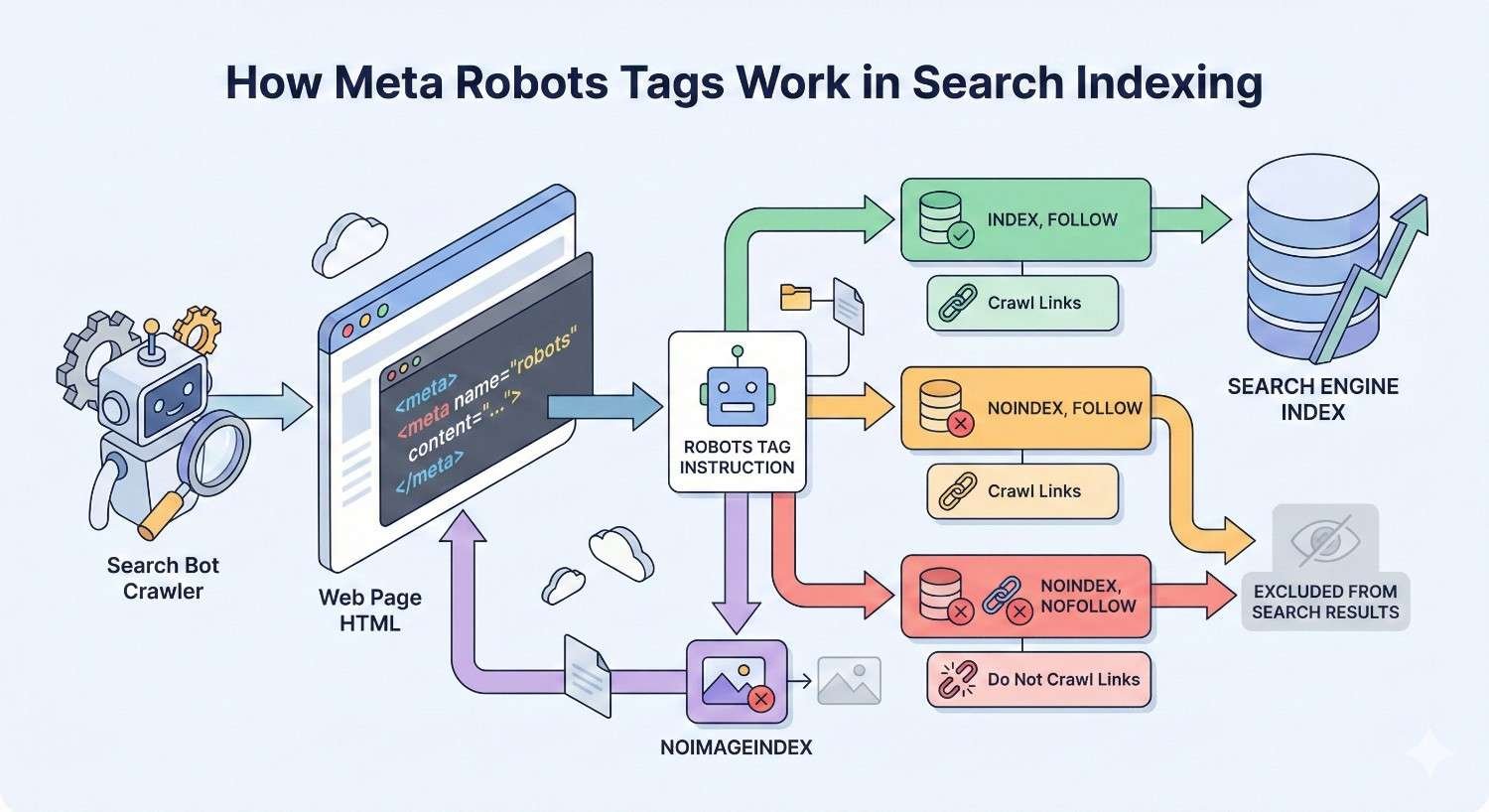
How Meta Robots Tags Work in Search Indexing
When Googlebot or another search crawler visits your page, it reads the meta robots tag before deciding what to do with the content. This happens during the rendering phase, after the crawler has already fetched the HTML.
The process follows this sequence:
- Crawler requests the page URL
- Server returns HTML response
- Crawler parses the head section for meta robots directives
- Crawler applies those directives to its indexing decision
- If “index” is allowed, content enters the indexing pipeline
- If “follow” is allowed, crawler adds discovered links to its queue
Here’s what makes this critical for SEO: search engines treat meta robots tags as strong directives. A noindex tag tells Google not to include that page in search results, regardless of how valuable the content might be.
Google’s John Mueller has confirmed that noindex pages eventually stop being crawled altogether. If a page remains noindexed for an extended period, Googlebot reduces crawl frequency and may stop visiting entirely.
The rendering dependency creates another consideration. JavaScript-rendered meta robots tags work, but there’s a delay. Google must execute JavaScript before seeing the directive, which can cause temporary indexing of pages you intended to block.
Meta Robots Tag vs Robots.txt: Key Differences
These two mechanisms serve different purposes and operate at different stages of the crawl process.
Robots.txt works at the crawl level. It tells search engines which URLs they can or cannot request. When you block a URL in robots.txt, crawlers never fetch that page’s content.
Meta robots tags work at the index level. Crawlers must first access the page to read the tag. This means the page gets crawled, but the directive controls what happens next.
| Feature | Robots.txt | Meta Robots Tag |
| Scope | Site-wide or directory-level | Individual page |
| Location | Root directory file | HTML head section |
| Crawl prevention | Yes | No |
| Index prevention | No (indirectly) | Yes |
| Link equity control | No | Yes (nofollow) |
| Requires page access | No | Yes |
A common mistake involves using robots.txt to prevent indexing. Blocking a URL in robots.txt doesn’t remove it from search results if Google already knows about it. Google may display the URL with a “No information is available for this page” message.
For pages you want crawled but not indexed, use meta robots noindex. For pages you don’t want crawled at all, use robots.txt disallow. For maximum control, you can use both, though this creates redundancy.
The X-Robots-Tag HTTP header offers a third option. It delivers the same directives as meta robots tags but through server response headers. This works for non-HTML files like PDFs and images that can’t contain meta tags.
Common Meta Robots Tag Issues That Hurt SEO
Meta robots problems typically fall into five categories. Each creates distinct symptoms and requires different diagnostic approaches.
Noindex Tags Blocking Important Pages
This is the most damaging meta robots error. A noindex directive on revenue-generating pages removes them from search results entirely.
Common causes include:
Development settings carried to production. Developers often add noindex tags during staging to prevent test pages from appearing in search results. When the site launches or updates deploy, these tags sometimes persist.
CMS default configurations. Some content management systems apply noindex to certain page types by default. Category pages, tag archives, and author pages frequently receive automatic noindex treatment.
Plugin conflicts. SEO plugins can override theme settings or conflict with other plugins, resulting in unintended noindex directives.
Conditional logic errors. Dynamic sites may apply noindex based on parameters, user status, or other conditions. Bugs in this logic can noindex pages that should be indexed.
Template inheritance issues. Child pages may inherit noindex from parent templates when they shouldn’t.
The business impact scales with page importance. A noindexed homepage devastates organic traffic. A noindexed product page costs direct revenue. Even noindexed blog posts reduce topical authority and internal link value.
Nofollow Tags Preventing Link Equity Flow
Nofollow directives tell search engines not to pass PageRank or link equity through links on that page. When applied incorrectly, this disrupts your internal linking architecture.
Page-level nofollow affects all links on the page. This differs from link-level nofollow attributes, which target individual links.
Problems arise when:
Internal navigation gets nofollowed. If your main navigation template includes a page-level nofollow, link equity stops flowing to your most important pages.
Category and hub pages block equity. These pages should distribute authority to child pages. Nofollow prevents this distribution.
Pagination carries nofollow. Paginated content needs link equity to flow through the series. Nofollow breaks this chain.
The symptom is often subtle. Pages may remain indexed but rank poorly because they’re not receiving internal link signals. This makes nofollow issues harder to diagnose than noindex problems.
Conflicting Directives Between Meta Tags and HTTP Headers
When meta robots tags and X-Robots-Tag headers contain different instructions, search engines must resolve the conflict. Google follows the most restrictive directive.
Example conflict:
- Meta tag: <meta name=”robots” content=”index, follow”>
- HTTP header: X-Robots-Tag: noindex
Result: Page gets noindexed because noindex is more restrictive than index.
This happens when:
CDN or proxy layers add headers. Content delivery networks sometimes inject X-Robots-Tag headers for caching or security purposes.
Server configuration overrides application settings. Apache or Nginx rules may add headers that conflict with CMS-generated meta tags.
Multiple plugins modify headers. WordPress sites with several SEO or security plugins can generate conflicting header instructions.
Load balancer configurations. Enterprise setups with load balancers may have header rules that developers don’t know about.
Diagnosing these conflicts requires checking both the HTML source and HTTP response headers, which many site owners overlook.
Missing Meta Robots Tags on Critical Pages
While browsers and search engines assume index/follow when no tag exists, missing tags create ambiguity and missed optimization opportunities.
Issues from missing tags include:
No control over snippet display. Without max-snippet or nosnippet directives, you can’t control how Google displays your content in search results.
Inconsistent crawl signals. Mixed presence of meta robots tags across your site can confuse crawlers about your indexing intentions.
No protection against unwanted indexing. Pages that should be noindexed (thank you pages, internal search results, filtered views) may appear in search results.
Difficulty auditing at scale. When some pages have tags and others don’t, automated audits become less reliable.
Best practice involves explicitly declaring index/follow on pages you want indexed. This removes ambiguity and makes auditing straightforward.
Incorrect Syntax and Formatting Errors
Syntax errors render meta robots tags ineffective. Search engines may ignore malformed tags entirely or misinterpret the directives.
Common syntax problems:
Wrong attribute names:
html
Copy
<!– Incorrect –>
<meta name=”robot“ content=”noindex“>
<!– Correct –>
<meta name=”robots“ content=”noindex“>
Invalid directive values:
html
Copy
<!– Incorrect –>
<meta name=”robots“ content=”no-index, no-follow“>
<!– Correct –>
<meta name=”robots“ content=”noindex, nofollow“>
Placement outside head section:
html
Copy
<!– Incorrect – tag in body –>
<body>
<meta name=”robots“ content=”noindex“>
<!– Correct – tag in head –>
<head>
<meta name=”robots“ content=”noindex“>
</head>
Multiple conflicting tags:
html
Copy
<!– Problematic –>
<meta name=”robots“ content=”index“>
<meta name=”robots“ content=”noindex“>
Case sensitivity issues: While most crawlers handle case variations, inconsistent capitalization can cause problems with some parsers.
Extra spaces or characters:
html
Copy
<!– May cause issues –>
<meta name=”robots“ content=” noindex , follow “>
These errors often go undetected because the page still loads normally. Only inspection of the source code or crawler behavior reveals the problem.
How to Identify Meta Robots Tag Problems
Effective diagnosis combines multiple tools and methods. No single approach catches every issue.
Using Google Search Console for Index Coverage Issues
Google Search Console’s Index Coverage report reveals pages Google has excluded from indexing and why.
Navigate to Pages (formerly Coverage) in the left sidebar. Look for these status categories:
“Excluded by ‘noindex’ tag” directly indicates meta robots problems. Click this category to see affected URLs.
“Crawled – currently not indexed” may indicate conflicting signals where Google crawled the page but chose not to index it.
“Discovered – currently not indexed” can result from noindex tags on pages Google found through sitemaps or links but hasn’t fully processed.
For specific URL diagnosis, use the URL Inspection tool:
- Enter the URL in the inspection bar
- Review the “Indexing allowed?” field
- Check “Page fetch” details for meta robots information
- Click “View crawled page” to see what Google actually rendered
The Coverage report updates gradually. Recent changes may take days or weeks to reflect. For immediate verification, use the URL Inspection tool’s “Test Live URL” feature.
Cross-reference excluded pages against your sitemap. Pages in your sitemap that appear in exclusion reports indicate configuration problems.
Site Audit Tools for Meta Robots Detection
Dedicated crawling tools provide comprehensive meta robots analysis across your entire site.
Screaming Frog SEO Spider crawls your site and reports meta robots directives for every URL. Filter by “Indexability” to find noindexed pages. The “Directives” tab shows exact tag content.
Ahrefs Site Audit flags meta robots issues in its technical SEO report. It identifies noindexed pages, conflicting directives, and pages blocked from indexing.
Semrush Site Audit categorizes meta robots problems by severity and provides fix recommendations. Its “Indexability” report highlights pages with blocking directives.
Sitebulb offers visual representations of indexability across your site architecture. Its “Indexability” audit specifically targets meta robots issues.
When running these audits:
- Configure the crawler to render JavaScript if your site uses client-side rendering
- Set the user agent to Googlebot for accurate directive detection
- Include subdomains if applicable
- Run authenticated crawls for member-only content
Compare audit results against your intended indexing strategy. Create a spreadsheet mapping each page type to its expected meta robots configuration, then verify actual implementation matches.
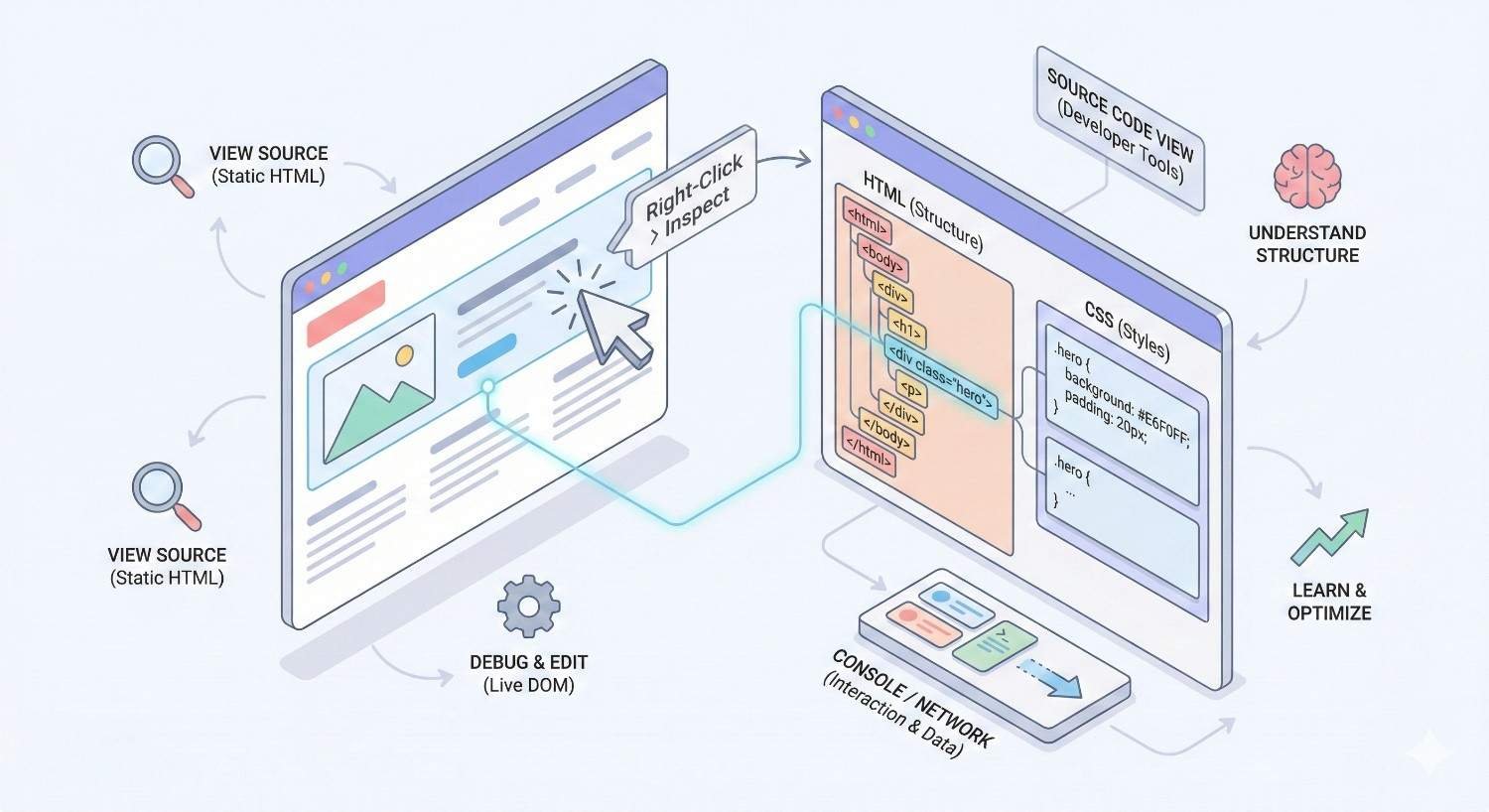
Manual Page Source Inspection Methods
Manual inspection remains essential for verifying specific pages and understanding implementation details.
Browser view source method:
- Navigate to the page in your browser
- Right-click and select “View Page Source”
- Press Ctrl+F (Cmd+F on Mac) and search for “robots”
- Review all meta robots tags found
Browser developer tools method:
- Open Developer Tools (F12 or right-click > Inspect)
- Go to the Elements tab
- Expand the <head> section
- Look for meta tags with name=”robots”
JavaScript-rendered content check:
- View the initial page source (shows pre-render HTML)
- Compare with Developer Tools Elements tab (shows post-render DOM)
- If meta robots tags differ, JavaScript is modifying them
Command line inspection:
bash
Copy
curl -s https://example.com/page | grep -i “robots”
This shows what crawlers see before JavaScript execution.
For dynamic sites, test multiple page states:
- Logged in vs. logged out
- Different URL parameters
- Mobile vs. desktop user agents
- Various geographic locations (if using geo-targeting)
Checking X-Robots-Tag HTTP Headers
HTTP headers require different inspection methods than HTML meta tags.
Browser Developer Tools:
- Open Developer Tools (F12)
- Go to the Network tab
- Reload the page
- Click the main document request
- Look for “X-Robots-Tag” in Response Headers
Command line with curl:
bash
Copy
curl -I https://example.com/page
This returns only headers, making X-Robots-Tag easy to spot.
Online header checkers: Tools like httpstatus.io or webpagetest.org display full header information.
Important considerations:
Headers may vary based on:
- User agent (Googlebot vs. regular browser)
- Request method (GET vs. HEAD)
- Geographic location
- Authentication status
Test with Googlebot user agent for accurate results:
bash
Copy
curl -I -A “Mozilla/5.0 (compatible; Googlebot/2.1; +http://www.google.com/bot.html)” https://example.com/page
Document any X-Robots-Tag headers you find and trace their origin. Check server configuration files, CDN settings, and application code.
How to Fix Meta Robots Tag Issues
Fixing meta robots problems requires identifying the source of the directive and modifying it appropriately.
Removing Accidental Noindex Directives
The fix depends on where the noindex originates.
Theme or template files:
Locate the header template (often header.php in WordPress themes). Search for meta robots output. Remove or conditionally modify the noindex directive.
php
Copy
// Remove this line or add conditions
<meta name=“robots” content=“noindex, nofollow”>
CMS settings:
Most CMS platforms have indexing controls in their admin interface.
WordPress: Settings > Reading > “Discourage search engines from indexing this site” should be unchecked.
Check individual page/post settings in the editor sidebar for page-level noindex options.
SEO plugin configurations:
Review plugin settings for global and page-type indexing rules. Common locations:
- Yoast SEO: Search Appearance > Content Types
- Rank Math: Titles & Meta > Posts/Pages
- All in One SEO: Search Appearance
Check individual page meta boxes for overrides.
Database entries:
Some noindex settings persist in the database even after plugin removal. Query your database for meta values containing “noindex” if other methods don’t resolve the issue.
Server-level directives:
Check .htaccess (Apache) or nginx.conf for header additions:
apache
Copy
# Remove if present
Header set X-Robots-Tag “noindex”
After making changes, use Google Search Console’s URL Inspection tool to request reindexing.
Resolving Conflicting Robot Directives
When multiple sources issue different directives, you must align them or remove redundant ones.
Step 1: Document all directive sources
Create a list of everywhere meta robots directives originate:
- HTML meta tags
- X-Robots-Tag headers
- CMS settings
- Plugin configurations
- Server configuration
- CDN rules
Step 2: Determine the authoritative source
Choose one location as the primary control point. For most sites, this should be the CMS or SEO plugin.
Step 3: Remove redundant directives
Eliminate directives from other sources. If your SEO plugin handles meta robots, remove any server-level header additions.
Step 4: Verify single-source control
After cleanup, confirm only one source generates directives. Test by temporarily changing the setting and verifying the change appears.
Step 5: Document the configuration
Record where meta robots directives are managed for future reference and team knowledge.
For enterprise sites with complex infrastructure, work with DevOps to map the full request path and identify all potential directive injection points.
Implementing Correct Tag Syntax
Proper syntax ensures search engines interpret your directives correctly.
Standard format:
html
Copy
<meta name=”robots“ content=”directive1, directive2“>
Valid directive combinations:
html
Copy
<!– Allow indexing and following –>
<meta name=”robots“ content=”index, follow“>
<!– Prevent indexing, allow following –>
<meta name=”robots“ content=”noindex, follow“>
<!– Allow indexing, prevent following –>
<meta name=”robots“ content=”index, nofollow“>
<!– Prevent both –>
<meta name=”robots“ content=”noindex, nofollow“>
<!– With additional directives –>
<meta name=”robots“ content=”index, follow, max-snippet:150, max-image-preview:large“>
Bot-specific tags:
html
Copy
<meta name=”googlebot“ content=”noindex“>
<meta name=”bingbot“ content=”noindex“>
Placement requirements:
The tag must appear within the <head> section, before the closing </head> tag. Tags in the body are invalid.
Validation checklist:
- Tag uses name=”robots” (plural)
- Directives are comma-separated
- No hyphens in directive names (noindex, not no-index)
- Tag appears in head section
- Only one robots meta tag per page (unless targeting different bots)
- No conflicting directives in the same tag
CMS-Specific Fixes (WordPress, Shopify, Wix)
Each platform has unique meta robots implementation methods.
WordPress:
Global setting: Settings > Reading > Search engine visibility (uncheck to allow indexing)
With Yoast SEO:
- SEO > Search Appearance > Content Types
- Set “Show [content type] in search results” to Yes
- For individual pages, use the Yoast meta box in the editor
With Rank Math:
- Rank Math > Titles & Meta
- Configure each post type’s indexing default
- Use the Rank Math meta box for page-level control
Theme-level fixes: Check your theme’s header.php or functions.php for hardcoded meta robots tags. Child theme modifications may override parent theme settings.
Shopify:
Shopify handles meta robots through theme code. Access via:
- Online Store > Themes > Edit code
- Find theme.liquid or header.liquid
- Search for “robots” meta tags
For collection and product pages, check if your theme conditionally adds noindex based on inventory, tags, or other factors.
Shopify apps can also inject meta robots tags. Review installed apps if you can’t locate the directive source in theme files.
Wix:
Wix provides limited meta robots control:
- Marketing & SEO > SEO Tools
- Select the page to modify
- Use the SEO panel to adjust indexing settings
For advanced control, Wix Velo (formerly Corvid) allows custom code injection, but this requires developer expertise.
General CMS troubleshooting:
- Disable plugins/apps one by one to identify the source
- Switch to a default theme temporarily to rule out theme issues
- Check for caching that might serve old meta tags
- Review any custom code additions
Verifying Fixes with Fetch and Render Tools
After implementing fixes, verify search engines see the changes.
Google Search Console URL Inspection:
- Enter the fixed URL
- Click “Test Live URL”
- Review “Indexing allowed?” status
- Check “Page fetch” for meta robots details
- If correct, click “Request Indexing”
Google Rich Results Test:
- Enter the URL at search.google.com/test/rich-results
- View the rendered HTML
- Search for meta robots tags in the output
Mobile-Friendly Test:
- Enter URL at search.google.com/test/mobile-friendly
- Click “View tested page” > “HTML”
- Verify meta robots tag content
Third-party tools:
- Screaming Frog: Recrawl specific URLs to verify changes
- Ahrefs/Semrush: Run new site audits after fixes
- Technical SEO browser extensions: Check pages in real-time
Verification timeline:
- Immediate: Live URL tests show current state
- 24-48 hours: Google may recrawl and update its records
- 1-2 weeks: Index Coverage reports reflect changes
- 2-4 weeks: Search results update for previously noindexed pages
Monitor Search Console for several weeks after fixes to confirm sustained improvement.
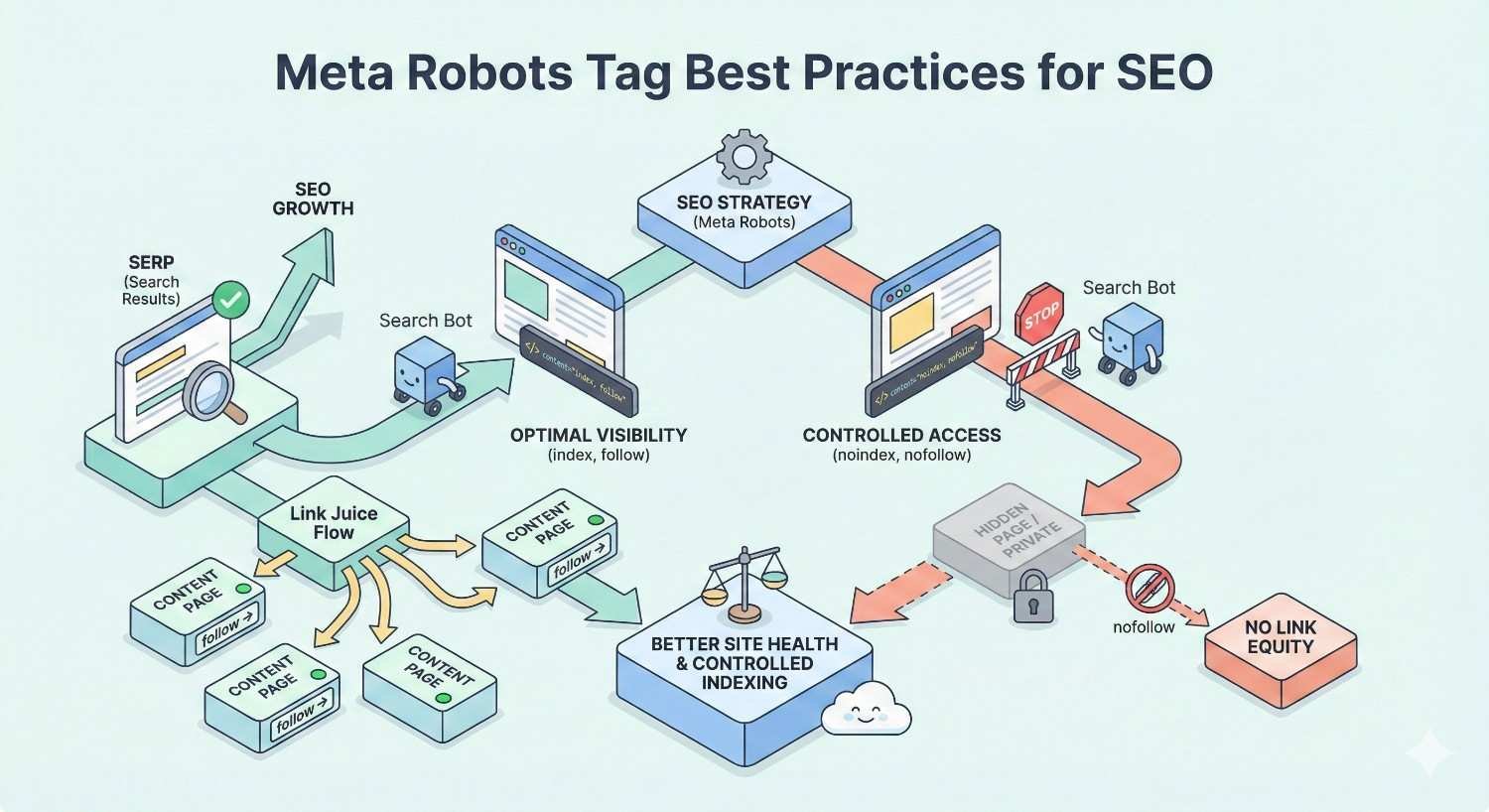
Meta Robots Tag Best Practices for SEO
Proactive management prevents meta robots issues from occurring.
When to Use Noindex, Nofollow, and Other Directives
Use noindex for:
- Thank you and confirmation pages
- Internal search results pages
- Paginated archives beyond page 1 (debatable, but common)
- Duplicate content you can’t canonicalize
- Thin content pages with no search value
- Private or gated content
- Staging and development environments
- Admin and login pages
- Print-friendly page versions
Use nofollow (page-level) for:
- Pages with primarily external links you don’t endorse
- User-generated content pages with unmoderated links
- Paid content or sponsored pages (though link-level nofollow is preferred)
Use index, follow (explicitly) for:
- All pages you want in search results
- Pages where you want clear indexing signals
- Sites with complex technical setups where defaults might not apply
Use max-snippet for:
- Pages where you want to control snippet length
- Content where shorter snippets might increase click-through
- Pages with sensitive information you don’t want fully displayed
Use noarchive for:
- Time-sensitive content that becomes outdated
- Pages with frequently changing information
- Content you don’t want cached versions available for
Use unavailable_after for:
- Event pages with specific end dates
- Limited-time offers
- Seasonal content
Staging vs Production Environment Management
Staging environments require careful meta robots handling to prevent test content from appearing in search results.
Staging environment protection methods:
Method 1: Password protection (recommended) HTTP authentication prevents crawlers from accessing content entirely. This is more reliable than meta robots tags.
Method 2: Robots.txt disallow
Copy
User-agent: *
Disallow: /
Blocks crawling but doesn’t prevent indexing if URLs are discovered through links.
Method 3: Meta robots noindex Add site-wide noindex via theme or server configuration. Ensure this doesn’t transfer to production.
Method 4: X-Robots-Tag header Configure your staging server to add noindex headers to all responses.
Production deployment checklist:
Before launching or deploying updates:
- Verify robots.txt allows crawling
- Check for site-wide noindex settings
- Test sample pages for meta robots tags
- Confirm SEO plugin settings are production-ready
- Review server configuration for X-Robots-Tag headers
- Test with Google’s URL Inspection tool
Environment-specific configuration:
Use environment variables or configuration files to manage meta robots settings:
php
Copy
// Example WordPress approach
if (defined(‘WP_ENVIRONMENT_TYPE’) && WP_ENVIRONMENT_TYPE !== ‘production’) {
add_action(‘wp_head’, function() {
echo ‘<meta name=”robots” content=”noindex, nofollow”>’;
});
}
This automatically applies noindex on non-production environments without manual intervention.
Ongoing Monitoring and Audit Schedules
Regular monitoring catches meta robots issues before they cause significant damage.
Weekly checks:
- Review Google Search Console for new indexing errors
- Check Index Coverage report for “Excluded by noindex” increases
- Monitor organic traffic for unexpected drops
Monthly audits:
- Run full site crawl with Screaming Frog or similar tool
- Compare indexed page count in Google (site:yourdomain.com) against expected count
- Review any new page templates or content types for proper meta robots implementation
Quarterly deep dives:
- Audit all page types against documented indexing strategy
- Review plugin and theme updates for meta robots changes
- Test staging-to-production deployment process
- Update documentation for any configuration changes
Automated monitoring setup:
Configure alerts for:
- Significant drops in indexed page count
- New pages appearing in “Excluded by noindex” reports
- Changes to robots.txt or sitemap files
- HTTP header modifications
Tools like ContentKing, Lumar (formerly Deepcrawl), or Little Warden provide continuous monitoring with alerting capabilities.
Documentation requirements:
Maintain records of:
- Intended indexing status for each page type
- Location of meta robots configuration (plugin, theme, server)
- Change history for meta robots settings
- Responsible team members for SEO configuration
Impact of Meta Robots Tag Errors on Search Visibility
Understanding the consequences helps prioritize fixes and justify resources for prevention.
Traffic Loss from Deindexed Pages
When important pages get noindexed, organic traffic to those pages drops to zero. The timeline and severity depend on several factors.
Immediate impact:
Google stops showing the page in search results once it processes the noindex directive. For frequently crawled pages, this can happen within days.
Cascading effects:
- Direct traffic loss from the noindexed page
- Reduced internal link equity flow to other pages
- Lower topical authority signals for related content
- Potential ranking drops for pages that relied on the noindexed page’s authority
Revenue implications:
For e-commerce sites, noindexed product pages mean lost sales. A study by Ahrefs found that the top-ranking page gets approximately 27.6% of all clicks for a query. Losing that position to a noindex error eliminates that traffic entirely.
Detection delay problem:
Many businesses don’t notice meta robots issues until traffic has already declined significantly. By then, recovery takes additional time.
Case pattern:
A common scenario involves a site redesign or CMS migration where staging noindex settings persist. The site launches, traffic initially seems normal (due to reporting lag), then drops sharply over 2-4 weeks as Google processes the noindex directives.
Crawl Budget Waste and Efficiency Issues
Meta robots problems affect how efficiently search engines crawl your site.
Crawl budget basics:
Google allocates limited crawling resources to each site. Pages with noindex tags still consume crawl budget when Googlebot visits them.
Inefficiency patterns:
- Googlebot crawls noindexed pages repeatedly before reducing frequency
- Conflicting directives may cause additional crawl attempts
- Large numbers of noindexed pages dilute crawl attention from important content
Large site impact:
For sites with thousands or millions of pages, meta robots inefficiencies compound. If 30% of crawled pages are noindexed, that’s 30% of crawl budget producing no indexing value.
Optimization approach:
For pages you never want indexed:
- Use robots.txt to block crawling (saves crawl budget)
- Don’t include in XML sitemaps
- Minimize internal links to these pages
For pages you want indexed but are currently noindexed by mistake:
- Fix the meta robots issue
- Ensure pages are in your sitemap
- Build internal links to signal importance
Recovery Timeline After Fixing Tag Errors
Recovery speed varies based on site authority, crawl frequency, and the scope of the problem.
Typical recovery phases:
Phase 1: Detection (1-7 days) After fixing meta robots tags, Google must recrawl the affected pages to see the changes. High-authority sites with frequent crawling see faster detection.
Phase 2: Reindexing (1-4 weeks) Google processes the pages for indexing. This involves rendering, evaluating content quality, and adding to the index.
Phase 3: Ranking restoration (2-8 weeks) Reindexed pages gradually regain rankings. Previous ranking positions aren’t guaranteed; pages compete fresh against current results.
Phase 4: Traffic normalization (4-12 weeks) Organic traffic returns as rankings stabilize. Full recovery to pre-issue levels may take months for competitive queries.
Factors affecting recovery speed:
- Site authority: Higher-authority sites recover faster
- Crawl frequency: Frequently crawled sites see quicker changes
- Issue duration: Longer noindex periods may mean slower recovery
- Competition: Competitive niches take longer to regain positions
- Content freshness: Updated content during the fix may help recovery
Accelerating recovery:
- Request indexing via Search Console URL Inspection
- Update XML sitemaps with correct lastmod dates
- Build internal links to affected pages
- Consider promoting key pages through other channels temporarily
Meta Robots Tags and Technical SEO Audits
Systematic auditing prevents meta robots issues and catches problems early.
Including Meta Robots in Regular SEO Audits
Meta robots analysis should be a standard component of every technical SEO audit.
Audit checklist items:
Indexability analysis:
- Total pages with noindex directives
- Breakdown by page type (product, category, blog, etc.)
- Comparison against intended indexing strategy
- Identification of incorrectly noindexed pages
Directive consistency:
- Pages with conflicting meta tags and headers
- Inconsistent directive application across similar pages
- Missing meta robots tags where explicit control is needed
Syntax validation:
- Malformed meta robots tags
- Invalid directive values
- Incorrect tag placement
Source identification:
- Where directives originate (CMS, plugin, theme, server)
- Multiple sources creating potential conflicts
- Undocumented directive sources
Comparison metrics:
- Indexed pages vs. pages in sitemap
- Indexed pages vs. total crawlable pages
- Changes since last audit
Audit frequency recommendations:
- Monthly: Quick indexability check via Search Console
- Quarterly: Full crawl analysis with detailed meta robots review
- After major changes: Complete audit following redesigns, migrations, or significant updates
Prioritizing Meta Robots Issues by Business Impact
Not all meta robots problems deserve equal attention. Prioritize based on business value.
Priority matrix:
Critical (fix immediately):
- Noindex on homepage
- Noindex on primary product/service pages
- Noindex on high-traffic landing pages
- Site-wide noindex from staging settings
High (fix within 1 week):
- Noindex on category/collection pages
- Noindex on blog posts with significant traffic history
- Conflicting directives on important pages
- Nofollow blocking internal link equity to key pages
Medium (fix within 1 month):
- Noindex on lower-traffic content pages
- Syntax errors on indexed pages
- Missing explicit directives on important pages
- Inconsistent directive application
Low (fix during regular maintenance):
- Noindex on intentionally thin pages
- Minor syntax inconsistencies
- Documentation gaps
Prioritization factors:
- Revenue impact: Pages directly tied to conversions get priority
- Traffic volume: Higher-traffic pages matter more
- Strategic importance: Pages supporting key business goals
- Fix complexity: Quick wins may be worth addressing first
- Risk of spread: Issues that might affect more pages over time
Resource allocation:
For limited SEO resources, focus on:
- Pages in the top 20% of organic traffic
- Pages with conversion tracking showing revenue
- New pages that should be building authority
- Pages recently affected by algorithm updates
When to Get Professional Help for Meta Robots Issues
Some meta robots problems require expertise beyond basic SEO knowledge.
Signs You Need Technical SEO Support
Consider professional help when:
Complexity exceeds internal capabilities:
- Custom CMS or proprietary platform
- Multiple interconnected systems (CMS, CDN, caching layers)
- Enterprise-scale site with thousands of page templates
- Headless or JavaScript-heavy architecture
Issues persist despite attempted fixes:
- Changes don’t appear in Search Console
- Problems return after being fixed
- Can’t identify the source of directives
- Conflicting information from different diagnostic tools
Business impact is significant:
- Major traffic decline attributed to indexing issues
- Revenue-critical pages affected
- Time-sensitive situation (product launch, seasonal peak)
- Stakeholder pressure for quick resolution
Internal knowledge gaps:
- Team lacks technical SEO experience
- No developer resources available
- Previous fixes created new problems
- Documentation is missing or outdated
Scale of the problem:
- Hundreds or thousands of affected pages
- Multiple page types with different issues
- Site-wide configuration problems
- Migration or redesign causing widespread issues
What to Expect from a Technical SEO Audit
Professional technical SEO audits provide comprehensive meta robots analysis within broader site health assessment.
Audit deliverables typically include:
Diagnostic report:
- Complete inventory of meta robots directives across the site
- Identification of all directive sources
- Mapping of conflicts and inconsistencies
- Comparison against SEO best practices
Impact assessment:
- Quantified traffic and revenue impact of issues
- Prioritized list of problems by business value
- Risk assessment for unaddressed issues
Fix recommendations:
- Specific technical instructions for each issue
- CMS/platform-specific guidance
- Code examples where applicable
- Implementation sequence recommendations
Implementation support:
- Developer-ready documentation
- QA testing procedures
- Verification checklists
- Rollback procedures if needed
Monitoring setup:
- Alerting configuration recommendations
- Ongoing audit schedule
- KPIs to track for meta robots health
Timeline expectations:
- Initial audit: 1-2 weeks depending on site size
- Fix implementation: Varies by complexity and internal resources
- Verification: 1-2 weeks after implementation
- Full recovery: 4-12 weeks for traffic normalization
Selecting an SEO partner:
Look for:
- Demonstrated technical SEO expertise
- Experience with your CMS/platform
- Clear communication of technical concepts
- Documented processes and deliverables
- Ongoing support options
Conclusion
Meta robots tag issues represent one of the most impactful yet preventable technical SEO problems. A single misconfigured directive can remove valuable pages from search results, disrupt link equity flow, and waste crawl budget on content that will never rank.
The path forward involves systematic diagnosis using Search Console and crawling tools, targeted fixes based on your specific CMS and infrastructure, and ongoing monitoring to catch problems before they cause traffic loss. Whether you’re dealing with accidental noindex tags from a staging environment or conflicting directives between your CDN and application layer, the solutions follow consistent patterns.
At White Label SEO Service, we help businesses diagnose and resolve technical SEO issues that block organic growth. Our technical audits identify meta robots problems alongside other indexing barriers, providing clear fix recommendations and implementation support. Contact us to discuss how we can help protect your search visibility and build sustainable organic traffic.
Frequently Asked Questions
How long does it take for Google to reindex pages after removing a noindex tag?
Google typically recrawls and reindexes pages within 1-4 weeks after removing noindex directives. You can accelerate this by requesting indexing through Search Console’s URL Inspection tool. Full ranking recovery may take an additional 2-8 weeks depending on competition and site authority.
Can meta robots tags and robots.txt conflict with each other?
Yes, but they operate at different levels. Robots.txt blocks crawling, while meta robots tags control indexing. If robots.txt blocks a page, Google can’t see the meta robots tag. If both allow access, Google follows the meta robots directive. The most restrictive instruction wins when conflicts exist.
Why are my pages still showing noindex in Search Console after I fixed them?
Search Console reports update gradually, often lagging 1-2 weeks behind actual changes. Use the URL Inspection tool’s “Test Live URL” feature for real-time verification. Also confirm the fix deployed correctly by checking the live page source and HTTP headers.
Should I use noindex or robots.txt disallow for pages I don’t want indexed?
Use robots.txt disallow when you want to save crawl budget and prevent Google from accessing the page entirely. Use noindex when Google needs to crawl the page but shouldn’t index it. For most cases where you simply don’t want pages in search results, noindex is the safer choice.
Do meta robots tags affect pages that are already indexed?
Yes. When Google recrawls an indexed page and finds a noindex directive, it will remove that page from the index. This process typically takes days to weeks depending on crawl frequency. Previously indexed pages don’t have permanent protection from noindex tags.
How do I check if my CDN is adding X-Robots-Tag headers?
Use browser developer tools (Network tab) or command-line tools like curl to inspect HTTP response headers. Compare headers when accessing your site directly versus through the CDN. Many CDNs have configuration panels where you can review and modify header rules.
What happens if I have both a meta robots tag and an X-Robots-Tag header with different values?
Google combines directives from both sources and follows the most restrictive interpretation. If your meta tag says “index” but your header says “noindex,” the page will be noindexed. Audit both sources and ensure they align to avoid unintended blocking.


