

Majestic remains one of the most specialized link analysis platforms available, offering proprietary metrics like Trust Flow and Citation Flow that no other tool replicates. For SEO professionals managing backlink profiles, conducting competitor research, or building link acquisition strategies, understanding how to leverage Majestic’s database of over one trillion URLs can directly impact ranking outcomes.
This guide covers everything you need to extract maximum value from Majestic. You’ll learn how its crawling infrastructure works, how to interpret its unique metrics accurately, and how to apply its tools for audits, competitor analysis, and strategic link building that drives measurable organic growth.
What Is Majestic and How Does It Work for Link Analysis?
Majestic is a dedicated backlink analysis platform that has been crawling and indexing the web since 2004. Unlike broader SEO suites that include link data as one feature among many, Majestic focuses exclusively on link intelligence. This specialization translates into one of the largest link databases available and proprietary metrics designed specifically for evaluating link quality and authority.
The platform serves SEO agencies, in-house marketing teams, and consultants who need granular backlink data for audits, competitive intelligence, and link building campaigns. Its strength lies in depth rather than breadth. You won’t find keyword tracking or content optimization features here. What you will find is comprehensive link data that often surfaces backlinks other tools miss.
Understanding Majestic’s Link Index Database
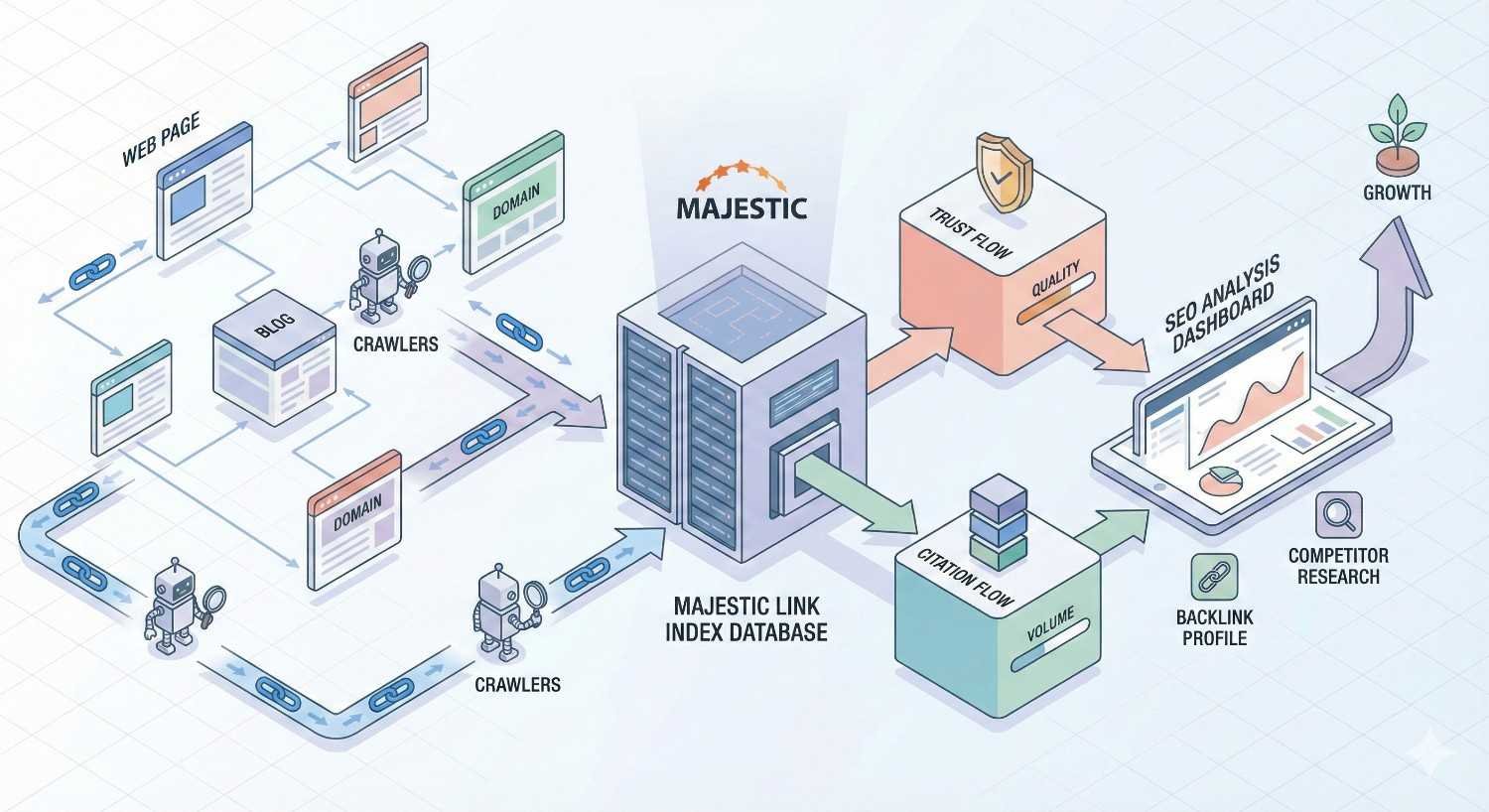
Majestic maintains one of the web’s largest proprietary link indexes, built through continuous crawling since its founding. The database contains information on billions of URLs and the relationships between them. This isn’t scraped from third-party sources. Majestic operates its own crawler infrastructure, giving it direct control over data freshness and coverage.
The index stores not just the existence of links but contextual information about them. This includes anchor text, link position on the page, surrounding content, and whether links are followed or nofollowed. This granular data enables the platform’s unique metrics and allows users to evaluate links beyond simple existence checks.
For practical purposes, this means Majestic often discovers links that newer or smaller tools miss, particularly on less frequently crawled portions of the web. The trade-off is that Majestic’s data can sometimes lag behind real-time changes, which is why understanding the difference between its index types matters.
How Majestic Crawls and Indexes Backlinks
Majestic’s crawler operates continuously, visiting billions of pages to discover and verify links. The crawling process prioritizes pages based on their perceived importance and how frequently they change. High-authority sites and frequently updated pages get crawled more often than static, low-traffic pages.
When the crawler visits a page, it extracts all outbound links and records detailed information about each one. This includes the exact anchor text used, the position of the link within the page structure, the surrounding text context, and technical attributes like nofollow tags. This information feeds into Majestic’s metrics calculations.
The crawler also tracks when links appear and disappear. This historical tracking enables features like the Backlink History tool, which shows how a site’s link profile has evolved over time. Understanding that Majestic’s data reflects crawler visits rather than real-time monitoring helps set appropriate expectations for data freshness.
Fresh Index vs. Historic Index Explained
Majestic maintains two distinct indexes that serve different analytical purposes. The Fresh Index contains links discovered within approximately the last 120 days. It reflects the current state of a site’s backlink profile and is most useful for monitoring recent link building efforts, identifying newly acquired links, and spotting recently lost links.
The Historic Index contains Majestic’s complete crawl history, going back years. This larger dataset is valuable for understanding long-term link profile trends, analyzing competitors’ historical link building patterns, and identifying links that may have been removed but still influence how search engines perceive a site’s history.
Choosing between indexes depends on your analysis goal. For ongoing link monitoring and recent campaign tracking, the Fresh Index provides relevant, current data. For comprehensive audits, competitive research, and understanding a site’s full link history, the Historic Index offers broader coverage. Many analyses benefit from comparing both indexes to identify trends and changes.
Key Majestic Metrics for Link Analysis
Majestic’s proprietary metrics distinguish it from other link analysis tools. While competitors rely on their own authority scores, Majestic’s Trust Flow and Citation Flow have become industry-standard reference points for evaluating link quality. Understanding these metrics and their relationships is essential for accurate link analysis.
Trust Flow: Measuring Link Quality and Authority
Trust Flow measures the quality of links pointing to a URL or domain based on how closely connected it is to trusted seed sites. Majestic maintains a curated list of highly trusted websites across various categories. The closer a site is to these trusted seeds through its link relationships, the higher its Trust Flow score.
The metric operates on a logarithmic scale from 0 to 100. A Trust Flow of 40 is significantly more difficult to achieve than a Trust Flow of 20. Sites like major news publications, government domains, and established educational institutions typically show Trust Flow scores above 70. Most legitimate business websites fall in the 15-40 range.
Trust Flow matters because it indicates link neighborhood quality. A site with high Trust Flow has earned links from other trustworthy sites, which themselves earned links from trustworthy sources. This chain of trust signals to search engines that the site belongs in quality company. When evaluating potential link targets, Trust Flow helps identify sites that will pass meaningful authority.
Citation Flow: Understanding Link Quantity Signals
Citation Flow measures the quantity of links pointing to a URL or domain, weighted by the link equity those linking pages possess. Unlike Trust Flow, Citation Flow doesn’t evaluate quality. It simply reflects how much link activity a page or domain has attracted.
The scale mirrors Trust Flow, running from 0 to 100 logarithmically. A page with many links from pages that themselves have many links will show high Citation Flow. This metric can indicate popularity and visibility but doesn’t distinguish between quality editorial links and low-value directory spam.
Citation Flow serves as a useful baseline for understanding a site’s link volume. High Citation Flow with low Trust Flow often indicates a link profile heavy on quantity but light on quality. This pattern frequently appears on sites that have engaged in aggressive link building without attention to source quality.
Trust Flow vs. Citation Flow Ratio Analysis
The relationship between Trust Flow and Citation Flow reveals important information about link profile health. A balanced ratio, where Trust Flow approaches or equals Citation Flow, suggests a natural link profile with quality links. When Citation Flow significantly exceeds Trust Flow, it signals potential quality issues.
Consider a site with Trust Flow 15 and Citation Flow 45. The 1:3 ratio suggests the site has accumulated many links, but most come from low-trust sources. This pattern often indicates paid links, link schemes, or spam. Search engines may view such profiles with suspicion.
Conversely, a site with Trust Flow 35 and Citation Flow 40 shows a healthy ratio near 1:1. The links driving Citation Flow are also contributing to Trust Flow, indicating quality sources. When prospecting link targets, prioritize sites with balanced ratios. When auditing your own profile, a widening gap between Citation Flow and Trust Flow warrants investigation.
Topical Trust Flow: Relevance by Category
Topical Trust Flow extends the Trust Flow concept by categorizing trust into specific topic areas. Rather than a single trust score, Majestic calculates how much trust a site has earned within different categories like Business, Health, Technology, or Sports. This enables relevance-based link evaluation.
The metric helps answer whether a potential link source is topically relevant to your site. A link from a high Trust Flow site in an unrelated category carries less value than a link from a moderate Trust Flow site in your exact niche. Search engines increasingly weight topical relevance in link evaluation, making this metric strategically important.
When building links, Topical Trust Flow helps prioritize outreach targets. A software company should value links from sites with strong Technology Topical Trust Flow over sites with equivalent overall Trust Flow but strength in unrelated categories. This alignment signals to search engines that your site belongs within its topical community.
Visibility Flow and Referring Domains
Visibility Flow estimates how visible a site is in search results based on its link profile. This metric attempts to predict organic visibility by analyzing the links a site has earned. While not a direct ranking factor, it provides a useful benchmark for comparing sites and tracking progress.
Referring domains count the unique domains linking to a site, regardless of how many individual links each domain provides. This metric matters because search engines value link diversity. One hundred links from one domain carry less weight than one link each from one hundred different domains.
Tracking referring domain growth over time reveals link building momentum. Steady increases in unique referring domains indicate successful outreach and content marketing. Sudden spikes may indicate link scheme activity worth investigating. Declining referring domains suggest link loss that needs attention.
Core Majestic Tools for Backlink Analysis
Majestic packages its link data into several specialized tools, each designed for specific analysis tasks. Understanding which tool to use for which purpose maximizes efficiency and ensures you extract the right insights for your objectives.
Site Explorer: Complete Backlink Profile Overview
Site Explorer serves as Majestic’s primary interface for analyzing any URL, subdomain, or root domain. Enter a target, and you receive a comprehensive overview including Trust Flow, Citation Flow, referring domains, external backlinks, and Topical Trust Flow breakdown. This dashboard provides the starting point for most link analysis tasks.
The tool displays backlinks in sortable, filterable lists. You can segment by link type, anchor text, Trust Flow range, or discovery date. This flexibility enables targeted analysis. Need to find your highest-quality links? Sort by source Trust Flow. Want to identify recent acquisitions? Filter by discovery date within the Fresh Index.
Site Explorer also visualizes link data through charts showing referring domain growth, anchor text distribution, and link type breakdowns. These visualizations quickly surface patterns that might take hours to identify in raw data. The tool supports URL, subdomain, and root domain analysis, letting you zoom in or out depending on your needs.
Link Context: Analyzing Link Placement and Surroundings
Link Context reveals where links appear on linking pages and what content surrounds them. This matters because link placement affects value. A link within main body content carries more weight than a link buried in a footer or sidebar. Link Context surfaces this information at scale.
The tool categorizes links by position: editorial content, navigation, footer, sidebar, or other locations. It also shows the text immediately surrounding each link, helping you understand the context in which your site is mentioned. This context affects how search engines interpret link relevance and intent.
For auditing purposes, Link Context helps identify potentially problematic links. Links appearing in footers across hundreds of pages suggest site-wide link schemes. Links surrounded by unrelated or spammy content may harm rather than help. This granular view enables informed decisions about which links to pursue, maintain, or disavow.
Backlink History Checker
The Backlink History tool tracks how a site’s link profile has changed over time. It charts referring domain counts and external backlink totals across months or years, revealing growth patterns, sudden changes, and long-term trends. This historical perspective is invaluable for competitive analysis and due diligence.
When analyzing competitors, Backlink History shows when they experienced link growth spurts. These often correlate with successful campaigns, viral content, or link building initiatives you can learn from. Sudden drops may indicate penalty recovery efforts or natural link decay.
For your own sites, the tool helps demonstrate SEO progress to stakeholders. Showing steady referring domain growth over time provides concrete evidence of link building success. It also helps identify when link loss began if you’re troubleshooting ranking declines.
Compare Tool: Competitive Link Analysis
The Compare tool enables side-by-side analysis of up to five domains simultaneously. It displays key metrics for each domain in a unified view, making competitive benchmarking straightforward. You can quickly see how your Trust Flow, Citation Flow, and referring domains stack up against competitors.
Beyond metrics comparison, the tool identifies linking domains that point to competitors but not to you. These represent immediate outreach opportunities. If a site links to three of your competitors, they’re clearly willing to link within your industry. Your job is giving them a reason to link to you as well.
The Compare tool also reveals competitive gaps in Topical Trust Flow. If competitors show stronger topical authority in your primary category, you know where to focus link building efforts. This competitive intelligence shapes strategy by highlighting where you’re winning and where you need improvement.
Bulk Backlink Checker for Large-Scale Audits
The Bulk Backlink Checker processes multiple URLs simultaneously, returning key metrics for each. This tool serves agencies managing many clients, enterprises with large site portfolios, and anyone needing to analyze links at scale without manual URL-by-URL lookups.
Upload a list of URLs, and the tool returns Trust Flow, Citation Flow, referring domains, and external backlinks for each. This enables rapid assessment of link lists from outreach campaigns, potential link targets, or audit exports. Processing hundreds of URLs takes minutes rather than hours.
The tool also supports checking whether specific backlinks still exist. Upload a list of pages that should link to you, and Majestic verifies each one. This helps maintain link building records and identify lost links that may need recovery outreach.
How to Use Majestic for Competitor Link Analysis
Competitive link analysis reveals where competitors earn their authority and surfaces opportunities for your own link building. Majestic’s tools enable systematic competitor research that goes beyond surface-level metrics to actionable intelligence.
Identifying Competitor Backlink Sources
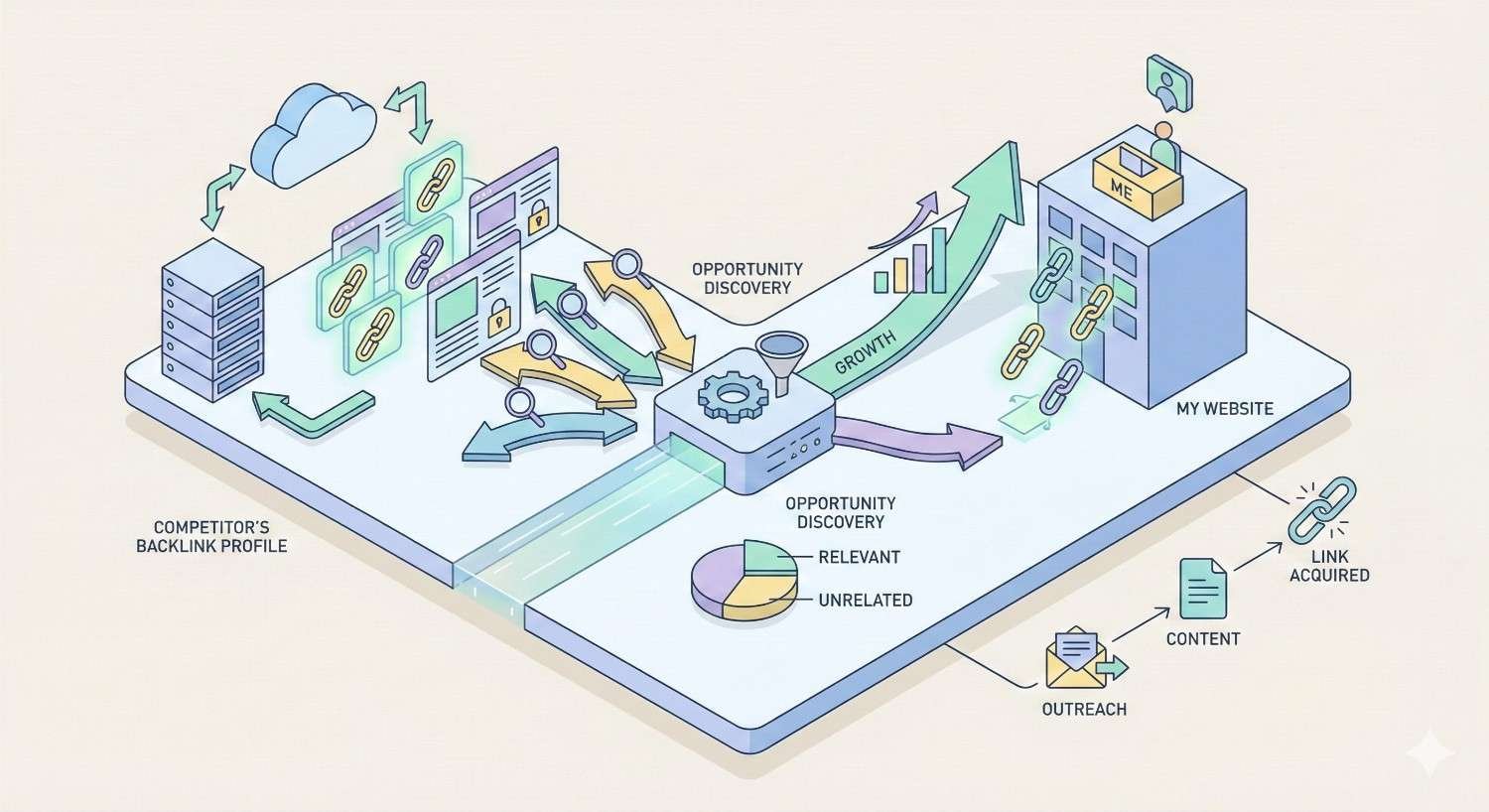
Start competitor analysis by exporting their complete backlink profile from Site Explorer. Filter for links with Trust Flow above 15 to focus on quality sources. This filtered list represents the links actually moving the needle for your competitor’s authority.
Categorize these links by type: editorial mentions, guest posts, resource page inclusions, directory listings, and others. This categorization reveals your competitor’s link building tactics. Heavy guest post presence suggests they invest in content outreach. Many resource page links indicate they’ve created linkable assets.
Look for patterns in linking domains. Do certain publications or blogs link to them repeatedly? These relationships represent either paid placements or genuine editorial relationships worth understanding. Identifying these patterns helps you replicate successful tactics and avoid wasting effort on approaches that don’t work in your space.
Finding Link Building Opportunities from Competitors
The Compare tool’s gap analysis identifies domains linking to competitors but not to you. Export this list and filter by Trust Flow to prioritize quality opportunities. These domains have demonstrated willingness to link within your industry. They’re warm prospects rather than cold outreach targets.
Analyze why these domains linked to competitors. Did they cite a specific resource? Quote an expert? Include them in a roundup? Understanding the link context reveals what you need to offer. If competitors earned links through original research, you need comparable or better research. If they earned links through expert commentary, you need to position your team as sources.
Prioritize opportunities where you can offer something competitors don’t. Unique data, contrarian perspectives, or more comprehensive resources give linking sites reasons to add your link alongside or instead of competitor links.
Benchmarking Your Link Profile Against Competitors
Regular benchmarking tracks your competitive position over time. Use the Compare tool monthly to monitor Trust Flow, Citation Flow, and referring domain counts against key competitors. Document these metrics to identify trends and measure progress.
Pay attention to ratio comparisons, not just absolute numbers. A competitor with twice your referring domains but similar Trust Flow suggests they’ve built quantity without quality. You may be better positioned despite lower raw numbers. Conversely, if competitors show better Trust Flow ratios, they’re building smarter and you need to adjust tactics.
Benchmark Topical Trust Flow specifically. Winning in your primary category matters more than overall metrics. A competitor with lower overall Trust Flow but higher Topical Trust Flow in your niche may outrank you for relevant queries. Focus link building on closing topical authority gaps.
Analyzing Competitor Link Velocity and Trends
Link velocity measures how quickly a site acquires new links. The Backlink History tool reveals competitor velocity by showing referring domain growth over time. Steep upward curves indicate aggressive link building. Flat lines suggest maintenance mode or stalled efforts.
Sudden velocity spikes warrant investigation. Check what content or campaigns launched around spike dates. Competitors may have published viral content, launched digital PR campaigns, or engaged in link schemes. Understanding the cause helps you decide whether to replicate the approach.
Compare your velocity to competitors. If they’re acquiring referring domains faster, they’ll eventually overtake your authority regardless of current standings. Matching or exceeding competitor velocity ensures you maintain or improve competitive position over time.
Conducting a Backlink Audit with Majestic
Regular backlink audits identify problems before they impact rankings. Majestic provides the data needed to evaluate link quality, spot toxic patterns, and make informed decisions about which links to keep, pursue, or disavow.
Identifying Toxic and Low-Quality Links
Export your complete backlink profile and sort by Trust Flow ascending. Links with Trust Flow below 10 from domains with Trust Flow below 15 warrant scrutiny. Low trust scores often indicate spam, link farms, or low-quality directories that could harm your profile.
Look for patterns among low-quality links. Do they share similar anchor text? Come from similar domain types? Appear in similar page locations? Patterns suggest coordinated link schemes rather than natural accumulation. Even if you didn’t build these links, their presence can trigger algorithmic penalties.
Check linking page content for relevance and quality. A low Trust Flow link from a legitimate small business in your industry differs from a low Trust Flow link from an unrelated foreign-language spam site. Context matters when deciding which links pose actual risk.
Evaluating Link Relevance and Context
Use Link Context to assess where your links appear and what surrounds them. Links embedded in relevant editorial content signal legitimate endorsement. Links in footers, sidebars, or unrelated content blocks suggest manipulation or low-value placements.
Evaluate anchor text distribution across your profile. Natural profiles show diverse anchor text with branded terms dominating. Profiles heavy on exact-match keyword anchors suggest over-optimization that search engines may penalize. If more than 5-10% of anchors match your target keywords exactly, consider diversification.
Assess topical relevance of linking domains using Topical Trust Flow. Links from topically relevant sites carry more weight and pose less risk than links from unrelated sites. A fitness site with many links from gambling domains should investigate regardless of those links’ Trust Flow scores.
Detecting Unnatural Link Patterns
Unnatural patterns include sudden link spikes, repetitive anchor text, links from the same IP ranges, and site-wide links appearing across hundreds of pages simultaneously. Majestic’s data enables detection of these patterns through careful analysis.
Chart your link acquisition over time using Backlink History. Natural profiles show gradual, somewhat irregular growth. Sudden spikes followed by plateaus suggest purchased links or link schemes. Multiple spikes at regular intervals may indicate ongoing paid link campaigns.
Examine referring domain diversity. Healthy profiles show links from many different domains. Profiles where a small number of domains contribute most links may indicate private blog networks or other manipulation. Calculate what percentage of your links come from your top 10 referring domains. If it exceeds 50%, investigate those relationships.
Creating a Disavow File from Majestic Data
When you identify links that pose risk, document them for potential disavowal. Export problematic links from Majestic including the full URL of linking pages. Organize by domain to identify whether entire domains should be disavowed or only specific pages.
Format your disavow file according to Google’s specifications. Use “domain:” prefix to disavow entire domains when most or all links from that domain are problematic. Use full URLs when only specific pages pose issues. Include comments explaining why each entry was added for future reference.
Before submitting disavow files, attempt link removal through outreach. Contact webmasters of linking sites requesting removal. Document these attempts. Disavowal should be a last resort after removal efforts fail. Majestic’s data helps prioritize which links warrant removal effort based on their potential negative impact.
Majestic for Link Building Strategy Development
Beyond analysis, Majestic supports proactive link building by helping identify prospects, prioritize targets, and track campaign progress. The platform’s data transforms link building from guesswork into systematic outreach.
Discovering High-Authority Link Prospects
Use competitor analysis to build initial prospect lists. Domains linking to multiple competitors but not to you represent qualified opportunities. Filter these by Trust Flow to prioritize sites that will actually move your metrics.
Expand prospect lists using Majestic’s related sites features. When you find one quality linking opportunity, explore what other sites link to that domain. Quality sites often link to other quality sites, creating networks of potential prospects.
Search for resource pages and link roundups in your industry using Majestic’s anchor text analysis. Find competitors’ links with anchors like “resources,” “tools,” or “recommended.” These often point to curated pages actively seeking quality links to include.
Using Topical Trust Flow for Niche-Relevant Outreach
Filter prospects by Topical Trust Flow in your primary category. A site with Trust Flow 30 and strong Topical Trust Flow in your niche provides more value than a site with Trust Flow 40 but no topical relevance. Relevance increasingly matters for link value.
Analyze your own Topical Trust Flow to identify category gaps. If competitors show stronger topical authority, prioritize building links from sites strong in those specific categories. This targeted approach builds topical authority more efficiently than general link building.
When pitching prospects, reference their topical authority. Explaining that you’re reaching out because they’re recognized authorities in your shared niche demonstrates research and provides a compelling reason for them to link to relevant content.
Prioritizing Link Targets by Trust Flow Score
Not all link opportunities deserve equal effort. Prioritize outreach based on potential impact. A link from a Trust Flow 50 site moves metrics more than ten links from Trust Flow 10 sites. Allocate outreach resources accordingly.
Create tiered prospect lists. Tier one includes high Trust Flow, high relevance targets worth significant personalized outreach effort. Tier two includes moderate Trust Flow targets suitable for templated but customized outreach. Tier three includes lower Trust Flow targets for scaled outreach or passive link building tactics.
Track conversion rates by tier. If tier one prospects convert at 5% and tier two at 15%, the math may favor focusing on tier two despite lower individual link value. Use Majestic data to continuously refine prioritization based on actual results.
Tracking Link Acquisition Progress
Monitor referring domain growth in Majestic to verify link building success. New links should appear in the Fresh Index within weeks of going live. If outreach targets confirm link placement but links don’t appear, investigate whether pages are being crawled.
Compare link acquisition velocity to goals and competitors. Set monthly referring domain targets based on competitive analysis. Track progress against these targets to ensure link building keeps pace with competitive requirements.
Document link building campaigns with Majestic data. Record target Trust Flow, actual acquired link Trust Flow, and impact on your own metrics. This documentation enables ROI analysis and helps refine future campaign targeting.
Majestic vs. Other Link Analysis Tools
Majestic competes with several other link analysis platforms. Understanding how it compares helps you choose the right tool for your needs or decide whether to use multiple tools for comprehensive coverage.
Majestic vs. Ahrefs: Feature Comparison
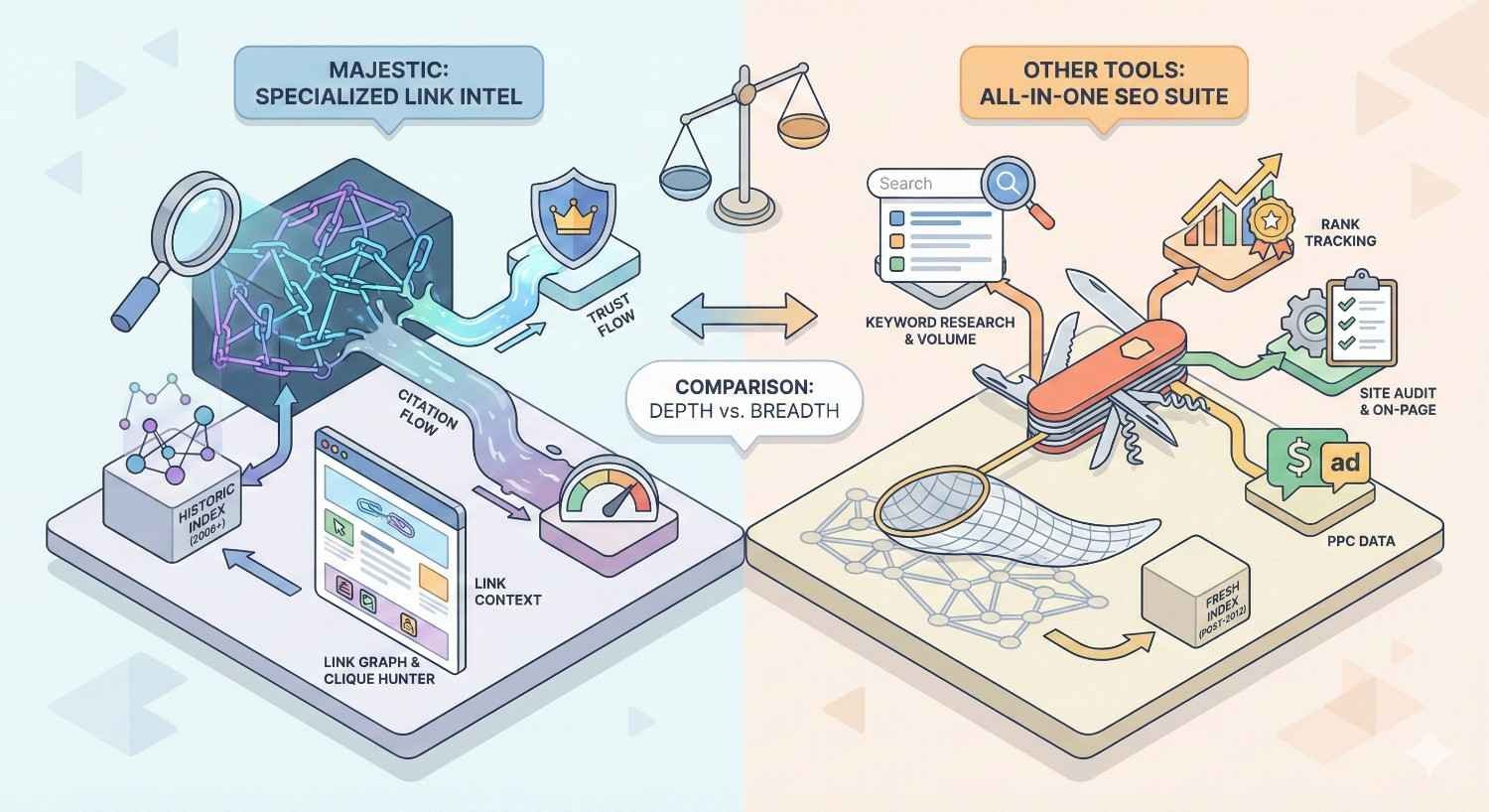
Ahrefs offers a broader SEO suite including keyword research, rank tracking, and content analysis alongside link data. Majestic focuses exclusively on links. This difference shapes which tool fits different workflows.
For link data specifically, both platforms maintain large indexes with substantial overlap. Ahrefs updates more frequently and often shows newer links faster. Majestic’s Historic Index provides deeper historical data. Ahrefs’ Domain Rating differs from Trust Flow in calculation methodology, making direct comparison difficult.
Ahrefs suits teams wanting an all-in-one platform. Majestic suits teams with dedicated link analysis needs or those already using other tools for keyword and content work. Many serious SEO operations use both, cross-referencing data for comprehensive coverage.
Majestic vs. Moz Link Explorer
Moz Link Explorer integrates with Moz’s broader SEO toolset and uses Domain Authority and Page Authority metrics. These metrics have become industry standards despite being proprietary calculations. Moz’s index is smaller than Majestic’s, potentially missing links Majestic finds.
Moz offers a more user-friendly interface suited to SEO beginners. Majestic provides more granular data and advanced features for experienced practitioners. Moz’s Spam Score attempts to identify toxic links, a feature Majestic lacks as a built-in metric.
Choose Moz for accessibility and integration with Moz Pro features. Choose Majestic for deeper link analysis, larger index coverage, and unique metrics like Topical Trust Flow that Moz doesn’t offer.
Majestic vs. SEMrush Backlink Analytics
SEMrush provides backlink analysis as part of a comprehensive digital marketing platform including PPC, social media, and content tools. Its link database has grown substantially but historically lagged behind Majestic and Ahrefs in size.
SEMrush’s Authority Score combines multiple factors beyond just links. This holistic approach differs from Majestic’s link-focused metrics. SEMrush offers toxic link identification built into its interface, streamlining audit workflows.
SEMrush suits marketing teams needing cross-channel tools in one platform. Majestic suits teams prioritizing link analysis depth over breadth of marketing features. The platforms serve different primary use cases despite overlapping in backlink data.
When to Use Majestic Over Alternatives
Choose Majestic when link analysis is your primary need and you want the deepest possible data. Its Historic Index provides unmatched historical coverage. Trust Flow and Citation Flow offer unique quality signals other tools don’t replicate.
Majestic excels for agencies specializing in link building who need granular data for client work. Its API supports custom integrations for scaled operations. The platform’s focus means updates and improvements concentrate on link analysis rather than spreading across feature sets.
Consider Majestic alongside rather than instead of other tools. Cross-referencing link data across platforms provides more complete coverage than any single tool. Majestic’s unique metrics complement rather than replace metrics from Ahrefs, Moz, or SEMrush.
Majestic Pricing Plans and Value Assessment
Majestic offers tiered pricing based on feature access and usage limits. Understanding what each tier provides helps match your subscription to actual needs without overpaying for unused capabilities.
Lite Plan: Features and Best Use Cases
The Lite plan provides basic access to Site Explorer, backlink data, and core metrics. It suits freelancers, small businesses, and those with occasional link analysis needs. Usage limits restrict the number of reports and data exports per day.
At this tier, you can analyze your own site and a handful of competitors. The Fresh Index is accessible, providing current link data. Historic Index access is limited, restricting deep historical analysis. This tier works for monitoring your own link profile and basic competitive research.
The Lite plan doesn’t suit agencies or teams with heavy analysis needs. Daily limits constrain productivity for intensive audit work. Consider it an entry point for learning the platform before committing to higher tiers.
Pro Plan: Advanced Analysis Capabilities
The Pro plan unlocks full Historic Index access, higher usage limits, and additional features like Link Context and the Compare tool. This tier suits SEO professionals, agencies, and businesses with serious link building programs.
Increased limits enable comprehensive audits and competitive analysis without hitting daily caps. Full historical data supports trend analysis and due diligence for site acquisitions. The Compare tool’s competitive features become available at this tier.
Most professional users find the Pro plan provides necessary capabilities without enterprise-level costs. It balances feature access with reasonable pricing for small to medium operations.
API Access and Enterprise Solutions
Majestic’s API enables programmatic access to link data for custom applications, automated reporting, and integration with proprietary tools. API access requires Pro or higher subscriptions with additional API-specific pricing based on usage volume.
Enterprise solutions provide dedicated support, custom limits, and SLA guarantees for large-scale operations. Agencies managing hundreds of clients or enterprises with extensive site portfolios may require enterprise arrangements.
API access transforms Majestic from a manual tool into a data source for automated workflows. Development resources are required to leverage API capabilities, making this relevant primarily for technically sophisticated operations.
Majestic ROI for SEO Teams and Agencies
Calculate Majestic ROI by comparing subscription costs to time saved and insights gained. Manual link research without tools takes hours per site. Majestic reduces this to minutes, freeing time for strategy and outreach.
For agencies, Majestic data supports client deliverables including audits, competitive analyses, and progress reports. The platform’s unique metrics provide differentiated insights clients can’t get from free tools. This supports premium service positioning.
Consider opportunity cost alongside direct costs. Missing toxic links that trigger penalties costs far more than subscription fees. Failing to identify competitor link sources means missing opportunities. The platform’s value extends beyond time savings to risk mitigation and opportunity capture.
Majestic Integrations and Workflow Optimization
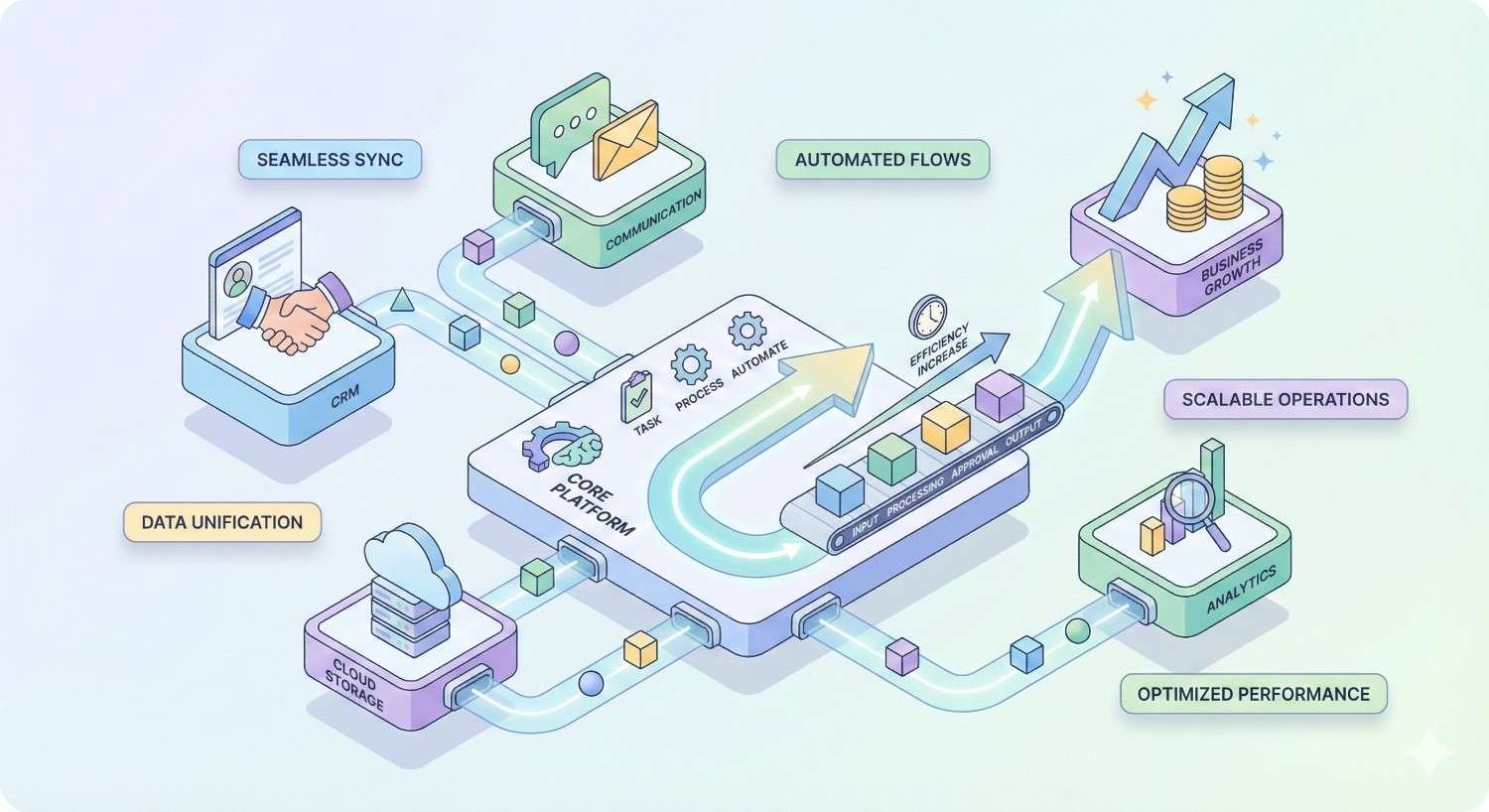
Majestic integrates with various tools and workflows to maximize efficiency. Leveraging these integrations reduces manual data handling and embeds link intelligence into broader SEO processes.
Majestic API for Custom Reporting
The API returns link data in structured formats suitable for custom dashboards and automated reports. Development teams can build client-facing portals displaying Majestic metrics alongside other data sources.
Common API use cases include automated weekly link profile snapshots, competitor monitoring alerts, and integration with CRM systems for outreach tracking. The API documentation provides endpoint details and usage examples.
API implementation requires development resources but enables workflows impossible with manual tool access. Agencies with technical capabilities can create significant competitive advantages through custom API integrations.
Browser Extensions and Plugins
Majestic offers browser extensions for Chrome and Firefox that display link metrics while browsing. Visiting any page shows its Trust Flow, Citation Flow, and referring domain count without leaving the page or logging into Majestic.
Extensions streamline prospecting workflows. While researching potential link targets, you can instantly assess quality without switching contexts. This speeds evaluation of resource pages, potential guest post targets, and competitor backlinks.
The extensions also integrate with search results, showing metrics for ranking pages directly in Google. This helps assess competitive link profiles while conducting keyword research.
Integrating Majestic with Google Sheets
Majestic data exports to CSV format compatible with Google Sheets and Excel. For ongoing analysis, third-party add-ons enable direct Majestic data pulls into spreadsheets without manual exports.
Spreadsheet integration supports custom analysis frameworks. Build templates that automatically calculate Trust Flow ratios, flag potential toxic links, or prioritize outreach targets based on your criteria. Once built, these templates process new data exports instantly.
Combining Majestic data with other sources in spreadsheets enables holistic analysis. Merge link data with traffic data from Analytics, ranking data from tracking tools, and outreach status from CRM exports for complete campaign visibility.
Third-Party Tool Integrations
Several SEO platforms integrate Majestic data directly. Reporting tools like Agency Analytics and DashThis pull Majestic metrics into client dashboards. This eliminates manual data compilation for regular reporting.
Some outreach tools integrate Majestic for prospect qualification. When building outreach lists, these tools can filter by Trust Flow thresholds, ensuring you only contact quality targets.
Evaluate integration quality before relying on third-party connections. Some integrations provide limited data subsets or delayed updates. Direct Majestic access remains necessary for comprehensive analysis even when integrations handle routine reporting.
Common Majestic Link Analysis Mistakes to Avoid
Effective link analysis requires understanding not just what Majestic shows but how to interpret it correctly. Common mistakes lead to flawed conclusions and misguided strategies.
Misinterpreting Trust Flow and Citation Flow
Trust Flow and Citation Flow measure different things. Treating them interchangeably leads to poor decisions. High Citation Flow without corresponding Trust Flow indicates quantity without quality. High Trust Flow with low Citation Flow suggests a small but high-quality link profile.
Avoid fixating on absolute numbers without context. Trust Flow 30 means different things for a local business versus a national brand. Compare metrics to relevant competitors rather than arbitrary benchmarks.
Remember these metrics measure Majestic’s assessment, not Google’s. They correlate with ranking potential but don’t directly determine rankings. Use them as indicators, not guarantees.
Ignoring Link Context and Relevance
Metrics alone don’t tell the complete story. A Trust Flow 40 link from an irrelevant site in an unrelated language provides less value than a Trust Flow 25 link from a topically relevant industry publication. Always evaluate context alongside metrics.
Use Link Context features to understand where links appear. Editorial links within content carry more weight than footer or sidebar placements. Links surrounded by relevant content signal genuine endorsement.
Topical Trust Flow matters increasingly. Search engines evaluate topical relevance when assessing link value. A link profile strong in irrelevant categories may underperform a smaller profile with strong topical alignment.
Over-Relying on Single Metrics
No single metric captures link profile health completely. Trust Flow alone misses quantity considerations. Citation Flow alone misses quality. Referring domain counts miss the quality of those domains.
Develop holistic evaluation frameworks considering multiple metrics together. Trust Flow to Citation Flow ratio, referring domain diversity, topical alignment, and link context all contribute to complete understanding.
Avoid making major decisions based on single metric changes. A Trust Flow drop might reflect Majestic recrawling rather than actual link loss. Cross-reference with other data sources before reacting to metric movements.
Failing to Cross-Reference with Other Data Sources
Majestic provides one perspective on link profiles. Other tools may find links Majestic misses or show different metric assessments. Relying exclusively on any single tool creates blind spots.
Cross-reference important findings with Ahrefs, Moz, or SEMrush data. If all tools agree on a finding, confidence increases. If tools disagree, investigate further before acting.
Combine link data with other SEO data for complete pictures. Ranking changes, traffic patterns, and Google Search Console data provide context for interpreting link metrics. A link profile that looks healthy in Majestic but correlates with ranking declines warrants deeper investigation.
Frequently Asked Questions About Majestic for Link Analysis
Is Majestic accurate for backlink data?
Majestic maintains one of the largest link indexes available, providing comprehensive coverage for most sites. Accuracy depends on crawl frequency, with popular sites showing more current data than obscure pages. Cross-referencing with other tools provides the most complete picture.
How often does Majestic update its index?
The Fresh Index updates continuously as Majestic’s crawler discovers new links, typically reflecting changes within days to weeks. The Historic Index updates less frequently but provides deeper historical coverage. High-authority sites get crawled more often than low-traffic pages.
Can Majestic identify all toxic backlinks?
Majestic doesn’t provide a built-in toxic link score like some competitors. You must evaluate potential toxicity using Trust Flow, link context, and manual review. Low Trust Flow combined with suspicious patterns indicates potential issues, but human judgment remains necessary.
What is a good Trust Flow score?
Trust Flow benchmarks vary by industry and site type. Most legitimate business websites fall between 15-40. Scores above 50 indicate strong authority. Compare your Trust Flow to direct competitors rather than arbitrary benchmarks for meaningful assessment.
Does Majestic offer a free trial?
Majestic offers limited free access allowing basic lookups for your own verified sites. Full feature access requires paid subscription. The Lite plan provides an affordable entry point for evaluating the platform before committing to higher tiers.
How does Majestic compare to free backlink checkers?
Free tools typically provide limited data from smaller indexes with less frequent updates. Majestic’s comprehensive index, proprietary metrics, and advanced features justify subscription costs for serious SEO work. Free tools suit basic checks but lack depth for professional analysis.
Can I use Majestic for local SEO link building?
Majestic works for local SEO by helping identify local link opportunities and analyzing local competitor profiles. Filter by geographic relevance when possible and prioritize links from locally relevant sources. Topical Trust Flow helps identify industry-relevant local opportunities.
Conclusion
Majestic provides specialized link analysis capabilities that support every aspect of backlink strategy, from auditing existing profiles to identifying competitive opportunities and tracking link building progress. Its proprietary Trust Flow and Citation Flow metrics offer unique quality signals, while tools like Site Explorer, Link Context, and the Compare function enable both granular analysis and strategic planning.
Understanding how to interpret Majestic’s data correctly separates effective link analysis from misleading conclusions. Combining multiple metrics, evaluating context alongside numbers, and cross-referencing with other data sources ensures accurate assessments that drive sound decisions.
We help businesses build sustainable organic growth through comprehensive SEO strategies including technical optimization, content development, and authority building. Contact White Label SEO Service to discuss how professional link analysis and strategic link building can strengthen your search visibility and drive measurable business results.


