

The best content writing tools combine AI-powered generation, SEO optimization, and grammar correction to help teams produce high-quality content faster. Tools like Jasper, Grammarly, and Surfer SEO have become essential for businesses scaling their organic growth strategies in 2025.
Content production demands have never been higher. Search engines reward consistent, well-optimized content, and your competitors are publishing more than ever. The right writing tools bridge the gap between limited resources and ambitious content goals.
This guide covers every category of content writing tool available today. You’ll learn what features matter most, compare the top options in each category, and understand how to build a tool stack that drives measurable SEO results.
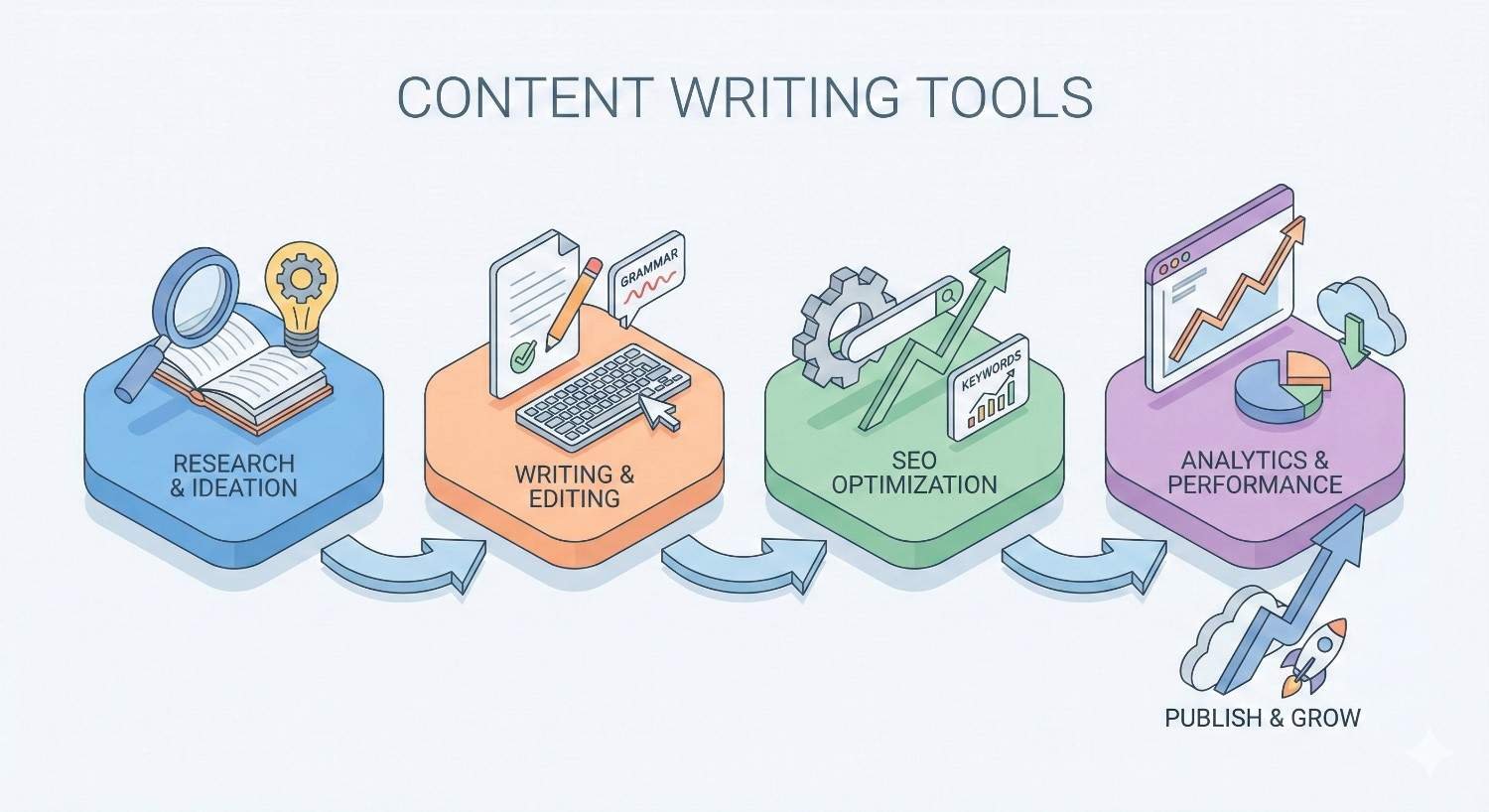
What Are Content Writing Tools?
Content writing tools are software applications designed to assist with creating, editing, optimizing, and managing written content. They range from simple grammar checkers to sophisticated AI platforms that generate entire articles.
Definition and Core Functions
Content writing tools serve specific functions in the content creation workflow. Some generate initial drafts. Others polish existing text. Many analyze content against SEO benchmarks to improve search visibility.
The core functions include:
- Text generation using artificial intelligence and natural language processing
- Grammar and spelling correction with contextual suggestions
- SEO analysis including keyword density, readability, and content scoring
- Plagiarism detection to ensure content originality
- Readability optimization for target audience comprehension
- Research assistance for topic ideation and competitive analysis
Modern tools often combine multiple functions. Platforms like Jasper integrate AI writing with SEO recommendations. Grammarly pairs grammar correction with tone analysis. This convergence means fewer tools can accomplish more tasks.
How Content Writing Tools Support SEO and Marketing Goals
Content writing tools directly impact organic search performance. They help teams create content that satisfies both user intent and search engine algorithms.
Keyword optimization becomes systematic rather than guesswork. SEO writing tools analyze top-ranking content and recommend specific terms, questions, and topics to cover. This semantic approach aligns with how Google evaluates content relevance.
Content velocity increases without sacrificing quality. AI writing assistants produce first drafts in minutes. Human editors then refine the output. Teams publish more frequently, building topical authority faster.
Consistency improves across large content operations. Style guides become enforceable through tone detection. Brand voice remains uniform whether one writer or twenty contribute to the blog.
Performance tracking connects content creation to business outcomes. Many tools integrate with Google Analytics and Search Console. Writers see which content drives traffic, conversions, and revenue.
For marketing teams, these tools reduce the cost per published piece. They shorten production timelines. They enable data-driven content decisions rather than intuition-based publishing.
Types of Content Writing Tools
The content writing tool landscape includes six primary categories. Most content operations require tools from multiple categories to cover the full production workflow.
AI Writing Assistants
AI writing assistants use large language models to generate human-like text. They produce blog posts, ad copy, social media content, product descriptions, and email sequences.
These tools work from prompts. You provide context, tone preferences, and desired output length. The AI generates content matching your specifications. Quality varies based on prompt engineering and the underlying model.
Leading AI writing assistants include ChatGPT, Jasper, Copy.ai, and Writesonic. Each offers different strengths. ChatGPT excels at conversational content and complex explanations. Jasper provides marketing-specific templates and brand voice training. Copy.ai focuses on short-form marketing copy.
AI assistants accelerate the drafting phase dramatically. What took hours now takes minutes. However, output requires human review. Factual accuracy, brand alignment, and strategic positioning still need human judgment.
Grammar and Editing Tools
Grammar tools catch errors that spell-checkers miss. They identify subject-verb disagreement, comma splices, passive voice overuse, and unclear phrasing.
Grammarly dominates this category with browser extensions, desktop apps, and integrations across major platforms. It provides real-time suggestions as you write. Premium tiers add tone detection, clarity improvements, and plagiarism checking.
ProWritingAid offers deeper analysis for long-form content. It generates reports on sentence structure, pacing, and stylistic patterns. Fiction writers and content marketers both use it for manuscript-level editing.
Hemingway Editor takes a minimalist approach. It highlights complex sentences, passive voice, and adverb overuse. The goal is bold, clear writing. It’s free for basic use and particularly useful for improving readability scores.
SEO Content Optimization Tools
SEO writing tools analyze content against search engine ranking factors. They compare your draft to top-ranking pages and recommend improvements.
Surfer SEO provides real-time content scoring. As you write, it tracks keyword usage, content length, heading structure, and semantic terms. The content editor shows exactly what changes will improve your score.
Clearscope focuses on content grading and keyword recommendations. It pulls data from top-ranking pages to identify terms and topics your content should cover. Many enterprise content teams use Clearscope as their standard optimization platform.
Frase combines research, outlining, and optimization. It generates content briefs from SERP analysis, suggests questions to answer, and scores content against competitors. The workflow covers ideation through publication.
These tools remove guesswork from SEO content creation. Writers know exactly what to include. Editors have objective criteria for approval. The result is content engineered for search visibility.
Plagiarism Checkers
Plagiarism checkers scan content against databases of published material. They identify matching text and potential originality issues.
Copyscape remains the industry standard for web content. It checks your text against billions of indexed pages. Results show matching URLs and percentage overlap. Many publishers require Copyscape verification before accepting submissions.
Quetext offers a more affordable alternative with similar functionality. It provides a percentage-based originality score and highlights potentially problematic passages.
Originality.ai addresses a newer concern: AI-generated content detection. It identifies text likely produced by ChatGPT, Claude, or similar models. Publishers and educators use it to verify human authorship.
For content teams, plagiarism checking protects against accidental duplication and ensures freelancer submissions are original. It’s a quality control checkpoint before publication.

Content Research and Ideation Tools
Research tools help identify topics, analyze competitors, and gather information for content creation.
BuzzSumo reveals what content performs best in any niche. It shows social shares, backlinks, and engagement metrics for published articles. Content strategists use it to identify proven topics and content formats.
AnswerThePublic visualizes questions people ask about any topic. It pulls autocomplete data from search engines and organizes queries by type. The output feeds content calendars and FAQ sections.
Ahrefs and Semrush, while primarily SEO platforms, include powerful content research features. They show keyword difficulty, search volume, and content gaps. Many teams use them for topic prioritization and competitive analysis.
Research tools inform content strategy. They answer what to write about, not just how to write it.
Readability and Style Analyzers
Readability tools measure how easy content is to understand. They calculate scores based on sentence length, word complexity, and structural factors.
The Flesch-Kincaid readability tests remain widely used. They estimate the grade level required to understand text. Most web content should target 7th-9th grade reading levels for broad accessibility.
Yoast SEO includes readability analysis within WordPress. It checks sentence length, paragraph structure, transition word usage, and passive voice percentage. Green lights indicate content meeting readability standards.
Readable provides detailed analysis across multiple readability formulas. It’s useful for content targeting specific audiences or meeting accessibility requirements.
Readability directly impacts user engagement. Content that’s easier to read keeps visitors on page longer. This engagement signals quality to search engines.
Key Features to Look for in Content Writing Tools
Not all content writing tools deliver equal value. These features separate tools that improve content operations from those that add complexity without results.
AI-Powered Content Generation
Effective AI generation requires more than basic text output. Look for tools offering:
Template libraries for common content types. Blog intros, product descriptions, email subject lines, and social posts each benefit from specialized prompts.
Tone and style controls that adjust output personality. Formal, conversational, persuasive, and informative tones serve different content purposes.
Long-form capability for articles exceeding 1,000 words. Many AI tools struggle with coherence in longer pieces. Test this before committing.
Factual grounding through citations or source integration. Pure AI generation often includes inaccuracies. Tools that reference real sources produce more reliable output.
Iteration features that refine output based on feedback. The ability to say “make this more concise” or “add more examples” improves efficiency.
SEO Integration and Keyword Optimization
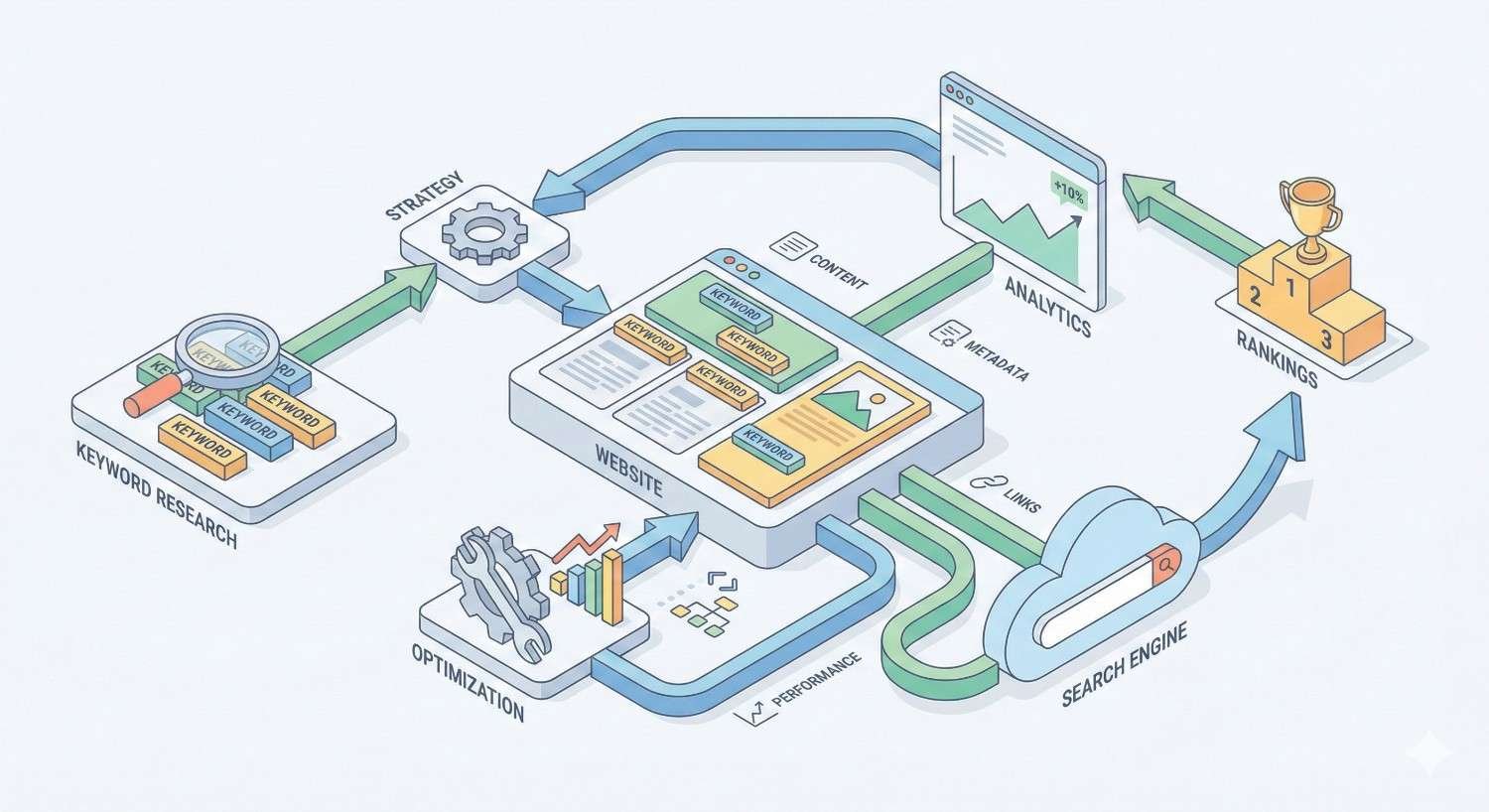
SEO features should connect writing to search performance:
Real-time scoring shows optimization status as you write. Waiting until completion to check SEO wastes revision time.
Competitor analysis reveals what top-ranking pages include. This goes beyond keywords to cover topics, questions, and content structure.
Semantic keyword suggestions identify related terms that strengthen topical relevance. Modern SEO requires semantic breadth, not just primary keyword repetition.
SERP preview shows how titles and descriptions will appear in search results. This helps optimize click-through rates.
Content gap identification highlights topics competitors cover that you’ve missed. Comprehensive coverage builds topical authority.
Collaboration and Workflow Features
Team-based content production requires coordination features:
Multi-user access with role-based permissions. Writers, editors, and managers need different capabilities.
Comment and suggestion modes for editorial feedback. Track changes functionality speeds revision cycles.
Version history preserves previous drafts. This protects against accidental deletions and enables comparison.
Assignment and deadline tracking keeps production on schedule. Some tools include full project management capabilities.
Approval workflows formalize the review process. Content moves through defined stages before publication.
Tone and Brand Voice Customization
Consistent brand voice requires tools that learn your style:
Voice training analyzes existing content to establish patterns. The tool then applies these patterns to new content.
Style guide enforcement flags deviations from documented standards. This catches inconsistencies before publication.
Audience targeting adjusts language for different reader segments. Technical audiences and general consumers require different approaches.
Formality controls maintain appropriate register. B2B content typically requires more formal tone than B2C.
Integration with CMS and Marketing Platforms
Tools should connect to your existing technology stack:
WordPress integration enables direct publishing or optimization within the editor. This eliminates copy-paste workflows.
Google Docs compatibility supports collaborative drafting. Many teams draft in Docs before moving to CMS.
API access enables custom integrations and automation. Enterprise teams often build proprietary workflows.
Marketing platform connections link content to campaigns. Integration with HubSpot, Marketo, or similar platforms tracks content performance.
Analytics integration connects content to traffic and conversion data. This closes the loop between creation and results.
Best Content Writing Tools for 2025 [Comparison]
Each tool category has clear leaders. This comparison covers the top options based on functionality, pricing, and user adoption.
Best AI Writing Tools (Jasper, Copy.ai, ChatGPT)
Jasper leads the AI writing market for marketing teams. It offers 50+ templates covering blog posts, ads, emails, and social content. The Brand Voice feature learns your style from uploaded examples. Pricing starts at $49/month for individual users, with team plans scaling based on usage.
Jasper excels at marketing copy and brand-consistent content. The Boss Mode feature handles long-form content with better coherence than many competitors. Integration with Surfer SEO adds optimization capabilities directly in the editor.
Copy.ai focuses on short-form marketing content. It generates ad copy, product descriptions, and social posts quickly. The free tier includes 2,000 words monthly, making it accessible for testing. Paid plans start at $49/month with unlimited words.
Copy.ai works best for teams producing high volumes of short content. The interface is simpler than Jasper’s, with faster output for quick tasks.
ChatGPT offers the most versatile AI writing capability. The free tier uses GPT-3.5, while ChatGPT Plus ($20/month) provides GPT-4 access. It handles everything from brainstorming to full article drafts.
ChatGPT requires more prompt engineering than purpose-built tools. It lacks marketing-specific templates and brand voice features. However, its flexibility and low cost make it valuable for diverse writing tasks.
Best Grammar and Editing Tools (Grammarly, ProWritingAid, Hemingway)
Grammarly remains the most widely adopted grammar tool. The free version catches basic errors. Premium ($12/month annually) adds clarity suggestions, tone detection, and plagiarism checking. Business plans ($15/user/month) include style guides and analytics.
Grammarly’s browser extension works across virtually every platform. The suggestions are accurate and contextually appropriate. For most content teams, Grammarly Premium provides sufficient editing support.
ProWritingAid offers deeper analysis for serious writers. It generates 20+ reports covering style, structure, and pacing. Pricing starts at $30/month or $120/year. Lifetime licenses are available for $399.
ProWritingAid suits long-form content creators who want detailed feedback. The learning curve is steeper than Grammarly’s, but the analysis depth rewards the investment.
Hemingway Editor provides free browser-based editing focused on readability. It highlights complex sentences, passive voice, and adverb overuse. The desktop app costs $19.99 one-time.
Hemingway works best as a finishing tool. Run content through it before publication to ensure clarity and accessibility.
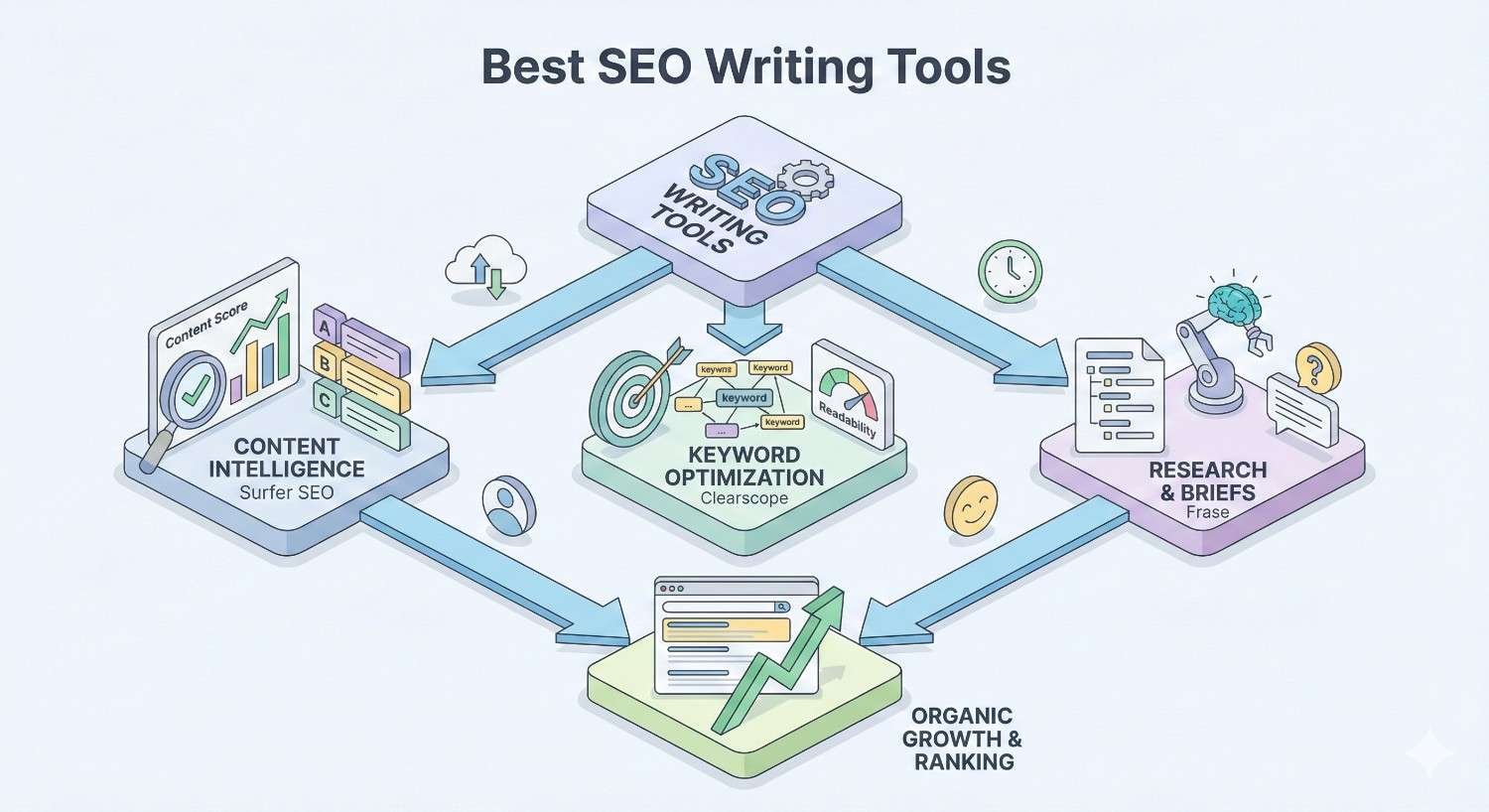
Best SEO Writing Tools (Surfer SEO, Clearscope, Frase)
Surfer SEO provides the most comprehensive content optimization platform. The Content Editor scores drafts in real-time against top-ranking pages. Plans start at $89/month for 30 articles, scaling to $219/month for 70 articles.
Surfer’s SERP Analyzer reveals exactly what ranking content includes. The Audit feature optimizes existing pages. Integration with Jasper and Google Docs streamlines workflows.
Clearscope focuses on content grading and recommendations. It analyzes top results and provides term suggestions with importance ratings. Pricing starts at $170/month for 20 content reports.
Clearscope’s interface is cleaner than Surfer’s, with less overwhelming data. Enterprise content teams often prefer its simplicity and reliability.
Frase combines research, outlining, and optimization at lower price points. Plans start at $15/month for basic features, with full optimization at $45/month. It generates content briefs automatically from SERP analysis.
Frase offers the best value for smaller teams. The research-to-optimization workflow covers more of the content process than competitors.
Best Plagiarism Checkers (Copyscape, Quetext, Originality.ai)
Copyscape charges $0.03 per search for up to 200 words, plus $0.01 per additional 100 words. Premium features include batch checking and private index monitoring. It remains the industry standard for web content verification.
Quetext offers subscription pricing at $8.80/month for 50,000 words. It provides percentage-based originality scores and source identification. The interface is more modern than Copyscape’s.
Originality.ai costs $0.01 per 100 words for combined plagiarism and AI detection. It identifies content likely generated by ChatGPT, Claude, and similar models. Publishers increasingly require AI detection alongside plagiarism checking.
Best Free Content Writing Tools
Several capable tools offer free tiers or completely free access:
Google Docs provides collaborative writing with basic grammar suggestions. It’s free with a Google account and integrates with many SEO tools.
Hemingway Editor (browser version) offers free readability analysis. No account required.
ChatGPT Free includes GPT-3.5 access for AI-assisted writing. Usage limits apply during peak times.
AnswerThePublic provides limited free searches for content ideation. Three searches daily without an account.
Grammarly Free catches grammar and spelling errors. The browser extension works across platforms.
Canva Docs combines writing with visual content creation. Free tier includes basic features.
Free tools work for individuals and small teams with limited budgets. As content operations scale, paid tools typically deliver better ROI through time savings and quality improvements.
How to Choose the Right Content Writing Tool for Your Business
Tool selection depends on your specific situation. A solo blogger needs different capabilities than an enterprise content team.
Assessing Your Content Goals and Team Size
Start by defining what you’re trying to accomplish:
Content volume targets determine capacity needs. Publishing 4 articles monthly requires different tools than 40 articles monthly.
Content types influence tool selection. Long-form blog content, product descriptions, and social posts each benefit from specialized tools.
Quality standards affect editing requirements. Highly regulated industries need more rigorous review processes.
Team structure shapes collaboration needs. Distributed teams require cloud-based tools with strong sharing features.
Map your current workflow. Identify bottlenecks. Select tools that address specific pain points rather than adding features you won’t use.
Budget Considerations: Free vs. Paid Tools
Free tools work for:
- Testing tool categories before committing
- Individual creators with limited budgets
- Supplementing paid tools for specific tasks
- Teams just starting content operations
Paid tools become worthwhile when:
- Time savings exceed subscription costs
- Quality improvements drive measurable results
- Team coordination requires advanced features
- Content volume demands efficiency gains
Calculate the true cost of content production. Include writer time, editor time, and revision cycles. Tools that reduce these costs often pay for themselves quickly.
Scalability and Enterprise Needs
Growing content operations require tools that scale:
User limits matter as teams expand. Per-seat pricing adds up quickly. Look for plans with generous user allowances.
API access enables automation and custom integrations. Enterprise teams often build proprietary workflows connecting multiple tools.
Admin controls become essential with larger teams. Role-based permissions, usage tracking, and centralized billing simplify management.
Support levels vary significantly. Enterprise plans typically include dedicated account managers and priority support.
Security and compliance requirements increase with company size. SOC 2 compliance, SSO integration, and data handling policies matter for enterprise adoption.
Trial Periods and ROI Evaluation
Most tools offer free trials. Use them strategically:
Test with real projects, not artificial examples. Evaluate how tools perform on your actual content.
Measure time savings precisely. Track how long tasks take before and after tool adoption.
Assess quality impact through performance data. Does optimized content rank better? Does edited content engage readers longer?
Evaluate team adoption. Tools only deliver value if people actually use them. Complex interfaces reduce adoption rates.
Calculate ROI before annual commitments. Monthly subscriptions cost more but provide flexibility during evaluation.
How Content Writing Tools Improve SEO Performance
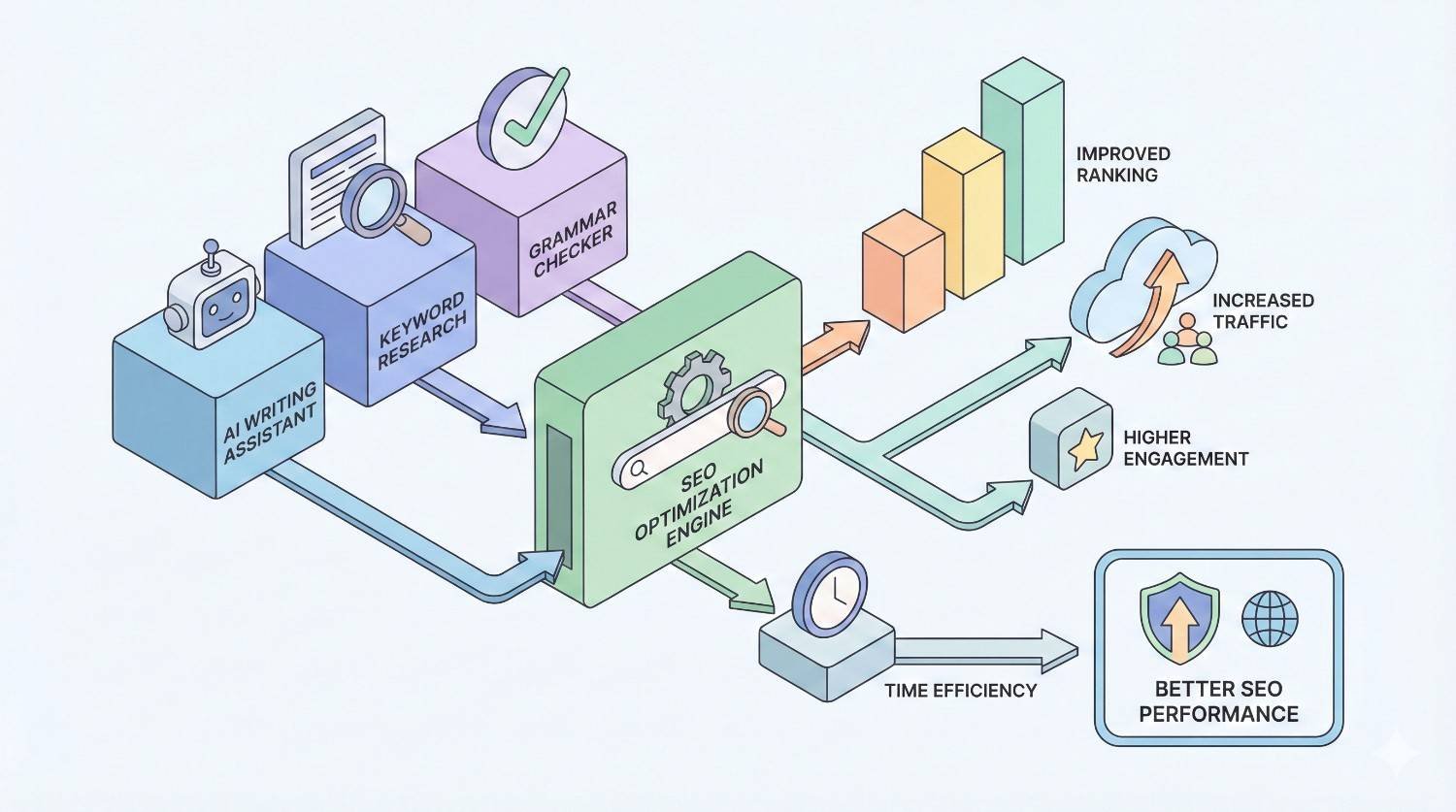
Content writing tools directly impact search rankings through three primary mechanisms: optimization, quality, and scale.
Keyword Optimization and Semantic Relevance
SEO writing tools transform keyword research into actionable content guidance. They analyze top-ranking pages and identify patterns that correlate with search visibility.
Primary keyword placement becomes systematic. Tools recommend optimal density and placement in titles, headings, and body content.
Semantic keywords expand topical coverage. Related terms signal comprehensive coverage to search algorithms. Tools identify these terms automatically from competitor analysis.
Question coverage addresses user intent directly. Tools pull “People Also Ask” queries and related questions. Answering these improves featured snippet eligibility.
Content structure follows proven patterns. Heading hierarchy, paragraph length, and section organization align with what search engines reward.
The result is content engineered for relevance. Writers focus on quality while tools handle optimization mechanics.
Content Quality Signals and User Engagement
Search engines measure content quality through user behavior signals. Writing tools improve these metrics:
Readability improvements keep visitors engaged. Clear, accessible content reduces bounce rates. Grammar tools and readability analyzers ensure content meets audience comprehension levels.
Comprehensive coverage satisfies search intent. Users find complete answers without returning to search results. This “pogo-sticking” reduction signals quality to Google.
Error-free content builds credibility. Grammar mistakes and typos undermine trust. Editing tools catch issues before publication.
Consistent quality across all content strengthens domain authority. Tools enforce standards that maintain quality at scale.
Scaling Content Production for Organic Growth
Organic growth requires consistent content production. Tools enable scale without proportional resource increases:
AI drafting accelerates initial content creation. First drafts that took hours now take minutes. Human editors refine rather than create from scratch.
Template-based workflows standardize production. Repeatable processes reduce training time and ensure consistency.
Batch optimization improves existing content efficiently. Tools identify underperforming pages and recommend specific improvements.
Content calendars maintain publishing consistency. Regular publication builds topical authority and keeps sites fresh in search indexes.
Teams using content writing tools effectively often double or triple output without adding headcount. The efficiency gains compound over time as processes mature.
Content Writing Tools vs. Human Writers: Finding the Right Balance
AI writing tools raise questions about the role of human writers. The answer isn’t replacement but collaboration.
When to Use AI-Assisted Writing
AI tools excel at specific tasks:
First draft generation for standard content formats. Blog post outlines, product descriptions, and email templates benefit from AI starting points.
Variation creation for testing. Generate multiple headline options or ad copy versions quickly.
Research synthesis from multiple sources. AI can summarize and combine information efficiently.
Overcoming writer’s block. AI suggestions often spark human creativity.
Scaling routine content. High-volume, formulaic content like category descriptions or FAQ answers.
AI works best when output requirements are well-defined and quality can be verified objectively.
The Role of Human Editing and Strategy
Humans remain essential for:
Strategic direction. What topics to cover, what angles to take, and how content supports business goals.
Brand voice and personality. AI can mimic style but struggles with authentic brand expression.
Factual verification. AI generates plausible-sounding but sometimes incorrect information. Human fact-checking is mandatory.
Original insights. Unique perspectives, proprietary data, and expert opinions require human contribution.
Emotional resonance. Content that truly connects with readers needs human empathy and understanding.
Quality judgment. Determining whether content meets standards requires human evaluation.
The most effective content operations use AI for efficiency and humans for quality, strategy, and authenticity.
Building a Hybrid Content Workflow
Successful hybrid workflows typically follow this pattern:
Strategy (Human): Define topics, angles, and goals based on business objectives and audience needs.
Research (AI-Assisted): Use tools to gather information, analyze competitors, and identify content requirements.
Outlining (Collaborative): AI generates structure options; humans refine based on strategic intent.
Drafting (AI-Assisted): AI produces initial content; humans provide detailed prompts and direction.
Editing (Human): Writers refine AI output for accuracy, voice, and quality.
Optimization (Tool-Assisted): SEO tools guide keyword integration and structural improvements.
Review (Human): Final quality check before publication.
Analysis (Tool-Assisted): Performance tracking informs future content decisions.
This workflow captures AI efficiency while maintaining human quality control. The balance shifts based on content type, importance, and available resources.
Common Mistakes When Using Content Writing Tools
Tools amplify both good and bad practices. Avoid these common errors:
Over-Reliance on AI Without Human Oversight
AI-generated content without human review creates risks:
Factual errors appear authoritative but mislead readers. AI confidently states incorrect information. Every fact requires verification.
Generic content fails to differentiate. AI draws from common patterns, producing content that sounds like everything else.
Tone inconsistencies emerge across pieces. Without human calibration, AI output varies unpredictably.
Ethical issues arise from unattributed AI content. Transparency about AI involvement builds trust.
Quality degradation occurs gradually. Initial AI output seems acceptable; standards slip over time without human benchmarks.
Treat AI as a capable assistant, not an autonomous creator. Human judgment remains the quality standard.
Ignoring Brand Voice and Audience Needs
Tools optimize for general effectiveness, not your specific brand:
Generic optimization produces interchangeable content. SEO tools recommend what works broadly, not what fits your voice.
Audience mismatch occurs when tools target average readers. Your specific audience may need different language, depth, or approach.
Brand dilution happens gradually. Each piece that doesn’t quite match your voice weakens overall brand identity.
Competitive similarity results from everyone using the same tools the same way. Differentiation requires human creativity.
Configure tools to support your brand, not replace your brand decisions. Use style guides, voice training, and manual review to maintain distinctiveness.
Neglecting SEO Fundamentals
Tools can’t compensate for strategic gaps:
Keyword research shortcuts lead to wrong targets. Tools optimize content, but choosing what to optimize for requires strategic thinking.
Technical SEO issues undermine content performance. The best-written content won’t rank on a slow, poorly-structured site.
Link building neglect limits ranking potential. Content tools don’t build backlinks. Authority requires external validation.
User intent misalignment wastes optimization effort. Perfectly optimized content for the wrong intent won’t satisfy users or search engines.
Measurement gaps prevent improvement. Tools that don’t connect to analytics can’t demonstrate ROI or guide strategy.
Content writing tools are one component of SEO success. They work best within a comprehensive strategy addressing technical foundations, content quality, and authority building.
Conclusion: Choosing the Best Content Writing Tools for Sustainable Growth
The best content writing tools match your specific needs, budget, and workflow. AI assistants accelerate drafting. Grammar tools ensure quality. SEO platforms guide optimization. The right combination depends on your content goals and team structure.
At White Label SEO Service, we help businesses build content strategies that drive sustainable organic growth. Our approach combines the efficiency of modern tools with the strategic thinking and quality standards that search engines reward.
Ready to scale your content production while maintaining quality? Contact our team to discuss how we can support your SEO content goals with proven processes and expert guidance.
Frequently Asked Questions About Content Writing Tools
What is the best free content writing tool?
Google Docs combined with Grammarly’s free browser extension provides solid free writing support. For AI assistance, ChatGPT’s free tier offers capable content generation. Hemingway Editor adds free readability analysis.
Are AI writing tools good for SEO?
AI writing tools help with SEO when combined with human editing and optimization tools. They accelerate content production, but output requires fact-checking, brand voice refinement, and strategic keyword integration to rank effectively.
How much do content writing tools cost?
Costs range from free to several hundred dollars monthly. Grammar tools like Grammarly Premium cost $12/month. AI writers like Jasper start at $49/month. SEO tools like Surfer SEO begin at $89/month. Enterprise plans with multiple tools can exceed $500/month.
Can content writing tools detect plagiarism?
Dedicated plagiarism checkers like Copyscape and Quetext detect copied content. Some grammar tools like Grammarly Premium include plagiarism checking. Originality.ai adds AI content detection alongside traditional plagiarism scanning.
Which content writing tool is best for beginners?
Grammarly offers the gentlest learning curve with immediate value. Its suggestions are clear and actionable. For AI writing, Copy.ai’s template-based approach guides beginners through content creation without requiring prompt engineering skills.
Do content writing tools work for all industries?
Most tools work across industries, but effectiveness varies. Technical and regulated industries may need specialized tools or more human oversight. B2B and B2C content benefit from different tool configurations. Test tools with your specific content types before committing.
How do I measure ROI from content writing tools?
Track time savings per piece, content output volume, and quality metrics like readability scores. Connect to analytics to measure organic traffic, rankings, and conversions from tool-assisted content. Compare costs against productivity gains and performance improvements.


