

A well-planned URL structure directly impacts how search engines crawl, understand, and rank your website. Clean, logical URLs improve indexation efficiency, distribute link equity effectively, and signal topical relevance to both algorithms and users.
This matters because URL decisions made during site development become increasingly difficult to change without risking traffic loss. Getting it right from the start saves months of redirect management and ranking recovery.
This guide covers everything from URL components and best practices to hierarchy planning, common mistakes, international considerations, and migration strategies. You will walk away with a complete framework for building SEO-friendly URL structures.
What Is URL Structure?
URL structure refers to the format and organization of web addresses across your website. Every URL serves as both a navigation path for users and a signal to search engines about page content, site hierarchy, and topical relationships.
Think of URLs as your site’s address system. Just as a well-organized filing cabinet makes documents easy to find, a logical URL structure helps search engines and visitors locate content efficiently.
Components of a URL
Every URL contains several distinct elements that work together to identify and locate web resources.
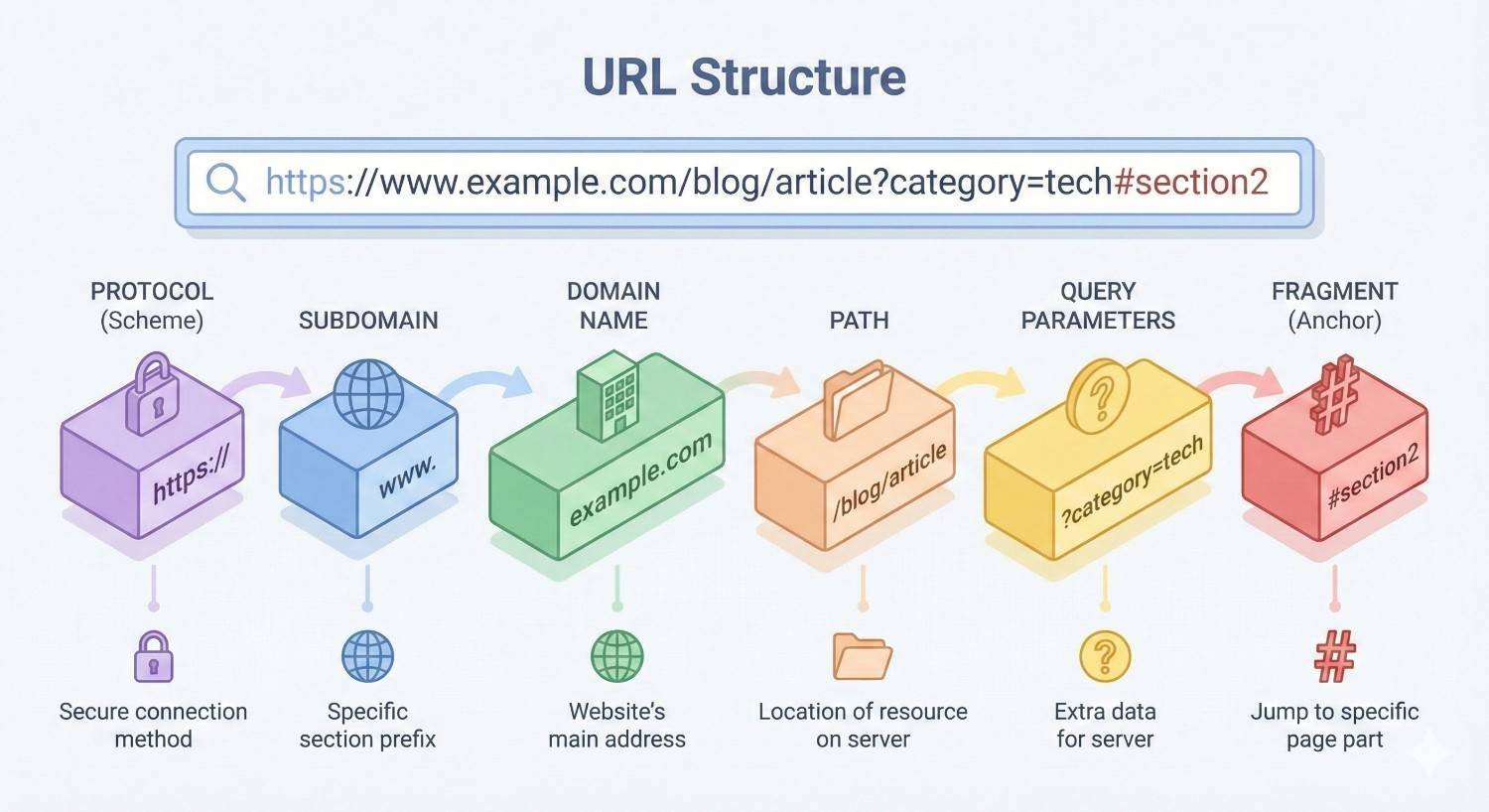
The protocol (https://) establishes the secure connection between browser and server. Google has confirmed HTTPS as a ranking signal, making secure protocols essential for modern websites.
The domain (example.com) represents your brand’s primary web address. This includes the subdomain (www or alternatives), the domain name itself, and the top-level domain (.com, .org, .co.uk).
The path (/category/page-name) indicates the specific page location within your site hierarchy. This is where most URL optimization occurs.
Parameters (?id=123&color=blue) pass additional information to the server. These query strings often create duplicate content issues when not managed properly.
Fragments (#section) point to specific sections within a page. Search engines typically ignore fragments when indexing.
Here is a breakdown of a complete URL:
| Component | Example | Purpose |
| Protocol | https:// | Security and connection type |
| Subdomain | www. | Server designation |
| Domain | example | Brand identifier |
| TLD | .com | Domain classification |
| Path | /shoes/running | Page location and hierarchy |
| Parameters | ?size=10 | Dynamic content variables |
| Fragment | #reviews | In-page navigation |
How URLs Communicate with Search Engines
URLs function as one of the first signals search engines receive about page content. Before crawlers even access your page content, they analyze the URL for relevance cues.
Search engines use URLs to understand topical relationships between pages. A URL like /digital-marketing/seo/link-building clearly communicates that the page belongs within a specific content hierarchy.
Googlebot and other crawlers also use URL patterns to predict content types. Product URLs typically follow different patterns than blog posts, helping search engines apply appropriate ranking factors.
URL words contribute to relevance signals. While not a dominant ranking factor, keywords in URLs provide contextual confirmation of page topics. This becomes particularly valuable when other on-page signals are ambiguous.
Clean URL structures also improve crawl efficiency. Search engines allocate limited crawl budget to each site. Simple, predictable URLs allow crawlers to discover and index content faster than complex, parameter-heavy alternatives.
Why URL Structure Matters for SEO
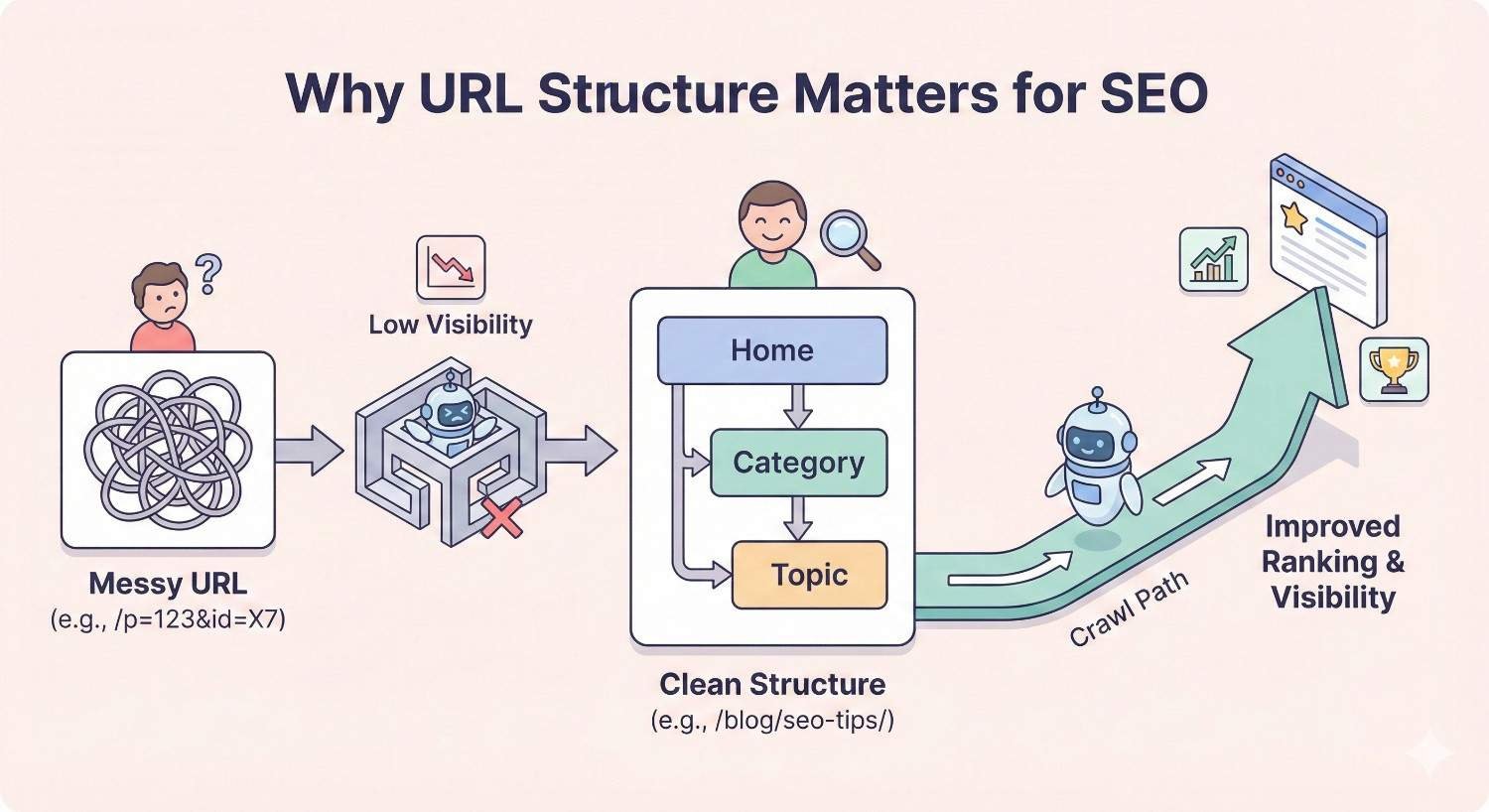
URL structure influences multiple ranking factors and user behavior metrics. Understanding these connections helps prioritize URL optimization within your broader SEO strategy.
Crawlability and Indexation
Search engines must crawl and index pages before they can rank. Poor URL structures create barriers at both stages.
Complex URLs with multiple parameters often trigger crawl traps. Search engines may interpret parameter variations as separate pages, wasting crawl budget on duplicate content. A single product page with color, size, and sorting parameters could generate hundreds of URL variations.
Logical URL hierarchies help search engines understand site architecture. When URLs reflect your content organization, crawlers can efficiently navigate between related pages and identify your most important content.
Deep URL structures (many subdirectories) can signal low page importance. Pages buried five or six levels deep may receive less crawl attention than those closer to the root domain.
Consistent URL patterns also support XML sitemap effectiveness. Search engines cross-reference sitemap URLs with discovered links. Inconsistent structures create discrepancies that slow indexation.
User Experience and Click-Through Rates
URLs appear in search results, browser address bars, and shared links. Their appearance directly affects user behavior.
Descriptive URLs set accurate expectations. Users scanning search results use URL text to verify relevance before clicking. A URL containing their search terms provides confidence the page addresses their needs.
Short, readable URLs are easier to share. Social media posts, emails, and messages often display full URLs. Clean addresses look more professional and trustworthy than parameter-filled alternatives.
URL readability also affects direct navigation. Users who remember partial URLs can often guess page locations on well-structured sites. This reduces reliance on search and improves return visitor experience.
Studies consistently show that users prefer shorter, keyword-rich URLs. While Google has stated URL length is not a direct ranking factor, the user behavior improvements from clean URLs indirectly support rankings.
Link Equity Distribution
URL structure determines how link authority flows through your website. Strategic planning maximizes the SEO value of every backlink.
Flat structures concentrate authority closer to the root domain. Pages one or two levels deep receive more direct link equity than deeply nested content.
Consistent URL patterns prevent authority dilution. When the same content is accessible through multiple URLs, backlinks split between versions. This fragmentation weakens ranking potential for all variations.
Logical hierarchies support internal linking strategies. Category pages can pass authority to subcategory and product pages through natural navigation paths. This creates topical clusters that strengthen overall domain authority.
URL structure also affects how external sites link to you. Complex URLs are more likely to be truncated or modified when shared, potentially creating broken links or misdirected authority.
URL Structure Best Practices
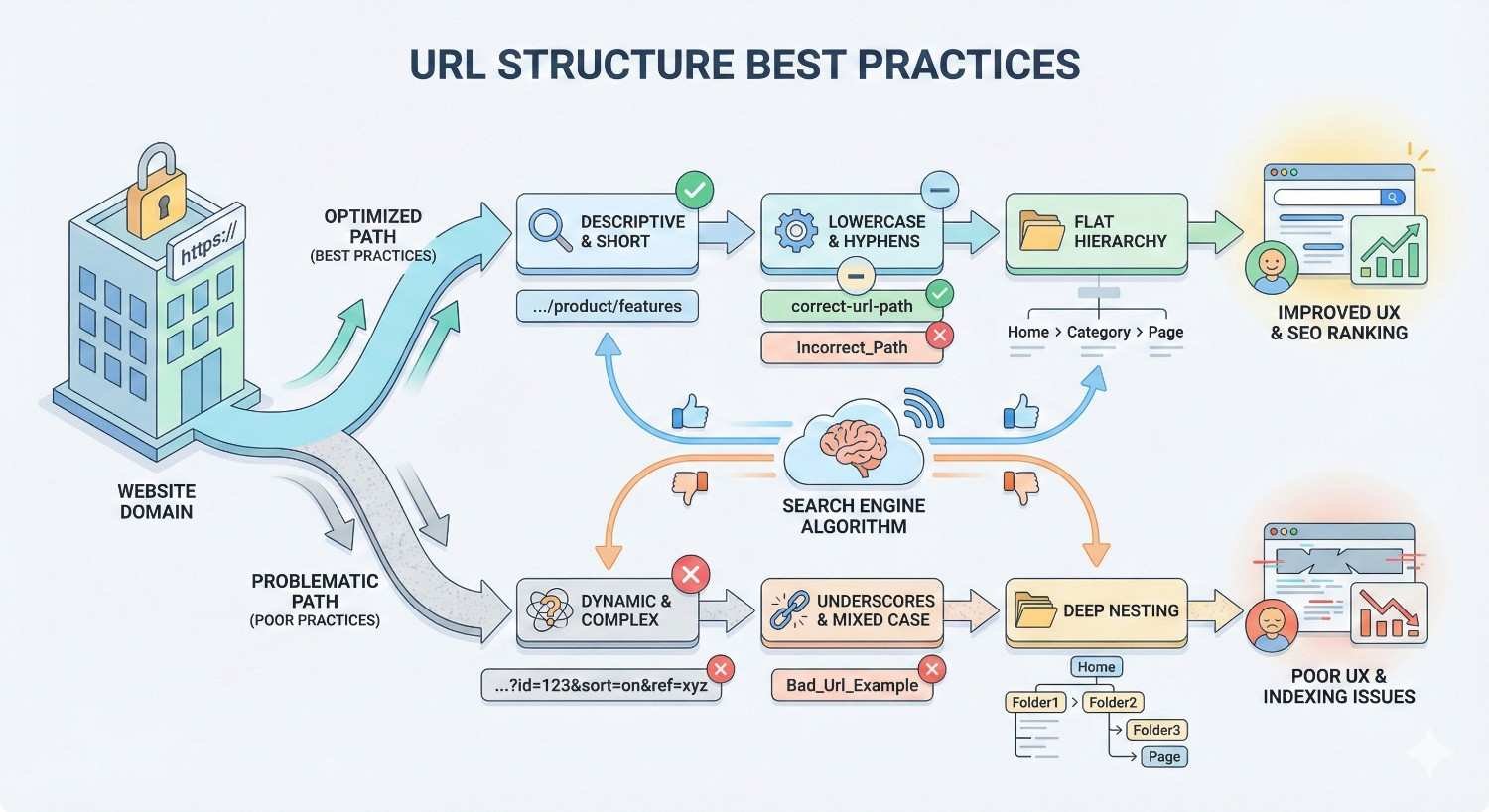
These guidelines apply across industries and website types. Implementing them consistently creates a foundation for long-term SEO success.
Keep URLs Short and Descriptive
Shorter URLs correlate with better rankings and user engagement. Aim for URLs that communicate page content in as few words as possible.
Remove unnecessary words like “the,” “and,” “of,” and “a.” These add length without improving clarity. Compare /the-best-guide-to-seo-for-beginners with /seo-beginners-guide.
Eliminate redundant category repetition. If your domain is shoes.com, you do not need /shoes/running-shoes/mens-running-shoes. Instead, use /running/mens.
Focus on the primary topic. Each URL should contain only the words necessary to identify the specific page content. Additional context comes from the broader site structure.
Target URLs between 50-60 characters for the path portion. This length typically accommodates necessary keywords while remaining readable and shareable.
Use Hyphens to Separate Words
Hyphens are the standard word separator for URLs. Search engines recognize hyphens as spaces, allowing them to parse individual words correctly.
Avoid underscores. Google historically treated underscores as word joiners rather than separators. While this distinction has lessened, hyphens remain the recommended standard.
Never use spaces. Spaces convert to %20 in URLs, creating ugly, confusing addresses that appear broken to users.
Avoid other special characters. Ampersands, plus signs, and other symbols can cause encoding issues and confuse both users and search engines.
Correct format: /content-marketing-strategy Incorrect formats: /content_marketing_strategy, /content%20marketing%20strategy, /contentmarketingstrategy
Include Target Keywords Naturally
URLs should contain relevant keywords that accurately describe page content. This supports both search engine understanding and user expectations.
Place the primary keyword early in the URL path. Search engines may give more weight to words appearing earlier in URLs.
Use the same keyword variations as your page title and H1. Consistency across these elements reinforces topical relevance.
Avoid forcing keywords where they do not fit naturally. A URL like /best-cheap-affordable-budget-running-shoes damages credibility and may trigger spam filters.
Match keyword specificity to page purpose. Category pages use broader terms (/running-shoes) while product pages use specific identifiers (/nike-air-zoom-pegasus-40).
Use Lowercase Letters Only
Lowercase URLs prevent duplicate content issues and user errors. Some servers treat uppercase and lowercase URLs as different pages.
Configure your server to automatically redirect uppercase URLs to lowercase versions. This prevents accidental duplicate content creation.
Consistent lowercase usage also improves memorability. Users do not need to remember capitalization patterns when typing URLs directly.
Most CMS platforms default to lowercase URLs, but always verify this setting during site setup. Manual URL creation should follow the same standard.
Avoid Dynamic Parameters When Possible
Dynamic parameters create multiple URLs for similar or identical content. This wastes crawl budget and dilutes ranking signals.
Use static, descriptive URLs instead of parameter-based alternatives. Replace /products?category=shoes&type=running with /shoes/running.
When parameters are necessary (filtering, sorting, session tracking), implement proper canonicalization. Tell search engines which URL version to index.
Use Google Search Console’s URL Parameters tool to indicate how Googlebot should handle specific parameters. This prevents unnecessary crawling of parameter variations.
Consider implementing AJAX or JavaScript-based filtering that does not modify URLs. Users can filter content without creating indexable URL variations.
Implement Logical Hierarchy
URL paths should reflect your site’s content organization. This creates predictable patterns that benefit both users and search engines.
Structure URLs from general to specific. Start with broad categories and narrow to specific pages: /category/subcategory/page-name.
Limit directory depth to three or four levels. Deeper structures suggest low page importance and complicate navigation.
Ensure parent directories exist as actual pages. If your URL is /services/seo/technical-audit, both /services and /services/seo should be accessible, indexable pages.
Maintain consistency across similar content types. All blog posts should follow the same pattern, as should all product pages and all service pages.
Planning Your URL Hierarchy
Strategic URL hierarchy planning aligns your address structure with site architecture and business goals. This planning phase prevents costly restructuring later.
Mapping Site Architecture to URLs
Begin URL planning by documenting your complete site structure. Every page type needs a defined URL pattern before development begins.
Create a visual sitemap showing all planned pages and their relationships. This reveals natural category groupings and hierarchy levels.
Identify your most important pages. These should have the shortest, most direct URLs. Homepage links directly to primary category pages, which link to subcategories, which link to individual content.
Consider future expansion. Your URL structure should accommodate new categories, products, or content types without requiring existing URL changes.
Document URL patterns for each page type:
- Category pages: /category-name
- Subcategory pages: /category-name/subcategory-name
- Product pages: /category-name/product-name or /products/product-name
- Blog posts: /blog/post-title or /resources/post-title
- Service pages: /services/service-name
Category and Subcategory Structure
Category URLs establish the primary organizational framework for your content. Plan these carefully as they affect all child pages.
Use clear, keyword-rich category names. Categories should match how users search for and think about your content groupings.
Limit subcategory depth. Most sites function well with two category levels (category/subcategory). Three levels may be necessary for large catalogs but rarely more.
Avoid overlapping categories. Each page should have one logical home in your hierarchy. Multiple valid category paths create duplicate content risks.
Consider whether subcategories need their own URLs. Sometimes subcategories function better as filtered views of parent categories rather than separate indexable pages.
Example hierarchy for an outdoor equipment retailer:
- /camping (category)
- /camping/tents (subcategory)
- /camping/tents/backpacking-tents (sub-subcategory or filtered view)
- /camping/tents/msr-hubba-hubba (product)
Flat vs. Deep URL Structures
Flat structures place most pages one or two levels from the root domain. Deep structures use multiple directory levels to organize content.
Flat structure advantages:
- Concentrates link equity near the root
- Simplifies navigation and crawling
- Reduces click depth to important pages
- Works well for smaller sites
Deep structure advantages:
- Clearly communicates content relationships
- Scales better for large sites
- Supports detailed categorization
- Matches user mental models for complex topics
Most sites benefit from a hybrid approach. Keep important pages shallow while using deeper structures for extensive content libraries.
The right choice depends on site size and content relationships. A 50-page service business needs flat URLs. A 10,000-product ecommerce site requires hierarchical organization.
URL Structure for Different Page Types
Different content types serve different purposes and benefit from distinct URL patterns.
Homepage and Main Navigation
Your homepage URL is simply your domain. Main navigation pages should be one level deep with clear, keyword-focused slugs.
Primary navigation URLs:
- example.com/services
- example.com/products
- example.com/about
- example.com/contact
- example.com/blog
These pages receive the most internal links and should target your broadest, highest-volume keywords.
Product and Service Pages
Product URLs should be descriptive enough to identify the specific item without excessive length.
Include the product name and key identifiers. Avoid including attributes that might change (prices, colors, sizes) in the URL itself.
Good product URL: /running-shoes/nike-air-zoom-pegasus-40 Poor product URL: /p/12345 or /running-shoes/nike-air-zoom-pegasus-40-black-size-10-mens
Service pages follow similar principles. Use the service name and any necessary qualifiers.
Good service URL: /services/technical-seo-audit Poor service URL: /services/service-page-3
Blog and Resource Content
Blog URLs should prioritize the post topic over organizational metadata. Dates and categories in URLs often create more problems than they solve.
Recommended: /blog/url-structure-best-practices Avoid: /blog/2024/03/15/seo/technical/url-structure-best-practices
Removing dates keeps content evergreen. You can update posts without the URL suggesting outdated information.
If you use categories in blog URLs, keep them to one level: /blog/seo/url-structure-planning rather than /blog/seo/technical-seo/on-page/url-structure-planning.
Location-Based Pages
Local business pages require geographic identifiers in URLs. Structure these consistently across all locations.
Pattern: /locations/city-name or /service-name-city-name
Examples:
- /locations/chicago
- /plumber-chicago
- /services/plumbing/chicago
For businesses serving multiple areas, create a scalable pattern:
- /locations/state/city
- /locations/illinois/chicago
Avoid keyword stuffing location pages: /best-plumber-chicago-il-plumbing-services-chicago-area
Common URL Structure Mistakes to Avoid
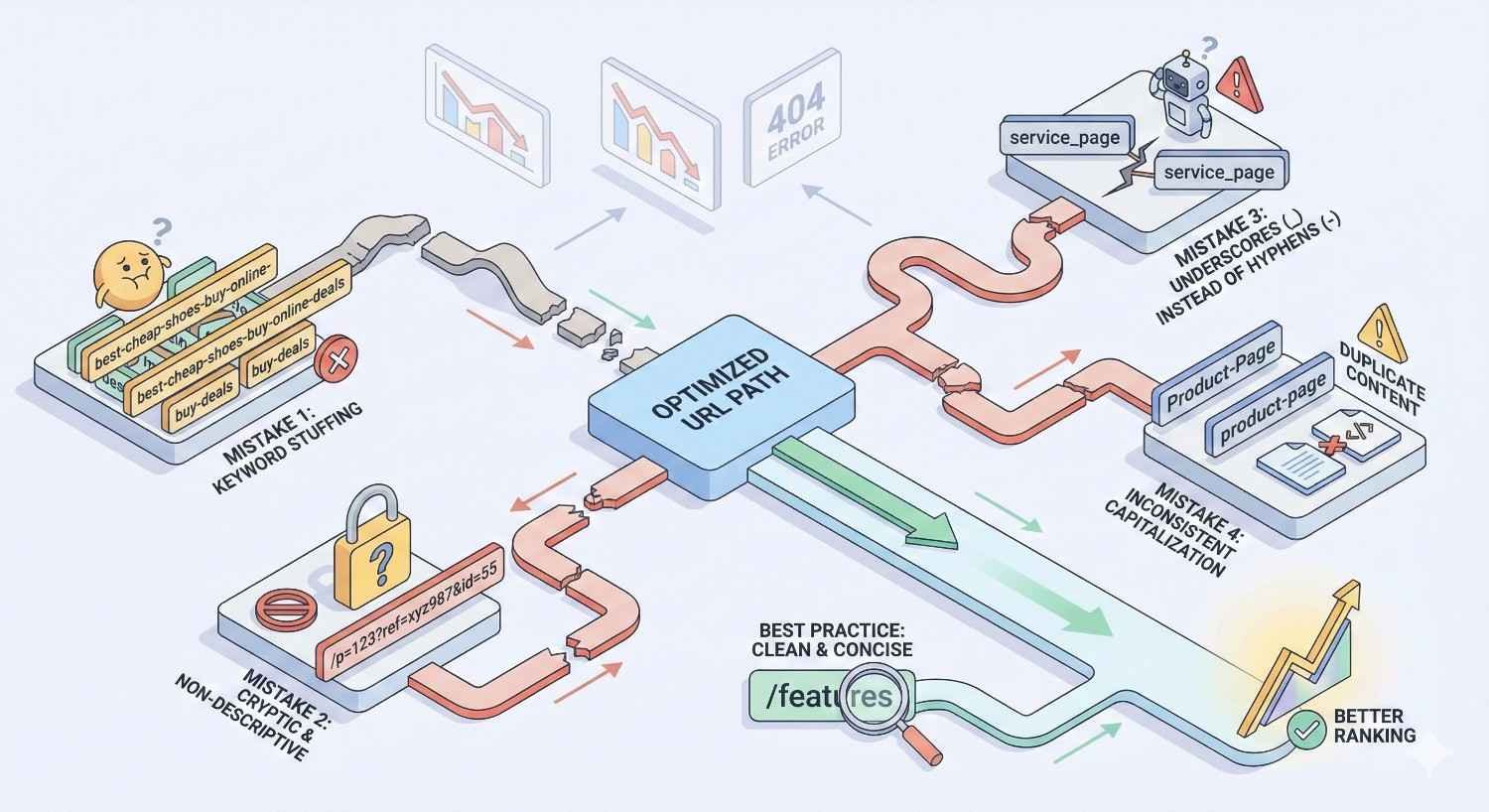
These errors appear frequently across websites of all sizes. Identifying and correcting them improves crawlability, user experience, and ranking potential.
Using Auto-Generated URLs
Content management systems often create URLs automatically based on page titles or database IDs. These defaults rarely produce optimal results.
Auto-generated problems include:
- Excessively long URLs from full page titles
- Meaningless ID numbers (/page?id=4827)
- Inconsistent patterns across similar content
- Special characters and encoding issues
Always manually review and edit URLs before publishing. Most CMS platforms allow custom URL slugs even when auto-generation is enabled.
Create URL guidelines for content creators. Document your patterns and provide examples so everyone follows consistent standards.
Keyword Stuffing in URLs
Including relevant keywords helps. Repeating keywords or cramming multiple variations hurts.
Stuffed URL: /seo-services-best-seo-company-seo-experts-affordable-seo Clean URL: /seo-services
Keyword stuffing in URLs signals low-quality content to search engines. It also looks spammy to users, reducing click-through rates.
Use one primary keyword phrase per URL. Additional relevance signals come from page content, not URL repetition.
Creating Duplicate URL Paths
Multiple URLs accessing the same content splits ranking signals and confuses search engines.
Common duplicate URL causes:
- www vs. non-www versions
- HTTP vs. HTTPS versions
- Trailing slash vs. no trailing slash
- Parameter variations
- Case sensitivity issues
- Index.html or default.asp suffixes
Implement server-level redirects to enforce one canonical URL pattern. Choose your preferred format and redirect all variations.
Use canonical tags as a backup signal, but do not rely on them alone. Redirects provide stronger consolidation.
Ignoring URL Canonicalization
Canonicalization tells search engines which URL version to index when multiple versions exist. Ignoring this creates duplicate content problems.
Every page should have a self-referencing canonical tag pointing to its preferred URL. This confirms the correct version even when no duplicates exist.
Canonical tags should use absolute URLs (https://example.com/page) rather than relative URLs (/page).
Ensure canonical URLs match your internal linking. Do not link to /page/ while canonicalizing to /page. Consistency reinforces your preferred version.
Pagination requires special canonical handling. Paginated series should not canonicalize to page one unless the pages contain truly duplicate content.
Changing URLs Without Redirects
URL changes without proper redirects cause immediate ranking and traffic loss. Search engines cannot automatically connect old URLs to new locations.
Every changed URL needs a 301 redirect from the old address to the new one. This transfers ranking signals and prevents 404 errors for existing links.
Maintain redirects indefinitely for high-value pages. Removing redirects after a few months can resurface ranking losses.
Update internal links to point directly to new URLs. Redirects work but add unnecessary server requests and slightly dilute link equity.
Notify external sites linking to changed URLs when possible. Direct links to new URLs are always preferable to redirected links.
How to Audit and Fix Existing URL Structures
Most websites have URL issues accumulated over years of content creation. Systematic auditing identifies problems and prioritizes fixes.
Conducting a URL Audit
Start with a complete crawl of your website. Tools like Screaming Frog, Sitebulb, or Ahrefs Site Audit capture all accessible URLs and their characteristics.
Export your URL list and analyze for common issues:
- URLs exceeding 100 characters
- URLs containing uppercase letters
- URLs with parameters or special characters
- Duplicate content (same content, different URLs)
- Redirect chains (multiple redirects in sequence)
- Broken internal links
- Orphan pages (no internal links pointing to them)
Cross-reference with Google Search Console data. Identify URLs with impressions and clicks that might be affected by changes.
Check your XML sitemap against crawl results. Discrepancies indicate indexation or crawlability issues.
Prioritizing URL Changes
Not all URL problems require immediate attention. Prioritize based on page importance and issue severity.
High priority fixes:
- Duplicate content affecting important pages
- Broken redirects losing significant traffic
- Canonical errors on high-ranking pages
- Security issues (HTTP pages that should be HTTPS)
Medium priority fixes:
- Suboptimal URLs on pages with ranking potential
- Inconsistent patterns causing confusion
- Unnecessary parameters on important pages
Low priority fixes:
- Minor formatting issues on low-traffic pages
- Historical URLs with no current links
- Cosmetic improvements with minimal SEO impact
Create a phased implementation plan. Changing too many URLs simultaneously makes it difficult to diagnose problems if rankings drop.
Implementing 301 Redirects
301 redirects permanently transfer ranking signals from old URLs to new ones. Proper implementation preserves SEO value during URL changes.
Implement redirects at the server level when possible. Server redirects execute faster than plugin or application-level alternatives.
For Apache servers, use .htaccess rules:
Copy
Redirect 301 /old-page /new-page
For Nginx servers, use rewrite rules in your configuration:
Copy
rewrite ^/old-page$ /new-page permanent;
Avoid redirect chains. If /page-a redirects to /page-b, and you later want /page-b to redirect to /page-c, update the original redirect to go directly from /page-a to /page-c.
Test redirects after implementation. Verify that old URLs properly redirect and that no redirect loops exist.
Monitoring Post-Migration Performance
URL changes require careful monitoring to catch problems early. Track key metrics for several months after implementation.
Monitor in Google Search Console:
- Crawl errors and 404 pages
- Index coverage changes
- Ranking changes for affected pages
- Click and impression trends
Monitor in Google Analytics:
- Traffic to new URLs
- Traffic loss from old URLs (should be zero with proper redirects)
- User behavior metrics on changed pages
Monitor with rank tracking tools:
- Keyword position changes
- SERP feature changes
- Competitor movement
Expect some fluctuation in the weeks following URL changes. Significant drops lasting more than 2-3 weeks indicate implementation problems requiring investigation.
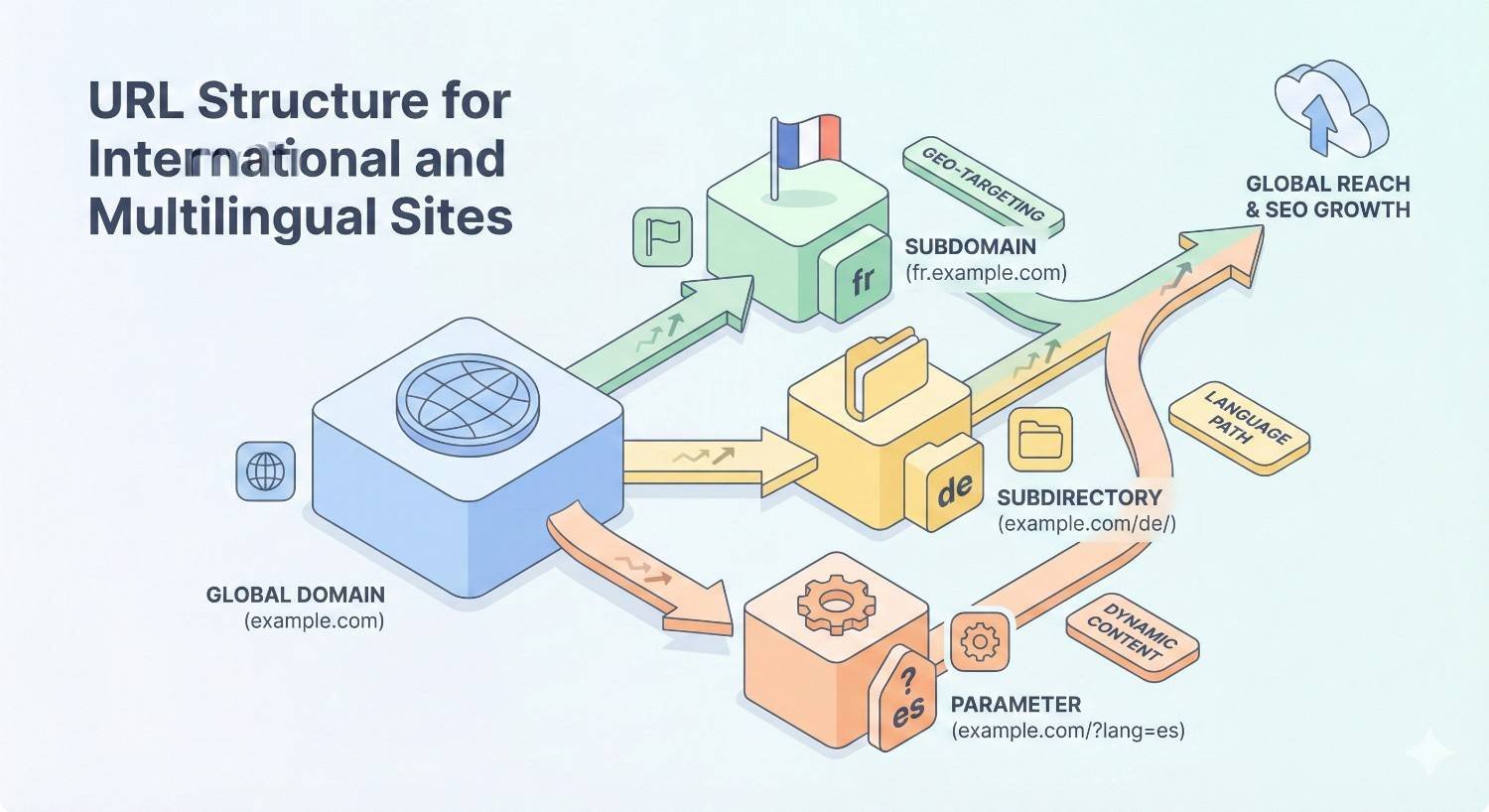
URL Structure for International and Multilingual Sites
Websites targeting multiple countries or languages face additional URL structure decisions. The right approach depends on your specific international strategy.
Country Code Top-Level Domains (ccTLDs)
Country-code domains (.co.uk, .de, .fr) provide the strongest geographic signals to search engines.
ccTLD advantages:
- Clear country targeting
- User trust in local markets
- Separate domain authority for each market
ccTLD disadvantages:
- Higher cost (multiple domain registrations)
- Split link equity across domains
- More complex management
- Requires building authority for each domain separately
ccTLDs work best for businesses with strong local presence and resources to build authority in each market independently.
Subdirectories vs. Subdomains
Subdirectories (/fr/, /de/) and subdomains (fr.example.com, de.example.com) offer alternatives to ccTLDs for international targeting.
Subdirectory advantages:
- Consolidated domain authority
- Simpler management
- Lower cost
- Easier internal linking
Subdirectory disadvantages:
- Weaker geographic signals than ccTLDs
- Requires geo-targeting setup in Search Console
Subdomain advantages:
- Clearer separation between language versions
- Can host on different servers by region
- Easier to manage with different teams
Subdomain disadvantages:
- May be treated as separate sites by search engines
- Potentially split link equity
- More complex technical setup
Most SEO professionals recommend subdirectories for international sites. The consolidated authority benefits typically outweigh the slightly weaker geographic signals.
Hreflang Implementation Considerations
Hreflang tags tell search engines which language and regional versions of pages exist. URL structure affects hreflang implementation complexity.
Consistent URL patterns across language versions simplify hreflang management. If your English page is /services/seo, your French version should be /fr/services/seo, not /fr/referencement.
Self-referencing hreflang tags are required. Every page must include a tag pointing to itself in addition to tags for other language versions.
Hreflang requires reciprocal confirmation. If page A references page B as its French version, page B must reference page A as its English version.
URL structure should support easy hreflang generation. Predictable patterns allow automated tag creation rather than manual specification for each page.
URL Structure and Site Migration
Website redesigns and platform migrations create significant URL change risks. Proper planning preserves years of accumulated SEO value.
Planning URLs Before a Redesign
URL structure decisions should happen early in the redesign process. Retrofitting URL changes after development creates unnecessary work and risk.
Document your current URL structure completely. Every existing URL needs a planned destination in the new structure.
Identify URLs that should remain unchanged. High-performing pages with strong backlink profiles benefit from URL continuity.
Define new URL patterns before development begins. Developers need clear specifications to implement correct structures from the start.
Consider SEO requirements in platform selection. Some CMS platforms offer more URL flexibility than others. Verify your preferred structure is achievable before committing.
Redirect Mapping Strategies
Redirect mapping connects every old URL to its appropriate new destination. This document guides implementation and serves as a reference for troubleshooting.
Create a spreadsheet with columns for:
- Old URL
- New URL
- Redirect type (301 for permanent changes)
- Page importance/priority
- Implementation status
- Testing status
Map URLs based on content destination, not URL similarity. If /services/consulting becomes /solutions/business-consulting, the redirect follows the content.
Handle deleted pages appropriately. Content removed without replacement should redirect to the most relevant existing page, not the homepage.
Plan for URL patterns, not just individual pages. Regex-based redirects can handle entire sections efficiently: /old-blog/* → /blog/*
Preserving SEO Value During Migration
Migrations inherently carry ranking risk. Minimize this risk through careful planning and execution.
Pre-migration preparation:
- Complete redirect mapping
- Benchmark current rankings and traffic
- Backup current site completely
- Test redirects in staging environment
During migration:
- Implement all redirects simultaneously with launch
- Update XML sitemap immediately
- Submit new sitemap to Search Console
- Update internal links to new URLs
Post-migration monitoring:
- Check for crawl errors daily for first two weeks
- Monitor rankings for key pages
- Verify redirect functionality
- Address issues immediately
Expect 10-20% traffic fluctuation during the first month. Larger or prolonged drops indicate problems requiring investigation.
Tools for URL Structure Planning
The right tools make URL auditing, planning, and monitoring more efficient. These options cover different needs and budgets.
Screaming Frog and Crawling Tools
Screaming Frog SEO Spider is the industry standard for website crawling. It captures comprehensive URL data for analysis.
Key features for URL analysis:
- Complete URL inventory
- Duplicate content detection
- Redirect chain identification
- Response code analysis
- URL length and character analysis
The free version crawls up to 500 URLs. Paid licenses remove this limit and add advanced features.
Alternative crawling tools:
- Sitebulb: Visual crawl analysis with automated recommendations
- DeepCrawl: Enterprise-level crawling with extensive reporting
- Ahrefs Site Audit: Combines crawling with backlink data
Google Search Console URL Inspection
Google Search Console provides direct insight into how Google sees your URLs. The URL Inspection tool shows indexation status and any issues.
URL Inspection reveals:
- Whether a URL is indexed
- How Google discovered the URL
- Canonical URL Google selected
- Mobile usability status
- Any crawling or indexing errors
Use URL Inspection to verify redirect implementation. Check that old URLs show the redirect and new URLs show as indexed.
The Index Coverage report identifies URL-level issues across your entire site. Filter by error type to prioritize fixes.
Sitemap Generators and Validators
XML sitemaps communicate your URL structure directly to search engines. Proper sitemap management supports crawling and indexation.
Sitemap generators:
- Screaming Frog (export crawl as sitemap)
- Yoast SEO (WordPress automatic generation)
- XML-Sitemaps.com (online generator for smaller sites)
Sitemap validators:
- Google Search Console (submit and monitor)
- XML Sitemap Validator (standalone validation)
- Screaming Frog (sitemap analysis mode)
Ensure your sitemap only includes canonical, indexable URLs. Exclude redirects, noindex pages, and duplicate content.
Update sitemaps immediately after URL changes. Prompt sitemap submission accelerates search engine discovery of new URL structures.
URL Structure Checklist for New Websites
New websites have the advantage of implementing correct URL structures from the start. Use this checklist to ensure nothing is overlooked.
Pre-Launch URL Planning Steps
Architecture planning:
- Document complete site structure
- Define URL patterns for each page type
- Establish maximum directory depth
- Plan category and subcategory hierarchy
- Identify primary keywords for main sections
Technical configuration:
- Choose www vs. non-www and configure redirects
- Implement HTTPS across all pages
- Set trailing slash preference and enforce consistency
- Configure lowercase URL enforcement
- Set up proper canonical tag implementation
CMS and platform setup:
- Disable auto-generated URL features or configure properly
- Create URL slug guidelines for content creators
- Test URL generation with sample content
- Verify parameter handling configuration
- Confirm pagination URL structure
Content preparation:
- Create custom URLs for all launch content
- Review URLs for keyword inclusion
- Check URL lengths (under 75 characters preferred)
- Verify no duplicate URL paths exist
- Confirm internal links use correct URL format
Pre-launch verification:
- Crawl staging site to identify issues
- Test all URL patterns function correctly
- Verify redirects work as expected
- Confirm XML sitemap accuracy
- Check robots.txt allows intended crawling
Launch day:
- Submit XML sitemap to Search Console
- Request indexing for priority pages
- Monitor crawl errors closely
- Verify live URLs match planned structure
Conclusion
URL structure planning establishes the foundation for long-term SEO success. Clean, logical URLs improve crawlability, strengthen topical signals, and create better user experiences that support higher rankings and engagement.
The principles covered here apply whether you are building a new website or optimizing an existing one. Consistent patterns, descriptive slugs, proper hierarchy, and careful change management protect and enhance your organic visibility.
We help businesses implement SEO-friendly URL structures as part of comprehensive technical optimization at White Label SEO Service. From initial planning through migration support and ongoing monitoring, our team ensures your URL architecture supports sustainable organic growth.
Frequently Asked Questions About URL Structure
Do URLs Affect Search Rankings?
URLs are a minor but confirmed ranking factor. Google uses URL words as relevance signals, though page content carries far more weight. The bigger impact comes from how URL structure affects crawlability, user experience, and link equity distribution. Clean URLs support better performance across all these areas.
Should I Include Dates in Blog URLs?
Avoid dates in blog URLs for most content. Dates make evergreen content appear outdated and require URL changes when you update posts. The exception is genuinely time-sensitive content like news articles or event coverage where the date is essential context.
How Long Should a URL Be?
Keep URL paths under 75 characters when possible. Shorter URLs are easier to read, share, and remember. While Google can process longer URLs, excessively long addresses often indicate keyword stuffing or poor structure. Focus on including only necessary words.
Can I Use Underscores Instead of Hyphens?
Use hyphens, not underscores. Google treats hyphens as word separators but historically treated underscores as word joiners. While this distinction has become less significant, hyphens remain the industry standard and ensure maximum compatibility.
How Do I Change My URL Structure Without Losing Rankings?
Implement 301 redirects from every old URL to its new equivalent. Update your XML sitemap, submit it to Search Console, and monitor crawl errors closely. Expect some ranking fluctuation for 2-4 weeks. Maintain redirects permanently for pages with external backlinks.
What Tools Help With URL Structure Planning?
Screaming Frog SEO Spider provides comprehensive URL auditing through site crawls. Google Search Console offers URL inspection and index coverage data. Sitemap generators and validators ensure proper communication with search engines. Most SEO platforms include URL analysis features.
Should Product URLs Include Category Paths?
Including category paths (/shoes/running/nike-pegasus) provides hierarchy context but creates longer URLs and potential issues if products move between categories. Flat product URLs (/products/nike-pegasus) are simpler but lose hierarchical signals. Choose based on your catalog size and how often products change categories.


