

Browser caching stores website files locally on visitors’ devices, eliminating redundant server requests and dramatically improving page load times. This technical SEO foundation directly impacts your Core Web Vitals scores, user experience metrics, and search rankings.
Slow websites lose visitors and rankings. Google confirms page speed as a ranking factor, making caching optimization essential for competitive organic visibility.
This guide covers caching implementation, best practices, measurement tools, and troubleshooting strategies to help you build faster, higher-ranking websites.
What Is Browser Caching and Why It Matters for SEO
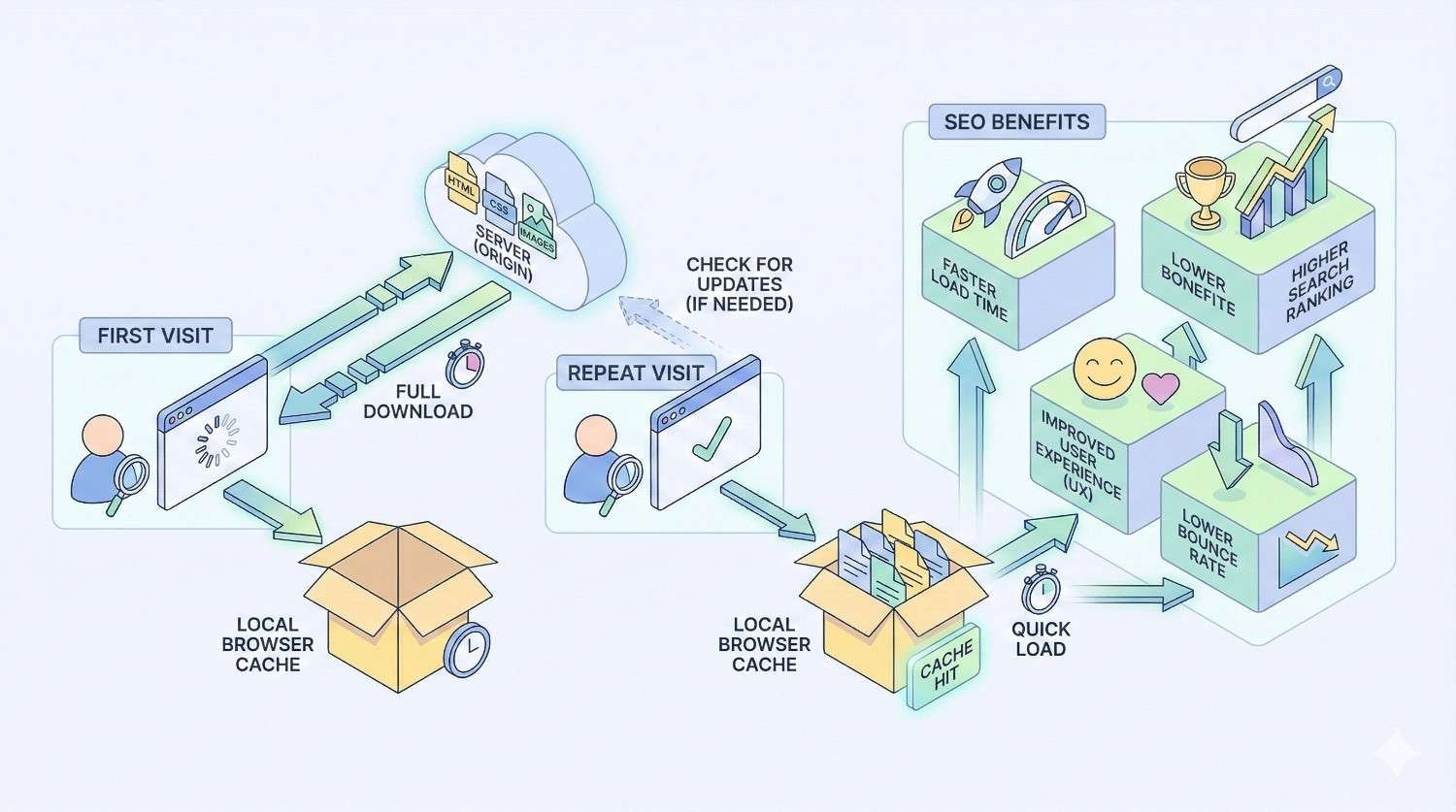
Browser caching is a mechanism that stores copies of web resources locally on a user’s device. When someone visits your website, their browser downloads files like images, CSS stylesheets, JavaScript files, and fonts. Without caching, the browser requests these same files every single visit. With caching enabled, the browser retrieves stored copies instead, loading pages significantly faster.
For SEO, this matters because Google uses page speed as a ranking signal. Faster sites provide better user experiences, reduce bounce rates, and signal quality to search engines. Browser caching represents one of the most impactful technical optimizations you can implement.
How Browser Caching Works (Technical Overview)
When a user first visits your website, their browser sends HTTP requests to your server for every resource needed to render the page. Your server responds with the files plus HTTP headers containing caching instructions.
These headers tell the browser how long to store each file locally. Common caching headers include Cache-Control, Expires, and ETag. Cache-Control uses directives like max-age=31536000 to specify caching duration in seconds. Expires sets an absolute expiration date.
On subsequent visits, the browser checks its local cache first. If valid cached copies exist, it uses them without contacting your server. This eliminates network latency, reduces bandwidth consumption, and delivers near-instant page loads for returning visitors.
The browser validates cached resources using ETags or Last-Modified headers. If a resource changed, the server sends the new version. If unchanged, it returns a 304 Not Modified response, confirming the cached version remains valid.
The Connection Between Page Speed and Search Rankings
Google has explicitly confirmed page speed as a ranking factor since 2010 for desktop and 2018 for mobile searches. The relationship between speed and rankings operates through multiple mechanisms.
Direct ranking signals include Core Web Vitals metrics that Google measures and incorporates into search algorithms. Indirect signals include user behavior metrics like bounce rate, time on site, and pages per session. Slow sites consistently underperform on these engagement metrics.
Research from Google shows that as page load time increases from 1 second to 3 seconds, bounce probability increases by 32%. At 5 seconds, bounce probability jumps to 90%. These user experience degradations translate directly into ranking disadvantages.
Competitive analysis reveals that top-ranking pages typically load faster than lower-ranking competitors. While speed alone won’t guarantee rankings, slow speeds create a ceiling that limits your ranking potential regardless of content quality.
Core Web Vitals and Caching Performance
Core Web Vitals are Google’s specific metrics for measuring user experience. Browser caching directly impacts two of the three primary metrics.
Largest Contentful Paint (LCP) measures how quickly the main content loads. Caching images, fonts, and CSS files that contribute to LCP dramatically improves this metric for returning visitors. Google recommends LCP under 2.5 seconds for good user experience.
First Input Delay (FID) measures interactivity responsiveness. Cached JavaScript files load faster, reducing main thread blocking and improving FID scores. Google recommends FID under 100 milliseconds.
Cumulative Layout Shift (CLS) measures visual stability. While caching doesn’t directly affect CLS, faster resource loading can prevent layout shifts caused by late-loading elements.
Proper caching implementation can improve LCP by 40-60% for repeat visitors. This improvement compounds across your entire user base, as returning visitors typically represent a significant portion of traffic.
How Browser Caching Improves SEO Performance
Browser caching creates measurable improvements across multiple SEO performance indicators. Understanding these connections helps prioritize caching within your broader optimization strategy.
Faster Page Load Times = Better User Experience
Speed improvements from caching translate directly into better user experiences. Returning visitors experience dramatically faster page loads because their browsers already have most resources stored locally.
First-time visitors also benefit indirectly. Proper caching reduces server load, allowing faster response times for all requests. Additionally, once a visitor loads one page, subsequent pages on your site load faster because shared resources are already cached.
User experience improvements manifest in measurable metrics. Lower bounce rates indicate visitors find your content accessible. Higher pages per session suggest easier navigation. Longer session durations reflect engagement that search engines interpret as quality signals.
These behavioral improvements create a positive feedback loop. Better user metrics lead to better rankings, which attract more traffic, which generates more positive signals.
Reduced Server Load and Bandwidth Usage
Every HTTP request your server handles consumes resources. Without caching, servers must process and deliver the same files repeatedly to the same visitors. This creates unnecessary load that degrades performance for everyone.
Effective caching reduces server requests by 60-80% for returning visitors. This reduction frees server resources to handle more concurrent users, respond faster to new requests, and maintain performance during traffic spikes.
Bandwidth savings are equally significant. Large files like images and JavaScript libraries consume substantial bandwidth when delivered repeatedly. Caching eliminates this redundant data transfer, reducing hosting costs and improving delivery speed.
For sites with significant returning visitor traffic, these efficiency gains compound dramatically. E-commerce sites, membership platforms, and content sites with loyal audiences see the greatest benefits.
Impact on Crawl Budget and Indexing Efficiency
Crawl budget refers to how many pages Googlebot will crawl on your site within a given timeframe. While Google states crawl budget isn’t a concern for most sites, larger sites with thousands of pages must optimize crawl efficiency.
Faster page loads allow Googlebot to crawl more pages in less time. When your server responds quickly, crawlers can process more of your content during each crawl session. This improves indexing speed for new and updated content.
Server efficiency from caching also prevents crawl rate limiting. If your server struggles under load, Google automatically reduces crawl frequency to avoid overwhelming your infrastructure. Caching helps maintain consistent server performance that supports aggressive crawling.
For large e-commerce catalogs, news sites, or content-heavy platforms, these crawl efficiency improvements directly impact how quickly new pages appear in search results.
Mobile Performance and Caching Benefits
Mobile users face additional performance challenges including slower network connections, limited processing power, and variable connectivity. Browser caching addresses several of these constraints.
Cached resources eliminate network requests entirely, bypassing slow mobile connections. This is particularly valuable for users on 3G networks or in areas with poor coverage. A cached page loads almost instantly regardless of network conditions.
Mobile devices also benefit from reduced processing requirements. Parsing and executing JavaScript consumes significant CPU resources on mobile devices. Cached, already-parsed resources reduce this processing burden.
Google’s mobile-first indexing means your mobile performance directly determines rankings for all searches. Caching optimization for mobile users isn’t optional—it’s essential for competitive visibility.
Types of Browser Caching for SEO Optimization
Understanding different caching mechanisms helps you implement comprehensive strategies that address various performance scenarios.
HTTP Caching (Cache-Control Headers)
Cache-Control headers provide the primary mechanism for controlling browser caching behavior. These headers offer granular control over how browsers store and validate resources.
Key Cache-Control directives include:
- max-age: Specifies how long (in seconds) a resource remains valid
- public: Allows caching by browsers and intermediate caches
- private: Restricts caching to the user’s browser only
- no-cache: Requires validation before using cached copies
- no-store: Prevents any caching of the resource
- immutable: Indicates the resource will never change
Effective Cache-Control implementation combines these directives strategically. Static assets like images and fonts use long max-age values with immutable flags. Dynamic content uses shorter durations or no-cache directives requiring validation.
Example header for static assets: Cache-Control: public, max-age=31536000, immutable
Example header for HTML pages: Cache-Control: no-cache, must-revalidate
Browser Cache vs. Server-Side Caching
Browser caching and server-side caching serve different purposes within your performance optimization stack.
Browser caching stores resources on the user’s device. Benefits include eliminated network requests, instant loading for cached resources, and reduced bandwidth consumption. Limitations include no benefit for first-time visitors and cache storage limits on user devices.
Server-side caching stores processed content on your server or intermediate systems. This includes page caching (storing complete HTML pages), object caching (storing database query results), and opcode caching (storing compiled PHP code).
These caching types complement each other. Server-side caching speeds up content generation for all visitors. Browser caching eliminates delivery overhead for returning visitors. Implementing both creates multiplicative performance improvements.
For SEO purposes, both caching types contribute to faster page loads. Server-side caching improves Time to First Byte (TTFB), while browser caching improves subsequent resource loading.
Static vs. Dynamic Resource Caching
Different resource types require different caching strategies based on how frequently they change.
Static resources rarely or never change after deployment. These include:
- Images and media files
- CSS stylesheets (versioned)
- JavaScript libraries (versioned)
- Font files
- PDF documents
Static resources should use aggressive caching with long expiration times (one year is common). Use cache busting techniques like version numbers or content hashes in filenames to force updates when needed.
Dynamic resources change frequently or contain personalized content. These include:
- HTML pages
- API responses
- User-specific content
- Real-time data feeds
Dynamic resources require shorter cache durations or validation-based caching. HTML pages might cache for minutes or hours, with ETags enabling efficient validation.
Misclassifying resources creates problems. Caching dynamic content too aggressively serves stale information. Under-caching static resources wastes performance opportunities.
CDN Caching and Edge Network Performance
Content Delivery Networks (CDNs) add another caching layer between your origin server and users. CDNs store copies of your content on servers distributed globally, delivering resources from locations geographically closer to each user.
CDN caching provides several SEO benefits:
Reduced latency: Users receive content from nearby edge servers rather than distant origin servers. This dramatically improves TTFB and overall page load times.
Improved reliability: CDN infrastructure handles traffic spikes and provides redundancy if your origin server experiences issues.
Global performance: International visitors experience consistent performance regardless of your server location.
CDN caching works alongside browser caching. The CDN caches content at edge locations, then sets browser caching headers for end users. Both layers contribute to overall performance.
Popular CDN providers include Cloudflare, Fastly, Amazon CloudFront, and Akamai. Many offer free tiers suitable for small to medium websites.
How to Implement Browser Caching for SEO
Proper implementation requires configuring your server to send appropriate caching headers. The specific approach depends on your hosting environment and platform.
Setting Cache-Control Headers Correctly
Cache-Control headers should vary based on resource type and update frequency. Here’s a strategic approach:
For static assets (images, fonts, versioned CSS/JS):
Copy
Cache-Control: public, max-age=31536000, immutable
This caches resources for one year and indicates they won’t change.
For HTML pages:
Copy
Cache-Control: no-cache, must-revalidate
This requires validation on each request while still allowing caching.
For API responses:
Copy
Cache-Control: private, max-age=0, must-revalidate
This prevents shared caching and requires fresh data.
For sensitive content:
Copy
Cache-Control: no-store
This prevents any caching of sensitive information.
Implementation methods vary by server. Apache uses .htaccess files or server configuration. Nginx uses location blocks in configuration files. Cloud platforms often provide caching controls through dashboards.
Configuring Expires Headers for Static Resources
Expires headers provide an alternative to Cache-Control for specifying cache duration. While Cache-Control is preferred for modern browsers, Expires headers ensure compatibility with older systems.
Expires headers use absolute dates rather than relative durations:
Copy
Expires: Thu, 31 Dec 2026 23:59:59 GMT
When both Cache-Control and Expires headers exist, Cache-Control takes precedence. However, including both ensures maximum compatibility.
For Apache servers, configure Expires in .htaccess:
apache
Copy
<IfModule mod_expires.c>
ExpiresActive On
ExpiresByType image/jpeg “access plus 1 year”
ExpiresByType image/png “access plus 1 year”
ExpiresByType text/css “access plus 1 year”
ExpiresByType application/javascript “access plus 1 year”
</IfModule>
Leveraging ETags for Cache Validation
ETags (Entity Tags) provide a mechanism for validating cached resources without downloading them again. The server generates a unique identifier for each resource version.
When a browser has a cached resource with an ETag, it sends a conditional request including the ETag value. If the resource hasn’t changed, the server returns a 304 Not Modified response without the resource body. If changed, it returns the new resource with a new ETag.
ETags are particularly useful for resources that change unpredictably. Rather than guessing appropriate cache durations, you can use short max-age values combined with ETag validation.
However, ETags can cause issues in load-balanced environments where different servers generate different ETags for identical content. In these cases, configure consistent ETag generation or rely on Last-Modified headers instead.
Browser Caching Setup for Different Platforms
Implementation details vary significantly across platforms. Here are specific approaches for common environments.
WordPress Browser Caching Configuration
WordPress sites can implement caching through plugins or server configuration.
Plugin approach: Caching plugins like WP Super Cache, W3 Total Cache, or WP Rocket handle browser caching configuration automatically. These plugins add appropriate headers and often include additional optimizations.
Manual approach: Add caching rules to your .htaccess file in the WordPress root directory. This provides more control but requires technical knowledge.
Managed hosting: Many WordPress hosts like WP Engine, Kinsta, and Flywheel include built-in caching that handles browser caching automatically.
For most WordPress sites, a quality caching plugin provides the best balance of effectiveness and ease of implementation.
Shopify Caching Settings
Shopify handles most caching automatically at the platform level. The platform sets appropriate Cache-Control headers for static assets and manages CDN caching through their infrastructure.
However, you can optimize further by:
- Minimizing app usage that adds uncached scripts
- Using Shopify’s native features rather than third-party alternatives
- Optimizing images before upload
- Reviewing theme code for caching-unfriendly patterns
Shopify’s built-in caching is generally effective, but third-party apps and custom code can undermine performance.
Custom CMS and Static Site Caching
Custom CMS platforms require manual caching configuration at the server level.
For static site generators (Jekyll, Hugo, Gatsby), configure caching in your hosting platform’s settings. Netlify, Vercel, and similar platforms provide caching configuration through their dashboards or configuration files.
For custom PHP or Node.js applications, set headers programmatically:
PHP example:
php
Copy
header(‘Cache-Control: public, max-age=31536000, immutable’);
Node.js/Express example:
javascript
Copy
res.set(‘Cache-Control’, ‘public, max-age=31536000, immutable’);
Apache vs. Nginx Caching Rules
Apache configuration uses .htaccess or httpd.conf:
apache
Copy
<IfModule mod_headers.c>
<FilesMatch “\.(ico|pdf|jpg|jpeg|png|gif|webp|svg|js|css|woff|woff2)$”>
Header set Cache-Control “public, max-age=31536000, immutable”
</FilesMatch>
</IfModule>
Nginx configuration uses location blocks:
nginx
Copy
location ~* \.(ico|pdf|jpg|jpeg|png|gif|webp|svg|js|css|woff|woff2)$ {
expires 1y;
add_header Cache-Control “public, immutable”;
}
Nginx generally offers better performance for static file serving, but both servers support comprehensive caching configuration.
Testing and Validating Your Caching Implementation
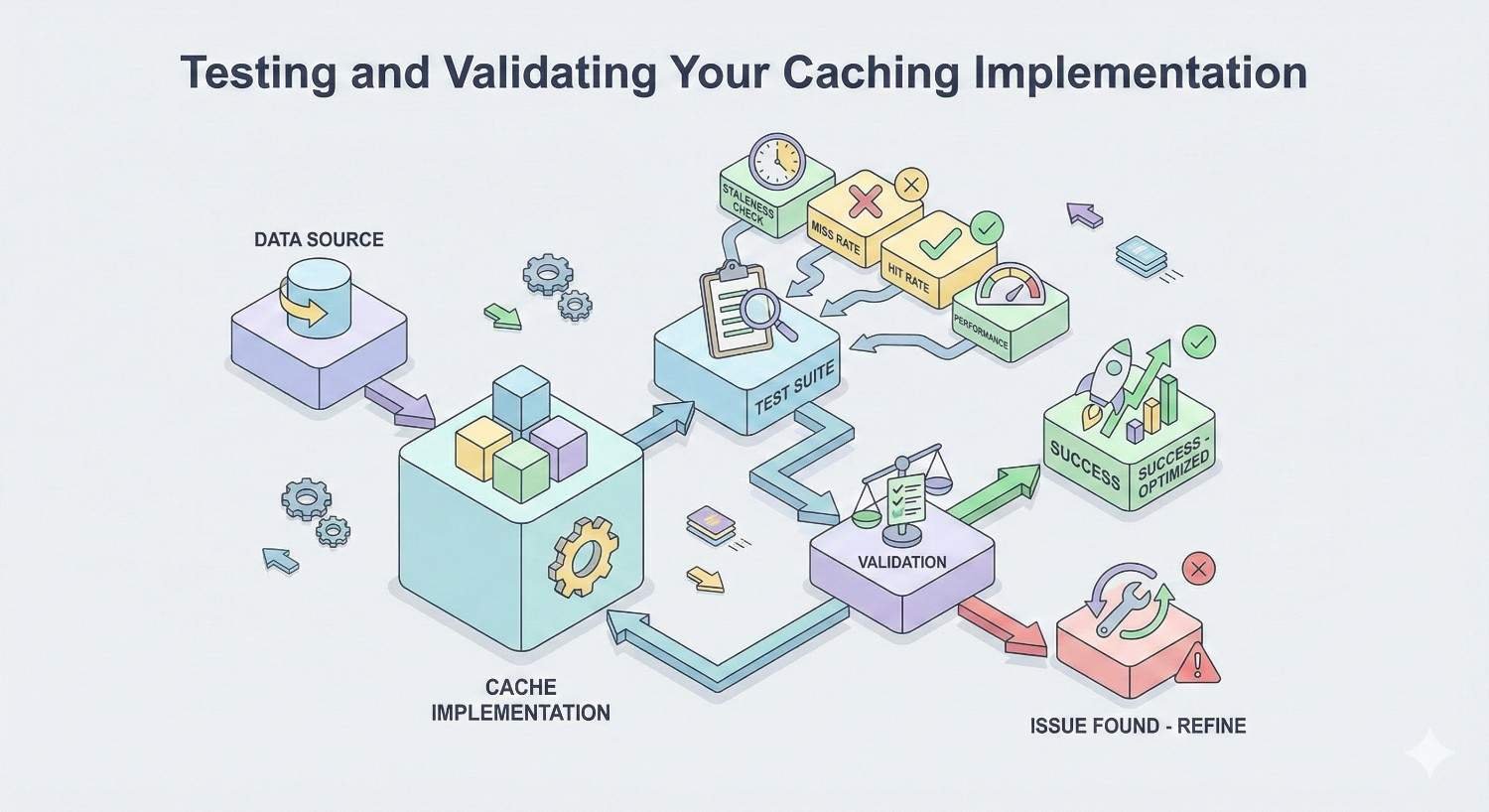
After implementing caching, verify it works correctly using multiple methods.
Browser DevTools: Open Chrome DevTools, navigate to the Network tab, and reload your page. Check the response headers for each resource to verify Cache-Control and Expires headers appear correctly.
curl command: Test specific resources from the command line:
bash
Copy
curl -I https://yoursite.com/image.jpg
This displays response headers including caching directives.
Online tools: Google PageSpeed Insights, GTmetrix, and WebPageTest all report on caching implementation and identify resources lacking proper headers.
Test both first-visit and repeat-visit scenarios. First visits should show resources loading from the server. Repeat visits should show resources loading from cache (indicated by “from disk cache” or “from memory cache” in DevTools).
Browser Caching Best Practices for SEO
Effective caching requires balancing performance benefits against content freshness requirements. These best practices help you optimize without creating problems.
Optimal Cache Duration by Resource Type
Different resources warrant different cache durations based on change frequency and update mechanisms.
| Resource Type | Recommended Duration | Rationale |
| Images | 1 year | Rarely change; use new URLs for updates |
| Fonts | 1 year | Never change once deployed |
| Versioned CSS/JS | 1 year | Version numbers handle updates |
| Unversioned CSS/JS | 1 week to 1 month | Balance freshness and performance |
| HTML pages | Minutes to hours | Content changes frequently |
| API responses | Seconds to minutes | Data freshness critical |
| Favicon | 1 year | Rarely changes |
These durations assume you have cache busting mechanisms for static assets. Without version control, use shorter durations to ensure updates propagate.
Cache Busting Strategies for Updated Content
Cache busting forces browsers to download new versions of cached resources. Without cache busting, users might see outdated CSS, JavaScript, or images even after you deploy updates.
Filename versioning: Include version numbers or content hashes in filenames:
- styles.v2.css
- app.a1b2c3d4.js
Build tools like Webpack, Gulp, and Vite can automate hash generation.
Query string versioning: Append version parameters to URLs:
- styles.css?v=2.0
- app.js?v=1234567890
Query strings are simpler to implement but some CDNs ignore them for caching purposes.
Filename hashing is generally preferred because it guarantees cache invalidation and works universally across CDNs and proxies.
Avoiding Common Caching Mistakes That Hurt SEO
Several common mistakes undermine caching effectiveness or create user experience problems.
Caching HTML too aggressively: Long cache durations on HTML pages prevent users from seeing content updates. Use short durations or validation-based caching for HTML.
Inconsistent headers: Different servers in a load-balanced environment sending different headers creates unpredictable behavior. Ensure consistent configuration across all servers.
Forgetting mobile resources: Mobile-specific resources need the same caching attention as desktop resources. Audit mobile page loads separately.
Ignoring third-party resources: Scripts from analytics, advertising, and social platforms often have poor caching. While you can’t control their headers, you can minimize their impact through async loading and limiting third-party dependencies.
No cache busting mechanism: Aggressive caching without cache busting means users see stale content after updates. Always implement versioning for static assets.
Balancing Freshness and Performance
The fundamental caching tradeoff involves freshness versus performance. Longer cache durations improve performance but risk serving stale content. Shorter durations ensure freshness but sacrifice performance benefits.
Resolve this tension through strategic approaches:
Separate static and dynamic content: Use aggressive caching for truly static resources while keeping dynamic content fresh.
Implement validation caching: Use ETags or Last-Modified headers to enable efficient freshness checks without full downloads.
Use cache busting for updates: Long cache durations become safe when you can force updates through filename changes.
Monitor user impact: Track whether users report seeing stale content. Adjust durations based on actual problems rather than theoretical concerns.
Mobile-First Caching Considerations
Mobile users face unique constraints that make caching even more valuable.
Network variability: Mobile connections range from fast 5G to slow 3G. Cached resources provide consistent performance regardless of network conditions.
Data costs: Many mobile users have limited data plans. Caching reduces data consumption, improving user experience and reducing bounce rates.
Battery impact: Network requests consume battery. Cached resources reduce power consumption, particularly important for users on older devices.
Storage limits: Mobile browsers have smaller cache storage limits. Prioritize caching your most impactful resources rather than everything.
Test your caching implementation on actual mobile devices and networks, not just desktop simulations.
Measuring Browser Caching Impact on SEO Performance
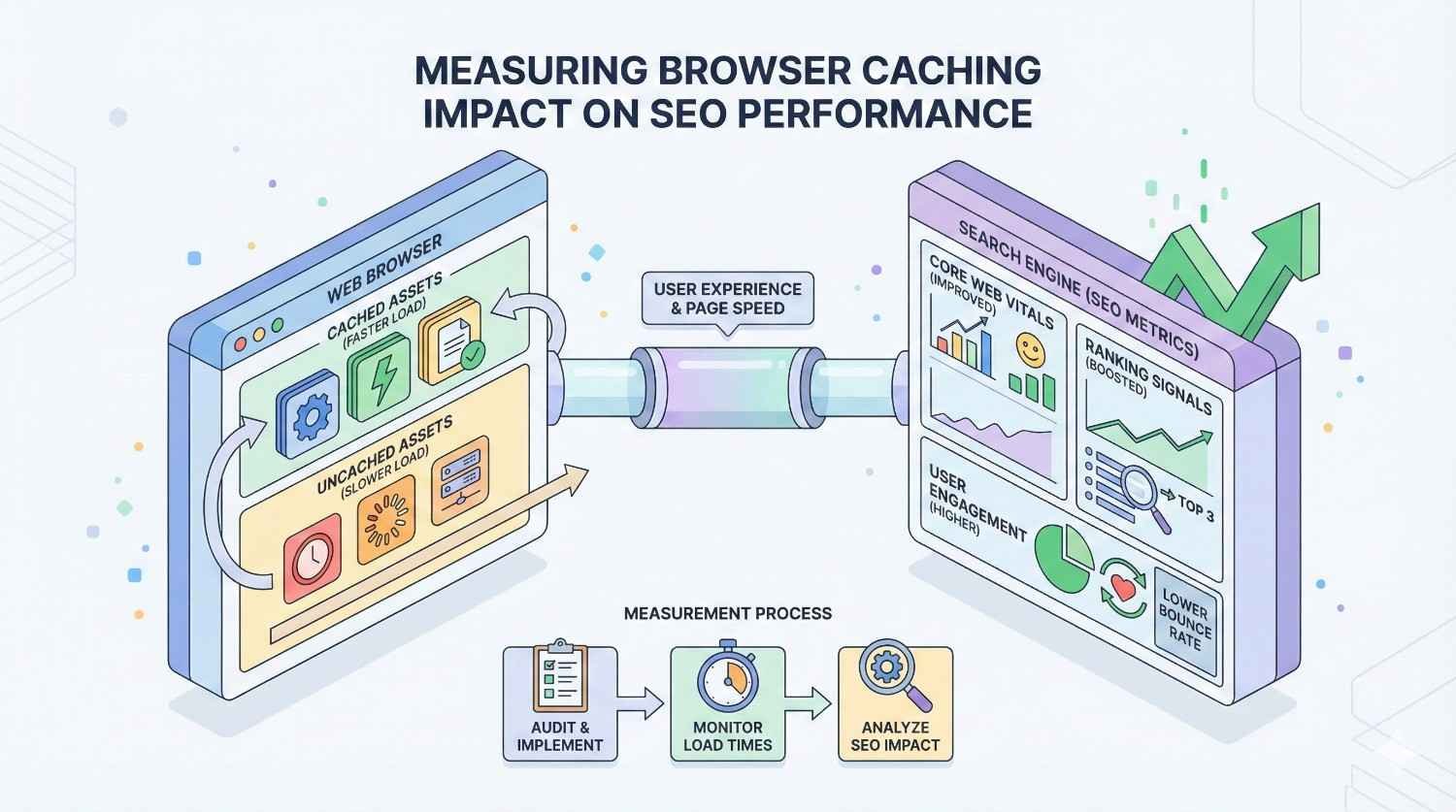
Quantifying caching benefits helps justify implementation effort and identify optimization opportunities.
Key Metrics to Track
Several metrics directly reflect caching effectiveness and SEO impact.
Time to First Byte (TTFB)
TTFB measures how long until the browser receives the first byte of response from your server. While browser caching primarily affects subsequent resource loading, server-side caching improvements show in TTFB.
Good TTFB: Under 200ms Needs improvement: 200-500ms Poor: Over 500ms
TTFB improvements indicate server-side caching effectiveness and overall server performance.
Largest Contentful Paint (LCP)
LCP measures when the largest content element becomes visible. For returning visitors, cached images and fonts dramatically improve LCP.
Good LCP: Under 2.5 seconds Needs improvement: 2.5-4 seconds Poor: Over 4 seconds
Compare LCP for first-time versus returning visitors to quantify browser caching impact.
First Input Delay (FID)
FID measures responsiveness to user interactions. Cached JavaScript loads faster, reducing main thread blocking and improving FID.
Good FID: Under 100ms Needs improvement: 100-300ms Poor: Over 300ms
Note: FID is being replaced by Interaction to Next Paint (INP) as a Core Web Vital.
Cumulative Layout Shift (CLS)
CLS measures visual stability during page load. While caching doesn’t directly affect CLS, faster resource loading can prevent layout shifts from late-loading elements.
Good CLS: Under 0.1 Needs improvement: 0.1-0.25 Poor: Over 0.25
Tools for Testing Browser Caching
Multiple tools help assess caching implementation and performance impact.
Google PageSpeed Insights
PageSpeed Insights provides Core Web Vitals data from real users (field data) and lab testing. The tool specifically flags resources lacking efficient caching policies.
Look for the “Serve static assets with an efficient cache policy” audit. This identifies resources with short or missing cache durations.
PageSpeed Insights also shows the performance impact of caching improvements through its opportunity estimates.
GTmetrix Caching Analysis
GTmetrix provides detailed waterfall charts showing how each resource loads. The tool identifies caching issues and estimates potential improvements.
Key GTmetrix features for caching analysis:
- Cache status indicators for each resource
- Header inspection showing exact caching directives
- Comparison between cached and uncached page loads
- Historical tracking to measure improvement over time
WebPageTest Cache Diagnostics
WebPageTest offers advanced testing capabilities including repeat view testing that specifically measures caching effectiveness.
Run tests with “First View and Repeat View” to compare performance with empty versus populated caches. The difference quantifies your caching benefit.
WebPageTest also provides detailed header analysis and identifies caching configuration issues.
Chrome DevTools Network Tab
Chrome DevTools provides immediate feedback on caching behavior during development and testing.
Key DevTools features:
- Size column shows “from disk cache” or “from memory cache” for cached resources
- Response headers tab displays exact caching directives
- Disable cache checkbox enables testing first-visit scenarios
- Throttling options simulate slow network conditions
Interpreting Caching Performance Data
Raw metrics require context for meaningful interpretation.
Compare first visit versus repeat visit: The difference quantifies caching benefit. Significant improvements for repeat visitors indicate effective caching.
Segment by device type: Mobile and desktop may show different caching effectiveness due to varying cache sizes and network conditions.
Track over time: Monitor metrics after caching changes to verify improvements. Unexpected degradation might indicate configuration problems.
Benchmark against competitors: Compare your caching effectiveness against top-ranking competitors. Significant gaps represent optimization opportunities.
Consider traffic patterns: Sites with high returning visitor rates benefit more from browser caching. Analyze your returning visitor percentage to estimate overall impact.
Common Browser Caching Issues and How to Fix Them
Even well-implemented caching can encounter problems. Understanding common issues helps you troubleshoot effectively.
Resources Not Being Cached Properly
When resources don’t cache as expected, investigate these potential causes:
Missing or incorrect headers: Verify your server sends appropriate Cache-Control headers. Use browser DevTools or curl to inspect actual response headers.
Server configuration not applied: Configuration changes might not take effect without server restart. Verify configuration syntax and restart services.
CDN overriding headers: Some CDNs modify or ignore origin caching headers. Check CDN configuration and ensure it respects your directives.
Dynamic URL parameters: URLs with query strings might bypass caching. Ensure your caching rules handle parameterized URLs appropriately.
HTTPS issues: Some older configurations don’t cache HTTPS content properly. Verify caching works for secure connections.
Stale Content Serving After Updates
Users seeing outdated content after updates indicates cache busting failures:
No versioning mechanism: Implement filename versioning or query string parameters for static assets.
CDN cache not purged: CDN edge caches might retain old versions. Purge CDN caches after deployments or configure automatic invalidation.
Long HTML cache duration: If HTML pages cache too long, users don’t receive updated references to new asset versions. Reduce HTML cache duration.
Browser cache persistence: Some browsers aggressively cache content. Provide clear cache instructions and consider shorter durations for frequently updated resources.
Conflicting Caching Directives
Multiple caching instructions can conflict, causing unpredictable behavior:
Cache-Control versus Expires: When both exist, Cache-Control takes precedence. Ensure they specify consistent durations.
Server versus CDN headers: CDNs might add or modify headers. Audit the final headers users receive, not just origin server configuration.
Multiple Cache-Control directives: Some configurations accidentally send multiple Cache-Control headers. Browsers use the last one, which might not be intended.
Plugin conflicts: WordPress sites with multiple caching plugins might send conflicting headers. Use only one caching plugin.
Third-Party Script Caching Challenges
Third-party scripts often have poor caching that you can’t directly control:
Short cache durations: Analytics and advertising scripts typically use short cache durations to ensure tracking accuracy.
No caching at all: Some third-party scripts explicitly prevent caching.
Mitigation strategies:
- Minimize third-party script usage
- Load scripts asynchronously to prevent blocking
- Consider self-hosting critical third-party resources (with permission and update mechanisms)
- Use tag managers to consolidate and control third-party loading
HTTPS and Secure Caching Considerations
HTTPS introduces additional caching considerations:
Shared cache restrictions: The private directive prevents intermediate caches (proxies, CDNs) from storing sensitive content. Use appropriately for personalized content.
Mixed content issues: HTTP resources on HTTPS pages might not cache properly and create security warnings. Ensure all resources use HTTPS.
HSTS implications: HTTP Strict Transport Security affects how browsers handle cached redirects. Configure HSTS appropriately for your security requirements.

Browser Caching as Part of Your Complete Technical SEO Strategy
Browser caching represents one component of comprehensive technical SEO. Understanding how it fits within broader optimization efforts helps prioritize effectively.
How Caching Fits Into Technical SEO Audits
Technical SEO audits should evaluate caching as part of performance assessment:
Audit checklist items:
- Cache-Control headers present and appropriate
- Static assets using long cache durations
- HTML pages using validation-based caching
- CDN caching configured correctly
- Cache busting mechanisms in place
- No conflicting caching directives
Priority assessment: Caching issues that significantly impact Core Web Vitals warrant immediate attention. Minor optimizations can be scheduled with other improvements.
Competitive benchmarking: Compare your caching implementation against top-ranking competitors. Significant gaps represent quick-win opportunities.
Prioritizing Caching Alongside Other Speed Optimizations
Multiple optimizations contribute to page speed. Prioritize based on impact and implementation effort.
Image Optimization and Lazy Loading
Images typically represent the largest page weight. Optimize images before focusing on caching:
- Compress images appropriately
- Use modern formats (WebP, AVIF)
- Implement responsive images
- Add lazy loading for below-fold images
Caching amplifies image optimization benefits by ensuring optimized images load instantly for returning visitors.
Minification and Compression
Reduce file sizes before caching:
- Minify CSS and JavaScript
- Enable Gzip or Brotli compression
- Remove unnecessary code and comments
Smaller files cache more efficiently and load faster even when not cached.
Server Response Time Optimization
Improve TTFB through server-side optimizations:
- Upgrade hosting infrastructure
- Implement server-side caching
- Optimize database queries
- Use PHP opcode caching
Server improvements benefit all visitors, while browser caching primarily helps returning visitors.
JavaScript and CSS Optimization
Optimize code delivery:
- Defer non-critical JavaScript
- Inline critical CSS
- Remove unused code
- Split code for better caching granularity
These optimizations work synergistically with caching to maximize performance.
Caching Strategy for Different Site Types
Different websites require different caching approaches based on content characteristics and user behavior.
E-commerce Sites
E-commerce sites balance performance with dynamic content requirements:
- Cache product images aggressively
- Use shorter durations for pricing and inventory data
- Implement edge-side includes for personalized elements
- Consider separate caching for logged-in versus anonymous users
Product pages might use validation-based caching to ensure price accuracy while still benefiting from caching.
Content/Blog Sites
Content sites can use aggressive caching:
- Long cache durations for images and media
- Moderate durations for HTML (hours to days)
- Cache busting for CSS/JS updates
- Consider static site generation for maximum caching benefit
Blog content changes infrequently, making aggressive caching safe and effective.
SaaS and Web Applications
Applications require careful caching to balance performance with functionality:
- Cache static assets aggressively
- Use no-cache or short durations for application state
- Implement API response caching where appropriate
- Consider service workers for offline functionality
Application caching requires understanding data freshness requirements for each feature.
Local Business Websites
Local business sites typically have simple caching requirements:
- Aggressive caching for all static assets
- Moderate HTML caching (daily updates are usually sufficient)
- Ensure contact information updates propagate quickly
Simple sites benefit significantly from basic caching implementation without complex configuration.
Long-Term Caching Maintenance and Monitoring
Caching requires ongoing attention to maintain effectiveness:
Regular audits: Check caching configuration quarterly or after major site changes.
Performance monitoring: Track Core Web Vitals trends to identify degradation.
Update procedures: Ensure deployment processes include cache busting and CDN purging.
Documentation: Maintain documentation of caching configuration for team reference.
Testing protocols: Include caching verification in QA processes for site updates.
When to Seek Professional Help with Browser Caching and Technical SEO
While basic caching implementation is straightforward, complex situations benefit from expert assistance.
Signs Your Caching Strategy Needs Expert Review
Consider professional help when:
Performance remains poor despite optimization attempts: Underlying issues might require deeper technical analysis.
Complex infrastructure: Multi-server environments, microservices architectures, or hybrid cloud setups create caching complexity.
E-commerce or application requirements: Dynamic content, personalization, and real-time data require sophisticated caching strategies.
Inconsistent results: If caching works sometimes but not others, configuration issues need expert diagnosis.
Competitive disadvantage: If competitors significantly outperform you on speed metrics, comprehensive technical review is warranted.
The ROI of Professional Technical SEO Implementation
Professional technical SEO implementation delivers measurable returns:
Time savings: Experts implement solutions faster than learning and troubleshooting yourself.
Avoided mistakes: Experience prevents common errors that waste time and potentially harm rankings.
Comprehensive optimization: Professionals address caching within broader technical SEO context, maximizing overall impact.
Sustainable results: Proper implementation creates lasting improvements rather than temporary fixes.
Competitive advantage: Professional optimization often achieves performance levels difficult to reach independently.
For businesses where organic traffic drives significant revenue, professional technical SEO investment typically delivers strong ROI.
How We Help Businesses Optimize Caching for Sustainable Growth
Our technical SEO services address caching as part of comprehensive performance optimization:
Technical audits: We identify caching issues and opportunities within broader technical SEO assessment.
Implementation support: We configure caching correctly for your specific platform and infrastructure.
Performance monitoring: We track metrics to verify improvements and identify emerging issues.
Ongoing optimization: We continuously refine caching strategy as your site evolves.
Training and documentation: We ensure your team understands caching configuration for ongoing maintenance.
Conclusion: Browser Caching as a Foundation for SEO Success
Browser caching delivers measurable SEO benefits through faster page loads, improved Core Web Vitals, and better user experiences. Proper implementation requires understanding caching mechanisms, configuring appropriate headers, and maintaining cache busting procedures for updates.
Caching works best as part of comprehensive technical SEO strategy. Combined with image optimization, code minification, and server improvements, caching helps create the fast, reliable websites that both users and search engines prefer.
We help businesses implement effective caching strategies that drive sustainable organic growth. Contact White Label SEO Service for a technical SEO audit that identifies your caching opportunities and creates a roadmap for improved search performance.
Frequently Asked Questions
How long should I cache static assets for SEO?
Cache static assets like images, fonts, and versioned CSS/JavaScript files for one year (31536000 seconds). Use cache busting through filename versioning to force updates when needed. This maximizes performance benefits while maintaining update capability.
Does browser caching affect first-time visitors?
Browser caching primarily benefits returning visitors who already have resources stored locally. First-time visitors must download all resources initially. However, caching reduces server load, potentially improving response times for everyone.
Can browser caching hurt my SEO if configured incorrectly?
Yes. Caching HTML pages too aggressively can serve outdated content to users and search engines. Missing cache busting mechanisms prevent users from seeing updates. Always use validation-based caching for HTML and implement versioning for static assets.
How do I test if browser caching is working correctly?
Use Chrome DevTools Network tab to verify resources show “from disk cache” or “from memory cache” on repeat visits. Check response headers for appropriate Cache-Control directives. Tools like PageSpeed Insights and GTmetrix also report caching effectiveness.
What’s the difference between browser caching and CDN caching?
Browser caching stores resources on the user’s device, eliminating network requests entirely. CDN caching stores resources on distributed edge servers, reducing latency by serving content from nearby locations. Both work together for maximum performance.
Should I cache HTML pages for SEO?
Cache HTML pages with short durations or validation-based caching (no-cache with ETags). This allows browsers to check for updates efficiently while still benefiting from caching when content hasn’t changed. Avoid long cache durations that serve stale content.
How does browser caching impact Core Web Vitals?
Browser caching significantly improves Largest Contentful Paint (LCP) for returning visitors by loading images and fonts instantly from local storage. It also improves First Input Delay (FID) by loading JavaScript faster. These improvements directly affect Google’s ranking signals.


