

Optimized CSS reduces page load times by 40-60% and directly impacts your Core Web Vitals scores, search rankings, and conversion rates. Every millisecond matters when Google evaluates your site’s performance and users decide whether to stay or bounce.
Unoptimized stylesheets create render-blocking bottlenecks that delay first contentful paint and frustrate visitors before they see your content. This technical debt compounds across every page view.
This guide covers critical CSS extraction, minification techniques, delivery optimization, selector efficiency, and measurement strategies that transform sluggish sites into high-performing assets.
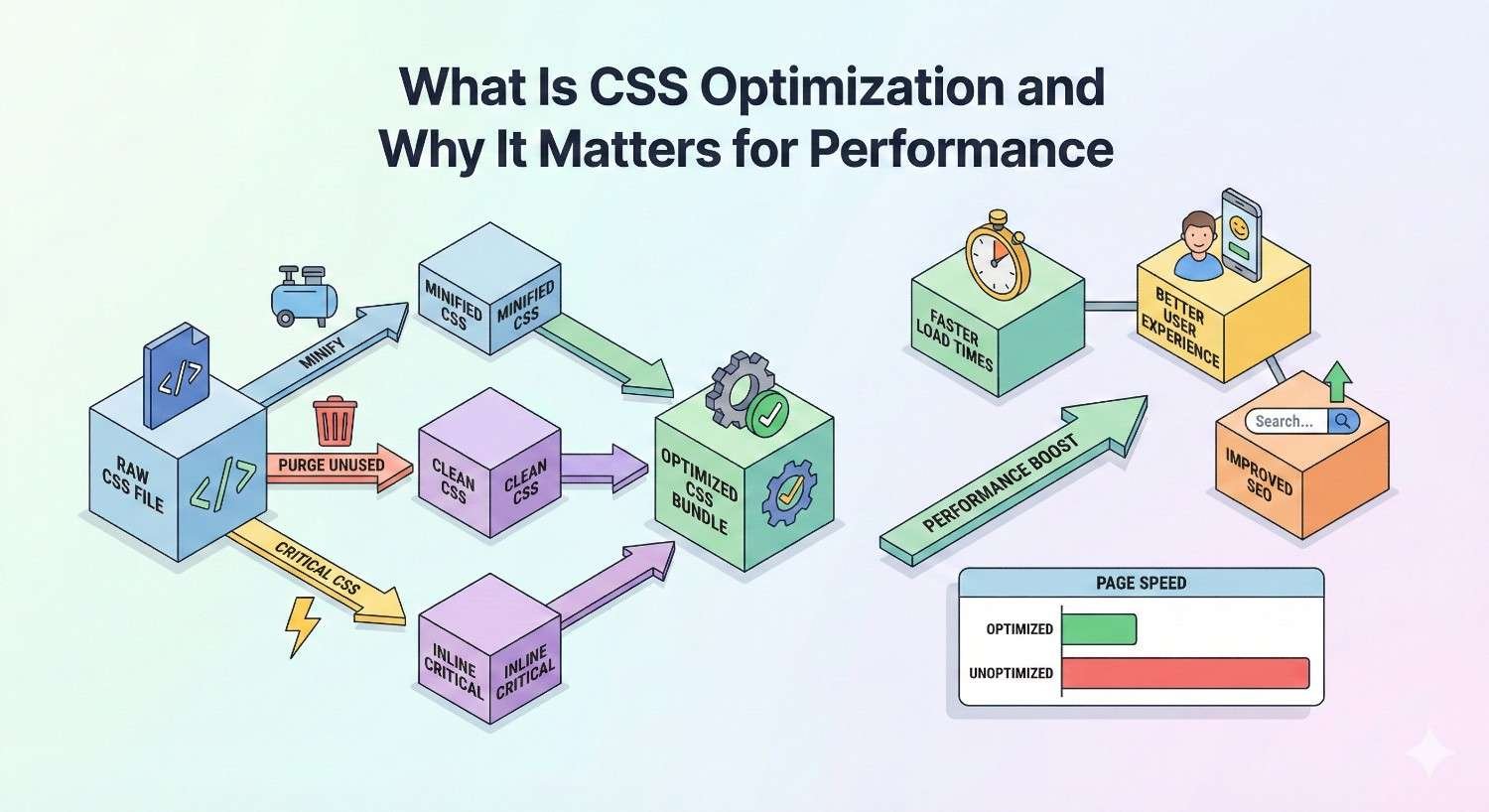
What Is CSS Optimization and Why It Matters for Performance
CSS optimization encompasses techniques that reduce stylesheet file sizes, eliminate render-blocking behavior, and improve how browsers process styling rules. The goal is delivering visual styles faster while minimizing the computational overhead browsers experience when parsing and applying CSS.
Modern websites often ship hundreds of kilobytes of CSS, much of it unused on any given page. This bloat directly impacts how quickly users see meaningful content and how search engines evaluate your technical SEO foundation.
How CSS Affects Page Load Speed
Browsers must download, parse, and construct the CSS Object Model before rendering any content. This process blocks rendering entirely until complete. Large stylesheets extend this blocking period proportionally.
External CSS files require additional HTTP requests. Each request adds latency from DNS lookup, connection establishment, and data transfer. Multiple stylesheet requests compound these delays.
Unused CSS rules still require parsing. Browsers cannot skip rules they might need, so every selector and declaration consumes processing time regardless of whether it applies to the current page.
Complex selectors require more computational work during style calculation. Browsers evaluate selectors right-to-left, and deeply nested or universal selectors force evaluation against many DOM elements.
The Impact of CSS on Core Web Vitals
Largest Contentful Paint measures when the main content becomes visible. Render-blocking CSS directly delays LCP because browsers cannot paint content until stylesheets load and parse.
First Input Delay and Interaction to Next Paint suffer when CSS triggers expensive layout recalculations. Heavy style computations block the main thread, preventing response to user interactions.
Cumulative Layout Shift increases when CSS loads asynchronously without proper handling. Late-loading styles can reflow content, causing visual instability that frustrates users and hurts CLS scores.
Google’s Core Web Vitals documentation confirms that CSS optimization directly influences all three metrics. Sites failing these thresholds face ranking disadvantages in search results.
CSS Rendering and the Critical Rendering Path
The critical rendering path describes the sequence browsers follow to convert HTML, CSS, and JavaScript into rendered pixels. CSS sits at a crucial bottleneck in this process.
Browsers construct the DOM from HTML parsing. Simultaneously, they build the CSSOM from stylesheet parsing. Neither tree alone enables rendering. The browser must combine them into the render tree.
Only after render tree construction can browsers calculate layout geometry and paint pixels. Any delay in CSSOM construction delays everything downstream. This makes CSS a critical resource by definition.
Optimizing CSS means reducing the time between navigation start and render tree completion. Every technique in this guide targets some portion of this critical path.
How to Measure CSS Performance Impact
Effective optimization requires measurement. You cannot improve what you do not measure, and CSS performance involves multiple metrics across different tools.
Baseline measurements establish your starting point. Ongoing measurement validates that changes produce expected improvements without introducing regressions.
Key CSS Performance Metrics to Track
Total CSS size measures the combined weight of all stylesheets. Track both uncompressed and compressed sizes since both affect different performance aspects.
CSS coverage percentage indicates how much of your shipped CSS actually applies to each page. Low coverage signals optimization opportunities through unused CSS removal.
Time to first byte for CSS resources reveals server and network performance. Slow TTFB for stylesheets delays everything dependent on them.
Render-blocking time measures how long CSS prevents content painting. This directly correlates with user-perceived load speed.
Style recalculation time shows how long browsers spend computing styles after DOM changes. High values indicate selector efficiency problems or excessive CSS complexity.
Tools for Analyzing CSS Performance
Multiple tools provide CSS performance insights. Each offers different perspectives and capabilities.
Chrome DevTools Coverage Tab
The Coverage tab shows exactly which CSS rules execute on the current page. Red highlighting indicates unused bytes. Green shows utilized code.
Access Coverage through DevTools > More Tools > Coverage. Click the reload button to capture coverage during page load. Results show percentage utilization per stylesheet.
This tool identifies specific unused rules, not just aggregate percentages. You can click any file to see line-by-line coverage highlighting in the Sources panel.
Lighthouse CSS Audits
Lighthouse audits include specific CSS performance checks. The “Reduce unused CSS” audit quantifies potential savings from removing dead code.
“Eliminate render-blocking resources” identifies CSS files delaying first paint. Lighthouse estimates time savings from addressing each blocking resource.
Run Lighthouse from DevTools, PageSpeed Insights, or command line. Consistent testing conditions improve measurement reliability.
WebPageTest CSS Analysis
WebPageTest provides waterfall charts showing CSS loading timing in context with other resources. You can identify whether CSS blocks other critical resources.
The “Blocking CSS” metric specifically measures render-blocking stylesheet impact. Connection view reveals whether CSS benefits from HTTP/2 multiplexing.
WebPageTest’s filmstrip view shows exactly when CSS-dependent content becomes visible. This visual timeline helps communicate performance issues to stakeholders.
Identifying CSS Bottlenecks in Your Website
Start with the largest stylesheets. Sort by file size and prioritize optimization efforts on the biggest files first for maximum impact.
Check coverage on your highest-traffic pages. These pages benefit most from optimization since improvements multiply across more sessions.
Examine the network waterfall for CSS loading patterns. Look for sequential loading that could parallelize, or late-discovered stylesheets that could preload.
Profile style recalculation during interactions. DevTools Performance panel shows style computation time. Spikes during scrolling or clicking indicate selector efficiency problems.
Critical CSS Extraction and Inline Implementation
Critical CSS refers to the minimum styles needed to render above-the-fold content. Inlining these styles eliminates render-blocking external requests for initial viewport rendering.
This technique separates essential styles from deferrable ones. Users see styled content faster while remaining CSS loads asynchronously.
What Is Critical CSS
Critical CSS includes only rules that affect elements visible without scrolling. This typically represents a small fraction of total stylesheet size.
The critical set varies by page and viewport size. A homepage has different critical CSS than a product page. Mobile viewports require different rules than desktop.
Extracting critical CSS requires analyzing which selectors match above-the-fold elements and including only those rules plus their dependencies.
How to Extract Critical CSS
Manual extraction involves identifying above-the-fold elements, finding their matching selectors, and copying those rules. This works for simple sites but scales poorly.
Automated tools analyze rendered pages to determine critical rules programmatically. They render pages at specified viewport sizes and capture which styles apply to visible elements.
Critical by Addy Osmani automates extraction and inlining. It uses Puppeteer to render pages and extract critical styles.
Penthouse focuses specifically on critical CSS extraction. It generates critical CSS that you then integrate into your build process.
Implementing Inline Critical CSS
Place extracted critical CSS in a <style> tag within the document <head>. This eliminates the external request for above-the-fold rendering.
html
Copy
<head>
<style>
/* Critical CSS inlined here */
.header { … }
.hero { … }
</style>
<link rel=”preload“ href=”full.css“ as=”style“ onload=”this.onload=null;this.rel=’stylesheet’“>
<noscript><link rel=”stylesheet“ href=”full.css“></noscript>
</head>
The full stylesheet loads asynchronously using the preload pattern. Users see styled above-the-fold content immediately while remaining styles load in the background.
Keep inlined critical CSS under 14KB to fit within the initial TCP congestion window. Larger inline styles can actually hurt performance by delaying HTML parsing.
Automating Critical CSS Generation
Build tool integration automates critical CSS for every deployment. This ensures critical styles stay synchronized with stylesheet changes.
Webpack plugins like critters inline critical CSS during build. Critters analyzes HTML and CSS together to extract and inline critical rules.
For server-rendered applications, generate critical CSS per route or template. Cache generated critical CSS to avoid repeated extraction overhead.
CI/CD pipelines should include critical CSS generation as a build step. Automated testing can verify critical CSS coverage meets thresholds.
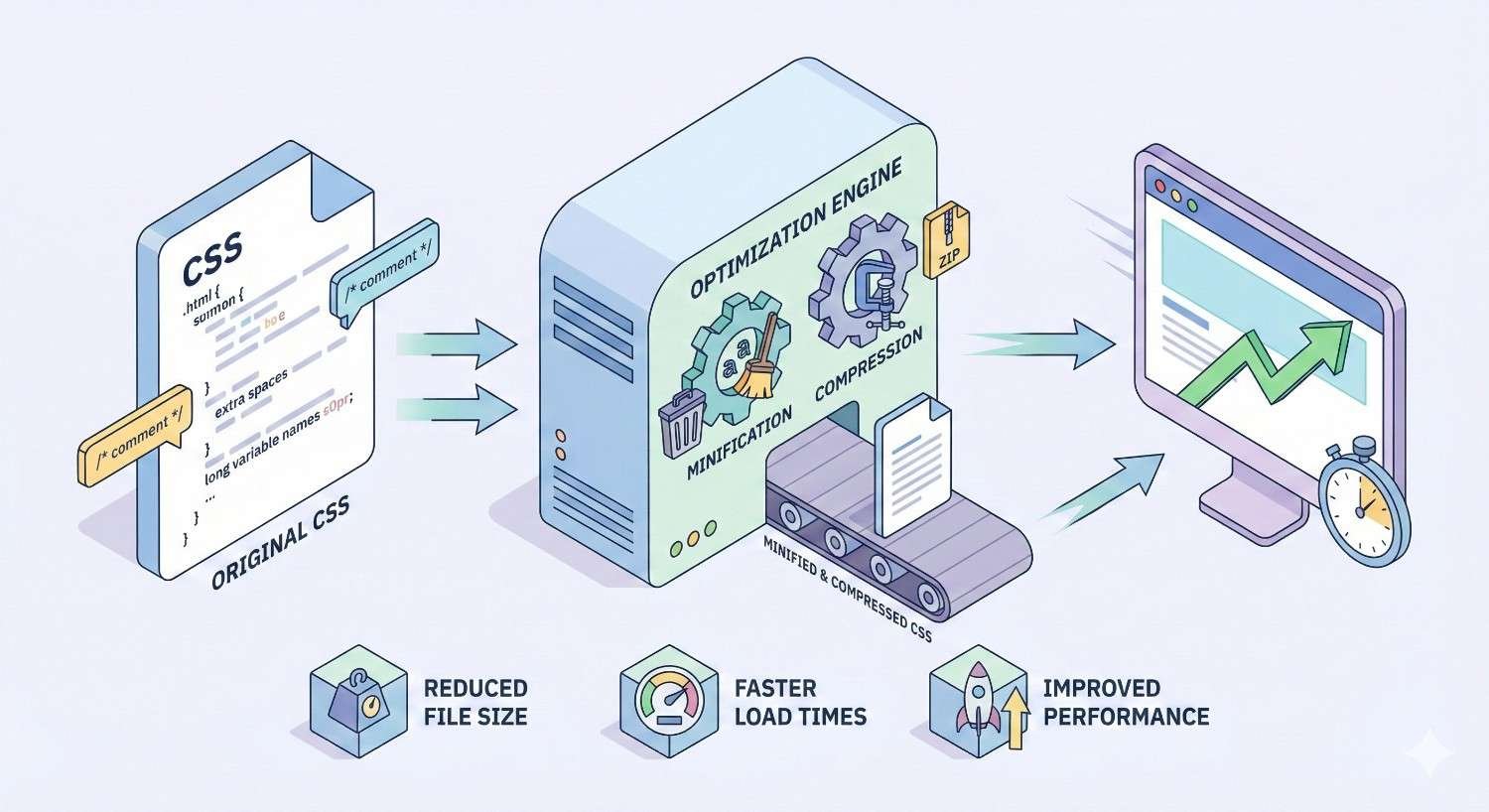
CSS Minification and Compression Techniques
Minification removes unnecessary characters without changing functionality. Compression reduces transfer size through encoding algorithms. Both techniques reduce CSS delivery time.
CSS Minification: Removing Unnecessary Code
Minification eliminates whitespace, comments, and redundant syntax. A 100KB development stylesheet might minify to 70KB or less.
Minifiers also optimize values. #ffffff becomes #fff. 0px becomes 0. font-weight: bold becomes font-weight: 700.
Advanced minifiers merge duplicate rules, combine selectors, and restructure code for smaller output. These optimizations require careful testing since aggressive changes can alter specificity.
Gzip and Brotli Compression for CSS Files
Gzip compression typically reduces CSS file sizes by 60-80%. A 70KB minified file might transfer as 15KB compressed.
Brotli compression achieves 15-25% better compression than Gzip for text assets. Most modern browsers support Brotli, making it the preferred choice.
Configure your server or CDN to serve compressed CSS. Verify compression with browser DevTools network panel, which shows both transferred and actual sizes.
Pre-compress CSS files during build rather than compressing on each request. This eliminates server CPU overhead and ensures optimal compression levels.
CSS Minification Tools and Build Process Integration
cssnano provides comprehensive CSS minification with configurable optimization levels. It integrates with PostCSS for build pipeline inclusion.
clean-css offers aggressive optimization options and handles edge cases well. It works standalone or as a build tool plugin.
esbuild includes CSS minification with extremely fast processing. Its speed makes it ideal for development builds requiring quick feedback.
Integrate minification into your production build. Development builds can skip minification for easier debugging while production always minifies.
Removing Unused CSS (CSS Pruning)
Unused CSS inflates file sizes without providing value. Removing dead code reduces download time, parsing time, and memory usage.
How Unused CSS Slows Down Your Website
Every unused rule still downloads over the network. Bandwidth spent on dead code delays useful content delivery.
Browsers parse all CSS regardless of usage. Unused rules consume parsing time and memory for CSSOM construction.
Unused CSS often accumulates over time. Features get removed but their styles remain. Framework defaults ship but never apply. Technical debt compounds.
HTTPArchive data shows median pages ship over 60KB of unused CSS. Top sites often exceed 200KB of dead stylesheet code.
Tools for Detecting Unused CSS
Chrome DevTools Coverage identifies unused CSS with line-level precision. Export coverage reports for analysis and tracking over time.
PurifyCSS analyzes HTML and JavaScript to identify used selectors. It works with static analysis rather than runtime coverage.
UnCSS renders pages and captures which styles apply. This catches dynamically-added classes that static analysis might miss.
PurgeCSS and Automated CSS Removal
PurgeCSS scans content files for CSS selectors and removes unmatched rules. It integrates with major build tools and frameworks.
Configure PurgeCSS with content sources including HTML templates, JavaScript files, and any code that might reference CSS classes.
javascript
Copy
// postcss.config.js
module.exports = {
plugins: [
require(‘@fullhuman/postcss-purgecss’)({
content: [‘./src/**/*.html’, ‘./src/**/*.js’],
safelist: [‘dynamic-class’, /^modal-/]
})
]
}
Safelisting prevents removal of dynamically-generated classes. Use patterns for class prefixes that JavaScript generates at runtime.
Safe CSS Removal Strategies
Test thoroughly after removing CSS. Visual regression testing catches styling breaks that functional tests miss.
Start with high-confidence removals. Classes never referenced anywhere are safe to remove. Classes only in deleted features are safe.
Implement gradually on high-traffic pages first. Monitor for user-reported issues before expanding to full site coverage.
Keep removed CSS accessible for rollback. Version control and staged deployments enable quick recovery if problems emerge.
CSS Delivery Optimization Strategies
How CSS reaches browsers matters as much as file size. Delivery optimization reduces latency and eliminates unnecessary blocking.
Eliminating Render-Blocking CSS
Standard <link rel=”stylesheet”> tags block rendering until the stylesheet loads. This default behavior ensures styled content but delays first paint.
Critical CSS inlining eliminates blocking for above-the-fold content. The inline styles render immediately while external stylesheets load asynchronously.
Media queries can mark stylesheets as non-blocking for non-matching conditions. Print stylesheets should use media=”print” to avoid blocking screen rendering.
html
Copy
<link rel=”stylesheet“ href=”print.css“ media=”print“>
<link rel=”stylesheet“ href=”large-screen.css“ media=”(min-width: 1200px)“>
Async and Deferred CSS Loading
The preload pattern loads CSS asynchronously while applying it after load:
html
Copy
<link rel=”preload“ href=”styles.css“ as=”style“ onload=”this.onload=null;this.rel=’stylesheet’“>
JavaScript-based loading provides more control over when styles apply. Libraries like loadCSS handle cross-browser compatibility.
Deferred CSS should only contain non-critical styles. Any styles affecting above-the-fold content need synchronous loading or inlining.
CSS Preloading with rel=”preload”
Preload hints tell browsers to fetch resources early. For CSS discovered late in HTML parsing, preloading eliminates discovery delay.
html
Copy
<link rel=”preload“ href=”critical-font.woff2“ as=”font“ type=”font/woff2“ crossorigin>
<link rel=”preload“ href=”above-fold.css“ as=”style“>
Preload CSS that blocks rendering but appears late in the document. Preload font files referenced in CSS to avoid font-display delays.
Avoid preloading everything. Excessive preload hints compete for bandwidth and can delay truly critical resources.
Media Queries for Conditional CSS Loading
Split CSS by media query to load only relevant styles. Mobile users skip desktop-only stylesheets and vice versa.
html
Copy
<link rel=”stylesheet“ href=”base.css“>
<link rel=”stylesheet“ href=”mobile.css“ media=”(max-width: 767px)“>
<link rel=”stylesheet“ href=”desktop.css“ media=”(min-width: 768px)“>
Browsers still download non-matching stylesheets but at lower priority. The primary benefit is reduced render-blocking for non-matching media.
This approach works best when media-specific styles are substantial. Small differences do not justify the additional HTTP requests.
CSS File Structure and Organization for Performance
How you organize CSS files affects both development efficiency and runtime performance. Strategic structure balances maintainability with delivery optimization.
Splitting CSS into Multiple Files vs. Single Bundle
Single bundles minimize HTTP requests but deliver unused CSS to every page. Multiple files enable page-specific loading but increase request count.
HTTP/2 multiplexing reduces the penalty for multiple requests. Modern infrastructure often favors granular files over monolithic bundles.
Consider your caching strategy. Shared CSS cached once benefits all pages. Page-specific CSS caches separately but enables targeted invalidation.
CSS Code Splitting by Route or Component
Route-based splitting loads CSS only for the current page. Users visiting the homepage do not download product page styles.
Component-based splitting in frameworks like React or Vue loads CSS with components. Unused components mean unloaded styles.
javascript
Copy
// Dynamic CSS import in JavaScript
import(‘./component.css’).then(() => {
// CSS loaded, render component
});
Code splitting requires build tool support. Webpack, Vite, and Parcel all support CSS code splitting with different configuration approaches.
Optimal CSS File Size and HTTP/2 Considerations
Keep individual CSS files under 50KB compressed for optimal caching granularity. Larger files risk cache invalidation for small changes.
HTTP/2 server push can deliver CSS before browsers request it. However, push requires careful tuning to avoid wasting bandwidth on cached resources.
Balance request count against caching efficiency. Five 10KB files cache more granularly than one 50KB file but require more connections on HTTP/1.1.
CSS Selector Performance Optimization
Selector efficiency affects style calculation time. While modern browsers optimize well, complex selectors still impact performance on large DOM trees.
How CSS Selector Complexity Affects Rendering Speed
Browsers evaluate selectors right-to-left. The selector .nav ul li a first finds all <a> elements, then filters to those inside <li>, then <ul>, then .nav.
Universal selectors (*) and attribute selectors ([type=”text”]) require checking every element. This scales poorly on large pages.
Deeply nested selectors require more filtering steps. Each combinator adds evaluation work that multiplies across DOM size.
Writing Efficient CSS Selectors
Prefer class selectors over complex combinators. .nav-link outperforms .nav ul li a and communicates intent more clearly.
Keep selector depth shallow. Two to three levels typically suffice. Deeper nesting often indicates overly specific selectors.
Avoid qualifying class selectors with elements. .button performs identically to a.button but allows broader application.
css
Copy
/* Efficient */
.nav-link { }
.card-title { }
/* Less efficient */
nav ul li a { }
.card > .card-body > .card-title { }
Avoiding Expensive CSS Selectors
Avoid universal selectors in descendant combinators. * { } alone is fine, but .widget * { } checks every element inside widgets.
Minimize attribute selectors, especially partial matches. [class*=”btn”] requires string matching against every element’s class attribute.
Pseudo-classes like :nth-child() require sibling counting. Use sparingly on large lists or tables.
Test selector performance with DevTools. The Performance panel shows style recalculation time. Profile before and after selector changes.
Optimizing CSS Animations and Transitions
Animations can enhance user experience or destroy performance. The difference lies in which properties you animate and how you trigger animations.
GPU-Accelerated CSS Properties
Browsers can offload certain property animations to the GPU. GPU-accelerated animations run on a separate thread, avoiding main thread blocking.
Transform and opacity animate on the GPU by default. These properties do not trigger layout or paint, only compositing.
Properties triggering layout (width, height, margin, padding) or paint (color, background, border) animate on the main thread. These block other JavaScript and cause jank.
Using Transform and Opacity for Smooth Animations
Animate position with transform: translate() instead of top/left. Both achieve movement, but transform avoids layout recalculation.
css
Copy
/* Smooth – GPU accelerated */
.slide-in {
transform: translateX(-100%);
transition: transform 0.3s ease;
}
.slide-in.active {
transform: translateX(0);
}
/* Janky – triggers layout */
.slide-in {
left: -100%;
transition: left 0.3s ease;
}
Scale with transform: scale() instead of changing width/height. Fade with opacity instead of visibility or display changes.
Combine transforms in single declarations. Multiple transform functions in one property animate together efficiently.
Will-Change Property: When and How to Use It
will-change hints to browsers that a property will animate. Browsers can prepare optimizations before animation starts.
css
Copy
.animated-element {
will-change: transform, opacity;
}
Use will-change sparingly. Each declaration consumes memory for layer promotion. Excessive use degrades rather than improves performance.
Apply will-change just before animation starts and remove after completion. Permanent will-change wastes resources when elements are not animating.
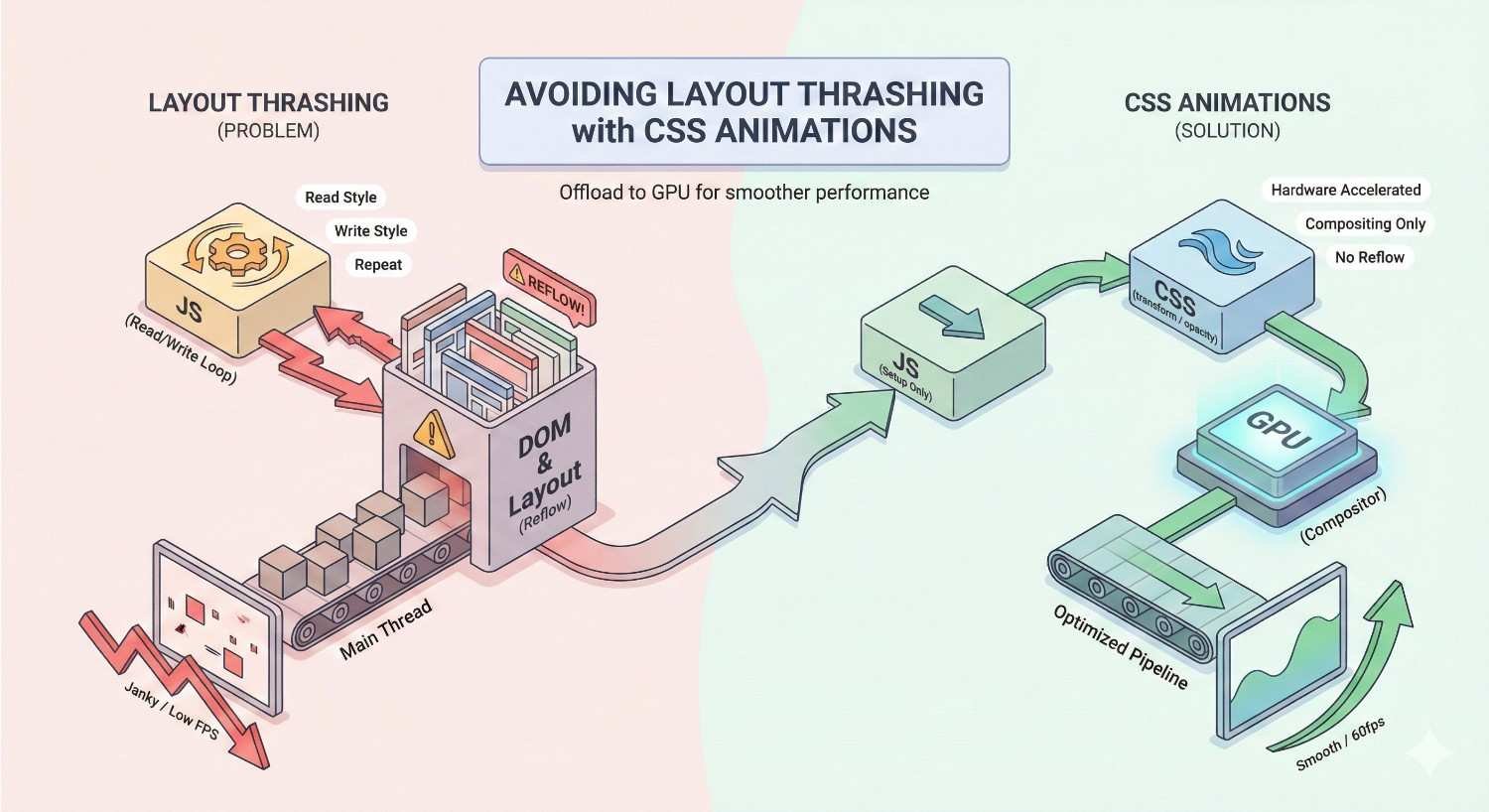
Avoiding Layout Thrashing with CSS Animations
Layout thrashing occurs when JavaScript reads layout properties, triggers changes, then reads again. Each read-write cycle forces synchronous layout.
CSS animations avoid thrashing by declaring the full animation upfront. Browsers optimize the entire animation path without JavaScript intervention.
Use CSS transitions for simple state changes. Reserve JavaScript animation libraries for complex sequences requiring programmatic control.
Batch DOM reads before writes. If JavaScript must interact with animated elements, read all needed values first, then make all changes together.
CSS Caching and Versioning Strategies
Effective caching delivers CSS instantly on repeat visits. Versioning ensures users receive updates without stale cache problems.
Browser Caching for CSS Files
Configure Cache-Control headers for long-term caching. CSS files with content-based filenames can cache for one year.
Copy
Cache-Control: public, max-age=31536000, immutable
The immutable directive tells browsers the file will never change at this URL. This prevents revalidation requests on navigation.
Set appropriate caching for HTML that references CSS. HTML needs shorter cache times to pick up new CSS file references.
Cache-Busting Techniques for CSS Updates
Content-based hashing generates unique filenames from file contents. Any change produces a new filename, bypassing cached versions.
Copy
styles.a1b2c3d4.css /* Hash changes when content changes */
Build tools generate hashes automatically. Webpack, Vite, and other bundlers include content hashing as standard features.
Query string versioning (styles.css?v=1.2.3) works but some proxies ignore query strings for caching. Filename hashing is more reliable.
CDN Delivery for CSS Assets
CDNs cache CSS at edge locations worldwide. Users download from nearby servers rather than your origin, reducing latency.
Configure CDN cache headers to match your caching strategy. CDNs respect origin headers but can override with edge rules.
Enable CDN compression if not handling at origin. Most CDNs support Brotli and Gzip compression at the edge.
Purge CDN caches when deploying new CSS versions. Content-hashed filenames make purging unnecessary since new files have new URLs.
Modern CSS Features for Better Performance
Recent CSS specifications include features specifically designed for performance optimization. Browser support has reached practical levels for production use.
CSS Custom Properties (Variables) and Performance
Custom properties reduce repetition and file size. Defining colors, spacing, and other values once eliminates duplication.
css
Copy
:root {
–primary-color: #3b82f6;
–spacing-unit: 8px;
}
.button {
background: var(–primary-color);
padding: var(–spacing-unit);
}
Custom properties enable runtime theming without shipping multiple stylesheets. JavaScript can modify variables, and all dependent styles update automatically.
Performance impact is minimal. Custom property resolution adds negligible overhead compared to the file size savings from reduced repetition.
CSS Containment for Rendering Optimization
The contain property isolates elements from the rest of the document. Browsers can optimize rendering by limiting recalculation scope.
css
Copy
.card {
contain: layout style paint;
}
contain: layout prevents element changes from affecting outside layout. contain: paint prevents painting outside element bounds. contain: style isolates counter and quote scoping.
Use containment on repeated components like cards, list items, or widgets. The optimization multiplies across many contained elements.
Content-Visibility for Lazy Rendering
content-visibility: auto skips rendering for off-screen elements. Browsers render content only when it approaches the viewport.
css
Copy
.article-section {
content-visibility: auto;
contain-intrinsic-size: 0 500px;
}
contain-intrinsic-size provides placeholder dimensions for skipped content. This prevents layout shifts when content renders.
This feature dramatically improves initial render time for long pages. Chrome’s documentation reports 7x rendering performance improvements on content-heavy pages.
CSS Grid and Flexbox Performance Considerations
Grid and Flexbox perform well for their intended use cases. Both are highly optimized in modern browsers.
Avoid deeply nested flex containers. Each nesting level adds layout calculation complexity. Flatten structures where possible.
Grid’s explicit sizing often outperforms Flexbox’s content-based sizing. When you know dimensions, Grid’s fr units calculate faster than Flexbox’s flex-grow distribution.
Neither layout method is inherently slow. Performance problems usually stem from excessive nesting or triggering layout during animations.
CSS Optimization Impact on SEO and User Experience
CSS performance directly influences search rankings and user behavior. Google measures and rewards fast-loading pages.
How CSS Performance Affects Google Rankings
Core Web Vitals became ranking factors in 2021. CSS optimization directly impacts LCP, FID/INP, and CLS scores that Google measures.
Google’s Page Experience documentation confirms that page speed influences rankings. While content relevance remains primary, performance serves as a tiebreaker among similar content.
Mobile rankings particularly weight performance. Mobile users on slower connections experience CSS bloat more severely than desktop users.
CSS Optimization and Mobile-First Indexing
Google indexes and ranks based on mobile page versions. Mobile CSS performance determines your indexed page speed.
Mobile-specific CSS optimization matters more than desktop. Reduce CSS payload for mobile viewports where bandwidth and processing power are limited.
Test CSS performance on throttled connections simulating 3G or 4G. Real mobile conditions differ significantly from development environments.
User Experience Metrics Improved by CSS Optimization
Bounce rate correlates with load time. Google research shows bounce probability increases 32% when load time goes from 1 to 3 seconds.
Time on site increases with faster pages. Users engage more when pages respond quickly to interactions.
Conversion rates improve with speed. Deloitte research found 0.1 second improvements in mobile site speed increased conversion rates by 8.4% for retail sites.
CSS Frameworks and Performance Trade-offs
CSS frameworks accelerate development but often include substantial unused code. Understanding trade-offs enables informed decisions.
Bootstrap, Tailwind, and Framework CSS Overhead
Bootstrap’s full CSS exceeds 150KB uncompressed. Most sites use a fraction of included components and utilities.
Tailwind generates CSS from utility classes used in templates. Unused utilities do not ship, but the approach requires build-time processing.
Foundation, Bulma, and other frameworks carry similar overhead. The convenience of pre-built components comes with file size costs.
Optimizing CSS Frameworks for Production
PurgeCSS integration removes unused framework classes. Tailwind includes PurgeCSS in its default build configuration.
Import only needed Bootstrap components rather than the full bundle. Sass imports enable component-level inclusion.
scss
Copy
// Import only what you need
@import “bootstrap/scss/functions”;
@import “bootstrap/scss/variables”;
@import “bootstrap/scss/mixins”;
@import “bootstrap/scss/buttons”;
@import “bootstrap/scss/forms”;
Custom builds exclude unused JavaScript and CSS. Most frameworks support modular builds for production optimization.
When to Use Custom CSS vs. Frameworks
Frameworks suit rapid prototyping and teams without CSS expertise. The productivity gain often outweighs performance costs for internal tools or MVPs.
Custom CSS suits performance-critical public sites. Hand-crafted styles contain only what you need with no framework overhead.
Hybrid approaches use framework utilities selectively. Extract commonly-used patterns while writing custom CSS for unique components.
Consider long-term maintenance. Frameworks provide upgrade paths and community support. Custom CSS requires internal expertise for ongoing development.
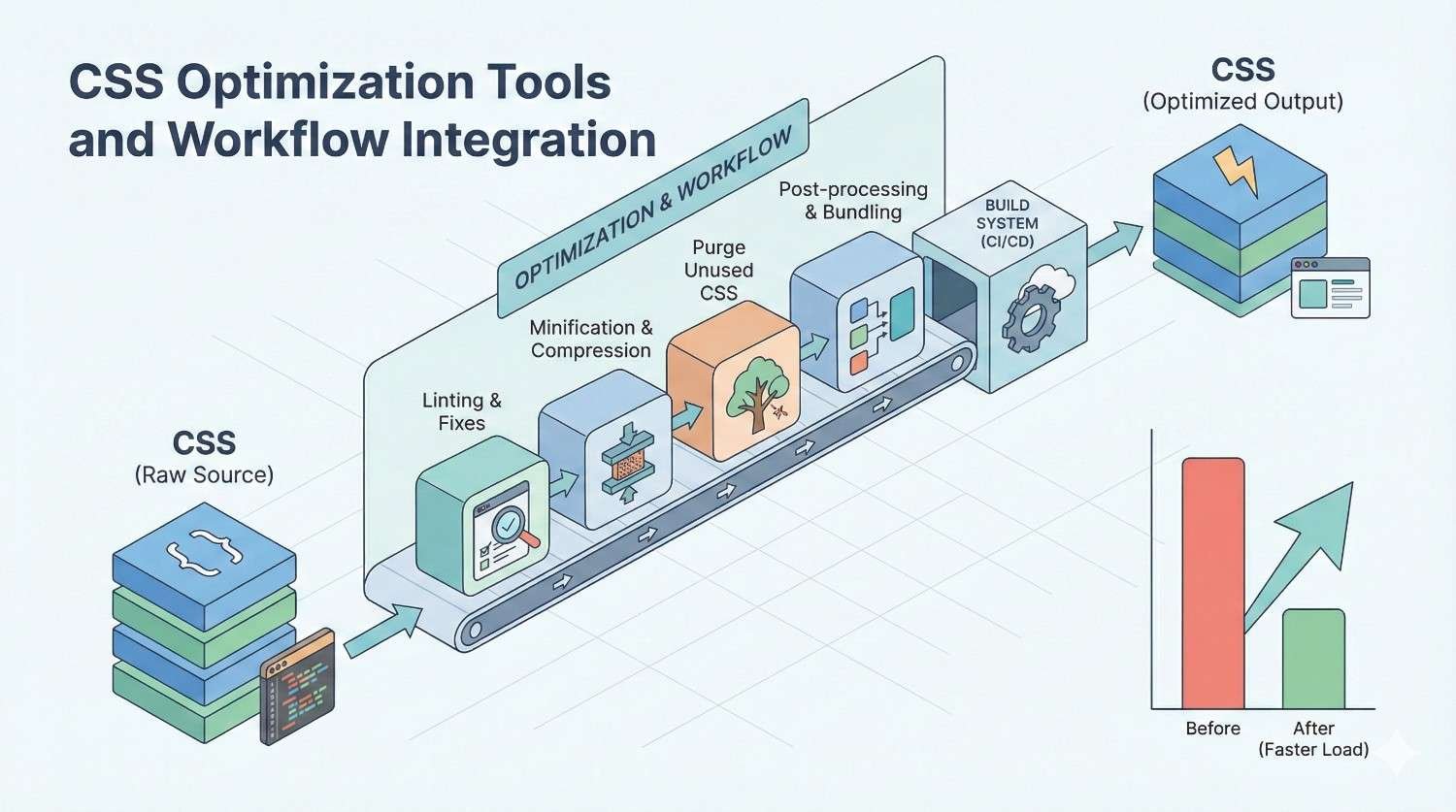
CSS Optimization Tools and Workflow Integration
Automated tooling ensures consistent optimization without manual effort. Integration into development workflows catches issues before production.
Build Tools for CSS Optimization (Webpack, Vite, Parcel)
Webpack’s css-loader and MiniCssExtractPlugin handle CSS bundling and optimization. Configuration controls splitting, minification, and source maps.
Vite includes CSS optimization by default. Its dev server provides fast hot module replacement while production builds optimize automatically.
Parcel requires zero configuration for basic CSS optimization. It detects CSS imports and applies appropriate transformations automatically.
Choose tools matching your stack. React projects often use Webpack or Vite. Simpler sites might prefer Parcel’s zero-config approach.
PostCSS and CSS Processing Pipelines
PostCSS transforms CSS through plugins. It serves as the foundation for many optimization tools.
Autoprefixer adds vendor prefixes automatically. You write standard CSS while the tool ensures browser compatibility.
cssnano minifies through PostCSS. Combine it with other plugins in a single processing pipeline.
javascript
Copy
// postcss.config.js
module.exports = {
plugins: [
require(‘autoprefixer’),
require(‘cssnano’)({ preset: ‘default’ })
]
}
Automated CSS Optimization in CI/CD
CI pipelines should build optimized CSS for every deployment. This ensures production always receives optimized assets.
Add performance budgets to CI checks. Fail builds when CSS exceeds size thresholds, preventing regression.
yaml
Copy
# Example GitHub Actions step
– name: Check CSS size
run: |
SIZE=$(stat -f%z dist/styles.css)
if [ $SIZE -gt 50000 ]; then
echo “CSS exceeds 50KB budget”
exit 1
fi
Automated Lighthouse CI tracks Core Web Vitals over time. Catch CSS-related performance regressions before they reach users.
CSS Linting for Performance Best Practices
Stylelint enforces CSS coding standards. Performance-focused rules catch inefficient patterns during development.
javascript
Copy
// .stylelintrc
{
“rules”: {
“selector-max-specificity”: “0,3,0”,
“selector-max-compound-selectors”: 3,
“no-duplicate-selectors”: true
}
}
Editor integration provides real-time feedback. Developers see warnings as they write, preventing problems before commit.
Pre-commit hooks run linting automatically. Catch issues before code enters the repository.
CSS Optimization for Different Platforms
Different platforms require tailored optimization approaches. WordPress, e-commerce, and SPAs each present unique challenges and opportunities.
Mobile CSS Optimization Strategies
Prioritize above-the-fold mobile content. Mobile viewports show less content, making critical CSS extraction more impactful.
Reduce CSS complexity for mobile. Simpler layouts require fewer rules. Consider mobile-first CSS that adds complexity for larger screens.
Test on real devices, not just emulators. Actual mobile processors and networks reveal performance issues simulators miss.
Consider data saver modes. Some mobile browsers request reduced resources. Respect these preferences with lighter CSS alternatives.
CSS Optimization for WordPress Sites
WordPress themes often include excessive CSS. Audit theme stylesheets and remove unused components.
Plugin CSS accumulates quickly. Each plugin may add its own stylesheet. Consolidate and optimize plugin styles.
Caching plugins like WP Rocket or W3 Total Cache handle CSS minification and combination. Configure them for optimal CSS delivery.
Consider theme alternatives. Lightweight themes like GeneratePress or Astra ship minimal CSS compared to feature-heavy themes.
CSS Optimization for E-commerce Platforms
Product pages share common CSS. Optimize shared styles aggressively since they affect every product view.
Category and search pages often have unique CSS needs. Consider route-based splitting for these distinct page types.
Checkout flows require minimal CSS for maximum conversion. Strip unnecessary styles from purchase paths.
Third-party widgets (reviews, recommendations, chat) often inject CSS. Audit and optimize or defer these external styles.
CSS Optimization for Single Page Applications
SPAs can lazy-load CSS with route components. Users download styles only for visited sections.
CSS-in-JS solutions like styled-components or Emotion generate styles at runtime. Evaluate the JavaScript overhead against CSS file savings.
Server-side rendering extracts critical CSS automatically in many frameworks. Next.js, Nuxt, and similar frameworks handle this optimization.
Code splitting in SPAs should include CSS. Webpack and Vite split CSS alongside JavaScript chunks automatically.
Common CSS Performance Mistakes to Avoid
Certain patterns consistently cause performance problems. Recognizing and avoiding these mistakes prevents common pitfalls.
Overusing @import Statements
CSS @import creates sequential loading. Each import must complete before the next begins, creating a waterfall.
css
Copy
/* Slow – sequential loading */
@import url(‘reset.css’);
@import url(‘typography.css’);
@import url(‘components.css’);
Use build tools to combine files instead. Multiple <link> tags load in parallel, but combined files eliminate requests entirely.
Sass/SCSS @import differs from CSS @import. Preprocessor imports combine at build time, avoiding runtime penalties.
Inline Styles vs. External Stylesheets
Excessive inline styles bloat HTML and prevent caching. Every page load re-downloads inline styles.
Inline styles have highest specificity, complicating maintenance. Overriding inline styles requires !important or more inline styles.
Reserve inline styles for critical CSS and truly dynamic values. JavaScript-controlled animations might justify inline styles for specific properties.
External stylesheets cache across pages. Shared styles download once and apply everywhere.
CSS Specificity Wars and Performance Impact
High specificity selectors require equally specific overrides. This escalation bloats CSS with increasingly complex selectors.
css
Copy
/* Specificity escalation */
.nav .menu .item a { color: blue; }
.nav .menu .item a.active { color: red; }
.nav .menu .item a.active:hover { color: darkred; }
Flat specificity with BEM or similar methodologies avoids escalation. Single-class selectors override easily.
css
Copy
/* Flat specificity */
.nav-link { color: blue; }
.nav-link–active { color: red; }
.nav-link–active:hover { color: darkred; }
Not Leveraging Browser Caching
Missing or short cache headers force repeated downloads. Users re-download unchanged CSS on every visit.
Verify caching with browser DevTools. The Network panel shows whether resources load from cache or network.
Configure server headers appropriately. Static CSS files should cache for extended periods with content-based cache busting.
Measuring CSS Optimization ROI and Business Impact
Performance improvements must translate to business outcomes. Measuring and communicating ROI justifies optimization investment.
Performance Improvements and Conversion Rate Correlation
Track conversion rates alongside performance metrics. Correlate speed improvements with conversion changes.
A/B test performance variations when possible. Serve optimized CSS to a portion of traffic and compare outcomes.
Segment analysis by connection speed. Performance improvements often show stronger conversion impact for slower connections.
Calculate revenue impact. If 0.1 second improvement increases conversions by 1%, multiply by traffic and average order value.
Tracking CSS Optimization Results Over Time
Establish baseline metrics before optimization. Document current CSS size, coverage, and Core Web Vitals scores.
Monitor metrics continuously after changes. Performance can regress as new features add CSS.
Use Real User Monitoring for production data. Lab tests show potential; RUM shows actual user experience.
Create dashboards tracking CSS-specific metrics. Visualize trends to catch regressions early.
Reporting CSS Performance Wins to Stakeholders
Translate technical metrics to business language. “Reduced CSS by 40%” means less than “Pages load 0.5 seconds faster.”
Connect performance to revenue. “Faster load times correlate with X% higher conversion rates” resonates with business stakeholders.
Visualize before/after comparisons. Filmstrip comparisons and waterfall charts communicate improvements effectively.
Document methodology for credibility. Explain how you measured and what variables you controlled.
CSS Optimization Implementation Roadmap
Systematic implementation ensures sustainable improvements. Prioritize high-impact changes while building toward comprehensive optimization.
Quick Wins: CSS Optimizations You Can Implement Today
Enable CSS minification if not already active. Most build tools and hosting platforms support this with minimal configuration.
Add compression headers for CSS files. Gzip or Brotli compression provides immediate file size reduction.
Audit for obviously unused CSS. Remove styles for deleted features or components no longer in use.
Defer non-critical CSS loading. Move print stylesheets and below-fold styles to async loading.
Medium-Term CSS Performance Improvements
Implement critical CSS extraction. This requires build tool integration but significantly improves perceived performance.
Set up PurgeCSS or similar unused CSS removal. Configure carefully to avoid removing dynamically-used classes.
Optimize CSS selectors. Audit for overly complex selectors and refactor to simpler alternatives.
Establish performance budgets. Define acceptable CSS size limits and enforce through CI/CD.
Long-Term CSS Architecture Strategy
Adopt CSS methodology (BEM, ITCSS, or similar). Consistent architecture prevents specificity problems and improves maintainability.
Implement design tokens and CSS custom properties. Centralized values reduce duplication and enable theming.
Consider CSS-in-JS or utility-first approaches. Evaluate whether architectural changes suit your team and project.
Plan for ongoing optimization. CSS accumulates over time. Regular audits prevent gradual performance degradation.
Maintaining CSS Performance Over Time
Include CSS review in code review process. Catch inefficient patterns before they merge.
Monitor production performance continuously. Real user data reveals issues lab testing misses.
Schedule regular CSS audits. Quarterly reviews identify accumulated bloat and optimization opportunities.
Document CSS architecture decisions. Help future developers understand and maintain performance standards.
Conclusion
CSS optimization encompasses file size reduction, delivery optimization, selector efficiency, and modern feature adoption. Each technique contributes to faster page loads, better Core Web Vitals, and improved user experience.
The business impact extends beyond technical metrics. Faster sites rank higher, convert better, and retain users longer. CSS optimization directly supports organic growth and revenue goals.
We help businesses implement comprehensive CSS optimization as part of technical SEO strategy. Contact White Label SEO Service to audit your site’s CSS performance and build a roadmap for sustainable speed improvements.
Frequently Asked Questions
How much can CSS optimization improve page load times?
Comprehensive CSS optimization typically reduces page load times by 30-60%. The exact improvement depends on your starting point. Sites with bloated, unoptimized stylesheets see the largest gains.
Does CSS optimization affect SEO rankings directly?
Yes. Core Web Vitals are confirmed Google ranking factors, and CSS directly impacts LCP, FID/INP, and CLS scores. Faster CSS delivery improves these metrics, supporting better search visibility.
What is the ideal CSS file size for optimal performance?
Keep total CSS under 50KB compressed for most sites. Critical CSS should stay under 14KB to fit the initial TCP congestion window. Larger sites may need more but should optimize aggressively.
How often should I audit CSS performance?
Audit CSS quarterly at minimum. Monitor Core Web Vitals continuously through tools like Google Search Console. Audit immediately after major feature releases or redesigns.
Can CSS optimization break my website’s appearance?
Aggressive optimization, particularly unused CSS removal, can break styles if not configured correctly. Always test thoroughly in staging environments. Use safelisting for dynamically-generated classes.
Should I use a CSS framework or write custom CSS for performance?
Custom CSS offers best performance but requires more development time. Frameworks accelerate development but add overhead. Optimize frameworks with PurgeCSS and selective imports for a balanced approach.
What tools do I need to start optimizing CSS?
Start with Chrome DevTools Coverage tab to identify unused CSS. Use Lighthouse for Core Web Vitals impact. Implement cssnano for minification and PurgeCSS for unused code removal in your build process.


