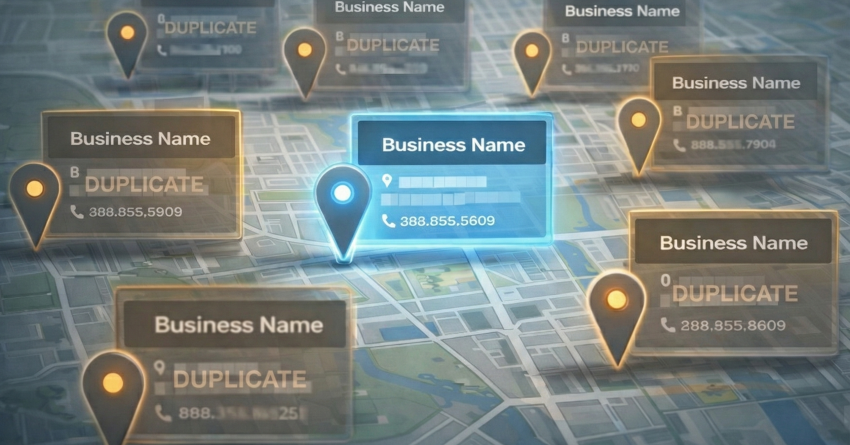
Duplicate listings are sneaky.
They don’t always look like a “problem,” but they quietly drain your local visibility.
One business. Two profiles. Three addresses. Slightly different phone numbers.
Now Google and customers don’t know which one to trust.
The good news?
You can fix duplicates today if you use a clean, step-by-step approach.
H2: What top competitors emphasize (and why)
The strongest white-label local SEO ecosystems treat listings cleanup like a core deliverable.
They know accurate data drives rankings, calls, and trust.
Here’s what leading platforms emphasize:
- Duplicate suppression so only one correct version shows across publishers and maps (Yext highlights “duplicate suppression” as a key listings capability).
- Listings protection to reduce unwanted third-party edits and keep data consistent (Vendasta positions accuracy protection and duplicate suppression together).
- Scalable location management for agencies and multi-location brands, including workflows for duplicates (Uberall documentation and product pages discuss duplicate handling and suppression)
- Automation + reporting so agencies can prove progress and keep clients longer (GoHighLevel’s Uberall integration mentions duplicate suppression at scale).
Need duplicate cleanup done for your clients without burning your team’s time?
White Label SEO Service can run listing audits, suppression, and Google Business Profile cleanup as a white-label deliverable you can resell.
Gap analysis (what they often don’t explain clearly)
Most competitors sell the feature.
They don’t fully teach the playbook.
Common gaps you can capitalize on:
- How to spot duplicates that don’t look obvious
- How to choose the “primary” listing without losing reviews
- What to do when Google forces a merge or ownership issue
- How to prevent duplicates from coming back next month
New opportunities for White Label SEO Service
White Label SEO Service can win by productizing a simple “Duplicate Listings Cleanup” system.
High-value opportunities:
- A duplicate audit + suppression workflow you can run across all client locations
- A merge/removal SOP for Google Business Profile duplicates (with decision rules)
- A data consistency lock-in plan (NAP consistency + publisher cleanup + monitoring)
- A conversion boost package after cleanup (better clicks, cleaner calls, fewer wrong locations)
What counts as a duplicate listing (in plain English)
A duplicate listing is another online profile for the same business that competes with the main one.
It can be on Google Maps, Apple Maps, Bing, Yelp, Facebook, data aggregators, or niche directories.
Common duplicate scenarios
- Same business name, same address, different phone number
- Same business name, different suite number or spelling
- Old location still live after a move
- A second profile created by a staff member or agency
- Auto-generated listings pulled from messy directory data
The “looks harmless” duplicate
This is the one that hurts the most.
Everything looks “close enough,” so it gets ignored.
But Google sees conflicts.
And customers get confused.
Why duplicate listings hurt trust, traffic, and sales
Duplicates don’t just clutter the internet.
They create real business damage.
They split ranking signals
When signals are divided between profiles, your main profile may look weaker.
That can mean fewer local pack impressions and fewer map clicks.
They cause wrong info and missed leads
Duplicates often show:
- Old hours
- Wrong phone numbers
- Wrong directions
- Wrong category
That turns into missed calls and wasted ad spend.
They can trigger “Action Required” headaches
Some platforms surface duplicates flagged by Google as issues you must resolve.
If you wait too long, the cleanup gets harder.
How to find duplicate listings fast
You don’t need to guess.
Use a simple, repeatable scan.
Start with Google Maps (the biggest impact)
Search these variations:
- Business name + city
- Business name + old address
- Business name + old phone number
- Business name misspellings
- Business name + “suite” variations
Then check the knowledge panel and map results for duplicates.
Check your Google Business Profile manager
Look for:
- Similar profiles with the same address
- Profiles marked as duplicates or with ownership issues
- Profiles with old categories and old hours
Scan major publishers and directories
Focus on:
- Apple Maps
- Bing Places
- Yelp
- Top data aggregators and industry directories
Duplicates here often feed duplicates elsewhere.
The “NAP mismatch” clue
If name, address, or phone is inconsistent across the web, duplicates become more likely.
That inconsistency also weakens trust.
How to fix duplicate listings today (clean process)
This is the part most people mess up.
So keep it simple.
Step 1 Decide which listing should win
Pick the listing that has:
- The correct name, address, phone
- The most reviews (usually)
- Verified ownership (if possible)
- The cleanest categories and service areas
Step 2 Fix the Google Business Profile duplicate correctly
Google provides options to remove duplicates or request merges in certain situations. Google Help+1
The key is choosing the correct profile to remove or merge, so you don’t lose the wrong content.
Quick decision rules:
- If one profile is correct and one is clearly wrong → remove the wrong one
- If both profiles matter and represent the same business → request a merge where applicable Google Help+1
- If ownership is unclear → follow Google’s “resolve ownership issues” path Google Help
What NOT to do
- Don’t create a “new fresh profile” just because it feels easier
- Don’t mark the correct profile as closed
- Don’t ignore it and hope it fixes itself
Step 3 Suppress duplicates across publisher networks
This is where listings platforms win.
They push updates at scale and help suppress duplicates across connected sites.
Several top platforms explicitly market duplicate suppression as a core listings feature.
Step 4 Prevent duplicates from coming back
Duplicates often return because the data source is still messy.
Lock it down with:
- One standard business name format
- One standard address format (including suite rules)
- One primary phone number (consistent everywhere)
- A monthly scan for new conflicts
If your client’s map rankings are stuck, duplicates might be the silent blocker.
White Label SEO Service can identify duplicate conflicts, clean them up, and stabilize listings so your other local SEO work starts “lifting” again.
E-E-A-T: How to make your duplicate cleanup feel credible
Experience
Show the before-and-after in plain language.
Example: “Two listings were competing. Calls were going to the wrong number. We merged the profiles, corrected the data, and the right listing started getting the clicks again.”
Expertise
Explain why each step matters.
You’re not “doing busywork.” You’re removing data conflicts that confuse search engines and customers, and you’re protecting the listing from future inconsistency.
Authoritativeness + Trust
Be transparent and documented.
Include who performed the cleanup, what was changed, screenshots with permission, and a clear escalation path when Google support or ownership verification is needed. (Google’s own guidance warns to remove the correct duplicate because removal affects content and managers.) Google Help
Semantic, human-first content signals that help this page rank
To keep this article natural (and still SEO-strong), you’re already covering the right ideas:
- local listings management
- NAP consistency (name, address, phone)
- Google Business Profile duplicates
- merge vs. remove decisions
- duplicate suppression
- publisher networks and directories
- map pack visibility and conversions
No awkward repetition needed.
Just clear explanations and real steps.
Who this service is for
This is for:
- SEO agencies offering local SEO and tired of mystery ranking issues
- Multi-location brands managing dozens or hundreds of profiles
- Local service businesses that rely on calls and booked jobs
- Marketing teams cleaning up old data after moves, rebrands, or ownership changes
If you’ve ever said, “Our listing looks right… so why aren’t we ranking?”
Duplicates are a top suspect.
Key Takeaways
- Duplicate listings split trust and ranking signals.
- They cause wrong info, missed calls, and confused customers.
- Google provides paths to remove or merge duplicates depending on the situation. Google Help+1
- Top listings platforms treat duplicate suppression as a core feature because it’s high-impact and scalable.
- A monthly prevention routine stops duplicates from returning.
Lessons Learned
- Most duplicate problems start with small NAP inconsistencies.
- Fixing duplicates often unlocks progress for everything else (content, links, GBP posts).
- A documented SOP is what makes this scalable for agencies.
- Prevention is cheaper than cleanup.
FAQs
1) What causes duplicate listings?
Duplicates usually come from inconsistent directory data, business moves, rebrands, staff creating new profiles, or auto-generated profiles from third-party sources.
2) Should I delete a duplicate Google Business Profile?
Sometimes, yes but only after you confirm which profile is the correct one. Google notes that removing a duplicate can remove content and managers, so you need to remove the right profile. Google Help
3) When should I merge profiles instead of removing one?
If two profiles represent the same business and both are valid in some way, a merge may be the right path. Google provides guidance for requesting merges in certain duplicate scenarios. Google Help+1
4) How do I stop duplicates from coming back?
Standardize your business name, address formatting, and phone number everywhere. Then monitor monthly and suppress duplicates across key publisher networks using a consistent process (and tools where needed). Yext+1
Want to sell “Duplicate Listings Cleanup” as a premium add-on this week?
White Label SEO Service can fulfill the audit, suppression, and Google Business Profile cleanup under your brand complete with reporting your clients actually understand.