

Footer links influence how search engines crawl your site, distribute link equity, and understand your page hierarchy. While they carry less weight than contextual body links, a well-optimized footer can strengthen your internal linking structure and improve user navigation across your entire website.
Most site owners overlook their footer as an SEO asset. They either stuff it with excessive links hoping to boost rankings, or they ignore it entirely. Both approaches miss the strategic opportunity footers provide for guiding both users and search engine crawlers to your most important pages.
This guide covers everything you need to know about footer links and SEO. You will learn how footer links impact rankings, best practices for optimization, common mistakes to avoid, and specific strategies based on your website type.
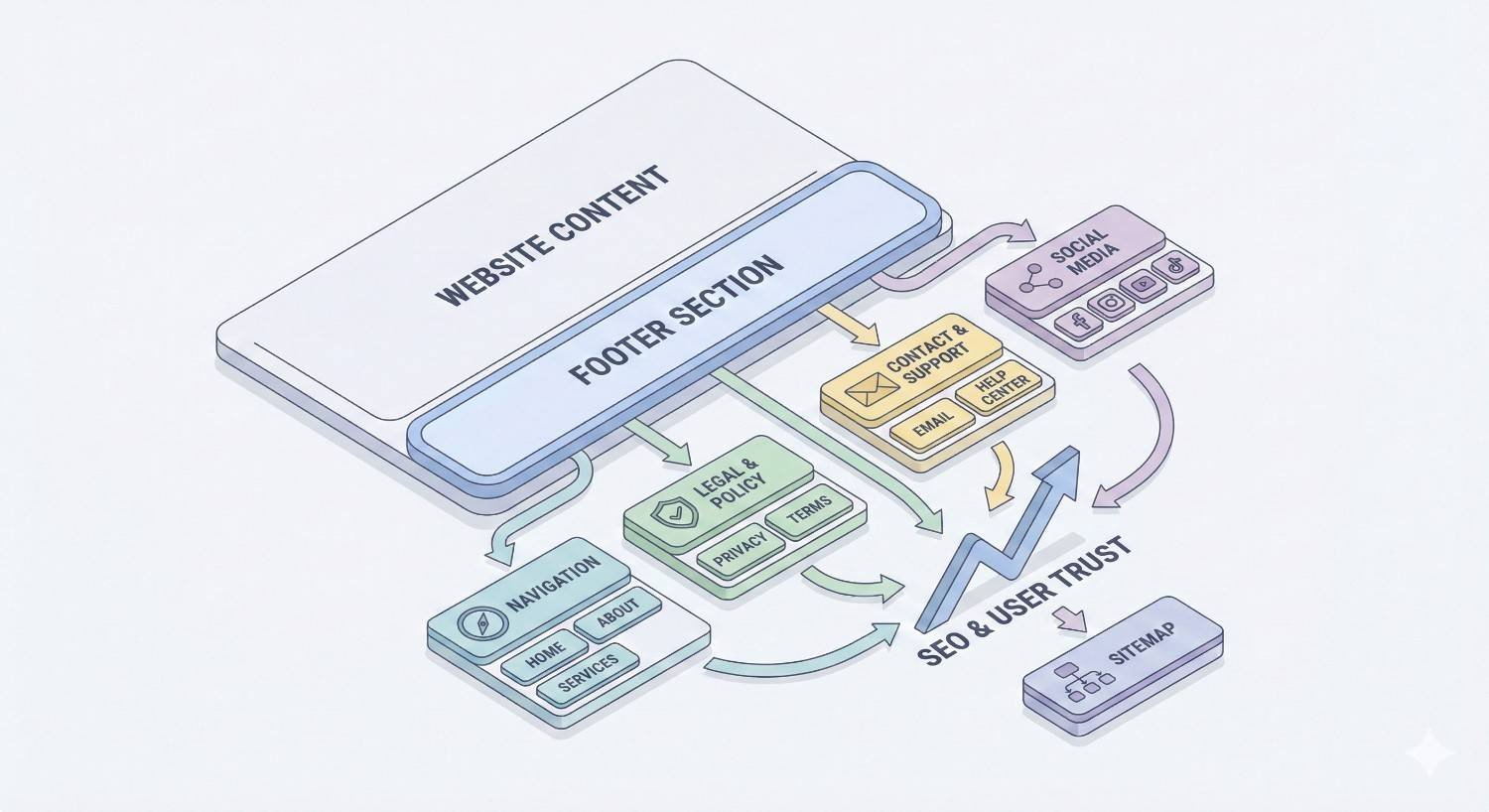
What Are Footer Links?
Footer links are the hyperlinks located in the bottom section of a webpage that appears consistently across all or most pages of a website. They serve as a secondary navigation system, providing users and search engines with access to important pages that may not fit in the main navigation menu.
Definition and Basic Structure
A website footer is the content area at the bottom of every page, typically separated from the main content by visual design elements. Footer links within this section create pathways to various pages on your site and occasionally to external resources.
The basic structure of a footer usually includes multiple columns or sections organized by category. You might see one column for company information, another for product categories, a third for support resources, and a fourth for legal pages. This organization helps users quickly find what they need without scrolling back to the top navigation.
From a technical perspective, footer links are HTML anchor elements contained within a footer tag or a div with a footer class. Search engine crawlers identify these links and follow them to discover and index additional pages on your site.
Types of Footer Links
Navigational Footer Links
Navigational footer links direct users to key sections of your website. These typically include links to main category pages, popular products or services, about pages, and resource centers. E-commerce sites often link to top-level category pages, while service businesses might link to their core service offerings.
These links serve users who scroll to the bottom of a page looking for additional navigation options. They also help search engines understand your site structure and identify which pages you consider most important.
Legal/Policy Footer Links
Legal footer links include your privacy policy, terms of service, cookie policy, and disclaimer pages. These pages are required by various regulations including GDPR and CCPA, making footer placement standard practice across the web.
While legal pages rarely drive organic traffic, they build trust with users and demonstrate compliance with data protection requirements. Search engines also expect to find these pages on legitimate business websites.
Contact and Location Links
Contact links in the footer typically point to your contact page, support center, or help documentation. For businesses with physical locations, footer links often include location pages, store finders, or embedded address information.
Local businesses benefit significantly from footer contact links. Including your NAP (Name, Address, Phone) information in the footer creates consistent citations across your site, which supports local SEO efforts.
Social Media Footer Links
Social media links connect your website to your profiles on platforms like LinkedIn, Facebook, Instagram, and Twitter. These external links typically open in new tabs and often use recognizable social media icons.
Social footer links do not directly impact SEO rankings. However, they support brand visibility and provide users with additional ways to engage with your business.
Common Footer Link Configurations
The most effective footer configurations balance comprehensiveness with usability. A typical well-structured footer includes four to six distinct sections with five to ten links each.
Common configurations include a company section with about, careers, and press links. A products or services section links to main offerings. A resources section connects to blogs, guides, and documentation. A support section provides access to help centers and contact information. A legal section houses required policy pages.
Large e-commerce sites often expand their footers to include links to top brands, popular categories, and seasonal collections. SaaS companies frequently add links to integrations, API documentation, and developer resources.
The key is matching your footer configuration to user needs and business goals. Every link should serve a clear purpose for either users or search engines.
How Footer Links Impact SEO
Footer links affect multiple aspects of search engine optimization, from technical crawling to user experience signals. Understanding these impacts helps you make strategic decisions about which links to include and how to structure them.
Crawlability and Site Architecture
Footer links appear on every page of your website, creating multiple pathways for search engine crawlers to discover content. When Googlebot lands on any page, it can follow footer links to reach other important pages without navigating through your main menu structure.
This sitewide presence makes footer links valuable for ensuring deep pages get crawled regularly. Pages buried several clicks from your homepage become more accessible when linked from the footer.
However, excessive footer links can dilute crawl efficiency. If your footer contains hundreds of links, crawlers spend resources following paths that may not lead to your most valuable content. Strategic selection ensures crawl budget focuses on pages that matter most.
Internal Link Equity Distribution
Internal links pass authority from one page to another within your site. Footer links, appearing on every page, create a unique distribution pattern where linked pages receive small amounts of equity from across your entire site.
The cumulative effect can be significant. A page linked from your footer receives a small boost from every page on your site. For a 500-page website, that footer link creates 500 internal links pointing to a single page.
This distribution pattern differs from contextual links, which pass equity from specific relevant pages. Footer links provide broad, shallow equity distribution while contextual links provide deep, targeted distribution.
PageRank Flow and Link Juice
Google’s PageRank algorithm considers link placement when calculating how much value passes through a link. Google’s documentation confirms that links in main content areas typically carry more weight than links in footers or sidebars.
This does not mean footer links pass zero value. They still contribute to your internal linking structure and help establish page importance signals. The value is simply weighted differently than links embedded within your content.
Think of footer links as supporting actors rather than leads. They reinforce your site structure and ensure important pages remain accessible, but they should not be your primary internal linking strategy.
User Experience Signals
Footer links influence how users interact with your site, which indirectly affects SEO through engagement metrics. A well-organized footer helps users find additional relevant content, potentially increasing pages per session and time on site.
Poor footer design creates the opposite effect. Cluttered footers with dozens of links overwhelm users and make finding specific pages difficult. This friction can increase bounce rates and reduce overall engagement.
Search engines increasingly consider user experience signals when evaluating page quality. A footer that genuinely helps users navigate your site supports positive engagement patterns that benefit SEO.
Footer Links Best Practices for SEO
Optimizing your footer links requires balancing SEO objectives with user experience. These best practices help you create a footer that serves both search engines and human visitors effectively.
Strategic Link Selection
Choose footer links based on strategic importance rather than trying to link everything. Focus on pages that meet one or more of these criteria: high commercial value, frequent user demand, important for site structure, or required for compliance.
Start by identifying your most valuable pages. These might be top service pages, key product categories, or high-converting landing pages. Linking these from your footer ensures they receive consistent internal link equity.
Consider user behavior data from Google Analytics. Pages that users frequently search for or navigate to deserve footer placement. If your contact page receives significant traffic, it belongs in the footer.
Limit your total footer links to a manageable number. Most effective footers contain between 20 and 50 links organized into clear categories. Going beyond this range risks diluting link equity and overwhelming users.
Anchor Text Optimization
Footer anchor text should be descriptive and natural. Use clear labels that tell users exactly where each link leads. Avoid generic text like “click here” or “learn more” that provides no context.
Include relevant keywords in anchor text where they fit naturally. A link to your SEO services page might use “SEO Services” as anchor text rather than just “Services.” This helps search engines understand the linked page’s topic.
Avoid over-optimization by varying anchor text across your site. If every internal link to a page uses identical keyword-rich anchor text, it can appear manipulative. Footer links should use straightforward descriptive text.
Keep anchor text concise. Long anchor text strings look cluttered and reduce scannability. Aim for two to four words that clearly communicate the destination.
Link Hierarchy and Organization
Organize footer links into logical categories that match user mental models. Group related links together under clear headings. This structure helps users scan the footer quickly and find what they need.
Place your most important links in prominent positions. Users typically scan footers from left to right and top to bottom. Position high-priority links in the upper left area of your footer.
Use visual hierarchy to distinguish between link categories. Headings should be visually distinct from link text. Adequate spacing between sections prevents the footer from appearing cluttered.
Consider a tiered approach where primary links appear in the main footer area and secondary links appear in a sub-footer or separate section. This keeps the main footer focused while still providing access to additional pages.
Mobile Footer Considerations
Mobile footer design requires special attention since most websites now receive majority mobile traffic. Footer links must be easily tappable on touchscreens with adequate spacing between links.
Consider using accordion or expandable sections for mobile footers. This approach keeps the footer compact while still providing access to all links. Users can expand only the sections relevant to their needs.
Test your footer on actual mobile devices, not just browser simulations. Ensure links are large enough to tap accurately and that the footer does not extend excessively on small screens.
Prioritize the most important links for mobile display. Mobile users often have different needs than desktop users, so your mobile footer might emphasize contact information and key actions over comprehensive navigation.
Avoiding Over-Optimization
Over-optimized footers trigger search engine penalties and create poor user experiences. Recognize the warning signs and maintain a natural, user-focused approach.
Avoid stuffing keywords into footer links or surrounding text. A footer filled with keyword variations looks spammy to both users and search engines. Each link should serve a genuine navigation purpose.
Do not create footer links solely for SEO purposes. If a link would not help users navigate your site, it probably should not be in your footer. Search engines have become sophisticated at identifying manipulative internal linking.
Resist the temptation to link every page from your footer. Comprehensive does not mean exhaustive. A focused footer with strategic links outperforms a bloated footer trying to boost every page.
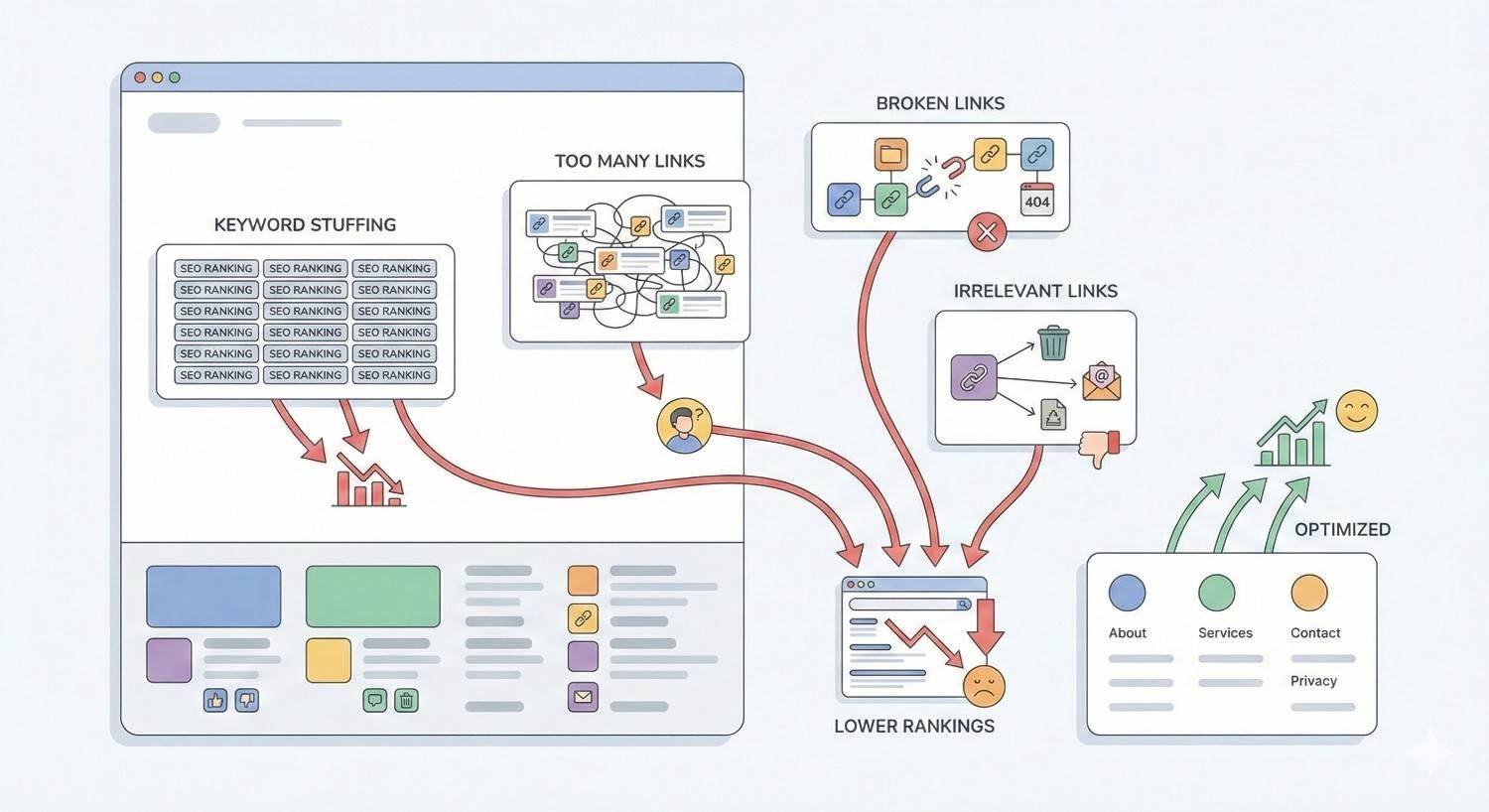
Footer Link Mistakes That Hurt Rankings
Certain footer link practices can actively harm your SEO performance. Understanding these mistakes helps you avoid penalties and maintain a healthy site structure.
Keyword Stuffing in Footer Links
Keyword stuffing in footers was a common tactic in early SEO. Site owners would pack their footers with keyword-rich anchor text hoping to boost rankings for those terms. This approach no longer works and can trigger penalties.
Modern search algorithms easily identify unnatural keyword patterns. A footer with links like “best SEO services,” “top SEO company,” “affordable SEO agency,” and “professional SEO experts” all pointing to the same page signals manipulation.
The solution is using natural, descriptive anchor text that prioritizes user understanding over keyword inclusion. If your anchor text sounds awkward when read aloud, it probably needs revision.
Excessive Sitewide Links
Sitewide links appear on every page of your website. While some sitewide links are appropriate, excessive use dilutes their value and can appear manipulative.
Google’s algorithms discount the value of sitewide links compared to unique contextual links. Having 1,000 footer links pointing to a page does not provide 1,000 times the value of a single contextual link. The cumulative effect is much smaller.
More problematically, excessive sitewide links to external sites can trigger spam signals. If your footer links to dozens of external websites, search engines may view this as a link scheme.
Keep your footer focused on essential internal navigation with minimal external links. Reserve sitewide placement for pages that genuinely deserve site-wide accessibility.
Hidden or Manipulative Footer Links
Hidden footer links violate Google’s webmaster guidelines and can result in manual penalties. This includes links hidden through CSS, tiny font sizes, color matching with backgrounds, or placement off-screen.
Some site owners hide footer links thinking they can pass link equity without affecting user experience. Search engines specifically look for this behavior and penalize sites that employ it.
Manipulative footer links also include links disguised as other elements, links that redirect unexpectedly, or links that use deceptive anchor text. All of these practices risk penalties.
Every footer link should be visible, clearly labeled, and lead where users expect. Transparency builds trust with both users and search engines.
Broken and Orphaned Footer Links
Broken footer links create poor user experiences and waste crawl budget. Since footer links appear on every page, a single broken link multiplies across your entire site.
Regularly audit your footer links to identify and fix broken links. Tools like Screaming Frog or Ahrefs can crawl your site and flag links returning 404 errors.
Orphaned pages linked only from the footer may indicate structural problems. If a page is important enough for footer placement, it should also have contextual links from relevant content pages.
Maintain your footer as part of regular site maintenance. Update links when pages move, remove links to deleted content, and ensure all destinations remain relevant and functional.
Footer Links vs. Other Internal Links
Understanding how footer links compare to other internal link types helps you build a comprehensive linking strategy. Each link type serves different purposes and carries different weight.
Footer Links vs. Navigation Menu Links
Navigation menu links and footer links both provide sitewide internal linking, but they serve different user needs and carry different SEO weight.
Navigation menus appear at the top of pages where users expect primary navigation. These links typically receive more clicks and engagement than footer links. Search engines may weight navigation links slightly higher due to their prominent placement.
Footer links serve users who scroll through content and need additional navigation options. They also catch users who reach the bottom of a page without finding what they need.
The two link types should complement each other rather than duplicate. Your navigation menu should contain your most important top-level pages, while your footer can include secondary pages and additional resources.
Footer Links vs. Contextual Body Links
Contextual body links embedded within your content carry significantly more SEO weight than footer links. These links appear within relevant context, signaling to search engines that the linked page relates to the surrounding content.
Google’s John Mueller has confirmed that links within main content are more valuable than links in footers or navigation. The contextual relevance of body links makes them more meaningful signals.
Body links also receive more user engagement. Readers clicking links within content they are actively reading demonstrate genuine interest in the linked topic.
Footer links should supplement, not replace, contextual body links. Use your footer for navigation and accessibility while building contextual links within your content for SEO value.
When to Use Each Link Type
Use navigation menu links for your primary site sections that users need to access from any page. These are your top-level categories, main services, and essential pages.
Use footer links for secondary navigation, legal pages, contact information, and pages that support user needs without requiring top-level prominence. Footer links work well for resource libraries, help documentation, and company information pages.
Use contextual body links for SEO-focused internal linking. When you mention a topic covered on another page, link to it naturally within your content. These links pass the most value and help search engines understand topical relationships.
A comprehensive internal linking strategy uses all three types appropriately. Navigation provides primary structure, footers provide secondary access, and body links build topical authority.
Do Footer Links Still Pass Link Value?
The question of whether footer links pass meaningful SEO value generates ongoing debate. Understanding Google’s position and available evidence helps you make informed decisions.
Google’s Stance on Footer Links
Google has consistently stated that links in footers and sidebars carry less weight than links in main content areas. This position reflects the understanding that editorial links within content represent stronger endorsements than navigational links.
However, Google has never said footer links pass zero value. They remain part of your internal linking structure and contribute to how search engines understand your site architecture.
Google’s algorithms evaluate links based on multiple factors including placement, context, and user engagement patterns. Footer links score lower on contextual relevance but still contribute to overall link signals.
The key takeaway is that footer links should not be your primary SEO linking strategy, but they remain a legitimate part of comprehensive site optimization.
Link Weight and Placement Studies
Several SEO studies have attempted to measure the relative value of links based on placement. While methodologies vary, most find that links higher on a page and within content areas correlate with stronger ranking effects.
Research from Moz suggests that link placement affects both the likelihood of clicks and the perceived editorial value. Links that users actually click may carry more weight than links that exist purely for navigation.
The “reasonable surfer” model, which Google patented, suggests that links more likely to be clicked pass more value. Footer links, being less prominent, would pass less value under this model.
These studies support using footer links strategically rather than relying on them for primary SEO benefit.
Practical Evidence from SEO Testing
Practical SEO testing provides mixed results on footer link value. Some tests show measurable ranking improvements from footer link additions, while others show minimal impact.
The variation likely reflects differences in site authority, existing link structures, and competitive landscapes. A footer link on a high-authority site may pass meaningful value, while the same link on a low-authority site may have negligible effect.
What testing consistently shows is that footer links alone rarely drive significant ranking improvements. They work best as part of a comprehensive internal linking strategy that includes strong contextual links.
For most sites, footer links provide their greatest value through improved crawlability and user navigation rather than direct ranking boosts.
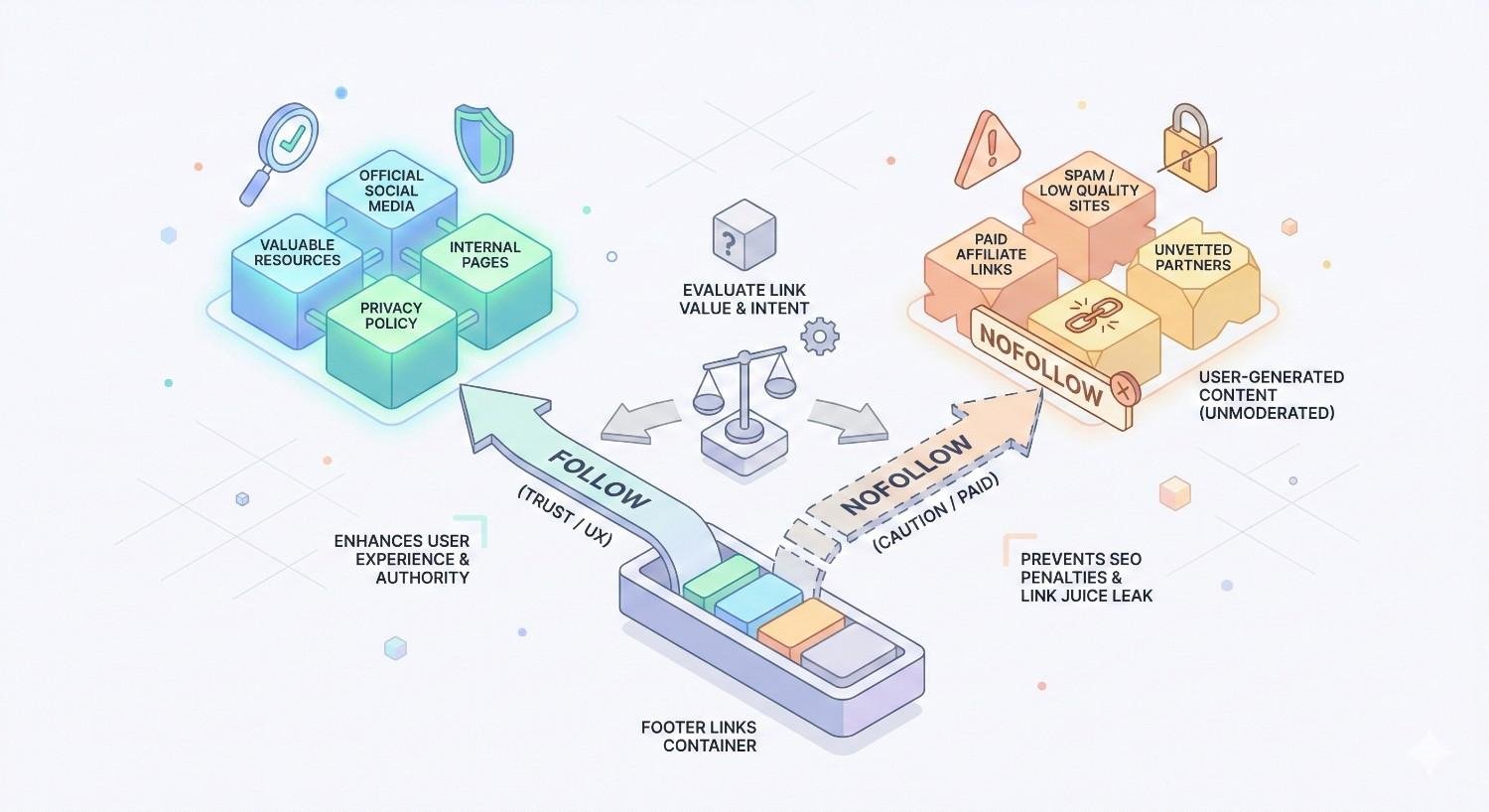
When to Use Nofollow on Footer Links
The nofollow attribute tells search engines not to pass link equity through a link. Certain footer link situations warrant nofollow usage to maintain a healthy link profile.
External Footer Links
External links in your footer should generally use the nofollow attribute unless you have a specific reason to pass equity. This includes links to social media profiles, partner websites, and external resources.
The reasoning is straightforward. Your footer appears on every page, so an external dofollow link in your footer creates hundreds or thousands of links to that external site. This level of linking is rarely appropriate for external destinations.
Exceptions might include links to parent companies, official partners with formal relationships, or industry organizations where the association benefits your credibility. Even then, consider whether sitewide linking is necessary.
Using nofollow on external footer links protects your site from being seen as participating in link schemes while still providing user navigation value.
Login and Account Pages
Login pages, account dashboards, and other user-specific pages should use nofollow links in your footer. These pages provide no SEO value and do not need link equity.
Search engines cannot access authenticated content behind login pages, so passing equity to these pages wastes your internal link value. The nofollow attribute keeps equity flowing to pages that can actually rank.
This applies to shopping cart pages, checkout processes, and any other transactional pages that exist for logged-in users rather than search discovery.
Sponsored and Affiliate Links
Any sponsored or affiliate links in your footer must use appropriate link attributes. Google requires sponsored links to use rel=”sponsored” and affiliate links to use rel=”sponsored” or rel=”nofollow.”
Failure to properly attribute commercial links violates Google’s guidelines and risks penalties. This applies regardless of where the link appears on your page.
If your footer includes links to partners, advertisers, or affiliate programs, ensure proper attribution. The small effort of adding correct attributes protects your site from potential penalties.
Footer Link Audit Checklist
Regular footer audits ensure your links remain optimized and free from issues. Use this checklist to evaluate your current footer link implementation.
Technical Audit Steps
Start by crawling your site to identify all footer links. Tools like Screaming Frog export complete link lists that you can filter to footer elements.
Check each link for proper functionality. Identify any links returning 404 errors, redirect chains, or unexpected destinations. Fix or remove problematic links.
Verify that link attributes are correctly implemented. Confirm nofollow attributes appear where intended and that no links have conflicting or malformed attributes.
Review your footer’s HTML structure. Ensure links are contained within semantic footer elements and that the structure supports accessibility standards.
Test footer rendering across devices and browsers. Confirm links display correctly and remain functional on mobile devices, tablets, and various desktop browsers.
SEO Performance Review
Analyze which footer-linked pages receive the most internal links and whether this aligns with your SEO priorities. Your most important pages should have strong internal link profiles.
Check Google Search Console for crawl errors related to footer-linked pages. Crawl issues may indicate problems with your footer link implementation.
Review the anchor text distribution for footer links. Ensure anchor text is descriptive and natural without over-optimization patterns.
Evaluate whether your footer links support your site’s topical structure. Links should reinforce your content hierarchy and help search engines understand page relationships.
Compare your footer link strategy against top competitors. Identify opportunities to improve based on what successful sites in your space include in their footers.
User Experience Assessment
Gather user feedback on footer navigation. Analytics data showing footer link clicks indicates which links users find valuable.
Test footer usability with real users. Ask them to find specific information using only the footer and observe any difficulties.
Evaluate visual design and organization. Confirm that link groupings make logical sense and that the footer is easy to scan quickly.
Check mobile footer experience specifically. Ensure adequate tap targets, readable text, and logical organization on small screens.
Review accessibility compliance. Footer links should be navigable via keyboard and properly labeled for screen readers.
Footer Link Strategy by Website Type
Different website types benefit from different footer link strategies. Tailor your approach based on your site’s purpose and user needs.
E-commerce Footer Links
E-commerce footers typically include extensive navigation to support product discovery. Link to main product categories, popular brands, and seasonal collections.
Include customer service links prominently. Shipping information, return policies, and contact options help users complete purchases with confidence.
Add trust signals like payment method icons, security badges, and customer review links. These elements support conversion even though they may not directly impact SEO.
Consider linking to buying guides and comparison content. These resources help users make decisions and create opportunities for contextual internal linking.
Keep your footer organized despite the volume of links. Use clear category headings and visual hierarchy to prevent overwhelming users.
SaaS and B2B Footer Links
SaaS footers should emphasize resources that support the buyer journey. Link to product features, pricing, case studies, and documentation.
Include links to integration partners and technical resources. B2B buyers often evaluate software based on ecosystem compatibility.
Add links to company information including about pages, careers, and press resources. B2B buyers research vendors thoroughly before purchasing.
Consider linking to comparison pages and competitor alternative content. These pages often drive significant organic traffic for SaaS companies.
Support existing customers with links to help centers, status pages, and community forums.
Local Business Footer Links
Local business footers should emphasize location and contact information. Include your full NAP (Name, Address, Phone) consistently across all pages.
Link to individual location pages if you have multiple locations. Each location page should have unique content and local optimization.
Include links to service area pages if you serve specific geographic regions. These pages support local SEO for service-based businesses.
Add links to review profiles on Google Business Profile, Yelp, and industry-specific platforms. Social proof supports local business credibility.
Consider embedding a Google Map or linking to directions. This helps users find your physical location easily.
Publisher and Blog Footer Links
Publisher footers should help readers discover more content. Link to popular posts, content categories, and topic archives.
Include links to newsletter signup and RSS feeds. These options help readers stay connected with your content.
Add author pages and contributor information. This supports E-E-A-T signals by highlighting content creators.
Link to editorial policies, fact-checking standards, and correction procedures. Transparency builds trust with readers and search engines.
Consider linking to related publications or media properties if part of a larger network.
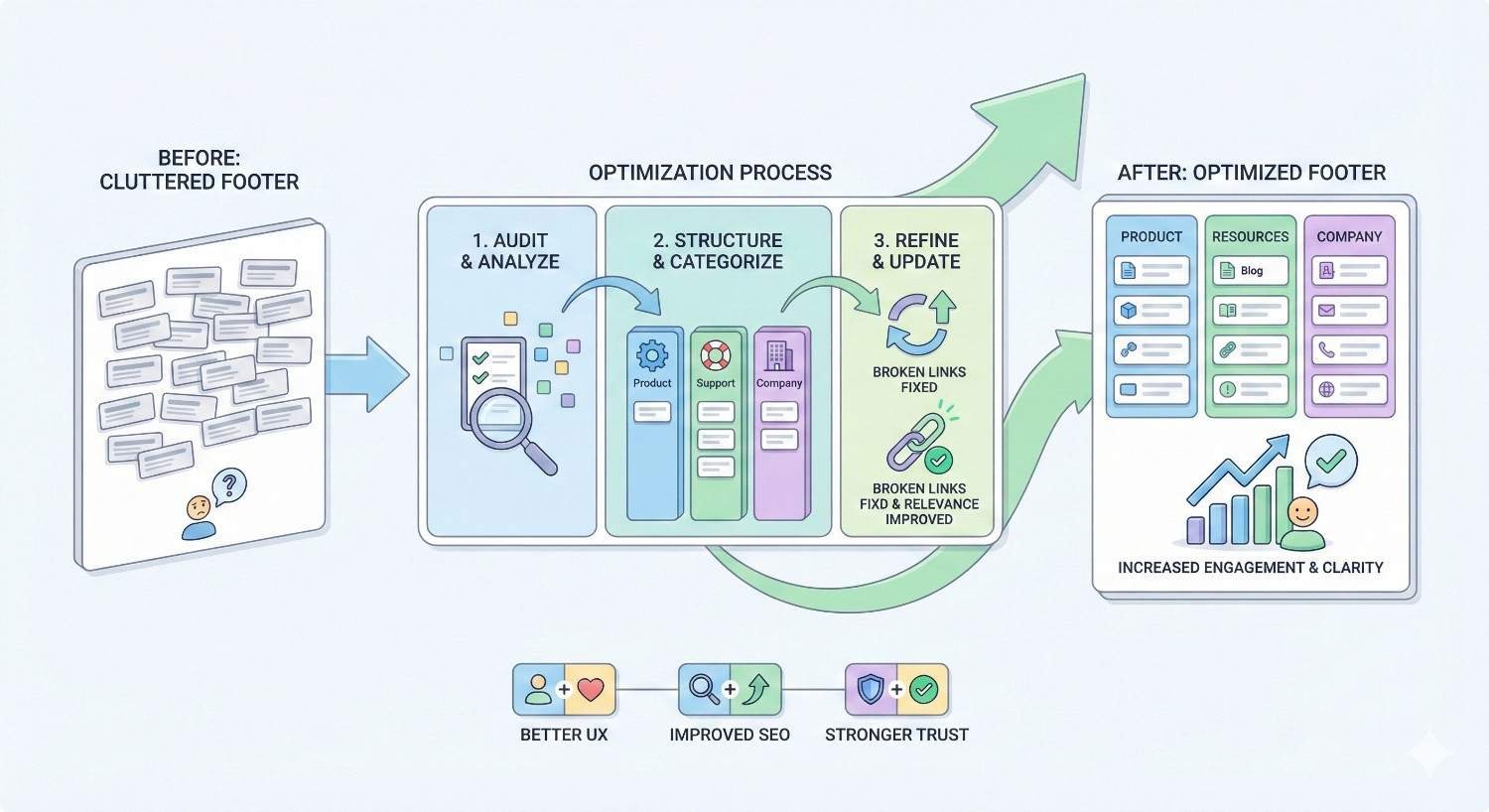
How to Optimize Existing Footer Links
If your current footer needs improvement, follow this systematic approach to optimization.
Conducting a Footer Link Audit
Begin by documenting your current footer links in a spreadsheet. Record each link’s anchor text, destination URL, and any attributes like nofollow.
Categorize links by type: navigational, legal, contact, social, and other. This categorization reveals your current footer structure.
Identify links that no longer serve a purpose. Pages that have been removed, redirected, or become irrelevant should be cleaned up.
Note any missing links that should be added based on user needs or SEO priorities.
Compare your footer against the best practices outlined earlier in this guide. Flag any issues for correction.
Prioritizing High-Value Pages
Identify your most important pages based on business value and SEO potential. These pages deserve footer placement if they do not already have it.
Review Google Analytics to find pages with high conversion rates or engagement metrics. These pages benefit from increased internal linking.
Check Google Search Console for pages ranking on page two or three for valuable keywords. Additional internal links, including footer links, may help these pages improve.
Consider pages that support your topical authority in key areas. Linking to comprehensive resources reinforces your expertise signals.
Balance commercial pages with informational resources. A footer focused entirely on sales pages may not serve user needs effectively.
Restructuring for Better Crawl Efficiency
Organize your footer links to support efficient crawling. Group related pages together and use clear category labels.
Remove links to low-value pages that consume crawl budget without providing SEO benefit. Focus footer links on pages you want crawled frequently.
Ensure your footer structure supports your overall site architecture. Footer categories should align with your main navigation and content silos.
Consider implementing a mega footer for large sites with many important pages. This approach provides comprehensive navigation while maintaining organization.
Test your restructured footer to ensure all links function correctly and the design remains user-friendly.
Measuring Footer Link Performance
Track footer link clicks using Google Analytics event tracking. This data reveals which links users actually find valuable.
Monitor crawl statistics in Google Search Console after making footer changes. Look for improvements in crawl coverage and frequency.
Track ranking changes for pages added to or removed from your footer. While isolating footer link impact is difficult, significant changes may indicate effect.
Review user behavior metrics like bounce rate and pages per session. Footer improvements should support better overall engagement.
Conduct periodic re-audits to ensure your footer remains optimized as your site evolves.
Key Takeaways and Next Steps
Footer links play a supporting role in SEO strategy. They improve crawlability, distribute link equity across your site, and help users navigate to important pages. While they carry less weight than contextual body links, a well-optimized footer contributes to overall site health and user experience.
Footer Link SEO Summary
Footer links impact SEO through crawlability, internal link equity distribution, and user experience signals. They should complement, not replace, contextual internal linking within your content.
Best practices include strategic link selection, natural anchor text, logical organization, and mobile optimization. Avoid keyword stuffing, excessive links, hidden links, and broken links.
Different website types benefit from different footer strategies. E-commerce sites need extensive product navigation, while local businesses should emphasize location and contact information.
Regular audits ensure your footer remains optimized. Check for technical issues, SEO alignment, and user experience problems on a quarterly basis.
Implementing Your Footer Link Strategy
Start by auditing your current footer using the checklist provided. Document existing links, identify issues, and note opportunities for improvement.
Prioritize changes based on impact and effort. Fixing broken links and removing spammy anchor text should come first. Adding strategic links to high-value pages comes next.
Implement changes systematically and monitor results. Track crawl statistics, user engagement, and ranking changes to measure the effect of your optimizations.
Conclusion
Footer links deserve strategic attention as part of your overall SEO approach. They support site architecture, improve crawlability, and help users find important pages. The key is treating your footer as a navigation tool that serves real user needs rather than an SEO manipulation opportunity.
At White Label SEO Service, we help businesses optimize every aspect of their internal linking strategy, including footer implementation. Our technical SEO audits identify footer issues and opportunities that most site owners overlook.
Ready to improve your site’s internal linking structure? Contact our team for a comprehensive SEO audit that includes footer link analysis and optimization recommendations tailored to your specific website type and business goals.
Frequently Asked Questions About Footer Links and SEO
Are footer links bad for SEO?
Footer links are not inherently bad for SEO. They become problematic only when over-optimized with keyword stuffing, excessive quantities, or manipulative tactics. A well-structured footer with strategic links to important pages supports both user navigation and search engine crawling.
How many links should be in a footer?
Most effective footers contain between 20 and 50 links organized into clear categories. The right number depends on your site size and user needs. Focus on quality and relevance rather than hitting a specific number. Every link should serve a genuine navigation purpose.
Do footer links count as backlinks?
Footer links are internal links, not backlinks. Backlinks come from external websites pointing to your pages. Internal footer links help distribute link equity within your own site but do not provide the external authority signals that backlinks provide.
Should footer links open in new tabs?
External footer links, such as social media profiles, typically should open in new tabs to keep users on your site. Internal footer links should open in the same tab to maintain normal navigation behavior. Consistency in this approach improves user experience.
Can footer links cause duplicate content issues?
Footer links themselves do not cause duplicate content issues. However, if your footer contains large amounts of text that appears on every page, search engines might view this as boilerplate content. Keep footer text minimal and focus on navigation links rather than content blocks.
Do footer links pass as much value as body links?
No, footer links pass less value than contextual links within your main content. Google’s algorithms weight links based on placement and context. Body links within relevant content carry more SEO value than navigational footer links. Use both strategically for best results.
Should I nofollow all external footer links?
Generally, yes. External links in your footer appear on every page, creating many links to external sites. Using nofollow prevents passing excessive equity to external destinations and protects your site from appearing to participate in link schemes. Exceptions exist for formal partnerships or parent company relationships.


