
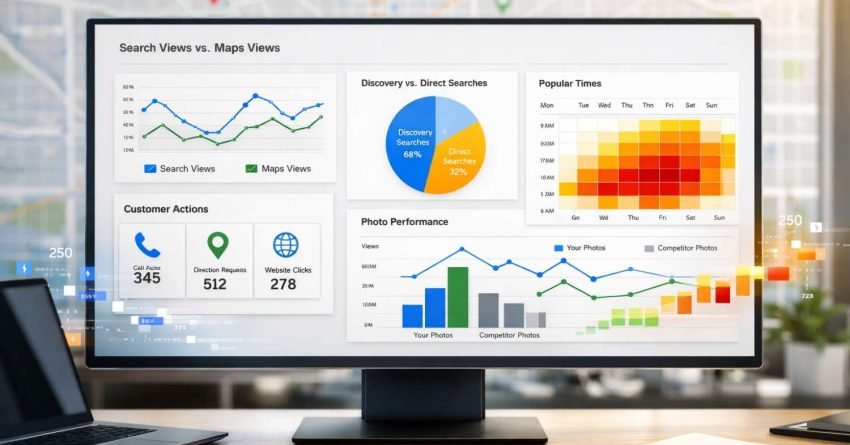
Google Business Profile Insights transforms raw data into actionable intelligence about how customers discover and interact with your business online. This dashboard reveals exactly which searches trigger your listing, how users engage with your profile, and what actions they take before contacting you.
For business owners tracking local SEO performance, these metrics provide the clearest picture of visibility and customer behavior available. Understanding what each data point means separates businesses that guess from those that grow strategically.
This guide breaks down every GMB Insights metric, explains what the numbers actually indicate, and shows you how to use this data to improve local search performance and drive more qualified leads.

What Are GMB Insights and Why Do They Matter?
GMB Insights is the analytics dashboard within Google Business Profile that tracks how customers find and interact with your business listing. This free tool measures search visibility, customer actions, and engagement patterns across Google Search and Google Maps.
The platform collects data every time someone views your listing, requests directions, calls your business, or visits your website through your profile. Google aggregates this information into digestible reports showing performance trends over customizable time periods.
For local businesses, these insights answer critical questions. How many people see your listing each month? What search terms bring them there? Do they call, visit your website, or request directions? This data directly informs local SEO strategy and marketing budget allocation.
The metrics matter because they connect online visibility to real business outcomes. A listing generating thousands of views but few calls indicates a conversion problem. Strong direction requests but weak website clicks suggests customers prefer in-person visits. Each pattern reveals optimization opportunities.
How Customers Find Your Business: Search Types Explained
GMB Insights categorizes discovery into distinct search types, revealing how customers locate your listing. Understanding these categories helps you evaluate brand awareness versus discovery potential.
Direct Searches
Direct searches occur when someone types your exact business name or address into Google. These users already know your business exists and are looking specifically for you. High direct search numbers indicate strong brand recognition and effective offline marketing.
A restaurant with 500 direct searches monthly has established name recognition in its market. These searches often come from repeat customers, referrals, or people who saw traditional advertising. Direct searches typically convert at higher rates because the user has existing intent.
Discovery Searches
Discovery searches happen when users search for a category, product, or service you offer rather than your specific business name. Someone searching “coffee shop near me” or “emergency plumber downtown” triggers discovery results.
This metric reveals your visibility to new potential customers. Strong discovery numbers mean your listing appears when people search for what you sell, not just who you are. For most businesses, discovery searches represent the largest growth opportunity since they capture customers who haven’t chosen a provider yet.
Branded Searches
Branded searches include queries for a brand related to your business. If you’re an authorized dealer or carry specific product lines, searches for those brands may surface your listing. This category helps businesses understand how brand partnerships affect visibility.
Search Queries Report
Beyond categories, GMB Insights shows the actual search terms triggering your listing. This report lists specific queries like “best Italian restaurant downtown” or “24 hour locksmith” along with impression counts for each.
Analyzing search queries reveals whether you’re appearing for relevant terms. If a law firm sees queries for “cheap divorce lawyer” but positions itself as premium, there’s a messaging disconnect. The queries report guides keyword strategy for your website and helps identify new service opportunities based on what people actually search.
Understanding Views: Search vs. Maps Performance
GMB Insights separates views by platform, showing whether customers found you through Google Search results or Google Maps. This distinction matters for understanding user behavior and optimizing accordingly.
Views on Search
Search views count how many times your listing appeared in Google Search results. This includes the local pack (the map with three business listings), knowledge panels, and organic search results where your profile displays.
High search views indicate strong visibility in traditional Google results. Users viewing your listing on Search are often in research mode, comparing options before making decisions. They may be at their desk or on mobile, but the search interface suggests deliberate information gathering.
Views on Maps
Maps views track appearances within the Google Maps application or maps.google.com. These users are often actively navigating, looking for nearby options, or planning routes. Maps users tend to have higher immediate intent since they’re specifically using a location-based tool.
Strong Maps performance matters especially for businesses dependent on foot traffic. Restaurants, retail stores, and service businesses with physical locations benefit from Maps visibility because these users are often ready to visit.
Total Views Analysis
Combining both metrics shows overall visibility trends. A business averaging 10,000 total views monthly has significant exposure. However, the ratio between Search and Maps views reveals user behavior patterns.
A 70/30 split favoring Search suggests customers research before visiting. A 60/40 split toward Maps indicates strong local discovery and navigation-based finding. Neither ratio is inherently better, but understanding yours helps tailor your optimization approach.
Customer Actions: Measuring Real Engagement
Views show visibility, but actions reveal engagement. GMB Insights tracks specific behaviors customers take after viewing your listing, providing direct indicators of business impact.
Website Clicks
This metric counts clicks on the website link in your profile. Users clicking through want more information than your listing provides. They may be checking menus, pricing, service details, or booking options.
Strong website click rates indicate your listing generates interest but needs your website to close the deal. Low website clicks despite high views might mean your listing already answers customer questions, or it could signal that users aren’t compelled to learn more.
Direction Requests
Direction requests measure how many users clicked for navigation to your location. This action shows strong visit intent since people don’t request directions casually. For brick-and-mortar businesses, this metric directly correlates with foot traffic potential.
Tracking direction requests over time reveals seasonal patterns and marketing campaign effectiveness. A spike after a local promotion indicates the campaign drove physical visit intent. Consistent direction requests suggest steady local demand.
Phone Calls
Call tracking counts taps on your phone number from mobile devices. This metric captures high-intent users ready to speak with someone immediately. Service businesses, restaurants taking reservations, and professional services often prioritize call volume.
GMB Insights shows call timing patterns, revealing when customers most frequently reach out. A plumber seeing 60% of calls between 6-9 PM knows emergency calls drive their business. A restaurant with lunch-hour call spikes should ensure phone coverage during that window.
Message Requests
If you’ve enabled messaging, this metric tracks how many users initiated conversations through your listing. Messaging appeals to customers who prefer text communication over calls. Younger demographics and certain service categories show higher messaging engagement.
Booking Actions
For businesses using integrated booking systems, GMB tracks reservation and appointment requests made directly through the listing. This metric shows how many customers converted without ever visiting your website.
Photo Performance: Visual Content Analytics
GMB Insights provides detailed analytics on your business photos, comparing your visual content performance against competitors in your category.
Photo Views
This metric shows how many times users viewed photos on your listing. High photo views indicate visual interest in your business. Restaurants, hotels, retail stores, and any business where appearance matters should monitor this closely.
Google also shows how your photo views compare to similar businesses. If competitors average 1,000 photo views monthly and you’re at 300, your visual content needs improvement. If you’re at 2,000, your photos are outperforming the market.
Photo Quantity Comparison
The dashboard compares how many photos you’ve uploaded versus category averages. Businesses with more photos typically see higher engagement, but quality matters more than quantity. Ten excellent photos outperform fifty mediocre ones.
Google’s comparison helps benchmark your visual content strategy. If similar businesses average 25 photos and you have 8, adding relevant images could improve performance. However, adding stock photos or irrelevant images won’t help and may hurt credibility.
Owner vs. Customer Photos
GMB distinguishes between photos you upload and those customers add. Customer photos provide social proof and authentic perspectives. A healthy mix of both indicates an engaged customer base and active business management.
Monitoring customer photos also helps identify potential issues. Negative images or inappropriate content occasionally appears in customer uploads. Regular review ensures your visual presentation remains professional.
Popular Times and Visit Duration Data
For businesses with sufficient foot traffic data, GMB Insights displays popular times and average visit duration. This information helps with staffing, marketing timing, and customer experience optimization.
Popular Times Graph
This visualization shows typical busy periods throughout the week. The graph displays hour-by-hour popularity based on aggregated visit data. Peaks indicate when most customers visit, while valleys show slower periods.
Understanding popular times helps with operational decisions. Scheduling more staff during peak hours improves service. Running promotions during slow periods can balance traffic. Knowing your busiest day helps with inventory and preparation.
Live Busyness Indicator
Google shows real-time busyness levels when sufficient data exists. This feature helps customers decide when to visit and helps you understand current demand. Consistently high live busyness during certain hours confirms your popular times data.
Average Visit Duration
This metric estimates how long customers typically spend at your location. A coffee shop might see 20-minute averages while a furniture store shows 45 minutes. Understanding dwell time helps with space planning and customer experience design.
Comparing your visit duration to category averages reveals whether customers linger or leave quickly. Longer visits often indicate engagement and satisfaction, though the ideal duration varies by business type.
How to Access and Navigate GMB Insights
Accessing your insights requires a verified Google Business Profile. The data lives within your profile dashboard and can be viewed through multiple interfaces.
Desktop Access
Log into your Google Business Profile at business.google.com. Select your business if you manage multiple locations. Click “Insights” in the left navigation menu. The dashboard displays with default date ranges you can customize.
Mobile Access
The Google Business Profile app provides mobile access to insights. After logging in, tap your business and navigate to the insights section. Mobile views show the same data in a format optimized for smaller screens.
Date Range Selection
Insights default to showing recent data, but you can adjust timeframes. Comparing month-over-month or year-over-year performance reveals trends. Seasonal businesses should compare similar periods across years rather than consecutive months.
Data Export Options
Google allows exporting insights data for deeper analysis. Downloaded reports can be imported into spreadsheets for custom calculations, trend analysis, or client reporting. Regular exports create historical records since Google only retains limited historical data in the dashboard.

Interpreting Your Data: What Good Performance Looks Like
Raw numbers mean little without context. Understanding benchmarks and interpreting trends helps you evaluate whether your performance indicates success or signals problems.
Industry Benchmarks
Performance expectations vary dramatically by industry and location. A downtown restaurant might see 50,000 monthly views while a suburban accountant sees 500. Both could represent excellent performance for their categories.
According to BrightLocal’s research, the average business receives approximately 1,260 views monthly through their Google Business Profile. However, this average spans all industries and locations, making category-specific comparisons more valuable.
Trend Analysis Over Time
Single-month snapshots provide limited insight. Tracking metrics over 6-12 months reveals meaningful patterns. Consistent growth indicates improving visibility. Sudden drops warrant investigation. Seasonal fluctuations become predictable over time.
A business seeing 10% monthly view increases is building momentum. One experiencing 20% monthly declines needs immediate attention. Flat performance might be acceptable in stable markets but concerning in growing ones.
Conversion Rate Calculations
Dividing actions by views creates conversion rates. If 10,000 views generate 500 website clicks, your click-through rate is 5%. Comparing this rate over time shows whether your listing is becoming more or less compelling.
Low conversion rates despite high views suggest your listing isn’t persuading viewers to act. This might indicate poor photos, missing information, negative reviews, or simply that you’re appearing for irrelevant searches.
Competitive Context
Your performance only matters relative to competitors. Dominating a small market differs from competing in a saturated one. If possible, gather competitive intelligence through industry reports or by analyzing competitor listings.
Common GMB Insights Mistakes and Misinterpretations
Business owners frequently misread their insights data, leading to poor decisions. Avoiding these common mistakes ensures you draw accurate conclusions.
Confusing Views with Unique Visitors
Views count impressions, not unique people. One person searching multiple times creates multiple views. High view counts don’t necessarily mean high reach. A listing appearing in many searches to the same users inflates view numbers without expanding actual audience.
Ignoring Seasonal Patterns
Comparing December to January without considering seasonality leads to false conclusions. Retail businesses naturally see December spikes. Tax accountants peak in spring. Always compare similar periods when evaluating performance changes.
Overvaluing Single Metrics
Focusing exclusively on one metric misses the full picture. High views with no actions indicate visibility without engagement. Strong calls but weak website clicks might be fine for some businesses but problematic for others. Evaluate metrics together, not in isolation.
Expecting Immediate Changes
GMB Insights data has reporting delays, sometimes up to several days. Changes you make today won’t appear in insights immediately. Additionally, SEO improvements take time to affect visibility. Patience and consistent tracking matter more than daily checking.
Misattributing Causation
Correlation doesn’t equal causation in insights data. A view spike coinciding with a new photo doesn’t prove the photo caused the spike. Multiple factors affect performance simultaneously. Test changes systematically and consider alternative explanations.
Using Insights to Improve Local SEO Performance
Data without action wastes potential. Translating insights into optimization strategies creates measurable improvement.
Optimizing for Discovery Searches
If discovery searches lag behind direct searches, your listing needs better category optimization. Ensure you’ve selected the most accurate primary and secondary categories. Add relevant attributes. Include service-area information if applicable.
Review the search queries report to identify terms you should rank for but don’t. If competitors appear for “emergency plumber” but you don’t, investigate why. Your listing might lack relevant keywords in the description or services section.
Improving Action Rates
Low action rates despite strong views indicate listing optimization opportunities. Review your photos for quality and relevance. Ensure your business description clearly communicates value. Check that all information is accurate and complete.
Add posts regularly to keep your listing fresh. Respond to reviews promptly and professionally. Enable all relevant features like messaging, booking, and products. Each improvement can increase the percentage of viewers who take action.
Leveraging Popular Times
Use popular times data to inform marketing decisions. Run ads during slower periods to balance traffic. Schedule social media posts when customers are most likely searching. Adjust staffing to match demand patterns.
Consider whether your popular times align with your goals. A restaurant wanting more lunch business but seeing dinner dominance might need lunch-specific promotions. Understanding current patterns helps you strategically shift them.
Photo Strategy Refinement
If photo views underperform category averages, upgrade your visual content. Hire a professional photographer for key images. Add photos showing different aspects of your business. Update seasonal images regularly.
Monitor which photos get the most views. If interior shots outperform exterior ones, add more interior content. If product photos drive engagement, expand your product gallery. Let data guide your visual strategy.
GMB Insights Limitations You Should Know
While valuable, GMB Insights has limitations that affect how you should use the data.
Data Sampling and Accuracy
Google uses sampling and estimation for some metrics. Numbers represent approximations rather than exact counts. Small businesses with limited data may see less accurate reporting than high-traffic listings.
Limited Historical Data
Google doesn’t retain unlimited historical data in the dashboard. Older data eventually becomes unavailable. Regular exports preserve historical records for long-term trend analysis.
Attribution Challenges
Insights can’t track what happens after someone leaves your listing. A direction request doesn’t guarantee a visit. A website click doesn’t guarantee a conversion. Connecting GMB data to actual revenue requires additional tracking systems.
Competitive Data Gaps
While Google shows some comparative data, you can’t see competitors’ actual numbers. Benchmarks are category averages, not specific competitor performance. This limits competitive analysis capabilities.
Delayed Reporting
Data appears with delays ranging from hours to days. Real-time analysis isn’t possible. This lag affects how quickly you can identify and respond to changes.
Integrating GMB Insights with Other Analytics
GMB Insights provides one piece of your analytics puzzle. Combining it with other data sources creates comprehensive performance understanding.
Google Analytics Connection
Track GMB traffic in Google Analytics by using UTM parameters on your website link. This allows you to see what GMB visitors do after clicking through. You can measure bounce rates, page views, and conversions from GMB specifically.
Compare GMB traffic quality to other sources. If GMB visitors convert at higher rates than paid ads, that informs budget allocation. If they bounce quickly, your website might not match listing expectations.
Google Search Console Data
Search Console shows how your website performs in organic search. Comparing this to GMB Insights reveals whether your website and listing target similar or different queries. Alignment between both strengthens overall search presence.
Call Tracking Integration
Third-party call tracking provides deeper phone analytics than GMB offers. You can record calls, track which convert to appointments, and measure call quality. This data supplements GMB’s basic call counts.
CRM and Sales Data
Ultimately, business success comes from revenue, not views. Connecting GMB data to your CRM shows which leads originated from your listing. Tracking these leads through your sales process reveals true GMB ROI.
Conclusion
GMB Insights transforms Google Business Profile from a static listing into a dynamic performance dashboard. Every metric tells part of your local visibility story, from how customers discover you to what actions they take. Understanding these data points empowers strategic decisions rather than guesswork.
The businesses that win local search don’t just claim their profiles and forget them. They monitor insights regularly, identify patterns, and optimize continuously. This data-driven approach compounds over time, building visibility advantages competitors struggle to match.
Ready to turn your GMB Insights into measurable growth? White Label SEO Service helps businesses transform local search data into strategic action plans that drive real results. Contact us to discuss how professional local SEO management can accelerate your visibility and customer acquisition.
Frequently Asked Questions
How often does Google update GMB Insights data?
Google typically updates GMB Insights data every 24-72 hours, though some metrics may take longer during high-traffic periods. You won’t see real-time data, so check insights weekly rather than daily for meaningful trend analysis.
Why did my GMB views suddenly drop?
Sudden view drops can result from algorithm updates, increased competition, listing issues, or seasonal changes. Check for profile warnings, verify your information is accurate, and compare to the same period last year before assuming a problem.
What’s a good conversion rate for GMB listings?
Conversion rates vary significantly by industry, but 3-8% action rates (actions divided by views) represent healthy engagement for most businesses. Service businesses often see higher rates than retail due to different customer journeys.
Can I see which competitors appear in the same searches?
GMB Insights doesn’t show specific competitor data. You can manually search your target keywords to see which competitors appear, but Google doesn’t provide this information within the insights dashboard.
How do I increase my discovery searches?
Improve discovery searches by optimizing your primary and secondary categories, adding relevant services and attributes, including location-specific keywords in your description, and earning reviews that mention your services naturally.
Does responding to reviews affect my insights metrics?
Review responses don’t directly change insights metrics, but they influence customer perception and may indirectly affect action rates. Listings with thoughtful responses often see better engagement than those ignoring reviews.
Why do my phone call numbers seem low?
GMB only tracks calls made by tapping your phone number on mobile devices. Desktop users who manually dial aren’t counted. Additionally, some users call after finding your number elsewhere, which GMB can’t attribute.
How far back can I see historical GMB data?
Google retains approximately 6-18 months of historical data in the dashboard, depending on the metric. Export your data regularly if you need longer historical records for trend analysis.
What’s the difference between impressions and views in GMB?
Google uses these terms somewhat interchangeably in GMB Insights. Both refer to how many times your listing appeared to users. The distinction matters more in Google Ads, where impressions and clicks are clearly separated.
Should I focus more on Search views or Maps views?
Neither is inherently more valuable. Focus depends on your business model. Retail and restaurants often benefit more from Maps visibility since those users have immediate visit intent. Service businesses may value Search visibility for research-phase customers.


