

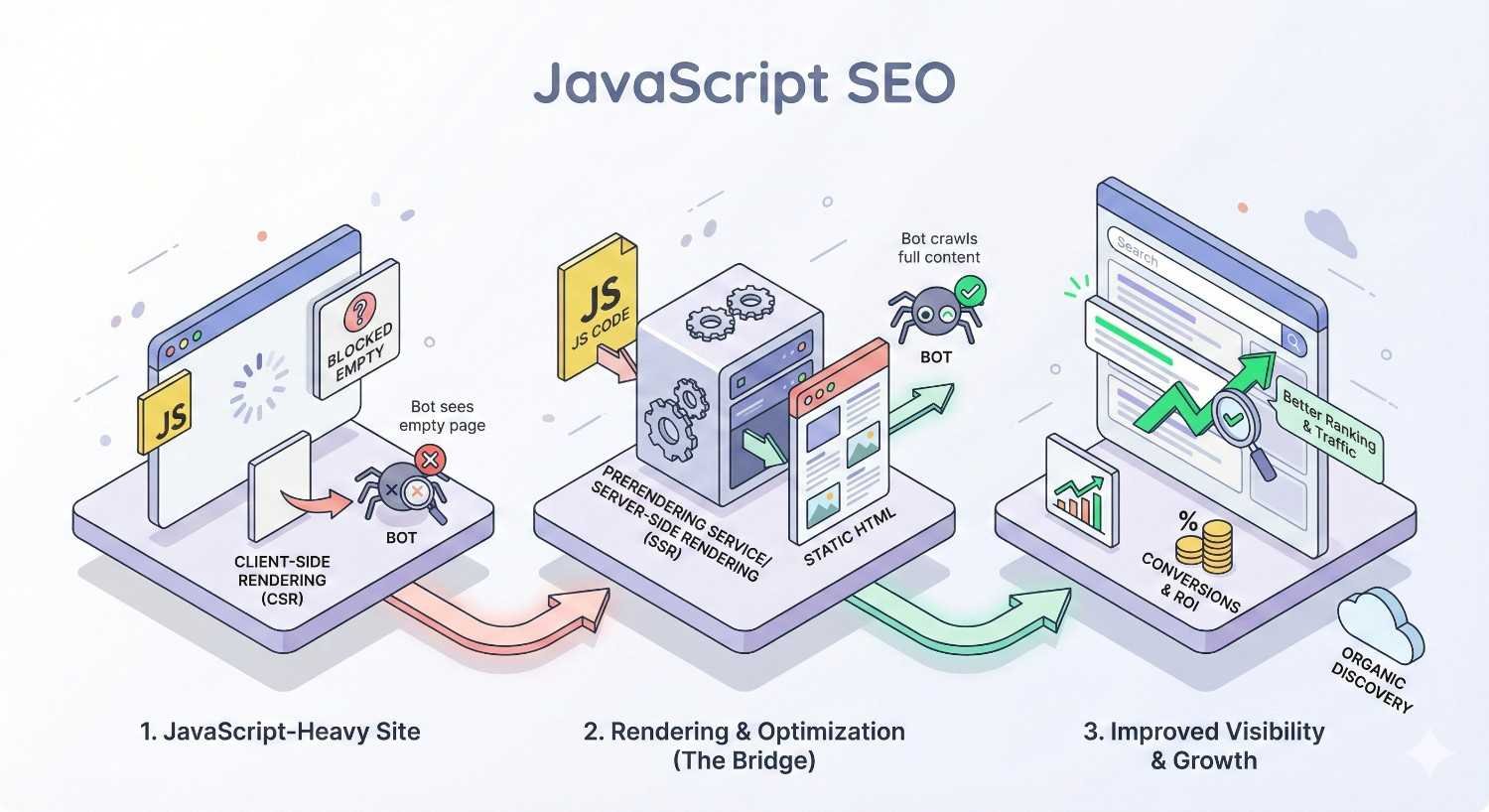
JavaScript-heavy websites lose organic traffic when search engines cannot render their content properly. Modern frameworks like React, Angular, and Vue create dynamic user experiences, but they also introduce crawling, rendering, and indexing challenges that directly impact your search visibility and revenue potential.
This gap between what users see and what Googlebot indexes represents one of the most significant technical SEO challenges facing businesses today. Without proper optimization, your JavaScript-powered pages may appear empty to search engines, resulting in missed rankings and lost opportunities.
This guide covers everything from rendering strategies and framework-specific considerations to auditing techniques and Core Web Vitals optimization, giving you a complete roadmap for JavaScript SEO success.
What Is JavaScript SEO and Why Does It Matter?
JavaScript SEO refers to the specialized practices required to ensure search engines can properly crawl, render, and index content generated or modified by JavaScript. Unlike traditional HTML pages where content exists in the initial source code, JavaScript-dependent sites require browsers and search engine bots to execute code before content becomes visible.
This distinction matters because search engines have limited resources for rendering JavaScript. When your critical content, navigation, or internal links depend on JavaScript execution, you introduce risk into your organic search performance. Pages that render perfectly for users may appear partially empty or completely blank to search engine crawlers.
For businesses relying on organic traffic, JavaScript SEO determines whether your investment in content and user experience translates into search visibility. A technically excellent site that search engines cannot properly index delivers zero organic value.
How Search Engines Process JavaScript
Search engines process JavaScript differently than standard HTML. When Googlebot encounters a page, it first downloads the HTML and identifies resources like CSS and JavaScript files. The initial HTML response is what traditional crawlers see immediately.
For JavaScript-dependent content, Google uses a headless Chromium browser to render pages. This rendering process executes JavaScript, builds the DOM, and captures the final rendered content. However, this rendering happens separately from the initial crawl and requires additional computational resources.
Other search engines have varying JavaScript capabilities. Bing has improved its JavaScript rendering significantly, while some search engines and social media crawlers still struggle with JavaScript-heavy content. This inconsistency means relying solely on client-side rendering creates visibility risks across multiple platforms.
The Rendering Gap: Crawling vs. Rendering
The rendering gap describes the delay between when Google crawls your page and when it renders the JavaScript content. During initial crawling, Googlebot captures the raw HTML response. If your content exists only after JavaScript execution, that content is invisible during this first pass.
Google queues pages for rendering based on available resources and page priority. This queue can create delays ranging from seconds to days, depending on your site’s crawl priority and Google’s rendering capacity. During this gap, your pages may be indexed with incomplete or missing content.
This gap creates practical problems. New content may not appear in search results promptly. Updated content may show outdated information in search snippets. Critical pages may be indexed without their primary content, resulting in poor rankings or exclusion from relevant searches entirely.
Why JavaScript Can Hurt Your Search Visibility
JavaScript impacts search visibility through several mechanisms. First, content that requires JavaScript to render may not be indexed at all if rendering fails or times out. Google’s renderer has resource limits and time constraints that can prevent complete page rendering.
Second, JavaScript-dependent internal links may not pass link equity effectively. If your navigation or contextual links require JavaScript execution, crawlers may not discover linked pages or may not attribute proper link value to those connections.
Third, JavaScript often increases page load time and affects Core Web Vitals metrics. Heavy JavaScript bundles delay content rendering, increase interaction latency, and can cause layout shifts. These performance factors directly influence rankings, particularly for mobile searches.
Finally, JavaScript errors can prevent rendering entirely. A single uncaught exception can halt JavaScript execution, leaving your page in a broken state for search engine crawlers even when it works perfectly for users with error-tolerant browsers.
How JavaScript Impacts Crawling, Rendering, and Indexing
Understanding Google’s technical process for handling JavaScript helps you identify where problems occur and how to solve them. The crawling, rendering, and indexing pipeline has distinct stages, each with potential failure points for JavaScript-dependent content.
Googlebot’s Two-Wave Indexing Process
Google processes JavaScript pages in two distinct waves. The first wave involves traditional crawling where Googlebot fetches the HTML response and extracts links and basic content from the raw source. Pages are initially indexed based on this first-wave content.
The second wave involves rendering. Google queues pages for its Web Rendering Service (WRS), which uses headless Chromium to execute JavaScript and capture the fully rendered DOM. After rendering, Google updates its index with the complete content.
This two-wave process means your pages may exist in Google’s index in two different states. Initially, only content present in the raw HTML is indexed. After rendering, JavaScript-generated content becomes visible. The time between these waves varies based on crawl budget, page importance, and Google’s rendering queue.
For time-sensitive content or frequently updated pages, this delay can significantly impact your search performance. News articles, product updates, or promotional content may miss their relevance window if rendering delays prevent timely indexing.
Render Budget and Crawl Budget Explained
Crawl budget refers to the number of pages Google will crawl on your site within a given timeframe. This budget depends on your site’s crawl rate limit (how fast Google can crawl without overloading your server) and crawl demand (how much Google wants to crawl based on popularity and freshness).
Render budget is a related but separate concept. Google allocates finite resources for JavaScript rendering, and your site competes for these resources with every other JavaScript-dependent site on the web. Complex pages requiring extensive JavaScript execution consume more render budget than simple pages.
When render budget is exhausted or constrained, Google may render pages incompletely, skip rendering entirely, or significantly delay the rendering process. Sites with thousands of JavaScript-dependent pages face greater render budget challenges than smaller sites.
Optimizing for render budget means reducing JavaScript complexity, ensuring critical content appears in initial HTML, and prioritizing which pages truly need JavaScript rendering versus which can be served as static HTML.
Common JavaScript Indexing Problems
Several recurring issues cause JavaScript indexing failures. Timeout errors occur when JavaScript execution exceeds Google’s time limits. Complex applications with extensive API calls, heavy computations, or slow third-party scripts frequently trigger timeouts.
Blocked resources prevent proper rendering. If your robots.txt blocks JavaScript files, CSS, or API endpoints that your page depends on, Google cannot render the page correctly. This results in partially rendered or completely broken pages in Google’s index.
Client-side routing without proper configuration creates crawling problems. Single-page applications that change URLs without server-side support may appear as a single page to Google, with all your content consolidated under one URL rather than distributed across indexable pages.
JavaScript errors halt rendering. Unlike browsers that often continue despite errors, rendering failures can prevent Google from capturing any JavaScript-generated content. Console errors that seem minor to developers can have major indexing consequences.
Lazy-loaded content below the fold may not trigger during rendering. If your content loads only on scroll or user interaction, Google’s renderer may never see it. Critical content hidden behind interaction requirements remains invisible to search engines.
JavaScript Frameworks and Their SEO Implications
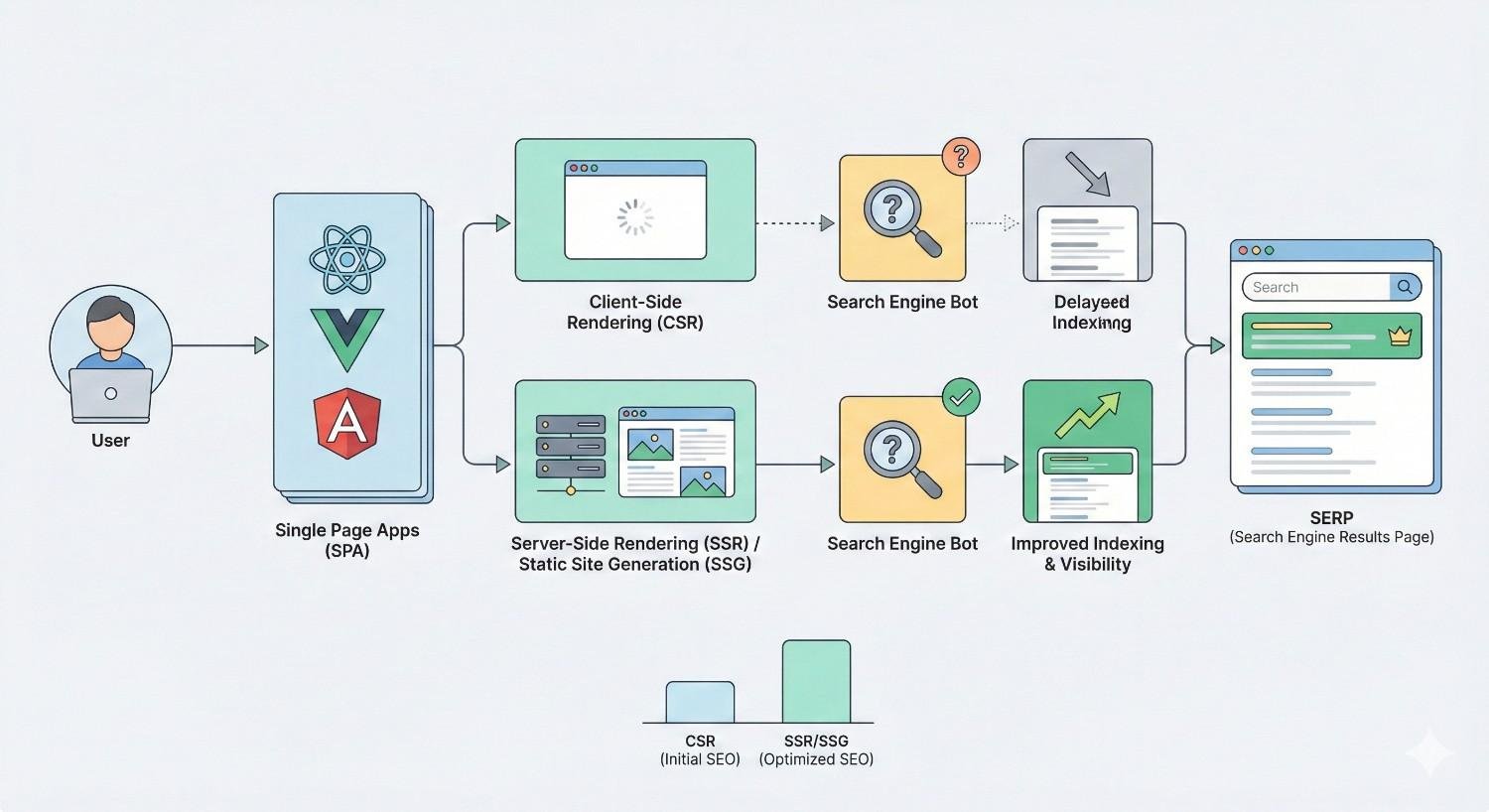
Modern JavaScript frameworks power exceptional user experiences but introduce varying SEO challenges. Understanding your framework’s default behavior and available solutions helps you make informed architectural decisions.
React SEO Considerations
React applications render content client-side by default. A standard Create React App delivers minimal HTML with a JavaScript bundle that builds the entire page in the browser. This approach means search engines see an empty container until rendering completes.
React’s virtual DOM and component-based architecture create efficient user experiences but require additional configuration for SEO. Without server-side rendering or static generation, React apps depend entirely on Google’s rendering capabilities for indexation.
React Helmet and similar libraries help manage meta tags dynamically, but these tags still require JavaScript execution to appear. For critical SEO elements like titles, descriptions, and canonical tags, client-side-only implementation creates risk.
Solutions for React SEO include implementing Next.js for server-side rendering or static generation, using prerendering services, or building custom SSR solutions with frameworks like Express. Each approach has tradeoffs in complexity, performance, and maintenance requirements.
Angular SEO Considerations
Angular applications face similar client-side rendering challenges. Angular Universal provides server-side rendering capabilities, but implementation requires significant development effort and ongoing maintenance.
Angular’s change detection and dependency injection systems add complexity to SSR implementations. Applications with extensive third-party integrations or browser-specific code may require substantial refactoring for server-side compatibility.
Angular’s build process produces optimized bundles, but these bundles can still be substantial for complex applications. Large JavaScript payloads delay rendering for both users and search engines, impacting Core Web Vitals and crawl efficiency.
For Angular applications, evaluate whether Angular Universal’s complexity is justified by your SEO requirements. Simpler applications may benefit from prerendering or dynamic rendering solutions that require less architectural change.
Vue.js SEO Considerations
Vue.js offers flexibility in rendering approaches. Standard Vue applications render client-side, but the ecosystem provides multiple paths to server-side rendering and static generation.
Nuxt.js, built on Vue, provides built-in SSR and static site generation with minimal configuration. This makes Vue one of the more SEO-friendly framework choices when paired with Nuxt’s capabilities.
Vue’s smaller bundle size compared to Angular and its efficient reactivity system can result in faster rendering times. However, Vue applications still require proper configuration to ensure search engine compatibility.
Vue’s progressive adoption model allows incremental implementation. You can add Vue to existing pages without rebuilding entire applications, making it easier to maintain SEO-friendly server-rendered HTML while enhancing specific components with JavaScript interactivity.
Next.js, Nuxt.js, and SEO-Friendly Alternatives
Next.js has emerged as the leading solution for React SEO challenges. It provides server-side rendering, static site generation, and incremental static regeneration out of the box. Pages can be configured individually, allowing you to choose the optimal rendering strategy for each route.
Next.js handles meta tags, generates sitemaps, and manages routing in SEO-friendly ways. Its image optimization and automatic code splitting improve Core Web Vitals performance. For React applications with SEO requirements, Next.js represents the current best practice.
Nuxt.js provides equivalent capabilities for Vue applications. Its auto-generated routing, built-in meta management, and flexible rendering modes make Vue SEO significantly more manageable than custom implementations.
Other alternatives include Gatsby for React static sites, SvelteKit for Svelte applications, and Astro for content-focused sites with minimal JavaScript. Each framework optimizes for different use cases, but all prioritize delivering HTML content that search engines can index without rendering dependencies.
Rendering Strategies for JavaScript SEO
Choosing the right rendering strategy determines your JavaScript SEO success. Each approach offers different tradeoffs between development complexity, server resources, user experience, and search engine compatibility.
Client-Side Rendering (CSR) and SEO Risks
Client-side rendering delivers minimal HTML with JavaScript that builds the page in the user’s browser. This approach simplifies deployment, reduces server costs, and enables rich interactive experiences. However, it creates significant SEO risks.
Search engines must render CSR pages to see content. This dependency on rendering introduces delays, potential failures, and resource constraints. If rendering fails for any reason, your content remains invisible to search engines.
CSR also impacts user experience metrics that influence rankings. Users see blank or loading states until JavaScript executes and content renders. This delay increases bounce rates and negatively affects Core Web Vitals, particularly Largest Contentful Paint.
CSR remains appropriate for authenticated applications, internal tools, or content that doesn’t require search visibility. For public-facing content where organic traffic matters, CSR alone is insufficient.
Server-Side Rendering (SSR) for Better Indexability
Server-side rendering generates complete HTML on the server for each request. When users or search engines request a page, the server executes JavaScript, renders the content, and delivers fully-formed HTML. This ensures content is immediately visible without client-side rendering dependencies.
SSR provides the best of both worlds for SEO. Search engines receive complete, indexable HTML. Users see content immediately while JavaScript hydrates the page for interactivity. This approach eliminates rendering delays and dependencies for search engine crawlers.
SSR requires server resources for each request. High-traffic sites need robust infrastructure to handle rendering load. Caching strategies help reduce server burden, but SSR inherently requires more computational resources than serving static files.
Implementation complexity varies by framework. Next.js and Nuxt.js simplify SSR significantly, while custom implementations require careful handling of browser-specific code, data fetching, and state management.
Static Site Generation (SSG) Benefits
Static site generation pre-renders pages at build time, producing HTML files that can be served directly without server-side processing. This approach combines the SEO benefits of complete HTML with the performance and simplicity of static hosting.
SSG pages load extremely fast because they require no server-side computation. CDNs can cache and serve static files globally, reducing latency and improving user experience. These performance benefits positively impact Core Web Vitals and rankings.
SSG works best for content that doesn’t change frequently. Blog posts, documentation, marketing pages, and product information are ideal candidates. Pages requiring real-time data or personalization need alternative approaches.
Incremental Static Regeneration (ISR), available in Next.js, bridges the gap between SSG and SSR. Pages are statically generated but can be regenerated on-demand or at specified intervals, allowing static performance with dynamic content capabilities.
Dynamic Rendering as a Workaround
Dynamic rendering serves different content to users and search engines. Users receive the standard JavaScript application, while search engine bots receive pre-rendered HTML. This approach allows maintaining existing CSR architecture while improving search engine compatibility.
Google has acknowledged dynamic rendering as a legitimate workaround for JavaScript SEO challenges. Services like Prerender.io, Rendertron, and Puppeteer-based solutions detect bot requests and serve rendered HTML.
Dynamic rendering introduces complexity and potential issues. Maintaining consistency between user and bot experiences requires ongoing attention. Google has indicated that dynamic rendering is a workaround rather than a long-term solution, suggesting that proper SSR or SSG implementations are preferable.
For large existing applications where SSR implementation would require significant refactoring, dynamic rendering provides a pragmatic path to improved indexability without complete architectural changes.
Hybrid Rendering Approaches
Hybrid rendering combines multiple strategies based on page requirements. Marketing pages might use SSG for maximum performance, product pages might use SSR for fresh data, and user dashboards might use CSR since they don’t need indexing.
This approach optimizes each page type for its specific requirements. Not every page needs the same rendering strategy, and forcing a single approach across an entire application often creates unnecessary complexity or suboptimal results.
Modern frameworks support hybrid approaches natively. Next.js allows per-page rendering configuration. Nuxt.js provides similar flexibility. This granular control enables sophisticated optimization strategies that balance SEO requirements, performance goals, and development resources.
Implementing hybrid rendering requires clear documentation and team alignment. Developers need to understand which rendering strategy applies to each page type and why. Without this clarity, inconsistent implementations can create unexpected SEO issues.
Technical JavaScript SEO Best Practices
Beyond rendering strategy, specific technical practices determine JavaScript SEO success. These optimizations ensure search engines can access, understand, and properly index your content.
Ensuring Critical Content Is in Initial HTML
Critical content should appear in the initial HTML response whenever possible. This includes page titles, meta descriptions, heading structure, primary content, and important internal links. Even with SSR, verify that essential elements don’t depend on additional JavaScript execution after initial render.
Use the “View Source” function to see what search engines receive before any JavaScript execution. If your main content, navigation, or key SEO elements are missing from this view, they depend on JavaScript rendering and carry associated risks.
For content that must be JavaScript-rendered, ensure it appears early in the rendering process. Content that requires user interaction, scroll events, or delayed loading may never be seen by search engine renderers.
Progressive enhancement principles apply here. Build pages that function and display core content without JavaScript, then enhance with JavaScript for improved interactivity. This approach ensures baseline accessibility for search engines and users with JavaScript disabled or delayed.
Implementing Proper Internal Linking
Internal links should use standard HTML anchor tags with href attributes. JavaScript-based navigation using onClick handlers, button elements, or custom routing without proper href attributes may not be followed by search engine crawlers.
Ensure your navigation, footer links, and contextual links within content use crawlable formats. Links should be present in the initial HTML or rendered reliably during the rendering process. Test link discovery using Google Search Console’s URL Inspection tool.
Single-page applications require special attention to internal linking. Client-side routing must be paired with server-side support so that each URL returns appropriate content when accessed directly. Without this, internal links may not function correctly for search engine crawlers.
Link equity flows through properly implemented links. If your internal linking structure depends on JavaScript that doesn’t execute during crawling, you lose the SEO benefits of strategic internal linking, including the distribution of authority throughout your site.
Optimizing JavaScript Load and Execution Time
Reduce JavaScript bundle sizes through code splitting, tree shaking, and removing unused dependencies. Smaller bundles download faster and execute more quickly, improving both user experience and rendering reliability for search engines.
Prioritize critical JavaScript that affects above-the-fold content. Use async or defer attributes appropriately to prevent render-blocking. Critical rendering path optimization ensures content appears quickly while non-essential JavaScript loads subsequently.
Monitor JavaScript execution time using browser developer tools and performance monitoring services. Long-running scripts delay rendering and can trigger timeout errors during search engine rendering. Identify and optimize performance bottlenecks.
Third-party scripts often contribute significantly to JavaScript bloat and execution time. Audit third-party dependencies regularly, remove unused scripts, and consider lazy-loading non-critical third-party functionality.
Lazy Loading Without Blocking Indexation
Lazy loading improves performance by deferring resource loading until needed. However, improper implementation can prevent search engines from discovering lazy-loaded content.
For images, use native lazy loading with the loading=”lazy” attribute. This browser-native approach is understood by search engines and doesn’t require JavaScript for basic functionality. Ensure images have proper src attributes that crawlers can discover.
For content lazy loading, avoid implementations that require scroll or interaction to trigger. Search engine renderers typically don’t simulate scrolling or user interactions. Content that loads only on scroll may never be rendered for indexing.
If lazy loading is necessary for performance, ensure critical content loads without interaction. Reserve lazy loading for supplementary content, comments, related items, or other elements that aren’t essential for the page’s primary SEO value.
Handling JavaScript Redirects and URLs
Implement redirects server-side whenever possible. JavaScript redirects using window.location or meta refresh tags may not be followed correctly by all crawlers and can create indexing issues.
For single-page applications, ensure URLs update appropriately using the History API. Each distinct content state should have a unique, shareable URL that returns appropriate content when accessed directly.
Avoid hash-based routing (#) for content that needs indexing. While Google can crawl hashbang (#!) URLs, standard path-based URLs are preferred and more reliably indexed. Modern frameworks support proper URL routing without hash fragments.
Canonical tags should be present in the initial HTML response, not added via JavaScript. If canonical tags require rendering to appear, they may not be processed correctly, potentially causing duplicate content issues.
Structured Data Implementation in JavaScript
Structured data can be implemented via JavaScript using JSON-LD, which Google recommends. However, ensure structured data is present in the rendered HTML that Google captures. Test using the Rich Results Test tool, which renders JavaScript.
For critical structured data like product information, reviews, or organization details, consider including JSON-LD in the initial HTML response rather than injecting it via JavaScript. This eliminates rendering dependencies for important search features.
Dynamic structured data that changes based on user interaction or page state should reflect the default page state. Search engines capture a single snapshot during rendering, so structured data should represent the canonical version of the content.
Validate structured data regularly using Google’s testing tools. JavaScript errors or rendering issues can prevent structured data from appearing correctly, causing rich result eligibility problems.
How to Audit JavaScript SEO Issues
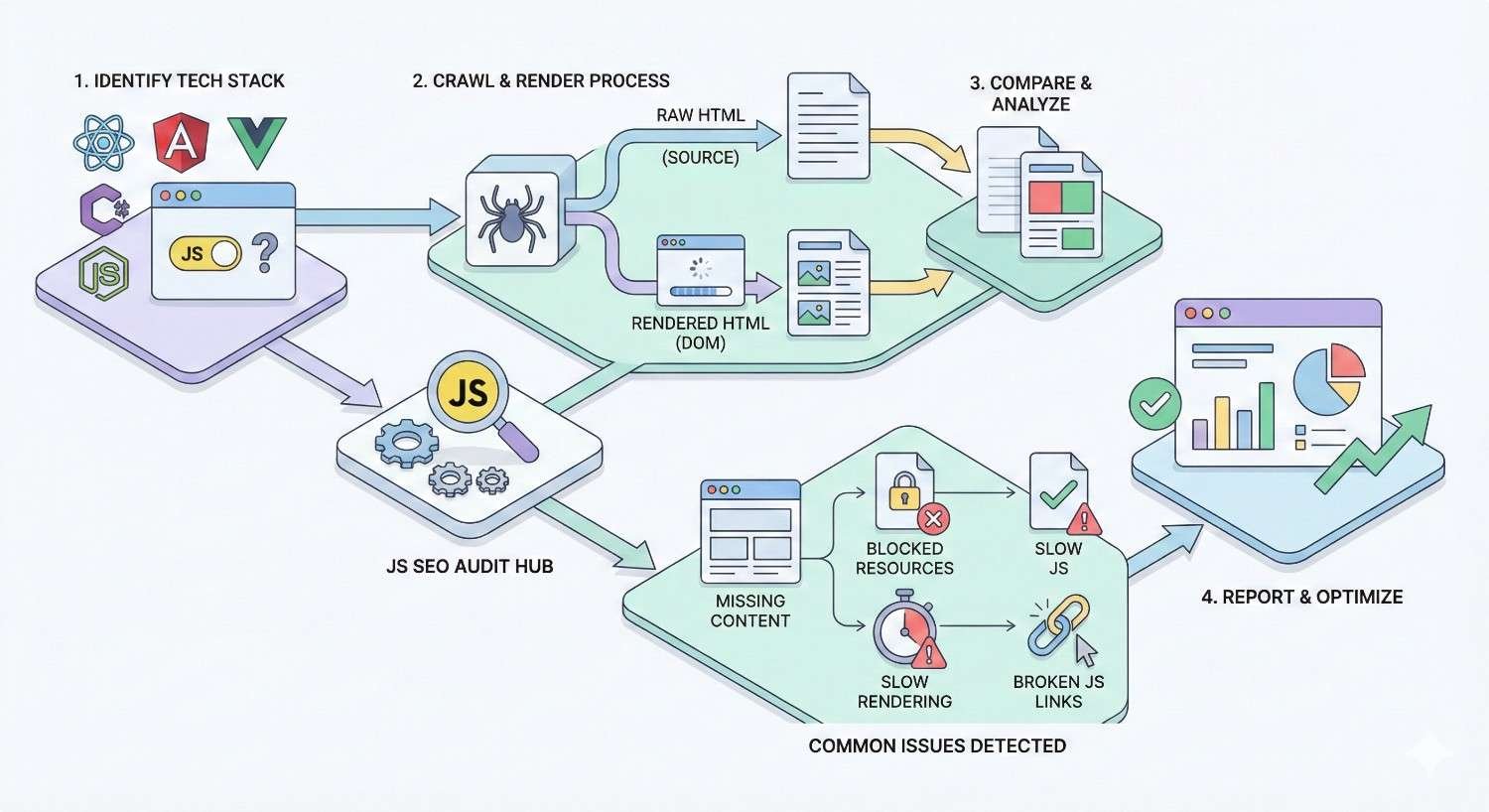
Regular auditing identifies JavaScript SEO problems before they significantly impact rankings. Multiple tools and techniques help diagnose rendering, indexing, and performance issues.
Using Google Search Console for JavaScript Debugging
Google Search Console provides direct insight into how Google sees your pages. The Coverage report identifies indexing issues, including pages that couldn’t be indexed due to rendering problems.
Review the “Crawled – currently not indexed” and “Discovered – currently not indexed” categories for JavaScript-related issues. Pages stuck in these states may have rendering problems preventing proper indexation.
The Core Web Vitals report highlights performance issues that often relate to JavaScript. Pages failing LCP, FID, or CLS thresholds may need JavaScript optimization to improve both user experience and search performance.
Monitor the Coverage report after deploying JavaScript changes. New rendering issues often appear within days of problematic deployments, allowing quick identification and resolution.
URL Inspection Tool and Live Testing
The URL Inspection tool shows exactly how Google renders specific pages. Enter any URL from your site to see the rendered HTML, screenshot, and any rendering errors or resource loading issues.
Use the “Test Live URL” feature to see current rendering results rather than cached data. This is essential when debugging recent changes or verifying fixes.
Compare the rendered HTML to your expected output. Missing content, broken layouts, or absent elements indicate rendering problems. The tool also shows blocked resources that may prevent proper rendering.
Review the “More Info” section for specific errors, warnings, and resource loading details. JavaScript errors, blocked resources, and timeout issues appear here with actionable diagnostic information.
Comparing Rendered HTML vs. Raw HTML
Systematically compare raw HTML (View Source) with rendered HTML (Inspect Element or rendered output from testing tools). Significant differences indicate JavaScript dependencies that may affect search engine indexing.
Document which content elements appear only after rendering. Prioritize moving critical SEO elements to the initial HTML response. Accept rendering dependencies only for non-critical enhancements.
Use automated comparison tools for large-scale audits. Screaming Frog, Sitebulb, and similar crawlers can compare raw and rendered HTML across your entire site, identifying pages with significant rendering dependencies.
Track rendering differences over time. Development changes may inadvertently move content from initial HTML to JavaScript-dependent rendering. Regular monitoring catches these regressions before they impact rankings.
Third-Party Tools for JavaScript SEO Audits
Screaming Frog’s JavaScript rendering mode crawls your site using a headless browser, capturing rendered content and identifying discrepancies. This provides site-wide visibility into JavaScript rendering issues.
Sitebulb offers similar JavaScript crawling capabilities with detailed visualizations of rendering issues, resource loading problems, and content accessibility concerns.
Merkle’s pre-rendering testing tools and similar services help evaluate how different rendering solutions affect your content’s accessibility to search engines.
Lighthouse audits provide performance insights that often relate to JavaScript issues. Performance scores, specific recommendations, and diagnostic information help identify optimization opportunities.
Mobile-First Indexing and JavaScript Testing
Google uses mobile-first indexing, meaning the mobile version of your site determines indexing and ranking. Test JavaScript rendering specifically on mobile viewport sizes and with mobile user agents.
Mobile devices often have less processing power and slower connections than desktop environments. JavaScript that renders acceptably on desktop may timeout or fail on mobile-equivalent conditions.
Ensure your responsive design doesn’t hide critical content on mobile. Content hidden via CSS or JavaScript on mobile viewports may not be indexed even if it appears on desktop.
Test with throttled connections and CPU to simulate real mobile conditions. Chrome DevTools allows network and CPU throttling that reveals performance issues not apparent on fast development machines.
Core Web Vitals and JavaScript Performance
Core Web Vitals directly influence rankings, and JavaScript significantly impacts all three metrics. Optimizing JavaScript performance improves both user experience and search visibility.
How JavaScript Affects LCP, FID, and CLS
Largest Contentful Paint (LCP) measures when the main content becomes visible. JavaScript that blocks rendering or delays content loading directly increases LCP times. Heavy JavaScript bundles that must download and execute before content appears cause poor LCP scores.
First Input Delay (FID) measures responsiveness to user interaction. Long-running JavaScript tasks block the main thread, preventing the browser from responding to user input. Complex JavaScript execution during page load creates poor FID experiences.
Cumulative Layout Shift (CLS) measures visual stability. JavaScript that injects content, modifies layouts, or loads resources without reserved space causes layout shifts. Dynamic content insertion without proper sizing is a common JavaScript-related CLS issue.
Interaction to Next Paint (INP), which is replacing FID, similarly measures responsiveness throughout the page lifecycle. JavaScript performance affects INP through main thread blocking and inefficient event handlers.
Code Splitting and Tree Shaking
Code splitting divides your JavaScript bundle into smaller chunks loaded on demand. Instead of downloading all JavaScript upfront, users download only what’s needed for the current page, with additional code loaded as required.
Route-based code splitting loads JavaScript specific to each page. Component-based splitting loads code for specific features when they’re needed. Both approaches reduce initial bundle size and improve loading performance.
Tree shaking removes unused code from your bundles during the build process. Modern bundlers like Webpack and Rollup analyze your code and exclude functions, classes, and modules that aren’t actually used.
Audit your bundles using tools like Webpack Bundle Analyzer or Source Map Explorer. Identify large dependencies, unused code, and optimization opportunities. Often, significant bundle size reductions are possible through better dependency management and tree shaking configuration.
Deferring and Async Loading Scripts
The defer attribute loads scripts in parallel with HTML parsing but executes them after parsing completes. This prevents render-blocking while maintaining execution order. Use defer for scripts that need the DOM but aren’t critical for initial render.
The async attribute loads and executes scripts as soon as they’re available, without waiting for HTML parsing. This is appropriate for independent scripts like analytics that don’t depend on DOM state or other scripts.
Critical scripts needed for above-the-fold content should load without defer or async to ensure they execute promptly. Non-critical scripts should use defer or async to prevent blocking.
Inline critical JavaScript directly in the HTML for fastest execution. External scripts require additional network requests that delay execution. For small, critical scripts, inlining eliminates this latency.
Measuring JavaScript Impact on Page Speed
Use Lighthouse and PageSpeed Insights to measure JavaScript’s impact on performance. These tools identify specific scripts causing issues and provide actionable recommendations.
The Performance tab in Chrome DevTools shows detailed JavaScript execution timing. Long tasks, main thread blocking, and execution bottlenecks become visible through performance profiling.
Real User Monitoring (RUM) tools like Google Analytics or dedicated performance monitoring services show actual user experience data. Lab tests don’t always reflect real-world conditions, making RUM data essential for understanding true performance.
Track Core Web Vitals in Google Search Console to see how Google perceives your performance. The field data shown here directly relates to ranking considerations and reflects actual user experiences.
JavaScript SEO vs. Traditional SEO: Key Differences
JavaScript SEO requires specialized knowledge beyond traditional SEO practices. Understanding these differences helps you allocate resources appropriately and set realistic expectations.
Content Accessibility Challenges
Traditional SEO assumes content is accessible in the HTML source. JavaScript SEO must verify content accessibility through rendering, testing, and monitoring. This additional verification layer adds complexity to content audits and optimization.
Content changes in JavaScript applications may not be immediately visible to search engines. The rendering delay means updates take longer to appear in search results compared to traditional HTML changes.
A/B testing and personalization in JavaScript applications can inadvertently show different content to search engines than to users. Ensuring consistency between user and bot experiences requires careful implementation.
Dynamic content that changes based on user behavior, time, or other factors may not be captured correctly during search engine rendering. The snapshot nature of rendering means only one content state is indexed.
Link Equity and JavaScript Navigation
Traditional link equity flows through HTML anchor tags. JavaScript navigation that doesn’t use proper href attributes may not pass link equity, weakening your internal linking strategy.
Single-page applications with client-side routing require careful implementation to ensure link equity flows correctly. Each page needs a distinct URL that returns appropriate content and passes link signals.
External links to your JavaScript pages may not provide full link equity if the linked content requires rendering. Ensure landing pages for link building campaigns render critical content reliably.
Navigation menus, footer links, and contextual links all contribute to internal link equity distribution. Verify these elements use crawlable link formats and appear in rendered HTML.
When JavaScript SEO Requires Specialist Expertise
Complex JavaScript applications often require specialized expertise combining SEO knowledge with JavaScript development skills. This intersection of disciplines isn’t common, making qualified practitioners valuable.
Diagnosing JavaScript rendering issues requires understanding both search engine behavior and JavaScript execution. Problems may stem from SEO configuration, JavaScript errors, server configuration, or combinations of factors.
Implementing solutions like SSR or dynamic rendering requires development resources and architectural decisions. SEO recommendations must be translated into technical specifications that developers can implement.
Ongoing monitoring and maintenance of JavaScript SEO requires sustained attention. Framework updates, dependency changes, and feature additions can introduce new issues that require prompt identification and resolution.
Common JavaScript SEO Mistakes to Avoid
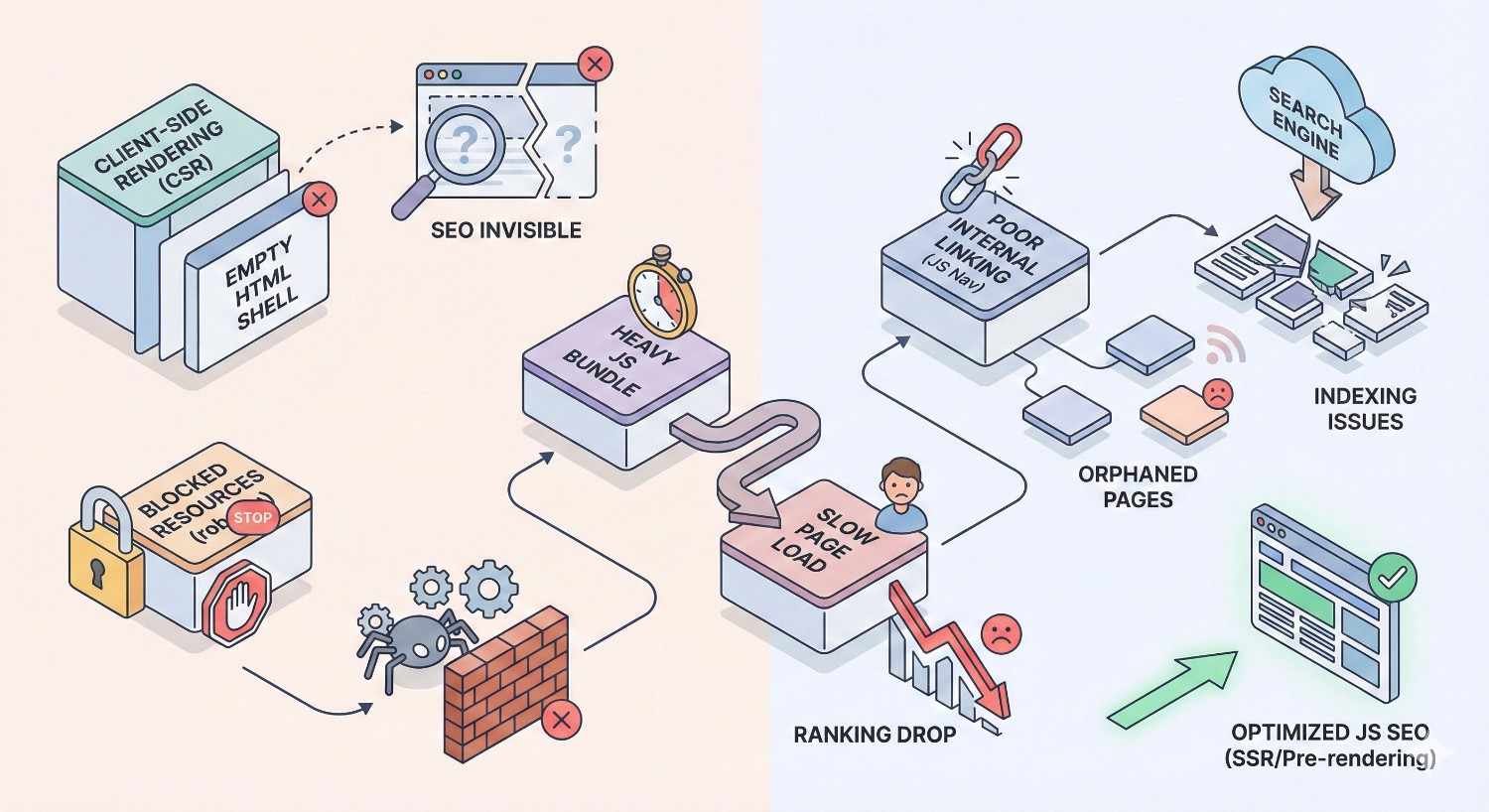
Avoiding common mistakes prevents significant ranking losses and wasted development effort. These issues appear frequently across JavaScript-heavy sites.
Blocking JavaScript in Robots.txt
Blocking JavaScript files in robots.txt prevents Google from rendering your pages correctly. If Google cannot access your JavaScript, it cannot execute it, and your content remains invisible.
Review your robots.txt file to ensure JavaScript files, CSS files, and API endpoints needed for rendering are accessible. Use Google Search Console’s robots.txt tester to verify.
This mistake often occurs when developers add broad blocking rules without considering rendering implications. Rules intended to block crawling of development files or internal tools may inadvertently block production JavaScript.
Similarly, blocking third-party domains that host critical JavaScript libraries prevents proper rendering. Ensure CDN-hosted scripts and external dependencies are accessible to crawlers.
Relying Solely on Client-Side Rendering
Pure client-side rendering creates complete dependency on Google’s rendering capabilities. Any rendering failure, timeout, or resource constraint results in unindexed content.
Even when rendering succeeds, the delay between crawling and rendering can impact content freshness in search results. Time-sensitive content may miss its relevance window.
Client-side rendering also affects user experience metrics that influence rankings. The blank page or loading state users see while JavaScript executes increases bounce rates and harms Core Web Vitals.
Evaluate whether your content truly requires client-side rendering or whether SSR, SSG, or hybrid approaches would better serve both users and search engines.
Ignoring JavaScript Errors in Console
JavaScript errors can halt rendering entirely. An error that seems minor in a browser that continues despite errors may completely prevent search engine rendering.
Regularly audit your pages for JavaScript errors using browser developer tools and automated testing. Errors in production should be treated as high-priority issues.
Third-party scripts are common sources of errors. A failing analytics script, broken widget, or deprecated API can introduce errors that affect your entire site’s rendering.
Implement error monitoring to catch JavaScript errors in production. Services like Sentry, LogRocket, or similar tools alert you to errors before they significantly impact indexing.
Overlooking Mobile JavaScript Performance
Mobile-first indexing means mobile performance determines your rankings. JavaScript that performs acceptably on desktop may fail on mobile due to processing power and connection constraints.
Test JavaScript performance specifically on mobile devices and with mobile throttling enabled. Identify scripts that cause excessive load times or main thread blocking on mobile.
Mobile users are less tolerant of slow experiences. High bounce rates from mobile users signal poor experience to search engines, potentially affecting rankings beyond direct Core Web Vitals impacts.
Ensure your JavaScript optimization efforts prioritize mobile performance. Desktop improvements that don’t translate to mobile provide limited SEO benefit under mobile-first indexing.
When to Invest in JavaScript SEO Optimization
JavaScript SEO optimization requires resources. Understanding when investment is warranted helps you prioritize effectively and demonstrate ROI.
Signs Your JavaScript Is Hurting Rankings
Declining organic traffic despite quality content may indicate JavaScript indexing issues. If your content isn’t being indexed properly, it cannot rank regardless of its quality.
Pages appearing in Google’s index with missing or incorrect content suggest rendering problems. Search for your pages and review the cached versions to see what Google has indexed.
Google Search Console showing pages as “Crawled – currently not indexed” or with rendering errors indicates JavaScript issues preventing proper indexation.
Poor Core Web Vitals scores, particularly on JavaScript-heavy pages, suggest performance issues that may be affecting rankings. Compare performance between JavaScript-heavy and lighter pages.
Competitors with similar content outranking you despite lower domain authority may have better JavaScript SEO implementation, giving them an indexing advantage.
ROI of JavaScript SEO for Business Growth
JavaScript SEO improvements directly impact organic traffic by ensuring your content is properly indexed and ranked. Pages that weren’t indexed begin appearing in search results, driving new traffic.
Performance improvements from JavaScript optimization reduce bounce rates and improve conversion rates. Faster pages keep users engaged and more likely to complete desired actions.
Fixing JavaScript SEO issues often reveals content that was invisible to search engines. This “found” content can represent significant traffic potential that was previously unrealized.
Calculate potential ROI by estimating traffic value of currently unindexed or poorly performing pages. Compare this value against the cost of JavaScript SEO optimization to justify investment.
Building a JavaScript SEO Roadmap
Start with an audit to identify specific issues and their severity. Prioritize fixes based on impact and effort, addressing high-impact, low-effort issues first.
Categorize issues into quick wins, medium-term projects, and long-term architectural changes. Quick wins might include fixing robots.txt blocking or adding critical content to initial HTML. Long-term changes might involve implementing SSR or migrating frameworks.
Set measurable goals for each phase. Track indexed pages, Core Web Vitals scores, organic traffic, and rankings for target keywords. These metrics demonstrate progress and ROI.
Plan for ongoing monitoring and maintenance. JavaScript SEO isn’t a one-time fix but requires sustained attention as your site evolves and search engine capabilities change.
Choosing the Right JavaScript SEO Strategy for Your Business
Different businesses need different approaches to JavaScript SEO. Your strategy should align with your resources, technical capabilities, and business objectives.
In-House vs. Agency JavaScript SEO Support
In-house teams provide ongoing attention and deep familiarity with your specific codebase. However, JavaScript SEO expertise is specialized, and your team may lack the specific skills required.
Agencies bring specialized expertise and experience across multiple implementations. They can diagnose issues quickly and implement proven solutions. However, they may lack deep familiarity with your specific architecture.
Hybrid approaches often work well. Agencies can audit, strategize, and guide implementation while in-house teams execute and maintain. This combines specialized expertise with institutional knowledge.
Consider your team’s current capabilities, the complexity of your JavaScript implementation, and the urgency of your SEO needs when deciding between in-house, agency, or hybrid approaches.
Quick Wins vs. Long-Term Architectural Changes
Quick wins provide immediate improvement with minimal effort. Examples include unblocking JavaScript in robots.txt, adding critical content to initial HTML, or implementing basic performance optimizations.
Long-term architectural changes like implementing SSR or migrating to SEO-friendly frameworks require significant investment but provide sustainable solutions. These changes address root causes rather than symptoms.
Balance quick wins with long-term planning. Quick wins demonstrate progress and provide immediate value while longer-term projects are planned and executed.
Avoid accumulating technical debt through excessive quick fixes. Temporary solutions that aren’t replaced with proper implementations create maintenance burden and potential future issues.
Aligning JavaScript SEO with Business Objectives
Connect JavaScript SEO efforts to business metrics. Traffic increases should translate to leads, sales, or other business outcomes. Frame recommendations in terms of business impact, not just technical improvements.
Prioritize pages and features based on business value. High-value product pages, lead generation content, and revenue-driving sections deserve more attention than low-traffic informational pages.
Consider the full customer journey. JavaScript SEO affects not just traffic acquisition but also user experience, conversion rates, and customer satisfaction. Improvements often have benefits beyond organic search.
Communicate progress in business terms. Executives and stakeholders care about revenue impact, not rendering strategies. Translate technical improvements into business language for effective communication.
Conclusion
JavaScript SEO bridges the gap between modern web development and search engine visibility. Proper rendering strategies, technical optimization, and ongoing monitoring ensure your JavaScript-powered content reaches its organic traffic potential.
At White Label SEO Service, we help businesses navigate JavaScript SEO complexity with proven strategies tailored to your specific framework, architecture, and business goals. Our technical SEO expertise ensures your investment in content and user experience translates into sustainable organic growth.
Contact us today to audit your JavaScript SEO implementation and build a roadmap for improved search visibility, better performance, and measurable business results.
Frequently Asked Questions About JavaScript SEO
Can Google Index JavaScript Content?
Yes, Google can index JavaScript content using its Web Rendering Service based on headless Chromium. However, rendering happens separately from initial crawling and depends on available resources. Content in initial HTML is indexed more reliably than JavaScript-dependent content.
Does JavaScript Slow Down SEO?
JavaScript can slow SEO through rendering delays, performance impacts on Core Web Vitals, and potential indexing failures. Properly optimized JavaScript with appropriate rendering strategies minimizes these impacts while maintaining rich user experiences.
What Is the Best Framework for SEO?
Next.js for React and Nuxt.js for Vue are currently the most SEO-friendly framework choices due to built-in server-side rendering and static generation capabilities. The best framework depends on your team’s expertise and specific requirements.
How Do I Know If JavaScript Is Blocking My Pages?
Use Google Search Console’s URL Inspection tool to see rendered HTML and identify missing content. Compare View Source with rendered output to identify JavaScript dependencies. Check the Coverage report for indexing issues related to rendering.
Is Server-Side Rendering Necessary for SEO?
SSR isn’t strictly necessary but significantly improves SEO reliability. Alternatives include static site generation, dynamic rendering, or ensuring critical content appears in initial HTML. Pure client-side rendering creates the highest SEO risk.
How Long Does It Take to Fix JavaScript SEO Issues?
Timeline varies based on issue complexity. Quick fixes like unblocking resources take hours. Implementing SSR or migrating frameworks may take weeks or months. Most sites see indexing improvements within 2-4 weeks of implementing fixes.
Should I Rebuild My Site for Better JavaScript SEO?
Complete rebuilds are rarely necessary. Most JavaScript SEO issues can be addressed through configuration changes, rendering strategy adjustments, or targeted optimizations. Evaluate the cost-benefit of incremental improvements versus architectural changes based on your specific situation.


