

JavaScript rendering issues silently block your content from Google’s index, causing pages to appear as soft 404 errors despite loading perfectly in browsers. When search engines cannot execute your JavaScript properly, they see empty pages or incomplete content, treating valuable URLs as non-existent.
This disconnect between what users see and what Googlebot indexes costs businesses significant organic traffic. Modern websites rely heavily on JavaScript frameworks, yet many development teams overlook how search engine crawlers process dynamic content differently than browsers.
This guide walks you through diagnosing JavaScript rendering problems, implementing proven fixes, and building a sustainable strategy that protects your search visibility long-term.
What Are JavaScript Rendering Issues?
JavaScript rendering issues occur when search engine crawlers cannot properly execute, process, or interpret the JavaScript code that generates your website’s content. The result is a fundamental mismatch between what human visitors experience and what search engines actually index.
For business owners and marketing teams, this creates a frustrating scenario. Your website looks perfect when you visit it. Customers navigate smoothly. Yet Google Search Console shows pages with indexing errors, thin content warnings, or soft 404 classifications. The root cause often traces back to how JavaScript delivers content to the page.
Understanding this problem requires examining how search engines fundamentally differ from web browsers in their approach to processing dynamic content.
How Search Engines Process JavaScript
Search engines process JavaScript through a multi-stage system that differs significantly from how your browser renders pages. When Googlebot visits a URL, it first downloads the raw HTML response from your server. This initial crawl captures only what exists in the source code before any JavaScript executes.
Google then queues the page for rendering. This rendering process uses a headless Chromium browser to execute JavaScript and capture the final DOM state. However, this rendering queue operates separately from the initial crawl, creating delays that can stretch from seconds to days depending on your site’s crawl budget and Google’s resource allocation.
The critical point here is timing. Content that loads through JavaScript must wait for this secondary rendering pass before Google can evaluate and index it. If your JavaScript fails during rendering, times out, or produces errors, that content never enters Google’s index.
Google’s own documentation confirms that while Googlebot can render JavaScript, the process requires additional resources and introduces potential failure points that static HTML avoids entirely.
Client-Side vs Server-Side Rendering Explained
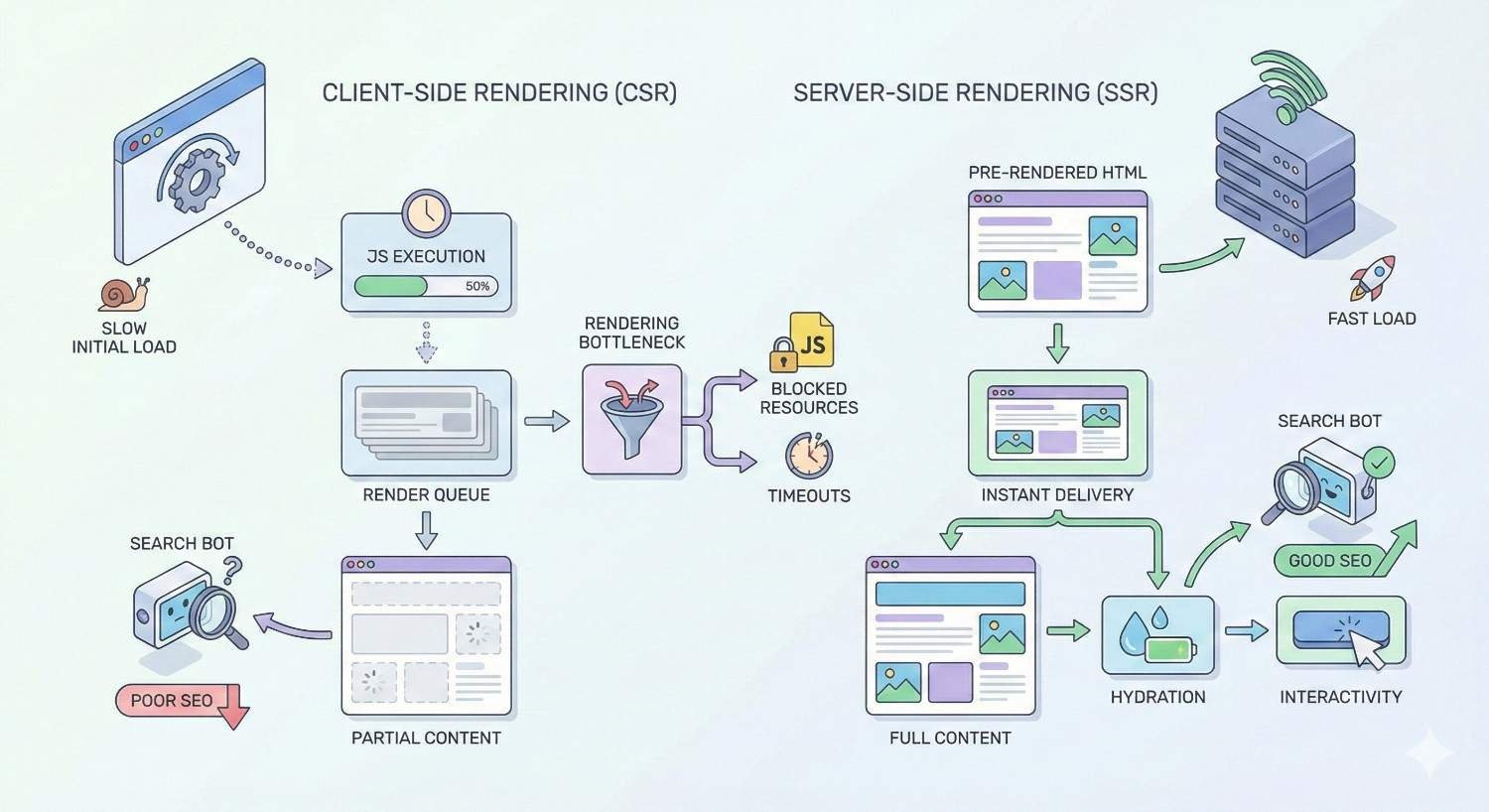
Client-side rendering (CSR) means your server sends a minimal HTML shell to the browser, then JavaScript builds the actual page content after loading. React, Vue, and Angular applications commonly use this approach. The browser downloads JavaScript bundles, executes them, fetches data from APIs, and constructs the visible page.
Server-side rendering (SSR) generates complete HTML on the server before sending it to the browser. The user receives a fully-formed page immediately. JavaScript then “hydrates” the page, adding interactivity without rebuilding the content structure.
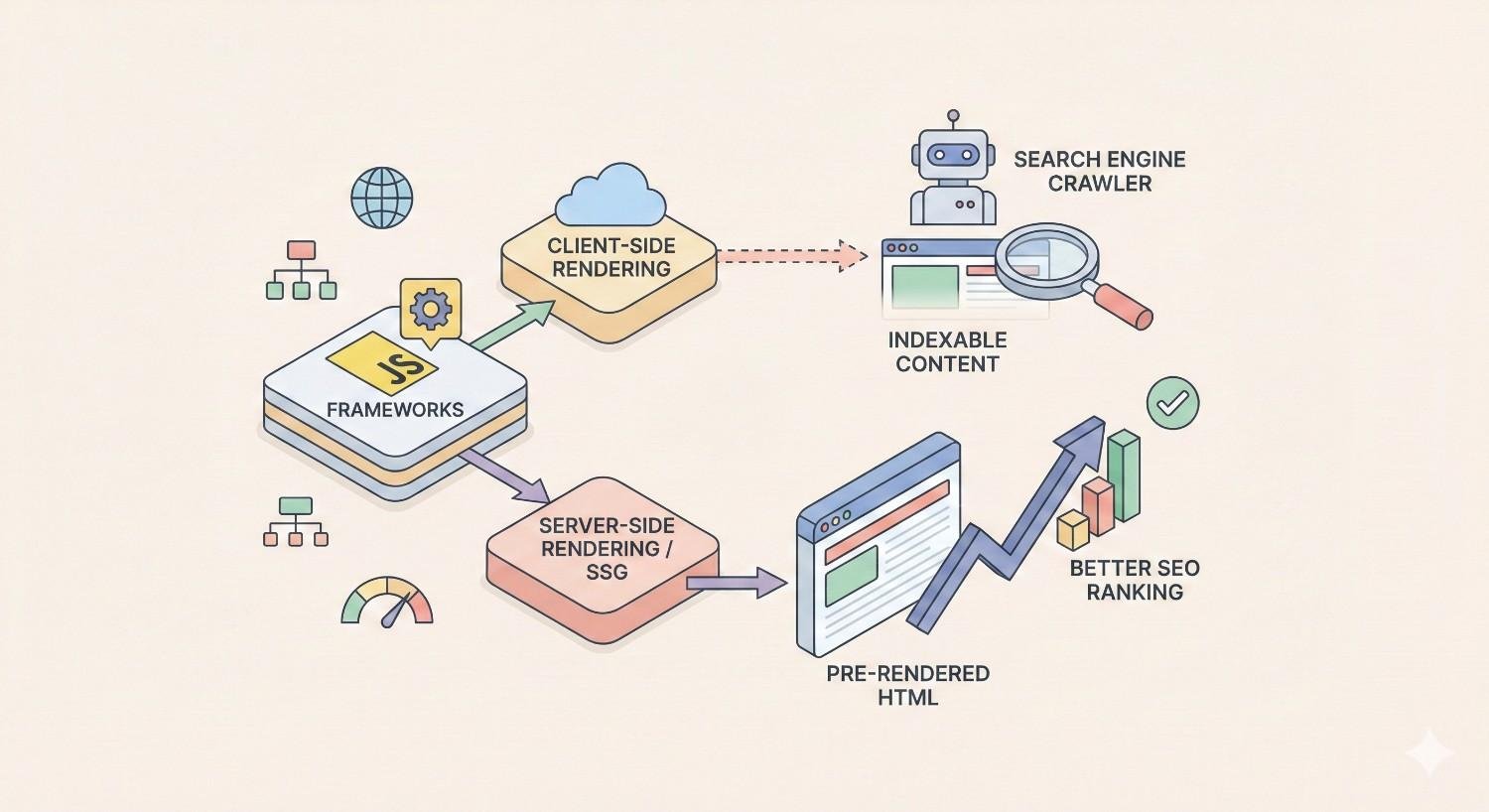
For SEO purposes, this distinction matters enormously. With CSR, search engines must successfully execute your JavaScript to see any meaningful content. With SSR, the critical content exists in the initial HTML response, providing a reliable fallback even if JavaScript rendering fails.
Static site generation (SSG) takes this further by pre-building HTML pages at build time rather than on each request. This approach eliminates rendering concerns entirely for content that doesn’t require real-time data.
Why JavaScript Rendering Matters for SEO
JavaScript rendering directly impacts three core SEO functions: indexation, ranking, and crawl efficiency.
Indexation depends on Google successfully seeing your content. Pages where JavaScript fails to render properly may receive soft 404 classifications, meaning Google treats them as error pages despite returning 200 status codes. Your content effectively becomes invisible to search.
Ranking signals require content to be indexed before they can be evaluated. If Google’s rendered version of your page differs from what users see, you lose the ranking benefit of that content. Internal links generated by JavaScript may not pass authority if rendering fails.
Crawl budget suffers when Google must render JavaScript-heavy pages. Rendering consumes significantly more resources than parsing static HTML. For large sites, this means Google may crawl fewer pages overall, leaving portions of your site under-indexed.
The business impact compounds over time. Pages that should drive organic traffic sit invisible in search results. Competitors with better-rendering sites capture the traffic you should be earning.
Common JavaScript Rendering Issues That Block Search Visibility
Identifying specific JavaScript problems helps you prioritize fixes and communicate clearly with development teams. These issues range from complete rendering failures to subtle problems that partially block content.
Content Not Indexed Due to JS Dependencies
The most severe rendering issue occurs when critical content depends entirely on JavaScript execution. Product descriptions, article text, navigation menus, and internal links that load through JavaScript may never reach Google’s index if rendering fails.
Common causes include:
API failures during rendering. Your JavaScript fetches content from an API endpoint. If that endpoint is slow, returns errors, or requires authentication that Googlebot lacks, the content never loads.
Conditional rendering logic. Code that checks for user authentication, geolocation, or specific browser features before displaying content may hide that content from search engine crawlers.
Third-party script dependencies. When your content rendering depends on external scripts (analytics, chat widgets, A/B testing tools), failures in those scripts can cascade and block your own content.
JavaScript errors that halt execution. A single uncaught error can stop JavaScript execution entirely, leaving the page in a partially-rendered state.
Render-Blocking JavaScript Errors
Render-blocking occurs when JavaScript files in the document head must download and execute before the browser can render any content. While browsers handle this gracefully for users, search engine crawlers may timeout waiting for these resources.
Large JavaScript bundles compound this problem. A 2MB JavaScript bundle that takes several seconds to download and parse on a fast connection may exceed Googlebot’s rendering timeout on a slower simulated connection.
The sequence matters too. Scripts loaded synchronously in the head block all rendering until they complete. Scripts with errors that prevent completion leave the page stuck in a loading state.
Lazy Loading Implementation Problems
Lazy loading improves page speed by deferring image and content loading until users scroll near those elements. However, search engine crawlers don’t scroll. They capture the initial viewport state and may miss content below the fold.
Problematic implementations include:
Infinite scroll without pagination. Content that only loads as users scroll never appears to crawlers that don’t simulate scrolling behavior.
Lazy-loaded text content. While lazy loading images is generally safe, lazy loading actual text content risks that content never being indexed.
Placeholder content that never resolves. Loading spinners or skeleton screens that remain visible because the actual content load was never triggered.
JavaScript Redirect Chains
JavaScript-based redirects create problems that server-side redirects avoid. When your JavaScript executes window.location.href to redirect users, Googlebot may not follow that redirect during rendering, or may follow it but lose context about the redirect chain.
Multiple JavaScript redirects compound the problem. Each redirect requires a new rendering pass, multiplying the chances of failure and consuming additional crawl budget.
Additionally, JavaScript redirects don’t pass the same signals as HTTP 301 redirects. Link equity may not transfer properly, and Google may continue indexing the original URL rather than the destination.
Dynamic Content Loading Failures
Dynamic content that loads based on user interactions poses inherent indexing challenges. Content behind tabs, accordions, modals, or expandable sections may not be visible in the rendered DOM if JavaScript doesn’t automatically expand these elements.
AJAX-loaded content presents similar issues. If your page loads a content shell, then fetches the actual content through AJAX calls, those calls must complete successfully during Google’s rendering window for the content to be indexed.
Timing issues frequently cause failures here. Content that loads after a 5-second delay may miss Google’s rendering timeout. Content that requires specific user actions (clicks, hovers) to trigger loading will never appear to crawlers.
Single Page Application (SPA) Crawling Issues
Single page applications present unique challenges because they fundamentally change how navigation works. Instead of loading new HTML pages, SPAs update the DOM through JavaScript while manipulating the browser’s history API.
URL handling problems occur when SPAs don’t properly implement history API pushState. Google may see all content as belonging to a single URL, or may not recognize route changes as separate indexable pages.
Initial load dependencies mean the entire application must bootstrap before any content renders. If this process fails or times out, every page on the site becomes invisible to search.
Link discovery failures happen when internal links are generated entirely through JavaScript. If rendering fails, Google cannot discover links to other pages on your site, limiting crawl coverage.
State management issues arise when content depends on application state that doesn’t exist during a fresh page load. Content that requires user login, previous navigation, or stored preferences may not render for crawlers.
How to Diagnose JavaScript Rendering Problems
Effective diagnosis requires comparing what search engines see against what users experience. Multiple tools provide different perspectives on this comparison.
Using Google Search Console URL Inspection Tool
Google Search Console’s URL Inspection tool provides the most authoritative view of how Google sees your pages. Enter any URL from your verified property to see Google’s cached version.
The tool shows three critical pieces of information:
Coverage status indicates whether the page is indexed, excluded, or has errors. Soft 404 classifications appear here, signaling that Google found the page but considered it empty or low-value.
Rendered HTML shows the DOM state after Google’s rendering process completed. Compare this against your live page to identify missing content, failed scripts, or incomplete rendering.
Page resources lists all files Google attempted to load during rendering, including which resources were blocked, timed out, or returned errors. Failed resources often explain rendering problems.
Request indexing after making fixes to prompt Google to re-crawl and re-render the page. Monitor the coverage status over subsequent days to confirm the fix worked.
Comparing Rendered HTML vs Raw HTML
The gap between raw HTML (view-source) and rendered HTML (inspect element) reveals your JavaScript dependency. Pages where these differ significantly rely heavily on client-side rendering.
To perform this comparison:
- View the page source (Ctrl+U or Cmd+Option+U) to see raw HTML
- Open developer tools and inspect the DOM to see rendered HTML
- Search for critical content in both views
- Note any content present in rendered HTML but missing from raw HTML
Content missing from raw HTML depends entirely on successful JavaScript execution. This content is at risk of indexing failures.
For systematic analysis, use tools that fetch pages without JavaScript execution. The curl command retrieves raw HTML, while browser developer tools show the rendered result. Significant differences indicate rendering dependencies.
Testing with Google’s Mobile-Friendly Test
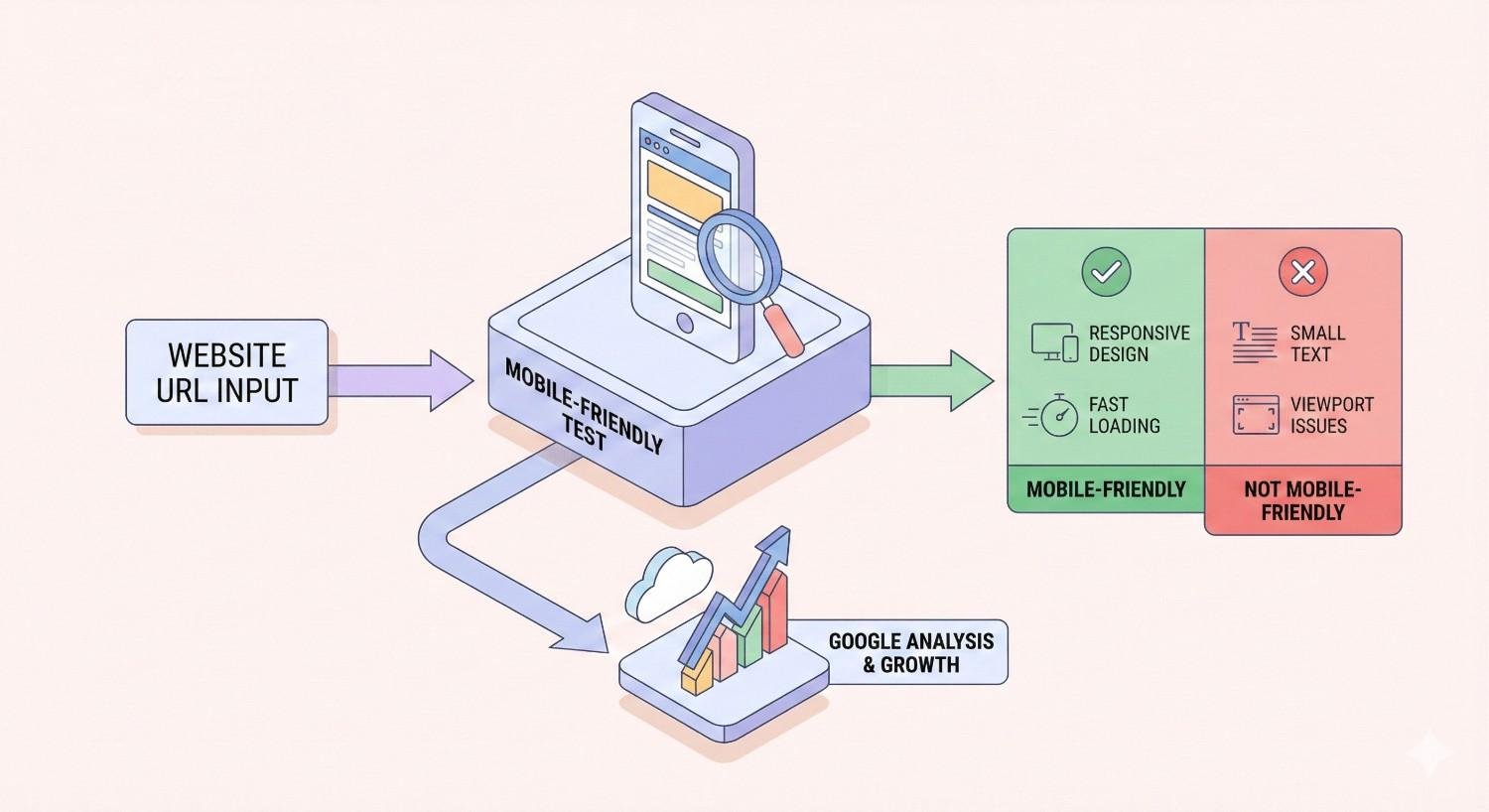
Google’s Mobile-Friendly Test renders pages using the same infrastructure as Googlebot, providing a preview of how Google sees your content. Enter any URL to see the rendered screenshot and HTML.
This tool reveals:
Rendering completeness through the visual screenshot. Missing images, blank sections, or loading indicators suggest rendering failures.
Page loading issues when resources cannot be fetched. The tool reports blocked resources that may prevent proper rendering.
Mobile rendering specifically, which matters because Google uses mobile-first indexing. Desktop rendering may succeed while mobile rendering fails due to responsive JavaScript logic.
Use this tool during development to catch rendering issues before they affect your live site’s indexation.
Chrome DevTools for JavaScript Debugging
Chrome DevTools provides deep insight into JavaScript execution, network requests, and rendering performance. Several specific features help diagnose SEO-related rendering issues.
Network throttling simulates slower connections similar to what Googlebot might experience. Test your page with “Slow 3G” throttling to see if content still loads within reasonable timeframes.
JavaScript disabled mode shows what your page looks like without any JavaScript execution. Access this through Settings > Debugger > Disable JavaScript. Critical content should ideally be visible even with JavaScript disabled.
Coverage tool identifies unused JavaScript code that increases bundle size without providing value. Reducing bundle size improves rendering speed and reliability.
Performance panel records page load and identifies long-running JavaScript tasks that might exceed rendering timeouts. Tasks blocking the main thread for more than 50 milliseconds can cause rendering delays.
Console errors reveal JavaScript failures that might prevent rendering completion. Errors during page load are particularly problematic for SEO.
Third-Party JavaScript SEO Audit Tools
Specialized SEO tools provide automated JavaScript rendering analysis at scale. These tools crawl your site while rendering JavaScript, identifying pages with rendering issues across your entire domain.
Screaming Frog offers JavaScript rendering mode that uses Chrome to render pages during crawling. Compare rendered content against raw HTML across thousands of URLs to identify patterns.
Sitebulb provides visual rendering comparisons and identifies specific JavaScript issues affecting crawlability.
These tools help prioritize fixes by showing which pages have the most severe rendering problems and which issues affect the most URLs.
How to Fix JavaScript Rendering Issues
Fixing JavaScript rendering issues requires balancing SEO requirements against development constraints and user experience goals. Multiple approaches exist, each with different implementation complexity and effectiveness.
Implementing Server-Side Rendering (SSR)
Server-side rendering solves JavaScript SEO issues at the architectural level by generating complete HTML on the server before sending it to browsers or crawlers. The content exists in the initial response, eliminating dependency on client-side JavaScript execution.
SSR implementation varies by framework:
Next.js provides SSR through getServerSideProps, which runs on each request to fetch data and render HTML server-side. Pages using this function deliver complete content to crawlers without requiring JavaScript rendering.
Nuxt.js offers universal rendering mode that automatically handles SSR for Vue.js applications. Configuration determines which pages render server-side versus client-side.
Angular Universal adds SSR capabilities to Angular applications, though implementation requires more configuration than Next.js or Nuxt.js equivalents.
The tradeoff with SSR is server load. Each page request requires server-side rendering, increasing compute costs compared to serving static files or client-rendered shells. Caching strategies help mitigate this cost.
Dynamic Rendering Solutions
Dynamic rendering serves different content to search engine crawlers than to regular users. When the server detects a crawler user agent, it returns pre-rendered HTML. Human visitors receive the standard JavaScript-dependent version.
This approach provides a middle ground when full SSR implementation isn’t feasible. Tools like Prerender.io and Rendertron automate this process by maintaining a rendering service that generates static HTML snapshots for crawlers.
Implementation typically involves:
- Detecting crawler user agents at the server or CDN level
- Routing crawler requests to the pre-rendering service
- Serving cached rendered HTML to crawlers
- Serving normal responses to human visitors
Google officially supports dynamic rendering as a workaround for JavaScript-heavy sites, though they recommend SSR or static rendering as long-term solutions.
Pre-Rendering Static Pages
Pre-rendering generates static HTML files at build time rather than on each request. This approach works well for content that doesn’t change frequently, such as blog posts, product pages with stable information, or marketing landing pages.
Static site generators like Gatsby, Next.js (with getStaticProps), and Nuxt.js (with nuxt generate) create HTML files during the build process. These files serve instantly without any server-side processing or client-side rendering requirements.
Benefits include:
Guaranteed rendering since HTML is generated during controlled build processes where you can verify output.
Faster page loads because static files serve from CDNs without server processing.
Reduced infrastructure costs since static hosting is significantly cheaper than server-side rendering infrastructure.
The limitation is content freshness. Pages must be rebuilt when content changes. For frequently-updated content, incremental static regeneration (ISR) in Next.js provides a hybrid approach that rebuilds pages on a schedule or on-demand.
Optimizing JavaScript Load Order
How JavaScript loads affects both rendering speed and reliability. Optimizing load order ensures critical content renders quickly while deferring non-essential scripts.
Defer non-critical scripts using the defer attribute. Deferred scripts download in parallel but execute only after HTML parsing completes, preventing render blocking.
Async for independent scripts using the async attribute. Async scripts download and execute as soon as available, useful for scripts that don’t depend on DOM content.
Critical JavaScript inline by including essential rendering code directly in the HTML rather than external files. This eliminates network requests for critical functionality.
Code splitting breaks large JavaScript bundles into smaller chunks loaded on demand. Users and crawlers only download the JavaScript needed for the current page.
Prioritize above-the-fold content by ensuring JavaScript that renders visible content loads and executes before scripts handling below-fold or interactive features.
Fixing Render-Blocking Resources
Render-blocking resources prevent the browser from displaying content until they fully load. Identifying and addressing these resources improves both user experience and crawler rendering success.
Move scripts to body end rather than the head. Scripts at the end of the body don’t block initial HTML rendering.
Use resource hints like preload for critical resources and prefetch for resources needed soon. These hints help browsers prioritize downloads.
Eliminate unused JavaScript identified through Chrome DevTools Coverage tool. Removing dead code reduces bundle size and parsing time.
Optimize third-party scripts by loading them asynchronously or deferring them entirely. Analytics, chat widgets, and advertising scripts rarely need to block rendering.
Implement critical CSS by inlining styles needed for above-the-fold content and deferring the rest. This allows meaningful content to display before full stylesheets load.
Hydration Best Practices
Hydration is the process where client-side JavaScript takes over a server-rendered page, adding interactivity to static HTML. Poor hydration implementation can cause content flashing, layout shifts, or functionality failures.
Match server and client output exactly. Differences between server-rendered HTML and client-side expectations cause hydration errors that may break functionality.
Progressive hydration prioritizes interactive elements users are likely to engage with first. Less critical components hydrate later, reducing initial JavaScript execution time.
Partial hydration (also called islands architecture) hydrates only interactive components while leaving static content as plain HTML. This dramatically reduces JavaScript requirements.
Lazy hydration defers hydration of below-fold components until users scroll near them, similar to lazy loading but for interactivity rather than content.
Avoid hydration mismatches by ensuring server and client have access to the same data. Mismatches often occur when server rendering uses different data than client-side fetching.
JavaScript Frameworks and SEO Compatibility
Different JavaScript frameworks present different SEO challenges and solutions. Understanding your framework’s specific characteristics helps you implement appropriate fixes.
React SEO Rendering Considerations
React applications using Create React App (CRA) default to client-side rendering, which presents significant SEO challenges. The initial HTML contains only a root div element, with all content generated through JavaScript.
SEO-friendly React options include:
Next.js provides the most straightforward path to React SEO. It supports SSR, SSG, and ISR out of the box, with file-based routing that simplifies URL structure.
Gatsby generates static sites from React components, ideal for content-focused sites where real-time data isn’t required.
React Server Components (in React 18+) enable server-side rendering of specific components while maintaining client-side interactivity for others.
For existing CRA applications, migration to Next.js or implementing dynamic rendering provides the most practical solutions. Retrofitting SSR into a CRA application requires significant architectural changes.
Angular Universal for Server-Side Rendering
Angular applications face similar client-side rendering challenges. Angular Universal adds server-side rendering capabilities, generating complete HTML on the server.
Implementation requires:
- Installing Angular Universal packages
- Creating a server-side app module
- Configuring server routes
- Setting up a Node.js server or serverless function to handle rendering
Angular Universal supports both dynamic SSR (rendering on each request) and pre-rendering (generating static HTML at build time). The choice depends on content update frequency and server infrastructure.
Transfer state between server and client carefully to avoid duplicate API calls during hydration. Angular provides TransferState service for this purpose.
Vue.js and Nuxt.js Solutions
Vue.js applications benefit from Nuxt.js, which provides SSR, SSG, and hybrid rendering modes with minimal configuration.
Nuxt.js rendering modes:
Universal mode renders pages server-side on first request, then hydrates for client-side navigation. This provides SEO benefits while maintaining SPA-like user experience.
Static mode pre-renders all pages at build time, generating a fully static site deployable to any static hosting.
Hybrid mode (Nuxt 3) allows per-route rendering configuration. Some pages render statically, others server-side, based on content requirements.
Vue 3’s composition API and Nuxt 3’s improved architecture provide better performance and developer experience compared to earlier versions.
Next.js SEO Advantages
Next.js has become the dominant framework for SEO-conscious React development due to its flexible rendering options and built-in optimizations.
Key SEO features:
Automatic static optimization detects pages without data requirements and generates static HTML automatically.
Incremental Static Regeneration updates static pages without full rebuilds, combining static performance with dynamic content freshness.
Image optimization through next/image component automatically serves properly sized, modern format images.
Built-in head management through next/head component simplifies meta tag implementation.
Middleware enables dynamic rendering decisions based on request characteristics, including user agent detection for crawler-specific handling.
Edge rendering through Vercel’s edge network provides SSR performance approaching static sites.
Gatsby and Static Site Generation
Gatsby generates static sites from React components, pulling content from various sources (CMS, APIs, markdown files) at build time.
SEO strengths:
Complete HTML generation ensures all content exists in source HTML, eliminating rendering dependencies.
Automatic performance optimization including code splitting, image optimization, and prefetching.
Plugin ecosystem provides SEO-specific functionality including sitemap generation, schema markup, and meta tag management.
Limitations:
Build times increase with site size. Large sites with thousands of pages may have lengthy build processes.
Content freshness requires rebuilds. Frequently-changing content may not suit pure static generation.
Incremental builds in Gatsby Cloud help address build time concerns for larger sites.
Measuring the SEO Impact of JavaScript Rendering Fixes
Implementing fixes is only valuable if you can measure their impact. Establish baselines before making changes and track specific metrics afterward.
Indexation Rate Improvements
Track the percentage of your pages that Google successfully indexes before and after implementing rendering fixes.
Google Search Console Coverage report shows indexed pages, excluded pages, and specific exclusion reasons. Monitor:
- Pages with “Crawled – currently not indexed” status
- Pages marked as “Soft 404”
- Pages with “Discovered – currently not indexed” status
After implementing fixes, request indexing for affected pages and monitor status changes over 2-4 weeks. Significant indexation improvements indicate successful rendering fixes.
Site: search operator provides a quick check of indexed pages. Search site:yourdomain.com to see approximately how many pages Google has indexed. Compare this against your total page count.
Core Web Vitals and Page Speed Metrics
JavaScript rendering fixes often improve Core Web Vitals, which directly influence rankings.
Largest Contentful Paint (LCP) measures when the main content becomes visible. SSR and pre-rendering typically improve LCP by delivering content in initial HTML rather than waiting for JavaScript execution.
First Input Delay (FID) and Interaction to Next Paint (INP) measure interactivity. Reducing JavaScript bundle size and optimizing hydration improves these metrics.
Cumulative Layout Shift (CLS) measures visual stability. Proper SSR implementation reduces layout shifts caused by content loading after initial render.
Monitor these metrics through Google Search Console’s Core Web Vitals report and PageSpeed Insights for individual page analysis.
Organic Traffic Recovery Timelines
Expect gradual traffic improvements rather than immediate jumps after fixing rendering issues. Google must re-crawl, re-render, and re-evaluate your pages.
Typical timeline:
Week 1-2: Google begins re-crawling fixed pages. Request indexing through Search Console to accelerate this process.
Week 2-4: Re-indexed pages begin appearing in search results. Initial ranking positions may fluctuate.
Month 2-3: Rankings stabilize as Google fully processes the improved content. Traffic patterns become clearer.
Month 3-6: Full impact becomes measurable. Compare year-over-year traffic to account for seasonality.
Track organic traffic in Google Analytics, segmenting by landing page to identify which fixed pages show improvement.
Crawl Budget Optimization Results
For large sites, rendering fixes can improve crawl efficiency, allowing Google to index more pages within your crawl budget.
Monitor in Google Search Console:
Crawl stats show total requests, response times, and crawl frequency. Improved rendering efficiency may increase crawl rate.
Coverage report trends indicate whether more pages are being indexed over time.
Server logs provide detailed crawl data including which pages Googlebot visits and how often.
Reduced JavaScript complexity means faster rendering, allowing Google to process more pages in the same time. This particularly benefits sites with thousands of pages competing for limited crawl budget.
When to Hire an SEO Expert for JavaScript Issues
JavaScript rendering issues sit at the intersection of development and SEO, requiring expertise in both domains. Knowing when to bring in specialized help prevents prolonged traffic losses.
Signs Your Development Team Needs SEO Support
Several indicators suggest your team would benefit from SEO expertise:
Persistent indexation problems despite development efforts indicate missing SEO knowledge. Developers may fix technical issues without understanding SEO implications.
Traffic declines after site updates suggest changes inadvertently harmed SEO. An SEO expert can diagnose whether JavaScript changes caused the decline.
Conflicting priorities between development speed and SEO requirements need mediation. SEO experts help prioritize fixes based on traffic impact.
Framework migrations (moving to React, Vue, or Angular) require SEO guidance to avoid losing existing rankings during transition.
Limited SEO tooling knowledge means your team may not know how to diagnose rendering issues. SEO experts bring tool expertise and diagnostic frameworks.
Technical SEO Audit Process for JS-Heavy Sites
A comprehensive technical SEO audit for JavaScript-heavy sites includes:
Rendering analysis comparing raw HTML, rendered HTML, and Google’s cached version across representative page templates.
JavaScript dependency mapping identifying which content requires JavaScript and assessing risk levels.
Framework assessment evaluating current architecture and recommending rendering strategy improvements.
Performance analysis measuring Core Web Vitals and identifying JavaScript-related bottlenecks.
Crawl analysis reviewing server logs and Search Console data to understand how Google currently interacts with your site.
Competitive benchmarking comparing your rendering approach against competitors to identify gaps.
Prioritized recommendations ranking fixes by impact and implementation effort to guide development resources.
ROI of Professional JavaScript SEO Remediation
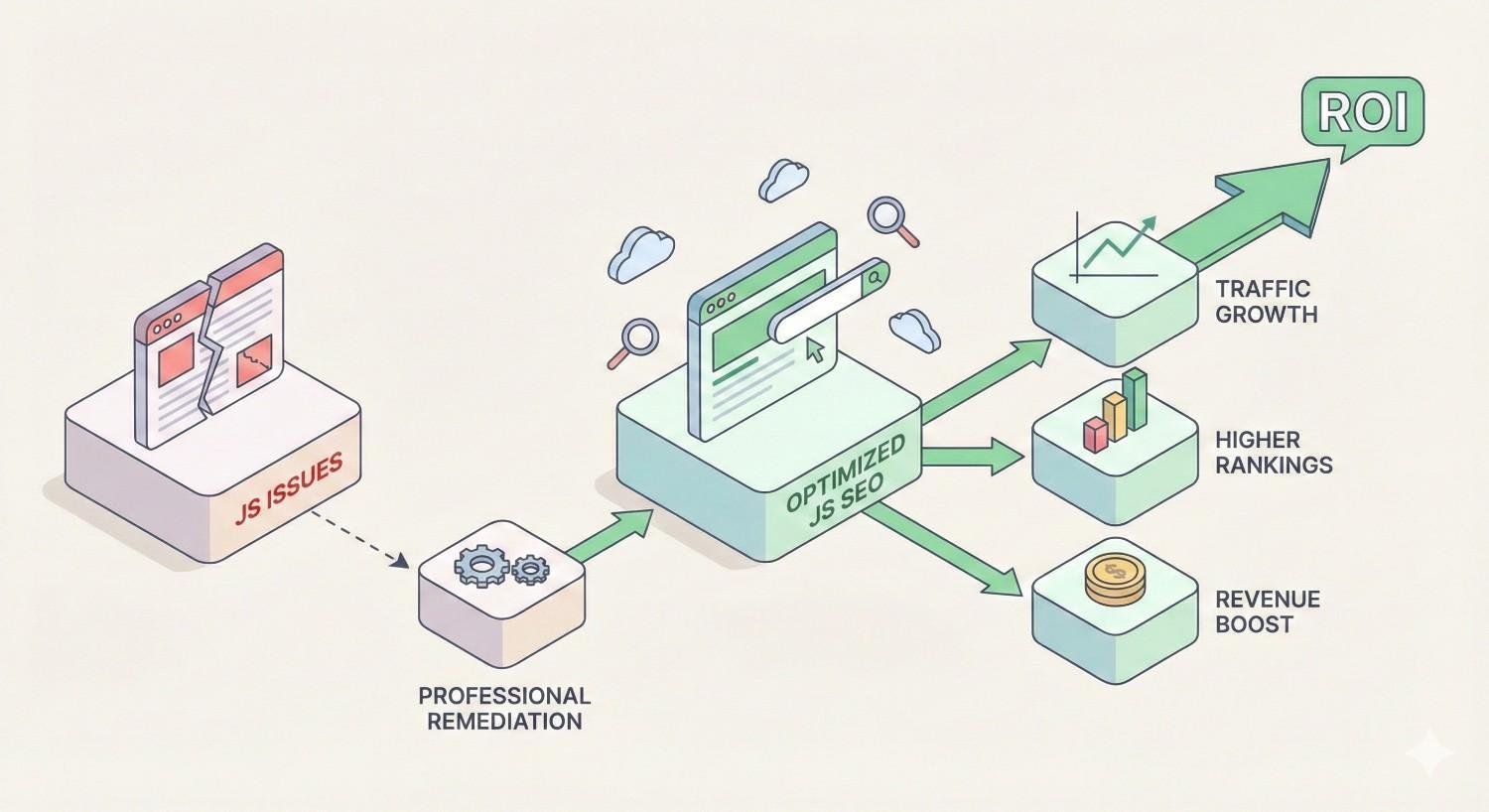
Calculate potential ROI by estimating traffic recovery value:
Identify affected pages through Search Console coverage data. Count pages with soft 404 errors, indexation issues, or rendering problems.
Estimate traffic potential using keyword research tools to assess search volume for terms those pages should rank for.
Calculate revenue impact by applying your typical conversion rate and customer value to potential traffic.
Compare against remediation cost including audit fees, implementation time, and ongoing monitoring.
For many businesses, recovering even a portion of lost organic traffic justifies significant investment in JavaScript SEO remediation. A site losing 10,000 monthly visits to rendering issues might recover $50,000+ annually in equivalent paid traffic value.
JavaScript Rendering Issues Prevention Checklist
Preventing JavaScript rendering issues is more efficient than fixing them after traffic losses occur. Implement these practices to maintain SEO health.
Pre-Launch JavaScript SEO Testing Protocol
Before launching new pages or site updates:
Test rendering in Search Console using URL Inspection tool on staging URLs (if verified) or immediately after launch.
Compare raw vs rendered HTML to understand JavaScript dependencies for new templates.
Verify critical content in source ensuring essential text, links, and metadata exist without JavaScript.
Check mobile rendering specifically, as mobile-first indexing means mobile rendering issues affect all rankings.
Test with JavaScript disabled to see fallback content and identify complete JavaScript dependencies.
Validate structured data renders correctly, as schema markup generated by JavaScript must be present in rendered HTML.
Review Core Web Vitals for new pages to catch performance issues before they affect rankings.
Ongoing Monitoring and Maintenance
Establish regular monitoring routines:
Weekly Search Console review checking coverage report for new errors, particularly soft 404s and indexation issues.
Monthly rendering spot-checks testing representative pages to ensure rendering continues working correctly.
Quarterly technical audits using crawling tools to identify emerging issues across the full site.
Alert configuration in monitoring tools to notify you of significant indexation drops or new rendering errors.
Dependency updates reviewing and testing JavaScript framework and library updates for SEO impact before deploying.
Developer-SEO Collaboration Best Practices
Bridge the gap between development and SEO teams:
Shared documentation explaining SEO requirements for JavaScript implementation, including rendering expectations and testing procedures.
SEO review in development workflow adding SEO checks to pull request reviews and deployment checklists.
Regular sync meetings between SEO and development teams to discuss upcoming changes and potential impacts.
Training sessions helping developers understand how search engines process JavaScript and why certain practices matter.
Shared metrics dashboards giving developers visibility into SEO performance so they understand the impact of their work.
Clear escalation paths for SEO issues discovered in production, ensuring rapid response to rendering problems.
Frequently Asked Questions About JavaScript Rendering Issues
Does Google fully render JavaScript?
Yes, Google renders JavaScript using a headless Chromium browser, but with limitations. Rendering happens in a separate queue from initial crawling, may timeout on complex pages, and doesn’t simulate user interactions like scrolling or clicking. Content requiring these interactions may not be indexed.
How long does Googlebot take to render JavaScript?
Google’s rendering queue introduces delays ranging from seconds to days depending on your site’s crawl priority and Google’s resource availability. High-authority sites typically see faster rendering, while newer or lower-traffic sites may wait longer. This delay is separate from crawl frequency.
Can JavaScript hurt my search rankings?
JavaScript itself doesn’t hurt rankings, but implementation problems can. Content that fails to render won’t be indexed or ranked. Slow JavaScript execution harms Core Web Vitals scores. JavaScript-dependent internal links may not pass authority if rendering fails.
What is the two-wave indexing process?
Google’s two-wave indexing first crawls and indexes raw HTML content, then later renders JavaScript and indexes additional content discovered through rendering. This means JavaScript-dependent content may be indexed days or weeks after the initial crawl, if rendering succeeds.
Is server-side rendering necessary for SEO?
SSR isn’t strictly necessary if Google successfully renders your client-side JavaScript. However, SSR provides reliability that client-side rendering cannot guarantee. For business-critical pages where indexation matters, SSR or pre-rendering eliminates rendering risk entirely.
How do I know if JavaScript is causing my SEO problems?
Compare your page in Google Search Console’s URL Inspection tool against what you see in a browser. If significant content is missing from Google’s rendered version, JavaScript rendering is likely the cause. Also check for soft 404 errors on pages that should have content.
Should I rebuild my website to fix JavaScript SEO issues?
Not necessarily. Dynamic rendering, pre-rendering services, and incremental improvements can address many issues without full rebuilds. However, if your current architecture fundamentally prevents SEO success and your business depends on organic traffic, migration to an SEO-friendly framework may provide better long-term ROI.
Conclusion: Building a JavaScript SEO Strategy for Long-Term Visibility
JavaScript rendering issues represent one of the most technically complex SEO challenges, but they’re entirely solvable with the right approach. The key is understanding that search engines process your site differently than browsers, then implementing solutions that ensure content visibility regardless of rendering success.
At White Label SEO Service, we help businesses diagnose and resolve JavaScript rendering problems that silently drain organic traffic. Our technical SEO audits identify exactly where rendering fails and provide prioritized remediation plans that balance SEO requirements with development realities.
Ready to ensure your JavaScript-powered site achieves its full organic potential? Contact our team for a comprehensive technical SEO assessment that uncovers hidden rendering issues and charts a clear path to improved search visibility.


