

A single toxic backlink can undo months of SEO progress, triggering ranking drops that cost businesses thousands in lost organic traffic. Link audits identify these harmful connections before they escalate into manual penalties or algorithmic suppression.
Your backlink profile directly influences how Google evaluates your site’s trustworthiness. When spammy, irrelevant, or manipulative links point to your domain, search engines question your credibility. The result? Declining visibility, reduced organic traffic, and diminished lead generation.
This guide walks you through the complete link audit process. You’ll learn to identify toxic links, use professional audit tools, execute systematic removal strategies, and build monitoring systems that protect your rankings long-term.
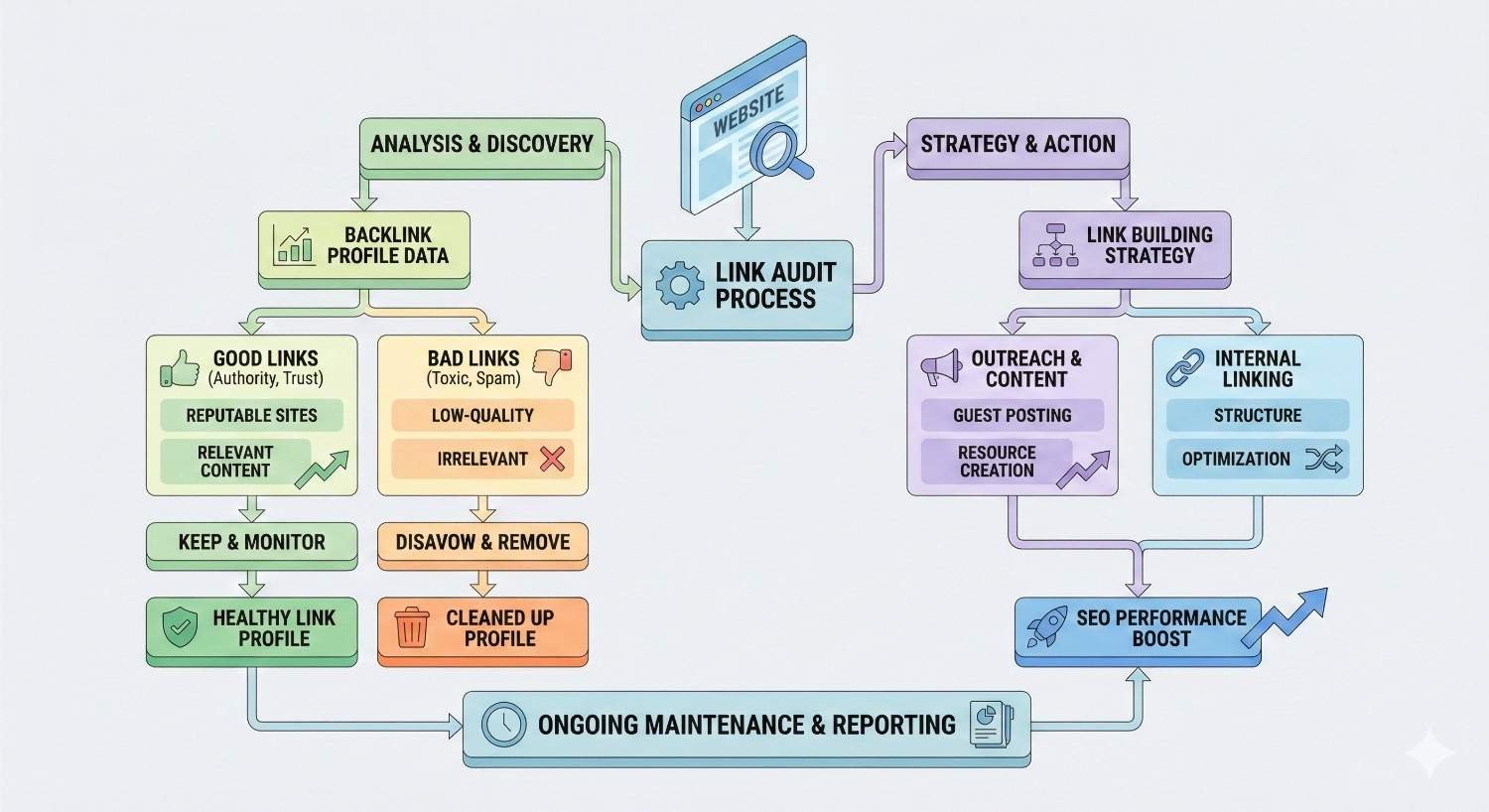
What Is a Link Audit?
A link audit examines every backlink pointing to your website to assess quality, relevance, and potential risk. This systematic review separates valuable links that strengthen your authority from harmful ones that threaten your search performance.
Definition and Purpose of Link Audits
A link audit is a comprehensive analysis of your complete backlink profile. The process involves collecting all inbound links, evaluating each one against quality criteria, and categorizing them by risk level.
The primary purpose is risk identification. You’re looking for links that violate Google’s guidelines or signal manipulation to search algorithms. Secondary purposes include understanding your link velocity, identifying your strongest referring domains, and discovering link building opportunities.
Link audits serve both defensive and offensive functions. Defensively, they protect against penalties. Offensively, they reveal gaps in your link profile and highlight competitors’ strategies worth emulating.
Why Link Audits Matter for SEO Health
Backlinks remain one of Google’s most influential ranking factors. According to Backlinko’s analysis, the number one result in Google has 3.8x more backlinks than positions two through ten. Quality matters as much as quantity.
Google’s algorithms have grown sophisticated at detecting unnatural link patterns. The Penguin update, now part of Google’s core algorithm, continuously evaluates link quality. Sites with toxic backlink profiles experience gradual ranking erosion even without manual penalties.
Regular audits catch problems early. A link that seemed harmless six months ago might now originate from a penalized domain. Proactive monitoring prevents small issues from becoming ranking emergencies.
For businesses investing in SEO, link audits protect that investment. Every dollar spent on content creation and technical optimization loses value when toxic links undermine domain authority.
What Are Toxic Links?
Toxic links are backlinks that harm your search rankings rather than help them. These links signal manipulation, spam, or low-quality associations to search engines, triggering algorithmic suppression or manual penalties.
Characteristics of Toxic Backlinks
Toxic links share identifiable patterns. Understanding these characteristics helps you spot problems quickly during audits.
Irrelevant context tops the list. A link from a gambling site to your accounting software makes no topical sense. Google recognizes these mismatches as potential manipulation.
Unnatural anchor text raises immediate red flags. When dozens of links use exact-match commercial keywords like “best SEO services” or “cheap insurance quotes,” the pattern screams manipulation. Natural link profiles show diverse anchor text including brand names, URLs, and generic phrases.
Low-quality source domains transfer their poor reputation to your site. Links from domains with thin content, excessive ads, or obvious spam characteristics damage your profile.
Link schemes include any arrangement designed primarily to manipulate PageRank. Private blog networks, link exchanges, and paid links without proper disclosure all qualify.
Foreign language spam often appears in backlink profiles without explanation. If your English-language site suddenly has hundreds of links from foreign-language gambling or pharmaceutical sites, those links are almost certainly toxic.
Common Sources of Toxic Links
Toxic links originate from predictable sources. Knowing where to look accelerates your audit process.
Private Blog Networks (PBNs) remain a common source despite Google’s ongoing efforts to identify and devalue them. These networks of interconnected sites exist solely to sell links. When Google identifies a PBN, every site linking from it becomes toxic.
Comment spam generates low-quality links at scale. Automated tools blast links across blog comments, forum signatures, and guestbook pages. These links typically use exact-match anchor text and point to commercial pages.
Article directories and low-quality guest post farms once provided easy link building. Most now carry negative associations. Links from sites accepting any content without editorial review signal low quality.
Hacked sites sometimes inject links without the site owner’s knowledge. Your backlink profile might include links from legitimate sites that were compromised and used for link spam.
Negative SEO attacks involve competitors deliberately building toxic links to your site. While Google claims to handle these algorithmically, concentrated toxic link building can still cause ranking fluctuations.
Scraped content sites copy content from legitimate sources and republish it, including any links. These duplicate content farms provide zero value and potential harm.
How Toxic Links Damage Your Rankings
Toxic links damage rankings through two mechanisms: algorithmic suppression and manual penalties.
Algorithmic suppression happens automatically. Google’s Penguin algorithm evaluates link quality continuously. When it detects unnatural patterns, it devalues those links or suppresses the target site’s rankings. You won’t receive notification. Rankings simply decline.
Manual penalties require human review. Google’s webspam team investigates sites flagged for link scheme violations. If they confirm manipulation, they issue a manual action visible in Google Search Console. Recovery requires link cleanup and a reconsideration request.
The damage extends beyond rankings. Toxic links waste crawl budget as Googlebot follows worthless links. They dilute your link equity by associating your domain with spam. They create ongoing vulnerability as source domains get penalized.
Google’s own documentation explicitly warns against link schemes, stating that any links intended to manipulate rankings may be considered spam.
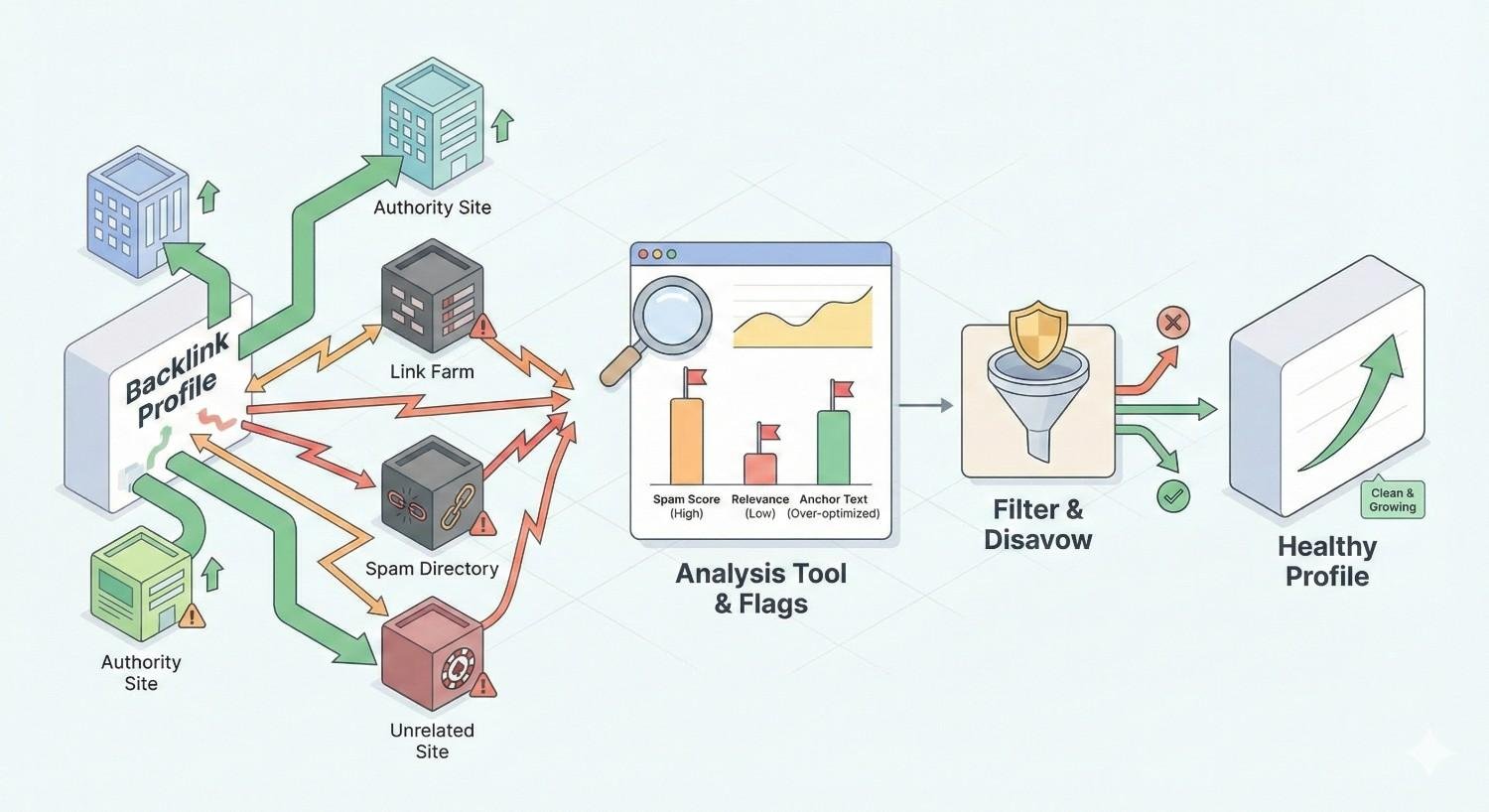
How to Identify Toxic Links in Your Backlink Profile
Identifying toxic links requires systematic evaluation using multiple quality signals. No single metric definitively labels a link toxic. Instead, you’re looking for patterns and combinations that indicate risk.
Key Metrics for Evaluating Link Quality
Professional link audits evaluate links across several dimensions. Each metric provides partial information. Combined, they reveal the complete picture.
Domain Authority and Trust Signals
Domain authority metrics estimate a domain’s ranking potential based on its backlink profile. While not Google metrics, they correlate with search performance.
Low domain authority alone doesn’t make a link toxic. New legitimate sites have low authority. However, links from domains with authority scores below 10 combined with other negative signals warrant scrutiny.
Trust signals matter more than raw authority. Look for:
- Real contact information and about pages
- Consistent publishing history
- Legitimate business presence
- Natural link profiles of their own
Domains lacking trust signals while showing high spam indicators present the highest risk.
Spam Score Indicators
Spam scores aggregate multiple negative signals into a single risk metric. Moz’s Spam Score evaluates 27 common spam flags including thin content, low authority, and suspicious link patterns.
High spam scores indicate elevated risk but require context. A spam score of 30% on an otherwise legitimate site might reflect temporary issues. A spam score of 60% on a site with no real content almost certainly indicates a toxic source.
Use spam scores as screening tools, not final verdicts. High-scoring domains deserve manual review before classification.
Anchor Text Distribution Analysis
Natural anchor text distribution follows predictable patterns. Studies of large link datasets show healthy profiles typically contain:
- Branded anchors: 40-60% (company name, URL variations)
- Generic anchors: 20-30% (“click here,” “this website,” “learn more”)
- Naked URLs: 10-20%
- Exact-match keywords: Under 5%
Profiles dominated by exact-match commercial anchors signal manipulation. If 15% or more of your anchors are exact-match keywords, investigate those links carefully.
Sudden anchor text changes also indicate problems. A natural profile evolves gradually. Rapid shifts suggest artificial link building.
Link Relevance Assessment
Topical relevance connects your content to linking pages logically. Google expects links to make contextual sense.
Evaluate relevance at multiple levels:
- Domain relevance: Does the linking site cover related topics?
- Page relevance: Does the specific page content relate to yours?
- Contextual relevance: Does the link appear naturally within content?
A link from a technology blog to your software company makes sense. A link from a recipe site to your B2B services doesn’t. Irrelevant links in large quantities suggest purchased or manipulated placements.
Red Flags That Indicate a Toxic Link
Certain characteristics immediately signal toxic links. When you encounter these red flags, prioritize those links for removal.
Sitewide links appear on every page of a domain, often in footers or sidebars. A single sitewide link can generate thousands of backlinks from one source. Unless the linking site is highly relevant and authoritative, sitewide links typically harm more than help.
Links from penalized domains transfer negative associations. Check if linking domains show signs of Google penalties: dramatic traffic drops, deindexed pages, or manual actions.
Excessive reciprocal linking suggests link exchanges. A few natural reciprocal links are normal. Dozens indicate a scheme.
Links from link farms are immediately toxic. These sites exist solely to sell or exchange links. They typically feature:
- Hundreds of outbound links per page
- No coherent topic focus
- Thin or auto-generated content
- Obvious monetization through link sales
Hidden links using CSS tricks, tiny fonts, or color matching indicate manipulation. Legitimate sites don’t hide their links.
Links from adult, gambling, or pharmaceutical sites to unrelated businesses almost always indicate spam or negative SEO.
Manual Review vs. Automated Detection
Effective link audits combine automated tools with human judgment. Neither approach works optimally alone.
Automated detection excels at scale. Tools can evaluate thousands of links against quality metrics in minutes. They identify patterns humans might miss and flag high-risk links for review.
However, automation produces false positives. A legitimate niche site might trigger spam signals despite being valuable. Automated tools can’t evaluate context, intent, or nuanced quality factors.
Manual review provides accuracy. Human evaluators can visit linking pages, assess content quality, and make judgment calls about borderline cases. They understand context that algorithms miss.
Manual review doesn’t scale. Reviewing thousands of links individually takes weeks. It’s also subject to inconsistency and fatigue.
The optimal approach uses automation for initial screening and manual review for final decisions. Let tools flag potential problems. Have humans verify before taking action.
For most sites, manually review:
- All links with spam scores above 40%
- Links from domains you don’t recognize
- Links with suspicious anchor text
- Any link flagged by multiple tools
Best Tools for Finding Toxic Links
Professional link audits require professional tools. Each platform offers different strengths. Most SEO professionals use multiple tools for comprehensive coverage.
Google Search Console for Link Analysis
Google Search Console provides the most authoritative backlink data available. It shows links Google actually knows about and considers when evaluating your site.
Access your link data through the Links report. You’ll see:
- Top linking sites
- Top linked pages
- Top linking text (anchor text)
Export this data for analysis. Search Console shows up to 100,000 links, sufficient for most sites.
The platform’s limitation is analysis capability. Search Console shows links but doesn’t evaluate quality. You’ll need to export data to spreadsheets or other tools for toxic link identification.
Search Console also hosts the Disavow Tool, making it essential for the complete audit-to-cleanup workflow.
Ahrefs Backlink Audit Features
Ahrefs maintains one of the largest backlink databases, crawling over 8 billion pages daily. Their Site Explorer tool provides comprehensive backlink analysis.
Key features for toxic link identification:
- Domain Rating (DR): Measures linking domain strength
- URL Rating (UR): Measures specific page strength
- Referring domains breakdown: Shows link diversity
- Anchor text analysis: Reveals distribution patterns
- New/lost links: Tracks profile changes over time
Ahrefs doesn’t provide a dedicated “toxic score” but offers the data needed for manual evaluation. Filter by low DR, check anchor text patterns, and identify suspicious referring domains.
The Batch Analysis feature lets you evaluate multiple domains simultaneously, accelerating the review of flagged links.
SEMrush Backlink Audit Tool
SEMrush offers a dedicated Backlink Audit tool that specifically identifies toxic links. The tool evaluates links against over 45 toxicity markers.
Each link receives a toxicity score from 0-100. The tool categorizes links as:
- Toxic: High risk, recommend removal
- Potentially toxic: Moderate risk, review recommended
- Non-toxic: Low risk, likely safe
SEMrush integrates the complete workflow. You can identify toxic links, send removal requests through the platform, and generate disavow files without leaving the tool.
The platform also tracks your audit history, showing how your toxic link count changes over time. This helps measure cleanup progress and identify new threats.
Moz Link Explorer
Moz Link Explorer provides backlink analysis with their proprietary Spam Score metric. This score evaluates 27 spam flags to estimate link risk.
Moz’s approach focuses on domain-level evaluation. Rather than scoring individual links, they assess the overall quality of linking domains. This helps identify patterns across your profile.
Key Moz metrics:
- Domain Authority (DA): Overall domain strength
- Spam Score: Percentage of spam flags triggered
- Linking domains: Total unique domains linking to you
- Discovered/lost links: Profile changes over time
Moz excels at identifying low-quality domains at scale. Sort your backlinks by Spam Score to quickly surface the riskiest links for review.
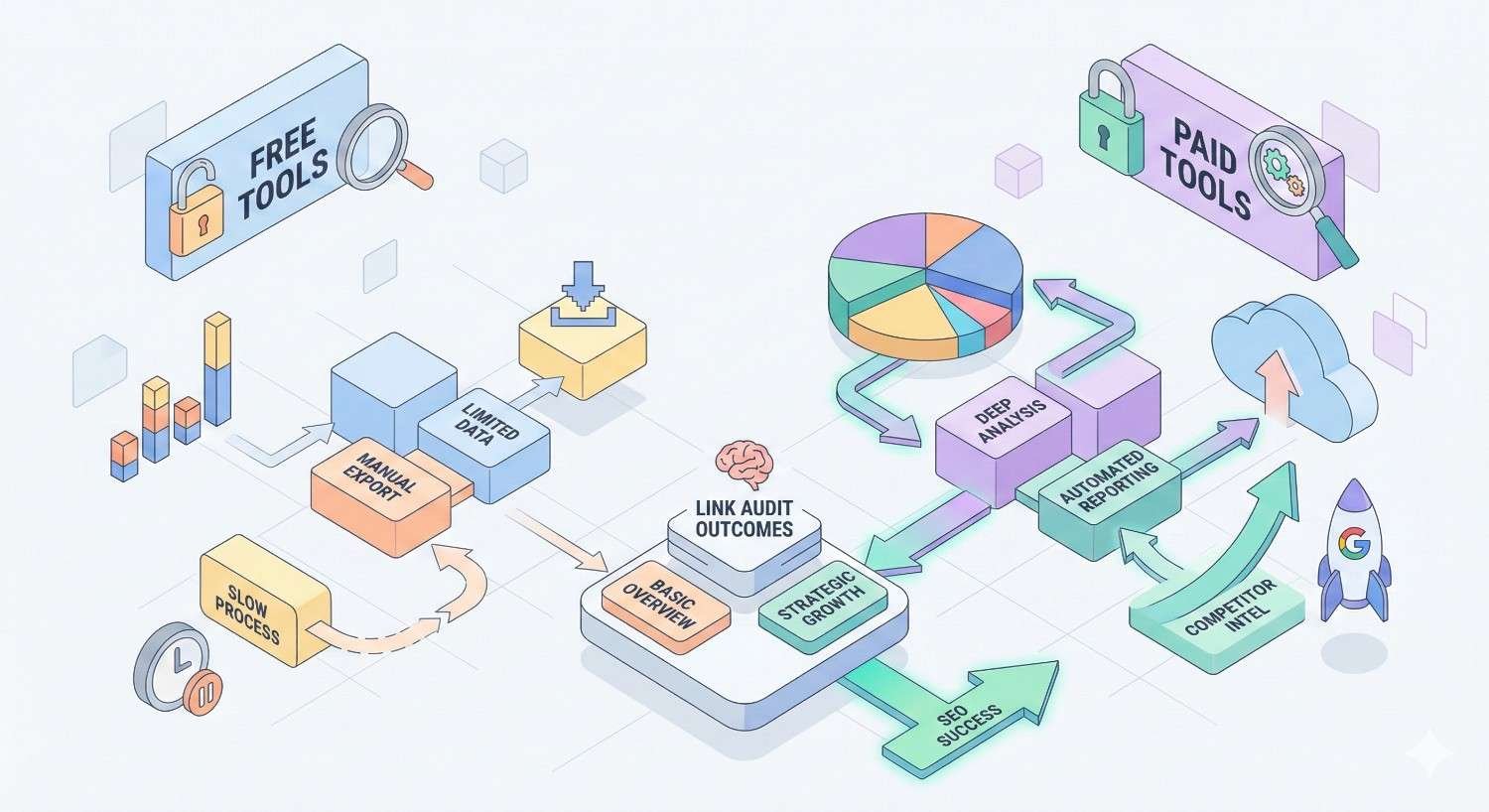
Comparing Free vs. Paid Link Audit Tools
Free tools provide basic functionality suitable for small sites or initial assessments. Paid tools offer the depth needed for comprehensive audits.
Free options include:
- Google Search Console (essential, use regardless of budget)
- Ahrefs Webmaster Tools (limited free backlink data)
- Ubersuggest (basic backlink overview)
- Small SEO Tools (simple backlink checker)
Free tools typically limit data access, update frequency, and analysis features. They work for sites with small backlink profiles or for quick spot-checks.
Paid tools justify their cost through:
- Larger, more current databases
- Advanced filtering and analysis
- Toxicity scoring algorithms
- Workflow integration (outreach, disavow generation)
- Historical data and trend tracking
- API access for custom analysis
For sites with more than a few hundred backlinks, paid tools save significant time. The efficiency gains typically exceed subscription costs for any serious SEO operation.
Recommended approach: Use Google Search Console (free) plus one comprehensive paid tool. Ahrefs and SEMrush both provide excellent toxic link identification. Choose based on your other SEO needs and budget.
Step-by-Step Link Audit Process
A systematic process ensures thorough coverage and consistent results. Follow these steps for every audit.
Step 1: Export Your Complete Backlink Profile
Comprehensive data collection prevents missed toxic links. Export backlinks from multiple sources to ensure complete coverage.
Required exports:
- Google Search Console: Links report → Export external links
- Primary SEO tool (Ahrefs, SEMrush, or Moz): Full backlink export
- Secondary tool if available: Cross-reference data
Combine exports into a single spreadsheet. Remove exact duplicates but keep links that appear in only one source. Different tools discover different links.
Your combined dataset should include:
- Source URL (the page linking to you)
- Source domain
- Target URL (your page receiving the link)
- Anchor text
- Link type (dofollow/nofollow)
- First seen date
- Any available quality metrics
For large profiles, this dataset might contain tens of thousands of rows. That’s expected. The next steps filter it down to manageable review lists.
Step 2: Categorize Links by Risk Level
Initial categorization separates obviously safe links from those requiring review. This triage step focuses your manual effort where it matters.
Create three categories:
Low Risk (No Review Needed):
- Links from domains you recognize as legitimate
- Links from high-authority news sites, educational institutions, government sites
- Links from industry publications and established blogs
- Links with natural anchor text from relevant sources
Medium Risk (Quick Review):
- Links from unfamiliar domains with moderate metrics
- Links with slightly unusual anchor text
- Links from sites outside your primary industry
- Older links from domains that may have changed
High Risk (Detailed Review):
- Links from domains with spam scores above 30%
- Links with exact-match commercial anchor text
- Links from foreign-language sites (if unexpected)
- Links from sites with excessive outbound links
- Links from known link scheme categories (directories, article farms)
Use spreadsheet filters or tool features to sort links into categories. Most profiles show roughly 70% low risk, 20% medium risk, and 10% high risk. Adjust your thresholds based on profile size and available review time.
Step 3: Analyze Suspicious Domains
High-risk and medium-risk links require individual evaluation. Visit each suspicious domain to assess actual quality.
Evaluation checklist for each domain:
Content quality:
- Is there original, substantive content?
- Does the content make sense and provide value?
- Is the site actively maintained with recent updates?
Business legitimacy:
- Can you identify who operates the site?
- Is there contact information and an about page?
- Does the business appear real?
Link patterns:
- How many outbound links appear on the page?
- Do outbound links go to legitimate sites?
- Is your link contextually placed or randomly inserted?
Technical signals:
- Does the site load properly?
- Are there excessive ads or pop-ups?
- Does the site appear hacked or compromised?
Document your findings for each reviewed domain. Note whether you classify it as toxic, borderline, or acceptable. Include reasoning for future reference.
Step 4: Document Toxic Links for Action
Create a dedicated toxic link list with all information needed for removal efforts.
Required documentation for each toxic link:
- Source URL (full URL of the linking page)
- Source domain
- Your target URL
- Anchor text used
- Reason classified as toxic
- Contact information for the domain (if available)
- Date identified
Organize this list in a spreadsheet with columns for tracking removal status. You’ll update this document throughout the cleanup process.
Additional useful columns:
- Outreach attempt date
- Response received (yes/no)
- Response content summary
- Removal confirmed (yes/no)
- Added to disavow (yes/no)
Thorough documentation prevents duplicate efforts and provides evidence if you need to file a reconsideration request with Google.
Step 5: Create a Prioritized Removal List
Not all toxic links require equal urgency. Prioritize based on potential impact and removal likelihood.
Highest priority:
- Links from penalized or deindexed domains
- Links triggering manual action warnings
- Large quantities of links from single toxic sources
- Links with obviously manipulative anchor text
Medium priority:
- Links from low-quality but not obviously spam domains
- Scattered toxic links from various sources
- Links from domains that might respond to removal requests
Lower priority:
- Nofollow toxic links (limited ranking impact)
- Links from domains unlikely to respond
- Single links from borderline sources
Focus removal efforts on highest-priority links first. These present the greatest risk and often the clearest path to removal.
For very large toxic link counts, consider whether full cleanup is feasible. Sometimes disavowing entire domains makes more sense than pursuing individual link removal.
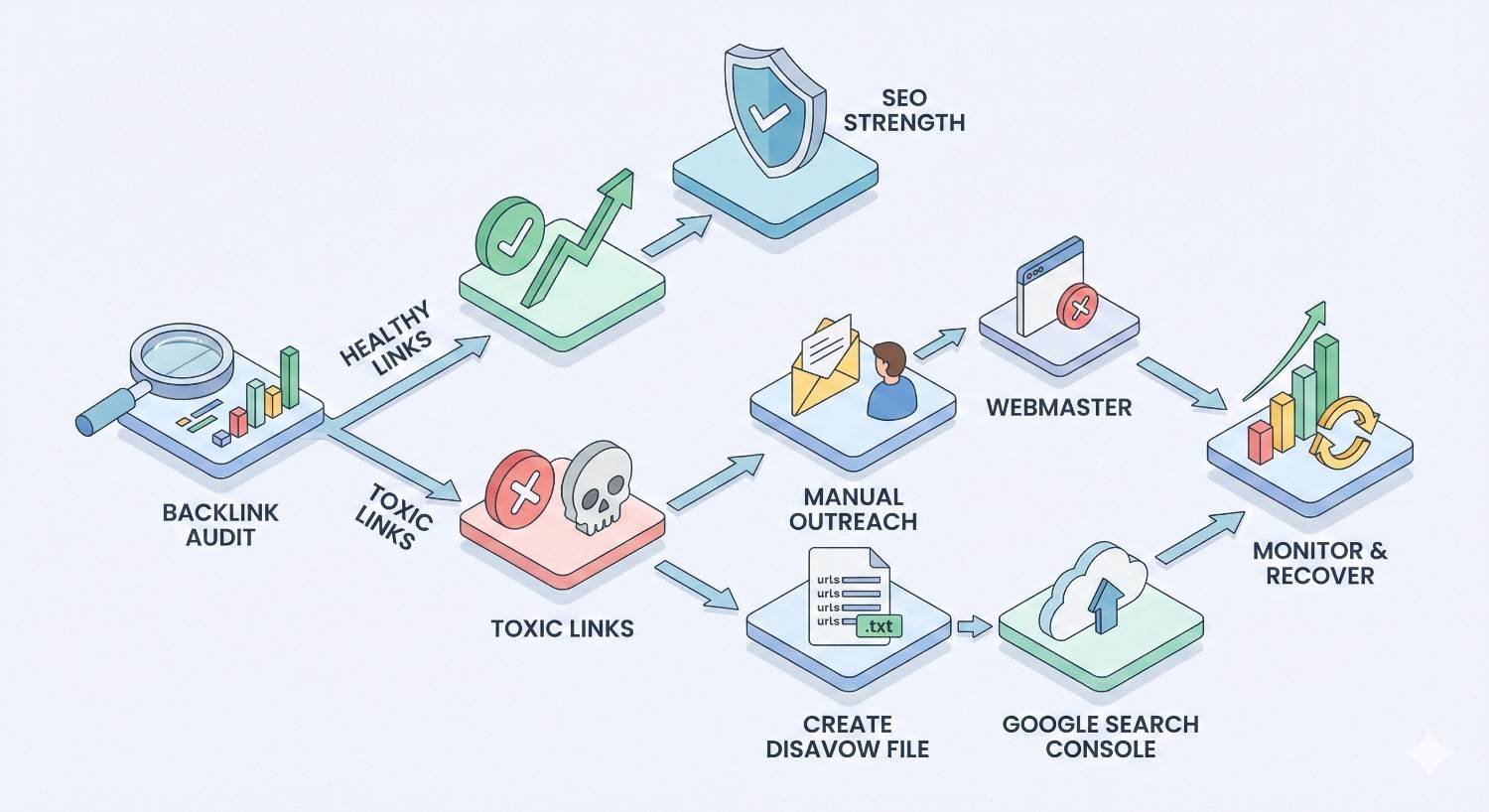
What to Do After Finding Toxic Links
Identification is only half the process. Effective cleanup requires strategic action combining outreach and technical solutions.
Manual Link Removal Outreach
Direct removal requests should be your first approach for toxic links. Removed links are better than disavowed links because they no longer exist at all.
Outreach process:
- Find contact information: Look for contact pages, about pages, or WHOIS data. Many sites list webmaster emails.
- Write professional requests: Keep emails brief and specific. Include:
- The exact URL containing the link
- Your URL being linked to
- A polite request for removal
- Your contact information for confirmation
- Send and track: Log every outreach attempt with dates. Follow up once after 7-10 days if no response.
Sample outreach template:
Subject: Link Removal Request – [Your Domain]
Hello,
I’m conducting a backlink audit for [your domain] and found a link from your site that I’d like to request removal of.
Page containing the link: [their URL] Link pointing to: [your URL]
Would you please remove this link? I’d appreciate confirmation once completed.
Thank you for your time.
[Your name] [Your contact info]
Realistic expectations: Response rates for removal requests typically range from 5-15%. Many sites ignore requests, have abandoned contact addresses, or refuse removal. Don’t expect high success rates, but the effort is worthwhile for links that do get removed.
Using Google’s Disavow Tool
The Disavow Tool tells Google to ignore specific links when evaluating your site. It’s a last resort when removal isn’t possible.
When to Use the Disavow File
Use disavow for links you cannot remove through outreach. Appropriate situations include:
- Removal requests ignored or refused
- Contact information unavailable
- Domain appears abandoned
- Large-scale spam attack requiring bulk disavowal
- Manual action requiring documented cleanup effort
Do not disavow:
- Links you’re unsure about (when in doubt, leave it out)
- Low-quality but not toxic links
- Links from legitimate sites you don’t recognize
- Competitor links you’re jealous of
Google’s John Mueller has repeatedly stated that the disavow tool is only necessary in specific situations. Overusing it can harm your profile by removing legitimate link equity.
How to Format a Disavow File
The disavow file uses a specific plain text format. Errors in formatting can cause Google to ignore your submissions.
Format rules:
- Plain text file (.txt)
- UTF-8 or 7-bit ASCII encoding
- One entry per line
- Comments start with #
- Individual URLs: list the full URL
- Entire domains: use “domain:” prefix
Example disavow file:
Copy
# Toxic links identified in March 2025 audit
# Spam domains
domain:spammysite.com
domain:linkfarm-example.net
# Individual toxic pages
https://example.com/bad-page-with-link
https://another-site.com/spammy-article
# Negative SEO attack links
domain:attack-domain1.com
domain:attack-domain2.com
Submit through Google Search Console under the Disavow Links tool. Google processes files within days but ranking effects may take weeks or months to appear.
Common Disavow Mistakes to Avoid
Disavowing too aggressively: Including legitimate links removes valuable link equity. Only disavow confirmed toxic links.
Formatting errors: Wrong file encoding, missing “domain:” prefix, or including extra characters causes processing failures.
Disavowing instead of removing: Google prefers actual removal. Disavow should supplement removal efforts, not replace them.
Forgetting to update: Your disavow file should be cumulative. Each new submission replaces the previous one. Include all previously disavowed links plus new additions.
Not documenting reasoning: Keep records of why each link was disavowed. You may need this information for reconsideration requests or future audits.
Expecting immediate results: Disavow processing takes time. Don’t panic if rankings don’t immediately improve. Allow 2-3 months for full effect.
Monitoring Results After Cleanup
Track multiple metrics to assess cleanup effectiveness.
Key metrics to monitor:
- Organic traffic: Watch for recovery trends in Google Analytics
- Ranking positions: Track target keywords for improvement
- Crawl stats: Check Search Console for crawl rate changes
- Manual actions: Verify penalty removal if applicable
- New toxic links: Continue monitoring for fresh threats
Create a baseline before cleanup begins. Document current traffic, rankings, and backlink counts. Compare against these baselines monthly.
Expected timeline:
- Disavow processing: 1-4 weeks
- Initial ranking effects: 4-8 weeks
- Full recovery (if penalized): 3-6 months
- Stabilization: 6-12 months
Recovery isn’t always linear. Rankings may fluctuate before stabilizing. Patience and continued monitoring are essential.
How Often Should You Conduct a Link Audit?
Audit frequency depends on your site’s size, link acquisition rate, and risk profile. Establish a schedule that catches problems before they escalate.
Recommended Audit Frequency by Site Size
Small sites (under 1,000 backlinks):
- Full audit: Every 6-12 months
- Quick monitoring check: Quarterly
- Rationale: Limited link velocity means slow accumulation of toxic links
Medium sites (1,000-10,000 backlinks):
- Full audit: Every 3-6 months
- Monitoring check: Monthly
- Rationale: Moderate link acquisition requires regular oversight
Large sites (10,000+ backlinks):
- Full audit: Quarterly
- Monitoring check: Weekly or bi-weekly
- Rationale: High link velocity and visibility increase toxic link risk
Sites with active link building:
- Full audit: Monthly or after each campaign
- Continuous monitoring: Automated alerts
- Rationale: Active acquisition increases both opportunity and risk
Adjust frequency based on your specific situation. Sites in competitive industries or those previously penalized should audit more frequently.
Trigger Events That Require Immediate Audits
Certain events demand immediate link profile review regardless of your regular schedule.
Ranking drops: Sudden, unexplained ranking declines often indicate link-related issues. Audit immediately to identify potential causes.
Manual action notification: Google Search Console alerts require immediate attention. Begin audit and cleanup the same day.
Negative SEO suspicion: If you notice unusual link patterns or competitor activity, audit to assess damage.
Algorithm updates: Major Google updates sometimes affect link evaluation. Audit after significant algorithm changes to ensure compliance.
Site acquisition: Purchasing a domain or website requires thorough backlink review. Previous owners may have built toxic links.
Competitor attacks: If competitors mention negative SEO or you notice coordinated spam, audit immediately.
Traffic anomalies: Unusual traffic patterns from referring sites might indicate link spam or hacked sites linking to you.
Link Audits and Google Penalties
Understanding penalty types helps you respond appropriately and set realistic recovery expectations.
Manual Actions vs. Algorithmic Penalties
Manual actions result from human review. Google’s webspam team identifies violations and applies penalties directly. You’ll see notifications in Search Console under Security & Manual Actions.
Manual action characteristics:
- Explicit notification provided
- Specific violation identified
- Requires reconsideration request for removal
- Clear recovery path once issues addressed
Algorithmic penalties happen automatically through Google’s ranking systems. Penguin evaluates link quality continuously. No notification is provided.
Algorithmic penalty characteristics:
- No direct notification
- Gradual or sudden ranking decline
- Recovery happens automatically when issues resolved
- No reconsideration request needed
Distinguishing between them matters for response strategy. Manual actions require formal reconsideration. Algorithmic issues resolve through cleanup alone.
Signs Your Site Has Been Penalized
Recognizing penalty symptoms enables faster response.
Manual action indicators:
- Search Console notification (definitive)
- Complete deindexing of site or sections
- Dramatic overnight ranking loss
Algorithmic penalty indicators:
- Gradual ranking decline over weeks
- Loss of rankings for specific keyword types
- Traffic drops correlating with known algorithm updates
- Rankings recover then drop repeatedly
Not necessarily penalties:
- Normal ranking fluctuations
- Competitor improvements
- Seasonal traffic changes
- Technical issues affecting crawling
Before assuming a penalty, rule out other causes. Check for technical problems, content issues, and competitive changes. Penalties are less common than many site owners assume.
Recovery Timeline After Toxic Link Removal
Recovery timelines vary based on penalty severity and cleanup thoroughness.
Manual action recovery:
- Cleanup completion: 2-8 weeks (depending on toxic link volume)
- Reconsideration request review: 1-4 weeks
- Ranking recovery after approval: 2-8 weeks
- Full recovery: 2-4 months total
Algorithmic recovery:
- Cleanup completion: 2-8 weeks
- Google recrawl and reprocessing: 4-12 weeks
- Ranking stabilization: 2-6 months
- Full recovery: 3-6 months total
Factors affecting recovery speed:
- Severity of original violation
- Thoroughness of cleanup
- Overall site quality
- Competitive landscape
- Continued positive SEO efforts
Recovery requires patience. Continue building quality content and legitimate links during the recovery period. Don’t expect overnight results.
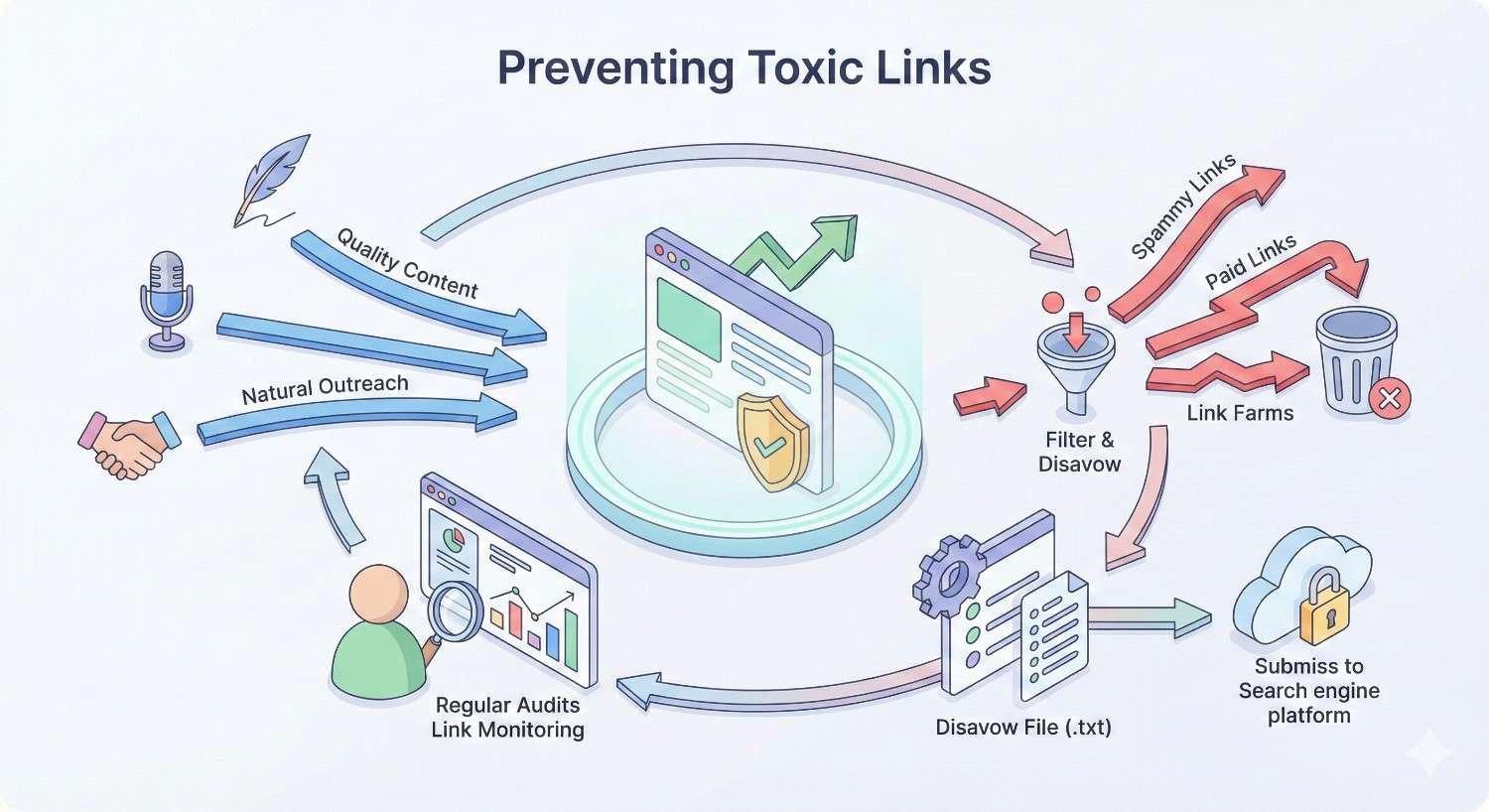
Preventing Toxic Links in the Future
Prevention costs less than cleanup. Implement systems that minimize toxic link accumulation.
Building a Healthy Link Acquisition Strategy
Quality-focused link building naturally avoids toxic sources.
Principles for safe link acquisition:
- Earn links through content: Create resources worth linking to. Earned links rarely become toxic.
- Vet opportunities carefully: Research any site before pursuing links. Check metrics, content quality, and link patterns.
- Diversify sources: Avoid over-reliance on any single link type or source.
- Document everything: Keep records of link building activities for future reference.
- Avoid shortcuts: Cheap, fast link building almost always creates toxic links.
Link types to prioritize:
- Editorial mentions in industry publications
- Resource page inclusions
- Expert contributions and interviews
- Original research citations
- Genuine business relationships
Link types to avoid:
- Purchased links without disclosure
- Private blog network placements
- Mass directory submissions
- Comment and forum spam
- Link exchanges and schemes
Setting Up Backlink Monitoring Alerts
Automated monitoring catches new toxic links before they accumulate.
Monitoring setup:
- Tool-based alerts: Configure Ahrefs, SEMrush, or Moz to notify you of new backlinks. Set thresholds for spam scores or domain ratings.
- Google Alerts: Create alerts for your brand name to catch mentions that might include links.
- Regular review schedule: Even with alerts, schedule periodic manual reviews of new links.
Alert thresholds to consider:
- New links from domains with spam score above 30%
- Unusual anchor text patterns
- High volume of new links in short periods
- Links from unexpected geographic regions
Respond to alerts promptly. Investigating new suspicious links immediately prevents accumulation.
Vetting Link Opportunities Before Acquisition
Evaluate potential link sources before pursuing placements.
Pre-acquisition checklist:
- Domain has legitimate business presence
- Content is original and substantive
- Site has reasonable traffic and engagement
- Outbound link profile appears natural
- No obvious spam signals or penalties
- Topical relevance to your site
- Editorial standards for content
Red flags to avoid:
- Sites openly selling links
- Excessive outbound links per page
- Thin or auto-generated content
- No clear ownership or contact information
- Recent dramatic metric changes
When in doubt, skip the opportunity. One toxic link isn’t worth the cleanup effort. Better opportunities exist.
Link Audit Checklist
Use this checklist for every audit to ensure consistent, thorough coverage.
Data Collection:
- Export backlinks from Google Search Console
- Export backlinks from primary SEO tool
- Combine and deduplicate data
- Record baseline metrics (total links, referring domains)
Initial Analysis:
- Sort links by spam score/toxicity metrics
- Identify anchor text distribution
- Flag exact-match anchor text links
- Categorize links by risk level
Detailed Review:
- Manually review all high-risk links
- Spot-check medium-risk links
- Visit suspicious domains
- Document findings for each reviewed link
Toxic Link Documentation:
- Create toxic link list with full details
- Prioritize by severity and removal likelihood
- Gather contact information for outreach
- Note reasons for toxic classification
Removal Actions:
- Send removal requests to contactable sites
- Track outreach attempts and responses
- Follow up on non-responses
- Document removal confirmations
Disavow Process:
- Create properly formatted disavow file
- Include only confirmed toxic links
- Submit through Search Console
- Save copy of submitted file
Post-Cleanup Monitoring:
- Set up new link alerts
- Schedule follow-up audit
- Track ranking and traffic changes
- Document recovery timeline
Frequently Asked Questions About Link Audits
What percentage of toxic links is dangerous?
There’s no universal threshold. Context matters more than percentages. A site with 5% toxic links from a negative SEO attack faces different risk than one with 5% toxic links from past link building mistakes. Generally, toxic links exceeding 10-15% of your profile warrant immediate attention, but even smaller percentages can cause problems if those links are particularly harmful.
Should I disavow all low-quality links?
No. Disavow only confirmed toxic links, not merely low-quality ones. Low-quality links from legitimate sites rarely cause penalties. Google’s algorithms typically ignore them naturally. Over-disavowing removes potential link equity and signals distrust of your own profile. Reserve disavow for links that clearly violate guidelines or come from spam sources.
How long does a link audit take?
Audit duration depends on backlink profile size and review depth. Small sites with under 1,000 links typically require 2-4 hours. Medium sites with 1,000-10,000 links need 1-2 days. Large sites with 10,000+ links may require a week or more for thorough review. Using professional tools significantly reduces time compared to manual-only approaches.
Can I do a link audit myself or hire an expert?
Both approaches work depending on your situation. DIY audits suit smaller sites, technically comfortable site owners, and limited budgets. Professional audits make sense for large or complex profiles, sites with penalty history, and businesses where SEO significantly impacts revenue. Many businesses start with DIY audits and escalate to professionals when problems arise.
Do nofollow links need to be audited?
Yes, but with lower priority. Nofollow links pass minimal ranking signals, reducing their potential harm. However, Google now treats nofollow as a hint rather than directive, meaning some nofollow links may still influence rankings. Include nofollow links in your audit but focus removal efforts on dofollow toxic links first.
Can toxic links cause a Google penalty?
Yes. Toxic links can trigger both manual actions and algorithmic suppression. Manual penalties occur when Google’s webspam team identifies link scheme violations. Algorithmic penalties happen automatically through Penguin when unnatural link patterns are detected. Both result in ranking losses, though manual actions provide explicit notification while algorithmic effects happen silently.
How do I know if my link audit was successful?
Success indicators include stable or improving organic traffic, ranking recovery for affected keywords, removal of manual actions if applicable, and reduced toxic link percentage in follow-up audits. Full recovery typically takes 3-6 months. Track metrics consistently and compare against pre-audit baselines to measure progress accurately.
Conclusion
Link audits protect your SEO investment by identifying and removing toxic backlinks before they damage rankings. Regular audits, combined with proactive monitoring and quality-focused link building, create sustainable organic growth without penalty risk.
The process requires systematic evaluation, strategic cleanup, and ongoing vigilance. Whether you’re recovering from existing toxic links or preventing future problems, the framework outlined here provides a clear path forward.
At White Label SEO Service, we conduct comprehensive link audits for businesses worldwide, identifying toxic links and implementing complete cleanup strategies. Contact us to protect your backlink profile and build sustainable search visibility.


