

Link building CRM tools transform scattered outreach efforts into systematic, trackable campaigns that consistently acquire high-quality backlinks. These specialized platforms combine prospect management, email automation, and relationship tracking specifically designed for SEO professionals and marketing teams running link acquisition at scale.
Without a dedicated system, most teams lose track of conversations, miss follow-ups, and waste hours on manual tasks that software handles in seconds. The difference between teams using proper link building CRMs and those relying on spreadsheets often shows in response rates, link placement success, and overall campaign ROI.
This guide covers everything you need to evaluate, select, and implement the right link building CRM for your operation. You’ll learn key features to prioritize, compare leading platforms, and discover practical strategies to maximize your outreach results.
What Are Link Building CRM Tools?
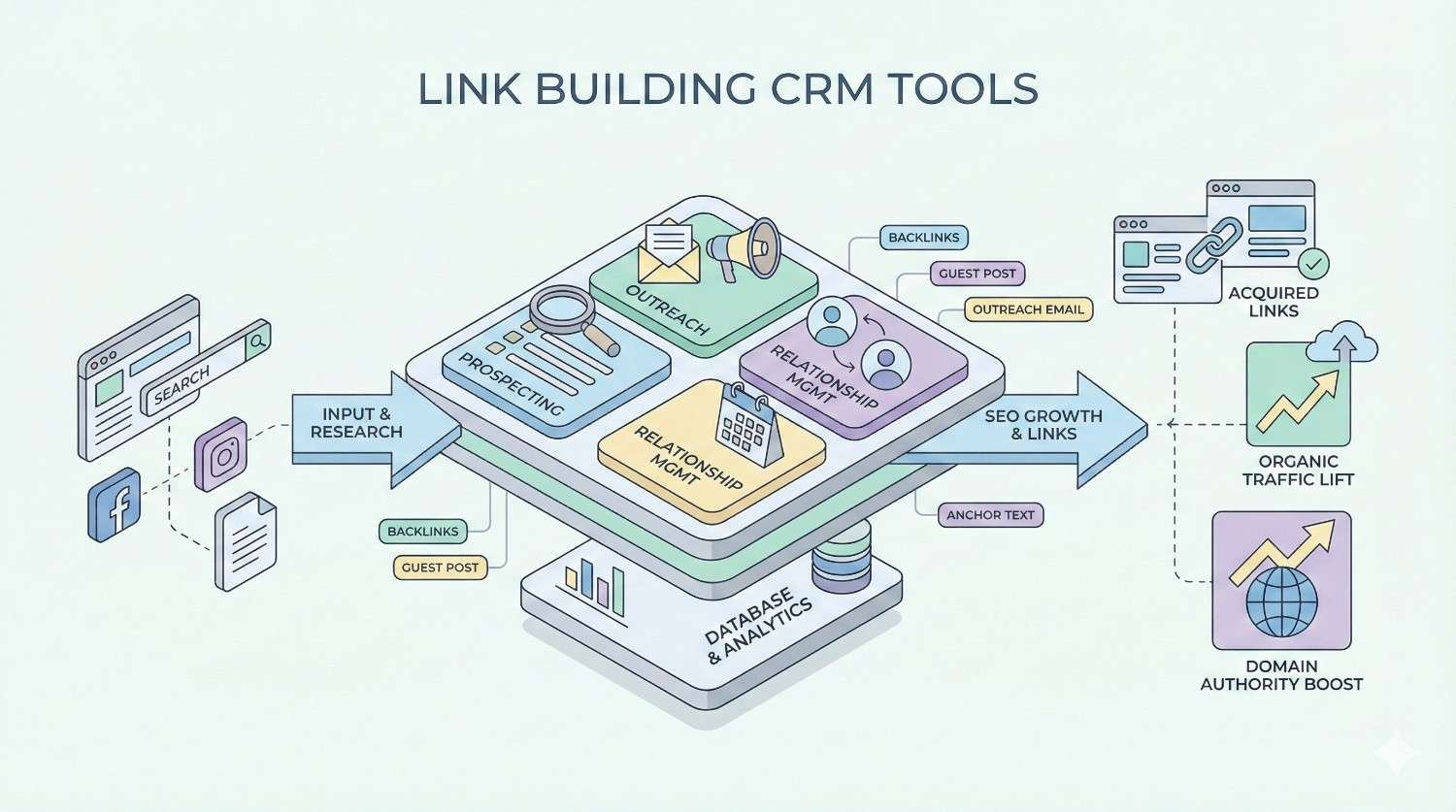
Link building CRM tools are specialized software platforms designed to manage the entire outreach process for acquiring backlinks. They centralize prospect research, email communication, follow-up sequences, and relationship tracking into one unified system built specifically for SEO link acquisition workflows.
Core Definition and Purpose
A link building CRM serves as the operational hub for outreach campaigns. It stores contact information for bloggers, journalists, webmasters, and site owners you want links from. The software tracks every interaction, automates repetitive tasks, and provides visibility into campaign performance.
The core purpose is efficiency and scale. Manual outreach using email clients and spreadsheets breaks down quickly when you’re contacting hundreds or thousands of prospects monthly. Link building CRMs eliminate the chaos by organizing prospects into pipelines, automating follow-up sequences, and preventing duplicate outreach that damages your sender reputation.
These tools also solve the relationship management challenge. Link building isn’t transactional. The best results come from building genuine connections with publishers over time. A proper CRM remembers every conversation, tracks link placements, and helps you nurture relationships that produce multiple links over months and years.
How Link Building CRMs Differ from General CRMs
General CRMs like Salesforce or HubSpot focus on sales pipelines and customer lifecycle management. They track deals, revenue, and customer support interactions. While powerful, they lack features specific to link building workflows.
Link building CRMs include built-in prospecting tools that pull domain metrics, contact information, and content data directly from target websites. They integrate with SEO platforms like Ahrefs, Moz, and Semrush to display Domain Authority, referring domains, and traffic estimates alongside contact records.
Email functionality differs significantly. Link building CRMs support mass personalization at scale, with merge fields that pull website names, recent article titles, and custom compliments into templates. They track opens, clicks, and replies across thousands of emails while managing deliverability through sending limits and warm-up features.
General CRMs also lack link monitoring capabilities. Link building platforms automatically check whether placed links remain live, alert you to removed links, and track the SEO value of acquired backlinks over time.
Key Features of Link Building CRM Software
The best link building CRMs share core functionality that separates them from generic outreach tools. Understanding these features helps you evaluate platforms and identify which capabilities matter most for your campaigns.
Prospect Database Management
Prospect management forms the foundation of any link building CRM. The software stores detailed records for every website and contact in your outreach universe. Each record typically includes website URL, domain metrics, contact name, email address, social profiles, and custom fields for your specific needs.
Advanced platforms pull prospect data automatically. Enter a URL, and the CRM populates domain authority, monthly traffic estimates, content categories, and existing backlink profiles. This automation saves hours of manual research and ensures consistent data quality across your database.
Segmentation capabilities let you organize prospects by campaign, niche, link type, or any custom criteria. You might segment by guest post opportunities, resource page targets, broken link prospects, or HARO sources. Smart filters help you quickly find the right prospects for each campaign.
Duplicate detection prevents embarrassing situations where multiple team members contact the same person. The CRM flags existing records when you import new prospects and merges duplicate entries automatically.
Outreach Campaign Automation
Campaign automation handles the repetitive mechanics of sending personalized emails at scale. You create email sequences with multiple touchpoints, set timing between messages, and let the software execute while you focus on strategy and relationship building.
Personalization goes beyond basic merge fields. Top platforms support conditional logic that changes email content based on prospect attributes. A template might include different opening lines for bloggers versus journalists, or adjust the pitch based on the prospect’s content focus.
Sending controls protect your deliverability. You set daily sending limits per email account, randomize send times to appear more natural, and pause sequences automatically when prospects reply. These safeguards prevent spam flags and maintain healthy sender reputation.
Campaign templates save proven sequences for reuse. When you find an approach that generates strong response rates, save it as a template and deploy it across future campaigns with minimal setup time.
Email Tracking and Follow-Up Sequences
Email tracking provides visibility into prospect engagement. You see exactly when emails are opened, which links get clicked, and how many times prospects revisit your message. This intelligence helps you prioritize follow-ups and refine messaging.
Follow-up sequences run automatically until prospects respond. Most successful link building campaigns require three to five touchpoints before generating replies. Automated sequences ensure no prospect falls through the cracks due to forgotten follow-ups.
Smart sequencing stops automatically when prospects reply, preventing awkward situations where automated emails continue after someone responds. The CRM moves replied prospects into a different pipeline stage for manual handling.
A/B testing capabilities let you experiment with subject lines, email copy, and send times. Run tests across segments of your prospect list, measure results, and continuously improve performance based on data rather than guesswork.
Link Monitoring and Relationship Tracking
Link monitoring tracks the status of acquired backlinks over time. The CRM periodically checks target pages to verify your links remain live and haven’t been removed or nofollowed. Alerts notify you immediately when link status changes.
Relationship tracking maintains the full history of interactions with each contact. Every email, reply, link placement, and note lives in one timeline. When you reach out again months later, you have complete context for the relationship.
Link value tracking connects acquired backlinks to SEO metrics. See the domain authority, traffic, and referring domains of sites linking to you. This data helps you prioritize high-value relationships and demonstrate campaign ROI.
Some platforms integrate with Google Search Console and analytics tools to show how acquired links correlate with ranking improvements and organic traffic growth. This closed-loop reporting proves the business impact of link building efforts.
Reporting and Analytics Dashboards
Reporting dashboards aggregate campaign performance into actionable insights. Standard metrics include emails sent, open rates, reply rates, links acquired, and cost per link. Visual charts show trends over time and highlight top-performing campaigns.
Team performance reports track individual contributor metrics. See which team members generate the highest response rates, acquire the most links, and maintain the best prospect relationships. Use this data for coaching and resource allocation.
Pipeline reports show prospects at each stage of your outreach funnel. Identify bottlenecks where prospects stall and optimize your process to move more contacts toward successful link placements.
Export capabilities let you pull data into spreadsheets or business intelligence tools for custom analysis. API access enables integration with reporting dashboards that combine link building metrics with broader marketing performance data.
Benefits of Using a CRM for Link Building
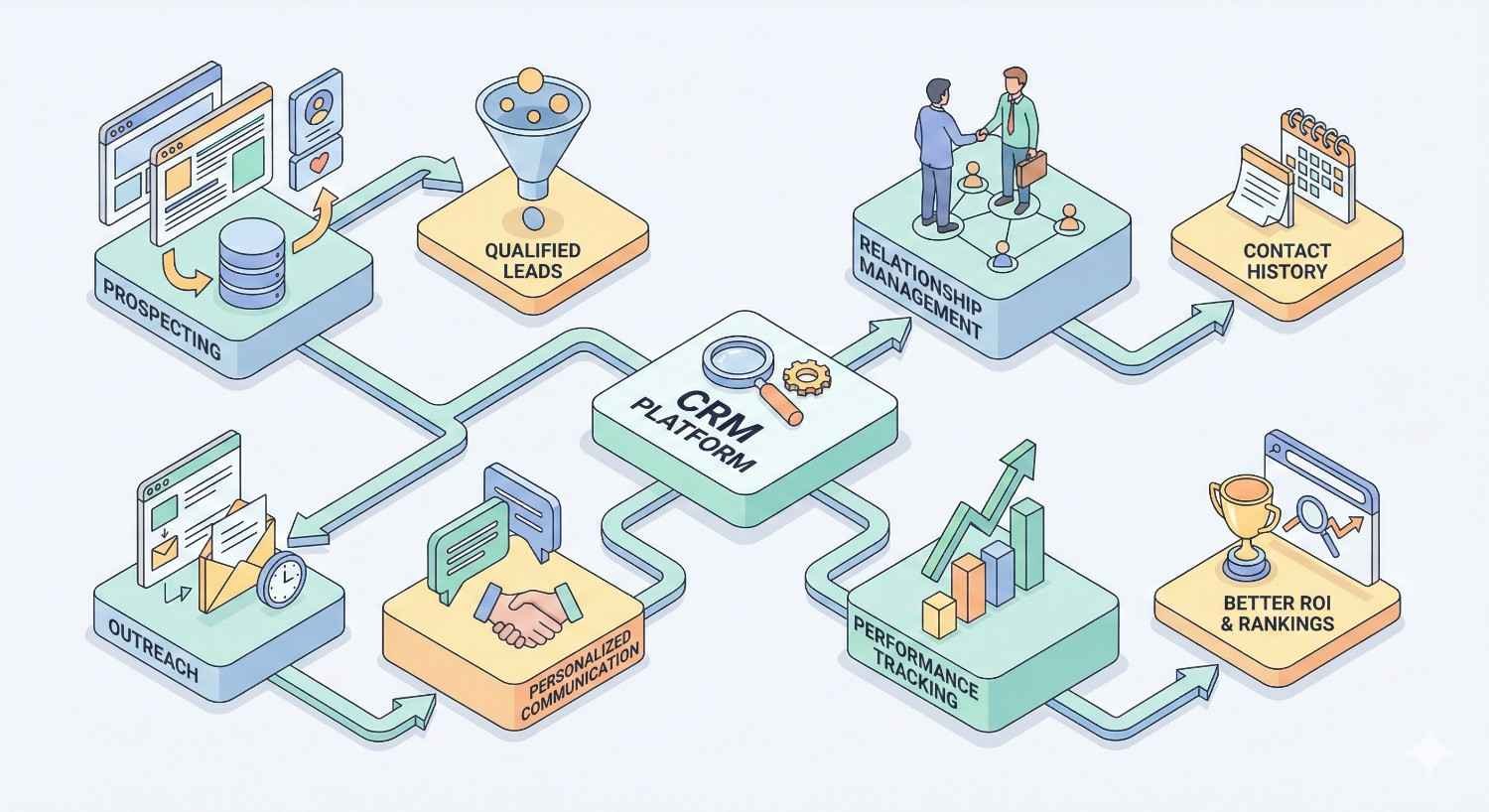
Implementing a dedicated link building CRM delivers measurable improvements across your outreach operation. The benefits compound over time as your database grows and processes mature.
Streamlined Outreach Workflow
A proper CRM eliminates the friction that slows manual outreach. Prospect research, email composition, sending, and follow-up happen within one interface. No more switching between spreadsheets, email clients, and SEO tools.
Workflow automation handles routine tasks automatically. Import a list of prospects, and the CRM enriches records with contact data and domain metrics. Create a campaign, and emails send on schedule without manual intervention. Prospects who reply move automatically to the appropriate pipeline stage.
Templates and snippets accelerate email creation. Build a library of proven pitches, personalization elements, and response templates. Compose emails in seconds by combining pre-written components with prospect-specific customization.
The time savings are substantial. Teams typically report reducing time spent on outreach mechanics by 50-70% after implementing a link building CRM. That freed capacity goes toward strategy, relationship building, and scaling campaigns.
Improved Response Rates and Conversions
CRM-powered personalization dramatically improves response rates compared to generic mass emails. When every message includes the prospect’s name, website, recent content, and relevant compliments, recipients recognize genuine effort and respond accordingly.
Optimal timing increases open rates. CRMs track when individual prospects typically engage with email and schedule sends accordingly. Some platforms use machine learning to predict the best send times for each contact.
Consistent follow-up converts prospects who would otherwise ignore initial outreach. Studies show that most positive responses come after the second or third email. Automated sequences ensure every prospect receives appropriate follow-up without manual tracking.
Response rate improvements of 2-3x are common when teams move from manual outreach to CRM-powered campaigns. Higher response rates mean more link opportunities from the same prospect list.
Scalable Link Acquisition Campaigns
Link building CRMs remove the ceiling on campaign scale. Manual processes break down beyond a few hundred prospects monthly. CRMs handle thousands of active prospects across multiple campaigns simultaneously.
Database growth compounds over time. Every campaign adds new prospects to your CRM. Contacts who don’t convert today become targets for future campaigns. After a year of consistent outreach, you’ve built a valuable asset of qualified prospects and relationship history.
Team scaling becomes straightforward. Add new team members, assign them campaigns, and the CRM ensures consistent processes and prevents overlap. Managers maintain visibility into all activity without micromanaging.
Multi-campaign management lets you run different outreach strategies in parallel. Guest posting, resource page outreach, broken link building, and digital PR campaigns all operate simultaneously within the same platform.
Centralized Team Collaboration
Team collaboration improves dramatically with a shared CRM. Everyone sees the same prospect data, communication history, and campaign status. No more confusion about who contacted which prospect or what was discussed.
Role-based permissions control access appropriately. Managers see everything while individual contributors access only their assigned campaigns. Sensitive contact information stays protected while enabling necessary collaboration.
Handoffs between team members happen smoothly. When someone leaves or campaigns transfer between teams, all history and context remains in the CRM. New owners pick up relationships without starting from scratch.
Notes and internal comments facilitate communication about specific prospects. Flag contacts who need special handling, share insights about what messaging works, and coordinate complex outreach involving multiple team members.
Best Link Building CRM Tools in 2024
The link building CRM market includes several established platforms with different strengths. Your ideal choice depends on team size, budget, integration needs, and workflow preferences.
Pitchbox
Pitchbox positions itself as the enterprise solution for link building and influencer outreach. The platform combines prospecting, outreach automation, and relationship management in a comprehensive package used by major agencies and in-house teams.
Prospecting capabilities stand out. Pitchbox integrates directly with search engines to find link opportunities based on keywords, competitor backlinks, and content types. Built-in filters narrow results by domain metrics, traffic, and relevance.
The outreach workflow guides users through campaign creation with templates and best practices. Personalization options include conditional content, custom fields, and dynamic snippets that adapt based on prospect attributes.
Reporting provides detailed campaign analytics and team performance metrics. The platform tracks links acquired, response rates, and ROI calculations that demonstrate value to stakeholders.
Pricing sits at the premium end, typically starting around $550 monthly for smaller teams. Enterprise pricing scales based on users and features. The investment makes sense for teams running substantial outreach volume who need advanced capabilities.
BuzzStream
BuzzStream offers a balanced combination of features and affordability that appeals to mid-market teams. The platform has evolved over years of development into a mature solution covering the full outreach workflow.
The prospecting extension lets you add prospects to your database while browsing the web. Visit a target site, click the extension, and BuzzStream pulls contact information and domain metrics automatically. This workflow feels natural for researchers building prospect lists.
Email integration works with Gmail and Outlook, sending messages through your actual email accounts rather than the platform’s servers. This approach often improves deliverability since emails come from established domains with sending history.
Team features include shared templates, campaign collaboration, and performance tracking. The interface feels intuitive for users familiar with email clients and basic CRM concepts.
Pricing starts around $24 monthly per user for basic features, scaling to $124 monthly for advanced capabilities. The accessible entry point makes BuzzStream popular with smaller teams and agencies testing link building CRM adoption.
Respona
Respona focuses on AI-powered personalization and streamlined workflows. The platform targets users who want sophisticated outreach without complex setup and configuration.
AI features analyze prospect websites and suggest personalized opening lines, compliments, and pitch angles. This automation accelerates campaign creation while maintaining the personalization that drives response rates.
The campaign builder walks users through a structured process from prospecting through sequence creation. Templates for common link building tactics like guest posting, resource pages, and podcast outreach provide starting points for new campaigns.
Integration with major SEO tools pulls domain metrics directly into prospect records. You see Ahrefs Domain Rating, Moz Domain Authority, and traffic estimates without leaving the platform.
Pricing typically starts around $99 monthly, positioning Respona between budget options and enterprise platforms. The AI capabilities justify the premium for teams who value time savings in campaign creation.
Hunter.io (with CRM Features)
Hunter.io built its reputation on email finding before expanding into outreach and CRM functionality. The platform now offers a complete workflow from prospect discovery through campaign execution.
Email finding remains the core strength. Hunter’s database and verification tools locate contact information with high accuracy. The Chrome extension pulls emails from any website instantly.
The campaigns feature handles email sequences with personalization, scheduling, and tracking. While less sophisticated than dedicated outreach platforms, it covers essential functionality for straightforward campaigns.
CRM capabilities organize prospects and track interactions. The interface stays simple compared to full-featured alternatives, which appeals to users who want basic organization without complexity.
Pricing includes a free tier with limited searches and sends. Paid plans start around $49 monthly, making Hunter accessible for individuals and small teams. The email finding credits often provide standalone value even if you use other tools for outreach.
Mailshake
Mailshake emphasizes ease of use and quick setup for sales and link building outreach. The platform strips away complexity to focus on core email automation functionality.
The campaign builder creates sequences in minutes. Add prospects, write emails with merge fields, set timing, and launch. The straightforward workflow appeals to users who find other platforms overwhelming.
Phone dialer and social selling features extend Mailshake beyond email. Some link building campaigns benefit from multi-channel outreach that combines email with LinkedIn messages or phone calls.
Deliverability tools include email warm-up, domain health monitoring, and sending optimization. These features help maintain inbox placement as you scale outreach volume.
Pricing starts around $59 monthly per user. The simplicity and reasonable cost make Mailshake popular with individuals and small teams running focused campaigns without complex requirements.
Ninja Outreach
Ninja Outreach combines influencer discovery with outreach automation. The platform targets users who need to find prospects and execute campaigns within one tool.
The prospecting database includes millions of influencers and bloggers across niches. Search by topic, location, or social following to build targeted prospect lists. Contact information and social profiles come included with database access.
Outreach templates cover common link building and influencer marketing scenarios. The platform provides starting points for guest posts, product reviews, sponsored content, and collaboration requests.
CRM functionality tracks relationships and communication history. The interface organizes prospects by campaign and status, providing visibility into pipeline progress.
Pricing starts around $49 monthly for basic access, scaling based on database searches and outreach volume. The combined prospecting and outreach value appeals to teams who would otherwise pay separately for these capabilities.
Link Building CRM Tool Comparison Table
| Platform | Starting Price | Best For | Key Strength | Integration Depth |
| Pitchbox | ~$550/month | Enterprise teams, agencies | Comprehensive prospecting | Extensive SEO tool integration |
| BuzzStream | ~$24/month | Mid-market teams | Balanced features and price | Gmail/Outlook native integration |
| Respona | ~$99/month | AI-assisted workflows | Automated personalization | Major SEO platforms |
| Hunter.io | ~$49/month | Email-focused outreach | Email finding accuracy | Basic integrations |
| Mailshake | ~$59/month | Simple campaigns | Ease of use | Sales tool ecosystem |
| Ninja Outreach | ~$49/month | Influencer outreach | Built-in prospect database | Social platform connections |
How to Choose the Right Link Building CRM
Selecting the right platform requires honest assessment of your needs, constraints, and priorities. The best tool for an enterprise agency differs significantly from the ideal choice for a solo consultant.
Assessing Your Team Size and Outreach Volume
Team size directly impacts platform requirements. Solo practitioners need simple tools that one person can manage effectively. Large teams require collaboration features, permission controls, and manager visibility.
Outreach volume determines necessary scale. If you’re sending a few hundred emails monthly, basic tools handle the load easily. Thousands of monthly emails require robust automation, deliverability management, and database capacity.
Consider growth trajectory alongside current needs. Choosing a platform you’ll outgrow in six months creates migration headaches. Select tools that accommodate reasonable growth without requiring immediate upgrades.
User seat pricing affects total cost significantly. Some platforms charge per user while others offer unlimited users at higher base prices. Calculate total cost based on your actual team structure rather than just the advertised starting price.
Integration Requirements (SEO Tools, Email Providers)
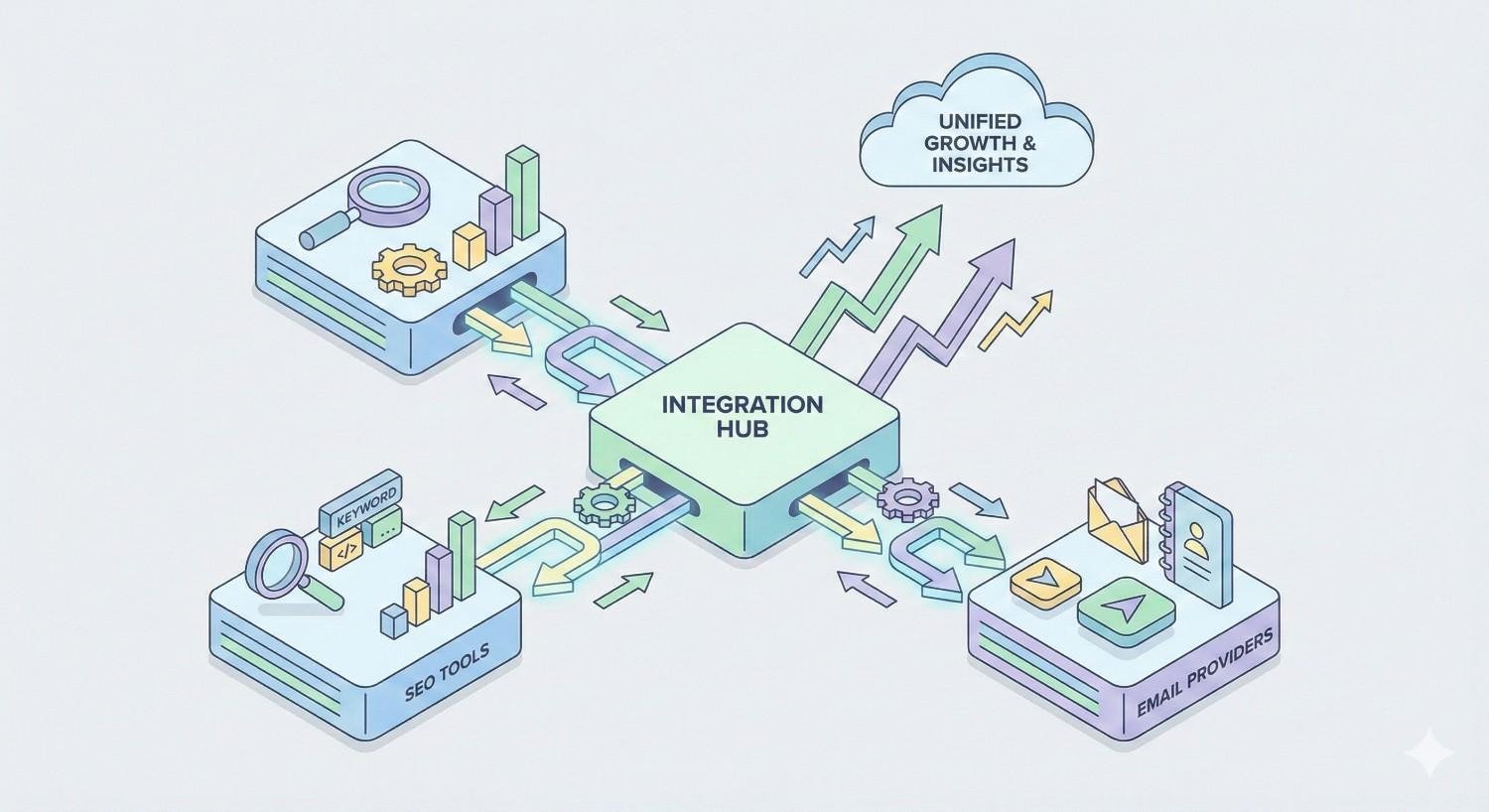
Integration with your existing SEO tools determines data quality and workflow efficiency. If your team relies on Ahrefs for backlink analysis, choose a CRM that pulls Ahrefs metrics directly into prospect records.
Email provider integration affects deliverability and workflow. Some platforms send through their own servers while others connect to your Gmail or Outlook accounts. Sending from established email accounts often improves inbox placement.
Consider your broader marketing technology stack. CRMs that connect with project management tools, reporting platforms, and communication apps reduce manual data transfer and context switching.
API availability matters for custom workflows. If you have developers who can build integrations, API access enables connections with any tool in your stack. Platforms without APIs limit you to pre-built integrations.
Budget Considerations and Pricing Models
Link building CRM pricing varies dramatically. Budget options start under $50 monthly while enterprise platforms exceed $500 monthly. Determine your budget range before evaluating specific tools.
Pricing models differ between platforms. Some charge flat monthly fees while others price based on contacts, emails sent, or features accessed. Understand the pricing structure to avoid unexpected costs as usage grows.
Calculate total cost of ownership beyond subscription fees. Factor in implementation time, training, and potential productivity loss during transition. A slightly more expensive platform that deploys faster may cost less overall.
Free trials let you test platforms before committing. Most link building CRMs offer trial periods ranging from seven to thirty days. Use trials to evaluate actual workflow fit rather than just feature lists.
Ease of Use vs. Advanced Functionality
Platform complexity correlates with capability. Simple tools deploy quickly but may lack features you need later. Complex platforms offer extensive functionality but require significant learning investment.
Assess your team’s technical comfort level. Some users thrive with powerful tools that offer extensive customization. Others prefer streamlined interfaces that guide them through standard workflows.
Consider the learning curve relative to expected usage duration. If you’re building a long-term link building operation, investing time to learn a sophisticated platform pays dividends. Short-term projects favor simpler tools with faster deployment.
Demo sessions reveal usability better than feature lists. Schedule demos with shortlisted platforms and evaluate how intuitive the interface feels for your specific workflows.
How to Use a Link Building CRM Effectively
Implementing a link building CRM successfully requires more than software installation. Effective usage depends on proper setup, thoughtful processes, and continuous optimization.
Setting Up Your Prospect Pipeline
Pipeline stages should mirror your actual outreach workflow. Common stages include: New Prospect, Researched, Contacted, Replied, Negotiating, Link Placed, and Relationship Maintained. Customize stages to match how your team actually works.
Define clear criteria for moving prospects between stages. When does a prospect move from “Contacted” to “Replied”? What qualifies as “Link Placed”? Documented criteria ensure consistent pipeline management across team members.
Import existing prospect data during initial setup. Migrate contacts from spreadsheets, previous tools, and email histories. Clean data during import by removing duplicates and standardizing formats.
Set up automation rules that move prospects automatically based on actions. When someone replies, move them to the “Replied” stage automatically. When a link goes live, update status without manual intervention.
Creating Personalized Outreach Templates
Effective templates balance efficiency with personalization. Create a framework that handles common elements while leaving space for prospect-specific customization.
Build template libraries for different campaign types. Guest post outreach requires different messaging than broken link building or resource page requests. Maintain separate templates optimized for each approach.
Use merge fields strategically. First name and website name are table stakes. Advanced personalization includes recent article titles, specific content compliments, and references to shared connections or interests.
Test templates before full deployment. Send initial batches to small prospect segments and measure response rates. Refine messaging based on results before scaling to larger audiences.
Managing Follow-Up Sequences
Follow-up timing significantly impacts results. Too aggressive feels spammy while too passive lets opportunities fade. Most successful sequences space follow-ups three to seven days apart.
Vary follow-up messaging rather than simply resending the original email. Each touchpoint should add value or approach the request from a different angle. Reference the previous email while introducing new information.
Set appropriate sequence length based on campaign type. Cold outreach to unknown prospects might warrant three to four follow-ups. Warm contacts with existing relationships might receive more persistent sequences.
Monitor sequence performance and adjust timing based on data. If most replies come after the second email, your sequence length is appropriate. If replies cluster after the fourth email, extend sequences accordingly.
Tracking Metrics and Optimizing Campaigns
Establish baseline metrics before optimizing. Track open rates, reply rates, and conversion rates for initial campaigns. These baselines provide context for evaluating changes.
Focus optimization on high-impact metrics. Reply rate typically matters more than open rate for link building. A campaign with lower opens but higher replies outperforms one with the opposite pattern.
Run controlled experiments to isolate variables. Test one element at a time, whether subject lines, send times, or email copy. Changing multiple variables simultaneously makes it impossible to identify what drove results.
Review metrics regularly and act on insights. Weekly metric reviews catch problems early and identify opportunities for improvement. Monthly deeper analyses reveal trends and inform strategic adjustments.
Link Building CRM Tools vs. General Outreach Tools
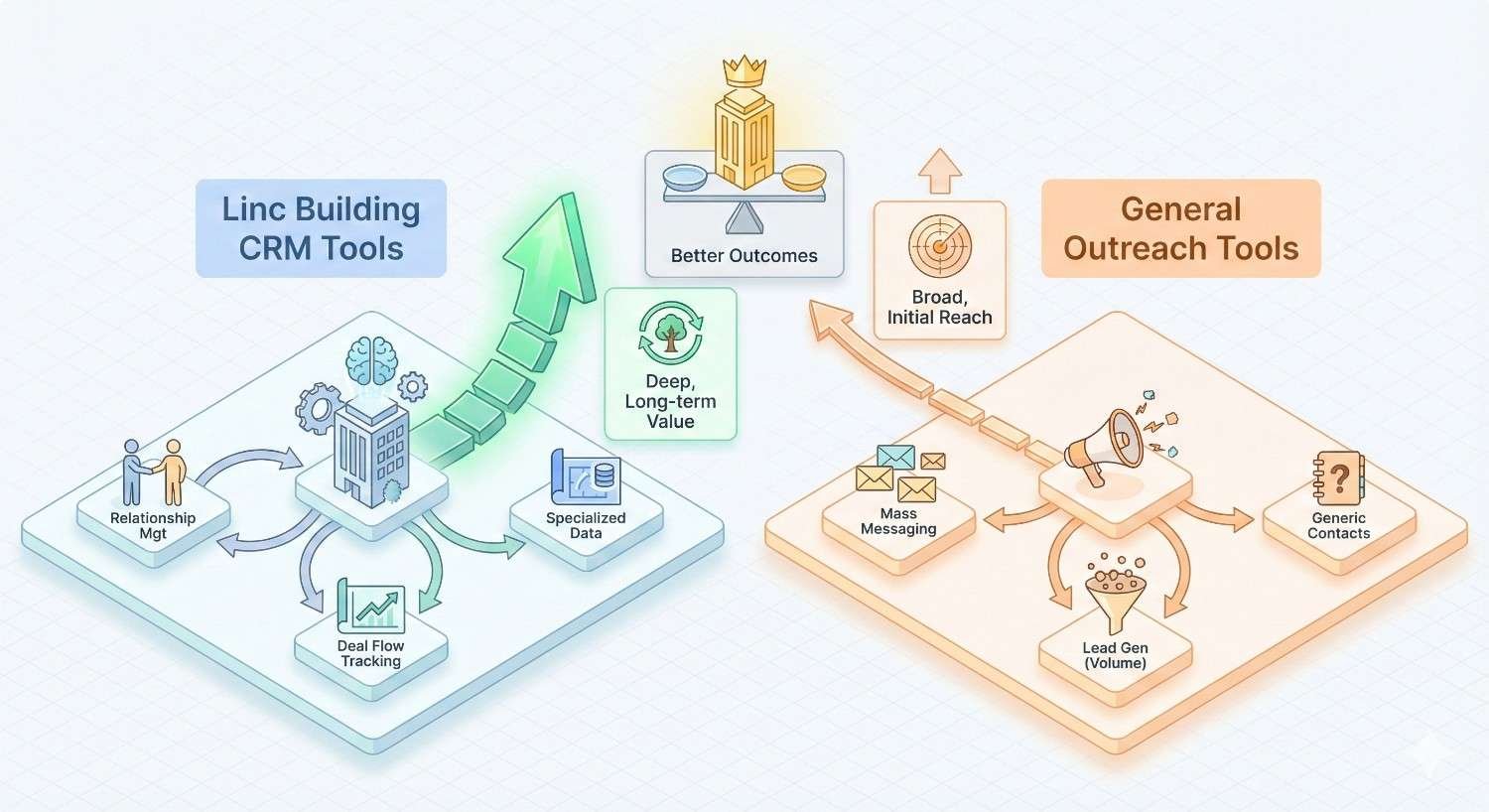
Understanding the distinction between specialized link building CRMs and general outreach platforms helps you select the right tool category for your needs.
Feature Differences
Link building CRMs include SEO-specific functionality absent from general outreach tools. Domain metrics, backlink data, and link monitoring capabilities come built-in rather than requiring manual research or separate tools.
Prospect enrichment differs significantly. Link building CRMs pull website-specific data like content categories, publishing frequency, and existing link profiles. General outreach tools focus on contact information without website context.
Reporting in link building CRMs tracks SEO outcomes. You see links acquired, domain authority of linking sites, and correlation with ranking improvements. General tools report on email metrics without connecting to SEO performance.
Workflow templates in specialized platforms reflect link building best practices. Campaign structures for guest posting, resource pages, and broken link building come pre-configured. General tools require building these workflows from scratch.
When to Use Each Type
Choose link building CRMs when backlink acquisition is a primary business function. Agencies, in-house SEO teams, and content marketing operations benefit from specialized functionality that accelerates link building workflows.
General outreach tools work when link building is occasional rather than core. If you run a few link campaigns annually alongside other outreach activities, a general platform avoids paying for specialized features you rarely use.
Consider hybrid approaches for diverse outreach needs. Some teams use link building CRMs for dedicated link acquisition campaigns while maintaining general outreach tools for sales, partnerships, and other communication.
Budget constraints sometimes favor general tools. If specialized platforms exceed your budget, general outreach tools with manual SEO research can accomplish link building goals less efficiently but more affordably.
Common Mistakes When Using Link Building CRMs
Even powerful tools produce poor results when used incorrectly. Avoiding common mistakes maximizes your return on CRM investment.
Over-Automation and Generic Outreach
Automation enables scale but risks sacrificing quality. Sending thousands of nearly identical emails damages your reputation and produces minimal results. Recipients recognize mass outreach and delete without reading.
Balance automation with genuine personalization. Use CRM efficiency for mechanics while investing human effort in customization. Every email should feel individually crafted even when templates provide the foundation.
Avoid fully automated sequences for high-value prospects. Important targets deserve manual attention and custom messaging. Reserve automation for lower-priority prospects where volume matters more than individual conversion.
Monitor deliverability metrics for signs of over-automation. Declining open rates, spam complaints, and blacklist appearances indicate that automation has crossed into spam territory.
Poor Prospect Qualification
CRM efficiency makes it easy to contact large numbers of low-quality prospects. Sending emails is cheap, but poor targeting wastes time on prospects who will never convert.
Establish clear qualification criteria before importing prospects. Define minimum domain authority, traffic thresholds, content relevance, and other factors that indicate link value. Apply these filters consistently.
Quality over quantity produces better results. One hundred highly qualified prospects typically outperform one thousand poorly targeted contacts. Invest time in prospect research rather than maximizing list size.
Regularly audit prospect quality and refine criteria. Review which prospects convert to links and identify common characteristics. Update qualification criteria based on actual conversion patterns.
Neglecting Relationship Nurturing
Link building CRMs excel at initial outreach but relationships require ongoing attention. Treating contacts as one-time targets rather than long-term relationships leaves value on the table.
Use CRM relationship tracking to maintain connections over time. Note important details about contacts, set reminders for periodic check-ins, and track the full history of interactions.
Provide value beyond link requests. Share contacts’ content, offer helpful resources, and engage genuinely with their work. Relationships built on mutual value produce more links than transactional outreach.
Reactivate dormant relationships periodically. Contacts who didn’t convert previously may respond to new approaches or changed circumstances. Your CRM database represents accumulated relationship potential worth nurturing.
Integrating Link Building CRMs into Your SEO Strategy
Link building CRMs deliver maximum value when integrated with broader SEO strategy rather than operating in isolation.
Aligning Outreach with Content Strategy
Coordinate link building campaigns with content publication. When you publish link-worthy content, launch outreach campaigns immediately while the content is fresh and newsworthy.
Use content gaps to guide outreach targeting. If your content strategy targets specific topics, prioritize link prospects in those same areas. Topical relevance between your content and linking sites strengthens SEO impact.
Create content specifically designed for link acquisition. Outreach campaigns promoting genuinely valuable resources outperform those pushing thin content. Invest in linkable assets that give prospects compelling reasons to link.
Share content performance data between teams. When outreach generates links to specific content, content teams learn what resonates. When content performs well organically, outreach teams know what to promote.
Connecting CRM Data with SEO Performance Metrics
Link CRM data to ranking and traffic outcomes. Track which acquired links correlate with ranking improvements for target keywords. This connection demonstrates ROI and guides future targeting.
Import search performance data into campaign planning. Prioritize link building for pages with ranking potential that need authority boosts. Focus outreach efforts where links will have the greatest impact.
Build dashboards that combine CRM metrics with SEO data. Visualize the relationship between outreach activity, links acquired, and organic performance. These dashboards communicate value to stakeholders and guide strategy.
Use attribution modeling to understand link impact. Not every link produces immediate ranking changes. Sophisticated attribution considers the cumulative effect of link building over time.
Building Long-Term Link Partnerships
Transform one-time link placements into ongoing relationships. Contacts who link once often link again when you have relevant content. Nurture these relationships for compounding returns.
Identify partnership opportunities beyond simple links. Guest posting relationships, content collaborations, and co-marketing arrangements provide more value than isolated link placements.
Track relationship value over time in your CRM. Some contacts produce multiple high-value links while others never convert. Prioritize relationship investment based on demonstrated and potential value.
Create systems for relationship maintenance at scale. Automated check-ins, content sharing, and periodic outreach keep relationships warm without requiring constant manual attention.
Conclusion
Link building CRM tools transform chaotic outreach into systematic campaigns that consistently acquire valuable backlinks. The right platform streamlines prospecting, automates follow-ups, tracks relationships, and provides visibility into campaign performance that drives continuous improvement.
Selecting the best tool requires honest assessment of your team size, outreach volume, integration needs, and budget constraints. Whether you choose an enterprise platform like Pitchbox or an accessible option like BuzzStream, the key is matching capabilities to your actual requirements rather than chasing features you won’t use.
At White Label SEO Service, we help businesses implement link building strategies that drive sustainable organic growth. Our team combines proven outreach processes with the right tools to build authority and improve search visibility. Contact us to discuss how strategic link acquisition can accelerate your SEO results.
Frequently Asked Questions About Link Building CRM Tools
What is the best CRM for link building?
The best link building CRM depends on your specific needs. Pitchbox suits enterprise teams needing comprehensive features. BuzzStream offers strong value for mid-market teams. Respona excels at AI-powered personalization. Evaluate platforms against your team size, budget, and workflow requirements.
How much do link building CRM tools cost?
Link building CRM pricing ranges from approximately $24 monthly for basic BuzzStream plans to $550+ monthly for enterprise Pitchbox subscriptions. Most mid-tier options fall between $50-150 monthly per user. Factor in team size and required features when calculating total cost.
Can I use a regular CRM for link building?
Regular CRMs like HubSpot or Salesforce can manage link building contacts but lack specialized features. You’ll miss domain metrics integration, link monitoring, and SEO-specific reporting. Teams with occasional link building needs might adapt general CRMs, but dedicated tools significantly improve efficiency for regular campaigns.
Do link building CRMs help with guest posting?
Yes, link building CRMs streamline guest posting workflows effectively. They help identify guest post opportunities, manage pitches to editors, track submission status, and follow up on pending posts. Most platforms include templates specifically designed for guest posting outreach.
What integrations should a link building CRM have?
Essential integrations include SEO tools like Ahrefs, Moz, or Semrush for domain metrics. Email provider connections with Gmail or Outlook improve deliverability. Additional valuable integrations include Google Search Console, analytics platforms, and project management tools your team already uses.
How long does it take to see results from a link building CRM?
Most teams see efficiency improvements within the first month of CRM implementation. Actual link acquisition results depend on campaign quality, prospect targeting, and outreach volume. Expect two to three months before accumulated links begin impacting search rankings measurably.
Is a link building CRM worth the investment for small teams?
Small teams often benefit significantly from link building CRMs because automation multiplies limited capacity. A solo practitioner with proper tools can match the output of a small team using manual processes. Start with affordable options like BuzzStream or Hunter.io to validate value before upgrading.


