

The right outreach tool can transform your link building from a time-consuming grind into a scalable, measurable growth channel. Without proper software, most teams spend 70% of their time on manual tasks—finding contacts, sending emails, tracking responses—leaving little room for strategy or relationship building.
Link building remains one of the most impactful ranking factors in SEO, but success depends heavily on execution efficiency. The difference between campaigns that earn quality backlinks and those that get ignored often comes down to the systems behind them.
This guide covers everything you need to choose and use outreach tools effectively: feature comparisons, platform reviews, step-by-step campaign workflows, and the mistakes that tank response rates.

What Are Link Building Outreach Tools?
Link building outreach tools are software platforms designed to streamline the process of contacting website owners, bloggers, and editors to earn backlinks. They handle the operational heavy lifting—finding email addresses, managing contact lists, automating follow-ups, and tracking campaign performance—so you can focus on building genuine relationships and creating link-worthy content.
These tools sit at the intersection of email marketing, CRM functionality, and SEO prospecting. Unlike general email platforms, they’re built specifically for the unique challenges of link acquisition: managing hundreds of personalized conversations, tracking which prospects responded, and measuring success by links earned rather than opens or clicks.
How Outreach Tools Work in the Link Building Process
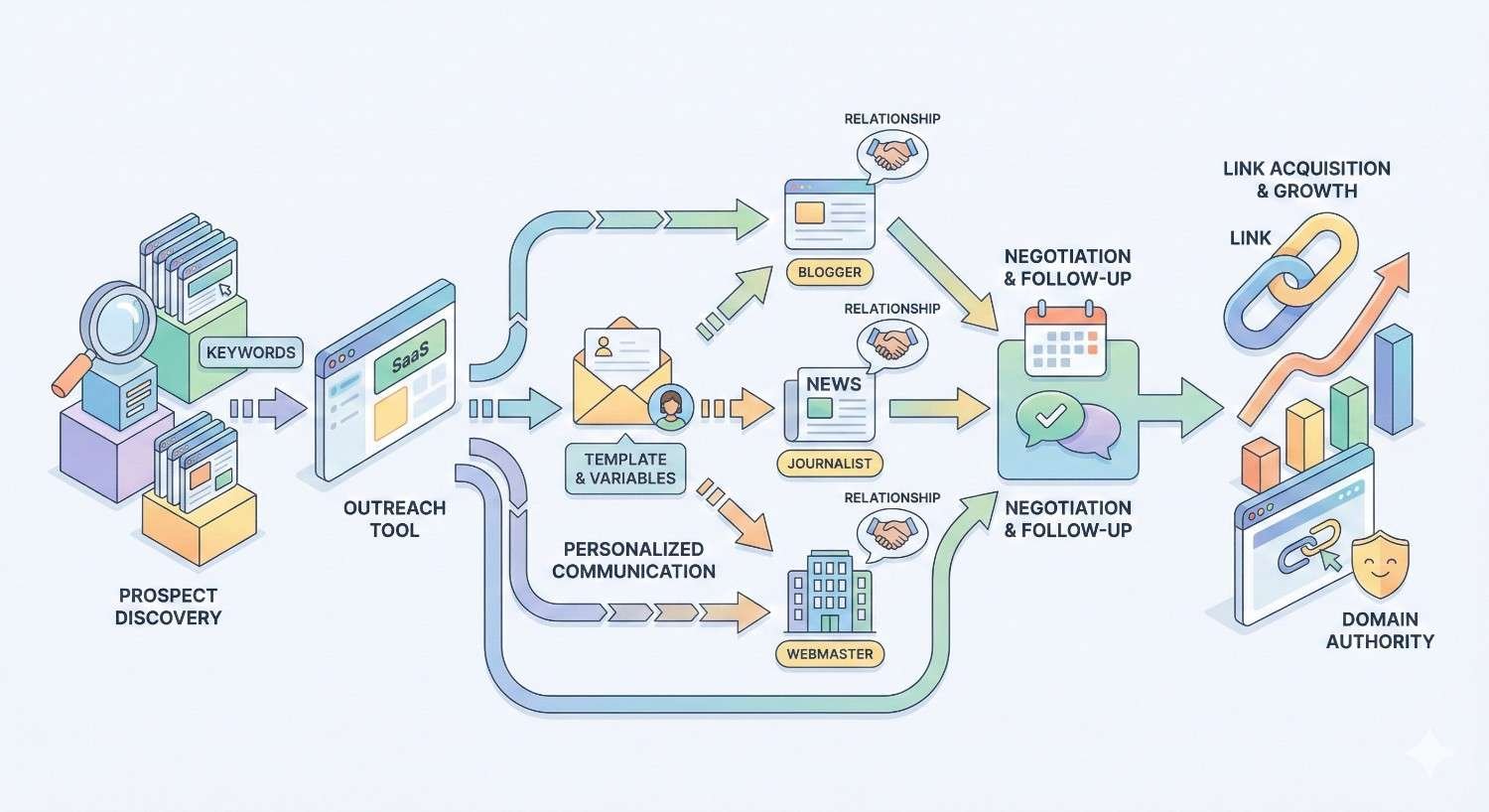
The link building workflow typically follows a predictable pattern. First, you identify target websites through SEO tools like Ahrefs or SEMrush. Then you find the right contact person and their email address. Next comes crafting and sending personalized pitches, followed by strategic follow-ups. Finally, you track responses and measure results.
Outreach tools automate or semi-automate each stage. They pull prospect data from SEO platforms, find and verify email addresses, send personalized emails at scale, schedule follow-up sequences, and consolidate all communication in one dashboard. The best platforms maintain a balance—enough automation to save time, but enough personalization to avoid spam filters and cold responses.
Most tools integrate directly with prospecting sources. You can import a list of domains from Ahrefs, and the software will automatically find contact information, enrich the data with social profiles, and queue prospects for outreach. This integration eliminates the manual copy-paste work that makes traditional link building so tedious.
Types of Outreach Tools (Email Finders, CRM, Automation, All-in-One)
Email Finders focus specifically on discovering and verifying contact information. Hunter.io and Snov.io excel here, offering browser extensions that pull emails from websites and databases that verify deliverability. These tools solve one problem extremely well but require pairing with other software for full campaign management.
CRM-Focused Tools prioritize relationship management over automation. BuzzStream is the prime example—it tracks every interaction with a contact, stores notes about relationships, and helps teams avoid the embarrassment of duplicate outreach. These platforms treat link building as relationship building, which aligns with how successful campaigns actually work.
Automation Platforms emphasize sending volume and follow-up sequences. Mailshake and Lemlist fall into this category, offering sophisticated drip campaigns, A/B testing, and scheduling features. They’re powerful for scaling outreach but require careful use to avoid crossing into spam territory.
All-in-One Solutions combine prospecting, email finding, outreach, and CRM in a single platform. Pitchbox and Respona represent this category, offering end-to-end workflows from prospect discovery to link tracking. These tools command higher prices but eliminate the friction of switching between multiple platforms.
Why Outreach Tools Are Essential for Link Building Success
Manual link building doesn’t scale. A single outreach specialist can realistically manage 20-30 personalized emails per day without software assistance. With the right tools, that same person can handle 100-200 daily while maintaining quality. The math is straightforward: better tools mean more opportunities, which means more links.
Beyond volume, outreach tools provide consistency and accountability. Every email gets logged. Every follow-up happens on schedule. Every response gets tracked. This systematic approach eliminates the chaos of spreadsheet-based outreach and ensures no opportunity falls through the cracks.
Time Efficiency and Scalability
The average link building email takes 15-20 minutes to research, personalize, and send manually. Outreach tools compress this to 3-5 minutes by automating research, pre-populating templates with personalization variables, and handling the technical sending process.
Consider the compound effect. Saving 12 minutes per email across 50 daily emails equals 10 hours saved per day. That’s not just efficiency—it’s the difference between a sustainable link building operation and one that burns out team members.
Scalability also means handling growth without proportional headcount increases. A team using Pitchbox or BuzzStream can double their outreach volume without doubling their staff. The software handles the operational load while humans focus on strategy, relationship building, and content creation.
Personalization at Scale
Generic templates get ignored. According to Backlinko’s outreach study, personalized emails receive 32% higher response rates than templated messages. The challenge is maintaining personalization when sending hundreds of emails weekly.
Modern outreach tools solve this through dynamic personalization fields. Beyond basic {FirstName} and {Website} variables, platforms like Lemlist and Respona offer custom fields for recent articles, social media activity, and specific page references. You can create templates that feel individually crafted while still benefiting from automation.
The best approach combines automation with human review. Tools handle the data population and sending mechanics, but a human eye reviews each email before it goes out. This hybrid model captures efficiency gains without sacrificing the personal touch that earns responses.
Tracking and Performance Measurement
You can’t improve what you don’t measure. Outreach tools provide granular analytics on every campaign metric: open rates, reply rates, link placement rates, and response times. This data reveals what’s working and what needs adjustment.
Tracking also enables accountability and forecasting. When you know your historical conversion rates—say, 15% of pitches result in responses and 30% of responses convert to links—you can predict outcomes and set realistic goals. This transforms link building from guesswork into a predictable growth channel.
Most platforms offer pipeline views showing exactly where each prospect stands: contacted, opened, replied, negotiating, or link placed. This visibility helps teams prioritize follow-ups and identify bottlenecks in their process.

Key Features to Look for in Link Building Outreach Tools
Not all outreach tools are created equal. The features that matter most depend on your team size, campaign volume, and link building strategy. However, certain capabilities separate professional-grade platforms from basic email senders.
Evaluate tools against your specific workflow. A solo link builder needs different features than an agency managing 20 client campaigns. The best tool is the one that fits your process, not necessarily the one with the longest feature list.
Email Finding and Verification
Accurate contact information is foundational. Sending emails to invalid addresses damages your sender reputation and wastes campaign resources. Look for tools with built-in email finding and real-time verification.
Hunter.io maintains one of the largest email databases, with verification accuracy rates above 95% according to their published metrics. Snov.io offers similar capabilities with additional LinkedIn integration. Some all-in-one platforms like Pitchbox include email finding, though dedicated tools often provide better accuracy.
Verification matters as much as finding. An email address that existed six months ago may bounce today. Tools should verify deliverability before sending, not just confirm format validity. This real-time checking prevents the bounce rate spikes that trigger spam filters.
Campaign Automation and Sequencing
Follow-up sequences dramatically improve response rates. Research from Woodpecker shows that campaigns with 3-4 follow-ups achieve significantly higher reply rates than single-email approaches. Automation makes consistent follow-up practical.
Look for tools that allow conditional sequences—different follow-ups based on whether someone opened, clicked, or ignored your initial email. This branching logic creates more relevant touchpoints without manual intervention.
Scheduling flexibility matters too. The ability to send emails during recipients’ business hours, regardless of your timezone, improves open rates. Platforms should offer timezone detection and optimal send-time features.
Personalization Capabilities
Basic merge fields ({FirstName}, {Company}) are table stakes. Advanced personalization includes custom variables, dynamic content blocks, and AI-assisted personalization suggestions.
Lemlist pioneered image personalization—embedding the recipient’s name or logo into email images. This visual personalization stands out in crowded inboxes and signals genuine effort. Respona uses AI to analyze prospect websites and suggest personalization angles.
The personalization system should be flexible enough to handle your specific approach. If you reference recent articles in every pitch, the tool should make that data easily accessible. If you mention mutual connections, it should integrate with LinkedIn.
CRM and Contact Management
Link building is relationship building. The same editors and webmasters appear across multiple campaigns. A proper CRM prevents embarrassing duplicate outreach and helps nurture long-term relationships.
BuzzStream excels here, tracking every interaction with a contact across all campaigns and team members. You can see that you pitched someone six months ago, what they said, and whether they eventually linked. This institutional memory becomes invaluable as your link building operation matures.
Contact management should include tagging, segmentation, and search functionality. When you need to find all technology bloggers you’ve successfully worked with, the system should surface that list instantly.
Analytics and Reporting
Comprehensive analytics should cover both activity metrics (emails sent, opened, replied) and outcome metrics (links earned, domain authority of linking sites, anchor text distribution). The first category measures effort; the second measures results.
Look for customizable dashboards and exportable reports. Agency teams need client-ready reporting. In-house teams need executive summaries. The platform should accommodate both without manual data manipulation.
Attribution tracking—connecting specific links back to specific campaigns and emails—helps identify your most effective strategies. When you know which pitch angles and prospect types convert best, you can double down on what works.
Integrations with SEO and Prospecting Tools
Outreach tools don’t exist in isolation. They need to connect with the SEO platforms where you identify prospects (Ahrefs, SEMrush, Moz) and the productivity tools your team uses (Slack, Google Sheets, project management software).
Native integrations beat manual exports. Pitchbox connects directly with Ahrefs, allowing you to import prospect lists without leaving the platform. This seamless data flow eliminates friction and reduces errors.
API access matters for teams with custom workflows. If you’ve built proprietary prospecting systems, the outreach tool should accept data programmatically. Zapier integration provides a middle ground for teams without development resources.
Best Outreach Tools for Link Building in 2026
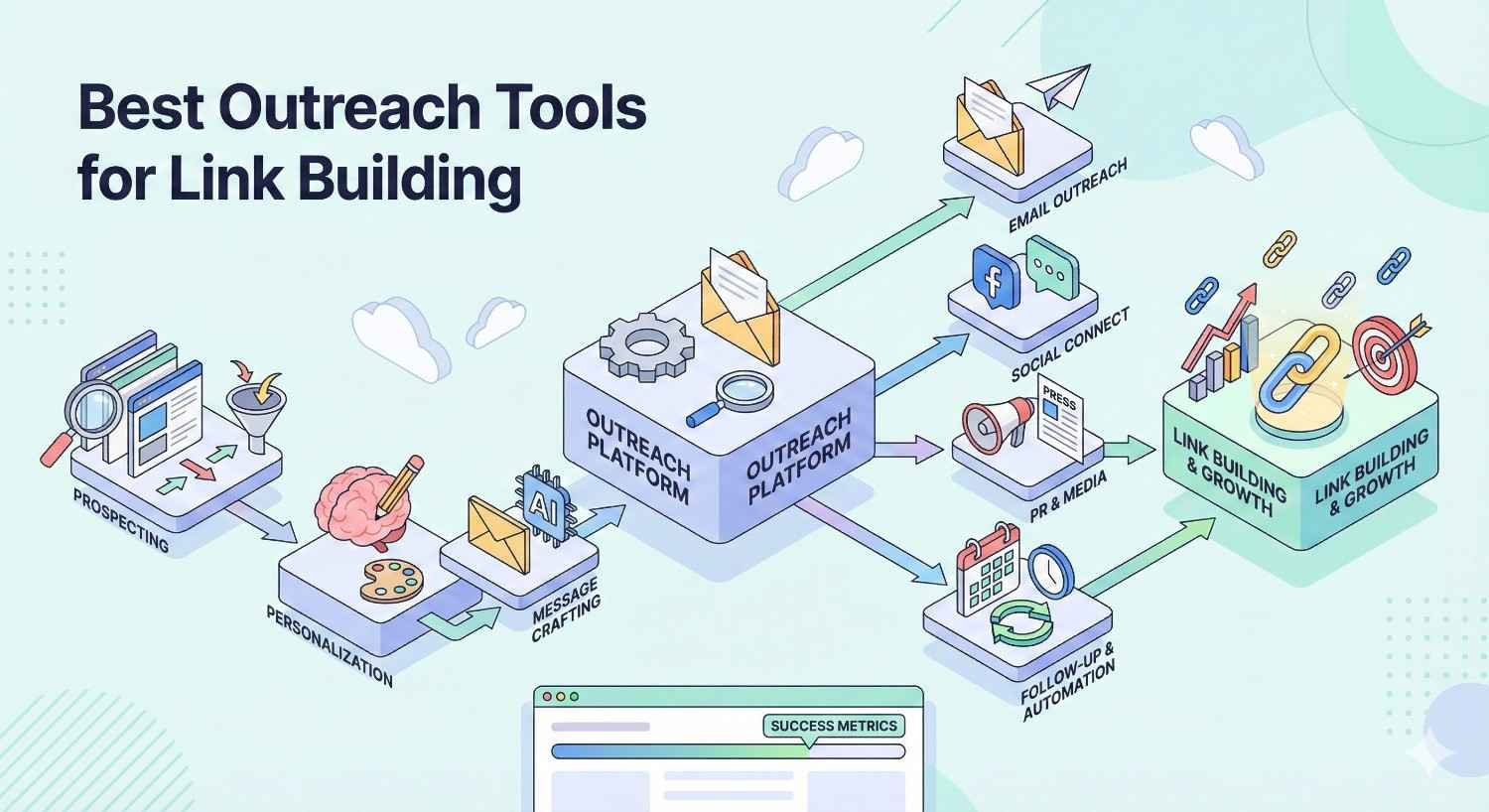
The outreach tool market has matured significantly. Several platforms have emerged as category leaders, each with distinct strengths and ideal use cases. The following reviews reflect hands-on experience and industry consensus.
Pricing and features change frequently. Verify current offerings directly with vendors before making purchasing decisions.
Pitchbox (Enterprise-Level Outreach)
Pitchbox is the industry standard for agencies and large in-house teams. It combines prospecting, outreach, and relationship management in a single platform designed for high-volume link building operations.
The prospecting module integrates with major SEO tools and includes built-in search operators for finding link opportunities. You can identify broken link targets, resource page prospects, and guest posting opportunities without leaving the platform.
Workflow automation is Pitchbox’s standout feature. You can create complex sequences with conditional logic, team assignments, and approval workflows. This makes it possible to maintain quality control even when sending thousands of emails monthly.
Pricing starts around $550/month for the basic plan, making it prohibitive for solo practitioners but cost-effective for teams where the efficiency gains justify the investment.
BuzzStream (Relationship-Focused Outreach)
BuzzStream prioritizes relationship management over automation volume. It’s the preferred choice for teams that view link building as long-term relationship cultivation rather than transactional outreach.
The platform’s strength is its comprehensive contact profiles. Every interaction—emails, social mentions, link placements—gets logged against the contact record. When you reach out to someone, you see your complete history with them.
Team collaboration features prevent the common problem of multiple team members contacting the same person. BuzzStream flags potential duplicates and maintains a shared contact database across all users.
Pricing starts at $24/month for individuals, scaling to $124/month for teams, making it accessible across budget levels.
Hunter.io (Email Finding and Verification)
Hunter.io isn’t a full outreach platform—it’s a specialized email finding and verification tool that integrates with other systems. For teams that already have outreach software but need better contact data, Hunter fills that gap.
The domain search feature returns all known email addresses associated with a website, along with confidence scores and sources. The browser extension pulls contact information while you browse prospect sites.
Verification happens in real-time, checking deliverability before you send. This prevents the bounce rate issues that damage sender reputation.
Hunter offers a free tier with 25 searches/month, with paid plans starting at $49/month for 500 searches.
Respona (AI-Powered Outreach)
Respona represents the newer generation of outreach tools, using AI to automate personalization and prospect research. It’s designed to reduce the manual work of crafting individualized pitches.
The AI assistant analyzes prospect websites and suggests personalization angles—recent articles to reference, achievements to mention, content gaps to address. This accelerates the research phase without sacrificing relevance.
Campaign templates include proven frameworks for different link building tactics: guest posting, resource page outreach, broken link building, and more. New users can launch effective campaigns quickly.
Pricing starts at $99/month for the starter plan, positioning it between budget tools and enterprise platforms.
Mailshake (Sales and Link Building Outreach)
Mailshake originated as a sales outreach tool but has found strong adoption in link building. Its strength is email deliverability—the platform includes warming features and sending optimization that keep messages out of spam folders.
The interface is straightforward, making it accessible for teams without technical expertise. Campaign setup takes minutes, and the learning curve is minimal.
A/B testing capabilities help optimize subject lines and email copy. You can test multiple variations and let the platform automatically shift volume to winners.
Pricing starts at $59/month per user for the email outreach plan.
Lemlist (Personalized Cold Email)
Lemlist differentiates through visual personalization. You can embed dynamic images in emails—the recipient’s name written on a whiteboard, their logo on a coffee mug, their website screenshot with annotations.
This visual approach stands out in text-heavy inboxes. Recipients notice the effort, which translates to higher response rates for teams that leverage the feature effectively.
The platform also includes standard automation features: sequences, scheduling, and analytics. But the image personalization is the reason teams choose Lemlist over alternatives.
Pricing starts at $59/month per user.
Snov.io (All-in-One Prospecting)
Snov.io combines email finding, verification, and outreach in a single platform at a competitive price point. It’s popular among startups and small teams that need comprehensive functionality without enterprise pricing.
The email finder includes a LinkedIn extension, making it easy to build prospect lists from professional profiles. Verification is included, ensuring deliverability before sending.
Drip campaigns support multi-step sequences with delays and conditions. The interface is functional if not elegant, prioritizing capability over polish.
Pricing starts at $39/month for 1,000 credits, with credits consumed by both finding and sending.
NinjaOutreach (Influencer and Blogger Outreach)
NinjaOutreach focuses on influencer and blogger relationships, making it particularly suited for content promotion and guest posting campaigns. The built-in database includes millions of influencer profiles across niches.
Prospecting happens within the platform—you search by topic, filter by metrics, and add prospects directly to campaigns. This eliminates the need for separate prospecting tools.
The CRM tracks relationship stages and communication history. Team features support collaboration without duplicate outreach.
Pricing starts at $49/month for the basic plan.
How to Choose the Right Outreach Tool for Your Link Building Strategy
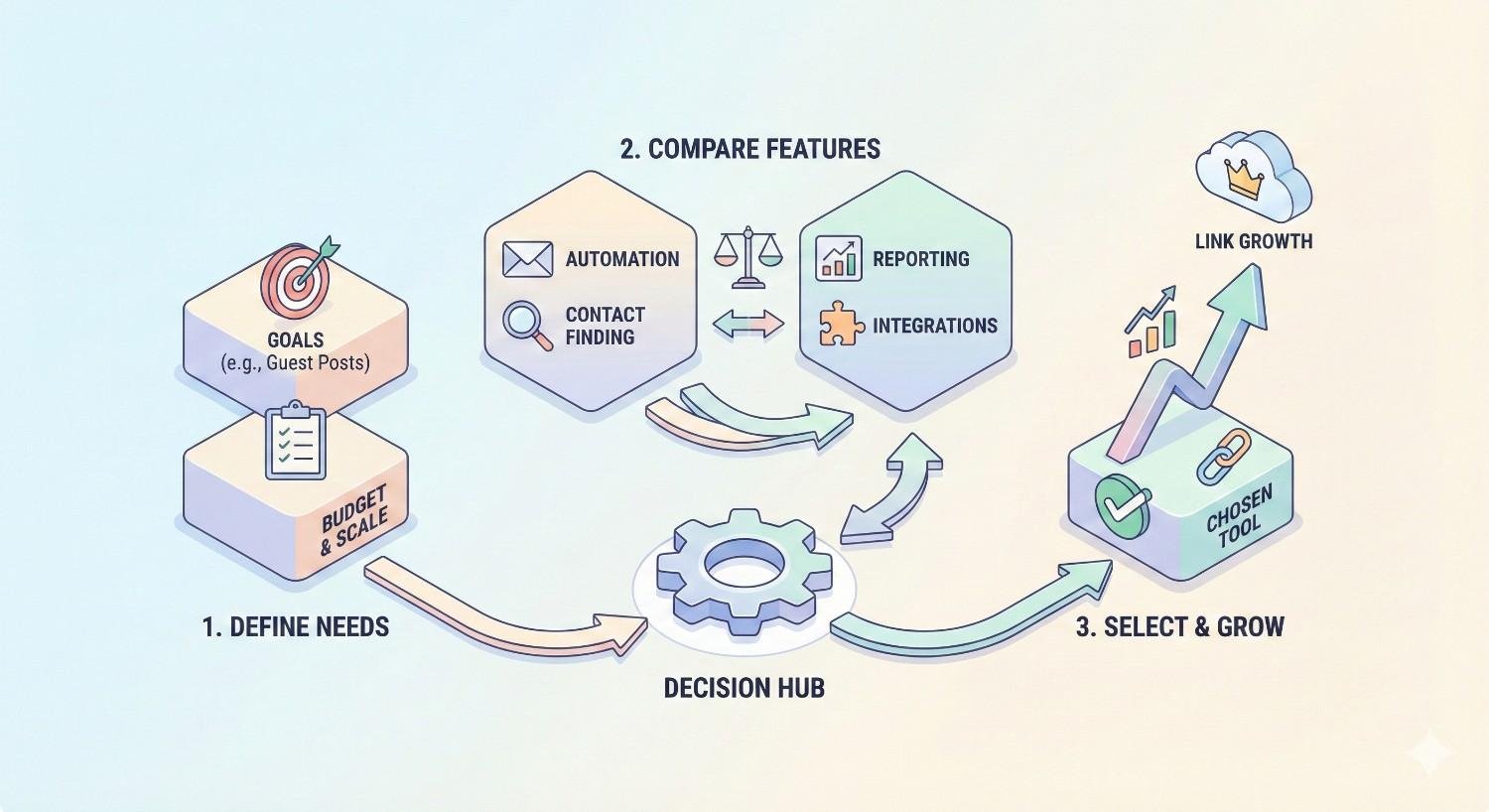
Tool selection should follow strategy, not precede it. Before evaluating platforms, clarify your link building approach, team structure, and success metrics. The best tool for a solo consultant differs dramatically from the best tool for a 20-person agency.
Avoid feature overwhelm. Most teams use 20% of their tool’s capabilities. Focus on the features that directly support your workflow rather than theoretical functionality you might use someday.
Assessing Your Team Size and Budget
Solo practitioners and small teams should prioritize simplicity and value. BuzzStream’s individual plan or Snov.io’s starter tier provides essential functionality without complexity overhead. The learning curve matters when you’re the only one using the tool.
Mid-size teams (3-10 people) need collaboration features: shared contact databases, team inboxes, and workflow assignments. BuzzStream and Mailshake handle this tier well, with per-user pricing that scales reasonably.
Enterprise teams and agencies require advanced workflow automation, client segregation, and comprehensive reporting. Pitchbox dominates this segment, with pricing that reflects the operational complexity it handles.
Budget reality checks matter. A tool that costs $500/month but saves 40 hours of labor monthly is cost-effective if your time is worth more than $12.50/hour. Calculate ROI based on time savings and link acquisition improvements, not just subscription cost.
Matching Tool Capabilities to Campaign Goals
Guest posting campaigns need strong prospecting and relationship tracking. BuzzStream and NinjaOutreach excel here, with features designed for ongoing blogger relationships.
Broken link building requires integration with SEO tools that identify broken link opportunities. Pitchbox’s native Ahrefs integration streamlines this workflow.
Resource page outreach benefits from email finding accuracy and personalization capabilities. Hunter.io paired with Lemlist covers both needs.
High-volume campaigns (100+ emails daily) demand deliverability optimization and automation sophistication. Mailshake and Pitchbox handle volume without triggering spam filters.
Relationship-focused strategies prioritize CRM functionality over sending volume. BuzzStream’s contact management is unmatched for teams that nurture long-term connections.
Free vs. Paid Outreach Tools: What’s Worth the Investment
Free tools exist but come with significant limitations. Hunter.io’s free tier (25 searches/month) works for occasional prospecting but not sustained campaigns. Gmail with mail merge handles basic outreach but lacks tracking and automation.
The question isn’t whether to pay, but how much. For most teams, a $50-150/month tool provides sufficient functionality. Enterprise pricing ($500+/month) makes sense only when volume and complexity justify it.
Calculate the break-even point. If a $100/month tool helps you earn one additional link monthly, and each link is worth $200+ in equivalent advertising or SEO value, the investment pays for itself immediately.
Free trials matter. Most platforms offer 7-14 day trials. Test your actual workflow, not just the feature list. The tool that feels intuitive during real work is the one you’ll actually use consistently.
How to Use Outreach Tools for Effective Link Building Campaigns
Tools are force multipliers, not magic solutions. The same platform that powers successful campaigns can produce zero results when used poorly. Effective link building combines good tools with sound strategy and quality execution.
The following workflow applies across platforms. Specific button clicks vary, but the underlying process remains consistent.
Step 1: Building a Targeted Prospect List
Quality prospects matter more than quantity. A list of 50 highly relevant websites outperforms 500 tangentially related ones. Start with clear criteria: domain authority thresholds, content relevance, linking history, and contact accessibility.
Use SEO tools to identify prospects. Ahrefs’ Content Explorer finds articles on your topic; filter by domain rating and organic traffic. SEMrush’s Backlink Analytics reveals who links to competitors. Moz’s Link Explorer identifies resource pages in your niche.
Import prospects into your outreach tool. Most platforms accept CSV uploads or direct integrations. Tag prospects by campaign, opportunity type, and priority level. This organization pays dividends when managing multiple simultaneous campaigns.
Verify relevance manually. Automated prospecting catches quantity but misses quality signals. Spend 30 seconds per prospect confirming they’re actually a good fit before adding them to active campaigns.
Step 2: Finding and Verifying Contact Information
Generic contact forms and info@ addresses yield poor results. Find the specific person who handles content decisions—usually an editor, content manager, or site owner.
Use your tool’s email finding features first. Hunter.io and Snov.io maintain large databases that often surface the right contact immediately. When databases fail, try LinkedIn searches, author bylines, and about pages.
Verify before sending. Invalid emails damage sender reputation and waste campaign resources. Run all addresses through verification, removing any that fail or show high-risk indicators.
Document contact sources. When someone asks how you found their email, you should have a legitimate answer. “I found your email on your website’s contact page” is fine. “I scraped it from a leaked database” is not.
Step 3: Crafting Personalized Outreach Templates
Templates provide structure; personalization provides relevance. The best outreach emails feel individually written while following proven frameworks.
Start with a hook that demonstrates you’ve actually visited their site. Reference a specific article, compliment a genuine strength, or mention a shared connection. Generic flattery (“I love your blog!”) signals mass outreach.
State your value proposition clearly. What’s in it for them? Guest posts offer free content. Resource additions offer value to their readers. Broken link fixes solve a problem. Lead with their benefit, not your request.
Keep emails concise. Busy editors don’t read walls of text. Aim for 100-150 words that communicate your pitch completely. Every sentence should earn its place.
Create template variations for A/B testing. Test different subject lines, opening hooks, and calls to action. Let data guide optimization rather than assumptions.
Step 4: Setting Up Automated Follow-Up Sequences
Most responses come from follow-ups, not initial emails. Studies consistently show that 80% of sales require 5+ follow-ups, and link building follows similar patterns.
Space follow-ups appropriately. 3-4 days between the first and second email, 5-7 days before the third. Longer gaps for subsequent touches. Aggressive daily follow-ups annoy recipients and trigger spam complaints.
Vary your follow-up content. Don’t just resend the original email. Add new value—a different angle, additional context, or a simplified ask. Each touch should give them a reason to respond.
Set sequence limits. 3-4 follow-ups is standard. Beyond that, you’re likely annoying someone who isn’t interested. Respect the implicit “no” of continued silence.
Configure stop conditions. Sequences should halt automatically when someone replies, clicks a link, or unsubscribes. Continuing to follow up after a response creates awkward situations.
Step 5: Tracking Responses and Measuring Success
Monitor campaigns daily during active sending. Respond to replies within 24 hours—faster response times correlate with higher conversion rates. Delayed responses signal disinterest and lose momentum.
Track the full funnel: emails sent → opened → replied → negotiating → link placed. Identify where prospects drop off. Low open rates suggest subject line problems. Low reply rates indicate pitch issues. Low conversion from reply to link points to negotiation or content quality problems.
Calculate your key metrics. Response rate (replies ÷ emails sent) benchmarks around 5-15% for cold outreach. Link conversion rate (links earned ÷ replies) varies by tactic but 20-40% is achievable with quality prospects and pitches.
Document learnings. Which subject lines performed best? Which prospect types converted highest? Which pitch angles resonated? This institutional knowledge improves future campaigns.
What Is a Good Response Rate for Link Building Outreach?
Response rates vary significantly by tactic, niche, and execution quality. Cold outreach to strangers typically yields 5-15% response rates. Warm outreach to existing contacts or referrals can exceed 30%.
Context matters more than benchmarks. A 5% response rate from high-authority sites beats a 20% rate from low-quality prospects. Focus on link quality outcomes, not just response volume.
Improve response rates through better targeting (more relevant prospects), stronger personalization (genuine research, not template variables), and clearer value propositions (obvious benefit to the recipient).
How Many Emails Should I Send Per Day for Link Building?
Sending limits depend on your email infrastructure and domain reputation. New domains should start with 20-30 emails daily, gradually increasing as reputation builds. Established domains with good sender scores can handle 100-200 daily without deliverability issues.
Quality trumps quantity. 50 well-researched, personalized emails outperform 200 generic blasts. The goal is links, not sent email counts.
Spread sending throughout the day rather than batching. Sudden volume spikes trigger spam filters. Most outreach tools include scheduling features that distribute sends naturally.
Monitor bounce rates and spam complaints. If either metric spikes, reduce volume immediately. Sender reputation damage takes weeks to repair.
Common Link Building Outreach Mistakes to Avoid
Even good tools can’t compensate for strategic errors. The following mistakes consistently undermine link building campaigns, regardless of which platform you use.
Recognizing these patterns in your own work is the first step toward improvement. Most link builders make several of these errors before developing effective processes.
Over-Automation and Generic Templates
Automation should save time on mechanics, not replace human judgment. Emails that read like mail merge outputs get deleted immediately. Recipients recognize template language and generic compliments.
The fix: Use automation for sending, scheduling, and tracking. Keep personalization human. Review every email before it sends, adding genuine touches that demonstrate real research.
Signs you’ve over-automated: Your emails could apply to any website in your prospect list. You can’t remember specific details about prospects you’ve contacted. Recipients call out your templates in replies.
Ignoring Email Deliverability Best Practices
Deliverability determines whether your emails reach inboxes or spam folders. Poor practices accumulate damage over time, eventually rendering your domain unusable for outreach.
Warm up new domains before sending volume. Services like Lemwarm or Mailwarm simulate natural email activity, building reputation before campaigns begin.
Authenticate your domain with SPF, DKIM, and DMARC records. These technical configurations verify your identity and improve deliverability across email providers.
Monitor blacklists regularly. Tools like MXToolbox check whether your domain or IP appears on spam lists. Early detection allows remediation before serious damage occurs.
Clean your lists aggressively. Remove bounces immediately. Unsubscribe anyone who requests it. Never email purchased lists or scraped addresses without verification.
Failing to Follow Up Strategically
Single-email campaigns leave significant value on the table. Most positive responses come from follow-ups, not initial outreach. But follow-ups require strategy, not just persistence.
Time follow-ups appropriately. Too soon feels pushy. Too late loses context. 3-5 days between touches balances persistence with respect.
Add value with each follow-up. New information, different angles, or simplified asks give recipients reasons to engage. Repeating the same pitch signals desperation.
Know when to stop. After 3-4 unanswered follow-ups, move on. Continued contact crosses from persistent to annoying, potentially damaging your reputation in the niche.
Outreach Tool Pricing Comparison
| Tool | Starting Price | Key Features | Best For |
| Pitchbox | $550/month | Full prospecting, automation, CRM | Agencies, enterprise teams |
| BuzzStream | $24/month | Relationship CRM, team collaboration | Relationship-focused teams |
| Hunter.io | $49/month | Email finding, verification | Contact data needs |
| Respona | $99/month | AI personalization, templates | Mid-size teams |
| Mailshake | $59/month/user | Deliverability, A/B testing | Sales-style outreach |
| Lemlist | $59/month/user | Image personalization, sequences | Creative campaigns |
| Snov.io | $39/month | All-in-one prospecting | Budget-conscious teams |
| NinjaOutreach | $49/month | Influencer database, CRM | Blogger outreach |
Prices reflect published rates at time of writing. Most tools offer discounts for annual billing. Enterprise pricing requires custom quotes.
Integrating Outreach Tools with Your SEO Workflow
Outreach tools deliver maximum value when connected to your broader SEO ecosystem. Isolated tools create data silos and manual work. Integrated systems enable seamless workflows from prospect identification to link tracking.
Plan integrations before selecting tools. The platform with the best features means little if it can’t connect with your existing stack.
Connecting with Ahrefs, SEMrush, and Moz
Direct integrations eliminate export/import friction. Pitchbox connects natively with Ahrefs, allowing prospect imports without leaving the platform. Respona offers similar SEMrush integration.
When native integrations don’t exist, use CSV exports. All major SEO tools export prospect lists that outreach platforms can import. The workflow is less elegant but functional.
Zapier bridges gaps for tools without direct connections. You can create automated workflows that push data between platforms, though this requires setup and occasional maintenance.
Maintain data consistency across tools. Use standardized naming conventions, tagging systems, and field mappings. Inconsistent data creates confusion and duplicate work.
CRM Integration for Long-Term Relationship Building
Link building relationships extend beyond single campaigns. The editor who placed your guest post today might be a valuable contact for years. CRM integration preserves these relationships.
BuzzStream functions as a dedicated link building CRM. For teams using general CRMs like HubSpot or Salesforce, integrations sync contact data and communication history.
Track relationship stages: prospect, contacted, responded, collaborated, ongoing relationship. This pipeline view helps prioritize outreach and identify nurturing opportunities.
Document relationship context. Notes about preferences, past collaborations, and personal details enable more effective future outreach. “Mentioned they’re launching a new site section in Q2” becomes valuable context months later.
Reporting and ROI Tracking
Connect outreach metrics to business outcomes. Links earned is a vanity metric without context. Links from DA 50+ sites that drive referral traffic and improve rankings—that’s meaningful.
Build dashboards that show the full picture: outreach activity, response rates, links earned, domain authority of linking sites, and downstream SEO impact. Google Data Studio or similar tools can pull data from multiple sources.
Calculate cost per link. Total outreach costs (tools + labor) divided by links earned gives you a benchmark for evaluating efficiency. Compare against alternative link acquisition methods.
Report on trends, not just snapshots. Month-over-month improvements in response rates or link quality demonstrate program maturation. Declining metrics signal problems requiring attention.
Conclusion: Choosing the Right Outreach Tool for Sustainable Link Building
Outreach tools transform link building from manual grind to scalable system. The right platform saves hours weekly, improves response rates through better personalization, and provides the tracking needed to optimize continuously. But tools alone don’t build links—they amplify the effectiveness of sound strategy and quality execution.
At White Label SEO Service, we help businesses build sustainable organic growth through strategic link acquisition. Our team combines proven outreach systems with relationship-focused execution, earning quality backlinks that drive rankings and traffic.
Ready to scale your link building without the operational headaches? We handle the prospecting, outreach, and relationship management while you focus on growing your business. Contact us to discuss how our link building services can accelerate your SEO results.
Frequently Asked Questions About Outreach Tools for Link Building
What is the best free outreach tool for link building?
Hunter.io offers the most useful free tier, with 25 email searches and 50 verifications monthly. For actual outreach, Gmail with a mail merge extension like Yet Another Mail Merge provides basic functionality. However, free tools lack the automation and tracking that make link building scalable.
How do outreach tools improve link building success rates?
Outreach tools improve success through consistent follow-ups, better personalization, and data-driven optimization. Automated sequences ensure no prospect falls through the cracks. Personalization features help emails stand out. Analytics reveal which approaches work, enabling continuous improvement.
Can I use outreach tools for guest posting?
Yes, guest posting is one of the primary use cases for outreach tools. Platforms like NinjaOutreach and BuzzStream include features specifically designed for blogger outreach, including prospect databases, pitch templates, and relationship tracking for ongoing contributor relationships.
What’s the difference between outreach tools and email marketing platforms?
Email marketing platforms (Mailchimp, ConvertKit) are designed for sending to opted-in subscribers at scale. Outreach tools are built for cold outreach to individuals, with features like email finding, personalization at the individual level, and CRM functionality for managing one-to-one relationships.
How many follow-ups should I send in a link building campaign?
Three to four follow-ups is the standard recommendation. Research shows most positive responses come from follow-ups rather than initial emails. Beyond four touches, you’re likely annoying someone who isn’t interested. Space follow-ups 3-7 days apart and add new value with each message.
Do outreach tools guarantee link building results?
No tool guarantees results. Outreach tools improve efficiency and enable scale, but success depends on prospect quality, pitch relevance, and the value you offer. A great tool with poor strategy produces poor results. Focus on fundamentals—targeting, personalization, value proposition—and let tools amplify your execution.
Are outreach tools compliant with email regulations like GDPR and CAN-SPAM?
Most reputable outreach tools include compliance features: unsubscribe handling, sender identification, and data management. However, compliance ultimately depends on how you use the tool. B2B outreach to professional email addresses generally falls under legitimate interest provisions, but consult legal counsel for specific situations.


