

Redirect chains and loops silently drain your site’s crawl budget, dilute link equity, and slow page load times. These technical SEO issues often go unnoticed until rankings drop or pages stop indexing altogether. For business owners and marketing teams investing in organic growth, understanding how redirects work is essential to protecting your search visibility.
The good news: both problems are fixable once you know where to look. Whether you’re dealing with legacy redirects from a site migration or conflicting server rules causing infinite loops, the solutions are straightforward.
This guide covers everything you need to identify redirect chains and loops, understand their SEO impact, and implement permanent fixes that keep your site architecture clean.
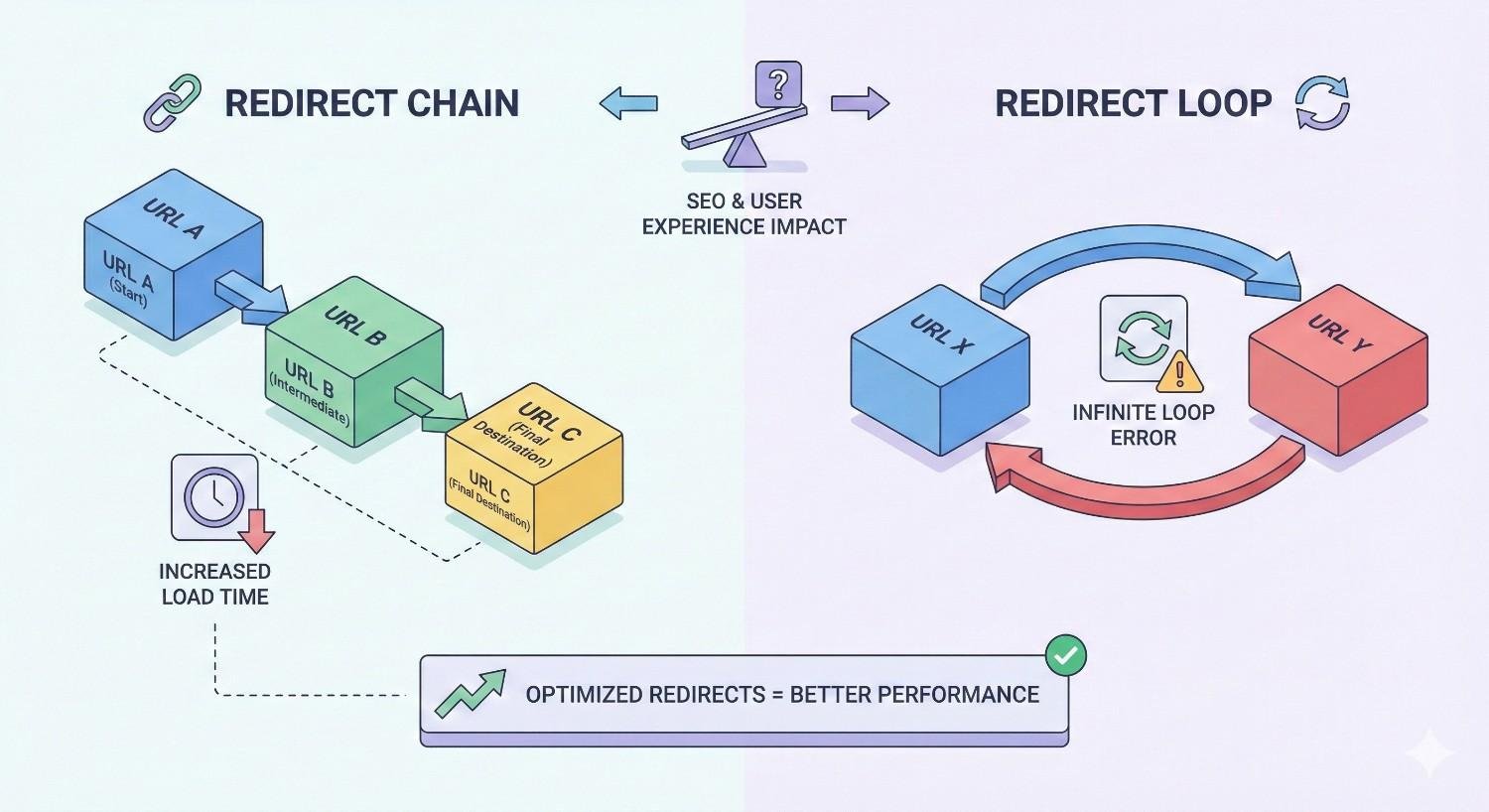
What Are Redirect Chains and Redirect Loops?
Redirects tell browsers and search engines that a URL has moved to a new location. When implemented correctly, they preserve user experience and pass ranking signals to the destination page. When implemented poorly, they create chains or loops that damage your site’s technical health.
Understanding the difference between these two issues is the first step toward fixing them.
Redirect Chains Explained
A redirect chain occurs when a URL redirects to another URL, which then redirects to yet another URL, and so on. Instead of a single hop from the old page to the new one, visitors and search engine crawlers must follow multiple redirects before reaching the final destination.
Here’s what a typical redirect chain looks like:
Page A → Page B → Page C → Page D (final destination)
Each hop in the chain adds latency, consumes crawl budget, and potentially loses a small percentage of link equity. While Google has stated they will follow up to 10 redirects in a chain, best practice is keeping redirects to a single hop.
Redirect chains commonly form over time as websites evolve. A page gets redirected during a redesign, then that destination page gets redirected during a migration, and suddenly you have three or four hops where one would suffice.
Redirect Loops Explained
A redirect loop is more severe than a chain. It occurs when URL A redirects to URL B, and URL B redirects back to URL A, creating an infinite cycle with no final destination.
Page A → Page B → Page A → Page B → (infinite)
Loops can also involve multiple URLs:
Page A → Page B → Page C → Page A → (infinite)
When a browser encounters a redirect loop, it eventually stops trying and displays an error message like “This page isn’t working” or “ERR_TOO_MANY_REDIRECTS.” Search engine crawlers similarly abandon the attempt, meaning the affected pages cannot be indexed.
Redirect loops effectively make pages inaccessible to both users and search engines. They require immediate attention.
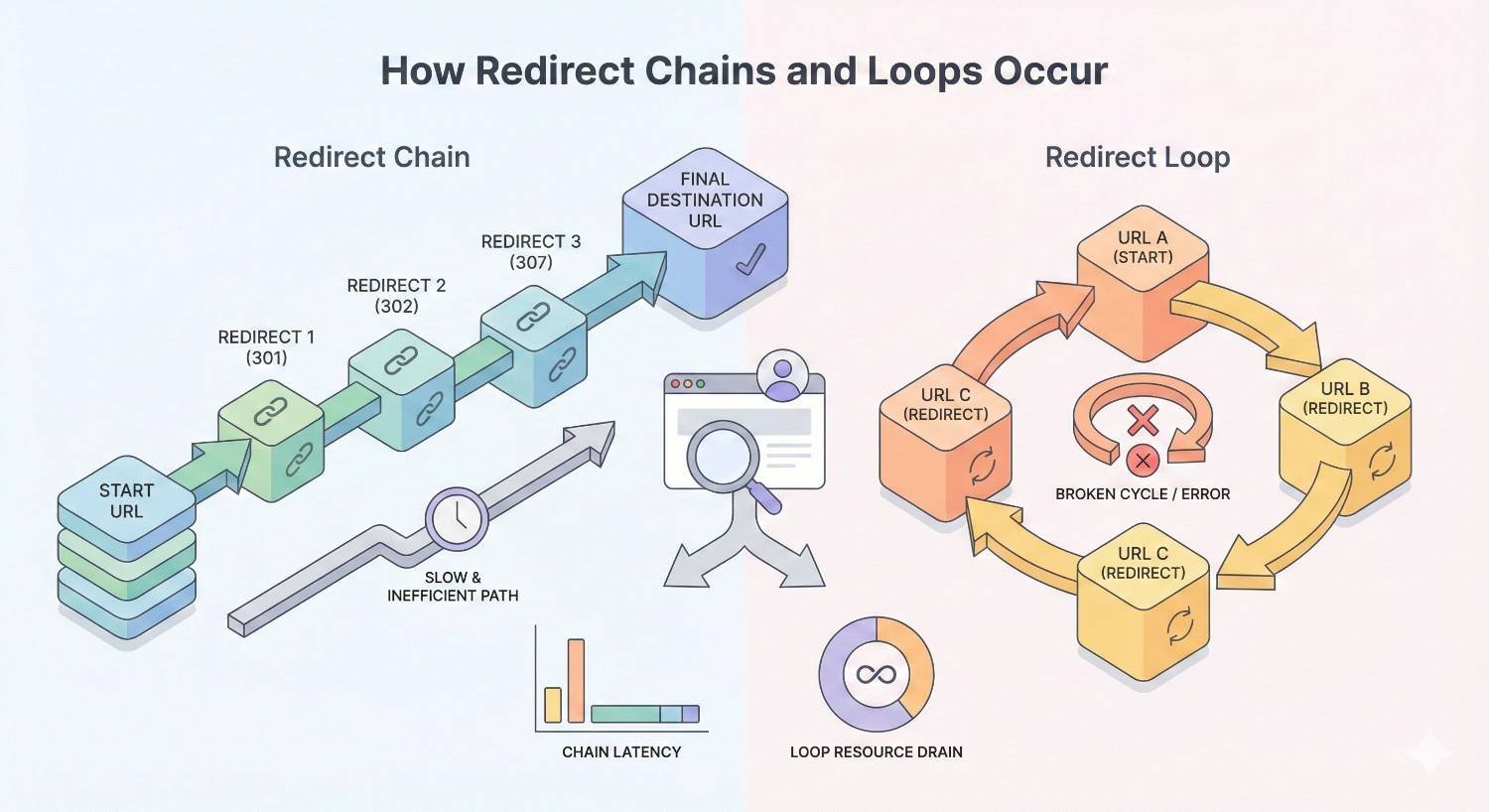
How Redirect Chains and Loops Occur
Neither redirect chains nor loops happen intentionally. They accumulate through normal website operations, often without anyone realizing until problems surface in analytics or Search Console.
Common Causes of Redirect Chains
Site Migrations and Redesigns
Website redesigns frequently change URL structures. When you migrate from one URL pattern to another, you create redirects. If you’ve redesigned multiple times without consolidating old redirects, chains form naturally.
For example, a 2019 redesign redirected /products/widget to /shop/widget. A 2022 migration then redirected /shop/widget to /store/widgets/widget-name. Now any links pointing to the original URL must follow two redirects.
CMS and Plugin Updates
Content management systems sometimes change permalink structures during updates. If your CMS automatically creates redirects when you change a page’s URL slug, and you’ve changed it multiple times, you end up with chains.
WordPress plugins that manage redirects can compound this issue. Different plugins may create overlapping redirect rules, each adding another hop to the chain.
HTTP to HTTPS Transitions
Moving from HTTP to HTTPS requires redirecting all HTTP URLs to their HTTPS equivalents. If your site previously had other redirects in place, the HTTPS redirect adds another hop.
A common scenario: http://example.com/old-page redirects to http://example.com/new-page, which then redirects to https://example.com/new-page. That’s two hops where one direct redirect to the final HTTPS URL would work better.
Domain Changes and Consolidations
Rebranding or consolidating multiple domains creates redirect chains when not handled carefully. If oldbrand.com redirects to newbrand.com, and newbrand.com later changes its URL structure, visitors from old backlinks follow multiple redirects.
Companies that acquire other businesses and merge websites face this challenge frequently. Each domain consolidation adds potential redirect hops.
Common Causes of Redirect Loops
Misconfigured Server Rules
Server-level redirect rules in .htaccess files or nginx configurations can conflict with each other. A rule that redirects non-www to www URLs combined with another rule that does the opposite creates an infinite loop.
Similarly, rules that force HTTPS can loop if they’re not written correctly. The server keeps trying to redirect to HTTPS, but something in the configuration keeps sending requests back to HTTP.
Conflicting Redirect Rules
When redirects exist at multiple levels, conflicts arise. Your server might have one redirect rule, your CMS another, and a plugin a third. If these rules contradict each other, loops form.
For instance, your .htaccess file redirects /page-a to /page-b, but your WordPress redirect plugin redirects /page-b back to /page-a. Neither system knows about the other’s rule.
Plugin or Script Conflicts
Multiple SEO or redirect plugins running simultaneously often cause loops. Each plugin may try to handle the same redirect differently, creating circular references.
JavaScript-based redirects can also conflict with server-side redirects. The server sends the browser to one URL, but client-side code immediately redirects elsewhere, potentially back to the original location.
Why Redirect Chains and Loops Hurt Your SEO
The technical problems caused by redirect chains and loops translate directly into ranking and traffic losses. Understanding these impacts helps prioritize fixes.
Crawl Budget Waste
Every website has a crawl budget, the number of pages Googlebot will crawl within a given timeframe. Each redirect hop consumes part of that budget without adding any indexable content.
For large websites with thousands of pages, redirect chains can significantly reduce how much of your actual content gets crawled. If Googlebot spends resources following redirect chains, it has less capacity to discover and index your valuable pages.
Sites with limited crawl budgets, typically newer or smaller sites, feel this impact more acutely. Every wasted crawl is a missed opportunity to get important pages indexed.
PageRank Dilution and Link Equity Loss
Google has confirmed that redirects pass PageRank, but the transfer isn’t always complete. While a single 301 redirect passes most link equity, each additional hop in a chain may lose a small percentage.
More importantly, redirect chains create uncertainty. If the chain breaks at any point, all the link equity from backlinks pointing to the original URL is lost entirely.
For pages with valuable backlinks, redirect chains put that hard-earned authority at risk. Consolidating to single-hop redirects protects your link equity investment.
Increased Page Load Time
Each redirect adds latency. The browser must make a new HTTP request for each hop, wait for the server response, then follow the next redirect. This process repeats until reaching the final destination.
According to Google’s web performance guidelines, each redirect can add 100-500 milliseconds to page load time depending on server response speed and network conditions.
For mobile users on slower connections, redirect chains create noticeably poor experiences. Pages that should load in two seconds might take four or five seconds when multiple redirects are involved.
Indexation Problems
Redirect loops prevent indexation entirely. If Googlebot cannot reach a final destination, the page simply won’t appear in search results.
Redirect chains can also cause indexation issues, though less severely. If a chain is too long or includes temporary redirects mixed with permanent ones, Google may not index the final destination correctly.
Pages stuck in redirect problems don’t rank. Period. Every day these issues persist is a day your content isn’t competing for search visibility.
How to Identify Redirect Chains and Loops
Finding redirect problems requires systematic auditing. Several tools make this process manageable, even for large websites.
Using Google Search Console
Google Search Console reports crawl errors including redirect issues. Navigate to the Coverage report to find pages with redirect errors.
Look specifically for:
- Pages marked as “Redirect error” in the excluded pages list
- Crawl anomalies in the Crawl Stats report showing high redirect rates
- URL Inspection tool results showing redirect chains for specific pages
Search Console won’t show you every redirect chain, but it highlights the ones causing actual indexation problems. Start your investigation with these flagged URLs.
Crawling Tools (Screaming Frog, Sitebulb, Ahrefs)
Dedicated crawling tools provide the most comprehensive redirect analysis. These applications crawl your entire site and map every redirect relationship.
Screaming Frog SEO Spider identifies redirect chains in its Redirect Chains report. You can see exactly which URLs redirect where and how many hops exist in each chain. The tool also flags redirect loops that prevent crawling.
Sitebulb visualizes redirect chains graphically, making complex redirect relationships easier to understand. Its audit reports prioritize redirect issues by severity.
Ahrefs Site Audit includes redirect chain detection as part of its technical SEO analysis. The tool shows affected URLs and provides recommendations for fixes.
For most websites, running a full crawl monthly catches redirect problems before they accumulate.
Browser Developer Tools
Chrome DevTools offers quick redirect analysis for individual URLs. Open DevTools (F12), go to the Network tab, and load the URL you want to test.
The Network tab shows every request made during page load, including redirects. Look for 301 and 302 status codes in the Status column. Multiple consecutive redirects indicate a chain.
This method works well for spot-checking specific URLs but isn’t practical for site-wide audits.
Online Redirect Checkers
Free online tools like Redirect Checker, httpstatus.io, and Redirect Detective trace redirect paths for individual URLs. Enter a URL and see every hop in the redirect chain.
These tools are useful for:
- Quick verification of specific redirect paths
- Checking competitor redirects
- Testing fixes before implementation
- Sharing redirect information with team members
Online checkers complement but don’t replace comprehensive crawling tools.
How to Fix Redirect Chains
Fixing redirect chains involves updating each redirect to point directly to the final destination URL. The process requires careful mapping and systematic implementation.
Mapping Your Redirect Paths
Before making changes, document every redirect chain on your site. Create a spreadsheet with columns for:
- Original URL (start of chain)
- Intermediate URLs (each hop)
- Final destination URL
- Number of hops
- Priority (based on traffic or backlink value)
This mapping prevents mistakes during implementation. You need to know exactly where each redirect should point before changing anything.
Export redirect chain data from your crawling tool and organize it by priority. Fix high-traffic and high-authority pages first.
Updating Redirects to Point Directly to Final URL
The fix is conceptually simple: change every redirect to point directly to the final destination, eliminating intermediate hops.
If your current chain is:
/old-page → /renamed-page → /final-page
Update it to:
/old-page → /final-page /renamed-page → /final-page
Both old URLs now redirect directly to the final destination in a single hop. No chain exists.
Be thorough. Every URL that previously redirected to an intermediate page needs updating. Missing even one creates a partial chain.
Updating Internal Links
Redirects should be a fallback, not the primary navigation path. After fixing redirect chains, update internal links throughout your site to point directly to final destination URLs.
Search your content, navigation menus, and footer links for any URLs that redirect. Replace them with the current, canonical URL.
This reduces server load, improves page speed, and ensures users and crawlers reach content directly. It also future-proofs your site against redirect accumulation.
Implementing via .htaccess, Server Config, or CMS
Where you implement redirects depends on your hosting environment and technical setup.
.htaccess (Apache servers)
Edit your .htaccess file to update redirect rules. Use 301 redirects for permanent changes:
Copy
Redirect 301 /old-page https://example.com/final-page
.nginx configuration
For nginx servers, update your server block configuration:
Copy
rewrite ^/old-page$ https://example.com/final-page permanent;
CMS redirect managers
WordPress plugins like Redirection or Yoast SEO Premium manage redirects through the admin interface. Update existing redirects to point to final destinations.
Important: After implementing changes, clear any server-side caching and test each redirect to confirm it works correctly.
How to Fix Redirect Loops
Redirect loops require identifying and resolving conflicting rules. The fix depends on where the conflict originates.
Identifying the Conflicting Rules
Loops occur when two or more redirect rules contradict each other. Your first task is finding where these rules exist.
Check these locations in order:
- Server configuration files (.htaccess, nginx.conf)
- CMS redirect settings
- Plugin redirect rules
- CDN redirect rules
- JavaScript redirects in page code
Document every redirect rule you find for the affected URLs. The conflict becomes apparent when you see rules pointing in opposite directions.
Resolving Server-Level Conflicts
Server configuration conflicts are the most common cause of redirect loops. Look for rules that contradict each other.
Common conflicting patterns:
- Non-www to www redirect combined with www to non-www redirect
- HTTP to HTTPS redirect conflicting with HTTPS to HTTP rule
- Trailing slash rules that add and remove slashes simultaneously
Remove or modify the conflicting rule. Decide on one canonical format (www or non-www, with or without trailing slash) and ensure all rules support that decision consistently.
Checking Plugin and CMS Settings
If server rules look correct, the conflict likely exists in your CMS or plugins.
Disable redirect plugins one at a time and test whether the loop persists. This isolation process identifies which plugin causes the conflict.
Check your CMS’s built-in redirect settings. WordPress, for example, has permalink settings that can conflict with manual redirects.
Once you identify the conflicting plugin or setting, either reconfigure it or remove it entirely if redundant.
Testing After Fixes
Never assume a fix worked without testing. After resolving a redirect loop:
- Clear all caches (browser, server, CDN)
- Test the URL in an incognito browser window
- Use an online redirect checker to verify the path
- Check the URL in Google Search Console’s URL Inspection tool
- Monitor for recurrence over the following days
Document what caused the loop and how you fixed it. This documentation helps prevent similar issues in the future.
301 vs 302 Redirects: Which to Use
Choosing the correct redirect type affects how search engines handle your URL changes. Using the wrong type can cause indexation problems.
When to Use 301 Permanent Redirects
Use 301 redirects when a page has permanently moved to a new URL. This tells search engines to transfer ranking signals to the new location and update their index accordingly.
Appropriate 301 scenarios:
- Page URL structure changes permanently
- Domain migrations
- HTTP to HTTPS transitions
- Consolidating duplicate content
- Retiring old pages while preserving link equity
301 redirects signal that the change is permanent. Search engines will eventually stop crawling the old URL and fully transfer authority to the new one.
For most redirect situations in SEO, 301 is the correct choice.
When to Use 302 Temporary Redirects
Use 302 redirects only when a page temporarily moves and will return to its original URL. This tells search engines to keep the original URL in their index.
Appropriate 302 scenarios:
- A/B testing different page versions
- Temporary maintenance pages
- Geo-targeting redirects based on user location
- Promotional landing pages that will revert
302 redirects do not pass full link equity because search engines expect the original URL to return. Using 302 when you mean 301 can prevent proper indexation of your new URL.
When in doubt, use 301. Temporary redirects are rarely the right choice for permanent URL changes.
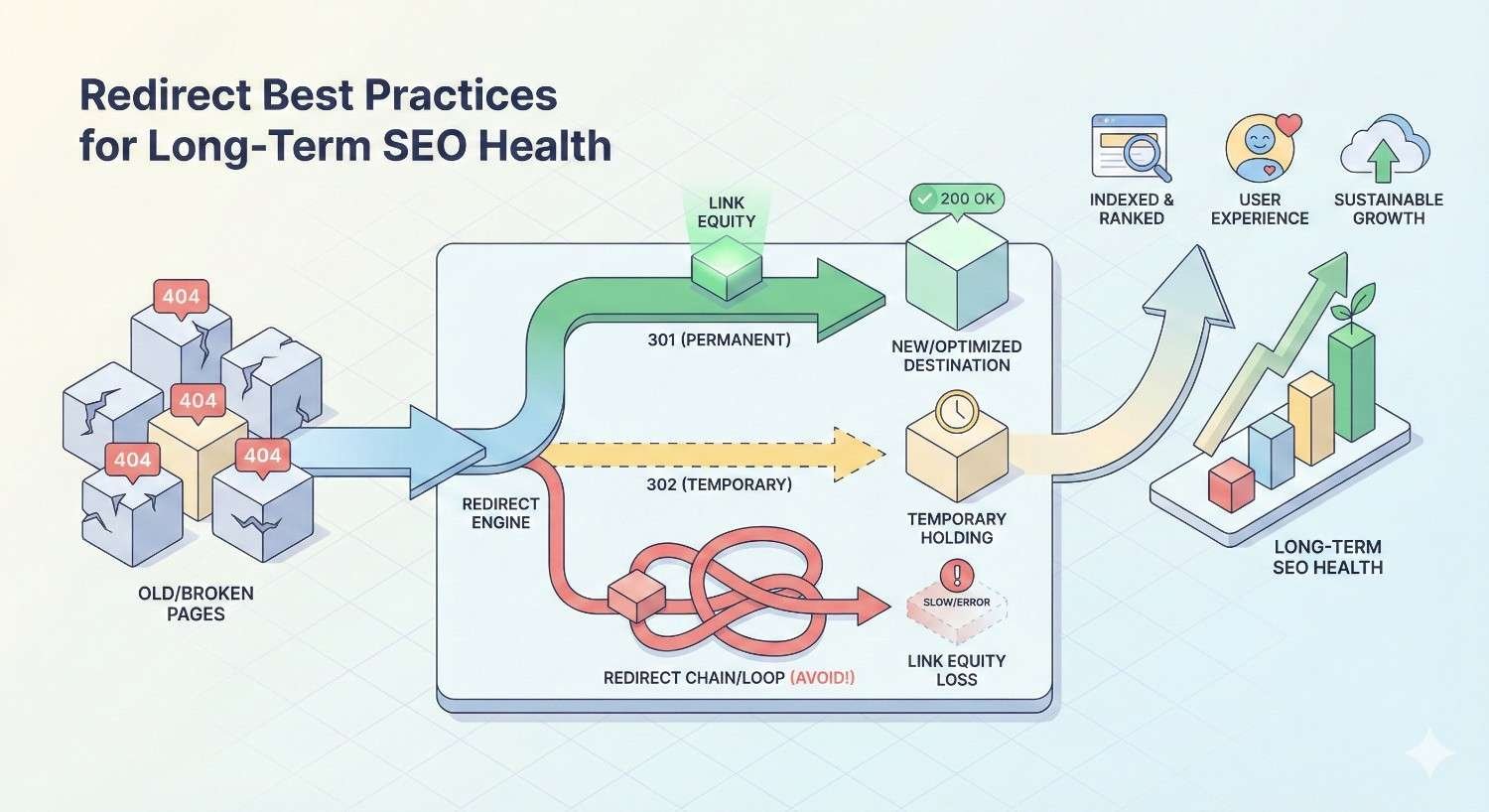
Redirect Best Practices for Long-Term SEO Health
Preventing redirect problems is easier than fixing them. These practices keep your redirect architecture clean over time.
Limit Redirects to One Hop
Every redirect should point directly to the final destination URL. No exceptions.
When creating new redirects, check whether the destination URL itself redirects anywhere. If it does, point your new redirect to that final destination instead.
Build this check into your workflow. Before adding any redirect, verify the destination is the canonical, final URL.
Audit Redirects Regularly
Schedule quarterly redirect audits using your crawling tool of choice. Look for:
- New redirect chains that have formed
- Redirects pointing to 404 pages
- Redirect loops
- Unnecessary redirects that can be removed
- Redirects with low or no traffic
Regular audits catch problems early before they compound into larger issues.
Document All Redirect Changes
Maintain a redirect log documenting every redirect added to your site. Include:
- Date added
- Original URL
- Destination URL
- Reason for redirect
- Who implemented it
This documentation proves invaluable during troubleshooting. When a redirect chain forms, you can trace back through the log to understand how it happened.
Shared documentation also prevents team members from creating conflicting redirects unknowingly.
Monitor Crawl Errors in Search Console
Set up regular reviews of Google Search Console’s Coverage report. New redirect errors often indicate emerging problems.
Pay attention to:
- Sudden increases in redirect errors
- Pages dropping from the index due to redirect issues
- Crawl anomalies in the Crawl Stats report
Early detection through Search Console monitoring prevents small issues from becoming ranking problems.
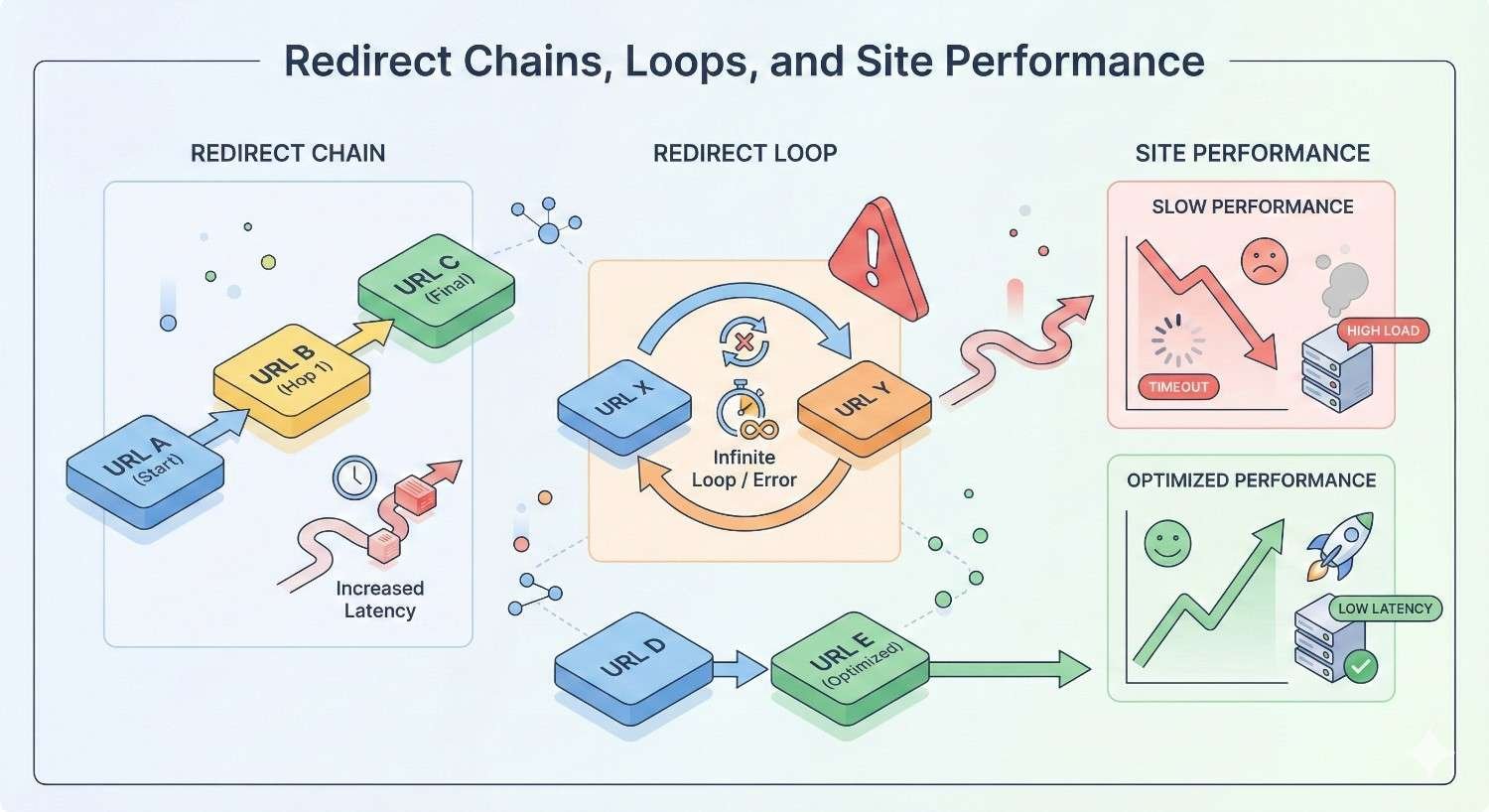
Redirect Chains, Loops, and Site Performance
Beyond SEO, redirect issues affect user experience and site performance metrics that increasingly influence rankings.
Impact on Core Web Vitals
Core Web Vitals measure real-world user experience. Redirect chains directly impact these metrics.
Largest Contentful Paint (LCP) suffers when redirects delay the initial server response. Each redirect hop adds time before the browser can even begin rendering the page.
First Input Delay (FID) and Interaction to Next Paint (INP) can be affected if redirect-related delays cause JavaScript execution timing issues.
Cumulative Layout Shift (CLS) is less directly affected, but slow-loading pages from redirect chains may experience more layout shifts as elements load progressively.
Sites with significant redirect chain problems often see Core Web Vitals scores improve after cleanup.
Mobile vs Desktop Considerations
Mobile users experience redirect delays more acutely than desktop users. Mobile networks have higher latency, meaning each redirect hop takes longer.
A redirect chain that adds 300 milliseconds on desktop might add 800 milliseconds or more on mobile. Given that mobile traffic dominates most websites, this performance gap matters significantly.
Google’s mobile-first indexing means the mobile experience determines your rankings. Redirect problems that seem minor on desktop can substantially impact mobile performance and, consequently, search visibility.
CDN and Caching Implications
Content Delivery Networks can both help and complicate redirect situations.
CDNs cache redirect responses, which speeds up subsequent requests but can also cache incorrect redirects. If you fix a redirect loop but your CDN has cached the old redirect, users still experience the loop until the cache expires.
When fixing redirect issues:
- Implement the fix at the origin server
- Purge CDN cache for affected URLs
- Verify the fix works through the CDN, not just directly to origin
Some CDNs offer redirect rules at the edge. These can conflict with origin server redirects, creating loops. Audit CDN-level redirects alongside server-level rules.
When to Remove Old Redirects
Redirects consume server resources and add complexity. At some point, old redirects can be safely removed.
Redirect Lifespan Guidelines
The general recommendation is maintaining redirects for at least one year after implementation. This allows:
- Search engines to fully process the URL change
- Backlinks to be updated or their value transferred
- Users with bookmarks to update their references
- Analytics to capture the transition period
For high-value pages with significant backlinks, consider maintaining redirects indefinitely. The server resource cost is minimal compared to losing link equity.
Low-traffic redirects with no backlinks can be removed after one year. Check backlink data and traffic logs before removing any redirect.
Balancing SEO Value vs Server Load
Large redirect lists can slow server response times, particularly on shared hosting or with inefficient redirect implementations.
Evaluate redirects for removal based on:
- Traffic: Does anyone still use this redirect?
- Backlinks: Do external sites still link to the old URL?
- Age: Has it been more than two years?
- Value: Was the original page important?
Remove redirects that score low on all criteria. Keep redirects for pages that had significant authority or still receive traffic.
If server performance is a concern, consider moving redirects from .htaccess to server configuration or a dedicated redirect service. These handle large redirect lists more efficiently.
Conclusion: Maintaining Clean Redirect Architecture
Redirect chains and loops represent preventable technical SEO problems that directly impact crawl efficiency, link equity, page speed, and indexation. Regular audits, proper redirect implementation, and systematic documentation keep these issues from accumulating and damaging your organic visibility.
Clean redirect architecture supports every other SEO investment you make. Your content strategy, link building efforts, and on-page optimization all depend on search engines being able to crawl and index your pages efficiently.
We help businesses identify and resolve technical SEO issues like redirect chains and loops as part of comprehensive site audits. Contact White Label SEO Service to schedule a technical SEO review and ensure your site’s redirect architecture supports sustainable organic growth.
Frequently Asked Questions About Redirect Chains & Loops
How many redirects in a chain is too many?
Any redirect chain with more than one hop is suboptimal. While Google will follow up to 10 redirects, best practice is a single redirect from the old URL directly to the final destination. Even two-hop chains should be consolidated.
Do redirect chains pass full link equity?
Redirect chains pass most link equity, but each hop introduces potential loss. A single 301 redirect passes nearly all PageRank, while longer chains may lose small percentages at each hop. More importantly, chains increase the risk of breaks that lose all equity.
Can redirect loops crash a website?
Redirect loops won’t crash your server, but they make affected pages completely inaccessible. Browsers display error messages after detecting the loop, and search engines cannot index the pages. High-traffic pages stuck in loops can significantly impact user experience and conversions.
How often should I audit my redirects?
Quarterly redirect audits work well for most websites. Sites undergoing frequent changes, migrations, or redesigns should audit monthly. At minimum, review redirects after any major site update and monitor Search Console for redirect errors continuously.
Do redirects affect page speed scores?
Yes, redirects add latency to page load times. Each redirect requires an additional HTTP request and server response. Multiple redirects in a chain can add several hundred milliseconds to load time, negatively impacting Core Web Vitals scores and user experience.
What’s the difference between a 301 and 302 redirect for SEO?
A 301 redirect indicates a permanent move and passes full link equity to the destination URL. A 302 redirect signals a temporary move and does not transfer ranking signals the same way. Use 301 for permanent URL changes and 302 only for genuinely temporary situations.
How do I know if my site has redirect chains?
Use a crawling tool like Screaming Frog, Sitebulb, or Ahrefs Site Audit to scan your entire site for redirect chains. These tools identify all redirect relationships and flag chains automatically. For individual URLs, online redirect checkers show the complete redirect path.


