

A well-structured SaaS glossary can become one of your highest-performing organic assets, driving qualified traffic while establishing topical authority in your niche. These resource pages answer the exact questions your prospects type into search engines every day.
For SaaS companies and B2B marketers, glossary content represents a strategic opportunity most competitors overlook. The terms your audience searches define their buying journey.
This guide covers essential SaaS terminology, SEO optimization strategies, and step-by-step frameworks for building resource hubs that generate measurable traffic and leads.
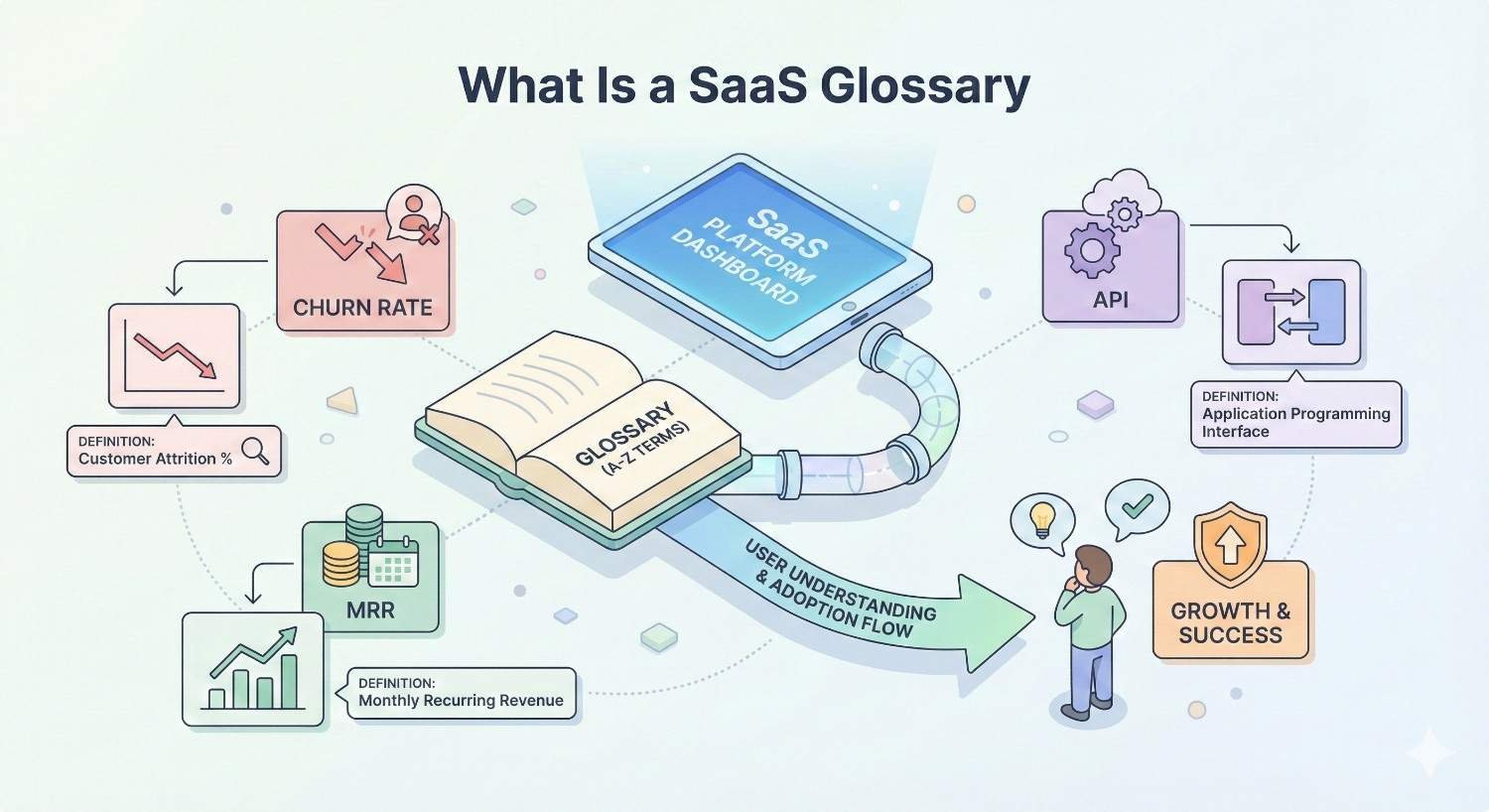
What Is a SaaS Glossary?
Definition and Purpose
A SaaS glossary is a centralized collection of industry-specific terms, definitions, and explanations designed to educate users while capturing search traffic. Unlike generic dictionaries, SaaS glossaries focus on software-as-a-service terminology that business owners, marketers, and decision-makers actively search for.
The primary purpose extends beyond education. Glossary pages serve as entry points into your content ecosystem. When someone searches “what is MRR” or “churn rate definition,” they signal early-stage awareness. Capturing this traffic positions your brand as the authority they trust throughout their buying journey.
Effective glossaries balance accessibility with depth. Each term should provide immediate clarity while offering pathways to related concepts and deeper resources.
Why SaaS Terminology Matters for Business Owners
Understanding SaaS terminology directly impacts business decisions. When a founder misinterprets churn rate calculations or confuses MRR with ARR, financial projections become unreliable. When a marketing manager cannot distinguish between MQLs and SQLs, pipeline reporting breaks down.
The SaaS industry evolves rapidly. New pricing models emerge. Technical architectures shift. Growth strategies transform. Business owners who stay current with terminology make better vendor selections, negotiate stronger contracts, and communicate more effectively with technical teams.
For companies selling to SaaS businesses, demonstrating fluency in industry language builds immediate credibility. Your glossary becomes proof of expertise before any sales conversation begins.
How Glossaries Support SEO and User Experience
Glossary pages target high-intent informational queries with clear search volume. Terms like “customer acquisition cost” or “net revenue retention” generate consistent monthly searches from qualified audiences.
From an SEO perspective, glossaries create natural internal linking opportunities. Each term connects to related definitions, supporting articles, and product pages. This interconnected structure signals topical depth to search engines while guiding users through your content.
User experience benefits compound over time. Visitors bookmark comprehensive glossaries. They return when encountering unfamiliar terms. They share specific definitions with colleagues. Each interaction strengthens brand association with expertise.
Search engines reward this behavior. Dwell time increases. Bounce rates decrease. Return visits signal value. These engagement metrics influence rankings across your entire domain.
Essential SaaS Terms Every Business Should Know
Core SaaS Business Model Terms
MRR (Monthly Recurring Revenue) represents the predictable revenue a SaaS company expects each month from active subscriptions. Calculate MRR by multiplying total paying customers by average revenue per user. This metric forms the foundation of SaaS financial planning.
ARR (Annual Recurring Revenue) projects MRR across twelve months, providing a standardized metric for year-over-year growth comparisons. Investors and analysts prefer ARR for evaluating company trajectory and valuation multiples.
Churn measures customer or revenue loss over a specific period. Customer churn tracks the percentage of subscribers who cancel. Revenue churn accounts for downgrades and lost expansion revenue. Both metrics reveal retention health.
LTV (Lifetime Value) estimates total revenue expected from a single customer throughout their relationship with your company. Calculate LTV by dividing average revenue per account by churn rate. This metric determines sustainable acquisition spending.
CAC (Customer Acquisition Cost) totals all sales and marketing expenses required to acquire one new customer. Divide total acquisition spend by new customers gained. The LTV to CAC ratio indicates business model viability.
NRR (Net Revenue Retention) measures revenue retained from existing customers including expansions, contractions, and churn. NRR above 100% indicates growth from current customers alone, a powerful indicator of product-market fit.
Technical SaaS Infrastructure Terms
API (Application Programming Interface) enables different software systems to communicate and share data. APIs allow SaaS products to integrate with other tools, extending functionality without custom development.
Multi-tenancy describes architecture where a single software instance serves multiple customers. Each tenant’s data remains isolated while sharing underlying infrastructure. This model enables cost efficiency and simplified maintenance.
Microservices break applications into small, independent services that communicate through APIs. This architecture allows teams to develop, deploy, and scale individual components without affecting the entire system.
Cloud-native applications are designed specifically for cloud environments, leveraging containerization, dynamic orchestration, and microservices. These applications scale automatically and recover from failures without manual intervention.
SaaS Pricing and Subscription Terms
Freemium offers basic functionality at no cost while charging for premium features. This model reduces acquisition friction and creates a large user base for potential conversion.
Tiered Pricing structures plans at different price points with increasing features or usage limits. Customers self-select based on needs, enabling natural expansion as requirements grow.
Usage-based Pricing charges customers based on actual consumption rather than fixed subscriptions. This model aligns cost with value delivered, reducing barriers for new customers.
Per-seat Pricing charges based on the number of users accessing the software. This straightforward model scales predictably as organizations grow.
SaaS Marketing and Growth Terms
PLG (Product-Led Growth) relies on the product itself to drive acquisition, conversion, and expansion. Users experience value before purchasing, reducing sales cycle length and acquisition costs.
MQL (Marketing Qualified Lead) identifies prospects who have engaged with marketing content and meet predefined criteria indicating potential interest. MQLs represent the top of the sales funnel.
SQL (Sales Qualified Lead) describes prospects vetted by sales teams as ready for direct engagement. SQLs have demonstrated intent and fit, justifying sales resource investment.
Conversion Rate measures the percentage of users completing a desired action. Track conversion rates at each funnel stage to identify optimization opportunities.
Funnel visualizes the customer journey from awareness through purchase. Each stage filters prospects, with conversion rates determining overall efficiency.
SaaS Customer Success Terms
Onboarding encompasses all activities helping new customers achieve initial value from your product. Effective onboarding reduces time-to-value and establishes habits that drive retention.
Retention measures the percentage of customers who continue subscribing over time. High retention indicates product-market fit and customer satisfaction.
NPS (Net Promoter Score) gauges customer loyalty by asking how likely users are to recommend your product. Scores range from -100 to 100, with higher scores indicating stronger advocacy.
Health Score combines multiple signals to predict customer retention likelihood. Inputs typically include product usage, support interactions, billing history, and engagement metrics.
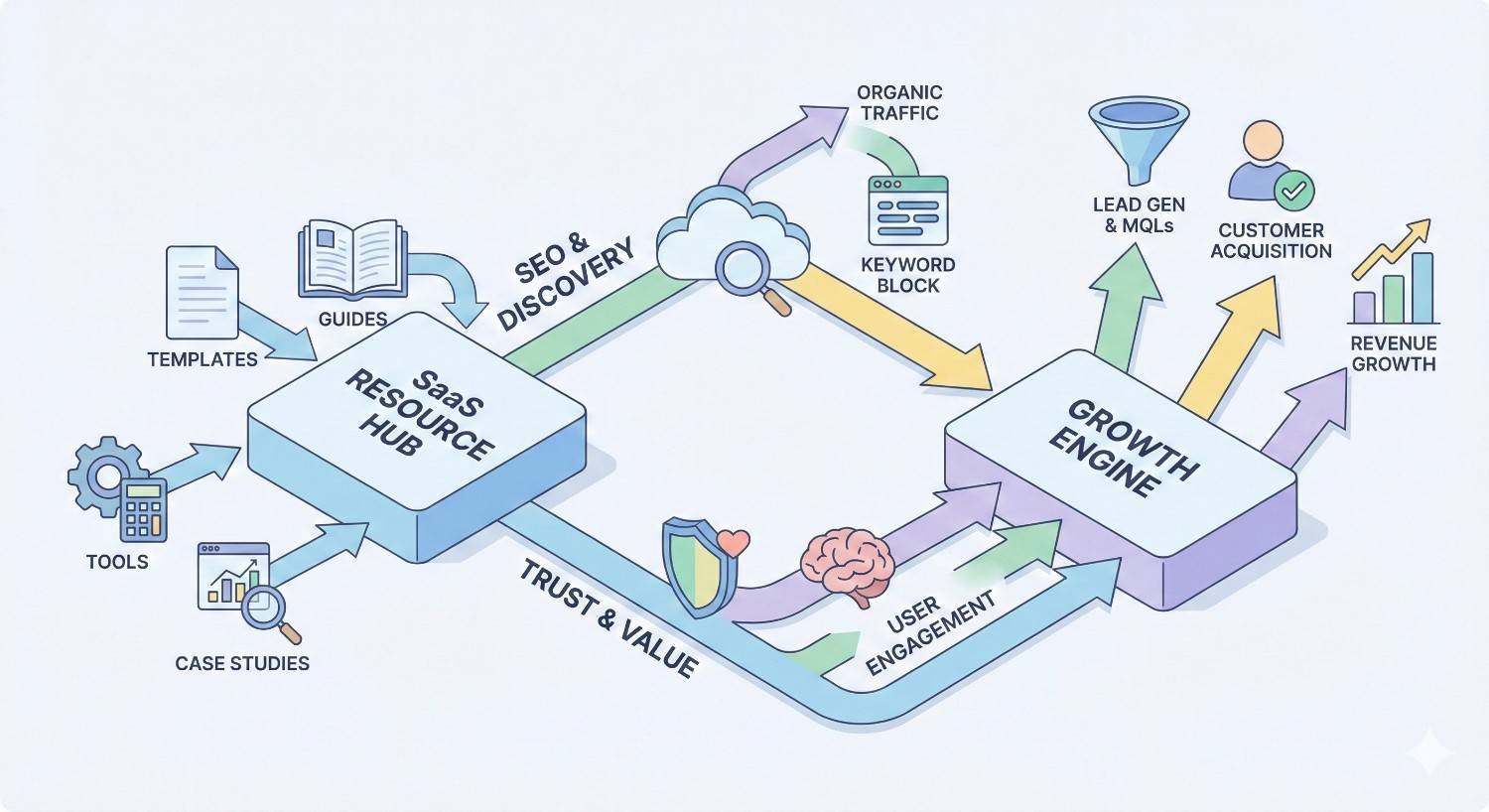
How to Use SaaS Resource Pages for Organic Growth
Building Topical Authority Through Glossary Content
Topical authority develops when search engines recognize your site as a comprehensive resource on specific subjects. Glossary pages accelerate this process by systematically covering terminology within your niche.
Each definition page targets a specific query while contributing to broader topic coverage. When you publish definitions for MRR, ARR, churn, LTV, and CAC, search engines understand your expertise in SaaS metrics. This understanding improves rankings across related content.
The key lies in depth and interconnection. Surface-level definitions copied from competitors provide no advantage. Original explanations with practical examples, calculation methods, and contextual applications demonstrate genuine expertise.
Build glossaries around topic clusters rather than random terms. Group related concepts together. Link between them consistently. Create pillar content that synthesizes multiple definitions into comprehensive guides.
Internal Linking Strategies for Resource Hubs
Internal links distribute authority throughout your site while guiding users to relevant content. Glossary pages create natural linking opportunities that benefit both SEO and user experience.
Within each definition, link to related terms. When explaining churn, reference retention, LTV, and customer success. These contextual links help users explore connected concepts while signaling semantic relationships to search engines.
Link from glossary terms to deeper content. Your MRR definition should connect to articles about revenue forecasting, pricing optimization, and financial modeling. These pathways move users from awareness toward consideration.
Reverse the flow by linking from blog posts and guides back to glossary definitions. When discussing customer acquisition strategies, link CAC and LTV to their respective definitions. This bidirectional linking strengthens the entire content ecosystem.
Use descriptive anchor text that includes target keywords naturally. Avoid generic phrases like “click here” or “learn more.” Instead, link phrases like “calculate customer lifetime value” or “understand net revenue retention.”
Optimizing Glossary Pages for Featured Snippets
Featured snippets display directly in search results, capturing significant click-through rates for definition queries. Glossary pages are ideally positioned to win these placements.
Structure definitions to match snippet formats. Begin each term with a clear, concise definition in the first paragraph. Keep this opening under 50 words. Search engines frequently pull this text directly into featured snippets.
Use the format: “[Term] is [definition].” This direct structure aligns with how Google extracts and displays definition snippets.
Include supporting elements that enhance snippet eligibility. Bulleted lists summarizing key points, tables comparing related concepts, and step-by-step calculations all qualify for different snippet types.
Implement DefinedTerm schema markup to explicitly identify your content as definitions. This structured data helps search engines understand content purpose and increases snippet likelihood.
Types of SaaS Resource Pages That Drive Traffic
Glossary and Definition Pages
Definition pages target “what is” queries with substantial search volume. These informational searches indicate early-stage awareness, making them ideal for top-of-funnel capture.
Individual term pages allow deeper optimization than consolidated glossaries. Each page can target specific long-tail variations, include comprehensive examples, and earn backlinks independently.
The most effective definition pages go beyond dictionary entries. Include calculation formulas, industry benchmarks, common mistakes, and practical applications. This depth satisfies user intent while differentiating from competitors.
Comparison and Alternative Pages
Comparison pages target commercial investigation queries. Users searching “HubSpot vs Salesforce” or “Slack alternatives” have identified a need and are evaluating options.
These pages capture high-intent traffic from users actively considering purchases. Even if your product is not directly compared, establishing authority in comparison content positions your brand as a trusted advisor.
Structure comparisons objectively. Present accurate information about all options. Highlight genuine differentiators rather than manufactured advantages. This balanced approach builds trust and earns links from users sharing helpful resources.
How-To Guides and Tutorials
Tutorial content targets procedural queries. Users searching “how to calculate churn rate” or “how to implement usage-based pricing” need actionable guidance.
These pages demonstrate practical expertise. Anyone can define a term. Showing how to apply concepts in real scenarios proves genuine understanding.
Include screenshots, code examples, templates, and step-by-step instructions. Visual elements increase engagement and time on page while making content more shareable.
Industry Benchmark and Statistics Pages
Statistics pages become linkable assets that earn backlinks naturally. Journalists, bloggers, and researchers cite original data when supporting their own content.
Compile industry benchmarks relevant to your audience. Average churn rates by industry, typical CAC payback periods, and NRR benchmarks by company stage all attract consistent search traffic and citation links.
Update statistics annually to maintain accuracy and relevance. Outdated data loses value quickly. Fresh benchmarks continue earning links and traffic.
Template and Tool Libraries
Templates and tools provide immediate practical value. Downloadable spreadsheets, calculators, and frameworks solve specific problems while capturing leads.
A churn rate calculator or LTV projection template attracts users who need these tools. Gating downloads behind email capture converts traffic into leads while providing genuine value.
Free tools also earn backlinks. Users share helpful resources with colleagues and communities. This organic distribution amplifies reach beyond search traffic alone.
How to Structure a SaaS Glossary for SEO
Alphabetical vs. Categorical Organization
Alphabetical organization works best for comprehensive glossaries with hundreds of terms. Users can quickly locate specific definitions using familiar A-Z navigation.
Categorical organization groups related terms together, improving discoverability for users exploring a topic area. Someone learning about SaaS metrics benefits from seeing MRR, ARR, churn, and LTV presented together.
The optimal approach combines both methods. Provide alphabetical navigation for direct lookups while organizing terms into thematic categories for exploration. This dual structure serves different user needs.
Consider your glossary size when choosing primary organization. Smaller glossaries with fewer than 50 terms work well with categorical grouping. Larger glossaries require alphabetical indexing for usability.
Individual Term Pages vs. Single Glossary Page
Individual pages allow deeper optimization for each term. You can target specific keywords, earn term-specific backlinks, and provide comprehensive coverage without overwhelming users.
Single-page glossaries consolidate authority but limit optimization flexibility. All terms compete for the same page’s ranking potential. Long pages also create user experience challenges on mobile devices.
A hybrid approach often performs best. Create individual pages for high-volume terms with significant search demand. Consolidate lower-volume terms on category pages that still provide value without requiring separate URLs.
Analyze search volume for your target terms. Terms with monthly searches above 500 typically justify individual pages. Lower-volume terms can be grouped effectively.
Schema Markup for Definition Content
Schema markup helps search engines understand your content structure. DefinedTerm schema explicitly identifies glossary content, increasing eligibility for rich results.
Implement FAQPage schema for question-and-answer formatted definitions. This markup can trigger FAQ rich results, expanding your search result footprint.
Use WebPage schema with appropriate page types. Glossary index pages should use CollectionPage. Individual definitions can use DefinedTermSet or Article depending on depth.
Test implementation using Google’s Rich Results Test. Verify markup renders correctly before publishing. Monitor Search Console for structured data errors after launch.
Mobile and UX Considerations
Mobile users represent the majority of search traffic. Glossary pages must function flawlessly on small screens.
Implement sticky navigation that remains accessible while scrolling. Long glossary pages require easy access to alphabetical or categorical filters.
Use expandable sections for lengthy definitions. Show concise summaries by default with options to reveal full explanations. This approach reduces scrolling while maintaining comprehensive coverage.
Ensure tap targets are appropriately sized. Links and buttons should be easily tappable without accidental clicks on adjacent elements.
Test page speed on mobile connections. Large glossaries with many terms can become slow without proper optimization. Lazy load content below the fold to improve initial load times.
Measuring the SEO Impact of SaaS Resource Pages
Key Performance Indicators for Glossary Content
Track organic traffic to glossary pages individually and collectively. Monitor trends over time to identify growth patterns and seasonal variations.
Measure keyword rankings for target terms. Track position changes for primary keywords and discover new ranking opportunities through Search Console queries.
Analyze engagement metrics including time on page, scroll depth, and pages per session. High engagement indicates content satisfies user intent.
Monitor conversion events from glossary traffic. Track newsletter signups, resource downloads, and demo requests originating from definition pages.
Calculate traffic value by multiplying organic visits by estimated cost-per-click for ranking keywords. This metric demonstrates ROI in terms competitors would pay for equivalent traffic.
Traffic and Ranking Benchmarks
New glossary pages typically require three to six months before reaching stable rankings. High-competition terms may take longer. Lower-competition long-tail terms often rank faster.
Expect gradual traffic growth as pages index and accumulate authority. Initial months may show minimal traffic. Patience and consistent optimization yield compounding returns.
Well-optimized glossary pages can rank in top three positions for definition queries. Featured snippet capture significantly increases click-through rates beyond standard organic results.
Benchmark against competitors by analyzing their glossary traffic using tools like Semrush or Ahrefs. Identify gaps where competitors rank for terms you have not yet covered.
Connecting Resource Pages to Lead Generation
Glossary traffic represents top-of-funnel awareness. Converting this traffic requires strategic calls-to-action aligned with user intent.
Offer related resources that provide deeper value. A user reading about churn rate may want a retention strategy guide or churn reduction checklist.
Implement contextual CTAs within definitions. After explaining CAC, offer a customer acquisition cost calculator or benchmarking report.
Track attribution paths from glossary pages through conversion. Understand which terms drive the most valuable traffic and prioritize optimization accordingly.
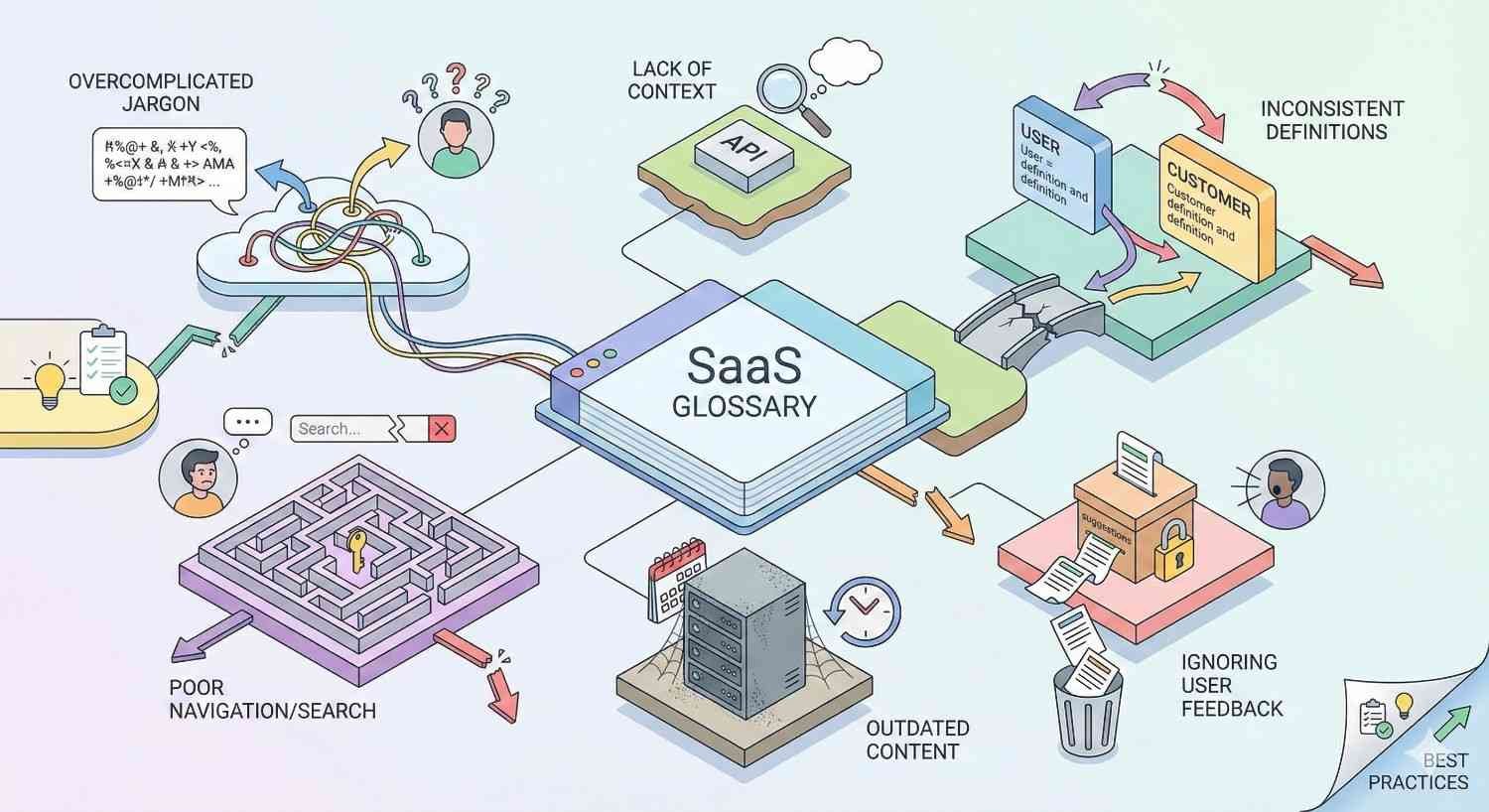
Common Mistakes When Building SaaS Glossaries
Thin Content and Duplicate Definitions
Copying definitions from competitors or dictionaries provides no unique value. Search engines recognize duplicate content and reward original explanations.
Thin definitions that offer only basic explanations fail to satisfy user intent. Users can find surface-level definitions anywhere. Depth and practical application differentiate valuable glossaries.
Each definition should include elements competitors lack. Original examples, calculation methods, common mistakes, and industry context add genuine value.
Aim for minimum 300 words per definition for standalone pages. Consolidated glossary entries can be shorter but should still provide meaningful depth.
Ignoring Search Intent Behind Terms
Not all definition searches have identical intent. Someone searching “what is churn” wants a basic explanation. Someone searching “how to calculate churn rate” needs a formula and methodology.
Analyze SERP results for target terms. Understand what content currently ranks and what format search engines prefer. Align your content with demonstrated intent.
Create multiple content pieces for terms with varied intent. A definition page explains the concept. A how-to guide provides calculation methods. A benchmark page offers industry comparisons.
Failing to Update and Maintain Content
SaaS terminology evolves. Definitions that were accurate two years ago may now be incomplete or misleading.
Schedule regular glossary audits. Review definitions annually at minimum. Update statistics, add new context, and refine explanations based on industry changes.
Monitor Search Console for declining impressions or rankings. Performance drops often indicate content freshness issues or increased competition.
Add new terms as the industry evolves. Emerging concepts like product-led growth or usage-based pricing were not common terminology five years ago. Stay current with evolving language.
SaaS Glossary Examples and Best Practices
High-Performing SaaS Glossary Case Studies
Successful SaaS glossaries share common characteristics. They provide comprehensive coverage of their niche terminology. They offer genuine depth beyond basic definitions. They maintain consistent quality across all entries.
Companies like HubSpot and Salesforce have built glossaries generating significant organic traffic. Their definitions rank for thousands of keywords, driving awareness-stage visitors into their content ecosystems.
These glossaries succeed because they invest in quality. Each definition receives editorial attention. Examples are specific and relevant. Internal links guide users to related resources.
Smaller companies can compete by focusing on niche terminology. Rather than covering all marketing terms, specialize in your specific vertical. Deep expertise in a narrow area outperforms shallow coverage of broad topics.
What Top SaaS Companies Do Differently
Leading SaaS companies treat glossaries as strategic assets rather than afterthoughts. They allocate dedicated resources for creation and maintenance.
They integrate glossaries into broader content strategies. Definitions connect to blog posts, guides, and product pages. This integration maximizes the value of each piece.
They optimize for featured snippets systematically. Structured definitions, schema markup, and clear formatting increase snippet capture rates.
They measure and iterate. Performance data informs updates and expansion. Underperforming terms receive optimization attention. High-performing terms inspire related content.
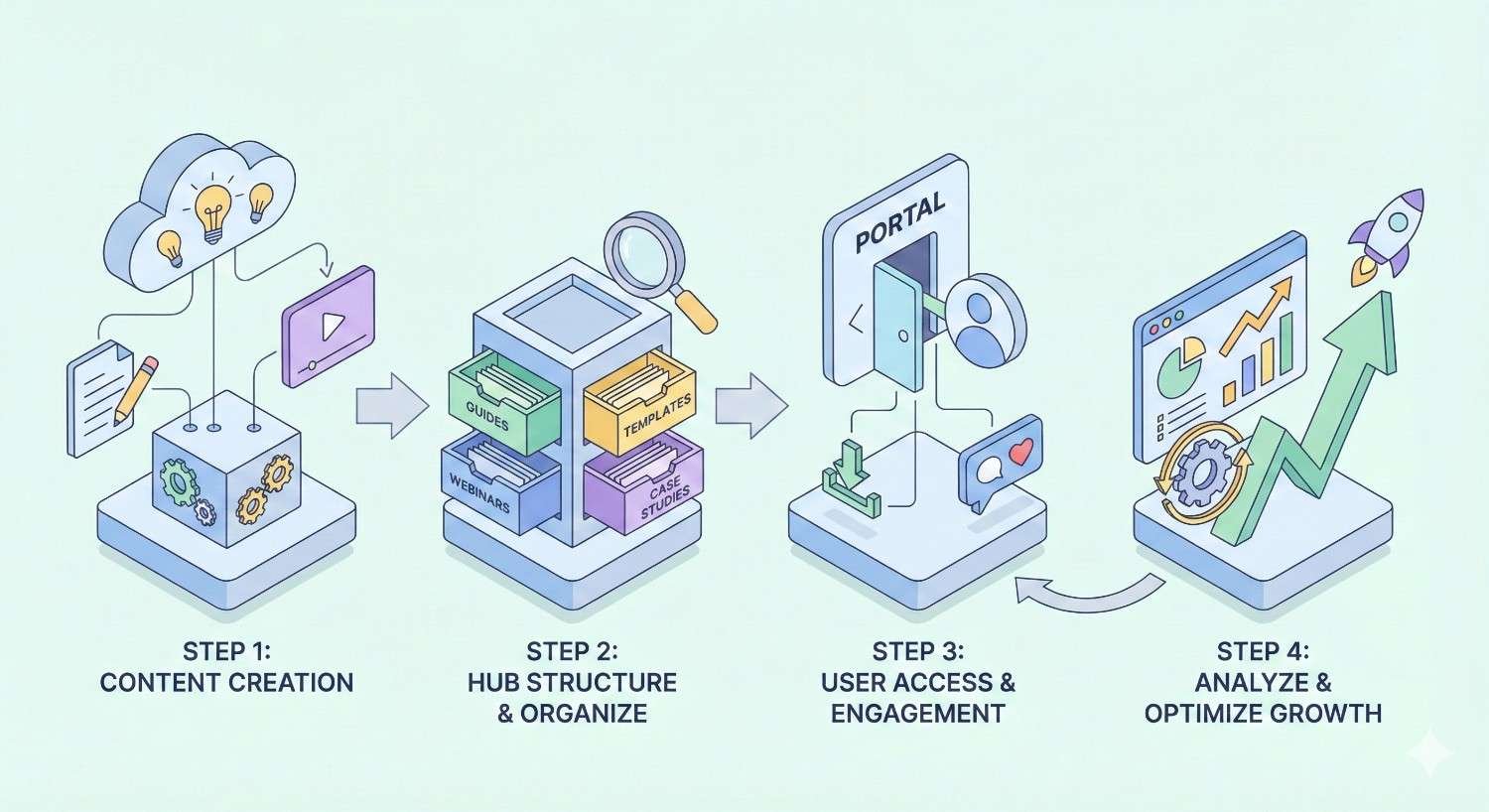
Building Your SaaS Resource Hub: Step-by-Step
Keyword Research for Glossary Terms
Begin with seed terms from your industry. List every acronym, concept, and technical term your audience encounters.
Use keyword research tools to validate search volume. Prioritize terms with meaningful monthly searches and manageable competition.
Analyze competitor glossaries to identify gaps. Find terms they cover that you have missed. Find terms they have neglected that you can own.
Group terms into thematic clusters. This organization informs content structure and internal linking strategy.
Consider search intent for each term. Categorize terms by user need: definition, calculation, comparison, or application.
Content Creation Workflow
Develop templates that ensure consistent quality. Each definition should follow a standard structure while allowing flexibility for term-specific needs.
Assign subject matter experts to review technical accuracy. Definitions must be correct to build trust and authority.
Create editorial guidelines covering tone, depth, and formatting. Consistency across hundreds of terms requires documented standards.
Batch similar terms together for efficient production. Writing related definitions in sequence improves coherence and speeds creation.
Implement quality checks before publication. Review for accuracy, completeness, and optimization before any page goes live.
Launch and Promotion Strategy
Launch with a minimum viable glossary covering core terms. You do not need hundreds of definitions before publishing. Start with 20-30 essential terms and expand systematically.
Submit new pages to Google Search Console for indexing. Monitor crawl status and address any indexing issues promptly.
Promote glossary content through existing channels. Email subscribers, social followers, and community members represent initial traffic sources.
Pursue link building opportunities. Reach out to sites that link to competitor glossaries. Offer your superior resource as an alternative.
Ongoing Optimization and Expansion
Monitor performance weekly during initial months. Identify quick wins and optimization opportunities.
Add new terms monthly based on keyword research and industry developments. Consistent expansion builds topical authority over time.
Update existing definitions based on performance data. Improve underperforming pages. Expand successful pages with additional depth.
Test different formats and structures. A/B test CTAs, layouts, and content elements to optimize conversion rates.
Conclusion
SaaS glossary and resource pages represent one of the most efficient organic growth strategies available to software companies. They capture high-intent informational traffic, build topical authority, and create natural pathways to conversion.
Success requires commitment to quality over quantity. Comprehensive definitions with practical applications outperform thin content every time. Strategic internal linking amplifies the value of each page while guiding users through your content ecosystem.
At White Label SEO Service, we help SaaS companies build resource hubs that drive sustainable organic growth. Our team handles keyword research, content creation, technical optimization, and ongoing expansion so you can focus on your core business. Contact us to discuss your glossary strategy.
Frequently Asked Questions About SaaS Glossaries
How many terms should a SaaS glossary include?
Start with 20-30 core terms covering essential concepts in your niche. Expand to 50-100 terms within the first year based on keyword research and audience needs. Quality matters more than quantity, so prioritize depth over breadth.
Should each glossary term have its own page?
High-volume terms with monthly searches above 500 benefit from individual pages. Lower-volume terms can be grouped on category pages. This hybrid approach maximizes optimization potential while maintaining efficient site architecture.
How do glossary pages support link building?
Glossary pages earn links naturally when they provide superior definitions. Journalists, bloggers, and educators cite authoritative resources. Proactive outreach to sites linking to competitor glossaries can accelerate link acquisition.
What is the ROI of SaaS resource pages?
Calculate ROI by multiplying organic traffic by estimated cost-per-click for ranking keywords. A glossary generating 10,000 monthly visits for keywords averaging $5 CPC delivers $50,000 in equivalent paid traffic value monthly.
How long does it take for glossary pages to rank?
New glossary pages typically require three to six months to reach stable rankings. Lower-competition terms may rank faster. High-competition terms require more time and authority building. Consistent optimization accelerates results.
What metrics should I track for resource page performance?
Track organic traffic, keyword rankings, engagement metrics, and conversion events. Monitor time on page and scroll depth to assess content quality. Calculate traffic value to demonstrate ROI in business terms.
Can small companies compete with enterprise glossaries?
Yes. Focus on niche terminology where large competitors lack depth. Specialized expertise in a narrow vertical outperforms shallow coverage of broad topics. Quality and relevance matter more than domain authority for definition queries.


