

A well-optimized site hierarchy directly impacts how search engines crawl, index, and rank your pages. When your website structure follows logical patterns, Googlebot discovers content faster, distributes link equity efficiently, and understands topical relationships between pages.
This matters because poor site architecture creates crawl waste, orphan pages, and diluted ranking signals. Most sites leave significant organic traffic on the table simply due to structural inefficiencies that compound over time.
This guide covers hierarchy models, URL alignment, internal linking strategies, technical implementation, and measurement frameworks to transform your site structure into a competitive advantage.
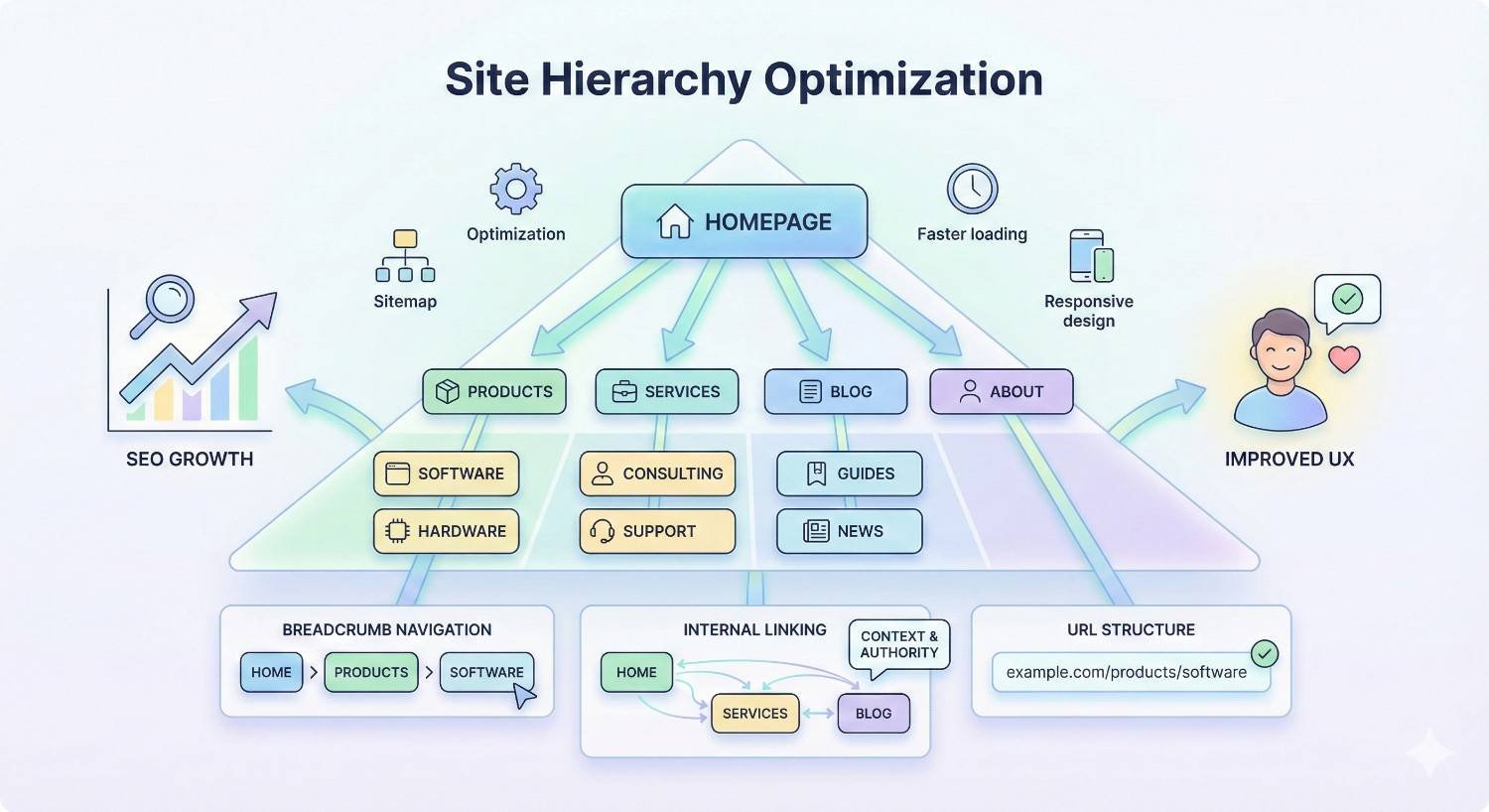
What Is Site Hierarchy Optimization?
Site hierarchy optimization is the strategic organization of website pages into logical parent-child relationships that maximize crawl efficiency, user navigation, and search engine understanding. It encompasses how pages connect, how URLs reflect content relationships, and how authority flows throughout your domain.
Think of your site hierarchy as the skeletal system of your website. Every page needs a clear position within the overall structure. When that structure follows predictable patterns, both users and search engines navigate confidently.
Core Components of Site Architecture
Site architecture consists of three interconnected elements: information architecture, technical structure, and navigation systems.
Information architecture defines how content is categorized and grouped. This includes your taxonomy, category relationships, and content clustering strategy. Strong information architecture means users intuitively understand where they are and what related content exists.
Technical structure encompasses URL patterns, internal linking, XML sitemaps, and crawl directives. These elements tell search engines how to interpret your hierarchy programmatically.
Navigation systems include main menus, footer links, breadcrumbs, and contextual links. Navigation translates your hierarchy into clickable pathways for users.
Each component must align. Mismatches between your URL structure and navigation create confusion for crawlers and users alike.
How Site Structure Impacts Search Performance
Your site structure directly influences four critical SEO factors: crawlability, indexation, link equity distribution, and topical relevance signals.
Crawlability determines which pages Googlebot discovers. Pages buried deep in your hierarchy or disconnected from internal links may never get crawled. Google’s documentation confirms that crawlers follow links to discover new content.
Indexation depends on crawl priority. Pages receiving more internal links and sitting higher in your hierarchy typically get indexed faster and more reliably.
Link equity distribution follows your internal linking patterns. Strategic hierarchy design ensures your most important pages receive the strongest authority signals from internal links.
Topical relevance emerges from content clustering. When related pages connect through logical hierarchy, search engines better understand your expertise on specific subjects.
Hierarchy vs. Navigation vs. URL Structure
These three concepts overlap but serve distinct purposes. Understanding their differences prevents common optimization mistakes.
Hierarchy is the conceptual organization of your content. It exists as a mental model and planning document before any code is written. Your hierarchy defines parent-child relationships between content categories.
Navigation is the user-facing implementation of hierarchy. Menus, breadcrumbs, and links translate hierarchical relationships into clickable elements. Navigation can differ from hierarchy when you want to surface content outside its natural position.
URL structure is the technical representation of hierarchy in your URLs. URLs like /category/subcategory/page reflect hierarchical relationships, but URLs don’t have to mirror hierarchy exactly.
The key insight: these three elements should align strategically, not necessarily identically. Your navigation might surface popular deep pages prominently. Your URLs might flatten certain hierarchies for simplicity. But the underlying conceptual hierarchy should remain consistent.
Why Site Hierarchy Matters for SEO
Site hierarchy isn’t just organizational preference. It directly impacts measurable SEO outcomes including crawl budget utilization, PageRank flow, user engagement metrics, and topical authority development.
Crawl Budget & Indexation Efficiency
Crawl budget represents the number of pages Googlebot will crawl on your site within a given timeframe. For large sites, inefficient hierarchy wastes crawl budget on low-value pages while important content goes undiscovered.
Google’s crawl budget documentation explains that crawl rate and crawl demand together determine how much attention your site receives. Poor hierarchy inflates crawl demand by creating unnecessary pages and duplicate paths.
Flat hierarchies with excessive pages at the same level force crawlers to evaluate thousands of similar-priority URLs. Deep hierarchies bury important content behind multiple click layers, reducing crawl frequency for those pages.
Optimal hierarchy balances breadth and depth. Important pages sit within three clicks of the homepage. Category pages consolidate related content. Pagination and filters use proper canonicalization.
PageRank Flow & Link Equity Distribution
Internal links pass PageRank between pages. Your hierarchy determines the default flow patterns for this authority.
Pages higher in your hierarchy naturally accumulate more internal links. Your homepage links to main categories. Categories link to subcategories. Subcategories link to individual pages. This creates a pyramid where authority concentrates at the top.
Strategic hierarchy design ensures your most valuable pages receive proportional authority. If your highest-converting pages sit deep in the hierarchy with few internal links, they’re starved of the ranking signals they need.
Link equity distribution follows predictable patterns:
- Homepage receives external links and distributes authority downward
- Category pages aggregate authority from child pages and pass it to siblings
- Individual pages receive authority based on their position and internal link count
Understanding these patterns lets you engineer authority flow toward priority pages.
User Experience & Engagement Signals
Site hierarchy shapes user experience in ways that generate engagement signals search engines measure.
Clear hierarchy reduces bounce rates. Users who understand where they are and what’s available explore more pages. Confusing hierarchy frustrates users, increasing pogo-sticking back to search results.
Logical navigation paths increase pages per session. When related content connects through intuitive hierarchy, users naturally discover additional relevant pages.
Time on site improves when hierarchy matches user mental models. Users spend less time figuring out navigation and more time consuming content.
These engagement signals correlate with rankings. While Google hasn’t confirmed direct ranking factors, their quality rater guidelines emphasize user experience as a quality indicator.
Topical Authority & Content Clustering
Modern SEO rewards topical authority. Sites demonstrating comprehensive expertise on subjects outrank sites with scattered, disconnected content.
Hierarchy enables topical authority through content clustering. Related pages grouped under common parent categories signal topical relationships to search engines.
When your hierarchy organizes content by topic, you create natural content silos. Each silo covers a subject comprehensively. Internal links within silos reinforce topical connections. The parent category page becomes a topical hub.
This clustering helps search engines understand:
- What topics your site covers
- How deeply you cover each topic
- Which pages are most authoritative on specific subjects
- How subtopics relate to broader themes
Without intentional hierarchy, topical signals scatter. Pages compete with each other instead of supporting collective authority.
Site Hierarchy Models & Structures
Different hierarchy models suit different site types and business goals. Understanding each model’s strengths helps you choose the right foundation.
Flat vs. Deep Hierarchy
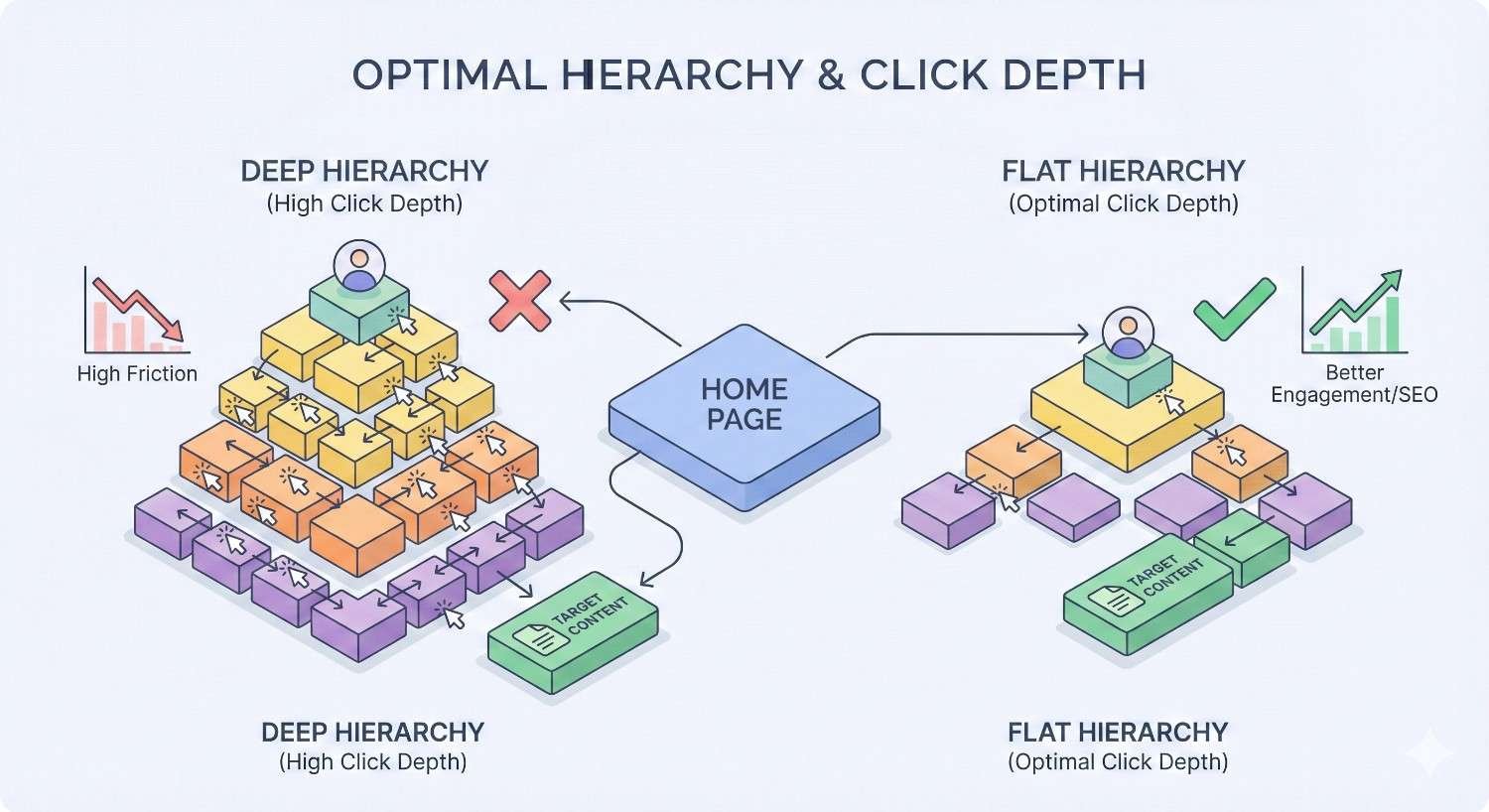
Flat hierarchies minimize click depth. Most pages sit one or two clicks from the homepage. Deep hierarchies create multiple levels, with some pages requiring four or more clicks to reach.
Flat hierarchy advantages:
- Maximum crawl accessibility for all pages
- Equal authority distribution across pages
- Simpler navigation for users
- Faster indexation of new content
Flat hierarchy disadvantages:
- Difficult to scale beyond hundreds of pages
- Limited topical organization
- Navigation menus become overwhelming
- Harder to establish content relationships
Deep hierarchy advantages:
- Scales to millions of pages
- Clear topical organization
- Manageable navigation at each level
- Strong content clustering signals
Deep hierarchy disadvantages:
- Important pages may get buried
- Crawl frequency decreases with depth
- Authority dilutes across levels
- Users may get lost in navigation
Most sites benefit from a hybrid approach: relatively flat for primary content, with deeper structures for archives, filters, and secondary pages.
Pyramid (Hierarchical) Structure
The pyramid structure is the most common hierarchy model. Content organizes into progressively narrower categories from top to bottom.
At the top sits your homepage. Below that, main category pages. Each category contains subcategories. Subcategories contain individual content pages.
Pyramid structure example:
Copy
Homepage
├── Category A
│ ├── Subcategory A1
│ │ ├── Page 1
│ │ └── Page 2
│ └── Subcategory A2
├── Category B
└── Category C
This model works well for most websites because it mirrors how humans naturally categorize information. Users understand that drilling down reveals more specific content.
The pyramid structure also aligns with how search engines evaluate topical relevance. Parent pages establish broad topics. Child pages demonstrate depth within those topics.
Silo Architecture
Silo architecture takes the pyramid model further by strictly isolating topical clusters. Pages within a silo link primarily to other pages in the same silo, with limited cross-silo linking.
The goal is to concentrate topical relevance within each silo. When a silo’s pages link mostly to each other, search engines receive strong signals about topical relationships.
Silo structure principles:
- Each silo covers one distinct topic
- Internal links stay within silos when possible
- Cross-silo links use strategic anchor text
- Silo landing pages receive the most internal links
Silo architecture works best for sites covering multiple distinct topics where you want to rank for competitive terms in each area. The isolation prevents topical dilution.
However, strict silos can feel artificial. Users often want to explore related topics across silos. Overly rigid implementation sacrifices user experience for SEO theory.
Hub-and-Spoke Model
The hub-and-spoke model organizes content around central pillar pages (hubs) with supporting content (spokes) linking back to them.
Each hub covers a broad topic comprehensively. Spokes address specific subtopics, questions, or angles related to the hub. All spokes link to their hub. The hub links to all its spokes.
Hub-and-spoke benefits:
- Clear topical authority signals
- Flexible content organization
- Natural internal linking patterns
- Scalable without deep nesting
This model works particularly well for content-heavy sites and blogs. You can add new spoke content indefinitely without restructuring your hierarchy.
The hub-and-spoke model also aligns with how users search. They might enter through a specific spoke (long-tail query) then navigate to the hub for comprehensive information.
Optimal Hierarchy Depth & Click Depth
Click depth measures how many clicks separate a page from the homepage. Optimal depth balances accessibility with organizational clarity.
The 3-Click Rule: Myth vs. Reality
The “3-click rule” suggests all important pages should be reachable within three clicks of the homepage. This guideline has merit but isn’t absolute.
Where the rule holds true:
- Important pages should be easily accessible
- Excessive depth correlates with lower crawl frequency
- Users prefer shorter navigation paths
- Authority dilutes with each hierarchy level
Where the rule oversimplifies:
- Large sites can’t fit everything within three clicks
- Click depth matters less than link equity
- User intent determines acceptable depth
- Well-linked deep pages can rank well
Research from various SEO studies suggests that pages within four clicks of the homepage generally perform well, assuming adequate internal linking.
The real principle: important pages need strong internal link profiles, regardless of click depth. A page four clicks deep with 50 internal links outperforms a page two clicks deep with 3 internal links.
Determining Ideal Depth for Your Site
Ideal hierarchy depth depends on your site’s size, content type, and business priorities.
Small sites (under 100 pages): Two to three levels maximum. Flat hierarchy works well. Every page can receive direct homepage or category links.
Medium sites (100-1,000 pages): Three to four levels. Category and subcategory structure provides organization without excessive depth.
Large sites (1,000-100,000 pages): Four to five levels. Multiple category tiers handle content volume. Strategic internal linking ensures important pages remain accessible.
Enterprise sites (100,000+ pages): Five or more levels may be necessary. Crawl budget management becomes critical. XML sitemaps and internal linking compensate for depth.
Evaluate your current depth using crawl tools. If important pages sit beyond five clicks with few internal links, restructuring may be warranted.
Balancing Scalability with Accessibility
Your hierarchy must accommodate growth without sacrificing current performance.
Scalability considerations:
- Can you add new categories without restructuring?
- Do URL patterns allow for new subcategories?
- Will navigation remain usable as content grows?
- Can internal linking scale with content volume?
Accessibility considerations:
- Are priority pages within reasonable click depth?
- Do all pages have adequate internal links?
- Can users find content through multiple pathways?
- Does navigation surface important content prominently?
Build hierarchy with expansion in mind. Use URL structures that accommodate new categories. Design navigation that scales gracefully. Create internal linking systems that automatically connect related content.
URL Structure & Hierarchy Alignment
URLs should reflect your hierarchy while remaining user-friendly and technically sound.
Descriptive vs. Shallow URL Paths
Descriptive URLs include category paths: /category/subcategory/page-name. Shallow URLs minimize path depth: /page-name.
Descriptive URL advantages:
- Communicate hierarchy to users and search engines
- Provide context before clicking
- Enable breadcrumb generation
- Support category-based analysis
Shallow URL advantages:
- Shorter, easier to share
- Flexible if hierarchy changes
- No keyword stuffing in paths
- Simpler redirect management
Most sites benefit from moderate descriptive URLs. Include one or two category levels, but avoid excessive nesting. /services/seo-audit communicates hierarchy without /services/digital-marketing/seo/technical-seo/seo-audit.
Subdirectories vs. Subdomains
Subdirectories (example.com/blog) keep content on your main domain. Subdomains (blog.example.com) create separate entities.
Subdirectory advantages:
- Consolidated domain authority
- Simpler technical management
- Unified analytics tracking
- Clear hierarchy signals
Subdomain use cases:
- Technically separate applications
- Different geographic targets
- Distinct brand properties
- Enterprise-scale separation needs
For most SEO purposes, subdirectories outperform subdomains. Google treats subdomains as separate sites for many purposes, potentially diluting authority.
Use subdomains only when technical requirements demand separation or when you intentionally want distinct properties.
URL Consistency & Canonicalization
Consistent URL patterns prevent duplicate content and consolidate ranking signals.
URL consistency rules:
- Choose trailing slash or no trailing slash, then enforce it
- Use lowercase only
- Avoid URL parameters when possible
- Implement consistent category paths
Canonicalization requirements:
- Set canonical tags on all pages
- Point canonicals to preferred URL versions
- Handle www vs. non-www consistently
- Manage pagination canonicals properly
Inconsistent URLs create duplicate content. If /page, /page/, and /Page all resolve, search engines may index multiple versions, splitting ranking signals.
Implement server-side redirects to enforce your preferred URL format. Use canonical tags as a secondary signal.
Internal Linking Strategy for Hierarchy Optimization
Internal links are the connective tissue of your hierarchy. Strategic linking amplifies hierarchy signals and distributes authority effectively.
Strategic Link Placement & Anchor Text
Where you place internal links and what anchor text you use significantly impacts SEO value.
High-value link placements:
- Within main content body (contextual links)
- Navigation menus (sitewide authority)
- Related content sections
- Breadcrumb navigation
Lower-value placements:
- Footer link blocks
- Sidebar widgets with excessive links
- Author bio sections
Anchor text should be descriptive and varied. Use target keywords naturally, but avoid exact-match anchor text on every link. Variation signals natural linking patterns.
Anchor text best practices:
- Include target keywords in some anchors
- Use natural phrase variations
- Avoid generic anchors like “click here”
- Match anchor text to destination page topic
Contextual vs. Navigational Links
Contextual links appear within content, surrounded by relevant text. Navigational links appear in menus, sidebars, and footers.
Contextual links:
- Pass more topical relevance
- Appear natural to users
- Can use varied anchor text
- Require manual or automated insertion
Navigational links:
- Provide sitewide authority
- Establish hierarchy structure
- Use consistent anchor text
- Scale automatically with templates
Both link types serve important purposes. Navigational links establish your hierarchy framework. Contextual links reinforce topical relationships and distribute authority to specific pages.
Prioritize contextual linking for pages needing ranking boosts. Ensure navigational linking covers all important category and subcategory pages.
Orphan Page Prevention
Orphan pages have no internal links pointing to them. Search engines may never discover orphan pages, and they receive no internal authority.
Common orphan page causes:
- New pages not added to navigation
- Removed pages still accessible via direct URL
- Pagination pages without proper linking
- Landing pages created for campaigns
Orphan prevention strategies:
- Audit internal links regularly using crawl tools
- Automate related content linking
- Include new pages in XML sitemaps
- Review navigation after content changes
Every indexable page should have at least one internal link, preferably multiple links from relevant pages.
Link Equity Distribution Patterns
Internal links distribute PageRank throughout your site. Understanding distribution patterns helps you engineer authority flow.
Default distribution pattern: Homepage receives most external links → passes authority to main categories → categories pass to subcategories → subcategories pass to individual pages.
Each level receives diluted authority. Pages at the bottom of deep hierarchies receive minimal authority through default patterns.
Strategic redistribution tactics:
- Link directly from homepage to priority deep pages
- Create hub pages that link to related content clusters
- Use contextual links to boost specific pages
- Reduce links to low-priority pages
The goal is directing authority toward pages with the highest business value, regardless of their natural hierarchy position.
Category & Taxonomy Planning
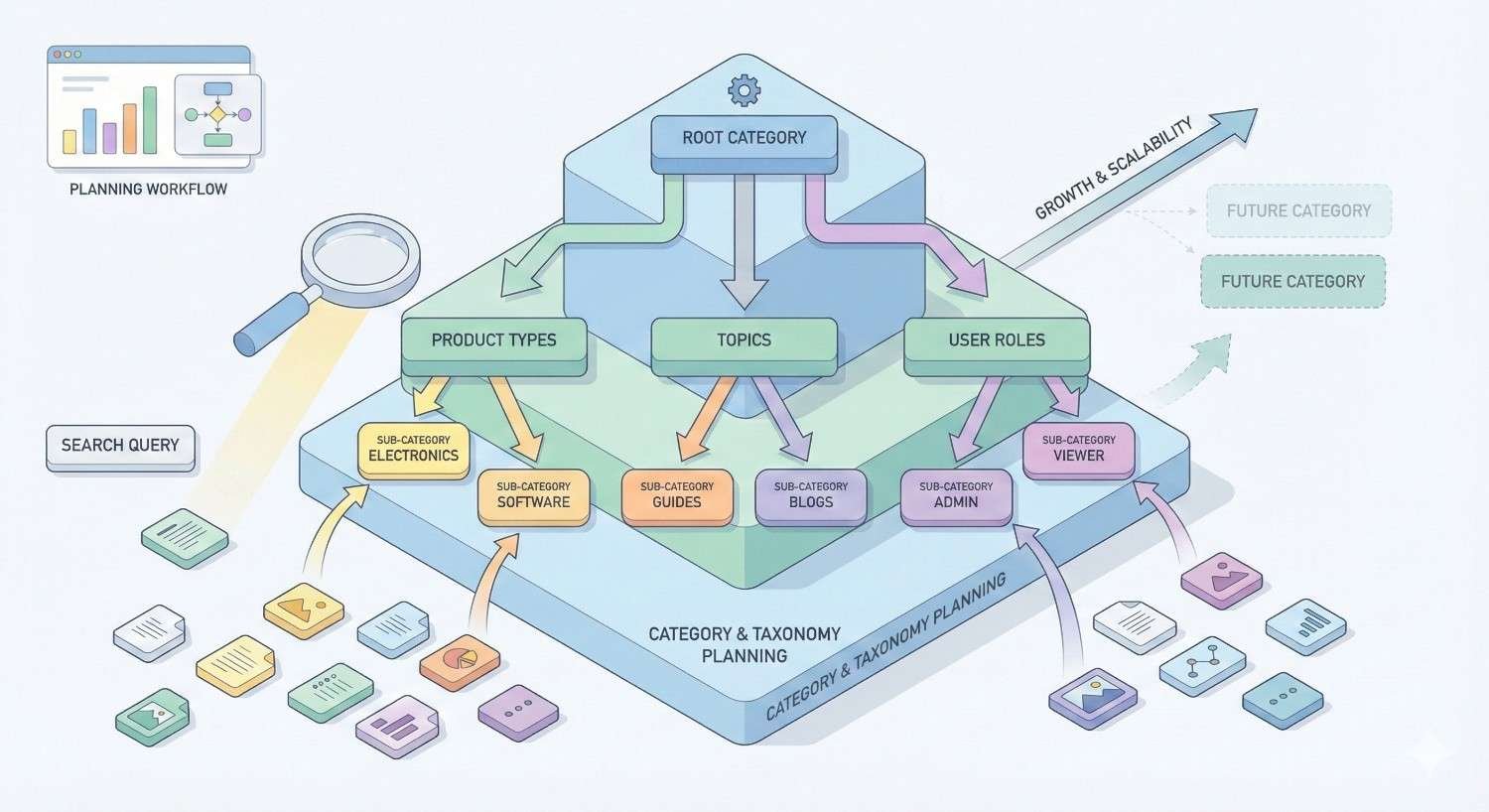
Your category structure forms the backbone of site hierarchy. Thoughtful taxonomy planning prevents structural problems that are difficult to fix later.
Parent-Child Relationships
Every category should have a clear parent, and every page should belong to a logical category. Ambiguous relationships confuse users and search engines.
Defining parent-child relationships:
- Parent categories cover broad topics
- Child categories address specific subtopics
- Each child has exactly one primary parent
- Depth reflects specificity, not importance
Relationship clarity tests:
- Can you explain why each child belongs to its parent?
- Would users expect to find this content under this category?
- Does the parent category naturally encompass all its children?
- Are sibling categories mutually exclusive?
Avoid creating categories just to have them. Each category should serve a clear organizational purpose and contain sufficient content to justify its existence.
Category Naming Conventions
Category names should be descriptive, keyword-aware, and user-friendly.
Naming best practices:
- Use terms your audience searches for
- Keep names concise but clear
- Maintain consistent naming patterns
- Avoid jargon unless audience-appropriate
Naming mistakes to avoid:
- Generic names like “Resources” or “More”
- Overly clever names that obscure meaning
- Inconsistent capitalization or formatting
- Duplicate names across different sections
Category names appear in URLs, navigation, and breadcrumbs. Choose names that work well in all contexts.
Avoiding Category Overlap & Duplication
Overlapping categories create confusion about where content belongs and can cause duplicate content issues.
Overlap indicators:
- Content could logically fit in multiple categories
- Similar category names with unclear distinctions
- Users frequently navigate to wrong categories
- Internal search shows category confusion
Preventing overlap:
- Define clear category scope before creating
- Document category criteria for content creators
- Audit existing content placement regularly
- Merge or restructure overlapping categories
When overlap exists, choose a primary category for each piece of content. Use tags or secondary categorization for cross-cutting themes rather than duplicate category placement.
Faceted Navigation & SEO Considerations
Faceted navigation lets users filter content by multiple attributes. E-commerce sites commonly use facets for size, color, price, and brand.
Faceted navigation SEO risks:
- Creates thousands of URL combinations
- Generates thin or duplicate content pages
- Wastes crawl budget on filter combinations
- Dilutes authority across parameter URLs
Faceted navigation solutions:
- Canonicalize filtered pages to main category
- Use robots.txt to block low-value combinations
- Implement AJAX filtering without URL changes
- Allow indexation only for valuable filter combinations
Google’s guidance on faceted navigation recommends careful management to prevent crawl budget waste.
Identify which filter combinations have search demand. Allow those to be indexed. Block or canonicalize the rest.
Technical Implementation of Site Hierarchy
Technical elements reinforce your hierarchy signals to search engines. Proper implementation ensures crawlers understand your intended structure.
XML Sitemap Structure & Priority Signals
XML sitemaps list pages you want search engines to index. Sitemap structure can reflect hierarchy organization.
Sitemap hierarchy options:
- Single sitemap listing all pages
- Sitemap index with category-based child sitemaps
- Separate sitemaps for content types (posts, pages, products)
For large sites, category-based sitemap organization helps search engines understand content groupings. A sitemap index pointing to /sitemap-category-a.xml, /sitemap-category-b.xml reinforces category structure.
Priority and changefreq signals: While Google has stated these signals carry limited weight, they can indicate your hierarchy priorities. Assign higher priority values to important category pages and lower values to deep archive content.
Sitemap best practices:
- Include only indexable, canonical URLs
- Update sitemaps when content changes
- Keep individual sitemaps under 50,000 URLs
- Submit sitemaps through Google Search Console
Breadcrumb Navigation Schema Markup
Breadcrumbs display the hierarchy path to the current page. Schema markup helps search engines understand and display this path.
Breadcrumb benefits:
- Reinforce hierarchy signals to search engines
- Improve user navigation and orientation
- Enable rich results in search listings
- Provide additional internal links
Implementing breadcrumb schema: Use JSON-LD structured data following Google’s breadcrumb guidelines. Each breadcrumb item needs a name and URL.
json
Copy
{
“@context”: “https://schema.org”,
“@type”: “BreadcrumbList”,
“itemListElement”: [{
“@type”: “ListItem”,
“position”: 1,
“name”: “Category”,
“item”: “https://example.com/category”
}]
}
Ensure breadcrumb paths match your actual hierarchy. Inconsistencies between breadcrumbs and URL structure confuse search engines.
HTML Sitemap Best Practices
HTML sitemaps provide user-accessible page listings. While less critical than XML sitemaps for crawling, they offer hierarchy visualization and internal linking benefits.
HTML sitemap purposes:
- Help users find content
- Provide internal links to all pages
- Demonstrate site organization
- Support accessibility requirements
HTML sitemap structure: Organize your HTML sitemap to reflect hierarchy. Group pages under category headings. Use indentation or visual hierarchy to show parent-child relationships.
For large sites, create category-specific HTML sitemaps rather than one overwhelming list.
Robots.txt & Crawl Directive Management
Robots.txt controls which areas of your site search engines can crawl. Strategic use supports hierarchy optimization.
Robots.txt hierarchy applications:
- Block low-value sections from crawling
- Prevent crawl waste on filtered URLs
- Protect staging or development areas
- Guide crawlers toward priority content
Common directives:
Copy
User-agent: *
Disallow: /admin/
Disallow: /cart/
Disallow: /*?filter=
Allow: /
Sitemap: https://example.com/sitemap.xml
Be cautious with robots.txt. Blocking important content prevents indexation. Test changes carefully before implementation.
Auditing Your Current Site Hierarchy
Before optimizing, you need to understand your current hierarchy state. Systematic auditing reveals structural issues and opportunities.
Crawl Analysis & Depth Mapping
Crawl your site using tools like Screaming Frog, Sitebulb, or Ahrefs Site Audit. These tools map your actual hierarchy based on internal links.
Key crawl metrics:
- Click depth distribution (how many pages at each level)
- Internal link counts per page
- Orphan pages (no internal links)
- Redirect chains affecting hierarchy
- Canonical tag implementation
Depth mapping process:
- Run a full site crawl
- Export click depth data
- Identify pages beyond acceptable depth
- Map internal link distribution
- Compare actual structure to intended hierarchy
Crawl data often reveals surprises. Pages you thought were prominent may have few internal links. Important content may be buried deeper than expected.
Identifying Structural Issues
Common hierarchy problems emerge from crawl analysis and manual review.
Structural issues to identify:
- Orphan pages: No internal links pointing to them
- Dead ends: Pages with no outbound internal links
- Redirect chains: Multiple redirects between pages
- Broken links: Internal links to non-existent pages
- Duplicate content: Multiple URLs for same content
- Thin categories: Categories with insufficient content
- Deep burial: Important pages beyond four clicks
Prioritize issues by impact. Orphan pages for important content need immediate attention. Deep burial of low-priority archives may be acceptable.
Tools for Hierarchy Visualization
Visual hierarchy maps help identify structural patterns and problems.
Visualization tools:
- Screaming Frog: Crawl visualization and directory tree views
- Sitebulb: Interactive hierarchy diagrams
- Visual Site Mapper: Simple visual sitemaps
- Dyno Mapper: Comprehensive site mapping
What to look for in visualizations:
- Balanced vs. lopsided category distribution
- Isolated content clusters
- Unexpected depth patterns
- Missing connections between related areas
Visualizations make hierarchy problems obvious that spreadsheet data obscures.
Performance Metrics to Track
Establish baseline metrics before making hierarchy changes. Track these metrics to measure optimization impact.
Hierarchy-related metrics:
- Crawl stats: Pages crawled per day (Google Search Console)
- Indexation rate: Indexed pages vs. submitted pages
- Click depth distribution: Percentage of pages at each level
- Internal link distribution: Average links per page
- Orphan page count: Pages without internal links
Performance correlation metrics:
- Organic traffic by hierarchy level
- Rankings for category vs. individual pages
- Bounce rate by click depth
- Pages per session by entry point
Track metrics over time to identify trends and measure optimization impact.
Implementing Site Hierarchy Changes Safely
Hierarchy changes carry ranking risk. Careful planning and execution minimize disruption while achieving structural improvements.
Migration Planning & Risk Assessment
Before changing hierarchy, assess risks and plan mitigation strategies.
Risk assessment factors:
- Number of URLs changing
- Current ranking performance of affected pages
- External links pointing to changing URLs
- Business impact of temporary ranking drops
Planning requirements:
- Document all URL changes
- Map redirects before implementation
- Establish rollback procedures
- Set monitoring alerts for traffic drops
- Schedule changes during low-traffic periods
Large hierarchy changes should be treated as site migrations. Apply the same rigor you would to a domain change.
301 Redirect Mapping Strategy
Every changed URL needs a 301 redirect to its new location. Redirect mapping ensures no authority is lost.
Redirect mapping process:
- Export all current URLs
- Identify URLs that will change
- Map each old URL to its new equivalent
- Verify mappings for accuracy
- Implement redirects before URL changes go live
- Test all redirects post-implementation
Redirect best practices:
- Redirect to the most relevant new URL, not just homepage
- Avoid redirect chains (old → intermediate → new)
- Implement redirects at server level when possible
- Monitor redirect performance in Search Console
Redirect errors are the most common cause of ranking loss during hierarchy changes. Double-check every mapping.
Staged Rollout vs. Complete Restructure
You can implement hierarchy changes all at once or in phases. Each approach has tradeoffs.
Staged rollout advantages:
- Limits risk exposure
- Allows course correction
- Easier to monitor impact
- Less overwhelming for teams
Complete restructure advantages:
- Faster to complete
- Avoids prolonged transition state
- Cleaner implementation
- Single monitoring period
For major changes affecting hundreds of URLs, staged rollout reduces risk. For smaller changes or when speed matters, complete restructure may be appropriate.
If staging, prioritize changes by risk level. Start with lower-traffic sections to validate your process before touching high-value areas.
Monitoring & Recovery Protocols
Active monitoring during and after hierarchy changes enables rapid response to problems.
Monitoring checklist:
- Daily crawl stats in Search Console
- Ranking tracking for priority keywords
- Organic traffic by landing page
- Crawl errors and redirect issues
- Indexation status of new URLs
Recovery triggers:
- Traffic drop exceeding 20% for more than 3 days
- Significant ranking losses for priority terms
- Crawl errors spiking unexpectedly
- New URLs not getting indexed
Recovery actions:
- Verify redirect implementation
- Check for crawl blocks or noindex tags
- Review canonical tag accuracy
- Submit updated sitemaps
- Request indexing for priority pages
Have recovery procedures documented before making changes. When problems occur, you need to act quickly.
Site Hierarchy for Different Platform Types
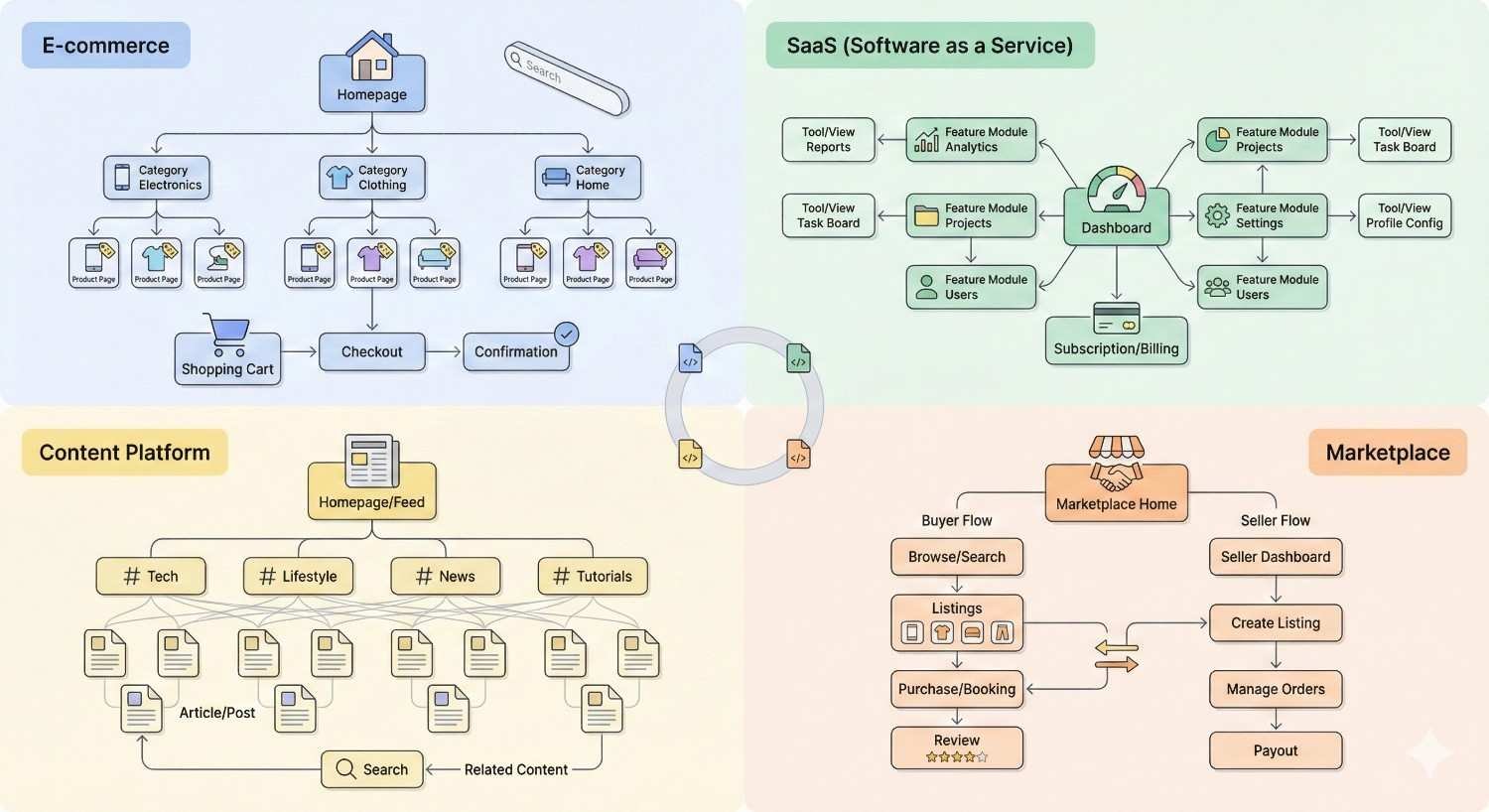
Different website types require different hierarchy approaches. Match your structure to your content and business model.
E-commerce Site Architecture
E-commerce sites face unique hierarchy challenges: large product catalogs, multiple categorization needs, and faceted navigation requirements.
E-commerce hierarchy principles:
- Products should be reachable within 3-4 clicks
- Category pages need unique, valuable content
- Product pages should link to related products
- Faceted navigation requires careful SEO management
Typical e-commerce structure:
Copy
Homepage
├── Department (Clothing)
│ ├── Category (Men’s)
│ │ ├── Subcategory (Shirts)
│ │ │ └── Product pages
│ │ └── Subcategory (Pants)
│ └── Category (Women’s)
└── Department (Electronics)
E-commerce specific considerations:
- Handle out-of-stock products without breaking hierarchy
- Manage seasonal category changes
- Balance SEO with merchandising priorities
- Implement proper pagination for large categories
Content/Blog Site Structure
Content sites prioritize topical organization and content discovery. Hierarchy should support both search engines and reader exploration.
Content site hierarchy principles:
- Organize by topic, not chronology
- Create hub pages for major themes
- Link related content contextually
- Balance evergreen and timely content
Typical content site structure:
Copy
Homepage
├── Topic Hub (SEO)
│ ├── Subtopic (Technical SEO)
│ │ └── Individual articles
│ ├── Subtopic (Content SEO)
│ └── Subtopic (Link Building)
├── Topic Hub (Content Marketing)
└── Resources/Tools
Content site specific considerations:
- Update hub pages as new content publishes
- Maintain internal linking as content library grows
- Archive or consolidate outdated content
- Balance category depth with content volume
Service Business Websites
Service businesses typically have smaller sites focused on conversion. Hierarchy should guide users toward contact or purchase.
Service site hierarchy principles:
- Services should be prominently accessible
- Location pages need proper hierarchy for local SEO
- Case studies and testimonials support service pages
- Blog content supports topical authority
Typical service site structure:
Copy
Homepage
├── Services
│ ├── Service A
│ ├── Service B
│ └── Service C
├── Industries/Verticals
├── Case Studies
├── About
└── Blog
Service site specific considerations:
- Create service-specific landing pages for different audiences
- Implement location hierarchy for multi-location businesses
- Link case studies to relevant service pages
- Balance service promotion with helpful content
Enterprise & Large-Scale Sites
Enterprise sites with hundreds of thousands of pages require sophisticated hierarchy management.
Enterprise hierarchy principles:
- Automate internal linking where possible
- Implement strict governance for consistency
- Use XML sitemaps strategically for crawl guidance
- Monitor crawl budget allocation carefully
Enterprise specific considerations:
- Multiple stakeholder input on hierarchy decisions
- Technical constraints from legacy systems
- International and multilingual hierarchy needs
- Integration with product information management systems
Enterprise hierarchy optimization often requires dedicated technical SEO resources and cross-functional coordination.
Common Site Hierarchy Mistakes to Avoid
Learning from common mistakes helps you build better hierarchy from the start.
Over-Categorization & Excessive Depth
Creating too many categories or nesting too deeply dilutes authority and confuses users.
Signs of over-categorization:
- Categories with only 1-2 items
- More than 5 hierarchy levels
- Users can’t find content they’re looking for
- Similar categories with unclear distinctions
Solutions:
- Merge thin categories
- Flatten unnecessary hierarchy levels
- Use tags instead of categories for cross-cutting themes
- Audit category usage regularly
Start with fewer, broader categories. Add specificity only when content volume justifies it.
Inconsistent Structural Logic
Inconsistent hierarchy patterns confuse users and search engines about your site’s organization.
Inconsistency examples:
- Some sections use subcategories, others don’t
- URL patterns vary across sections
- Navigation depth differs by area
- Naming conventions change between categories
Solutions:
- Document hierarchy standards
- Apply consistent patterns across all sections
- Audit for inconsistencies regularly
- Train content creators on standards
Consistency builds user trust and helps search engines understand your structure.
Neglecting Mobile Navigation Hierarchy
Mobile users experience hierarchy through constrained navigation. Desktop hierarchy that works poorly on mobile hurts user experience and engagement.
Mobile hierarchy considerations:
- Deep menus are difficult to navigate on mobile
- Hamburger menus hide hierarchy from users
- Touch targets need adequate spacing
- Mobile users may have different navigation patterns
Solutions:
- Test hierarchy on mobile devices
- Simplify mobile navigation where appropriate
- Ensure critical pages are easily accessible
- Consider mobile-specific navigation patterns
With mobile-first indexing, your mobile hierarchy experience matters for rankings.
Ignoring User Intent in Structure
Hierarchy built around internal logic rather than user needs fails to serve its purpose.
Intent misalignment signs:
- High bounce rates from category pages
- Users searching for content they can’t find
- Navigation paths that don’t match user journeys
- Categories named for internal terminology
Solutions:
- Research how users search for your content
- Analyze site search queries for navigation gaps
- Test hierarchy with real users
- Align category names with user vocabulary
Build hierarchy around how users think about your content, not how you organize it internally.
Measuring Site Hierarchy Performance
Ongoing measurement ensures your hierarchy continues to perform as your site evolves.
Key Performance Indicators (KPIs)
Track metrics that directly reflect hierarchy effectiveness.
Crawl and indexation KPIs:
- Pages crawled per day
- Indexation rate (indexed/submitted)
- Crawl errors by type
- Time to index new content
User experience KPIs:
- Pages per session
- Bounce rate by entry point
- Navigation path completion
- Site search usage
SEO performance KPIs:
- Organic traffic by hierarchy level
- Rankings for category pages
- Click-through rates from search
- Internal link click patterns
Establish baselines before optimization. Track changes over time to measure impact.
Google Search Console Insights
Search Console provides direct data on how Google interacts with your hierarchy.
Relevant Search Console reports:
- Coverage report: Indexation status by section
- Crawl stats: Crawl frequency and response codes
- Links report: Internal link distribution
- Performance: Traffic by page and query
Using Search Console for hierarchy analysis:
- Filter coverage by URL pattern to see section-level indexation
- Compare crawl stats before and after hierarchy changes
- Identify pages with few internal links
- Track ranking changes for restructured sections
Regular Search Console review catches hierarchy problems before they significantly impact performance.
Analytics Behavior Flow Analysis
Analytics tools show how users actually navigate your hierarchy.
Behavior flow insights:
- Common navigation paths through your site
- Drop-off points in user journeys
- Entry points by traffic source
- Internal search patterns
Using behavior flow for hierarchy optimization:
- Identify navigation paths that don’t match intended hierarchy
- Find content users search for but can’t navigate to
- Discover unexpected popular paths to optimize
- Validate that hierarchy changes improve user flow
User behavior data grounds hierarchy decisions in reality rather than assumptions.
Ranking Impact Assessment
Ultimately, hierarchy optimization should improve rankings for target keywords.
Ranking assessment approach:
- Track rankings for category page targets
- Monitor individual page rankings within categories
- Compare ranking velocity before and after changes
- Assess ranking distribution across hierarchy levels
Correlation analysis:
- Do pages with more internal links rank better?
- Does click depth correlate with ranking position?
- Do hub pages outrank spoke pages for broad terms?
- Has topical authority improved for target subjects?
Ranking improvements validate that hierarchy changes achieved their SEO goals.
Advanced Hierarchy Optimization Strategies
Beyond fundamentals, advanced strategies address complex scenarios and emerging requirements.
Dynamic Hierarchy for Personalization
Dynamic hierarchy adapts structure based on user behavior, preferences, or context.
Dynamic hierarchy applications:
- Personalized navigation based on user history
- Contextual category ordering by popularity
- User-specific content recommendations
- A/B testing different hierarchy structures
SEO considerations for dynamic hierarchy:
- Ensure Googlebot sees consistent structure
- Don’t hide important content behind personalization
- Maintain crawlable paths to all content
- Test that dynamic elements don’t break indexation
Dynamic hierarchy can improve user experience without sacrificing SEO if implemented carefully.
International Site Structure (hreflang)
International sites need hierarchy that serves multiple languages and regions while maintaining SEO effectiveness.
International hierarchy options:
- Subdirectories: example.com/en/, example.com/de/
- Subdomains: en.example.com, de.example.com
- Country-code TLDs: example.com, example.de
Hreflang implementation: Hreflang tags tell search engines which pages target which languages and regions. Implement hreflang consistently across your international hierarchy.
html
Copy
<link rel=”alternate“ hreflang=”en“ href=”https://example.com/en/page“ />
<link rel=”alternate“ hreflang=”de“ href=”https://example.com/de/page“ />
International hierarchy best practices:
- Mirror hierarchy structure across languages
- Implement hreflang on all alternate versions
- Use consistent URL patterns across regions
- Consider cultural differences in category organization
JavaScript Rendering & Hierarchy Visibility
JavaScript-heavy sites risk hierarchy elements being invisible to search engines.
JavaScript hierarchy risks:
- Navigation rendered only via JavaScript
- Internal links not in initial HTML
- Dynamic content loading hiding hierarchy
- Client-side routing obscuring URL structure
Solutions:
- Server-side rendering for critical navigation
- Ensure internal links exist in initial HTML
- Test with Google’s URL Inspection tool
- Implement proper routing for JavaScript apps
Google can render JavaScript, but delays and rendering issues can impact hierarchy discovery. Prioritize server-rendered hierarchy elements.
Progressive Enhancement Approaches
Progressive enhancement ensures hierarchy works for all users and crawlers, regardless of technical capabilities.
Progressive enhancement for hierarchy:
- HTML-based navigation as foundation
- CSS enhancement for visual hierarchy
- JavaScript enhancement for interactivity
- Graceful degradation when features unavailable
Implementation approach:
- Build functional hierarchy in semantic HTML
- Add visual styling with CSS
- Enhance with JavaScript interactions
- Test with JavaScript disabled
This approach ensures search engines always see your hierarchy, even if JavaScript rendering fails.
Building Long-Term Hierarchy Governance
Sustainable hierarchy requires ongoing governance, not just initial optimization.
Documentation & Style Guides
Document your hierarchy standards so teams can maintain consistency.
Documentation elements:
- Hierarchy structure diagrams
- Category definitions and scope
- URL pattern standards
- Internal linking guidelines
- Naming conventions
Style guide components:
- When to create new categories
- How to name categories and pages
- Required internal linking for new content
- Approval process for hierarchy changes
Documentation prevents hierarchy drift as team members change and content grows.
Stakeholder Alignment & Approval Workflows
Hierarchy decisions affect multiple teams. Establish clear decision-making processes.
Stakeholders to involve:
- SEO team (search performance)
- Content team (content organization)
- UX team (user navigation)
- Development team (technical implementation)
- Business stakeholders (strategic priorities)
Approval workflow elements:
- Who can propose hierarchy changes
- Review process for changes
- Testing requirements before implementation
- Rollback authority if problems occur
Clear workflows prevent unauthorized changes while enabling necessary evolution.
Ongoing Maintenance & Optimization
Hierarchy requires regular maintenance to remain effective.
Maintenance activities:
- Quarterly hierarchy audits
- Regular crawl analysis
- Content placement reviews
- Navigation usability testing
- Performance metric monitoring
Optimization triggers:
- New content areas requiring categories
- Underperforming sections needing restructure
- User feedback indicating navigation problems
- Competitive analysis revealing gaps
Schedule maintenance activities rather than waiting for problems to emerge.
Scaling Hierarchy as Your Site Grows
Plan for growth to avoid painful restructuring later.
Scaling considerations:
- URL patterns that accommodate new categories
- Navigation systems that handle more items
- Internal linking that scales with content
- Technical infrastructure for larger crawls
Growth planning questions:
- What categories might you need in 2-3 years?
- How will navigation work with 10x more content?
- Can your CMS handle hierarchy at scale?
- What automation will you need?
Building scalability into initial hierarchy design saves significant effort later.
Conclusion
Site hierarchy optimization directly impacts crawl efficiency, authority distribution, and ranking potential across your entire domain. The structural decisions you make today compound over time, either accelerating or limiting your organic growth.
Effective hierarchy requires balancing technical SEO requirements with user experience needs and business priorities. No single model fits all sites, but the principles of logical organization, strategic internal linking, and consistent implementation apply universally.
We help businesses build and optimize site hierarchies that drive sustainable organic growth. Contact White Label SEO Service to audit your current structure and develop a hierarchy strategy aligned with your growth goals.
Frequently Asked Questions
How long does it take to see SEO results from hierarchy optimization?
Initial crawl and indexation improvements typically appear within 2-4 weeks. Ranking improvements for restructured sections generally take 2-3 months as search engines reprocess your site’s authority signals and topical relationships.
Can I change my site hierarchy without losing rankings?
Yes, with proper planning. Implement 301 redirects for all changed URLs, maintain internal link equity to important pages, and monitor performance closely. Most sites experience temporary fluctuations before recovering and improving.
How deep should my site hierarchy be?
Most sites perform well with 3-4 hierarchy levels. Important pages should be reachable within 4 clicks of the homepage. Deeper structures work for large sites if internal linking compensates for depth.
Should I use subdirectories or subdomains for different site sections?
Subdirectories consolidate domain authority and are recommended for most SEO purposes. Use subdomains only when technical requirements demand separation or you intentionally want distinct properties.
How many internal links should each page have?
There’s no fixed number, but every page should have multiple internal links from relevant pages. Priority pages should have more internal links than lower-value content. Focus on relevance over quantity.
What’s the difference between site hierarchy and site architecture?
Site hierarchy refers specifically to the parent-child organizational structure of your content. Site architecture is broader, encompassing hierarchy plus technical structure, navigation systems, and URL patterns.
How often should I audit my site hierarchy?
Conduct comprehensive hierarchy audits quarterly. Monitor key metrics like crawl stats and indexation continuously. Review hierarchy whenever adding significant new content sections or experiencing performance changes.


