

An SSL certificate is no longer optional for SEO success. Since Google confirmed HTTPS as a ranking signal, websites without SSL encryption face measurable disadvantages in search visibility, user trust, and conversion rates. The good news: implementing SSL correctly takes hours, not weeks, and the SEO benefits compound over time.
This matters because browsers now flag HTTP sites as “Not Secure,” driving visitors away before they even see your content. For business owners and marketing teams focused on organic growth, SSL represents one of the fastest technical SEO wins available.
This guide covers everything you need: how SSL certificates work, their direct and indirect impact on rankings, step-by-step installation, migration best practices, and ongoing maintenance. You’ll walk away with a clear action plan.
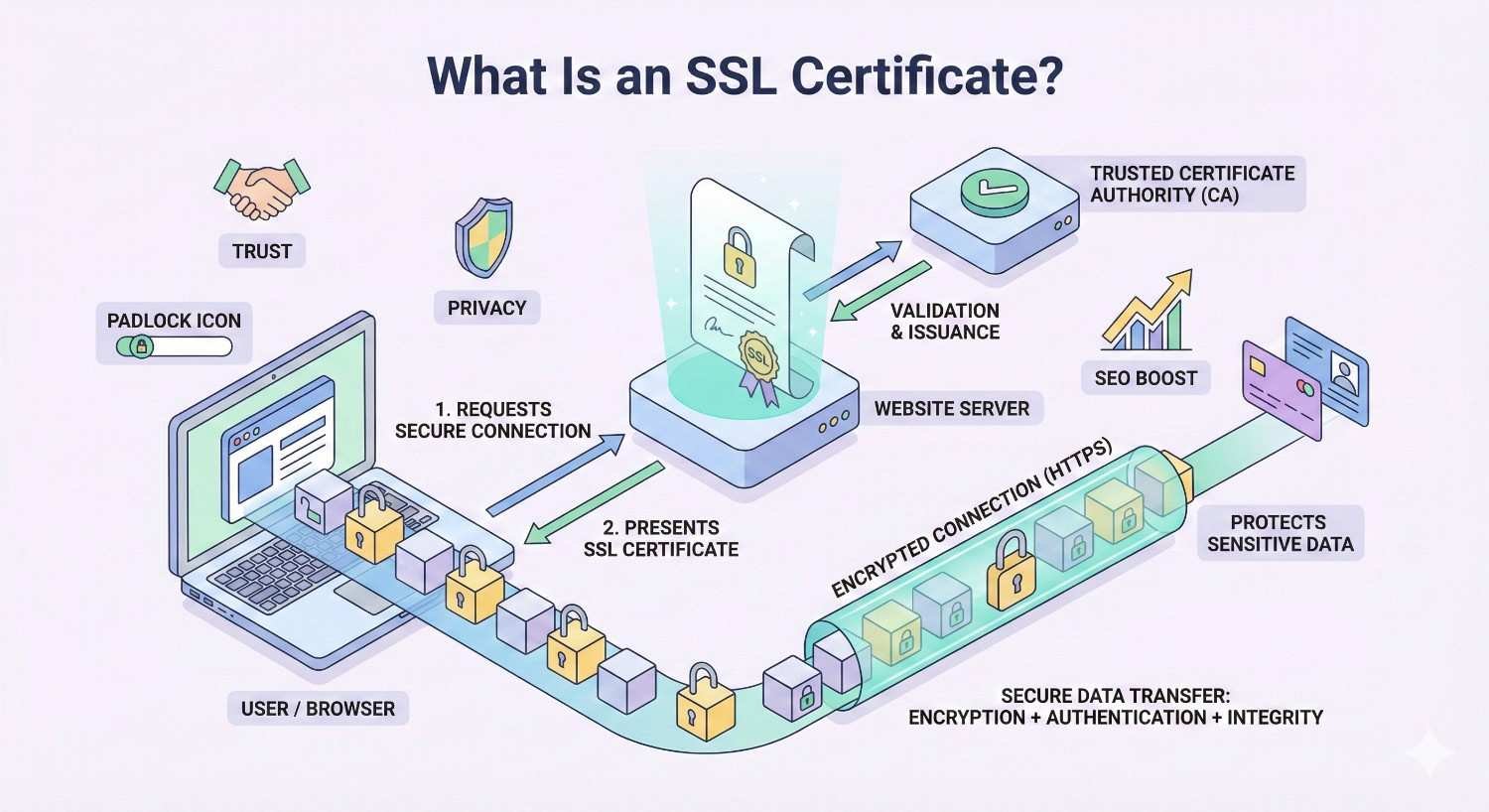
What Is an SSL Certificate?
An SSL certificate (Secure Sockets Layer) is a digital credential that authenticates your website’s identity and enables encrypted connections between your server and visitors’ browsers. When installed, it transforms your URL from HTTP to HTTPS, displaying the padlock icon that signals security to users and search engines alike.
Think of SSL as a secure tunnel. Without it, data travels openly between your site and visitors, vulnerable to interception. With SSL, that same data becomes encrypted, unreadable to anyone except the intended recipient.
For SEO purposes, SSL certificates serve dual functions. They satisfy Google’s security requirements while simultaneously building the trust signals that influence user behavior metrics like bounce rate and time on site.
How SSL Certificates Work
SSL certificates use public key cryptography to establish secure connections. Here’s the simplified process:
A visitor’s browser requests a secure connection to your server. Your server responds by sending its SSL certificate, which contains a public key. The browser verifies the certificate’s authenticity through a Certificate Authority (CA). Once verified, the browser and server establish an encrypted session using symmetric encryption.
This handshake happens in milliseconds. Modern TLS protocols (the successor to SSL, though we still use “SSL” colloquially) complete this process so quickly that users never notice the security verification occurring.
The encryption strength matters for both security and SEO. Certificates using 256-bit encryption meet current security standards and satisfy Google’s requirements. Weaker encryption or outdated protocols can trigger browser warnings that devastate user experience and rankings.
Types of SSL Certificates
Not all SSL certificates offer the same validation level. Understanding the differences helps you choose appropriately for your site’s needs and SEO goals.
Domain Validated (DV)
DV certificates verify only that you control the domain. The Certificate Authority confirms ownership through email verification or DNS record changes. Issuance takes minutes to hours.
For SEO purposes, DV certificates provide identical ranking benefits to more expensive options. Google’s algorithm doesn’t differentiate between validation levels. A free Let’s Encrypt DV certificate delivers the same HTTPS ranking signal as a premium EV certificate.
DV certificates work well for blogs, informational sites, and small business websites where transaction security isn’t the primary concern.
Organization Validated (OV)
OV certificates require the Certificate Authority to verify your organization’s legal existence and identity. This involves checking business registration documents and confirming physical address and phone number.
The validation process takes one to three days. OV certificates display your organization name in certificate details, though not prominently in browser interfaces.
From an SEO perspective, OV certificates offer no ranking advantage over DV. However, they provide additional trust signals for B2B websites where visitors might inspect certificate details before engaging.
Extended Validation (EV)
EV certificates require the most rigorous verification process. Certificate Authorities conduct thorough background checks on your organization, including legal status, operational existence, and authorization of the certificate request.
Historically, EV certificates displayed the organization name in a green address bar. Modern browsers have largely eliminated this visual distinction, reducing the user-facing trust benefit that once justified their premium pricing.
For SEO, EV certificates provide no additional ranking benefit. Their value lies in compliance requirements for certain industries and the psychological reassurance some enterprise buyers seek.
Why SSL Certificates Matter for SEO
SSL certificates influence SEO through multiple channels: direct ranking signals, user behavior metrics, and technical performance factors. Understanding each helps you prioritize implementation and measure results.
Google’s HTTPS Ranking Signal
Google officially confirmed HTTPS as a ranking signal in August 2014. Initially described as a “lightweight” signal affecting fewer than 1% of queries, its importance has grown substantially.
By 2025, HTTPS has become table stakes rather than a competitive advantage. Over 95% of page-one results now use HTTPS. The signal functions less as a ranking boost and more as a baseline requirement. Sites without SSL face an implicit penalty through exclusion from the secure web standard.
Google’s Chrome browser, commanding roughly 65% market share, displays “Not Secure” warnings for HTTP sites. This warning appears directly in the address bar, immediately visible to every visitor. The trust damage compounds any direct ranking impact.
For new websites, launching without SSL makes no strategic sense. For existing HTTP sites, migration should be a priority technical SEO task.
Trust Signals and User Experience
User trust directly influences SEO through behavior metrics. When visitors see security warnings, they leave. When they feel secure, they engage.
The padlock icon has become universally recognized as a trust indicator. Its absence raises immediate concerns, particularly for sites requesting any form of user input. Contact forms, newsletter signups, and login pages on HTTP sites trigger heightened browser warnings that devastate conversion rates.
Trust impacts SEO through measurable user signals. Higher bounce rates tell Google your content doesn’t satisfy user intent. Shorter session durations suggest poor user experience. Lower engagement rates reduce the behavioral signals that support rankings.
Beyond direct metrics, trust influences link acquisition. Other websites hesitate to link to insecure sites, limiting your ability to build the backlink profile that drives authority and rankings.
Core Web Vitals and Site Security
SSL certificates interact with Core Web Vitals and overall site performance in ways that affect SEO.
Modern performance optimizations require HTTPS. HTTP/2 and HTTP/3 protocols, which significantly improve page load speeds, only function over secure connections. Without SSL, you’re limited to the older, slower HTTP/1.1 protocol.
Service workers, which enable advanced caching and offline functionality, require HTTPS. Progressive Web App features that improve user experience and engagement metrics depend on secure connections.
Browser security features increasingly restrict HTTP site capabilities. Geolocation APIs, camera access, and other features that might enhance user experience are blocked on insecure origins.
The performance benefits of HTTPS-enabled technologies directly support Core Web Vitals metrics. Faster Largest Contentful Paint, improved First Input Delay, and better Cumulative Layout Shift scores all contribute to the page experience signals Google uses for ranking.
How SSL Impacts Search Rankings
Understanding the specific mechanisms through which SSL affects rankings helps you set realistic expectations and measure implementation success.
Direct Ranking Benefits
The direct ranking benefit of SSL is real but modest in isolation. Google has consistently described HTTPS as a “lightweight” signal, meaning it won’t overcome significant content quality or relevance gaps.
In practical terms, SSL alone won’t jump your site from page three to page one. However, in competitive niches where multiple sites offer similar content quality and relevance, SSL can provide the edge needed to outrank competitors.
The direct benefit manifests most clearly in two scenarios. First, when competing against HTTP sites with otherwise comparable content. Second, when Google’s algorithm uses HTTPS as a tiebreaker between closely matched pages.
For sites already ranking well, adding SSL typically produces modest ranking improvements within two to four weeks of proper implementation. For sites with other significant SEO issues, SSL won’t compensate for thin content, poor user experience, or weak backlink profiles.
Indirect SEO Benefits
The indirect benefits of SSL often exceed the direct ranking signal in total impact. These benefits compound over time and influence multiple ranking factors simultaneously.
Lower Bounce Rates
Security warnings drive visitors away before they engage with your content. Removing these warnings by implementing SSL reduces bounce rates, particularly for pages requiring user input.
Lower bounce rates signal to Google that your content satisfies user intent. While Google has stated bounce rate isn’t a direct ranking factor, the correlation between low bounce rates and high rankings remains strong across studies.
Increased Dwell Time
Visitors who trust your site spend more time engaging with content. They read more pages, watch more videos, and explore more deeply. This increased dwell time provides positive user engagement signals.
Secure sites also load faster through HTTP/2, reducing the friction that causes visitors to abandon slow-loading pages. Every second of improved load time correlates with measurably longer session durations.
Higher Click-Through Rates
In search results, HTTPS URLs display without security warnings while HTTP URLs may show cautionary indicators depending on browser and search context. This visual distinction influences click-through rates.
Users have learned to associate HTTPS with legitimate, trustworthy sites. Given the choice between secure and insecure results, many users preferentially click HTTPS links. Higher CTR sends positive signals to Google about your result’s relevance and appeal.
HTTPS as a Tiebreaker Signal
Google’s John Mueller has described HTTPS as functioning like a tiebreaker. When two pages offer similar relevance and quality for a query, HTTPS can determine which ranks higher.
This tiebreaker function matters most in competitive niches. If you’re competing against sites with comparable content, backlink profiles, and technical SEO, SSL might provide the marginal advantage that secures higher positions.
The tiebreaker concept also applies to featured snippets and other SERP features. Google prefers pulling featured snippet content from secure sources when multiple candidates exist.
For practical SEO strategy, this means SSL is necessary but not sufficient. It removes a potential disadvantage and provides marginal advantages, but it won’t compensate for fundamental content or authority gaps.
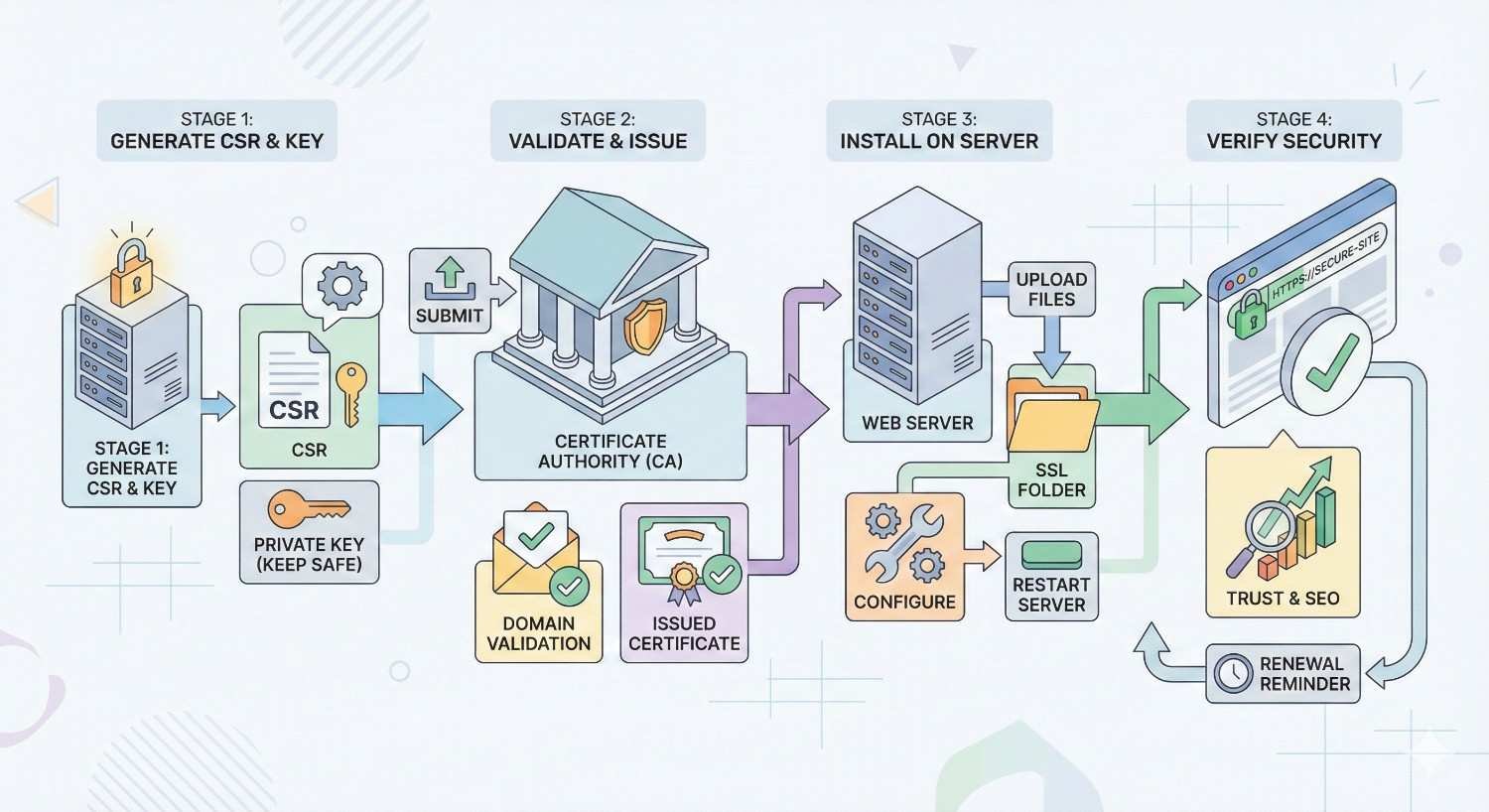
How to Install an SSL Certificate
Installing an SSL certificate involves selecting the right certificate type, completing the installation process, configuring your server, and verifying everything works correctly. Each step requires attention to avoid common mistakes that can harm SEO.
Choosing the Right SSL Certificate
Your choice depends on your site’s structure, security needs, and budget. For most SEO purposes, the technical implementation matters more than the certificate type.
Single Domain Certificates cover one domain (example.com). They’re the simplest and most affordable option for sites operating on a single domain without subdomains.
Wildcard Certificates cover a domain and all its subdomains (*.example.com). If you operate blog.example.com, shop.example.com, and app.example.com, a wildcard certificate secures all of them under one certificate.
Multi-Domain Certificates (SAN) cover multiple different domains under one certificate. Useful for businesses operating several distinct websites.
For SEO, ensure your certificate covers all URL variations users might access. If both www and non-www versions of your site resolve, your certificate must cover both, or you must implement proper redirects.
Free certificates from Let’s Encrypt provide identical SEO benefits to paid alternatives. The primary reasons to pay for certificates include extended validation requirements, warranty coverage, and dedicated support.
Step-by-Step Installation Process
The installation process varies by hosting environment, but follows a consistent general pattern.
Step 1: Generate a Certificate Signing Request (CSR)
Your server generates a CSR containing your domain information and public key. This request goes to the Certificate Authority for validation.
Most hosting control panels (cPanel, Plesk) include CSR generation tools. For command-line environments, OpenSSL handles CSR creation.
Step 2: Submit CSR to Certificate Authority
Submit your CSR to your chosen CA. For DV certificates, you’ll verify domain ownership through email, DNS record, or file upload. OV and EV certificates require additional documentation.
Step 3: Receive and Install Certificate
The CA issues your certificate files. You’ll typically receive the certificate itself, intermediate certificates (the certificate chain), and possibly a root certificate.
Install these files on your server according to your hosting environment’s requirements. Control panel installations often involve pasting certificate contents into designated fields.
Step 4: Configure HTTPS
Update your server configuration to serve content over HTTPS. This involves specifying certificate file locations and enabling SSL/TLS protocols.
Step 5: Force HTTPS
Configure redirects to ensure all HTTP requests redirect to HTTPS equivalents. This prevents duplicate content issues and ensures all visitors receive the secure version.
Configuring Your Web Server
Server configuration determines whether your SSL implementation helps or harms SEO. Proper configuration ensures security, performance, and search engine compatibility.
Apache Configuration
Enable the SSL module and configure your virtual host to listen on port 443. Specify certificate file paths and enable modern TLS protocols while disabling outdated, insecure versions.
Implement HTTP to HTTPS redirects in your .htaccess file or virtual host configuration. Use 301 permanent redirects to pass link equity and signal the permanent nature of the change.
Nginx Configuration
Configure your server block to listen on port 443 with SSL enabled. Specify certificate and key file locations. Enable HTTP/2 for performance benefits.
Implement redirects in a separate server block listening on port 80, returning 301 redirects to the HTTPS equivalent.
Hosting Panel Configuration
Most managed hosting environments provide SSL installation through control panels. cPanel’s AutoSSL feature automatically provisions and renews Let’s Encrypt certificates. Similar features exist in Plesk, DirectAdmin, and other panels.
These automated tools handle most configuration details but verify redirects and protocol settings manually.
Verifying SSL Installation
Verification ensures your installation works correctly and doesn’t introduce SEO problems.
Browser Testing
Visit your site in multiple browsers. Check for the padlock icon, absence of security warnings, and proper certificate details. Test both www and non-www versions, plus any subdomains.
SSL Testing Tools
SSL Labs’ SSL Test provides comprehensive analysis of your SSL configuration. Aim for an A or A+ rating. The tool identifies protocol weaknesses, certificate chain issues, and configuration problems.
Mixed Content Detection
Use browser developer tools to identify mixed content warnings. These occur when HTTPS pages load HTTP resources (images, scripts, stylesheets). Mixed content triggers security warnings and undermines your SSL implementation.
Redirect Verification
Test that HTTP URLs properly redirect to HTTPS equivalents. Use curl or online redirect checkers to verify 301 status codes and correct destination URLs.
Search Console Verification
After installation, add the HTTPS property to Google Search Console. Monitor for crawl errors, indexing issues, and security problems.
SSL Migration Best Practices for SEO
Migrating from HTTP to HTTPS is technically a site migration. Without proper planning and execution, you risk temporary or permanent ranking losses. Following best practices minimizes disruption and accelerates recovery.
Planning Your HTTP to HTTPS Migration
Successful migrations start with thorough planning. Rushing the process creates problems that take months to resolve.
Audit Current State
Document your current rankings, traffic patterns, and indexed pages. This baseline helps you identify migration-related issues and measure recovery.
Export your current sitemap and crawl your site to create a complete URL inventory. You’ll need this for redirect mapping and verification.
Choose Migration Timing
Avoid migrating during peak business periods. Rankings may fluctuate temporarily, and you want bandwidth to address issues quickly.
Schedule migrations when you can monitor closely for several days post-launch. Weekday mornings often work well, providing full business days for troubleshooting.
Prepare Staging Environment
Test your SSL implementation in a staging environment before production deployment. Verify certificate installation, redirects, and mixed content resolution without affecting your live site.
Implementing 301 Redirects
Redirects are the most critical element of SSL migration. Incorrect redirects cause ranking losses, crawl budget waste, and poor user experience.
Redirect Every URL
Every HTTP URL must 301 redirect to its HTTPS equivalent. This includes pages, images, PDFs, and any other indexed resources.
Implement redirects at the server level for efficiency. Pattern-based redirects (redirecting all HTTP requests to HTTPS equivalents) work better than individual redirect rules.
Maintain URL Structure
Redirect HTTP URLs to identical HTTPS URLs. Don’t combine SSL migration with URL restructuring. Each change introduces risk; combining them multiplies problems.
http://example.com/page/ should redirect to https://example.com/page/, not https://example.com/new-page/ or https://www.example.com/page/.
Avoid Redirect Chains
Ensure redirects go directly from HTTP to final HTTPS destination. Chains (HTTP → HTTPS non-www → HTTPS www) waste crawl budget and dilute link equity.
Audit existing redirects before migration. If you already have redirects in place, update them to point directly to final HTTPS destinations.
Updating Internal Links
While redirects handle external links and bookmarks, updating internal links improves crawl efficiency and user experience.
Update All Internal Links
Change internal links from HTTP to HTTPS throughout your site. This includes navigation, content links, footer links, and any hardcoded URLs.
For WordPress sites, plugins like Better Search Replace can update database-stored URLs. For other platforms, find-and-replace tools or manual updates may be necessary.
Update Canonical Tags
Ensure canonical tags point to HTTPS versions. Incorrect canonicals can cause indexing problems and ranking confusion.
Update Sitemap
Generate a new sitemap with HTTPS URLs. Submit this updated sitemap to Google Search Console.
Update Robots.txt
If your robots.txt references your sitemap or specific URLs, update these to HTTPS versions.
Updating Google Search Console
Google Search Console treats HTTP and HTTPS as separate properties. Proper setup ensures you maintain visibility into your site’s search performance.
Add HTTPS Property
Add your HTTPS site as a new property in Search Console. Verify ownership through your preferred method.
Submit HTTPS Sitemap
Submit your updated HTTPS sitemap to the new property. This accelerates Google’s discovery and indexing of your secure URLs.
Monitor Both Properties
Keep both HTTP and HTTPS properties active during transition. The HTTP property shows redirect processing and any remaining HTTP indexing. The HTTPS property shows your new baseline.
Request Indexing
For important pages, use the URL Inspection tool to request indexing of HTTPS versions. This can accelerate the transition for high-priority content.
Common Migration Mistakes to Avoid
Learning from others’ mistakes helps you execute a clean migration.
Mistake: Incomplete Redirects
Failing to redirect all URLs leaves orphaned HTTP pages competing with HTTPS versions. Crawl your site thoroughly and verify every URL redirects correctly.
Mistake: Using 302 Instead of 301
Temporary (302) redirects don’t pass full link equity and signal impermanence to search engines. Always use 301 permanent redirects for HTTP to HTTPS migration.
Mistake: Forgetting Subdomains
If you operate subdomains, each needs SSL implementation and proper redirects. A secure main domain with insecure subdomains creates inconsistent user experience and potential security warnings.
Mistake: Ignoring Mixed Content
Mixed content warnings undermine your SSL implementation. Audit thoroughly and update all resource references to HTTPS.
Mistake: Not Updating External Profiles
Update your URL in Google Business Profile, social media profiles, directory listings, and anywhere else your HTTP URL appears. While redirects handle the technical transition, direct HTTPS links are preferable.
Mistake: Panicking Over Temporary Fluctuations
Rankings often fluctuate briefly during migration as Google processes the change. Allow two to four weeks before concluding something went wrong. Monitor closely but avoid making reactive changes that compound problems.
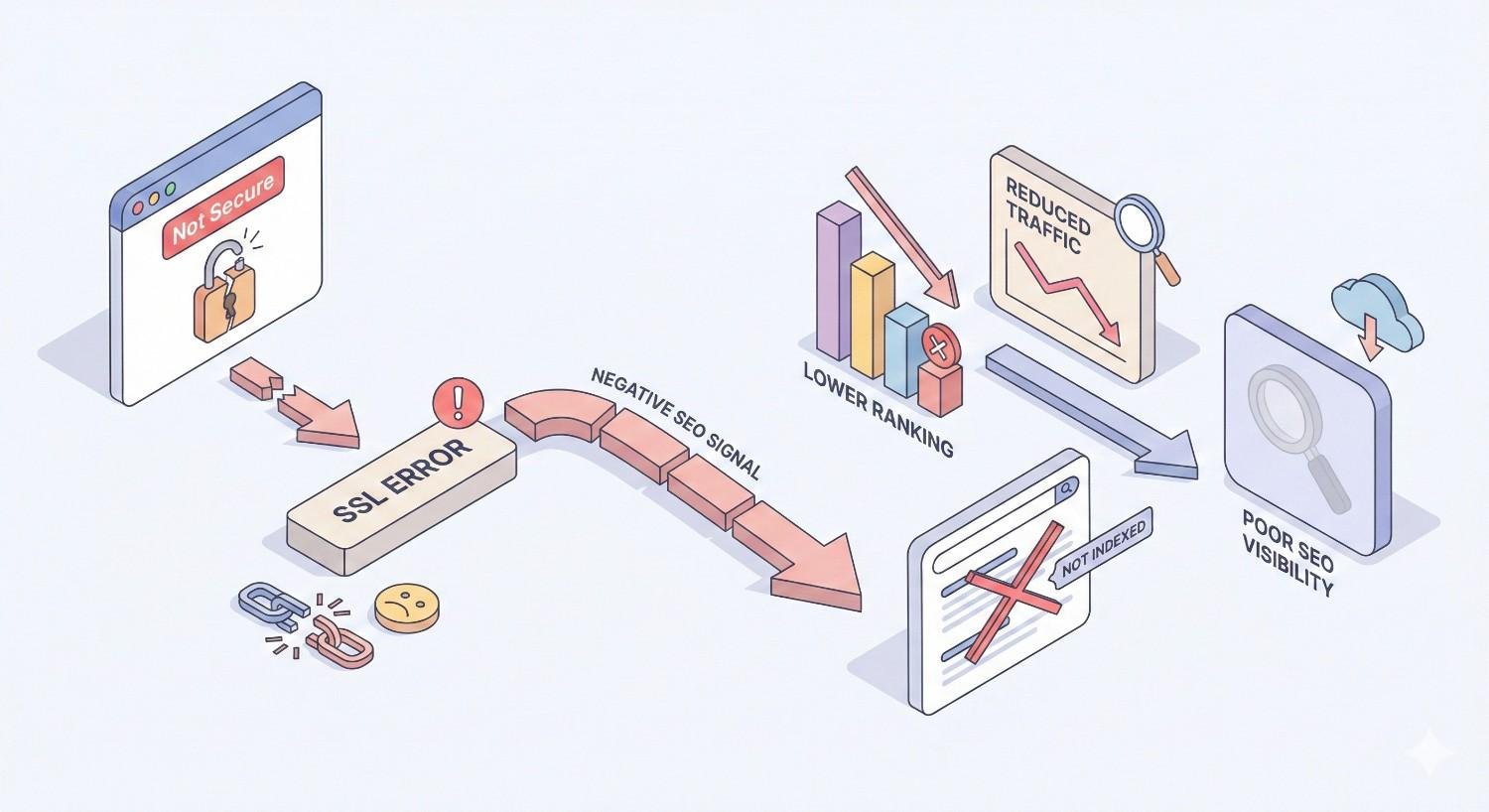
SSL Certificate Errors and SEO Impact
SSL errors damage user trust and can significantly harm SEO performance. Understanding common errors and their solutions helps you maintain the security and rankings benefits of your SSL implementation.
Mixed Content Warnings
Mixed content occurs when an HTTPS page loads resources (images, scripts, stylesheets, iframes) over HTTP. Browsers flag this as a security concern because insecure resources can be intercepted or modified.
Types of Mixed Content
Passive mixed content (images, video, audio) triggers warnings but typically still loads. Active mixed content (scripts, stylesheets, iframes) poses greater security risks and is often blocked entirely by modern browsers.
SEO Impact
Mixed content warnings display security indicators that erode user trust. Blocked resources can break page functionality, increasing bounce rates and harming user experience signals.
Google may also view mixed content as incomplete HTTPS implementation, potentially reducing the ranking benefit of your SSL certificate.
Detection and Resolution
Browser developer tools (Console tab) identify mixed content resources. Online tools like Why No Padlock scan pages for mixed content issues.
Resolution involves updating resource URLs to HTTPS or, when HTTPS versions don’t exist, finding alternative resources or hosting copies on your secure server.
Expired SSL Certificates
SSL certificates have validity periods, typically 90 days for Let’s Encrypt or one to two years for paid certificates. Expired certificates trigger prominent browser warnings that devastate traffic.
SEO Impact
Expired certificates cause browsers to display full-page security warnings requiring users to actively bypass security to access your site. Most visitors leave immediately.
The traffic drop is immediate and severe. If expiration persists, Google may demote or remove your pages from search results entirely.
Prevention
Implement certificate monitoring and automated renewal. Let’s Encrypt certificates can auto-renew through certbot or hosting panel features. Paid certificates require manual renewal but can be set up with advance expiration alerts.
Calendar reminders at 30, 14, and 7 days before expiration provide backup notification if automated systems fail.
Certificate Chain Issues
SSL certificates rely on a chain of trust from your certificate through intermediate certificates to a root certificate trusted by browsers. Incomplete chains cause validation failures.
Common Chain Problems
Missing intermediate certificates are the most common issue. Your server must provide the complete certificate chain, not just your domain certificate.
Incorrect certificate order can also cause problems. The chain should proceed from your certificate through intermediates to the root.
SEO Impact
Chain issues cause browser warnings similar to expired certificates. Some browsers may fail to establish secure connections entirely, blocking access to your site.
Resolution
SSL testing tools identify chain issues. Obtain correct intermediate certificates from your Certificate Authority and install them alongside your domain certificate.
How to Fix SSL Errors
Systematic troubleshooting resolves most SSL errors quickly.
Step 1: Identify the Specific Error
Use SSL Labs’ SSL Test for comprehensive diagnostics. Browser developer tools provide additional context for page-specific issues.
Step 2: Check Certificate Validity
Verify your certificate hasn’t expired and covers the correct domain(s). Mismatched domains (certificate for example.com used on www.example.com) cause errors.
Step 3: Verify Certificate Chain
Ensure all intermediate certificates are installed and in correct order. Your CA provides the necessary chain certificates.
Step 4: Check Server Configuration
Verify TLS protocols and cipher suites are properly configured. Outdated protocols or weak ciphers can trigger security warnings.
Step 5: Scan for Mixed Content
Audit all pages for HTTP resource references. Update or replace insecure resources.
Step 6: Test Across Browsers
Different browsers handle SSL errors differently. Test in Chrome, Firefox, Safari, and Edge to ensure consistent security across all visitors.
Do I really need an SSL certificate for my website?
Free vs Paid SSL Certificates for SEO
The choice between free and paid SSL certificates generates significant confusion. For SEO purposes specifically, the answer is straightforward: free certificates provide identical ranking benefits to paid alternatives.
Let’s Encrypt and Free SSL Options
Let’s Encrypt revolutionized SSL adoption by providing free, automated certificates. Launched in 2016, it now secures hundreds of millions of websites.
How Let’s Encrypt Works
Let’s Encrypt issues Domain Validated certificates through an automated process. The ACME protocol handles verification and issuance without human intervention.
Certificates are valid for 90 days, encouraging automated renewal. Most hosting environments support automatic Let’s Encrypt renewal, eliminating manual certificate management.
SEO Equivalence
Google’s ranking algorithm doesn’t differentiate between certificate providers or validation levels. A Let’s Encrypt certificate provides the same HTTPS ranking signal as a $500 EV certificate.
The encryption strength is identical. Let’s Encrypt uses the same cryptographic standards as paid certificates.
Other Free Options
Cloudflare provides free SSL through their CDN service. This option adds Cloudflare’s infrastructure between your server and visitors, which may or may not align with your architecture preferences.
Some hosting providers include free SSL with hosting packages, often powered by Let’s Encrypt or similar automated CAs.
When to Invest in Paid SSL
Paid certificates make sense in specific situations unrelated to SEO ranking benefits.
Warranty Coverage
Paid certificates include warranties covering losses from certificate failures. Amounts range from $10,000 to over $1 million depending on certificate type and provider.
For e-commerce sites processing significant transaction volumes, warranty coverage provides financial protection against unlikely but potentially costly certificate-related breaches.
Extended Validation Requirements
Some industries, contracts, or compliance frameworks require EV certificates. If your business operates under such requirements, paid EV certificates are necessary regardless of SEO considerations.
Support and Management
Paid certificates typically include dedicated support and management tools. For organizations without technical staff to manage certificate lifecycle, paid options reduce operational burden.
Organizational Trust Signals
While browsers no longer prominently display EV organization names, the information remains accessible in certificate details. Some B2B buyers inspect certificates as part of vendor evaluation.
SSL Certificate Providers Comparison
Multiple providers offer SSL certificates with varying features, prices, and support levels.
Let’s Encrypt
Cost: Free. Validation: DV only. Validity: 90 days. Support: Community forums. Best for: Most websites prioritizing SEO benefits without additional requirements.
Cloudflare
Cost: Free (with CDN). Validation: DV. Validity: Varies. Support: Tiered by plan. Best for: Sites already using or considering Cloudflare’s CDN and security services.
DigiCert
Cost: Premium pricing. Validation: DV, OV, EV. Validity: 1-2 years. Support: Dedicated. Best for: Enterprise organizations requiring warranties, support, and extended validation.
Sectigo (formerly Comodo)
Cost: Budget to mid-range. Validation: DV, OV, EV. Validity: 1-2 years. Support: Tiered. Best for: Organizations wanting paid certificate features at lower price points.
GoDaddy
Cost: Mid-range. Validation: DV, OV, EV. Validity: 1-2 years. Support: Included. Best for: Users already in GoDaddy’s ecosystem seeking integrated management.
For pure SEO purposes, Let’s Encrypt or hosting-provided free SSL delivers complete ranking benefits. Paid certificates serve organizational, compliance, or risk management needs beyond SEO.
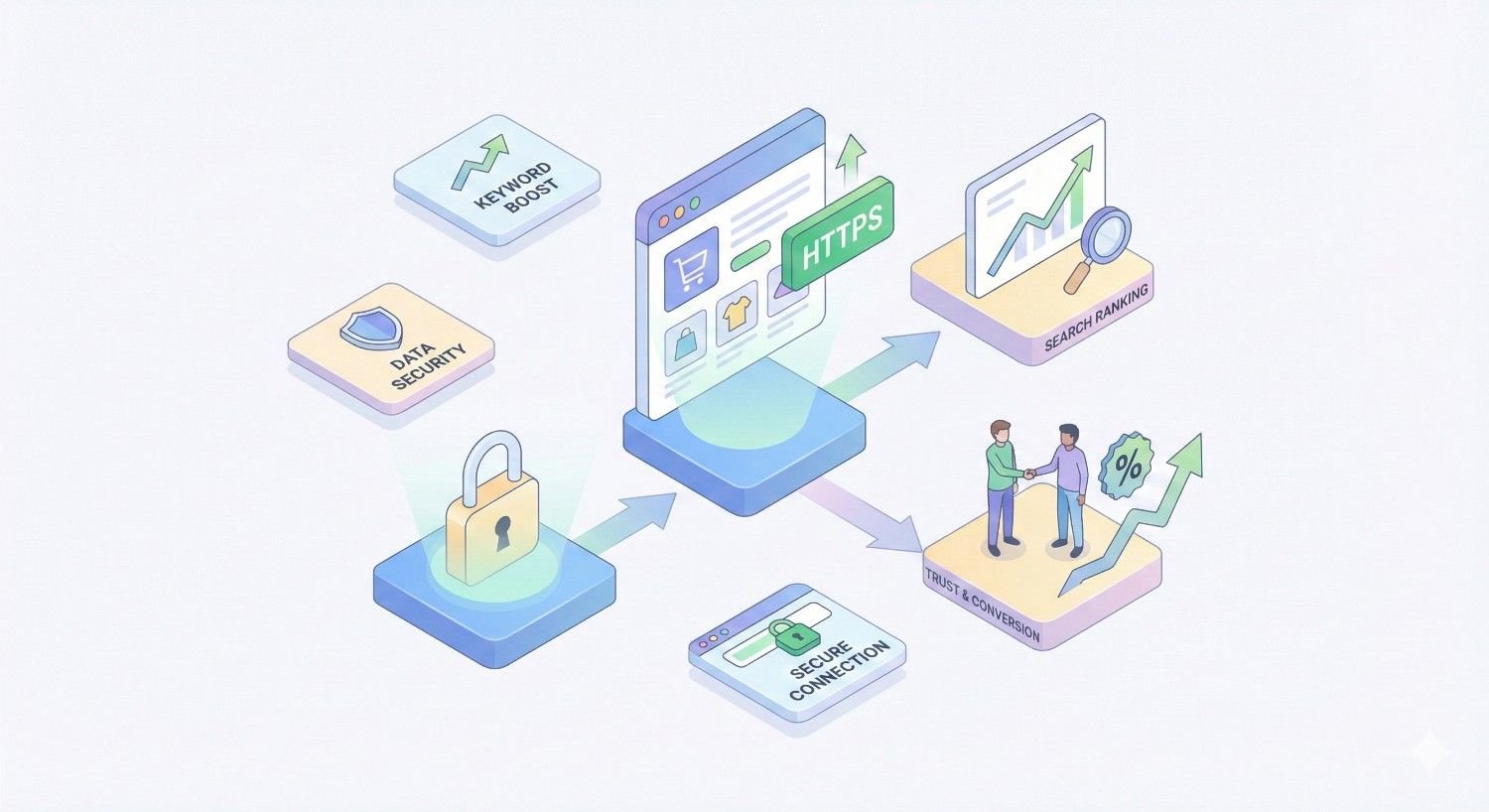
SSL Certificates for E-commerce SEO
E-commerce sites face unique SSL considerations. Beyond SEO benefits, SSL directly impacts compliance requirements, customer trust, and conversion rates.
PCI Compliance Requirements
The Payment Card Industry Data Security Standard (PCI DSS) governs how businesses handle credit card information. SSL/TLS encryption is a fundamental requirement.
Encryption Requirements
PCI DSS requires encryption of cardholder data during transmission over public networks. SSL certificates enable this encryption, making them mandatory for any site accepting credit card payments.
Non-compliance risks include fines, increased transaction fees, and potential loss of ability to process card payments.
Validation Level Considerations
PCI DSS doesn’t mandate specific certificate validation levels. DV certificates satisfy encryption requirements. However, some payment processors or acquiring banks may have additional requirements.
SEO Connection
PCI compliance itself doesn’t directly affect SEO. However, the SSL implementation required for compliance provides the same ranking benefits as any other SSL deployment.
Building Customer Trust
E-commerce success depends on customer willingness to share payment information. SSL certificates are foundational to that trust.
Visual Trust Indicators
The padlock icon reassures customers their connection is secure. Its absence raises immediate concerns about payment safety.
Trust badges and security seals complement SSL but don’t replace it. Customers increasingly understand that the padlock indicates actual encryption while badges are merely images.
Trust and SEO Interaction
Customer trust influences SEO through behavior metrics. Trusted sites see lower cart abandonment, higher conversion rates, and more return visits. These engagement signals support rankings.
Trusted sites also earn more reviews, social shares, and backlinks. These authority signals compound over time, strengthening SEO performance.
Checkout Security and Conversions
The checkout process is where SSL most directly impacts business outcomes.
Abandonment Reduction
Cart abandonment rates average around 70% across e-commerce. Security concerns contribute significantly to abandonment, particularly at payment entry.
SSL certificates with visible security indicators reduce security-related abandonment. The impact varies by audience, but studies consistently show conversion improvements from proper security implementation.
Mobile Checkout
Mobile shoppers are particularly sensitive to security indicators. Smaller screens make security warnings more prominent and harder to dismiss.
With mobile commerce growing rapidly, SSL implementation directly affects an increasing share of e-commerce transactions.
SEO Impact of Conversions
Higher conversion rates don’t directly affect rankings. However, successful e-commerce sites invest more in content, earn more reviews, and generate more brand searches. These secondary effects strengthen SEO over time.
Monitoring SSL Certificate Health
SSL implementation isn’t a one-time task. Ongoing monitoring prevents expiration, identifies emerging issues, and maintains the security and SEO benefits of your certificate.
SSL Monitoring Tools
Multiple tools help you monitor certificate health and identify problems before they affect users or rankings.
SSL Labs SSL Test
Qualys SSL Labs provides comprehensive certificate analysis. Regular testing identifies configuration drift, protocol vulnerabilities, and chain issues.
Run tests after any server changes and periodically (monthly) as a baseline check.
Uptime Monitoring Services
Services like Pingdom, UptimeRobot, and StatusCake can monitor SSL certificate validity alongside general uptime. They alert you to expiration approaching or certificate errors.
Google Search Console
Search Console reports security issues affecting your site. The Security Issues report identifies problems Google has detected, including SSL-related concerns.
Browser Developer Tools
Chrome’s Security tab in Developer Tools shows certificate details and identifies mixed content or other security issues on specific pages.
Certificate Expiration Alerts
Expiration is the most common SSL failure. Automated alerts prevent this entirely preventable problem.
Hosting Panel Alerts
Most hosting control panels can send expiration warnings. Configure alerts at 30, 14, and 7 days before expiration.
Third-Party Monitoring
Dedicated SSL monitoring services track expiration across multiple certificates and domains. Useful for organizations managing numerous sites.
Calendar Reminders
As a backup to automated systems, add calendar reminders for certificate renewal dates. Redundant notification prevents single points of failure.
Automated Renewal
The best expiration prevention is automated renewal. Let’s Encrypt certificates auto-renew through certbot. Paid certificates from some providers offer similar automation.
Security Audit Checklist
Regular security audits maintain SSL effectiveness and identify emerging issues.
Monthly Checks
- Run SSL Labs test and verify A/A+ rating
- Check for mixed content on key pages
- Verify redirects function correctly
- Review Search Console for security issues
Quarterly Checks
- Audit all subdomains for proper SSL coverage
- Review TLS protocol configuration against current best practices
- Check certificate chain completeness
- Verify automated renewal is functioning
Annual Checks
- Evaluate certificate type against current needs
- Review Certificate Authority relationship and pricing
- Assess whether current SSL implementation meets evolved requirements
- Plan for any necessary certificate changes
SSL and Technical SEO Checklist
Systematic checklists ensure complete SSL implementation and ongoing maintenance. Use these checklists to guide your implementation and verify ongoing health.
Pre-Installation Checklist
Complete these items before beginning SSL installation.
- Audit current site: document rankings, traffic, indexed pages
- Inventory all URLs requiring SSL coverage
- Identify all subdomains needing certificates
- Choose appropriate certificate type (single, wildcard, multi-domain)
- Select Certificate Authority (free or paid based on requirements)
- Plan migration timing to avoid peak business periods
- Prepare staging environment for testing
- Document current redirect rules
- Backup current server configuration
- Notify stakeholders of planned migration
Post-Installation Verification
Complete these checks immediately after SSL installation.
- Verify certificate installation with SSL Labs test (aim for A+)
- Test site access in multiple browsers (Chrome, Firefox, Safari, Edge)
- Verify padlock displays without warnings
- Test both www and non-www URL versions
- Verify all subdomains are properly secured
- Check HTTP to HTTPS redirects return 301 status
- Scan for mixed content on all page templates
- Verify internal links updated to HTTPS
- Confirm canonical tags point to HTTPS URLs
- Submit updated HTTPS sitemap to Search Console
- Add HTTPS property to Search Console
- Update Google Business Profile URL
- Update social media profile URLs
- Verify robots.txt accessible and correct
- Test site speed (should improve with HTTP/2)
Ongoing Maintenance Tasks
Schedule these tasks to maintain SSL health over time.
Weekly
- Check uptime monitoring for SSL-related alerts
- Review Search Console for new security issues
Monthly
- Run SSL Labs test
- Spot-check pages for mixed content
- Verify automated renewal is scheduled correctly
- Review certificate expiration date
Quarterly
- Comprehensive mixed content audit
- Review TLS configuration against current standards
- Audit subdomain SSL coverage
- Check redirect performance and accuracy
Annually
- Evaluate certificate provider and type
- Review SSL strategy against business changes
- Update documentation and procedures
- Train new team members on SSL maintenance
Conclusion
SSL certificates have evolved from optional security enhancement to fundamental SEO requirement. The ranking signal, while modest in isolation, combines with trust improvements, user experience benefits, and technical performance gains to significantly impact organic visibility.
For business owners and marketing teams focused on sustainable organic growth, SSL implementation represents one of the highest-ROI technical SEO investments available. The cost is minimal (often free), implementation takes hours rather than weeks, and benefits compound over time through improved user trust and engagement metrics.
At White Label SEO Service, we help businesses build comprehensive technical SEO foundations that support long-term organic growth. If you’re ready to ensure your SSL implementation is optimized for maximum SEO impact, or need support with broader technical SEO strategy, our team is here to help you achieve sustainable search visibility.
Frequently Asked Questions
Does SSL certificate affect SEO rankings?
Yes, SSL certificates directly affect SEO rankings. Google confirmed HTTPS as a ranking signal in 2014, and its importance has grown since. While described as a “lightweight” signal, SSL provides both direct ranking benefits and indirect advantages through improved user trust and engagement metrics.
How long does SSL take to impact SEO?
Most sites see ranking stabilization within two to four weeks after proper SSL migration. Initial fluctuations are normal as Google processes the change. Full SEO benefits, including improved user behavior metrics, typically manifest over one to three months as engagement data accumulates.
Can I lose rankings migrating to HTTPS?
Temporary ranking fluctuations during migration are common and usually resolve within weeks. Permanent ranking losses typically result from implementation errors: incomplete redirects, mixed content issues, or redirect chains. Following migration best practices minimizes risk and accelerates recovery.
Which SSL certificate is best for SEO?
For SEO purposes specifically, all properly implemented SSL certificates provide identical ranking benefits. Free certificates from Let’s Encrypt deliver the same HTTPS signal as premium EV certificates. Choose based on organizational requirements (warranties, compliance, support) rather than SEO considerations.
Is free SSL good enough for SEO?
Yes, free SSL certificates from Let’s Encrypt or hosting providers deliver complete SEO benefits. Google’s algorithm doesn’t differentiate between certificate providers or validation levels. Free certificates use identical encryption standards and provide the same ranking signal as paid alternatives.
Do I need SSL if I don’t collect sensitive data?
Yes, SSL benefits all websites regardless of data collection. Beyond SEO ranking signals, browsers display “Not Secure” warnings on HTTP sites, damaging user trust and increasing bounce rates. Modern web features like HTTP/2 and service workers require HTTPS, making SSL essential for performance optimization.
How do I know if my SSL certificate is working correctly?
Use SSL Labs’ SSL Test (ssllabs.com/ssltest) for comprehensive analysis. Check for the padlock icon in browsers without warnings. Verify in Google Search Console that no security issues are reported. Test that HTTP URLs properly redirect to HTTPS with 301 status codes.


