

Technical SEO and on-page SEO serve different functions, but both are essential for ranking in search engines. Technical SEO ensures search engines can crawl, index, and render your site. On-page SEO ensures your content matches what users are searching for.
Ignoring either creates a ceiling on your organic growth. A technically flawless site with weak content won’t rank. Exceptional content on a broken site won’t get indexed.
This guide breaks down both disciplines, explains their differences, shows how they work together, and gives you a clear implementation roadmap for each.
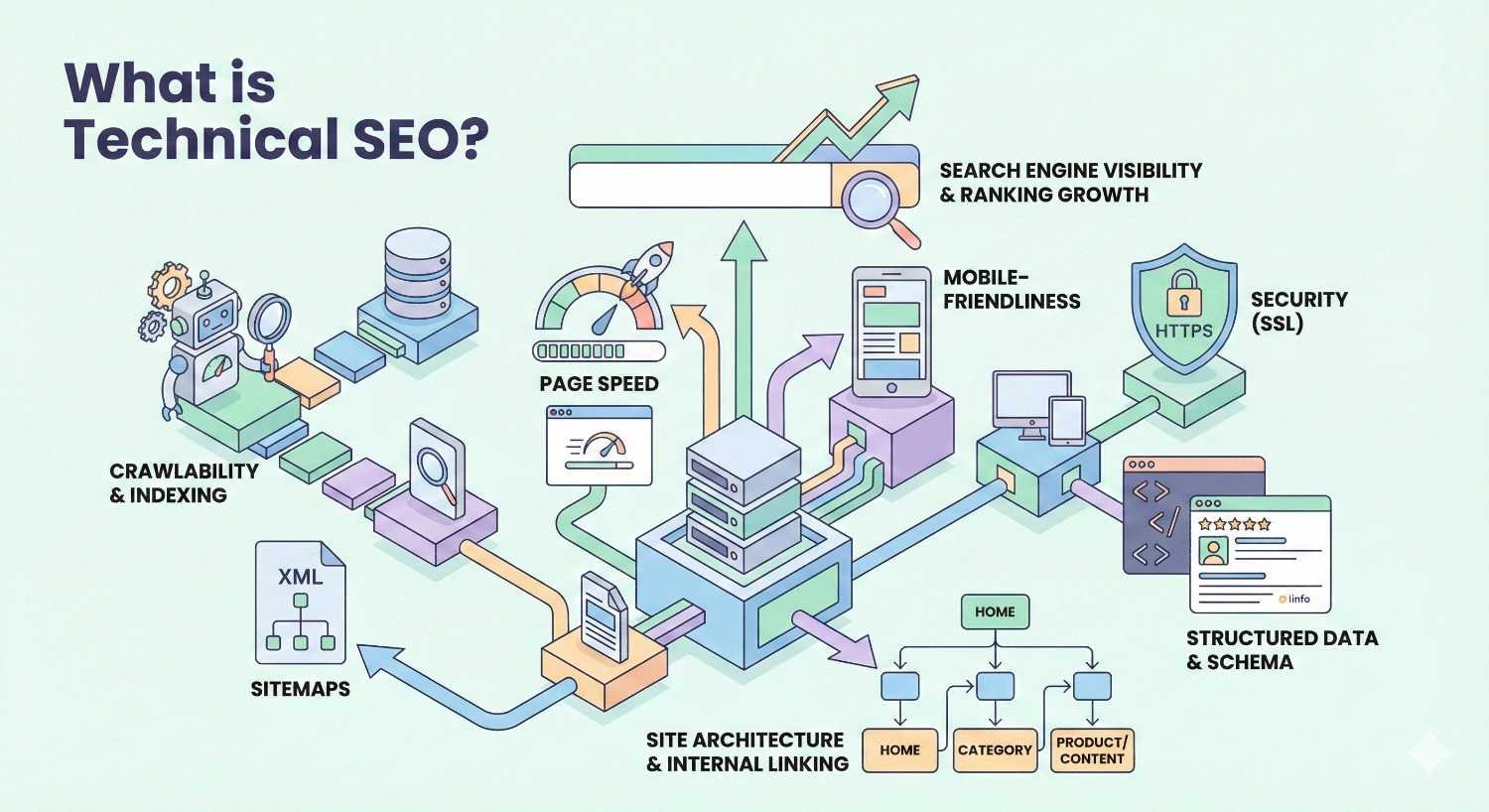
What is Technical SEO?
Technical SEO refers to the optimization of your website’s infrastructure to help search engines crawl, index, render, and rank your pages efficiently. It focuses on the backend elements that affect how search engine bots interact with your site rather than the content users see.
Think of technical SEO as the foundation of a building. Without a solid foundation, everything built on top becomes unstable. Your content strategy, link building efforts, and on-page optimizations all depend on a technically sound website.
Technical SEO addresses questions like: Can Google find all your pages? Can it understand your site structure? Does your site load fast enough? Is it secure? These factors determine whether your content even has a chance to compete in search results.
Core Components of Technical SEO
Crawlability determines whether search engine bots can access and navigate your website. This includes your robots.txt file configuration, XML sitemaps, internal linking structure, and URL architecture. If Googlebot can’t reach a page, that page won’t rank.
Indexability controls which pages search engines store in their index. Canonical tags, meta robots directives, and proper handling of duplicate content all fall under indexability. You want your important pages indexed and your thin or duplicate pages excluded.
Site speed and Core Web Vitals measure how quickly your pages load and how stable they are during loading. Google uses Largest Contentful Paint, First Input Delay, and Cumulative Layout Shift as ranking signals. Slow sites lose both rankings and users.
Mobile-friendliness ensures your site works properly on smartphones and tablets. Google uses mobile-first indexing, meaning it primarily uses the mobile version of your site for ranking decisions.
Site architecture refers to how your pages are organized and linked together. A logical hierarchy helps both users and search engines understand your site’s structure and find content efficiently.
HTTPS and security protect user data and signal trustworthiness to search engines. Sites without SSL certificates display security warnings that drive users away.
Structured data markup helps search engines understand your content’s context and can enable rich results in search. Schema.org vocabulary allows you to mark up products, reviews, FAQs, events, and dozens of other content types.
How Technical SEO Impacts Search Performance
Technical SEO creates the conditions necessary for ranking. Without proper technical foundations, even the best content struggles to perform.
Crawl budget optimization becomes critical for larger sites. Search engines allocate limited resources to crawling each domain. If your crawl budget gets wasted on broken pages, redirect chains, or duplicate content, your important pages may not get crawled frequently enough.
Indexation issues can silently kill organic traffic. A single misplaced noindex tag or robots.txt rule can remove thousands of pages from search results. Regular technical audits catch these problems before they cause significant damage.
Page speed directly correlates with rankings and conversions. Google’s research shows that as page load time increases from one second to three seconds, bounce probability increases by 32%. At five seconds, that probability jumps to 90%.
Mobile usability affects the majority of searches. Mobile devices account for roughly 60% of all Google searches. Sites that don’t render properly on mobile lose more than half their potential audience.
Structured data implementation can significantly increase click-through rates. Rich results with star ratings, prices, availability, and other enhanced information stand out in search results and attract more clicks than plain blue links.
Common Technical SEO Issues and Fixes
Slow page speed often stems from unoptimized images, render-blocking JavaScript, excessive HTTP requests, or poor server response times. Compress images, defer non-critical scripts, enable browser caching, and consider a content delivery network for global audiences.
Crawl errors appear in Google Search Console when Googlebot encounters problems accessing your pages. Fix broken internal links, resolve server errors, and ensure your robots.txt doesn’t accidentally block important content.
Duplicate content confuses search engines about which version of a page to rank. Implement canonical tags to specify the preferred version, use 301 redirects for permanently moved content, and ensure URL parameters don’t create infinite duplicate variations.
Missing or incorrect hreflang tags cause international SEO problems. If you serve content in multiple languages or regions, proper hreflang implementation tells Google which version to show each audience.
Orphan pages lack internal links pointing to them, making them difficult for search engines to discover. Audit your site structure regularly and ensure every important page is reachable through internal navigation.
Redirect chains and loops waste crawl budget and slow down page loading. Audit your redirects periodically and update any chains to point directly to the final destination.
What is On-Page SEO?
On-page SEO encompasses all optimizations made directly on your web pages to improve their search rankings and attract relevant traffic. It focuses on content quality, keyword targeting, HTML elements, and user experience signals that help search engines understand what your pages are about and whether they satisfy user intent.
While technical SEO ensures search engines can access your content, on-page SEO ensures that content is relevant, valuable, and properly optimized for target queries. It bridges the gap between what users search for and what your pages deliver.
On-page SEO answers questions like: Does this page target the right keywords? Does the content comprehensively address user intent? Are the title tags and meta descriptions compelling? Is the content structured for readability and engagement?
Core Components of On-Page SEO
Keyword research and targeting forms the foundation of on-page optimization. Understanding what terms your audience searches for, their search volume, competition level, and intent allows you to create content that matches real demand.
Title tags are among the most important on-page ranking factors. They appear in search results, browser tabs, and social shares. Effective title tags include target keywords, accurately describe page content, and entice clicks.
Meta descriptions don’t directly impact rankings but significantly affect click-through rates. A compelling meta description acts as ad copy for your page in search results.
Header tags (H1-H6) create content hierarchy and help both users and search engines understand your page structure. Your H1 should include your primary keyword and clearly state the page topic. Subsequent headers organize content into logical sections.
Content quality and depth determines whether your page satisfies user intent. Thin content rarely ranks well. Comprehensive coverage of a topic, supported by evidence and examples, signals expertise and provides genuine value.
Internal linking distributes page authority throughout your site and helps users discover related content. Strategic internal links guide both users and search engines to your most important pages.
Image optimization includes descriptive file names, alt text, appropriate sizing, and modern formats. Images should enhance content while loading quickly.
URL structure should be clean, descriptive, and include relevant keywords. Short, readable URLs perform better than long strings of numbers and parameters.
How On-Page SEO Drives Rankings
On-page SEO signals help search engines determine relevance and quality. When your on-page elements align with user queries and intent, you’re more likely to rank and earn clicks.
Relevance matching happens when search engines compare your page content against user queries. Proper keyword usage in titles, headers, and body content signals what your page is about. But modern algorithms look beyond exact matches to understand semantic relationships and topical coverage.
User engagement signals like time on page, bounce rate, and pages per session indicate whether your content satisfies visitors. While Google has been cagey about using these as direct ranking factors, pages that engage users tend to earn more links and return visits.
Click-through rate optimization through compelling titles and meta descriptions can improve rankings over time. If your page consistently earns more clicks than competitors at the same position, search engines may interpret this as a quality signal.
Topical authority builds when you create comprehensive content clusters around related subjects. A single page rarely establishes authority. Multiple interlinked pages covering a topic from various angles demonstrate expertise.
E-E-A-T signals (Experience, Expertise, Authoritativeness, Trustworthiness) influence how Google evaluates content quality, particularly for YMYL (Your Money or Your Life) topics. On-page elements like author bios, citations, and transparent sourcing contribute to these signals.
On-Page SEO Best Practices
Match content to search intent. Before writing, analyze what currently ranks for your target keyword. If the top results are all how-to guides, don’t create a product page. If they’re comparison articles, don’t write a definition piece.
Create comprehensive content. Cover your topic thoroughly. Address related questions users might have. Include relevant subtopics that competing pages miss. Depth and breadth both matter.
Optimize title tags strategically. Place your primary keyword near the beginning. Keep titles under 60 characters to avoid truncation. Make them specific and compelling.
Write meta descriptions that sell. Include your target keyword naturally. Highlight unique value propositions. Add a call to action when appropriate. Stay under 155 characters.
Use header tags to structure content. Your H1 should match your title tag’s intent. Use H2s for main sections and H3s for subsections. Headers should be descriptive and include relevant keywords where natural.
Optimize images properly. Use descriptive file names before uploading. Write alt text that describes the image for accessibility and SEO. Compress images to reduce file size without sacrificing quality.
Build internal links intentionally. Link to related content using descriptive anchor text. Prioritize linking to your most important pages. Update old content with links to newer relevant pages.
Keep URLs clean and descriptive. Include your target keyword. Use hyphens to separate words. Avoid unnecessary parameters, numbers, or special characters.
Technical SEO vs On-Page SEO: Key Differences
Understanding the distinctions between technical SEO and on-page SEO helps you allocate resources effectively and build a complete optimization strategy. While both aim to improve search visibility, they operate in different domains and require different approaches.
Scope and Focus Areas
Technical SEO focuses on infrastructure. It deals with how search engines interact with your website at a systems level. The work happens in server configurations, code, site architecture, and backend settings. Users rarely see technical SEO directly, but they experience its effects through site speed, mobile usability, and security.
On-page SEO focuses on content and presentation. It deals with what users see and read on your pages. The work happens in your content management system, within individual pages, and through the words and media you publish. Users interact directly with on-page elements.
Technical SEO asks: “Can search engines access, understand, and index this site efficiently?”
On-page SEO asks: “Does this content match what users are searching for and provide genuine value?”
Implementation Requirements
Technical SEO often requires developer involvement. Implementing structured data, fixing crawl errors, optimizing server response times, and configuring proper redirects typically need technical skills. Changes often happen at the server, database, or code level.
On-page SEO can often be handled by content teams. Writing optimized title tags, creating quality content, adding internal links, and optimizing images are tasks that marketers and writers can execute within most content management systems.
Technical SEO implementations tend to be one-time fixes or periodic maintenance tasks. Once you fix a crawl error or implement HTTPS, it stays fixed unless something breaks.
On-page SEO requires ongoing effort. Content needs regular updates, new pages need optimization, and keyword strategies evolve as search behavior changes.
Skill Sets and Resources Needed
Technical SEO requires:
- Understanding of HTML, CSS, and JavaScript
- Familiarity with server configurations and hosting
- Knowledge of crawling and indexing mechanics
- Ability to read and interpret log files
- Experience with technical SEO tools like Screaming Frog, Sitebulb, or DeepCrawl
On-page SEO requires:
- Strong writing and editing skills
- Keyword research expertise
- Understanding of search intent
- Content strategy knowledge
- Familiarity with on-page SEO tools like Surfer, Clearscope, or Frase
Some professionals specialize in one area. Others develop competency in both. Larger organizations often have separate technical SEO and content SEO roles.
Impact on Search Rankings
Technical SEO creates ranking potential. Without proper technical foundations, your pages may not get indexed at all. Technical issues can cap your rankings regardless of content quality. Fixing critical technical problems often produces immediate ranking improvements.
On-page SEO realizes ranking potential. Once technical foundations are solid, on-page optimization determines which queries you rank for and how well. Content quality and relevance drive long-term ranking success.
Technical SEO issues tend to have binary impacts. Either your pages are indexed or they’re not. Either your site loads fast enough or it doesn’t. Fixing problems removes barriers.
On-page SEO impacts exist on a spectrum. Better content, better optimization, and better user experience lead to incrementally better rankings. There’s always room for improvement.
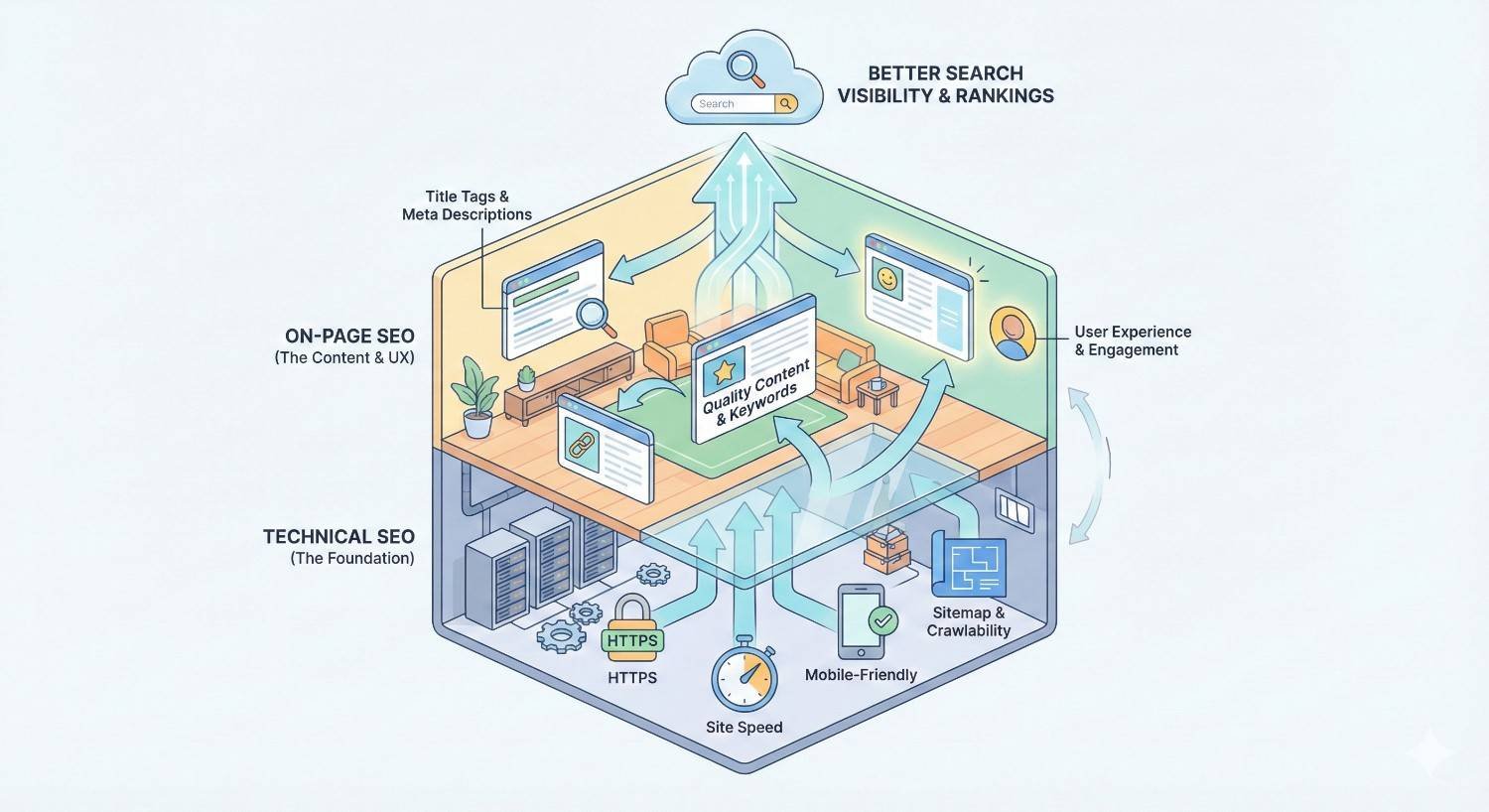
How Technical SEO and On-Page SEO Work Together
Technical SEO and on-page SEO aren’t competing priorities. They’re complementary disciplines that together create the conditions for organic search success. Understanding their relationship helps you build more effective SEO strategies.
The Foundation-Content Relationship
Think of technical SEO as the foundation and plumbing of a house. On-page SEO is the interior design and furnishings. You need both for a functional, attractive home.
A beautiful interior means nothing if the foundation is cracked and the plumbing doesn’t work. Similarly, exceptional content can’t rank if search engines can’t crawl and index it properly.
Conversely, a solid foundation with working plumbing but empty rooms isn’t useful either. A technically perfect website with thin, irrelevant content won’t attract or retain visitors.
Technical SEO enables on-page SEO to work. Your carefully optimized content needs to be crawlable, indexable, and fast-loading to have any chance of ranking.
On-page SEO gives technical SEO purpose. All that infrastructure work exists to support content that serves users and achieves business goals.
Sequential vs Parallel Implementation
The traditional approach is sequential: Fix technical issues first, then focus on content optimization. This makes sense when technical problems are severe enough to prevent indexing or significantly harm user experience.
The modern approach is often parallel: Address critical technical issues immediately while simultaneously working on content. Most sites don’t have technical problems severe enough to warrant stopping all content work.
Prioritization depends on your situation:
If your site has major crawlability issues, pages not getting indexed, or severe speed problems, prioritize technical fixes. Content optimization won’t help pages that search engines can’t access.
If your technical foundations are reasonably solid, you can work on both simultaneously. Fix technical issues as you find them while continuously improving content.
For new sites, build technical foundations correctly from the start. It’s easier to launch with proper technical SEO than to retrofit it later.
Measuring Combined Impact
Isolating the impact of technical vs on-page changes can be challenging. Both affect the same ultimate metrics: rankings, traffic, and conversions.
Technical SEO improvements often show faster results. Fixing a critical indexation issue can produce ranking changes within days of Google recrawling affected pages. Speed improvements may show impact within weeks.
On-page SEO improvements typically take longer. Content changes need to be crawled, processed, and evaluated against competitors. Expect weeks to months before seeing the full impact of content optimizations.
Track both types of changes separately. Document when you make technical fixes and when you optimize content. This helps you understand what’s driving results and where to focus future efforts.
Use Google Search Console to monitor technical health. The Coverage report shows indexation issues. Core Web Vitals reports track speed metrics. The Performance report shows how changes affect clicks and impressions.
Use analytics to track content performance. Monitor organic traffic to optimized pages. Track engagement metrics like time on page and bounce rate. Measure conversions from organic search.
Technical SEO vs On-Page SEO: Comparison Table
| Attribute | Technical SEO | On-Page SEO |
| Primary Focus | Website infrastructure and crawlability | Content relevance and quality |
| Who Sees It | Search engine bots primarily | Users and search engines |
| Implementation | Server, code, and configuration level | Content management system level |
| Skills Required | Developer/technical knowledge | Content and marketing knowledge |
| Typical Tasks | Site speed optimization, fixing crawl errors, implementing structured data, managing redirects | Keyword optimization, content creation, title tag writing, internal linking |
| Frequency | Periodic audits and maintenance | Ongoing content optimization |
| Time to Results | Often faster (days to weeks) | Usually slower (weeks to months) |
| Tools Used | Screaming Frog, Google Search Console, PageSpeed Insights, log file analyzers | Keyword research tools, content optimization platforms, rank trackers |
| Impact Type | Removes barriers to ranking | Improves relevance and quality signals |
| Common Issues | Slow speed, crawl errors, indexation problems, duplicate content | Thin content, poor keyword targeting, weak titles, missing internal links |
Which Should You Prioritize: Technical SEO or On-Page SEO?
The answer depends on your current situation, resources, and goals. Neither discipline is universally more important. The right priority varies by website and circumstance.
When to Start with Technical SEO
Prioritize technical SEO when you have indexation problems. If Google Search Console shows significant pages not being indexed, or if your site has fewer indexed pages than it should, technical issues are blocking your potential.
Prioritize technical SEO when your site is slow. If Core Web Vitals are failing or page load times exceed three seconds, speed issues are hurting both rankings and user experience. Fix these before investing heavily in content.
Prioritize technical SEO when launching a new site. Getting technical foundations right from the start prevents problems later. Proper site architecture, URL structure, and technical configurations are easier to implement before you have thousands of pages.
Prioritize technical SEO when migrating or redesigning. Site migrations and redesigns are high-risk moments for SEO. Technical mistakes during these transitions can devastate organic traffic. Careful technical planning and execution are essential.
Prioritize technical SEO when you’ve never audited. If your site has existed for years without a technical SEO audit, unknown issues may be limiting your performance. A comprehensive audit reveals problems you didn’t know existed.
When to Focus on On-Page SEO
Focus on on-page SEO when technical foundations are solid. If your site loads quickly, pages get indexed properly, and no major technical issues exist, content optimization becomes your primary lever for growth.
Focus on on-page SEO when you have thin content. If your pages lack depth, don’t target specific keywords, or fail to address user intent, content improvements will have more impact than technical tweaks.
Focus on on-page SEO when competitors outrank you with similar technical profiles. If competing sites aren’t technically superior but rank better, their content is likely stronger. Match or exceed their content quality.
Focus on on-page SEO when you’re targeting new keywords. Expanding into new topic areas requires new content. Technical SEO won’t help you rank for keywords you don’t have pages targeting.
Focus on on-page SEO when existing content is outdated. Search engines favor fresh, accurate content. Updating old pages with current information and improved optimization can revive declining traffic.
Balancing Both for Maximum Results
The ideal approach addresses both simultaneously. Most organizations shouldn’t choose one over the other. They should allocate resources to both based on current needs and opportunities.
Conduct regular technical audits. Quarterly technical reviews catch emerging issues before they cause significant damage. Monthly monitoring of key metrics in Google Search Console provides early warning of problems.
Maintain ongoing content optimization. Continuously improve existing content while creating new pages targeting valuable keywords. Content optimization is never “done.”
Allocate resources based on opportunity. If a technical fix could unlock significant ranking potential, prioritize it. If a content improvement could capture valuable traffic, prioritize that. Let data guide decisions.
Build processes that integrate both. When creating new content, ensure it follows technical best practices. When fixing technical issues, consider content implications. The disciplines should inform each other.
How to Implement Technical SEO: Step-by-Step Process
Implementing technical SEO systematically ensures you address the most impactful issues first and maintain improvements over time. This process works for sites of any size.
Technical SEO Audit and Assessment
Start with Google Search Console. Review the Coverage report for indexation issues. Check Core Web Vitals for speed problems. Look at the Mobile Usability report for responsive design issues. Search Console provides Google’s direct feedback on your site’s technical health.
Crawl your site with a dedicated tool. Tools like Screaming Frog, Sitebulb, or Ahrefs Site Audit simulate how search engines crawl your site. They identify broken links, redirect chains, duplicate content, missing meta tags, and dozens of other issues.
Test page speed thoroughly. Use Google PageSpeed Insights for Core Web Vitals data. Test multiple page types: homepage, category pages, product pages, blog posts. Speed issues often vary by template.
Check mobile rendering. Use Google’s Mobile-Friendly Test on key pages. Browse your site on actual mobile devices. Ensure all content and functionality works properly on smaller screens.
Review your robots.txt and XML sitemap. Confirm robots.txt isn’t blocking important content. Verify your sitemap includes all pages you want indexed and excludes pages you don’t.
Analyze your site architecture. Map how pages link together. Identify orphan pages with no internal links. Check that important pages are reachable within three clicks from the homepage.
Prioritizing Technical Issues
Critical issues come first. Anything preventing pages from being indexed, causing security warnings, or making the site unusable on mobile needs immediate attention. These issues cap your ranking potential entirely.
High-impact issues come second. Slow page speed, significant duplicate content, and crawl budget waste affect rankings but don’t completely prevent them. Address these after critical issues are resolved.
Medium-impact issues come third. Missing structured data, suboptimal URL structures, and minor redirect chains affect performance but less dramatically. Schedule these for regular maintenance.
Low-impact issues can wait. Minor validation errors, non-critical missing alt text, and cosmetic issues have minimal ranking impact. Address them when convenient but don’t prioritize over higher-impact work.
Consider effort vs impact. Some high-impact fixes are quick. Some medium-impact fixes require significant development resources. Prioritize quick wins that deliver meaningful results.
Essential Technical SEO Tools
Google Search Console is free and essential. It shows how Google sees your site, reports indexation issues, tracks Core Web Vitals, and provides search performance data. Every site should have it configured.
Screaming Frog SEO Spider crawls websites and identifies technical issues. The free version handles up to 500 URLs. The paid version removes limits and adds advanced features. It’s the industry standard for technical audits.
Google PageSpeed Insights tests page speed and Core Web Vitals. It provides both lab data and field data from real users. Use it to identify specific speed issues and track improvements.
Ahrefs or Semrush include site audit features alongside their other SEO tools. They’re useful for ongoing monitoring and catching issues between comprehensive audits.
Log file analyzers like Screaming Frog Log Analyzer or Botify show how search engines actually crawl your site. This data reveals crawl budget issues and helps optimize for large sites.
Ongoing Technical Maintenance
Monitor Google Search Console weekly. Check for new crawl errors, indexation drops, or Core Web Vitals regressions. Early detection prevents small issues from becoming big problems.
Run monthly crawls. Regular crawling catches new issues introduced by site updates, content additions, or platform changes. Compare crawl data over time to identify trends.
Audit quarterly. Comprehensive technical audits every three months ensure nothing significant gets missed. Document findings and track progress on fixes.
Test after major changes. Any significant site update, platform migration, or redesign should trigger immediate technical testing. Don’t assume changes won’t affect SEO.
Stay current on algorithm updates. Google regularly updates its technical requirements. Core Web Vitals thresholds, mobile-first indexing requirements, and other technical factors evolve. Stay informed and adapt.
How to Implement On-Page SEO: Step-by-Step Process
On-page SEO implementation follows a systematic process from audit through optimization to ongoing refinement. This framework applies whether you’re optimizing existing content or creating new pages.
On-Page SEO Audit and Content Analysis
Inventory your existing content. List all pages on your site with their target keywords, current rankings, and traffic. Identify pages that underperform their potential and pages that perform well.
Analyze top-performing pages. Understand why your best content works. What keywords does it target? How comprehensive is the coverage? What makes it better than competitors? Apply these insights to other pages.
Identify content gaps. Compare your content against competitors and keyword research. What topics do they cover that you don’t? What questions does your audience ask that you haven’t answered?
Evaluate content quality objectively. Is your content more comprehensive than competitors? Does it provide unique value? Is it well-written and engaging? Be honest about where improvements are needed.
Check on-page elements systematically. Review title tags, meta descriptions, header structure, internal links, and image optimization across your site. Identify patterns of missing or suboptimal elements.
Keyword Research and Mapping
Start with seed keywords. List the core topics and terms relevant to your business. These become starting points for deeper research.
Expand with keyword tools. Use tools like Ahrefs, Semrush, or Google Keyword Planner to find related keywords, questions, and long-tail variations. Look for terms with meaningful search volume and manageable competition.
Analyze search intent. For each target keyword, examine what currently ranks. Understand whether searchers want information, comparisons, products, or something else. Your content must match this intent.
Map keywords to pages. Assign primary and secondary keywords to specific pages. Avoid targeting the same keyword with multiple pages, which causes internal competition. Create new pages for keywords without appropriate existing content.
Prioritize by opportunity. Focus first on keywords where you have realistic ranking potential and meaningful business value. High-volume keywords with entrenched competitors may not be the best starting point.
Content Optimization Framework
Optimize title tags first. Include your primary keyword near the beginning. Keep titles under 60 characters. Make them specific, accurate, and compelling. Each page needs a unique title.
Write effective meta descriptions. Include your target keyword naturally. Summarize the page’s value proposition. Add a call to action when appropriate. Stay under 155 characters to avoid truncation.
Structure content with headers. Use one H1 per page matching your title’s intent. Break content into logical sections with H2s. Use H3s for subsections. Include relevant keywords in headers where natural.
Improve content depth and quality. Ensure your content comprehensively addresses the topic. Add sections competitors miss. Include examples, data, and expert insights. Remove fluff and filler.
Optimize images. Use descriptive file names before uploading. Write alt text that describes each image. Compress files to reduce load time. Use modern formats like WebP where supported.
Build internal links. Link to related content using descriptive anchor text. Ensure important pages receive links from multiple other pages. Update old content with links to newer relevant pages.
Add structured data where appropriate. Implement FAQ schema for question-and-answer content. Use product schema for e-commerce pages. Add article schema for blog posts. Structured data can enable rich results.
On-Page SEO Tools and Resources
Keyword research tools like Ahrefs, Semrush, Moz, or Ubersuggest help identify target keywords, analyze competition, and track rankings. Most offer free tiers with limited functionality.
Content optimization tools like Surfer SEO, Clearscope, or Frase analyze top-ranking content and provide recommendations for improving your pages. They help ensure comprehensive topic coverage.
Google Search Console shows which queries drive traffic to your pages, helping you identify optimization opportunities and track the impact of changes.
Rank tracking tools monitor your positions for target keywords over time. This helps you measure the impact of optimizations and identify pages that need attention.
Readability tools like Hemingway Editor or Grammarly help ensure your content is clear, well-written, and accessible to your target audience.
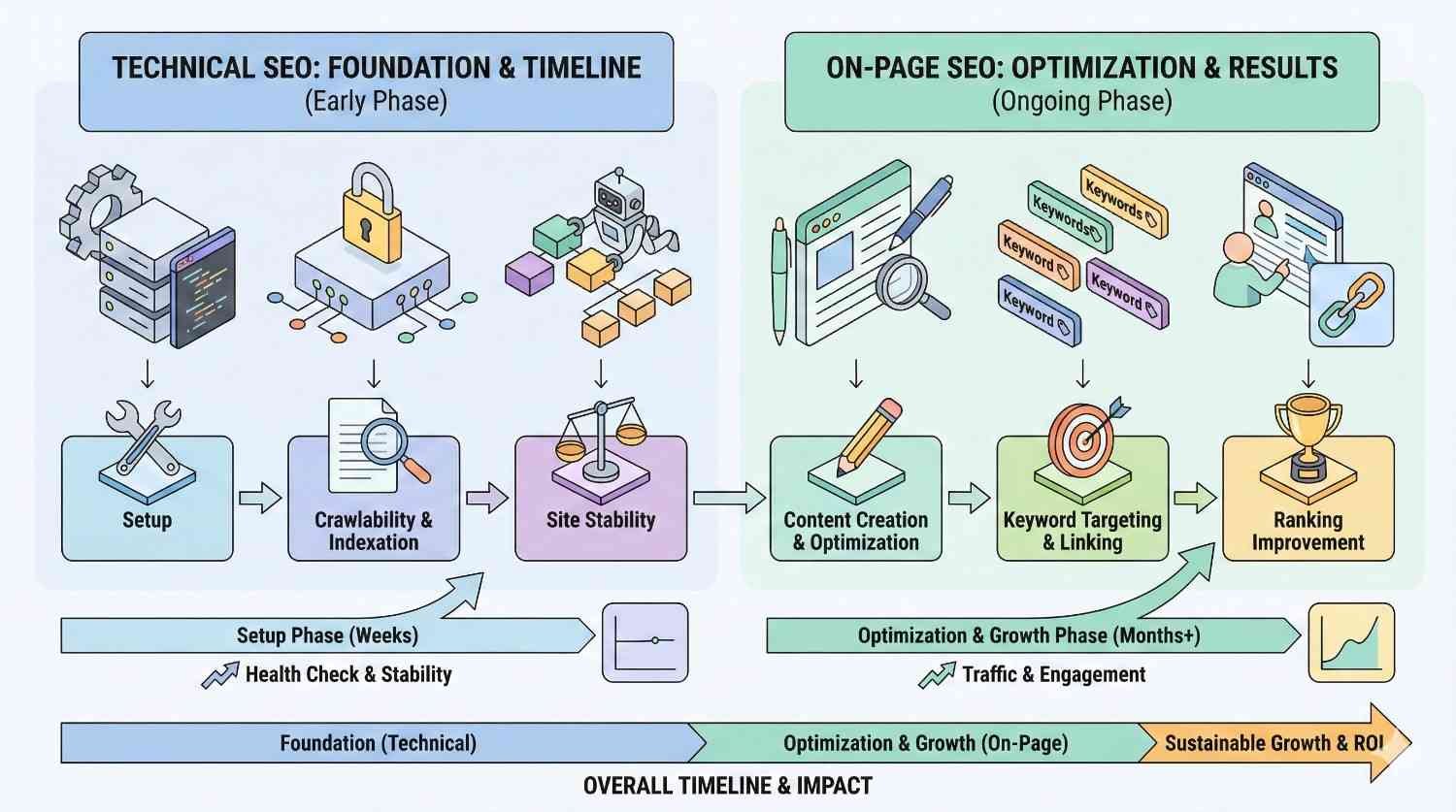
Technical SEO vs On-Page SEO: Timeline and Results
Setting realistic expectations for SEO results helps you plan effectively and avoid frustration. Both technical and on-page SEO take time to show impact, but timelines differ.
How Long Technical SEO Takes to Show Results
Critical fixes can show results within days. If you fix an issue preventing pages from being indexed, those pages may appear in search results within days of Google recrawling them. Removing a mistaken noindex tag or fixing a robots.txt block can produce rapid improvements.
Speed improvements typically show results within weeks. After implementing page speed optimizations, you’ll see Core Web Vitals improvements in Google Search Console within 28 days as field data updates. Ranking impacts may follow within weeks to a couple of months.
Structural changes take longer to fully propagate. Major site architecture changes, new internal linking structures, or significant URL changes may take months to fully impact rankings as Google recrawls and reevaluates your site.
The more severe the issue, the faster the improvement. Fixing a problem that completely blocked indexation produces faster results than fixing a minor speed issue. The baseline matters.
How Long On-Page SEO Takes to Show Results
New content typically takes 3-6 months to reach its ranking potential. Google needs time to crawl, index, and evaluate new pages against competitors. Initial rankings often improve over several months as Google gathers more signals.
Content updates can show results within weeks to months. Refreshing existing content with improved optimization may produce faster results than new content since the page already has history and authority.
Competitive keywords take longer. If you’re targeting keywords where established competitors rank, expect a longer timeline. Building the authority and signals needed to compete takes time.
Less competitive keywords can rank faster. Long-tail keywords with lower competition may show results within weeks. These quick wins can drive traffic while you work on more competitive terms.
Setting Realistic Expectations for Combined Efforts
Expect 6-12 months for significant organic growth. Meaningful increases in organic traffic typically require sustained effort across both technical and on-page SEO over many months. Quick wins happen, but transformational results take time.
Early months focus on foundation building. The first few months of SEO work often show limited traffic impact as you fix technical issues, create content, and build authority. This is normal.
Compound growth accelerates over time. As your technical foundations solidify and content library grows, each new piece of content benefits from existing authority. Growth often accelerates in year two and beyond.
Track leading indicators, not just traffic. Monitor indexation rates, keyword rankings, and impressions before traffic increases. These leading indicators show progress before traffic follows.
Be patient but not passive. SEO takes time, but that doesn’t mean waiting passively. Continuously improve, test, and optimize while results develop.
Common Mistakes in Technical SEO and On-Page SEO
Avoiding common mistakes accelerates your progress and prevents setbacks. Learn from others’ errors rather than making them yourself.
Technical SEO Mistakes to Avoid
Blocking important content with robots.txt. Overly aggressive robots.txt rules can prevent search engines from accessing pages you want indexed. Audit your robots.txt regularly and test with Google’s robots.txt tester.
Creating redirect chains. When page A redirects to page B, which redirects to page C, you’ve created a chain that wastes crawl budget and slows page loading. Update redirects to point directly to final destinations.
Ignoring mobile experience. With mobile-first indexing, your mobile site is your primary site for ranking purposes. Ensure mobile pages have the same content as desktop and function properly on smaller screens.
Neglecting page speed. Slow sites frustrate users and hurt rankings. Don’t assume your site is fast enough without testing. Regularly monitor Core Web Vitals and address issues promptly.
Implementing structured data incorrectly. Invalid or misleading structured data can result in manual actions from Google. Test your markup with Google’s Rich Results Test and follow schema.org guidelines precisely.
Forgetting about international SEO. If you serve multiple countries or languages, improper hreflang implementation causes the wrong pages to rank in the wrong markets. Get international technical SEO right or avoid it entirely.
Not monitoring after changes. Technical changes can have unintended consequences. Always monitor Google Search Console and analytics after implementing fixes to catch any negative impacts quickly.
On-Page SEO Mistakes to Avoid
Targeting keywords without understanding intent. Ranking for a keyword means nothing if your content doesn’t match what searchers want. Always analyze search intent before creating or optimizing content.
Keyword stuffing. Unnaturally forcing keywords into content hurts readability and can trigger spam filters. Use keywords naturally and focus on comprehensive topic coverage rather than keyword density.
Neglecting title tags and meta descriptions. These elements significantly impact click-through rates. Generic or missing titles and descriptions waste ranking potential. Optimize every page.
Creating thin content. Pages with little substantive content rarely rank well. If a topic deserves a page, it deserves comprehensive coverage. Consolidate thin pages or expand them significantly.
Ignoring internal linking. Internal links distribute authority and help users discover content. Failing to link between related pages wastes opportunities. Build intentional internal linking into your content process.
Duplicating content across pages. Multiple pages targeting the same keyword compete against each other. Consolidate duplicate content and ensure each page has a unique purpose and target.
Optimizing for search engines instead of users. Content that prioritizes SEO over user value may rank initially but won’t retain visitors or earn links. Create genuinely useful content that happens to be well-optimized.
Integration Mistakes That Hurt Performance
Treating technical and on-page SEO as separate silos. These disciplines must work together. Technical teams need to understand content goals. Content teams need to follow technical best practices.
Fixing technical issues without content strategy. A technically perfect site with poor content won’t rank. Technical fixes create potential; content realizes it.
Creating content without technical foundations. Publishing great content on a site with indexation problems wastes effort. Ensure technical basics are covered before scaling content production.
Not communicating between teams. When developers make changes without SEO input, or content teams publish without technical review, problems occur. Build communication into your processes.
Measuring the wrong metrics. Tracking only rankings or only traffic misses the full picture. Monitor technical health, content performance, and business outcomes together.
Technical SEO and On-Page SEO for Different Website Types
Different types of websites face different SEO challenges. Understanding your site type helps you prioritize the right technical and on-page elements.
E-commerce Websites
Technical SEO priorities for e-commerce:
- Faceted navigation management to prevent duplicate content and crawl budget waste
- Product schema implementation for rich results
- Site speed optimization, especially for product images
- Handling out-of-stock products without losing SEO value
- Managing large numbers of URLs efficiently
On-page SEO priorities for e-commerce:
- Unique, detailed product descriptions
- Category page optimization for broader keywords
- User-generated content like reviews
- Internal linking between related products
- Optimized product titles and meta descriptions
E-commerce sites often have thousands or millions of pages, making technical SEO particularly important. Crawl budget optimization and proper handling of product variations become critical at scale.
Service-Based Businesses
Technical SEO priorities for service businesses:
- Local SEO technical elements like Google Business Profile optimization
- Schema markup for local business, services, and reviews
- Mobile optimization for local searchers
- Fast loading for users researching on mobile devices
- Proper handling of location pages for multi-location businesses
On-page SEO priorities for service businesses:
- Service page optimization for target keywords
- Location-specific content for local rankings
- Trust signals like testimonials and case studies
- Clear calls to action for lead generation
- Content addressing common customer questions
Service businesses often compete locally, making local SEO technical elements particularly important. Content should demonstrate expertise and build trust with potential clients.
Content Publishers and Blogs
Technical SEO priorities for publishers:
- Fast page speed despite ad placements
- Proper pagination and archive handling
- News sitemap implementation for timely content
- AMP or other fast-loading formats for mobile
- Managing large content archives efficiently
On-page SEO priorities for publishers:
- Comprehensive topic coverage for authority building
- Optimized headlines for both search and social
- Internal linking between related articles
- Regular content updates to maintain freshness
- Author pages and bylines for E-E-A-T
Publishers depend on organic traffic more than most site types. Both technical performance and content quality directly impact revenue.
SaaS and Technology Companies
Technical SEO priorities for SaaS:
- JavaScript rendering for single-page applications
- Documentation site optimization
- Handling of login-gated content
- International SEO for global products
- Integration of marketing site with product
On-page SEO priorities for SaaS:
- Feature and use case page optimization
- Comparison content against competitors
- Educational content for top-of-funnel traffic
- Integration and documentation content
- Customer success stories and case studies
SaaS companies often have complex technical architectures that require careful SEO consideration. Content strategy typically spans awareness through decision stages.
Measuring Success: KPIs for Technical and On-Page SEO
Tracking the right metrics helps you understand what’s working and where to focus improvement efforts. Different KPIs apply to technical and on-page SEO.
Technical SEO Performance Metrics
Crawl stats show how search engines interact with your site. Monitor pages crawled per day, crawl budget usage, and crawl errors in Google Search Console. Healthy crawl patterns indicate good technical foundations.
Indexation rate measures what percentage of your pages are indexed. Compare indexed pages in Google Search Console to total pages on your site. Low indexation rates signal technical problems.
Core Web Vitals scores track page experience metrics. Monitor Largest Contentful Paint, First Input Delay, and Cumulative Layout Shift. Aim for “good” scores across all metrics.
Page speed metrics beyond Core Web Vitals include Time to First Byte, Total Blocking Time, and Speed Index. These provide additional insight into performance issues.
Mobile usability errors in Google Search Console indicate pages that don’t work properly on mobile devices. Zero errors is the goal.
HTTPS coverage should be 100% for all pages. Mixed content warnings or insecure pages hurt trust and rankings.
Structured data validity can be monitored through Google Search Console’s enhancements reports. Track errors and warnings for implemented schema types.
On-Page SEO Performance Metrics
Organic traffic is the ultimate measure of SEO success. Track total organic sessions and traffic to specific pages over time.
Keyword rankings show where you appear for target terms. Monitor rankings for primary keywords and track movement over time.
Click-through rate from search results indicates how compelling your titles and descriptions are. Compare your CTR to expected rates for your ranking positions.
Organic impressions show how often your pages appear in search results. Growing impressions indicate expanding visibility even before traffic increases.
Pages per session and time on site suggest content engagement. Higher values typically indicate content that satisfies user intent.
Bounce rate for organic traffic shows whether visitors find what they’re looking for. High bounce rates may indicate intent mismatch or poor content quality.
Conversions from organic traffic connect SEO to business outcomes. Track leads, sales, or other goals attributed to organic search.
Holistic SEO Performance Tracking
Create a unified dashboard. Combine technical and on-page metrics in one view. This helps you see the complete picture and identify relationships between metrics.
Track trends, not just snapshots. Monthly or weekly comparisons reveal whether you’re improving. Single data points can be misleading.
Segment by page type. Different page types may perform differently. Track blog posts, product pages, and service pages separately to identify specific opportunities.
Compare to competitors. Use tools like Ahrefs or Semrush to benchmark your performance against competitors. Understanding relative performance provides context.
Connect to business metrics. Ultimately, SEO should drive business results. Track how organic traffic contributes to revenue, leads, or other business goals.
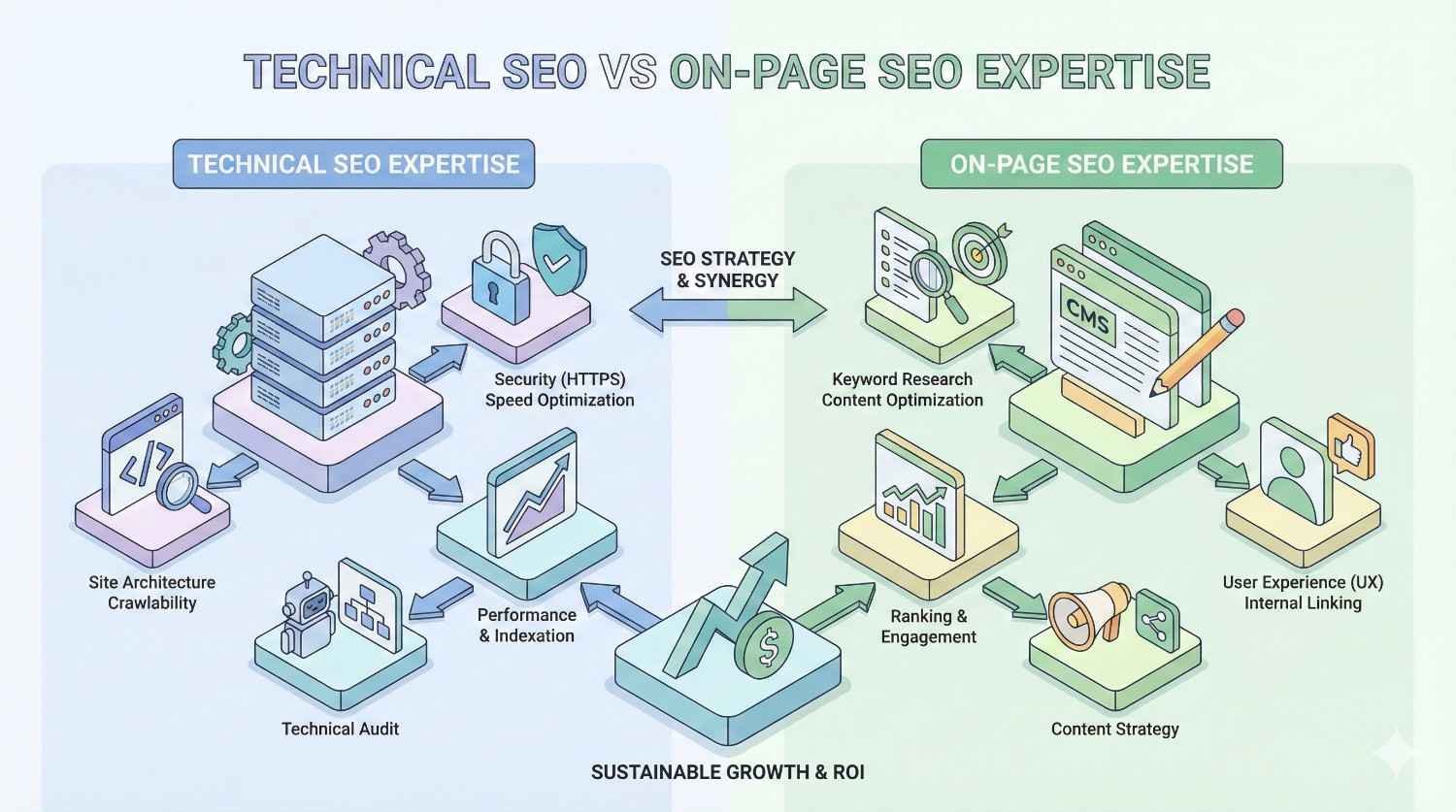
When to Hire Help: Technical SEO vs On-Page SEO Expertise
Deciding whether to handle SEO in-house or hire external help depends on your resources, expertise, and goals. The decision may differ for technical vs on-page work.
DIY vs Professional Technical SEO
DIY technical SEO works when:
- Your site is relatively simple with standard architecture
- You have team members with technical skills
- Issues are straightforward and well-documented
- You have time to learn and implement properly
Professional technical SEO is worth it when:
- Your site has complex architecture or custom development
- You’re experiencing significant technical issues you can’t diagnose
- You’re planning a migration or major redesign
- Technical problems are costing you significant traffic or revenue
- You lack internal technical resources
Technical SEO mistakes can be costly and difficult to reverse. If you’re unsure about implementation, professional help often pays for itself by avoiding errors.
DIY vs Professional On-Page SEO
DIY on-page SEO works when:
- You have strong writing skills on your team
- You understand your audience and their search behavior
- You have time to learn keyword research and optimization
- Your content needs are manageable in volume
Professional on-page SEO is worth it when:
- You need to scale content production significantly
- Your team lacks writing or SEO expertise
- You’re entering competitive markets requiring expert-level content
- You need strategic guidance on content priorities
- Internal resources are better spent on core business activities
On-page SEO is more accessible to non-specialists than technical SEO, but expertise still matters. Professional content strategists and writers often produce better results faster.
Building an Integrated SEO Strategy
Consider a hybrid approach. Many organizations handle routine on-page optimization internally while engaging specialists for technical audits and complex implementations.
Start with an audit. Whether you plan to DIY or hire help, begin with a professional audit. Understanding your current state helps you make informed decisions about next steps.
Build internal capabilities over time. Even if you start with external help, develop internal SEO knowledge. This helps you maintain improvements and make better decisions.
Choose partners who teach, not just do. The best SEO partners transfer knowledge to your team. Look for agencies or consultants who explain their work and build your capabilities.
Align on goals and metrics. Whether working with internal teams or external partners, ensure everyone agrees on what success looks like and how it will be measured.
Conclusion: Building a Complete SEO Foundation
Technical SEO and on-page SEO represent two essential pillars of search optimization. Technical SEO ensures search engines can access, crawl, and index your site efficiently. On-page SEO ensures your content matches user intent and provides genuine value. Neither alone is sufficient for sustainable organic growth.
The most successful SEO strategies address both disciplines systematically. They build solid technical foundations while continuously improving content quality and relevance. They measure progress across both dimensions and adapt based on data.
At White Label SEO Service, we help businesses build complete SEO foundations that drive sustainable organic growth. Whether you need technical audits, content optimization, or integrated strategy, our team delivers results. Contact us to discuss how we can accelerate your search visibility.
Frequently Asked Questions
What is the main difference between technical SEO and on-page SEO?
Technical SEO focuses on website infrastructure like site speed, crawlability, and indexation. On-page SEO focuses on content elements like keywords, title tags, and content quality. Technical SEO helps search engines access your site; on-page SEO helps them understand and rank your content.
Can I do SEO without technical knowledge?
You can handle basic on-page SEO without deep technical knowledge. Writing optimized content, creating good title tags, and building internal links are accessible skills. However, technical SEO often requires developer involvement or specialized expertise for issues like site speed, structured data, and crawl optimization.
How long does it take to see results from technical SEO fixes?
Critical technical fixes like resolving indexation issues can show results within days to weeks. Speed improvements typically impact rankings within one to three months. The timeline depends on the severity of the issue and how quickly Google recrawls your site.
Should I fix technical SEO issues before creating content?
Fix critical technical issues that prevent indexation first. However, you don’t need perfect technical SEO before creating content. Address major problems immediately, then work on technical maintenance and content optimization in parallel.
What tools do I need for technical SEO vs on-page SEO?
Technical SEO tools include Google Search Console, Screaming Frog, and PageSpeed Insights. On-page SEO tools include keyword research platforms like Ahrefs or Semrush, and content optimization tools like Surfer or Clearscope. Google Search Console serves both purposes.
How often should I audit my technical SEO?
Run comprehensive technical audits quarterly. Monitor Google Search Console weekly for emerging issues. Perform immediate audits after any major site changes, migrations, or platform updates.
Is technical SEO or on-page SEO more important for rankings?
Neither is universally more important. Technical SEO creates the conditions for ranking by ensuring search engines can access your content. On-page SEO determines what you rank for by establishing relevance. You need both for optimal results.


