

If search engines can’t crawl your website, your pages won’t rank—period. Website crawlability determines whether Googlebot and other crawlers can access, read, and process your content for indexing. Without proper crawlability, even exceptional content remains invisible to organic search.
This technical foundation directly impacts your traffic, leads, and revenue potential. Crawlability issues silently block pages from appearing in search results, wasting your content investment.
This guide covers everything from crawl budget fundamentals to advanced optimization strategies, giving you actionable steps to ensure search engines discover and process every important page on your site.
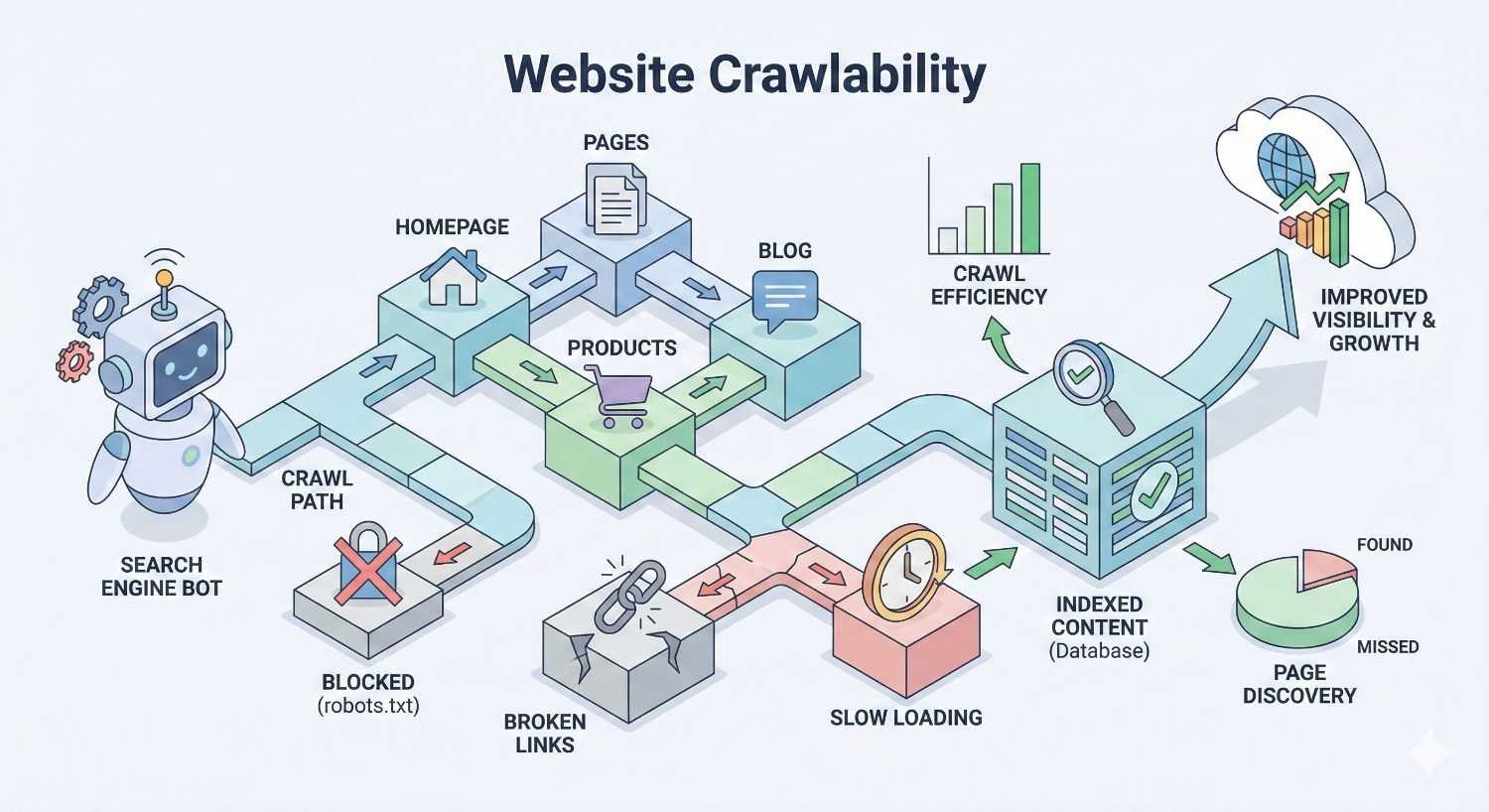
What Is Website Crawlability?
Website crawlability refers to a search engine’s ability to access and navigate through your website’s pages. When a site is crawlable, search engine bots can follow links, read content, and gather information needed for indexing. Poor crawlability creates barriers that prevent discovery of your pages.
Think of crawlability as the first gate in the SEO process. Before Google can evaluate your content quality, relevance, or authority, its crawlers must physically reach and process your pages. Technical barriers at this stage stop the entire ranking process before it begins.
How Search Engine Crawlers Work
Search engine crawlers—also called spiders or bots—are automated programs that systematically browse the web. Googlebot, Google’s primary crawler, starts with a list of known URLs and follows links to discover new pages. The crawler downloads page content, extracts links, and adds new URLs to its crawl queue.
Crawlers render pages similarly to browsers, processing HTML, CSS, and JavaScript to understand content structure. They respect directives in robots.txt files and meta tags that control access. Each crawler has specific behaviors and capabilities that affect how thoroughly it processes your site.
The crawling process operates continuously. Googlebot revisits pages to detect changes, with crawl frequency varying based on page importance and update patterns. High-authority pages with frequent updates receive more crawler attention than static, low-traffic pages.
The Crawl Budget Concept
Crawl budget represents the number of pages Googlebot will crawl on your site within a given timeframe. Google defines crawl budget as the combination of crawl rate limit and crawl demand.
Crawl rate limit prevents server overload. Google adjusts crawling speed based on your server’s response times and capacity. If your server slows down, Googlebot reduces its crawl rate to avoid causing problems.
Crawl demand reflects how much Google wants to crawl your site. Popular, frequently updated sites with high-quality content receive more crawl attention. Sites with stale content or low authority get crawled less often.
For most small to medium websites, crawl budget isn’t a concern. However, sites with thousands of pages, complex URL parameters, or technical issues can exhaust their crawl budget on low-value pages, leaving important content undiscovered.
Why Crawlability Matters for SEO Performance
Crawlability directly impacts your organic visibility and business outcomes. Pages that can’t be crawled can’t be indexed. Pages that aren’t indexed can’t rank. This cascade effect means crawlability problems translate directly to lost traffic and revenue.
Consider a scenario where your robots.txt accidentally blocks your product pages. Despite having excellent content and strong backlinks, those pages generate zero organic traffic because Google never sees them. This happens more often than most site owners realize.
Crawlability issues also waste resources. If Googlebot spends its crawl budget on duplicate pages, parameter variations, or low-value URLs, your important content gets crawled less frequently. This delays indexing of new pages and slows recognition of content updates.
How Search Engines Discover and Crawl Your Website
Understanding the discovery and crawling process helps you optimize for better coverage. Search engines use multiple methods to find URLs and determine crawl priorities.
The Crawling Process: From Discovery to Indexing
The journey from URL discovery to search results follows a specific sequence. First, Google discovers a URL through links, sitemaps, or direct submission. The URL enters a crawl queue where it waits for processing based on priority signals.
When Googlebot reaches your URL, it sends an HTTP request to your server. Your server responds with the page content and a status code. Googlebot processes this response, rendering JavaScript if needed, and extracts the page’s content and links.
After crawling, Google’s systems analyze the content for indexing. Not every crawled page gets indexed—Google evaluates quality, uniqueness, and relevance before adding pages to its index. Finally, indexed pages become eligible to appear in search results.
This entire process can take anywhere from hours to weeks depending on your site’s authority, crawl frequency, and technical setup. New sites or pages with few inbound links typically experience longer delays.
Googlebot and Other Search Engine Crawlers
Googlebot operates as Google’s primary web crawler, but multiple specialized crawlers exist for different content types. Googlebot Smartphone handles mobile crawling—now the default for indexing. Googlebot Images and Googlebot Video focus on media content.
Bing uses Bingbot, which follows similar principles but has different crawl patterns and JavaScript rendering capabilities. Other search engines like Yandex, Baidu, and DuckDuckGo operate their own crawlers with varying sophistication levels.
Each crawler identifies itself through its user-agent string. This identification allows you to serve different content or apply different rules to specific crawlers. However, user-agent spoofing exists, so critical access controls shouldn’t rely solely on user-agent detection.
Understanding crawler behavior helps you diagnose issues. If Googlebot crawls your site successfully but Bingbot struggles, you might have Bing-specific technical problems worth investigating.
URL Discovery Methods
Search engines discover URLs through several channels. Internal links remain the primary discovery method—Googlebot follows links from known pages to find new content. Strong internal linking ensures all important pages are discoverable through crawling.
XML sitemaps provide a direct URL list to search engines. While sitemaps don’t guarantee crawling or indexing, they help search engines discover pages that might be difficult to find through link following alone.
External backlinks from other websites introduce your URLs to crawlers. When Googlebot crawls a page linking to your site, it discovers your URL and adds it to its crawl queue. This is why backlinks accelerate indexing of new content.
Direct URL submission through Google Search Console offers another discovery path. You can request indexing for specific URLs, though Google doesn’t guarantee immediate crawling. This method works best for urgent updates to important pages.
Crawl Frequency and Prioritization
Google doesn’t crawl all pages equally. Crawl frequency depends on multiple factors including page importance, update frequency, and overall site authority. Homepage and category pages typically receive more frequent crawls than deep product pages.
Pages that change frequently signal to Google that regular crawling is worthwhile. News sites and blogs with daily updates get crawled more often than static corporate sites. You can influence this perception by maintaining consistent publishing schedules.
Internal link structure affects crawl prioritization. Pages with more internal links appear more important to crawlers. Strategic internal linking can direct crawl attention toward your highest-value pages.
Server response times also impact crawl frequency. Fast-loading sites can be crawled more aggressively without server strain. Slow sites force Google to reduce crawl rates, potentially leaving pages undiscovered.
Technical Factors That Control Crawlability
Multiple technical elements determine whether and how search engines crawl your pages. Understanding these factors gives you precise control over crawler access.
Robots.txt: Controlling Crawler Access
The robots.txt file sits at your domain root and provides instructions to crawlers about which URLs they can access. This plain text file uses a simple syntax to allow or disallow crawling of specific paths.
A basic robots.txt might look like this:
Copy
User-agent: *
Disallow: /admin/
Disallow: /private/
Allow: /
This tells all crawlers to avoid the /admin/ and /private/ directories while allowing access to everything else. You can create specific rules for different crawlers using their user-agent names.
Important limitations exist. Robots.txt blocks crawling but not indexing. If other sites link to a disallowed page, Google might index it based on anchor text and link context—just without crawling the actual content. For true indexing prevention, you need noindex directives.
Robots.txt errors can devastate your SEO. A misplaced wildcard or incorrect path can block your entire site from crawling. Always test changes using Google Search Console’s robots.txt tester before deploying to production.
XML Sitemaps: Guiding Crawler Discovery
XML sitemaps list URLs you want search engines to discover and crawl. While not required, sitemaps help ensure comprehensive coverage, especially for large sites or pages with limited internal linking.
A well-structured sitemap includes:
- All indexable URLs (pages you want in search results)
- Last modification dates (helps prioritize crawling)
- Change frequency hints (optional, often ignored)
- Priority values (optional, relative importance within your site)
Sitemap best practices include keeping files under 50MB uncompressed and 50,000 URLs per sitemap. Larger sites need sitemap index files that reference multiple individual sitemaps.
Submit your sitemap through Google Search Console and reference it in your robots.txt file. Monitor sitemap coverage reports to identify URLs that are submitted but not indexed—these often indicate crawlability or quality issues.
Meta Robots Tags and X-Robots-Tag Headers
Meta robots tags provide page-level crawling and indexing instructions. Unlike robots.txt, these directives require the page to be crawled first—the crawler must access the page to read the meta tag.
Common meta robots values include:
- noindex: Prevents indexing (page won’t appear in search results)
- nofollow: Tells crawlers not to follow links on the page
- noarchive: Prevents cached versions in search results
- nosnippet: Blocks snippet display in search results
The X-Robots-Tag HTTP header provides identical functionality for non-HTML resources like PDFs or images. This header-based approach works when you can’t add meta tags to the content itself.
Combining robots.txt with meta robots requires careful planning. If robots.txt blocks a page, crawlers never see the meta robots tag. This can cause problems when you want a page crawled but not indexed—you need to allow crawling while using noindex.
Canonical Tags and URL Normalization
Canonical tags tell search engines which URL version represents the authoritative copy of a page. This consolidates ranking signals when the same content exists at multiple URLs.
Common scenarios requiring canonicalization:
- HTTP vs. HTTPS versions
- WWW vs. non-WWW variations
- Trailing slash differences
- URL parameter variations
- Mobile and desktop URL pairs
Implement canonical tags in the HTML head section:
html
Copy
<link rel=”canonical“ href=”https://example.com/preferred-url/“ />
Self-referencing canonicals (pointing to the current URL) are recommended as a defensive measure. This prevents issues if your content gets scraped or accessed through unexpected URL variations.
Canonical tags are hints, not directives. Google may ignore canonicals if they conflict with other signals like internal linking patterns or sitemap inclusion. Consistent implementation across all signals produces the best results.
Server Response Codes (200, 301, 302, 404, 503)
HTTP status codes communicate page availability to crawlers. Understanding these codes helps you diagnose crawl issues and implement proper redirects.
200 OK: The page exists and content was delivered successfully. This is the expected response for all indexable pages.
301 Moved Permanently: The page has permanently moved to a new URL. Crawlers update their records and transfer most ranking signals to the new location. Use 301s for permanent URL changes.
302 Found (Temporary Redirect): The page temporarily redirects elsewhere. Crawlers maintain the original URL in their index. Use 302s only for genuinely temporary situations.
404 Not Found: The page doesn’t exist. Crawlers eventually remove 404 pages from the index. Excessive 404s waste crawl budget and create poor user experiences.
503 Service Unavailable: The server temporarily can’t handle requests. Crawlers retry later without penalizing the page. Use 503s during planned maintenance to prevent indexing of error pages.
Monitor status codes through server logs and crawl tools. Unexpected 4xx or 5xx errors indicate problems requiring immediate attention.
JavaScript Rendering and Crawlability
Modern websites increasingly rely on JavaScript to render content. This creates crawlability challenges because search engines must execute JavaScript to see the full page content.
Google uses a two-phase indexing process for JavaScript content. First, it crawls and indexes the initial HTML. Later, it renders JavaScript and processes the dynamic content. This delay can mean JavaScript-dependent content takes longer to appear in search results.
Google’s rendering capabilities have improved significantly, but limitations remain. Complex JavaScript frameworks, client-side routing, and lazy-loaded content can still cause crawlability issues.
Testing JavaScript crawlability requires specific tools. Google Search Console’s URL Inspection tool shows how Googlebot renders your pages. Compare the rendered HTML to your intended content to identify gaps.
Site Architecture and Internal Linking
Site architecture determines how easily crawlers navigate your content. A logical hierarchy with clear internal linking ensures all pages are discoverable within a reasonable number of clicks from the homepage.
The concept of “crawl depth” matters significantly. Pages requiring many clicks to reach from the homepage appear less important to crawlers and may be crawled less frequently. Keep important pages within three clicks of your homepage.
Internal linking distributes crawl priority throughout your site. Pages with more internal links receive more crawler attention. Strategic linking from high-authority pages can boost crawl frequency for newer or deeper content.
Avoid orphaned pages—URLs with no internal links pointing to them. These pages are difficult for crawlers to discover and may never be indexed despite appearing in your sitemap.
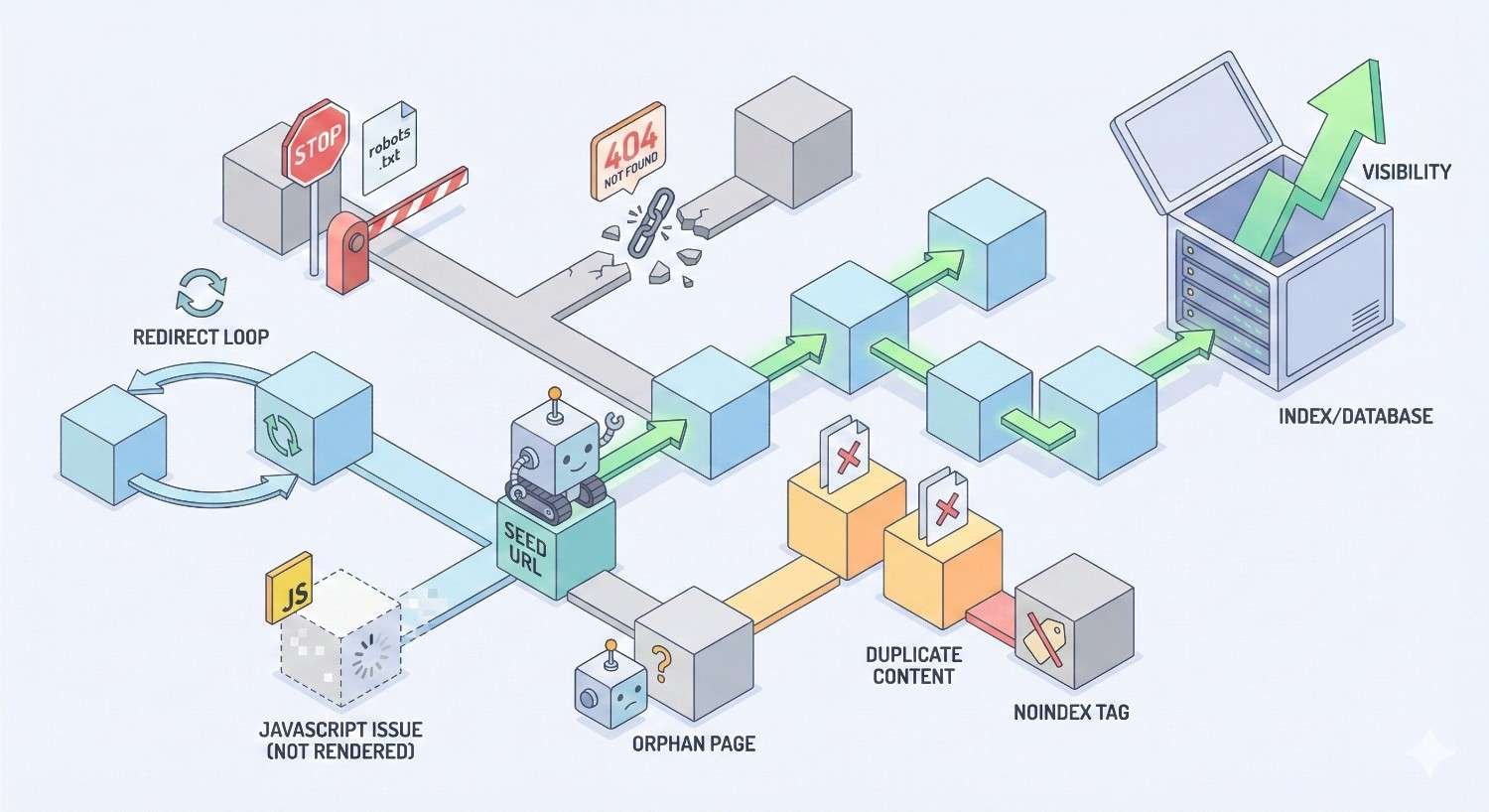
Common Crawlability Issues and Blockers
Identifying and fixing crawlability problems requires understanding common issues that block or impede search engine access.
Blocked Resources and Disallowed URLs
Robots.txt blocking remains the most common crawlability issue. Overly aggressive disallow rules can accidentally block important content, CSS files, or JavaScript resources needed for proper rendering.
Check your robots.txt for these common mistakes:
- Blocking entire directories containing important pages
- Disallowing CSS or JS files (prevents proper rendering)
- Using wildcards that match unintended URLs
- Forgetting to update rules after site restructuring
Google Search Console’s Coverage report identifies pages blocked by robots.txt. The URL Inspection tool shows whether specific URLs are blocked and why.
Resource blocking creates rendering problems even when pages themselves are accessible. If Googlebot can’t load your CSS, it can’t properly understand your page layout and content hierarchy.
Orphaned Pages and Poor Internal Linking
Orphaned pages exist on your server but have no internal links pointing to them. Crawlers can only discover these pages through external links or sitemap inclusion—neither of which guarantees regular crawling.
Common causes of orphaned pages include:
- Removing navigation links during redesigns
- Creating pages without adding them to menus
- Pagination changes that break link chains
- CMS issues that fail to generate internal links
Identify orphaned pages by comparing your sitemap URLs against pages found through crawling. Any URL in your sitemap but not discovered through link following is effectively orphaned.
Fix orphaned pages by adding contextual internal links from relevant content. Don’t just add links to navigation—create meaningful connections within your content that help both users and crawlers.
Redirect Chains and Loops
Redirect chains occur when one redirect leads to another, creating a sequence of hops before reaching the final destination. Each hop wastes crawl resources and can dilute ranking signals.
Example redirect chain:
Copy
/old-page → /newer-page → /newest-page → /final-page
Crawlers follow redirect chains but may abandon them after too many hops. Google typically follows up to 10 redirects, but best practice keeps chains to a single hop.
Redirect loops occur when redirects create a circular path with no final destination. These completely block crawling and must be fixed immediately.
Audit redirects regularly using crawling tools. Update old redirects to point directly to final destinations rather than intermediate URLs.
Duplicate Content and Parameter Issues
Duplicate content wastes crawl budget by forcing crawlers to process the same content at multiple URLs. URL parameters commonly create this problem—sorting options, tracking codes, and session IDs can generate thousands of duplicate URLs.
Example parameter duplicates:
Copy
/products/widget
/products/widget?sort=price
/products/widget?sort=price&color=blue
/products/widget?ref=email&utm_source=newsletter
Address parameter issues through:
- Canonical tags pointing to the preferred URL
- Google Search Console’s URL Parameters tool
- Robots.txt rules blocking parameter variations
- Server-side parameter handling that prevents duplicate URLs
Faceted navigation on e-commerce sites creates particularly severe duplication. A product category with 10 filter options can generate millions of URL combinations, most containing identical or near-identical content.
Slow Server Response Times
Server response time directly impacts crawl efficiency. Google recommends server response times under 200ms. Slow responses force crawlers to reduce their crawl rate, leaving pages undiscovered.
Common causes of slow server responses:
- Inadequate hosting resources
- Unoptimized database queries
- Missing server-side caching
- Geographic distance from crawler locations
- Plugin or extension overhead
Monitor server response times through Google Search Console’s Core Web Vitals report and server logs. Sudden increases often indicate infrastructure problems requiring immediate attention.
Improving server performance benefits both crawlability and user experience. Faster sites get crawled more thoroughly and provide better experiences that support higher rankings.
Broken Links and 404 Errors
Broken internal links waste crawl budget and create dead ends for crawlers. Each 404 response represents a wasted crawl request that could have been used on valid content.
Broken links accumulate over time through:
- Content deletions without redirect implementation
- URL structure changes
- Typos in manually created links
- External sites linking to non-existent pages
Regular crawl audits identify broken links before they impact crawlability significantly. Prioritize fixing broken links on high-traffic pages and those with significant internal link equity.
For external broken links (other sites linking to your 404 pages), implement redirects to relevant existing content. This recovers link equity and improves user experience for referral traffic.
Infinite Spaces and Crawler Traps
Crawler traps are URL structures that generate unlimited unique URLs, potentially trapping crawlers in endless loops. These waste crawl budget and can prevent discovery of legitimate content.
Common crawler traps include:
- Calendar widgets generating URLs for every date
- Session IDs creating unique URLs per visit
- Relative links that append to current URLs
- Search functionality with crawlable result pages
- Faceted navigation without proper controls
Identify crawler traps through log analysis—look for patterns of excessive crawling on specific URL patterns. Google Search Console may also show warnings about crawl anomalies.
Prevent crawler traps through robots.txt rules, nofollow attributes on trap-generating links, and proper URL parameter handling. Test changes carefully to avoid blocking legitimate content.
How to Audit Your Website’s Crawlability
Regular crawlability audits identify issues before they significantly impact your organic performance. Multiple tools and techniques provide comprehensive visibility into crawler behavior.
Using Google Search Console for Crawl Analysis
Google Search Console offers direct insight into how Googlebot interacts with your site. The Coverage report shows indexing status for all discovered URLs, categorized by status.
Key Coverage report categories:
- Error: Pages with critical issues preventing indexing
- Valid with warnings: Indexed pages with potential problems
- Valid: Successfully indexed pages
- Excluded: Pages intentionally or unintentionally excluded from indexing
The URL Inspection tool provides detailed information about specific URLs including:
- Crawl status and last crawl date
- Indexing status and any issues
- Mobile usability assessment
- Rendered page screenshot
- Detected canonical URL
Use the Crawl Stats report to understand overall crawl patterns. This shows daily crawl requests, response times, and response codes over time. Sudden changes often indicate technical problems.
Server Log File Analysis
Server logs provide the most accurate picture of crawler behavior. Unlike third-party tools that simulate crawling, logs show exactly what Googlebot requested and received.
Log analysis reveals:
- Which pages Googlebot actually crawls (vs. what you expect)
- Crawl frequency for different page types
- Response codes returned to crawlers
- Crawler identification and behavior patterns
- Resources requested during rendering
Processing raw logs requires specialized tools. Options include Screaming Frog Log File Analyzer, Splunk, or custom scripts using tools like GoAccess or AWStats.
Compare log data against your sitemap and site structure. Pages in your sitemap but rarely crawled indicate priority or accessibility issues. Pages crawled frequently but not in your sitemap might be wasting crawl budget.
Technical SEO Crawling Tools
Dedicated crawling tools simulate search engine behavior to identify issues. These tools crawl your site like Googlebot would, reporting on technical problems and optimization opportunities.
Popular crawling tools include:
Screaming Frog SEO Spider: Desktop application that crawls websites and exports detailed technical data. Excellent for comprehensive audits of sites up to several hundred thousand pages.
Sitebulb: Visual crawler that presents findings through intuitive charts and prioritized recommendations. Strong for identifying issues and explaining their impact.
DeepCrawl (Lumar): Cloud-based crawler suited for enterprise sites. Offers scheduled crawls, historical comparisons, and integration with other SEO platforms.
Ahrefs Site Audit: Part of the broader Ahrefs toolset, providing crawl data alongside backlink and keyword information.
Each tool has strengths for different use cases. Smaller sites benefit from Screaming Frog’s one-time purchase model. Enterprise sites need cloud-based solutions that handle scale and provide ongoing monitoring.
Identifying Crawl Budget Waste
Crawl budget waste occurs when Googlebot spends resources on low-value URLs instead of important content. Identifying waste requires analyzing what’s being crawled versus what should be crawled.
Common sources of crawl budget waste:
- Parameter variations of the same content
- Paginated archives with thin content
- Tag and category pages with minimal unique value
- Internal search result pages
- Outdated content that should be removed or consolidated
- Soft 404 pages (200 status but error content)
Quantify waste by comparing crawl logs against your priority pages. If Googlebot makes 10,000 daily requests but only 1,000 reach important pages, you’re wasting 90% of your crawl budget.
Address waste through robots.txt rules, noindex directives, and URL consolidation. Prioritize fixes based on the volume of wasted crawls and the importance of pages being neglected.
Creating a Crawlability Audit Checklist
Systematic audits ensure comprehensive coverage of crawlability factors. Use this checklist as a starting framework:
Robots.txt Review
- Verify file is accessible at /robots.txt
- Check for unintended blocking of important content
- Confirm CSS and JS files are crawlable
- Validate sitemap reference is included
Sitemap Analysis
- Confirm sitemap is valid XML format
- Check all listed URLs return 200 status
- Verify important pages are included
- Remove noindexed or redirected URLs
Crawl Coverage
- Compare crawled pages against sitemap
- Identify orphaned pages
- Check crawl depth for important content
- Review internal linking structure
Technical Factors
- Test server response times
- Check for redirect chains
- Identify duplicate content issues
- Verify canonical implementation
JavaScript Rendering
- Test pages in URL Inspection tool
- Compare rendered vs. raw HTML
- Check for content loading issues
- Verify critical content in initial HTML
Optimizing Website Crawlability: Best Practices
Proactive optimization ensures search engines can efficiently discover and process your content. These best practices address the most impactful crawlability factors.
Robots.txt Optimization Strategies
Effective robots.txt configuration balances crawler access with resource protection. Start with a permissive approach and add restrictions only where necessary.
Best practices for robots.txt:
Allow crawling of CSS, JavaScript, and image files. Blocking these resources prevents proper rendering and can hurt your rankings.
Use specific paths rather than broad patterns. Instead of blocking /admin*, use /admin/ to avoid accidentally matching legitimate URLs.
Test all changes before deployment. Use Google Search Console’s robots.txt tester to verify rules work as intended.
Include your sitemap location:
Copy
Sitemap: https://example.com/sitemap.xml
Avoid using robots.txt for security. The file is publicly readable and doesn’t prevent access—it only requests that compliant crawlers avoid certain paths.
XML Sitemap Best Practices
Optimized sitemaps guide crawlers to your most important content efficiently. Quality matters more than quantity—include only URLs you want indexed.
Sitemap optimization guidelines:
Include only canonical, indexable URLs. Remove redirects, noindexed pages, and duplicate content from sitemaps.
Update lastmod dates only when content actually changes. Artificially updating dates to encourage crawling can backfire if Google detects the manipulation.
Segment large sitemaps by content type or site section. This helps identify indexing issues and allows targeted submission of updated sections.
Monitor sitemap coverage in Google Search Console. The gap between submitted and indexed URLs indicates potential quality or crawlability issues.
Keep sitemaps current through automation. CMS plugins or custom scripts should update sitemaps when content changes rather than requiring manual maintenance.
Internal Linking Architecture Optimization
Strategic internal linking distributes crawl priority and ensures comprehensive page discovery. Every important page should be reachable through logical link paths.
Internal linking best practices:
Maintain shallow site architecture. Important pages should be within three clicks of the homepage. Deep pages receive less crawl attention and appear less important.
Use descriptive anchor text that indicates page content. This helps crawlers understand page topics and relationships.
Link contextually within content, not just through navigation. Editorial links from relevant content carry more weight than template-based navigation links.
Create hub pages that link to related content clusters. These pages help crawlers understand topical relationships and ensure comprehensive coverage of subject areas.
Audit internal links regularly. Broken links, redirect chains, and orphaned pages accumulate over time and require ongoing maintenance.
URL Structure and Site Hierarchy
Clean URL structures improve crawlability and help search engines understand your site organization. Logical hierarchies signal content relationships and importance.
URL structure guidelines:
Use descriptive, keyword-relevant paths:
Copy
Good: /products/running-shoes/mens-trail-runners/
Bad: /p/cat/12345/item/67890/
Maintain consistent URL patterns across your site. Inconsistency creates confusion for crawlers and users.
Avoid unnecessary parameters when possible. Static URLs are easier to crawl and less likely to create duplicate content issues.
Implement proper URL canonicalization. Choose one URL format (HTTPS, www or non-www, trailing slash or not) and redirect all variations.
Keep URLs reasonably short. While there’s no strict limit, shorter URLs are easier to share and less likely to be truncated in various contexts.
Page Speed and Server Performance
Fast-loading pages enable more efficient crawling and better user experiences. Server performance directly impacts how thoroughly Google can crawl your site.
Performance optimization priorities:
Optimize server response time (Time to First Byte). Target under 200ms for optimal crawl efficiency.
Implement server-side caching to reduce database load and response times. Cached responses serve faster and allow higher crawl rates.
Use a Content Delivery Network (CDN) to reduce latency for geographically distributed crawlers and users.
Optimize images and other media. Large files slow page loading and consume bandwidth that could support more crawl requests.
Monitor performance continuously. Sudden slowdowns can dramatically reduce crawl rates and should be addressed immediately.
Managing Crawl Budget Efficiently
Efficient crawl budget management ensures Googlebot focuses on your most valuable content. This matters most for large sites but benefits any site with limited crawl attention.
Crawl budget optimization strategies:
Prioritize important pages through internal linking. Pages with more internal links receive more crawl attention.
Block low-value URLs from crawling. Use robots.txt to prevent crawling of parameter variations, internal search results, and other low-value URL patterns.
Consolidate duplicate and thin content. Fewer, higher-quality pages are better than many low-value pages competing for crawl attention.
Fix crawl errors promptly. Errors waste crawl budget and may indicate broader technical problems.
Monitor crawl patterns through logs and Search Console. Understanding current crawl behavior helps identify optimization opportunities.
Mobile Crawlability Considerations
Google uses mobile-first indexing, meaning Googlebot primarily crawls and indexes the mobile version of your content. Mobile crawlability issues directly impact your search visibility.
Mobile crawlability requirements:
Ensure mobile and desktop versions have equivalent content. Missing content on mobile won’t be indexed regardless of desktop presence.
Use responsive design when possible. This eliminates the need to maintain separate mobile URLs and simplifies crawlability management.
If using separate mobile URLs (m.example.com), implement proper annotations:
- Desktop pages: <link rel=”alternate” media=”only screen and (max-width: 640px)” href=”mobile-url”>
- Mobile pages: <link rel=”canonical” href=”desktop-url”>
Test mobile rendering in Google Search Console. The URL Inspection tool shows how Googlebot Smartphone renders your pages.
Verify mobile page speed. Mobile users often have slower connections, and Google factors mobile performance into rankings.
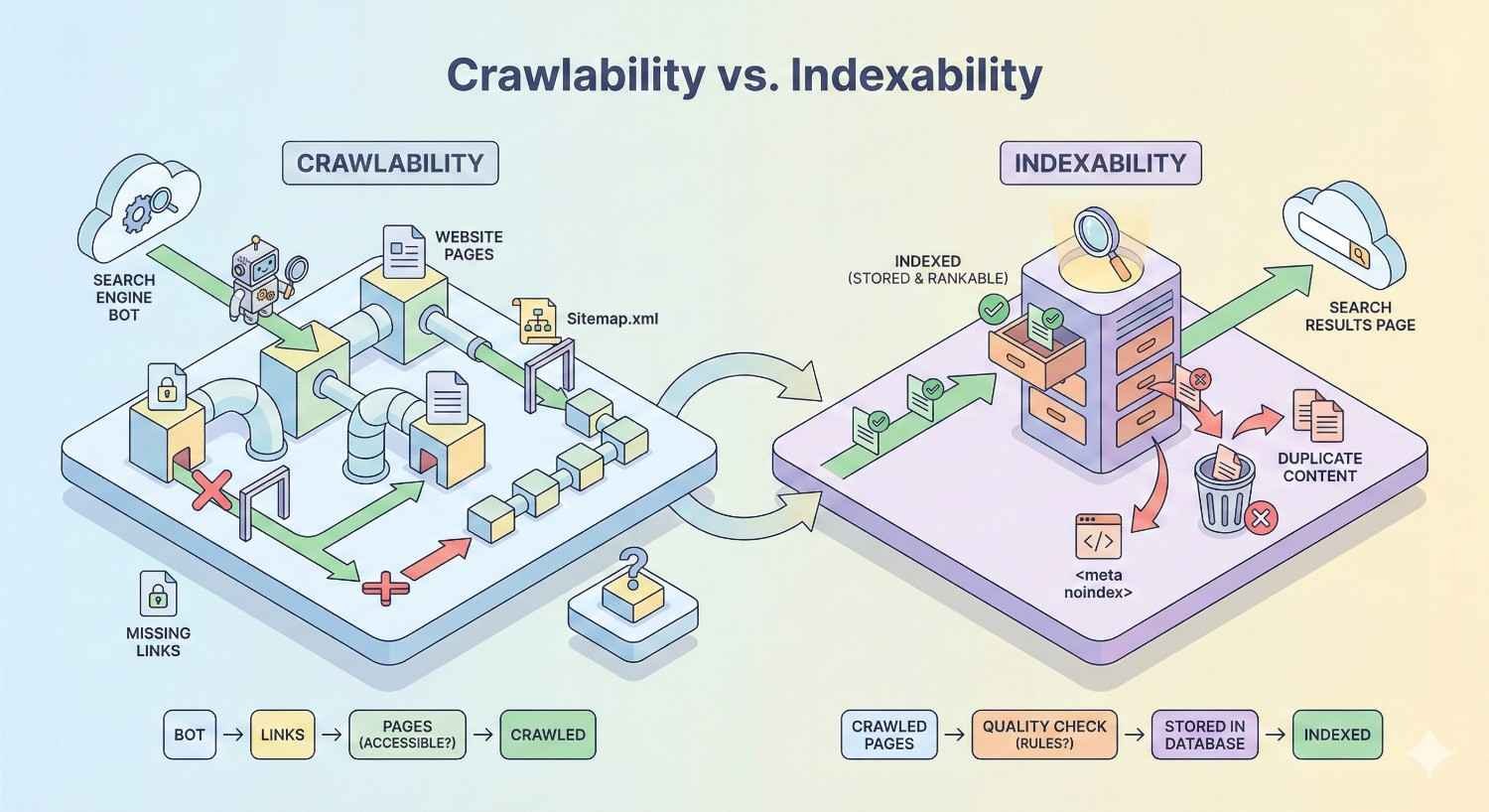
Crawlability vs. Indexability: Understanding the Difference
Crawlability and indexability are related but distinct concepts. Understanding their relationship helps you diagnose issues and implement appropriate solutions.
Crawlability determines whether search engines can access your pages. Indexability determines whether accessed pages are added to the search index. A page must be crawlable to be indexed, but crawlable pages aren’t automatically indexed.
When Pages Are Crawlable But Not Indexable
Several scenarios create crawlable but non-indexable pages:
Noindex directives: Pages with <meta name=”robots” content=”noindex”> can be crawled but won’t be indexed. This is intentional for pages like thank-you pages or internal tools.
Quality issues: Google may crawl pages but decline to index them due to thin content, duplicate content, or low quality. These pages appear as “Crawled – currently not indexed” in Search Console.
Canonical pointing elsewhere: If a page’s canonical tag points to a different URL, Google may crawl the page but index only the canonical version.
Manual actions: Pages affected by manual penalties may be crawled but excluded from the index until issues are resolved.
Diagnosing non-indexing requires checking multiple factors. Use URL Inspection to see Google’s assessment and identify specific issues preventing indexing.
Coordinating Crawl and Index Directives
Effective technical SEO requires coordinating robots.txt, meta robots, and canonical tags. Conflicting directives create confusion and unexpected results.
Common coordination issues:
Blocking pages in robots.txt while expecting noindex to work. If robots.txt blocks crawling, Google never sees the noindex tag. The page might still be indexed based on external signals.
Using noindex on pages you want crawled for link discovery. Noindex prevents indexing but doesn’t prevent crawling. If you want Google to follow links on a page without indexing it, use noindex without nofollow.
Canonical tags pointing to blocked URLs. If the canonical target is blocked by robots.txt, Google may ignore the canonical and index the non-canonical version.
Best practice coordination:
- Use robots.txt for pages that should never be crawled (admin areas, private content)
- Use noindex for pages that should be crawled but not indexed (thank-you pages, filtered views)
- Use canonical tags for duplicate content that should be crawled and consolidated
Enterprise-Scale Crawlability Challenges
Large websites face unique crawlability challenges that require specialized strategies. Scale amplifies small issues into significant problems.
Managing Large-Scale Websites
Sites with millions of pages can’t rely on Google discovering everything through crawling alone. Proactive management ensures important content receives adequate crawler attention.
Large-site strategies:
Implement sitemap segmentation. Break sitemaps into logical sections (products, categories, blog posts) to enable targeted monitoring and updates.
Prioritize crawl budget allocation. Use internal linking and sitemap organization to direct crawler attention toward highest-value pages.
Monitor crawl patterns at scale. Log analysis becomes essential for understanding how Google allocates crawl resources across your site.
Implement incremental sitemap updates. Rather than regenerating entire sitemaps, update only changed sections to signal fresh content efficiently.
Consider IndexNow for rapid indexing. This protocol notifies search engines immediately when content changes, reducing reliance on crawl discovery.
E-commerce Crawlability Considerations
E-commerce sites face particular challenges from product variations, faceted navigation, and dynamic inventory. These factors can create millions of URLs from relatively few products.
E-commerce crawlability solutions:
Control faceted navigation crawling. Use robots.txt, noindex, or JavaScript-based filtering to prevent crawling of low-value filter combinations.
Manage product variations carefully. Decide whether color/size variations deserve separate URLs or should be handled through a single canonical product page.
Handle out-of-stock products appropriately. Options include keeping pages live with availability messaging, redirecting to category pages, or returning 404s—each has crawlability implications.
Implement proper pagination. Use rel=”next” and rel=”prev” (though Google no longer uses these as indexing signals, they help crawlers understand page relationships) or consider infinite scroll with proper implementation.
Multi-Language and Multi-Regional Sites
International sites multiply crawlability complexity through language and regional variations. Proper implementation ensures each version receives appropriate crawler attention.
International crawlability requirements:
Implement hreflang correctly. These annotations tell Google which language/region version to show different users and help consolidate ranking signals.
Choose an appropriate URL structure:
- Country-code top-level domains (example.de, example.fr)
- Subdomains (de.example.com, fr.example.com)
- Subdirectories (example.com/de/, example.com/fr/)
Each approach has crawlability implications. Subdirectories consolidate domain authority but require careful internal linking. Separate domains distribute authority but simplify regional management.
Create language-specific sitemaps. This helps search engines discover all language versions and understand your international structure.
Faceted Navigation and Filter Pages
Faceted navigation allows users to filter products by multiple attributes, creating exponential URL combinations. Without controls, this can generate millions of crawlable URLs with minimal unique content.
Faceted navigation solutions:
Identify which facets create valuable, indexable pages. Brand + category combinations might deserve indexing while color + size combinations don’t.
Implement crawl controls for low-value combinations:
- Robots.txt blocking of parameter patterns
- Noindex on filter result pages
- JavaScript-based filtering that doesn’t create crawlable URLs
- Canonical tags pointing to unfiltered category pages
Use Google Search Console’s URL Parameters tool to indicate how parameters affect content. This helps Google understand which parameter combinations to crawl.
Monitor faceted navigation impact through log analysis. High crawl volume on filter URLs indicates potential crawl budget waste.
Advanced Crawl Budget Management
Sophisticated crawl budget management maximizes the value of every Googlebot request. This becomes critical for large sites competing for limited crawler attention.
Calculating Your Crawl Budget
While Google doesn’t provide exact crawl budget numbers, you can estimate your allocation through log analysis and Search Console data.
Estimation approach:
Analyze server logs to count daily Googlebot requests. This represents your actual crawl volume.
Review Search Console’s Crawl Stats report for average daily crawl requests and trends over time.
Compare crawl volume against your total indexable pages. If you have 100,000 pages but only 1,000 daily crawls, complete site coverage takes 100 days.
Factor in crawl frequency needs. Pages requiring daily crawling (news, inventory) need more budget allocation than static pages.
Understanding your crawl budget helps prioritize optimization efforts. Sites with adequate budgets can focus on other SEO factors while budget-constrained sites need aggressive optimization.
Prioritizing High-Value Pages
Not all pages deserve equal crawl attention. Strategic prioritization ensures your most important content receives adequate crawler coverage.
Prioritization factors:
Revenue impact: Pages that drive conversions deserve priority crawling to ensure fresh content and availability.
Traffic potential: High-search-volume keywords justify more crawl investment than low-volume targets.
Content freshness requirements: Time-sensitive content needs frequent crawling while evergreen content can be crawled less often.
Implementation methods:
Internal linking: More internal links signal higher importance. Link prominently to priority pages from high-authority pages.
Sitemap organization: Place priority URLs in dedicated sitemaps and submit them separately for monitoring.
URL structure: Shorter paths closer to the root typically receive more crawl attention.
Reducing Low-Value URL Crawling
Eliminating crawl waste frees budget for important content. Identify and address URLs consuming crawl resources without providing value.
Common low-value URL sources:
- Parameter variations (sorting, filtering, tracking)
- Paginated archives beyond useful depth
- Tag and date-based archives with thin content
- Internal search result pages
- Print-friendly or alternate format versions
- Session ID or user-specific URLs
Reduction strategies:
Block via robots.txt for URLs that should never be crawled.
Apply noindex for URLs that might have some value but shouldn’t consume index space.
Consolidate through canonicalization for legitimate variations of the same content.
Remove or redirect for truly obsolete content that no longer serves any purpose.
Monitoring Crawl Budget Usage Over Time
Ongoing monitoring identifies trends and catches problems before they significantly impact performance. Establish baselines and track changes over time.
Key monitoring metrics:
- Daily crawl requests (total and by page type)
- Crawl request distribution across site sections
- Response code breakdown (200s, 301s, 404s, 500s)
- Average response time for crawl requests
- New URL discovery rate
- Crawl frequency for priority pages
Monitoring tools and methods:
Google Search Console Crawl Stats provides high-level trends and averages.
Server log analysis offers detailed, accurate crawl data.
Third-party monitoring tools can alert you to significant changes.
Set up alerts for anomalies—sudden drops in crawl volume or spikes in error rates indicate problems requiring investigation.
JavaScript Frameworks and Crawlability
Modern JavaScript frameworks create unique crawlability challenges. Understanding rendering options helps you choose approaches that balance development efficiency with search visibility.
Client-Side vs. Server-Side Rendering
Rendering approach significantly impacts how search engines process your content. Each method has distinct crawlability implications.
Client-Side Rendering (CSR): JavaScript executes in the browser, building the page after initial HTML loads. Search engines must render JavaScript to see content, creating delays and potential issues.
Crawlability challenges:
- Content not visible in initial HTML
- Rendering delays indexing
- Some content may not render correctly
- Higher resource requirements for crawlers
Server-Side Rendering (SSR): The server generates complete HTML before sending to browsers. Search engines receive fully-rendered content immediately.
Crawlability advantages:
- Content visible in initial HTML
- No rendering delays
- More reliable content discovery
- Lower crawler resource requirements
Hybrid approaches combine benefits of both methods. Initial page load uses SSR for crawlability while subsequent navigation uses CSR for performance.
Dynamic Rendering for Search Engines
Dynamic rendering serves different content versions to users and search engines. Users receive client-side rendered pages while crawlers receive pre-rendered HTML.
Implementation approach:
Detect crawler user-agents at the server level. When Googlebot requests a page, serve a pre-rendered HTML version. When users request the same page, serve the standard JavaScript version.
Important considerations:
Google considers dynamic rendering a workaround, not a long-term solution. It’s acceptable but SSR or hybrid approaches are preferred.
Content must be equivalent. Serving different content to crawlers than users violates Google’s guidelines and risks penalties.
Maintain the dynamic rendering infrastructure. Pre-rendered versions must stay synchronized with live content.
Dynamic rendering adds complexity and potential failure points. Consider whether the development investment is worthwhile compared to implementing SSR.
Testing JavaScript Crawlability
Verifying that search engines can access JavaScript-rendered content requires specific testing approaches. Don’t assume crawlability—verify it.
Testing methods:
Google Search Console URL Inspection: Enter any URL to see how Googlebot renders it. Compare the screenshot and rendered HTML against your expected content.
Mobile-Friendly Test: Google’s testing tool shows rendered page content and identifies loading issues.
View page source vs. Inspect element: In your browser, “View Source” shows initial HTML while “Inspect Element” shows rendered DOM. If critical content only appears in Inspect Element, crawlers may not see it.
Fetch and render tools: Third-party tools like Screaming Frog can render JavaScript and compare against non-rendered versions.
Testing checklist:
- Verify main content appears in rendered HTML
- Check that internal links are crawlable (not JavaScript-only)
- Confirm images and media are accessible
- Test on multiple page types (homepage, category, product, article)
- Verify after JavaScript framework updates
Tools and Resources for Crawlability Management
Effective crawlability management requires the right tools for monitoring, analysis, and optimization. Different tools serve different needs and scales.
Google Search Console Features
Google Search Console provides free, authoritative data directly from Google. Every site should use Search Console as a primary crawlability monitoring tool.
Key crawlability features:
Coverage Report: Shows indexing status for all discovered URLs. Identifies errors, warnings, and exclusions with specific reasons.
URL Inspection: Provides detailed information about individual URLs including crawl date, indexing status, and rendered page view.
Crawl Stats: Displays crawl request volume, response times, and response codes over time. Available under Settings > Crawl Stats.
Sitemaps: Submit and monitor XML sitemaps. Shows submitted vs. indexed URL counts.
Removals: Temporarily hide URLs from search results and view URLs blocked by robots.txt.
Core Web Vitals: While primarily about user experience, performance issues here often correlate with crawlability problems.
Screaming Frog SEO Spider
Screaming Frog is the industry-standard desktop crawling tool. It simulates search engine crawling and provides comprehensive technical data.
Key capabilities:
- Crawls websites and exports all discovered URLs
- Identifies broken links, redirects, and errors
- Analyzes page titles, meta descriptions, and headings
- Finds duplicate content and canonicalization issues
- Renders JavaScript for accurate content analysis
- Integrates with Google Analytics and Search Console
- Generates XML sitemaps from crawl data
Best use cases:
- Comprehensive technical audits
- Pre-launch site reviews
- Migration planning and verification
- Competitive analysis
- Regular monitoring for small to medium sites
The free version crawls up to 500 URLs. Paid licenses remove this limit and add advanced features.
Server Log Analysis Tools
Log analysis provides ground-truth data about crawler behavior. Unlike simulation tools, logs show exactly what happened on your server.
Log analysis options:
Screaming Frog Log File Analyzer: Dedicated tool for SEO-focused log analysis. Imports logs and provides crawler-specific reports.
Splunk: Enterprise log management platform with powerful analysis capabilities. Requires significant setup but handles massive scale.
ELK Stack (Elasticsearch, Logstash, Kibana): Open-source log analysis platform. Flexible and powerful but requires technical expertise.
Custom scripts: Python or other languages can parse logs for specific analyses. Useful for unique requirements or integration with other systems.
Key log analysis insights:
- Actual Googlebot crawl patterns
- Pages crawled vs. pages you want crawled
- Response codes returned to crawlers
- Crawl frequency by page type
- Bot identification and verification
Other Technical SEO Platforms
Beyond Screaming Frog, several platforms offer crawlability analysis as part of broader SEO toolsets.
Ahrefs Site Audit: Cloud-based crawler integrated with Ahrefs’ backlink and keyword data. Good for combining technical and off-page analysis.
Semrush Site Audit: Comprehensive technical auditing with prioritized recommendations. Strong visualization and reporting features.
Sitebulb: Desktop crawler with exceptional visualization. Presents findings through intuitive charts and graphs.
Lumar (formerly DeepCrawl): Enterprise-focused cloud crawler. Handles very large sites and provides advanced segmentation.
ContentKing: Real-time SEO monitoring that tracks changes continuously rather than periodic crawls.
Choose tools based on your site size, technical requirements, and budget. Most sites benefit from combining Google Search Console (free, authoritative) with a dedicated crawling tool (comprehensive analysis).
Setting Up Crawlability Monitoring
Proactive monitoring catches issues before they impact performance. Establish monitoring systems that alert you to problems quickly.
Monitoring setup checklist:
Google Search Console alerts: Enable email notifications for coverage issues, manual actions, and security problems.
Scheduled crawls: Set up regular crawls (weekly or monthly) to track changes over time. Compare results against previous crawls.
Log analysis automation: Create automated reports highlighting crawler behavior changes, error spikes, or unusual patterns.
Uptime monitoring: Use services like Pingdom or UptimeRobot to alert you when your site becomes unavailable.
Performance monitoring: Track server response times and page load speeds. Degradation often precedes crawlability problems.
Custom alerts: Set thresholds for key metrics (crawl volume, error rates, indexing changes) and receive notifications when exceeded.
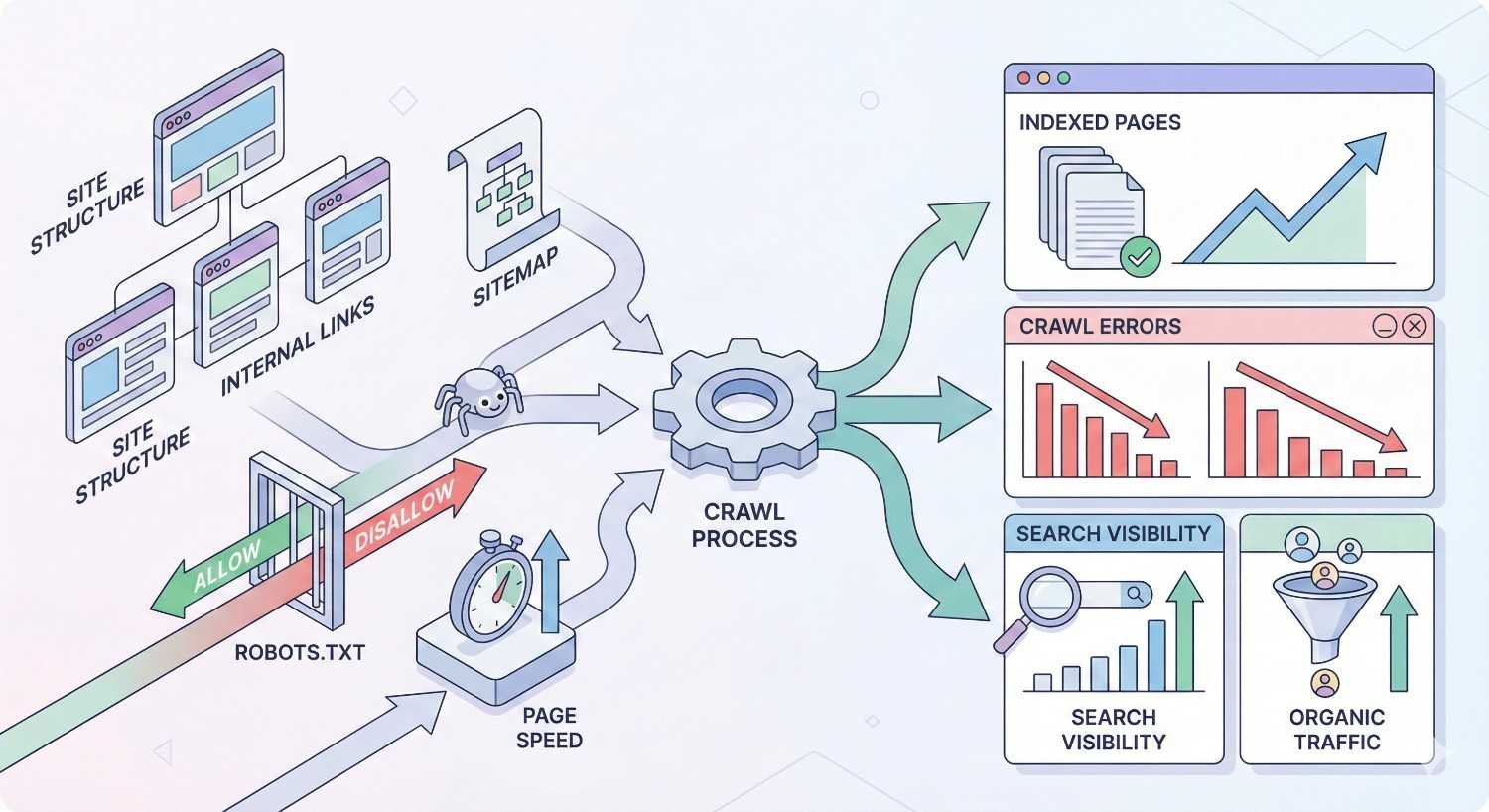
Measuring Crawlability Improvements
Tracking the impact of crawlability optimizations validates your efforts and guides future priorities. Connect technical improvements to business outcomes.
Key Crawlability Metrics to Track
Focus on metrics that indicate crawler access and efficiency. These leading indicators predict future indexing and ranking changes.
Primary metrics:
Crawl requests per day: Total Googlebot requests to your site. Increases suggest improved crawl efficiency or site authority.
Crawl request distribution: Percentage of crawls reaching important vs. low-value pages. Improvement means better budget allocation.
Response code breakdown: Ratio of 200s to errors. Decreasing error rates indicate technical health improvements.
Average response time: Server speed for crawler requests. Faster responses enable more efficient crawling.
Pages crawled vs. pages indexed: Gap between these numbers indicates quality or technical issues preventing indexing.
Secondary metrics:
- New URL discovery rate
- Crawl frequency for priority pages
- Time from publication to indexing
- Orphaned page count
- Redirect chain length
Expected Timelines for Crawl Improvements
Crawlability changes don’t produce instant results. Understanding typical timelines helps set realistic expectations.
Immediate effects (hours to days):
- Robots.txt changes take effect on next crawl
- Sitemap submissions trigger discovery within hours
- URL Inspection requests can expedite individual page crawling
Short-term effects (days to weeks):
- Crawl pattern changes become visible in logs
- New pages begin appearing in index
- Error rate improvements show in Search Console
Medium-term effects (weeks to months):
- Crawl budget reallocation becomes measurable
- Indexing improvements stabilize
- Ranking changes from better indexing appear
Long-term effects (months):
- Full site re-crawling after major changes
- Authority improvements from better crawl efficiency
- Sustained traffic growth from improved coverage
Patience is essential. Major crawlability improvements may take 2-3 months to fully manifest in organic performance.
Connecting Crawlability to Organic Performance
Crawlability improvements should ultimately drive business results. Track the connection between technical changes and traffic outcomes.
Connection points:
Indexed page count → Ranking opportunities: More indexed pages mean more potential ranking keywords. Track indexed page growth against organic keyword portfolio expansion.
Crawl frequency → Content freshness: Faster crawling means quicker recognition of content updates. Monitor time-to-index for new content and correlation with ranking improvements.
Error reduction → Traffic recovery: Fixing crawl errors recovers previously lost traffic. Track traffic to pages after resolving their crawlability issues.
Budget optimization → Priority page performance: Better crawl allocation should improve rankings for important pages. Compare ranking changes for priority pages before and after optimization.
Attribution challenges:
Crawlability is one factor among many affecting organic performance. Isolate its impact by:
- Tracking changes during periods without other SEO activity
- Comparing performance of fixed pages against unchanged pages
- Monitoring leading indicators (crawl metrics) alongside lagging indicators (traffic)
Reporting Crawlability Health to Stakeholders
Communicating crawlability status to non-technical stakeholders requires translating technical metrics into business terms.
Effective reporting approaches:
Executive summary: Lead with business impact—pages indexed, potential traffic affected, revenue implications.
Trend visualization: Charts showing improvement over time are more compelling than point-in-time numbers.
Issue prioritization: Rank problems by business impact, not technical severity. A crawl error on a high-revenue page matters more than errors on low-traffic pages.
Action items: Include clear next steps with expected outcomes and timelines.
Benchmark comparisons: Compare against previous periods, targets, or industry standards to provide context.
Sample reporting metrics:
- Percentage of important pages indexed (target: 100%)
- Average time to index new content (target: <7 days)
- Crawl error rate (target: <1%)
- Crawl budget efficiency (percentage reaching priority pages)
Common Crawlability Mistakes to Avoid
Learning from common mistakes helps you avoid pitfalls that can severely impact your organic visibility.
Over-Blocking Important Resources
Aggressive robots.txt rules often block more than intended. CSS, JavaScript, and image blocking prevents proper rendering and can hurt rankings.
Common over-blocking scenarios:
Blocking entire directories that contain important content:
Copy
# Problematic
Disallow: /resources/
# When /resources/guides/ contains valuable content
Using wildcards that match unintended patterns:
Copy
# Problematic
Disallow: /*?
# Blocks all URLs with query strings, including legitimate pages
Blocking rendering resources:
Copy
# Problematic
Disallow: /wp-content/themes/
Disallow: /wp-includes/
# Prevents CSS and JS loading
Prevention:
Test all robots.txt changes before deployment. Use Google Search Console’s robots.txt tester and URL Inspection tool to verify important pages remain accessible.
Start permissive and add restrictions only when necessary. It’s easier to block specific problematic URLs than to unblock accidentally restricted content.
Neglecting Mobile Crawlability
With mobile-first indexing, mobile crawlability issues directly impact your search visibility. Desktop-only testing misses critical problems.
Mobile-specific issues:
Content differences between mobile and desktop versions. Missing content on mobile won’t be indexed.
Mobile-specific rendering problems. JavaScript that works on desktop may fail on mobile devices.
Mobile page speed issues. Slow mobile pages may be crawled less frequently.
Interstitials and popups blocking content. These can prevent crawlers from accessing page content.
Prevention:
Test mobile rendering specifically using Google’s Mobile-Friendly Test and URL Inspection tool.
Ensure content parity between mobile and desktop versions.
Monitor mobile-specific metrics in Search Console’s Mobile Usability report.
Ignoring Server Log Data
Search Console provides valuable data, but server logs offer ground truth about crawler behavior. Ignoring logs means missing important insights.
What logs reveal that Search Console doesn’t:
- Exact crawl times and frequencies
- All crawler requests (not just Googlebot)
- Server response details
- Resource requests during rendering
- Crawler behavior patterns
Common log analysis oversights:
Not analyzing logs at all. Many sites never examine their server logs for SEO insights.
Analyzing only periodically. Continuous monitoring catches issues faster than monthly reviews.
Focusing only on Googlebot. Other crawlers (Bingbot, various bots) may reveal additional issues.
Prevention:
Establish regular log analysis processes. Even monthly reviews provide valuable insights.
Set up automated alerts for anomalies in crawler behavior.
Compare log data against Search Console data to identify discrepancies.
Failing to Update Sitemaps
Stale sitemaps waste crawler resources and may cause important pages to be overlooked. Sitemap maintenance requires ongoing attention.
Common sitemap problems:
Including URLs that return errors (404s, 500s).
Listing noindexed or redirected pages.
Missing recently published content.
Outdated lastmod dates that don’t reflect actual changes.
Including non-canonical URL versions.
Prevention:
Automate sitemap generation through your CMS or build process.
Validate sitemaps regularly using online validators or crawling tools.
Monitor sitemap coverage in Search Console for submitted vs. indexed discrepancies.
Remove problematic URLs promptly when issues are identified.
How Professional SEO Services Improve Crawlability
Complex crawlability challenges often benefit from professional expertise. Understanding what SEO services provide helps you evaluate whether external support makes sense for your situation.
Technical SEO Audit and Implementation
Professional technical audits go beyond automated tool reports. Experienced SEO professionals interpret findings in context and prioritize based on actual impact.
Audit components:
Comprehensive crawl analysis using multiple tools and data sources.
Log file analysis revealing actual crawler behavior.
Competitive benchmarking against top-ranking sites.
Custom recommendations based on your specific site architecture and business goals.
Implementation support:
Translating recommendations into developer-ready specifications.
Prioritizing fixes based on effort vs. impact.
Testing changes before and after deployment.
Coordinating with development teams on technical requirements.
Ongoing Crawlability Monitoring
Continuous monitoring catches issues before they significantly impact performance. Professional services provide systematic oversight that internal teams often can’t maintain.
Monitoring services:
Regular crawl audits tracking changes over time.
Automated alerts for critical issues.
Log analysis identifying crawler behavior changes.
Search Console monitoring for coverage problems.
Proactive maintenance:
Identifying emerging issues before they become critical.
Seasonal preparation for traffic spikes.
Migration support ensuring crawlability continuity.
Regular reporting on crawlability health.
Strategic Crawl Budget Optimization
Large sites require strategic approaches to crawl budget management. Professional services bring experience from similar sites and established optimization frameworks.
Strategic services:
Crawl budget analysis and allocation planning.
URL consolidation and cleanup strategies.
Internal linking architecture optimization.
Faceted navigation and parameter management.
Long-term optimization:
Ongoing budget monitoring and adjustment.
Content strategy alignment with crawl priorities.
Technical debt reduction planning.
Scalability planning for site growth.
Integration with Broader SEO Strategy
Crawlability optimization works best as part of comprehensive SEO strategy. Professional services connect technical improvements to content, links, and business outcomes.
Integration points:
Aligning crawlability priorities with content strategy.
Coordinating technical fixes with link building efforts.
Connecting crawl improvements to ranking and traffic goals.
Balancing technical investment against other SEO activities.
Strategic value:
Ensuring technical foundation supports content and authority building.
Prioritizing technical work based on business impact.
Measuring and communicating ROI of technical improvements.
Planning technical roadmaps aligned with business objectives.
Conclusion
Website crawlability forms the essential foundation of organic search visibility. Without proper crawler access, even exceptional content remains invisible to search engines and potential customers. The technical factors controlling crawlability—from robots.txt configuration to JavaScript rendering—require systematic attention and ongoing maintenance.
Effective crawlability management connects directly to business outcomes. Every page that search engines can’t crawl represents lost ranking potential, traffic, and revenue. Investing in crawlability optimization delivers compounding returns as improved crawler access enables better indexing, higher rankings, and sustained organic growth.
At White Label SEO Service, we help businesses build sustainable organic visibility through comprehensive technical SEO—including crawlability audits, optimization, and ongoing monitoring. Contact us to ensure search engines can discover and index every important page on your site.
Frequently Asked Questions
How does crawlability differ from indexability?
Crawlability determines whether search engines can access your pages. Indexability determines whether accessed pages are added to the search index. A page must be crawlable to be indexed, but crawlable pages aren’t automatically indexed—quality issues, noindex directives, or canonical tags can prevent indexing of crawlable pages.
What tools should I use to monitor crawlability?
Start with Google Search Console for authoritative data directly from Google. Add a dedicated crawling tool like Screaming Frog for comprehensive technical analysis. For deeper insights, implement server log analysis to see exactly how crawlers interact with your site.
How long does it take to fix crawlability issues?
Technical fixes can be implemented quickly, but seeing results takes longer. Robots.txt changes take effect on the next crawl. Broader improvements typically show in Search Console within 2-4 weeks. Full impact on rankings and traffic may take 2-3 months to materialize.
Does crawl budget matter for small websites?
For most small websites (under 10,000 pages), crawl budget isn’t a significant concern. Google typically crawls small sites thoroughly. However, even small sites benefit from eliminating crawl waste—fixing errors, removing duplicate URLs, and ensuring efficient crawler access.
Can JavaScript hurt my website’s crawlability?
JavaScript can create crawlability challenges if content depends entirely on client-side rendering. Google can render JavaScript but does so in a delayed, two-phase process. Critical content should be available in initial HTML or use server-side rendering for reliable crawlability.
How often should I audit my website’s crawlability?
Conduct comprehensive crawlability audits quarterly for most sites. Implement continuous monitoring through Search Console and automated alerts for critical issues. Large sites or those with frequent changes may need monthly audits and daily monitoring.
What’s the most common crawlability mistake?
Accidentally blocking important content through robots.txt misconfiguration is the most damaging common mistake. A single misplaced rule can block entire site sections from crawling. Always test robots.txt changes before deployment and monitor Search Console for unexpected blocking.


