

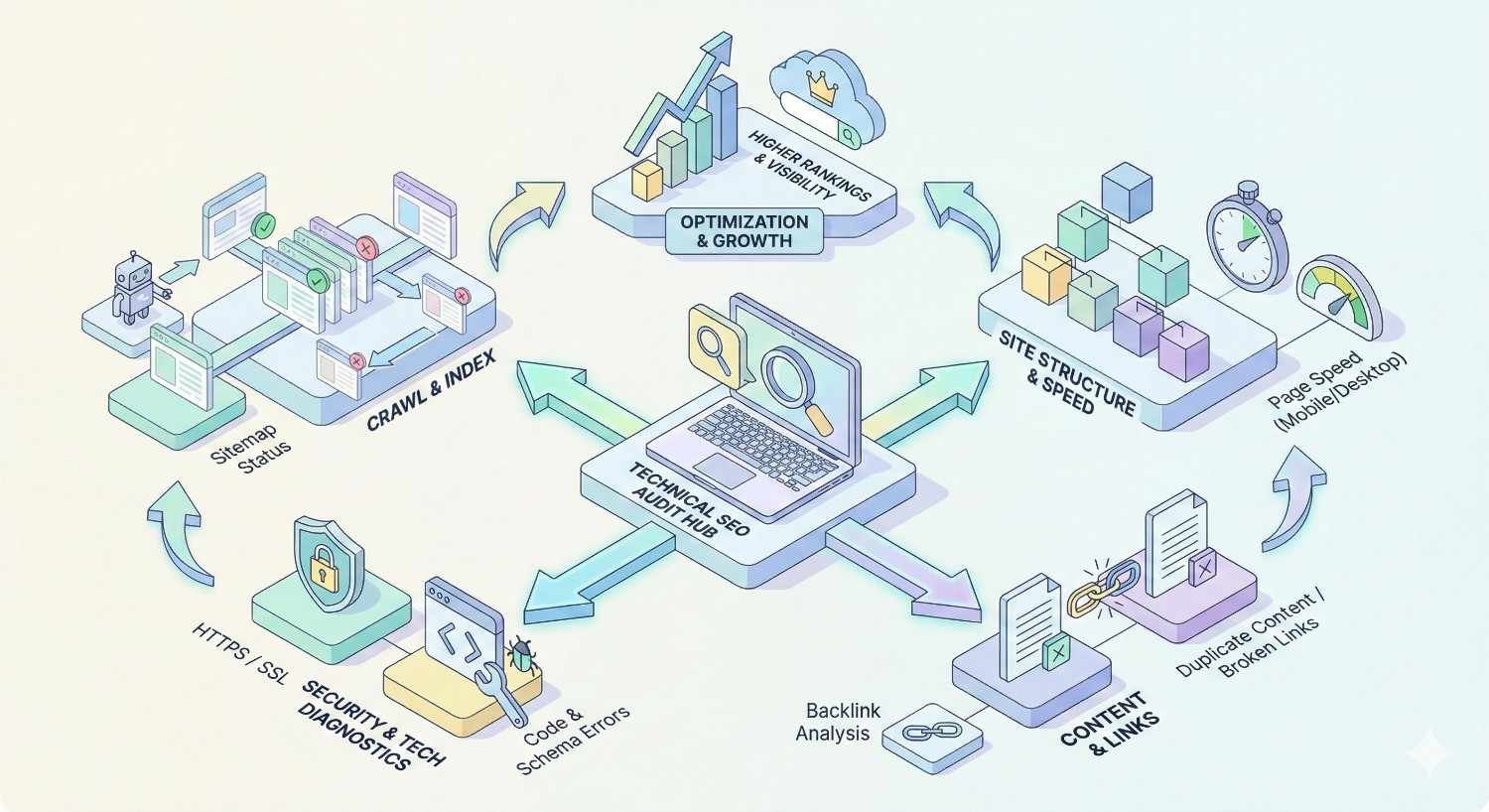
A technical SEO audit examines your website’s infrastructure to identify issues preventing search engines from crawling, indexing, and ranking your pages effectively. Without this foundation, even exceptional content struggles to gain organic visibility.
Technical problems silently drain your SEO performance. Crawl errors, slow page speeds, and indexation gaps compound over time, costing you rankings and revenue you never knew you were losing.
This guide covers every element your technical SEO audit should include—from crawlability analysis and Core Web Vitals to security protocols and international SEO factors. You’ll walk away with a complete framework for diagnosing and fixing technical issues that impact your search performance.
What Is a Technical SEO Audit?
Definition and Purpose
A technical SEO audit is a systematic evaluation of your website’s backend infrastructure and how it interacts with search engine crawlers. Unlike content audits that focus on what you publish, technical audits examine how your site functions at the code, server, and architecture level.
The purpose is straightforward: identify barriers preventing Google and other search engines from efficiently discovering, crawling, rendering, and indexing your pages. These barriers range from misconfigured robots.txt files blocking important content to slow server response times that frustrate both users and crawlers.
Technical audits produce actionable findings. Each issue discovered comes with a clear path to resolution, whether that’s fixing broken canonical tags, compressing oversized images, or restructuring your internal linking architecture.
Why Technical SEO Audits Matter for Organic Growth
Search engines cannot rank pages they cannot find or understand. Technical issues create invisible ceilings on your organic potential—you might have the best content in your industry, but if Googlebot struggles to access it, rankings suffer.
Consider crawl budget. Google allocates limited resources to crawling each website. If your site wastes that budget on duplicate pages, redirect chains, or low-value URLs, your important pages get crawled less frequently. Updates take longer to appear in search results. New content sits undiscovered.
Core Web Vitals directly influence rankings. Google confirmed that page experience signals, including loading performance, interactivity, and visual stability, factor into search rankings. Sites failing these metrics compete at a disadvantage.
Technical health also compounds. A site with clean architecture, fast load times, and proper indexation signals builds authority more efficiently. Every piece of content you publish benefits from that strong foundation. Conversely, technical debt accumulates—small issues become major problems that require significant resources to fix.
Crawlability and Indexation Analysis
Crawlability determines whether search engines can access your content. Indexation determines whether they choose to include it in search results. Both require careful analysis.
Robots.txt Configuration Review
Your robots.txt file serves as the first instruction set search engine crawlers encounter. Located at yourdomain.com/robots.txt, this file tells crawlers which areas of your site they can and cannot access.
During your audit, verify these elements:
Accessibility check. Ensure your robots.txt file exists and returns a 200 status code. A missing or broken file creates uncertainty for crawlers.
Disallow directives. Review every Disallow rule. Common mistakes include accidentally blocking CSS and JavaScript files that Googlebot needs to render pages properly, or blocking entire sections of valuable content.
Allow directives. Confirm that important directories and page types are explicitly allowed when needed, especially if parent directories contain Disallow rules.
Sitemap reference. Your robots.txt should include a Sitemap directive pointing to your XML sitemap location. This helps crawlers discover your sitemap without relying solely on Search Console submission.
User-agent specificity. Check whether rules apply to all crawlers (User-agent: *) or specific bots. Overly restrictive rules for Googlebot can harm your visibility.
Test your robots.txt using Google Search Console’s robots.txt Tester. This tool shows exactly how Google interprets your directives and flags potential issues.
XML Sitemap Audit
XML sitemaps provide search engines with a roadmap of your important pages. An effective sitemap accelerates discovery and communicates page priority.
File accessibility. Confirm your sitemap loads without errors and returns proper XML formatting. Broken sitemaps provide no value.
URL inclusion accuracy. Your sitemap should contain only indexable, canonical URLs. Including redirects, 404 pages, or non-canonical versions wastes crawl budget and sends mixed signals.
Sitemap size limits. Individual sitemaps cannot exceed 50,000 URLs or 50MB uncompressed. Larger sites need sitemap index files that reference multiple child sitemaps.
Last modified dates. The lastmod tag should reflect actual content changes, not arbitrary timestamps. Accurate dates help crawlers prioritize recently updated content.
Priority and change frequency. While Google largely ignores these signals, maintaining logical values demonstrates sitemap hygiene. Remove them entirely if you cannot maintain accuracy.
Sitemap submission. Verify your sitemap is submitted through Google Search Console and Bing Webmaster Tools. Check for any reported errors or warnings.
Cross-reference your sitemap URLs against your actual site structure. Pages missing from the sitemap may be overlooked. Pages in the sitemap that no longer exist create crawl errors.
Crawl Budget Optimization
Crawl budget represents the number of pages Googlebot will crawl on your site within a given timeframe. For most small to medium sites, crawl budget is not a limiting factor. For larger sites with thousands or millions of pages, optimization becomes critical.
Identify crawl waste. Use log file analysis to see which URLs Googlebot actually requests. Common waste sources include:
- Faceted navigation creating infinite URL combinations
- Session IDs or tracking parameters generating duplicate URLs
- Paginated archives with minimal unique content
- Internal search result pages
- Calendar or date-based archives
Consolidate duplicate content. Every duplicate page Googlebot crawls is a page of unique content it does not crawl. Implement canonical tags, use parameter handling in Search Console, or block low-value URL patterns via robots.txt.
Improve crawl efficiency. Faster server response times allow Googlebot to crawl more pages per session. Reduce time to first byte (TTFB) through server optimization, caching, and CDN implementation.
Prioritize important pages. Internal linking structure influences crawl priority. Ensure your most valuable pages receive strong internal link equity and are easily discoverable from your homepage.
Index Coverage and Crawl Errors
Google Search Console’s Index Coverage report reveals how Google perceives your site’s indexability. This report categorizes URLs into four buckets: Valid, Valid with warnings, Excluded, and Error.
Error analysis. Prioritize fixing URLs in the Error category. Common errors include:
- Server errors (5xx) indicating hosting or backend problems
- Redirect errors from broken or looping redirects
- Submitted URL marked ‘noindex’ when you want indexation
- Submitted URL blocked by robots.txt unintentionally
Excluded URL review. Not all exclusions are problems. Google excludes URLs for legitimate reasons like canonical consolidation or crawl anomalies. However, review exclusions to ensure important pages are not incorrectly categorized.
Crawl anomalies. URLs that Google attempted to crawl but could not access require investigation. Intermittent server issues, rate limiting, or firewall rules may block Googlebot.
Soft 404 detection. Pages returning 200 status codes but displaying error content confuse crawlers. Ensure actual 404 pages return proper 404 status codes.
Monitor this report weekly. Sudden spikes in errors often indicate site-wide issues requiring immediate attention.
Canonical Tag Implementation
Canonical tags tell search engines which URL version represents the master copy when duplicate or similar content exists across multiple URLs. Proper implementation prevents duplicate content issues and consolidates ranking signals.
Self-referencing canonicals. Every indexable page should include a canonical tag pointing to itself. This reinforces the preferred URL version and prevents issues from URL parameters or tracking codes.
Cross-domain canonicals. If content legitimately exists on multiple domains, canonical tags can point to the preferred domain. Ensure the target domain allows this through proper configuration.
Canonical consistency. The canonical URL should match exactly what you want indexed—including protocol (https), www preference, and trailing slashes. Inconsistencies create confusion.
Canonical and redirect alignment. If a page redirects, the redirect target and canonical should align. Conflicting signals (redirecting to URL A but canonicalizing to URL B) create problems.
Pagination canonicals. Paginated series should not canonicalize all pages to page one. Each page in a series should self-canonicalize unless you are intentionally consolidating.
Audit canonical tags across your site using crawling tools. Flag pages with missing canonicals, canonicals pointing to non-existent URLs, or canonical chains (page A canonicalizes to B, which canonicalizes to C).
Site Architecture and URL Structure
Site architecture determines how content is organized and how link equity flows throughout your site. Clean architecture helps both users and search engines navigate efficiently.
URL Hierarchy and Naming Conventions
URLs communicate content hierarchy and topic relevance. Well-structured URLs improve user experience and provide contextual signals to search engines.
Logical hierarchy. URLs should reflect your site’s content organization. A URL like /services/seo/technical-audit/ clearly indicates the page’s position within your site structure.
Descriptive slugs. URL slugs should describe page content using relevant keywords. Avoid generic slugs like /page1/ or /post-12345/. Keep slugs concise—typically three to five words.
Consistent formatting. Establish and maintain URL conventions across your site:
- Lowercase letters only (URLs are case-sensitive)
- Hyphens between words (not underscores)
- No special characters or spaces
- Consistent trailing slash usage
Parameter management. URL parameters for filtering, sorting, or tracking create duplicate content risks. Use canonical tags, implement parameter handling in Search Console, or configure your CMS to use cleaner URL structures.
URL length. While no strict limit exists, shorter URLs are easier to share and remember. Aim for URLs under 100 characters when possible.
Avoid changing URLs without proper redirects. Every URL change requires a 301 redirect from the old URL to the new one to preserve link equity and prevent broken links.
Internal Linking Structure Analysis
Internal links distribute page authority throughout your site and help search engines understand content relationships. Strategic internal linking improves crawlability and rankings.
Link equity distribution. Analyze how link equity flows from high-authority pages (typically your homepage and popular content) to deeper pages. Important pages should receive links from multiple authoritative internal sources.
Orphan page identification. Orphan pages have no internal links pointing to them. Search engines struggle to discover these pages, and they receive no internal link equity. Every important page needs at least one internal link.
Anchor text optimization. Internal link anchor text provides context about the target page. Use descriptive, relevant anchor text rather than generic phrases like “click here” or “read more.”
Link placement. Links within main content carry more weight than footer or sidebar links. Prioritize contextual links within your body content for important pages.
Broken internal links. Links pointing to 404 pages or redirects waste link equity and create poor user experiences. Audit and fix broken internal links regularly.
Excessive linking. Pages with hundreds of links dilute the equity passed to each target. Focus on quality, relevant links rather than quantity.
Use crawling tools to visualize your internal link structure. Identify pages with few incoming links, pages linking excessively, and opportunities to strengthen connections between related content.
Site Depth and Click Depth Evaluation
Site depth measures how many clicks it takes to reach a page from your homepage. Pages buried deep in your site structure receive less crawl attention and link equity.
Three-click rule. Important pages should be reachable within three clicks from your homepage. This ensures adequate crawl frequency and link equity distribution.
Flat vs. deep architecture. Flatter architectures (fewer levels) generally perform better for SEO. However, extremely flat structures can create navigation challenges. Balance depth with logical organization.
Category page optimization. Category and hub pages serve as bridges between your homepage and deeper content. Ensure these pages are well-linked and provide clear paths to individual pieces of content.
Pagination depth. Long paginated series push content increasingly deep. Consider implementing “load more” functionality, infinite scroll with proper SEO handling, or limiting pagination depth.
Crawl your site and analyze the click depth distribution. If significant content exists beyond four or five clicks from your homepage, restructure your navigation or add internal links to reduce depth.
Breadcrumb Navigation Review
Breadcrumbs provide secondary navigation showing users their location within your site hierarchy. They also help search engines understand your site structure.
Implementation verification. Confirm breadcrumbs appear on all appropriate pages and accurately reflect the page’s position in your hierarchy.
Schema markup. Implement BreadcrumbList schema markup to help search engines parse your breadcrumb structure. This can result in enhanced search result displays showing your breadcrumb path.
Link functionality. Each breadcrumb element should link to the corresponding page. Broken or missing links reduce breadcrumb utility.
Hierarchy accuracy. Breadcrumbs should match your actual URL structure and site organization. Inconsistencies confuse both users and search engines.
Homepage inclusion. Breadcrumb trails should begin with your homepage, providing a clear path back to your site’s root.
Test breadcrumb schema using Google’s Rich Results Test to ensure proper implementation and eligibility for enhanced search displays.
Page Speed and Core Web Vitals Assessment
Page speed directly impacts user experience and search rankings. Core Web Vitals provide specific metrics Google uses to evaluate page experience.
Largest Contentful Paint (LCP) Analysis
LCP measures how long it takes for the largest visible content element to render. This typically includes hero images, large text blocks, or video thumbnails. Google considers LCP good when it occurs within 2.5 seconds of page load.
Identify the LCP element. Use Chrome DevTools or PageSpeed Insights to determine which element triggers your LCP measurement. Common LCP elements include:
- Hero images
- Featured images in blog posts
- Large heading text
- Video poster images
Server response time. Slow TTFB delays everything, including LCP. Optimize server configuration, implement caching, and consider CDN usage for faster initial responses.
Resource load optimization. If your LCP element is an image, ensure it loads quickly through:
- Proper image compression
- Modern formats (WebP, AVIF)
- Appropriate sizing for display dimensions
- Preload hints for critical images
Render-blocking resources. CSS and JavaScript that block rendering delay LCP. Minimize render-blocking resources through critical CSS inlining, async/defer script loading, and code splitting.
Client-side rendering issues. JavaScript-heavy sites that render content client-side often suffer poor LCP. Consider server-side rendering or static generation for critical content.
First Input Delay (FID) / Interaction to Next Paint (INP)
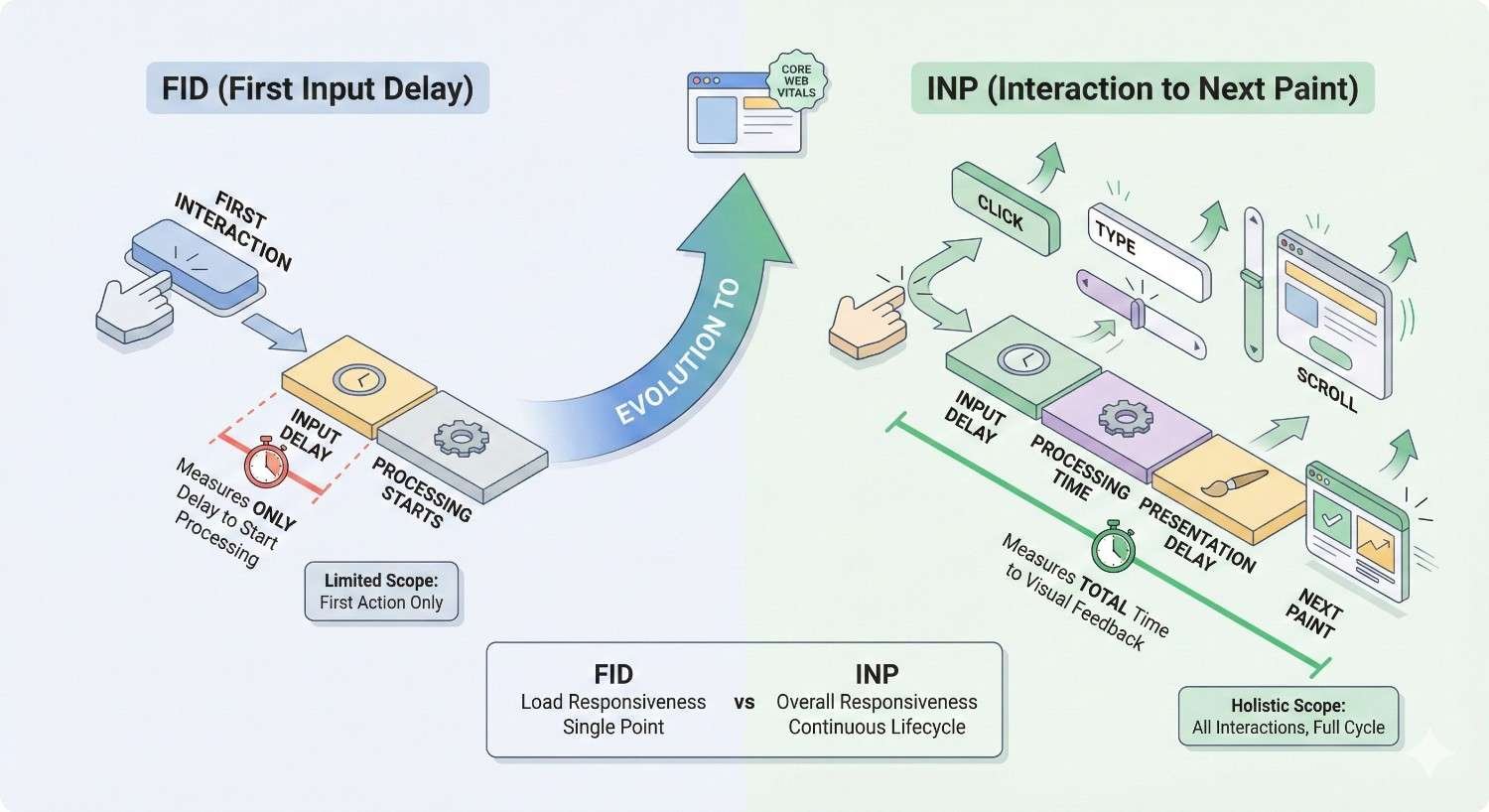
FID measures the delay between a user’s first interaction and the browser’s response. Google is transitioning to INP (Interaction to Next Paint) as the primary responsiveness metric, which measures all interactions throughout the page lifecycle.
Good FID is under 100 milliseconds. Good INP is under 200 milliseconds.
JavaScript execution. Heavy JavaScript processing blocks the main thread, preventing the browser from responding to user input. Audit your JavaScript for:
- Long-running tasks that should be broken into smaller chunks
- Unnecessary third-party scripts
- Inefficient code that could be optimized
Third-party impact. Analytics, advertising, chat widgets, and other third-party scripts often cause interactivity issues. Evaluate each script’s necessity and load non-critical scripts after initial page interaction.
Main thread optimization. Use web workers for heavy computations. Implement code splitting to load only necessary JavaScript for each page.
Input handler efficiency. Ensure event handlers execute quickly. Debounce or throttle handlers for frequent events like scrolling or resizing.
Test interactivity using real user data from Chrome User Experience Report (CrUX) or field data in Search Console, not just lab tests which may not reflect actual user conditions.
Cumulative Layout Shift (CLS) Evaluation
CLS measures visual stability—how much page content shifts unexpectedly during loading. Good CLS is under 0.1.
Image and video dimensions. Always specify width and height attributes for images and videos. This allows browsers to reserve appropriate space before the media loads.
Ad and embed space reservation. Dynamically injected content like ads often causes layout shifts. Reserve space for these elements using CSS min-height or aspect-ratio properties.
Web font loading. Fonts loading after text renders cause text to reflow. Use font-display: swap with fallback fonts that match your web font’s dimensions, or preload critical fonts.
Dynamic content injection. Content inserted above existing content pushes everything down. Insert dynamic content below the viewport or use CSS transforms that do not trigger layout recalculation.
Animation best practices. Avoid animations that trigger layout changes. Use transform and opacity properties which can be handled by the compositor without affecting layout.
Audit CLS using PageSpeed Insights and review the specific elements causing shifts. Chrome DevTools’ Performance panel can identify exactly when and why shifts occur.
Mobile vs Desktop Performance
Performance often varies significantly between mobile and desktop. Since Google uses mobile-first indexing, mobile performance takes priority.
Separate testing. Test both mobile and desktop versions independently. Issues may exist on one platform but not the other.
Network conditions. Mobile users often experience slower, less reliable connections. Test under throttled network conditions that simulate real mobile experiences.
Device capabilities. Mobile devices have less processing power than desktops. JavaScript that runs smoothly on desktop may cause significant delays on mobile.
Viewport-specific issues. Some performance problems only manifest at certain viewport sizes. Test across multiple device sizes, not just generic “mobile” and “desktop.”
Real user data comparison. Compare mobile and desktop Core Web Vitals in Search Console. Significant disparities indicate platform-specific issues requiring targeted fixes.
Prioritize mobile performance improvements. Fixes that improve mobile experience typically benefit desktop as well, but the reverse is not always true.
Image and Resource Optimization
Images typically represent the largest portion of page weight. Optimizing images and other resources dramatically improves load times.
Image compression. Compress images to reduce file size without noticeable quality loss. Tools like Squoosh, ImageOptim, or automated build processes can handle compression.
Modern formats. WebP offers superior compression compared to JPEG and PNG. AVIF provides even better compression but has less browser support. Implement format fallbacks using picture elements or server-side content negotiation.
Responsive images. Serve appropriately sized images for each device. A 2000px wide image displayed at 400px wastes bandwidth. Use srcset and sizes attributes to provide multiple image versions.
Lazy loading. Defer loading of images below the fold until users scroll near them. Native lazy loading (loading=”lazy”) works in modern browsers without JavaScript.
Resource minification. Minify CSS, JavaScript, and HTML to remove unnecessary characters. Enable gzip or Brotli compression at the server level.
Caching configuration. Set appropriate cache headers for static resources. Long cache durations for versioned assets reduce repeat visitor load times.
CDN implementation. Content delivery networks serve resources from geographically distributed servers, reducing latency for users worldwide.
Mobile-Friendliness and Responsive Design
Mobile-first indexing means Google primarily uses your mobile site version for ranking and indexing. Mobile optimization is not optional.
Mobile-First Indexing Compliance
Google crawls and indexes the mobile version of your site by default. Your mobile site must contain all content and functionality you want indexed.
Content parity. Ensure your mobile site includes all content present on desktop. Hidden content, collapsed accordions, or tabbed interfaces should be crawlable and indexable.
Structured data parity. Schema markup must exist on mobile pages, not just desktop versions. Verify structured data implementation on your mobile site.
Meta data consistency. Title tags, meta descriptions, and other meta elements should match between mobile and desktop versions.
Internal linking parity. Mobile navigation should provide access to the same pages as desktop navigation. Simplified mobile menus that remove important links harm indexation.
Image and video accessibility. Media content should be accessible and properly optimized on mobile. Ensure images use supported formats and include alt text.
Use Google’s Mobile-Friendly Test and Search Console’s mobile usability report to identify compliance issues.
Viewport Configuration
The viewport meta tag controls how your page displays on mobile devices. Proper configuration is essential for mobile rendering.
Standard viewport tag. Include this meta tag in your HTML head:
html
Copy
<meta name=”viewport“ content=”width=device-width, initial-scale=1“>
Avoid fixed widths. Do not set viewport width to a fixed pixel value. This prevents proper scaling across different device sizes.
User scaling. Avoid disabling user zoom (maximum-scale=1, user-scalable=no) unless absolutely necessary for specific functionality. Accessibility guidelines recommend allowing zoom.
Responsive breakpoints. Your CSS should include media queries that adapt layout to different viewport sizes. Test across common device widths.
Touch Element Spacing
Mobile users interact via touch, requiring larger tap targets and adequate spacing between interactive elements.
Minimum tap target size. Interactive elements should be at least 48×48 CSS pixels. Smaller targets cause accidental taps and frustration.
Adequate spacing. Maintain at least 8 pixels of space between tap targets. Crowded elements lead to mis-taps.
Link and button sizing. Ensure links within text have sufficient padding or line height for easy tapping. Inline links in dense text paragraphs are difficult to tap accurately.
Form input sizing. Form fields should be large enough for comfortable input on mobile. Small input fields frustrate users and increase form abandonment.
Mobile Usability Errors
Google Search Console reports specific mobile usability issues affecting your pages.
Common errors include:
- Text too small to read without zooming
- Clickable elements too close together
- Content wider than screen requiring horizontal scrolling
- Viewport not configured
- Incompatible plugins (Flash, etc.)
Error prioritization. Address errors affecting the most pages first. Site-wide template issues create errors across all pages using that template.
Testing after fixes. Use Search Console’s URL Inspection tool to validate fixes. Request re-indexing after resolving mobile usability issues.
Regular monitoring. Mobile usability errors can emerge from theme updates, plugin changes, or new content. Monitor the report regularly for new issues.
HTTPS and Security Audit
Security is a confirmed ranking factor. HTTPS protects user data and builds trust with both visitors and search engines.
SSL Certificate Validation
SSL certificates enable HTTPS encryption. Invalid or misconfigured certificates create security warnings that devastate user trust and rankings.
Certificate validity. Verify your certificate has not expired and will not expire soon. Set calendar reminders for renewal dates.
Certificate authority. Use certificates from trusted certificate authorities. Self-signed certificates trigger browser warnings.
Domain coverage. Ensure your certificate covers all domains and subdomains you use. Wildcard certificates cover subdomains; multi-domain certificates cover separate domains.
Certificate chain. The complete certificate chain must be properly installed. Missing intermediate certificates cause validation failures in some browsers.
Protocol support. Disable outdated protocols (SSL 3.0, TLS 1.0, TLS 1.1) that have known vulnerabilities. Support TLS 1.2 and TLS 1.3.
Use SSL testing tools like SSL Labs’ SSL Server Test to identify certificate and configuration issues.
Mixed Content Issues
Mixed content occurs when HTTPS pages load resources (images, scripts, stylesheets) over HTTP. This compromises security and triggers browser warnings.
Active mixed content. Scripts and stylesheets loaded over HTTP are blocked by modern browsers, potentially breaking page functionality.
Passive mixed content. Images and videos loaded over HTTP display warnings but typically still load. However, they still compromise security.
Detection methods. Browser developer tools flag mixed content in the console. Crawling tools can identify mixed content across your entire site.
Resolution approaches:
- Update hardcoded HTTP URLs to HTTPS
- Use protocol-relative URLs (//example.com/resource)
- Implement Content-Security-Policy headers to block or report mixed content
- Update CMS settings and database entries containing HTTP URLs
HTTP to HTTPS Redirect Chains
All HTTP URLs should redirect to their HTTPS equivalents. However, redirect chains waste crawl budget and slow page loads.
Direct redirects. HTTP URLs should redirect directly to the final HTTPS URL in a single hop. Avoid chains like HTTP → HTTPS non-www → HTTPS www.
Redirect type. Use 301 (permanent) redirects for HTTP to HTTPS migration. This passes full link equity to the HTTPS version.
Comprehensive coverage. Every HTTP URL variation should redirect:
- http://example.com
- http://www.example.com
- All internal pages and resources
HSTS implementation. HTTP Strict Transport Security headers tell browsers to always use HTTPS, eliminating redirect overhead for repeat visitors.
Security Headers Review
Security headers protect against various attacks and demonstrate security best practices.
Key security headers:
Content-Security-Policy (CSP). Controls which resources can load on your pages, preventing XSS attacks.
X-Content-Type-Options. Prevents MIME type sniffing attacks. Set to “nosniff.”
X-Frame-Options. Prevents clickjacking by controlling whether your site can be embedded in frames. Set to “DENY” or “SAMEORIGIN.”
Referrer-Policy. Controls how much referrer information is sent with requests.
Permissions-Policy. Controls which browser features your site can use.
Strict-Transport-Security. Forces HTTPS connections for specified duration.
Use security header testing tools to audit your implementation and identify missing or misconfigured headers.
Structured Data and Schema Markup
Structured data helps search engines understand your content and can enable rich results in search listings.
Schema Implementation Audit
Schema markup provides explicit context about your content using a standardized vocabulary search engines understand.
Relevant schema types. Identify which schema types apply to your content:
- Organization and LocalBusiness for company information
- Article, BlogPosting, NewsArticle for content
- Product, Offer for e-commerce
- FAQPage, HowTo for instructional content
- BreadcrumbList for navigation
- Review, AggregateRating for reviews
Implementation method. Schema can be implemented via JSON-LD (recommended), Microdata, or RDFa. JSON-LD is easiest to implement and maintain.
Required properties. Each schema type has required and recommended properties. Missing required properties invalidate the markup.
Accuracy verification. Schema data must accurately reflect visible page content. Misleading schema violates Google’s guidelines and can result in penalties.
Rich Snippet Eligibility
Proper schema implementation can earn enhanced search result displays including star ratings, prices, FAQ dropdowns, and more.
Eligibility requirements. Meeting schema requirements does not guarantee rich results. Google determines eligibility based on:
- Markup validity and accuracy
- Content quality and relevance
- Site authority and trust
- User experience factors
Rich result types. Different schema types enable different rich results:
- Review schema → Star ratings
- FAQ schema → Expandable Q&A
- HowTo schema → Step-by-step displays
- Product schema → Price, availability, ratings
- Recipe schema → Cooking time, calories, ratings
Competitive analysis. Check which rich results competitors earn for target queries. This indicates which schema implementations provide value in your space.
Schema Validation and Errors
Invalid schema provides no benefit and may indicate broader implementation problems.
Validation tools. Test your schema using:
- Google’s Rich Results Test
- Schema.org Validator
- Google Search Console’s Enhancements reports
Common errors:
- Missing required properties
- Incorrect property values or formats
- Mismatched schema type for content
- Schema not matching visible content
- Nested schema errors
Warning vs. error distinction. Errors prevent rich result eligibility. Warnings indicate missing recommended properties that could enhance results but are not required.
Site-wide auditing. Crawl your entire site to identify schema issues across all pages. Template-level problems affect every page using that template.
On-Page Technical Elements
On-page technical elements directly influence how search engines understand and display your content.
Title Tag and Meta Description Audit
Title tags and meta descriptions appear in search results and influence click-through rates.
Title tag requirements:
- Unique title for every page
- Primary keyword near the beginning
- 50-60 characters to avoid truncation
- Compelling, click-worthy phrasing
- Brand name inclusion (typically at end)
Meta description requirements:
- Unique description for every page
- 150-160 characters optimal length
- Include target keyword naturally
- Clear value proposition
- Call to action when appropriate
Common issues to identify:
- Missing titles or descriptions
- Duplicate titles or descriptions across pages
- Truncated titles (too long)
- Keyword stuffing
- Generic, non-descriptive text
Template-based problems. CMS templates sometimes generate identical or poorly formatted meta elements. Audit template logic, not just individual pages.
Header Tag Hierarchy (H1-H6)
Header tags create content hierarchy and help search engines understand page structure.
H1 requirements:
- Exactly one H1 per page
- Contains primary keyword
- Accurately describes page content
- Matches user intent and title tag theme
Hierarchy logic:
- H2s break content into main sections
- H3s subdivide H2 sections
- H4-H6 provide further granularity
- Never skip levels (H1 → H3 without H2)
Common issues:
- Multiple H1 tags
- Missing H1 tags
- Skipped heading levels
- Headers used for styling rather than structure
- Non-descriptive header text
Accessibility connection. Proper header hierarchy aids screen reader navigation. SEO and accessibility requirements align here.
Image Alt Text and Optimization
Alt text describes images for accessibility and provides context for search engines.
Alt text requirements:
- Descriptive text explaining image content
- Include relevant keywords naturally
- Concise (typically under 125 characters)
- Avoid “image of” or “picture of” prefixes
- Empty alt (alt=””) for decorative images
Image SEO factors:
- Descriptive file names (blue-widget.jpg vs. IMG_12345.jpg)
- Appropriate file size (compressed)
- Correct dimensions for display size
- Modern formats where supported
Common issues:
- Missing alt text
- Generic alt text (“image,” “photo”)
- Keyword-stuffed alt text
- Alt text not matching image content
Duplicate Content Detection
Duplicate content confuses search engines and dilutes ranking signals across multiple URLs.
Internal duplication sources:
- URL parameters creating multiple versions
- WWW vs. non-WWW variations
- HTTP vs. HTTPS versions
- Trailing slash inconsistencies
- Print-friendly page versions
- Pagination issues
Detection methods:
- Site crawls identifying identical content
- Search Console duplicate content warnings
- Site: searches revealing multiple indexed versions
- Copyscape or similar tools for external duplication
Resolution approaches:
- Canonical tags pointing to preferred version
- 301 redirects eliminating duplicate URLs
- Parameter handling in Search Console
- Robots.txt blocking low-value duplicates
- Noindex tags for necessary but non-indexable pages
Thin Content Identification
Thin content provides little value to users and can harm site-wide quality perception.
Thin content indicators:
- Very low word counts (under 300 words for substantive topics)
- High template-to-content ratio
- Automatically generated content
- Doorway pages targeting keyword variations
- Affiliate pages with no original content
Quality assessment:
- Does the page answer user questions comprehensively?
- Does it provide unique value not found elsewhere?
- Would users be satisfied landing on this page?
- Does it demonstrate expertise on the topic?
Resolution options:
- Expand thin pages with valuable content
- Consolidate similar thin pages into comprehensive resources
- Noindex pages that must exist but lack SEO value
- Remove pages providing no user value
International SEO Technical Factors
Sites targeting multiple countries or languages require additional technical considerations.
Hreflang Tag Implementation
Hreflang tags tell search engines which language and regional versions of pages to show different users.
Implementation locations:
- HTML head section
- HTTP headers
- XML sitemap
Tag format:
html
Copy
<link rel=”alternate“ hreflang=”en-us“ href=”https://example.com/page/“ />
<link rel=”alternate“ hreflang=”en-gb“ href=”https://example.co.uk/page/“ />
<link rel=”alternate“ hreflang=”x-default“ href=”https://example.com/page/“ />
Critical requirements:
- Bidirectional confirmation (each page must reference all alternates including itself)
- Valid language and region codes
- Absolute URLs (not relative)
- x-default for fallback/language selector pages
Common errors:
- Missing return links
- Invalid language codes
- Hreflang pointing to non-canonical URLs
- Conflicting hreflang and canonical signals
Geotargeting Configuration
Geotargeting signals help search engines understand which geographic audiences you serve.
Google Search Console targeting. For ccTLDs or subdirectories, set geographic targeting in Search Console’s International Targeting report.
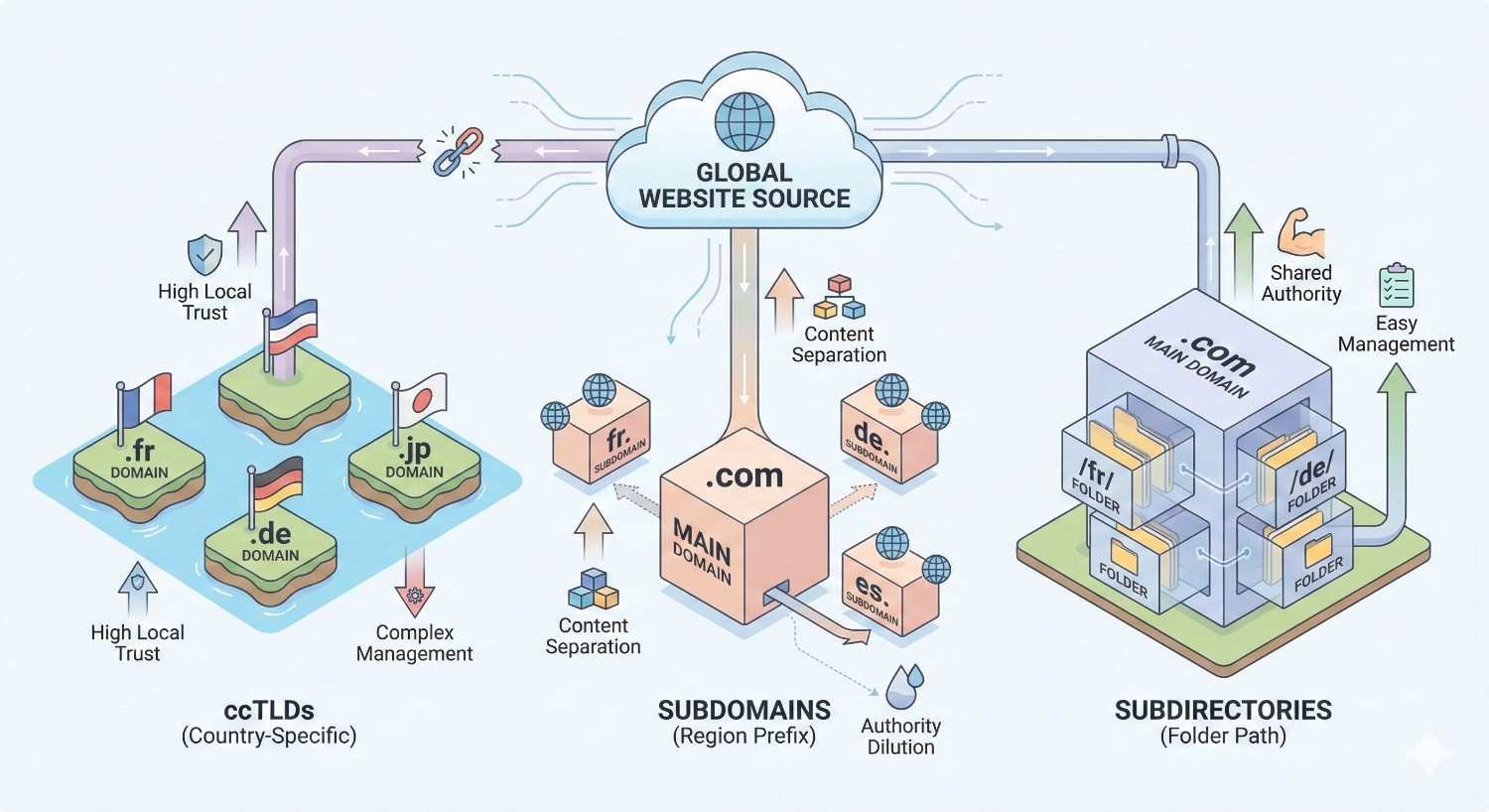
ccTLD signals. Country-code top-level domains (.co.uk, .de, .fr) provide strong geographic signals but limit global reach.
Subdirectory vs. subdomain. Subdirectories (example.com/uk/) consolidate domain authority. Subdomains (uk.example.com) provide clearer separation but split authority.
Server location. While less important than other signals, server location can influence perceived geographic relevance. CDNs mitigate this concern.
Language and Regional URL Structures
URL structure for international sites affects both user experience and search engine understanding.
Structure options:
- ccTLDs: example.de, example.fr
- Subdomains: de.example.com, fr.example.com
- Subdirectories: example.com/de/, example.com/fr/
- Parameters: example.com?lang=de (not recommended)
Consistency requirements:
- Maintain consistent structure across all regions
- Use the same URL patterns within each regional site
- Ensure navigation allows easy switching between versions
Content localization:
- Translate URLs, not just content
- Localize meta elements
- Adapt content for regional preferences and terminology
Technical SEO Audit Tools and Software
The right tools make comprehensive auditing possible. Different tools serve different purposes.
Free Technical SEO Audit Tools
Several free tools provide valuable audit capabilities.
Google Search Console. Essential for understanding how Google sees your site. Provides index coverage, Core Web Vitals, mobile usability, and security issue reports.
Google PageSpeed Insights. Analyzes page performance and Core Web Vitals using both lab and field data.
Google Mobile-Friendly Test. Confirms mobile rendering and identifies usability issues.
Google Rich Results Test. Validates structured data implementation and rich result eligibility.
Bing Webmaster Tools. Provides similar insights for Bing search, plus unique features like backlink data.
Screaming Frog (free version). Crawls up to 500 URLs, identifying technical issues across your site.
Chrome DevTools. Built-in browser tools for performance analysis, network inspection, and debugging.
Premium SEO Audit Platforms
Paid tools offer deeper analysis and larger-scale capabilities.
Screaming Frog (paid). Unlimited crawling, JavaScript rendering, custom extraction, and API integrations.
Ahrefs Site Audit. Comprehensive crawling with prioritized issue reporting and historical tracking.
Semrush Site Audit. Detailed technical analysis with thematic issue grouping and progress monitoring.
Sitebulb. Visual crawl analysis with clear prioritization and actionable recommendations.
DeepCrawl (Lumar). Enterprise-level crawling for large sites with advanced segmentation.
ContentKing. Real-time monitoring that alerts you to technical changes as they happen.
Choose tools based on your site size, technical complexity, and budget. Most sites benefit from combining free Google tools with one comprehensive crawling platform.
Google Search Console and Analytics Setup
Proper configuration of Google’s tools is foundational to technical SEO monitoring.
Search Console setup:
- Verify all site versions (www, non-www, HTTP, HTTPS)
- Set preferred domain
- Submit XML sitemap
- Configure international targeting if applicable
- Set up email alerts for critical issues
Google Analytics configuration:
- Implement tracking code on all pages
- Set up goals and conversions
- Configure site search tracking
- Enable enhanced measurement features
- Link to Search Console for combined reporting
Regular monitoring schedule:
- Daily: Check for critical alerts
- Weekly: Review index coverage and Core Web Vitals
- Monthly: Comprehensive performance analysis
- Quarterly: Full technical audit
Technical SEO Audit Checklist Template
Downloadable Audit Checklist
A structured checklist ensures consistent, comprehensive audits.
Crawlability checklist:
- Robots.txt accessible and properly configured
- XML sitemap valid and submitted
- No critical pages blocked from crawling
- Crawl errors addressed in Search Console
- Canonical tags properly implemented
Indexation checklist:
- Important pages indexed
- No unwanted pages indexed
- No duplicate content issues
- Noindex tags used appropriately
- Index coverage errors resolved
Performance checklist:
- LCP under 2.5 seconds
- FID/INP under 100/200 milliseconds
- CLS under 0.1
- Images optimized and lazy-loaded
- Resources minified and compressed
Mobile checklist:
- Mobile-friendly test passed
- Viewport properly configured
- Touch elements adequately sized
- Content parity with desktop
Security checklist:
- Valid SSL certificate
- No mixed content
- HTTPS redirects working
- Security headers implemented
Structured data checklist:
- Relevant schema implemented
- Schema validates without errors
- Rich results appearing where eligible
On-page checklist:
- Unique title tags on all pages
- Unique meta descriptions on all pages
- Proper header hierarchy
- Alt text on all images
- No thin content issues
How Often Should You Conduct a Technical SEO Audit?
Audit Frequency by Website Size
Audit frequency should match your site’s size, complexity, and rate of change.
Small sites (under 100 pages). Quarterly comprehensive audits suffice for most small sites. Monthly monitoring of Search Console catches issues between audits.
Medium sites (100-10,000 pages). Monthly partial audits focusing on high-priority areas, with quarterly comprehensive reviews. Automated monitoring tools provide continuous oversight.
Large sites (10,000+ pages). Continuous monitoring is essential. Weekly partial audits of different site sections, monthly comprehensive reviews, and real-time alerting for critical issues.
High-change environments. Sites with frequent content publication, regular development updates, or dynamic content generation need more frequent auditing regardless of size.
Trigger Events for Immediate Audits
Certain events warrant immediate technical audits outside your regular schedule.
Site migrations. Any domain change, CMS migration, or major redesign requires pre-migration auditing, launch monitoring, and post-migration verification.
Traffic drops. Sudden organic traffic declines often indicate technical problems. Audit immediately to identify and resolve issues.
Algorithm updates. Major Google updates may expose previously tolerated technical issues. Audit after confirmed updates affecting your traffic.
Development releases. New features, redesigns, or infrastructure changes can introduce technical problems. Audit after significant releases.
Security incidents. Any security breach requires immediate auditing to identify compromised elements and verify remediation.
Indexation anomalies. Sudden changes in indexed page counts signal potential problems requiring investigation.
Common Technical SEO Issues and How to Fix Them
Crawl Errors and Solutions
404 errors. Pages returning 404 status codes that should exist need restoration or redirection. For legitimately removed pages, ensure no internal links point to them.
Soft 404s. Pages displaying error content but returning 200 status codes confuse crawlers. Configure your server to return proper 404 codes for error pages.
Server errors (5xx). Intermittent server errors indicate hosting or backend problems. Work with your hosting provider or development team to resolve underlying issues.
Redirect errors. Redirect loops, chains, or broken redirects waste crawl budget. Audit redirects and implement direct paths to final destinations.
Blocked resources. CSS, JavaScript, or images blocked by robots.txt prevent proper rendering. Allow access to resources Googlebot needs.
Page Speed Issues and Fixes
Slow server response. Upgrade hosting, implement caching, optimize database queries, or add a CDN to reduce TTFB.
Large images. Compress images, serve modern formats, implement responsive images, and lazy load below-fold images.
Render-blocking resources. Inline critical CSS, defer non-critical CSS, and async or defer JavaScript loading.
Excessive JavaScript. Audit third-party scripts, remove unnecessary code, implement code splitting, and consider server-side rendering.
No caching. Configure browser caching headers for static resources. Implement server-side caching for dynamic content.
Indexation Problems and Remedies
Pages not indexed. Check for noindex tags, canonical issues, robots.txt blocking, or low content quality. Request indexing via Search Console after resolving issues.
Wrong pages indexed. Implement canonical tags pointing to preferred versions. Use noindex on pages that should not appear in search.
Slow indexing. Improve internal linking to important pages, submit updated sitemaps, and ensure adequate crawl budget allocation.
Index bloat. Too many low-value pages indexed dilutes site quality. Noindex or remove thin, duplicate, or auto-generated pages.
Technical SEO Audit vs. Full SEO Audit
When You Need Each Type
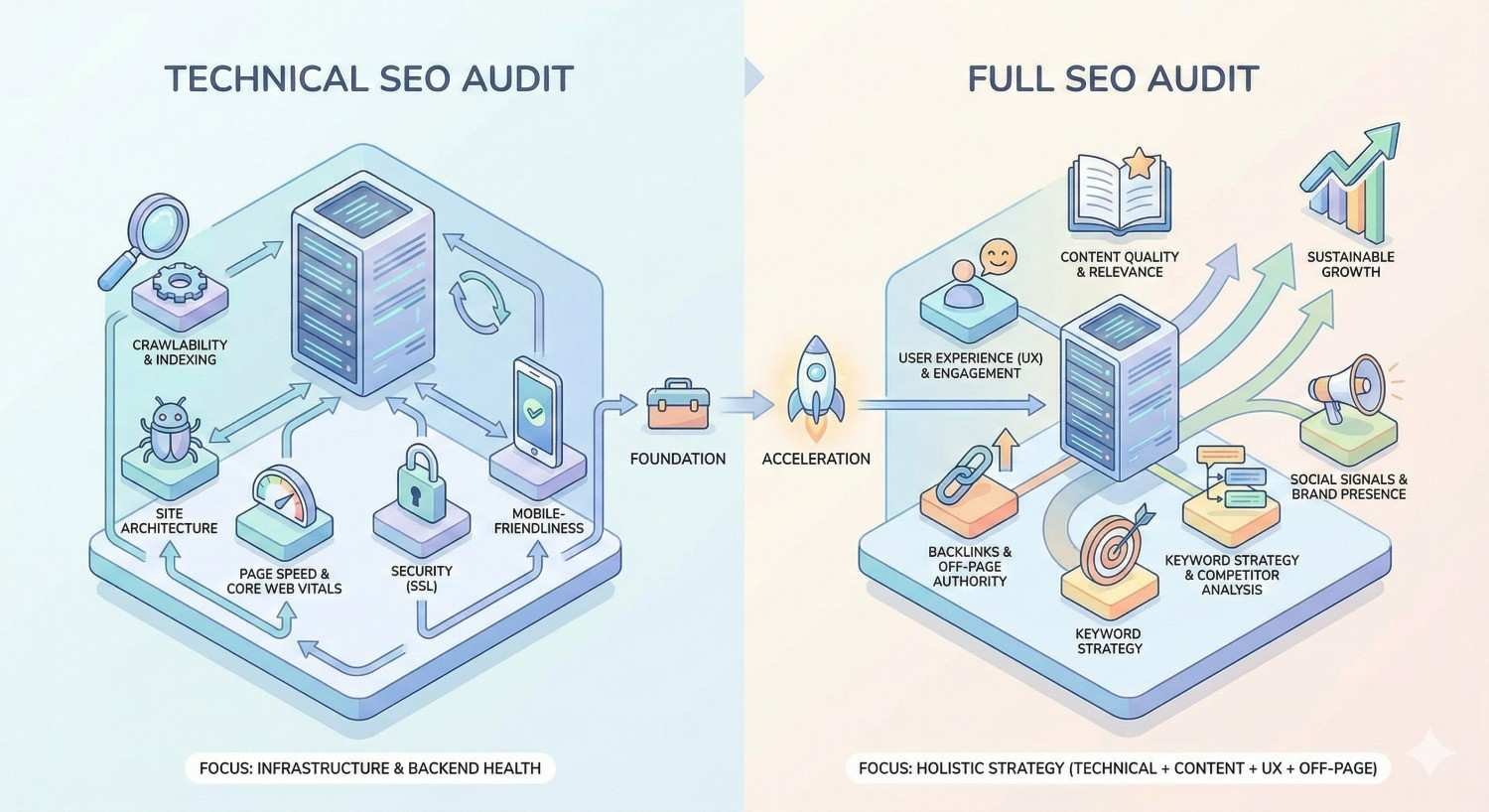
Technical SEO audits and full SEO audits serve different purposes.
Technical SEO audit scope:
- Crawlability and indexation
- Site architecture and URL structure
- Page speed and Core Web Vitals
- Mobile optimization
- Security implementation
- Structured data
- On-page technical elements
Full SEO audit additional scope:
- Keyword research and targeting
- Content quality and gaps
- Backlink profile analysis
- Competitor analysis
- Local SEO factors
- Conversion optimization
When to choose technical audit:
- Site experiencing crawl or indexation issues
- After migrations or major development changes
- Performance problems affecting rankings
- Regular maintenance and monitoring
- Foundation building before content investment
When to choose full audit:
- Comprehensive SEO strategy development
- Significant ranking declines across the board
- Entering new markets or verticals
- Annual strategic planning
- Before major marketing investments
Many organizations benefit from annual full audits supplemented by quarterly technical audits.
DIY vs. Professional Technical SEO Audit
When to Audit In-House
In-house audits work well under certain conditions.
Suitable scenarios:
- Small sites with straightforward architecture
- Teams with technical SEO knowledge
- Limited budgets requiring cost efficiency
- Ongoing monitoring between professional audits
- Quick checks after minor changes
Required capabilities:
- Understanding of technical SEO fundamentals
- Familiarity with audit tools
- Ability to interpret findings
- Access to development resources for fixes
- Time to conduct thorough analysis
Limitations:
- May miss complex or obscure issues
- Lacks external perspective
- Limited by team’s current knowledge
- Tool costs can accumulate
When to Hire an SEO Agency
Professional audits provide value in specific situations.
Recommended scenarios:
- Large or complex sites
- Major migrations or redesigns
- Persistent ranking problems despite internal efforts
- Limited internal technical SEO expertise
- Need for authoritative recommendations to secure development resources
- Annual comprehensive reviews
Agency advantages:
- Specialized expertise and experience
- Access to enterprise tools
- Fresh perspective on familiar problems
- Detailed documentation and prioritization
- Implementation guidance and support
- Accountability for recommendations
Selection criteria:
- Proven technical SEO track record
- Transparent methodology
- Clear deliverables and timelines
- Post-audit support availability
- References from similar projects
Prioritizing Technical SEO Fixes
High-Impact vs. Low-Impact Issues
Not all technical issues deserve equal attention. Prioritize based on impact and effort.
High-impact issues (fix immediately):
- Crawl blocks on important pages
- Site-wide indexation problems
- Security vulnerabilities
- Severe Core Web Vitals failures
- Mobile usability errors on key pages
- Broken critical functionality
Medium-impact issues (fix soon):
- Suboptimal canonical implementation
- Missing or duplicate meta elements
- Moderate performance issues
- Incomplete structured data
- Internal linking gaps
Low-impact issues (fix when possible):
- Minor validation warnings
- Cosmetic URL inconsistencies
- Non-critical schema enhancements
- Edge case redirect chains
Prioritization factors:
- Number of pages affected
- Traffic value of affected pages
- Severity of the issue
- Effort required to fix
- Dependencies on other fixes
Creating a Technical SEO Roadmap
A roadmap transforms audit findings into actionable plans.
Immediate actions (Week 1):
- Critical security issues
- Major crawl or indexation blocks
- Severe performance problems
Short-term fixes (Month 1):
- High-impact issues affecting significant traffic
- Quick wins with minimal development effort
- Foundation issues blocking other improvements
Medium-term projects (Quarter 1):
- Moderate-impact issues requiring development resources
- Architecture improvements
- Performance optimization projects
Long-term initiatives (Year 1):
- Major infrastructure changes
- Comprehensive content consolidation
- Platform migrations or upgrades
Roadmap documentation:
- Issue description and impact
- Recommended solution
- Required resources
- Timeline and dependencies
- Success metrics
- Responsible parties
Review and update your roadmap monthly. Priorities shift as issues are resolved and new problems emerge.
Conclusion
A comprehensive technical SEO audit examines every element affecting how search engines crawl, index, and rank your website. From robots.txt configuration and XML sitemaps to Core Web Vitals and structured data, each component contributes to your organic visibility foundation.
Technical health compounds over time. Sites with clean architecture, fast performance, and proper indexation build authority more efficiently than competitors struggling with technical debt. The investment in regular auditing pays dividends across all your SEO efforts.
We help businesses worldwide build sustainable organic growth through technical SEO excellence. Contact White Label SEO Service to discuss how a professional technical audit can identify opportunities and accelerate your search performance.
Frequently Asked Questions
What is included in a technical SEO audit?
A technical SEO audit includes crawlability analysis, indexation review, site architecture evaluation, page speed assessment, Core Web Vitals measurement, mobile-friendliness testing, security verification, structured data validation, and on-page technical element review. Comprehensive audits also cover international SEO factors for multi-language sites.
How long does a technical SEO audit take?
Small sites (under 100 pages) typically require 1-2 days for a thorough audit. Medium sites need 3-5 days. Large enterprise sites with thousands of pages may require 2-4 weeks for comprehensive analysis. Timeline depends on site complexity, tool access, and depth of analysis required.
What tools are needed for a technical SEO audit?
Essential free tools include Google Search Console, PageSpeed Insights, and Mobile-Friendly Test. Most audits also require a crawling tool like Screaming Frog. Premium platforms like Ahrefs, Semrush, or Sitebulb provide deeper analysis capabilities for larger or more complex sites.
How much does a technical SEO audit cost?
DIY audits cost only tool subscriptions, ranging from free to several hundred dollars monthly. Professional audits from agencies typically range from $1,000-$5,000 for small sites to $10,000-$30,000+ for enterprise sites. Cost varies based on site size, complexity, and audit depth.
Can I do a technical SEO audit myself?
Yes, with proper knowledge and tools. Small site owners with technical understanding can conduct effective audits using free tools and established checklists. However, complex sites, persistent problems, or limited expertise often benefit from professional analysis that catches issues DIY audits miss.
What happens after a technical SEO audit?
After an audit, you receive a prioritized list of issues and recommendations. Implementation follows, typically starting with high-impact fixes. Progress monitoring tracks improvements in crawl stats, indexation, and rankings. Most sites benefit from ongoing monitoring and periodic re-audits to maintain technical health.
How often should I conduct a technical SEO audit?
Small sites should audit quarterly with monthly Search Console monitoring. Medium sites benefit from monthly partial audits and quarterly comprehensive reviews. Large sites need continuous monitoring with weekly partial audits. Additional audits are warranted after migrations, major updates, or traffic drops.


