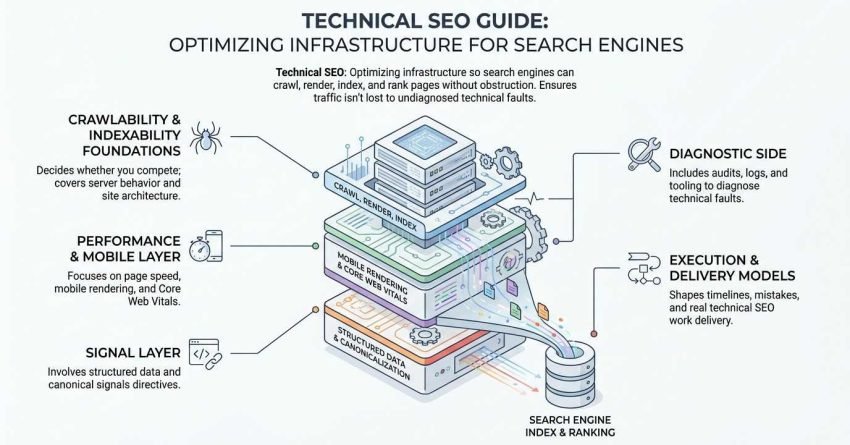
Technical SEO is the practice of optimizing a website’s infrastructure so search engines can crawl, render, index, and rank its pages without obstruction. It covers server behavior, site architecture, page speed, mobile rendering, structured data, and the directives that tell search engines what to include in their index.
Most sites lose organic traffic to technical faults nobody diagnosed. Pages sit uncrawled, canonical signals conflict, and rankings stall while budget keeps flowing into content nobody can find.
This guide covers how search engines actually process a page, the crawlability and indexability foundations that decide whether you compete at all, the performance and mobile layer around Core Web Vitals, the signal layer of structured data and canonicalization, the diagnostic side of audits, logs, and tooling, and finally the timelines, mistakes, and delivery models that shape real technical SEO work.
What Is Technical SEO?
Technical SEO is a discipline of search engine optimization that makes a website’s technical foundation accessible and interpretable to search engines. I think of it as everything that has to work before content and links can do anything at all.
The work is mostly invisible to visitors. A user never sees a canonical tag, a robots directive, or a server response code, but every one of those elements decides whether a page enters the index and competes for a query.
I split the discipline into two halves. The first half removes obstacles, meaning crawl blocks, redirect chains, render failures, and slow responses. The second half adds clarity, meaning structured data, clean internal linking, and consistent canonical signals that tell search engines exactly what each page is.
Technical SEO vs. On-Page SEO vs. Off-Page SEO
The three disciplines answer three different questions, and confusing them is where most beginner strategies go wrong. Technical SEO answers “can search engines access and understand this site,” on-page SEO answers “does this page match the query,” and off-page SEO answers “does anyone vouch for this site?”
| Discipline | Core question | Typical work | Owner |
| Technical SEO | Can it be crawled, rendered, indexed? | Site speed, robots.txt, canonicals, schema, sitemaps | Developer + SEO |
| On-page SEO | Does this page answer the query? | Titles, headings, content depth, internal links | Content + SEO |
| Off-page SEO | Is this site trusted? | Link acquisition, PR, brand mentions | Outreach + SEO |
The three overlap in places. Internal linking sits between technical and on-page work, and site speed influences conversion as much as crawling.
Why Technical SEO Comes First
Technical SEO comes first because every other SEO investment depends on it. A page that returns a 404, blocks crawlers in robots.txt, or fails to render its main content produces zero return no matter how good the writing is.
I sequence engagements this way for a practical reason. Fixing indexation on 200 existing pages often recovers more traffic in six weeks than publishing 20 new pages does in six months.
How Search Engines Actually Find and Rank Pages
Search engines process a page through four sequential stages: crawling, rendering, indexing, and ranking. Understanding this pipeline is the single most useful mental model in technical SEO, because every technical problem breaks the chain at a specific, identifiable point.
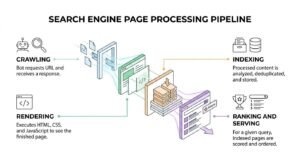
Here is the sequence, in order:
- Crawling. A bot requests the URL and receives a response.
- Rendering. The bot executes HTML, CSS, and JavaScript to see the finished page.
- Indexing. The processed content is analyzed, deduplicated, and stored.
- Ranking and serving. For a given query, indexed pages are scored and ordered.
Crawling
Crawling is the process by which a search engine bot discovers and requests URLs on a website. Googlebot finds URLs through internal links, XML sitemaps, external links, and previously crawled pages it revisits on a schedule.
A crawl either succeeds or fails at the server level first. Timeouts, 5xx errors, and aggressive rate limiting all reduce how much of a site gets seen.
Rendering
Rendering is the stage where a search engine executes a page’s code to produce the version a user would see. Google uses a headless Chromium instance, which means modern JavaScript is generally processed, though not instantly and not always completely.
Rendering is where a lot of modern sites quietly break. Content that only appears after a client-side fetch may be missed if the request fails or the script errors.
Indexing
Indexing is the process of analyzing a rendered page and storing it in a searchable database. During indexing, Google evaluates content, extracts entities, selects a canonical version among duplicates, and decides whether the page merits inclusion at all.
Indexing is not automatic. Google explicitly states that it does not index every page it crawls, which is why the distinction between crawled and indexed matters so much in diagnostics.
Ranking and Serving
Ranking is the scoring process that orders indexed pages for a specific query. Hundreds of signals contribute, covering relevance, quality, links, user location, device, and search intent.
I want to be blunt about one thing here. Technical SEO rarely wins a ranking on its own, but technical failure reliably loses one.
Crawlability: Letting Search Engines Reach Your Pages
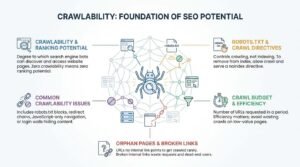
Crawlability is the degree to which search engine bots can discover and access the pages on a website. A page with zero crawlability has zero ranking potential, which makes this the first thing I check on any new site.
Crawlability breaks in a handful of predictable ways. Robots.txt disallows a directory nobody meant to block, a redirect chain runs four hops deep, JavaScript-only navigation hides links from bots, or a login wall sits in front of content.
Robots.txt and Crawl Directives
Robots.txt is a plain text file at a site’s root that tells crawlers which paths they may request. It controls crawling, not indexing, and that distinction trips up almost every beginner.
A blocked URL can still appear in search results if other pages link to it, because Google knows the URL exists but cannot see its noindex tag. To remove a page from the index, allow the crawl and serve a noindex directive instead.
Crawl Budget and Crawl Efficiency
Crawl budget is the number of URLs a search engine will request from a site within a given period. Google has said crawl budget is not a concern for most sites under a few thousand URLs, so it becomes a real constraint mainly on large ecommerce, marketplace, and publisher sites.
Crawl efficiency matters more than raw budget for most site owners. Wasting crawls on parameter URLs, filtered duplicates, and infinite calendar pages means fewer requests reach the pages that generate revenue.
Orphan Pages and Broken Links
An orphan page is a URL that no internal link points to. Orphan pages get crawled rarely or never, and I find them on nearly every site above a few hundred URLs, usually left behind by a migration or a retired campaign.
Broken internal links waste crawl requests and dead-end users. Both problems surface quickly in a crawl comparison between a site crawler’s link graph and the URL list in an XML sitemap.
Indexability: Getting the Right Pages Into the Index
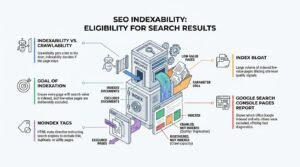
Indexability is a page’s eligibility to be stored in a search engine’s index and returned in results. Crawlability gets a bot to the door, and indexability decides whether the page gets to stay.
The goal is not maximum indexation. The goal is that every page with search value is indexed and every page without it is excluded deliberately.
Noindex, Canonical Tags, and Index Bloat
A noindex tag is an HTML meta directive instructing search engines to exclude a page from their index. It is the correct tool for thin, duplicate, or utility pages such as internal search results, thank-you pages, and filtered product views.
Index bloat is the condition of having a large volume of low-value pages indexed. Bloat dilutes site-level quality signals and buries the pages that matter, and I usually find it caused by parameter URLs, tag archives, or paginated series left fully indexable.
Reading the Google Search Console Pages Report
The Pages report in Google Search Console shows which URLs Google indexed and why the rest were excluded. It is the fastest free diagnostic in technical SEO, and I open it before any crawling tool.
The exclusion reasons are the useful part. “Crawled, currently not indexed” points to quality or duplication, “Discovered, currently not indexed” points to crawl capacity or priority, and “Alternate page with proper canonical tag” is usually correct behavior rather than a fault.
Site Architecture and URL Structure
Site architecture is the hierarchical organization of a website’s pages and the internal links that connect them. Good architecture distributes authority, clarifies topical relationships, and keeps every important page within a short click path from the homepage.
I aim to keep commercially important pages within three clicks of the homepage. Depth beyond that correlates with slower crawling, weaker internal authority, and slower indexation of new URLs.
Flat vs. Deep Hierarchies
A flat hierarchy places most pages a small number of clicks from the homepage, while a deep hierarchy nests them through many layers. Flat structures crawl faster and pass authority more efficiently, but they can create unfocused category pages when applied to genuinely large catalogs.
The right answer follows topical logic rather than a click-depth target. Group pages by the way users and search engines understand the subject, then flatten the path to the pages that earn revenue.
URL Naming Conventions
A clean URL is short, lowercase, hyphenated, and descriptive of the page’s subject. URL wording is a weak ranking factor, but it affects click-through, sharing, and how easily a team maintains a site.
I keep four rules. Lowercase only, hyphens rather than underscores, no session IDs or tracking parameters in canonical URLs, and no dates in evergreen paths that will be updated later.
XML Sitemaps and Internal Linking
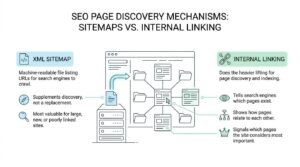
An XML sitemap is a machine-readable file listing the URLs a site owner wants search engines to crawl and index. It supplements discovery rather than replacing internal links, and it is most valuable on large sites, new sites, and sites with poor internal link structures.
Internal linking does the heavier lifting. Links tell search engines which pages exist, how they relate, and which ones the site itself considers most important.
What Belongs in an XML Sitemap
A sitemap should contain only canonical, indexable, 200-status URLs. Including redirects, noindexed pages, or 404s sends conflicting signals and reduces trust in the file.
The rule I apply is simple. If a URL should not appear in search results, it should not appear in the sitemap, and large sites should split sitemaps by content type so index coverage problems are easier to isolate.
Internal Links as Crawl Paths
Internal links are the primary route search engines use to discover new pages and understand site structure. A new page linked from a frequently crawled hub gets found in hours, while an unlinked page may wait weeks.
Anchor text carries context alongside the crawl path. Descriptive internal anchors help search engines understand what the destination page covers, which is why a deliberate internal linking strategy outperforms a plugin adding random related links.
Page Speed and Core Web Vitals
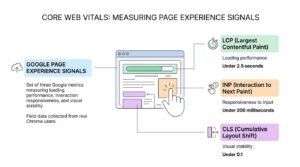
Core Web Vitals are a set of three Google metrics measuring loading performance, interaction responsiveness, and visual stability. They form part of Google’s page experience signals, and Google reports that field data is collected from real Chrome users rather than lab tests.
Here are the current thresholds a page needs to hit to be rated “good”:
| Metric | What it measures | “Good” threshold |
| LCP (Largest Contentful Paint) | Loading performance | Under 2.5 seconds |
| INP (Interaction to Next Paint) | Responsiveness to input | Under 200 milliseconds |
| CLS (Cumulative Layout Shift) | Visual stability | Under 0.1 |
LCP, INP, and CLS Explained
LCP measures how long the largest visible element takes to render, and it is usually a hero image, a video poster, or a large text block. Slow server response, unoptimized images, and render-blocking resources are the three most common causes of a poor LCP.
INP measures the delay between a user’s interaction and the next visual update, replacing the older First Input Delay metric in March 2024. CLS measures unexpected layout movement, which typically comes from images without dimensions, injected ads, or late-loading web fonts.
What Actually Moves the Numbers
Server response time, image weight, and JavaScript execution account for most Core Web Vitals failures I see. Fixing those three in order produces bigger gains than any plugin or caching layer applied blindly.
I want to set expectations honestly. Page speed is a real signal but a modest one, and moving from a 4-second LCP to 2.4 seconds improves conversion far more reliably than it improves rankings.
Mobile-First Indexing and Responsive Design
Mobile-first indexing is Google’s practice of using the mobile version of a page as the primary version for indexing and ranking. Google completed the transition to mobile-first indexing for all websites, which means the mobile rendering of a page is the one that counts.
The practical consequence catches teams out. Content hidden, truncated, or removed on mobile is content Google may not weigh, so parity between mobile and desktop content matters more than mobile-specific cleverness.
Responsive design solves this by serving one HTML document that adapts to viewport width. I check three things on every mobile audit: that primary content and internal links exist in the mobile HTML, that tap targets and font sizes are usable, and that no intrusive interstitial blocks the main content on load.
HTTPS, Security, and Site Reliability
HTTPS is an encrypted protocol for transferring data between a browser and a server, and Google has confirmed it as a lightweight ranking signal since 2014. In practice, HTTPS is table stakes, since browsers now flag HTTP pages as “not secure” and depress click-through on their own.
Mixed content breaks the benefit. A secure page loading images or scripts over HTTP triggers browser warnings and can prevent resources from loading, so every internal reference needs to be HTTPS after a migration.
Reliability sits alongside security as a technical signal. Repeated 5xx errors, long timeouts, or an unstable host reduce crawl rate, and I treat server uptime monitoring as part of technical SEO rather than as somebody else’s job.
Duplicate Content, Canonicalization, and Pagination
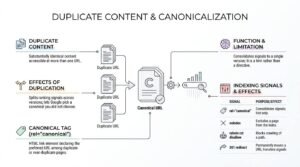
Duplicate content is substantially identical content accessible at more than one URL. Duplication rarely triggers a penalty, but it splits ranking signals across versions and lets Google pick a canonical you did not choose.
A canonical tag is an HTML link element that declares the preferred URL among duplicate or near-duplicate pages. It consolidates signals to a single version, and it is a hint rather than a directive, so Google can override it when other signals disagree.
| Signal | Purpose | Effect on indexing |
| rel=”canonical” | Names the preferred duplicate | Consolidates signals; hint only |
| noindex | Excludes a page from the index | Removes the page from results |
| robots.txt disallow | Blocks crawling of a path | Prevents crawling, not indexing |
| 301 redirect | Permanently moves a URL | Transfers signals to the target |
Parameter URLs and Faceted Navigation
Parameter URLs are variants created by appended query strings such as sort orders, filters, and tracking codes. Faceted navigation on ecommerce sites can generate thousands of these variants from a few hundred products, which is the most common cause of severe index bloat I encounter.
The fix combines several tools. Canonicalize filtered views to the parent category, noindex combinations with no search demand, and block genuinely infinite parameter spaces from crawling at the robots.txt level.
Pagination Handling
Pagination is the division of a content series across sequential numbered pages. Google retired support for rel=”next” and rel=”prev” in 2019, so paginated series now rely on crawlable links, self-referencing canonicals on each page, and unique titles.
The mistake I see most often is canonicalizing every paginated page back to page one. That hides deeper pages from the index and can leave products or articles on page four effectively undiscoverable.
Structured Data and Schema Markup
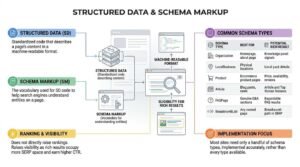
Structured data is standardized code that describes a page’s content in a machine-readable format. Schema markup is the vocabulary used for that code, and search engines use it to understand entities on a page and to determine eligibility for rich results.
Structured data does not directly raise rankings. It raises visibility because rich results occupy more SERP space and consistently earn higher click-through rates than plain blue links.
Common Schema Types Worth Implementing
Most sites need only a handful of schema types, implemented accurately, rather than every type available.
| Schema type | Best for | Potential rich result |
| Organization | Homepage, about page | Knowledge panel signals |
| LocalBusiness | Physical locations | Local pack details |
| Product | Ecommerce product pages | Price, availability, reviews |
| Article | Blog posts, news | Article and Top Stories features |
| FAQPage | Genuine Q&A sections | Expandable FAQ results |
| BreadcrumbList | Any nested page | Breadcrumb path in SERP |
Rich Results and Eligibility
A rich result is an enhanced search listing that displays additional information drawn from structured data. Eligibility requires valid markup, content that matches the markup exactly, and compliance with Google’s structured data guidelines.
Markup that describes content a user cannot see on the page violates those guidelines and risks a manual action. I validate every implementation in Google’s Rich Results Test before it ships, and I recheck after any template change.
International and Multi-Location Technical SEO
International SEO is the technical practice of signaling which version of a page serves which language or region. It becomes necessary the moment a site publishes near-identical content for multiple markets, because those versions otherwise compete with each other.
Hreflang Basics
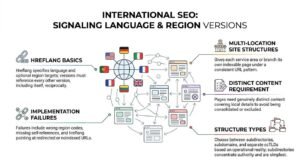
Hreflang is an HTML attribute that specifies the language and optional region a page targets. Each version must reference every other version, including itself, and the return references must be reciprocal or search engines ignore the cluster entirely.
Hreflang is easy to describe and hard to implement correctly at scale. Wrong region codes, missing self-references, and hreflang pointing at redirected or noindexed URLs are the three failures I find most often.
Multi-Location Site Structures
A multi-location structure gives each service area or branch its own indexable page under a consistent URL pattern. The pages need genuinely distinct content covering local details, because near-duplicate location pages get consolidated or excluded.
I choose between subdirectories, subdomains, and separate ccTLDs based on operational reality rather than theory. Subdirectories concentrate authority and are simplest to maintain, which makes them the right default for most US businesses expanding across states or cities.
JavaScript SEO and Rendering Issues
JavaScript SEO is the practice of ensuring content generated by JavaScript is crawlable, renderable, and indexable. Modern frameworks like React, Vue, and Angular can rank perfectly well, but they introduce failure points that server-rendered HTML does not have.
The core risk is a two-stage index. Google crawls the raw HTML first, queues the page for rendering, then processes the rendered output later, which delays indexation of anything that only exists after script execution.
Four checks catch most problems:
- View the rendered HTML, not the source, using the URL Inspection tool in Search Console.
- Confirm internal links are real anchors with href attributes rather than click handlers.
- Check that primary content loads without user interaction, since bots do not scroll or click.
- Verify canonical and meta tags exist in the initial HTML where possible, because injected tags are less reliable.
Server-side rendering or prerendering removes the risk entirely for content-critical pages. I recommend it whenever organic search is a primary acquisition channel.
Log File Analysis and Crawl Diagnostics
Log file analysis is the examination of server logs to see exactly which URLs search engine bots requested, how often, and what response they received. It is the only data source that shows real crawler behavior rather than a simulation of it.
Logs answer questions no crawler can. They reveal which sections consume crawl requests, which important pages go weeks without a visit, and whether Googlebot is hitting parameter URLs nobody intended to expose.
I treat log analysis as advanced but not optional above a certain scale. On sites under a thousand URLs, the Crawl Stats report in Search Console is usually sufficient, and above roughly ten thousand URLs, raw log review starts finding problems that nothing else surfaces.
The Technical SEO Audit: Process and Priorities
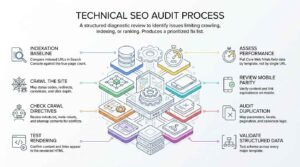
A technical SEO audit is a structured diagnostic review of a website’s infrastructure to identify issues limiting crawling, indexing, or ranking. A useful audit produces a prioritized fix list with owners and effort estimates, not a 200-item export nobody acts on.
I run audits in a fixed sequence, because each stage depends on the one before it:
- Indexation baseline. Compare indexed URLs in Search Console against the true page count.
- Crawl the site. Map status codes, redirects, canonicals, and click depth.
- Check crawl directives. Review robots.txt, meta robots, and sitemap contents for conflicts.
- Test rendering. Confirm content and links appear in the rendered HTML.
- Assess performance. Pull Core Web Vitals field data by template, not by single URL.
- Review mobile parity. Verify content and link equivalence on mobile.
- Audit duplication. Map parameters, facets, pagination, and canonical logic.
- Validate structured data. Test schema across every major template.
The Audit Sequence
The sequence matters because early findings change later scope. There is no point optimizing LCP on a template that turns out to be noindexed, and no point auditing schema on pages Google never crawls.
I always start with indexation. The gap between how many pages exist and how many are indexed tells me within an hour whether the site has a foundational problem or a refinement problem.
Prioritizing by Impact and Effort
Priority follows revenue exposure, not severity labels in a tool. A canonical error on a top-ten commercial template outranks a hundred missing alt attributes on archived blog posts every time.
I score each issue on traffic impact, implementation effort, and risk. Anything blocking indexation of revenue pages ships first, performance work follows, and cosmetic issues wait for a maintenance sprint.
Technical SEO Tools Beginners Actually Need
A beginner needs four tool categories to do competent technical SEO: a search console, a site crawler, a performance tester, and a structured data validator. Everything beyond those four is refinement rather than a requirement.
| Tool category | Examples | What it answers | Typical cost |
| Search console | Google Search Console, Bing Webmaster Tools | What is indexed and why | Free |
| Site crawler | Screaming Frog, Sitebulb, Ahrefs Site Audit | Where the technical faults are | Free tier to paid |
| Performance tester | PageSpeed Insights, Chrome UX Report | How fast real users experience pages | Free |
| Schema validator | Rich Results Test, Schema Markup Validator | Whether markup is valid and eligible | Free |
Google Search Console is non-negotiable. It is the only source of Google’s own indexation decisions, and no third-party tool can replicate that data.
Log analyzers, JavaScript rendering services, and enterprise crawlers become worthwhile as sites grow past several thousand URLs. I would not buy any of them before the free stack has been used properly for a quarter.
How Long Technical SEO Takes to Show Results
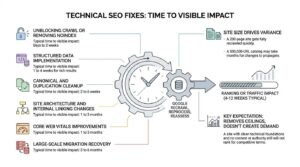
Most technical SEO fixes show measurable ranking or traffic impact within four to twelve weeks, though indexation-level fixes can register in days. The variable is not the fix itself but how quickly Google recrawls, reprocesses, and reassesses the affected pages.
Here is the pattern I see across engagements:
| Fix type | Typical time to visible impact |
| Unblocking crawl or removing noindex | Days to 2 weeks |
| Canonical and duplication cleanup | 2 to 6 weeks |
| Site architecture and internal linking changes | 1 to 3 months |
| Core Web Vitals improvements | 1 to 3 months |
| Structured data implementation | 1 to 4 weeks for rich results |
| Large-scale migration recovery | 3 to 6 months |
Site size drives most of the variance. A 200-page site gets fully recrawled quickly, while a 500,000-URL catalog may take months for changes to propagate through the index.
I set one expectation firmly with every client. Technical SEO removes ceilings rather than creating demand, so a site with clean technical foundations and no content or authority still will not rank for competitive terms.
Who should handle technical SEO?
Common Technical SEO Mistakes That Cost Rankings
Most technical SEO damage comes from a short list of repeated errors rather than exotic edge cases. These are the ones I find most often, roughly in order of how much traffic they cost:
- Blocking a path in robots.txt to remove pages from the index. This prevents Google from seeing the noindex tag, so the URL stays indexed without content.
- Canonicalizing paginated pages to page one. Deeper items become undiscoverable.
- Launching a redesign without a redirect map. Old URLs 404, and accumulated authority disappears.
- Leaving a staging site indexable. A full duplicate of the site competes with itself.
- Adding schema for content not visible on the page. This risks a structured data manual action.
- Treating a Core Web Vitals score as the objective. Chasing 100 in a lab tool while field data stays poor.
- Ignoring the mobile version. Content trimmed on mobile is content Google may not count.
- Submitting non-canonical URLs in the sitemap. Conflicting signals reduce trust in the file.
The pattern behind all eight is the same. Each one uses a tool for something it was not designed to do, which is why understanding the crawl-render-index pipeline prevents more damage than memorizing checklists.
In-House, Freelance, or White Label: Choosing a Model
The right technical SEO delivery model depends on site complexity, release frequency, and whether a business needs SEO capability once or continuously. There is no universally correct answer, only a correct fit.
| Model | Best when | Watch for |
| In-house specialist | Large site, frequent releases, SEO is a core channel | Hiring cost and single-point knowledge risk |
| Freelance consultant | One-off audit or migration support needed | Limited capacity for ongoing implementation |
| Agency retainer | Ongoing strategy plus execution across disciplines | Ensure technical depth, not just content output |
| White label partner | Agencies reselling SEO under their own brand | Reporting transparency and delivery consistency |
Development capacity is the real constraint, not SEO knowledge. An audit is worthless without someone able and willing to ship the fixes, so I always confirm developer availability before scoping technical work.
Agencies face a different version of this decision. Building technical SEO capability in-house takes years, which is why many marketing agencies deliver technical audits, implementation, and reporting through a white-label partner while keeping the client relationship entirely their own.
Conclusion
Technical SEO governs whether search engines can crawl, render, index, and understand a site. Crawlability, indexability, architecture, performance, and structured data form its foundation.
Every content and link investment sits on top of that foundation, and deeper resources exist for each layer covered here.
We build and maintain those foundations for agencies and brands every day. Talk to White Label SEO Service about auditing yours.
Frequently Asked Questions
Is technical SEO a one-time project or ongoing work?
Technical SEO is ongoing work with periodic intensive projects. An initial audit and remediation phase fixes accumulated issues, then continuous monitoring catches problems introduced by new releases, plugins, and content.
Can I do technical SEO myself without a developer?
You can diagnose and fix some technical SEO yourself, but implementation usually needs development access. Sitemaps, redirects, and meta tags are manageable on most CMS platforms, while rendering and server issues are not.
How much does technical SEO cost?
A one-off technical audit typically runs $1,500 to $10,000 in the US depending on site size and depth. Ongoing technical retainers generally start around $1,000 per month and scale with complexity.
Does technical SEO help if my content is weak?
Technical SEO removes barriers but does not create demand or relevance. Fixing indexation on weak content gets it crawled and ignored, so technical work pays off only alongside content that genuinely answers a query.
How do I know if my site has technical SEO problems?
Open the Pages report in Google Search Console and compare indexed URLs against your true page count. A large gap, or rising exclusion counts, signals technical problems worth investigating immediately.
Do small websites need technical SEO?
Small websites need technical SEO, though usually less of it. A 30-page site rarely has crawl budget problems, but broken indexation, poor mobile rendering, and missing HTTPS damage small sites exactly as much as large ones.
What is the difference between a technical SEO audit and a full SEO audit?
A technical SEO audit examines infrastructure only, covering crawling, indexing, performance, and markup. A full SEO audit adds content quality, keyword targeting, backlink profile, and competitive analysis on top of that.