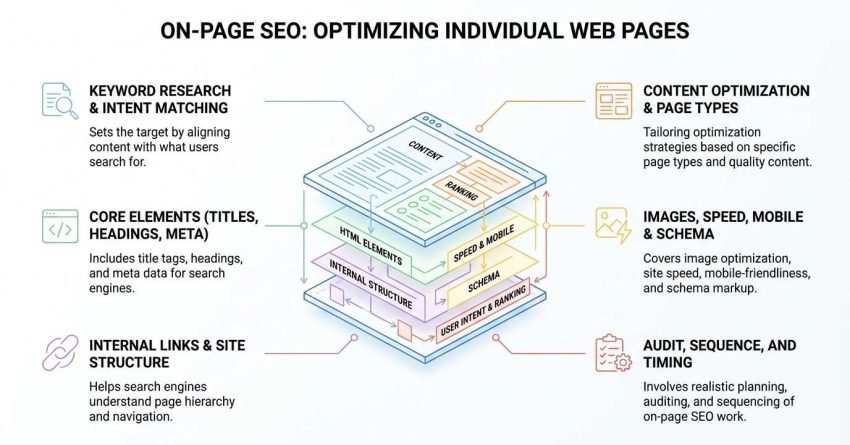
On-page SEO is the practice of optimizing individual web pages, their content, HTML elements, and internal structure so search engines understand what each page is about and rank it for relevant queries. It covers everything you directly control on your own site.
I have watched businesses spend thousands on backlinks while their title tags stayed empty. That order of operations costs them months of lost traffic and wasted budget every single time.
This guide covers what on-page SEO actually means and how search engines read a page, how keyword research and intent matching set the target, the core elements from titles through content, links, images, speed, mobile, and schema, how the work changes by page type, and how to audit, sequence, and time it realistically.
What On-Page SEO Actually Means
On-page SEO is a subset of search engine optimization that covers every ranking element located on the page itself, including the content, HTML tags, internal links, images, and page structure. Anything you can change by editing the page or its code counts as on-page.
I find the easiest way to explain it is by elimination. If a change lives on your server, it is on-page. If it lives on somebody else’s website, it is off-page.
On-Page vs Off-Page vs Technical SEO
The three disciplines overlap, so this table shows where each one sits and who typically owns it.
| Discipline | What it covers | Who controls it | Example |
| On-page SEO | Content, titles, headings, internal links, images, schema | You | Rewriting a title tag |
| Off-page SEO | Backlinks, brand mentions, citations, reviews | Third parties | Earning a link from a news site |
| Technical SEO | Crawlability, indexation, site speed, rendering, hreflang | You + developers | Fixing a broken canonical tag |
The line between on-page and technical SEO blurs constantly. I treat page speed, mobile usability, and schema markup as on-page in this guide because a marketer can usually influence all three without a full engineering sprint.
Why On-Page SEO Is the Part You Control
On-page SEO delivers the fastest return of the three disciplines because it requires no outreach, no third-party approval, and no waiting on other websites. You publish a change, and Google recrawls it, often within days.
That control matters more than most beginners realize. A Backlinko analysis of 11.8 million Google results found that comprehensive content covering a topic in depth outperformed thin pages targeting the same query, and depth is entirely an on-page decision.
I always start client work here. Fixing what you own costs less and moves faster than chasing links you do not own yet.
How Search Engines Read a Page
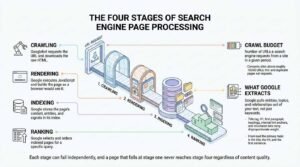
Search engines read a page in four stages: crawling, rendering, indexing, and ranking. Each stage can fail independently, and a page that fails at stage one never reaches stage four regardless of how good the content is.
Understanding this sequence changes how you prioritize fixes. A brilliant article on a page Google cannot crawl earns exactly nothing.
Crawling, Rendering, and Indexing in Plain Terms
Here is the sequence, one line per stage:
- Crawling: Googlebot requests the URL and downloads the raw HTML.
- Rendering: Google executes JavaScript and builds the page as a browser would see it.
- Indexing: Google stores the page’s content, entities, and signals in its index.
- Ranking: Google selects and orders indexed pages for a specific query.
Crawl budget is the number of URLs a search engine requests from a site in a given period. I only worry about it seriously on sites above roughly 10,000 URLs, where thin and duplicate pages start eating requests that should go to money pages.
What Google Extracts From a Page
Google pulls entities, topics, and relationships out of your text, not just keywords. The title tag, H1, first paragraph, headings, internal link anchors, and structured data carry disproportionate weight because they signal what the page is about before the crawler reads a single body paragraph.
That is why the top of a page matters so much. I front-load the primary topic in the title, the H1, and the first sentence, every time.
Keyword Research and Search Intent Matching
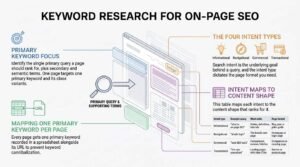
Keyword research for on-page SEO means identifying the single primary query a page should rank for, plus the secondary and semantic terms that support it. One page targets one primary keyword and its close variants, never five unrelated ones.
Beginners routinely get this backwards. They pick a topic, write 2,000 words, then hunt for keywords to sprinkle in afterward.
Mapping One Primary Keyword Per Page
Every page gets one primary keyword recorded in a spreadsheet alongside its URL. That single document prevents keyword cannibalization, which happens when two of your own pages compete for the same query and split their ranking signals.
I audit this map before writing anything new. If a keyword is already claimed, the answer is to improve the existing page rather than publish a second one.
The Four Intent Types and What Each One Demands
Search intent is the underlying goal behind a query, and the intent type dictates the page format you need. This table maps each intent to the content shape that ranks for it.
| Intent type | Example query | What ranks | Page format |
| Informational | “what is on-page SEO” | Guides, definitions, tutorials | Blog post or pillar guide |
| Navigational | “ahrefs login” | The brand’s own page | Homepage or login page |
| Commercial | “best SEO tools” | Comparisons, reviews, listicles | Comparison or roundup page |
| Transactional | “hire seo consultant” | Landing pages with clear CTAs | Service or product page |
Match the format or lose. I check the current top five results before committing to a page type, because Google has already told you which format it rewards for that query.
Title Tags and Meta Descriptions
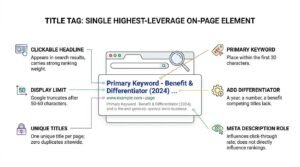
The title tag is the single highest-leverage on-page element because it appears as the clickable headline in search results and carries strong ranking weight. Google displays roughly 50 to 60 characters before truncating, so the primary keyword goes near the front.
Meta descriptions do not directly influence rankings. They influence click-through rate, which is a different and still valuable lever.
Title Tag Rules That Still Matter
Four rules cover most of what beginners need:
- Keep titles under 60 characters so they display in full.
- Place the primary keyword within the first 30 characters.
- Write one unique title per page, with zero duplicates sitewide.
- Add a differentiator: a year, a number, a benefit that competing titles lack.
Google rewrites titles it considers unhelpful. A Zyppy study of 80,959 title tags found Google rewrote 61.6% of them, most often when titles were truncated, keyword-stuffed, or missing entirely.
What Meta Descriptions Do and Do Not Do
A meta description is an HTML attribute that summarizes a page’s content for search result snippets. It carries no direct ranking weight, but a compelling one lifts click-through rate, and higher engagement supports rankings indirectly.
I write them at 150 to 160 characters, include the primary keyword so it bolds in the SERP, and end with a reason to click. Google still rewrites plenty of them, and that is fine.
Heading Structure and Content Hierarchy
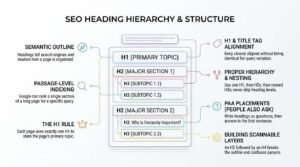
Headings create a semantic outline that tells search engines and readers how a page is organized. Proper hierarchy one H1, then H2s for major sections, then H3s nested beneath them helps Google identify which passages answer which questions.
Passage-level indexing makes this more valuable than it was five years ago. Google can now rank a single section of a long page for a specific query, and headings are how it finds that section.
The H1 Rule
Each page uses exactly one H1, and that H1 states the page’s primary topic. Multiple H1s will not usually break anything, but a single clear H1 removes ambiguity about what the page is about.
I keep the H1 and the title tag closely aligned without making them identical. Slight variation lets me target two phrasings of the same query.
Building Scannable H2 and H3 Layers
Never skip heading levels. An H2 followed by an H4 breaks the outline and confuses parsers that rely on nesting to understand relationships.
Write headings as questions wherever a People Also Ask query exists, then answer that question in the first sentence beneath it. That pairing is how sections win PAA placements.
Writing Content That Satisfies the Query
Content satisfies a query when it answers the searcher’s question completely enough that they stop searching. Google measures this indirectly through engagement patterns, and the pages that consistently end search sessions tend to hold their rankings.
Word count is not the goal. Coverage is the goal, and coverage sometimes takes 600 words and sometimes takes 4,000.
Depth, Coverage, and the Information Gain Test
Information gain is the amount of genuinely new information a page adds beyond what already ranks. Google patented a scoring approach around this concept, and it explains why the eleventh rewrite of the same listicle never breaks into the top ten.
Test any draft against three criteria:
- Coverage: Does it address every subtopic the top-ranking pages address?
- Gain: Does it add data, examples, or a perspective the others lack?
- Can a reader act on it without opening another tab?
I run this check before publishing. A page that fails the gain test gets original data, a proprietary framework, or first-hand examples added before it goes live.
Answer-First Writing for Snippets and AI Overviews
Open every section with a direct answer, then add context. AI Overviews and featured snippets lift individual sentences out of pages, and a sentence that depends on the paragraph before it cannot survive extraction.
That means naming the subject in every key sentence rather than leaning on “it” or “this.” Google’s own documentation on AI features confirms that standard content best practices, including clear structure and unique value, govern eligibility for AI surfaces.
Write claims that stand alone. That single habit changes how much of your content gets quoted.
URL Structure and Site Architecture
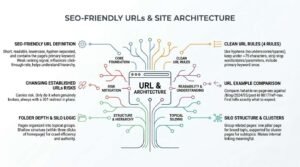
An SEO-friendly URL is short, readable, lowercase, hyphen-separated, and contains the page’s primary keyword. URLs are a weak ranking signal on their own, but they influence click-through rate and help Google and users understand page hierarchy at a glance.
Changing URLs on established pages carries risk. I only do it when the existing URL is genuinely broken, and always with a 301 redirect in place.
What a Clean URL Looks Like
Four rules cover almost every case:
- Use hyphens between words, never underscores or spaces.
- Keep the full URL under roughly 75 characters.
- Strip stop words, dates, and session parameters.
- Include the primary keyword once, without repeating it.
Compare /what-is-on-page-seo against /blog/2024/03/post-id-8817?ref=nav. The first tells you and Google exactly what to expect.
Folder Depth and Silo Logic
Site architecture is the way pages are organized and linked into topical groups. A shallow structure where important pages sit within three clicks of the homepage helps both crawl efficiency and authority distribution.
Group related pages into silos: one pillar page covering the broad topic, supported by cluster pages covering each subtopic. That grouping is what makes internal linking meaningful instead of random.
Internal Linking and Anchor Text
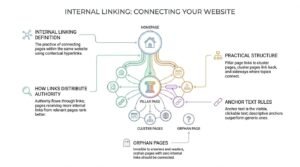
Internal linking is the practice of connecting pages within the same website using contextual hyperlinks. Internal links pass authority between pages, help Google discover new URLs, and signal which pages matter most through link volume and anchor text.
This is the most underused on-page lever I encounter. Most sites have the content already published and simply never connected it.
How Links Distribute Authority Across a Site
Authority flows through links, and pages receiving more internal links from relevant pages tend to rank better. Your homepage usually holds the most authority, so pages linked from it inherit more than pages buried six clicks deep.
A practical structure looks like this:
- Pillar page links down to every cluster page it covers.
- Each cluster page links back up to the pillar.
- Cluster pages link sideways to each other where topics genuinely connect.
- Orphan pages with zero internal links get connected or removed.
I audit for orphan pages quarterly. They are invisible to crawlers and to readers.
Anchor Text Rules Beginners Get Wrong
Anchor text is the visible, clickable text of a hyperlink, and it tells search engines what the destination page is about. Descriptive anchors that name the destination’s topic outperform generic anchors like “click here” or “read more.”
Two failure modes dominate. The first is generic anchors that describe nothing. The second is exact-match anchors repeated identically across dozens of links, which reads as manipulation.
Vary the phrasing naturally. Name the destination topic, then move on.
Image Optimization and Alt Text
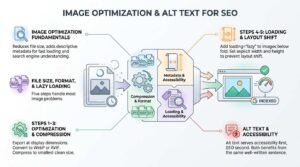
Image optimization reduces file size and adds descriptive metadata so images load fast and search engines understand what they depict. Images are frequently the heaviest assets on a page, which makes them the fastest route to a speed improvement.
Alt text serves accessibility first and SEO second. Both benefits come from the same well-written sentence.
File Size, Format, and Lazy Loading
Five steps handle most image problems:
- Export at the display dimensions, not the original camera resolution.
- Convert to WebP or AVIF, which cut file size substantially compared to JPEG.
- Compress to the smallest size that still looks clean.
- Add loading=”lazy” to images below the fold.
- Set explicit width and height attributes to prevent layout shift.
That last step matters more than it sounds. Missing dimensions are one of the most common causes of a failing Cumulative Layout Shift score.
Writing Alt Text That Describes, Not Stuffs
Alt text is an HTML attribute that describes an image’s content for screen readers and search engines. Write what the image actually shows in one plain sentence, and include the keyword only when it genuinely describes the image.
Good: alt=”On-page SEO checklist showing title tag, heading, and internal link items”. Bad: alt=” on page seo, seo services, best seo agency”.
Decorative images get empty alt attributes. Not missing ones, empty ones.
Page Speed and Core Web Vitals
Core Web Vitals are three Google metrics measuring loading speed, interaction responsiveness, and visual stability, and they function as a confirmed ranking signal. They act as a tiebreaker between pages of similar relevance rather than a primary ranking factor.
Speed will not rescue weak content. Slow load times will absolutely suppress good content.
LCP, INP, and CLS Explained
This table shows each metric, what it measures, and the threshold Google considers good.
| Metric | Measures | Good threshold |
| Largest Contentful Paint (LCP) | Time until the main content loads | Under 2.5 seconds |
| Interaction to Next Paint (INP) | Responsiveness to user input | Under 200 milliseconds |
| Cumulative Layout Shift (CLS) | Unexpected visual movement | Under 0.1 |
INP replaced First Input Delay as a Core Web Vital in March 2024. Google’s Core Web Vitals documentation confirms the current thresholds and measurement windows.
Where Speed Fits in Ranking Priority
Treat page speed as a hygiene requirement, not a growth strategy. Get into the “good” range, then spend your remaining time on content and links where the ranking upside is larger.
I check Core Web Vitals in Google Search Console rather than lab tools alone. Field data reflects what real users experience on real connections.
Mobile Usability and Responsive Design
Mobile-first indexing is Google’s practice of using the mobile version of a page as the primary version for indexing and ranking. If content exists on your desktop site but not your mobile site, Google effectively does not see it.
Google completed the migration to mobile-first indexing for all sites in 2023. Desktop-only content is now invisible.
Mobile-First Indexing in Practice
Content parity is the requirement. The mobile version needs the same text, the same headings, the same structured data, and the same internal links as desktop.
Accordions and tabs are fine as long as the content sits in the HTML. Content loaded only after a user taps something is riskier.
Common Mobile Failures on Business Sites
Four issues account for most mobile problems I audit:
- Text too small to read without zooming
- Tap targets placed too close together
- Intrusive interstitials covering content on load
- Horizontal scrolling caused by fixed-width elements
Test on an actual phone, not a resized browser window. The two behave differently more often than people expect.
Schema Markup and Structured Data
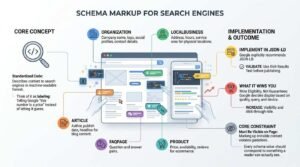
Schema markup is standardized code added to a page that describes its content to search engines in an explicit, machine-readable format. Schema does not directly boost rankings, but it makes pages eligible for rich results that increase visibility and click-through rate.
Think of it as labeling. You are telling Google “this number is a price” instead of letting it guess.
Schema Types Most Businesses Need
Five types cover the majority of business use cases:
- Organization: company name, logo, social profiles, contact details
- LocalBusiness: address, hours, service area for physical locations
- Article: author, publish date, headline for blog content
- FAQPage: question and answer pairs
- Product price, availability, reviews for ecommerce
Implement in JSON-LD, which Google explicitly recommends. Validate every implementation in the Rich Results Test before publishing.
What Schema Can and Cannot Win You
Schema wins eligibility, not guarantees. Google decides whether to display a rich result based on quality, query, and device, and eligible pages frequently show no enhancement at all.
Marking up content that is not visible on the page violates Google’s guidelines. Every schema value should correspond to something a reader can actually see.
E-E-A-T Signals on the Page
E-E-A-T stands for Experience, Expertise, Authoritativeness, and Trustworthiness, and it is the framework Google’s quality raters use to assess content credibility. E-E-A-T is not a direct ranking factor, but the on-page signals it describes are things Google’s systems genuinely measure.
The bar rises sharply for topics affecting health, finance, safety, or legal outcomes. Google classifies these as Your Money or Your Life pages.
Author Bylines, Bios, and Credentials
Every substantive page gets a named author with a linked bio page stating relevant credentials and experience. Anonymous content signals nothing about who is accountable for the claims.
I link author bios to their professional profiles and prior published work. That external corroboration is what turns a claimed credential into a verifiable one.
Citations, Dates, and Trust Elements
Four elements build page-level trust:
- Inline citations to primary sources for every statistic
- Visible publish and last-updated dates
- Accessible contact information and a physical address where applicable
- Transparent disclosure of affiliations and sponsorships
Google’s Search Quality Rater Guidelines place trust at the center of the E-E-A-T framework, describing it as the most important member of the group.
On-Page SEO for Different Page Types
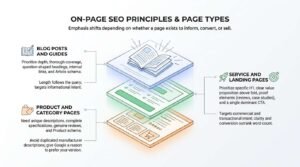
On-page SEO principles stay constant across page types, but the emphasis shifts depending on whether a page exists to inform, convert, or sell. A blog post and a product page need the same technical foundation and completely different content strategies.
I see the same mistake repeatedly: businesses applying blog-post tactics to landing pages and wondering why conversions collapse.
Blog Posts and Guides
Blog content targets informational intent, so depth, structure, and comprehensiveness carry the most weight. Prioritize thorough coverage, question-shaped headings, internal links to related content, and Article schema.
Length follows the query. A “what is” definition query needs less than a “complete guide” query.
Service and Landing Pages
Service pages target commercial and transactional intent, so clarity and conversion elements outrank raw word count. Prioritize a specific H1, a clear value proposition above the fold, proof elements like reviews and case studies, and a single dominant call to action.
Keep them substantial enough to demonstrate expertise. A 200-word service page rarely outranks a competitor’s 900-word version.
Product and Category Pages
Product pages need unique descriptions, complete specifications, genuine reviews, and Product schema. Manufacturer-supplied descriptions duplicated across hundreds of retailers give Google no reason to prefer your version.
Category pages carry the heavier ranking load in ecommerce. This table shows where emphasis sits by page type.
| Page type | Primary intent | Highest-weight element |
| Blog post | Informational | Content depth and structure |
| Service page | Transactional | Value proposition and proof |
| Product page | Transactional | Unique description and schema |
| Category page | Commercial | Intro copy and internal linking |
Common On-Page SEO Mistakes
The most common on-page SEO mistakes are keyword stuffing, duplicate content, thin pages, missing title tags, and keyword cannibalization. Each one is fully preventable, and each one costs rankings that were otherwise achievable.
I fix more problems by removing bad practices than by adding new tactics.
Keyword Stuffing and Over-Optimization
Keyword stuffing is the practice of repeating a target keyword unnaturally to manipulate rankings, and Google has treated it as a spam signal for well over a decade. Modern algorithms understand synonyms and entities, so repetition adds nothing and risks a penalty.
Write for a reader. If a sentence sounds strange when read aloud, it is over-optimized.
Duplicate, Thin, and Cannibalizing Pages
Three related problems, three fixes:
- Duplicate content: consolidate with 301 redirects or set a canonical tag.
- Thin content: expand content substantially or remove it entirely.
- Cannibalization: merge competing pages into one stronger page.
Pruning genuinely works. I have removed hundreds of weak URLs from client sites and watched the remaining pages climb.
How to Audit a Page Step by Step
An on-page SEO audit is a systematic review of a page’s content, HTML elements, links, and performance against best practice standards. Run it on any page before publishing and on existing pages that underperform their potential.
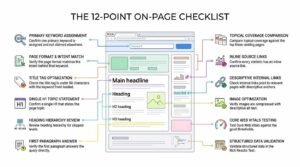
I work through the same checklist every time. Consistency beats cleverness here.
The 12-Point On-Page Checklist
Work through these in order:
- Confirm one primary keyword is assigned and not claimed elsewhere.
- Verify the page format matches the intent behind that keyword.
- Check the title tag is under 60 characters with the keyword front-loaded.
- Confirm a single H1 that states the page topic.
- Review heading hierarchy for skipped levels.
- Verify the first paragraph answers the query directly.
- Compare topical coverage against the top three ranking pages.
- Confirm every statistic has an inline source link.
- Check internal links point to relevant pages with descriptive anchors.
- Verify images are compressed with descriptive alt text.
- Test Core Web Vitals against the good thresholds.
- Validate structured data in the Rich Results Test.
Tools That Do the Heavy Lifting
Google Search Console is non-negotiable and free. It reports impressions, clicks, average position, indexing status, and Core Web Vitals from real user data.
Screaming Frog crawls a site and surfaces missing titles, duplicate metadata, broken links, and orphan pages at scale. Ahrefs or Semrush handle keyword research, competitor coverage gaps, and rank tracking.
Start with Search Console. Add paid tools once you have exhausted what the free data tells you.
How Long On-Page SEO Takes to Work
On-page SEO changes typically show measurable ranking movement within four to twelve weeks, which is faster than link building but slower than paid search. Established sites with existing authority often see movement in days, while new domains wait months.
Two variables drive the timeline: how quickly Google recrawls your page, and how much competition sits above you.
Realistic Timelines by Site Age and Authority
This table shows typical timeframes for on-page changes to produce visible results.
| Site profile | Recrawl speed | Typical time to movement |
| New domain, under 6 months | Slow | 4 to 8 months |
| Established, low authority | Moderate | 2 to 4 months |
| Established, strong authority | Fast | 2 to 6 weeks |
| High-authority publisher | Very fast | Days to 2 weeks |
An Ahrefs study of 2 million keywords found only 5.7% of pages reached the top 10 for any keyword within a year of publication. That figure covers new pages, not optimized existing ones, which move considerably faster.
What to Measure at 30, 90, and 180 Days
At 30 days, measure indexation and impressions in Search Console. Rankings rarely settle this early, but impression growth confirms Google is testing your page.
At 90 days, measure average position and click-through rate for the target keyword. At 180 days, measure organic sessions, conversions, and revenue, because those are the numbers that justify continued investment.
Where On-Page SEO Fits in a Complete SEO Strategy
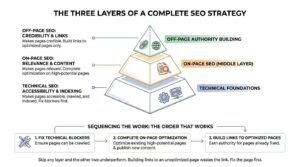
On-page SEO is the middle layer of a complete SEO strategy, sitting between technical foundations and off-page authority building. Technical SEO makes pages accessible, on-page SEO makes them relevant, and off-page SEO makes them credible.
Skip any layer and the other two underperform. I sequence them deliberately rather than running all three at once.
Sequencing Technical, On-Page, and Off-Page Work
The order that works:
- Fix technical blockers so pages can be crawled and indexed.
- Complete on-page optimization on existing high-potential pages.
- Publish new content filling identified coverage gaps.
- Build links to the pages already optimized.
Building links to an unoptimized page wastes the link. Fix the page first, then earn the authority.
When to Handle It In-House vs Outsource
Small sites under 50 pages can realistically handle on-page SEO in-house with Search Console, a checklist, and a few hours weekly. The work is systematic rather than specialized.
Sites above a few hundred pages, ecommerce catalogs, and multi-location businesses hit a scale problem quickly. That is the point where dedicated capacity, whether hired or outsourced, pays for itself.
Conclusion
On-page SEO connects keyword intent, content quality, HTML structure, internal links, and technical performance into signals search engines can read and reward.
Each element covered here supports the others, and deeper resources exist for every discipline from keyword research through structured data implementation.
We build and execute complete on-page programs that turn optimized pages into measurable organic growth. Talk to White Label SEO Service about your site.
Frequently Asked Questions
Is on-page SEO still important in 2026?
On-page SEO remains essential in 2026 because AI Overviews and traditional rankings both depend on well-structured, clearly written pages. Structure now determines extraction eligibility too.
How many keywords should one page target?
One page should target one primary keyword plus its close variants and semantic terms. Targeting multiple unrelated keywords splits relevance signals and causes cannibalization between your own pages.
Does keyword density still matter?
Keyword density is not a ranking factor and has not been one for years. Google evaluates topical coverage and entity relationships instead, so write naturally and cover the subject completely.
Can I do on-page SEO without a developer?
Most on-page SEO requires no developer. Titles, headings, content, internal links, and alt text are editable in any modern CMS, though schema and speed work sometimes need technical help.
How often should on-page SEO be reviewed?
Review high-value pages quarterly and run a full site audit annually. Pages losing rankings or covering fast-changing topics need attention sooner than that schedule suggests.
Does on-page SEO help with AI Overviews?
On-page SEO directly influences AI Overview eligibility because AI systems extract sentences from clearly structured pages. Answer-first writing and self-contained claims improve your citation odds considerably.
What is the single highest-impact on-page change?
Matching page format to search intent produces the largest single improvement. A page in the wrong format cannot rank regardless of how well its title and headings are optimized.