Google Business Profile attributes are the specific features, characteristics, and amenities you assign to your business listing that tell customers and Google what your business offers beyond the basics. I think of them as the extra layer of detail that separates a bare-bones listing from one that actually converts searchers into customers. We see attributes influence everything from whether a wheelchair user chooses your restaurant to whether Google surfaces you for an “outdoor seating near me” query.
Getting attributes wrong costs visibility in ways most owners never trace back to the source. A listing missing key attributes loses relevance signals competitors are actively collecting.
This guide covers the full range of attribute categories, from accessibility and amenities to payment and service options, plus exactly how to add, edit, and remove them in Google Business Profile Manager. I also walk through why some attributes disappear based on business category and how they tie into local ranking factors.
What Are Google Business Profile Attributes?
Google Business Profile attributes are predefined descriptors that business owners select or customers report to describe specific features of a business, such as “wheelchair accessible entrance” or “free Wi-Fi.” They sit below your business description and above your reviews section on most listings. I always tell clients that attributes function like filters; they’re what let Google match a searcher’s specific need to a specific business.
We rely on attributes constantly when auditing a client’s local presence, because Google’s own local ranking systems draw on them as relevance signals, not just decorative info.
Why Attributes Matter for Local SEO
Attributes matter for local SEO because they add relevance signals that help Google match specific search queries to specific business features. A search for “pet-friendly cafe” pulls listings tagged with that exact attribute far more reliably than ones without it.
I’ve watched businesses gain Local Pack visibility purely from filling out attributes competitors left blank. Completeness signals often break ties between similarly reviewed businesses in the same category.
Where Attributes Appear on Your Profile
Attributes appear directly beneath your business description on both Google Search and Google Maps, typically grouped under a heading like “From the business” or listed as small tags with icons. Mobile users see them prominently, right above the review snippets.
Desktop searchers often see them in the knowledge panel on the right side of results. Either way, they’re front and center, not buried in a secondary tab.
The Main Types of Google Business Profile Attributes
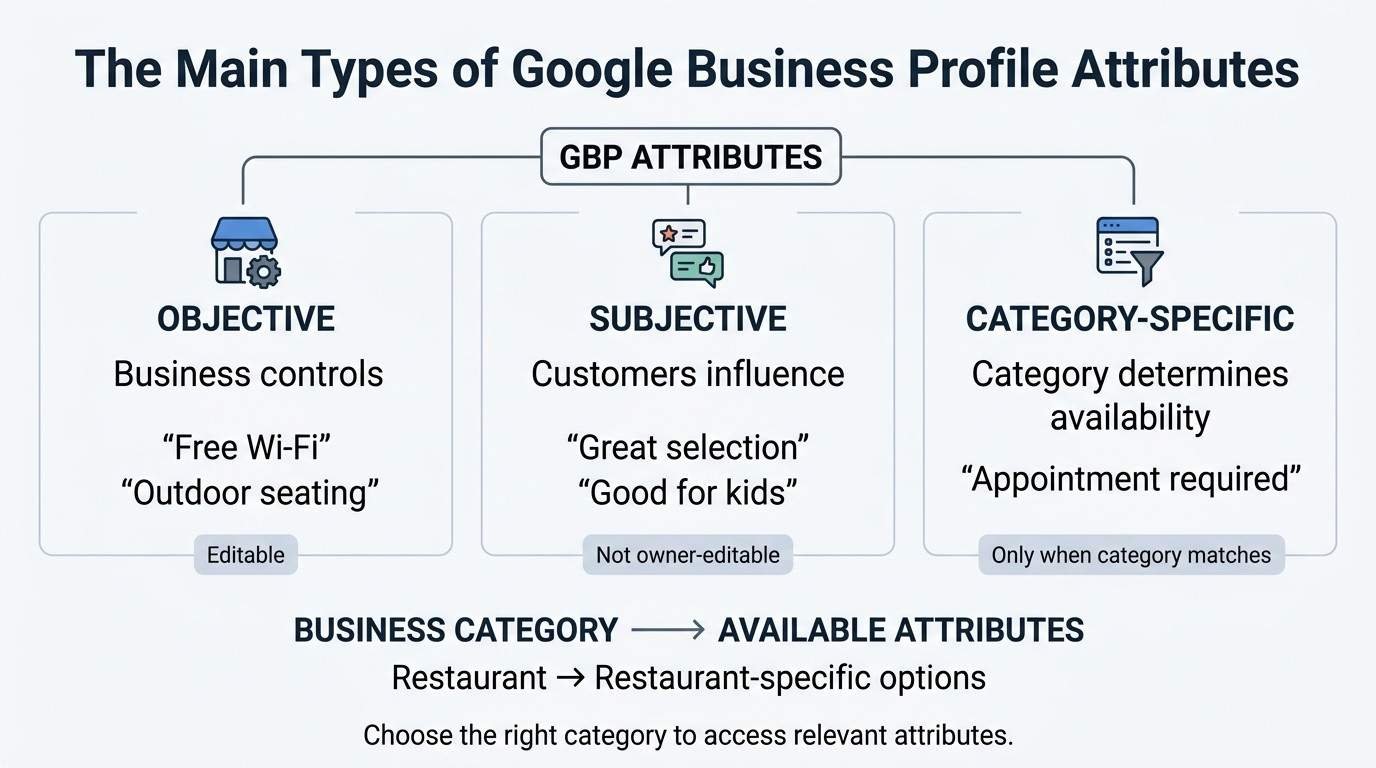
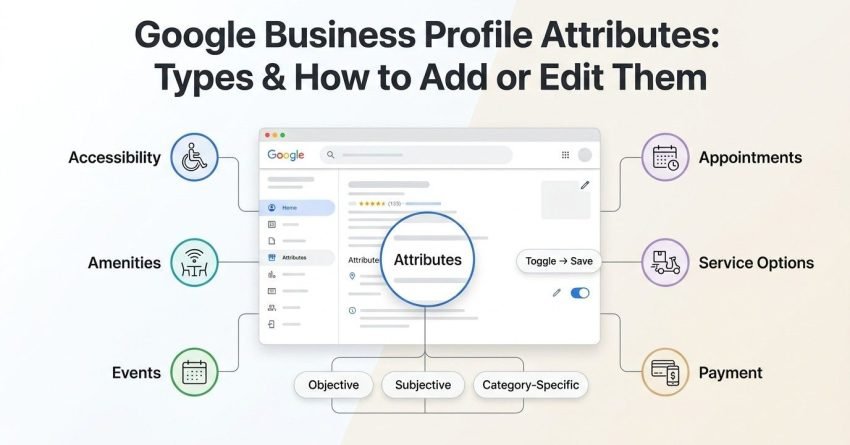
Google Business Profile attributes fall into three primary categories: objective attributes set by the business, subjective attributes reported by customers, and category-specific attributes unique to certain business types. I break it down this way for clients because each type behaves differently in terms of who controls it and how reliable it is.
| Attribute Type | Who Controls It | Example | Editability |
| Objective | Business owner | “Free Wi-Fi,” “Outdoor seating” | Fully editable anytime |
| Subjective | Customers (via Google surveys/reviews) | “Has a great selection,” “Good for kids” | Cannot be directly edited by owner |
| Category-Specific | Google (based on business category) | “Appointment required” for a salon | Only available if category matches |
Objective Attributes (Business-Defined Facts)
Objective attributes are factual, verifiable details the business owner selects directly in Google Business Profile Manager, such as parking availability or payment types accepted. These are the attributes I recommend clients audit first, since they’re entirely within their control.
Google occasionally verifies these against photos or user reports, so accuracy matters. Misrepresenting an objective attribute risks a suspension flag.
Subjective Attributes (Customer-Generated)
Subjective attributes are descriptive characteristics that Google surfaces based on aggregated customer feedback, such as “cozy atmosphere” or “great for solo dining.” We can’t add these ourselves, no matter how much a business owner wants them.
They accumulate over time as more reviews and post-visit surveys come in. I tell clients the only lever here is encouraging more detailed reviews.
Category-Specific Attributes
Category-specific attributes only appear when your primary or secondary business category supports them, meaning a plumbing business will never see restaurant-only options like “serves brunch.” Google ties this to its internal category taxonomy.
This is why choosing the right primary category early carries so much weight. A restaurant misclassified as a “cafe” may lose access to attributes its actual customers search for.
Accessibility Attributes
Accessibility attributes describe physical accommodations a business offers for people with disabilities, including wheelchair-accessible entrances, restrooms, seating, and parking. I push every client with a physical location to fill these out completely, both for compliance optics and genuine customer need.
These attributes also feed directly into Google’s accessibility filter, which a growing share of searchers now use deliberately.
Common Accessibility Options
Common accessibility attributes include wheelchair-accessible entrance, wheelchair-accessible restroom, wheelchair-accessible seating, and wheelchair-accessible parking lot. Each one is toggled independently in the profile editor.
Businesses that skip these often aren’t excluding people intentionally they simply never got prompted to think about it during setup.
Amenity Attributes
Amenity attributes highlight extra features or conveniences a business provides, such as free Wi-Fi, outdoor seating, or a fireplace. These tend to be the attributes that most directly influence a customer’s decision between two similarly-rated options nearby.
I’ve seen amenity attributes pull real click-through gains simply because they answer a question before the customer has to ask it.
Examples by Business Type
A coffee shop might select “outdoor seating” and “free Wi-Fi,” while a hotel might select “pool” and “fitness center.” Retail businesses often use amenities like “in-store shopping” or “assembly service.”
The available list changes based on category, echoing the category-specific attribute behavior covered above.
Planning Attributes
Planning attributes tell customers what to expect before they visit, such as whether a reservation is required or appointments are recommended. Restaurants, salons, and medical offices rely on these heavily to set visitor expectations upfront.
Skipping planning attributes creates friction. A customer who shows up without an appointment because the listing didn’t specify one usually blames the business, not Google.
Service Options Attributes
Service options attributes describe how customers can receive a business’s offerings, including options like delivery, in-store pickup, curbside pickup, and onsite services. These became especially prominent after search behavior shifted toward convenience-first queries.
A business offering curbside pickup but never marking the attribute is invisible to the exact searchers looking for that option.
Health & Safety Attributes
Health and safety attributes communicate protocols a business follows, such as mask requirements, staff health checks, or enhanced cleaning procedures. These attributes surged in relevance during the pandemic and many businesses still maintain them.
Some categories, particularly healthcare and food service, see these attributes weighted more heavily in customer decision-making even now.
Payment Attributes
Payment attributes specify which payment methods a business accepts, including credit cards, NFC mobile payments, checks, and debit cards. This seems minor until you consider how often a customer abandons a visit plan because payment friction wasn’t disclosed.
I always flag this section during audits because it’s frequently left at default settings from profile creation.
Crowd & Clientele Attributes
Crowd attributes describe the typical clientele or atmosphere a business caters to, such as “LGBTQ+ friendly,” “women-led,” or “veteran-led.” These carry real weight for searchers actively seeking businesses aligned with specific values or identities.
Google has expanded this category steadily, reflecting genuine search demand rather than a cosmetic addition.
From the Business Attributes
“From the business” attributes are self-reported identity descriptors, such as “identifies as women-owned” or “identifies as veteran-owned,” which businesses can voluntarily disclose. Unlike objective amenities, these speak to ownership identity rather than physical features.
Some businesses use these attributes for community trust-building, particularly in tight-knit local markets where ownership background matters to shoppers.
How to Add Attributes to Your Google Business Profile
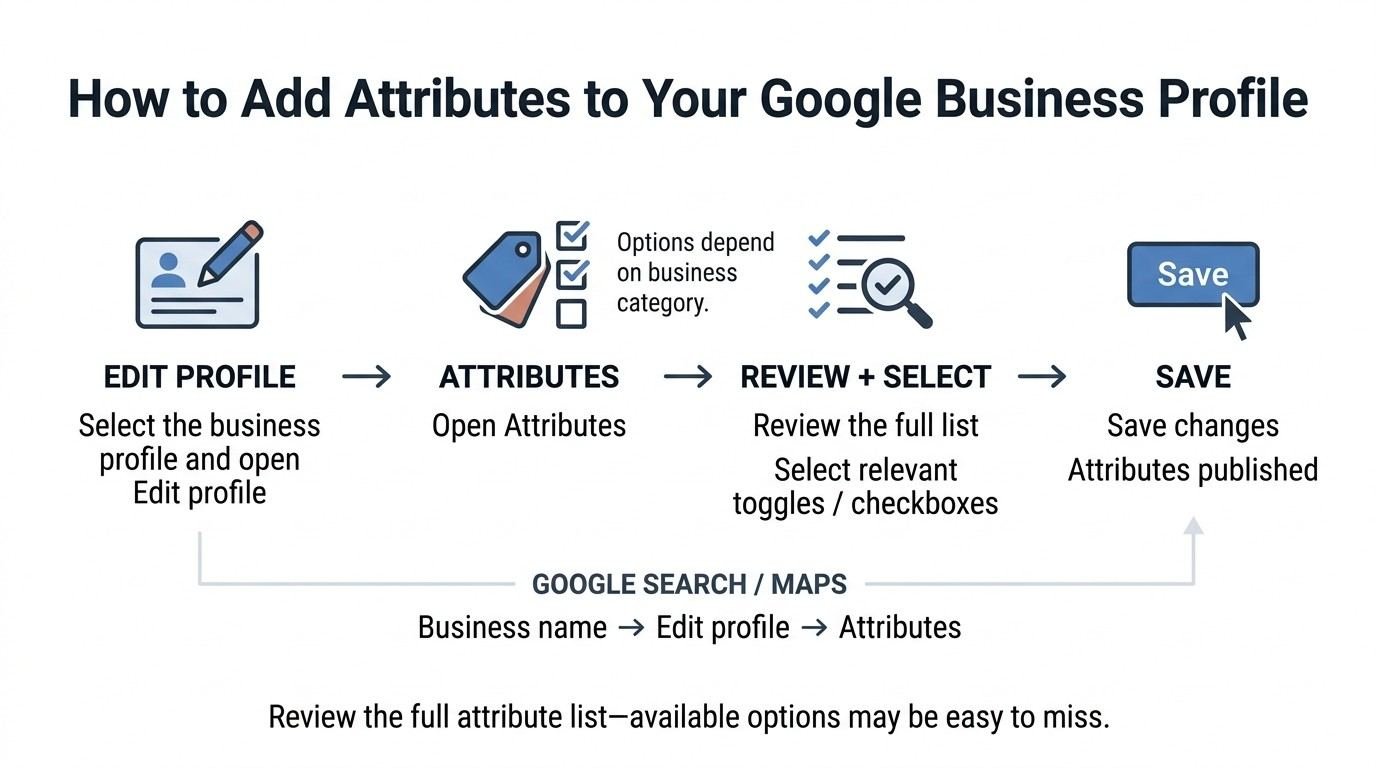
Business owners add attributes by logging into Google Business Profile Manager, selecting the “Edit profile” option, and choosing “Attributes” from the menu of editable sections. The interface groups available attributes by category and displays only the options relevant to your listed business type.
I recommend going through every single available toggle rather than assuming defaults are complete. Most owners miss attributes simply because they never scrolled the full list.
Adding Attributes via Google Business Profile Manager
Inside Profile Manager, the attributes section shows checkboxes and toggle switches organized under labeled headings like “Accessibility” or “Amenities.” Selecting an attribute and saving publishes it within a few minutes to a few hours.
Google occasionally suggests attributes based on your category, appearing as a prompt above the manual selection list.
Adding Attributes via Google Search or Maps
Business owners who manage their profile directly through Google Search can access attributes by searching their business name, clicking “Edit profile,” and navigating to the same attributes menu. This method works identically on mobile and desktop.
I find most small business owners actually manage attributes this way rather than through the dedicated Business Profile Manager site, since it’s faster for quick edits.
How to Edit or Remove Existing Attributes
Editing or removing an attribute involves opening the same “Attributes” section in Profile Manager, unchecking the toggle, and saving the update, which typically reflects live within a day. There’s no separate deletion process; removing an attribute is just switching it off.
I advise clients to review attributes quarterly rather than setting them once and forgetting them. Business offerings change, and stale attributes actively mislead customers.
Attributes flagged as inaccurate by multiple users can also get auto-removed by Google’s moderation systems, regardless of what the owner has selected. This happens more often than most owners realize, particularly for accessibility claims that don’t match reality on the ground.
Why Some Attributes Don’t Appear (Category Restrictions)
Some attributes remain invisible because Google ties attribute availability directly to a business’s selected primary and secondary categories, meaning mismatched categorization hides entire attribute sets. A business incorrectly categorized as “general contractor” instead of “electrician” loses access to electrician-specific attributes entirely.
This is one of the more common issues I find during profile audits: owners assume attributes are missing due to a platform bug, when the real cause is category selection made months or years earlier.
How Attributes Impact Local Search Rankings
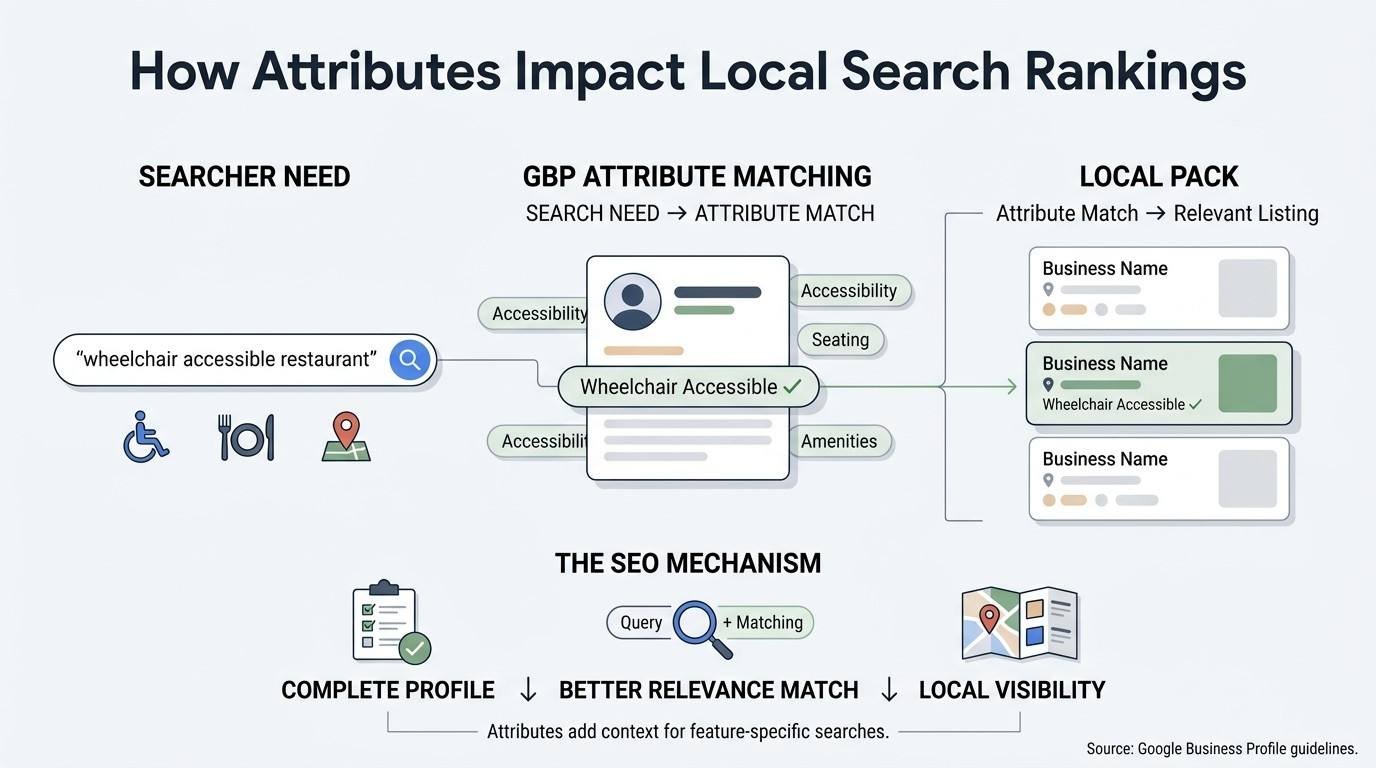
Attributes influence local search rankings indirectly by improving profile completeness and relevance matching, both of which Google’s local ranking systems factor into visibility. Google’s own Business Profile guidelines confirm that complete, accurate profiles perform better in local results than sparse ones.
I treat attribute completion as a foundational ranking lever, not a decorative afterthought, in every local SEO engagement we run.
Attributes and the Local Pack
Businesses with fully completed attribute sections tend to show stronger representation in the Local Pack for feature-specific queries, since Google can confidently match the listing to the searcher’s stated need. A search like “wheelchair accessible restaurant downtown” strongly favors listings with that attribute explicitly marked.
Relevance matching like this often decides Local Pack placement more than proximity alone, particularly in dense urban markets with many similarly-rated competitors.
Common Mistakes When Managing GBP Attributes
The most common attribute mistakes include leaving the section blank entirely, selecting inaccurate attributes to appear more appealing, and failing to update attributes after a business changes its offerings. I see all three constantly during profile audits, sometimes on the same listing.
Inaccurate attributes create a worse outcome than missing ones, since customers who arrive expecting a falsely advertised feature leave frustrated reviews that hurt rankings further.
How Often to Review and Update Attributes
Businesses should review Google Business Profile attributes at least once per quarter, or immediately after any operational change such as new payment methods or updated accessibility features. Seasonal businesses often need more frequent checks, particularly around service option changes.
I build attribute review into every ongoing local SEO retainer we manage, precisely because it’s the kind of maintenance task that gets forgotten until a customer complaint surfaces the gap.
Conclusion
Google Business Profile attributes connect specific business features to the exact searches customers run daily. Objective, subjective, and category-specific types each serve distinct roles in your local visibility.
Attributes work best as part of a broader local SEO strategy that includes categories, reviews, and consistent profile maintenance. Search behavior keeps rewarding specificity over generic listings.
We help businesses audit, optimize, and maintain every element of their local presence. Partner with White Label SEO Service to turn your profile into a genuine ranking asset.
Frequently Asked Questions
Do Google Business Profile attributes affect rankings directly?
Attributes don’t act as a standalone ranking factor, but they strengthen profile completeness and relevance matching. Both signals feed into how Google evaluates local search visibility.
Can I add my own custom attributes to my listing?
No, business owners can only select from Google’s predefined attribute list. Custom or business-created attributes aren’t supported on Google Business Profile.
Why can’t I find certain attributes on my profile?
Attribute availability depends on your business’s selected primary and secondary categories. Mismatched or overly broad categorization often hides relevant attribute options.
How long does it take for new attributes to appear live?
Most attribute changes reflect within a few hours, though some updates take up to 24 hours. Google occasionally reviews certain attributes before full publication.
Can customers add attributes to my business profile?
Yes, subjective attributes like “great for solo dining” come from aggregated customer surveys and reviews. Business owners cannot directly add or remove these themselves.
What happens if I select an inaccurate attribute?
Google’s moderation systems can auto-remove attributes flagged as inaccurate by multiple users. Repeated inaccuracies also risk broader profile compliance issues.
Should every business complete all available attributes?
Businesses should complete every attribute that’s genuinely accurate and relevant to their operations. Skipping accurate, available attributes leaves relevance signals on the table unnecessarily.