A Google Business Profile product catalog is a free feature inside your Business Profile that lets you showcase individual products with photos, prices, and descriptions directly in Google Search and Maps results. I’ve watched this feature quietly become one of the most underused local SEO assets available to small businesses. It works whether you sell physical goods, digital offerings, or curated collections, and it shows up right where local searchers are already looking.
Most business owners skip it entirely, or they set it up once and never touch it again. That gap is exactly where competitors with active catalogs start pulling ahead in local search visibility.
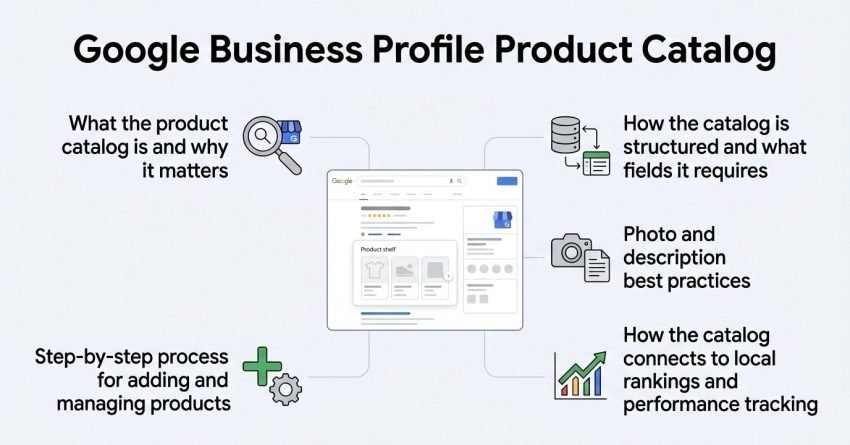
This guide covers what the product catalog actually is and why it matters, how the catalog is structured and what fields it requires, the step-by-step process for adding and managing products, photo and description best practices, and how the catalog connects to local rankings and performance tracking.
What Is a Google Business Profile Product Catalog?
A Google Business Profile product catalog is a structured section within your free listing that displays individual products with images, prices, and short descriptions. Google introduced this feature to give local businesses, especially retailers, boutiques, and product-based service providers a way to merchandise directly on the search results page.
I think of it as a mini storefront sitting inside your Business Profile. A searcher can browse products before ever clicking through to your website. The catalog sits alongside your services, posts, and reviews, giving your profile more surface area to convert a browser into a customer.
Unlike your website’s product pages, the catalog has no checkout function built in by default. It is a discovery and merchandising tool, not a transaction engine.
Why the Product Catalog Matters for Local SEO
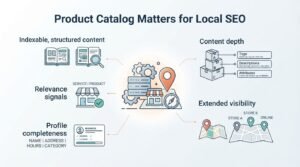
The product catalog matters for local SEO because it increases the amount of indexable, structured content Google associates with your business listing, which strengthens relevance signals for product-specific local searches. A shopper searching “leather wallets near me” is more likely to see a business whose catalog explicitly lists leather wallets than one that only mentions “accessories” in a general description.
An analysis of local pack ranking factors by Whitespark found that profile completeness and content depth remain among the strongest controllable local ranking signals. A populated catalog is one of the most direct ways to add that depth.
Catalogs also extend your visibility into Google Images and the Shopping-style carousels that sometimes appear for local product queries. That’s real estate a bare-bones profile simply cannot compete for.
Products vs. Services on Google Business Profile
Products and services are two separate sections in Google Business Profile, and choosing the wrong one limits how your business appears in search. Products are tangible or packaged items with a price and photo; services are actions or work you perform, usually billed by job or hour.
| Attribute | Products Section | Services Section |
| Best for | Retailers, product-based businesses | Contractors, consultants, repair businesses |
| Requires price | Optional but recommended | Optional |
| Requires photo | Recommended | Not required |
| Appears in | Product carousel, Search, Maps | Business description, booking prompts |
| Checkout link | Optional external link | Not applicable |
A hybrid business, a bakery that also caters events, for example, typically uses both sections at once, listing baked goods as products and catering as a service.
Key Components of a Product Listing
Every product listing in Google Business Profile requires a name, at least one photo, and a category, with price and description as strongly recommended optional fields. Skipping optional fields doesn’t block publication, but it does reduce how competitive the listing looks next to fuller entries.
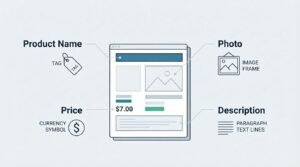
Product Name, Photo, Price, and Description Fields
The product name field works best as a specific, searchable phrase rather than a brand-only label; “Stainless Steel French Press” outperforms “Model X200” in search relevance. The photo field accepts JPG or PNG files, and Google recommends images at least 720 x 720 pixels for clean rendering across devices.
Price fields can display a fixed amount or a range, which matters for businesses with variant pricing like sizes or customization options. Descriptions are capped at 1,000 characters, giving enough room for a full sentence about materials, use case, or standout features without turning into filler text.
Product Categories and Collections Explained
Product categories and collections are the organizational layers that group similar items together inside the catalog so browsers can navigate by type instead of scrolling one long list. A collection might be “Summer Menu” for a restaurant or “Spring Collection” for a clothing retailer, while categories function more like folders: “Appetizers,” “Entrees,” “Desserts.”
I’ve found collections work best for time-bound or thematic groupings, while categories suit permanent structural divisions in a catalog. A hardware store might keep “Power Tools” and “Hand Tools” as permanent categories, then run a “Holiday Gift Guide” collection each December.
Categories also make bulk edits easier, since renaming or repricing an entire category updates every product inside it at once.
Google Business Profile Product Catalog Requirements
Google requires a verified Business Profile before the product catalog feature becomes available, and the business must fall into an eligible category; most physical-goods and hybrid retail categories qualify automatically. Purely service-based categories, like plumbing or legal consulting, sometimes have the products tab hidden by default and need it manually enabled through category selection.
There is no published hard limit on the total number of products a catalog can hold, though very large inventories are usually better managed through a bulk data feed rather than manual entry. Photos must meet Google’s minimum resolution guidelines, and product names cannot contain promotional text like “50% off” or contact information, since that violates Google’s content policies for profile fields.
How to Add Products to Your Google Business Profile
Adding a product to your Google Business Profile takes about five steps and can be completed from either the mobile app or Google Search directly. The process is identical whether you’re adding your first product or your fiftieth.
- Sign in to your Google Business Profile account and select the correct location if you manage multiple.
- Go to the “Products” tab in the left-hand menu.
- Click “Add product” and choose or create a category for it.
- Upload a photo, then fill in the product name, price, and description.
- Add an optional link if you want the product to send visitors to a specific page on your website.
- Click “Publish” to make the listing live.
- Repeat for each additional product, grouping related items into the same category as you go.
Most edits and additions appear on your live profile within a few minutes, though Google occasionally takes up to a day to fully index new entries into image search and carousels.
How to Edit or Remove Products From Your Catalog
Editing or removing a product in Google Business Profile takes just a couple of clicks from the same Products tab used to add listings. Open the product you want to change, click the pencil icon, update any field, and save; the change reflects on your live profile almost immediately.
Removing a product is just as direct: open the listing and select delete instead of edit. I recommend removing discontinued or out-of-stock items promptly rather than leaving them live, since outdated listings create a poor experience for anyone who clicks through expecting to buy something no longer available.
Adding Products via the Google Business Profile App vs. Desktop
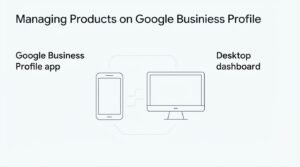
The Google Business Profile app and the desktop dashboard offer the same core functionality for managing products, but the app makes photo uploads noticeably faster since it pulls directly from your phone’s camera roll. Desktop, on the other hand, gives you a larger screen for writing longer descriptions and organizing multiple categories at once.
I generally recommend the app for on-the-go updates, snapping a photo of a new arrival and publishing it in under a minute, and reserving desktop sessions for bulk category reorganization or writing more detailed descriptions. Both platforms sync instantly, so changes made on one show up on the other without any extra steps.
Bulk Uploading Products With a Data Feed
A data feed allows businesses with large inventories to upload dozens or hundreds of products at once instead of entering them manually one by one. This method typically uses a structured spreadsheet or XML feed containing product names, prices, categories, and image URLs, which Google then processes in batch.
Data feeds make the most sense for retailers already maintaining a product feed for other platforms, since the same structured file can often be adapted with minor formatting changes. Manual entry remains more practical for businesses adding fewer than 20 products or updating listings infrequently.
Product Photo Best Practices for Higher Click-Through Rate
Product photos with clean backgrounds and natural lighting consistently earn higher click-through rates than photos taken in cluttered or dim environments. Google’s own display format crops images into a square thumbnail, so photos shot with the subject centered avoid awkward cropping in search results.
I always tell clients to photograph products from the angle a customer would actually view them in-store or in-use, rather than a generic catalog angle. Consistent lighting and background across all products in a catalog also make the entire listing feel more professional when a browser scrolls through several items at once.
Writing Product Descriptions That Improve Local Search Visibility
A strong product description names the product’s key attributes, materials, or use case in the first sentence, since that’s the portion most likely to be visible before a searcher taps to expand it. Vague descriptions like “great quality, must-have item” waste the limited 1,000-character allowance without adding any searchable substance.
Local search visibility improves when descriptions include natural, specific language a customer would actually search for; “handmade oak cutting board” performs better than “kitchen accessory.” I also recommend mentioning size, material, or compatibility details early, since these are the attributes shoppers scan for first when comparing similar products across different businesses.
Avoid keyword stuffing the description with repeated category terms, since Google’s systems are built to recognize natural language patterns and unnatural repetition can make a listing look lower quality rather than more relevant.
Common Product Catalog Mistakes That Hurt Visibility
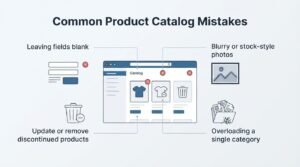
The most common product catalog mistake is leaving fields blank, particularly price and description, which makes a listing look incomplete next to fully filled-out competitor catalogs. A close second is uploading blurry or stock-style photos that don’t represent what the customer will actually receive.
Businesses also frequently forget to update or remove discontinued products, leaving customers to click through to dead ends. Overloading a single category with dozens of near-identical items, instead of using collections to organize them, buries standout products and makes the whole catalog harder to browse.
How the Product Catalog Impacts Local Pack Rankings
A well-maintained product catalog contributes to local pack rankings indirectly by strengthening the overall relevance and completeness signals Google uses to match businesses to product-specific local searches. It does not function as a standalone ranking factor the way reviews or proximity do, but it adds supporting context that helps Google understand exactly what a business sells.
BrightLocal’s Local Consumer Survey found that 87% of consumers used Google to evaluate local businesses in 2024, and a substantial share of that evaluation now happens directly on the profile before a website visit occurs. A catalog that clearly displays relevant products gives Google and the searcher more reason to consider that business a strong match for the query.
Tracking Product Catalog Performance in Google Business Profile Insights
Google Business Profile Insights reports how many times your product listings were viewed, giving a direct signal of which items draw the most attention from searchers. This data sits alongside your broader profile insights, including search queries, direction requests, and call clicks.
I check product view counts monthly for most clients, since a sudden drop often signals a photo or description that stopped resonating, while a spike usually lines up with a seasonal trend worth leaning into further. Insights don’t currently break down clicks-to-purchase, so pairing profile data with website analytics gives a fuller performance picture.
Product Catalog vs. Google Merchant Center: What’s the Difference
The Google Business Profile product catalog and Google Merchant Center serve different purposes, even though both display products in Google’s ecosystem. The Business Profile catalog is built for local discovery and appears on your Maps and Search listing, while Merchant Center powers Shopping ads and requires a linked website with real-time inventory feeds.
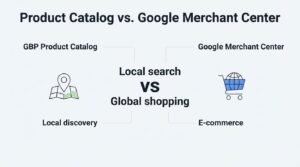
| Attribute | GBP Product Catalog | Google Merchant Center |
| Cost | Free | Free listing + paid ads option |
| Requires website | No | Yes |
| Checkout capability | No (link-out only) | Yes, via Shopping ads |
| Best for | Local discovery, walk-in businesses | E-commerce, paid Shopping campaigns |
| Setup complexity | Low | Moderate to high |
Businesses running both often find the two channels complement each other. Merchant Center drives paid Shopping traffic, while the profile catalog captures organic local browsers who never click a website link at all.
Conclusion
A Google Business Profile product catalog turns a static listing into a browsable storefront, connecting products, categories, and photos directly to local search intent. Local pack visibility and website analytics both benefit from an active, well-maintained catalog.
Merchant Center, structured data, and ongoing content strategy all extend what a catalog alone can achieve. Local SEO keeps evolving, and profile-level content is only gaining influence.
We help businesses turn their Google Business Profile into a genuine growth channel. Reach out to White Label SEO Service to build a strategy around it.
Frequently Asked Questions
Is the Google Business Profile product catalog free to use?
Yes, the product catalog is a completely free feature included with every verified Google Business Profile. There are no listing fees or limits tied to a paid subscription.
How many products can I add to my Google Business Profile?
Google has not published a strict maximum number of products per catalog. Very large inventories are best managed through a bulk data feed rather than manual entry.
Do products help with local SEO rankings?
Products support local SEO indirectly by adding relevance and completeness signals to your profile. They are not a standalone ranking factor like reviews or proximity.
Can service-based businesses use the product catalog?
Some service categories have the products tab hidden by default in Google Business Profile. Selecting a more product-inclusive category or contacting Google support can often enable it.
Why aren’t my products showing up on Google?
Missing products usually trace back to an unverified profile, an ineligible business category, or a recent upload still awaiting indexing. Indexing typically completes within a day of publishing.
Can I link products to my website for checkout?
Yes, each product listing supports an optional link field that can direct visitors to a specific product page. The catalog itself has no built-in checkout function.
How often should I update my product catalog?
Updating monthly, or whenever inventory changes significantly, keeps the catalog accurate and prevents dead-end clicks. Seasonal businesses often benefit from updates tied to each new collection.