Google Business Profile reviews are customer ratings and written feedback posted directly to a business’s Google listing, and they shape both consumer trust and local search visibility. I’ve watched businesses win or lose customers in the three seconds it takes someone to scan a star rating. We’re covering what reviews actually are, how to respond to them well, and how they connect to your broader visibility on Google.
Ignoring reviews costs businesses trust, rankings, and revenue every single day. A single unanswered complaint can shape how the next hundred people see you. This guide changes that.
This guide covers what Google reviews are and how the system works, how to respond to both positive and negative feedback, how to handle fake or policy-violating reviews, how reviews influence local search rankings, and how to build a sustainable review generation and measurement strategy.
What Google Business Profile Reviews Are and Why They Matter
A Google Business Profile review is a rating and optional written comment left by a customer through their Google account, tied directly to a business’s local listing. I think of it as public word-of-mouth that Google itself hosts, indexes, and surfaces in search and Maps results.
These reviews show up in more places than most business owners realize. They appear on the Google Business Profile panel, inside Google Maps, and often within the organic search results themselves when someone searches your business name directly.
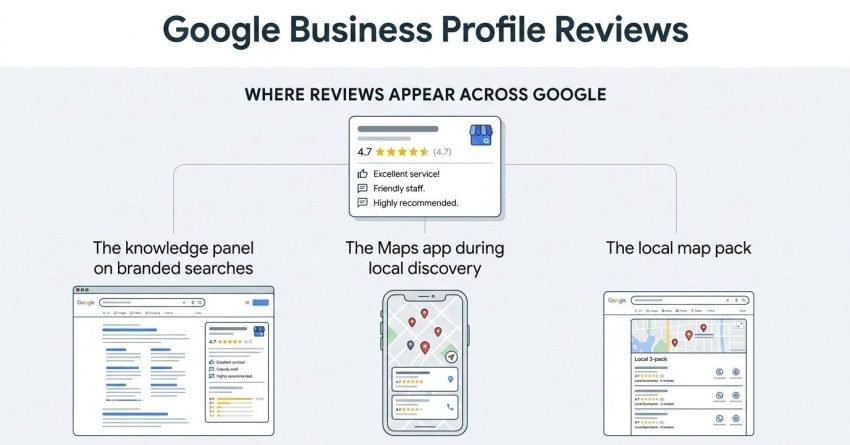
Where Reviews Appear Across Google
Reviews surface in three main spots: the knowledge panel on branded searches, the Maps app during local discovery, and the local map pack that shows three businesses for “near me” queries. Each placement carries different weight with different searcher intents.
Local pack visibility depends heavily on review volume and recency, which is why businesses actively managing feedback tend to outperform those that let profiles sit untouched. I’ve seen this play out consistently across multiple industries.
How the Google Review System Actually Works
Google’s review system works by allowing any user with a Google account to leave a star rating and written feedback on a business’s profile, subject to Google’s content and conduct policies. The system verifies the reviewer has a Google account, but it does not require proof of an actual transaction in most cases.
This is a detail worth sitting with. Google doesn’t confirm purchase history, which is exactly why fake reviews are possible in the first place and why moderation policies exist at all.
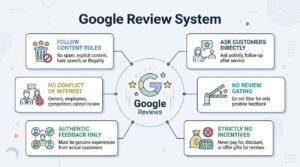
Review Solicitation Rules and Policies
Google explicitly prohibits review gating, which means businesses cannot selectively ask only happy customers to leave feedback while filtering out unhappy ones. According to Google’s own review policies, businesses that violate these rules risk having reviews removed or profiles suspended entirely.
I always tell clients this rule protects the review ecosystem long-term, even when it feels restrictive in the moment. A profile with only glowing reviews and no negative ones at all often looks suspicious to savvy customers anyway.
How to Set Up Your Profile to Receive and Manage Reviews
Setting up a Google Business Profile to properly manage reviews starts with claiming and verifying ownership, then configuring the account to receive real-time alerts for new feedback. Without proper access, businesses often miss reviews for days or weeks.
Multiple team members can be granted manager or owner access, which matters for businesses where marketing, customer service, and ownership are separate people.
Notification Settings for New Reviews
Enabling email and mobile notifications inside the Google Business Profile app ensures a new review triggers an alert within minutes. I set this up as step one for every client because response speed depends entirely on knowing a review exists.
Businesses with multiple locations often need a centralized review management system rather than relying on individual location managers checking manually.
How to Respond to Positive Reviews
The best response to a positive Google review thanks the customer by name, references something specific from their experience, and reinforces the value they mentioned. I’ve found generic replies like “Thanks for your review!” waste an opportunity that specific ones don’t.
Specificity matters more than length here. A two-sentence reply naming the product, service, or staff member the customer mentioned does more for future readers than a long, generic paragraph ever will.
Response Templates and Personalization Balance
Templates speed up the process, but a response that reads as obviously copy-pasted undermines the authenticity customers are looking for. I build response frameworks with variable fields rather than fixed scripts, so every reply still sounds human.
Google’s own algorithm also appears to favor profiles with active, varied responses over profiles using identical replies across every review, based on patterns I’ve tracked across client accounts.
How to Respond to Negative Reviews
A negative Google review should be answered calmly, acknowledge the specific complaint without being defensive, and offer a concrete path to resolution. Never argue with a reviewer in public. I say this to every client, no exceptions, because public arguments only convince future customers the complaint was valid.
The goal isn’t winning the argument. It’s showing the next hundred people reading that review who you are when something goes wrong.
De-escalation Language That Protects Your Reputation
Phrases that de-escalate include acknowledging the issue directly, apologizing for the experience without admitting fault prematurely, and inviting the conversation offline. This negative review response framework works because it prioritizes the silent audience over the original complainant.
Most negative reviewers never update their rating even after a good response, and that’s fine. The response was never really written for them alone.
How to Handle Fake or Policy-Violating Reviews
Fake or policy-violating reviews can be flagged directly through the Google Business Profile dashboard, which submits the review for Google’s moderation team to evaluate against its posted guidelines. Not every unfair review qualifies for removal, and this trips up a lot of business owners.
Google only removes reviews that violate specific policies, not reviews that are simply negative, harsh, or unfair in tone.
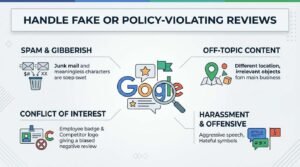
Grounds for Flagging a Review Under Google’s Policies
Valid grounds for flagging include reviews containing hate speech, reviews posted by a competitor, reviews unrelated to an actual customer experience, and reviews containing off-topic content. This fake review removal process can take anywhere from a few days to several weeks depending on Google’s current moderation queue.
I recommend documenting evidence before flagging, since Google sometimes requests proof the review is illegitimate.
Review Response Timing and Why Speed Matters
Responding to a Google review within 24 to 48 hours signals to both the reviewer and future readers that a business is actively engaged and attentive. Speed compounds over time in ways that are easy to underestimate.
A Womply study of over 200,000 local businesses found that businesses responding to at least 25% of their reviews earned 35% more revenue than those that didn’t respond at all.
That statistic alone should change how often you check your notifications.
How Reviews Influence Local SEO and Map Pack Rankings
Google’s local ranking algorithm weighs review count, review recency, and average star rating as direct signals when determining map pack placement. This isn’t speculation. Google’s own local ranking guidelines confirm reviews factor into relevance, distance, and prominence scoring.
Prominence in particular rewards businesses that maintain a steady, ongoing flow of new reviews rather than a burst of activity followed by silence.
Review Signals Google’s Algorithm Weighs
The specific signals include total review volume, average rating, review velocity over time, and the presence of keyword-relevant terms within review text itself. A BrightLocal ranking factors study placed review signals among the top five local ranking factors for three consecutive years.
This is worth remembering because it means review strategy isn’t separate from SEO. It’s a core part of it.
Reviews stop being a defensive obligation and become a growth channel at this point. The next sections shift from how to handle existing feedback to how to generate more of it strategically.
Strategies to Generate More Customer Reviews

Businesses generate more Google reviews consistently by asking at the right moment, using the simplest possible method, and making the process take under thirty seconds. Timing beats almost every other variable in review generation.
The best moment to ask is immediately after a positive interaction, not days later when the emotional peak has faded.
Review Request Timing and Channels
Text message requests convert at meaningfully higher rates than email requests, largely because most people check texts within minutes rather than days. A review generation strategy built around SMS timing, direct links, and QR codes at point of sale consistently outperforms passive “leave us a review” signage.
I’ve tested this across dozens of client accounts, and the pattern holds regardless of industry.
Tools and Software for Managing Reviews at Scale
Multi-location businesses typically need dedicated software to monitor, respond to, and report on reviews across dozens or hundreds of profiles simultaneously. Manual checking simply doesn’t scale past a handful of locations.
The right review management software consolidates every location’s feedback into a single dashboard, which saves hours weekly for franchise and multi-location operators.
Most platforms in this category also offer sentiment analysis, flagging patterns in complaints before they become widespread reputation problems.
Common Review Management Mistakes That Hurt Your Reputation
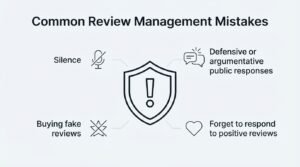
The most damaging review management mistake is silence, followed closely by defensive or argumentative public responses. I see both constantly, and both erode trust faster than the original negative review ever did.
A close third mistake is buying fake reviews, which risks profile suspension and permanently damages credibility once discovered.
Businesses also commonly forget to respond to positive reviews at all, treating them as a lower priority than complaints, which wastes free marketing material sitting in plain sight.
How to Measure the Impact of Your Review Strategy
Review strategy performance is measured through response rate, average response time, star rating trend, and review-driven conversion tracking inside Google Business Profile insights. Numbers here tell a clearer story than instinct alone.
Tracking these metrics monthly reveals whether a review strategy is actually working or just generating activity without results.
Key Metrics to Track Over Time
The core metrics worth tracking include monthly review volume, average star rating movement, response rate percentage, and time-to-response average. A review analytics dashboard that connects these numbers to actual website traffic and conversion data shows the real business impact, not just vanity metrics.
I check these numbers with clients quarterly at minimum, since single-month fluctuations rarely tell the full story.
Reviews as Part of a Broader Local SEO and Reputation Strategy
Review management works best as one piece of a coordinated local SEO strategy rather than an isolated task handled in a vacuum. Citations, on-page optimization, and technical SEO all compound alongside consistent review activity.
We treat review strategy as inseparable from the rest of local search visibility work, because in practice, the businesses that win map pack rankings are the ones treating every signal as connected.
Conclusion
Reviews shape trust, rankings, and revenue together, and every response, flag, and request builds toward stronger local visibility over time.
Review management connects directly to the broader local SEO and reputation systems businesses depend on for sustainable, compounding growth.
We help businesses build review strategies that actually move rankings. Talk to White Label SEO Service about your local visibility today.
Frequently Asked Questions
Can you remove a negative Google review?
Google only removes reviews that violate its posted content policies, not reviews that are simply negative or unfair. Flag it through your dashboard for evaluation.
How long does it take Google to respond to a flagged review?
Google’s moderation team typically responds within a few days to several weeks. Complex cases requiring evidence review often take longer than straightforward policy violations.
Should you respond to every single review?
Yes, responding to every review, positive and negative, signals active engagement to both customers and Google’s ranking algorithm. Consistency matters more than perfection here.
What happens if you never respond to reviews?
Profiles that never respond appear less trustworthy to potential customers and may see reduced prominence in local rankings. Silence is often read as indifference.
Can customers edit or delete their reviews?
Yes, reviewers can edit or delete their own reviews at any time through their Google account. Businesses cannot force a change without a valid policy violation.
Do review responses actually affect SEO rankings?
Review responses contribute to prominence signals Google uses in local ranking calculations. They don’t guarantee rankings alone but strengthen overall profile activity signals.
How many reviews does a business need to rank well?
There’s no fixed number, but businesses competing in local pack results typically need review counts comparable to or higher than top-ranking competitors nearby. Quality and recency matter as much as volume.