The Google Business Profile API is a set of Google-hosted web services that let developers and businesses read, write, and manage business listing data programmatically instead of through the Google Business Profile Manager interface. It replaced the older Google My Business API in 2023, and it now powers most large-scale local SEO tools on the market. I work with this API almost every week when clients need to manage more than a handful of locations.
Manual listing management breaks down fast past ten locations. Business owners lose hours updating hours, photos, and posts one listing at a time across a dozen or a thousand storefronts.
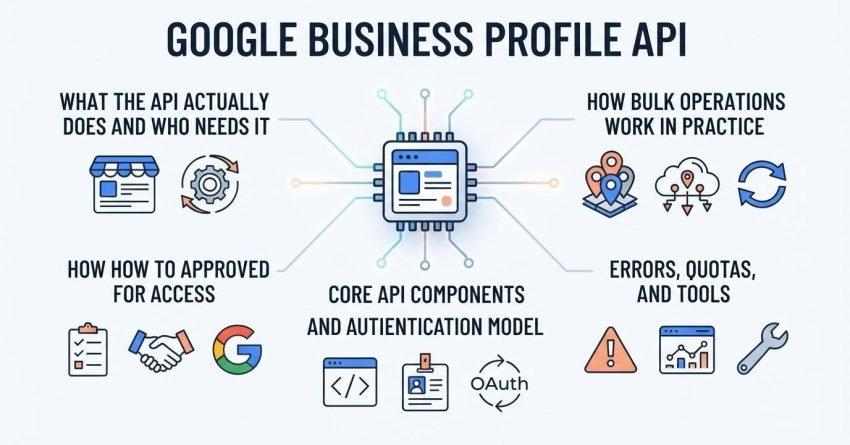
This guide covers what the API actually does and who needs it, how to get approved for access, the core API components and authentication model, how bulk operations work in practice, and the errors, quotas, and tools you’ll run into along the way.
What Is the Google Business Profile API?
The Google Business Profile API is a REST-based interface that allows authorized applications to create, read, update, and manage Google Business Profile listings without manual login to the dashboard. I think of it as the programmatic back door to everything you’d normally click through in the Business Profile Manager. It handles business information, verification status, posts, and performance data.
Google merged several older APIs into this unified structure back in 2023. The Google My Business API name disappeared, and everything now sits under the Google Business Profile API umbrella, which better reflects what agencies and enterprise tools actually use it for.
The API exists because manual management doesn’t scale. A franchise with 200 locations cannot reasonably have someone log into 200 separate dashboards every time store hours change for a holiday.
How Does the Google Business Profile API Work?
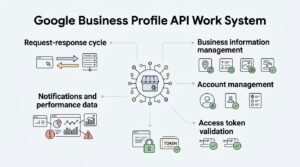
The Google Business Profile API works through a request-response cycle where an authenticated application sends HTTP requests to Google’s servers and receives structured JSON data back. Every action reading a listing, updating hours, posting an update follows this same pattern. I’ve built integrations where this cycle repeats thousands of times per sync job.
The core components split into distinct functional areas. Business information management handles the listing details themselves: name, address, phone, categories, and hours.
Account management controls who has access to which locations and at what permission level. Notifications and performance data round out the picture, feeding alerts and analytics back to connected platforms.
Requests carry an access token that Google’s servers validate before returning any data. Without that token, every request gets rejected regardless of what data is being requested.
Who Needs API Access to Google Business Profile?
Businesses and agencies managing more than roughly ten separate Google Business Profile locations are the primary candidates for API access, since the manual dashboard becomes impractical past that point. I’ve seen internal marketing teams hit this wall around 15 to 20 locations.
Multi-location businesses and franchises represent the clearest case. A regional restaurant chain with 50 locations needs one system that pushes menu updates everywhere at once, not 50 separate logins.
Agencies and SEO providers managing multiple clients hit the same wall from a different angle. An agency serving 30 clients across different verticals needs centralized control that the standard dashboard was never built to provide.
How Do You Get Access to the Google Business Profile API?
Getting access to the Google Business Profile API requires creating a Google Cloud project, enabling the API, and submitting a formal access request that Google’s team reviews before granting production quota. This isn’t instant, and I tell clients to budget several weeks for the full cycle.
The Google Cloud Console setup comes first. You create a project, enable billing, and turn on the specific Business Profile APIs your use case requires before Google will even look at an access request.
The request and approval process asks for details about your business use case, expected call volume, and how you’ll use the data. Google reviews these manually rather than approving automatically, which is different from most developer APIs.
Common rejection reasons include vague use-case descriptions, requesting access for a use case the API wasn’t designed for, and applications tied to newly created Cloud projects with no history. A clear, specific explanation of what you’re building improves approval odds significantly.
What Are the Core Google Business Profile APIs?
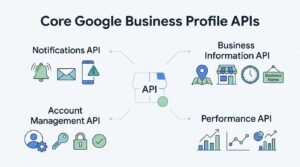
The Google Business Profile API is actually a family of four core sub-APIs: Business Information, Account Management, Notifications, and Performance, each handling a distinct function. Understanding this split matters because your access request needs to specify which ones you actually need.
The Business Information API manages the listing content itself: name, address, categories, attributes, and hours of operation. This is the one most bulk-editing tools rely on most heavily.
The Account Management API controls user permissions and location groupings, which matters most for agencies structuring client access. The Notifications API pushes real-time alerts about profile changes, new reviews, or verification status shifts.
The Performance API returns metrics like search views, map views, and customer actions, which is where reporting dashboards pull their numbers from.
What Is API Authentication and OAuth 2.0 in This Context?
Authentication for the Google Business Profile API uses OAuth 2.0, a standard authorization protocol where an application requests limited access to a user’s Google Business Profile data without ever seeing their password. I always tell clients this is a security feature, not a hurdle; it protects the underlying account.
Service accounts and OAuth client IDs serve different purposes here. A service account works well for backend automation where no human interaction happens during each request cycle.
An OAuth client ID fits situations where a human user needs to explicitly grant permission through a login screen, which is common in client-facing SaaS tools. Choosing the wrong one between the two creates permission headaches later.
What Are Bulk Operations in the Google Business Profile API?
Bulk operations in the Google Business Profile API allow a single authenticated request or batch of requests to update, create, or retrieve data across many locations simultaneously instead of one at a time. This is the single biggest reason agencies and franchises adopt the API at all.
Bulk location uploads let a business submit a spreadsheet-style batch of new locations in one call rather than manually creating each listing. I’ve used this to onboard 40 new franchise locations in an afternoon that would have taken days manually.
Bulk editing extends to business attributes and hours too. A national chain announcing extended holiday hours can push that change across every location in one operation instead of editing each listing by hand.
Managing bulk Q&A and review responses follows the same logic. An agency can pull unanswered questions across every managed location into one queue and respond systematically instead of checking each dashboard separately.
What Are Common Use Cases for Bulk API Operations?
Franchise rollouts and agency client management represent the two dominant use cases for bulk API operations, both driven by the same core problem of managing data across dozens or hundreds of listings at once.
Franchise and multi-location rollouts happen whenever a brand opens new locations in waves. Bulk operations let corporate marketing push branding, categories, and initial hours to every new location the moment it goes live.
Agency client management at scale looks different but hits the same technical need. An agency running local SEO for 50 clients uses bulk operations to standardize posting schedules and photo updates across every account from one dashboard.
What Are the API Rate Limits and Quotas?
Google enforces daily quota limits on the Business Profile API that vary by project and are typically capped in the low thousands of requests per day for newly approved accounts. I’ve had clients hit this ceiling faster than expected when running full historical data pulls.
Quotas reset on a rolling daily basis, and Google’s own Business Profile API documentation outlines the specific per-method limits that apply to each endpoint. Exceeding the limit doesn’t crash anything; it simply returns an error response until the quota resets.
What Are Common Google Business Profile API Errors?
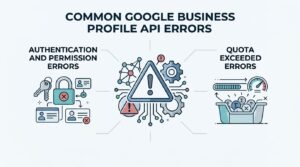
The most frequent Google Business Profile API errors fall into two categories: authentication failures and quota exceeded responses. Recognizing which category an error belongs to cuts troubleshooting time significantly.
Authentication and permission errors usually mean an expired token, a missing scope, or an account that lacks manager-level access to the requested location. These show up immediately on the first failed call.
Quota exceeded errors surface only after volume ramps up, typically during bulk sync jobs or full data re-pulls. The fix is almost always pacing requests rather than firing them all at once.
How Does the API Compare to Manual Google Business Profile Management?
The API outperforms manual management on speed and scale, while manual management remains simpler for businesses with a single location or only occasional updates. The tradeoff comes down to volume and technical resourcing.
| Factor | API Management | Manual Management |
| Best for | 10+ locations | 1-9 locations |
| Setup effort | Cloud project + approval process | None, just log in |
| Update speed at scale | Minutes for hundreds of listings | Hours to days |
| Technical skill needed | Developer or technical partner | None |
| Reporting depth | Programmatic, exportable | Dashboard-only |
What Tools and Platforms Integrate With the Google Business Profile API?
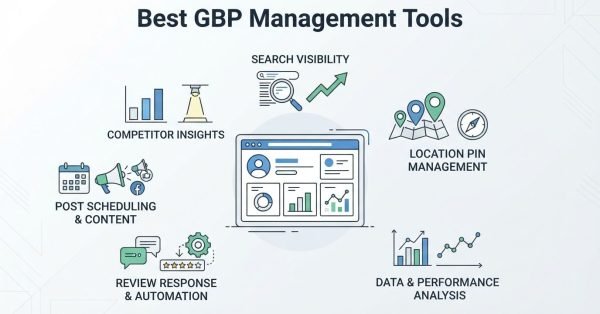
Several third-party local SEO platforms build directly on top of the Google Business Profile API to offer multi-location management, reputation monitoring, and bulk reporting in one interface. I recommend clients evaluate these before building custom integrations from scratch.
Third-party local SEO platforms typically bundle rank tracking, review management, and listing sync into one subscription, which saves the engineering cost of building against the raw API directly.
What Are Best Practices for Managing API Data at Scale?
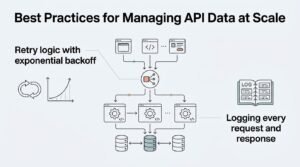
Managing Google Business Profile API data at scale works best when requests are batched, rate-limited deliberately, and logged for error tracking rather than fired in unmonitored bulk. I’ve seen sync jobs fail silently simply because nobody was watching the error responses.
Building in retry logic with exponential backoff prevents a single quota hiccup from cascading into a failed sync across hundreds of locations. Logging every request and response separately also makes troubleshooting dramatically faster when something breaks at 2 am.
What Does the Future Hold for Google Business Profile API Access?
Google has steadily tightened API access requirements since the 2023 consolidation, and that trend toward stricter approval and usage review is likely to continue. I expect verification requirements to keep growing as Google works to reduce spam and fake listings across its platform.
Businesses planning to rely on the API long-term should treat compliance and legitimate use-case documentation as an ongoing requirement, not a one-time approval hurdle.
Conclusion
The Google Business Profile API connects listing management, authentication, and bulk operations into one programmatic system for businesses managing scale. Multi-location brands and agencies increasingly depend on these tools as location counts grow. We help businesses navigate API-driven local SEO strategy. Talk to White Label SEO Service about scaling your local presence.
Frequently Asked Questions
Is the Google Business Profile API free to use?
Yes, the Google Business Profile API itself has no direct usage fee. Google does enforce daily quota limits, and exceeding them requires requesting a quota increase rather than paying a fee.
How long does Google take to approve API access?
Approval typically takes a few days to several weeks depending on use case clarity. Vague or incomplete access requests take longer and are more likely to be rejected on the first attempt.
Can I manage multiple business locations with the API?
Yes, managing multiple locations is the API’s primary purpose. Bulk operations let you update hours, attributes, and posts across dozens or hundreds of locations in a single batch request.
What is the difference between the API and the Google Business Profile Manager app?
The API is a programmatic interface for developers, while the Manager app is a visual dashboard for manual use. Businesses with more than a handful of locations typically outgrow the manual app.
Do I need coding experience to use the Google Business Profile API?
Yes, direct API use requires development resources to build and maintain the integration. Businesses without technical staff typically use third-party platforms built on top of the API instead.
What happens if I exceed my API quota?
Requests beyond your daily quota return an error response until the quota resets. Google allows businesses to request a quota increase if consistent legitimate usage justifies it.
Can agencies use the API to manage client listings?
Yes, agencies commonly use the API to manage listings across many client accounts from one system. This requires structuring account permissions correctly through the Account Management API.