Google Business Profile competitor manipulation happens when a rival business deliberately alters, sabotages, or exploits your GBP listing to hurt your visibility or steal your customers. I have watched this play out across dozens of local business categories, and it rarely looks dramatic from the outside. A review disappears. A phone number changes. A “closed” label appears on a listing that never closed.
We see this escalate fastest in saturated local markets. Ignoring early signs costs rankings, calls, and revenue within weeks, not months.
This guide covers how manipulation actually happens, from fake reviews and false suggested edits to duplicate listings and click fraud. I also walk through detection methods, reporting paths, and the ongoing protections that keep a profile secure once it is cleaned up.
What Counts as Google Business Profile Competitor Manipulation?
Google Business Profile competitor manipulation is any deliberate action by a rival business intended to damage, alter, or exploit another business’s GBP listing without authorization. I draw a hard line here between manipulation and normal competitive behavior, because business owners often confuse the two.
A competitor outranking you through better reviews, more posts, and stronger local citations is doing legitimate SEO. A competitor filing false suggested edits to change your business hours, or flooding your listing with fake negative reviews, is manipulation. The distinction matters because Google’s enforcement mechanisms only respond to violations of its Google Business Profile guidelines, not to fair competition.
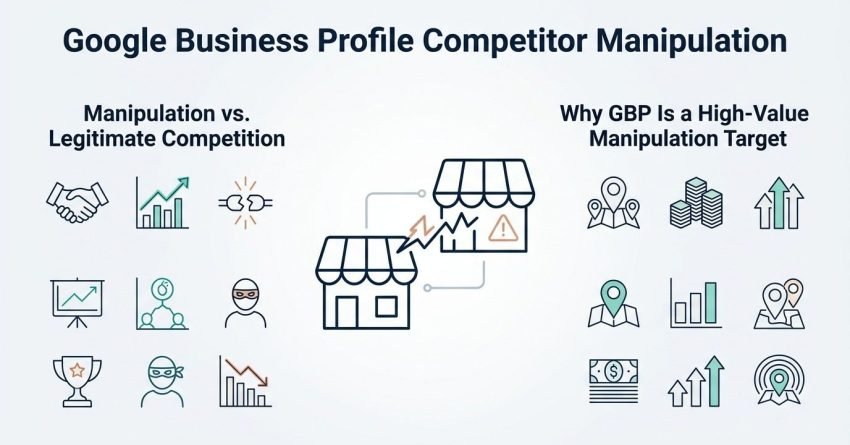
Manipulation vs. Legitimate Competition
Legitimate competition improves a rival’s own profile. Manipulation degrades yours. I use this single test with clients: does the action originate on the competitor’s own listing, or does it interfere directly with mine?
Why GBP Is a High-Value Manipulation Target
Local pack rankings drive a disproportionate share of calls and direction requests for service businesses. A BrightLocal survey found that 98% of consumers read online reviews for local businesses, which explains why review-based manipulation in particular has become so common.
Fake and Policy-Violating Reviews
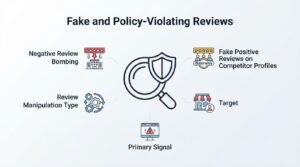
Fake and policy-violating reviews are reviews submitted with the intent to unfairly inflate a competitor’s rating or unfairly damage another business’s rating, often through paid review services, fake accounts, or coordinated review bombing. I see this tactic more than any other because reviews carry heavy ranking and conversion weight.
Negative Review Bombing
Negative review bombing involves a sudden cluster of one-star reviews, often from accounts with no prior review history, no profile photo, and generic complaints that don’t match any real transaction. I flag these patterns immediately when a client sees five or more low-quality negative reviews land within 48 to 72 hours.
The reviews typically share language patterns, post at unusual hours, or come from accounts created the same week. A cluster of unverified reviews arriving within a short window is the clearest single signal of coordinated manipulation rather than organic customer dissatisfaction.
Fake Positive Reviews on Competitor Profiles
The inverse tactic involves a competitor purchasing fake five-star reviews for their own listing to outrank yours on reputation signals. This doesn’t attack your profile directly, but it distorts the local pack ranking that reputation and review volume influence.
| Review Manipulation Type | Target | Primary Signal |
| Review bombing | Your profile | Sudden 1-star cluster |
| Fake positive reviews | Their profile | Sudden 5-star cluster, generic praise |
| Review gating | Their profile | Selective review requests |
| Keyword-stuffed reviews | Either profile | Repeated exact-match phrases |
This table shows the four review manipulation patterns most commonly reported to Google’s support teams.
False or Malicious Profile Suggested Edits
False or malicious profile suggested edits occur when a competitor submits inaccurate changes to your business name, address, phone number, hours, or category through Google’s public edit-suggestion feature. Because Google allows any user to propose edits to a business listing, this feature has become one of the easiest manipulation entry points.
Address and Service Area Tampering
A competitor can suggest an incorrect address or service area, which either confuses customers or triggers a suspension review if Google’s automated systems flag the inconsistency. I have seen this used specifically before a competitor’s seasonal sales push, timing the tampering to coincide with a rival’s highest-traffic period.
Category and Business Name Changes
Business category changes are subtler and harder to notice because Google auto-approves many suggested edits without notifying the owner first. A plumbing company’s primary category quietly changing to “plumbing supply store” will lose local pack visibility for its actual core service almost overnight.
Fake Business Profile Closures and Duplicate Listings
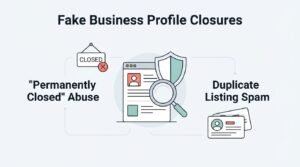
Fake business profile closures happen when a bad actor flags an active business as “permanently closed” on Google Maps, which removes the listing from search results and the local pack entirely. This is one of the most damaging tactics because closure status suppresses visibility instantly, often before the owner even notices.
“Permanently Closed” Abuse
Google generally auto-approves closure flags after multiple user reports, which means a coordinated group of fake accounts can mark a healthy business closed within days. Recovery requires direct dispute through Google Business Profile support, and reinstatement can take one to several weeks depending on verification backlog.
Duplicate Listing Spam
Duplicate listing spam involves a competitor or bad actor creating a second, unauthorized listing for your business at a slightly different address or name variation, which splits your reviews, citations, and ranking signals across two profiles instead of consolidating them into one.
Keyword Stuffing in Business Names
Keyword stuffing in business names is the practice of appending service or location keywords to a Google Business Profile’s official name field, such as “Smith Plumbing – Emergency 24/7 Water Heater Repair,” in violation of Google’s naming guidelines. Keyword-stuffed business names remain one of the most persistent and widely reported spam tactics in competitive local categories.
This tactic works because keyword-loaded names can trigger relevance matching for searches the business wouldn’t otherwise rank for. Google’s guidelines explicitly prohibit including anything beyond the business’s real-world legal or trading name, but enforcement is inconsistent and reactive rather than proactive. Reporting these listings through the “Suggest an edit” or “Report profile” tools is currently the only reliable countermeasure available to affected businesses.
Fake Listings and Address Spam
Fake listings and address spam refer to entirely fabricated Google Business Profiles, often for virtual offices, UPS store mailboxes, or residential addresses, created to rank in local packs for service-area businesses without a genuine commercial presence. This tactic is especially common in home service industries like locksmiths, garage door repair, and HVAC.
These listings frequently use call-tracking numbers and outsourced call centers rather than a real local team. Google’s spam policy for business profiles prohibits this explicitly, and mass reporting through the Business Profile community forum remains the most effective path to removal.
Photo and Media Manipulation
Photo and media manipulation involves a competitor uploading irrelevant, offensive, or misleading images to a rival’s Google Business Profile, since the platform allows any verified Google user to contribute photos to a public listing. This tactic damages first impressions in local search results, where photos display prominently before a searcher even clicks through.
Inappropriate or Irrelevant Image Uploads
Uploaded images might show a competing business’s storefront, unrelated stock photography, or explicit content designed purely to violate content policy and trigger a profile suspension. Businesses should audit their photo section monthly, since Google doesn’t notify owners when third-party photos are added.
Click Fraud and Fake Engagement Signals
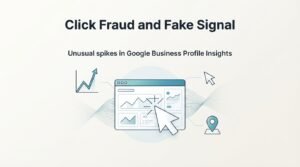
Click fraud and fake engagement signals involve competitors generating artificial clicks, calls, or direction requests on a rival’s Google Business Profile to distort performance data or, in ad-linked scenarios, drain advertising budgets. This tactic is harder to prove than reviews or edits because Google doesn’t expose raw click-level data to profile owners.
Unusual spikes in Google Business Profile Insights, particularly direction requests from geographically implausible locations, often indicate this kind of artificial engagement rather than genuine customer interest.
Q&A Section Sabotage
Q&A section sabotage happens when a competitor posts false or misleading questions and answers directly on a rival’s Google Business Profile, since the Q&A feature allows any Google user to both ask and answer questions publicly. A fabricated answer claiming a business “no longer offers” a core service, posted by an anonymous account and left unanswered, can misinform potential customers browsing the listing.
Monitoring the Q&A section weekly and immediately posting an owner-verified correction limits the damage this tactic causes.
Impersonation and Unauthorized Profile Claims
Impersonation and unauthorized profile claims occur when a bad actor gains ownership access to a business’s Google Business Profile through a fraudulent verification request, then alters listing details or redirects contact information to themselves. This is the most severe manipulation category because it grants the attacker full administrative control rather than surface-level edit access.
Recovering a hijacked profile requires Google’s ownership verification and dispute process, which can take anywhere from several days to multiple weeks depending on the evidence submitted.
How to Detect Competitor Manipulation Early
Detecting competitor manipulation early means actively monitoring your Google Business Profile’s insights, review activity, and edit history rather than waiting for a customer or a ranking drop to reveal a problem. Weekly monitoring catches most manipulation attempts within the critical first 72-hour window, before Google auto-approves fraudulent suggested edits or closure flags.

Monitoring Tools and Alerts
Google’s own notification system alerts owners to some but not all profile changes, which is why third-party rank tracking and listing monitoring tools have become standard practice for competitive local markets.
- Enable email and push notifications inside the Google Business Profile app for all account activity.
- Check Business Profile Insights weekly for spikes or drops in direction requests, calls, and searches.
- Review the “Updates” tab monthly to catch category, hours, or attribute changes.
- Search your business name and address monthly to check for duplicate listings.
- Set up Google Alerts for your exact business name and address.
This numbered sequence covers the minimum monitoring cadence needed to catch most manipulation attempts before they compound.
Warning Signs in Insights Data
A sudden drop in local pack impressions paired with no change in your own posting or review activity usually points to either an algorithm shift or a manipulation event, and cross-referencing your edit history is the fastest way to tell the difference.
How to Report and Reverse Manipulation Tactics
Reporting and reversing manipulation tactics involves using Google’s specific tools for flagging fake reviews, disputing incorrect edits, and escalating unresolved cases through the Business Profile support and community forum channels. Each manipulation type has a distinct reporting pathway, and using the wrong one delays resolution significantly.
Reporting Fake Reviews
- Open the review in Google Maps or Search and select “Flag as inappropriate.”
- Select the policy violation category that matches the review (fake engagement, off-topic, spam).
- Submit supporting evidence through the Business Profile support chat if the flag doesn’t resolve within a week.
- Escalate unresolved cases to the Google Business Profile community forum for manual review.
Following this exact sequence resolves the majority of straightforward fake review cases within two to three weeks.
Disputing Suggested Edits
Disputing an incorrect edit requires reverting the change inside the Business Profile dashboard, then documenting the original correct information with supporting evidence such as utility bills or business licenses in case the edit recurs.
Proactive Protection Strategies for Your Google Business Profile
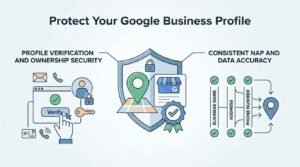
Proactive protection strategies are the ongoing security and verification practices that reduce a Google Business Profile’s vulnerability to manipulation before an attack happens, rather than reacting after damage occurs. Businesses that implement structured protection measures report significantly fewer successful manipulation incidents than those relying on reactive monitoring alone.
Profile Verification and Ownership Security
Two-factor authentication on the Google account managing the profile is the single strongest defense against unauthorized ownership claims, since most hijacking attempts exploit weak or reused passwords rather than sophisticated technical exploits.
- Enable two-factor authentication on the primary Google account.
- Add a trusted secondary manager rather than relying on a single account owner.
- Remove former employees’ access immediately after departure.
- Verify listing ownership status quarterly through the dashboard.
Consistent NAP and Data Accuracy
Keeping your business name, address, and phone number identical across your website, citations, and Google Business Profile makes fraudulent suggested edits easier to identify and dispute, since any inconsistency becomes immediately obvious against a documented baseline.
When to Escalate to Google Support or Legal Action
Escalating to Google Support or legal action becomes necessary when standard reporting tools fail to resolve manipulation within a reasonable timeframe, or when the manipulation causes measurable financial harm through lost rankings, calls, or revenue. I generally advise clients to escalate beyond self-service tools after two unsuccessful reporting attempts spanning three or more weeks.
Legal action, including cease-and-desist letters or claims under unfair competition statutes, becomes relevant when manipulation is severe, documented, and tied directly to identifiable financial damages. Most cases resolve through Google’s own escalation channels before reaching that point, but persistent or coordinated attacks sometimes require it.
Conclusion
Google Business Profile manipulation spans fake reviews, false edits, duplicate listings, and outright impersonation, each exploiting a different trust gap in Google’s open editing system.
We see monitoring and fast reporting as the difference between a contained incident and lasting ranking damage across your local search presence.
Protecting your visibility takes ongoing vigilance, and our team at White Label SEO Service helps businesses monitor, defend, and strengthen their local search presence.
Frequently Asked Questions
Can competitors really manipulate my Google Business Profile?
Yes, competitors can manipulate your profile through fake reviews, false suggested edits, and closure flags. Google’s open editing system allows any user to propose changes, which creates exploitable gaps.
How do I know if my negative reviews are fake?
Fake reviews typically cluster within a short timeframe, come from accounts with no history, and use generic language unrelated to your actual services. A sudden spike of similar one-star reviews is the strongest warning sign.
What should I do if a competitor changes my business information?
Revert the incorrect information immediately through your Business Profile dashboard. Document your original correct details with supporting evidence in case the false edit recurs.
Can I get suspended for reporting a competitor’s fake profile?
No, reporting a genuinely fraudulent listing does not risk your own profile’s standing. Google’s reporting tools are designed specifically to flag policy violations without penalizing the reporting business.
How long does it take Google to remove a fake review?
Removal timelines typically range from a few days to three weeks, depending on the volume of evidence and escalation path used. Straightforward policy violations resolve faster than disputed edge cases.
Does competitor manipulation affect my local search rankings?
Yes, manipulation tactics like fake negative reviews, false closures, and category changes can directly suppress local pack visibility. Ranking impact often begins within days of the manipulation event.
Should I hire an agency to monitor my Google Business Profile?
Hiring an agency makes sense for businesses without internal bandwidth for weekly monitoring and dispute filing. Professional monitoring catches manipulation faster, within the critical early window when reversal is easiest.