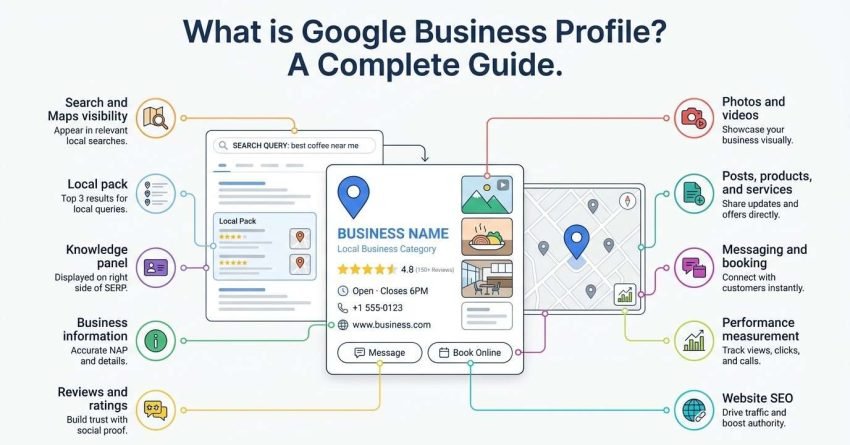
Google Business Profile is a free Google tool that lets a business control how it appears in Google Search and Google Maps, including its name, hours, location, photos, reviews, and contact options. It is the single largest lever most local businesses have over their own search visibility.
I have watched businesses double their inbound calls without touching their website. The profile was the whole change. Ignoring it means handing your local visibility to a competitor who filled theirs out properly.
This guide covers what the profile is and where it appears, who qualifies and how to verify, every field inside the dashboard and what each one controls, how Google actually ranks profiles, the content features that drive engagement, how to measure performance and protect against suspension, and how the profile connects to your wider local SEO strategy.
What Google Business Profile Is and Why It Exists
Google Business Profile is a free business listing tool that controls how a company appears across Google Search, Google Maps, and the local pack. Google built it because most local searches never reach a website. Someone searching “plumber near me” wants a phone number and a rating, not a homepage.
I think of the profile as a second website that Google hosts for you. It has its own ranking factors, its own analytics, and its own conversion paths. Most of the businesses I work with treat it as an afterthought, then wonder why the competitor three blocks away outranks them.
The tool replaced Google My Business in 2021. The name changed, the dashboard moved into Search and Maps directly, but the underlying function stayed identical.
The Difference Between a Profile and a Listing
A listing is the public result users see. A profile is the owner-controlled dashboard behind it. Google can generate a listing for your business without your involvement, pulling data from directories, user submissions, and street-level imagery.
That distinction matters more than it sounds. An unclaimed listing still ranks, still collects reviews, and still shows a location. It just shows whatever Google guessed, and anyone can suggest edits to it.
Claiming converts the listing into a profile you control.
Where Your Profile Appears in Search
Your profile surfaces in four places: the local pack on branded and unbranded searches, the knowledge panel on direct brand searches, Google Maps results, and increasingly inside AI-generated local answers. Each surface pulls from the same data set but displays different fields.
The local pack shows three businesses. The knowledge panel shows one. That gap explains why so much local SEO effort concentrates on the top three positions.
How Google Business Profile Fits Into Local Search
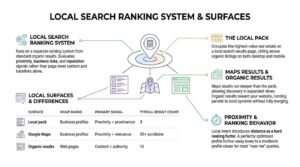
Local search runs on a separate ranking system from standard organic results. Google evaluates proximity, business data, and reputation signals rather than page-level content and backlinks alone. Your profile feeds that system directly.
Here is how the three main local surfaces differ:
| Surface | What ranks | Primary signal | Typical result count |
| Local pack | Business profiles | Proximity + prominence | 3 |
| Google Maps | Business profiles | Proximity + relevance | 20+ scrollable |
| Organic results | Web pages | Content + authority | 10 |
I run both systems in parallel for every local client. Skipping either one leaves visibility on the table, because the same searcher will scroll past the pack into organic results within seconds.
The Local Pack, Maps, and Organic Results
The local pack occupies the highest-value real estate on a local search results page, sitting above organic listings on both desktop and mobile. A BrightLocal study of local search behavior found that 76% of people who search for something nearby on their phone visit a business within 24 hours.
Maps results run deeper than the pack. A business sitting at position seven in Maps still gets found by searchers who tap “more places.”
Organic results reward your website. The two systems overlap but never fully merge.
Why Local Intent Changes Ranking Behavior
Local intent introduces distance as a hard ranking factor, which no amount of optimization overrides completely. A perfectly optimized profile twelve miles from the searcher loses to a mediocre profile two miles away for most “near me” queries.
That constraint reshapes strategy. You are not competing nationally. You are competing inside a radius, against a handful of businesses, on signals you can genuinely influence.
Who Can Create a Google Business Profile
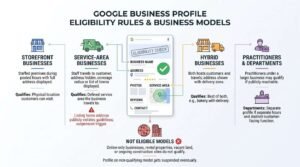
Any business that makes in-person contact with customers during its stated hours qualifies for a Google Business Profile. Google requires either a physical location customers can visit or a defined service area the business travels to.
Online-only businesses do not qualify. Neither do rental properties, vacant land, or ongoing construction sites.
I check eligibility before anything else. A profile built on a non-qualifying model gets suspended eventually, and recovery costs more time than the setup ever saved.
Eligibility Rules by Business Model
Google’s eligibility rules break down along four lines:
- Storefront businesses with staffed premises during posted hours qualify with a full address displayed
- Service-area businesses that travel to customers qualify with the address hidden
- Hybrid businesses that both host customers and travel qualify with the address shown
- Practitioners operating under a larger business may qualify for a separate profile if publicly reachable
Departments within a business, such as a service desk inside a dealership, can hold their own profile when they have separate hours and a distinct customer-facing function.
Storefront, Service-Area, and Hybrid Businesses
A service-area business is a business model where staff travels to the customer rather than serving them at a fixed premises, such as a plumber, mobile locksmith, or cleaning company. Google hides the street address on these profiles and displays a coverage radius or list of towns instead.
Getting this classification wrong is one of the most common suspension triggers I see. Listing a home address publicly on a service-area business violates guidelines, and Google’s manual reviewers catch it.
Hybrid businesses get the best of both. A bakery with delivery shows its address and its delivery zone.
How to Create and Verify a Google Business Profile
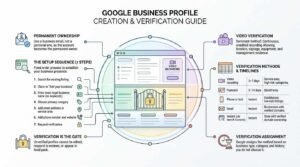
Creating a Google Business Profile takes about fifteen minutes; verification takes anywhere from instant to fourteen days depending on the method Google offers. The account you use becomes the permanent owner, so use a business email rather than a personal one.
Verification is the gate. An unverified profile cannot be edited, cannot respond to reviews, and often will not appear in the local pack at all.
The Setup Sequence
The setup process follows seven steps in a fixed order:
- Sign in to a Google account and search your business name to check for an existing listing
- Claim the existing listing if one appears, or select “Add your business to Google”
- Enter the exact legal business name with no keyword additions
- Choose a primary category from Google’s predefined list
- Add either a street address or a service area
- Add a phone number and website URL
- Request verification and complete the method Google assigns
Never skip step one. Duplicate profiles created over an existing listing cause merge conflicts that take weeks to untangle.
Verification Methods and Timelines
Google assigns the verification method based on business type, category, and history. You do not choose it.
| Method | Typical timeline | Common for |
| Video recording | 3–7 days | Service-area, high-risk categories |
| Postcard | 5–14 days | Storefronts |
| Phone or text | Instant | Established, low-risk listings |
| Instant | Businesses with verified domains | |
| Instant (via Search Console) | Instant | Sites with verified domain ownership |
Video verification now dominates. Google asks for a continuous, unedited recording showing your location, signage, equipment, and evidence you manage the business.
Every Field Inside Your Profile and What It Controls
Every field in your Google Business Profile maps to a specific function: identification, discovery, or conversion. Filling all of them is the cheapest ranking work available, and Google’s own guidance states that complete profiles are twice as likely to be considered reputable by consumers.
I audit fields before I audit anything else on a local account. Half-finished profiles are the norm, not the exception.
Core Identity Fields
Identity fields tell Google who you are and where. These are business name, address, phone, hours, and website URL, collectively known as your NAP data.
Your business name must match real-world signage exactly. Adding “Best” or a city name to the field is a guideline violation, even though competitors do it constantly.
Hours affect ranking more than most owners expect. Google filters “open now” searches aggressively.
Discovery Fields
Discovery fields help Google match your profile to queries. This group covers primary and secondary categories, attributes, the business description, opening date, and service or product lists.
The business description holds 750 characters and does not directly influence rankings. It does influence click-through, and it appears in AI-generated summaries.
Attributes such as “wheelchair accessible” or “women-owned” surface as filters in Maps, which pulls in searchers filtering for exactly those traits.
Conversion Fields
Conversion fields turn visibility into contact. Booking links, messaging, order buttons, menu links, and appointment URLs all sit here.
| Field | What it controls | Impact |
| Booking link | Direct appointment scheduling | High for services |
| Messaging | In-profile chat | High for urgent needs |
| Order online | Food and retail transactions | High for hospitality |
| Website URL | Traffic to your site | Universal |
| Call button | Direct phone contact | Highest on mobile |
How Google Ranks Business Profiles
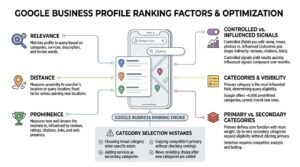
Google ranks business profiles using three published factors: relevance, distance, and prominence. Relevance measures how well your profile matches the query, distance measures physical proximity to the searcher, and prominence measures how well-known your business is both online and offline.
No single factor wins alone. A highly prominent business far from the searcher loses to a moderately prominent one nearby, and vice versa.
Relevance, Distance, and Prominence
Relevance comes from your categories, services, description, and the words in your reviews. Distance comes from the searcher’s location or the location named in the query. Prominence comes from reviews, ratings, citations, links to your website, and general web presence.
Prominence is the factor you influence most. It absorbs signals from your entire online footprint, which is why profile performance and website authority move together.
Distance is fixed unless you open another location.
Signals You Control vs. Signals You Influence
Controlled signals are fields you edit directly: name, categories, hours, attributes, photos, and posts. Influenced signals are outcomes you shape indirectly: review volume, review sentiment, citation consistency, and local link building from community sources.
I prioritize controlled signals first because they produce results within days. Influenced signals compound over months, which matches the general pattern of how long SEO takes across any channel.
The mistake is optimizing controlled signals endlessly while ignoring the influenced ones that actually separate the top three from everyone else.
Categories and How They Shape Visibility
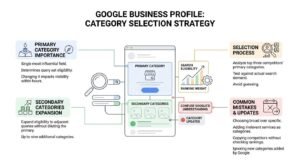
Your primary category is the single most influential field in your entire profile. It determines which query sets your business is eligible to appear for, and changing it changes your visibility within hours.
Google offers roughly 4,000 predefined categories. You cannot invent one.
Primary vs. Secondary Categories
The primary category defines your core business function and carries the most ranking weight. Secondary categories, up to nine of them, expand your eligibility into adjacent query sets without diluting the primary.
I pick the primary by looking at what the top three ranking competitors use, then testing against actual search demand. Guessing here wastes months.
Secondary categories are additive, not free. Irrelevant ones confuse Google’s understanding of your business.
Category Selection Mistakes
The most common category errors follow a pattern:
- Choosing a broad category when a specific one exists
- Adding secondary categories that describe services rather than business types
- Copying a competitor’s primary without checking their actual rankings
- Never revisiting the choice after Google adds new categories
Google updates the category list several times a year. A category that did not exist when you set up your profile may fit better now.
NAP Consistency and Citation Foundations
NAP consistency means your business name, address, and phone number appear in an identical format across every website that mentions your business. Google uses that consistency as a trust signal when deciding whether two listings describe the same real-world entity.
Inconsistent data splits your prominence. A profile listed as “St.” on one directory and “Street” on another sends weaker signals than one listed identically everywhere.
Citations are the mentions themselves. Building local citations across relevant directories, industry sites, and data aggregators reinforces the connection between your profile and your real-world presence. The work is unglamorous, and it moves rankings.
Reviews, Ratings, and Reputation Signals
Reviews influence both ranking and conversion, and they are the strongest prominence signal available to most local businesses. A BrightLocal consumer survey found that 75% of consumers read online reviews when evaluating local businesses.
Volume, recency, rating, and keyword content all matter. A profile with 200 reviews from 2021 underperforms one with 60 reviews from the last six months.
How Reviews Influence Rankings
Review signals feed prominence directly. Google reads review text for topical relevance, which means a review mentioning “emergency boiler repair” helps you rank for that phrase.
Rating matters, but perfection reads as suspicious. Profiles sitting at a flat 5.0 across hundreds of reviews attract filtering scrutiny more than profiles at 4.6.
Steady review velocity beats bursts. Twenty reviews in one week after eight months of silence triggers spam detection.
Responding, Reporting, and Recovery
Respond to every review, positive and negative, within a few days. Google’s own guidance confirms that responding to reviews improves local ranking and builds trust with prospective customers.
Fake and policy-violating reviews can be reported, though removal is inconsistent. Building genuine review generation into your customer process protects you better than fighting individual bad reviews.
A negative review answered well converts more readers than a five-star with no reply.
Photos, Videos, and Visual Content
Photos drive engagement and directly affect click-through from the local pack. Google reports that businesses with photos receive 42% more direction requests and 35% more website clicks than businesses without them.
Upload real photos, not stock. Google’s image recognition and user reporting both catch generic imagery.
I recommend a baseline of exterior shots for recognition, interior shots for expectation-setting, team shots for trust, and product or work-in-progress shots for proof. Refresh them quarterly, because photo recency feeds the freshness signals Google reads across your profile.
Google Posts, Products, and Services Modules
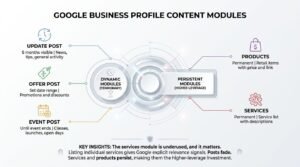
Posts, products, and services are content modules inside your profile that add fresh, query-relevant text without touching your website. Each module serves a different stage of the customer decision.
| Module | Lifespan | Best used for |
| Update post | 6 months visible | News, tips, general activity |
| Offer post | Set date range | Promotions and discounts |
| Event post | Until event ends | Classes, launches, open days |
| Products | Permanent | Retail items with price and link |
| Services | Permanent | Service list with descriptions |
The services module is underused, and it matters. Listing individual services with descriptions gives Google explicit relevance signals it otherwise infers.
Posts fade. Services and products persist, which makes them the higher-leverage investment for most businesses.
The Q&A Section and Owner-Seeded Questions
The Q&A section allows anyone to ask a public question about your business, and anyone to answer it. Unanswered questions sit visibly on your profile and get answered by strangers who often get it wrong.
You can seed your own questions and answer them from the business account. This is permitted,d and it works:
- List the ten questions your team answers most often on the phone
- Post each one from a personal account
- Answer from the verified business account
- Upvote the correct answers to pin them to the top
Monitor weekly. Competitor-planted questions and misinformation both appear here more often than owners realise.
Messaging, Booking, and Direct Conversion Features
Conversion features let a searcher act without leaving the search results page. Messaging enables live chat from the profile, booking connects to a scheduling provider, and order buttons route to a transaction partner.
Enable messaging only if you can answer within a few hours. Google tracks response rate and displays slow response times publicly.
Booking integrations depend on your scheduling software supporting Google’s Reserve partners. Where direct integration is unavailable, an appointment URL pointed at your own booking page achieves most of the same effect and keeps the conversion inside your own conversion tracking setup.
Multi-Location and Franchise Profile Management
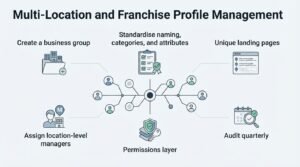
Businesses with multiple locations need one profile per physical location, managed under a single business group in the Google Business Profile Manager. Bulk management unlocks at ten or more locations, including bulk verification and spreadsheet uploads.
Multi-location management follows a consistent sequence:
- Create a business group to hold all locations under one owner account
- Standardise naming, categories, and attributes across every location
- Give each location a unique landing page on your website, never the homepage
- Assign location-level managers for reviews and posts
- Audit quarterly for duplicates and unauthorised edits
Location pages are the piece most brands skip. Pointing every profile at the same homepage collapses the relevance signal that location page optimization is designed to produce.
Franchises add a permissions layer. Corporate owns the account; franchisees manage day-to-day.
Measuring Performance with Profile Insights
Google Business Profile performance data reports how customers found your profile, what they searched, and what actions they took. The data lives inside the profile dashboard and covers a rolling six-month window.
Export monthly. Google’s retention window is short, rt and historical comparison is where the value sits.
The Metrics That Actually Matter
Not every metric in the dashboard deserves attention. These five do:
| Metric | What it tells you | Watch for |
| Searches (direct vs discovery) | Brand demand vs new discovery | Discovery growth = SEO working |
| Search queries | Actual phrases used | New query themes to target |
| Calls | Direct phone conversions | Day and time patterns |
| Direction requests | Physical visit intent | Geographic spread |
| Website clicks | Traffic handed to your site | Compare against analytics |
Discovery searches are the number I report first. Direct searches grow with brand awareness; discovery searches grow with local SEO work.
Connecting Profile Data to Revenue
Profile actions become revenue only when you can trace them. Tag your profile website URL with UTM parameters, so Google Analytics separates profile traffic from general organic traffic.
Calls need call tracking to attribute properly. Use a tracking number in the secondary phone field and keep your real number primary, which preserves NAP consistency while capturing attribution.
Without this plumbing, profile reporting stays a vanity exercise and the wider SEO ROI measurement picture stays incomplete.
Suspensions, Edits, and Profile Risk Management
A Google Business Profile suspension removes your listing from Search and Maps immediately, usually without warning. Soft suspensions remove management access; hard suspensions remove the listing entirely.
Suspensions cluster around a short list of causes:
- Business name containing keywords or locations not on real signage
- A service-area business displaying a residential address
- Address changes made alongside category or name changes at the same time
- Virtual offices, coworking desks, or PO boxes used as the address
- Review manipulation detected across the account
- Category selection inconsistent with the verified business type
Reinstatement requires an appeal with evidence: signage photos, utility bills, business registration, and vehicle branding for service-area businesses. Success rates improve dramatically with documentation.
Third parties can also suggest edits to your profile. Google sometimes applies them automatically, so check your hours, categories, and address monthly.
How Your Profile Works With Your Website SEO
Your profile and your website reinforce each other through shared signals. Google cross-references the NAP data on your profile against your website, checks that your landing page matches the profile’s stated services, and reads your site’s authority as a prominence input.
A strong profile paired with a weak site plateaus fast. Rankings in the local pack lift, then stall, because prominence has nowhere left to grow.
The site work that moves the profile is specific: a dedicated location page per profile, embedded schema markup matching the profile data, and internal links pointing at those location pages. Adding local business schema makes the connection between site and profile explicit rather than inferred.
Common Google Business Profile Mistakes
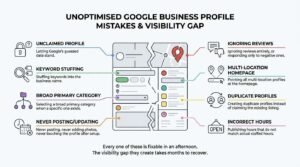
The mistakes that cost the most visibility repeat across almost every unoptimised profile:
- Leaving the profile unclaimed and letting Google’s guessed data stand
- Stuffing keywords into the business name
- Selecting a broad primary category when a specific one exists
- Never posting, never adding photos, never touching the profile after setup
- Ignoring reviews entirely, or responding only to negative ones
- Pointing all multi-location profiles at the homepage
- Creating duplicate profiles instead of claiming the existing listing
- Publishing hours that do not match actual staffed hours
Every one of these is fixable in an afternoon. The visibility gap they create takes months to recover.
What Google Business Profile Costs and Returns
Google Business Profile is completely free, with no paid tier, no listing fee, and no charge for any feature inside the dashboard. Google monetises the surrounding surface through Local Services Ads and search ads, not through the profile itself.
The real cost is time. I budget four to six hours for initial setup and optimization, then two to three hours monthly for posts, photos, review responses, and Q&A monitoring.
Return varies by category and competition, but the ratio is unusually favourable. A profile that moves from position eight to the local pack typically sees call volume shift within weeks, which is far faster than the SEO timeline for organic rankings on the same terms.
Conclusion
Google Business Profile controls how your business appears across Search and Maps, ranking on relevance, distance, and prominence signals you shape directly.
The profile is one component of local visibility. Location pages, citations, reviews, and site authority all feed it, and each deserves dedicated attention.
We build and manage local search programs that connect profile performance to revenue. Talk to White Label SEO Service about your local visibility.
Frequently Asked Questions
Is Google Business Profile free?
Yes, Google Business Profile is completely free with no paid tier. Google charges nothing for setup, verification, posts, messaging, or any dashboard feature.
How long does verification take?
Verification takes from instant to fourteen days depending on the method assigned. Video and postcard verification typically take three to fourteen days; phone and email are instant.
Do I need a physical address?
No, service-area businesses can verify without displaying an address. Google still requires an address during setup for verification purposes, but hides it publicly.
How often should I post?
Post at least once weekly to maintain freshness signals. Updated posts stay visible for six months, so consistency matters more than volume.
Can I have two profiles for one business?
No, one physical location gets one profile. Duplicate profiles for the same location violate guidelines and usually result in suspension or forced merging.
Why did my profile get suspended?
Suspensions most often follow keyword-stuffed business names, ineligible addresses, or multiple simultaneous edits. Appeal with signage photos, utility bills, and business registration documents.
How long until my profile ranks?
A verified, complete profile usually appears in Maps within days. Competitive local pack positions typically take three to six months of consistent review and citation work.