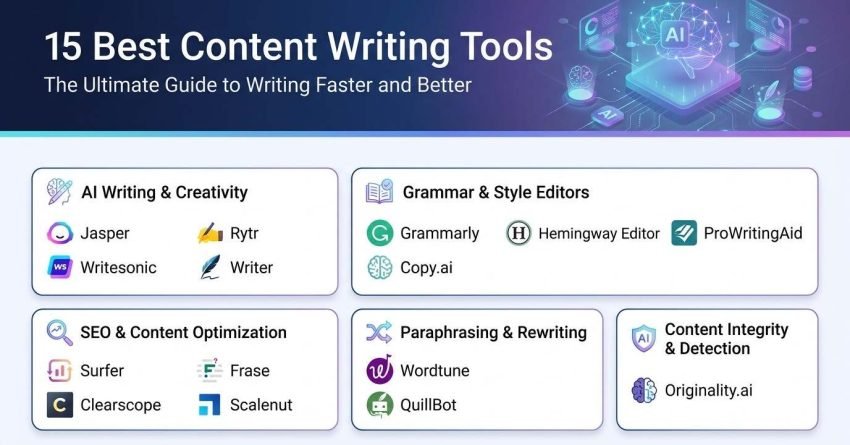
The best content writing tool depends on which part of the job is slowing you down. Drafting, optimizing, editing, and verifying are four different problems, and no single platform solves all four well. I tested 15 tools across live client work to sort them by the problem they actually fix.
Below, I cover what these tools are and the criteria I judge them on, how I ran the testing, a comparison table, and the full 15-tool breakdown from AI drafting through optimization and editing, then the parts most roundups skip: where AI output still breaks, what a full stack costs across a year, and how to sequence purchases so you stop paying twice for the same function.
What is a Content Writing Tool?
A content writing tool is software that assists with creating, editing, optimizing, or verifying written content such as blog posts, landing pages, product descriptions, emails, and social captions. The category spans grammar checking, AI drafting, SEO scoring, readability analysis, paraphrasing, and originality verification.
Four functional groups make up the market. Drafting tools generate text from a prompt or template. Editing tools correct and refine text you already wrote. Optimization tools score content against ranking pages and tell you what to add. Verification tools check originality, detect machine-written passages, and confirm you can publish safely.
Most teams end up owning at least one from each group. That is not overspending; it is the shape of the work. A drafting tool that also scores for SEO usually does one of those jobs adequately and the other poorly.
The buyers who benefit most are the ones publishing on a schedule. Freelance writers, in-house marketers, agency content teams, ecommerce managers writing hundreds of product descriptions, and founders producing their own blog all hit the same wall: output volume outpaces available hours.
The business case is straightforward. Content that ranks brings in traffic that does not require ad spend, and traffic that arrives with commercial intent converts. Tools shorten the distance between a topic idea and a published page that can compete.
What they do not do is decide what to publish or judge whether the output is true. That still belongs to a person. Every tool in this list is a multiplier on human judgment, never a substitute for it.
What to Look for in a Content Writing Tool?
I evaluate every tool against six things before it goes anywhere near a client account. Each one has a specific test I run during the trial period, because vendor feature lists tell you what exists, not what works.
Accuracy and Human-Like Output
I paste a 400-word sample of the target brand’s existing copy, ask the tool to continue it, and read the result aloud. If a client would recognise the continuation as theirs, the tool passes. If it produces flat, evenly weighted sentences with no rhythm, it fails no matter how good the feature list looks. Repetitive machine cadence is the single fastest way to lose reader trust.
SEO Optimization Features
I check whether the tool distinguishes between terms that matter and terms that merely appear. Flat keyword lists with no weighting push writers toward stuffing. What I want is semantic term prioritisation, live scoring as I type, search intent classification, and heading suggestions pulled from what currently ranks. Anything less and I am back to manual competitor analysis.
Key Features and Versatility
I test whether the tool holds context across a full long-form piece. I draft a 2,500-word article in one session and check whether section eight still remembers the argument from section two. Tools with small context windows produce articles that contradict themselves halfway through, and stitching those back together costs more time than writing from scratch.
Brand Voice and Customization
I set up two distinct voices in the same account and switch between them mid-session. This is the test that separates real voice engines from tone dropdowns. A tool that stores one global style and calls it brand voice is unusable for anyone handling multiple brands, and that includes almost every agency.
Pricing and Value
I calculate cost per published piece, not cost per month. A $59 platform that produces publishable drafts beats a $19 platform that needs ninety minutes of rewriting per article. I also check what happens at the plan ceiling, because word credits and article limits are where the real cost hides.
Ease of Use and Integrations
I time how long it takes to go from login to first usable output with no documentation. Then I check whether it writes into Google Docs and WordPress directly. Tools that force copy-paste between platforms add friction at exactly the point where a writer’s attention is most valuable.
These six criteria come out of running tools across many accounts at once rather than one. Volume exposes the weaknesses that a single-brand trial never surfaces.
How I Selected the Best Content Writing Tools
I tested these tools inside live delivery work at White Label SEO Service, where we produce content writing services for agency partners under their own branding. That setup shapes the testing in a way in-house use does not, because every draft ships with someone else’s reputation attached to it.
Multi-brand delivery is the harshest environment a content tool can face. We switch between voices constantly, across SaaS, ecommerce, local service businesses, and B2B, and a tool that cannot hold a distinct voice per account gets caught immediately. Alongside content, our team runs technical SEO, link building, and Google Analytics services for the same accounts, so I can watch whether an optimization score actually correlates with a ranking movement or just makes a dashboard look green.
Here is what I weighted during testing.
Real-World Ranking and Traffic Impact
I tracked published pieces from draft to indexed position and watched what happened over the following eight to twelve weeks. Tools whose output climbed consistently, held position, and pulled qualified sessions scored highest. Tools whose output ranked briefly then slid back told me the optimization was surface-level.
On-Page SEO Quality and Optimization Depth
I examined how each tool handled semantic coverage rather than raw keyword frequency. Good tools surface the entities and subtopics that ranking pages share and that my draft is missing. Weak tools hand over a term list with no hierarchy, which produces content that reads like it was assembled to satisfy a checker.
Output Quality and Natural Flow
Every draft got read aloud before it counted. I flagged invented statistics, circular paragraphs that restated the previous point, and transitions that existed only to fill space. Drafts needing more than thirty minutes of structural rework per thousand words were marked as net time losses regardless of how fast they generated.
Speed and Workflow Fit
I measured the full cycle: brief to outline to draft to optimized to exported. Generation speed alone is a vanity metric. What matters is whether the tool shortens the whole pipeline or just moves the bottleneck downstream into editing.
Customization and Brand Consistency
I set up multiple voice profiles per tool and had different writers produce pieces for the same brand in the same week. Then I read them as a set. If a reader could tell three people wrote them, the tool’s voice controls were decorative.
Value and Practical Limits
I hit the plan ceilings deliberately to see what breaks. Word caps, article credits, seat limits, and overage pricing decide whether a tool scales with you or becomes a monthly negotiation. Fair limits at a fair price beat generous limits attached to output nobody can publish.
Summary Table: 12 Best Content Writing Tools
Before the detailed breakdowns, here is the full comparison so you can shortlist by budget and by the job you need done. I added a free-tier column because whether you can trial a tool properly without a card changes the buying decision.
| Tool Name | Best For | Key Features | Starting Price | Free Tier? | Our Notes |
| Jasper | AI content generation at scale | Brand voice, long-form editor, SEO mode | $69/month | Trial only | Strongest voice control, priced for teams, not solos |
| Grammarly | Grammar and style checking | Real-time edits, tone detection, plagiarism scan | $12/month | Yes | Runs everywhere you type, non-negotiable for client work |
| Surfer | SEO content optimization | Live content score, NLP terms, SERP analysis | $99/month | No | Best score-to-ranking correlation we have measured |
| Copy.ai | Quick AI copywriting | Short-form templates, workflows, brand voice | $49/month | Yes | Excellent for ads, thin past 500 words |
| Hemingway Editor | Readability improvement | Sentence grading, passive voice, adverb flags | Free | Yes | Free web version still does the whole job |
| Frase | Content research and optimization | SERP research, briefs, question mining | $45/month | Trial only | Best research-to-brief workflow at this price |
| Clearscope | Enterprise content optimization | Relevance grading, Google Docs sidebar, inventory | $189/month | No | Most accurate scoring, credits force rationing |
| Writesonic | Budget AI writing | Article generator, bulk mode, live search | $49/month | Yes | Solid bulk output, needs heavier editing |
| Wordtune | AI rewriting and paraphrasing | Multi-option rewrites, tone shift, expand/shorten | Pro: $13.99/month | Yes | Fixes sentences you cannot unstick |
| QuillBot | Paraphrasing and summarizing | Paraphrase modes, summariser, citations | $8.33/month | Yes | Research aid, not a content production tool |
| Rytr | Affordable AI content generation | 40+ templates, tone options, plagiarism check | $9/month | Yes | Cheapest usable option, expect real editing time |
| Scalenut | All-in-one SEO content platform | Clustering, briefs, AI writing, optimization | $39/month | Trial only | Replaces three subscriptions at adequate quality |
| Writer | Enterprise brand governance | Style rules engine, terminology control, API | Custom | Trial only | Enforces guidelines rather than suggesting them |
| Originality.ai | AI detection and plagiarism | AI scanning, plagiarism, readability, team logs | Pay-as-you-go from $30 | No | The verification layer AI-heavy stacks are missing |
| ProWritingAid | Deep style and structure editing | 20+ reports, pacing, sentence variety, cliché | $10/month | Yes | Manuscript-grade reporting on longer pieces |
Pricing reflects publicly listed plans at the time of writing and shifts frequently. Confirm current rates and any annual discount on each vendor’s own pricing page before committing.
12 Best Content Writing Tools in 2026 (Free + Paid)
- Jasper — best for AI content at scale
- Grammarly — best for grammar and style checking
- Surfer — best for SEO content optimization
- Copy.ai — best for quick AI copywriting
- Hemingway Editor — best for readability improvement
- Frase — best for content research and briefs
- Clearscope — best for enterprise content optimization
- WriteSonic — best for budget AI writing
- Wordtune — best for AI rewriting and paraphrasing
- QuillBot — best for paraphrasing and summarizing
- Rytr — best for affordable AI generation
- Scalenut — best for all-in-one SEO content
- Writer — best for enterprise brand governance
- Originality.ai — best for AI detection and plagiarism scanning
- ProWritingAid — best for deep style and structure editing
Here are the details on each one.
1. Jasper – Best for AI Content at Scale
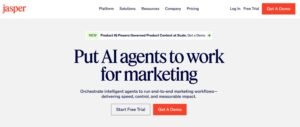
Best For: Marketing teams and agencies producing high volumes of content across multiple brands who need voice consistency to survive contact with several writers.
How I Use It: I use Jasper for first-draft blog sections, email sequences, and landing page copy when a client account needs steady output and the voice has already been defined and loaded.
Quick Overview
Jasper is an AI writing platform aimed at marketing and business content rather than general-purpose text generation. Its defining feature is a voice engine that ingests existing brand material and reproduces the resulting style across every output, which is a genuinely different proposition from a tone selector.
The voice engine is what earns it the top position for us. Load a brand’s real published copy, and subsequent drafts arrive already sounding like that brand, which removes the largest chunk of editing time on any AI draft. On multi-account delivery, that difference compounds fast.
I recommend Jasper for teams publishing above fifteen pieces a month, agencies handling several brands, and content operations where more than one writer touches the same account. Solo writers producing a handful of posts monthly are paying for infrastructure they will not use.
Jasper Key Features
- Brand Voice Engine: Ingests sample content and extracts tone, vocabulary preferences, and sentence rhythm into a reusable profile, then applies it automatically to every generation in that workspace without re-prompting.
- Long-Form Document Editor: Supports inline instructions written in plain language mid-paragraph, so you can direct the next passage without leaving the document or resetting context.
- Knowledge Base: Stores product facts, positioning statements, audience details, and terminology so generated content references verified information instead of inventing plausible-sounding substitutes.
- SEO Mode: Connects to third-party optimization data to surface term coverage and content scoring inside the editor, cutting the switching cost between drafting and optimizing.
- Template Library: Covers ads, product descriptions, email sequences, landing pages, and social posts using established copy frameworks that give first drafts a defensible structure.
- Team Workspaces: Shared voice profiles, permission levels, and asset libraries let distributed writers and freelancers generate from identical settings rather than personal preferences.
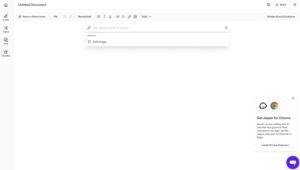
Jasper Pros
- Voice Consistency Genuinely Holds: Loaded voice profiles survive across formats and writers, keeping blogs, emails, and social copy recognisably one brand without circulated style documents.
- Inline Commands Speed Real Drafting: Mid-paragraph instructions replace template hopping, letting drafting flow conversationally and cutting first-draft time noticeably on longer pieces.
- Knowledge Base Reduces Invented Facts: Stored product and positioning data anchors output to verified information, cutting the hallucination rate that plagues generic AI drafting.
- Templates Produce Usable Starting Points: Framework-based templates deliver drafts with working structure, so editing improves copy rather than rebuilding it from nothing.
- Multi-Brand Switching Works Cleanly: Separate workspaces per brand keep voices isolated, which matters enormously when one team writes for several accounts weekly.
Jasper Cons
- Fact-Checking Remains Mandatory: Jasper still produces confident inaccuracies, particularly statistics and dates, so every claim requires verification before publication without exception.
- Setup Investment Before Value Appears: Voice training, knowledge base population, and command syntax take real hours upfront, frustrating anyone expecting immediate output quality.
- Pricing Excludes Small Publishers: Entry cost outpaces solo and small-team budgets, making value hard to justify below roughly fifteen published pieces monthly.
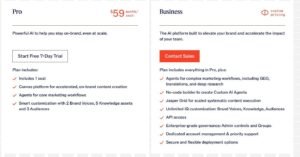
Jasper Pricing
- Free trial available
- Creator: from $69/month
- Pro: from $99/month
- Business: Custom pricing
Jasper Reviews
- G2: 4.7 out of 5 stars (1,200+ reviews)
- Capterra: 4.7 out of 5 stars (1,800+ reviews)
Reviewers consistently rate output quality and voice control highly while flagging cost and the initial setup burden. The pattern across reviews is clear: teams with defined workflows report strong value, individual creators report paying for capacity they never reach.
2. Grammarly – Best for Grammar and Style Checking

Best For: Anyone whose writing reaches a client, a customer, or a published page and needs mechanical correctness enforced without a separate editing step.
How I Use It: Every deliverable we send passes through Grammarly before it leaves — articles, client emails, proposals, and social copy. It catches the errors that survive a human read because the writer already knows what the sentence was meant to say.
Quick Overview
Grammarly is a writing assistant that checks grammar, spelling, punctuation, clarity, and tone in real time wherever you type. Its advantage over standalone editors is location: it operates inside the browser, the CMS, the email client, and the document, rather than requiring you to bring text to it.
That ubiquity is the entire value proposition. Editing tools that live on their own website get used on important documents and skipped on everything else, which is precisely backwards, because the embarrassing typo usually ships in a quick email rather than a reviewed article.
I recommend it for writers, marketers, agencies, and anyone doing client-facing communication. The free tier handles grammar and spelling properly. Paid adds tone detection, clarity rewrites, and originality scanning, which matter once your writing carries commercial weight.
Grammarly Key Features
- Real-Time Correction Across Applications: Flags errors as you type inside browsers, desktop apps, email clients, and content management systems, with one-click fixes and plain-language explanations attached.
- Tone Detection: Reads the emotional register of your draft and reports how it will land, letting you catch a proposal that reads cold or a reply that reads defensive before sending.
- Clarity and Conciseness Rewrites: Identifies wordiness, passive constructions, and tangled phrasing, then offers a tightened alternative that preserves your meaning while reducing reader effort.
- Plagiarism and Originality Scanning: Compares your text against web and academic sources on paid tiers, surfacing unintentional overlap before it becomes a client-facing problem.
- Browser and Application Extensions: Native operation across major browsers plus desktop and mobile apps means the checker follows your writing instead of the reverse.
- Writing Goal Profiles: Set audience, formality, domain, and intent per document so suggestions match a technical whitepaper differently from a conversational blog post.

Grammarly Pros
- Operates Wherever Writing Happens: Corrections appear in email, documents, CMS, and chat without copying text anywhere, which means it actually gets used consistently.
- Catches What Writers Cannot See: Authors read intended meaning rather than actual text, so a mechanical checker catches errors that survive careful human proofreading.
- Tone Detection Prevents Awkward Sends: Seeing how a message reads emotionally before sending prevents the defensive reply and the accidentally cold proposal.
- Explanations Build Writing Skill: Each suggestion includes the underlying rule, so writers stop repeating the same error rather than accepting endless corrections.
- Free Tier Is Genuinely Useful: Core grammar and spelling checking works without payment, which is rare and makes it easy to standardise across a whole team.
Grammarly Cons
- Suggestions Over-Correct Deliberate Style: Grammarly flags intentional fragments and rhythm choices as errors, and accepting everything produces flattened, characterless prose.
- Originality Scanning Misses Rephrased Text: Detection handles direct matches well but overlooks meaningfully reworded passages, so it cannot stand as your only originality check.
- Goal Settings Do Not Fully Adapt: Even configured for casual marketing, suggestions still push toward formal register, which fights conversational brand voices constantly.
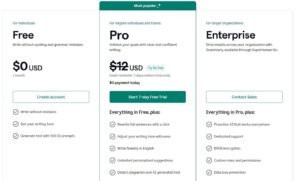
Grammarly Pricing
- Free
- Pro: from $12/month billed annually
- Enterprise: Custom pricing
Grammarly Reviews
- G2: 4.7 out of 5 stars (12,000+ reviews)
- Capterra: 4.7 out of 5 stars (7,000+ reviews)
The review volume alone signals how embedded this tool is. Praise centres on accuracy and cross-platform reach; criticism centres on over-eager suggestions and the sense that the free tier covers most everyday needs.
3. Surfer – Best for SEO Content Optimization

Best For: Content teams and SEO practitioners who need evidence-based guidance on term coverage, structure, and length before publishing into a competitive result page.
How I Use It: I run Surfer on every article intended to rank. It tells me which terms the ranking set shares, roughly how long the piece needs to be, and where my draft is thin, before the piece ships rather than after it underperforms.
Quick Overview
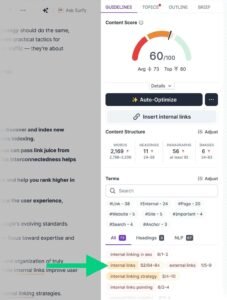
Surfer analyses the pages currently ranking for a target query and turns that analysis into a live content score plus a prioritised term list. Instead of guessing what Google rewards for a query, you get a description of what it is already rewarding.
The live score is the feature that changes writer behaviour. Watching coverage improve sentence by sentence keeps optimization inside the writing process instead of turning it into a separate compliance pass that nobody enjoys, and everyone rushes.
I recommend it for content marketers, SEO agencies, and in-house teams competing for commercial queries. If your content is already ranking comfortably, the marginal value drops. If you are stuck on page two, this is where I would spend first.
Surfer Key Features
- Live Content Score: Compares your draft against the ranking set in real time and updates with each addition, showing exactly which edits move coverage and which change nothing.
- Weighted Term Suggestions: Presents semantic terms ordered by how consistently ranking pages use them, so writers prioritise genuinely important language instead of treating every suggestion equally.
- SERP Analyzer: Breaks down word counts, heading structures, image usage, and term distribution across the top results, exposing the content patterns a query rewards.
- Outline Builder: Extracts heading structures and covered subtopics from ranking pages into a working outline, giving writers a proven skeleton before drafting starts.
- Content Audit: Evaluates already-published pages against current ranking data and identifies specific gaps, enabling targeted updates instead of speculative full rewrites.
- Editor Integrations: Scoring appears inside Google Docs and WordPress, so optimization happens in the drafting environment rather than in a separate browser tab.
[Image Source: Backlinko]
Surfer Pros
- Live Scoring Removes Optimization Guesswork: Immediate feedback on every edit shows which additions improve coverage, preventing both under-optimization and pointless term repetition.
- Weighted Terms Prevent Keyword Stuffing: Prioritised suggestions guide natural inclusion of terms that matter, rather than encouraging writers to cram every listed variation.
- SERP Data Replaces Assumptions: Concrete word counts, heading patterns, and term distributions from ranking pages settle arguments about structure with evidence.
- Audit Feature Finds Fast Wins: Existing page-two content often needs modest additions rather than rewriting, and the audit identifies exactly which additions.
- Integrations Keep Writers In Flow: Scoring inside Docs and WordPress means optimization happens while writing, not as a resented separate task afterwards.
Surfer Cons
- Score Chasing Causes Over-Optimization: Pushing for maximum scores produces stuffed, unnatural prose, and lower-scoring pages frequently outrank higher-scoring ones on user signals.
- Term Suggestions Repeat Across Queries: Closely related queries return near-identical term sets, inflating apparent requirements without adding real semantic value to the piece.
- Pricing Strains Solo Budgets: Entry cost sits above what individual creators typically allocate to optimization, making value contingent on steady publishing volume.

Surfer Pricing
- Essential: from $99/month
- Scale: from $219/month
- Enterprise: Custom pricing
Surfer Reviews
- G2: 4.8 out of 5 stars (500+ reviews)
- Capterra: 4.9 out of 5 stars (400+ reviews)
Reviewers rate data accuracy and live scoring highly and are consistently lukewarm on the bundled AI writing. The recurring theme is that Surfer amplifies a competent writer and does not replace one.
4. Copy.ai – Best for Quick AI Copywriting
Best For: Marketers and small business owners generating high volumes of short-form copy ad variants, subject lines, captions, and product blurbs where iteration speed beats depth.
How I Use It: I use Copy.ai when a campaign needs twenty ad headline variants or a dozen subject lines for testing. It produces the volume that manual brainstorming cannot match on a deadline.
Quick Overview
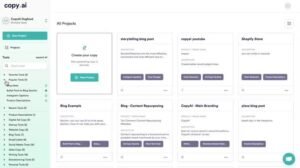
Copy.ai is an AI copywriting platform built around short-form marketing output. Its strength is friction removal: pick a format, supply a few details, receive multiple usable variants immediately, with no prompt engineering required.
Speed on volume is where it earns its place. Generating twenty distinct angles for a Facebook ad in under two minutes changes how much you can test, and testing volume is most of what determines paid campaign performance.
I recommend it for teams running PPC Services and Facebook ads services-style workloads, social media managers, and ecommerce operators writing product copy at scale. It is not a long-form tool, and treating it as one wastes both your time and its actual capability.
Copy.ai Key Features
- Extensive Short-Form Template Library: Covers ads, emails, product descriptions, landing sections, and social posts using established persuasion frameworks that give each output a working structure.
- Workflow Automation: Chains multiple generation steps together so a single input like a product feature set produces a complete matched campaign asset bundle.
- Brand Voice Profiles: Trains on supplied samples to keep tone consistent across formats and team members, though depth trails dedicated voice engines noticeably.
- Long-Form Editor: Extends generation beyond templates for articles and longer pieces, useful for outlines and sections rather than complete publishable drafts.
- Browser Extension: Generates copy directly inside Gmail, Google Docs, and social platforms, keeping short-form output inside the tool where the work happens.
- Team Workspaces: Shared folders, templates, and voice settings organise output by client or campaign so multiple users pull from identical configurations.
[Image Source : Copy.ai]
Copy.ai Pros
- Variant Volume Arrives Fast: Twenty distinct headline angles in two minutes transforms how much creative testing a campaign can realistically support.
- Templates Need No Prompt Skill: Format selection plus basic inputs produces usable copy immediately, so marketers without prompting experience get value on day one.
- Workflow Chaining Builds Whole Campaigns: One input generating a matched asset set across formats removes substantial repetitive work from every launch.
- Free Tier Permits Real Evaluation: Monthly free allowance covers genuine testing rather than a token demo, letting solo users assess fit before paying.
- Voice Profiles Keep Short-Form Cohesive: Applied tone settings make ads and captions across a campaign feel deliberately unified rather than individually authored.
Copy.ai Cons
- Long-Form Output Lacks Substance: Articles read generically, thin out past roughly five hundred words, and need rebuilding rather than editing to reach publishable quality.
- Short-Form Patterns Become Recognisable: Heavy template use produces repeating structural rhythms across campaigns, reducing creative variety unless outputs get manually reworked.
- No SEO Capability Whatsoever: Without keyword data, scoring, or SERP analysis, ranking-focused content requires a separate optimization tool entirely.

Copy.ai Pricing
- Free tier available
- Starter: from $49/month
- Advanced: from $249/month
- Enterprise: Custom pricing
Copy.ai Reviews
- G2: 4.7 out of 5 stars (170+ reviews)
- Capterra: 4.5 out of 5 stars (60+ reviews)
Reviewers value the interface simplicity and template breadth while noting long-form weakness. The consensus positions it as an ideation and variant engine rather than a source of finished copy.
5. Hemingway Editor – Best for Readability Improvement
Best For: Writers whose drafts run dense with long sentences, passive constructions, and technical phrasing that a general audience will not push through.
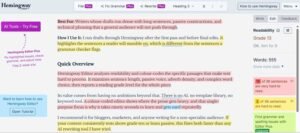
How I Use It: I run drafts through Hemingway after the first pass and before final edits. It highlights the sentences a reader will stumble on, which is different from the sentences a grammar checker flags.
Quick Overview
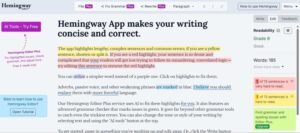
Hemingway Editor analyses readability and colour-codes the specific passages that make text hard to process. It examines sentence length, passive voice, adverb density, and complex word choice, then reports a reading grade level for the whole piece.
Its value comes from having no ambitions beyond that. There is no AI, no template library, no keyword tool. A colour-coded editor shows where the prose gets heavy, and that single-purpose focus is why it takes ninety seconds to learn and gets used repeatedly.
I recommend it for bloggers, marketers, and anyone writing for a non-specialist audience. If your content consistently tests above grade ten or leans passive, this fixes both faster than any AI rewriting tool I have tried.
Hemingway Editor Key Features
- Reading Grade Calculation: Reports the education level required to read your text comfortably, based on sentence length and word complexity across the entire document.
- Sentence Difficulty Highlighting: Colour-codes sentences by processing difficulty, marking hard sentences in yellow and very hard sentences in red so problem passages are visually obvious.
- Passive Voice Detection: Marks passive constructions in green with a per-document allowance, prompting the shift to active voice that makes statements land harder.
- Adverb and Weak Phrase Flagging: Highlights adverbs in blue and suggests replacing the adverb-plus-verb pair with a single stronger verb, cutting filler without losing meaning.
- Document Statistics: Displays word count, sentence count, paragraph count, character count, and estimated reading time for meeting length requirements and formatting consistency.
- Write and Edit Modes: Separates a clean, distraction-free drafting view from the analysis view, so highlighting does not interrupt the composition process.
Hemingway Editor Pros
- Problems Become Visible Instantly: Colour highlighting surfaces every dense sentence and passive construction at a glance, making a long draft scannable in seconds.
- Habits Improve With Repeated Use: Seeing the same constructions flagged repeatedly trains cleaner first drafts, which reduces editing time on everything written afterwards.
- Free Web Version Is Complete: The browser editor includes the full analysis at no cost, which is genuinely unusual in a paid-tier-dominated market.
- Zero Learning Curve Exists: Paste text, read colours, fix highlighted passages. New writers get value immediately without documentation, tutorials, or onboarding.
Hemingway Editor Cons
- Suggestions Ignore Deliberate Craft: Hemingway flags intentional long sentences and rhythmic variation as faults, and following it blindly produces choppy, monotonous prose.
- No Grammar or Spelling Coverage: Readability analysis only, so typos and grammatical errors pass through untouched and require a second tool entirely.
- Target Grade Fights Technical Writing: The implied grade six to eight target conflicts with specialist audiences who expect and require precise technical vocabulary.
Hemingway Editor Pricing
- Free web version
- Hemingway Editor Plus: paid tier with AI editing and desktop apps
Hemingway Editor Reviews
- G2: 4.4 out of 5 stars (45+ reviews)
- Capterra: 4.4 out of 5 stars (10+ reviews)
Reviewers appreciate the simplicity and effectiveness while noting it solves one problem only. The common recommendation is to pair it with a grammar checker rather than expecting it to replace one.
6. Frase – Best for Content Research and Briefs

Best For: Content teams and SEO writers who need the research and briefing stage compressed without losing the depth that makes a brief actually useful to a writer.
How I Use It: I use Frase to build briefs before anyone drafts. It pulls the ranking set, extracts heading patterns and questions, and surfaces subtopics competitors missed, which becomes the writer’s roadmap.
Quick Overview
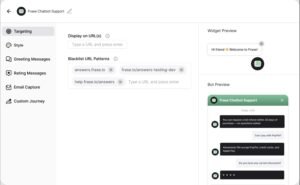
Frase combines SERP research, brief generation, AI assistance, and optimization scoring in one workflow. Its strongest component is research: it scrapes the ranking pages, extracts their structure, mines the questions people ask around the query, and assembles that into a brief.
Research depth at this price is what distinguishes it. Manual competitor analysis for a single article costs a couple of hours of reading and note-taking. Frase compresses that into minutes and produces something a writer can immediately work from.
I recommend it for content marketers, agencies, and writers who want research automated without accepting a shallow output. The AI writing is serviceable but clearly the secondary feature — buy this for the briefs.
Frase Key Features
- SERP Content Extraction: Scrapes and analyses top-ranking pages for your query, pulling out headings, covered topics, cited statistics, and structural patterns automatically.
- AI Outline Generation: Identifies heading structures common across ranking pages and assembles them into a working outline, giving writers a validated framework before drafting.
- Topic Clustering: Groups related queries by search intent so you can see which variations belong in one comprehensive piece and which deserve separate articles.
- Question Mining: Collects People Also Ask entries and related queries from the SERP, surfacing the specific questions your content must answer to match intent.
- Optimization Scoring: Grades your draft against ranking pages for term and topic coverage, integrated directly into the same workflow as the research.
- AI Content Assistance: Generates paragraphs and sections informed by the research data, useful for expanding an outline point rather than producing finished prose.
[Image Source: Frase]
Frase Pros
- Research Compresses to Minutes: Heading extraction, topic identification, and question mining that took two hours manually now takes several minutes reliably.
- Question Mining Exposes Real Gaps: People Also Ask data reveals the angles competitors skipped, which is where genuine coverage advantage actually comes from.
- Outlines Reflect Proven Structure: Generated frameworks mirror what already ranks, so writers build on validated architecture instead of guessing at content flow.
- Clustering Prevents Self-Competition: Seeing which queries share intent stops teams from publishing three articles that split their own ranking signals apart.
- Price Sits Well Below Comparable Depth: Research and optimization at this tier delivers value that competing platforms charge substantially more to match.
Frase Cons
- AI Writing Needs Heavy Rework: Generated prose reads generically and carries no brand voice, requiring substantial editing before any client-facing publication.
- Scoring Trails Dedicated Optimizers: Term recommendations occasionally push unnatural phrasing, making the optimization guidance less dependable than specialist alternatives.
- Full Feature Set Takes Learning: Clustering, briefs, scoring, and generation each have their own logic, and new users often use a fraction of the platform.

Frase Pricing
- Free trial available
- Solo: from $45/month
- Basic: from $115/month
- Team: from $500/month
Frase Reviews
- G2: 4.8 out of 5 stars (290+ reviews)
- Capterra: 4.8 out of 5 stars (330+ reviews)
Reviewers rate the research capability and value highly while noting AI writing weakness. The prevailing view treats it as a research and briefing platform where AI generation is a bonus rather than the draw.
7. Clearscope – Best for Enterprise Content Optimization

Best For: Enterprise content teams and established agencies where a single page ranking determines meaningful revenue and optimization accuracy justifies premium pricing.
How I Use It: I reserve Clearscope for pages where ranking matters most — commercial money pages and high-competition queries. Its relevance grading is the most accurate I have measured, and credit limits force that discipline anyway.
Quick Overview
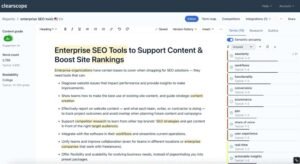
Clearscope grades content on semantic relevance rather than keyword frequency. It examines how ranking pages use related terms and concepts, then scores your draft on topical comprehensiveness, which is a materially different question from whether you hit a keyword count.
The relevance-first approach is why its grades track rankings closely. Density-based tools reward repetition. Clearscope rewards covering the concept space that ranking pages collectively cover, which is much closer to how search engines actually assess topical fit.
I recommend it for large content teams, enterprise marketing departments, and agencies handling high-value accounts. Solo creators and small businesses get better value from Surfer or Frase, and that is a pricing observation rather than a quality one.
Clearscope Key Features
- Semantic Relevance Grading: Scores content on how comprehensively it covers the concept space that ranking pages share, using language analysis rather than keyword counting.
- Google Docs Sidebar: Delivers live scoring inside Google Docs, so teams optimize while collaborating in the document rather than exporting to a separate platform.
- Content Inventory Reporting: Analyses your published library to surface optimization candidates, cannibalization conflicts, and topic coverage gaps across the whole site at once.
- Readability Assessment: Evaluates sentence complexity and reading level alongside SEO grading, so optimization does not quietly push content past what the audience will read.
- Competitor Term Analysis: Identifies concepts competitors cover that your page omits, turning gap analysis into a specific list rather than a vague instruction.
- Team Standardisation Tools: Shared reports and briefs keep distributed writers and freelancers working to identical optimization standards without repeated individual instruction.
[Image Source: Clearscope]]
Clearscope Pros
- Grading Accuracy Leads the Category: Relevance grades correlate with ranking outcomes more reliably than any competing scoring system we have tested against live pages.
- Docs Integration Drives Actual Adoption: Scoring inside the writing environment means writers use it, whereas separate platforms get skipped under deadline pressure.
- Semantic Focus Keeps Prose Natural: Optimizing for concept coverage instead of keyword counts produces content that reads properly while still scoring well.
- Inventory Reports Surface Quick Wins: Existing pages sitting just below the fold often need modest additions, and the inventory pinpoints exactly which ones.
- Standardisation Simplifies Team Onboarding: Shared briefs and consistent grading mean new writers hit acceptable optimization quality without extended individual coaching.
Clearscope Cons
- Credit Caps Force Constant Rationing: Monthly optimization limits mean choosing which pages deserve the tool, which undercuts consistency across a full content programme.
- Grade System Takes Time To Read: Understanding grade distributions and term recommendations properly requires learning, so early users apply the guidance clumsily.
- Content Grading Cannot Fix Everything Else: High grades do not overcome weak authority, technical problems, or poor user signals, so ranking still depends on factors outside the tool.
Clearscope Pricing
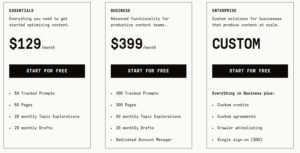
- Essentials: from $189/month
- Business: from $399/month
- Enterprise: Custom pricing
Clearscope Reviews
- G2: 4.9 out of 5 stars (90+ reviews)
- Capterra: 4.9 out of 5 stars (55+ reviews)
Reviewers rate accuracy and Docs integration at the top of the category and name pricing as the single consistent objection. The pattern is that teams with budget consider it the best available, and teams without it look elsewhere.
8. Writesonic– Best for Budget AI Writing

Best For: Small businesses and solo creators who need AI drafting capability without committing to premium platform pricing, and who accept more editing in exchange.
How I Use It: I use Writesonic for bulk work — batch meta descriptions, product description sets, and first-pass blog drafts on accounts where budget is genuinely tight.
Quick Overview
Writesonic covers most content formats at a materially lower price than premium AI platforms. Output quality sits below the category leaders, but the gap is smaller than the price gap, which is what makes it a defensible choice rather than a compromise.
Bulk generation is its most useful feature and the one that gets overlooked. Feeding a spreadsheet of products and receiving matched descriptions or meta tags back handles a task that is genuinely painful manually and does not require premium prose quality.
I recommend it for freelancers, small business owners, and startups with constrained marketing budgets. If you publish ten to twenty pieces monthly and need something above free tools without premium cost, this occupies that space.
Writesonic Key Features
- Article Generation: Produces full-length blog drafts from a keyword or topic using automated research and outline creation, delivering long-form structure with minimal input required.
- Extensive Template Library: Covers landing pages, search ads, social ads, product descriptions, and email formats, addressing most routine marketing content needs without custom prompting.
- Long-Form Editor: Supports inline AI commands for generating, expanding, and rewriting sections while holding document context, comparable in concept to premium long-form editors.
- Live Search Integration: Connects to current web results so generated content can reference recent developments rather than being capped at a training cutoff date.
- Bulk Generation: Processes spreadsheet uploads to produce hundreds of variations simultaneously, which is genuinely valuable for large product catalogues and meta tag batches.
- Image Generation: Built-in visual creation alongside text output, removing a separate subscription when written content needs accompanying imagery.

[Image Source: Scalenut]
Writesonic Pros
- Article Generator Produces Working Structure: Automated drafts arrive with headings and logical sections, saving hours of structural work even where prose needs rewriting.
- Live Search Keeps Content Current: Real-time result integration makes it usable for time-sensitive topics where a fixed training cutoff would produce stale output.
- Bulk Mode Handles Painful Volume: Spreadsheet processing for hundreds of product descriptions or meta tags solves a task that is genuinely miserable manually.
- Interface Requires No Training: Template selection and guided inputs let new users generate immediately without documentation or prompt engineering knowledge.
- Price Undercuts Premium Substantially: Feature coverage approaching premium platforms at roughly half the entry cost makes it viable for constrained budgets.
Writesonic Cons
- Output Quality Sits Below Leaders: Prose reads more generically and contains more factual errors, so editing time consumes part of the price advantage.
- Voice Consistency Stays Weak: Tone settings shift outputs somewhat but do not hold a distinct brand voice, so multi-piece consistency requires manual work.
- Templates Overlap Heavily: Many templates differ only marginally, and forcing content into a near-fitting preset produces awkward structural results.

Writesonic Pricing
- Free tier available
- Lite: from $49/month
- Standard: from $99/month
- Professional: from $249/month
- Enterprise: Custom pricing
Writesonic Reviews
- G2: 4.7 out of 5 stars (1,900+ reviews)
- Trustpilot: 4.6 out of 5 stars (1,800+ reviews)
Reviewers value affordability and feature breadth while consistently noting output quality trails premium tools. Most position it as a deliberate budget trade-off, accepting more editing for lower spend.
9. Wordtune – Best for AI Rewriting and Paraphrasing

Best For: Writers with completed drafts who need specific sentences unstuck, tone adjusted, or phrasing improved without generating new content from scratch.
How I Use It: I reach for Wordtune when a sentence is clearly wrong, but the fix will not come. It offers several concrete rewrites, and one of them usually resolves what ten minutes of staring did not.
Quick Overview
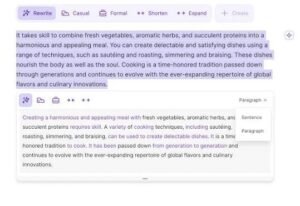
Wordtune focuses exclusively on improving text you already wrote rather than generating new text. Select a sentence, and it returns several alternative phrasings — shorter, longer, more formal, more casual — so you choose rather than describe what you want.
Specificity is what makes it useful. Generic editing tools tell you a sentence is unclear. Wordtune shows you five ways to write it differently, which is the difference between a diagnosis and a treatment.
I recommend it for editors, content refiners, and writers who know their point but struggle to land it cleanly. If your difficulty is starting from an empty page, a drafting tool serves you better.
Wordtune Key Features
- Multiple Rewrite Options: Returns several alternative phrasings per selected sentence, showing casual, formal, condensed, and expanded versions so you pick by comparison.
- Tone Shifting: Converts passages between formal and casual registers instantly, useful when repurposing existing content for a different audience or channel.
- Expand and Shorten Controls: Lengthens thin sentences with relevant detail or condenses wordy passages while holding core meaning, helping meet length targets without padding.
- Spice Suggestions: Recommends specific strengthening additions like an example, a counterargument, a statistic, or an analogy at the point where the argument needs support.
- Summarisation: Condenses long passages or documents into key points, useful for reviewing source material before writing about it.
- Browser and Application Extensions: Operates inside Google Docs, Gmail, LinkedIn, WordPress, and most web platforms, so rewriting happens where the draft lives.
[Image Source: Wordtune]
Wordtune Pros
- Resolves Sentence-Level Blockage Fast: Several concrete alternatives break the specific stall where you know the meaning but cannot find the phrasing.
- Tone Conversion Saves Repurposing Work: Shifting a formal piece to casual register across a document beats rewriting every sentence by hand.
- Expand Adds Substance, Not Padding: Lengthened sentences gain relevant context rather than filler, which is unusual among expansion features generally.
- Works Inside Existing Tools: Extension coverage across Docs, Gmail, WordPress, and LinkedIn means no platform switching during an editing pass.
- Free Tier Permits Daily Use: A daily rewrite allowance provides genuine ongoing utility for light users rather than functioning as a locked demo.
Wordtune Cons
- Cannot Generate Original Content: Strong at improving existing text, weak at producing anything new, so it complements rather than replaces a drafting tool.
- Rewrites Sometimes Shift Meaning: Suggested alternatives occasionally alter the intended point or break brand tone, so every option needs reading before acceptance.
- Covers Sentences, Not Structure: Sentence-level improvement only, leaving grammar, argument flow, and document architecture to other tools or manual editing.

Wordtune Pricing
- Free tier with daily rewrite limit
- Advanced: from $13.99/month
- Unlimited: from $19.99/month
- Business: Custom pricing
Wordtune Reviews
- G2: 4.6 out of 5 stars (190+ reviews)
- Capterra: 4.4 out of 5 stars (80+ reviews)
Reviewers rate rewriting accuracy and ease of use well while questioning the price against the narrow scope. Most use it specifically for editing existing drafts rather than as a primary writing tool.
10. QuillBot – Best for Paraphrasing and Summarizing

Best For: Students, researchers, and writers working with source material who need to restate findings in their own words or condense long documents.
How I Use It: I use QuillBot to summarise industry reports and long research documents before writing about them. Condensing forty pages into working notes is a real time-saver on research-heavy pieces.
Quick Overview
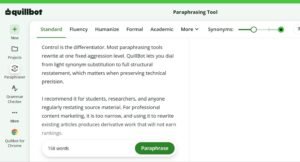
QuillBot began as an academic paraphrasing tool and remains strongest there. It offers multiple rewriting modes plus a synonym slider that controls how aggressively it changes wording, giving you fine control over the rewrite intensity.
Control is the differentiator. Most paraphrasing tools rewrite at one fixed aggression level. QuillBot lets you dial from light synonym substitution to full structural restatement, which matters when preserving technical precision.
I recommend it for students, researchers, and anyone regularly restating source material. For professional content marketing, it is too narrow, and using it to rewrite existing articles produces derivative work that will not earn rankings.
QuillBot Key Features
- Multiple Paraphrasing Modes: Offers Standard, Fluency, Formal, Academic, Simple, Creative, Expand, and Shorten modes, each rewriting at a different intensity and register.
- Synonym Control Slider: Adjusts how many words get substituted versus retained, letting you balance originality against precise meaning preservation in technical text.
- Summariser: Condenses long articles and documents into key points or a short paragraph, useful for reviewing multiple sources quickly during research.
- Grammar Checking: Corrects grammar and spelling alongside paraphrasing, though coverage is narrower than dedicated grammar platforms.
- Citation Generator: Produces formatted citations in APA, MLA, Chicago, and other styles, valuable for academic writing and properly attributed research.
- Plagiarism Checking: Scans text against web sources on paid tiers to confirm sufficient originality, with a smaller source database than specialist tools.
QuillBot Pros
- Paraphrasing Restructures Genuinely: Output changes sentence architecture rather than swapping words, producing meaningfully different text that still carries the original meaning.
- Summariser Accelerates Research: Long reports condense into reviewable notes quickly, which makes covering many sources feasible on a deadline.
- Mode Range Fits Varied Needs: Academic, Simple, Formal, and Creative modes let one tool handle technical restatement and casual rewriting alike.
- Pricing Stays Genuinely Accessible: Paid tiers sit well below most writing tools, which suits students and occasional users who cannot justify platform costs.
- Citation Generator Removes Tedium: Automatic formatted citations eliminate a slow, error-prone task in any source-based or academic writing workflow.
QuillBot Cons
- Output Often Reads Unnaturally: Paraphrased text is grammatically correct but stilted, needing a human editing pass before it reads smoothly.
- Scope Excludes Content Creation: Paraphrasing and summarising only, with no drafting, SEO, or optimization capability for marketing content production.
- Plagiarism Database Runs Smaller: Narrower source coverage than specialist checkers means matches get missed, so it cannot serve as a sole originality check.
- Wrong Tool For Ranking Content: Rewriting existing articles produces derivative content that adds nothing new, which neither ranks nor holds readers.

QuillBot Pricing
- Free tier with word limits
- Premium: from $8.33/month billed annually
- Team: Custom pricing
QuillBot Reviews
- G2: 4.4 out of 5 stars (110+ reviews)
- Capterra: 4.5 out of 5 stars (150+ reviews)
Reviewers rate paraphrasing accuracy and affordability well while noting output needs smoothing. Academic users report the strongest value; marketing users describe limited applicability beyond research support.
11. Rytr – Best for Affordable AI Generation

Best For: Budget-constrained creators who need basic AI drafting for blogs, social posts, and marketing copy at the lowest viable price point.
How I Use It: I have tested Rytr for accounts where budget is the binding constraint. It is the cheapest AI writer I would put in front of a paying client, with the honest caveat that editing time goes up.
Quick Overview
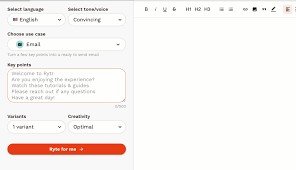
Rytr competes almost entirely on price. It offers a template library, wide language support, tone options, and a plagiarism checker at a cost that sits well below every other AI platform in this list.
The trade-off is explicit and worth stating plainly. You save money on subscription and spend it back in editing hours. Whether that is a good deal depends entirely on what your time is worth, and for someone starting out, it frequently is.
I recommend it for solopreneurs, local businesses, and anyone beginning content marketing with minimal budget. It is a real step above free general-purpose chatbots. It is not a step up to premium output quality.
Rytr Key Features
- Template Library: Covers blog sections, product descriptions, social posts, emails, and ads across the routine formats a small business actually produces.
- Wide Language Support: Generates across many major languages, useful for basic multilingual content without commissioning separate translation work.
- Tone Selection: Offers a broad set of tone options from formal through enthusiastic, changing output register without manual rewriting after generation.
- Included Plagiarism Checking: Scans generated text against web sources, bundled rather than sold separately as most competitors do.
- Meta Description Generation: Produces optimized meta descriptions within character limits including target terms, handy for bulk SEO work on larger sites.
- Team Features: Higher tiers include user management and shared access, though collaboration depth trails dedicated team platforms considerably.
[Image Source: Rytr]
Rytr Pros
- Covers Core Small-Business Formats: Blog, product, email, and social templates address what a small operation actually publishes without paying for unused capability.
- Plagiarism Checking Comes Bundled: Originality scanning at every tier gives creators confidence against accidental duplication without an additional subscription.
- Tone Options Shift Output Noticeably: Register changes are visible in the generated text, which covers basic tone matching for straightforward brand requirements.
- Onboarding Takes Minutes: A simple interface and guided templates produce output immediately, which suits users with no AI tool experience whatsoever.
- Price Sits Lowest In Category: Entry cost undercuts every comparable platform, making AI assistance viable at budgets that exclude everything else.
Rytr Cons
- Output Quality Trails All Competitors: Text reads generically, repeats structures, and carries factual unreliability, so editing consumes much of the cost savings.
- Voice Training Does Not Exist: No brand voice engine beyond tone presets, which produces inconsistent style across pieces and blocks multi-brand use entirely.
- Templates Stay Rigid and Basic: Limited variety and inflexible structures make output awkward whenever a content need sits outside a preset format.

Rytr Pricing
- Free tier with monthly character limit
- Unlimited: from $9/month
- Premium: from $29/month
Rytr Reviews
- G2: 4.7 out of 5 stars (800+ reviews)
- Capterra: 4.5 out of 5 stars (25+ reviews)
Reviewers value affordability while consistently reporting that output requires heavy editing. Most describe using it for ideas and first drafts rather than expecting publishable text, accepting the quality gap for the cost savings.
12. Scalenut – Best for All-in-One SEO Content

Best For: Small marketing teams and agencies who want keyword research, briefing, drafting, and optimization in one subscription rather than three or four.
How I Use It: I use Scalenut on accounts where separate research, optimization, and AI subscriptions cannot be justified. It handles all three adequately, which for smaller accounts beats excellent-at-one plus nothing.
Quick Overview
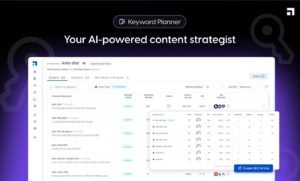
Scalenut consolidates keyword research, topic clustering, brief creation, AI drafting, and optimization scoring into a single platform. The pitch is replacing several specialised subscriptions with one, and for smaller operations, that pitch holds up.
Consolidation is genuinely the feature. Every individual component sits below the category specialist, but the combined cost sits well below three specialist subscriptions, and workflow friction drops because everything happens in one place.
I recommend it for small agencies, in-house teams of two to five, and businesses publishing ten to thirty SEO articles monthly. At enterprise scale or where any single function is business-critical, specialists still win clearly.
Scalenut Key Features
- Keyword Research and Clustering: Discovers related queries and groups them by intent, showing which terms belong in one piece and which need separate articles.
- AI Article Generation: Produces complete long-form drafts from a keyword using SERP analysis and automated outlining, with optimization considerations built into generation.
- Content Brief Creation: Builds detailed outlines with suggested headings, questions, and terms from competitor analysis, giving writers direction before drafting.
- Optimization Scoring: Grades drafts against ranking pages in real time on term usage, structure, and readability, comparable in concept to dedicated optimizers.
- Topic Cluster Planning: Identifies pillar opportunities and supporting article sets, structuring site architecture around topical authority rather than isolated keyword targeting.
- Cruise Mode: Runs an automated pipeline from keyword to complete draft with minimal intervention, useful for volume where output then gets edited.
[Image source: Scalenut]
Scalenut Pros
- Replaces Several Subscriptions: One platform covering research, briefing, drafting, and optimization removes multiple monthly costs that individually strain small budgets.
- Clustering Stops Cannibalization: Intent grouping shows where separate articles would compete with each other, preventing a common and expensive content planning mistake.
- Briefs Cut Research Overhead: Competitor-derived outlines give writers clear direction quickly, removing hours of manual analysis from every commissioned piece.
- Single Interface Improves Throughput: Research, drafting, and optimization in one place eliminates platform switching, which measurably speeds the whole production cycle.
- Cluster Planning Builds Real Structure: Pillar and supporting content mapping produces deliberate site architecture instead of an accumulating pile of unconnected posts.
Scalenut Cons
- Every Component Trails Its Specialist: Research, generation, and optimization each sit below the dedicated leader, so no single function is best-in-class.
- Automated Drafts Need Substantial Rewriting: Cruise Mode delivers complete articles that read generically and require heavy editing before they are publishable.
- Learning Spans Multiple Systems: Clustering, briefing, generation, and scoring each carry their own logic, so most users operate a fraction of the platform.

Scalenut Pricing
- Free trial available
- Essential: from $39/month
- Growth: from $79/month
- Pro: from $149/month
Scalenut Reviews
- G2: 4.7 out of 5 stars (300+ reviews)
- Capterra: 4.8 out of 5 stars (390+ reviews)
Reviewers value the consolidated workflow while consistently noting that individual features trail specialists. The recurring recommendation is for small teams wanting adequate coverage across functions rather than excellence in one.
13. Writer – Best for Enterprise Brand Governance

Best For: Enterprise marketing teams, regulated industries, and organisations where dozens of writers must produce content that obeys a documented style guide without exception.
How I Use It: I use Writer on accounts where brand and compliance rules are non-negotiable, and multiple writers contribute. It enforces the guideline rather than suggesting it, which is the difference that matters at scale.
Quick Overview
Writer is an enterprise writing platform built around governance rather than generation. You encode your style guide, approved terminology, banned phrasing, and compliance requirements as rules, and the platform enforces them inside every writer’s editor in real time.
That inversion is the whole point, and no other tool in this list does it. Every other platform suggests improvements a writer may ignore. Writer applies organisational rules, flags violations as violations, and produces a consistency that circulated documents never achieve.
I recommend it for enterprise content teams, regulated sectors like finance and healthcare, and any organisation where twenty or more people write under one brand. Small teams and solo writers will find it heavy and priced beyond their needs.
Writer Key Features
- Style Rule Engine: Encodes your documented style guide as enforced rules covering terminology, capitalisation, formatting, and banned phrasing, applied live in every writer’s editor.
- Terminology Management: Maintains approved product names, spellings, and industry terms with automatic flagging when a writer uses an unapproved variant anywhere.
- Custom AI Trained On Your Content: Generates drafts from your own approved material and knowledge sources, so output starts inside brand and compliance boundaries.
- Compliance And Claims Checking: Flags unsupported claims, prohibited language, and required disclosures, which matters enormously in regulated and legally reviewed content.
- Integration Coverage: Operates inside Google Docs, Word, browsers, and content management systems, plus an API for embedding checks into custom workflows.
- Team Analytics: Reports which rules get violated most often and by which teams, turning style enforcement into measurable training rather than repeated correction.
Writer Pros
- Enforces Rules Instead of Suggesting: Encoded guidelines get applied rather than recommended, producing consistency that circulated style documents have never once delivered.
- Terminology Control Prevents Drift: Approved-term enforcement stops product names and industry vocabulary fragmenting across writers, regions, and content types over time.
- Compliance Checking Reduces Legal Review: Automatic flagging of unsupported claims and required disclosures catches problems before content reaches legal, shortening approval cycles.
- Custom Model Stays Inside Brand: AI trained on approved material generates within boundaries, so drafts need editing for quality rather than for brand violations.
- Analytics Turn Style Into Training: Violation reporting shows where writers need coaching, replacing endless individual corrections with targeted skills development.
Writer Cons
- Enterprise Pricing Excludes Smaller Teams: Custom quoting aimed at large organisations puts it out of reach for small agencies and individual practitioners entirely.
- Rule Configuration Demands Real Investment: Encoding a style guide properly takes significant upfront work, and a partially configured system delivers little value.
- Generation Quality Trails Dedicated Writers: AI drafting is competent but sits below platforms focused solely on output quality, so it is governance-first by design.
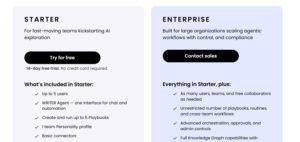
Writer Pricing
- Free trial available
- Team and Enterprise: Custom pricing
Writer Reviews
- G2: 4.5 out of 5 stars (1,300+ reviews)
- Capterra: 4.5 out of 5 stars (30+ reviews)
Reviewers rate governance capability and integration breadth highly while naming setup effort and enterprise pricing as barriers. The consistent theme is that large distributed teams find it indispensable and small teams find it excessive.
14. Originality.ai – Best for AI Detection and Plagiarism Scanning

Best For: Agencies, publishers, and content managers who commission writing and need to confirm what arrives is original and human-written before it publishes.
How I Use It: I run every commissioned draft through Originality.ai before it reaches a client. When you deliver under someone else’s brand, unverified AI text or accidental duplication is a reputational problem you cannot explain away afterwards.
Quick Overview
Originality.ai combines AI detection with plagiarism scanning in one pass, built specifically for people who commission content rather than people who write it. It returns a probability score for machine generation alongside a duplication report.
Its position in a stack is what makes it necessary. Nine of the tools above generate or assist with text. None of them verify the result. If your workflow ends at optimization scoring, nothing in it confirms the content is original or that a freelancer wrote it themselves.
I recommend it for agencies, publishers, editorial teams, and anyone paying for content they did not write. Solo writers producing their own work will not need it, though the plagiarism scanning still has value on research-heavy pieces.
Originality.ai Key Features
- AI Content Detection: Returns a probability score indicating machine generation across major model families, with sentence-level highlighting showing which passages triggered the assessment.
- Plagiarism Scanning: Checks text against a broad web index and reports matched sources with the specific overlapping passages identified for review.
- Combined Single-Scan Reporting: Runs AI detection and plagiarism checking together and returns one report, so verification is one step rather than two separate tools.
- Team Scan History: Logs every scan by user and document, creating an audit record of what was checked, when, and what the result was.
- Readability And Fact-Checking Aids: Adds readability grading and claim-flagging alongside detection, consolidating several pre-publication checks into the same pass.
- Chrome Extension And API: Scans content directly in Google Docs and web pages, with API access for wiring verification into an automated editorial pipeline.
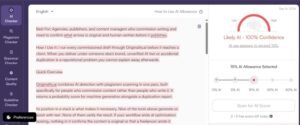
Originality.ai Pros
- Fills the Verification Gap Entirely: AI-heavy stacks generate constantly and verify never, and this closes that loop before content reaches a client.
- Combined Scanning Saves A Step: One report covering both AI detection and plagiarism removes the friction that makes teams skip verification under deadline.
- Scan History Creates Accountability: Logged results per writer and document produce an audit trail that resolves disputes about commissioned work factually.
- Sentence Highlighting Enables Targeted Fixes: Flagged passages get identified specifically, so an editor rewrites the problem sections rather than the whole piece.
- Pay-As-You-Go Suits Variable Volume: Credit purchasing without a subscription fits agencies whose commissioning volume swings month to month considerably.
Originality.ai Cons
- Detection Produces False Positives: Heavily edited human writing sometimes scores as machine-generated, so scores need human judgment rather than automatic acceptance.
- Scores Invite Misuse As Verdicts: Treating a probability as proof creates unfair accusations against writers, and the number requires interpretation, not enforcement.
- No Writing Assistance Whatsoever: Purely a verification tool with no drafting, editing, or optimization capability, so it adds to a stack rather than consolidating one.

Originality.ai Pricing
- Pay-as-you-go credits: from $30 one-time
- Pro subscription: from $14.95/month
- Enterprise: Custom pricing
Originality.ai Reviews
- G2: 4.6 out of 5 stars (100+ reviews)
- Capterra: 4.7 out of 5 stars (40+ reviews)
Reviewers rate detection accuracy and the combined report well while flagging false positives on heavily edited human text. The consistent guidance is to treat scores as a signal for editorial review rather than a definitive judgment.
15. ProWritingAid – Best for Deep Style and Structure Editing

Best For: Writers producing long-form content who need structural analysis of pacing, sentence variety, and repetition rather than sentence-level grammar correction.
How I Use It: I run ProWritingAid on pieces above 2,000 words. Its structural reports catch the problems that only appear at length — repeated sentence openings, monotonous rhythm, an overused phrase appearing eleven times.
Quick Overview
ProWritingAid analyses writing across more than twenty distinct reports covering grammar, style, pacing, sentence variety, repetition, cliché use, transitions, and readability. Its focus is document-level patterns rather than individual sentence errors.
The scope difference matters in long-form work. Grammar checkers examine sentences in isolation and readability tools measure complexity. Neither tells you that your last eight paragraphs all open the same way, and that pattern is what makes a 3,000-word article tiring to read.
I recommend it for long-form content writers, editors, and anyone producing pieces above 2,000 words regularly. For short marketing copy, the depth is unnecessary, and a grammar checker covers what actually needs covering.
ProWritingAid Key Features
- Twenty-Plus Analysis Reports: Separate reports for grammar, style, pacing, repetition, sentence variety, cliché use, transitions, sticky sentences, and readability across the whole document.
- Sentence Variety Analysis: Charts sentence lengths and opening structures across the piece, exposing monotonous rhythm and repeated openings that individual sentence checks never catch.
- Pacing Report: Identifies passages that slow the reader down, showing where dense exposition needs breaking up before a reader abandons the piece.
- Repetition Detection: Surfaces overused words and phrases document-wide with counts and locations, catching the crutch phrase you used eleven times unknowingly.
- Style Improvement Suggestions: Flags passive voice, vague wording, hidden verbs, and over-reliance on adverbs, with explanations connecting each flag to its readability impact.
- Integration Coverage: Operates inside Google Docs, Word, Scrivener, browsers, and desktop applications, so long-form analysis happens where long-form drafting happens.
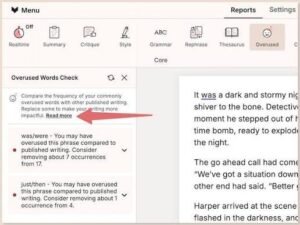
[Image source:ProWritingAid]
ProWritingAid Pros
- Structural Reports Catch Length Problems: Repeated openings, monotonous rhythm, and pacing failures only surface at document scale, and nothing else in a typical stack reports them.
- Repetition Detection Genuinely Surprises: Document-wide counts reveal crutch phrases writers use unconsciously, which is a fast and permanent quality improvement.
- Report Depth Teaches Writing Craft: Explanations connecting each flag to reader impact build durable skill rather than producing dependence on the checker.
- Long-Form Integrations Fit Real Workflows: Support for Scrivener and Word alongside Docs suits writers working on manuscripts and extended pieces properly.
- Pricing Undercuts Comparable Depth: Analysis breadth at this cost is unusual, and the annual tier sits below most single-purpose grammar subscriptions.
ProWritingAid Cons
- Report Volume Overwhelms New Users: Twenty-plus reports with no obvious starting point means beginners either ignore most of it or drown in flags.
- Analysis Runs Slower On Long Documents: Full-document reporting on a lengthy piece takes noticeable time, which interrupts flow if run mid-draft rather than after.
- Depth Is Wasted On Short Copy: Structural analysis of a 300-word ad returns almost nothing useful, making it the wrong tool for short-form marketing work.
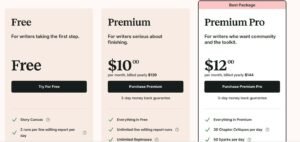
ProWritingAid Pricing
- Free tier with word limit
- Premium: from $10/month billed annually
- Premium Pro: from $12/month billed annually
ProWritingAid Reviews
- G2: 4.5 out of 5 stars (100+ reviews)
- Capterra: 4.6 out of 5 stars (350+ reviews)
Reviewers rate report depth and long-form value highly while noting the interface overwhelms initially. Fiction writers and long-form content producers report the strongest results; short-copy marketers report limited applicability.
What’s the Best Content Writing Tool for You?
The right answer depends on which stage of your process is actually broken. Here is how these tools sort by situation.
Best for Beginners
Grammarly is where I send anyone starting out. It works in whatever you already type into; the explanations teach the underlying rules rather than just fixing errors, and the free tier covers real needs. Nothing else delivers value this fast with this little setup.
Best Budget Choice
Hemingway Editor stays free and still does its whole job. No subscription, no upsell, no credit limits. I keep using it alongside premium tools because a fast readability pass has value regardless of what else is in the stack.
Best AI-Powered Workflow
Jasper is the drafting tool I trust on client accounts. The voice engine holds across writers and formats, which is the specific thing that breaks first when AI output scales. The price is real, and above roughly fifteen pieces monthly it stops being a question.
Best All-Rounder
Scalenut covers research, briefing, drafting, and optimization in one subscription. No component leads its category, but the combined coverage at that price beats owning one excellent tool and going without the other three, which is the actual choice most small teams face.
Where AI Writing Tools Still Fail
Nine of the tools above generate text, and every one of them will produce a confident falsehood if you let it. This is the failure mode that costs the most and gets discussed the least in tool comparisons.
The specific risks are consistent across platforms. Invented statistics attributed to real organisations. Fabricated study citations that look entirely plausible. Confidently stated dates and figures that are simply wrong. Product claims the AI assembled from patterns rather than from fact.
Search engine guidance on this is clearer than most people assume. Google’s own documentation states that its focus is on the quality of content rather than how it was produced, and that using automation to generate content primarily to manipulate rankings violates its spam policies. The distinction is usefulness and accuracy, not authorship.
That makes verification a workflow requirement rather than an optional quality step. Here is the check I run on every AI-assisted draft before it ships.
| Check | What to verify | Why it matters |
| Statistics | Every number traced to a named primary source you opened yourself | AI invents figures and attributes them to real organisations |
| Citations | Every study, report, and author confirmed to exist | Fabricated citations look completely legitimate |
| Dates and versions | Current pricing, features, and version numbers checked at source | Training data ages and pricing changes constantly |
| Product claims | Every capability confirmed on the vendor’s own documentation | AI describes features from pattern, not from fact |
| Originality | Full draft scanned before delivery | Generated text can closely mirror an existing source |
| Voice | Read aloud in full | Machine cadence is audible even when the text is technically correct |
The pattern in that table is that AI compresses drafting time and does nothing for verification time. Teams that budget for the first and not the second publish faster and then spend the savings on corrections.
The Real Cost of a Content Writing Stack in 2026
Monthly starting prices make individual tools look affordable and tell you almost nothing about what a working stack costs. The numbers below annualise realistic combinations at three team sizes.
| Stack tier | Typical tools | Approximate monthly | Approximate annual |
| Solo starter | Grammarly Pro, Hemingway free, Rytr Unlimited | $21 | $250 |
| Solo serious | Grammarly Pro, ProWritingAid Premium, Frase Solo, Originality credits | $80 | $960 |
| Small team | Jasper Creator, Surfer Essential, Grammarly Pro, Originality Pro | $195 | $2,340 |
| Agency | Jasper Pro, Clearscope Essentials, Surfer Scale, Grammarly Pro, Originality Pro | $520 | $6,240 |
| Consolidated small team | Scalenut Growth, Grammarly Pro, Originality Pro | $106 | $1,270 |
Three things stand out in that table. Annual figures reveal decisions monthly pricing hides — an agency stack crosses six thousand dollars a year, which is a hiring conversation rather than a software purchase.
Consolidation genuinely saves money at the small-team tier, cutting roughly a thousand dollars annually against specialist tools, and the quality cost is real but survivable at that scale. Optimization tools are the largest line item in every serious stack, which is worth knowing before you assume AI drafting is the expensive part.
Seat pricing is the trap that catches growing teams. Several of these platforms charge per user, so a stack that costs two thousand a year for three writers costs seven thousand for ten. Check per-seat terms before you build a workflow around a tool you will outgrow.
How to Build a Content Writing Stack Without Overpaying
Most overspending comes from buying tools in the wrong order. Teams purchase an AI writer first, discover output needs optimizing, buy an optimizer, then find nothing verifies the result. Working backwards from the bottleneck costs less.
Start by identifying which stage actually slows you down. If drafts arrive but do not rank, buy optimization before drafting. If drafts do not arrive at all, buy drafting. If drafts arrive and read poorly, buy editing. One purchase against the real constraint beats three against imagined ones.
Then watch for functional overlap, because this is where duplicate spend hides. Grammarly and ProWritingAid both check grammar. Surfer, Clearscope, Frase, and Scalenut all score optimization. Jasper, Copy.ai, Writesonic, Rytr, and Scalenut all generate text. Owning two tools from any one of those groups usually means paying twice.
| Team size | Buy first | Add second | Add third | Skip |
| Solo, under 5 pieces monthly | Grammarly Pro | Hemingway free | Rytr or Writesonic | Optimization platforms |
| Solo, 5–15 pieces monthly | Grammarly Pro | Frase Solo | ProWritingAid | Enterprise anything |
| Team of 2–5 | Scalenut or Frase | Grammarly Pro | Originality.ai | Duplicate AI writers |
| Team of 5–15 | Surfer | Jasper | Grammarly plus Originality | All-in-one platforms |
| Enterprise or regulated | Writer | Clearscope | Originality.ai | Budget AI tools |
One more sequencing point worth stating. Buy verification before you scale AI generation, not after. Teams that add Originality.ai only once a duplication problem has already shipped pay for the tool and the cleanup, and the cleanup is the expensive part.
Everything in that table assumes you actually use what you buy. The most common waste I see is not overpriced software; it is three subscriptions where one gets opened weekly, and two get opened at renewal.
Conclusion
Fifteen tools, four jobs. Drafting, optimizing, editing, and verifying are separate problems, and picking one tool per job against your actual bottleneck beats buying a platform that promises all four.
The tools that earned the top positions here did so because they held up across many brands at once, not because they demo well. Voice consistency, score-to-ranking correlation, and verification reliability are what survive volume, and volume is where most stacks break.
We built our own stack this way at White Label SEO Service, refining it across the content writing services and technical SEO work we deliver for agency partners under their branding. If you want that process handled rather than assembled, get in touch, and we will map a content plan to your growth targets.
Frequently Asked Questions
Do I need both an AI writer and an optimization tool?
Yes, if you write to rank. AI writers produce drafts; optimization tools tell you what ranking pages cover. Neither replaces the other reliably.
Will Google penalise content written with AI tools?
No. Google evaluates content quality rather than production method. Content built purely to manipulate rankings violates spam policies regardless of whether AI wrote it.
What is the cheapest genuinely useful stack?
Grammarly free plus Hemingway free costs nothing and handles editing properly. Add Rytr around nine dollars monthly for basic drafting capability.
Can one all-in-one platform replace three specialist tools?
For teams publishing under thirty pieces monthly, yes. Above that, specialist accuracy in optimization and voice control starts outweighing the consolidation savings.
How much editing does AI-generated content actually need?
Budget thirty to sixty minutes per thousand words on premium tools, and considerably more on budget platforms. Verification of every factual claim is separate.
Which tool should a complete beginner buy first?
Grammarly. It works inside whatever you already write in, explains each correction, and the free tier covers genuine everyday needs without commitment.